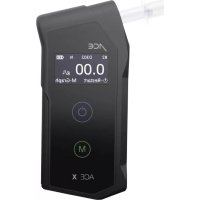
X - Breathalyzer ACE - Free user manual and instructions
Find the device manual for free X ACE in PDF.


| Product Type | Breathalyzer with Premium electrochemical sensor |
| Brand | ACE |
| Model | X |
| Dimensions (H x W x D) | 128 x 60 x 24 mm |
| Weight (with batteries) | 130 g |
| Power supply | 2 AA 1.5 V alkaline batteries (non-rechargeable) |
| Battery life | Up to 1000 tests per set of batteries |
| Sensor | Premium electrochemical sensor |
| Accuracy | ± 0.05‰ at 0.50‰ and 25°C |
| Measurement range | 0.000 ‰ to 5.000 ‰ (or equivalent in %BAC / mg/L) |
| Available units | ‰ (g/L), mg/100mL, %TA, ug/L, mg/L |
| Warm-up time | Approximately 10 seconds |
| Display | OLED 3 digits + 4 digits for %BAC, with unit |
| Memory | Up to 100 tests (number, date, time) |
| Operating temperature | -5°C to 40°C |
| Storage temperature | -5°C to 40°C |
| Recommended calibration | Every 12 months or 500 tests (whichever comes first) |
| PIN code protection | Yes (default code 0000) |
| Bluetooth (optional) | Frequency 2402-2480 MHz, max power -17.2 dBm |
| Package contents | 1 breathalyzer, 2 AA batteries, 6 mouthpieces, 1 case, 1 quick start guide, 1 instruction manual |
| Warranty | 2 years (electronics and housing), 1 year for the sensor |
Frequently Asked Questions - X ACE
User questions about X ACE
0 question about this device. Answer the ones you know or ask your own.
Ask a new question about this device
Download the instructions for your Breathalyzer in PDF format for free! Find your manual X - ACE and take your electronic device back in hand. On this page are published all the documents necessary for the use of your device. X by ACE.
USER MANUAL X ACE
Important notes on the Calibration
Each breathalyzer which you buy from ACE Instruments can also be calibrated by ACE Instruments. Of course, we also calibrate devices which were bought from other contractors, as long as these devices are identical in construction to the devices sold by ACE Instruments.
You can see the due date of the next calibration on the calibration sticker placed on your breathalyzer. If the sticker is missing, the calibration is to be done 6 months after the purchase date: e.g. purchase date: 13.05. = next calibration on the 13.11. and the next on the 13.05. of the following year.
For a calibration service you can send the device to the service address specified at www.alkomat.net.
Why is a calibration necessary?
The calibration is not mandatory, but the accuracy of the sensor installed in the breathalyzer will decrease steadily without a calibration and additionally guarantee expires, if you don't pay attention to the calibration ranges.
Which factors Influence the measurement accuracy
■ The more often the device is used the more the zero point is influenced.
■ The higher the alcohol concentration is, the more the zero point is relocated.
■ Devices which are used rarely have a decreased sensibility, too.

ACE Instruments recommends using the breathalyzer at least once (lx) a week independently of having drunken alcohol or not. To maintain the measurement accuracy, the breathalyzer should also be calibrated periodically.
Please also be aware of the several factors of influence on the measuring result
■ Alcohol amount
■ Period of the consumption of alcohol
Gender
Age
■ Weight
Height
■ Drinking habits
■ Health state
■ Vitality of the liver
■ Size of the lung
■ Admission of food during the consumption of alcohol
■ Influence of medicine
Important notes on test execution and self-assessment
After the last sip of alcohol you should wait at least 15 minutes, as there may still be residual alcohol in the oral cavity, which influences the measurement result. Also smoking should be avoided before a test, as cigarette smoke harms the sensor.
For each test you should use a new mouthpiece – not only for hygienic reasons, but also because an already used mouthpiece can influence the next measurement result. The mouthpiece could contain residual alcohol, which would affect the new test result when the same mouthpiece is used again (this for example could show an alcoholization of a person who hasn't drunken any alcohol).
If „BLOW ERROR" appears on the display, the given breath sample was insufficient or ended too soon. Blow into the moutpiece for about 4 seconds constantly (without a break) – preferably as if you were whistling without a sound.
If the same person performs 2 tests consecutively, then wait at least 3 minutes between the two tests, as a too short waiting time may cause different measurement results. The air exhaled from the lungs is, after a test, no longer enriched with the same alcohol content as in the previous test. Therefore, an immediate second test will indicate a lower test result.
All measured values determined with this breathalyzer are always indicative and not legally binding.
Why the estimated alcoholization and the measurement result in most cases cannot match
An alcohol test is affected by a lot of different factors which also affect the test result. Beside the gender, age, body size and body weight, also the body fat percentage and the amount of body fluid have a big influence.
In addition, the general physical and mental state or the current daily constitution have to be taken into consideration. Furthermore, the meals eaten before a breath test (type of content and level of the stomach) and the intake of medication may influence the measurement.
Other influencing factors are, of course, the type of drink (percentage of alcohol content in the beverage and its carbon dioxide and sugar content), the drinking rate and the individual subject's duration of alcohol build-up or degradation in the body.
Some people quickly have a high alcohol content in the blood, with other people it takes longer until an alcoholization is detected. About 40 - 50% of the consumed alcohol is in the body within 15 minutes, after 30 minutes it is 65% and after 70 minutes the previously consumed alcohol is 100% absorbed in the body. However, it should also be noted that some people - partly due to genetic factors - quickly reduce the alcohol content in the blood, whereas others still have an increased alcohol content in the blood after a longer period of time.
Atemalkoholtester
ACE X
All information herein was written by ACE Handels- and Entwicklungs GmbH (ACE Instruments) conscientiously and under the assumption of correctness. Hence, the author cannot be held liable for use of any kind whatsoever and/or any ensuing consequences. Furthermore, the author is not liable for any costs or expenses for damage that result from any information in this document. Any information is subject to change without prior notice.
Introduction
Thank you for purchasing our Alcohol Tester ACE X breathalyzer! It measures the alcohol concentration in human breath using a premium fuel cell sensor and calculates blood alcohol content. For this alcohol tester there is an ongoing approval procedure for the certificate EN 15964:2011. With this certificate, the ACE X will meet all legal requirements placed on breath alcohol testers for multiple uses. With the EN 15964:2011 certificate, the ACE X will be approved for use as a pre-test device for police traffic checks.
The test results are very reliable and have a tolerance of +/- 0.05% (per mill = g/L) with reference to 1.00% at 25^ ambient temperature. The measurement results are displayed as a 3-digit number with 2 decimals and are interpretable 1:1 (for example the display shows the value 0.36 = 0.36 per mill). The test result is displayed with 4 digits and 3 decimals for % BAC measurements.
The premium fuel cell sensor inside this breathalyzer can be calibrated. To maintain the measurement accuracy of this device and the sensor warranty, it should be calibrated regularly. To calibrate the device, you can send the device to the service address specified at www.alkomat.net.
The device must only be used pursuant to the instructions mentioned in this manual. All measured values determined by this breathalyzer are only a guide and are not legally binding. Breath tests should be carried out using clip-on mouthpieces (one new mouthpiece should be used per test for reasons of hygiene and to avoid falsified readings).

Note to country-specific Measurement Units
Customers in the EU receive the breathalyzer with % (per mill) as default setting, in the UK the default setting is mg/L, and in the USA, it is % BAC. In the chapter „Technical data,” you will find information about the accuracy concerning the different measurement units. Please check the website of the Department of Transportation, the website of the Ministry of Transport, or automotive clubs to become informed about the current alcohol limits in your country.
Scope of Delivery
■ 1 Digital ACE X Breathalyzer with premium fuel cell sensor
■ 2 AA batteries (1.5 V, Alkaline, Duracell)
■ 6 Mouthpieces
■ 1 Hard case carrying bag
■ 1 Quick Start Guide (in German & English)
■ 1 Manual (multilingual)
Label of Individual Components
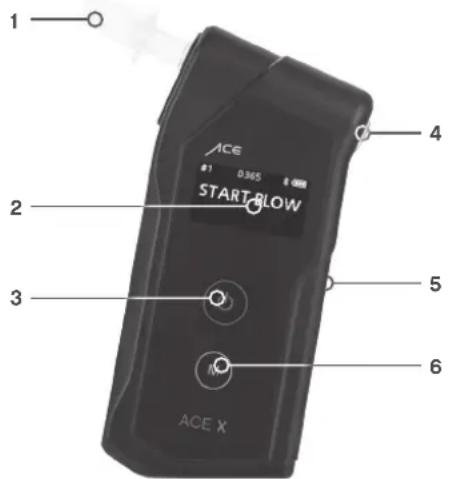
- Mouthpiece and Mouthpiece Slot
- Digital OLED Display (3 digits with unit % and mg/L and 4 digits with unit % BAC)
- Power Button
- Air Outlet (always leave this part unblocked)
- Battery Compartment Cover (on the back of the device)
- Menu Button (for different device settings)
Tips to Receive the Most Accurate Results
A) Wait at least 15 minutes after your last sip of alcohol. Do not eat, drink, or smoke during that time.
B) Do not open the casing.
C) Do not keep the breathalyzer in cold, hot, moist, or badly ventilated places.
D) Keep the breathalyzer out of the reach of children.
E) Conduct three inlet tests after long storage before conducting the actual alcohol test.
F) Do not drop the breathalyzer.
G) Change the battery if it is depleted. Diminished battery capacity leads to incorrect test results.
H) Do not conduct tests in loud (sound waves disrupt the sensor), drafty, or poorly ventilated places.
I) After a test result of 1.000 per mill (per mill = EU setting) / 0.100 % BAC (% BAC = US setting) / 0.500 mg/L (mg/L = UK setting) or higher the sensor needs rest time. In this case wait at least three minutes before starting the next test.
J) Do not conduct tests in very cold, very hot, or an unventilated, smoky ambience.
K) Store the breathalyzer in a way to avoid penetration by dust or liquids.
L) Blowing too hard may cause damage to the sensor as saliva flows into it.
Preparation for the Test
- Push the battery cover (on the back of the device) downwards (1.A) and open it. Install the 2 batteries (delivered together with the device) in the battery compartment while taking note of the battery polarity (1.B). Close the battery cover again.
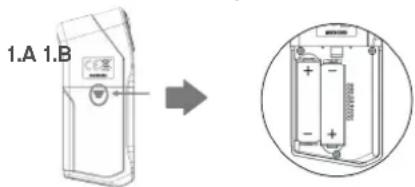
- Insert a mouthpiece into the slot on the front left side of the breathalyzer. Ensure whether it is securely fitted. It is highly recommended to use a new mouthpiece for every test for sanitary reasons.
Conducting the Measurement
-
Press the start button on the front of the breathalyzer for 2 seconds (it is the top button). The device beeps once and the display briefly shows the alarm limit, date and time set in the device; in addition, a green and a red light illuminate simultaneously above the display. "WARMING UP" then appears on the display and at the same time a line moves from left to right (the unit is warming up).
-
At the end of the warm-up phase, the unit beeps twice and „START BLOW“ appears on the display.
Note: Press the menu button quickly during the warming up process, or as soon as "START BLOW" appears, if you want to check the 10 previous test results with a bar graph, which enables you to check visually whether your test results are higher than the alarm limit that you have set in the menu.
- As soon as "START BLOW" appears on the display, start blowing gently into the previously attached mouthpiece for about 3 to 5 seconds until you hear 2 clicks and then 2 beeps tones (simply exhale slowly and without interruption, similar to whistling). While giving the breath sample you hear a continuous beep and the display shows "KEEP BLOW".
Note: If the breath sample has been interrupted or was too weak, „BLOW ERROR“ appears on the display. In this case, perform the test again by pressing the start button.
-
After hearing the 2 clicks and the 2 beep tones the breath sample is successfully finished and the instrument starts evaluating the measurement result. The red and green lights (above the display) flash alternately and "ANALYZING" appears on the display. After a few seconds, the measurement result is displayed with 3 digits (with 2 decimal places at g/L = per thousand) for 4 seconds. If the measured value is equal to or higher than the alarm limit, for example, 0.50 per mil, the red light flashes above the display for about 4 seconds and you hear a beep sound. If the measured value is lower than the alarm limit, for example, 0.50 per mil, the green light flashes above the display for about 4 seconds (without a beep sound).
-
To test again, simply press the start button briefly.
Note A: The unit switches off automatically after approx. 180 seconds. You will hear 5 beep tones and „POWER OFF* will appear on the display. For a new test simply press the start button again. You can also switch off the unit manually by pressing the start button for approx. 2 seconds, 4 beep tones can be heard. „POWER OFF* will briefly appear on the display and the unit will be switched off.
Note B: As soon as the total test number reaches 9,000, you will see a pre-warning message on the display which is shown every time when you turn on the device and additionally you will hear 1 beep tone. This pre-warning message and the beep tone will shortly pop up and be heard whenever you turn on the device. The pre-warning message is a reminder that you shall calibrate the device. If the total test number reaches 10,000 times and no calibration has been performed so far, then the device is locked, and no more tests can be performed. Contact your local distributor or the ACE Instruments Service Center (see www.alkomat.net).
Display After the Test
After the test result has been displayed for 4 seconds, „Retest“ and „M-Graph“ are also shown on the display.
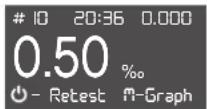
Now you have 3 possibilities:
-
Switch off the device or wait until it is switched off automatically.
-
Choose RETEST - Briefly press the power button to perform a new test.
-
Choose M-GRAPH - Briefly press the menu button to view the last 10 test results as a graph. The graph shows whether and how many of the last 10 test results were above the alarm limit set in the menu.
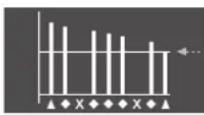
→ Alarm limit
▲ The most recent test result
◆ The test result with an approved breath sample
X The test without an approved breath sample
ACE Instruments Recommends
■ Always use a new mouthpiece for each person and test that is conducted. ACE Instruments assumes no liability for any damages that may arise when several people use the same mouthpiece for multiple tests.
■ Only use the provided individually packaged hygienic mouthpieces (more are available at www.alkomat.net). During each test the breathalyzer's internal and external parts come in contact with human secretion (saliva, blood, sweat, etc.)!
Use safety gloves when pulling out a mouthpiece used by another person! You can buy appropriate gloves at ACE Technik (www.ace-technik.de).
IMPORTANT NOTICE
■ WHEN YOU HAVE EATEN, DRUNK ALCOHOL OR, SMOKED A CIGARETTE, WAIT AT LEAST 15 MINUTES BEFORE STARTING THE MEASUREMENT. ANY TEST CONDUCTED PRIOR TO THE EXPIRATION OF THE RECOMMENDED WAITING PERIOD WILL RESULT IN INACCURATE RESULTS.
■ IF THE TEST RESULT IS BELOW 0.070‰ (PER MILL) OR 0.035 mg/L (UK setting) OR 0.007% BAC (US setting) THEN THE DEVICE SHOWS 0.00 (‰ OR mg/L OR % BAC – depending on the setting) ON THE DISPLAY. THIS HAPPENS BECAUSE AT A LOW RANGE OF ALCOHOL CONCENTRATION IT IS POSSIBLE TO MEASURE OTHER MATERIALS IN YOUR MOUTH.
This breathalyzer is a high quality and sensitive measurement device. To maintain the accuracy of the fuel cell sensor, it should regularly be used. If the device is not used for an extended period, the sensor can dry out. ACE Instruments recommends using the breathalyzer at least 2 times per month (even if you have not been drinking alcohol).
Due to changes in the product, the procedures stated can change. This can take place without prior notice or adaptation of the operating manual and is no cause for complaint, return or price reduction. The user is responsible for recognizing discrepancies between the operating manual and the actual handling of the breathalyzer and must react accordingly.
Only Use Original ACE Instruments Mouthpieces
■ Guarantees test result accuracy
■ Guarantees hygiene of you and the device
■ Guarantees full warranty of this device
ACE INSTRUMENTS ADVISES
EVEN IF YOU GET A RESULT MEANING „SAFE RANGE“, YOU SHOULD NEVER DRIVE AFTER CONSUMING ALCOHOL OR DO ANY OTHER ACTIVITIES THAT ARE SEVERELY IMPAIRED BY ALCOHOL CONSUMPTION AND MIGHT ENDANGER YOUR HEALTH AND SAFETY OR THE HEALTH AND SAFETY OF OTHERS.
Status Indicators on the Display
| #82 | D365 | |
| ↑ | ↑ | ↑ |
| Total number of all tests performed (will be reset to 0 after a calibration) | Remaining days until calibration | Remaining battery power |
Display
Indications
| NOTICE MEANING ACTION | ||
| BLOW ERROR The sampling volume or blow power is not enough to analyze the breath sample. | Press the power button to perform a new test. | |
| LOW BATTERY The testing cannot be performed because the battery is low. | Replace the integrated batteries with new batteries. | |
| CALIBRATION DUE DATE HAS PASSED | The recommended calibration is due. This display may depend on the time factor (default setting: 12 months). The setting can be changed under "Advanced Menu Settings". | Contact your local distributor or customer service center for proper recalibration service. |
| OVER NUMBER OF TEST ALLOWED | The recommended calibration is due. This display may depend on the number of tests (default setting: 500 tests). The setting can be changed under "Advanced Menu Settings". | Contact your local distributor or customer service center for proper recalibration service. |
| BREATH SAMPLE WITH EXCESSIVE SALIVA | Excessive saliva went into the sensor during the test. | Wait 20 minutes, and then try again. If this error code is displayed for a long time, contact the ACE Instruments Service Center (see www.alkomat.net) |
| OUT OF TEMP RANGE | The testing cannot be performed because the device is outside of recommended operating temperature. | Repeat the test after the device has reached a temperature within the operating range (-5°C up to 40°C). |
| NO MEMORY CAPACITY AVAILABLE | No further test can be performed because the number of tests has already reached 10,000 and no calibration has been performed so far (10,000 = maximum number of tests possible without a single calibration). | Contact your local distributor or the ACE Instruments Service Center (see www.alkomat.net). |
Basic Menu Options
How to enter the menu options: During the warm-up process, press the menu button for 2 seconds. You will see these menu options:
■ TEST RESULT ■ TEST RESULT-G ALARM LIMIT
UNIT BRIGHTNESS SOUND
■ INFORMATION ■ LANGUAGE PIN CODE
How to move within the menu options:
■ To move the cursor up, quickly press the power button.
■ To move the cursor down, quickly press the menu button.
■ To enter the selected option, press the power button for 2 seconds.
To save the selected setting, press and hold the power button and menu button simultaneously for 2 seconds
■ To return to warm up process, press the menu button for 2 seconds.
TEST RESULT
The device stores up to 100 test results, from the 101st test onwards the 1st test result is always deleted.
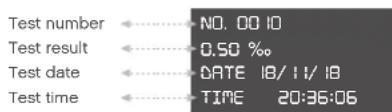
Note: The most recent test result will appear first.
■ To see the previous result, quickly press the power button.
■ To see the next result, quickly press the menu button.
■ To return to the menu list, press the menu button for 2 seconds.
TEST RESULT-G
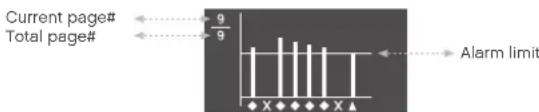
▲ The most recent test result
◆ The test result with an approved breath sample
X The test without an approved breath sample
The test results can be checked as a bar graph, which enables you to check visually whether your test results are higher than the alarm limit that you have set in the menu.
■ To see the previous page, quickly press the power button.
■ To see the next page, quickly press the menu button.
■ To return to the menu list, press the menu button for 2 seconds.
ALARM LIMIT
Settable value range:
0.10 up to 1.00‰ = per mil (OR 0.010 up to 0.100% BAC OR 0.05 up to 0.50mg/L) (Default setting: 0.50‰)
OFF
■ To raise the alarm limit, quickly press the power button.
■ To reduce the alarm limit, quickly press the menu button.
To save the setting and return to the menu list, press the power button and menu button for 2 seconds.
■ To return to the menu list without saving, press the menu button for 2 seconds.
UNIT
Settable value range: ‰ (= g/L), mg/100mL, %BAC, ug/L or mg/L (EU default setting: ‰)
■ To move the cursor up, quickly press the power button.
■ To move the cursor down, quickly press the menu button.
To save the setting and return to the menu list, press the power button and menu button for 2 seconds.
■ To return to the menu list without saving, press the menu button for 2 seconds.
BRIGHTNESS
Settable value range: HIGH, MID or LOW (Default setting: MID)
■ To move the cursor up, quickly press the power button.
■ To move the cursor down, quickly press the menu button.
■ To save the setting and return to the menu list, press the power button and menu button for 2 seconds.
■ To return to the menu list without saving, press the menu button for 2 seconds.
SOUND
Settable value range: HIGH, MID, LOW or OFF (Default setting: MID)
■ To move the cursor up, quickly press the power button.
■ To move the cursor down, quickly press the menu button.
■ To save the setting and return to the menu list, press the power button and menu button for 2 seconds.
■ To return to the menu list without saving, press the menu button for 2 seconds.
INFORMATION
The detailed information of the device can be checked in this option.
- Version of firmware
- The calibration date
- The total number of tests performed
To return to the menu list, press the menu button for 2 seconds.
LANGUAGE
Settable value range: ENGLISH or GERMAN (Default setting: GERMAN)
■ To move the cursor up, quickly press the power button.
■ To move the cursor down, quickly press the menu button.
To save the setting and return to the menu list, press the power button and menu button for 2 seconds.
■ To return to the menu list without saving, press the menu button for 2 seconds.
PIN CODE
In this menu, the user can input the PIN code to enter the advanced menu option. The default PIN code is 0000 and in the advanced menu the PIN code can be set from 0000 to 9999.
To move from a digit of the PIN code to the next digit, press the power button for 2 seconds.
■ To raise the number of PIN code, quickly press the power button.
■ To reduce the number of PIN code, quickly press the menu button.
■ To enter the advanced options menu, press the power button and menu button for 2 seconds after entering a PIN code.
■ To return to menu list, press the menu button for 2 seconds.
Advanced Menu Options
TEST LIMIT
The maximum number of measurements allowed can be changed or disabled in this menu. Settable value range: 50 up to 1000 tests (Default setting: 500 tests)
■ To raise the test limit, quickly press the power button.
■ To reduce the test limit, quickly press the menu button.
To save the setting and return to the advanced options menu list, press the power button and menu button for 2 seconds.
To return to the advanced options menu list without saving, press the menu button for 2 seconds.
SET TIME
In this menu the setting of time and date can be changed.
■ To move to the next digit of time and date, press the power button for 2 seconds.
■ To raise the number of time and date, quickly press the power button.
■ To reduce the number of time and date, quickly press the menu button.
To save the setting and return to the advanced menu list, press the power button and menu button for 2 seconds.
■ To return to the advanced options menu list without saving, press the menu button for 2 seconds.
DATE LIMIT
In this menu the date for the next calibration can be set (Please note: This should only be carried out by a trained service technician, any changes done by yourself will influence the warranty). Settable value range: 1 month up to 24 months (Default setting: 12 months)
■ To raise the date limit, quickly press the power butto
■ To reduce the date limit, quickly press the menu button.
To save the setting and return to the advanced options menu list, press the power button and menu button for 2 seconds.
To return to the advanced options menu list without saving, press the menu button for 2 seconds.
CHANGE PIN
Here you can change the PIN code, which is necessary for access to "Advanced Menu Settings". If you press the On/Off button for 2 seconds, you can switch to the next digit and the newly selected digit will be highlighted (for the selected digit, you can increase the number by briefly pressing the On/Off button and decrease it by briefly pressing the Menu button). The four-digit code can be within this number range: 0000 to 9999
■ Briefly press the start button to increase a number.
■ Briefly press the menu button to decrease a number.
To save a PIN digit, press the start button for 2 seconds to automatically move to the next PIN digit.
■ Press the start and menu buttons simultaneously for 2 seconds to save the new PIN and return to the menu.
If you only press the menu button for 2 seconds, you will return to the menu without saving the setting.
Calibration
To maintain measurement accuracy, ACE Instruments recommends that you calibrate the breathalyzer periodically. Default setting: After 12 months or 500 tests (whichever comes first). The settings can be changed (see chapter „Advanced Menu Settings“). Please observe the calibration instructions on the display!
The calibration is not mandatory, but the accuracy of the breathalyzer will decrease steadily and the warranty for the sensor expires if the calibration notice is disregarded. For a calibration service you can send the device to ACE Instruments (see www.alkomat.net).
We recommend sending It as a parcel, so that in case of loss an Inquiry or proof of delivery is possible.
Battery notices
The device associated with this operating manual contains 2 AA Duracell Alkaline batteries. These batteries are non-rechargeable. The use of a rechargeable battery is not possible with this device and can damage it. If the included batteries are depleted, they must not be thrown away into household waste. Used batteries may contain harmful substances that can cause damage to the environment or your health. Please return all depleted batteries to electrical appliance stores, who collect them for free.
Battery exchange
To replace the batteries, push the battery cover on the rear of the unit downwards and replace the discharged batteries with new ones. Be aware of the polarity when inserting the batteries (+/- pole). Close the battery compartment cover again. In the EU, the return of used batteries is mandatory by law. All depleted batteries and rechargeable batteries will be recycled. This way valuable resources like iron, zinc and nickel can be retrieved and reused. Battery recycling is the easiest lesson in environmental protection – so please support it!
The shown garbage bins mean that batteries or rechargeable batteries must not be thrown into the household waste. The signs below the garbage bins are acronyms for the chemical substances inside the battery:

Hg

Cd

Pb
■ Hg: Battery contains Mercury
■ Cd: Battery contains Cadmium
■ Pb: Battery contains Lead
Technical data*
| Sensor Premium fuel cell sensor | |
| Accuracy +/- 0.05‰ (per mill) with reference to 1.00‰ at 25°C(‰ = default setting)OR +/- 0.005% BAC (Blood Alcohol Concentration)with reference to 0.100% BAC at 25°COR +/- 0.025mg/L with reference to 0.50mg/L at 25°C | |
| Detection Range 0.00 up to 5.00‰ (‰ = default setting)OR 0.000 up to 0.500% BAC (USA)OR 0.00 up to 2.50mg/L (UK) | |
| Warm-up Time Within 10 seconds at 0.5‰. This may vary depending on the valueof per mill / BAC which was measured | |
| Test memory Stores the results of up to 100 tests(with test number, date and time) | |
| Dimension 128 x 60 x 24mm (L x W x H) | |
| Weight 130g (batteries included) | |
| Power Supply 2 pcs. of .5V AA Alkaline batteries (power for up to 1,000 tests) | |
| Working Temperature | -5°C to 40°C |
| Storage Temperature | -5°C to 40°C |
| Connectivity(only with optional BT) | Frequency range: 2402 to 2480 MHzMaximum transmission power: 1,6 dBm |
| Calibration Default setting: After 12 months or 500 tests (whichever comesfirst). The settings can be changed (see chapter “Advanced Menu Settings”). Please observe the calibration instructions on thedisplay. You can send the instrument for calibration to the serviceaddress given at www.alkomat.net. | |
*The technical data are subject to change without prior notice for functional improvements.
Warranty and liability
ACE Handels- & Entwicklungs GmbH (ACE Instruments) provides a warranty of two years after purchase for material and processing errors of the product (see attached warranty and liability declaration) in all versions and designations; and a warranty of one year for the sensor. This warranty includes the electronics as well as the casing and sensor without sampling components. Components that inevitably degrade over time (such as fuses) are not part of this warranty. The warranty is valid from the date of delivery or from the date of first activation (always the shorter period), if not stated otherwise in the accompanying ACE Instruments product literature.
Limitation of warranty and liability
1. PRODUCT DESCRIPTION
ACE Instruments rejects any further expressly stated or implied warranty, including the marketability and suitability for a determined purpose. This warranty especially excludes calibration. After changing the sensor, calibration is absolutely necessary. If an exchange of the sensor or a calibration is required for a product, the user may receive a cost estimate. Should the user reject the estimate, ACE Instruments will send the product back unrepaired/not calibrated and the product will be labelled accordingly. Should the product not fulfill the warranty, the claim of the buyer and the obligations of ACE Instruments are limited exclusively to the discretion of ACE Instruments for exchange, repair of the affected goods or reimbursement of the purchasing price for the faulty merchandise.
2. APPLICATION RESTRICTION
ACE Instruments is by no means liable for additional, incidental or consequential damage such as, among others, lost profit and downtime that result from selling, producing or using products that are part of this application restriction. This is independent of any claims emanating from, for instance, contracts, negligence or other culpable actions.
The product, which is accompanied by this warranty and liability declaration (no matter the version or designation), in particular cannot be used in a legally binding manner to determine one's capability to operate vehicles or execute action that could lead to personal injury or injury to others under the Influence of alcohol.
The thorough check for damage of all products upon receipt, calibration suitable for the given use by the buyer and the proper use, maintenance, and service according to the instructions of the accompanying ACE Instruments product literature are mandatory prerequisites of this warranty. Maintenance and service work performed by non-qualified persons as well as the use of non-approved consumables or spare parts results in the voiding of this warranty. As for all technically challenging products, it is a fundamental prerequisite and mandatory for ACE Instruments warranty that all users of these product are familiar with the properties and restrictions of the devices as stated in the respective literature.
3. ADVICE RESTRICTION
The buyer is solely responsible and confirms that they have checked the intended use and suitability of purchased goods for any purpose. Between the two parties it is expressly agreed that all technical or other advice given regarding the use of goods or services is free of charge and made under risk to the buyer exclusively. Therefore, no obligation or liability can result to ACE Instruments from any recommendation or their consequences.
Alcotest
ACE X
ACE Instruments consiglia
DECLARATION OF CONFORMITY
Directive 2014/53/EU
We, DA Tech Co., Ltd having its principal office at
39 Pyeongcheon-ro 141 beon-gil, Bupyeong-gu, Incheon, Korea,
declare under our sole responsibility that the following product:
Product: Breathalyzer
Model namename (Manufacturer / ACE Instruments): AF-50 / ACE X
is in conformity with the following essential requirements and other relevant provisions of the Directive 2014/53/EU:
| Essential Requirement | Applicable Standards / Specifications |
| Health & Safety EN 60 | 950-1:2006+A11:2009+A1:2010+A12:2011+A2:2013 |
| EN 62479 : 2010 | |
| Electromagnetic Compatibility | Draft ETSI EN 301 489-1 V2.2.0 (03/2017) |
| Draft ETSI EN 301 489-3 V2.1.1 (03/2017) | |
| Final draft ETSI EN 301 489-17 V3.2.0 (03/2017) | |
| EN 61326-1:2013, | |
| EN 55011:2009+A1:2010 Class B, | |
| EN 61326-2-3 : 2013 | |
| EN 61000-4-2 : 2009 | |
| EN61000-4-3 : 2006+A1:2008+A2:2010, | |
| EN 61000-4-8 : 2010 |
| Effective Use of Spectrum | EN 300 328 V2.1.1 |
| EN 303 413 V1.1.0 | |
| Various Requirements | Risk Assessment |

The product carries the mark:
Authorized Signature / Date:

/ October 11th 2018
Name & Title of Signatory:
Kwang Hee Park / President
Manufacturer
DA Tech Co., Ltd.
39 Pyeongcheon-ro 141 beon-gil,
Bupyeong-gu, Incheon, Korea
Web: www.alcofind.com
Tel: +82-32-868-0844
Fax: +82-32-868-0846
ACE Instruments
PRECISION OR NOTHING.
- Important notes on the Calibration
- Why is a calibration necessary?
- Which factors Influence the measurement accuracy
- Please also be aware of the several factors of influence on the measuring result
- Important notes on test execution and self-assessment
- Why the estimated alcoholization and the measurement result in most cases cannot match
- Atemalkoholtester
- ACE X
- Introduction
- Note to country-specific Measurement Units
- Scope of Delivery
- Tips to Receive the Most Accurate Results
- Preparation for the Test
- Conducting the Measurement
- Display After the Test
- ACE Instruments Recommends
- IMPORTANT NOTICE
- Only Use Original ACE Instruments Mouthpieces
- ACE INSTRUMENTS ADVISES
- Basic Menu Options
- TEST RESULT
- ALARM LIMIT
- UNIT
- BRIGHTNESS
- SOUND
- INFORMATION
- LANGUAGE
- PIN CODE
- Advanced Menu Options
- TEST LIMIT
- SET TIME
- DATE LIMIT
- CHANGE PIN
- Calibration
- Battery notices
- Battery exchange
- Warranty and liability
- Limitation of warranty and liability
- PRODUCT DESCRIPTION
- APPLICATION RESTRICTION
- ADVICE RESTRICTION
- Alcotest
- ACE Instruments consiglia
- DECLARATION OF CONFORMITY
- ACE Instruments
Brand : ACE
Model : X
Category : Breathalyzer