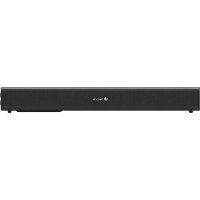
Subway - Soundbar NGS - Free user manual and instructions
Find the device manual for free Subway NGS in PDF.


| Product type | Soundbar |
| Brand | NGS |
| Model | Subway |
| Output power | 40 W RMS (20 W + 20 W) |
| Bluetooth version | 5.0 |
| Optical audio input | Yes (1 x optical) |
| USB input | Yes (1 x USB, MP3 playback) |
| Auxiliary input | Yes (1 x AUX 3.5 mm) |
| Power supply | DC 12 V / 1 A power adapter |
| Remote control included | Yes |
| Sound effects | Normal, Music, News, Movies |
| Indicator light | Yes (Bluetooth and power indicator) |
| Bluetooth range | Up to 10 meters |
| Main functions | On/Off, Play/Pause, Volume, Mode, Bluetooth, Optical input, USB |
| Cleaning | With a soft dry cloth; avoid liquids |
| Recycling | Do not dispose of with household waste; take to a recycling center |
| Safety precautions | Do not expose to moisture; unplug before cleaning |
Frequently Asked Questions - Subway NGS
User questions about Subway NGS
0 question about this device. Answer the ones you know or ask your own.
Ask a new question about this device
Download the instructions for your Soundbar in PDF format for free! Find your manual Subway - NGS and take your electronic device back in hand. On this page are published all the documents necessary for the use of your device. Subway by NGS.
USER MANUAL Subway NGS
2.0 SOUNDBAR COMPATIBLE WITH BLUETOOTH
ENGLISH I FRANÇAIS I ESPÁNOL I DEUTSCH I ITALIANO I PORTUGUES
POLSKI I NEDERLANDS I CEŠTINA I SLOVENCINA I EVAHNIKA I MAGYAR
NORSK I SUOMI I SVENSKA I DANSK I LIETUVIU


www.ngs.eu
USER'S MANUAL
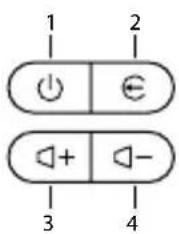
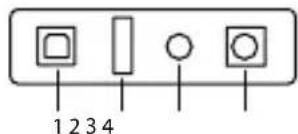
DESCRIPTION OF SIDE PANEL DESCRIPTION OF REAR PANEL
1 Long press
Short click
On/Off
Play/Pause
2 Long press
Disconnect the connected bluetooth
Short click
Audio source switch
3 Long press
Short click
Increase volume
4 Long press
Short click
Decrease volume
Previous track
1 Optical input
2 USB input
3 Aux input
4 DC input
Note:
To fully disconnect the electrical cable, please disconnect the plug from the electrical power point it is connected to. The base of the power point should be easy to access.
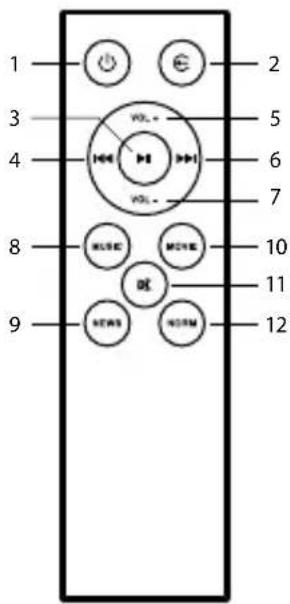
DESCRIPTION OF REMOTE CONTROL
1 On/Off
2 Audio source switch
3 Play/Pause
4 Previous track
5 Increase volume
6 Next track
7 Decrease volume
8 Music sound effect
9 News sound effect
10 Movie sound effect
11 Mute
12 Normal sound effect
BLUETOOTH MODE
- Turn on the speaker and then switch to Bluetooth mode: the "Bluetooth mode" prompt tone will sound and the indicator will flash in blue. Keep the speaker and Bluetooth-enabled device within a radius of ten metres.
- Set your mobile phone to search for Bluetooth devices.
- When the Bluetooth enabled finds the speaker, select "NGS SUBWAY" from the list of found devices.
If required, enter the password "0000".
After successfully being paired, BT will light up in blue.
AUX MODE
- Keep the unit powered on. Plug one end of the 3.5mm AUX cord to the headphone jack on your device.
- Plug the other end of the 3.5mm AUX cord into the AUX jack on the speaker.
- Use the connected device's audio controls for music playback.
USER'S MANUAL
USB PLAYBACK MODE
- Turn on the unit. Push USB disk with MP3 music(s) into USB port, it will switch to USB Playback Mode and then start to play music automatically.
OPTICAL INPUT MODE
- Plug one end of the optical cable into your TV, make sure it is turned on and plug the other end into the NGS SUBWAY speaker.
Note: You must select the optical audio output from the TV so that the sound signal reaches the speaker.
TECHNICAL SPECIFICATIONS
Output power: 40W
Compatible with Bluetooth 5.0
USB reader
Aux input
Optical input
RMS:20W
EQ effects
LED indicator
DC adapter: 12V/1A
ENGLISH


If at any time in the future you should need to dispose of this product please note that: Waste electrical products should not be disposed of with household waste. Please recycle where facilities exist. Check with your Local Authority or retailer for recycling advice. (Waste Electrical and Electronic Equipment Directive)
MANUEL DE L'UTILISATEUR
DESCRIPTION DU PANNEAU LATERAL
Avtantopac DC:12V/1A
EAAHNIKA


Av oTo meAov npaotei n avaykn anoppinc tou pioovtoc,lambdae unoyn:
Pioc ta anoBnTa nAekTPOVIKW npoiovtwv Ev EITPENETa va anoppiTTovTal 已 1e ta oikiaKa anoppipmuata. Avakukwote to otic diaheaiec Eykataotaoic.
AnotaTeiTE OIC apoDIEc TonikEc Apxec n OTov EunopikoavipooWTOYIA Pnpoopopiec Oxetika MEyn avakukawon.
(Osnyia nepi anoppiHektpovikw KAI Hekptipkwv Suokewv)
FELHASNZALOI UTMUTATO
A OLDALSO PANEL LEÍRÁSA A HÁTSO PANEL LEÍRÁSA
1 Pitkä painallus On/Off
Lyhyt klikkaus Toista/Pysayta
2 Pitkä painallus Pura bluetooth-pari
Lyhyt klikkaus Tila
HAS BEEN TESTED AND FOUND IN CONFORMITY WITH THE FOLLOWING HARMONIZED EUROPEAN STANDARDS:
HA SIDO TESTADO EN CONFORMIDAD CON LAS SIGUIENTES NORMAS STANDARD EUROPEAS ARMONIZADAS:
EN55032:2015+A11:2020 ETSI EN 301489-1 V2.2.3
EN 55035:2017 ETSI EN 301 489-17 V3.2.4
EN62368-1:2014 ETSI EN 300 328 V2.2.2
EN 62479:2010 IEC EN 63000:2018
AND THEREFORE COMPLY WITH THE ESSENTIAL REQUIREMENTS AND PROVISIONS OF THE FOLLOWING DIRECTIVES OF THE EUROPEAN PARLIAMENT AND EUROPEAN COUNCIL:
Y,PORLOTANTO,CUMPLECONLOS REQUERIMIENTOS Y PROVISIONES DE LAS SIGUIENTES DIRECTIVAS DEL PARLAMENTO EUROPEO:
RADIO EQUIPMENT DIRECTIVE 2014/53/EU
ROHS DIRECTIVE 2011/65/EU & (EU) 2015/863
- SOUNDBAR COMPATIBLE WITH BLUETOOTH
- USER'S MANUAL
- DESCRIPTION OF SIDE PANEL DESCRIPTION OF REAR PANEL
- Note:
- DESCRIPTION OF REMOTE CONTROL
- BLUETOOTH MODE
- AUX MODE
- USB PLAYBACK MODE
- OPTICAL INPUT MODE
- TECHNICAL SPECIFICATIONS
- MANUEL DE L'UTILISATEUR
- DESCRIPTION DU PANNEAU LATERAL
- FELHASNZALOI UTMUTATO
- A OLDALSO PANEL LEÍRÁSA A HÁTSO PANEL LEÍRÁSA
Brand : NGS
Model : Subway
Category : Soundbar