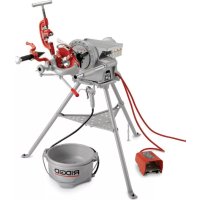
300 Complete - Industrial electric drill RIDGID - Free user manual and instructions
Find the device manual for free 300 Complete RIDGID in PDF.



| Product type | Pipe threading machine (drive system) |
| Brand | Ridgid |
| Model | 300 Complete |
| Threading capacity (pipes) | Ø1/8" to 2" (3 to 50 mm) |
| Threading capacity (bolts) | Ø1/4" to 2" (6 to 50 mm) |
| Rotation speed | 36, 38 or 57 rpm (depending on model) |
| Motor power | 1/2 hp (0.37 kW) |
| Power supply | 120 V, 50/60 Hz, 15 A or 220-240 V, 50/60 Hz, 7.5 A |
| Weight (unit only) | 40 kg (88 lb) |
| Dimensions (L × W × H) | 432 × 394 × 337 mm |
| Sound pressure (LPA) | 86.2 dB(A), K=3 |
| Sound power (LwA) | 93.2 dB(A), K=3 |
| Front chuck | Hammer type with replaceable rocker inserts |
| Rear centering device | Screw type, linked to the chuck |
| Lubrication system | Model No. 418 (optional) |
| Included accessories (Complete model) | Cart No. 311, pipe cutter No. 360, reamer No. 341, die heads, tool tray No. 1452 |
| Warranty | Lifetime warranty (conditions apply) |
| Maintenance | Cleaning, lubrication, replacement of motor brushes and jaws |
| Safety | Foot pedal control, REV/OFF/FOR switch, mechanical guards |
Frequently Asked Questions - 300 Complete RIDGID
User questions about 300 Complete RIDGID
0 question about this device. Answer the ones you know or ask your own.
Ask a new question about this device
Download the instructions for your Industrial electric drill in PDF format for free! Find your manual 300 Complete - RIDGID and take your electronic device back in hand. On this page are published all the documents necessary for the use of your device. 300 Complete by RIDGID.
USER MANUAL 300 Complete RIDGID
300 Power Drive/300 Power Drive Complete
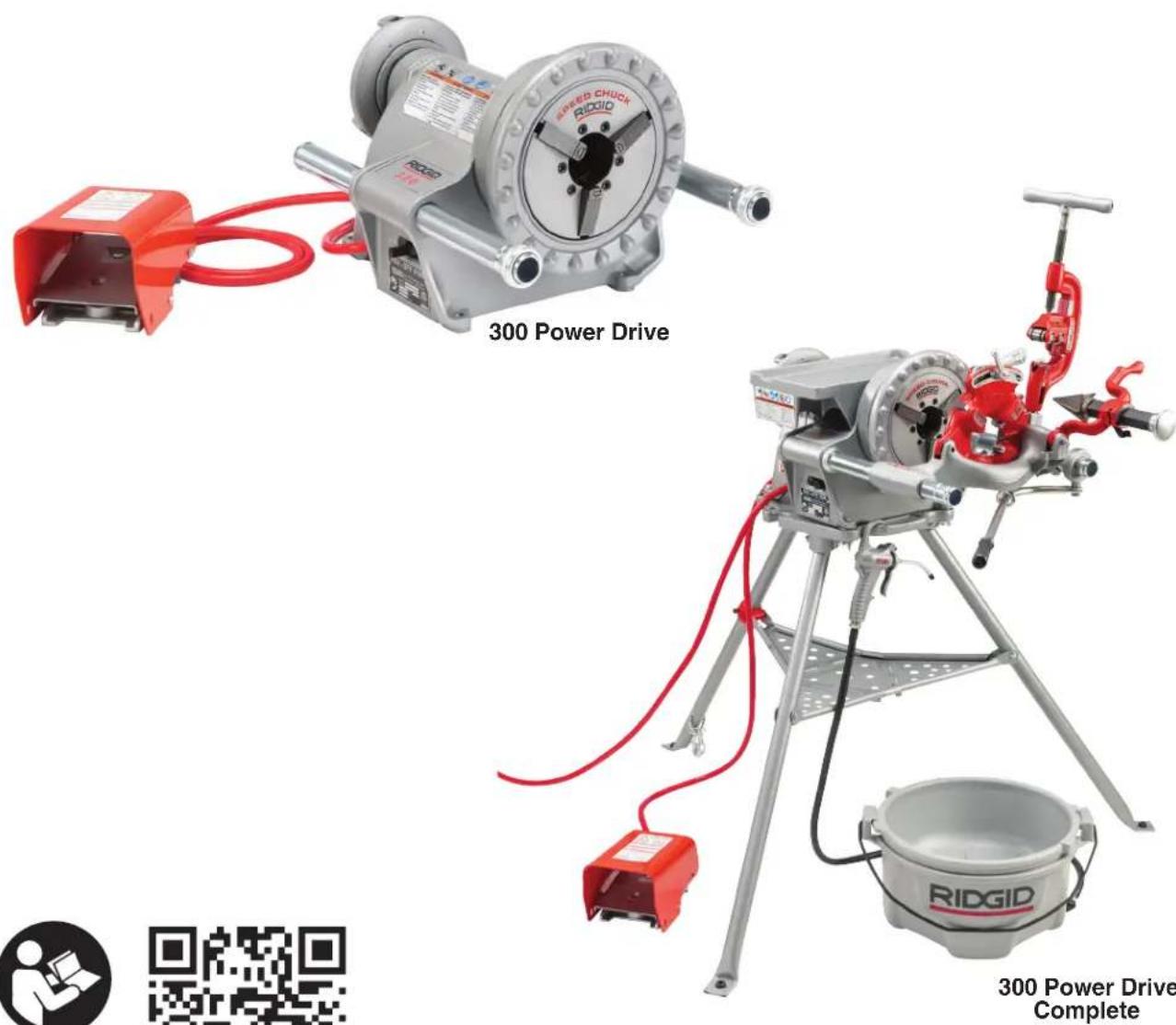
Table of Contents
Recording Form For Machine Serial Number 1
Safety Symbols 2
General Power Tool SafetyWarnings Work Area Safety 2
Electrical Safety 2
Personal Safety 3
Power Tool Use And Care 3
Service. 4
Specific Safety Information 300 Power Drive SafetyWarnings
RIDGID Contact Information 4
Description, Specifications And Standard Equipment Description 5
Specifications. 5
Standard Equipment 6
Machine Assembly Mounting on 1206 Stand. 6
Mounting on Bench 7
7
Installing 1452 Tool Tray. 8
Pre-Operation Inspection 8
Machine and Work Area Set-Up 8
Die Head Set-Up and Use. 9
Removing/Installing Die Head. 10
Quick-Opening Die Heads 10
Inserting/Changing the Dies 10
Adjusting Thread Size 10
Opening the Die Head at the End of the Thread. 10
Stop Bolt Adjustment 10
Operating Instructions 11
Use With Hand Tools 12
Cutting Pipe with No. 2-A or 202 Cutter 12
Reaming with No. 2 or 3 Reamer 12
Threading with Manual Threaders 12
Use with 311 Carriage Mounted Tools 14
Cutting with No. 360 Cutter 14
Reaming with No. 341 Reamer 14
Threading with Machine Die Heads 15
Threading Bar Stock/Bolt Threading 15
Left Hand Threading 16
Removing Pipe from the Machine. 16
Inspecting Threads 16
Preparing Machine for Transport 17
Machine Storage 18
Maintenance Instructions Cleaning. 18
Lubrication 18
No. 418 Oiler Maintenance. 18
Replacing Cutter Wheel 18
Replacing Jaw Inserts 18
Replacing Carbon Brushes 19
Troubleshooting 19-20
Service And Repair 20
Optional Equipment 20
Thread Cutting Oil Information 21
Disposal 21
Declaration of Conformity. Inside Back Cover
Lifetime Warranty. .Back Cover
Original Instructions - English
Power Drive
300 Power Drive/300 Power Drive Complete
| 300 Power Drive/300 Power Drive Complete | |
| Record Serial Number below and retain product serial number which is located on nameplate. | |
| Serial No. | |
WARNING!
Read this Operator's Manual carefully before using this tool. Failure to understand and follow the contents of this manual may result in electrical shock, fire and/or serious personal injury.
Safety Symbols
In this operator's manual and on the product, safety symbols and signal words are used to communicate important safety information. This section is provided to improve understanding of these signal words and symbols.

This is the safety alert symbol. It is used to alert you to potential personal injury hazards. Obey all safety messages that follow this symbol to avoid possible injury or death.

DANGER
DANGER indicates a hazardous situation which, if not avoided, will result in death or serious injury.

WARNING
WARNING indicates a hazardous situation which, if not avoided, could result in death or serious injury.

CAUTION
CAUTION indicates a hazardous situation which, if not avoided, could result in minor or moderate injury.
NOTICE
NOTICE indicates information that relates to the protection of property.

This symbol means read the operator's manual carefully before using the equipment. The operator's manual contains important information on the safe and proper operation of the equipment.

This symbol means always wear safety glasses with side shields or goggles when handling or using this equipment to reduce the risk of eye injury.

This symbol indicates the risk of fingers, hands, clothes and other objects catching on or between gears or other rotating parts and causing crushing injuries.

This symbol indicates the risk of fingers, legs, clothes and other objects catching and/or wrapping on rotating shafts causing crushing or striking injuries.
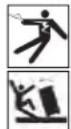
This symbol indicates the risk of electrical shock.

This symbol indicates the risk of machine tipping, causing striking or crushing injuries.

This symbol means always use a foot switch when using a threading machine/power drive to reduce the risk of injury.

This symbol means do not disconnect foot switch to reduce the risk of injury.

This symbol means do not block foot switch (lock in ON position) to reduce the risk of injury.
General Power Tool Safety Warnings*
WARNING
Read all safety warnings, instructions, illustrations and specifications provided with this power tool. Failure to follow all instructions listed below may result in electric shock, fire and/or serious injury.
SAVE ALL WARNINGS AND INSTRUCTIONS FOR FUTURE REFERENCE!
The term "power tool" in the warnings refers to your mains-operated (corded) power tool or battery-operated (cordless) power tool.
Work Area Safety
- Keep work area clean and well lit. Cluttered or dark areas invite accidents.
- Do not operate power tools in explosive atmospheres, such as in the presence of flammable liquids, gases, or dust. Power tools create sparks which may ignite the dust or fumes.
- Keep children and by-standers away while operating a power. Distractions can cause you to lose control.
Electrical Safety
-
Power tool plugs must match the outlet. Never modify the plug in any way. Do not use any adapter plugs with earthed (grounded) power tools.
-
The text used in the General Power Tool Safety Warnings section of this manual is verbatim, as required, from the applicable UL/CSA 62841-1 standard. This section contains general safety practices for many different types of power tools. Not every precaution applies to every tool, and some do not apply to this tool.
Unmodi fied plugs and matching outlets will risk of electric shock.
- Avoid body contact with earthed or grounded surfaces such as pipes, radiators, ranges and refrigerators. There is an increased risk of electrical shock if your body is earthed or grounded.
- Do not expose power tools to rain or wet conditions. Water entering a power tool will increase the risk of electrical shock.
- Do not abuse the cord. Never use the cord for carrying, pulling or unplugging the power tool. Keep cord away from heat, oil, sharp edges or moving parts. Damaged or entangled cords increase the risk of electric shock.
- When operating a power tool outdoors, use an extension cord suitable for outdoor use. Use of a cord suitable for outdoor use reduces the risk of electric shock.
- If operating a power tool in a damp location is unavoidable, use a ground fault circuit interrupter (GFCI) protected supply. Use of a GFCI reduces the risk of electric shock.
Personal Safety
- Stay alert, watch what you are doing and use common sense when operating a power tool. Do not use a power tool while you are tired or under the influence of drugs, alcohol, or medication. A moent of inattention while operating power tools may result in serious personal injury.
- Use personal protective equipment. Always wear eye protection. Protective equipment such as dust mask, non-skid safety shoes, hard hat, or hearing protection used for appropriate conditions will reduce personal injuries.
- Prevent unintentional starting. Ensure the switch is in the OFF-position before connecting to power source and/or battery pack, picking up or carrying the tool. Carrying power tools with your finger on the switch or energizing power tools that have the switch ON invites accidents.
- Remove any adjusting key or wrench before turning the power tool ON. A wrench or a key left attached to a rotating part of the power tool may result in personal injury.
- Do not overreach. Keep proper footing and balance at all times. This enables better control of the power tool in unexpected situations.
- Dress properly. Do not wear loose clothing or
reducejewelry. Keep your hair, and clothing away from moving parts. Loose clothes, jewelry, or long hair can be caught in moving parts.
- If devices are provided for the connection of dust extraction and collection facilities, ensure these are connected and properly used. Use of dust collection can reduce dust-related hazards.
- Do not let familiarity gained from frequent use of tools allow you to become complacent and ignore tool safety principles. A careless action can cause severe injury within a fraction of a second.
Power Tool Use and Care
- Do not force power tool. Use the correct power tool for your application. The correct power tool will do the job better and safer at the rate for which it is designed.
- Do not use power tool if the switch does not turn it ON and OFF. Any power tool that cannot be controlled with the switch is dangerous and must be repaired.
- Disconnect the plug from the power source and/or the battery pack, if detachable, from the power tool before making any adjustments, changing accessories, or storing power tools. Such preventive safety measures reduce the risk of starting the power tool accidentally.
- Store idle power tools out of the reach of children and do not allow persons unfamiliar with the power tool or these instructions to operate the tool. Power tools are dangerous in the hands of untrained users.
- Maintain power tools and accessories. Check for misalignment or binding of moving parts, breakage of parts and any other condition that may affect the power tool's operation. If damaged, have the power tool repaired before use. Many accidents are caused by poorly maintained power tools.
- Keep cutting tools sharp and clean. Properly maintained cutting tools with sharp cutting edges are less likely to bind and are easier to control.
- Keep handles and grasping surfaces dry, clean and free from oil and grease. Slippery handles and grasping surfaces do not allow for safe handling and control of the tool in unexpected situations.
- Use the power tool, accessories and tool bits etc. in accordance with these instructions, taking into account the working conditions and the work to be performed. The use of the power tool for operations different from those intended could result in a hazardous situation.
Service
- Have your power tool serviced by a qualified repair person using only identical replacement parts. This will ensure that the safety of the power tool is maintained.
Specific Safety Information
WARNING
This section contains important safety information that is specific to this tool.
Read these precautions carefully before using the 300 Power Drive to reduce the risk of electrical shock or other serious injury.
SAVE ALL WARNINGS AND INSTRUCTIONS FOR FUTURE REFERENCE!
Keep this manual with machine for use by the operator.
300 Power Drive SafetyWarnings
- Keep floor dry and free of slippery materials such as oil. Slippery floors invite accidents.
- Restrict access or barricade the area when work piece extends beyond machine to provide a minimum of one meter (three feet) clearance from the work piece. Restricting access or barricading the work area around the work piece will reduce the risk of entanglement.
- Do not wear gloves. Gloves may be entangled by the rotating pipe or machine parts leading to personal injury.
- Do not use the machine for other purposes such as drilling holes or turning winches. Other uses or modifying this machine for other applications may increase the risk of serious injury.
- Secure machine to bench or stand. Support long heavy pipe with pipe supports. This practice will prevent tipping.
- While operating the machine, stand on the side where the operator control switch is located. Operating the machine from this side eliminates need to reach over the machine.
-
Keep hands away from rotating pipe and fittings. Stop the machine before wiping pipe threads or screwing on fittings. Allow the machine to come to a complete stop before touching the pipe. This practice will reduce the chance of entanglement in rotating parts.
-
Do not use this machine to install or remove (make or break) fittings. This practice could lead to trapping, entanglement and loss of control.
- Do not operate the machine without all covers properly installed. Exposing moving parts increases the probability of entanglement.
- Do not use this machine if the foot switch is broken or missing. The foot switch provides safe control of the machine, such as shut-off in case of entanglement.
- One person must control the work process, machine operation and foot switch. Only the operator should be in the work area when the machine is running. This helps reduce the risk of injury.
- Never reach into the machine front chuck or rear centering head. This will reduce the risk of entanglement.
- Keep hands away from ends of pipe. Do not reach inside pipe. Threads, pipe ends and chips are sharp. Burrs and sharp edges can catch and cut. This will reduce the risk of entanglement in rotating parts.
- If operating machine with hand tools to cut, ream or thread pipe, do not place hand or fingers between the hand tool handle and support bar. This will reduce the risk of pinch point injuries.
- Read and understand these instructions and the instructions and warnings for all equipment and materials being used before operating this tool to reduce the risk of serious personal injury. This manual contains specific instructions use of the 300 Power Drive to cut, ream and thread with various RIDGID equipment. When used with other RIDGID equipment rated for use with the 300 Power Drive (such as Roll Groovers, 141/161 Geared Threaders, other die heads, 819 Nipple Chuck) follow the instructions and warnings for that equipment to reduce the risk of serious personal injury. Accessories suitable for use with other equipment may be hazardous when used with this machine.
RIDGID Contact Information
If you have any question concerning this RIDGID product:
- Contact your local RIDGID® distributor.
- Visit RIDGID.com to find your local RIDGID contact point.
- Contact Ridge Tool Technical Service Department at ProToolsTechService@Emerson.com, or in the U.S. and Canada call 844-789-8665.
Description, Specifications And Standard Equipment
Description
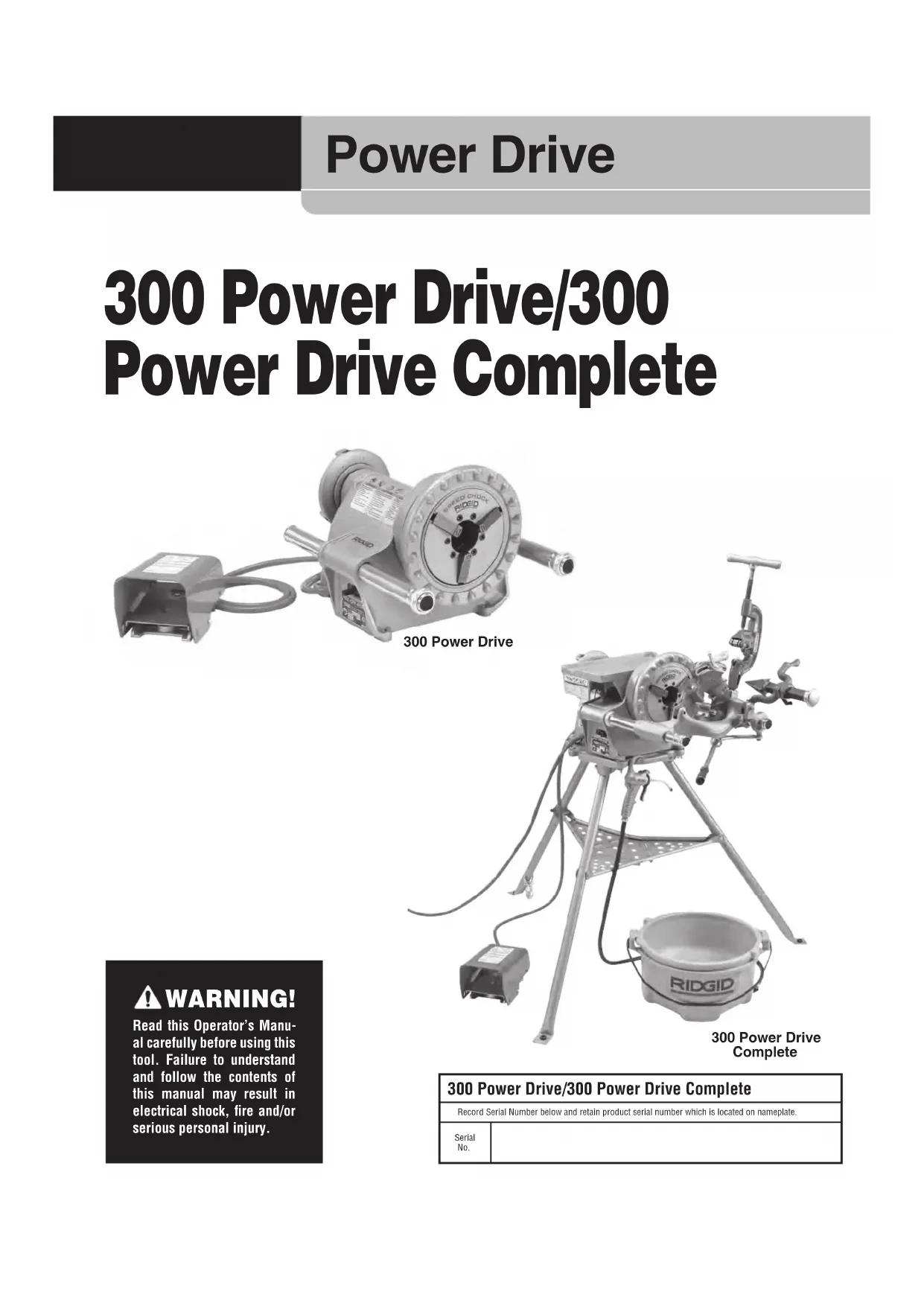
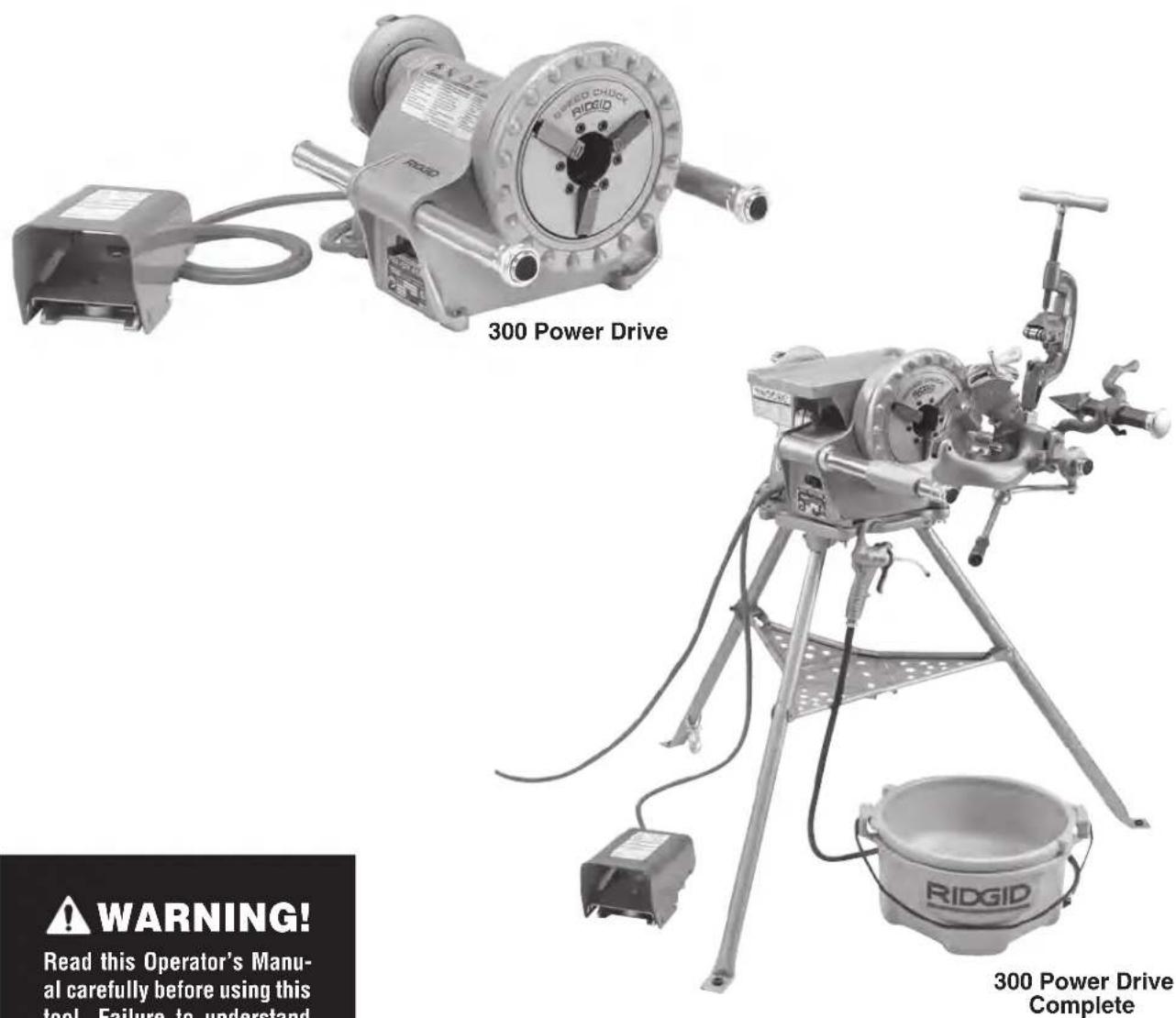
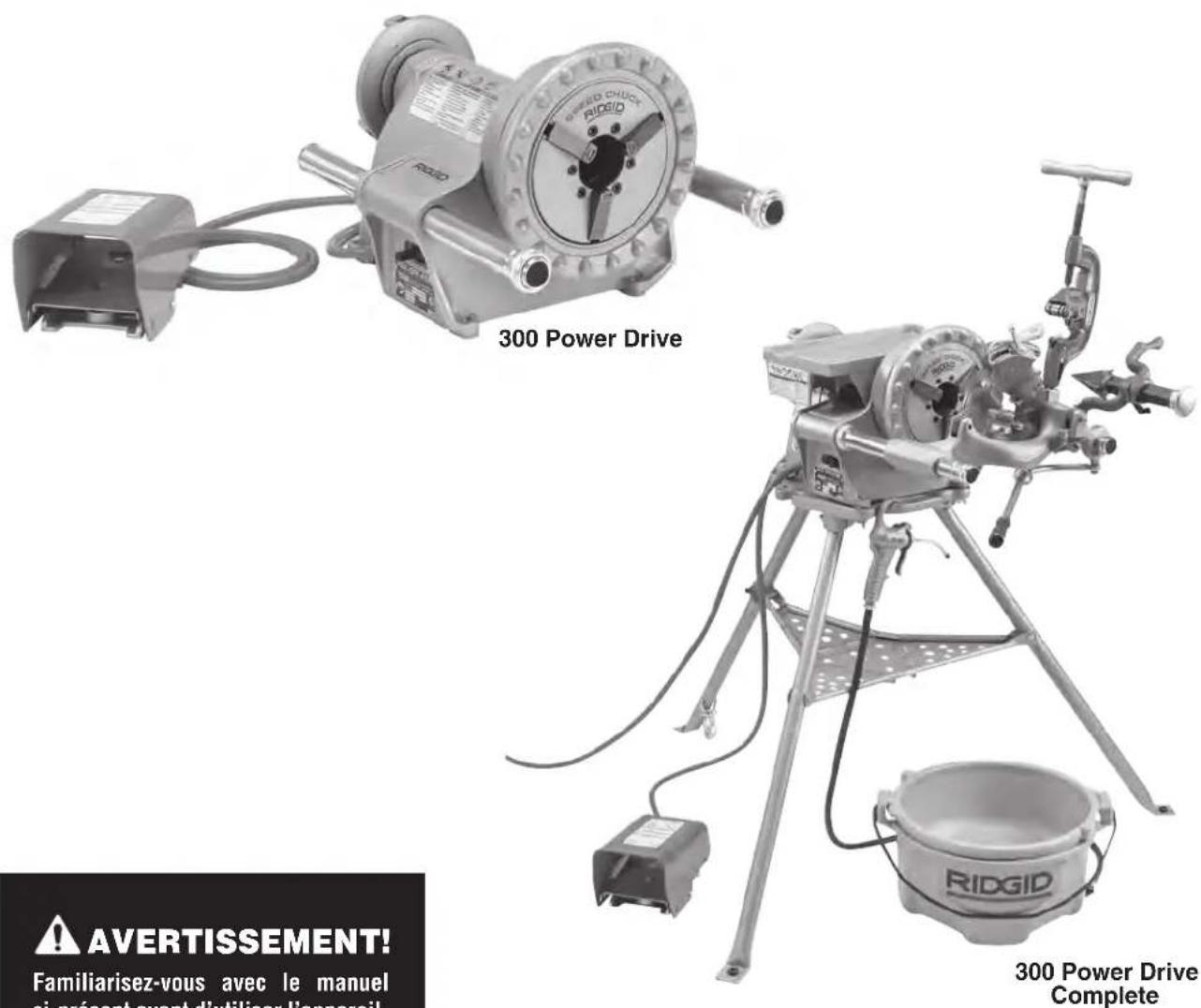
The RIDGID Model 300 Power Drive is an electric motor-driven machine that centers and chucks pipe, conduit and bolt stock and rotates it while cutting, reaming and threading operations are performed. Threading, cutting and reaming operations can be performed with various hand tools or 311 Carriage mounted tools on the 300 Power Drive Complete configuration. The RIDGID No. 418 Oiler is available to flood the work with thread cutting oil during the threading operation.
With proper optional equipment, RIDGID® Model 300 Power Drive can be used to thread larger pipe, short or close nipples or for roll grooving.
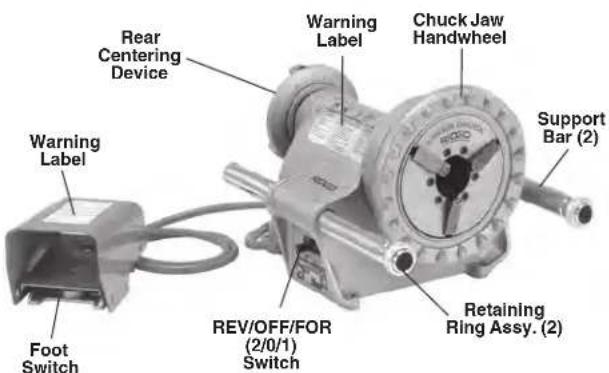
Figure 1 - Model 300 Power Drive
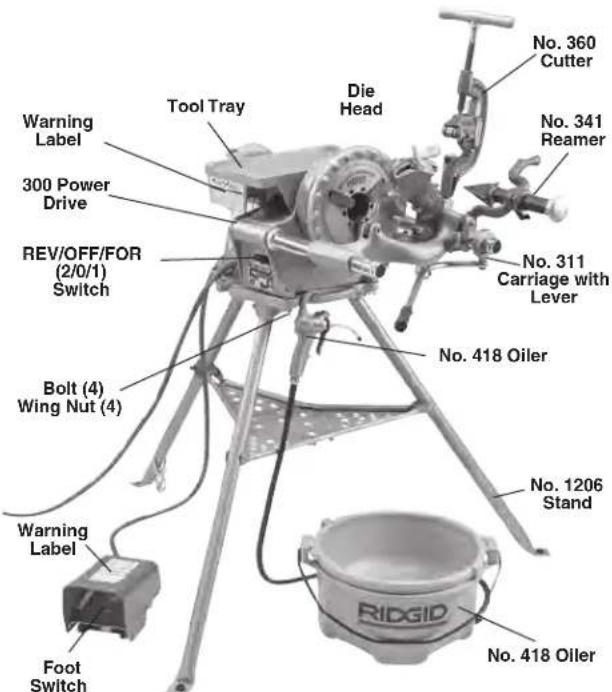
Figure 2 - Model 300 Power Drive Complete
Specifications
Threading
Capacity. Pipe 1 / 8'' to 2" (3 to 50 mm) Bolt 1 / 4'' to 2" (6 to 50 mm)
Maximum Workpiece
Diameter. 2.48" (63 mm)
LH Threads......With Proper Die Heads
Motor:
Type Universal, Reversible, Single Phase
Power. 1/2 HP (0.37 kW)
Ratings. 120 V, 50/60 Hz, 15 A; 220-240 V, 50/60 Hz, 7.5 A; Other Voltages Available (See RIDGID Catalog)
Operating Speed.....36, 38 or 57 RPM
Refer to on product serial plate for information specific to unit.
Controls. REV/OFF/FOR (2/0/1) Switch and ON/OFF Foot switch
Front Chuck....... Hammer-Type with Replaceable Rocker-Action Jaw Inserts
Rear-Centering
Device........................... Scroll operated, rotates with Chuck
Weight (Machine Only, No
Attachments) 88 lbs. (40 kg)
Weight
(1206 Stand Only) ... 28 lbs. (13 kg)
Weight (311 Carriage and
Tools Only) 41 lbs. (19 kg)
Size
(Machine Only) 17" x 15.5" x 13.25" (432 x 394 x 337 mm)
Sound Pressure
(LPA)^* 86.2 dB(A), K=3
Sound Power
(LWA)^* 93.2dB(A),K=3
-
Sound measurements are measured in accordance with a standardized test per Standard EN 62481-1.
-
Sound emissions may vary due to your location and specific use of these tools.
- Daily exposure levels for sound need to be evaluated for each application and appropriate safety measures taken when needed. Evaluation of exposure levels should consider the time a tool is switched OFF and not in use. This may significantly reduce the exposure level over the total working period.
All specifications are nominal and may change as design improvements occur.
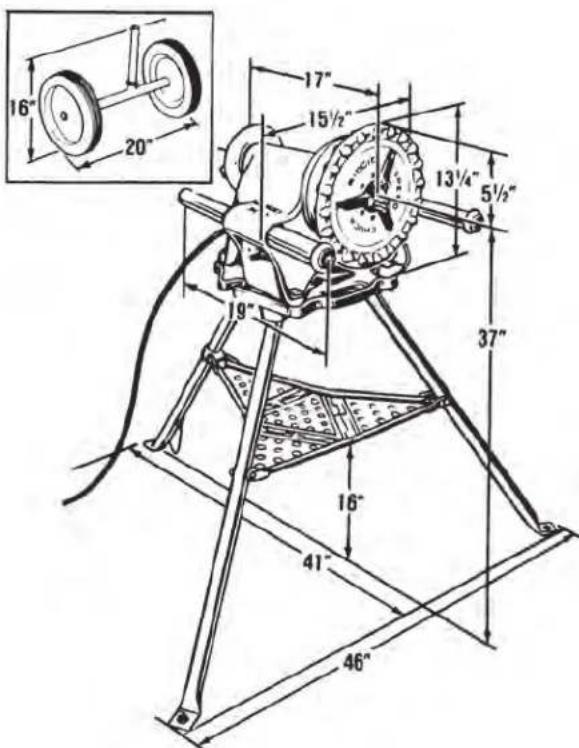
Figure 3 - 300 Power Drive and 1206 Stand Approximate Dimensions
Standard Equipment
The RIDGID 300 Power Drive can be purchased as a Power Drive only or as a 300 Complete with a variety of equipment included. Refer to the RIDGID catalog for details on equipment supplied with specific machine catalog numbers
The Power Drive serial number plate is located below the REV/OFF/FOR switch. The last 4 digits indicate the month and year of the manufacture (MM = month, YY = year).
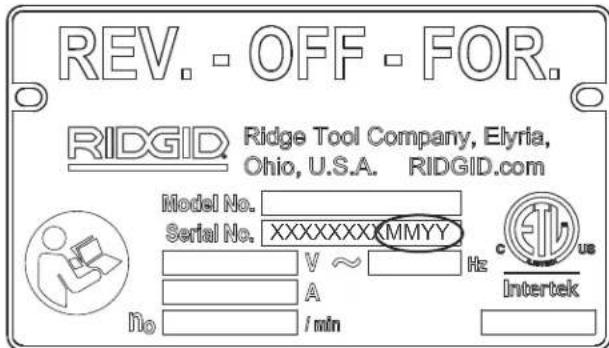
Figure 4 - Machine Serial Number
NOTICE Selection of appropriate materials and installation, joining and forming methods is the responsibility
of the system designer and/or installer. Selection of improper materials and methods could cause system failure.
Stainless steel and other corrosion resistant materials can be contaminated during installation, joining and forming. This contamination could cause corrosion and premature failure. Careful evaluation of materials and methods for the specific service conditions, including chemical and temperature, should be completed before any installation is attempted.
Machine Assembly
WARNING
To reduce the risk of serious injury during use, follow these procedures for proper assembly.
Failure to mount power drive to a stable stand or bench may result in tipping and serious injury.
REV/OFF/FOR switch should be OFF and machine unplugged before assembly.
Use proper lifting techniques. The RIDGID 300 Power Drive weighs 88 lbs. (40 kg).
Mounting on 1206 Stand
- Place stand with feet on floor and open legs. Carefully push down on the center of the tray and lock into position. Keep fingers and hands away from pinch points to prevent injury.
- A properly adjusted stand in good condition should sit solidly with no significant looseness. To adjust:
a. Remove all objects (pipe, tools, etc.) from stand. Carefully push up on the tray to unlock. Stay clear of moving legs.
b. Loosen the set screw on the rear tray support (see Figure 5).
c. Move the rear tray support towards the base to increase stiffness, and away from the base to decrease stiffness.
d. Firmly tighten the set screw on the rear tray support.
Repeat above steps until properly adjusted. On worn out stands, adjustment may not be possible.
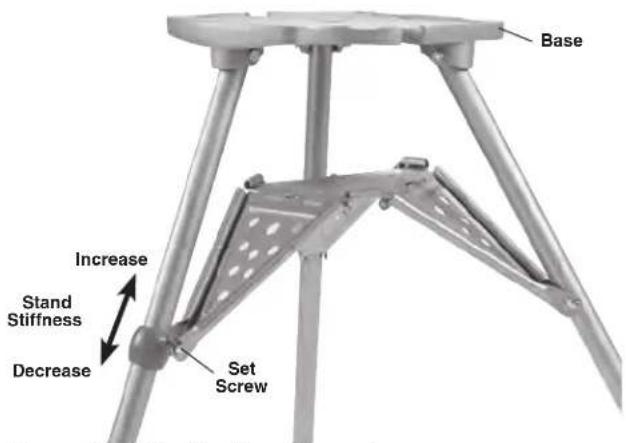
Figure 5 - Adjusting Tray Support
- Anchoring for greater stability - Holes are provided in the leg feet to fasten the stand to the floor. Always anchor the stand when using with geared threaders to prevent tipping.
- Place the 300 Power Drive on the stand and secure with the supplied fasteners (Figure 2).
Mounting on Bench
The 300 Power Drive can be mounted on a level, stable bench. To mount the unit on a bench, use four 3/8 - 16 UNC bolts in holes provided at each corner of the machine base. See Figure 6 for base hole spacing. Tighten securely.
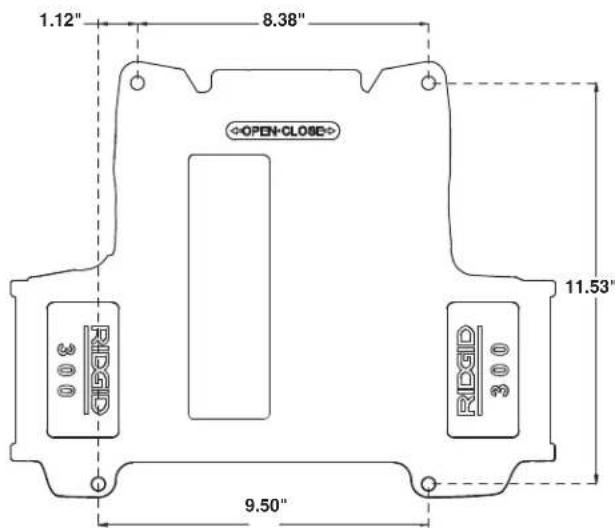
Figure 6 - 300 Power Drive Base Hole Spacing
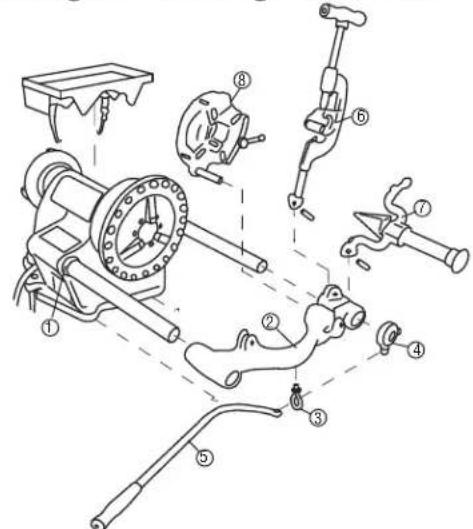
Installing 311 Carriage and Tools
Figure 7A - Installing 311 Carriage and Tools
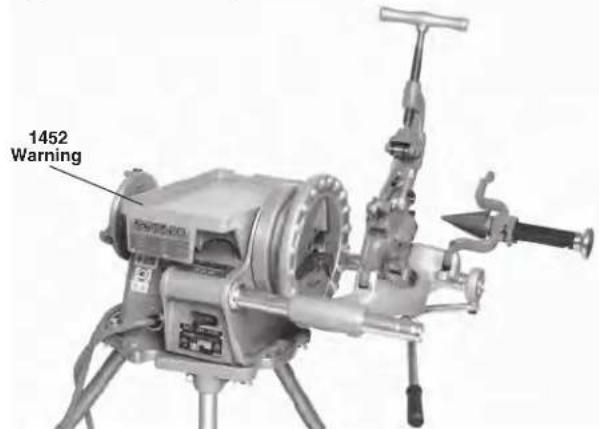
Figure 7B - Installing 311 Carriage and Tools
Installation steps align with Figure 7A.
- Extend Support Bars fully forward. Push Retaining Rings back until they rest against the 300 Power Drive body. Tighten Set Screws in Retaining Rings with a 18 hex wrench (Figure 8).
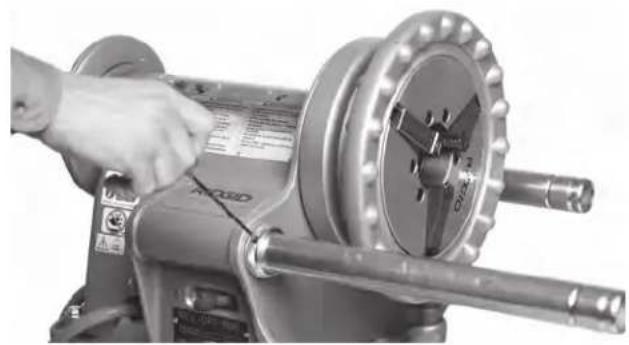
Figure 8 - Set Screw Location
- Slide the 311 Carriage onto Support Bars.
- Screw eye bolt into underside of 311 Carriage. Do not tighten jam nut.
- Slip collar assembly onto support bar as shown, threaded boss facing down.
- Insert 312 lever arm through eye bolt as shown. Secure lever to collar assembly with shoulder bolt. Tighten collar thumbscrew. Actuate lever and adjust eye bolt to get full throw and ease of movement. Tighten jam nut.
- Install 360 Cutter onto 311 Carriage as shown. Secure with pin. Swing the Cutter into up position.
- Install 341 Reamer onto Carriage as shown. Secure with pin.
- Insert Die Head Post into mating hole in carriage. When fully inserted, the Die Head will be held in place. Swing the die head into up position.
Installing 1452 Tool Tray
- Place 1452 Tool Tray on power drive body as shown in Figure 7. Clip side hook to the power drive body.
- Clip bottom hook to the power drive body and securely close hook lever.
Pre-Operation Inspection
WARNING


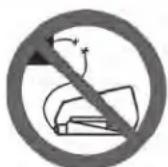
Before each use, inspect your 300 Power Drive and correct any problems to reduce the risk of serious injury from electric shock, crushing and other causes, and help prevent power drive damage.
-
Make sure that the power drive is unplugged and REV/OFF/FOR switch is in OFF position.
-
Clean any oil, grease or dirt from the power drive and accessories, including the handles and controls. This aids inspection and helps prevent the machine or control from slipping from your grip. Clean and maintain the machine per the maintenance instructions.
-
Inspect the power drive for the following:
-
Condition of the cords and plug for damage or modification.
-
Proper assembly, maintenance and completeness.
-
Any broken, worn, missing, misaligned or binding parts or other damage.
- Presence and operation of the foot switch. Confirm that foot switch is attached, in good condition, that it cycles smoothly and does not stick.
Presence and readability of warning labels (Figures 1, 2 & 7). - Condition of the dies, cutter wheel and reamer cutting edges. Dull or damaged cutting tools increase required force, produce poor results and increase the risk of injury.
- Any other condition which may prevent safe and normal operation.
If any problems are found, do not use the power drive until the problems have been repaired.
- Inspect and maintain any other equipment being used per its instructions to make sure it is functioning properly.
Machine and Work Area Set-Up
WARNING



Set up the 300 Power Drive and work area according to these procedures to reduce the risk of injury from electric shock, machine tipping, entanglement, crushing and other causes, and to help prevent machine damage.
Secure machine to stable stand or bench. Properly support pipe. This will reduce the risk of falling pipe, tipping and serious injury.
Do not use the 300 Power Drive without a properly operating foot switch. A foot switch provides better control by letting you shut off the machine motor by removing your foot.
-
Check work area for:
-
Adequate lighting.
- Flammable liquids, vapors or dust that may ignite. If present, do not work in area until source is identified, removed or corrected, and area is completely ventilated. The threading machine is not explosion proof and can cause sparks.
- Clear, level, stable, dry location for all equipment and operator.
-
Good ventilation. Do not use extensively in small, enclosed areas.
-
Properly grounded electrical outlet of the correct voltage. Check the machine serial plate for required voltage. A three-prong or GFCI outlet may not be properly grounded. If in doubt, have outlet inspected by a licensed electrician.
- Clean up the work area prior to setting up any equipment. Always wipe up any oil that may have splashed or dripped from the machine or oiler to prevent slips and falls.
- Inspect the pipe to be threaded and associated fittings. Determine the correct equipment for the job, see Specifications. Only thread straight stock. Do not thread bent material, pipe with fittings or other attachments. Threading anything other than straight stock increases the risk of entanglement and striking injuries.
- Transport equipment to work area along a clear path. See Preparing Machine for Transport for machine preparation.
- Confirm equipment to be used has been properly inspected and assembled.
- Uncoil the power cord and foot switch. Confirm that the REV/OFF/FWD switch is in the OFF position.
- Check that the correct dies are in the die head and are properly set. If needed, install and/or adjust the dies in the die head. See Die Head Set-Up and Use section or die head instructions for details.
- If installed, swing the cutter, reamer and die head up away from the operator. Make sure they are stable and will not fall in the work area.
9 If pipe will extend past the support bars in the front of the machine or more than 2^ (0.6m) out of the rear of the machine, use pipe stands to support the pipe and to prevent pipe and power drive from tipping or falling. Place the pipe stands in line with machine chucks, approximately 1/3 of distance from end of pipe to the machine. Longer pipe may need more than one pipe stand. Only use pipe stands designed for this purpose. Improper pipe supports or supporting the pipe by hand can cause tipping or entanglement injuries. - Restrict access or set-up guards or barricades to create a minimum of 3^ (1 m) clearance around the power drive and pipe. This helps prevent non-operators from contacting the machine or pipe and reduces the risk of tipping or entanglement.
- Position the foot switch as shown in Figure 18 to allow a proper operating position.
- Check level of RIDGID cutting oil in the 418 Oiler. Strainer should be fully submerged in oil. See No. 418
Oiler Maintenance. Position the oiler under the front of the Power Drive (see Figure 2).
- With the REV/OFF/FOR switch in OFF position, run the cord along a clear path. With dry hands, plug the power cord into properly grounded outlet. Keep all connections dry and off the ground. If the power cord is not long enough, use an extension cord that:
Is in good condition.
- Has a three-prong plug like on the power drive.
- Is rated for outdoor use and contains a W or W-A in the cord designation (e.g. SOW).
- Has sufficient wire size. For extension cords up to 50' (15.2 m) long use 14 AWG (2.5 mm²) or heavier. For extension cords 50' - 100' (15.2 m - 30.5 m) long use 12 AWG (2.5 mm²) or heavier.
-
Check the power drive for proper operation. With hands clear:
-
Move the REV/OFF/FOR switch to FOR position. Press and release the foot switch. Chuck should rotate counterclockwise when viewed from support bars side of the machine (see Figure 15). Repeat for REV operation - chuck should rotate clockwise. If machine does not rotate in correct direction, or foot switch does not control the machine operation, do not use the machine until it has been repaired.
-
Depress and hold the foot switch. Inspect the moving parts for misalignment, binding, odd noises or any other unusual conditions. Remove foot from the foot switch. If any unusual conditions are found, do not use the machine until it has been repaired
-
Move the REV/OFF/FOR switch to the OFF position, and with dry hands unplug the machine.
Die Head Set-Up and Use
The 300 Power Drive can be used with a variety of RIDGID die heads to cut pipe and bolt threads. Information is included here for the Quick-Opening Die Heads. See the RIDGID catalog for available die heads.
Quick-Opening Die Heads require one set of dies for each of the following pipe size ranges: (1/8") , (1/4" and 3/8") , (1/2" and 3/4") and (1" through 2") . NPT/NPSM dies must be used in NPT die heads and BSPT/BSPP dies must be used in BSPT die heads - The size bar is marked for each. High speed dies are recommended for 57 rpm machines.
Quick-Opening Die Heads using Bolt dies require a dedicated set of dies for each specific thread size.
See the RIDGID catalog for dies available for your die head.
Always cut a test thread to confirm proper thread size after changing/adjusting the dies.
Removing/Installing Die Head
Insert/remove Die Head Post into mating hole in carriage. When fully inserted, the Die Head will be held in place. When it is installed, the Die Head can be pivoted on post to align it with pipe or it can be swung up and out of the way to allow use of cutter or reamer.
Quick-Opening Die Heads
Quick opening die heads include Model 811A and 531/532 Bolt. Quick opening die heads are manually opened and closed for user specified thread length (see Figure 9).
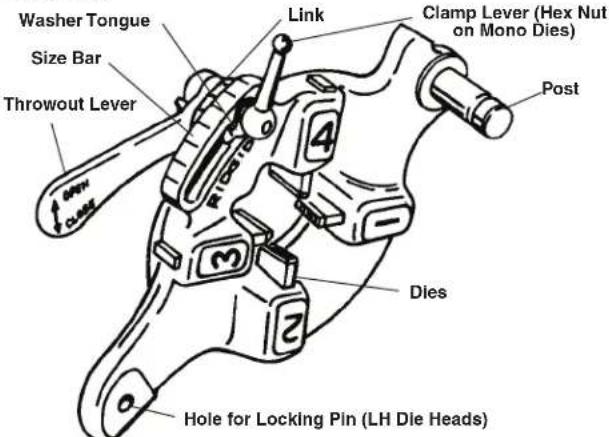
Figure 9 - Quick-Opening Die Head
Inserting/Changing the Dies
- Place the die head with numbers facing up.
- Move throwout lever to OPEN position (Figure 10).
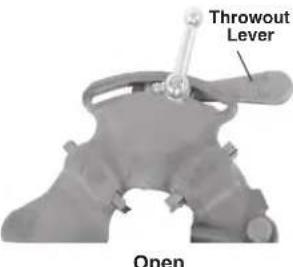
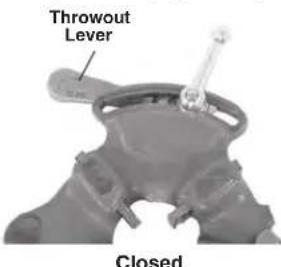
Figure 10 - Open/Closed Lever Position
- Loosen clamp lever approximately three turns.
- Lift tongue of washer out of slot in size bar. Move washer to end of slot (Figure 11).
- Remove dies from the die head.
- Insert appropriate dies into the die head, numbered
edge up until the indi cator line is flush with the edge of the die head (see Figure 11). Numbers on the dies must correspond with those on the die head slots. Always change dies as sets -do not mix dies from different sets.
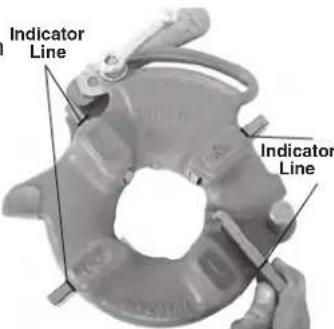
Figure 11 - Inserting Dies
- Move link index mark to align with desired size mark on size bar. Adjust die insertion as needed to allow movement. Washer tongue should be in slot to left.
- Tighten clamp lever.
Adjusting Thread Size
- Install the die head and move the die head into threading position.
- Loosen clamp lever.
- Start with link index mark a ligned with desired size mark on size bar. On Bolt die heads, set link mark at line in size bar. For bolt threads, set all bolt dies at BOLT line on size bar (FiGure 12).
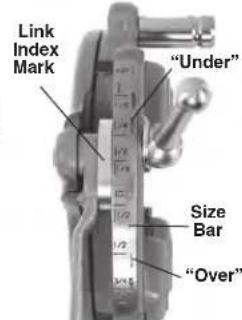
Figure 12 - Adjusting
- If thread size needs to be Thread Size ad justified, set the link index mark slightly off the mark on size bar in the direction of OVER (larger dia meter thread, less turns of fitting engagement) or UNDER (small er thread diameter, more turns of fitting engagement)markings.
- Tighten clamp lever.
Opening the Die Head at the End of the Thread
At the end of the thread:
- Pipe Threads - End of threaded pipe is flush with the end of the number 1 die.
- Bolt Threads - Thread the desired length - watch closely for any interference between the parts.
Move the throwout lever to the OPEN position, retracting dies.
Stop Bolt Adjustment
If for some reason, Die Head does not properly align with pipe for threading, adjust the stop bolt to raise or lower Die Head (see Figure 13).
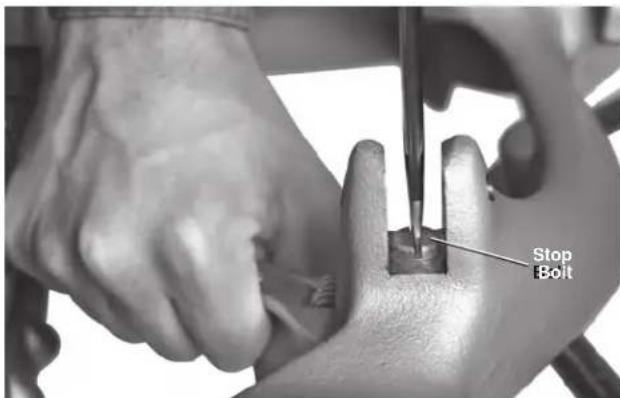
Figure 13 - Adjusting Stop Bolt
Operating Instructions
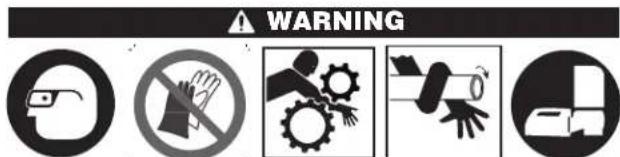
Do not wear gloves or loose clothing. Keep sleeves and jackets buttoned. Loose clothing can become entangled in rotating parts and cause crushing and striking injuries.
Keep hands away from rotating pipe and parts. Stop the machine before wiping threads or screwing on fittings. Do not reach across the machine or pipe. To prevent entanglement, crushing or striking injuries, allow machine to come to a complete stop before touching the pipe or machine chucks.
Do not use this machine to make or break (tighten or loosen) fittings. This can cause striking or crushing injuries.
Do not use a power drive without a properly operating foot switch. Never block a foot switch in the ON position so that it does not control the power drive. A foot switch provides better control by letting you shut off the machine motor by removing your foot. If entanglement should occur and power is maintained to the motor, you will be pulled into the machine. This machine has high torque and can cause clothing to bind around your arm or other body parts with enough force to crush or break bones or cause striking or other injuries.
One person must control both the work process and the foot switch. Do not operate with more than one person. In case of entanglement, the operator must be in control of the foot switch.
Follow operating instructions to reduce the risk of injury from entanglement, striking, crushing and other causes.
- Make sure that machine and work area is properly set up and that the work area is free of bystanders and
other distractions. The operator should be the only person in the area while the machine is operated.
If installed, the cutter, reamer and die head should be up away from the operator, do not place in the operating position. Ensure they are stable and will not fall. Fully open the chucks of the power drive.
- Insert pipe shorter than 2^(0,6m) from the front of the machine. Insert longer pipes through either end so that the longer section extends out beyond the rear of the machine. Confirm that pipe stands are properly placed.
- If needed, mark the pipe. Place pipe so that the area to be cut or end to be reamed or threaded is approximately 4^ (100 mm) from the front of the chuck. If closer, the carriage may strike the machine during the threading and damage the machine.
- Turn the rear-centering device counterclockwise (viewed from rear of machine) to close down onto pipe (Figure 14). Make sure that the pipe is centered in the inserts. This improves pipe support and gives better results.
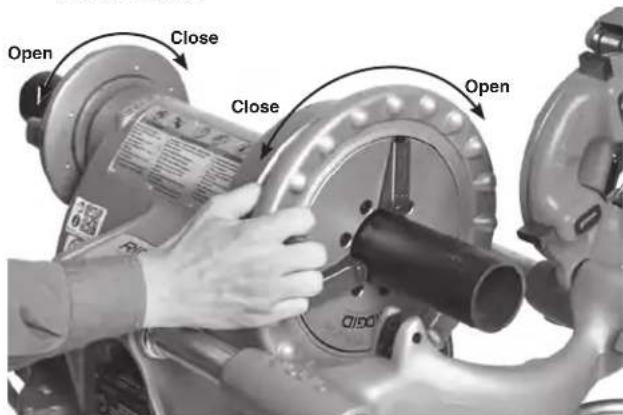
Figure 14 - Chucking Pipe
-
Turn the front chuck hand wheel counterclockwise (viewed from front of machine) to close down onto pipe. Make sure that the pipe is centered in inserts. Use repeated and forceful counterclockwise spins of the hand wheel to secure pipe in front chuck (Figure 14).
-
Assume a proper operating position to help maintain control of the machine and pipe (see Figures 18 and 23).
-
Stand on the REV/OFF/FOR switch side of the machine with convenient access to the tools and switch.
-
Be sure that you can control the foot switch. Do not step on foot switch yet. In case of emergency, you must be able to release the foot switch.
- Be sure that you have good balance and do not have to overreach.
Use With Hand Tools
Remove 311 Carriage before using 300 Power Drive with hand tools to cut, ream or thread pipe. Ensure switch side support bar is fully extended beyond the front of the Power Drive (Figure 15).
Cutting Pipe with No. 2-A or 202 Cutter
- Open cutter by turning the feed screw counterclockwise. Place cutter open side up (as shown in Figure 15) and align the cutter wheel with mark on the pipe. Cutting threaded or damaged sections of pipe can damage the cutter wheel.
- Tighten the cutter feed screw handle to bring the cutter wheel firmly in contact with the pipe while keeping the cutter wheel aligned with the mark on the pipe. Place the pipe cutter body on switch side support bar.
- Move the REV/OFF/FOR switch to FOR position.
- With both hands, firmly grasp the cutter feed screw handle. To avoid pinch point injuries, do not place hand or fingers between the cutter body and support bar. Keep cutter body in contact with the support bar.
- Depress the foot switch.
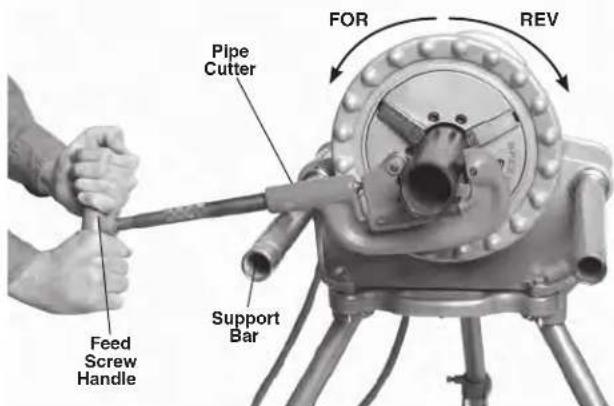
Figure 15 - Cutting Pipe with Hand Cutter/Machine Rotation (Keep Cutter in Contact with Support Bar.)
- Tighten the feed screw handle one-half turn per rotation of the pipe until pipe is cut. More aggressive tightening of the handle reduces cutter wheel life and increases pipe burr formation.
To avoid impact injuries, keep a firm grip on pipe cutter and be sure it is resting on the support bar. If not held firmly and supported, the tool may rotate or fall.
Do not support the pipe by hand. Support the cut off piece of pipe with pipe supports.
- Remove foot from the foot switch.
- Move the REV/OFF/FOR switch to the OFF position.
Reaming with No. 2 or 3 Reamer
Do not use self-feeding spiral reamers with the 300 Power Drive to prevent serious injury.
- Move the REV/OFF/FOR switch to the FOR position.
- Insert reamer into end of pipe as shown in Figure 16. Rest the reamer handle on switch side support bar and hold the reamer hand grip with right hand.
- Hold the end of reamer handle with left hand. To avoid pinch point injuries, do not place hand or fingers between the reamer handle and support bar. Keep reamer handle in contact with the support bar.
- Depress the foot switch.
- With right hand, firmly push reamer into pipe to remove burr as desired. Keep your body away from any rotating parts.
- Remove foot from the foot switch.
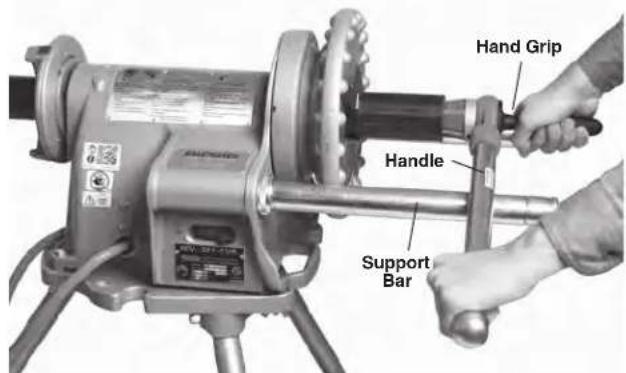
Figure 16 - Reaming Pipe with Hand Reamer, (Keep reamer handle in contact with support bar)
- Once Power Drive has stopped rotating, remove the reamer from pipe.
- Move the REV/OFF/FOR switch to OFF position.
Threading with Manual Threaders
The 300 Power Drive can be used with manual threaders (such as 00-R, 11-R and 12-R). Refer to the Manual Threader Instructions for die head set-up and use.
Select the correct dies for the size and type of pipe to be threaded and the desired thread form. Insert dies into the threads per threads instructions. Due to differing pipe characteristics, a test thread should always be performed before the first thread of the day or when changing pipesize, schedule or material.
- Move the REV/OFF/FOR switch to FOR position.
Place the die head over end of pipe as shown in Figure 17. Rest the threads handle on switch side support bar. Hold the end of threads handle with left hand. To avoid pinch point injuries, do not place hand or fingers between the threads handle and support bar. Keep handle in contact with the support bar. Apply oil to end of pipe and dies.
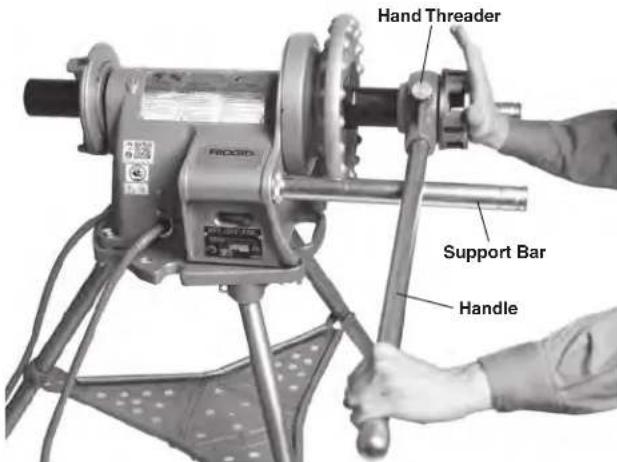
Figure 17 - Pushing Hand Threader onto Pipe to Engage Dies
- With the palm of right hand, push against die head cover plate, holding die head against end of pipe (Figure 17). Depress the foot switch. Do not wear gloves, jewelry or use a rag while pushing on the cover plate - this increases the risk of entanglement and injury. Keep hand away from rotating pipe. Once the dies engage, threads will be cut as the dies pull themselves onto end of pipe.
- Stop pushing on the cover plate and use oiler to apply a generous quantity of RIDGID Thread Cutting Oil to the area being threaded (Figure 18). This will lower threading torque, improve thread quality and increase die life.
- Continue to depress the foot switch until end of pipe is even with the end of dies (Figure 19). Remove foot from the foot switch. Let power drive come to a complete stop.
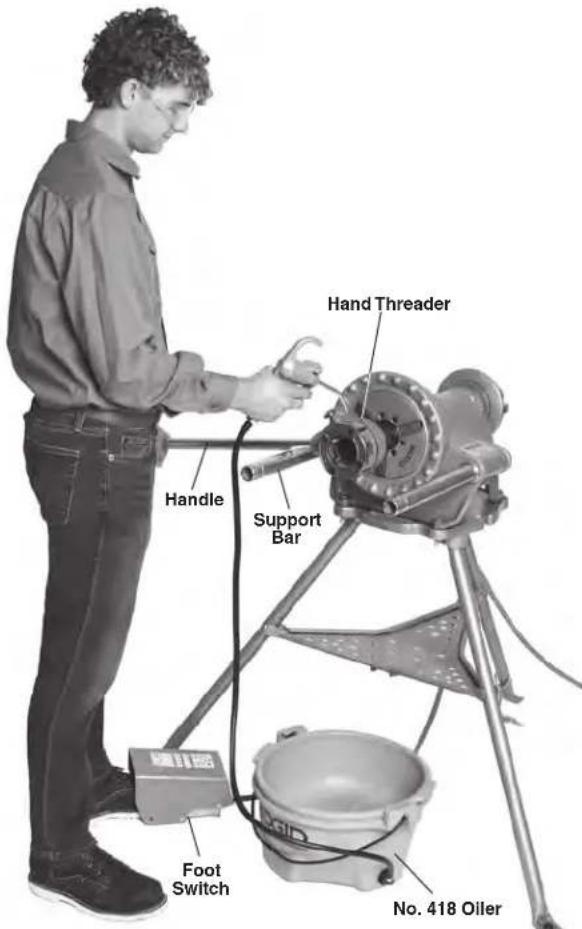
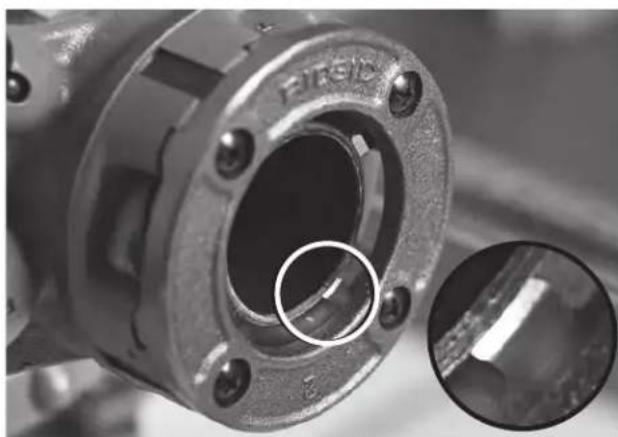
Figure 18 - Threading with Manual Threaders/Proper Operating Position (Keep Threader Handle in Contact with Support Bar.)
Figure 19 - Pipe Even with Edge of Dies
- To remove the die head from the threaded pipe: a. Move the REV/OFF/FOR switch to OFF position.
b. Slide the switch side support bar into power drive and lower the threadser handle below bar.
c. Fully extend the switch side support bar and raise threader handle against bottom of the bar. Hold the end of threader handle with left hand. To avoid pinch point injuries, do not place hand or fingers between the threadser handle and support bar. Keep handle in contact with the support bar (see Figure 20).
d. Move the REV/OFF/FOR switch to REV position.
e. Depress foot switch. Dies will unscrew from the pipe. Keep hand away from rotating pipe. Maintain close control of the threads so that it does not drop and the threads are not damaged.
f. Remove foot from the foot switch. Let power drive come to a complete stop.
g. Move the REV/OFF/FOR switch to OFF position.
h. Remove threads from pipe.
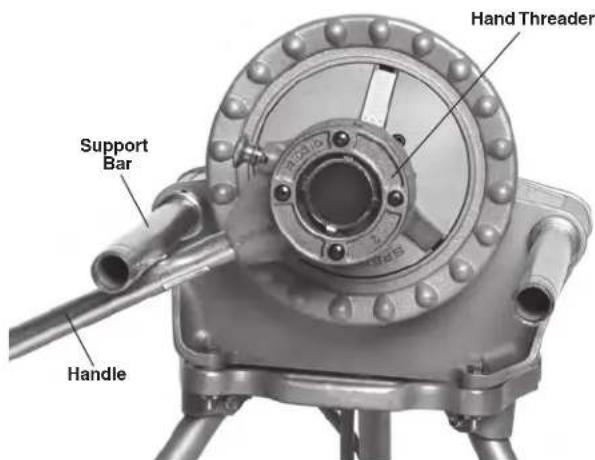
Figure 20 - Removing Die Head From Threaded Pipe (Handle Against Bottom of Bar.)
- Remove the pipe from the machine and inspect the thread. Do not use the machine to tighten or loosen fittings on the thread.
Use with 311 Carriage Mounted Tools
Ensure that the cutter, reamer and die head are swung up away from the operator.
Support Bars should be fully forward, held in place by the retaining rings with the set screws tightened. Ensure that equipment is stable and will not fall.
Cutting with No. 360 Cutter
- Open cutter by turning the feed screw counterclockwise. Lower the cutter into cutting position over pipe.
Use the carriage lever to move cutter over the area to be cut and align cutter wheel with the mark on pipe. Cutting threaded or damaged sections of pipe can damage the cutter wheel.
- Tighten the cutter feed screw handle to bring the cutter wheel firmly in contact with pipe while keeping the cutter wheel aligned with the mark.
- Move the REV/OFF/FOR switch to FOR position.
- With both hands, grasp the pipe cutter feed handle (Figure 21).
- Depress the foot switch.
- Tighten the feed screw handle one-half turn per rotation of pipe until the pipe is cut. More aggressive tightening of the handle reduces cutter wheel life and increases pipe burr formation. Do not support the pipe by hand. Let the cut off piece be supported by the carriage and pipe stand.
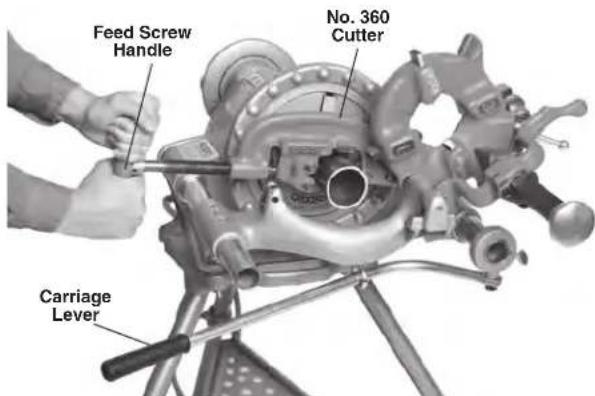
Figure 21 - Cutting with No. 360 Cutter
- Remove foot from the foot switch.
- Move the REV/OFF/FOR switch to OFF position.
- Raise cutter into position up away from the operator.
Reaming with No. 341 Reamer
- Lower the reamer into reaming position. Make sure that it is securely positioned to prevent it from moving during use.
- Extend reamer by pressing latch and sliding knob toward pipe until latch engages end of bar (Figure 22).
- Move the REV/OFF/FOR switch to FOR position.
- Grasp the carriage lever with right hand.
-
Depress the foot switch.
-
Move the reamer to the end of pipe. Apply slight force on carriage lever to feed the reamer into pipe to remove the burr as desired.
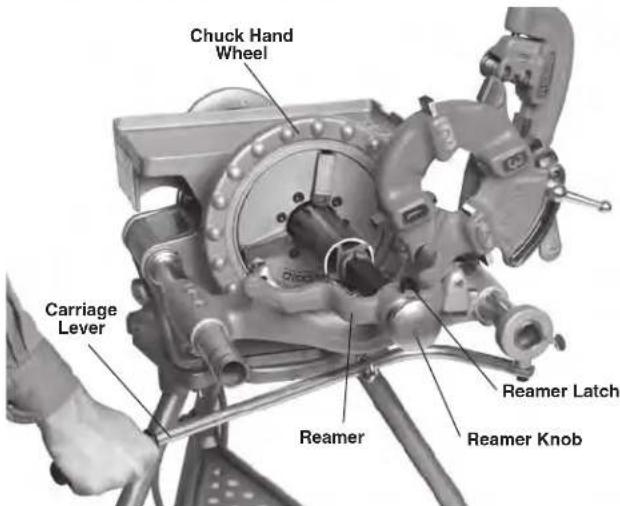
Figure 22 - Reaming with No. 341 Reamer
- Remove foot from the foot switch.
- Move the REV/OFF/FOR switch to OFF position.
- Retract the reamer by releasing latch and sliding the reamer away from pipe until the latch engages.
- Move the reamer up away from the operator.
Threading with Machine Die Heads
Due to differing pipe characteristics, a test thread should always be performed before the first thread of the day or when changing pipe size, schedule or material.
- Lower the die head into threading position. Confirm that the dies are correct for the pipe being threaded and properly set. See the Die Head Set-Up and Use section for information on changing and adjusting dies.
- Close the die head.
- Move the REV/OFF/FOR switch to FOR position.
- With one hand grasp the carriage lever. With other hand, pick up the oiler.
- Depress the foot switch.
- Move the carriage lever to bring the die head to pipe end (Figure 23). Apply slight force to the carriage lever to start die head onto the pipe. Once the die head starts threading pipe, no more force is required on the carriage lever.
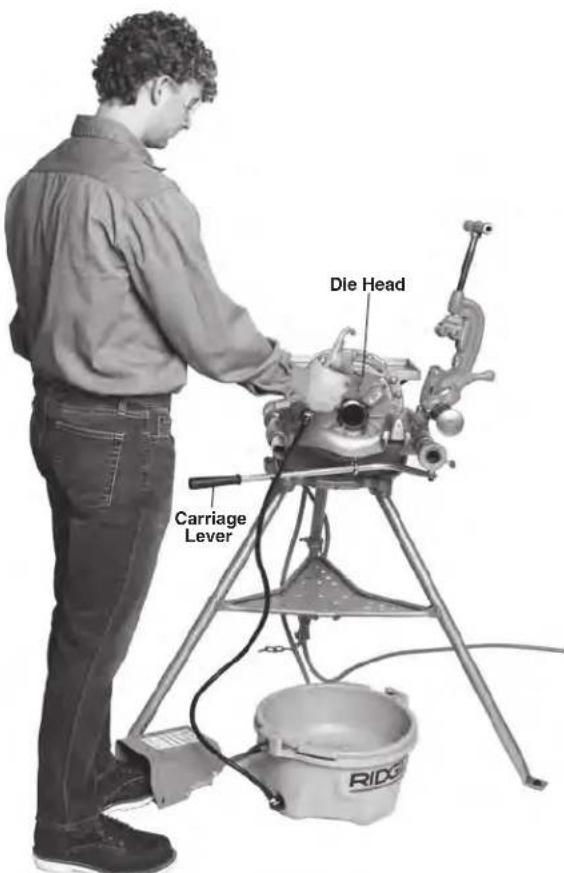
Figure 23 - Threading Pipe with Die Heads/Proper Operating Position
- Use oiler to apply a generous quantity of RIDGID Thread Cutting Oil to the area being threaded. This will lower threading torque, improve thread quality and increase die life.
- Keep your hands away from the rotating pipe. Make sure the carriage does not hit machine. When the thread is complete, open the die head. Do not run machine in Reverse (REV) with dies engaged.
- Remove foot from the foot switch.
- Move the REV/OFF/FOR switch to OFF position.
- Use carriage lever to move the die head past the end of pipe. Raise the die head into position up away from the operator.
- Remove the pipe from the machine and inspect the thread. Do not use the machine to tighten or loosen fittings on the thread.
Threading Bar Stock/Bolt Threading
Bolt threading is similar to the pipe threading process.
Bolt threading can be performed with manual threads or 311 Carriage mounted die heads. The stock diameter should never exceed the thread major diameter.
When cutting bolt threads, correct dies and die head must be used. Bolt threads may be cut as long as needed, but make sure carriage or manual threads does not hit the machine. If long threads are required:
- At the end of die head travel, remove foot from the foot switch and move the REV/OFF/FOR switch to OFF position. If using 311 Carriage mounted die head, leave the die head closed at the end of die head travel.
- Open the chuck and move the die head and workpiece to the end of machine.
- Re-chuck the rod and continue threading. If using manual threads, ensure the threads handle is resting against switch side support bar. To avoid pinch point injuries, do not place hand or fingers between the threads handle and support bar.
Left Hand Threading
Cutting left hand threads is similar to the right hand threading process. Left hand threading can be performed with manual threaders or 311 Carriage mounted die heads. To cut left hand threads, left hand die heads and dies are required.
Left Hand Threading with 311 Carriage Mounted Die Head
- Place a 5 / 16 pin, 2^ long through the holes in the carriage rest and left hand die head to retain in place (see Figure 24).
- Threading will be done with the REV/OFF/FOR switch in the REV position.
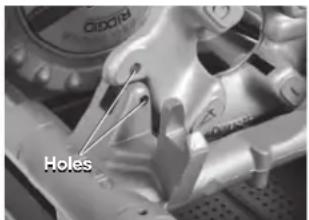
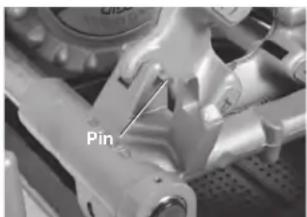
Figure 24 - Retaining LH Die Head in Place
Left Hand Threading with Manual Threader
-
Hold the threads handle against bottom of switch side support bar. To avoid pinch point injuries, do not place hand or fingers between the threads handle and support bar. See Figure 20 for proper operating position.
-
Threading will be done with the REV/OFF/FOR switch in the REV position.
Removing Pipe from the Machine
- With the REV/OFF/FOR switch in OFF position and the pipe stationary, use repeated and forceful clockwise spins of the hand wheel to loosen the pipe in chuck. Open the front chuck and rear-centering device. Do not reach into chuck or centering device.
- Firmly grip the pipe and remove from the machine. Carefully handle the pipe as the thread may still be hot and there may be burrs or sharp edges.
Inspecting Threads
- After removing the pipe from the machine, clean the thread.
- Visually inspect thread. Threads should be smooth and complete, with good form. If issues such as thread tearing, waviness, thin threads, or pipe out-of-roundness are found, the thread may not seal. Refer to the Troubleshooting Chart for help in diagnosing these issues.
-
Inspect the size of the thread.
-
The preferred method of checking thread size is with a ring gauge. There are various styles of ring gauges, and their usage may differ from that shown here.
- Screw ring gauge onto the thread hand tight.
- Look at how far the pipe end extends through the ring gauge. The end of the pipe should be flush with the side of the gauge plus or minus one turn (Figure 25). If thread does not gauge properly, cut off the thread, adjust the die head and cut another thread. Using a thread that does not gauge properly can cause leaks.
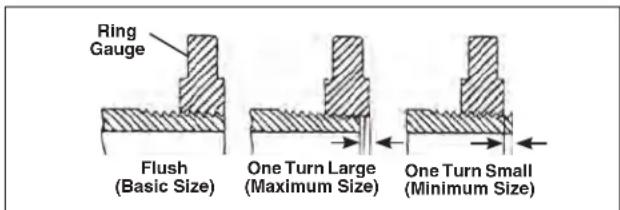
Figure 25 - Checking Thread Size
-
If a ring gauge is not available to inspect thread size, it is possible to use a new clean fitting representative of those used on the job to gauge thread size. For 2^ and under NPT threads, the threads should be cut to obtain 4 to 5 turns to hand tight engagement with the fitting and for BSPT it should be 3 turns.
-
Adjust the threads according to appropriate section of Adjusting Thread Size under Die Head Set-Up and Use heading.
- Test the piping system in accordance with local codes and normal practice.
Preparing Machine for Transport
The 300 Power Drive can be transported as a machine only or using the No. 32 Transporter.
- Make sure that the REV/OFF/FOR switch is in OFF position and the machine is unplugged from the outlet.
- Clean the chips and other debris from the machine. Remove all equipment and material from the machine and stand prior to moving to prevent falling or tipping. Clean up any oil or debris on the floor.
- If installed, remove 1452 Tool Tray, 311 Carriage and carriage mounted tools.
Transport As Machine Only
- Coil up the power cord and slide foot switch cover over one support bar as shown in Figure 26.
- Remove the 300 Power Drive from the 1206 Stand.
- Use proper lifting techniques, be aware of the machine weight. Machine can be lifted at support bar housings on 300 Power Drive body. Use care in lifting and moving.
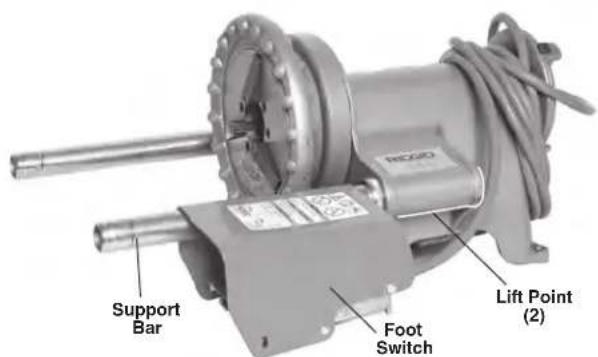
Figure 26 - Machine Only Prepared for Transport
Transport with the No. 32 Transporter
- If needed, assemble the No. 32 Transporter (see Figure 27).
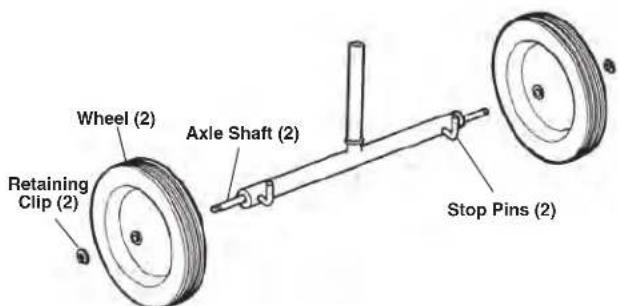
Figure 27 - No. 32 Transporter Assembly
- Open the front chuck of the power drive. Push support bars back until they extend 6^1/2 from the 300 Power Drive body. Tighten set screws in retaining rings.
- Insert shank of No. 32 Transporter into 300 Power Drive front chuck; stop pins should be in ends of support bars. Securely tighten the chuck on the transporter shank (Figure 28).
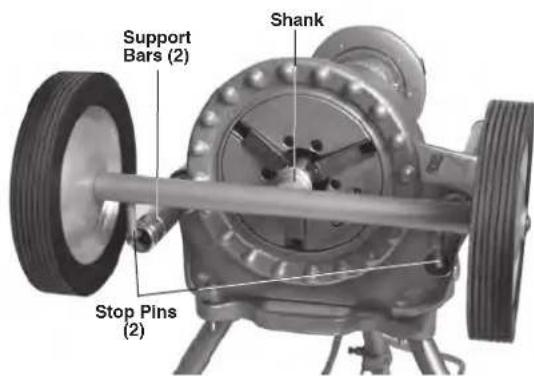
Figure 28 - Installing No. 32 Transporter
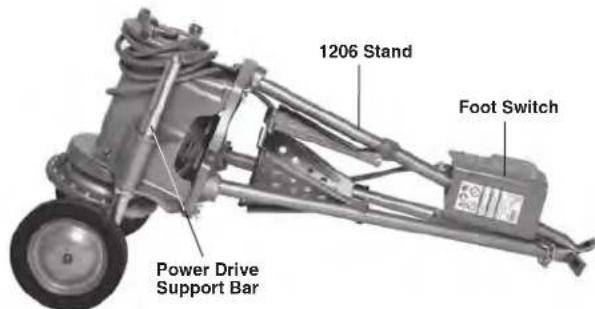
Figure 29 - Machine Prepared for Transport with No. 32 Transporter
- Tip the 300 Power Drive down onto Transporter wheels.
-
Coil up the power cord and slide foot switch cover over one leg as shown in Figure 29.
-
Carefully push on the center of the tray to fold the stand legs and secure with the attached chain. Keep fingers and hands away from pinch points to prevent injury.
- The No. 32 Transporter allows the 300 Power Drive and 1206 Stand to be moved over smooth, level surfaces. To use, lift legs and roll as needed. Use care in lifting and moving.
- Reverse steps 2-6 to set up the 300 Power Drive and 1206 Stand after transport.
Machine Storage
WARNING The 300 Power Drive must be kept indoors or well covered in rainy weather. Store the machine in a locked area that is out of reach of children and people unfamiliar with the machine. This machine can cause serious injury in the hands of untrained users.
Maintenance Instructions
WARNING
Make sure that the REV/OFF/FOR switch is in OFF position and the machine is unplugged before performing any maintenance or making any adjustments.
Maintain the power drive according to these procedures to reduce the risk of injury from electrical shock, entanglement and other causes
Cleaning
After each use, clean the threading chips from machine and wipe out any oil residue. Wipe oil off exposed surfaces, especially areas of relative motion like the support bars.
If the jaw inserts do not grip and need to be cleaned, use a wire brush to remove any build up of pipe scale, etc.
Lubrication
On a monthly basis (or more often if needed) lubricate all exposed moving parts (such as cutter wheels, cutter feed screw, jaw inserts and pivot points) with a light lubricating oil. Wipe off any excess oil from exposed surfaces.
Clean the grease fittings (Figure 30) to remove dirt and prevent contamination of the grease. Every 2-6 months, depending on usage, use a grease gun to apply Lithium EP (Extreme Pressure) grease through the grease fittings in the lubrication points.
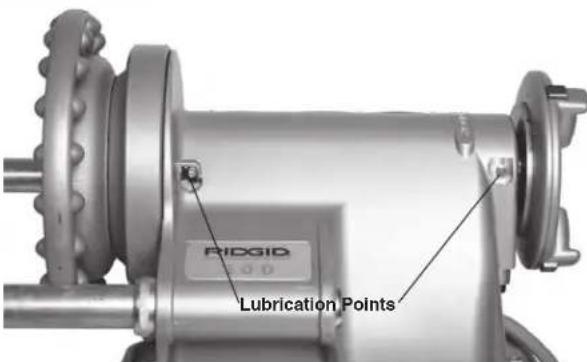
Figure 30 - Grease Fittings
No. 418 Oiler Maintenance
Keep oil strainer clean for sufficient oil flow. Do not operate 418 Oiler with oil strainer removed.
Replace thread cutting oil when it becomes dirty or contaminated. To drain the oil, rotate the drip pan counterclockwise to unlock and remove it. Follow all local laws and regulations when disposing of oil. Clean build up from the bottom of bucket and drip pan. Use RIDGID Thread Cutting Oil for high quality threads and maximum die life. Oil capacity for the 418 Oiler is 1 gallon. Do not mix oils.
Replacing Cutter Wheel
If the cutter wheel becomes dull or broken, push cutter wheel pin out of frame and check for wear. Replace pin if worn and install new Cutter Wheel (see RIDGID catalog). Lubricate pin with light lubricating oil.
Replacing Jaw Inserts
If Jaw inserts are worn out and do not grip pipe, they need to be replaced.
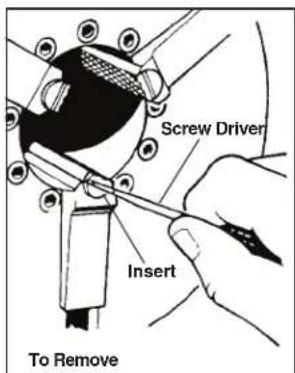
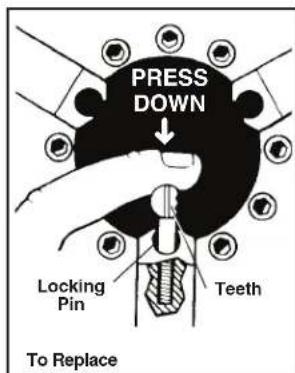
Figure 31 - Replacing Jaw Inserts
-
Place screwdriver in insert slot and turn 90 degrees in either direction. Remove insert (Figure 31).
-
Place insert sideways on locking pin and press down as far as possible (Figure 31).
- Hold insert down firmly, and with screwdriver, turn so teeth face up.
Replacing Carbon Brushes
Check motor brushes every 6 months. Replace when worn to less than 1/2 (13 mm).
- If installed, remove the 1452 Tool Tray, 311 carriage and carriage mounted tools.
- Remove the machine from 1206 Stand or bench.
- Set machine on a clear and stable bench. Turn machine over for access to underside (Figure 32).
- If equipped with a bottom cover, back out the 4 screws that attach the bottom cover to 300 Power Drive body. Screws will remain attached to bottom cover.
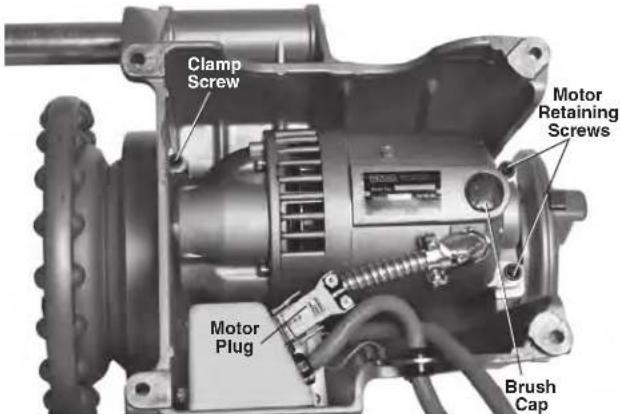
Figure 32 - Removing Motor Cover/Changing Brushes
- Disconnect the motor plug.
- Loosen the clamp screw that holds the snout of motor in place in 300 Power Drive body. Remove the two motor retaining screws.
- Remove the motor from power drive body.
- Unscrew the brush caps. Remove and inspect the brushes. Replace when worn to less than 1/2 (13 mm). Inspect commutator for wear. If excessively worn, have tool serviced.
- Reinstall brushes/Install new brushes.
- Reinstall the brush holder.
- Reassemble unit. When installing motor, apply a coating of grease to the exposed motor drive gear. Install all covers before operating machine.
- Run the machine at idle for 15 minutes in the forward direction followed by 15 minutes in the reverse direction to seat new brushes to the commutator before use.
Troubleshooting
| PROBLEM POSSIBLE REASONS SOLUTION | ||
| Torn threads. Damaged, | chipped or worn out dies. Replace dies. | |
| Incorrect cutting oil. | Only use RIDGID® Thread Cutting Oil. | |
| Insufficient oil. | Check oil flow and adjust as needed. | |
| Dirty or contaminated oil. | Replace the RIDGID® Thread Cutting Oil. | |
| Die head not properly aligned with pipe. | Clean chips, dirt or other foreign material from be-tween die head and carriage. | |
| Improper pipe. | Recommend using with black or galvanized steel pipe. | |
| Pipe wall too thin - use schedule 40 or heavier pipe. | ||
| Die head not properly set. | Adjust die head to give proper size thread. | |
| Carriage not moving freely on support bars. | Clean and lubricate support bars. | |
| Out-of-round or crushed threads. | Die head set undersize. Adjust die head to give proper size thread. | |
| Pipe wall thickness too thin. Use schedule 40 or heavier pipe. | ||
| Thin threads. | Dies inserted into head in wrong order. | Put dies in proper position in die head. |
| Forcing carriage feed handle during threading. | Once dies have started thread, do not force carriage feed handle. Allow carriage to self-feed. | |
| Die head cover plate screws are loose. Tighten screws. | ||
| No cutting oil flow. | Low or no cutting oil. | Fill oil reservoir. |
| Clogged strainer. Clean the strainer. | ||
| Clogged or faulty pump gun. Have the pump gun serviced. | ||
| Machine will not run. Motor brushes worn out. Replace brushes. | ||
| Pipe slips in jaws. | Jaw inserts loaded with debris. | Clean jaw inserts with wire brush. |
| Jaws inserts worn out. | Replace jaw inserts. | |
| Pipe not properly centered in jaw inserts. | Make sure pipe is centered in jaw inserts, use the rear centering device. | |
| Chuck not tight on pipe. Use repeated and forceful spins of the hammer wheel to tighten speed chuck. | ||
Service And Repair
WARNING
Improper service or repair can make machine unsafe to operate.
The Maintenance Instructions will take care of most of the service needs of this machine. Any problems not addressed by this section should only be handled by an authorized RIDGID service technician.
Tool should be taken to a RIDGID Authorized Independent Service Center or returned to the factory. Only use RIDGID service Parts.
For information on your nearest RIDGID Authorized Independent Service Center or any service or repair questions, see Contact Information section in this manual.
Optional Equipment
WARNING
To reduce the risk of serious injury, only use equipment specifically designed and recommended for use with the 300 Power Drive such as those listed.
| Catalog No. | Mod- el No. | Description |
| 42360 | 1206 | Stand for 300 Power Drive |
| 42575 | 32 | Transporter |
| 97365 | — | Jaw Inserts for Coated Pipe |
| 10883 418 Oiler with 1 Gallon of Premium Thread Cutting Oil | ||
| 51005 819 Nipple Chuck Complete, 1/2" to 2" (12 mm to 50 mm) | ||
| 22638 | 1452 | Clip-On Tool Tray |
| 46660 | E-863 | LH/RH Reamer Cone |
| Hand Tools | ||
| — | 00-R | Pipe Threader, 1/8" to 1" (3 mm to 25 mm) |
| — | 11-R | Pipe Threader, 1/8" to 2" (3 mm to 50 mm) |
| — | 12-R | Pipe Threader, 1/8" to 2" (3 mm to 50 mm) |
| — | 00-RB | Bolt Threader, 1/4" to 1" (6 mm to 25 mm) |
| 32895 | 202 | Heavy-Duty Wide Roll Cutter, 1/8" to 2" (3 mm to 50 mm) |
| 32820 | 2-A | Heavy-Duty Pipe Cutter, 1/8" to 2" (3 mm to 50 mm) |
| 34945 | 2 | Straight Reamer, 1/8" to 2" (3 mm to 50 mm) |
| 34950 | 3 | Straight Reamer, 3/8" to 3" (9 mm to 75 mm) |
| Carriage Mounted Tools | ||
| 68815 311 | Carriage with No. 312 Lever | |
| 42385 312 | Carriage Feed Lever | |
| 42365 341 | Reamer for No. 311 Carriage with Lever | |
| 42370 360 | Cutter for No. 311 Carriage | |
| 97065 811A | Universal Q.O. Die Head Only, Right-Hand Only | |
| 97075 815A | Self-Opening Die Head Only, Right-Hand Only | |
For a complete listing of RIDGID equipment available for these tools, see the Ridge Tool Catalog online at RIDGID.com or see Contact Information.
Thread Cutting Oil Information
Read and follow all instructions on the threading oil label and Safety Data Sheet (SDS). Specific information about RIDGID Thread Cutting Oils, including Hazard Identification, First Aid, Fire Fighting, Accidental Release Measures, Handling and Storage, Personal Protective Equipment, Disposal and Transportation, is included on the container and SDS. SDS is available at RIDGID.com or see Contact Information.
Disposal
Parts of the 300 Power Drive contain valuable materials and can be recycled. There are companies that specialize in recycling that may be found locally. Dispose of the components in compliance with all applicable regulations. Contact your local waste management authority for more information.
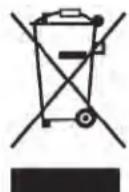
For EU Countries: Do not dispose of electrical equipment with household waste!
According to the European Guideline 2012/ 19/EU for Waste Electrical and Electronic Equipment and its implementation into national legislation, electrical equipment that
is no longer usable must be collected separately and disposed of in an environmentally correct manner.
Power Drive
300 Power Drive et 300 Power Drive Complete
AVERTISSEMENT!
EU DECLARATION OF CONFORMITY
We declare that the machines listed above, when used in accordance with the operator's manual, meet the relevant requirements of the Directives and Standards listed below.
DECLARATION DE CONFORMITE UE
Bridge Tool UK (BIDGID)
44 Baker Street
London W1U 7AL, UK

Signature:
Qualification: V.P. Engineering
Date: 04/12/2024

Intertek
5010236
Conforms to UL 62841-1/UL 62841-3-12
Certified to CSA C22.2#62841-1/CSA C22.2#62841-3-12
What is covered
RIDGID® tools are warranted to be free of defects in workmanship and material.
How long coverage lasts
This warranty lasts for the lifetime of the RIDGID tool. Warranty coverage ends when the product becomes unusable for reasons other than defects in workmanship or material.
How you can get service
To obtain the benefit of this warranty, deliver via prepaid transportation the complete product to RIDGID c/o Emerson Professional Tools, LLC in, Elyria, Ohio, or any RIDGID® AUTHORIZED INDEPENDENT SERVICE CENTER. Pipe wrenches and other hand tools should be returned to the place of purchase.
What we will do to correct problems
Warranted products will be repaired or replaced, at RIDGID's option, and returned at no charge; or, if after three attempts to repair or replace during the warranty period the product is still defective, you can elect to receive a full refund of your purchase price.
What is not covered
Failures due to misuse, abuse or normal wear and tear are not covered by this warranty. Seller is not responsible for any incidental or consequential damages.
How local law relates to the warranty
Some states do not allow the exclusion or limitation of incidental or consequential damages, so the above limitation or exclusion may not apply to you. This warranty gives you specific rights, and you may also have other rights, which vary, from state to state, province to province, or country to country.
No other express warranty applies
THIS FULL LIFETIME WARRANTY is the sole and exclusive warranty for RIDGE products. No employee, agent, dealer, or other person is authorized to alter this warranty or make any other warranty on behalf of the RIDGE TOOL COMPANY.
To obtain further warranty information on your product please visit www.RIDGID.com/us/en/warranty
Parts are available online at Store.RIDGID.com
RIDGID
Emerson Professional Tools, LCC
400 Clark Street
Elyria, Ohio 44035-6001
U.S.A.
Ce qui est couvert


- Power Drive/300 Power Drive Complete
- Table of Contents
- Power Drive
- WARNING!
- Safety Symbols
- DANGER
- WARNING
- CAUTION
- NOTICE
- General Power Tool Safety Warnings*
- SAVE ALL WARNINGS AND INSTRUCTIONS FOR FUTURE REFERENCE!
- Work Area Safety
- Electrical Safety
- Personal Safety
- Power Tool Use and Care
- Service
- Specific Safety Information
- Power Drive SafetyWarnings
- RIDGID Contact Information
- Description, Specifications And Standard Equipment
- Description
- Specifications
- Standard Equipment
- Machine Assembly
- Mounting on 1206 Stand
- Mounting on Bench
- Installing 1452 Tool Tray
- Pre-Operation Inspection
- Machine and Work Area Set-Up
- Die Head Set-Up and Use
- Removing/Installing Die Head
- Quick-Opening Die Heads
- Inserting/Changing the Dies
- Adjusting Thread Size
- Opening the Die Head at the End of the Thread
- Stop Bolt Adjustment
- Operating Instructions
- Use With Hand Tools
- Cutting Pipe with No. 2-A or 202 Cutter
- Reaming with No. 2 or 3 Reamer
- Threading with Manual Threaders
- Use with 311 Carriage Mounted Tools
- Cutting with No. 360 Cutter
- Reaming with No. 341 Reamer
- Threading with Machine Die Heads
- Threading Bar Stock/Bolt Threading
- Left Hand Threading
- Left Hand Threading with 311 Carriage Mounted Die Head
- Left Hand Threading with Manual Threader
- Removing Pipe from the Machine
- Inspecting Threads
- Preparing Machine for Transport
- Transport As Machine Only
- Transport with the No. 32 Transporter
- Machine Storage
- Maintenance Instructions
- Cleaning
- Lubrication
- No. 418 Oiler Maintenance
- Replacing Cutter Wheel
- Replacing Jaw Inserts
- Replacing Carbon Brushes
- Service And Repair
- Optional Equipment
- Thread Cutting Oil Information
- Disposal
- Power Drive et 300 Power Drive Complete
- AVERTISSEMENT!
- EU DECLARATION OF CONFORMITY
- DECLARATION DE CONFORMITE UE
- What is covered
- How long coverage lasts
- How you can get service
- What we will do to correct problems
- What is not covered
- How local law relates to the warranty
- No other express warranty applies
- Parts are available online at Store.RIDGID.com
- RIDGID
- Emerson Professional Tools, LCC
- Ce qui est couvert
Brand : RIDGID
Model : 300 Complete
Category : Industrial electric drill