CrystalCraft Premier USE0050 - Ice machine Manitowoc - Free user manual and instructions
Find the device manual for free CrystalCraft Premier USE0050 Manitowoc in PDF.


| Product Type | Ice Machine |
| Brand | Manitowoc |
| Model | CrystalCraft Premier USE0050 |
| Dimensions (H x W x D) | 35 x 15 x 26 in (89 x 38 x 65 cm) |
| Power Supply | 115 V, 60 Hz, single phase, 15 A max, dedicated circuit |
| Cooling Type | Air cooled (model USE0050A) |
| Ice Production | Freezing cycle of 15 to 30 minutes depending on conditions |
| Control Panel | On/Off, Clean, Ice Delay buttons, filter and service indicators |
| Special Features | Adjustable ice delay (2/4/8 h), daily repeat, automatic bin full stop |
| Installation | Possible integration, minimal clearance, requires open drain or drain pump |
| Water Supply | Cold water, pressure 20-80 psi, 1/4 in copper tube, water filter included |
| Maintenance | Cleaning/sanitizing every 6 months, descaling annually, filter replacement every 8000 cycles |
| Cleaning Products | Manitowoc descaler (9405463) and sanitizer (9405653) only |
| Safety | Grounding required, GFCI circuit breaker, shock and fire protection |
| Authorized Spare Parts | Adjustable feet, drain pump, Arctic Pure filter, bin light |
| Warranty | Online registration required, coverage from installation |
| Repairability | Service by qualified technician, approved original parts |
| Serial Number | On sticker on back of machine |
Frequently Asked Questions - CrystalCraft Premier USE0050 Manitowoc
User questions about CrystalCraft Premier USE0050 Manitowoc
0 question about this device. Answer the ones you know or ask your own.
Ask a new question about this device
Download the instructions for your Ice machine in PDF format for free! Find your manual CrystalCraft Premier USE0050 - Manitowoc and take your electronic device back in hand. On this page are published all the documents necessary for the use of your device. CrystalCraft Premier USE0050 by Manitowoc.
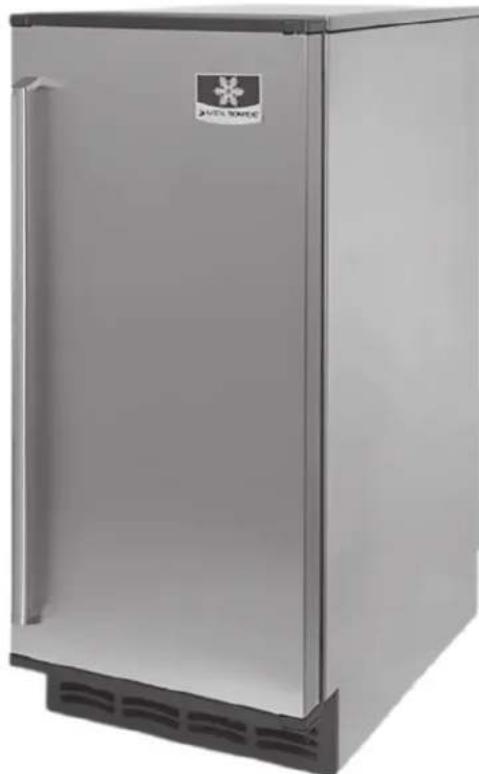
USER MANUAL CrystalCraft Premier USE0050 Manitowoc
CrystalCraft™ Premier
Model USE0050
Installation, Operation and Maintenance Manual
Original Document
Caution
Read this instruction before operating this equipment.
Safety Notices
Safety Notices
Read these precautions to prevent personal injury:
- Read this manual thoroughly before operating, installing or performing maintenance on the equipment. Failure to follow instructions in this manual can cause property damage, injury or death.
- Routine adjustments and maintenance procedures outlined in this manual are not covered by the warranty.
- Proper installation, care and maintenance are essential for maximum performance and trouble-free operation of your equipment.
Visit our website www.manitowocice.com for manual updates, translations, or contact information for service agents in your area.
- This equipment is intended for indoor use only. Do not install or operate this equipment in outdoor areas.
DEFINITIONS
DANGER
Indicates a hazardous situation that, if not avoided, will result in death or serious injury. This applies to the most extreme situations.
A Warning
Indicates a hazardous situation that, if not avoided, could result in death or serious injury.
Caution
Indicates a hazardous situation that, if not avoided, could result in minor or moderate injury.
Notice
Indicates information considered important, but not hazard-related (e.g. messages relating to property damage).
NOTE: Indicates useful, extra information about the procedure you are performing.
Warning
Follow these precautions to prevent personal injury during installation of this equipment:
- Installation must comply with all applicable equipment fire and health codes with the authority having jurisdiction.
- To avoid instability the installation area must be capable of supporting the combined weight of the equipment and product. Additionally the equipment must be level side to side and front to back.
- Before lifting and installing, use appropriate safety equipment during installation and servicing. Two or more people are required to lift or move this appliance to prevent tipping and/or injury.
- Do not damage the refrigeration circuit when installing, maintaining or servicing the unit.
- Connect to a potable water supply only.
Warning
Follow these electrical requirements during installation of this equipment.
- All field wiring must conform to all applicable codes of the authority having jurisdiction. It is the responsibility of the end user to provide the disconnect means to satisfy local codes. Refer to rating plate for proper voltage.
- This appliance must be grounded.
- This equipment must be positioned so that the plug is accessible unless other means for disconnection from the power supply (e.g., circuit breaker or disconnect switch) is provided.
- Check all wiring connections, including factory terminals, before operation. Connections can become loose during shipment and installation.
Warning
This product is hermetically sealed and contains fluorinated greenhouse gas R404A.
±b Warning
Follow these precautions to prevent personal injury while operating or maintaining this equipment:
- Read this manual thoroughly before operating, installing or performing maintenance on the equipment. Failure to follow instructions in this manual can cause property damage, injury or death.
- Crush/Pinch Hazard. Keep hands clear of moving components. Components can move without warning unless power is disconnected and all potential energy is removed.
- Moisture collecting on the floor will create a slippery surface. Clean up any water on the floor immediately to prevent a slip hazard.
- Objects placed or dropped in the bin can affect human health and safety. Locate and remove any objects immediately.
- Never use sharp objects or tools to remove ice or frost. Do not use mechanical devices or other means to accelerate the defrosting process.
- When using cleaning fluids or chemicals, rubber gloves and eye protection (and/or face shield) must be worn.
Warning
Follow these refrigeration system requirements during installation, use or repair of this equipment.
- This equipment contains high voltage electricity and refrigerant charge. Installation and repairs are to be performed by properly trained technicians aware of the dangers of dealing with high voltage electricity and refrigerant under pressure. The technician must also be certified in proper refrigerant handling and servicing procedures. All lockout and tag out procedures must be followed when working on this equipment.
- Do not damage the refrigeration circuit when installing, maintaining or servicing the unit. Never use sharp objects or tools to remove ice or frost. Do not use mechanical devices or other means to accelerate the defrosting process.
- All replacement parts must be like components obtained from the equipment manufacturers authorized replacement part network.
DANGER
Follow these precautions to prevent personal injury during use and maintenance of this equipment:
- It is the responsibility of the equipment owner to perform a Personal Protective Equipment Hazard Assessment to ensure adequate protection during maintenance procedures.
- The on-site supervisor is responsible for ensuring that operators are made aware of the inherent dangers of operating this equipment.
- Do Not Store Or Use Gasoline Or Other Flammable Vapors Or Liquids In The Vicinity Of This Or Any Other Appliance. Never use flammable oil soaked cloths or combustible cleaning solutions for cleaning.
- All covers and access panels must be in place and properly secured when operating this equipment.
- Risk of fire/shock. All minimum clearances must be maintained. Do not obstruct vents or openings.
- Failure to disconnect power at the main power supply disconnect could result in serious injury or death. The power button DOES NOT disconnect all incoming power.
- All utility connections and fixtures must be maintained in accordance with the authority having jurisdiction.
- Turn off and lockout all utilities (gas, electric, water) according to approved practices during maintenance or servicing.
- Never use a high-pressure water jet for cleaning on the interior or exterior of this unit. Do not use power cleaning equipment, steel wool, scrapers or wire brushes on stainless steel or painted surfaces.
- Two or more people are required to move this equipment to prevent tipping.
- Do not operate any appliance with a damaged cord or plug. All repairs must be performed by a qualified service company.
DANGER
Do not operate equipment that has been misused, abused, neglected, damaged, or altered/modified from that of original manufactured specifications. This appliance is not intended for use by persons (including children) with reduced physical, sensory or mental capabilities, or lack of experience and knowledge, unless they have been given supervision concerning use of the appliance by a person responsible for their safety. Do not allow children to play with, clean or maintain this appliance without proper supervision.
Table of Contents
Safety Notices
Safety Notices 3
Definitions. 3
Section 1 General Information
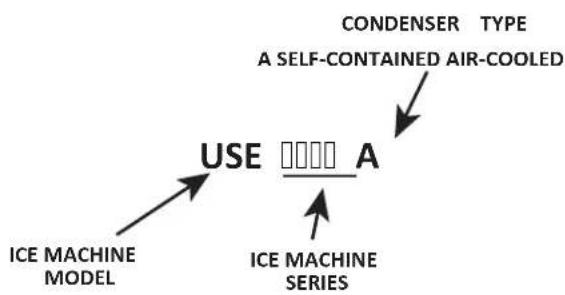
Model Numbers 7
How to Read a Model Number . 7
Accessories. 7
Model/Serial Number Location . 7
Warranty.. 8
Warranty Registration . 8
Section 2 Installation
Installation Prerequisites 9
Ice Machine Dimensions 9
Clearances 9
Minimum Cut-Out For Built-In Installations 9
Ice Machine Location. 10
Electrical Service 10
Voltage 10
Minimum Circuit Ampacity 11
Electric Requirements 11
Water Supply and Drain Requirements 11
Water Supply. 11
Water Inlet Lines. 11
Drain Connections. 12
Water Supply And Drain Line Sizing/Connections. 12
Step-by-Step Installation Procedure 12
Leveling The Ice Machine 13
Leg Option 13
Drain Pump Option 13
Before Starting the Ice Machine 13
Operational Checks 13
Water Level 13
Installation Checklist 14
Section 3 Operation
Control Panel. 15
Functions. 15
Ice Delay. 15
Repeat Delay Period Every 24 Hours .15
Sequence of Operation 16
Service Limits 16
Service Limit 1 Long Freeze Cycle 16
Service Limit 2 Long Harvest Cycle 16
Service Limit 3 Water Loss 16
Service Limit 4 Condensate Pump Fault 16
Service Limit 5 Full Bin Fault. 16
Section 4 Maintenance
Interior Cleaning and Sanitizing 17
General 17
Cleaning and Sanitizing Procedures 17
Remedial Cleaning Procedure 18
Clean button operation 18
Detailed Dcsaling and Sanitizing Procedure. 19
Removal of Parts for Descaling/Sanitizing 20
Top Cover 20
Water Curtain. 20
Ice chute 21
Water Trough 21
Spray Bar, Water Pump and Hose. 21
Spray Bar Disassembly 21
Bin Light 22
Water Filter 22
Ice Machine Inspection 22
Exterior Cleaning. 22
Cleaning the Condenser 22
Removal from Service/Long Term Storage/Winterization 22
Section 5 Troubleshooting
Checklist. 23
Service Limit Feature 24
Service Limit LED Operation 24
Service Limit 1 Long Freeze Cycle 24
Service Limit 2 Long Harvest Cycle 24
Service Limit 3 Water Loss 24
Service Limit 4 Condensate Pump Fault 24
Service Limit 5 Full Bin Fault. 24
Section1 GeneralInformation
Model Numbers
This manual covers the following models:
| Self Contained Air-Cooled |
| USE0050A |
HOW TO READ A MODEL NUMBER
ACCESSIONS
Contact your Manitowoc distributor for these optional accessories:
LEGS
Four inch adjustable legs are available.
DRAIN PUMP
Pumps waste water from ice machine to drain.
MANITOWOC DESCALER AND SANITIZER
Manitowoc Ice Machine Descaler and Sanitizer are available in convenient 16 oz. (473 ml) bottles. These are the only descaler and sanitizer approved for use with Manitowoc products.
ARCTIC PURE WATER FILTER SYSTEM
Engineered specifically for Manitowoc ice machines, This water filter is an efficient, dependable, and affordable method of inhibiting scale formation, filtering sediment, and removing chlorine taste and odor.
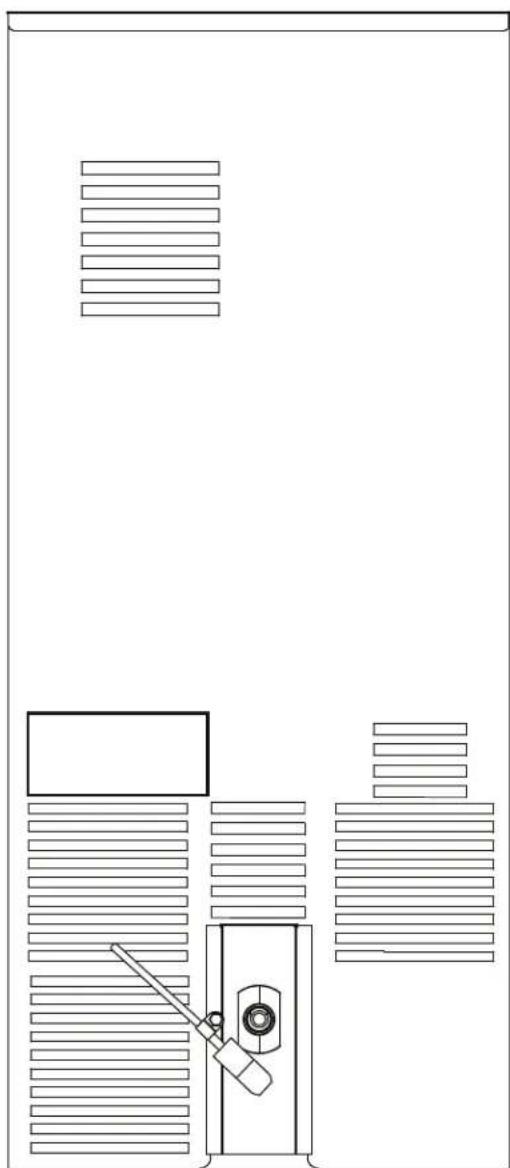
Model/Serial Number Location
These numbers are required when requesting information from your local Manitowoc distributor, or Manitowoc Ice.
The model and serial number are listed on the MODEL/ SERIAL NUMBER DECAL affixed to the rear ice machine.
Warranty
For warranty information visit: www.manitowocice.com/Service/Warranty
Warranty Coverage Information
Warranty Registration
Warranty Verification
Warranty coverage begins the day the ice machine is installed.
WARRANTY REGISTRATION
Completing the warranty registration process is a quick and easy way to protect your investment.
Scan the QR code with your smart device or enter the link in a web browser to complete your warranty registration.
WWW.MANITOWOCICE.COM/SERVICE/WARRANTY#WARRANTY-REGISTRATION Registering your product insures warranty coverage and streamlines the process if any warranty work is required.
Section2
Installation
Installation Prerequisites
- Must have open site (gravity) drain available or purchase optional drain pump (see Water Supply and Drain Requirements).
- Must have a grounded, polarized electrical power supply on a dedicated electrical circuit (only appliance on circuit). If GFCI (ground fault circuit interrupter) is required by your local electrical code, it must be breaker type, not outlet type (see Electrical Service).
- Must have cold water supply line available at Ice Machine (see Water Supply and Drain Requirements).
- Clearance and air temperatures must be met (see Location of Ice Machine).
- If built into a cabinet, ice machine must be removable for yearly cleaning procedure (see Interior Cleaning and Sanitizing in section 3).
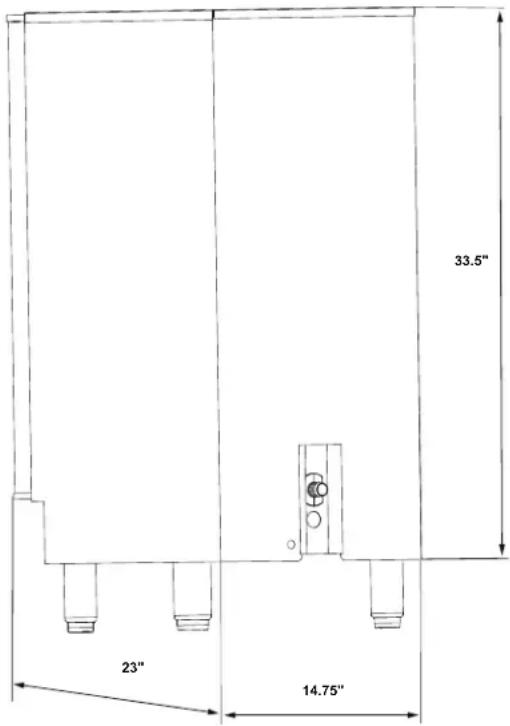
Ice Machine Dimensions
Clearances
The ice machine may be built into a cabinet. There is no minimum clearance requirement for the top or sides of the ice machine.
Minimum Cut-Out For Built-In Installations
| Height Width | Depth | |
| 35” (89 cm) 15” (38 cm) 26” (65 cm) | ||
Ice Machine Location
The location selected for the ice machine must meet the following criteria. If any of these criteria are not met, select another location.
- The ice machine may be built into a cabinet, however the location must allow removal of the ice machine for cleaning and servicing. Service diagnostics are performed from the top of the ice machine. Refer to "Minimum Cut-Out For Built-In Installations" on page 9.
- The location must be free of airborne and other contaminants.
- The air temperature must be at least 50^ (10^) , but must not exceed 100^ (38^) .
- The location must not be near heat-generating equipment.
- The location must not obstruct air flow through the condenser (airflow is in and out the front of the ice machine).
- The location must allow enough clearance for water, drain and electrical connections at the rear of the ice machine.
Caution
The ice machine must be protected if it will be subjected to ambient temperatures below 32^ (0^) . Component failure caused by exposure to freezing temperatures is not covered by the warranty.
ElectricalService
Prepare electrical circuit before installation of your ice machine. Installation requires a grounded (three-prong), polarized receptacle with a separate fuse/circuit breaker in an electrical service box.
VOLTAGE
The maximum allowable voltage variation is ± 10% of the rated voltage at ice machine start-up (when the electrical load is highest).
All electrical work, including wire routing and grounding, must conform to local, state and national electrical codes. The following precautions must be observed:
- The ice machine must be grounded.
- A separate fuse/circuit breaker must be provided for each ice machine.
- The maximum allowable voltage variation is + / - 10% of the rated voltage at ice machine start-up (when the electrical load is highest).
- Check all green ground screws in the control box and verify they are tight before starting the ice machine.
- Manitowoc's recommended minimum wire size is #14 for less than 100^ or #12 for more than 100^ to 200^ (solid copper conductor only). The recommended breaker is 15 amp. Local or state electrical code, length of run or materials used, can increase the minimum wire gauge required. A qualified electrician must determine the proper wire size, although #14 is the minimum size allowed.
- Incorrect polarity can lead to erratic ice machine operation and a safety issue.
MINIMUM CIRCUIT AMPACITY
The minimum circuit ampacity is used to help select the wire size of the electrical supply. (Minimum circuit ampacity is not the ice machine's running amp load.)
ELECTRIC REQUIREMENTS
Refer to Ice Machine Model/Serial Plate for voltage/ amperage specifications.
Maximum breaker size & minimum circuit amperage chart
| Model | Voltage Phase Cycle | Air-Cooled | |
| Maximum Fuse circuit Breaker | Minimum Circuit Ampacity | ||
| USE0050A 115/1/60 15 6.3 | |||
GFCI REQUIREMENTS
If GFCI (ground fault circuit interrupter) is required by local electrical code, it must be breaker type.
Water Supply and Drain Requirements
WATERSUPPLY
Prepare water supply line and drain before installation of your ice machine. Installation requires a 1/4'' ID copper cold water line and compression fitting (not supplied). The ice machine is supplied with a drain hose for gravity draining. The optional drain pump must be purchased if a gravity drain is not possible. Both drain methods require routing to an open site drain. Do not connect directly to drain line as bacteria from drain line may contaminate the ice machine.
The included water filter is designed to inhibit scale formation, filter sediment, and remove chlorine odor and taste. The life expectancy of the water filter is 6 months during normal usage. The ice machine control board will monitor water usage and indicate when replacement is required.
WATER INLET LINES
Follow these guidelines to install water inlet lines:
- Plumbing must conform to state and local codes.
- Do not connect the ice machine to a hot water supply. Be sure all hot water restrictors installed for other equipment are working. (Check valves on sink faucets, dishwashers, etc.)
- Water pressure must remain between 20 and 80 psig (14 to 55 bar). If water pressure exceeds the maximum recommended pressure (80 psi - 55 bar), obtain a water pressure regulator from your Manitowoc distributor.
- Install a water shut-off valve for the ice making water lines.
- Insulate the water inlet line to prevent condensation.
DRAIN CONNECTIONS
Follow these guidelines when installing drain lines to prevent drain water from flowing back into the ice machine and storage bin:
- Drain lines must have a 1.5 inch drop per 5 feet of run (2.5 cm per meter), and must not create traps.
- The floor drain must be large enough to accommodate drainage from all drains.
- Drain pump discharge line must terminate at an open site drain
Maximum rise - 12 feet (3.7 m)
Maximum run - 100 feet (30.5 m)
| Approximate Height of Ice Machine Drain | |
| Leg Levelers 3" (76 mm) | |
| Installation with Leg Option 7" (179 mm) |
WATER SUPPLY AND DRAIN LINE SIZING/CONNECTIONS
| Location | Water Temperature | Water Pressure | Ice Machine Fitting | Tubing Size Up To Ice Machine Fitting |
| Ice Making Water Inlet | 40°F (4°C) Min. 90°F (32°C) Max. | Minimum 20 psi (138 kPA) Maximum 80 psi (551 kPA) | 1/4" (6 mm) OD Copper Tubing | 1/4" (6 mm) Minimum Outside Diameter |
| Ice Making Bin Drain | ---- 3/4" | (19 mm) Hose Barb | 3/4" (19 mm) Minimum Inside Diameter | |
| Drain Pump | ---- 3/8" | (9 mm) Hose | 3/8" (9 mm) Minimum Inside Diameter |
Step-by-Step Installation Procedure
- Prepare the site by following the instructions under Electrical Service and Water Supply and Drain Requirements.
- Remove ice machine from carton.
- Inspect for damage.
- Remove literature/warranty packet and drain hose from inside the ice machine.
- Adjust leg levelers (or install optional legs). Refer to "Leveling The Ice Machine" on page 13
- Reverse door if desired. See "Installation Checklist" on page 14.
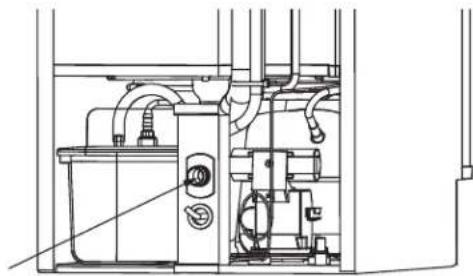
- For a gravity drain, install drain hose to drain on back of ice machine and route to open site drain. For optional drain pump method, see "Drain Pump Option" on page 13.
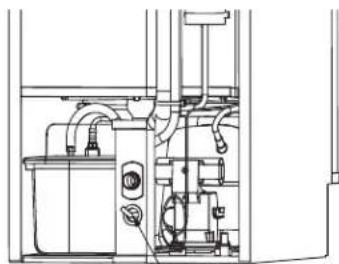
- Use compression fitting to connect the Water Inlet on back of ice machine to the prepared 1/4 ID cold water line. Refer to "Water Supply and Drain Requirements" on page 11
- Open the shut-off valve on the water line.
- Connect electrical plug to grounded (three-prong), polarized outlet. See "Electrical Service" on page 10
- Place ice machine back in position and check for level again. Make any necessary adjustments.
- Prepare descaler and sanitizer solution and clean and sanitize the ice machine according to steps 1 through 7 "In Place Cleaning/Sanitizing Procedure" on page 18.
- Press Power button.
LEVELING THE ICE MACHINE
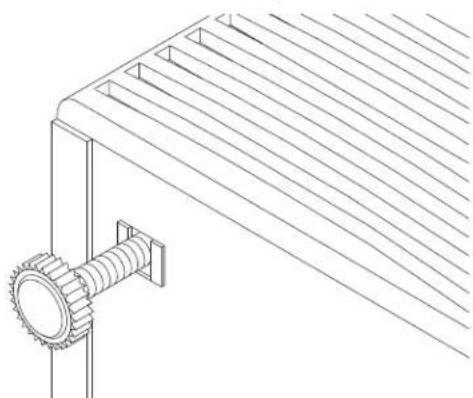
- Adjust the levelers close to desired height.
- Move the bin into its final position.
- Level the ice machine to assure that the bin door closes and seals properly. Use a level on top of the bin. Turn the base of each foot as necessary to level the bin.
LEG OPTION
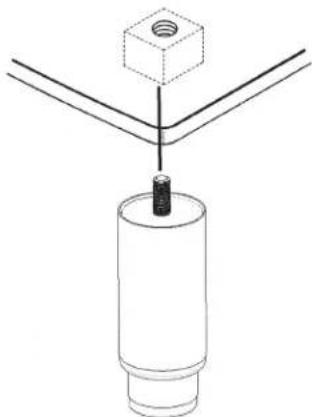
1.Remove leg levelers from the bottom of the ice machine.
2.Screw legs into the bottom of the ice machine.
3.Screw the foot of each leg in as far as possible.
4. Move ice machine to final position.
- Level the ice machine to assure that the bin door closes and seals properly. Use a level on top of the bin. Turn the base of each foot as necessary to level the bin.
DRAIN PUMP OPTION
Disconnect power to ice machine before proceeding.
- Remove top cover screws and slide cover off. Remove back panel screws and lift panel off.
2.Assemble the outlet tube and vent tube to the drain pump. - Plug the drain pump's wire assembly into the ice machine's wire assembly. Slide drain pump into cavity.
4.Swap out existing Bin Drain Tube for Bin Drain Tube packaged with drain pump. - Route the vent tube and outlet tube.
- Reassemble ice machine.
NOTE: See instructions packaged with drain pump for details.
Upon activation, be sure to check all connections for water leakage.
Before Starting the Ice Machine
The ice machine must be sanitized before making ice.
To ensure proper operation, follow the Operational Checks in Section 3 of this manual. Starting the ice machine and completing the Operational Checks are the responsibilities of the owner/operator.
Adjustments and maintenance procedures outlined in this manual are not covered by the warranty.
Operational Checks
Normally, new installations do not require any adjustment. To ensure proper operation, always follow the Operational Checks:
- when starting the ice machine for the first time
- after a prolonged out of service period
- after cleaning and sanitizing
NOTE: Routine adjustments and maintenance procedures are not covered by the warranty.
WATER LEVEL
The ice machine maintains the correct water level. The water level is not adjustable.
INSTALLATIONCHECKLIST
| Is the Ice Machine level? | |
| Has all of the internal packing been removed? | |
| Have all of the electrical and water connections been made? | |
| Has the supply voltage been tested and checked against the rating on the nameplate? | |
| Is there proper clearance around the ice machine for air circulation? | |
| Is the ice machine grounded and polarity correct? | |
| Has the ice machine been installed where ambient temperatures will remain in the range of 50° - 100°F (10° - 38°C)? | |
| Has the ice machine been installed where the incoming water temperature will remain in the range of 40° - 90°F (4° - 32°C)? | |
| Is the ice machine drain line routed to an open site drain? | |
| Are all electrical leads free from contact with refrigeration lines and moving equipment? | |
| Has the owner/operator been instructed regarding maintenance and the use of Manitowoc Descaler and Sanitizer? | |
| Has the warranty registration information been completed online at www.manitowocice.com/Service/Warranty#Warranty-Registration? | |
| Has the ice machine and bin been sanitized? | |
| When installed is the drain pump functioning correctly energizes, de-energizes and safety switch stops the ice machine? | |
| GFCI Required - Is it a breaker type and not a receptacle type? | |
| Is the ice machine plugged into a properly grounded, polarized receptacle? | |
| Have the water and drain connections been examined for leaks? | |
| Has the ice machine been cleaned and sanitized? |
NOTE: If air temperature is less than 60^ (15^) , water temperature must be equal to or greater than 50^ (10^) .
Section3
Operation
ControlPanel
FUNCTIONS
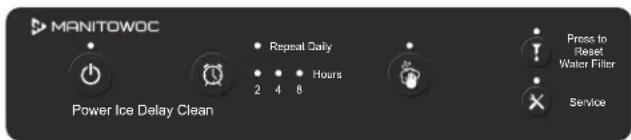
Power Button (Blue)
Pressing the "Power" button once will energize the ice machine and blue Power light. Pressing the "Power" button a second time will de-energize the ice machine.
Clean (Blue)
Pressing the "Clean" button will initiate a clean cycle and energize the clean light. The clean light will flash during the clean cycle to indicate the proper time to add ice machine descaler or sanitizer.
Replace Filter (Red)
When the ice machine completes 8000 freeze/harvest cycles the light will energize to indicate the filter needs replacement. Depressing the "Clean" button for 6 seconds will reset the counter and de-energize the light.
Service (Red)
Flashes to indicate a service limit has been exceeded. Pressing the service light allows viewing of service limits.
ICE DELAY
Pressing the "Ice Delay" button will initiate a delay cycle. The ice machine will not run until the delay time expires.
NOTE: The power button must be on to adjust delay start.
- Pressing the button once will energize the 2 hour light and initiate a two hour delay period.
- Pressing the button a second time will energize the 4 hour light and initiate a four hour delay period.
- Pressing the button a third time will energize the 8 hour light and initiate an eight hour delay period.
- Pressing the button a fourth time will cancel the delay cycle.
REPEAT ICE DELAY PERIOD EVERY 24 HOURS
- Press the power button to start the ice machine.
- Press and hold the ice delay button for 3 seconds.
- Pressing the ice delay button will energize the 2 hour light and initiate a two hour delay period every 24 hours.
- Pressing the ice delay button again will energize the 4 hour light and initiate a four hour delay period every 24 hours.
- Pressing the ice delay button again will energize the 8 hour light and initiate an eight hour delay period every 24 hours.
- Pressing the ice delay button again will cancel the 24 hour repeat delay. Start with step 1 to reenter 24 hour delay setup.
EXAMPLE
Setting a daily 4 hour ice delay from 1pm to 5pm .
At 1 pm perform steps 1 through 4 above. The 4 hour delay light will blink every 3 seconds to indicate it is in a delay period. After 5 pm the ice machine will fill the bin as needed. At 1 pm on all following days the ice machine will initiate a delay period at 1 pm and flash the 4 hour delay LED.
Canceling a delay period
A delay period can be ended by pressing the power button off/on.
Canceling a 24 hour ice delay period
- Press the power button while a delay period is active.
- Follow "Repeat Delay Period every 24 Hours" to step 6.
Sequence of Operation
Depending on ambient conditions and cold water supply temperature, the ice making process will take approximately 15-30 minutes.
Step 1 Initial Start-Up or
Start-Up After Automatic Shut-Off: Water Purge/Refrigeration Equalization
Before the compressor starts, the harvest valve and dump valve will energize for 15 seconds to equalize pressure in the refrigeration system and purge old water from the system.
Step 2 Refrigeration System Start-Up - Prechill
The compressor, condenser fan motor, liquid line solenoid and water inlet valve energize. The prechill cycle continues until the water trough fills (float valve opens) and the 30 second minimum prechill time expires.
Step 3 Freeze
The water pump energizes and sprays water onto the evaporator. The water freezes on the evaporator, dropping the water trough level until the low water float closes, ending the freeze cycle.
Step 4 Harvest
The water pump and water inlet valve remain on for 45 seconds, then shutoff. The evaporator is warmed, allowing the cubes to release from the evaporator and drop into the storage bin. As the cubes drop into the bin a 60 second timer starts. The harvest cycle ends when the 60 second timer expires.
- When the bin is not full of ice the control will start a new prechill cycle (step 2).
- When the bin is full of ice the control initiates step 5 automatic shutoff.
Step 5 Automatic Shut-Off
The level of ice in the storage bin controls the ice machine shut-off. When the bin is full, ice will either contact the bin thermistor or hold the water curtain open, which stops the ice machine. The ice machine remains off until ice no longer contacts the bin thermistor and/or the water curtain. The increase in temperature will restart the ice machine (step 1).
Service Limits
Service limits protect the machine from major system failures. The service LED will flash when one of the five service limits are exceeded. When the service button is pressed the LED will flash the corresponding number for the fault condition. For example if service limit 2 occurs the service light will flash twice. Only the most recent service limit is saved to memory.
SERVICE LIMIT 1 LONG FREEZE CYCLE
The maximum freeze time is 30 minutes at which time the control board automatically initiates a harvest cycle (step 4).
SERVICE LIMIT 2 LONG HARVEST CYCLE
The maximum harvest time is 7 minutes at which time the control board either starts a prechill cycle (step 2) or enters automatic shutoff (step 4).
SERVICE LIMIT 3 WATER LOSS
In the Prechill cycle (step 2) when the high and low water level float switches do not open within 4 minutes the ice machine stops.
SERVICE LIMIT 4 CONDENSATE PUMP FAULT
When the float switch on the condensate pump is open or the float switch jumper is disconnected from the wire harness the ice machine stops.
SERVICE LIMIT 5 FULL BIN FAULT
When power is on and the ice machine has remained off for 24 hours the service LED will flash.
Refer to "Troubleshooting" on page 23 for further service limit detail.
Section4 Maintenance
Interior Cleaning and Sanitizing
GENERAL
Clean and sanitize the ice machine every six months for efficient operation. If the ice machine requires more frequent cleaning and sanitizing, consult a qualified service company to test the water quality and recommend appropriate water treatment.
The ice machine must be taken apart for cleaning and sanitizing.
Warning
If you do not understand the procedures or the safety precautions that must be followed, call your local Manitowoc service representative to perform the maintenance procedures for you
Caution
Use only Manitowoc approved Ice Machine Descaler (9405463) and Sanitizer (9405653). Using a non Manitowoc descaler or sanitizer may result in bodily harm and/or cause damage to the ice machine that is not covered under the warranty. Do not use descaler or sanitizer quantities that exceed the amounts listed in this manual. Do not use these solutions in a manner inconsistent with their labeling. Read and understand all labels printed on bottles before use.
Cleaning and Sanitizing Procedures
Ice machine descaler is used to remove lime scale and mineral deposits. Ice machine sanitizer disinfects and removes algae and slime.
Perform an In Place Cleaning/Sanitizing procedure 6 months and a Cleaning/Sanitizing procedure every 12 months for efficient operation. If the ice machine requires more frequent cleaning and sanitizing, consult a qualified service company to test the water quality and recommend appropriate water treatment. An extremely dirty ice machine must be taken apart for cleaning and sanitizing.
CAUTION
Damage to the ice machine evaporator caused by incorrect chemical usage is not covered by the warranty. Use Manitowoc Ice Machine Descaler (part number 9405463) and Sanitizer (part number 9405653) only.
| Maintenance Procedure | Weekly Semi Annual Annual | After Prolong Shutdown | ||
| Clean Cabinet exterior X | X | X | X | |
| Sanitize Ice Bin X | X | X | ||
| Clean Evaporator X | X | X | ||
| Sanitize Evaporator X | X | X | ||
| Clean Condenser Coil X | X | X | ||
| Change Water Filter X | X | X | ||
| Check Ice Quality X | X | X | X |
Remedial Cleaning Procedure
This procedure allows in place descending of all surfaces that come in contact with the water system. The ice machine requires disassembly and descending/sanitizing a minimum of once every 6 months. The quality of your potable water supply may require more frequent cleaning intervals.
CLEAN BUTTON OPERATION
- When the clean cycle is complete, default is to start ice making. The ice machine will shutoff at the end of the clean cycle, when the power button is pressed during the clean cycle.
- The clean cycle is aborted when the clean button is pressed and held for 3 seconds.
- If the curtain switch is open for more than 2 seconds, the clean cycle is paused until the curtain switch closes.
- Pressing and holding the clean button for 3 seconds will abort the clean cycle.
Step 1 Press power after ice falls from the evaporator at the end of a harvest cycle. Or, press power and allow the ice to melt off the evaporator
Step 2 Remove all ice from the bin.
Step 3 Prepare 4 oz (1/2 cup) of undiluted Manitowoc Ice Machine Descaler (part number 9405463 only) in a container that will fit easily under the lifted water curtain.
Model Amount of Descaler
USE0050 4 ounces (120 ml)
Step 4 Press and hold the clean button for 3 seconds.
Step 5 Wait until the water pump sprays water onto the evaporator(approximately 3 minutes) then add the prepared Manitowoc Descaler by lifting the water curtain and pouring directly into the spray area.
Step 6 Press the power button to have the ice machine stop at the end of the clean cycle. The ice machine will automatically time out a ten minute cleaning cycle, followed by five rinse cycles and stop. This entire cycle lasts approximately 30 minutes.
Step 7 Prepare 1/2 oz (1 tablespoon) of undiluted Manitowoc Ice Machine Sanitizer (part number 9405653 only) in a container that will fit into the same area.
Model Amount of Sanitizer
USE0050 1/2 Ounce (15ml)
Step 8 Press and hold the clean button for 3 seconds.
Step 9 Wait until the water pump sprays water onto the evaporator(approximately 3 minutes) then add the prepared Manitowoc Sanitizer by lifting the water curtain and pouring directly into the spray area. The ice machine will automatically time out a ten minute sanitizing cycle, followed by five rinse cycles. This entire cycle lasts approximately 30 minutes. When the clean cycle is complete the ice machine will start a freeze cycle.
Step 10 Mix a solution of 1/4 oz. (7.4ml) of sanitizer and 1/2 gallon (1.9L) of water. Use a spray bottle, sponge or cloth to sanitize the bin. Rinsing is not required
Detailed Descaling and Sanitizing Procedure
Ice machine descaler is used to remove lime scale and other mineral deposits. Ice machine sanitizer disinfects and removes algae and slime.
Step 1 Press power after ice falls from the evaporator at the end of a harvest cycle. Or, press power and allow the ice to melt off the evaporator
Step 2 Remove all ice from the bin.
Prepare 4 oz (1/2 cup) of undiluted Manitowoc Ice Machine descaler (part number 9405463 only) in a container that will fit easily under the lifted water curtain.
| Model Amount Of | Descaler |
| USE0050 4 oz. (120 ml) |
Step 3 Press and hold the clean button for 3 seconds.
Step 4 Wait until the water pump sprays water onto the evaporator(approximately 3 minutes) then add the prepared Manitowoc Descaler by lifting the water curtain and pouring directly into the spray area.
Step 5 Press the power button to have the ice machine stop at the end of the clean cycle. The ice machine will automatically time out a ten minute cleaning cycle, followed by five rinse cycles and stop. This entire cycle lasts approximately 30 minutes.
Step 6 Disconnect electric power to the ice machine.
Step 7 Mix 16 oz (2 cups) descaler with 2 gal of warm water.
| Model Descaler | Amount Water Amount | |
| USE0050 16 oz | (473 ml) 1 gal. (4L) |
Step 8 Remove the following components for descaling and sanitizing:
Tongs, Tong Holder, Water Curtain, Ice Ramp, Water Pump, and Spray Nozzle Assembly. Refer to "Removal of Parts for Descaling/Sanitizing" on page 20 for identification.
Step 9 Take all removed components to a sink for descaling. Use 1/2 of the descaler/water mixture to descale all components. The solution will foam when it contacts lime scale and mineral deposits; once the foaming stops, use a soft-bristle nylon brush, sponge or cloth (NOT a wire brush) to carefully clean the parts.
Step 10 Place floats in a small container filled with descaler water solution to soak.
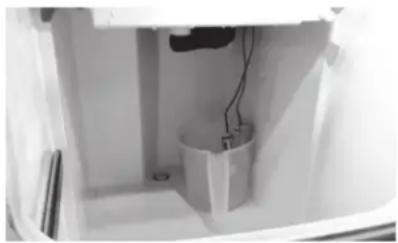
Step 11 While components are soaking, use the other 1/2 of the descaler/water solution and a nylon brush or cloth to clean inside the ice bin. Clean inside of door, door gasket, bin, and evaporator bucket. Rinse all areas thoroughly with clean water
Step 12 Mix 1 oz (2 tablespoons) sanitizer with 2 gal of warm water.
| Model Sanitizer Amount Water Amount | ||
| USE0050 1 oz (30ml) 2 gal (8L) |
Step 13 Remove floats from container, empty container and rinse floats and container with clean water. Fill container with sanitizer water solution and place floats in container to soak. Soak floats for 10 minutes then remove. Do not rinse sanitized floats.
Step 14 Use 1/2 of the sanitizer/water mixture to sanitize all removed components. Use a spray bottle, cloth or sponge to liberally apply the solution to all surfaces of the removed parts or soak the removed parts in the sanitizer/solution. Do not rinse sanitized components.
Step 15 Use the other 1/2 of the sanitizer/water solution and a spray bottle, sponge or cloth to sanitize the inside of ice bin. Sanitize inside of door, door gasket, bin and evaporator bucket. Do not rinse sanitized areas.
Step 16 Replace all removed components.
Step 17 Reapply power to the ice machine, then press the Clean button. Wait until the water pump sprays water onto the evaporator (approximately 3 minutes) then add 1/2 oz (1 tablespoon) of undiluted Manitowoc Sanitizer by lifting the water curtain and pouring directly into the spray area. This entire cycle lasts approximately 30 minutes. When the clean cycle is complete the ice machine will start a freeze cycle.
Removal of Parts for Descaling/Sanitizing
- Turn off the electrical and water supply to the ice machine.
Warning
Disconnect electric power to the ice machine before proceeding with any of the following procedures.
- Remove all ice from the bin.
- Remove the components that must be descaled and sanitized. See the following pages for removal procedures for these parts.
Warning
Wear rubber gloves and safety goggles (and/or face shield) when handling ice Machine Descaler or Sanitizer.
- Soak the removed part(s) in a properly mixed solution of descaler.
| Solution Type | Water Mixed | With |
| Descaler 1 ga. | (4 l) 16 oz (4l) descaler | |
| Sanitizer 2 ga. | (8 l) 1 oz (30 ml) sanitizer |
- The descaler will foam; once the foaming stops use a soft-bristle nylon brush, sponge or cloth (NOT a wire brush) to carefully clean the parts.
Caution
Do not mix Descaler and Sanitizer solutions together. It is a violation of Federal law to use these solutions in a manner inconsistent with their labeling.
Caution
Do not immerse the water pump motor in the descending or sanitizing solution.
- Thoroughly rinse all the parts with clear water.
- Soak the removed parts in a properly mixed solution of sanitizer for 5 minutes.
- Use a soft-bristle nylon brush, sponge or cloth (NOT a wire brush) to carefully sanitize the parts.
- Use the sanitizing solution and a spray bottle, sponge or cloth to sanitize (wipe) the interior of the ice machine and bin.
- Do not rinse sanitized areas when using Manitowoc Sanitizer.
- Install the removed parts.
- Turn on the water and electrical supply
TOP COVER
- Disconnect power to the ice machine.
- Remove two back screws.
- Slide top cover backward slightly and lift cover off.
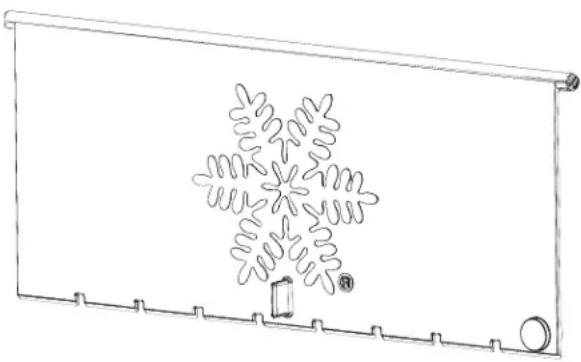
WATERCURTAIN
The water curtain is designed to keep the spraying water from escaping the evaporator compartment.
TO REMOVE JUST THE WATER CURTAIN:
- Grasp one end of the water curtain and lift up.
- Pivot water curtain and disengage remaining end.
- To re-install into ice machine, grasp one end of the water curtain, install one end, pivot the opposite end and pull down into position. Make sure tabs are secure in grooves.
TO REMOVE WATER CURTAIN ASSEMBLY:
- Slide evaporator bucket forward 1/2'' (13 mm).
- Lift curtain assembly straight up.
Warning
Removing the water curtain while the water pump is running will allow water to spray from ice machine. Disconnect electrical power to the ice machine at the electric service switch box and turn off the water supply.
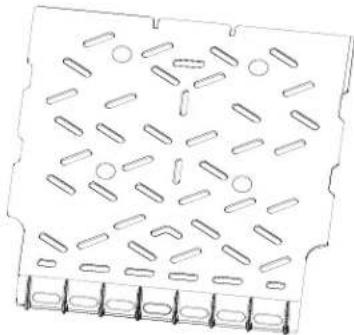
ICE CHUTE
The ice chute is positioned over the spray nozzles and allows the ice to easily fall into the bin. It must be firmly positioned over the spray bar, with the front edge inside the water trough. Spray nozzles must be align with the spray holes or spray water will fall into the bin.
- Grasp and lift up and forward to remove.
- Reverse procedure to re-install ice chute and reposition over the Water Distribution Assembly.
Make sure rear supports are over spray bar, and front edge is inside of water trough.
WATER TROUGH
- Depress tabs on right and left side of the water trough.
- Allow front of water trough to drop as you pull forward to disengage the rear pins.

SPRAY BAR, WATER PUMP AND HOSE
- Remove spray bar clamp and spray bar.
- Remove the 5 / 16'' water pump mounting screw.
- Grasp pump and pull straight down until water pump disengages and electrical connector is visible.
- Disconnect the electrical connector.
- Remove the water pump from ice machine.
- Remove clamp from hose to remove from pump.
- Do not soak the water pump in descaler or sanitizer. Wipe the pump and ice machine base clean.
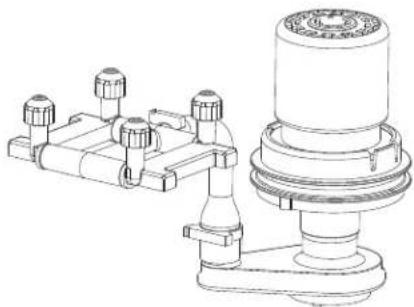
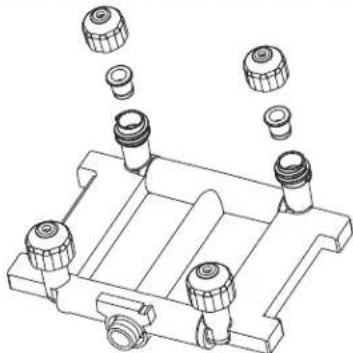
SPRAY BAR DISASSEMBLY
The spray bar supplies water to the individual ice making cups. Water from the water pump sprays through the nozzles, located on the upper portion of the tubes.
- Grasp one end of the spray bar, lift up and remove from seat formed in evaporator bucket.
- Remove clamp on water inlet tubing by grasping both ears on clip and separating.
- Apply food grade lubricant to ease re-assembly of spray bar components when necessary.
- To re-install spray bar, position water inlet tubing on inlet ports, and squeeze clips until tight.
- Reposition assembly on water trough seat.
Nozzles and inserts can be removed for cleaning by unscrewing nozzles. Inserts are located inside the spray bar ports. The spray bar also disassembles for easy cleaning.
BIN LIGHT
If the ice machine is shut down for a long period of time the bin light cover must be cleaned and sanitized. The light is provided for your convenience. If you experience operational problems with the light a replacement appliance bulb can be obtained from your local hardware store.
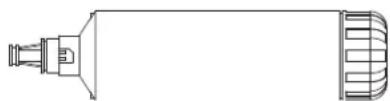
WATER FILTER
To replace the water filter incoming water does not need to be turned off. This system is equipped with an internal shut-off valve.
- Turn cartridge slowly to the left, about 1/4 turn, until it stops. At this position, both inlet and outlet ports are closed and water pressure has been relieved.
- Pull used cartridge forward to remove, then discard. There may be a small amount of residual water drainage after pressure is relieved and during cartridge removal.
- Remove cap from top of new cartridge and push new cartridge into filter head. Turn cartridge 1/4 turn to the right until it stops. Top surface of cartridge will become flush with bottom of the head when fully engaged.
- Run a 3-minute fill cycle of the ice machine to flush the filter. Then power off unit and restart to begin a new fill sequence and ice making cycle.
- Press and hold the "Clean" button for 6 seconds to reset the counter and de-energize the filter light.

ICE MACHINE INSPECTION
Check all water fittings and lines for leaks. Also, make sure the refrigeration tubing is not rubbing or vibrating against other tubing, panels, etc.
Do not put anything (boxes, etc.) in front of the ice machine. There must be adequate airflow through and around the ice machine to maximize ice production and ensure long component life.
EXTERIOR CLEANING
Clean the area around the ice machine as often as necessary to maintain cleanliness and efficient operation.
Sponge any dust and dirt off the outside of the ice machine with mild soap and water. Wipe dry with a clean, soft cloth.
Clean up any fallen ice or water spills as they occur.
CLEANING THE CONDenser
A dirty condenser restricts airflow, resulting in excessively high operating temperatures. This reduces ice production and shortens component life.
- Clean the condenser at least every six months.
- Shine a flashlight through the condenser to check for dirt between the fins.
- Compressed air can be blown through the condenser fins. This procedure will raise considerable dust and is best performed outside. Be careful not to bend the fan blades.
- If dirt or grease remains between the fins or the condenser fins are bent or flattened, consult your service representative.
Removal from Service/Long Term Storage/Winterization
- Perform a cleaning and sanitizing procedure to prevent mildew growth.
- Disconnect the electric power at the circuit breaker or the electric service switch.
- Turn off the water supply.
- Remove the water from the water trough.
- Disconnect and drain the incoming ice-making water line at the rear of the ice machine.
- Disconnect vinyl hose from water pump and allow to drain.
- Make sure water is not trapped in any of the water or drain lines. Compressed air can be used to blow out the lines.
- Use a spray bottle and a solution of sanitizer/water (0.50 oz/1 gal) and spray all interior surfaces. Do not rinse, allow to air dry.
Section 5
Troubleshooting
Checklist
If a problem arises during operation of your ice machine, follow the checklist below before calling service. Routine adjustments and maintenance procedures are not covered by the warranty.
| Problem Possible Cause To | Correct | |
| Ice machine does not operate. | No electrical power to the ice machine. | Replace the fuse/reset the breaker/turn on the main switch/plug power cord into receptacle. |
| Ice machine needs to be turned on. Press the Power button to start ice making. | ||
| Water curtain in open position. | Water curtain must be in the closed position and capable of swinging freely. | |
| Ice contacting bin level thermistor. Clear ice from bin level sensor. | ||
| Ice machine is in ice ice delay or repeat ice delay period every 24 hours. | Refer to section 3 Operation and cancel ice delay period. | |
| Ice machine stops, and can be restarted by turning the ice machine OFF and then ON. | Service limit feature stopping the ice machine. | Refer to "Service Limit Feature" on the next page. |
| Ice sheet is thick. | Water trough level is too high. Adjust ice thickness float. | |
| Power button was turned off/on during freeze cycle and ice remained on evaporator. | Allow ice to thaw and release from evaporator, then restart. | |
| Water curtain was opened then closed in the harvest cycle before the ice released. | Allow ice to thaw and release from evaporator, then restart. | |
| Long harvest cycles with repeated service limit indication. | Call for service. | |
| Ice machine does not release ice or is slow to harvest. | Ice machine is dirty. Clean and sanitize the ice | machine. |
| Ice machine is not level. Level the ice machine. | ||
| Low air temperature around ice machine (air-cooled models). | Air temperature must be at least 40°F (4°C). | |
| Ice machine does not cycle into harvest mode. | Harvest float switch is dirty. Clean and sanitize the ice machine. | |
| Harvest float switch wire is disconnected. Connect the wire. | ||
| Harvest float switch is out of adjustment. Adjust the harvest float switch. | ||
| Uneven ice fill (thin at top of evaporator). See "Shallow or Incomplete Cubes" below. | ||
| Ice quality is poor (soft or not clear). | Poor incoming water quality. | Contact a qualified service company to test the quality of the incoming water and make appropriate filter recommendations. |
| Water filtration is poor. Replace the filter. | ||
| Ice machine is dirty. Clean and sanitize the ice | machine. | |
| Water softener is working improperly (if applicable). | Repair the water softener. | |
| Ice machine produces shallow or incomplete cubes, or the ice fill pattern on the evaporator is incomplete. | Water trough level is too high or too low. | Check float position and adjust the water level. |
| Water filtration is poor. Replace the filter. | ||
| Hot incoming water. | Connect the ice machine to a cold water supply. | |
| Incorrect incoming water pressure. | Water pressure must be 20-80 psi (137.9-551.5 kPa) | |
| Ice machine is not level. Level the ice machine. | ||
| Low ice capacity. | The condenser is dirty. Clean the condenser. | |
| High air temperature around ice machine (air-cooled models). | Air temperature must not exceed 110°F (43°C). | |
| Inadequate clearance around the ice machine. | Provide adequate clearance. | |
| Objects stacked around ice machine, blocking airflow to condenser (air-cooled models) | Remove items blocking airflow. | |
| Hot incoming water. | Connect the ice machine to a cold water supply. | |
Service Limit Feature
This Maitowoc ice machine features built-in service limits, which will stop the ice machine if conditions arise which could cause a major component failure.
Before calling for service, re-start the ice machine using the following procedure:
- Press the power button and turn off the ice machine, then press the power button again to start the ice machine.
A. If the service limit feature has stopped the ice machine, it will restart after a short delay. Proceed to step 2.
B. If the ice machine does not restart, see "Ice machine does not operate" on the previous page.
- Allow the ice machine to run to determine if the condition is recurring.
A. If the ice machine stops again, the condition has recurred. Call for service.
B. If the ice machine continues to run, the condition has corrected itself. Allow the ice machine to continue running.
SERVICE LIMIT LED OPERATION
The service LED will flash when one of the five service limits are exceeded. When the service button is pressed the LED will flash the corresponding number for the fault condition. For example if service limit 2 occurred, the service light will flash twice.
- Only the most recent service limit is saved to memory.
Service limits are stored in memory for 100 cycles, then erased.
SERVICE LIMIT 1 LONG FREEZ CYCLE
The maximum freeze time is 30 minutes at which time the control board automatically initiates a harvest cycle.
SERVICE LIMIT 2 LONG HARVEST CYCLE
The maximum harvest time is 7 minutes at which time the control board either starts a prechill cycle or enters automatic shutoff.
SERVICE LIMIT 3 WATER LOSS
In the Prechill cycle when the high and low water level float switches do not open within 4 minutes the ice machine stops.
SERVICE LIMIT 4 CONDENSATE PUMP FAULT
When the float switch on the condensate pump is open or the float switch jumper is disconnected from the wire harness the ice machine stops.
SERVICE LIMIT 5 FULL BIN FAULT
When power is on and the ice machine has remained off for 24 hours the service LED will flash.
Avis de sécurité
Avis de sécurité
Section 2 Installation
Glissoire a glace. 43
Cuvé à eau. 43
www.manitowocice.com/Service/Warranty
www.manitowocice.com/Service/Warranty
- CrystalCraft™ Premier
- Model USE0050
- Safety Notices
- Read these precautions to prevent personal injury:
- DEFINITIONS
- DANGER
- A Warning
- Caution
- Notice
- Warning
- Follow these precautions to prevent personal injury during installation of this equipment:
- Follow these electrical requirements during installation of this equipment.
- Warning
- Follow these precautions to prevent personal injury while operating or maintaining this equipment:
- Follow these refrigeration system requirements during installation, use or repair of this equipment.
- Follow these precautions to prevent personal injury during use and maintenance of this equipment:
- Table of Contents
- Section 1 General Information
- Section 2 Installation
- Section 3 Operation
- Section 4 Maintenance
- Section 5 Troubleshooting
- Section1 GeneralInformation
- Model Numbers
- HOW TO READ A MODEL NUMBER
- ACCESSIONS
- LEGS
- DRAIN PUMP
- MANITOWOC DESCALER AND SANITIZER
- ARCTIC PURE WATER FILTER SYSTEM
- Model/Serial Number Location
- Warranty
- WARRANTY REGISTRATION
- Section2
- Installation
- Installation Prerequisites
- Clearances
- Ice Machine Location
- ElectricalService
- VOLTAGE
- MINIMUM CIRCUIT AMPACITY
- ELECTRIC REQUIREMENTS
- GFCI REQUIREMENTS
- Water Supply and Drain Requirements
- WATERSUPPLY
- WATER INLET LINES
- DRAIN CONNECTIONS
- Step-by-Step Installation Procedure
- LEVELING THE ICE MACHINE
- LEG OPTION
- DRAIN PUMP OPTION
- Before Starting the Ice Machine
- Operational Checks
- WATER LEVEL
- Section3
- Operation
- ControlPanel
- FUNCTIONS
- Power Button (Blue)
- Clean (Blue)
- Replace Filter (Red)
- Service (Red)
- ICE DELAY
- REPEAT ICE DELAY PERIOD EVERY 24 HOURS
- EXAMPLE
- Canceling a delay period
- Canceling a 24 hour ice delay period
- Sequence of Operation
- Step 1 Initial Start-Up or
- Step 2 Refrigeration System Start-Up - Prechill
- Step 3 Freeze
- Step 4 Harvest
- Step 5 Automatic Shut-Off
- Service Limits
- SERVICE LIMIT 1 LONG FREEZE CYCLE
- SERVICE LIMIT 2 LONG HARVEST CYCLE
- SERVICE LIMIT 3 WATER LOSS
- SERVICE LIMIT 4 CONDENSATE PUMP FAULT
- SERVICE LIMIT 5 FULL BIN FAULT
- Section4 Maintenance
- Interior Cleaning and Sanitizing
- GENERAL
- Cleaning and Sanitizing Procedures
- Remedial Cleaning Procedure
- CLEAN BUTTON OPERATION
- Model Amount of Descaler
- Model Amount of Sanitizer
- Detailed Descaling and Sanitizing Procedure
- Removal of Parts for Descaling/Sanitizing
- TOP COVER
- WATERCURTAIN
- TO REMOVE JUST THE WATER CURTAIN:
- TO REMOVE WATER CURTAIN ASSEMBLY:
- ICE CHUTE
- WATER TROUGH
- SPRAY BAR, WATER PUMP AND HOSE
- SPRAY BAR DISASSEMBLY
- BIN LIGHT
- WATER FILTER
- ICE MACHINE INSPECTION
- EXTERIOR CLEANING
- CLEANING THE CONDenser
- Removal from Service/Long Term Storage/Winterization
- Section 5
- Troubleshooting
- Checklist
- Service Limit Feature
- SERVICE LIMIT LED OPERATION
- SERVICE LIMIT 1 LONG FREEZ CYCLE
- Avis de sécurité
Brand : Manitowoc
Model : CrystalCraft Premier USE0050
Category : Ice machine