HF910P 011 - Vacuum Cleaner HOOVER - Free user manual and instructions
Find the device manual for free HF910P 011 HOOVER in PDF.


User questions about HF910P 011 HOOVER
0 question about this device. Answer the ones you know or ask your own.
Ask a new question about this device
Download the instructions for your Vacuum Cleaner in PDF format for free! Find your manual HF910P 011 - HOOVER and take your electronic device back in hand. On this page are published all the documents necessary for the use of your device. HF910P 011 by HOOVER.
USER MANUAL HF910P 011 HOOVER
text_image
QR code image containing encoded data, no visible human-readable text


natural_image
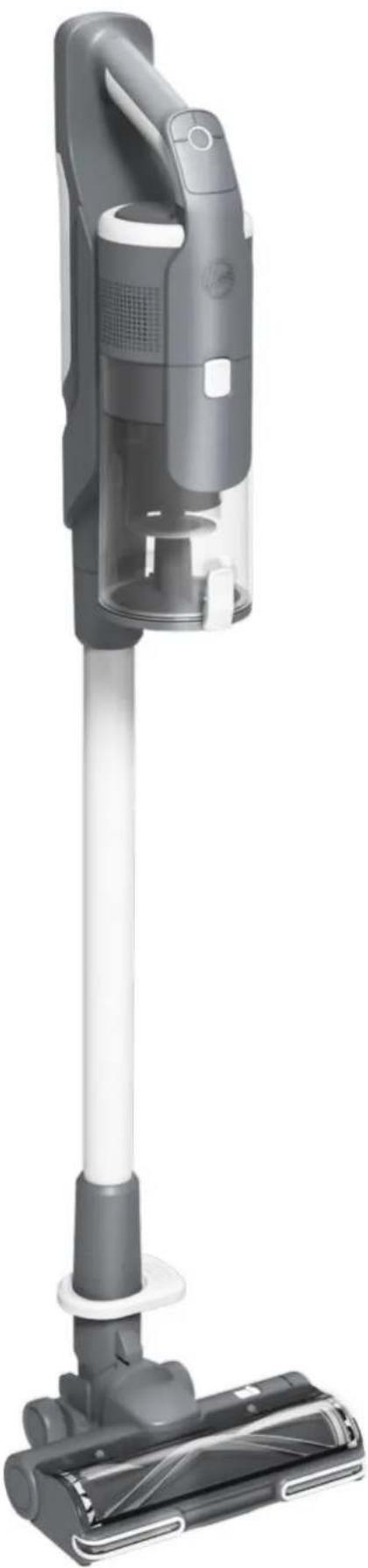
Exterior view of a modern vacuum cleaner with black body and white handle (no text or symbols visible)This appliance should only be used for domestic cleaning, as described in this user guide. Please ensure that this guide is fully understood before operating the appliance.
Always switch off and remove the charger from the socket before cleaning the appliance or any maintenance task.
This appliance can be used by children aged from 8 years and above and persons with reduced physical, sensory or mental capabilities or lack of experience and knowledge if they have been given supervision or instruction concerning use of the appliance in a safe way and understand the hazards involved. Children shall not play with the appliance.
Cleaning and user maintenance shall not be made by children without supervision.
If the power cord is damaged stop using the appliance immediately. To avoid a safety hazard, an authorised Hoover service engineer must replace the power cord.
Use only the original charger supplied with the appliance.
Check that your supply voltage is the same as that stated on the charger. This appliance is supplied with a double insulated battery charger which is only suitable for insertion in a 230V (UK 240V) socket outlet.
Plug the charger in to suitable socket outlet and connect the charger jack plug to the appliance.
When charging the appliance, the power switch lever must be in the off position.
The battery pack LED light will illuminate Red during charging and will turn white when fully charged.
Re-connect the appliance to the charger after use to recharge the battery.
Never charge the batteries in temperatures above 37^ C or below 0^ C. It is normal for the charger to become warm to the touch when charging.
Unplug the charger in the event of prolonged absence (holidays, etc.). Recharge appliance again before use as batteries may self discharge over increased periods of storage.
Use only attachments, consumables or spares recommended or supplied by Hoover.
Static electricity: some carpets can cause a small build up of static electricity. Any static discharge is not hazardous to health.
Keep hands, feet, loose clothing and hair away from rotating brushes.
Do not unplug the charger by pulling on the power cord.
Do not use your appliance out of doors or on any wet surface or for wet pick up. Do not pick up hard or sharp objects, matches, hot ashes, cigarette ends or other similar items.
Do not spray with or pick up flammable liquids, cleaning fluids, aerosols or their vapours.
Do not run over the power cord when using your appliance or remove the plug by pulling on the power cord. Do not continue to use your appliance or charger if it appears faulty.
Do not use the appliance to clean animals or people. Do not replace the batteries with non-rechargeable batteries.
Hoover service: To ensure the continued safe and efficient operation of this appliance we recommend that any servicing or repairs are only carried out by an authorised Hoover service engineer.
End of product Life disposal
If the appliance is to be disposed of the batteries must be removed. The appliance must be disconnected from the supply mains when removing the battery. Dispose of the batteries safely. Run the appliance until it stops because the batteries are fully discharged. Used batteries should be taken to a recycling station and not disposed of with household waste. To remove the batteries, please contact the Hoover Customer Centre or proceed according to the following instructions.
IMPORTANT: Always fully discharge the batteries before removal.
Run the cleaner until the batteries are completely empty. Remove the charger jack plug from the appliance.
Press the battery pack release buttons and slide to remove.
Note: Should you experience any difficulty in dismantling the unit or for more detailed information on treatment, recovery and recycling of this appliance, please contact your local city office or your household waste disposal service.
The Environment
The symbol on this appliance indicates that this appliance may not be treated as household waste. Instead it must be handed over to the applicable collection point for the recycling of electrical and electronic equipment. Disposal must be carried out in accordance with local environmental regulations for waste disposal. For more detailed information about treatment, recovery and recycling of this appliance, please contact your local city office, your household and waste disposal service or the shop where you purchased the appliance.

This appliance complies with the European Directives 2014/35/EU, 2014/30/EU and 2011/65/EU.
CANDY HOOVER GROUP S.r.l. Via Privata Eden Fumagalli, 20861 Brugherio (MB) Italy
2. IMPORTANT INFORMATION
Hoover Spares and Consumables
Always replace parts with genuine Hoover spares. These are available from your local Hoover dealer or direct from Hoover. When ordering parts always quote your model number.
Quality
Hoover's factories have been independently assessed for quality. Our products are made using a quality system which meets the requirements of ISO 9001.
Your Guarantee
The guarantee conditions for this appliance are as defined by our representative in the country in which it is sold. Details regarding these conditions can be obtained from the dealer from whom the appliance was purchased. The bill of sale or receipt must be produced when making any claim under the terms of this guarantee.
2 Year battery warranty
IMPORTANT: The battery in this cleaner is guaranteed for 2 years from the date of purchase. After 2 years the customer is liable for the cost of a new battery.
Subject to change without notice.
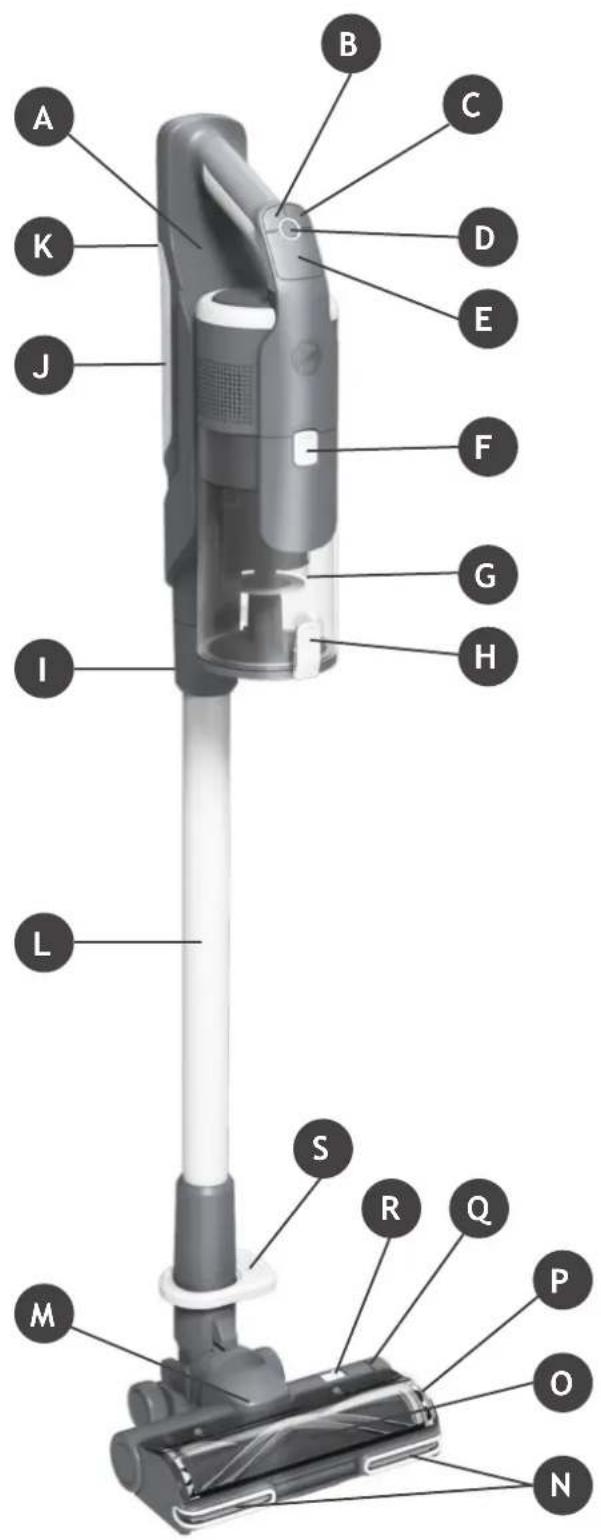
MAIN COMPONENTS:
A. Handheld unit
B. Mode button
C. Turbo button
D. On/Off Power button
E. LED Display
F. Dust bin release button
G. Dust bin
H. Dust bin flap release button
I. Handheld release button
J. Battery
K. Battery release button
L. Tube
M. Floor nozzle
N. Nozzle LED lights
0. Nozzle window
P. Brushbar release latch
Q. Brushbar staus light
R. Nozzle window release latch
S. Nozzle release pedal
T. Wall mount
U. Wall mount screws & fixings
V. Charger
W. Mini-turbo nozzle*
X. 2-in-1 Dusting brush/Furniture tool
Y. Crevice tool
Z. Extra battery*
text_image
A B C K D E J F G H I L S R Q M P O N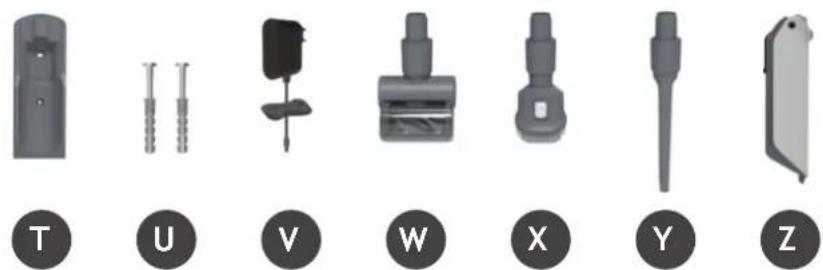
natural_image
Set of seven mechanical components labeled T, U, V, W, X, Y, Z, shown in grayscale without any text or symbols on parts.4. PREPARING YOUR CLEANER
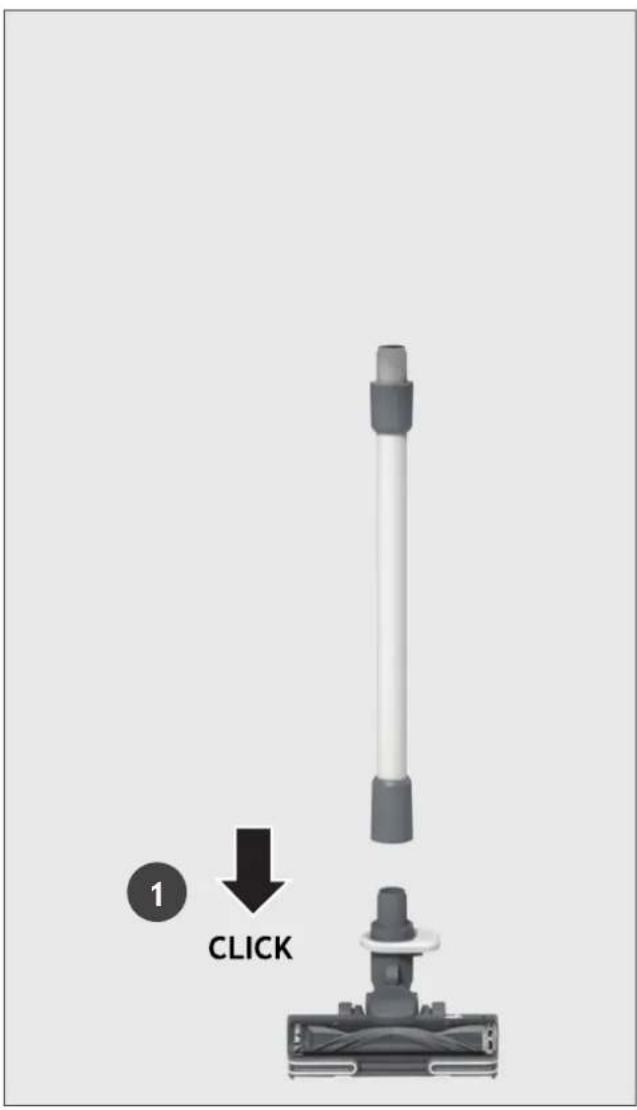
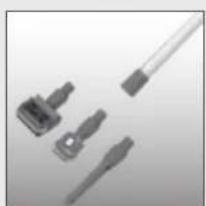
Remove all product parts from the packaging and assemble your cleaner.
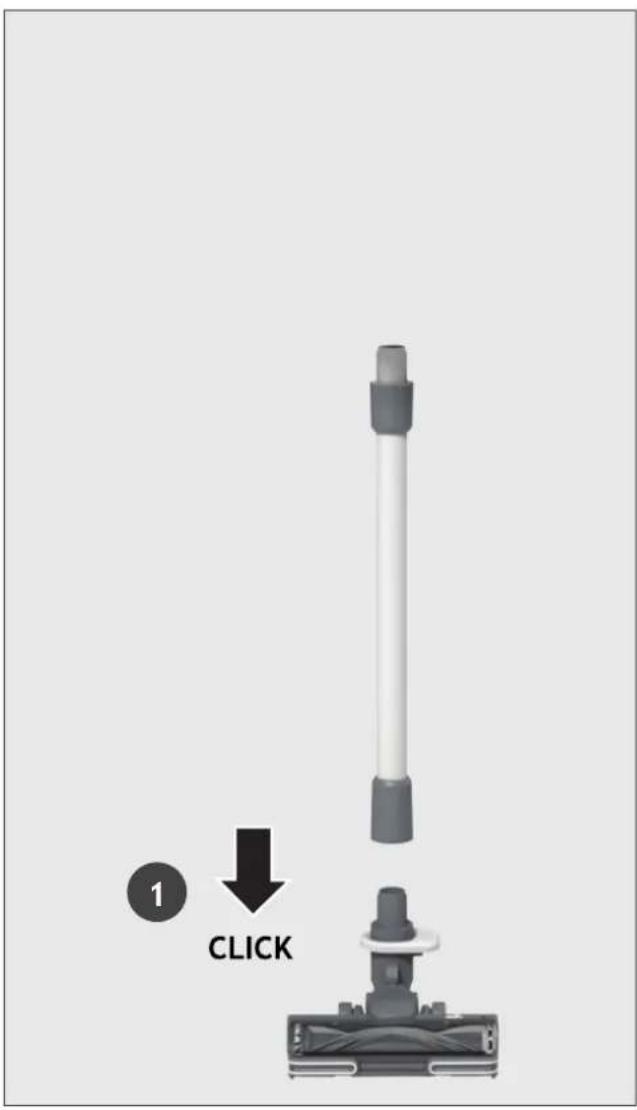
STEP 1: Fit the tube into the floor nozzle.
STEP 2: Fit the handheld unit onto the tube.
text_image
1 CLICK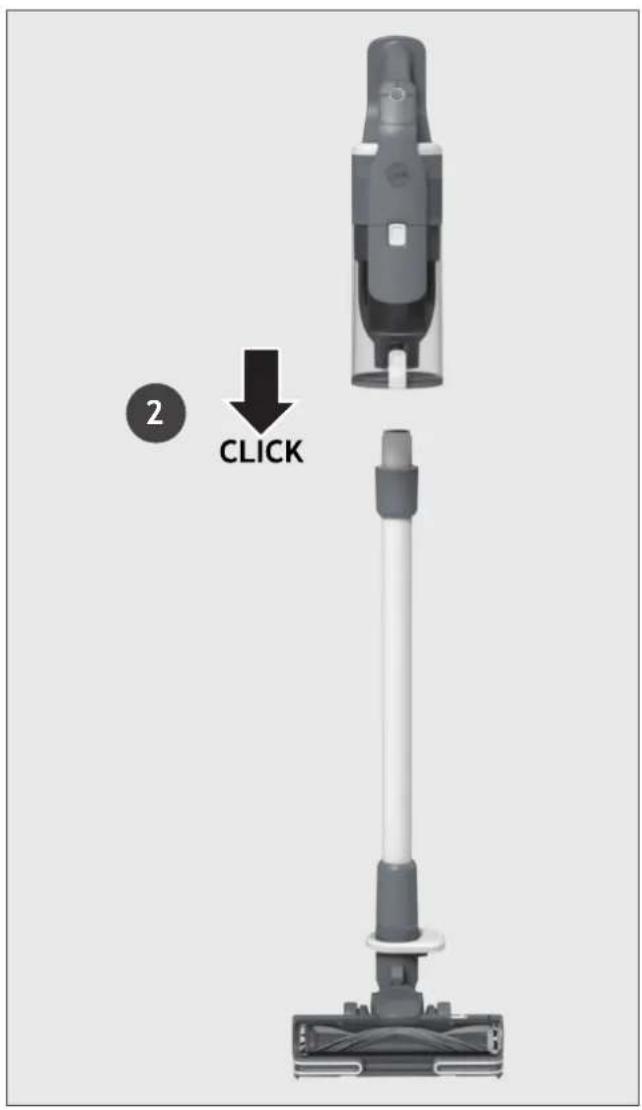
text_image
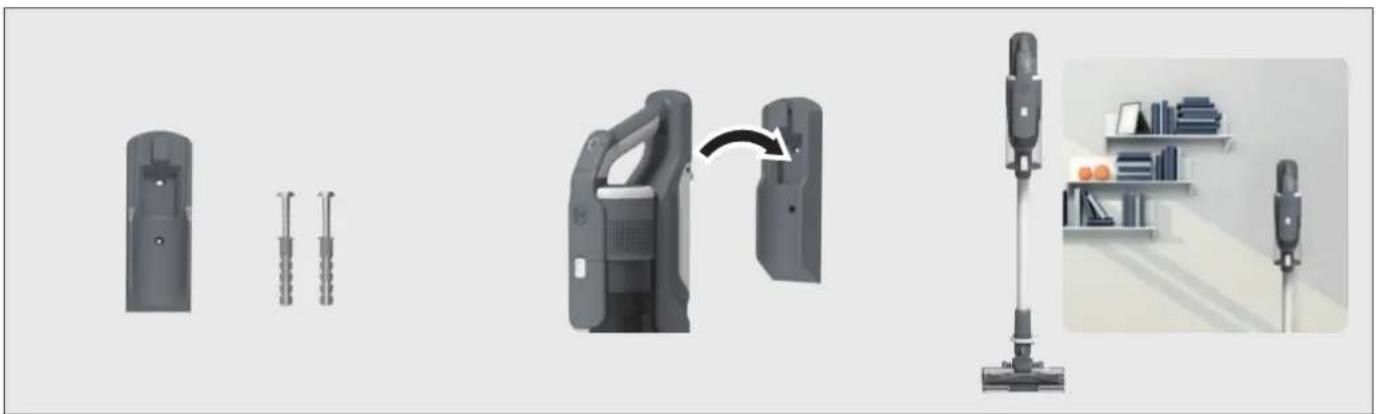
2 CLICKWe provide a wall mount for optional storage.
If you wish to use it, fix the wall mount to a suitable wall using the screws and fixings provided.
natural_image
Illustration of a vacuum cleaner with attached device and interior shelf view (no text or symbols)5. CHARGING THE BATTERY
The battery in your product does not come fully charged.
Before first use, please charge it completely: this should take around 3.5 hours.
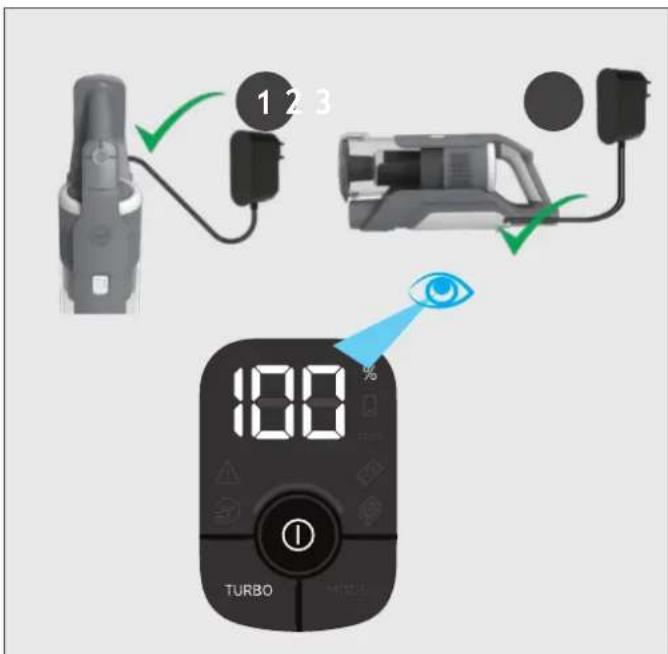
For your convenience, the battery can be charged in 3 different conditions.
- With the product fully assembled in stick mode or located in the wall mount, the battery status will be indicated on the LED display.
- With the product In the handheld mode, the battery status will be indicated on the LED display.
- With the battery removed from the product, the battery pack led will illuminate RED when charging and turn WHITE when fully charged.
text_image
1 2 3 100 TURBO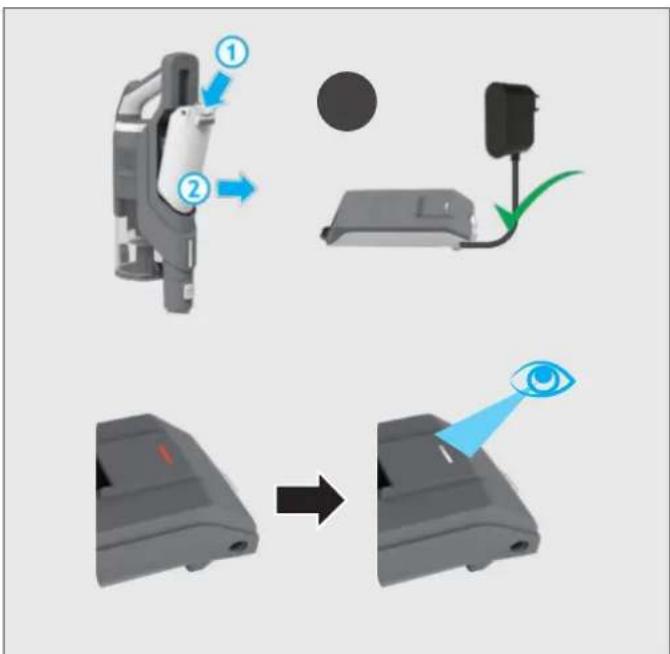
text_image
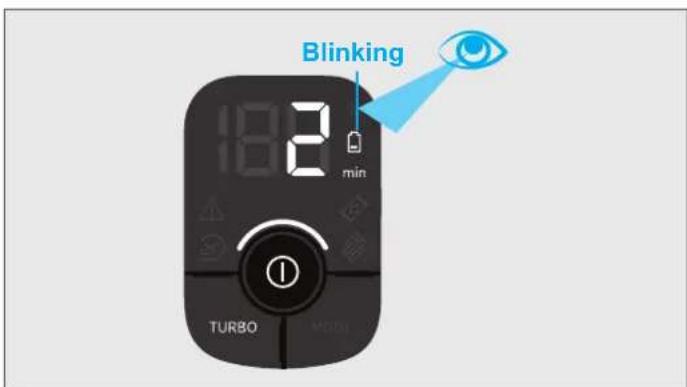
Diagram illustrating the step-by-step procedure of a device's eye detection, showing steps from device to final state.When using your product, the real time charge level of your battery is indicated on the LED display located on the handheld.
When the remaining run time is reduced to 2 mins, the LED display icons will begin to blink.
It is recommend you switch off your product and recharge the battery.
text_image
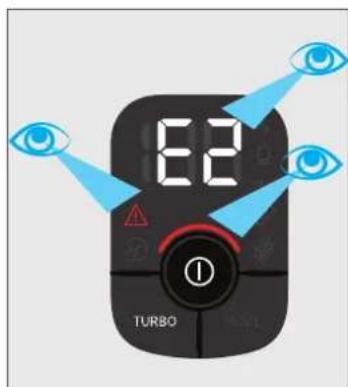
Blinking 18:2 min TURBO MDDIIn the unlikely event that your LED display shows an error code E2, this indicates a fault with your battery.
It is recommend that you immediately switch off your product, remove the battery and contact your local Hoover service centre.
text_image
6.2 TURBO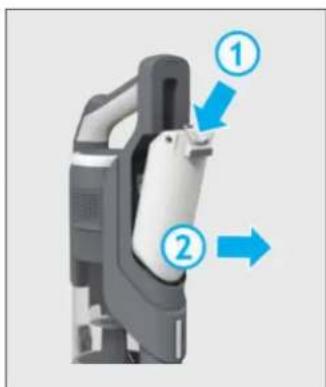
text_image
Diagram of a device with numbered annotations indicating directional movement or process steps6. USING YOUR CLEANER
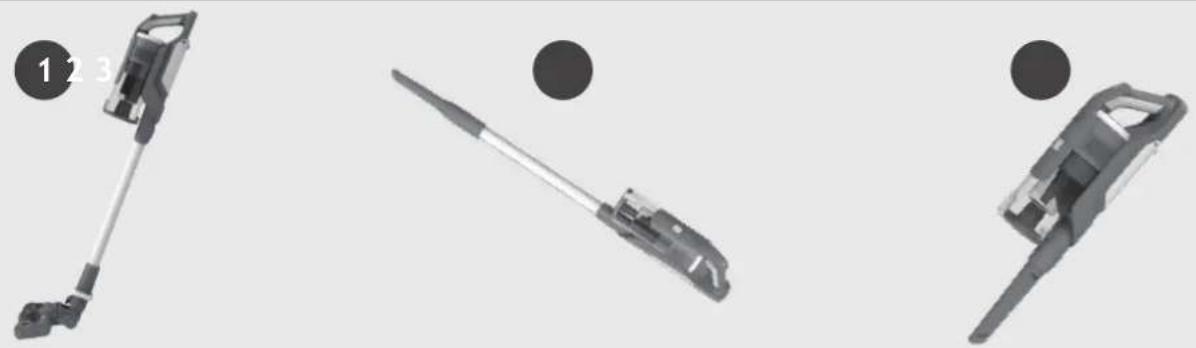
There are 3 different working modes for your cleaner:
- Stick mode.
- Above Floor mode.
- Handheld mode.
natural_image
Three mechanical components with numbered labels (1, 2, 3) shown in separate views: a lever, a tool, and a bracket (no text or symbols on the objects themselves)6.1 STICK MODE
To use your product in Stick mode:
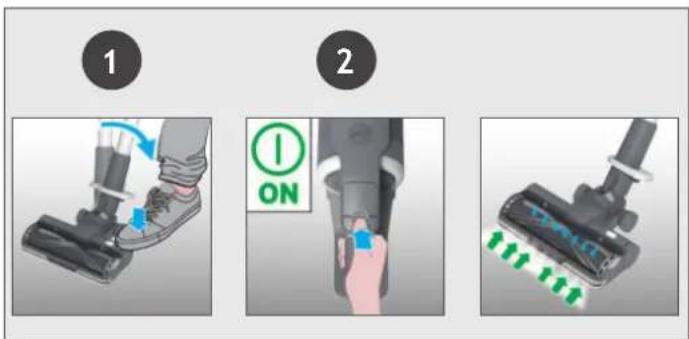
- Place your foot on the nozzle and pull back to recline the tube.
- Press the On/Off power button to begin cleaning.
NOTE: The nozzle LED lights are always on and the brushbar is always rotating.
Controls settings:
Press the MODE button to select your desired floor surface, the LED display icon of HARD FLOOR or CARPET will illuminate to confirm your setting.
If you require a deeper clean when using your product in Stick mode, press the turbo button to increase the power.
The turbo icon will illuminate on the LED display to confirm your selection.
Please note this will reduce your battery runtime.
To return to standard mode, press the turbo button, the icon on the display will turn off.
text_image
1 2 ON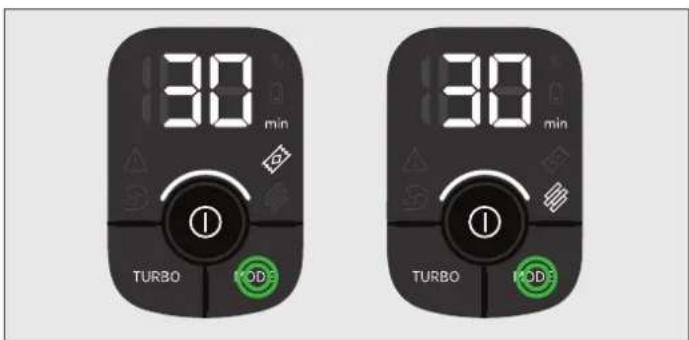
text_image
30 min TURBO MODE 30 min TURBO MODE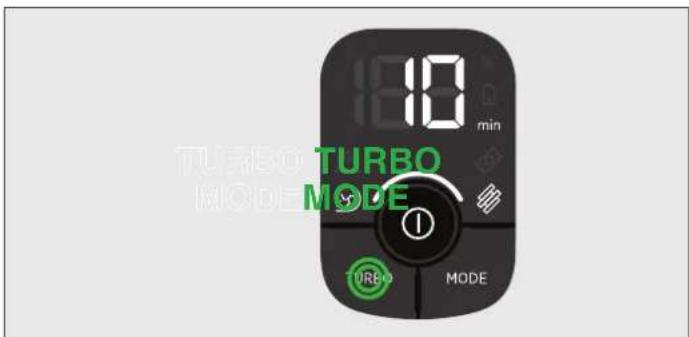
text_image
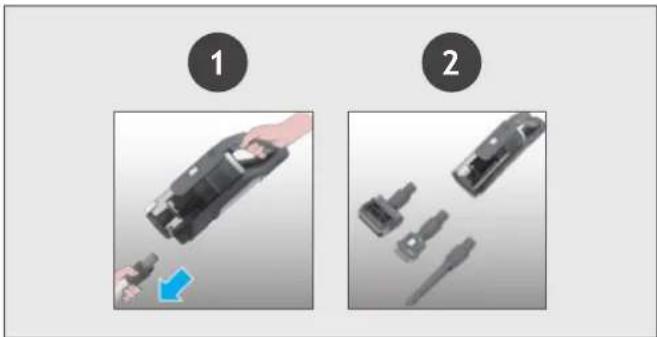
180 min TURBO TURBO MODE MODETo use your product in Above Floor mode:
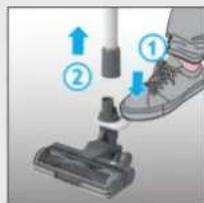
- Remove the tube from the nozzle by pressing the nozzle release pedal and pull the tube from the floor nozzle.
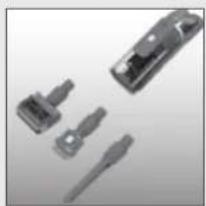
- Fit your desired accessory to the end of the tube.
All of your available accessories will fit onto the end of the tube. - Press the On/Off power button to begin cleaning.

text_image
Instructional diagram showing two-step cleaning steps: first to clean a vacuum cleaner, second to disassembly or repair a tool.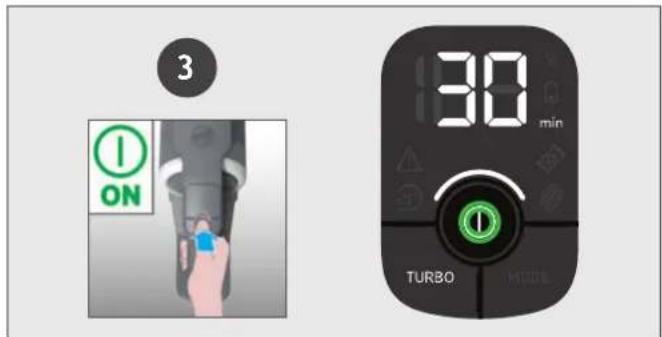
text_image
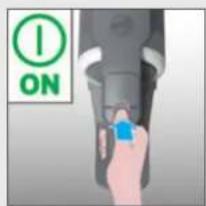
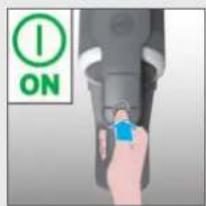
3 ON 30 min TURBOTo use your product in handheld mode:
- Remove the Handheld unit from the tube by pressing the handheld release button and pulling apart.
- Fit your desired accessory to the end of the handheld unit.
The floor nozzle and all of your available accessories will fit onto the end of the handheld unit. - Press the On/Off power button to begin cleaning.
text_image
Diagram showing two-step assembly steps of a device, labeled 1 and 2, with a hand holding a device and a blue arrow indicating the process.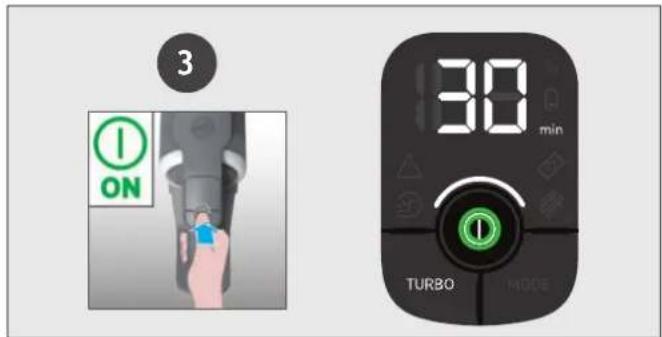
text_image
3 ON 30 min TURBO MODEControl settings:
If you require a deeper clean when using your product in Above floor or Handheld mode, press the turbo button to increase the power.
The turbo icon will illuminate on the LED display to confirm your selection.
Please note this will reduce your battery runtime.
To return to standard mode, press the turbo button, the icon on the LED display will turn off.

text_image
18:00 min TURBO MODE UREO7. CLEANER MAINTENANCE 7.1 EMPTYING THE DUST BIN
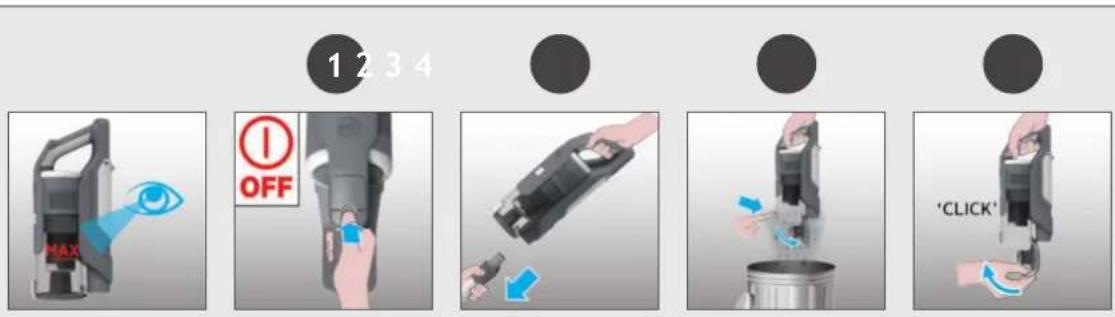
When the debris in your dust bin reaches the max fill line, empty your bin.
- Switch off your product.
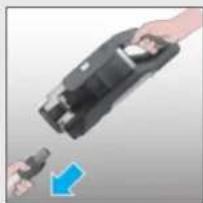
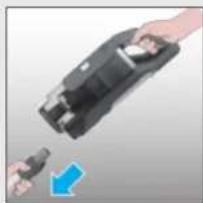
- Press the handheld release button and remove the handheld unit from the tube.
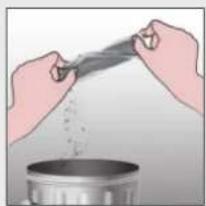
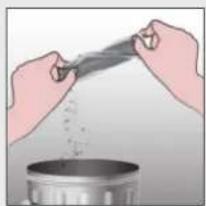
- Hold the handheld unit over a bin and press the bin flap release button to open the flap and release the debris into the trash.
- Close the bin flap.
7. CLEANER MAINTENANCE 7.2 FILTERS
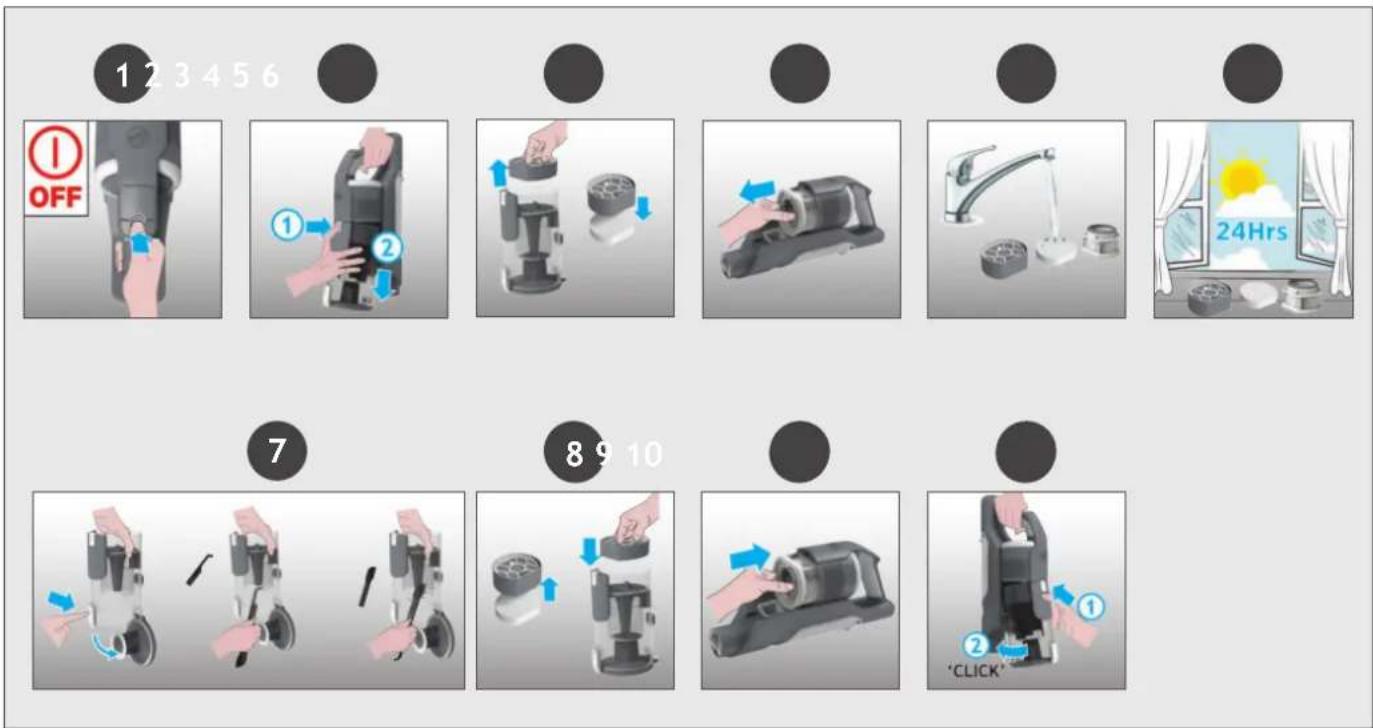
It is recommended to wash your filters after every 5 bin empties.
- Ensure your product is switched off.
- Press the bin release button and remove the bin assembly from the handheld unit.
- Remove the pre-motor filters from the bin and separate the foam filter.
- Remove the exhaust filter from the handheld unit.
- Remove any excess debris from the filters and wash all 3 filters using lukewarm water.
- Leave to dry for 24hrs before refitting to your product.
- Use the cleaning tool provided to remove any excess debris from inside the dust bin.
- Re-fit the foam filter to the pre-motor filter and re-fit into the bin.
-
Re-fit the exhaust filter to the handheld unit.
-
Re-fit the bin to the handheld unit.
7. CLEANER MAINTENANCE
7.3 FLOOR NOZZLE
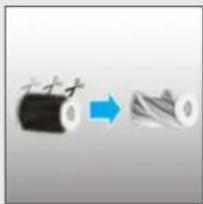
Thanks to ANTI-TWIST, your Hoover vacuum features an integrated comb which radically reduces hair wrapping around the brushbar. However, if your cleaner is not picking up efficiently your brushbar may need to be cleaned.
- Switch off your product.
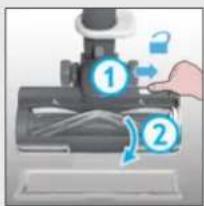
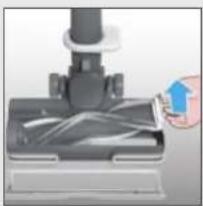
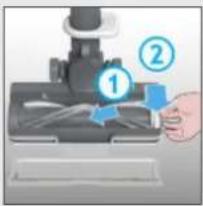
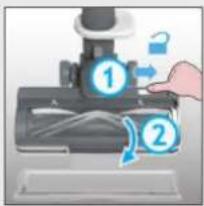
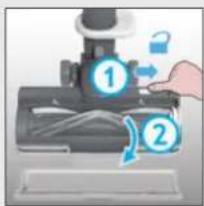
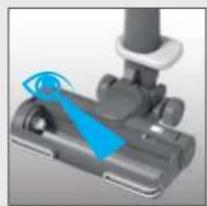
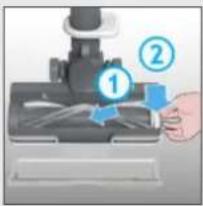
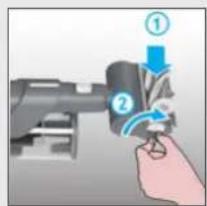
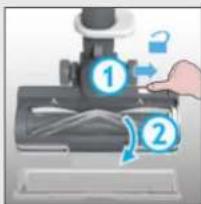
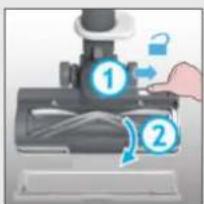
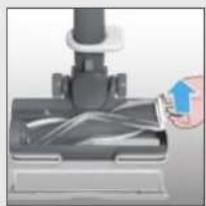
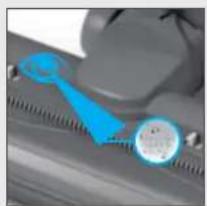
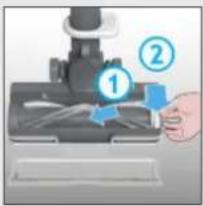
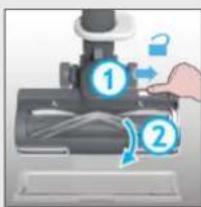
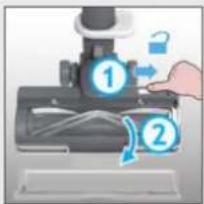
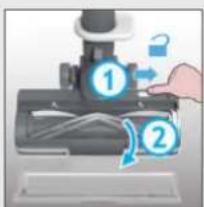
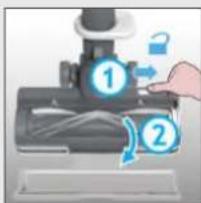
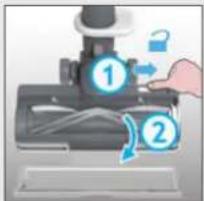
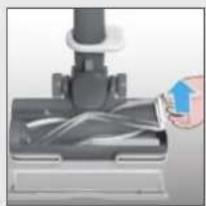
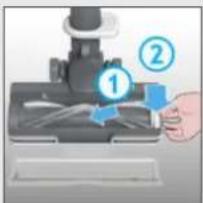
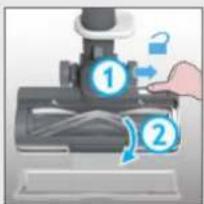
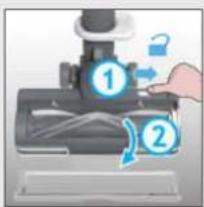
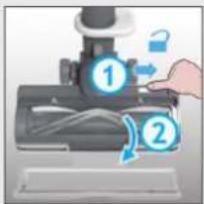
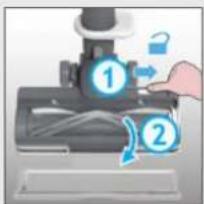
- Unlock the nozzle window sliding the nozzle window release latch and remove.
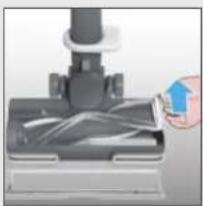
- Using the brushbar release latch, remove the brushbar from the nozzle.
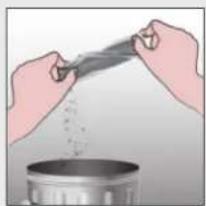
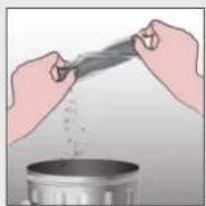
- Remove any excess debris from the brushbar.
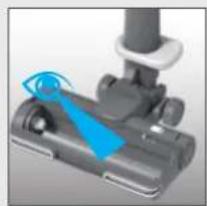
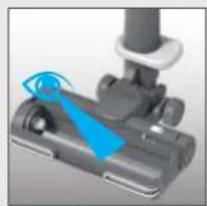
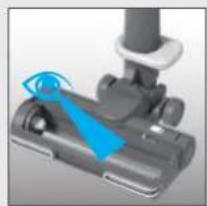
- Check for and remove any large debris from inside the nozzle.
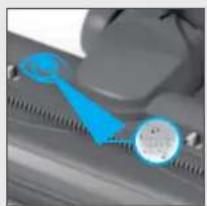
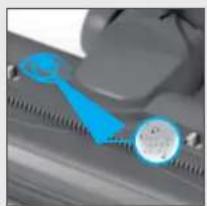
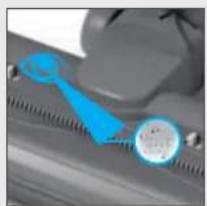
- Carefully check for and remove any tangled debris from the comb.
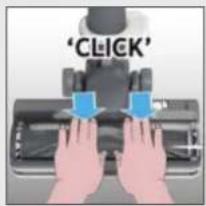
- Refit the brushbar to the nozzle ensuring the latch is fully in place.
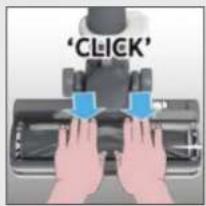
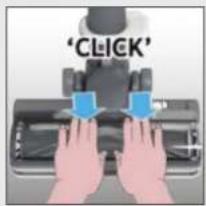
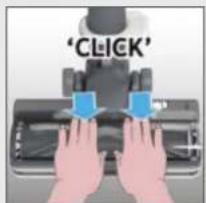
- Refit the nozzle window by locating at the front of the nozzle and closing firmly into location.
IMPORTANT: Ensure the window is fully closed. If the nozzle window is not correctly reassembled, the nozzle LED lights will flash, the brushbar status light will turn red and error E03 will appear on the user interface.
12345
text_image
OFFThe image is too blurry to recognize any text content.
text_image
Diagram showing a hand pressing a mouse with labeled parts ① and ②, indicating a process or procedure.●
natural_image
Close-up of a hand inserting a cable into a device component (no visible text or symbols)The image is too blurry to recognize any text content.
natural_image
Illustration of hands pouring liquid from a container into a pot (no text or symbols)The image is too blurry to recognize any text content.
natural_image
Close-up of a mechanical component with blue motion indicator (no text or symbols visible)6
natural_image
Close-up of a mechanical component with blue and gray parts, no visible text or symbols7
text_image
Diagram showing a hand using a microscope to interact with a tool, labeled with step numbers 1 and 2.8
text_image
'CLICK'7. CLEANER MAINTENANCE 7.4 MINI-TURBO NOZZLE\*
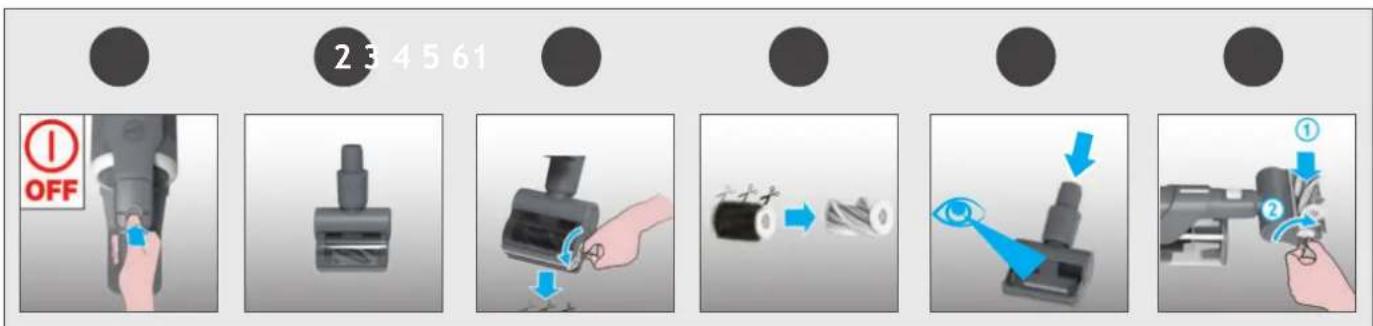
- Switch off your product.
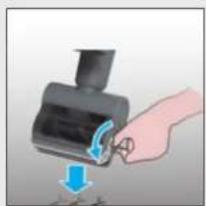
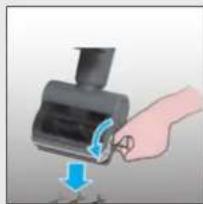
- Remove the mini-turbo nozzle from your product and turn over.
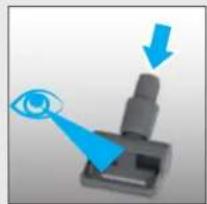
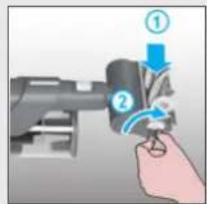
- Using a coin, open the brushbar release lock and remove the brush bar.
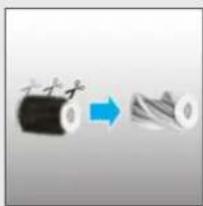
- Using scissors, remove any tangled fibres or debris from the brushbar.
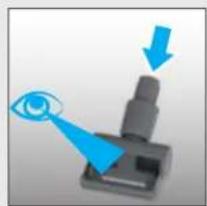
- Look inside the nozzle and remove any debris.
- Refit the brushbar into the nozzle and using a coin, lock into position.
flowchart
graph LR
    A["Brush"] --> B["Presser"]
    B --> C["Close-up"]
    C --> D["Close-up"]
    D --> E["Arrow pointing to brush tip"]
    E --> F["Arrow pointing to brush tip"]
    F --> G["Arrow pointing to brush tip"]
    G --> H["Arrow pointing to brush tip"]
*Dependant on your model.
7. CLEANER MAINTENANCE
7.5 BLOCKAGES
GB
If your product is still working but has low or no suction, you may have a blockage.
Carry out all maintenance instructions included in sections, 7.1, 7.2 & 7.3.
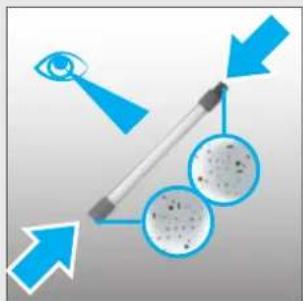
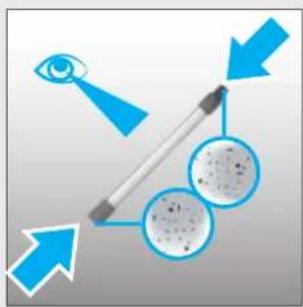
The following additional areas of your product should also checked for any debris or blockages:
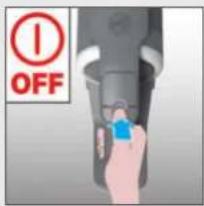
- Switch off your product.
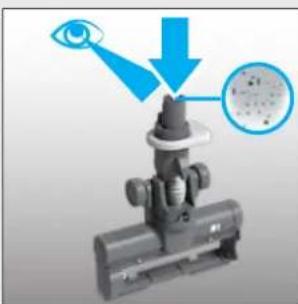
- Separate the Floor nozzle, tube and handheld unit as per previous instructions.
- Remove the nozzle window and brushbar from the nozzle as per previous instructions.
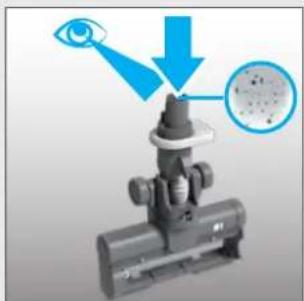
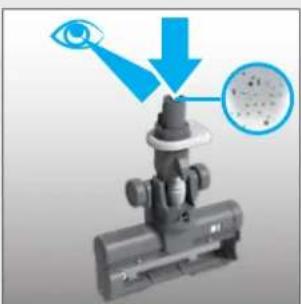
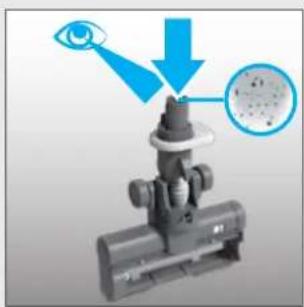
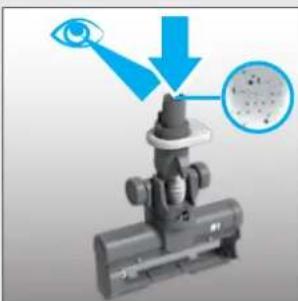
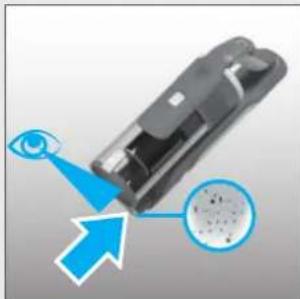
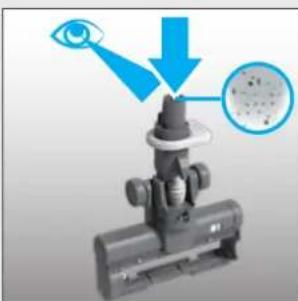
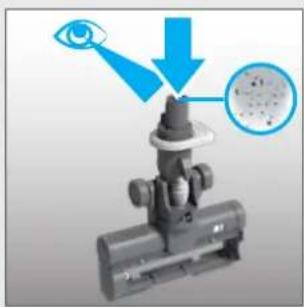
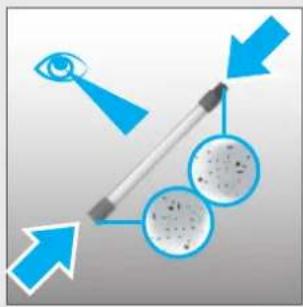
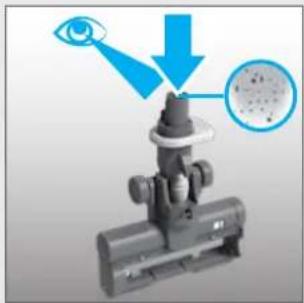
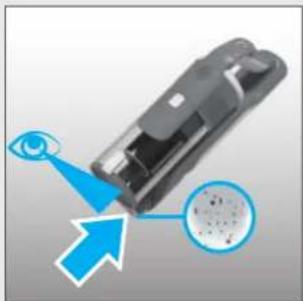
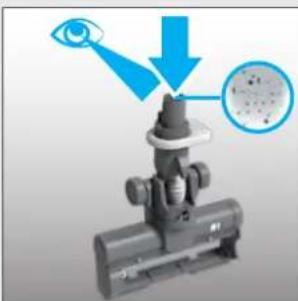
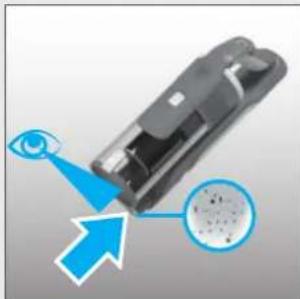
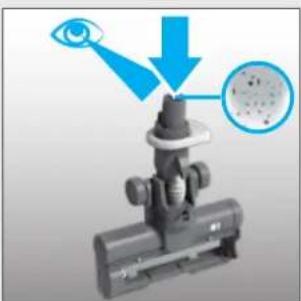
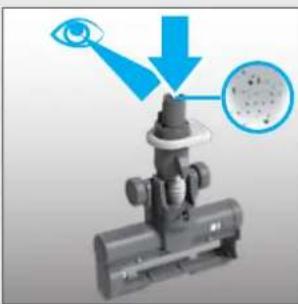
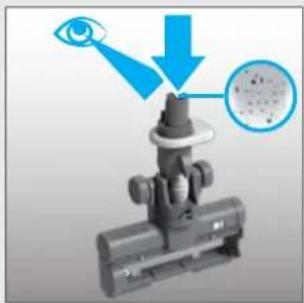
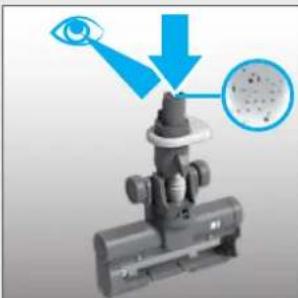
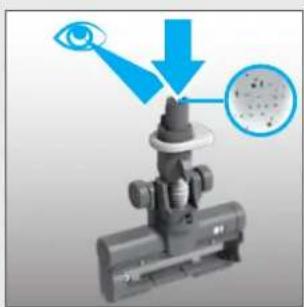
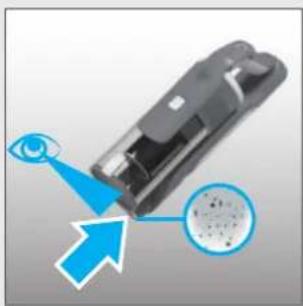
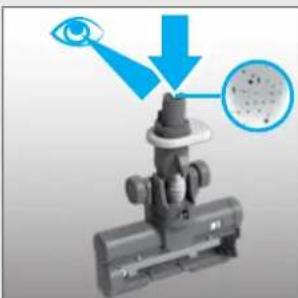
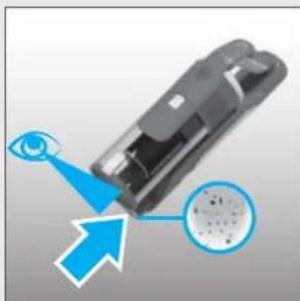
- Position the nozzle neck vertically and visually check for any debris or obstructions and clear.
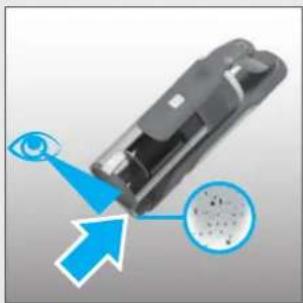
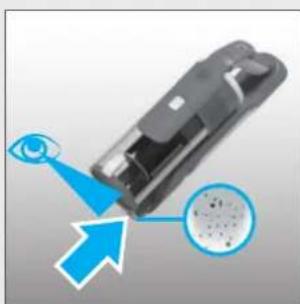
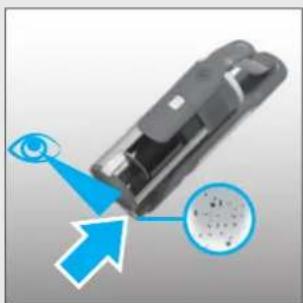
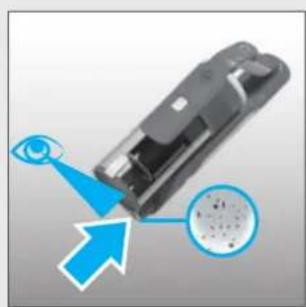
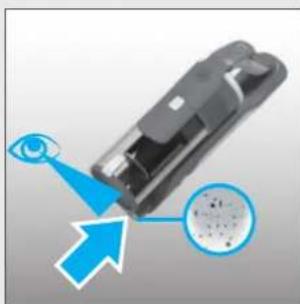
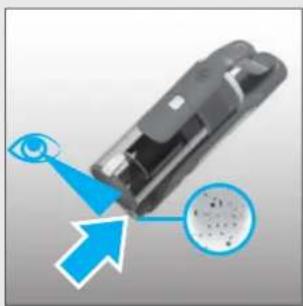
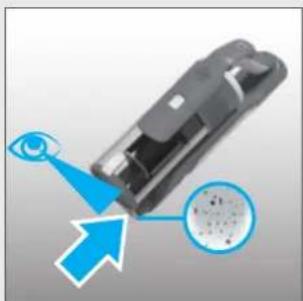
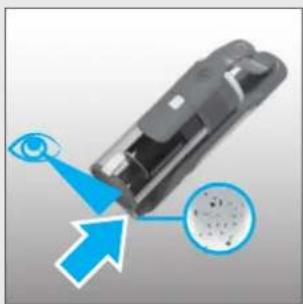
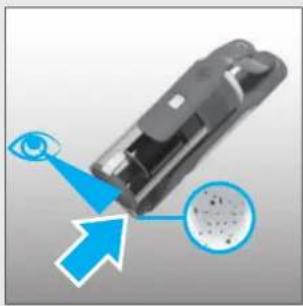
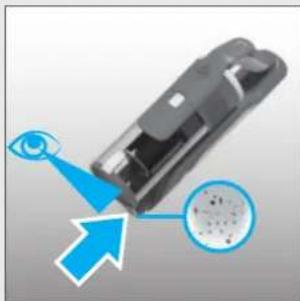
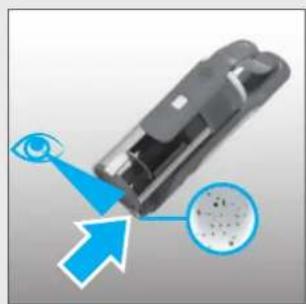
- Visually check the handheld inlet connection area for any debris or obstructions and clear.
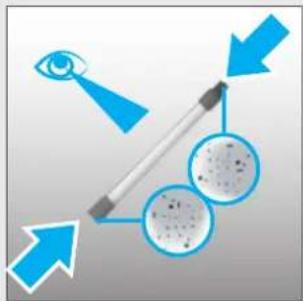
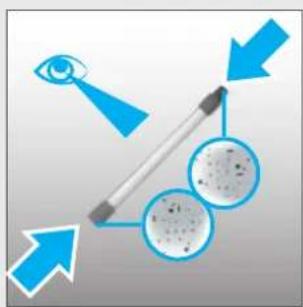
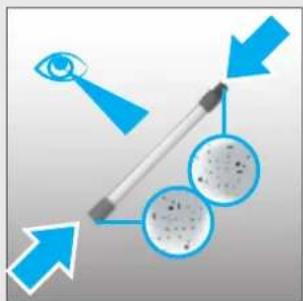
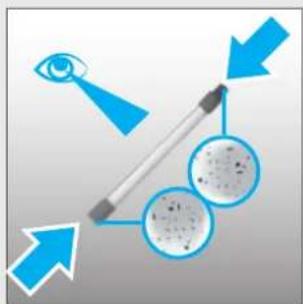
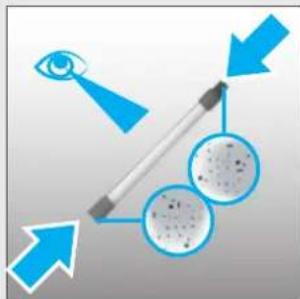
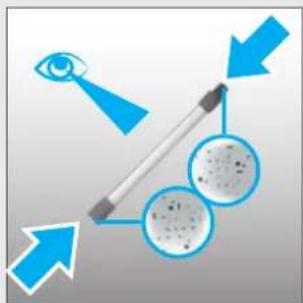
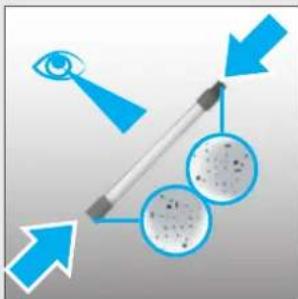
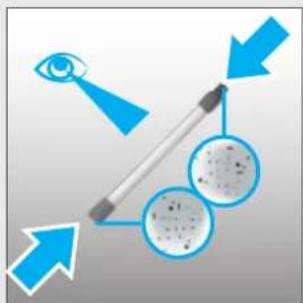
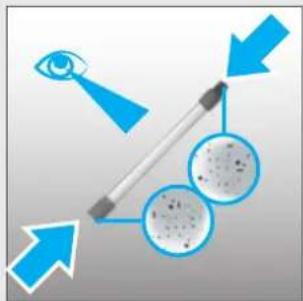
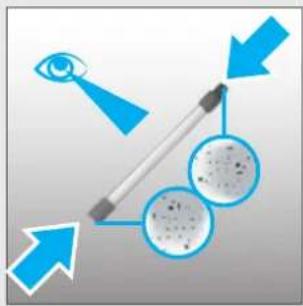
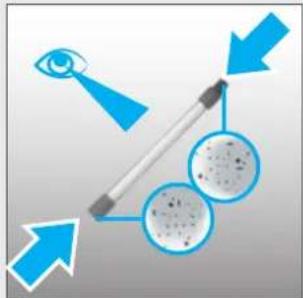
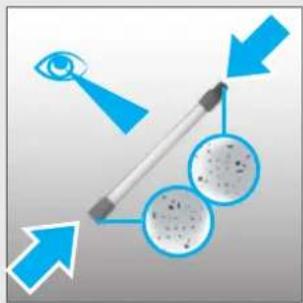
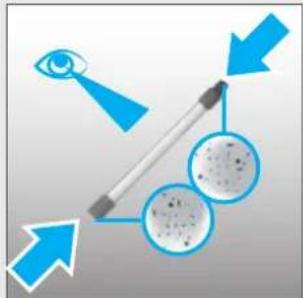
- Visually check both ends of the tube and remove any debris or obstructions.
Re-Assemble your product.
1
text_image
OFF2
text_image
Diagram showing foot cleaning steps with numbered arrows indicating movement from a vacuum cleaner to a shoe.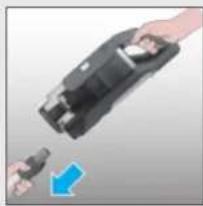
natural_image
Close-up of hands holding a black electronic device with a blue arrow pointing to it (no text or symbols visible)3
text_image
Diagram showing a hand pressing a device with numbered labels ① and ②, indicating a process step or state.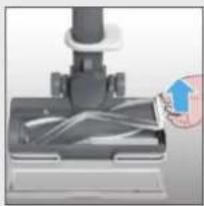
natural_image
Close-up of a mechanical device with a hand holding a paper airplane (no visible text or symbols)456
text_image
Diagram illustrating a microscope objective with eye and magnified view, showing optical path and particle distribution.●
natural_image
Diagram of a device with an eye and a magnified inset showing internal components (no text or symbols)The image is too blurry to recognize any text content.
natural_image
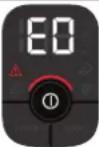
Diagram showing light rays interacting with a human eye and a pen, with no text or symbols present.The following is a list of error codes & solutions that your product will identify and indicate on your LED display should you product encounter problems:
| ERROR CODE | FAULT & SOLUTION | |
 | The pre motor filter is missing!1. Press bin release button to remove the bin.2. Reassemble the pre motor filter in the correct position.3. Reassemble the bin. | 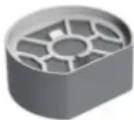 |
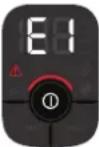 | Check if there is any obstruction in the nozzle.Go to section 7.3 and carry out ALL maintenance requirements. | 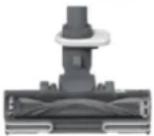 |
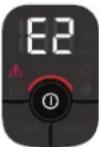 | There is a technical issue in the battery pack.Remove the battery from your product and contact your local Hoover service centre. |  |
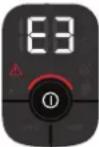 | Check if the window nozzle is correctly assembled in the nozzle.1. Make sure the window is in place correctly.2. Press the window down gently to click it in securely. |  |
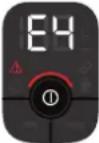 | There is a technical issue in the main nozzle.Switch off your product and wait for 20mins.If the product still does not work, Contact your local Hoover service centre. | 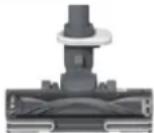 |
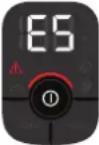 | E5 indicates there is a blockage in your product.Go to section 7 and carry out ALL maintenance requirements, Empty the bin, clean the filters, clean the nozzle & brushbar and check for blockages. |  |
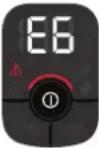 | There is a technical issue in the main vacuum.Stop using your product.Contact your local Hoover service centre. |  |
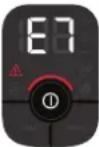 | There is a technical issue in the charger.Please ensure you are using a genuine HOOVER charger.If the problem persists, stop using your product and contact your local Hoover service centre. | [T86D] |
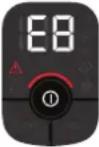 | There is a technical issue in the main vacuum.Switch off your product and wait for 20mins.If the problem persists, stop using your product and contact your local Hoover service centre. |  |
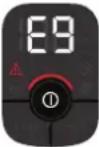 | E9 indicates there is a blockage in the mini turbo nozzle.Go to section 7.4 and perform the indicated maintenance task. | [CSZS] |
1. INSTRUCTIONS DE SÉCURITÉ D'UTILISATION
text_image
A B C K D E J F G H I L S R Q M P O N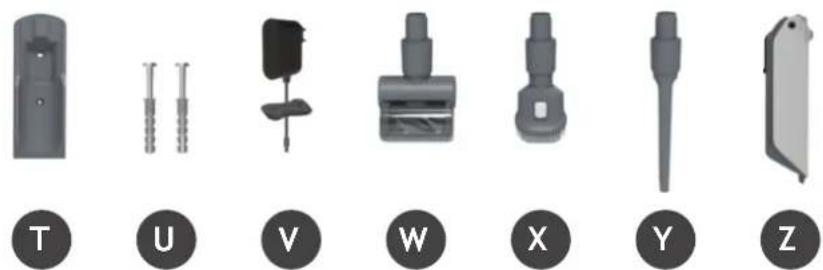
natural_image
Set of seven mechanical component icons labeled T, U, V, W, X, Y, Z (no text or symbols on parts)4. PREPARATION DE L'APPAREIL
natural_image
Illustration of a vacuum cleaner with attached door, showing part assembly and interior view (no text or symbols)text_image
Diagram illustrating the step-by-step procedure of a device's eye detection, showing steps from device to final eye detection.text_image
Diagram of a device with numbered annotations indicating directional movement or process steps6. UTILISATION DE L'APPAREIL
natural_image
Three mechanical components with numbered labels (1, 2, 3) shown in separate views: a lever, a tool, and a bracket (no text or symbols on the objects themselves)6.1 MODE BALAI
text_image
Instructional diagrams showing two steps of a vacuum cleaner's cleaning process, labeled 1 and 2 with numbered instructions.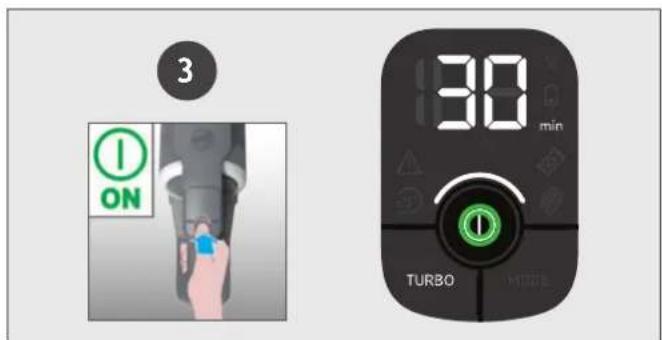
text_image
3 ON 30 min TURBOtext_image
Diagram showing two-step assembly steps of a device, labeled 1 and 2, with a hand holding a device and a blue arrow indicating the process.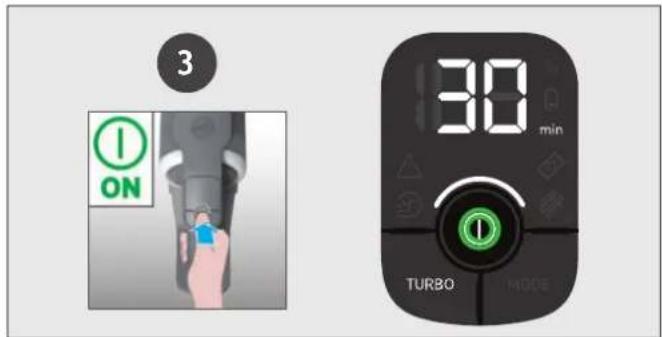
text_image
3 ON 30 min TURBO MODEThe image is too blurry to recognize any text content.
text_image
Diagram showing a hand operating a microscope with numbered instructions for recording or testing●
natural_image
Close-up of a hand inserting a blue arrow into a mechanical component (no text or symbols visible)The image is too blurry to recognize any text content.
natural_image
Illustration of hands pouring liquid from a container into a metal bowl (no text or symbols)The image is too blurry to recognize any text content.
natural_image
Close-up of a mechanical component with blue motion indicator (no text or symbols visible)6
natural_image
Close-up of a blue mechanical component with circular features and a ruler-like measurement (no visible text or symbols)7
text_image
Diagram showing a hand using a microscope to interact with a device, labeled with steps 1 and 2.8
text_image
'CLICK'7. ENTRETIEN DE L'ASPIRATEUR
7.4 MINI TURBOBROSSE\*
natural_image
Close-up of a mechanical component with a cylindrical shaft and rectangular base (no visible text or symbols)The image contains no text or characters.
natural_image
Hand holding a black device with a blue arrow indicating rotation or adjustment (no text or symbols)The image is too blurry to recognize any text content.
natural_image
Diagram showing a cylindrical object being converted into a twisted cable, with no text or symbols present.The image is too blurry to recognize any text content.
natural_image
Diagram showing a device with an eye and blue arrows indicating direction (no text or symbols)The image is too blurry to recognize any text content.
text_image
Diagram showing a hand holding a mechanical component with numbered callouts indicating steps ① and ②.7. ENTRETIEN DE L'ASPIRATEUR
7.5 BLOCAGES
FR
text_image
Diagram showing foot positioning of a vacuum cleaner with labeled parts and directional arrows indicating movement.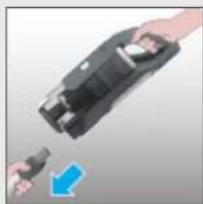
natural_image
Close-up of a hand holding a black electronic device with a blue arrow pointing to it (no text or symbols visible)3
text_image
Diagram showing a hand pressing a device with labeled buttons and icons, likely illustrating a process or control mechanism.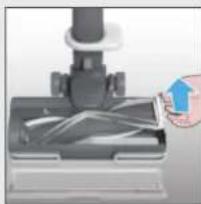
natural_image
Close-up of a hand holding a small object over a mechanical component (no visible text or symbols)45
natural_image
Diagram of a mechanical device with an eye and a magnified inset showing particle distribution (no text or symbols)
natural_image
Diagram showing a device with an eye interacting with a screen, and a magnified inset showing internal components (no text or symbols)
natural_image
Diagram showing eye, lens, and cellular structures with directional arrows (no text or symbols)text_image
A B C K D E J F G H I L S R Q M P O N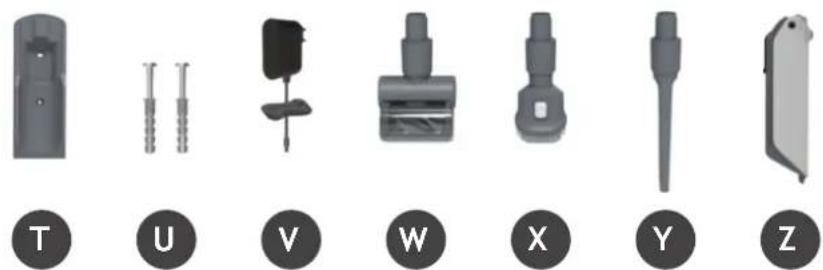
natural_image
Set of seven mechanical components labeled T, U, V, W, X, Y, Z, shown in grayscale without any text or symbols on parts.natural_image
Illustration of a vacuum cleaner with attached device and interior shelf view (no text or symbols)text_image
Diagram illustrating the step-by-step procedure of a device's eye detection, showing steps from device to final state with labeled components.text_image
Diagram of a device with numbered annotations indicating directional movement or process steps6. GEBRAUCH DES GERÄTES
natural_image
Three mechanical components with numbered labels (1, 2, 3) shown in separate views: a lever, a tool, and a bracket (no text or symbols on the objects themselves)6.1 STANDARD-MODUS
text_image
Instructional diagram showing two steps of a vacuum cleaner's cleaning process, labeled 1 and 2 with numbered arrows indicating step 1 and step 2.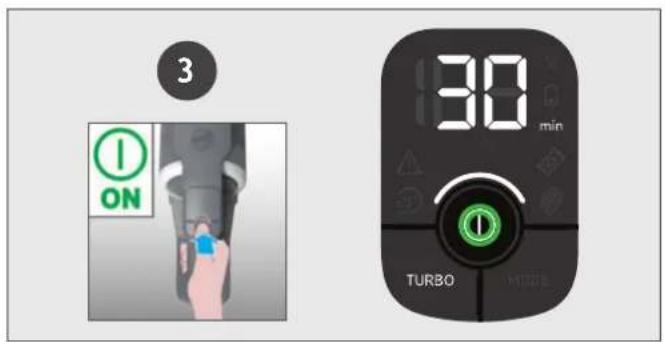
text_image
3 ON 30 min TURBO MODEtext_image
Diagram showing two-step installation of a mechanical device, labeled with step 1 and step 2, indicating tool path and component arrangement.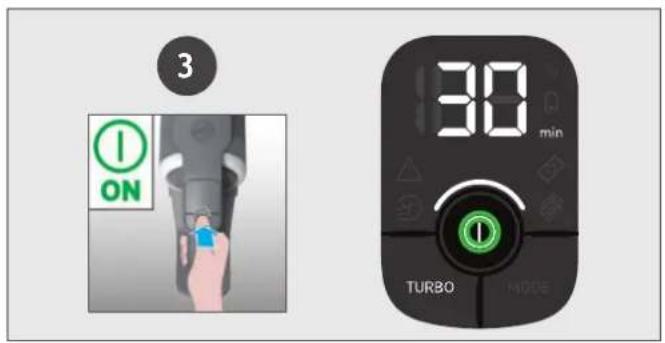
text_image
3 ON 30 min TURBO MODEEinstellungen:
text_image
Diagram showing a foot using a vacuum cleaner with labeled parts and directional arrows indicating motion or force.3

natural_image
Close-up of a hand holding a black electronic device with a blue arrow pointing to it (no text or symbols visible)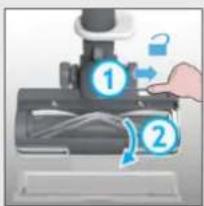
text_image
Diagram showing a hand operating a microscope with labeled parts 1 and 2, indicating a process or setup.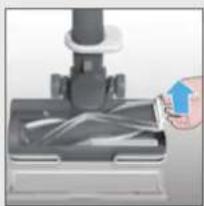
natural_image
Close-up of a hand pressing down on a mechanical component with a blue arrow indicating motion (no text or symbols visible)456
natural_image
Diagram of a mechanical device with an eye and a magnified inset showing internal components (no text or symbols)The image is too blurry to recognize any text content.
natural_image
Diagram of a device with an eye and a magnified inset showing internal components (no text or symbols)The image is too blurry to recognize any text content.
natural_image
Diagram showing light rays interacting with a human eye and a pen, with arrows indicating direction (no text or symbols)text_image
A B C K D E J F G H I L S R Q M P O N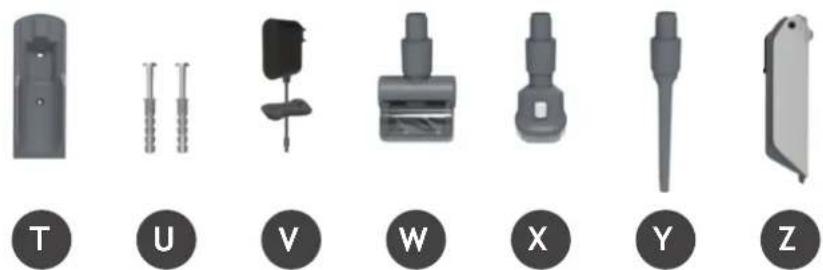
natural_image
Set of seven mechanical components labeled T, U, V, W, X, Y, Z, shown in grayscale without any text or symbols on parts.4. PREPARAZIONE DELL'APPARECCHIO
natural_image
Product line showing a vacuum cleaner with attached components and a close-up of its interior shelf (no text or symbols visible)text_image
Diagram illustrating the step-by-step procedure of a device's eye detection, showing steps from device to final eye detection.text_image
Diagram of a device with numbered annotations indicating directional movement or process steps6. UTILIZZO DELL'APPARECCHIO
natural_image
Three mechanical components with numbered labels (1, 2, 3) shown in separate views: a lever, a tool, and a bracket (no text or symbols on the objects themselves)6.1 MODALITÀ STANDARD
text_image
Instructional diagram showing two-step cleaning steps of a vacuum cleaner, with numbered instructions and component placement.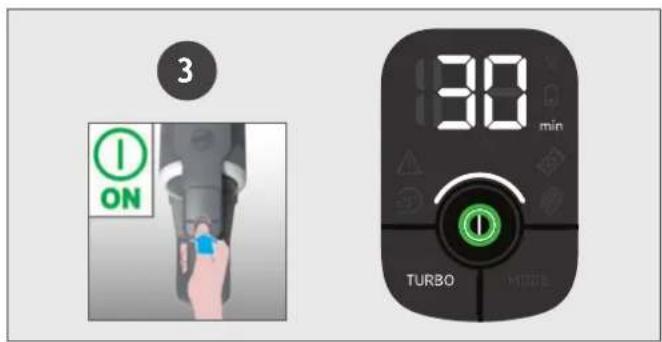
text_image
3 ON 30 min TURBO MODAtext_image
Diagram showing two-step installation of a mechanical device, labeled with step 1 and step 2, indicating tool path and component arrangement.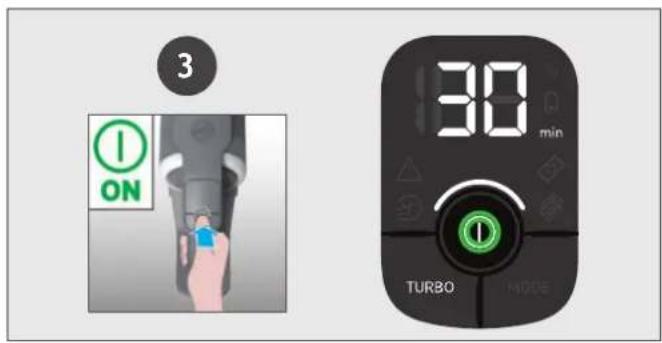
text_image
3 ON 30 min TURBO MODEtext_image
A B C K D E J F G H I L S R Q M P O N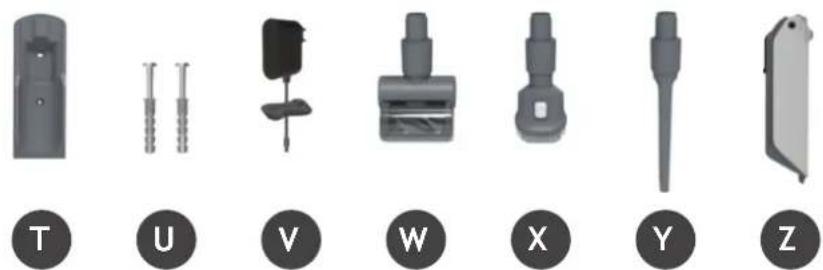
natural_image
Set of seven mechanical components labeled T, U, V, W, X, Y, Z, shown in grayscale without any text or symbols on parts.4. UW STOFZUIGER IN ELKAAR ZETTEN
natural_image
Illustration of a vacuum cleaner with attached door, showing internal components and assembly (no text or symbols)5. DE BATTERIJ OPLADEN
text_image
Diagram illustrating the step-by-step procedure of a device's eye detection, showing steps from device to final state.text_image
Diagram of a device with numbered annotations indicating directional movement or process steps6. UW STOFZUIGER GEBRUIKEN
natural_image
Three mechanical components with numbered labels (1, 2, 3) shown in separate views: a lever, a tool, and a bracket (no text or symbols on the objects themselves)6.1 STEELSTOFZUIGER MODUS
text_image
Instructional diagram showing two-step cleaning steps: first to clean a vacuum cleaner, second to disassembly or repair the components.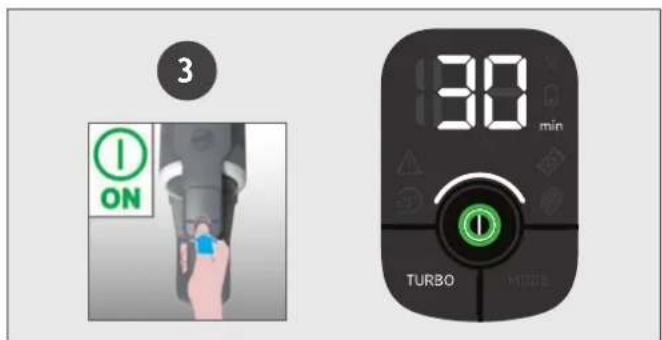
text_image
3 ON 30 min TURBOtext_image
Diagram showing two-step assembly steps of a device, labeled 1 and 2, with a hand holding a device and a blue arrow indicating the process.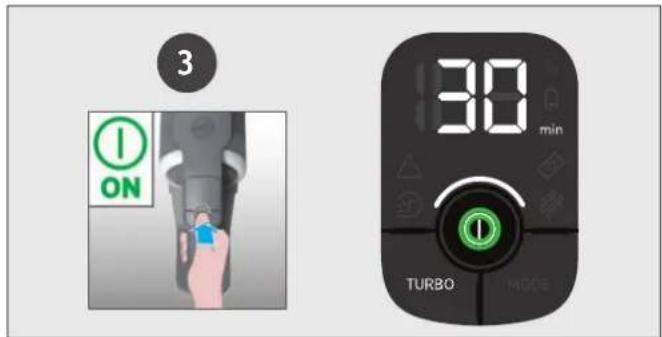
text_image
3 ON 30 min TURBO MODEInstellingen bedieningselement:
text_image
Diagram showing a foot using a vacuum cleaner with labeled parts and directional arrows indicating motion or force.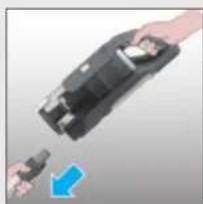
natural_image
Close-up of a hand holding a black electronic device with a blue arrow pointing to it (no text or symbols visible)3
text_image
Diagram showing a hand pressing a device with numbered labels 1 and 2, indicating steps to press or install.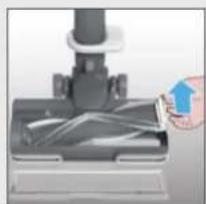
natural_image
Close-up of a hand holding a small object over a mechanical component (no visible text or symbols)456
natural_image
Diagram of a mechanical device with an eye and magnified inset showing internal components (no text or symbols)●
natural_image
Diagram of a device with an eye and a magnified inset showing internal components (no text or symbols)●
natural_image
Diagram showing light rays interacting with a human eye and a pen, with arrows indicating direction (no text or symbols)text_image
A B C K D E J F G H I L S R Q M P O N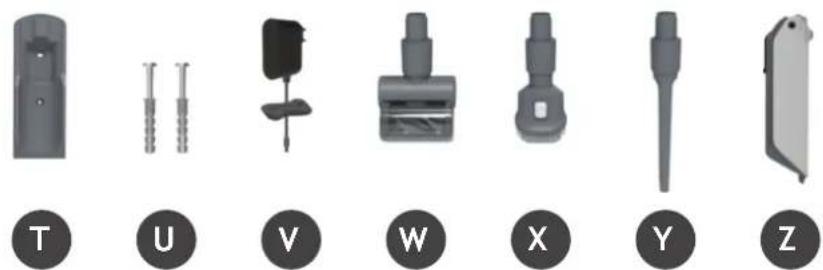
natural_image
Set of seven mechanical component icons labeled T, U, V, W, X, Y, Z (no text or symbols on parts)text_image
Diagram illustrating the step-by-step procedure of a device's eye detection, showing steps from device to final display.text_image
Diagram of a device with numbered annotations indicating directional movement or process steps6. UTILIZAR O SEU APARELHO
natural_image
Three mechanical components with numbered labels (1, 2, 3) shown in separate views: a lever, a tool, and a bracket (no text or symbols on the objects themselves)6.1 MODO VERTICAL
natural_image
Illustration of a person using a vacuum cleaner to lift a bag, showing motion and safety (no text or symbols)2
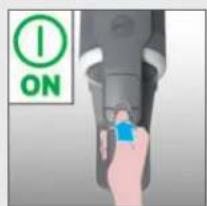
text_image
ON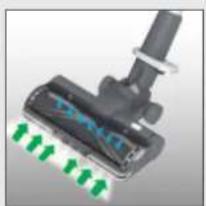
natural_image
Close-up of a black mechanical component with green directional arrows indicating motion or flow (no text or symbols)text_image
Instructional diagram showing two-step cleaning steps: first to clean a vacuum cleaner, second to disassembly or repair a tool.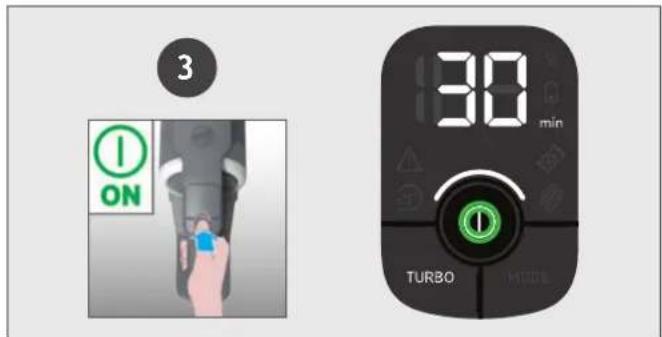
text_image
3 ON 30 min TURBOtext_image
Diagram showing two-step assembly steps of a device, labeled 1 and 2, with a hand holding a device and a blue arrow indicating the process.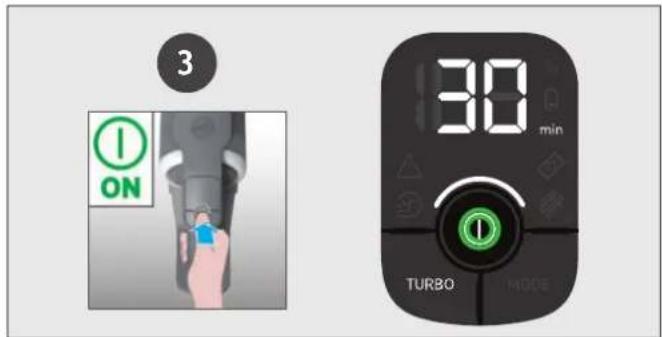
text_image
3 ON 30 min TURBO MODEtext_image
Diagram showing a foot using a vacuum cleaner with labeled parts and directional arrows indicating motion or force.3
natural_image
Hand holding a black device with a blue arrow pointing to it, no visible text or symbols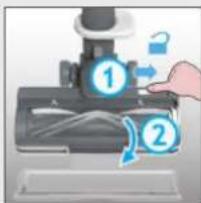
text_image
Diagram showing a hand pressing a device with numbered labels ① and ②, indicating a process step or state.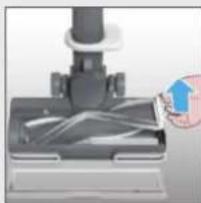
natural_image
Close-up of a hand holding a small object over a dark mechanical component (no visible text or symbols)456
natural_image
Diagram of a mechanical valve with eye and sensor components, no text or symbols present●
natural_image
Diagram showing a device with an eye and a magnified inset of a textured surface (no text or symbols)The image is too blurry to recognize any text content.
natural_image
Diagram showing light rays interacting with a human eye and a pen, with arrows indicating direction (no text or symbols)text_image
A B C K D E J F G H I L S R Q M P O N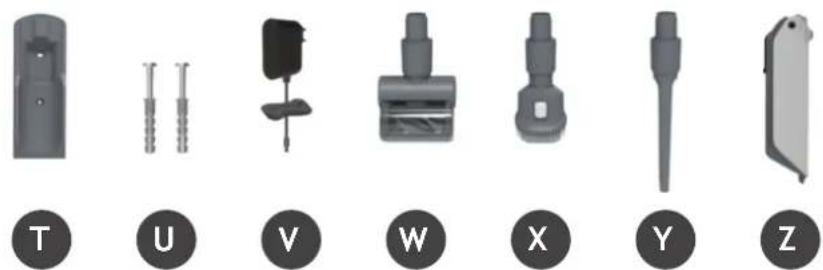
natural_image
Set of seven mechanical component icons labeled T, U, V, W, X, Y, Z (no text or symbols on parts)natural_image
Illustration of a vacuum cleaner with attached device and interior shelf view (no text or symbols)text_image
Diagram illustrating the step-by-step procedure of a device's eye detection, showing steps from sensor input to output.text_image
Diagram of a device with numbered annotations indicating directional movement or process steps6. USO DEL APARATO
natural_image
Three mechanical components with numbered labels (1, 2, 3) shown in separate views: a lever, a tool, and a bracket (no text or symbols on the objects themselves)6.1 MODO ESTÁNDAR
text_image
Instructional diagram showing two-step cleaning steps: first to clean a vacuum cleaner, second to disassembly or repair the components.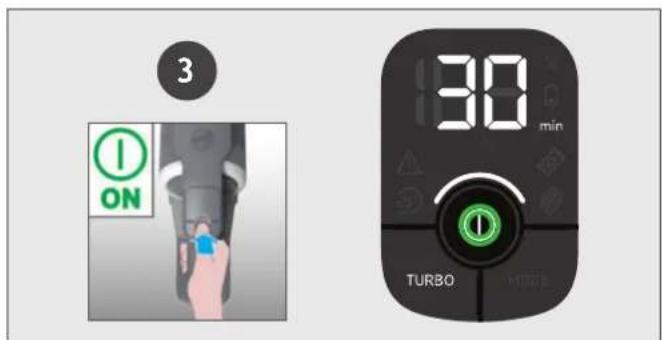
text_image
3 ON 30 min TURBOtext_image
Diagram showing two-step assembly steps of a device, labeled 1 and 2, with a hand holding a device and a blue arrow indicating the process.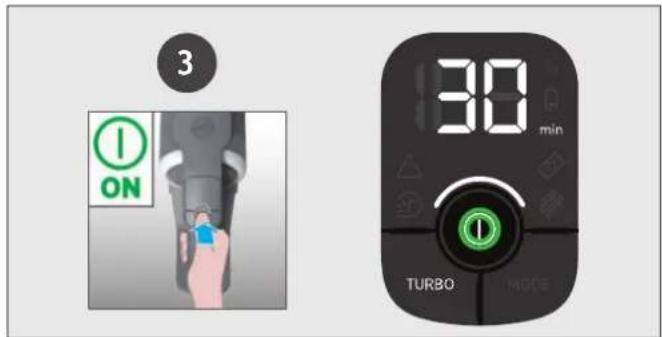
text_image
3 ON 30 min TURBO MODEThe image is too blurry to recognize any text content.

text_image
Diagram showing a hand pressing a mouse with labeled parts ① and ②, indicating a process or procedure.The image is too blurry to recognize any text content.
natural_image
Close-up of a hand pressing down on a mechanical component with a blue arrow indicating motion (no text or symbols visible)The image is too blurry to recognize any text content.
natural_image
Illustration of hands pouring liquid from a container into a metal bowl (no text or symbols)The image is too blurry to recognize any text content.
natural_image
Close-up of a mechanical component with blue motion indicator (no text or symbols visible)6
natural_image
Close-up of a mechanical component with blue and gray parts, no visible text or symbols7
text_image
Diagram showing a hand using a microscope to interact with a tool, labeled with step numbers 1 and 2.8
text_image
'CLICK'7. MANTENIMIENTO DEL APARATO
7.4 CEPILLO ESPECIAL PELO DE MASCOTA (MINI TURBO)\*
natural_image
3D rendered mechanical component with cylindrical shaft and threaded end (no text or symbols)The image contains no text or characters.
natural_image
Hand holding a black mechanical device with a blue arrow indicating rotation or adjustment (no text or symbols)The image is too blurry to recognize any text content.
natural_image
Two cylindrical objects with black and silver surfaces, one increasing by a blue arrow (no text or symbols)The image is too blurry to recognize any text content.
natural_image
Diagram showing a device with an eye and blue arrows pointing to it, no text or symbols present●
text_image
Diagram showing a hand holding a mechanical component with numbered parts and directional arrows indicating motion or assembly.7. MANTENIMIENTO DEL APARATO
7.5 OBSTRUCCIONES
ES
text_image
Diagram showing foot cleaning steps with numbered arrows indicating movement from a vacuum cleaner to a shoe.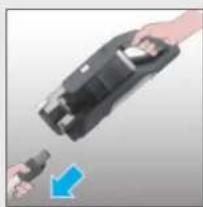
natural_image
Close-up of a hand holding a black device with a blue arrow pointing to it, no visible text or symbols3
text_image
Diagram showing a hand pressing a printer with labeled parts ① and ②, indicating a process step or instruction.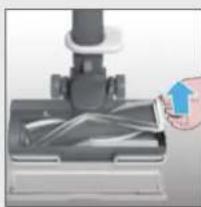
natural_image
Close-up of a hand holding a small object through a mechanical component (no visible text or symbols)456
natural_image
Diagram of a mechanical device with an eye and a magnified inset showing particle distribution (no text or symbols)●
natural_image
Diagram showing a device with an eye and a magnified inset of its surface (no text or symbols)The image is too blurry to recognize any text content.
natural_image
Diagram showing eye interacting with a pen and two circular objects, with blue arrows indicating direction (no text or symbols)text_image
A B C K D E J F G H I L S R Q M P O N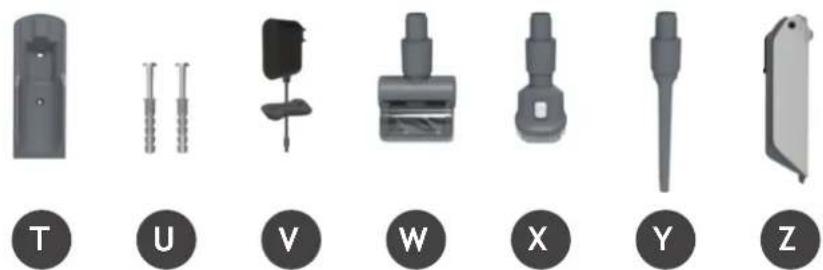
natural_image
Set of seven mechanical component icons labeled T, U, V, W, X, Y, Z (no text or symbols on parts)4. SÅDAN KLARGÕRES STÖVSUGEREN
natural_image
Illustration of a vacuum cleaner with attached device and interior shelf view (no text or symbols)5. OPLADNING AF BATTERIET
text_image
Diagram illustrating the step-by-step procedure of a device's eye detection, showing steps from device to final display.text_image
Diagram of a device with numbered annotations indicating directional movement or process steps6. BRUG AF ST∅VSUGEREN
natural_image
Three mechanical components with numbered labels (1, 2, 3) shown in separate views: a lever, a tool, and a bracket (no text or symbols on the objects themselves)6.1 STICK-TILSTAND
For at bruge dit produkt i stick-tilstand:
text_image
Instructional diagrams showing two-step cleaning steps: first to press a vacuum cleaner, second to install a tool with multiple sensors.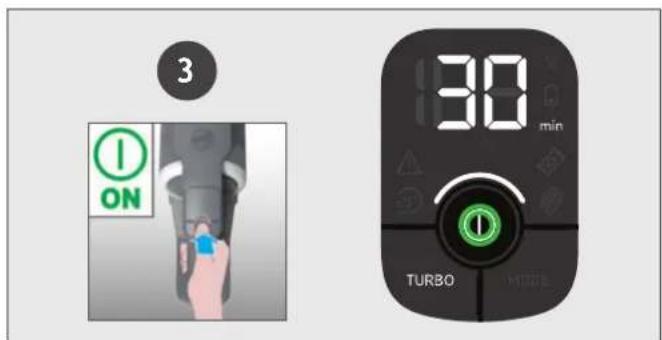
text_image
3 ON 30 min TURBO7.1 T∅MNING AF ST∅VBEHOLDEREN
text_image
Diagram showing foot positioning of a vacuum cleaner with labeled parts and directional arrows indicating movement.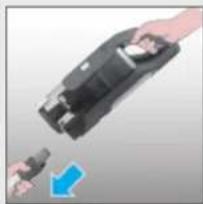
natural_image
Close-up of a hand holding a black electrical plug with a blue arrow pointing to it (no text or symbols visible)3
text_image
Diagram showing a hand pressing a device with numbered labels ① and ②, indicating steps to press or install.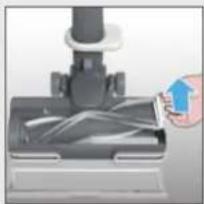
natural_image
Close-up of a hand holding a small object over a mechanical component (no visible text or symbols)456
natural_image
Diagram of a mechanical device with an eye and magnified inset showing particle distribution (no text or symbols)The image is too blurry to recognize any text content.
natural_image
Diagram of a device with an eye and a magnified inset showing internal components (no text or symbols)The image is too blurry to recognize any text content.
natural_image
Diagram showing light rays interacting with a human eye and a pen, with no text or symbols present.text_image
A B C K D E J F G H I L S R Q M P O N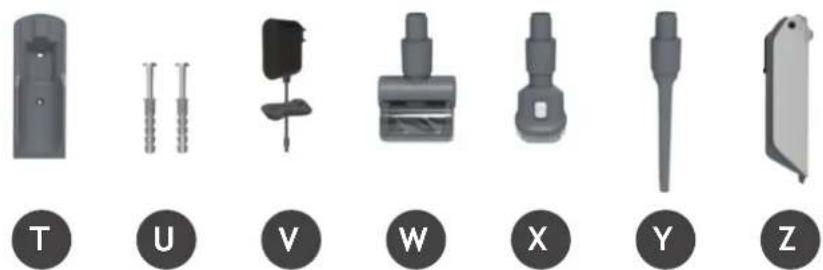
text_image
T U V W X Y Znatural_image
Three mechanical components with numbered labels (1, 2, 3) shown in separate views: a lever, a tool, and a bracket (no text or symbols on the objects themselves)6.1 STICK-MODUS
text_image
Instructional diagram showing two-step cleaning steps for a vacuum cleaner, with numbered instructions and component placement.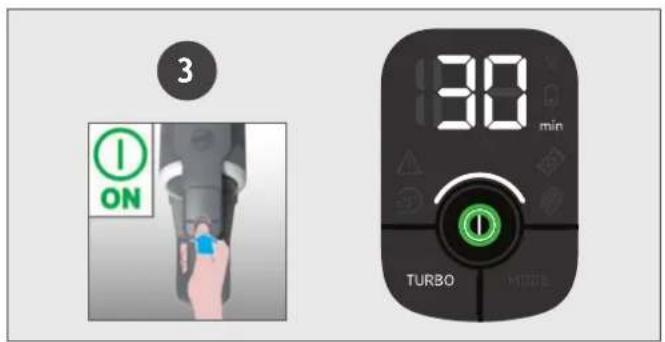
text_image
3 ON 30 min TURBO MODEtext_image
Diagram showing two-step installation of a handheld device, labeled 1 and 2, with tool icons and a blue arrow indicating motion.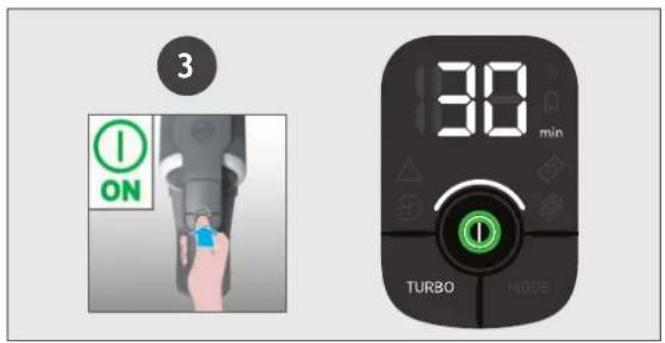
text_image
3 ON 30 min TURBO MODEflowchart
graph LR
    A["Brush"] --> B["Presser"]
    B --> C["Close-up"]
    C --> D["Close-up"]
    D --> E["Arrow pointing to brush tip"]
    E --> F["Arrow pointing to brush tip"]
    F --> G["Arrow pointing to brush tip"]
    G --> H["Arrow pointing to brush tip"]
7. VEDLIKEHOLD AV ST∅VSUGEREN
7.5 BLOKKERINGER
NO
Hvis produktet fungerer men suger lite eller ingenting, kan det skyldes en blokkering.
text_image
Diagram showing foot cleaning steps with numbered arrows indicating movement from a vacuum cleaner to a shoe.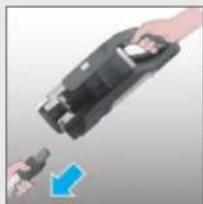
natural_image
Hand holding a black electronic device with a blue arrow pointing to it (no text or symbols visible)3
text_image
Diagram showing a hand pressing a device with labeled parts, including lock and directional arrows indicating process flow.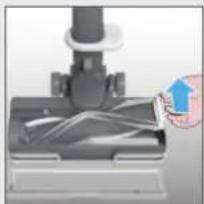
natural_image
Close-up of a hand inserting a plastic into a mechanical component (no visible text or symbols)456
natural_image
Diagram of a mechanical device with an eye and a magnified inset showing particle distribution (no text or symbols)●
natural_image
Diagram of a device with an eye and a sensor array, showing no text or symbols●
natural_image
Diagram showing light rays interacting with a human eye and a pen, with arrows indicating direction (no text or symbols)text_image
A B C K D E J F G H I L S R Q M P O N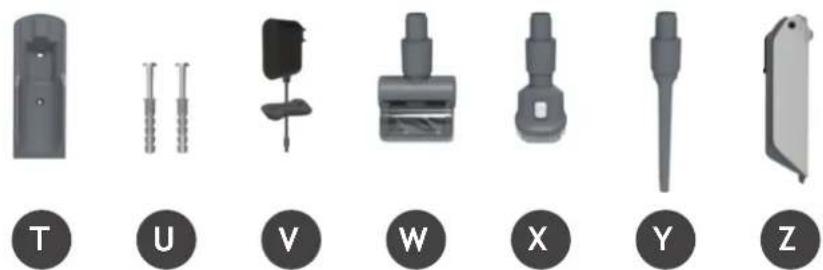
natural_image
Set of seven mechanical component icons labeled T, U, V, W, X, Y, Z (no text or symbols on parts)4. FÖRBEREDA DIN DAMMSUGARE
natural_image
Illustration of a vacuum cleaner with attached door, showing internal components and a close-up of its base (no text or symbols)5. LADDNING AV BATTERIET
text_image
Diagram illustrating the step-by-step procedure of a device's eye detection, showing steps from device to final display.text_image
Diagram of a device with numbered annotations indicating directional movement or process steps6. ANVÄNDNING
natural_image
Three mechanical components with numbered labels (1, 2, 3) shown in separate views: a lever, a tool, and a bracket (no text or symbols on the objects themselves)6.1 STICK-LÄGE
text_image
Diagram showing two-step assembly steps of a device, labeled 1 and 2, with a hand holding a device and a blue arrow indicating the process.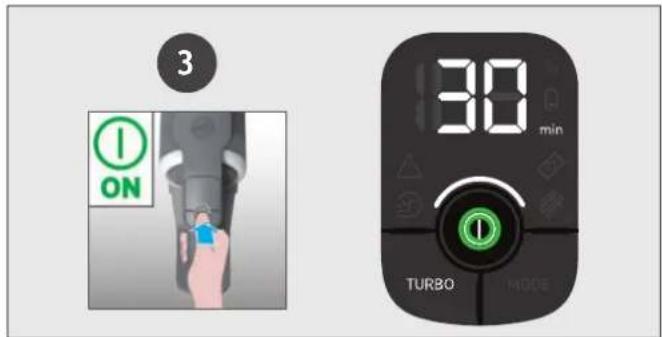
text_image
3 ON 30 min TURBO MODEflowchart
graph LR
    A["Brush Tool"] --> B["Cut to Press"]
    B --> C["Close-up of brush"]
    C --> D["Shipped to press"]
    D --> E["Shipped to brush with eye"]
    E --> F["Shipped to brush with blue eye"]
    F --> G["Shipped to brush with blue eye"]
    style A fill:#f9f,stroke:#333
    style G fill:#bbf,stroke:#333
7. UNDERHÅLL AV DAMMSUGAREN
7.5 BLOCKERINGAR
SE
text_image
Diagram showing a foot using a vacuum cleaner with labeled parts and directional arrows indicating motion or force.3
natural_image
Hand holding a black device with a blue arrow pointing to it, no visible text or symbols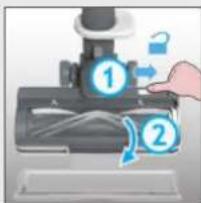
text_image
Diagram showing a hand pressing a device with numbered components, likely illustrating a mechanical or printing process.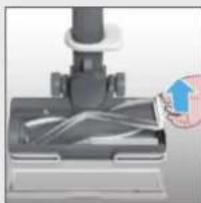
natural_image
Close-up of a hand holding a small object over a dark mechanical component (no visible text or symbols)456
natural_image
Diagram of a mechanical valve with eye and sensor components, no text or symbols present●
natural_image
Diagram showing a device with an eye and a magnified inset of a textured surface (no text or symbols)The image is too blurry to recognize any text content.
natural_image
Diagram showing light rays interacting with a human eye and a pen, with arrows indicating direction (no text or symbols)text_image
A B C K D E J F G H I L S R Q M P O N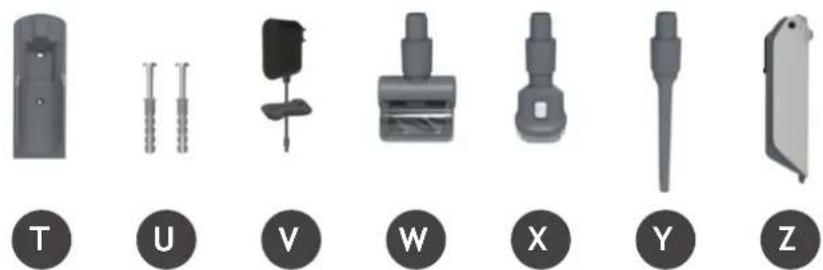
natural_image
Set of seven mechanical components labeled T, U, V, W, X, Y, Z, shown in grayscale without any text or symbols on parts.4. LAITTEEN KOKOAMINEN
natural_image
Illustration of a vacuum cleaner assembly with parts and a close-up of its base (no text or symbols)5. AKUN LATAUS
text_image
Diagram illustrating the step-by-step procedure of a device's eye detection, showing steps from device to final state.text_image
Diagram of a device with numbered annotations indicating directional movement or process steps6. LAITTEEN KÄYTTÖ
natural_image
Three mechanical components with numbered labels (1, 2, 3) shown in separate views: a lever, a tool, and a bracket (no text or symbols on the objects themselves)6.1 VARSI-IMURI TILA
text_image
Diagram showing foot cleaning steps with numbered arrows indicating movement from a vacuum cleaner to a foot.2
natural_image
Close-up of four electronic components with metallic leads, no visible text or symbols3
text_image
ON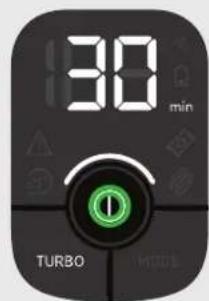
text_image
30 min TURBO MOSInatural_image
Close-up of a hand holding a black device with a blue arrow pointing to it, no visible text or symbols2
natural_image
Close-up of mechanical components including a clamped connector and two disassembled parts (no text or symbols visible)3
text_image
ON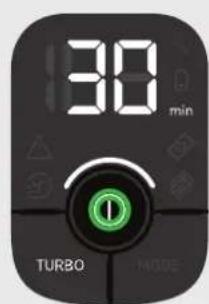
text_image
30 min TURBO MODEOhjausasetukset:
flowchart
graph LR
    A["Brush"] --> B["Presser"]
    B --> C["Close-up"]
    C --> D["Arrow to brush tip"]
    D --> E["Close-up of brush"]
    E --> F["Arrow to brush tip"]
    F --> G["Close-up of brush"]
    style A fill:#f9f,stroke:#333
    style G fill:#bbf,stroke:#333
7. LAITTEEN KUNNOSSAPITO
7.5 TUKOKSET
FI
text_image
Diagram showing a foot using a vacuum cleaner with labeled parts and directional arrows indicating motion or force.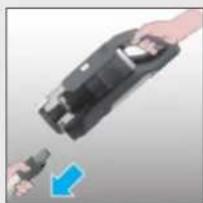
natural_image
Close-up of hands holding a black electronic device with a blue arrow pointing to it (no text or symbols visible)3
text_image
Diagram showing a hand pressing a device with numbered callouts and lock icons, likely illustrating a process or system step.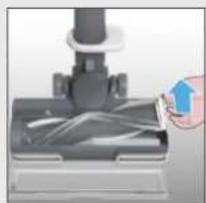
natural_image
Close-up of a hand inserting a blue plastic into a black cylindrical device (no text or symbols visible)456
natural_image
Diagram of a mechanical valve with an eye and a magnified inset showing internal components (no text or symbols)●
natural_image
Diagram of a device with an eye and a magnified inset showing internal components (no text or symbols)The image is too blurry to recognize any text content.
natural_image
Diagram showing light rays interacting with a human eye and a pen, with circular objects inside (no text or symbols)text_image
A B C K D E J F G H I L S R Q M P O N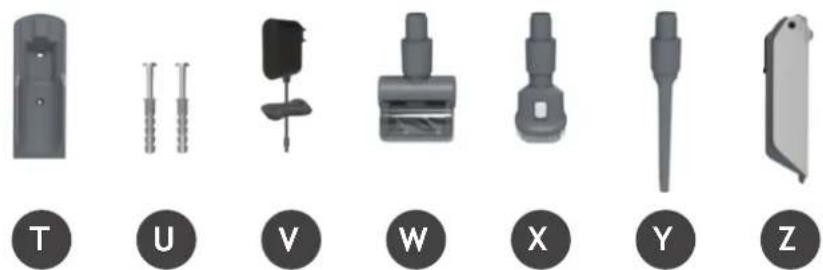
natural_image
Set of seven mechanical component icons labeled T, U, V, W, X, Y, Z (no text or symbols on parts)natural_image
Illustration of a vacuum cleaner with attached door, showing part assembly and interior view (no text or symbols)text_image
Diagram illustrating the step-by-step procedure of a device's eye detection, showing steps from device to final display.text_image
Diagram of a device with numbered annotations indicating directional movement or process steps6. ΟΔΗΓΙΕΣ ΧΡΗΣΕΩΣ
natural_image
Three mechanical components with numbered labels (1, 2, 3) shown in separate views: a lever, a tool, and a bracket (no text or symbols on the objects themselves)6.1 ΟΡΘΙΑ ΧΡΗΣΗ
text_image
Instructional diagram showing two steps of a vacuum cleaner's usage, labeled 1 and 2 with numbered instructions and component illustrations.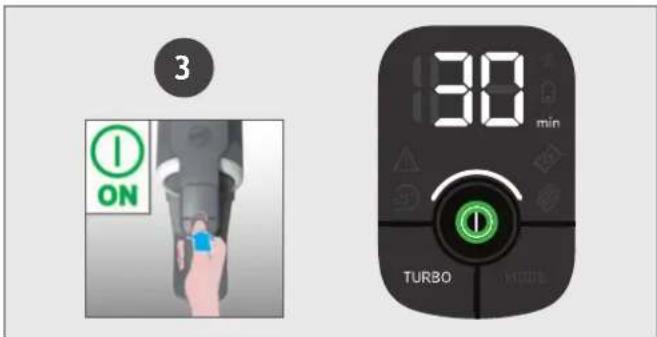
text_image
3 ON 30 min TURBOtext_image
Diagram showing two-step installation of a mechanical device, labeled with step 1 and step 2, indicating assembly or disassembly.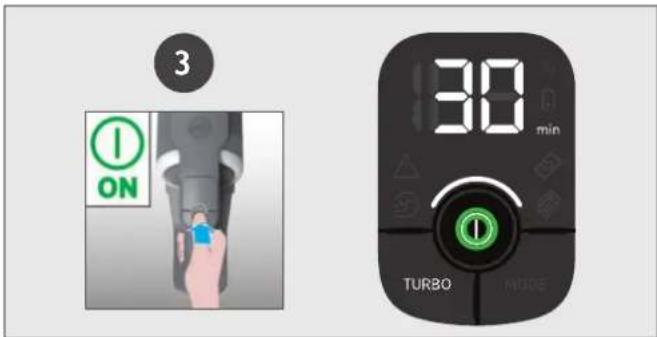
text_image
3 ON 30 min TURBO MODEΡυθμίσεις ελέγχου:
text_image
Diagram showing foot cleaning steps with numbered arrows indicating movement from a vacuum cleaner to a shoe.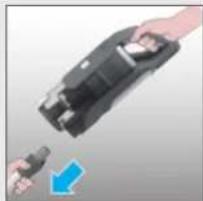
natural_image
Hand holding a black device with a blue arrow pointing to it, no visible text or symbols3
text_image
Diagram showing a hand pressing a device with numbered instructions and directional arrows indicating action or process steps.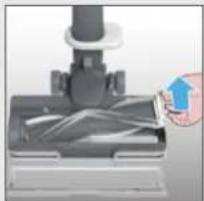
natural_image
Close-up of a hand using a handheld tool to press or spread material over a mechanical component (no visible text or symbols)456
natural_image
Diagram of a microscope with an eye and magnified inset showing tissue (no text or symbols)●
natural_image
Diagram of a device with an eye and a magnified inset showing internal components (no text or symbols)●
natural_image
Diagram showing light rays interacting with a human eye and a pen, with no text or symbols present.text_image
A B C K D E J F G H I L S R Q M P O N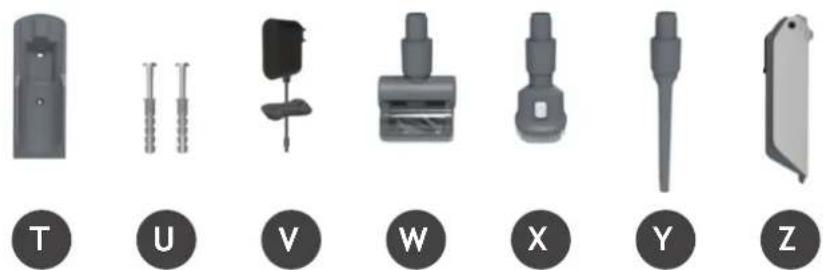
natural_image
Set of seven mechanical components labeled T, U, V, W, X, Y, Z, shown in grayscale without any text or symbols on parts.natural_image
Illustration of a vacuum cleaner with attached device and interior shelf view (no text or symbols)5. ЗАРЯДКА БАТАРЕИ
text_image
Diagram illustrating the step-by-step procedure of a device's eye detection, showing steps from device to final state with labeled components.text_image
Diagram of a device with numbered annotations indicating directional movement or process stepsnatural_image
Three mechanical components with no visible text or symbols, including a numbered label (1, 2, 3) in the top-left corner.6.1 РЕЖИМ С ТРУБКОЙ
text_image
Instructional diagram showing two-step cleaning steps: first to press down a vacuum cleaner, second to disassembly a tool.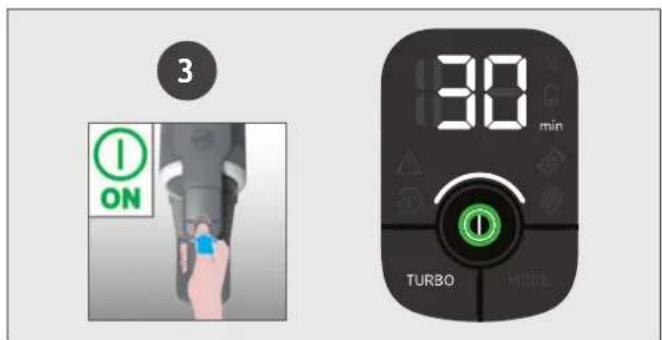
text_image
3 ON 30 min TURBOtext_image
Diagram showing two-step assembly steps of a device, labeled 1 and 2, with a hand holding a device and a blue arrow indicating the process.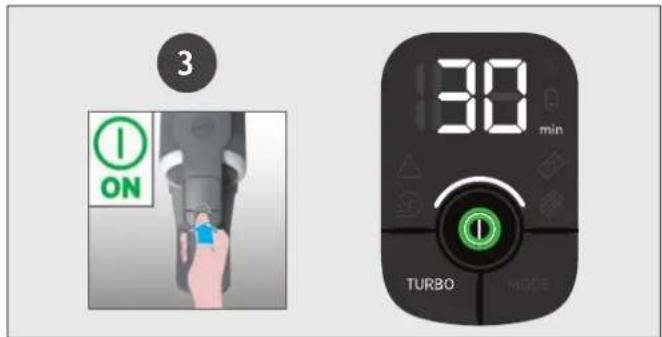
text_image
3 ON 30 min TURBO MODEtext_image
Diagram showing a hand using a microscope to interact with a device, labeled with numbered steps ① and ②.The image is too blurry to recognize any text content.
natural_image
Close-up of a hand pressing down on a mechanical component with a blue arrow indicating motion (no text or symbols visible)The image is too blurry to recognize any text content.
natural_image
Illustration of hands pouring liquid from a container into a metal bowl (no text or symbols)The image is too blurry to recognize any text content.
natural_image
Close-up of a mechanical component with blue motion indicator (no text or symbols visible)6
natural_image
Close-up of a blue mechanical component with a circular end, partially visible against a metallic background (no text or symbols)7
text_image
Diagram showing a hand using a microscope to interact with a device, labeled with numbered steps 1 and 2.8
text_image
'CLICK'text_image
Diagram showing foot cleaning steps with numbered arrows indicating movement from a vacuum cleaner to a shoe.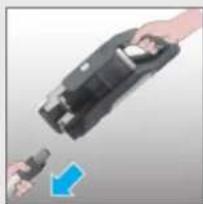
natural_image
Close-up of hands holding a black device with a blue arrow pointing to it, no visible text or symbols3
text_image
Diagram showing a hand pressing a printer with labeled parts, including numbered callouts ① and ②.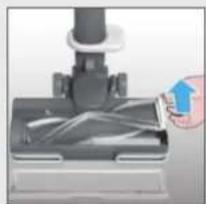
natural_image
Close-up of a hand holding a small object over a mechanical component (no visible text or symbols)456
natural_image
Diagram of a mechanical device with an eye and magnified inset showing internal components (no text or symbols)The image contains no text or characters. Therefore, the correct OCR output is an empty string.
natural_image
Diagram of a device with an eye and a magnified inset showing internal components (no text or symbols)The image contains no text or characters. Therefore, the correct OCR output is an empty string.
natural_image
Diagram showing light rays interacting with a human eye and a pen, with arrows indicating direction (no text or symbols)text_image
A B C K D E J F G H I L S R Q M P O N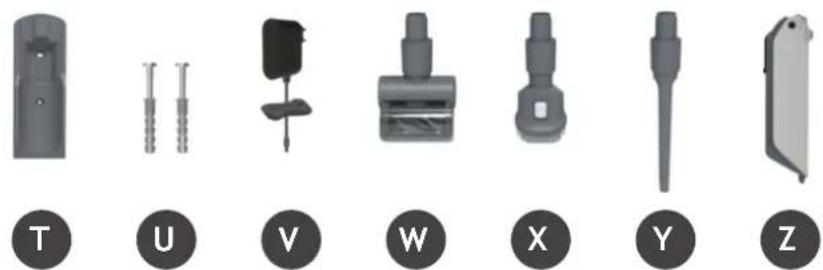
natural_image
Set of seven mechanical component icons labeled T, U, V, W, X, Y, Z (no text or symbols on parts)4. PRZYGOTOWYWANIE ODKURZACZA
natural_image
Illustration of a vacuum cleaner with attached device and interior shelf view (no text or symbols)5. LADOWANIE AKUMULATORA
text_image
Diagram illustrating the step-by-step procedure of a device's eye detection, showing steps from device to final display.text_image
Diagram of a device with numbered annotations indicating directional movement or process steps6. KORZYSTANIE Z ODKURZACZA
natural_image
Three mechanical components with numbered labels (1, 2, 3) shown in separate views: a lever, a tool, and a bracket (no text or symbols on the objects themselves)6.1 TRYB BEZPRZEWODOWY
text_image
Instructional diagram showing two-step cleaning steps: first to press a vacuum cleaner, second to install a tool with multiple sensors.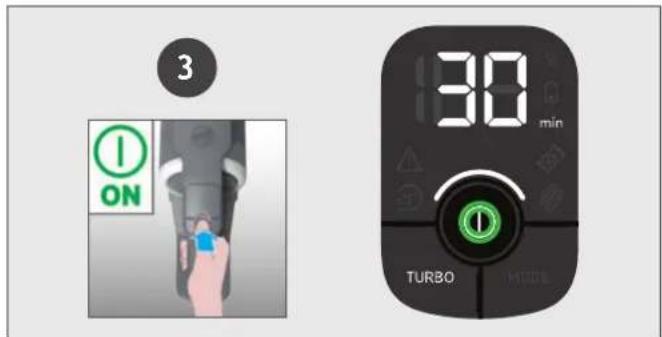
text_image
3 ON 30 min TURBOtext_image
Diagram showing two-step assembly steps of a device, labeled 1 and 2, with a hand holding a device and a blue arrow indicating the process.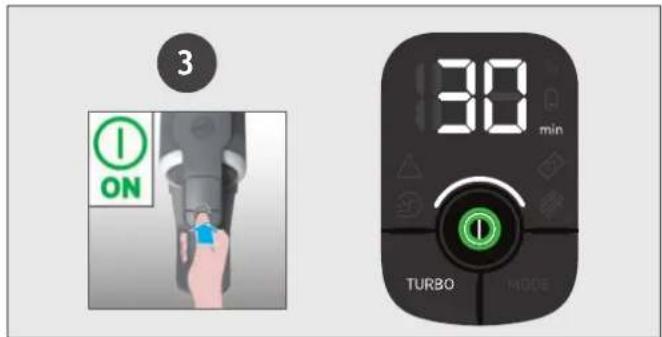
text_image
3 ON 30 min TURBO MODEflowchart
graph LR
    A["Start"] --> B["Disassembly with OFF indicator"]
    B --> C["Close-up of camera body"]
    C --> D["Close-up of eye signal"]
    D --> E["Final state with hand holding eye signal"]
    style A fill:#000,stroke:#fff,color:#fff
    style E fill:#000,stroke:#fff,color:#fff
7. KONSERWACJA URZĄDZENIA
7.5 ZATORY
PL
text_image
Diagram showing foot cleaning steps with numbered arrows indicating movement from a vacuum cleaner to a shoe.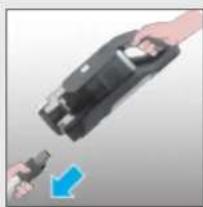
natural_image
Close-up of a hand holding a black device with a blue arrow pointing to it, no visible text or symbols3
text_image
Diagram showing a hand pressing a device with numbered callouts and lock icons, likely illustrating a process or system step.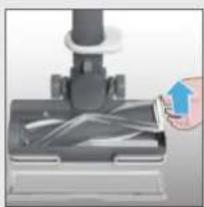
natural_image
Close-up of a hand inserting a small object into a mechanical component (no visible text or symbols)456
natural_image
Diagram of a mechanical device with an eye and a magnified inset showing internal components (no text or symbols)●
natural_image
Diagram of a device with an eye and a magnified inset showing internal components (no text or symbols)The image contains no text or characters.
natural_image
Diagram showing light rays interacting with a human eye and a pen, with arrows indicating direction (no text or symbols)text_image
A B C K D E J F G H I L S R Q M P O N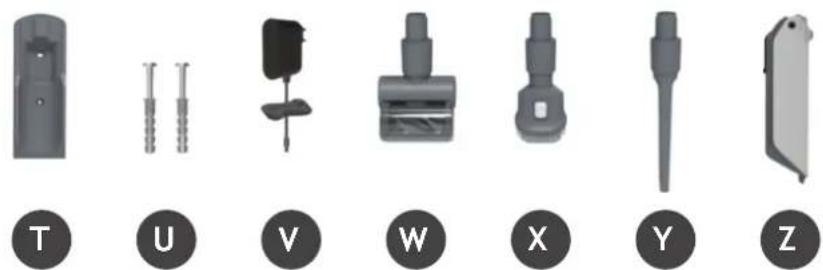
natural_image
Set of seven mechanical components labeled T, U, V, W, X, Y, Z, shown in grayscale without any text or symbols on parts.natural_image
Illustration of a vacuum cleaner with attached device and accessories, showing assembly and cleaning steps (no text or symbols)5. NABÍJENÍ BATERIE
text_image
Diagram illustrating the step-by-step procedure of a device's eye detection, showing steps from device to final state with labeled components.text_image
Diagram of a device with numbered annotations indicating directional movement or process steps6. JAK POUŽÍVAT VYSAVAČ
natural_image
Three mechanical components with numbered labels (1, 2, 3) shown in separate views: a lever, a tool, and a bracket (no text or symbols on the objects themselves)6.1 STANDARDNÍ REŽIM
Použití produktu jako tyčový vysavač:
text_image
Instructional diagrams showing two steps of a vacuum cleaner's cleaning process, labeled 1 and 2 with numbered instructions.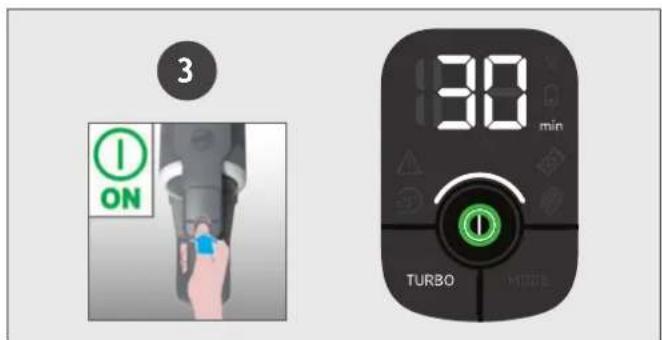
text_image
3 ON 30 min TURBOtext_image
Diagram showing two-step assembly steps of a device, labeled 1 and 2, with a hand holding a component and a blue arrow indicating the process.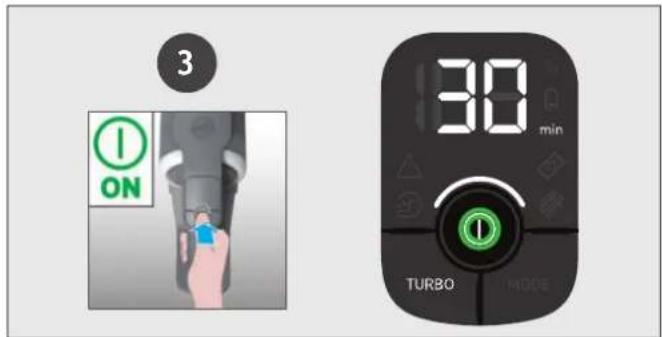
text_image
3 ON 30 min TURBO MODENastavení ovládání:
text_image
Diagram showing foot cleaning steps with numbered arrows indicating movement from a vacuum cleaner to a shoe.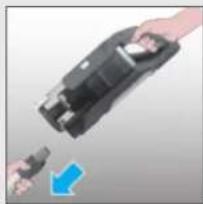
natural_image
Close-up of hands holding a black electronic device with a blue arrow indicating a change (no text or symbols visible)3
text_image
Diagram showing a hand pressing a printer with labeled parts, including numbered callouts ① and ②.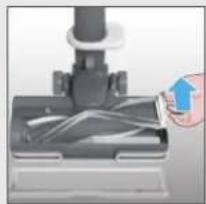
natural_image
Close-up of a hand inserting a plastic into a mechanical component (no visible text or symbols)456
text_image
Diagram showing a mechanical device with an eye icon pointing to a target and a magnified inset showing particle distribution.●
natural_image
Diagram of a device with an eye and a magnified inset showing internal components (no text or symbols)The image contains no text or characters.
natural_image
Diagram showing light rays interacting with a human eye and a pen, with arrows indicating direction (no text or symbols)text_image
A B C K D E J F G H I L S R Q M P O N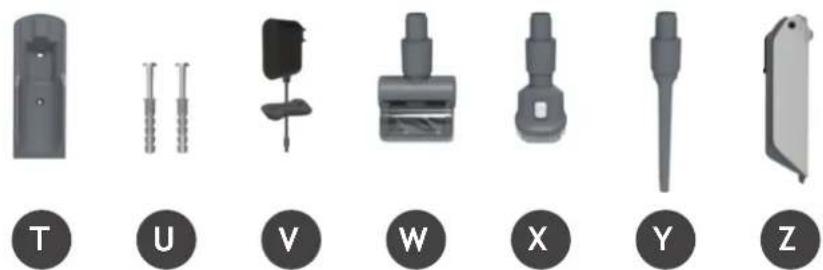
natural_image
Set of seven mechanical component icons labeled T, U, V, W, X, Y, Z (no text or symbols on parts)4. PRIPRAVA VAŠEGA SESALNIKA
Odstranite vse dele izdelka iz embalaže in sestavite svoj sesalnik.
-
KORAK: Cev namestite na nastavek za tla.
-
KORAK: Namestite enoto držala za roke na cev.
text_image
1 CLICK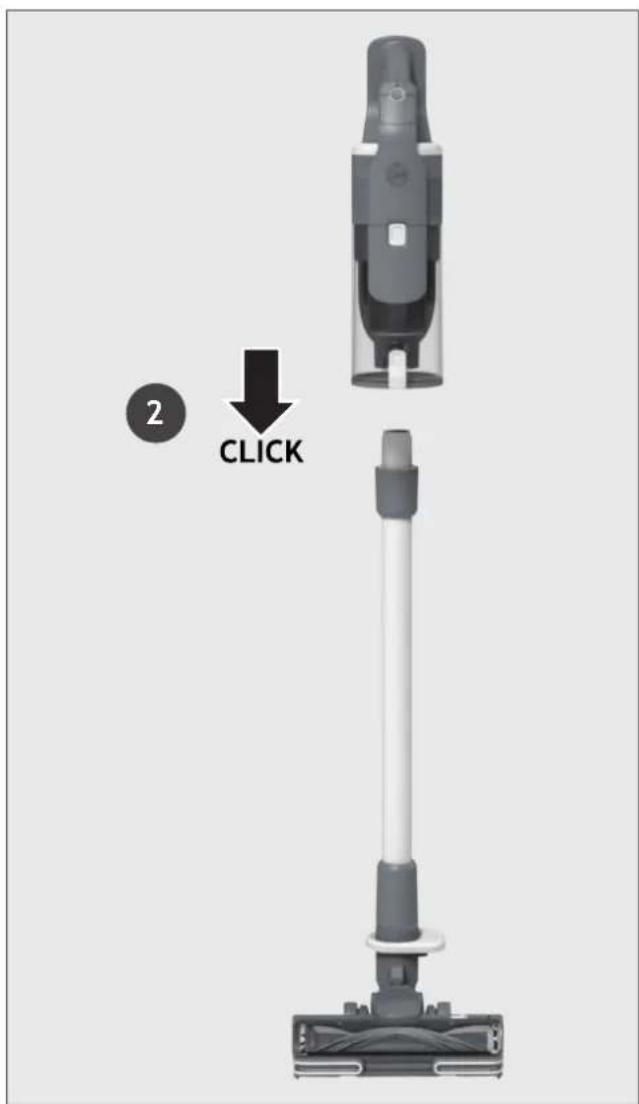
text_image
2 CLICKPriložili smo stenski nosilec za dodatno shranjevanje.
natural_image
Illustration of a vacuum cleaner with three accessories and a close-up of its interior shelf (no text or symbols)5. POLNJENJE BATERIJE
text_image
Diagram illustrating the step-by-step procedure of a device's eye detection, showing steps from device to final display.text_image
Diagram of a device with numbered annotations indicating directional movement or process steps6. UPORABA SESALNIKA
Za vaš sesalnik so na voljo 3 različni načini delovanja:
- Standardni način (Stick Mode).
- Način nad tlemi.
- Ročni način.
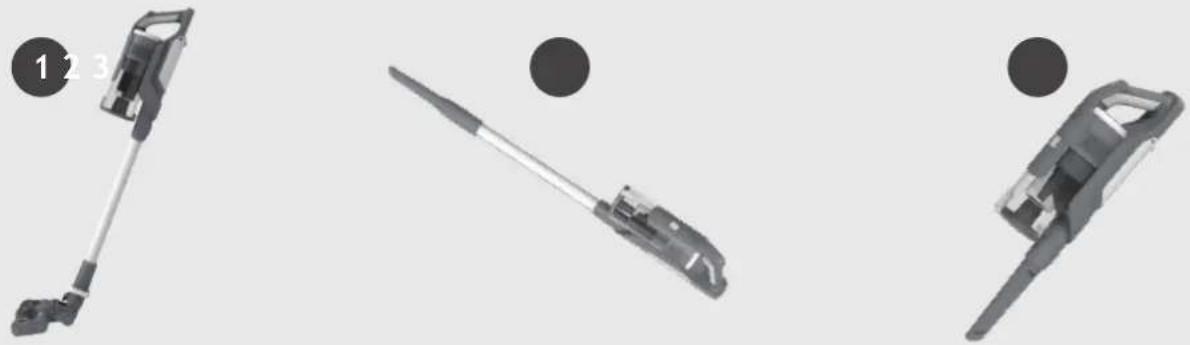
natural_image
Three mechanical components with numbered labels (1, 2, 3) shown in separate views: a lever, a tool, and a bracket (no text or symbols on the objects themselves)6.1 STANDARDNI NAČIN (STICK MODE)
text_image
Instructional diagrams showing two steps of a vacuum cleaner's cleaning process, labeled 1 and 2.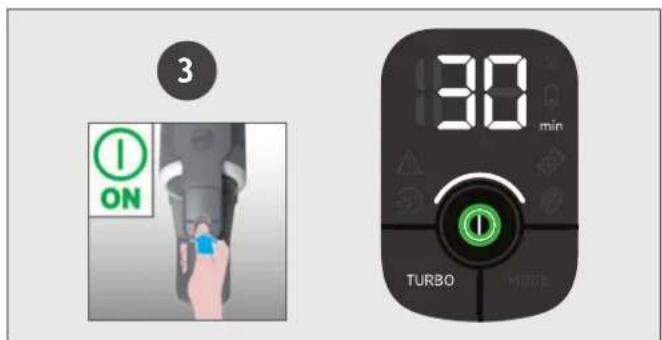
text_image
3 ON 30 min TURBOtext_image
Diagram showing two-step assembly steps of a device, labeled 1 and 2, with a hand holding a device and a blue arrow indicating the process.
text_image
3 ON 30 min TURBO MODENastavitve ukaza:
text_image
Diagram showing foot cleaning steps with numbered instructions and directional arrows indicating movement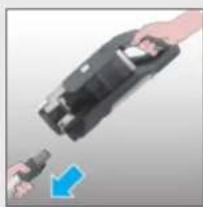
natural_image
Close-up of a hand holding a black electronic device with a blue arrow pointing to it, no visible text or symbols.3

text_image
Diagram showing a hand operating a device with labeled parts and directional arrows, likely illustrating a process or system.
natural_image
Close-up of a hand inserting a small object into a black mechanical component (no visible text or symbols)45
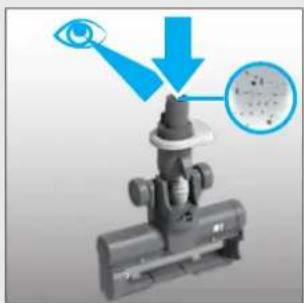
natural_image
Diagram of a mechanical device with an eye and magnified inset showing internal components (no text or symbols)●
natural_image
Diagram of a device with an eye and a magnified inset showing internal components (no text or symbols)●
natural_image
Diagram showing light rays interacting with a human eye and two circular objects, with blue arrows indicating direction (no text or symbols)text_image
A B C K D E J F G H I L S R Q M P O N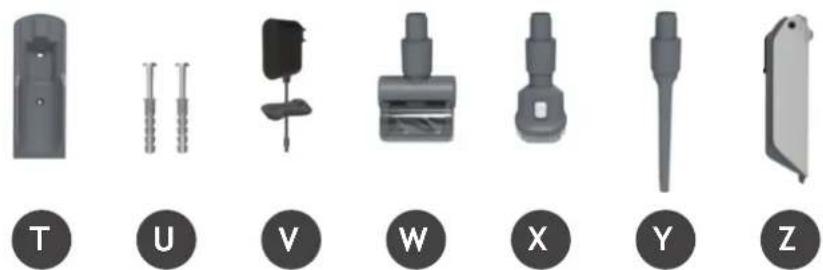
natural_image
Set of seven mechanical components labeled T, U, V, W, X, Y, Z, shown in grayscale without any text or symbols on parts.4. SÜPÜRGENİZİN HAZIRLANMASI
natural_image
Product line showing a vacuum cleaner with attached device and accessories, alongside an inset photo of a shelf shelf (no text or symbols visible)5. PILIN DEĞİŞTIRILMESI
text_image
Diagram illustrating the step-by-step procedure of a device's eye detection, showing steps from device to final state with labeled components.text_image
Diagram of a device with numbered annotations indicating directional movement or process steps6. TEMİZLEYİCİNİN KULLANIMI
natural_image
Three mechanical components with numbered labels (1, 2, 3) shown in separate views: a lever, a tool, and a bracket (no text or symbols on the objects themselves)6.1 DİK MOD
text_image
Instructional diagram showing two-step cleaning steps of a vacuum cleaner, with numbered instructions and component placement.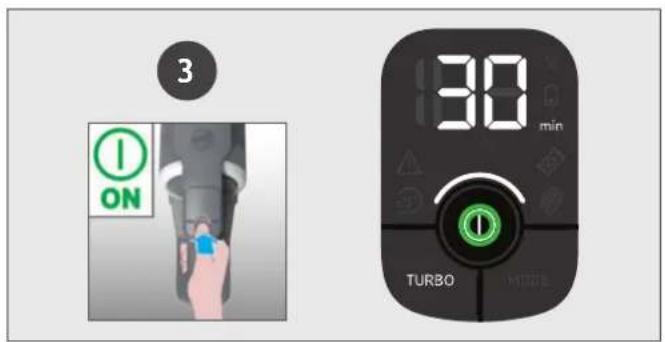
text_image
3 ON 30 min TURBO MODEtext_image
Diagram showing two-step installation of a handheld device, labeled with step 1 and step 2, indicating tool path and component arrangement.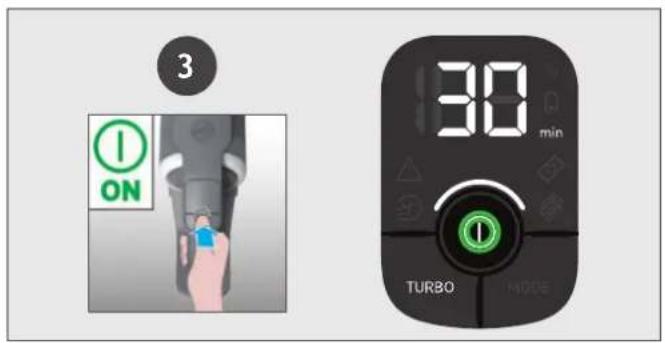
text_image
3 ON 30 min TURBO MODEKontrol ayarları:
text_image
Diagram showing foot cleaning steps with numbered arrows indicating movement from a vacuum cleaner to a shoe.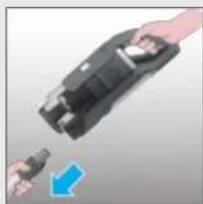
natural_image
Close-up of a hand holding a black electronic device with a blue arrow pointing to it (no text or symbols visible)3
text_image
Diagram showing a hand pressing a device with numbered labels ① and ②, indicating steps to press or install.
natural_image
Close-up of a hand inserting a cable into a mechanical component (no visible text or symbols)456
natural_image
Diagram of a mechanical device with an eye and magnified inset showing internal components (no text or symbols)The image is too blurry to recognize any text content.
natural_image
Diagram of a device with an eye and a magnified inset showing internal components (no text or symbols)●
natural_image
Diagram showing light rays interacting with a human eye and two circular objects, with directional arrows indicating light emission (no text or symbols)| Manufacturer Name | E-TEK Electronics Manufactory Co.LTD | |
| Manufacturer Address | 101, Workshop 1, No. 5, Jingye Road,Yanchaun Community, Yanlo Street, Bao’an District,518105, Shenzen, Guangdong, (PRC) | |
| Model | ZD024M268120BS | |
| Input Voltage | 100-240 V | |
| Input AC Frequency | 50/60 Hz | |
| Output Voltage | 26.8 V DC | |
| Output Current | 1.2 A | |
| Output Power | 32.16 W | |
| Average Active Efficiency | 87.2 % | |
| Efficiency at load 10% | 86.0% | |
| No-Load Power Consumption | 0.10 W |