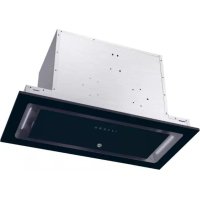
HPY6CBK5BGWIFI - Range hood HOOVER - Free user manual and instructions
Find the device manual for free HPY6CBK5BGWIFI HOOVER in PDF.


| Product type | Built-in extractor hood |
| Brand | Hoover |
| Model | HPY6CBK5BGWIFI |
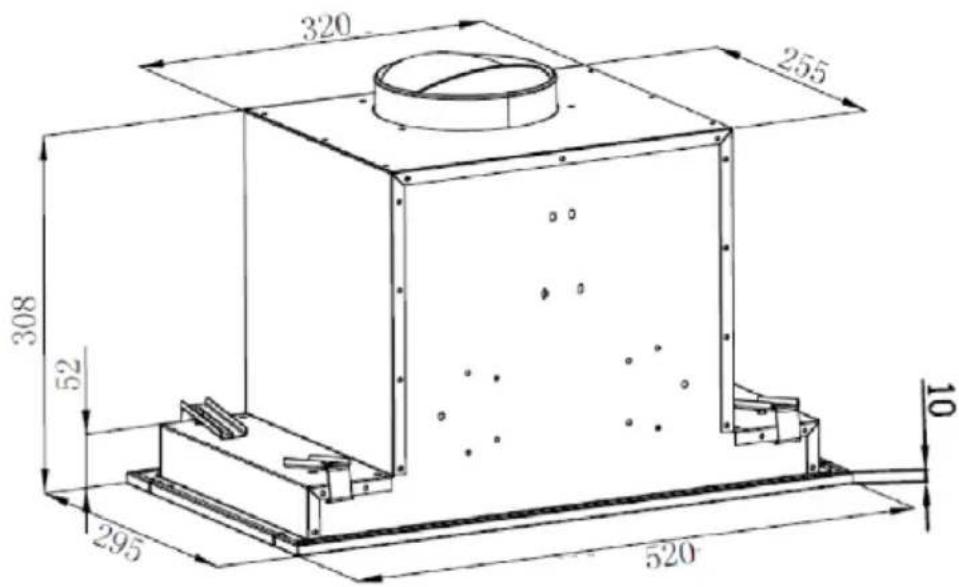
| Dimensions (W x D x H) | 520 x 295 x 308 mm |
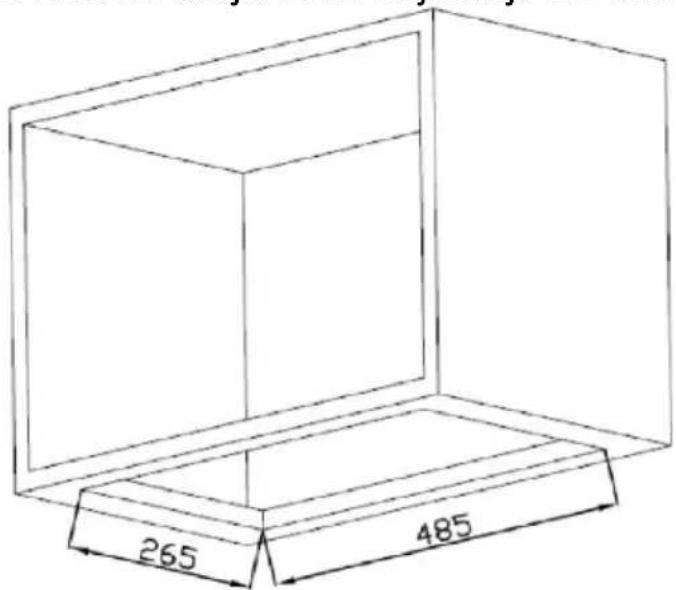
| Recess dimensions (W x D) | 485 x 265 mm |
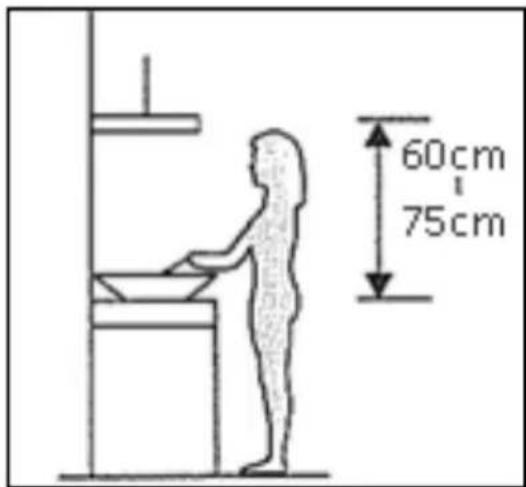
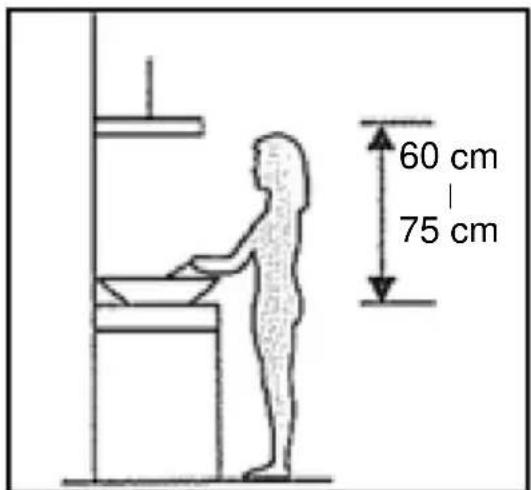
| Minimum distance above the hob | 60 to 75 cm |
| Exhaust duct diameter | 150 mm |
| Motor | Centrifugal fan |
| Speeds | 3 speeds + Boost function (speed 4 for 5 minutes) |
| Lighting | LED, 12 V max 1.5 W |
| Grease filter | Non-stick metal filter, dishwasher safe (monthly cleaning recommended) |
| Activated carbon filter | Optional, for recirculation, replace annually |
| Connectivity | Wi-Fi 802.11 b/g/n, 2.4 GHz band, max power 100 mW |
| Compatible app | hOn (iOS and Android) |
| Network standby consumption | 2 W |
| Timer | Yes, delayed shut-off of 5 minutes (via long press on lighting) |
| Power supply | 230 V ~ 50 Hz (estimate, check on the appliance) |
| Cleaning and maintenance | Soft cloth and soapy water; do not use abrasives |
| Safety | Automatic shut-off after 5 min in boost mode; flame protection (do not flambé under the hood) |
Frequently Asked Questions - HPY6CBK5BGWIFI HOOVER
User questions about HPY6CBK5BGWIFI HOOVER
0 question about this device. Answer the ones you know or ask your own.
Ask a new question about this device
Download the instructions for your Range hood in PDF format for free! Find your manual HPY6CBK5BGWIFI - HOOVER and take your electronic device back in hand. On this page are published all the documents necessary for the use of your device. HPY6CBK5BGWIFI by HOOVER.
USER MANUAL HPY6CBK5BGWIFI HOOVER
TROUBLESHOOTING....13
ENVIRONMENTALPROTECTION....14
INTRODUCTION
Thank you for choosing this cooker hood.
This instruction manual is designed to provide you with all required Instructions related to the installation, use and maintenance of the appliance.
In order to operate the unit correctly and safety, please read this instruction manual carefully before installation and usage.
The cooker hood use high quality materials, and is made with a streamlined design. Equipped with large power electric motor and centrifugal fan, it also provides strong suction power, low noise operation, non-stick grease filter and easy assembly installation.
Hereby, Candy Hoover Group Srl declares that the radio equipment is compliance with Directive 2014/53/EU and with the relevant Statutory Requirements (for the UKCA market).
The full text of the declaration of conformity is available at the follow internet address: www.candy-group.com.
SAFETY PRECAUTION
- Never let the children operate the machine.
- The cooker hood is for home use only, not suitable for barbecue, shop and other commercial purpose.
- The cooker hood and its filter should be clean regularly in order to keep in good working condition.
- Clean the cooker hood according to the instruction manual and keep the unit from danger of burning. There is a fire risk if cleaning is carried out in accordance with the instructions.
● Forbid the direct baking from the gas cooker. - Please keep the kitchen room a good convection.
- If the supply cord is damaged, it must be replaced by the manufacturing service agent similarly qualified persons in order to avoid a hazard
- There shall be adequate ventilation of the room when the range has used at the same time as appliances burning gas or other fuels;
● The air must not be discharged into a flue that is used for exhaust
fumes from appliances burning gas or other fuels;
● Regulations concerning the discharge of air have to be fulfilled.
- This appliance can be used by children aged from 8 years and ab and persons with reduced physical, sensory or mental capabilities or lack of experience and knowledge if they have been given supervisor or instruction concerning use of the appliance in a safe way and understand the hazards involved.
● Children should be supervised to ensure that they do not play with appliance.
- Cleaning and user maintenance shall not be made by children with supervision.
- Do not flame under the range hood.
- CAUTION: Accessible parts may become hot when used with cooking appliance.
- The warning shall be in the same part of the instructions that include details of how to mount the equipment.
Electrical Shock Hazard
- Only plug this unit into a properly earthed outlet. If in doubt se advice from a suitably qualified engineer.
- Failure to follow these instructions can result in death, fire, or electrical shock.
flowchart
graph LR
    A["LED"] <--> B["LED"]
The lamp used in this product is not suitable for use in the lighting of a room.
The purpose of this lamp is to provide illumination for using the prod
Prepare for installation:
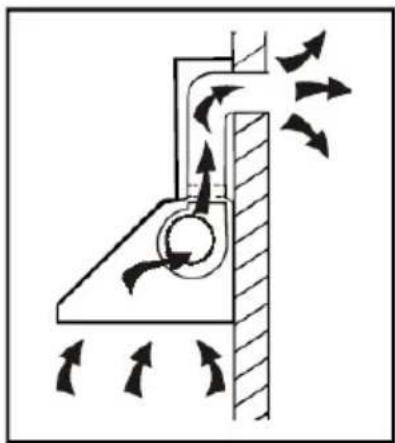
a. If you have an outlet to the outside, your cooker hood can be connected as below picture by means of an extraction duct (enamel, aluminum, flexible pipe or inflammable material with an interior diameter of 150mm)
natural_image
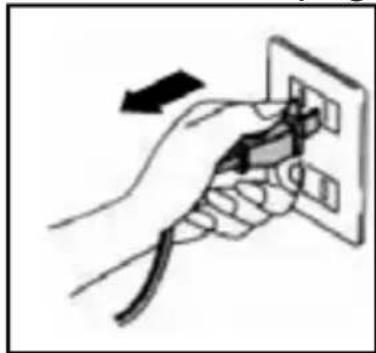
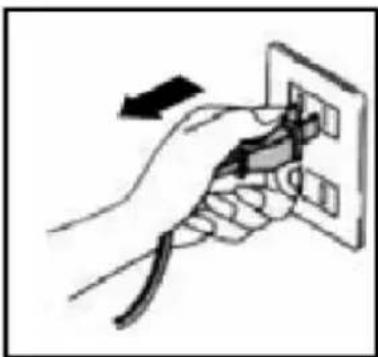
Diagram of a mechanical or fluidic system with directional arrows indicating flow or movement (no text or symbols present)b. Before installation, turn the unit off and unplug it from the outlet.
natural_image
Hand holding a plug inserted into an electrical outlet (no text or symbols visible)c. The cooker hood should be placed at a distance of 60\~75cm above the cooking plane for best effect.
Specifications
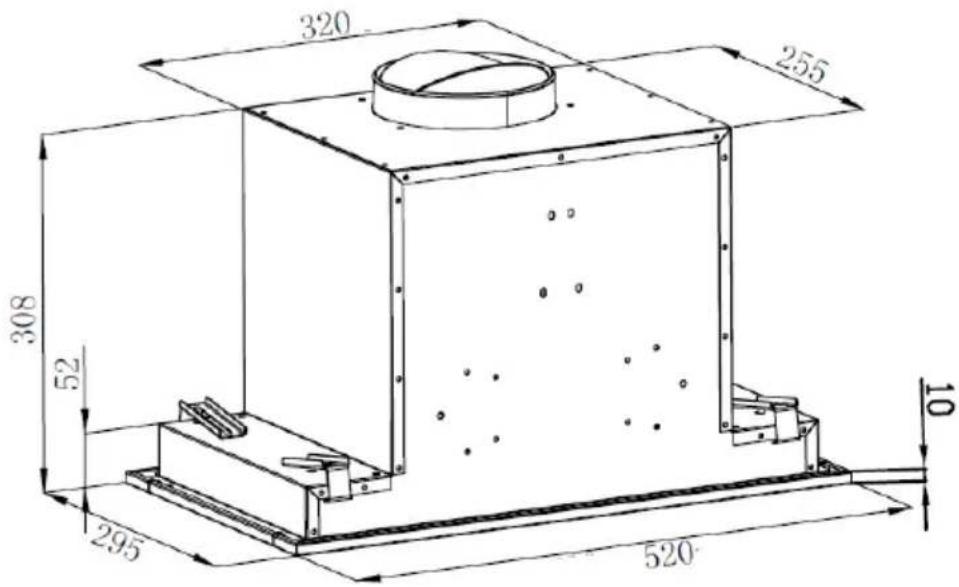
| Model Product dimension(W,D,H mm) | |
| HPY6CBK5BGWIFI | 520mm x 295mm x 308mm |
Installation
- The typical installation method for your range hood is into a purpose built overhead/wall cabinet.
- Using a jigsaw, create the required cut-out for your range hood, as per the following:
● HPY6CBK5BGWIFI: 485 × 265mm - Make sure the cut-out is at least 20mm from the cabinet edge.
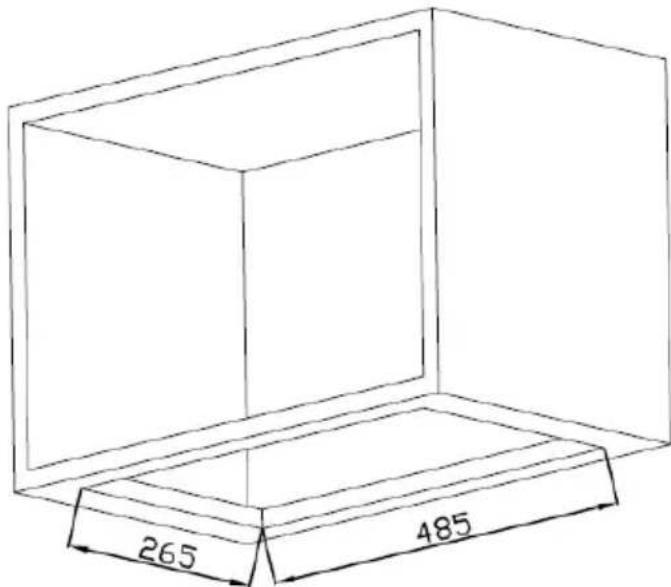
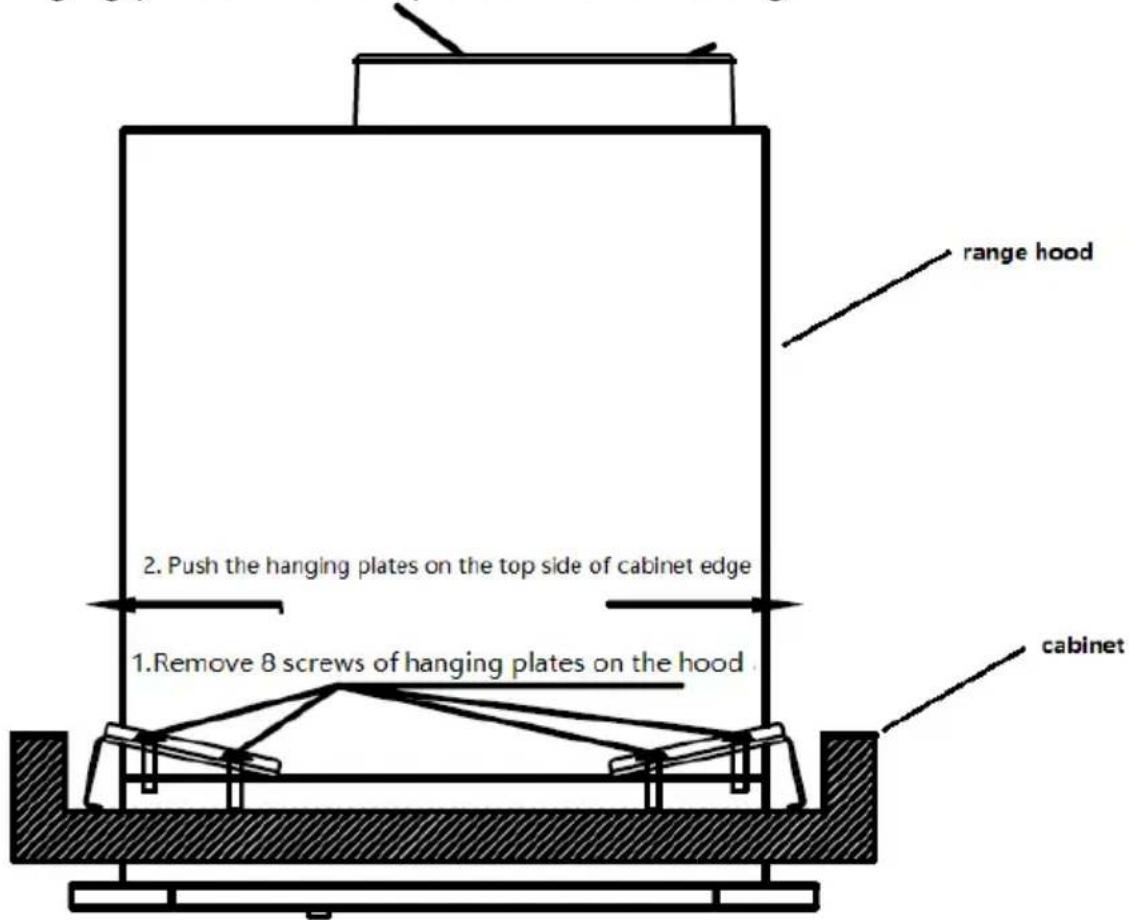
- Insert the range hood to the cabinet
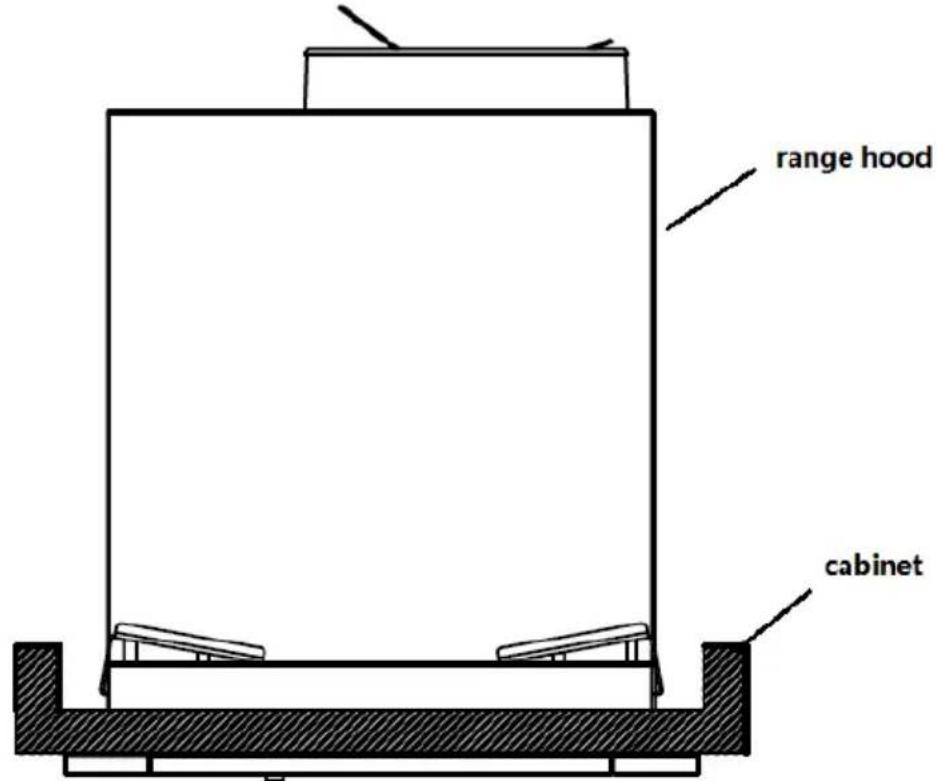
- Remove 8 screws of 4 hanging plates on the range hood, push the 4 hanging plates on the top side of cabinet edge.
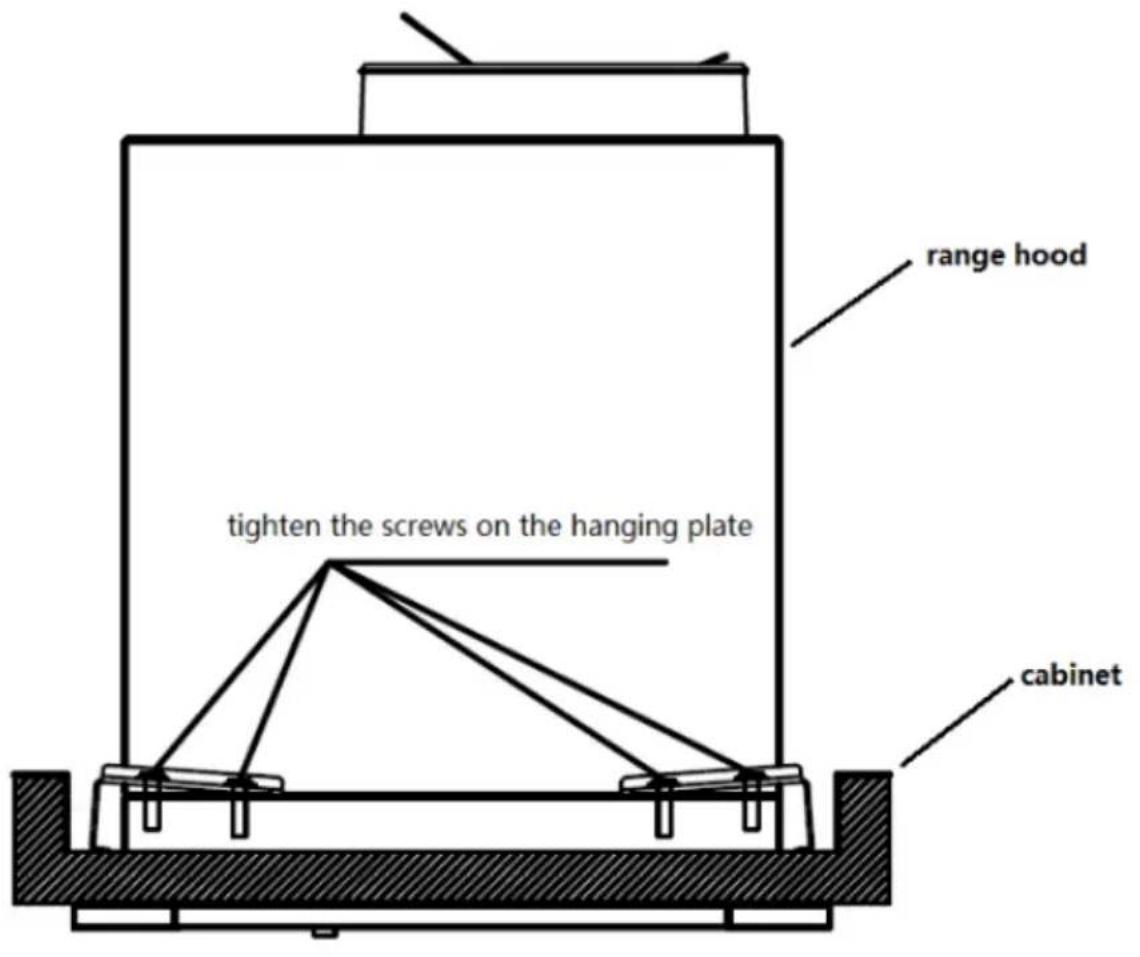
- Screw 4 hanging plates onto the range hood using 8 screws( previously removed on step 2). Note: Make sure the screws MUST be securely tightened.
Activated carbon filter can be used to trap odors.
In order to install the activated carbon filter, the grease filter should be detached first. Press the lock and pull it downward.
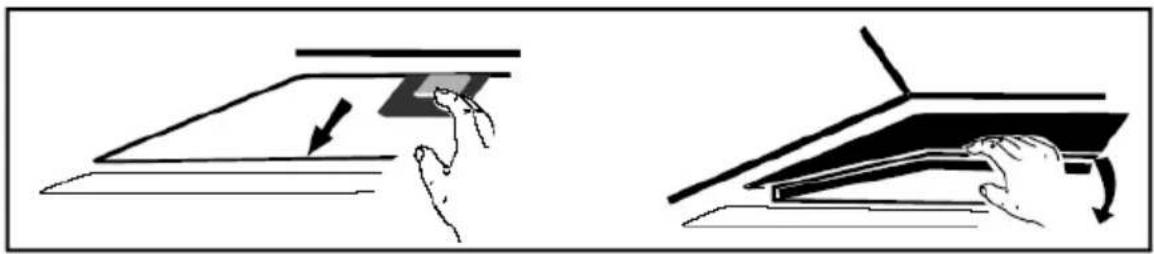
natural_image
Illustration showing two hand gestures interacting with a flat surface, one pointing downward and the other holding a flat surface (no text or symbols)Plug the activated carbon filter into the unit and turn it in clockwise direction. Repeat the same on the other side.
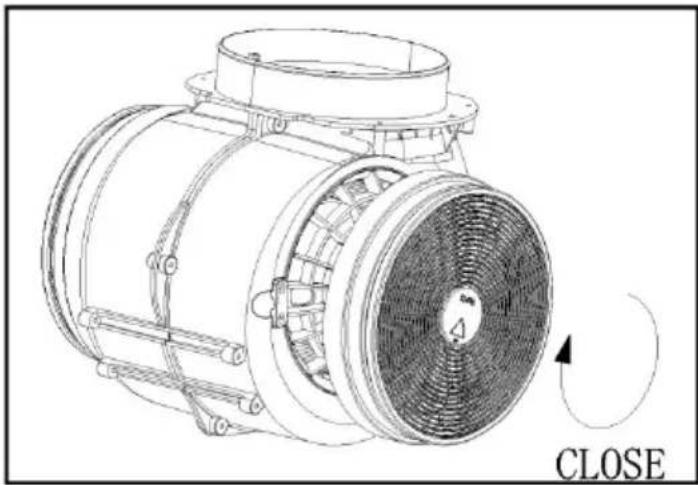
natural_image
Technical line drawing of a mechanical fan or motor assembly with no visible text or symbolsNOTE:
○ Make sure the filter is securelylocked. Otherwise, it would loosen and cause dangerous.
- When activated carbon filter attached, the suction power will be lower.
DESCRIPTION OF COMPONENTS
1
2
3
B


OPERATION
STANDBY MODE.
After plug in, all lighting, system in STANDBY MODE.
1 Low Speed button
It's used for Ventilation on the kitchen. It is suitable for simmering and cooking which do not make much steam.
2 Medium Speed button
Airflow speed is ideally for ventilation in standard cooking operation.
3 High Speed button
When high density of smoke or steam produced, press high-speed button for high effective ventilation.
B Booster function
This hood has a booster function. To activate the booster, Press
B to speed 4, enter into highest speed while the hood is in use and it will increase speed for 5 minutes, before slowing down again.

Light
Short press for lighting on & off
Quick timer: Long press the light button hold for 3 seconds, fan speed buttons will flashing & into 5 minutes count down, after 5 minutes motor & light will turn off automatic with three Buzzer sound.

Wi-Fi Connection
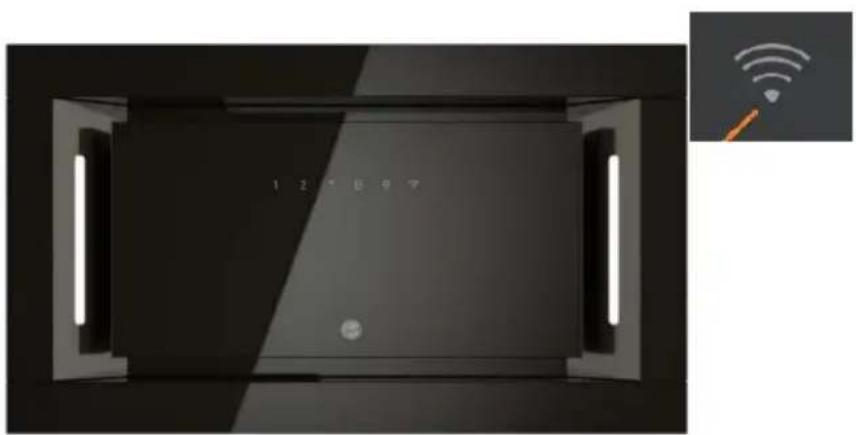
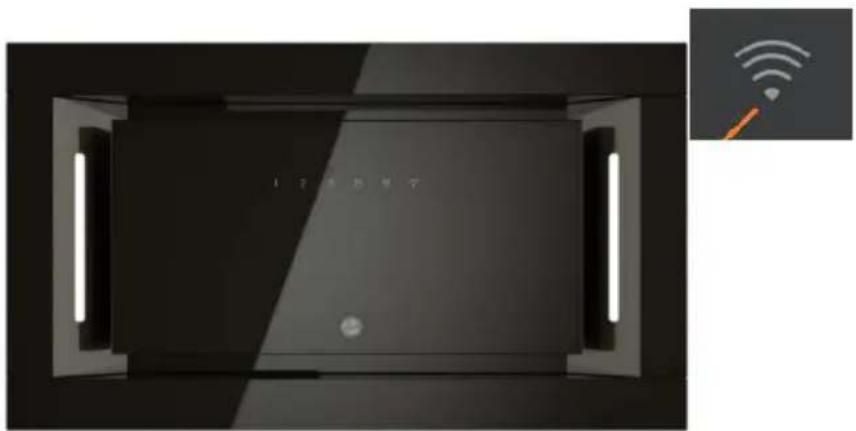
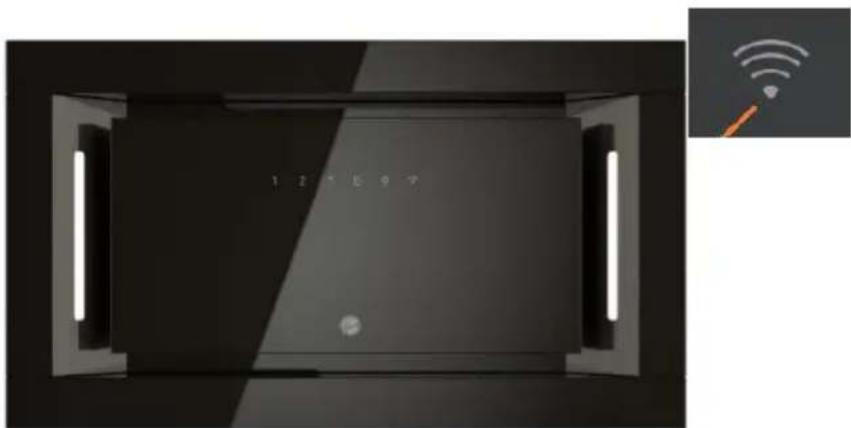
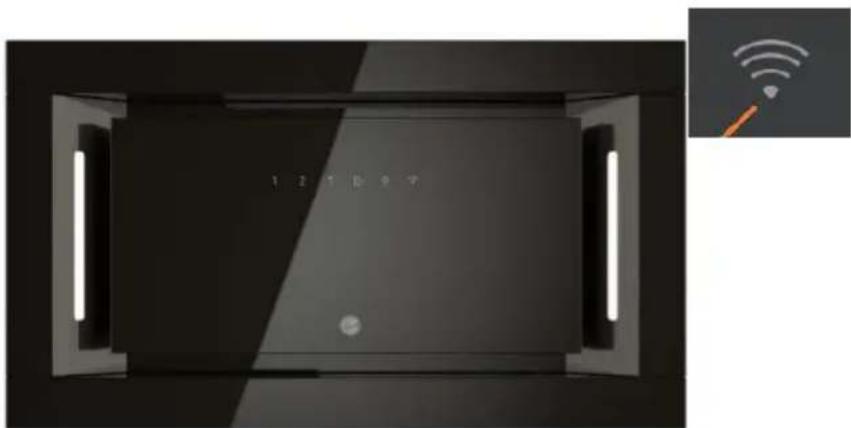
Long press WiFi icon and enter into connecting mode: the backlit of WiFi icon keep flashing indicate the connection is under connecting, the backlit of WiFi icon is light on indicate it is connected, same for standby mode; long press WiFi icon again and the connection will be stopped;
Download hOn App

First of all, you should download hOn APP and install to your portable device. Then enroll your hood.


NOTE
Get ready to add your appliance
1 Stay close to your appliance
2 While in front of your appliance, ensure that your smartphone is connected to a 2.4GHz Wi-Fi network with a stronger signal
CHANGE WI-FI SETTINGS
3 Public networks are not allowed due to low security and reliability.
4 Prepare to enter your Home Wi-Fi password.
ENROLLMENT HOOVER HOOD
natural_image
Interior view of a modern smart home with LED indicators and a Wi-Fi symbol (no readable text or symbols on main subject)The image of the hood has the only purpose of presenting it. May not be perfectly representative.
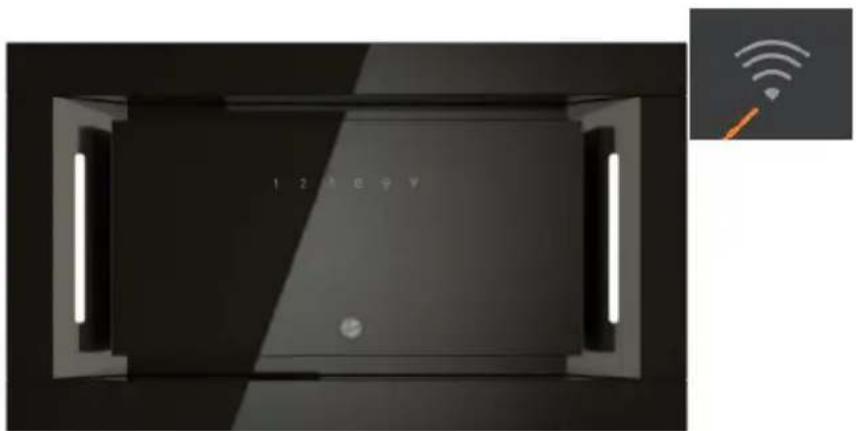
1- Press the WiFi button until the icon starts blinking When the pairing is completed the WiFi icon will be on.
MAINTENANCE
Before cleaning switch the unit off and pull out the plug.
I. Regular Cleaning
Use a soft cloth moistened with hand-warm mildly soapy water or household cleaning detergent. Never use metal pads, chemical, abrasive material or stiff brush to clean the unit.
II. Monthly Cleaning for Grease Filter
ESSENTIAL: Clean the filter every month can prevent any risk of fire.
The filter collects grease, smoke and dust.....so the filter is directly affecting the efficiency of the cooker hood. If not cleaned, the grease residue (potential flammable) will saturate on the filter. Clean it with household cleaning detergent.
III. Annual Cleaning for Activated Carbon Filter
Apply SOLELY to unit that installed as a recirculation unit (not vented to the outside). This filter traps odours and must be replaced at least once a year depending on how frequent the cooker hood used.
III. Lamp Replacement
- Switch the unit off and unplug the appliance.
- Remove the lamp cover by unscrewing the 2 screws.
- Unscrew the LED lamp
- Replace with the same type and lamp
● LED lamp (12 V max, 1.5W).
TROUBLESHOOTING
| Fault | Cause | Solution |
| Light on, but fan does not work | The fan blade is jammed. | Switch of the unit and repair by qualified service personnel only. |
| The motor is damaged. | ||
| Both light and fan do not work | light bulb burn. | Replace the bulb with correct rating. |
| Power cord looses. | Plug in to the power supply again. | |
| Serious Vibration of the unit | The fan blade is damaged. | Switch of the unit and repair by qualified service personnel only. |
| The fan motor is not fixed tightly. | Switch of the unit and repair by qualified service personnel only. | |
| The unit is not hung properly on the bracket. | Take down the unit and check whether the bracket is in proper location. | |
| Suction performance not good | Too long distance between the unit and the cooking plane | Readjust the distance to 65-75cm |
| Technology Wi-Fi | |
| Standard | 802.11 b/g/n |
| Frequency Band(s)[MHz] | 2400 MHz - 2483.5 MHz |
| Maximum Power[mW] | 100mW |
| Product information for networked equipment | |
| power consumption of the product in networked standby if all wired network ports are connected and all wireless network ports are activated: | 2 W |
| How to activate wireless network port: | If the Hood has been enrolled with the APP, turn on the Hood to activate wireless network port. |
| How to deactivate wireless network port: | If the Hood has been enrolled with the APP, turn off the Hood to deactivate wireless network port. If the Hood hasn't been enrolled with the APP, wireless network port will be deactivated even the Hood is on. |
ENVIRONMENTAL PROTECTION
Waste electrical products should not be disposed of with household waste. Please recycle where facilities exist. Check with your Local Authority or retailer for recycling advice.
This appliance is marked according to the European directive 2012/19/EU on Waste Electrical and Electronic Equipment (WEEE).
By ensuring this product is disposed of correctly, you will help prevent potential negative consequences for the environment and human health, which could otherwise be caused by inappropriate waste handling of this product.
The symbol on the product indicates that this product may not be treated as household waste. Instead it shall be handed over to the applicable collection point for the recycling of electrical and electronic equipment
Disposal must be carried out in accordance with local environmental regulations for waste disposal.
For more detailed information about treatment, recovery and recycling of this product, please contact your local city office, your household waste disposal service or the shop where you purchased the product.
INHALT
EINLEITUNG 3
flowchart
graph TD
    A["User Icon"] --> B["LED"]
    B --> C["LED"]
    C --> A
natural_image
Diagram of airflow around a mechanical structure with directional arrows indicating movement (no text or symbols)natural_image
Hand holding a power outlet plug with a black arrow indicating left motion (no text or symbols)natural_image
Two technical diagrams showing hand positioning of a flat panel and a folded panel, with no visible text or symbols.natural_image
Technical line drawing of a mechanical fan assembly with no visible text or symbolsHINWEIS:

HINWEIS
Get ready to add your appliance
1 Stay close to your appliance
2 While in front of your appliance, ensure that your smartphone is connected to a 2.4GHz Wi-Fi network with a stronger signal
CHANGE WI-FI SETTINGS
3 Public networks are not allowed due to low security and reliability.
4 Prepare to enter your Home Wi-Fi password.
natural_image
Interior view of a modern room with two recessed lighting fixtures and a central digital display (no visible text or symbols)
flowchart
graph TD
    A["User Icon"] --> B["LED"]
    B --> C["Second LED Output"]
natural_image
Diagram of airflow around a mechanical structure with directional arrows indicating movement (no text or symbols)natural_image
Hand inserting a plug into an electrical outlet (no text or symbols visible)natural_image
Two technical diagrams showing hand positioning of a flat panel and a folded panel, with no visible text or symbols.natural_image
Technical line drawing of a mechanical fan or motor assembly with no visible text or symbolsOPMERKING:

OPMERKING
Get ready to add your appliance
1 Stay close to your appliance
2 While in front of your appliance, ensure that your smartphone is connected to a 2.4GHz Wi-Fi network with a stronger signal
CHANGE WI-FI SETTINGS
3 Public networks are not allowed due to low security and reliability.
4 Prepare to enter your Home Wi-Fi password.
REGISTRATIE HOOVER-AFZUIGKAP
natural_image
Top-down view of a modern smart TV or audio device with illuminated screen and control buttons, accompanied by an inset image showing Wi-Fi signal icons (no text or symbols on main body)natural_image
Diagram of airflow around a mechanical structure with directional arrows indicating movement (no text or symbols)natural_image
Hand inserting a plug into an electrical outlet (no text or symbols visible)natural_image
Illustration showing two hand-drawn diagrams of a mechanical or architectural component, one with a downward arrow and the other with a curved handle (no text or symbols)natural_image
Technical line drawing of a mechanical fan or motor assembly with no visible text or symbolsREMARQUE :

REMARQUE
Get ready to add your appliance
1 Stay close to your appliance
2 While in front of your appliance, ensure that your smartphone is connected to a 2.4GHz Wi-Fi network with a stronger signal
CHANGE WI-FI SETTINGS
3 Public networks are not allowed due to low security and reliability.
4 Prepare to enter your Home Wi-Fi password.
ENREGISTREMENT DE LA HOTTE HOOVER
natural_image
Top-down view of a modern smart home control panel with LED indicators and a Wi-Fi symbol (no text or symbols on main body)natural_image
Diagram of airflow around a mechanical structure with directional arrows indicating movement (no text or symbols)natural_image
Hand inserting a plug into an electrical outlet (no text or symbols visible)natural_image
Two-step diagram showing hand positioning of a flat object on a surface, with no text or symbols present.natural_image
Technical line drawing of a mechanical fan or motor assembly with no visible text or symbolsPOZNÁMKA:

POZNÁMKA
Get ready to add your appliance
1 Stay close to your appliance
2 While in front of your appliance, ensure that your smartphone is connected to a 2.4GHz Wi-Fi network with a stronger signal
CHANGE WI-FI SETTINGS
3 Public networks are not allowed due to low security and reliability.
Prepare to enter your Home Wi-Fi password.
REGISTRACE ODSAVAČE PAR
natural_image
Interior view of a modern smart home with LED indicators and a Wi-Fi symbol (no readable text or symbols)natural_image
Diagram of airflow around a mechanical component with directional arrows indicating movement (no text or symbols)natural_image
Hand inserting a plug into an electrical outlet (no text or symbols visible)natural_image
Illustration showing two hand-drawn diagrams of a mechanical or architectural component, one with a downward arrow and the other with a curved arrow (no text or symbols)natural_image
Technical line drawing of a mechanical fan or motor assembly with no visible text or symbolsPOZNÁMKA:

POZNÁMKA
Get ready to add your appliance
1 Stay close to your appliance
2 While in front of your appliance, ensure that your smartphone is connected to a 2.4GHz Wi-Fi network with a stronger signal
CHANGE WI-FI SETTINGS
3 Public networks are not allowed due to low security and reliability.
4 Prepare to enter your Home Wi-Fi password.
REGISTRÁCIA ODSÁVAČA HOOVER
natural_image
Interior view of a modern smart TV or audio device with illuminated screen and control buttons, shown with an inset image of a Wi-Fi signal icon (no text or symbols on main components)natural_image
Diagram of airflow around a mechanical structure with directional arrows indicating movement (no text or symbols)natural_image
Hand holding a power outlet plug with a cable, showing an arrow indicating left-hand rule (no text or symbols present)natural_image
Illustration showing two hand-drawn diagrams of a device with a scroll, one pointing to a slide and the other holding a tray (no text or symbols)natural_image
Technical line drawing of a mechanical fan or motor assembly with no visible text or symbolsNOTA:

NOTA
Get ready to add your appliance
1 Stay close to your appliance
2 While in front of your appliance, ensure that your smartphone is connected to a 2.4GHz Wi-Fi network with a stronger signal
CHANGE WI-FI SETTINGS
3 Public networks are not allowed due to low security and reliability.
4 Prepare to enter your Home Wi-Fi password.
natural_image
Interior view of a modern smart home with LED screen and wall-mounted indicator lights (no readable text or symbols)natural_image
Diagram of airflow around a mechanical component with directional arrows indicating movement (no text or symbols)b. Pre ugradnje, isključite uređaj i izvucite ga iz utičnice.
natural_image
Hand inserting a plug into an electrical outlet (no text or symbols visible)c. Za najbolji efekat, napu treba postaviti na rastojanje od 60\~75 cm iznad ploče za kuvanje.
Specifikacije
| Model | Dimenzije proizvoda (Š,D,V u mm) |
| HPY6CBK5BGWIFI | 520 mm x 295 mm x 308 mm |
Ugradnja
- Tipičan način ugradnje vaše nape je u namenski ugrađen nadzemni/zidni ormarić.
- Koristeći ubodnu testeru, napravite potreban izrez za napu, u skladu sa sledećim:
● HPY6CBK5BGWIFI: 485 x 265 mm
– Uverite se da je izrez najmanje 20 mm od ivice ormarića.
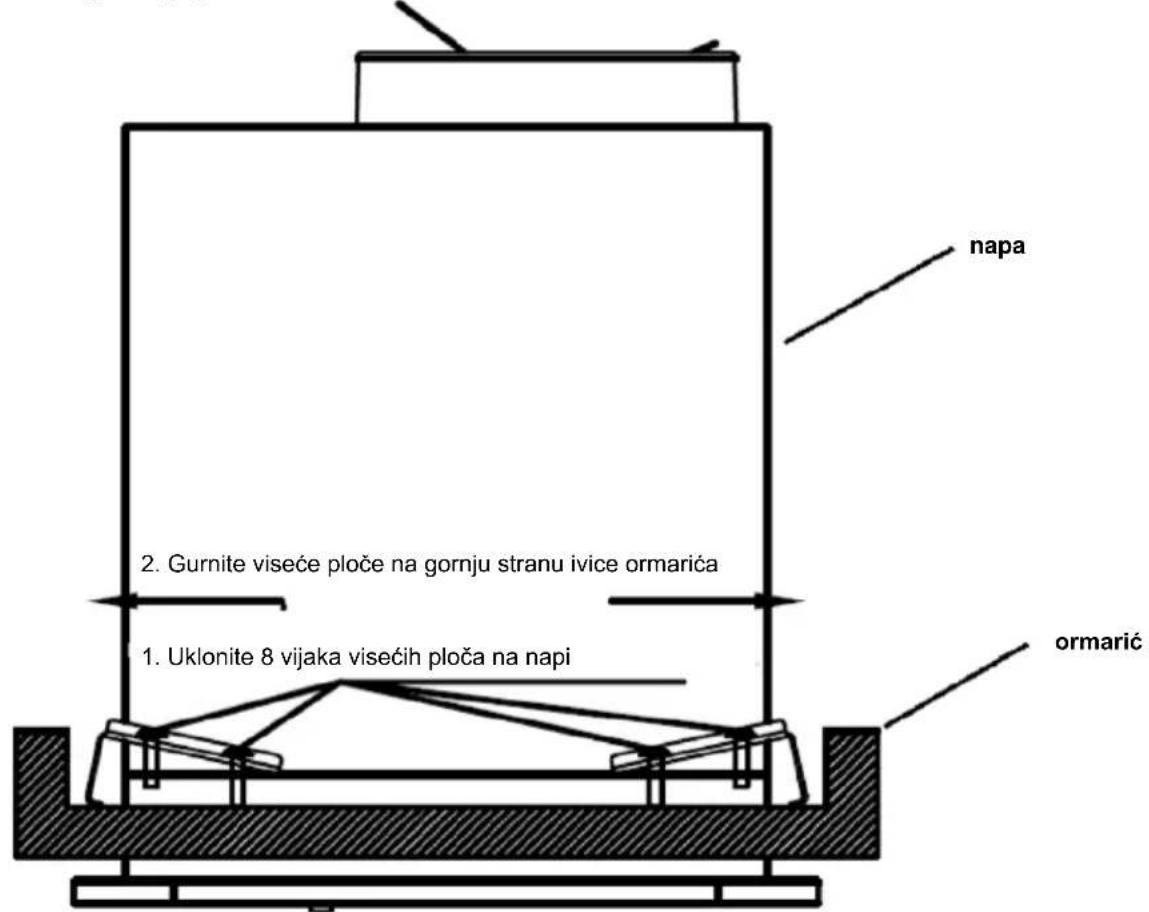
1. Stavite napu u ormarić
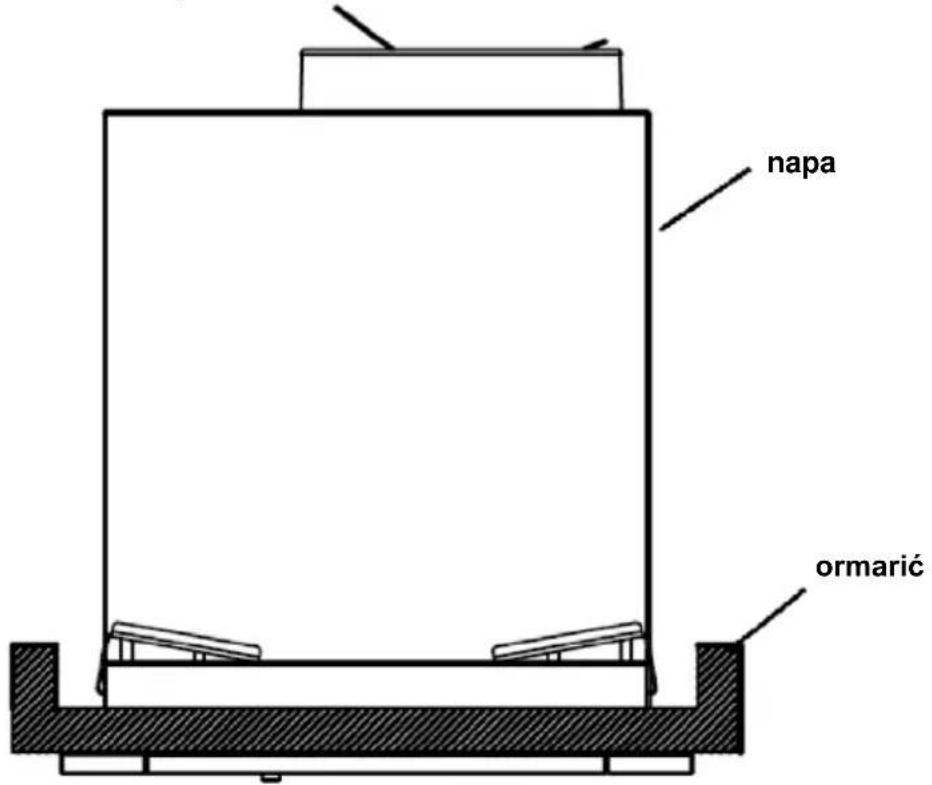
2. Uklonite 8 vijaka od 4 viseće ploče na napu, gurnite 4 viseće ploče na gornjoj strani ivice ormarića.
natural_image
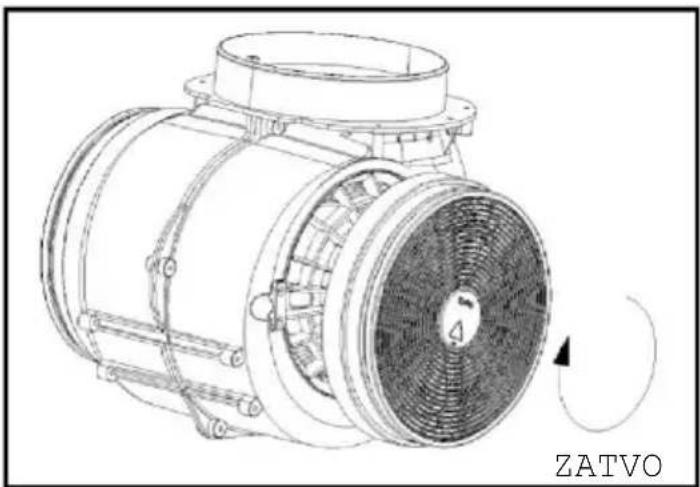
Illustration showing two hand-drawn diagrams of a device or tool, one with a downward arrow and the other with a curved arrow (no text or symbols)Uključite filter sa aktivnim ugljem u jedinicu i okrenite ga u smeru kazaljke na satu. Ponovite isto na drugoj strani.
natural_image
Technical line drawing of a mechanical fan or motor assembly with no visible text or symbolsNAPOMENA:

NAPOMENA
Get ready to add your appliance
1 Stay close to your appliance
2 While in front of your appliance, ensure that your smartphone is connected to a 2.4GHz Wi-Fi network with a stronger signal
CHANGE WI-FI SETTINGS
3 Public networks are not allowed due to low security and reliability.
4 Prepare to enter your Home Wi-Fi password.
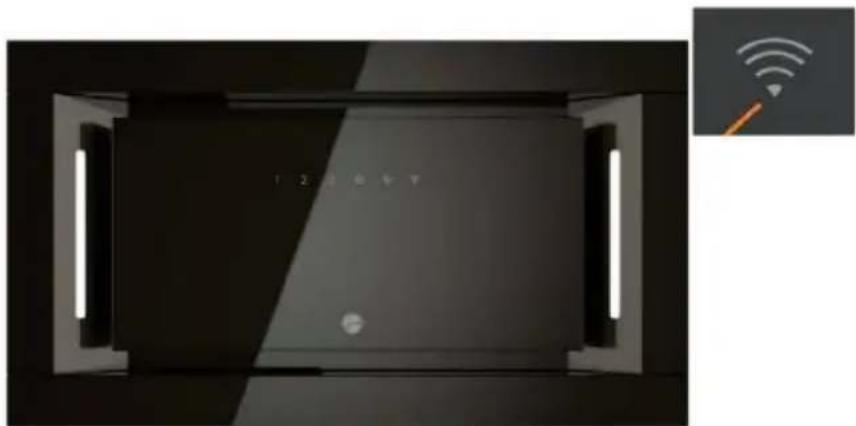
PRIJAVLJIVANJE NAPE
natural_image
Interior view of a modern room with illuminated windows and a close-up of a Wi-Fi signal icon (no text or symbols on main subject)



- INTRODUCTION
- Thank you for choosing this cooker hood.
- SAFETY PRECAUTION
- Electrical Shock Hazard
- Prepare for installation:
- Specifications
- Installation
- NOTE:
- DESCRIPTION OF COMPONENTS
- OPERATION
- STANDBY MODE.
- Low Speed button
- Medium Speed button
- High Speed button
- B Booster function
- Light
- Short press for lighting on & off
- Wi-Fi Connection
- Download hOn App
- NOTE
- Get ready to add your appliance
- ENROLLMENT HOOVER HOOD
- MAINTENANCE
- Regular Cleaning
- Monthly Cleaning for Grease Filter
- Annual Cleaning for Activated Carbon Filter
- Lamp Replacement
- ENVIRONMENTAL PROTECTION
- INHALT
- HINWEIS:
- HINWEIS
- OPMERKING:
- OPMERKING
- REGISTRATIE HOOVER-AFZUIGKAP
- REMARQUE :
- REMARQUE
- ENREGISTREMENT DE LA HOTTE HOOVER
- POZNÁMKA:
- POZNÁMKA
- REGISTRACE ODSAVAČE PAR
- REGISTRÁCIA ODSÁVAČA HOOVER
- NOTA:
- NOTA
- Specifikacije
- Ugradnja
- Stavite napu u ormarić
- Uklonite 8 vijaka od 4 viseće ploče na napu, gurnite 4 viseće ploče na gornjoj strani ivice ormarića.
- NAPOMENA:
- NAPOMENA
- PRIJAVLJIVANJE NAPE
Brand : HOOVER
Model : HPY6CBK5BGWIFI
Category : Range hood