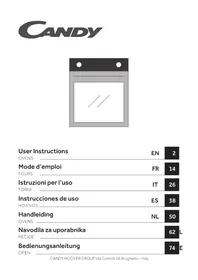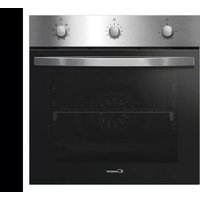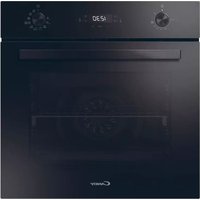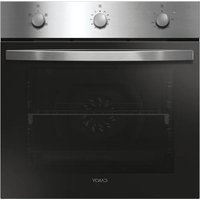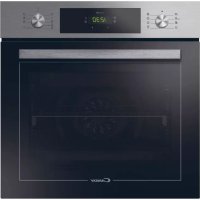
FCT896XS WIFI - Built-in oven CANDY - Free user manual and instructions
Find the device manual for free FCT896XS WIFI CANDY in PDF.


| Brand | Candy |
| Model | FCT896XS WIFI |
| Product type | Built-in oven |
| Dimensions (H x W x D) | Approx 595 x 595 x 568 mm |
| Weight | Approx 32 kg |
| Power supply | 230 V, 50 Hz, single-phase |
| Maximum power | Approx 3000 W |
| Capacity | Approx 70 L |
| Cooking functions | Fan-assisted, Natural convection, Grill, Turbo grill, Defrost, Bottom heat + fan, Lighting |
| Cleaning | Pyrolysis (ECO 90 min / SUP 120 min) and Aquactiva (steam) |
| Connectivity | Wi-Fi (IEEE 802.11 b/g/n) and Bluetooth (v4.2) |
| Remote control | Yes via hOn app |
| Child safety | Control lock function |
| Pyrolysis door lock | Automatic during cycle |
| Interior lighting | Replaceable bulb |
| Included accessories | Metal grid, drip tray, side racks |
| Installation type | Built-in in column or under counter |
| Energy class | A+ (estimated) |
| Repairability index | Not specified, parts available from customer service |
Frequently Asked Questions - FCT896XS WIFI CANDY
User questions about FCT896XS WIFI CANDY
0 question about this device. Answer the ones you know or ask your own.
Ask a new question about this device
Download the instructions for your Built-in oven in PDF format for free! Find your manual FCT896XS WIFI - CANDY and take your electronic device back in hand. On this page are published all the documents necessary for the use of your device. FCT896XS WIFI by CANDY.
USER MANUAL FCT896XS WIFI CANDY
- During cooking, moisture may condense inside the oven cavity or on the glass of the door. This is normal condition. To reduce this effect, wait 10-15 minutes after turning on the power before putting food inside the oven. In any case, the condensation disappears when the oven reaches the cooking temperature.
- Cook the vegetables in a container with a lid instead of an open tray.
- Avoid leaving food inside the oven after cooking for more than 15/20 minutes.
- WARNING: the appliance and accessible parts become hot during use. Be careful not to touch any hot parts.
- WARNING: the accessible parts can become hot when the grill is in use. Children should be kept at a safe distance.
- WARNING: ensure that the appliance is switched off before replacing the bulb, to avoid the possibility of electric shocks.
- WARNING: in order to avoid any danger caused by the accidental resetting of the thermal interruption device, the appliance should not be powered by an external switching device, such as a timer, or be connected to a circuit that is regularly switched on and off.
- Children under 8 should be kept at a safe distance from the appliance if not continuously supervised.
- Children should not play with the appliance.
- The appliance can be used by those aged 8 or over and by those with limited physical, sensorial or mental capacities, without experience or knowledge of the product, only if supervised or provided with instruction as to the operation of the appliance, in a safe way with awareness of the possible risks.
- Cleaning and maintenance should not be carried out by unsupervised children.
- Do not use rough or abrasive materials or sharp metal scrapers to clean the oven door glasses, as they can scratch the surface and cause the glass to shatter.
- The oven must be switched off before removing the removable parts. After cleaning, reassemble them according the instructions.
- Only use the meat probe recommended for this oven.
- Do not use a steam cleaner for cleaning operations.
IF THE OVEN IS PROVIDED BY THE MANUFACTURER WITHOUT PLUG:
- THE APPLIANCE MUST NOT BE CONNECTED TO THE POWER SOURCE USING PLUG OR SOCKETS, BUT MUST BE DIRECTLY CONNECTED TO THE SUPPLY MAINS. The connection to the power source must be carried out by a suitably qualified professional. In order to have an installation compliant to the current safety legislation the oven must be connected only placing an omnipolar breaker, with contact separation compliant to the requirements for overvoltage category III, between the appliance and the power source. The omnipolar breaker must bear the maximum connected load and must be in line with current legislation. The yellow-green earth cable should not be interrupted by the breaker. The omnipolar breaker used for the connection must be easily accessible when the appliance is installed.
- The connection to the power source must be carried out by a suitably qualified professional considering the polarity of the oven and of the power source.
- The disconnection must be achieved incorporating a switch in the fixed wiring in accordance with the wiring rules
IF THE OVEN IS PROVIDED BY THE MANUFACTURER WITH PLUG:
- The socket must be suitable for the load indicated on the tag and must have ground contact connected and in operation. The earth conductor is yellow-green in colour. This operation should be carried out by a suitably qualified professional. In case of incompatibility between the socket and the appliance plug, ask a qualified electrician to substitute the socket with another suitable type. The plug and the socket must be conformed to the current norms of the installation country. Connection to the power
source can also be made by placing an omnipolar breaker, with contact separation compliant to the requirements for overvoltage category III, between the appliance and the power source that can bear the maximum connected load and that is in line with current legislation. The yellow-green earth cable should not be interrupted by the breaker. The socket or omnipolar breaker used for the connection should be easily accessible when the appliance is installed.
- The disconnection may be achieved by having the plug accessible or by incorporating a switch in the fixed wiring in accordance with the wiring rules. - If the power cable is damaged, it should be substituted with a cable or special bundle available from the manufacturer or by contacting the customer service department. The type of power cable must be H05V2V2-F. This operation should be carried out by a suitably qualified professional. The earth conductor (yellow-green) must be approximately 10 mm longer than the other conductors. For any repairs, refer only to the Customer Care Department and request the use of original spare parts.
- Failure to comply with the above can compromise the safety of the appliance and invalidate the guarantee.
- Any excess of spilled material should be removed before cleaning.
- A long power supply failure during an occurring cooking phase may cause a malfunction of the monitor. In this case contact customer service.
- The appliance must not be installed behind a decorative door in order to avoid overheating.
- When you place the shelf inside, make sure that the stop is directed upwards and in the back of the cavity. The shelf must be inserted completely into the cavity.
- WARNING: Do not line the oven walls with aluminium foil or single-use protection available from stores. Aluminium foil or any other protection, in direct contact with the hot enamel, risk melting and deteriorating the enamel of the insides.
- WARNING: Never remove the oven door seal.
- CAUTION: Do not refill the cavity bottom with
water during cooking or when the oven is hot.
- No additional operation/setting is required in order to operate the appliance at the rated frequencies.
- .WARNING: before initiating the automatic cleaning cycle:
- Clean the oven door;
- Remove large or coarse food residues from the inside of the oven using a damp sponge. Do not use detergents;
- Remove all accessories and the sliding rack kit (where present);- Do not place tea towels.
- In ovens with meat probe it is necessary, before making the cleaning cycle, close the hole with the nut provided. Always close the hole with the nut when the meat probe is not used.
- During the pyrolytic cleaning process, surfaces can heat up more than usual, children must therefore be kept at a safe distance.
- Oven trays and grids are not suitable for direct contact with food. Please use suitable cookware or baking paper.
General Instructions
5
1.1 Safety indications
1.2 Electrical safety
1.3 Recommendations
1.4 Installation
1.5 Waste management
Product Description
6
2.1 Overview
2.2 Accessories
2.3 First use
Use of the Oven
7
3.1 Display description
3.2 Cooking modes
Oven Cleaning and Maintenance
10
4.1 General notes on cleaning
4.2 Pyrolysis
4.3 Aquactiva Function
4.4 Maintenance
- Instruction for removal and cleaning of the side racks
- Removal of the oven window
- Removal and cleaning of the glass door
- Changing the bulb
Troubleshooting
13
5.1 F.A.Q.
1. General Instructions
We thank you for choosing one of our products. For the best results with your oven, you should read this manual carefully and retain it for future reference. Before installing the oven, take note of the serial number so that you can give it to customer service staff if any repairs are required. Having removed the oven from its packaging, check that it has not been damaged during transportation. If you have doubts, do not use the oven and refer to a qualified technician for advice. Keep all of the packaging material (plastic bags, polystyrene, nails) out of the reach of children. When the oven is switched on for the first time, strong smelling smoke can develop, which is caused by the glue on the insulation panels surrounding the oven healing for the first time. This is absolutely normal and, if it occurs, you should wait for the smoke to dissipate before putting food in the oven. The manufacturer accepts no responsibility in cases where the instructions contained in this document are not observed.
NOTE: the oven functions, properties and accessories cited in this manual will vary, depending on the model you have purchased.
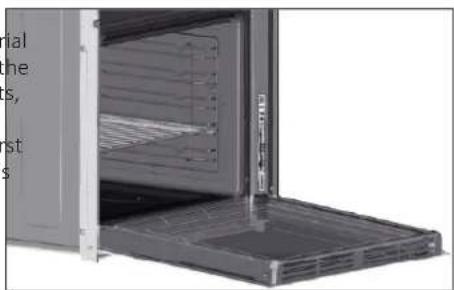
natural_image
Interior view of a modern kitchen appliance with open door and side panel (no visible text or symbols)1.1 Safety Indications
Only use the oven for its intended purpose, that is only for the cooking of foods; any other use, for example as a heat source, is considered improper and therefore dangerous. The manufacturer cannot be held responsible for any damage resulting from improper, incorrect or unreasonable usage. The use of any electrical appliance implies the observance of some fundamental rules:
- do not pull the power cable to disconnect the product to the power source - do not touch the appliance with wet or damp hands or feet;
- in general the use of adaptors, multiple sockets and extension cables is not recommended;
- in case of malfunction and/or poor operation, switch off the appliance and do not tamper with it.
1.2 Electrical Safety
ENSURE THAT AN ELECTRICIAN OR QUALIFIED TECHNICIAN MAKES THE ELECTRICAL CONNECTIONS. The power supply to which the oven is connected must conform with the laws in force in the country of installation. The manufacturer accepts no responsibility for any damage caused by the failure to observe these instructions. The oven must be connected to an electrical supply with an earthed wall outlet or a disconnector with multiple poles, depending on the laws in force in the country of installation. The electrical supply should be protected with suitable fuses and the cables used must have a transverse section that can ensure correct supply to the oven.
CONNECTION
The oven is supplied with a power cable that should only be connected to an electrical supply with 220-240 Vac 50 Hz power between the phases or between the phase and neutral. Before the oven is connected to the electrical supply, it is important to check:
- power voltage indicated on the gauge; - the setting of the disconnector.
The grounding wire connected to the oven's earth terminal must be connected to the earth terminal of the power supply.
WARNING
Before connecting the oven to the power supply, ask a qualified electrician to check the continuity of the power supply's earth terminal. The manufacturer accepts no responsibility for any accidents or other problems caused by failure to connect the oven to the earth terminal or by an earth connection that has defective continuity.
NOTE: as the oven could require maintenance work, it is advisable to keep another wall socket available so that the oven can be connected to this if it is removed from the space in which it is installed. The power cable must only be substituted by technical service staff or by technicians with equivalent qualifications.
1.3 Recommendations
After each use of the oven, a minimum of cleaning will help keep the oven perfectly clean.
Do not line the oven walls with aluminium foil or single-use protection available from stores. Aluminium foil or any other protection, in direct con with the hot enamel, risks melting and deteriorating the enamel of the insi
In order to prevent excessive dirtying of your oven and the resulting strong smokey smells, we recommend not using the oven at very high temperature. It is better to extend the cooking time and lower the temperature a little. In addition to the accessories supplied with the oven, we advise you only use dishes and baking moulds resistant to very high temperatures.
1.4 Installation
The manufacturers have no obligation to carry this out. If the assistance of the oven can be located high in a column or under a worktop. Before fixing, manufacturer is required to rectify faults arising from incorrect installation, you must ensure good ventilation in the oven space to allow proper this assistance is not covered by the guarantee. The installation instructions circulation of the fresh air required for cooling and protecting the internal for professionally qualified personnel must be followed. Incorrect installation parts. Make the openings specified on last page according to the type of may cause harm or injury to people, animals or belongings. The manufacture fitting. cannot be held responsible for such harm or injury.
1.5 Waste management and environmental protection
This appliance is labelled in accordance with European Directive 2012/19/EU regarding electric and electronic appliances (WEEE). The WEEE contain both polluting substances (that can have a negative effect or
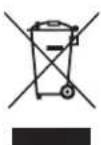
the environment) and base elements (that can be reused). It is important that the WEEE undergo specific treatments to correctly remove and dispose of the pollutants and recover all the materials. Individuals can play an important role in ensuring that the WEEE do not become an environmental problem; it is essential to follow a few basic rules:
- the WEEE should not be treated as domestic waste;
- the WEEE should be taken to dedicated collection areas managed by the town council or a registered company.
In many countries, domestic collections may be available for large WEEEs.
When you buy a new appliance, the old one can be returned to the vendor who must accept it free of charge as a one-off, as long as the appliance is of an equivalent type and has the same functions as the purchased appliance.
SAVING AND RESPECTING THE ENVIRONMENT
Where possible, avoid pre-heating the oven and always try to fill it. Open the oven door as infrequently as possible, because heat from the cavity disperses every time it is opened. For a significant energy saving, switch off the oven between 5 and 10 minutes before the planned end of the cooking time, and use the residual heat that the oven continues to generate. Keep the seals clean and in order, to avoid any heat dispersal outside of the cavity. If you have an electric contract with an hourly tariff, the "delayed cooking" programme makes energy saving more simple, moving the cooking process to start at the reduced tariff time slot.
2. Product Description
2.1 Overview
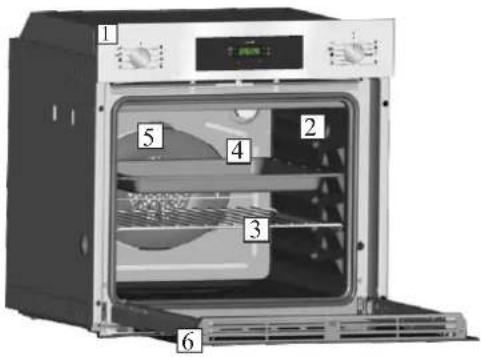
- Control panel
- Shelf positions
(lateral wire grid if included) - Metal grill
- Drip pan
- Fan (behind the steel plate)
- Oven door
2.2 Accessories (According to model)
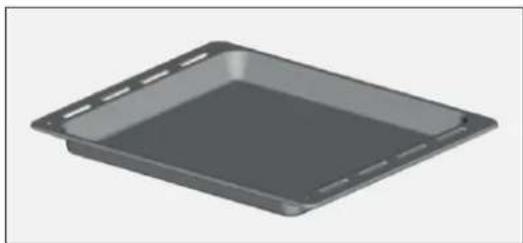
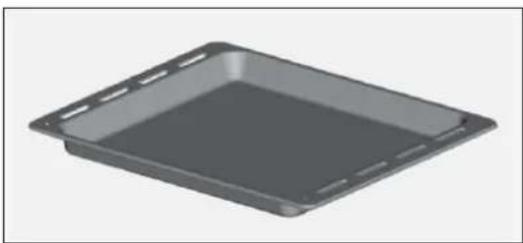
1 Drip pan
natural_image
3D rendering of a gray rectangular tray or baking tray with cutouts (no text or symbols)Collects the residues that drip during the cooking of foods on the grills.
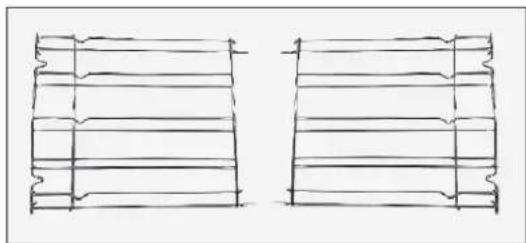
3 Lateral wire grids
natural_image
Two hand-drawn sketch-style grid-like structures with wavy edges, no text or symbols presentIt located at both sides of the oven cavity. It holds metal grills and drip pans.
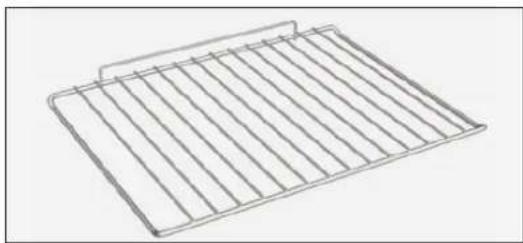
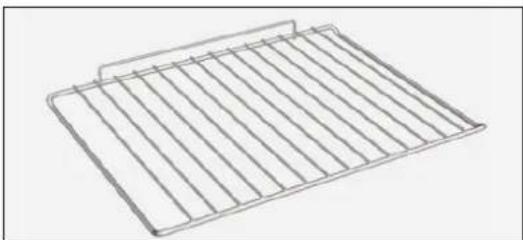
2 Metal grill
natural_image
Line drawing of a rectangular metal grate with vertical slats (no text or symbols)Holds baking trays and plates.
NOTE: Oven trays and grids are not suitable for direct contact with food. Please use suitable cookware or baking paper.
2.3 First Use
PRELIMINARY CLEANING
Clean the oven before using for the first time. Wipe over external surfaces with a damp soft cloth. Wash all accessories and wipe inside the oven with a solution of hot water and washing up liquid. Set the empty oven to the maximum temperature and leave on for about 1 hour, this will remove any lingering smells of newness.
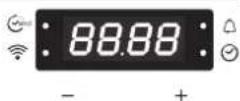
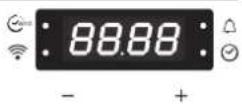
3.1 Display description

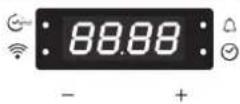
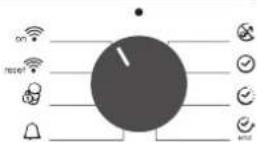
- Function selector knob
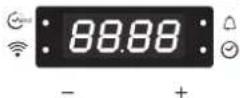
- Cooking Time/End of cooking
- Wifi signal lamp
- Minute minder
- Clock setting
- Temperature or clock display
- LCD/temperature adjustment controls
- Cooking function selector knob
WARNING: the first operation to carry out after the oven has been installed or following the interruption of power supply (this is recognizable the display pulsating and showing 12:00) is setting the correct time. The bottom right LED flashes at the same time(④). This is achieved as follows.
- Set time with buttons."-" "+"
- Push the Menu button or wait 5 seconds than the clock is set.
ATTENTION: The oven will only operate setting the clock
| FUNCTION | HOW TO ACTIVATE HOW TO | DEACTIVATE WHAT IT DOES WHY IT IS | NEEDED | |
| SILENCE MODE[4076] | Rotate the left function selector to the position "Silence mode". | Rotate the function selector to the position OFF. | It enables to turn off the sound of the minute minder. | To turn off the sound of the minute minder. |
| CLOCK SETTING[8C44] | Rotate the left function selector to the position "Set the time".Use the buttons "+" or "-" to set the time.Lower right LED is blinking during this operation. | Rotate the function selector to the position OFF. | It enables to set the time which appears on the display. | To set the time NB: Set the time when you first install your oven or just after a black out (the clock is showing a pulsating 12.00). |
| COOKING TIME[1Y20] | Turn the right function selector to a cooking function.Rotate the left function selector to the position "Cooking Time Duration".Set the time of cooking by using buttons "+" and "-"Upper left LED is blinking during this operation. | When the cooking time has elapsed, the oven switch off automatically and the alarm rings for few seconds to stop the cooking functions early, turn the function control to OFF or set the time on 00.00; by rotating the function selector to Cooking Time and by using the buttons "+" and "-" | It allows to preset the cooking time required for the recipe chosen.When the cooking time is set, turn the function selector to OFF to go back to actual time.To view the cooking time selected, turn the left function selector to Cooking Time. | To cook the desired recipes. |
| END OF COOKING[0089] | Turn the right function selector to a cooking function.Rotate the left function selector to the position "End of cooking".Set the end time of cooking by using buttons "+" and "-"Upper left LED is blinking during this operation. | When the cooking time has elapsed, the oven switch off automatically.To stop the cooking functions early, turn the function control to OFF. | It allows to preset the end of cooking time you want.When the cooking time is set, turn the function selector to OFF to go back to actual time.To view the cooking time selected, turn the left function selector to End of cooking. | This function is normally used with the Cooking Time function.For example, the desired food needs to cook for 45 minutes and I want it to be ready for 12.30; in this case: at the end of the set time, the oven automatically switches off and an alarm sounds. Select the desired cooking function. Set the cooking duration to 45 minutes ("-" "+" . Set the end of cooking to 12:30 ("-""+"). Cooking will automatically begin at 11:45 (12:30 minus 45 minutes), at the end of the set cooking time, the oven will automatically switch off.WARNING: by setting only the end of cooking time, and not the cooking duration, the oven will immediately switch on and switch off at the end of the set cooking time. |
| MINUTE MINDER[1842] | Turn the left function selector to the position Minute Minder.Set the Cooking Time by using buttons "+" and "-"Upper right LED is blinking during this operation. | Set the time on 00.00 by turning the left function selector to the position Minute Minder, and using the button "-" | It emits an audible signal at the end of a set time.During operation, the display shows the remaining time. | To use the oven as alarm even if the oven is switched off. |
| CHILD SAFETY LOCK[0027] | Turn the left function selector to the position Child lock.Press the button "+" during 5 seconds.Child lock is available when "STOP" appears on display. | Turn back the left function selector to Child lock and press button "+" during 5 seconds.Indication STOP disappears. | It disables the use of the oven. | For safety, when there are children in the house. |
WIRELESS PARAMETERS
| Technology | Wi-Fi | Bluetooth |
| Standard | IEEE 802.11 b/g/n | Bluetooth v4.2, BR/EDR, BLE |
| Frequency Band(s) [MHz] | 2401-2483 | 2402-2480 |
| Maximum Power [mW] | 100 | 10 |
PRODUCT INFORMATION FOR NETWORKED EQUIPMENT
• Power consumption of the product in networked standby if all wired network ports are connected and all wireless network ports are activated: 2,0 W
How to activate wireless network port:
- If the WiFi led blinks it means that the WiFi module is On.
- If already enrolled: turn the knob to WiFi On.
- If not enrolled: follow procedure for enrolling.
How to deactivate wireless network port:
- If the WiFi led is Off it means that the WiFi module is Off.
- If the oven is enrolled: turn the knob to WiFi reset position and then to Off position within 30 sec.
- If the oven is not enrolled WiFi is Off.
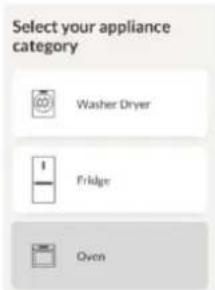
Oven enrollment on app
ON THE SMARTPHONE
Step 1
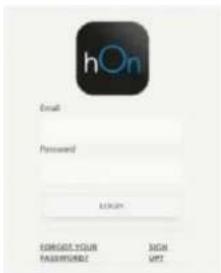
- Download hOn app.


ON THE APPLIANCE
Step 5
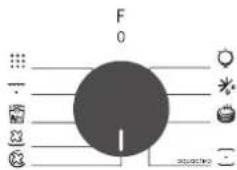
- Turn the cooking functions knob on a program (No "light" or "0").
Step 2
- Log in or sign up.
Step 6
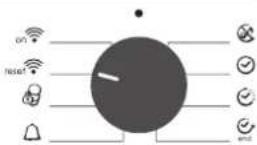
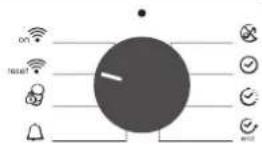
- Turn the functions knob to the WI-FI RESET program and wait 30 seconds.
Step 7
- When the WiFi LED starts blinking, you can proceed with pairing within 5 minutes.
Step 3
- Add new appliance
Remote control mode
Step 1
- Turn the knob to the WI-FI program.

Step 2
• The WiFi LED switches on.
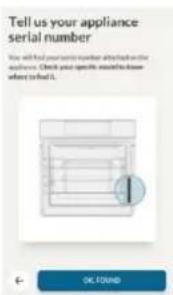
Step 4
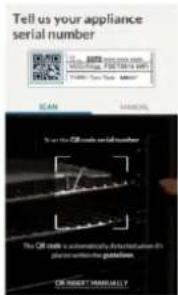
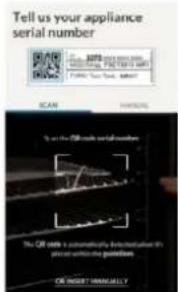
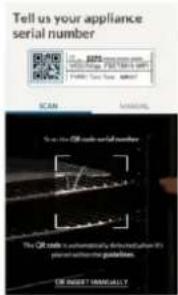
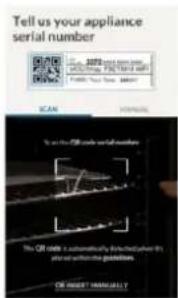
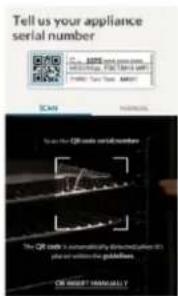
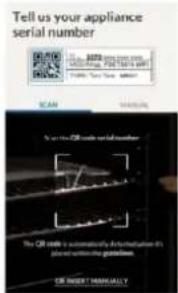
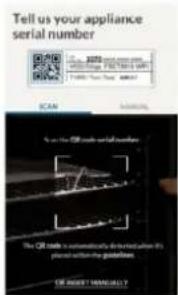
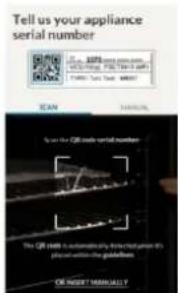
- Scan the QR code or insert the serial number.
Write here your serial number for future reference.
Hereby, Candy Hoover Group Srl declares that the radio equipment is in compliance with Directive 2014/53/EU and with the relevant Statutory Requirements (for the UKCA market). The full text of the declaration of conformity is available at the following internet address: www.candy-group.com
3.2 Cooking Modes
| Function Dial | T °CSuggested | T °CRange | Function (Depends on the oven model) |
 | LAMP: Turns on the oven light. | ||
 | DEFROST: When the dial is set to this position. The fan circulates air at room temperature around the frozen food so that it defrosts in a few minutes without the protein content of the food being changed or altered. | ||
| *[XYTY][CCOS] | 180210 50 | 50 ÷ 240÷ 240 | MULTI-LEVEL: We recommend you use this method for poultry, pastries, fish and vegetables. Heat penetrates into the food better and both the cooking and preheating times are reduced. You can cook different foods at the same time with or without the same preparation in one or more positions. This cooking method gives even heat distribution and the smells are not mixed. Allow about ten minutes extra when cooking foods at the same time. |
*[KST6] | 220 | 50 ÷ 280 | CONVENTIONAL: Both top and bottom heating elements are used. Preheat the oven for about ten minutes. This method is ideal for all traditional roasting and baking. For seizing red meats, roast beef, leg of lamb, game, bread, foil wrapped food (papillotes), flaky pastry. Place the food and its dish on a shelf in mid position. |
 | 210 | 50 ÷ 230 | BOTTOM HEATING + FAN: The bottom heating element is used with the fan circulating the air inside the oven. This method is ideal for juicy fruit flans, tarts, quiches and pâté. It prevents food from drying and encourages rising in cakes, bread dough and other bottom-cooked food. Place the shelf in the bottom position. |
| [VTS8] | 200 150 ÷ 220 | GRILL + FAN: use the turbo-grill with the door closed.The top heating element is used with the fan circulating the air inside the oven. Preheating is necessary for red meats but not for white meats. Ideal for cooking thick food items, whole pieces such as roast pork, poultry, etc. Place the food to be grilled directly on the shelf centrally, at the middle level. Slide the drip tray under the shelf to collect the juices. Make sure that the food is not too close to the grill. Turn the food over halfway through cooking. | |
| [DSZE] | L3 | L1 ÷ L5 | GRILL: use the grill with the door closed. The top heating element is used alone and you can adjust the temperature. Five minutes preheating is required to get the elements red-hot. Success is guaranteed for grills, kebabs and gratin dishes. White meats should be put at a distance from the grill; the cooking time is longer, but the meat will be tastier. You can put red meats and fish fillets on the shelf with the drip tray underneath. The oven has two grill positions: Grill: 2140 W Barbecue: 3340 W |
 | ECO | ECO÷SUPER | ECO: 90 minSUPER: 120 min PYROLYSIS |
| [CXDZT] | WIFI ON: Oven allows wifi connection. | ||
| [0A7K]re! | WIFI RESET: It allows wifi connection to be restarted. | ||
*Tested in accordance with the EN 60350-1 for the purpose of energy consumption declaration and energy class
4. Oven cleaning and maintenance
4.1 General notes on cleaning
The lifecycle of the appliance can be extended through regular cleaning. Wait for the oven to cool before carrying out manual cleaning operations. Never use abrasive detergents, steel wool or sharp objects for cleaning, so as to not irreparably damage the enamelled parts. Use only water, soap or bleach-based detergents (ammonia).
GLASS PARTS
It is advisable to clean the glass window with absorbent kitchen towel after every use of the oven. To remove more obstinate stains, you can use a detergent-soaked sponge, well wrung out, and then rinse with water.
OVEN WINDOW SEAL
If dirty, the seal can be cleaned with a slightly damp sponge.
4.2 Pyrolysis
ACCESSORIES
Clean accessories with a wet, soapy sponge before rinsing and drying them: avoid using abrasive detergents.
DRIP PAN
After using the grill, remove the pan from the oven. Pour the hot fat into a container and wash the pan in hot water, using a sponge and washing-up liquid.
If greasy residues remain, immerse the pan in water and detergent. Alternatively, you can wash the pan in the dishwasher or use a commercial oven detergent. Never put a dirty pan back into the oven.
The oven is equipped with a pyrolyser cleaning system, which destroys food residues at high temperature. The operation is carried out automatically by means of the programmer. The resulting fumes are rendered "clean" by passing over a Pyrolyser wich starts as soon as cooking begins. As very high temperatures are required by the Pyrolyser, the oven door is fitted with a safety lock. The pyrolyser can be stopped at any time. The door cannot be opened until the safety lock is displayed.
NOTE : If a hob has been fitted above the oven, never use the gas burners the electric hot-plates while the Pyrolyser is working, this will prevent the hob from overheating.
TWO PYROLYTIC CYCLE are pre-set:
ECO PYROCLEAN : Cleans a moderately stained oven. Operates for a period of 90 minutes.
SUPER PYROCLEAN : Cleans a heavily stained oven. Operates for a period of 120 minutes.
Never use commercially available cleaning products on a Pyrolytic oven! Tip : Carrying out Pyrolytic cleaning immediately after cooking allows you to take advantage of residual heat, thus saving energy.
Before executing a pyrolytic cycle:
- Remove all the accessories from the oven because they are not able to tolerate the high temperatures used during the pyrolytic cleaning cycle; in particular removing grids, side racks and the telescopic guides (refer to the chapter REMOVING GRIDS AND SIDE RACKS). In ovens with meat probe it is necessary, before making the cleaning cycle, close the hole with the nut provided.
- Remove any large spillages or stains as it would take too long to destroy them. Also excessively large amounts of grease could ignite when subject to the very high temperatures of the Pyrolytic cycle.
- Close the oven door.
- Excess spillage must be removed before cleaning.
- Clean the oven door;
- Remove large or coarse food residues from the inside of the oven using a damp sponge. Do not use detergents;
- Remove all accessories and the sliding rack kit (where present);
- Do not place tea towels.
Using the pyrolitic cycle:
1- Rotate the function selector to the position " . On the display, appears the indication " ECO " or " SUP ". The preset time is 90 min, this can be varied from 90 min (Eco mode) to 120 min (Sup mode) via the programmer (setting button " + " or "-"). If the oven is very dirty, it is recommend o increase the time to 120 min, if the oven is moderately dirty reduce the cleaning cycle time to 90 min.
2- It is possible to defer the start time of the pyroclean cycle by changing the FIND time via the programmer.
3- After few minutes, when the oven reaches a high temperature, the door locks automatically. The pyroclean cycle can be stopped at any time by turning the function selector back to '0' (the word OFF will be displayed for 3 seconds).
4- Once the pyroclean cycle is finished, the pyrolysis will switch off automatically. On the display appears the indication "END" until the door is locked then "0--n".
5- You can turn the function selector back to "0" but if the temperature is still high, the "0--n" indication appears to inform that the door is locked.
Use of the pyrolytic cycle in Touch Control ovens:
y1- Rotate the function selector into position pyrolisys. The display will show either "ECO" or "SUP"
2- The pre-set time is 90 minutes but it can be varied from 90 min. (Eco mode) to 120 min. (Sup mode) using the programmer (" +" or "-" key). If the oven is very dirty, the time should be increased to 120 min., while if the oven is only a slightly dirty, reduce the cleaning cycle to 90 min.
4.3 Aquactiva Function
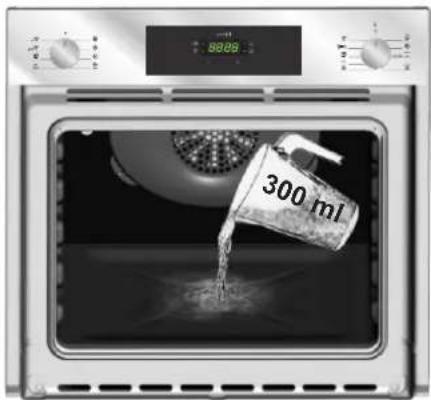
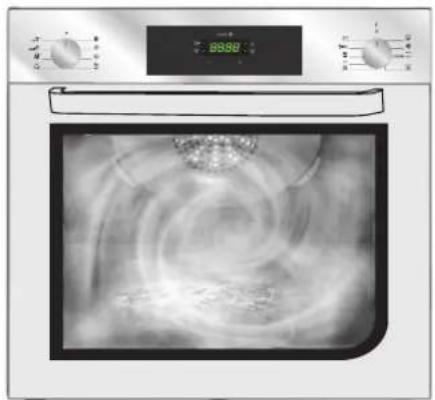
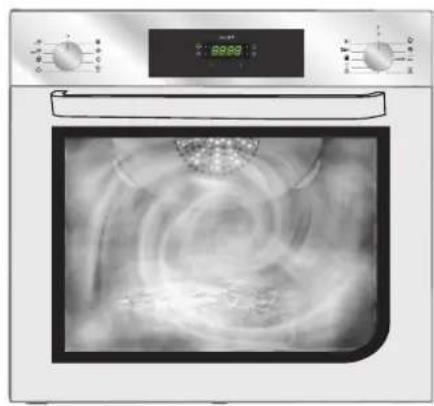
The Aquactiva procedure uses steam to help remove remaining fat and food particles from the oven.
-
Pour 300 ml of water into the Aquactiva container at the bottom of the oven.
-
Set the oven function to Static (•) or Bottom (•) heater
-
Set the temperature to the Aquactiva icon
-
Allow the program to operate for 30 minutes
-
After 30 minutes switch off the program and allow the oven to cool down.
-
When the appliance is cool, clean the inner surfaces of the oven with a cloth.
Warning: Make sure that the appliance is cool before you touch it.
Care must be taken with all hot surfaces as there is a risk of burns.
Use distilled or drinkable water.
natural_image
Front view of a microwave oven with digital temperature display and swirling air flow (no text or symbols visible)4.4 Maintenance
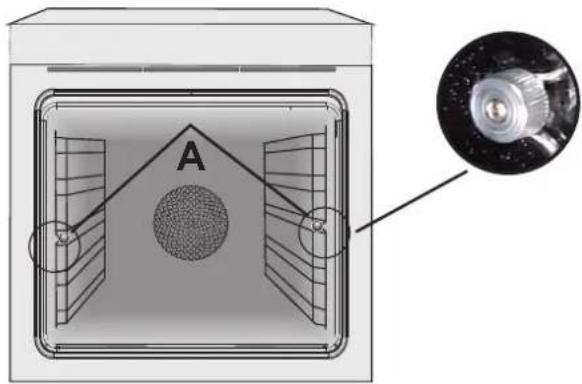
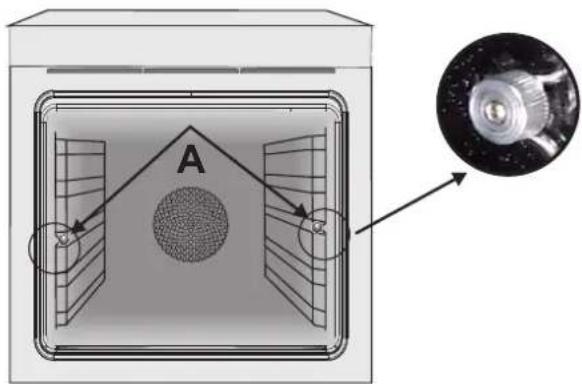
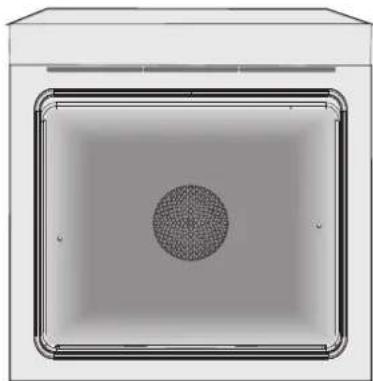
INSTRUCTION FOR REMOVAL AND CLEANING OF THE SIDE RACKS
- Remove the wire racks by pulling them in the direction of the arrows (see below)
- To clean the wire racks either put them in the dishwasher or use a wet sponge, ensuring that they are dried afterwards.
- After the cleaning process install the wire racks in reverse order.
natural_image
Diagram of a mechanical or electrical enclosure with labeled section A and an inset close-up showing a cylindrical component (no text or symbols present)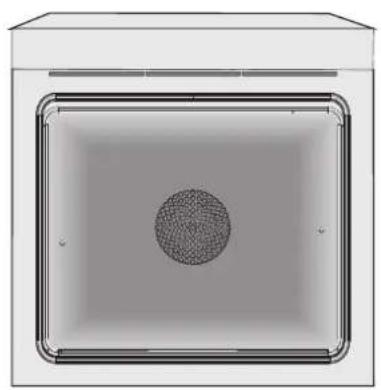
natural_image
Top-down view of a rectangular container with a central circular pattern and a textured center (no text or symbols)REMOVAL OF THE OVEN WINDOW
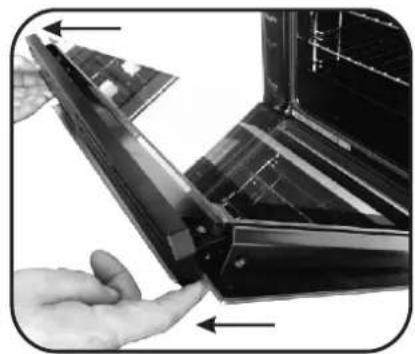
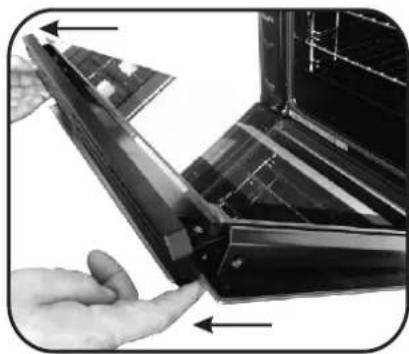
- Open the front window.
- Open the clamps of the hinge housing on the right and left side of the front window by pushing them downwards.
- Replace the window by carrying out the procedure in reverse.
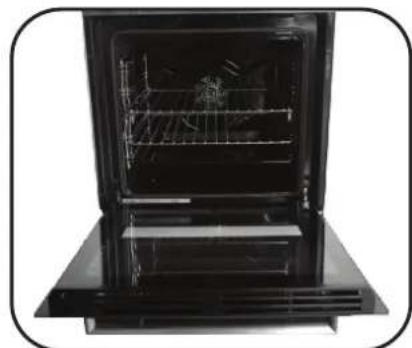
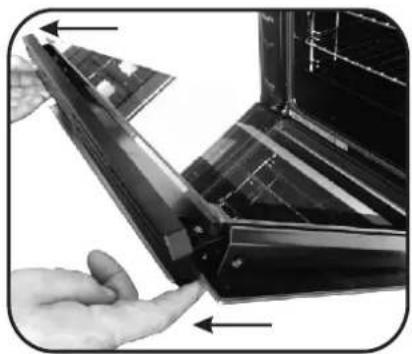
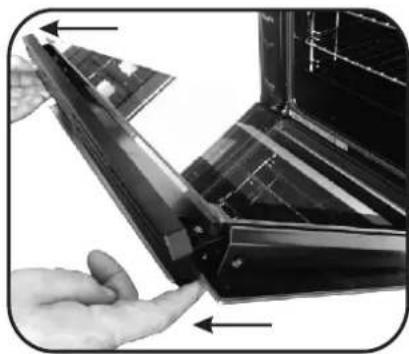
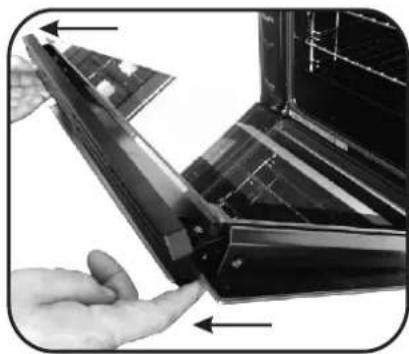
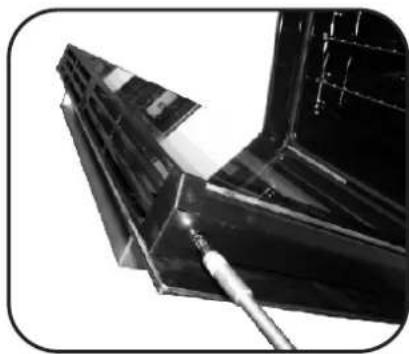
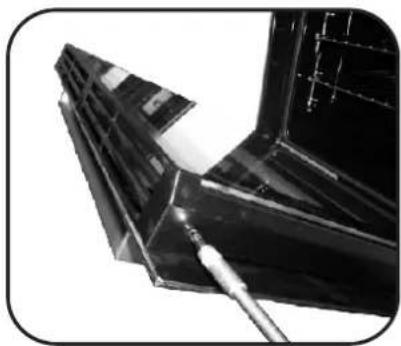
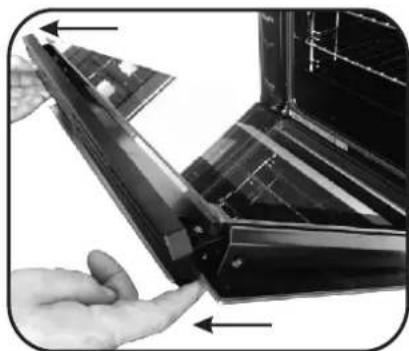
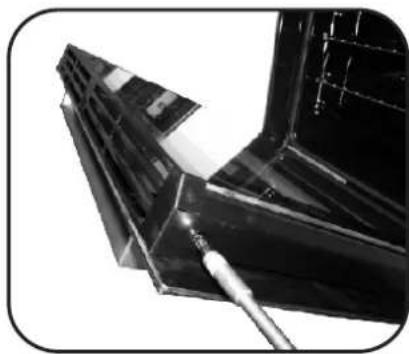
REMOVAL AND CLEANING OF THE GLASS DOOR
- Open the oven door.
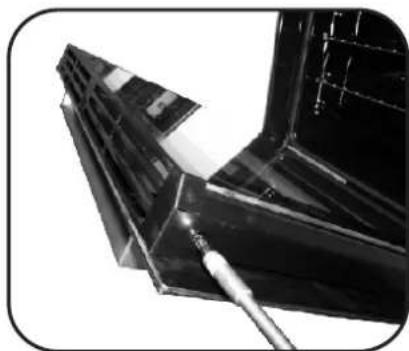
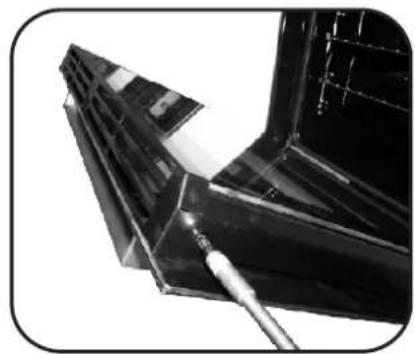
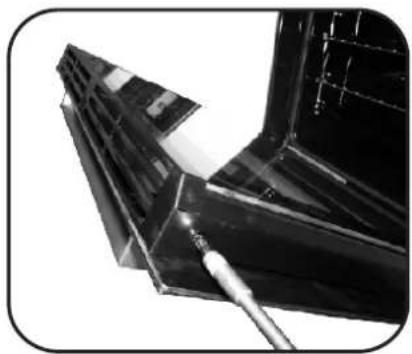
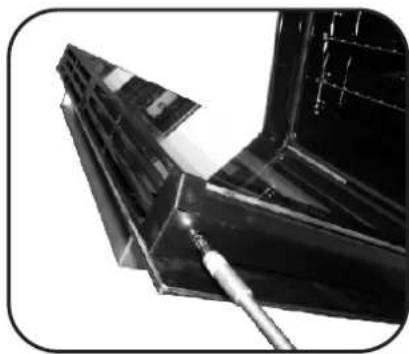
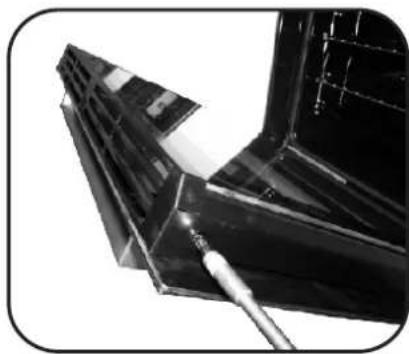
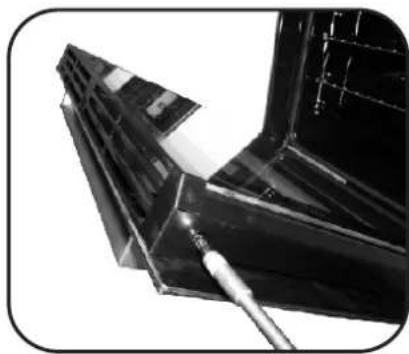
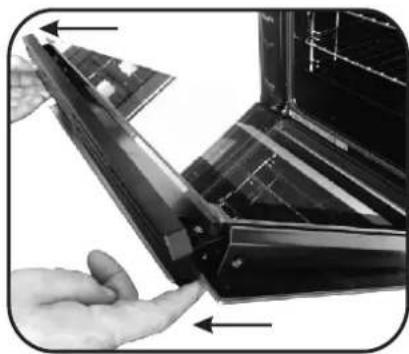
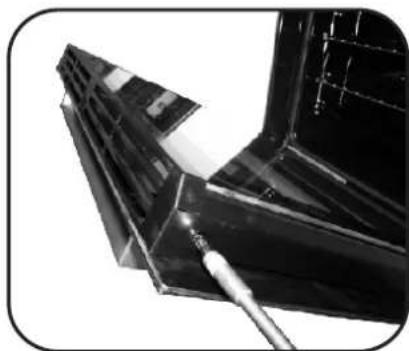
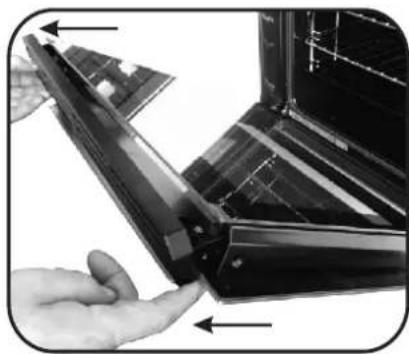
2.3.4. Lock the hinges, remove the screws and remove the upper metal cover by pulling it upwards.
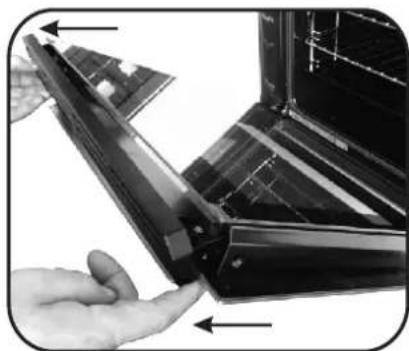
5.6. Remove the glass, carefully extracting it from the oven door (NB: in pyrolytic ovens, also remove the second and third glass (if present)). - At the end of cleaning or substitution, reassemble the parts in reverse order.
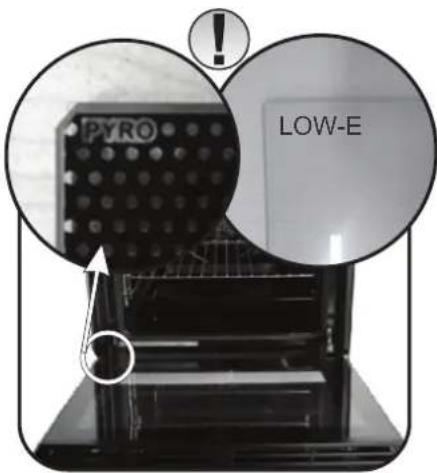
On all glass, the indication "Low-E" must be legible and positioned on the left side of the door, close to the left-hand lateral hinge. In this way, the printed label of the first glass will be inside the door.
natural_image
Interior view of a black oven with open door and side panel (no visible text or symbols)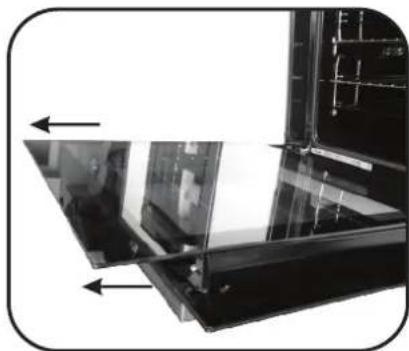
natural_image
Close-up of a glass panel with arrows indicating direction, no visible text or symbols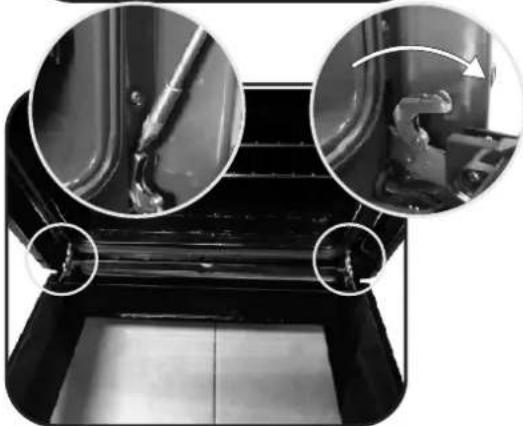
natural_image
Close-up of mechanical components with circular insets showing internal details (no visible text or symbols)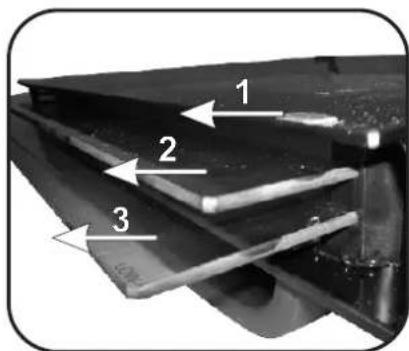
natural_image
Close-up of a metallic mechanical component with a tool inserted, showing no visible text or symbols.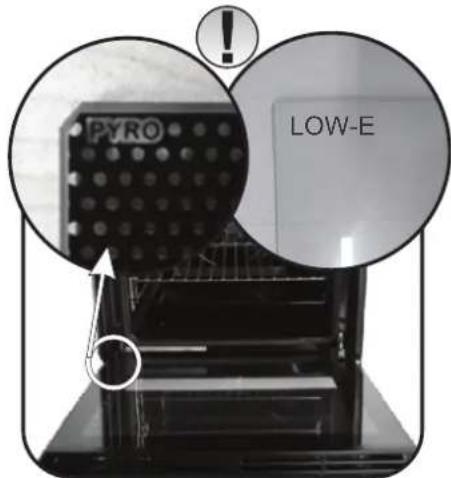
natural_image
Close-up of a hand inserting a flexible plastic component into a dark plastic housing (no text or symbols visible)CHANGING THE BULB
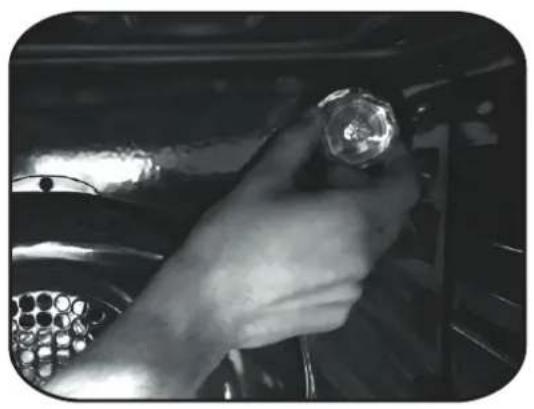
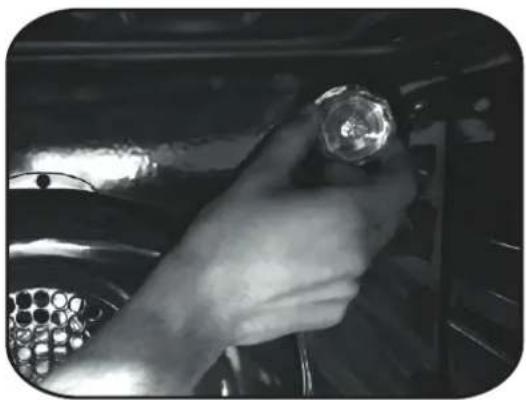
- Disconnect the oven from the mains supply.
- Undo the glass cover, unscrew the bulb and replace it with a new bulb of the same type.
- Once the defective bulb is replaced, replace the glass cover.
natural_image
Close-up of a hand holding a flashlight inside a vehicle engine compartment (no visible text or symbols)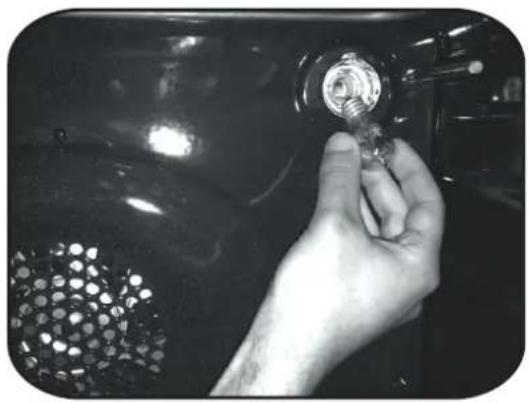
natural_image
Close-up of a hand holding a small metallic tool with a grid-patterned surface, against a dark glossy background (no text or symbols visible)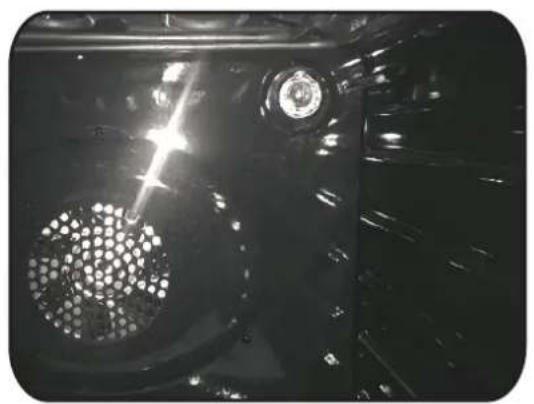
natural_image
Close-up of a car's front wheel and dashboard with visible light and mechanical components (no text or symbols)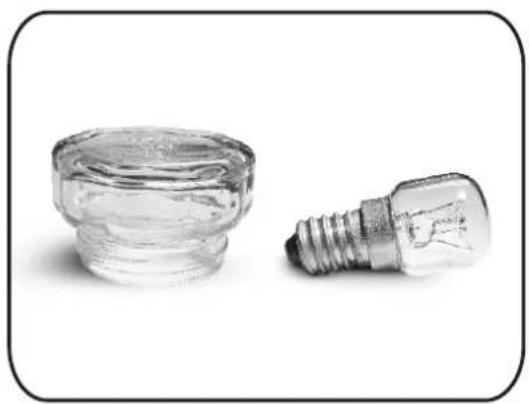
natural_image
Two small glass components: a cylindrical container and a standard incandescent light bulb, both on a plain background (no text or symbols visible)5. Troubleshooting
5.1 FAQ
| PROBLEM POSSIBLE CAUSE SOLUTION | ||
| The oven does not heat up | The clock is not set Set the clock | |
| The oven does not heat up | A cooking function and temperature has not been set | Ensure that the necessary settings are correct |
| No reaction of the touch user interface | Steam and condensation on the user interface panel | Clean with a microfiber cloth the user interface panel to remove the condensation layer |
natural_image
Exterior view of a modern kitchen appliance with a door open, showing internal shelves and ventilation grilles (no visible text or symbols)natural_image
3D rendering of a gray rectangular tray or baking tray with side brackets (no text or symbols)natural_image
Two hand-drawn sketch-style panels showing vertical grid lines, no text or symbols presentnatural_image
Line drawing of a rectangular metal grate or rack with vertical slats (no text or symbols)Étape 2
Étape 6
Étape 7
natural_image
Front view of a stainless steel oven with digital temperature display and internal swirling pattern (no text or symbols)4.4 Entretien
RETRAIT ET NETTOYAGE DES GRILLES LATÉRALES
natural_image
Diagram of a device with labeled components and an inset close-up showing a lens (no text or symbols present)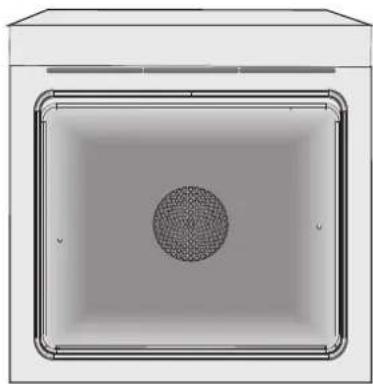
natural_image
Top-down view of a rectangular enclosure with a central circular pattern (no text or symbols)RETRAIT DE LA PORTE DU FOUR
natural_image
Interior view of a black oven with visible internal structure and ventilation duct (no text or symbols)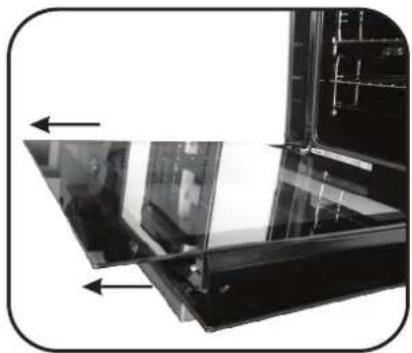
natural_image
Close-up of a glass panel with arrows indicating direction, no visible text or symbols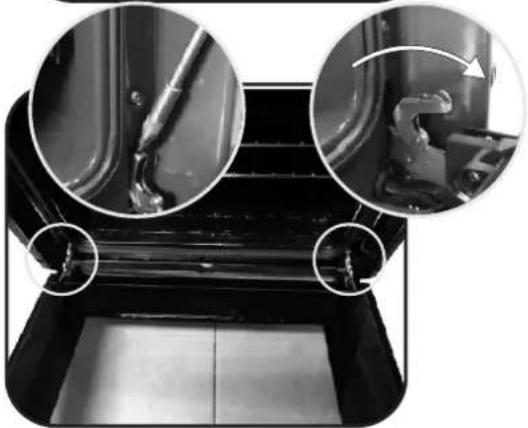
natural_image
Close-up of a mechanical component with three circular insets showing internal details (no visible text or symbols)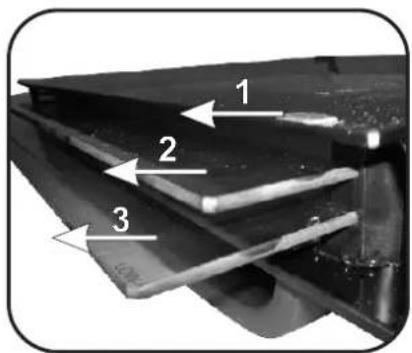
natural_image
Close-up of a metallic tool interacting with a dark metal bracket (no visible text or symbols)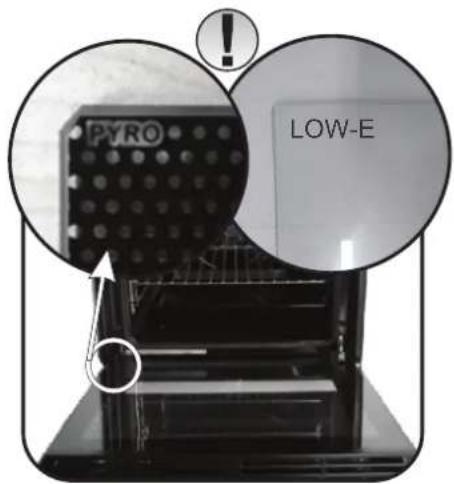
natural_image
Close-up of a hand inserting a plastic clip into a black metal frame (no text or symbols visible)REMPLACEMENT DE L'AMPOULE
natural_image
Close-up of a hand holding a flashlight inside a vehicle engine compartment (no visible text or symbols)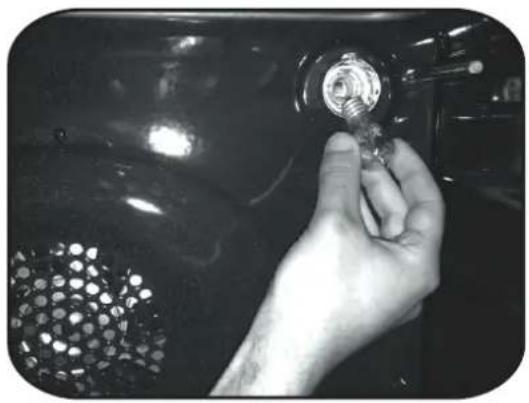
natural_image
Close-up of a hand holding a small metallic tool with a grid-patterned surface, against a dark glossy background (no text or symbols visible)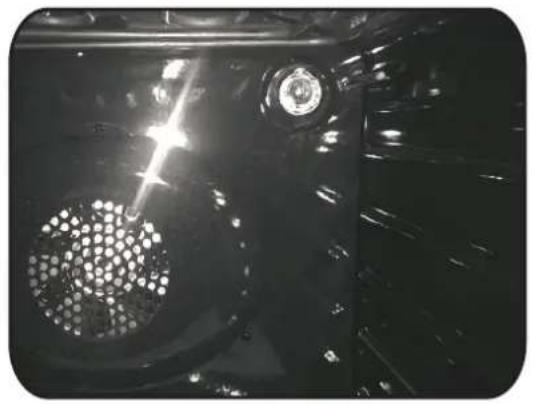
natural_image
Close-up of a mechanical component with a perforated circular feature and a central headlight (no visible text or symbols)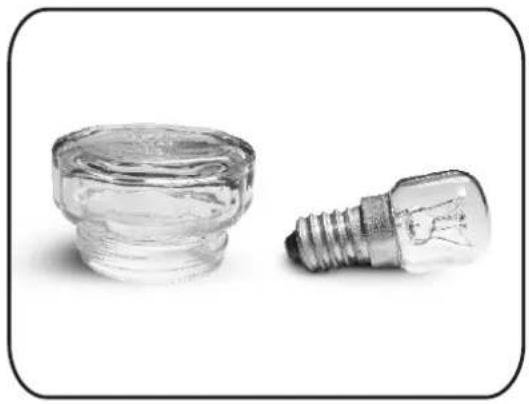
natural_image
Two small glass components: a cylindrical container and a standard incandescent light bulb, both on a plain background (no text or symbols visible)5. Dépannage
5.1 FAQ
natural_image
Exterior view of a modern container with lid open, showing internal compartments and ventilation slots (no text or symbols visible)natural_image
3D rendering of a gray rectangular tray or baking tray with side brackets (no text or symbols)natural_image
Two hand-drawn sketch-style panels showing horizontal lines with wavy ends, no text or symbols presentnatural_image
Line drawing of a rectangular metal grate with vertical slats (no text or symbols)Fase 2
Fase 6
natural_image
Front view of a stainless steel oven with digital temperature display and internal swirling pattern (no text or symbols)4.4 Manutenzione
STACCO E PULIZIA DELLE GRIGLIE LATERALI
natural_image
Top-down view of a square enclosure with a central circular pattern (no text or symbols)RIMOZIONE DELLO SPORTELLO DEL FORNO
natural_image
Interior view of a black oven with visible internal structure and ventilation grilles (no text or symbols)
natural_image
Close-up of a glass panel with arrows indicating direction, no visible text or symbols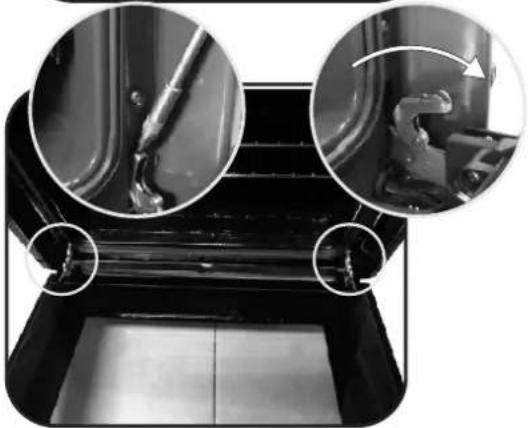
natural_image
Close-up of a mechanical component with three circular insets showing internal details (no visible text or symbols)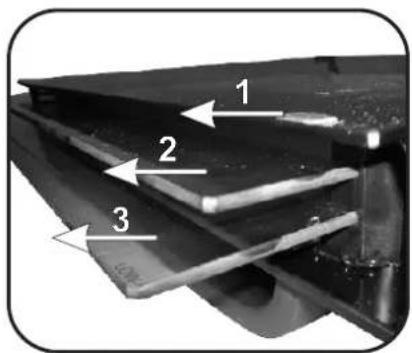
natural_image
Close-up of a metallic tool interacting with a dark metal bracket (no visible text or symbols)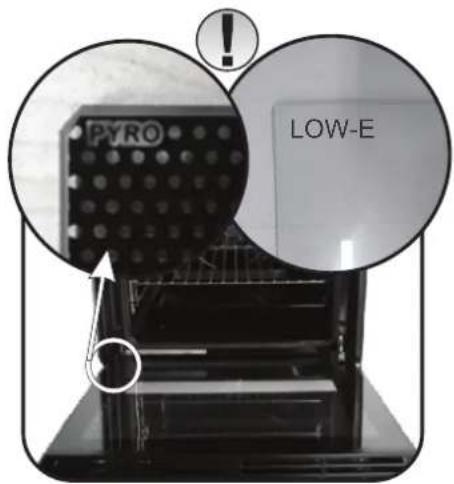
natural_image
Close-up of a hand inserting a plastic clip into a black metal panel (no text or symbols visible)natural_image
Close-up of a hand holding a flashlight inside a vehicle engine compartment (no visible text or symbols)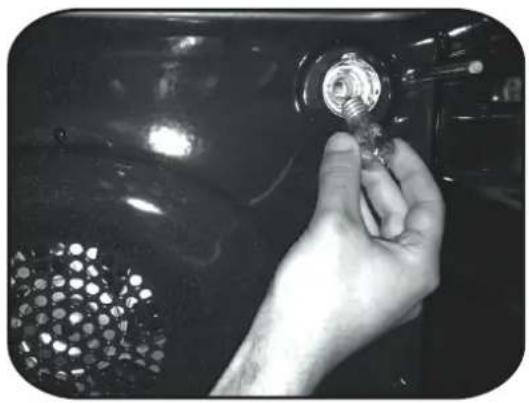
natural_image
Close-up of a hand holding a small metallic tool with a grid-patterned surface, against a dark glossy background (no text or symbols visible)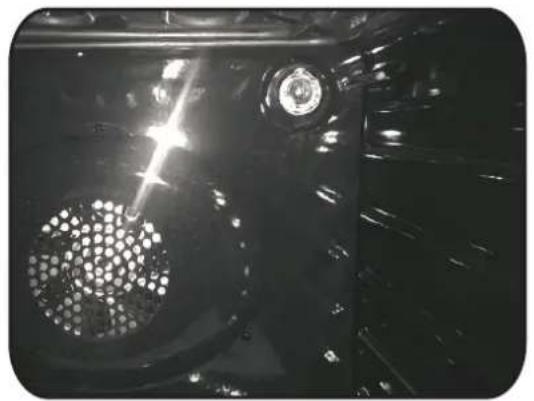
natural_image
Close-up of a mechanical component with a circular perforated part and a central head (no visible text or symbols)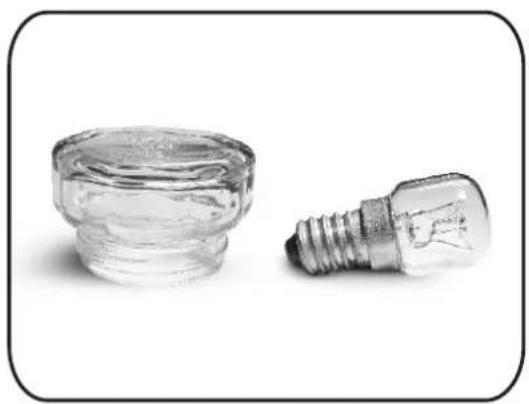
natural_image
Two small glass components: a cylindrical container and a standard incandescent light bulb, both on a plain background (no text or symbols visible)natural_image
Exterior view of a modern kitchen appliance with a closed door and ventilation slots (no visible text or symbols)natural_image
3D rendering of a gray rectangular tray with cutouts (no text or symbols)natural_image
Two hand-drawn sketch-style panels showing vertical grid lines, no text or symbols presentnatural_image
Line drawing of a rectangular metal grate with vertical slats (no text or symbols)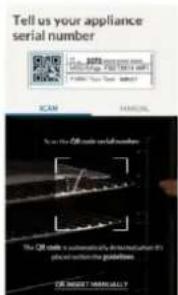
natural_image
Front view of a kitchen oven with digital temperature display and internal swirling pattern (no text or symbols)4.4 Mantenimiento
DESMONTAJE Y LIMPIEZA DE LAS GUÍAS LATERALES
natural_image
Top-down view of a rectangular enclosure with a central circular pattern (no text or symbols)natural_image
Interior view of a black oven with open door and side panel (no visible text or symbols)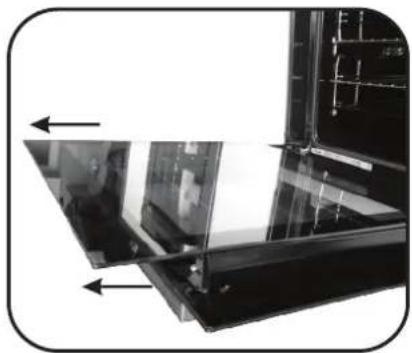
natural_image
Close-up of a glass panel with arrows indicating direction, no visible text or symbols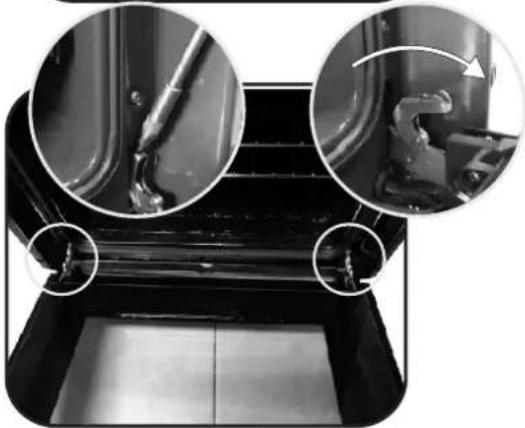
natural_image
Close-up of a mechanical component with three circular insets showing internal details (no visible text or symbols)
natural_image
Close-up of a mechanical component with a tool inserted, showing no visible text or symbols.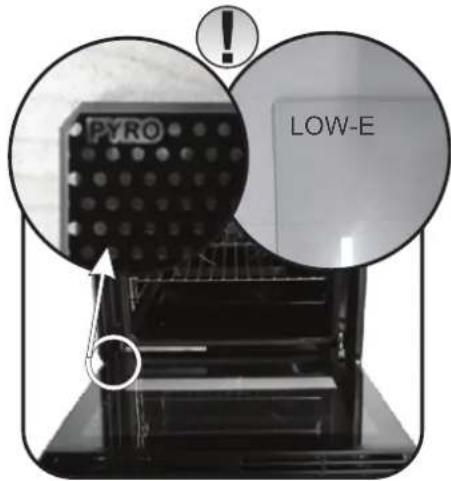
natural_image
Close-up of a hand inserting a black plastic clip into a dark metal frame (no text or symbols visible)natural_image
Close-up of a hand holding a small metallic object inside a vehicle or engine compartment (no visible text or symbols)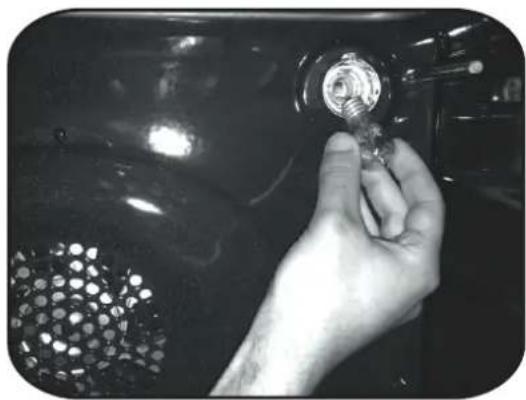
natural_image
Close-up of a hand holding a small metallic tool with a circular inset showing a mesh pattern (no text or symbols visible)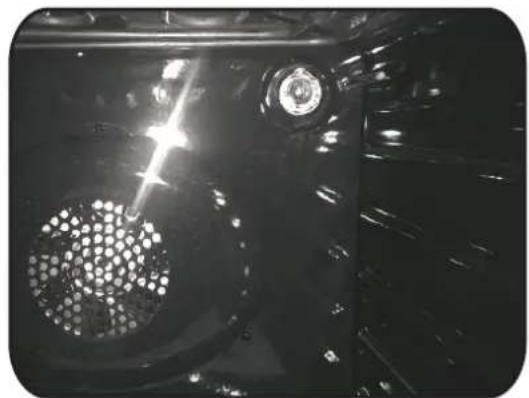
natural_image
Close-up of a mechanical component with a perforated circular feature and a central hub, under bright light (no visible text or symbols)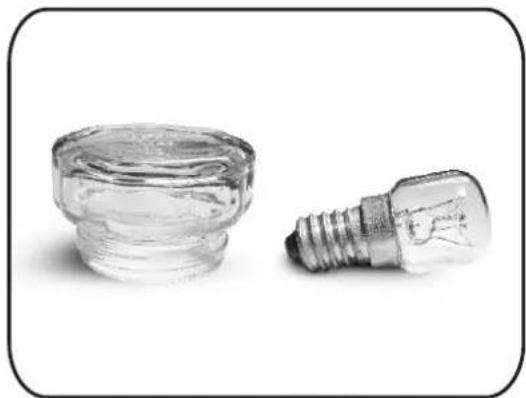
natural_image
Two small glass incandescent bulbs, one upright and one with a lit fuse (no text or symbols visible)natural_image
Interior view of a modern kitchen appliance with open door and side panel (no visible text or symbols)natural_image
3D rendering of a gray rectangular tray or baking tray with side brackets (no text or symbols)natural_image
Two hand-drawn sketch-style grid-like structures with no text or symbolsnatural_image
Line drawing of a rectangular metal grate with vertical slats (no text or symbols)INFORMACJE O PRODUKCIE DOT. URZĄDZEŃ SIECIOWYCH
Krok 6
natural_image
Front view of a microwave oven with digital display and internal swirling pattern (no visible text or symbols)4.4 Konserwacja
natural_image
Diagram of a mechanical or electrical enclosure with labeled components and an inset close-up showing a cylindrical component (no text or symbols present)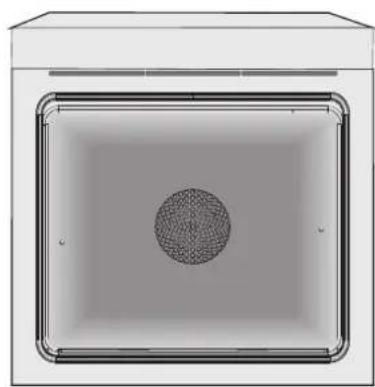
natural_image
Top-down view of a rectangular frame with a central circular pattern, no text or symbols visible.WYJMOWANIE DRZWICZEK PIEKARNIKA
natural_image
Interior view of a black oven with open door and side panel (no visible text or symbols)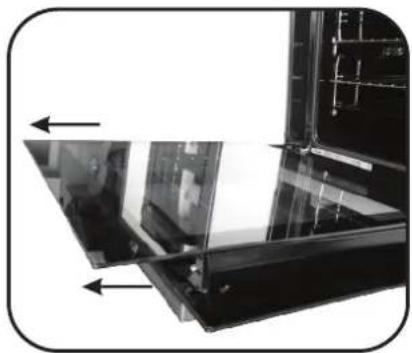
natural_image
Close-up of a glass panel with arrows indicating direction, no visible text or symbols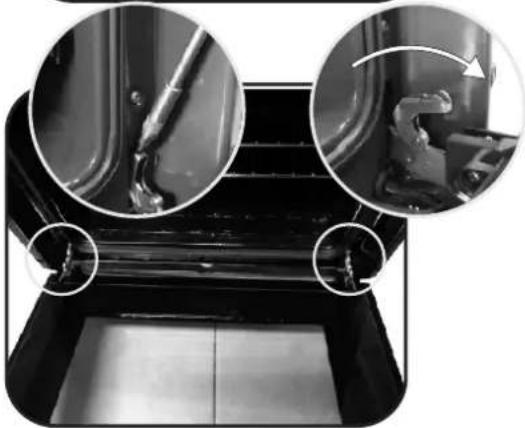
natural_image
Close-up of a mechanical component with three circular insets showing internal details (no visible text or symbols)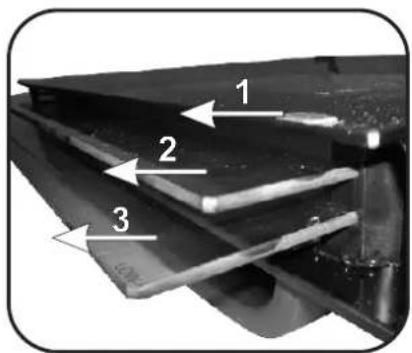
natural_image
Close-up of a mechanical component with a tool inserted, showing no visible text or symbols.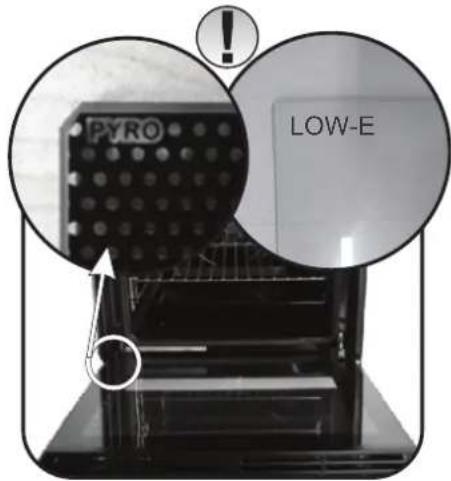
natural_image
Close-up of a hand inserting a black plastic clip into a dark metal frame (no text or symbols visible)WYMIANA ŻARÓWKI
natural_image
Close-up of a hand holding a flashlight inside a vehicle engine compartment (no visible text or symbols)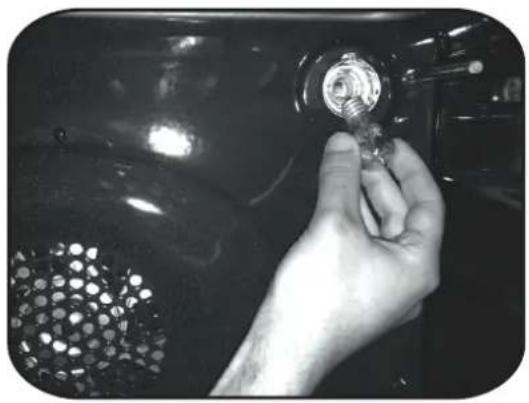
natural_image
Close-up of a hand holding a small metallic tool with a screw, against a dark glossy background (no text or symbols visible)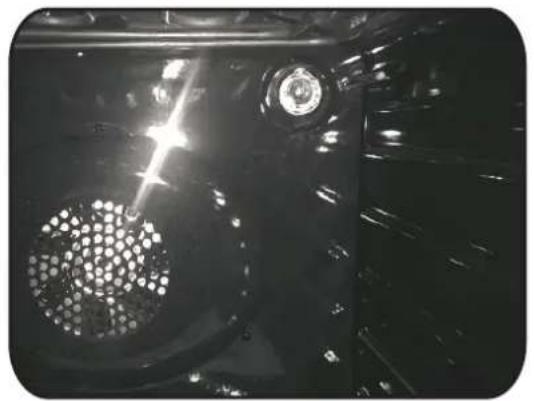
natural_image
Close-up of a mechanical component with a circular perforated part and a central headlight (no visible text or symbols)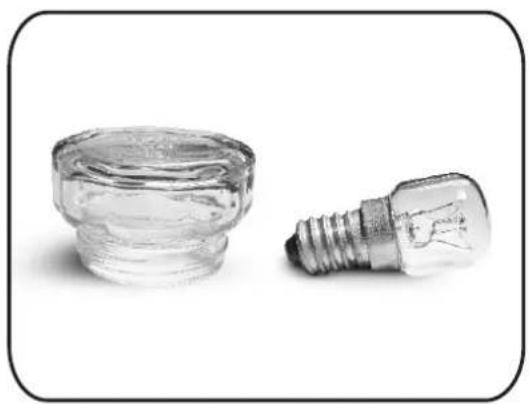
natural_image
Two small glass bulbs, one filled with clear liquid and the other with a standard light bulb (no text or symbols visible)natural_image
Exterior view of a modern office building (no signage)natural_image
3D rendering of a gray rectangular tray or baking tray with cutouts (no text or symbols)natural_image
Two hand-drawn sketch-style grid-like structures with wavy edges, no text or symbols presentnatural_image
Line drawing of a rectangular metal grate with vertical slats (no text or symbols)How to deactivate wireless network port:
Schritt 6
Fernsteuerungsmodus
Schritt 1
natural_image
Front view of a kitchen oven with digital temperature display and a grayscale image of the oven interior (no visible text or symbols)4.4 Wartung
natural_image
Technical diagram of a mechanical or electrical enclosure with labeled section A and inset close-up of a component (no readable text or symbols)
natural_image
Top-down view of a rectangular frame with a central circular pattern, no text or symbols visible.ENTFERNEN DES BACKOFENFENSTERS
natural_image
Interior view of a black oven with visible internal structure and ventilation slots (no text or symbols)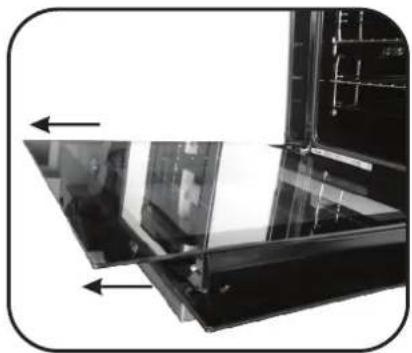
natural_image
Close-up of a glass panel with arrows indicating direction, no visible text or symbols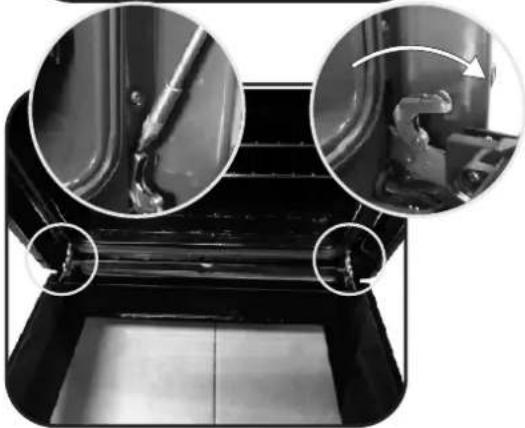
natural_image
Close-up of a mechanical component with three circular insets showing internal details (no visible text or symbols)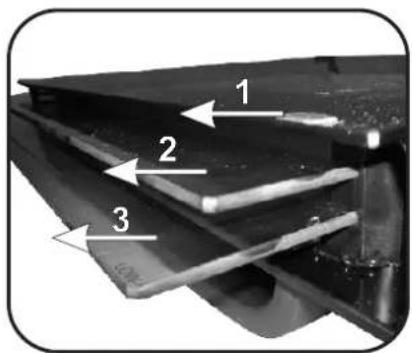
natural_image
Close-up of a metallic mechanical component with a tool inserted, showing no visible text or symbols.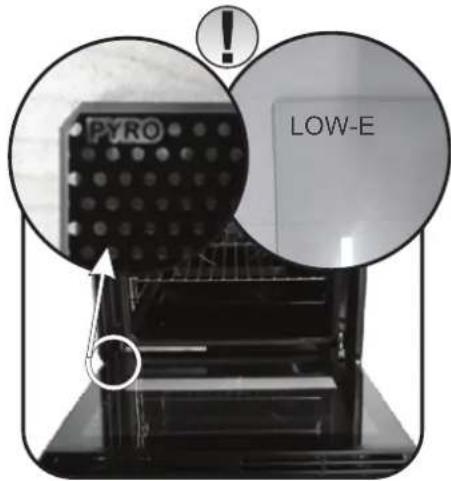
natural_image
Close-up of a hand inserting a black plastic clip into a dark metal frame (no text or symbols visible)WECHSELN DER GLÜHBIRNE
natural_image
Close-up of a hand holding a flashlight inside a vehicle engine compartment (no visible text or symbols)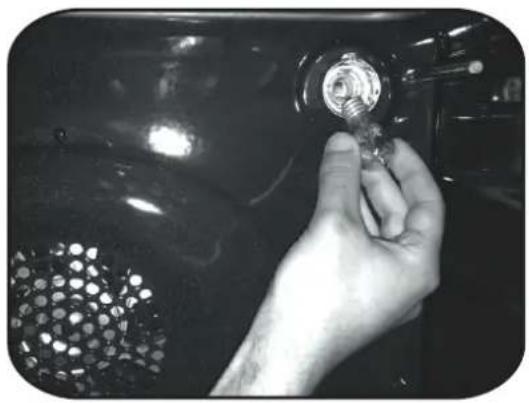
natural_image
Close-up of a hand holding a small metallic tool with a grid-patterned surface, against a dark glossy background (no text or symbols visible)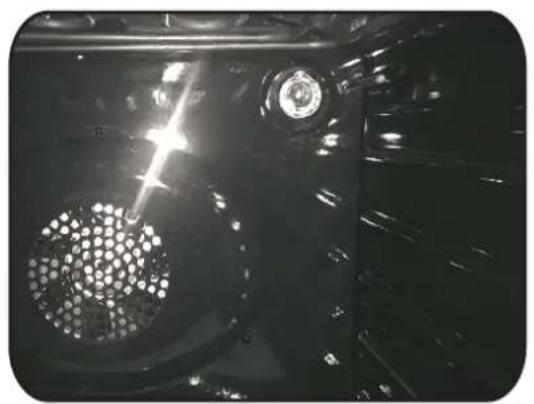
natural_image
Close-up of a car's front wheel and dashboard with visible light and mechanical components (no text or symbols)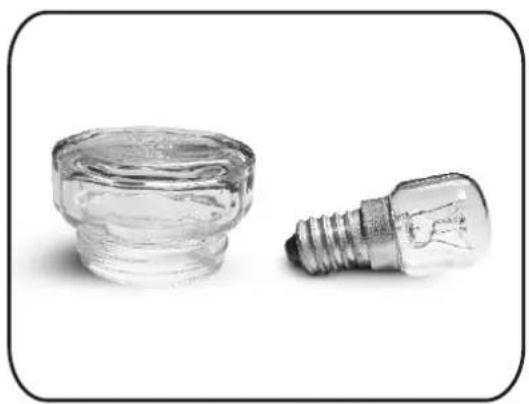
natural_image
Two small glass components: a cylindrical container and a standard incandescent light bulb, both on a plain background (no text or symbols visible)5. Fehlerbehebung
natural_image
Interior view of a modern industrial oven or storage unit with visible cooling fins and ventilation grilles (no text or symbols)natural_image
Line drawing of a rectangular metal grate with vertical slats (no text or symbols)natural_image
Two hand-drawn sketch-style panels showing vertical and horizontal lines with wavy ends, no text or symbols present.natural_image
3D rendering of a gray rectangular tray or baking tray with side brackets (no text or symbols)natural_image
Front view of a microwave oven with digital temperature display and internal swirling patterns (no text or symbols visible)4.4 Údržba
DEMONTÁŽ A ČIŠTĚNÍ BOČNÍCH DRŽÁKŮ
natural_image
Top-down view of a rectangular enclosure with a central circular pattern (no text or symbols)DEMONTÁŽ OKNA TROUBY
natural_image
Interior view of a black oven with visible grating and ventilation duct (no text or symbols)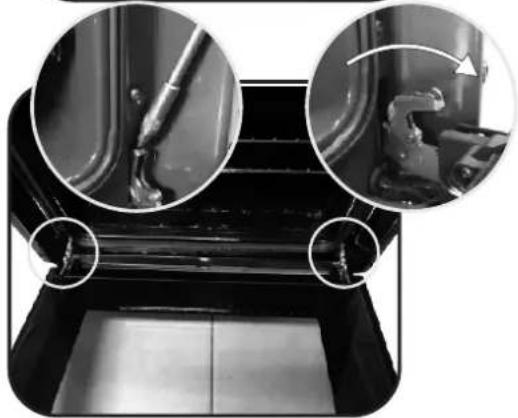
natural_image
Close-up of mechanical components with circular insets showing close-ups of joints and parts (no visible text or symbols)3.
natural_image
Close-up of a mechanical component with a tool inserted, no visible text or symbols
natural_image
Close-up of a hand holding a black metal panel with arrows indicating direction (no text or symbols visible)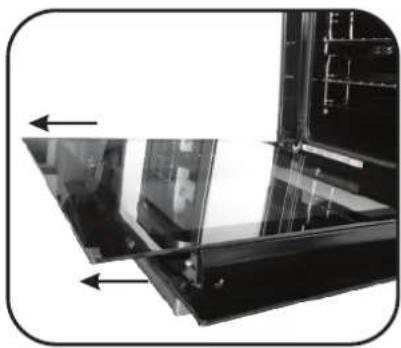
natural_image
Close-up of a mechanical or electronic component with directional arrows indicating movement or force (no visible text or symbols)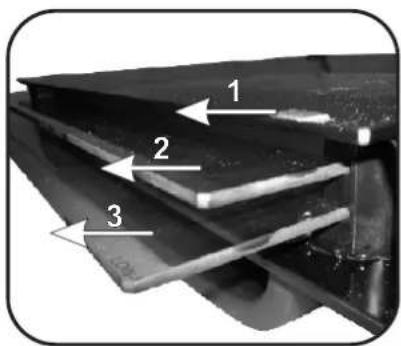
VÝMĚNA ŽÁROVKY
natural_image
Close-up of a hand holding a flashlight inside a vehicle engine compartment (no visible text or symbols)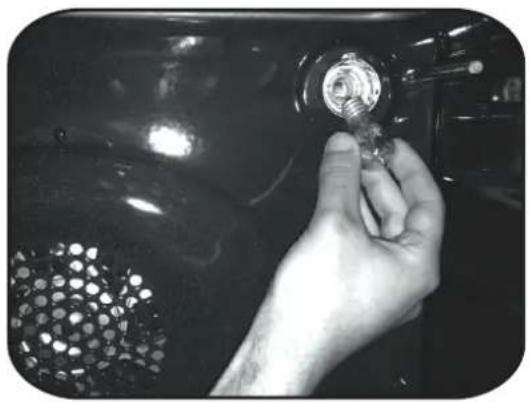
natural_image
Close-up of a hand holding a small metallic tool with a grid-patterned surface, against a dark glossy background (no text or symbols visible)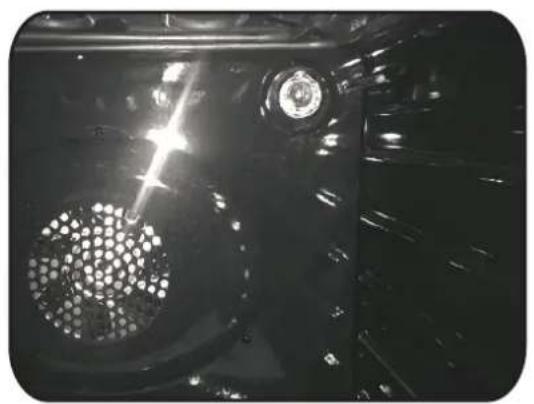
natural_image
Close-up of a car's front wheel and dashboard with visible light and mechanical components (no text or symbols)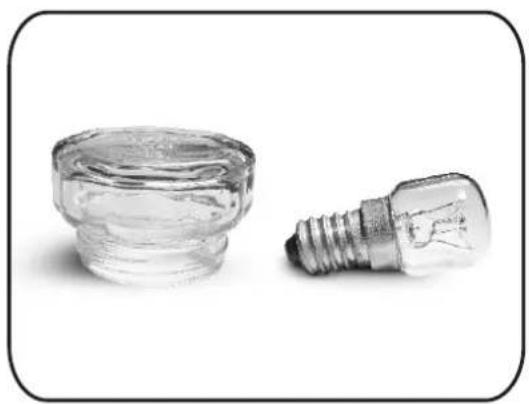
natural_image
Two small glass components: a cylindrical container and a standard incandescent light bulb, both on a plain background (no text or symbols visible)5. Rešení potíží
natural_image
Exterior view of a modern stainless steel oven with lid open (no visible text or symbols)- Control panel
- Shelf positions
(lateral wire grid if included) - Metal grill
- Drip pan
- Fan (behind the steel plate)
- Oven door
2.2 Pribor (ovisno o modelu)
1 Plitica za prikupljanje masnoće
natural_image
3D rendering of a gray rectangular tray with side brackets (no text or symbols)natural_image
Two hand-drawn sketch-style panels showing horizontal lines with rounded ends, no text or symbols present.Postavljene su na pliticu za prikupljanje masnoće i metalne rešetke bočnih polica.
2 Metalna rešetka
natural_image
Line drawing of a rectangular metal grate or rack structure (no text or symbols)Drži pladanj za pečenje i tanjure.
2.3 Prvo Korištenja
PRETHODNO ČIŠĆENJE
Način rada daljinskog upravljanja
1. Korak
- Okrenite ručicu na program Wi-Fi.
2. Korak
- Uključuje lampica LED za WiFi.
4. Korak
- Skenirajte kôd QR ili unesite serijski broj.
Ovim društvo Candy Hoover Group Srl izjavljuje da je radijska oprema u skladu s Direktivom 2014/53/EU i odgovarajućim zakonskim zahtjevima (za tržište UKCA). Potpuni tekst izjave o sukladnosti dostupan je na sljedećoj internetskoj adresi: www.candy-group.com
3.2 Upute Za Uporabu
| Regulator funkcije | Regulator termostata | T°C opseg | Funkcija (Ovisi o modelu pećnice) |
 | LÁMPA: Kiderült a sütõ világítása. | ||
| [302H] | ODLEĐIVANJE - kada je gumb za izbor funkcija podešen na ovaj položaj, ventilator okreće zrak na sobnoj temperaturi oko zaleđene hrane tako da se odledi za nekoliko minuta bez da sadržaj bjelančevina u hrani bude promijenjen.Temperatura je unaprijed podešena na 40°C i reguliranje nije moguće. | ||
*[6420] | 180210 50 | 50 ÷ 240÷ 240 | VIŠERAZINSKO- I gornji i donji grijači oriste se kada ventilator cirkulira zrak unutar pećnice. Preporučujemo ovaj način koristite za piletinu, da peciva, ribu i povrće. Toplina prodire bolje u namirnice te se skraćuje i kuhanje i zagrijavanje. Možete kuhati različitu hranu istovremeno s istim ili bez istog pripravljanja u jednom ili više položaja. Ovaj način kuhanja omogućava ravnomjernu raspodjelu topline i sprječava miješanje mirisa. Pričekajte dodatnih desetak minuta ako se namirnice kuhaju istovremeno. |
* aquacifva aquacifva | 220 | 50 ÷ 280 | KONVENKCIJA - Koriste se gornji i donji elementi pećnice. To je uobičajeni način pečenja i prženja. Idealno jeza prženje butine i divljači, pečenje kolačića i jabuka te pripravljanje mekanog i hrskavog jela. |
 | 210 | 50 ÷ 230 | VENTILATOR I DONJI GRIJAČ: Ova funkcija idealna je za delikatnajela (nabujci). |
| [970A] | 200 150 | ÷ 220 | ROŠTILI I VENTILATOR: koristi se gornji grijač zajedno s ventilatorom koji okreće vrući zrak po unutrašnjosti pećnice. Prethodno zagrijavanje preporučljivo je za crveno meso a nije potrebno za bijelo meso. Pečenje na grillu idealno je za deblje komade mesa kao što su svinjetina ili perad.Hranu koju pripremate na grillu postavite izravno u sredinu srednje policu a ispod postavite pliticu za sakupljanje sokova i masti. Za najbolje rezultate uvijek provjerite da meso nije preblizu grijača i okrenite meso na pola vremena pečenja. |
| [KYKZ] | L3 | L1 ÷ L5 | ROŠTILI: upotrebljavajte roštilj sa zatvorenim vratima.Gornji grijač upotrebljava se samostalno i možete prilagoditi razinu temperature. Kako bi se grijači zagrijali do usijanja, potrebno je pet minuta prethodnog zagrijavanja. Uspjeh je zajamčen za roštilje, kebabe i gratinirana jela. Bijelo meso može se staviti razmaknuto od roštilja; kuhanje traje dulje, no meso je sočnije. Možete staviti crveno meso i riblji file na policu s posudom za kapanje koja je stavljena ispod. Pećnica ima pet položaja za roštilj, od L1 do L5. |
 | ECO | ECO÷SUPER | ECO: 90 minSUPER: 120 min PYROLYSIS |
| [KKW3] | WIFI ON: Moguće je spajanje pećnice na wifi. | ||
| reset | WIFI RESET: Omogućava ponovno pokretanje spajanja na wifi. |
* Ispitano u skladu s normom EN 60350-1 za svrhu prijave potrošnje energije i energetskog razreda
natural_image
Front view of a microwave oven with digital display and control knobs (no visible text or symbols)4.4 Održavanje
UKLANJANJE I ČIŠĆENJE BOČNIH VODILICA
- Uklonite žičane rešetke tako što ćete ih povući u pravcu strelica (vidi u nastavku).
- Očistite žičane rešetke tako što ćete ih staviti u perilicu za posuđe ili koristite mokru spužvu te ih poslije osušite.
- Nakon čišćenja vratite žičane rešetke na svoje mjesto obrnutim redoslijedom.
natural_image
Top-down view of a rectangular enclosure with a central circular pattern (no text or symbols)UKLANJANJE PROZORA PEĆNICE
- Otvorite prednji prozor.
- Otvorite spojnice kućišta šarki na lijevoj i desnoj strani prednjeg prozora trako da ih gurnete prema dolje.
- Prozor vratite izvršavanjem postupka obrnutim redoslijedom.
UKLANJANJE I ČIŠĆENJE STAKLENIH VRATA
- Otvorite vrata pećnice.
2.3.4. Blokirajte šarke, uklonite vijke i uklonite gornji metalni poklopac tako da ga povučete prema gore.
5.6. Uklonite staklo tako da ga pažljivo izvučete iz vrata pećnice (napomena: u pirolitičkim pećnicama uklonite i drugo i treće staklo (ako postoji)). - Po završetku čišćenja ili zamjene sastavite dijelove obrnutim redoslijedom.
natural_image
Interior view of a black oven with open door and side panel (no visible text or symbols)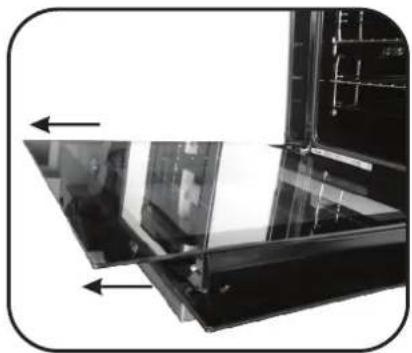
natural_image
Close-up of a glass panel with arrows indicating direction, no visible text or symbols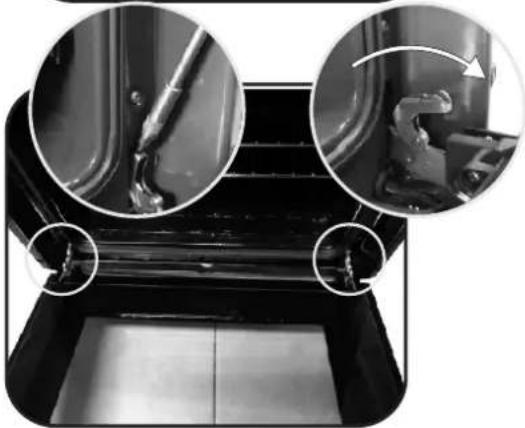
natural_image
Close-up of a mechanical component with three circular insets showing internal details (no visible text or symbols)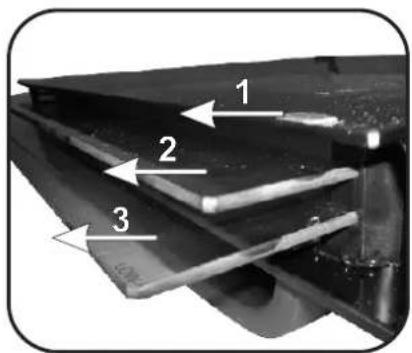
natural_image
Close-up of a mechanical component with a tool inserted, showing no visible text or symbols.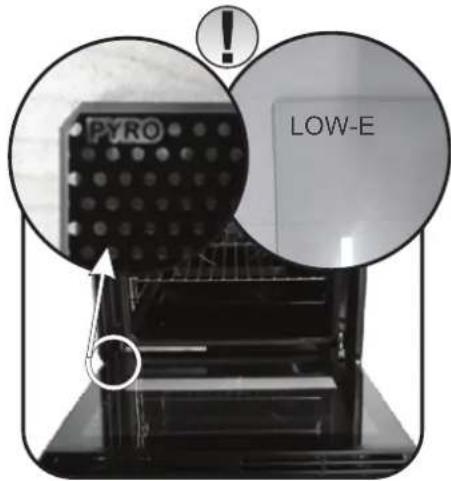
natural_image
Close-up of a hand inserting a black plastic clip into a dark metal frame (no text or symbols visible)ZAMJENA ŽARULJICE IZ SVJETILJKE
natural_image
Close-up of a hand holding a small metallic object inside a vehicle or engine compartment (no visible text or symbols)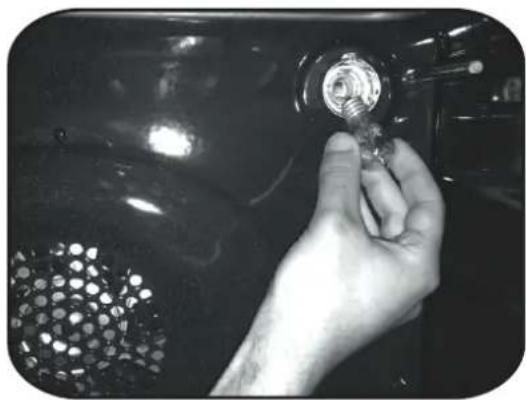
natural_image
Close-up of a hand holding a small metallic tool with a circular inset showing a mesh pattern (no text or symbols visible)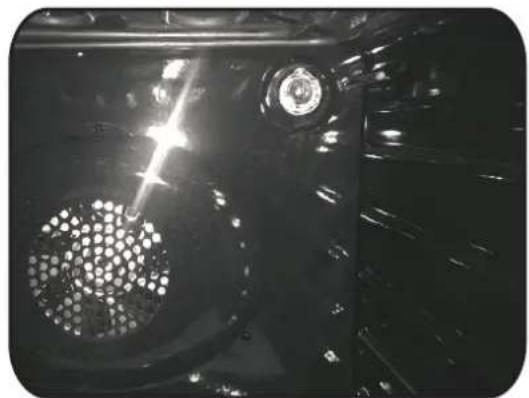
natural_image
Close-up of a mechanical component with a perforated circular feature and a central circular head (no visible text or symbols)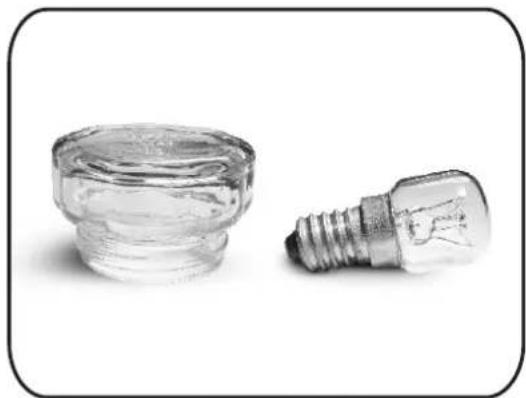
natural_image
Two small glass components: a cylindrical container and a standard incandescent light bulb, shown against a plain white background (no text or symbols visible).5. Rješavanje problema
5.1 ČESTA PITANJA
| PROBLEM MOGUĆI UZROK RJEŠENJE | ||
| Pećnica se ne zagrijava | Sat nije postavljen Postavite sat | |
| Pećnica se ne zagrijava | Nisu postavljeni funkcija kuhanja i temperatura | Pobrinite se da su potrebne postavke pravilne |
| Dodirno korisničko sučelje ne reagira | Para i kondenzacija na ploči korisničkog sučelja | Ploču korisničkog sučelja očistite krpom od mikrovlakana kako biste uklonili kondenzirani sloj |
natural_image
Interior view of a stainless steel oven with open door and side panel (no visible text or symbols)natural_image
3D rendering of a gray rectangular tray with side brackets (no text or symbols)natural_image
Two hand-drawn sketch-style grid-like structures with wavy lines, no text or symbols presentnatural_image
Line drawing of a rectangular metal grate with evenly spaced slats (no text or symbols)6. Korak
- Gumb s funkcijami obrnite na program WI-FI RESET in počakajte 30 sekund.
7. Korak
2. Korak
• Vklopi se LED lučka za WiFi.
4. Korak
natural_image
Front view of a microwave oven with digital display and internal air swirl pattern (no visible text or symbols)4.4 Vzdrževanje
ODSTRANJEVANJE IN ČIŠČENJE STRANSKIH NOSILCEV
natural_image
Technical diagram of a mechanical or electrical enclosure with labeled section A and inset close-up of a component (no readable text or symbols)
natural_image
Top-down view of a rectangular enclosure with a central circular pattern (no text or symbols)ODSTRANITEV OKNA PEČICE
natural_image
Interior view of a black oven with open door and side panel (no visible text or symbols)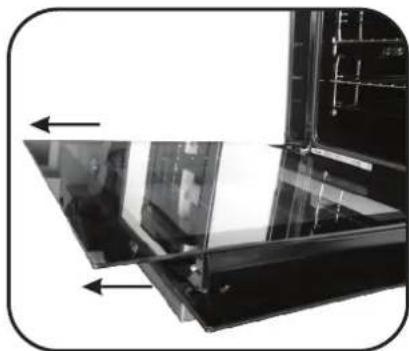
natural_image
Close-up of a glass panel with arrows indicating direction, no visible text or symbols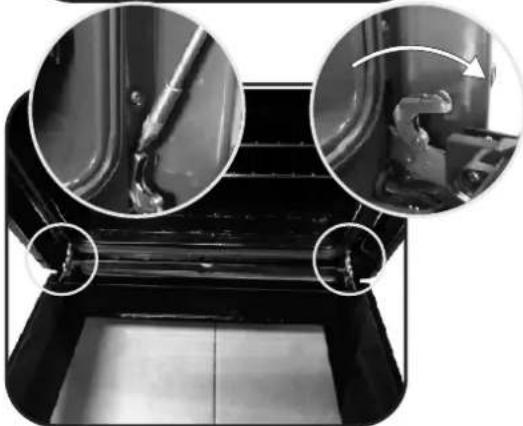
natural_image
Close-up of mechanical components with circular insets showing close-ups of a tool and a curved tool (no text or symbols visible)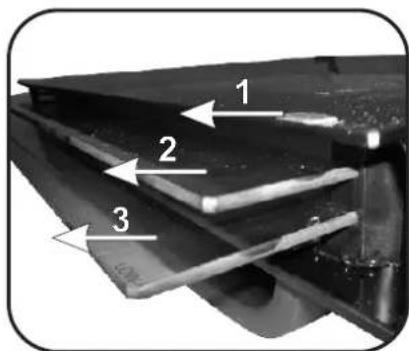
natural_image
Close-up of a metallic mechanical component with a tool inserted, showing no visible text or symbols.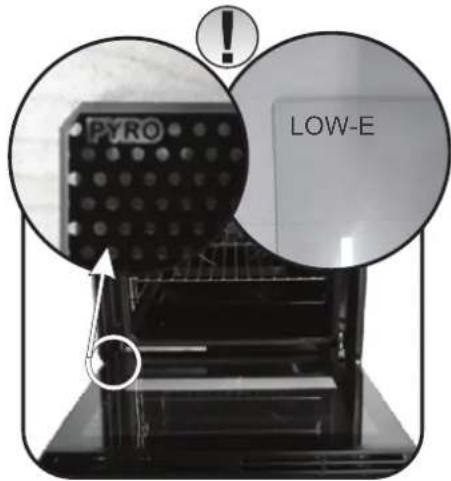
natural_image
Close-up of a hand inserting a flexible plastic component into a dark plastic housing (no text or symbols visible)ZAMENJAVA ŽARNICE
- Pečico izključite iz napajanja.
- Odvijte stekleni pokrov, odvijte žarnico in jo nadomestite z novo žarnico istega tipa.
- Ko ste pokvarjeno žarnico zamenjali, znova namestite stekleni pokrov.
natural_image
Close-up of a hand holding a small metallic object inside a vehicle engine compartment (no visible text or symbols)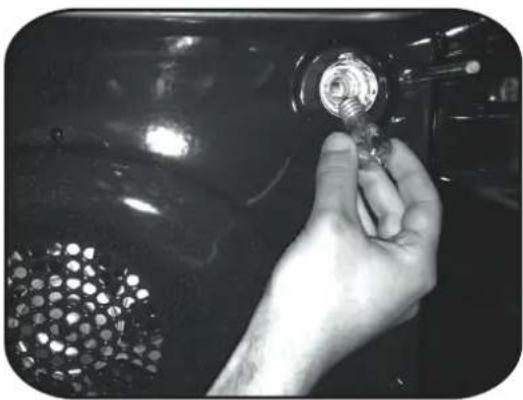
natural_image
Close-up of a hand holding a small metallic object with a grid pattern, against a dark background (no visible text or symbols)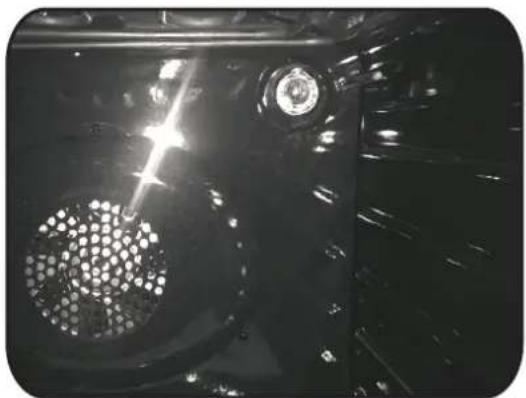
natural_image
Close-up of a mechanical component with a perforated circular feature and a central hub, under bright light (no visible text or symbols)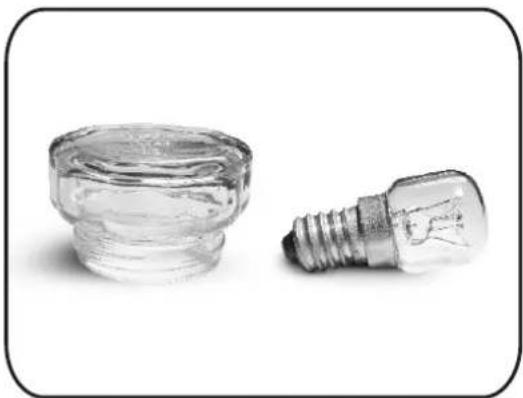
natural_image
Two small glass components: a cylindrical container and a standard incandescent light bulb, both on a plain background (no text or symbols visible)natural_image
3D rendering of a gray rectangular tray or baking tray with side brackets (no text or symbols)natural_image
Line drawing of a rectangular metal grate with vertical slats (no text or symbols)natural_image
Two hand-drawn sketch-style grid-like structures with wavy lines, no text or symbols presentΒήμα 6
natural_image
Front view of a microwave oven with digital temperature display (no visible text or symbols)4.4 Συντήρηση
natural_image
Technical diagram of a mechanical or electrical component with labeled section A and inset close-up view (no readable text or symbols)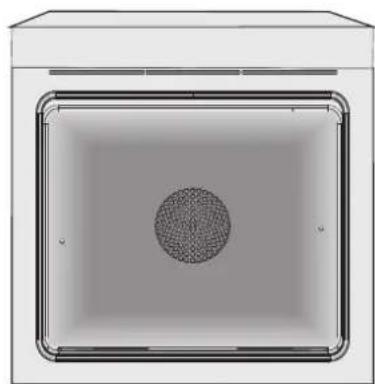
natural_image
Top-down view of a rectangular enclosure with a central circular pattern (no text or symbols)natural_image
Interior view of a black oven with open door and side panel (no visible text or symbols)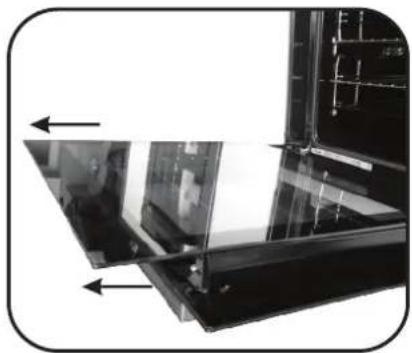
natural_image
Close-up of a glass panel with arrows indicating direction, no visible text or symbols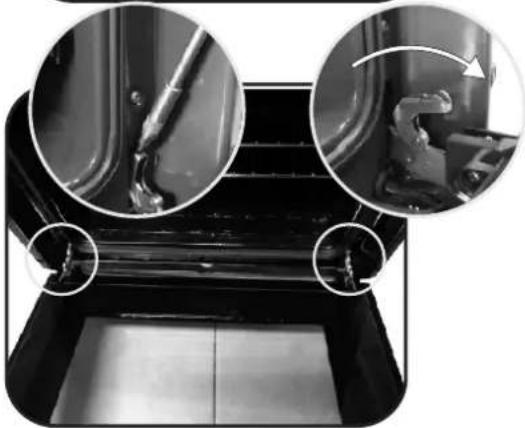
natural_image
Close-up of a mechanical component with three circular insets showing internal details (no visible text or symbols)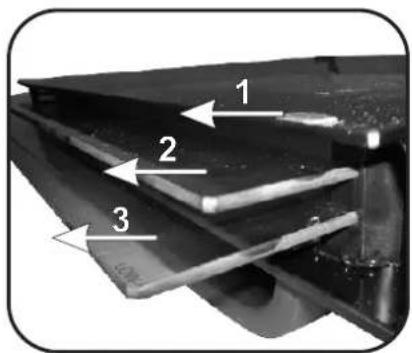
natural_image
Close-up of a metallic mechanical component with a tool inserted, showing no visible text or symbols.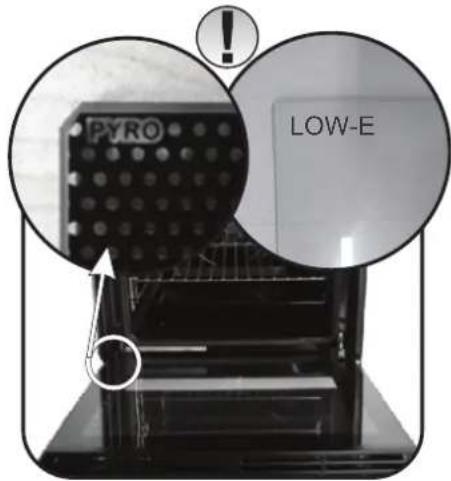
natural_image
Close-up of a hand inserting a black plastic clip into a dark metal frame (no text or symbols visible)natural_image
Close-up of a hand holding a small metallic object inside a vehicle engine compartment (no visible text or symbols)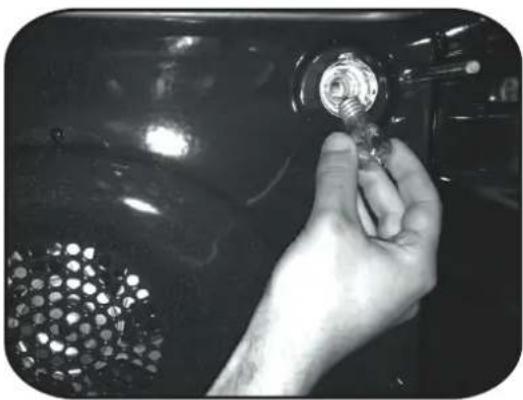
natural_image
Close-up of a hand holding a small metallic object with a grid-patterned surface, against a dark background (no visible text or symbols)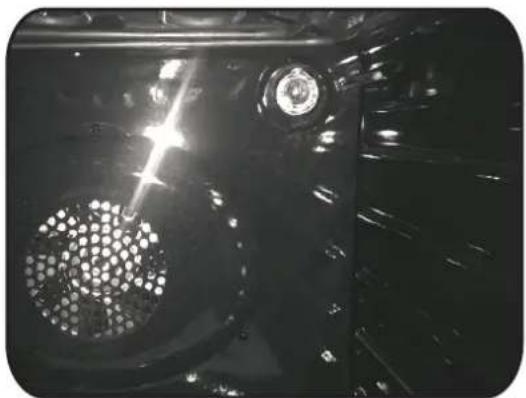
natural_image
Close-up of a mechanical component with a perforated circular feature and a central hub, under bright light (no visible text or symbols)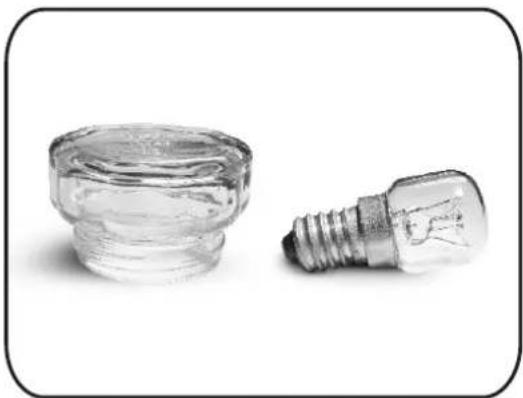
natural_image
Two small glass components: a cylindrical container and a standard incandescent light bulb, both on a plain background (no text or symbols visible)The manufacturer will not be responsible for any inaccuracy resulting from printing or transcript errors contained in this brochure. We reserve the right to carry out modifications to products as required, including the interests of consumption, without prejudice to the characteristics relating to safety or function.