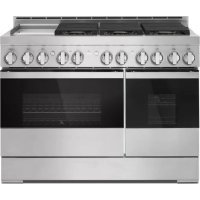
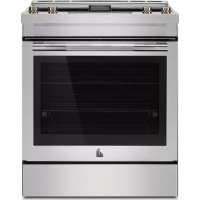
JGCP536HM - Cooker JENN-AIR - Free user manual and instructions
Find the device manual for free JGCP536HM JENN-AIR in PDF.


| Product type | Gas cooktop |
| Brand | JENN-AIR |
| Model | JGCP536HM |
| Width | 48 in (121.9 cm) |
| Power supply | Natural gas or propane (convertible) |
| Number of gas burners | 5 (2 large stacked, 2 small, 1 grill) |
| Griddle | Chromed electric, with preheat and indicator light |
| Ignition | Electronic with Flame-Sensing reignition system |
| Voltage | 120 V ~ 60 Hz |
| Main features | Sealed burners, built-in grill, griddle, high/low simmer |
| Surface material | Stainless steel |
| Safety | Flame detection, automatic shut-off if extinguished |
| Maintenance | Cleaning burners, grates, drip tray and griddle |
| Spare parts available | Yes (burner caps, grates, tray, accessories) |
| Customer service | 1-800-JENNAIR (USA and Canada) |
| Warranty | See provided warranty document |
Frequently Asked Questions - JGCP536HM JENN-AIR
User questions about JGCP536HM JENN-AIR
0 question about this device. Answer the ones you know or ask your own.
Ask a new question about this device
Download the instructions for your Cooker in PDF format for free! Find your manual JGCP536HM - JENN-AIR and take your electronic device back in hand. On this page are published all the documents necessary for the use of your device. JGCP536HM by JENN-AIR.
USER MANUAL JGCP536HM JENN-AIR
For questions about features, operation/performance, parts, accessories, or service in the U.S.A., call 1-800-JENNAIR (1-800-536-6247) or visit our website at www.jennair.com.
In Canada, call 1-800-JENNAIR (1-800-536-6247) or visit our website at www.jennair.ca.
SAFETY INFORMATION 3

PARTS AND FEATURES 5

Cooktop 5
Control Knobs. 6
COOKTOP FEATURES 7

Burners. 7
Grill 8
Chrome Electric Griddle. 9
CARE AND CLEANING 10

Cooktop Surface 10
Sealed Surface Burners. 10
Porcelain-Coated Grates and Caps 11
Grill 11
Griddle. 12
Cooktop Controls. 13
Stainless Steel. 13
TROUBLESHOOTING 14

ASSISTANCE OR SERVICE. 15

ACCESSIONS 15

INFORMATIONS DE SECURITE 16

PIECES ET CARACTERISTIQUES 18

Table de cuisson 18
ASSISTANCE OU SERVICE 28

ACCESSIONS 28

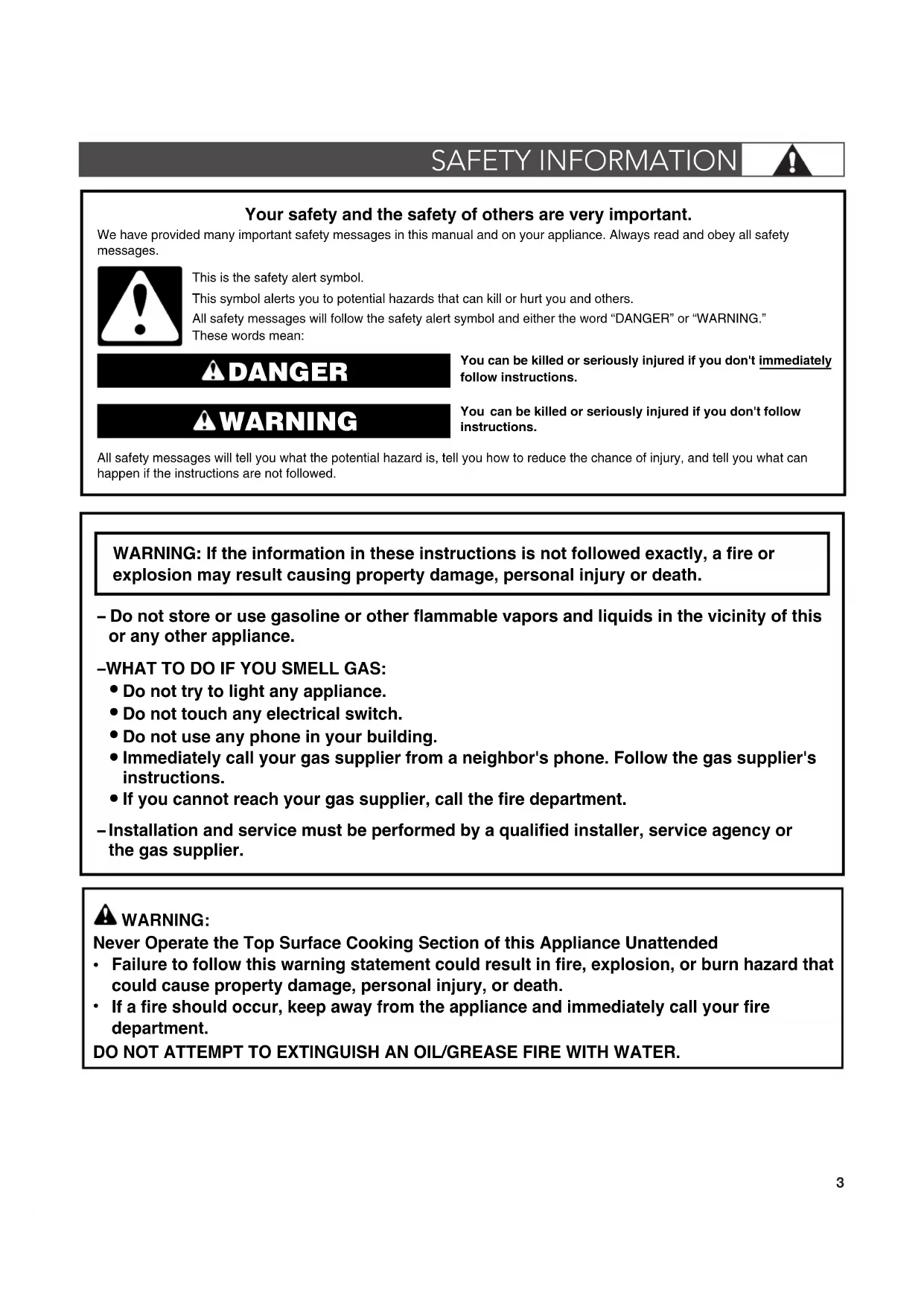
Your safety and the safety of others are very important.
We have provided many important safety messages in this manual and on your appliance. Always read and obey all safety messages.

This is the safety alert symbol.
This symbol alerts you to potential hazards that can kill or hurt you and others.
All safety messages will follow the safety alert symbol and either the word "DANGER" or "WARNING."
These words mean:
ADANGER
WARNING
You can be killed or seriously injured if you don't immediately follow instructions.
You can be killed or seriously injured if you don't follow instructions.
All safety messages will tell you what the potential hazard is, tell you how to reduce the chance of injury, and tell you what can happen if the instructions are not followed.
WARNING: If the information in these instructions is not followed exactly, a fire or explosion may result causing property damage, personal injury or death.
- Do not store or use gasoline or other flammable vapors and liquids in the vicinity of this or any other appliance.
-WHAT TO DO IF YOU SMELL GAS:
- Do not try to light any appliance.
- Do not touch any electrical switch.
- Do not use any phone in your building.
- Immediately call your gas supplier from a neighbor's phone. Follow the gas supplier's instructions.
-
If you cannot reach your gas supplier, call the fire department.
-
Installation and service must be performed by a qualified installer, service agency or the gas supplier.
WARNING:
Never Operate the Top Surface Cooking Section of this Appliance Unattended
- Failure to follow this warning statement could result in fire, explosion, or burn hazard that could cause property damage, personal injury, or death.
- If a fire should occur, keep away from the appliance and immediately call your fire department.
DO NOT ATTEMPT TO EXTINGUISH AN OIL/GREASE FIRE WITH WATER.

SAFETY INFORMATION
WARNING: Gas leaks cannot always be detected by smell.
Gas suppliers recommend that you use a gas detector approved by UL or CSA.
For more information, contact your gas supplier.
If a gas leak is detected, follow the "What to do if you smell gas" instructions.
IMPORTANT SAFETY INSTRUCTIONS
WARNING: To reduce the risk of fire, electrical shock, injury to persons, or damage when using the cooktop, follow basic precautions, including the following:
■WARNING: NEVER use this appliance as a space heater to heat or warm the room. Doing so may result in carbon monoxide poisoning and overheating of the cooktop.
CAUTION: Do not store items of interest to children in cabinets above the cooktop - children climbing on the cooktop to reach items could be seriously injured.
- Proper Installation - The cooktop, when installed, must be electrically grounded in accordance with local codes or, in the absence of local codes, with the National Electrical Code, ANSI/NFPA70 or the Canadian Electrical Code, Part 1. Be sure the cooktop is properly installed and grounded by a qualified technician.
This cooktop is equipped with a three-prong grounding plug for your protection against shock hazard and should be plugged directly into a properly grounded receptacle. Do not cut or remove the grounding prong from this plug.
- Disconnect the electrical supply before servicing the cooktop.
Injuries may result from the misuse of the cooktop such as stepping, leaning, or sitting on the top surface.
- Maintenance - Keep cooktop area clear and free from combustible materials, gasoline, and other flammable vapors and liquids.
Storage on the cooktop - Flammable materials should not be stored on or near surface units.
Top burner flame size should be adjusted so it does not extend beyond the edge of the cooking utensil.
SAVE THESE INSTRUCTIONS
These instructions cover several different models. The cooktop you have purchased may have some or all of the items listed. The locations and appearances of the features shown here may not match those of your model. Refer to these instructions or the "Frequently Asked Questions (FAQs)" section of our website at producthelp.jennair.com for more detailed instructions. In Canada, refer to the Customer Service Section at www.jennair.ca.
COOKTOP
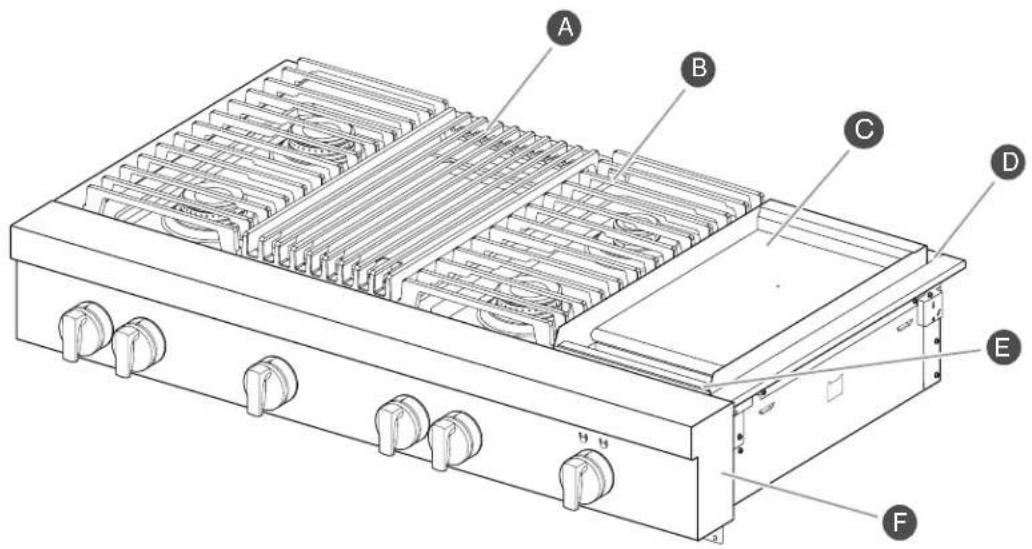
48" (121.9 cm) cooktop shown*
A Grill (on some models)
Island trim
B Cooktop grate
Drip tray (on griddle models)
Electric griddle (on some models)
F Console panel
*Cooktop configuration may differ.
CONTROL KNOBS
The cooktop features are accessed through the cooktop knobs.
48" (121.9 CM)
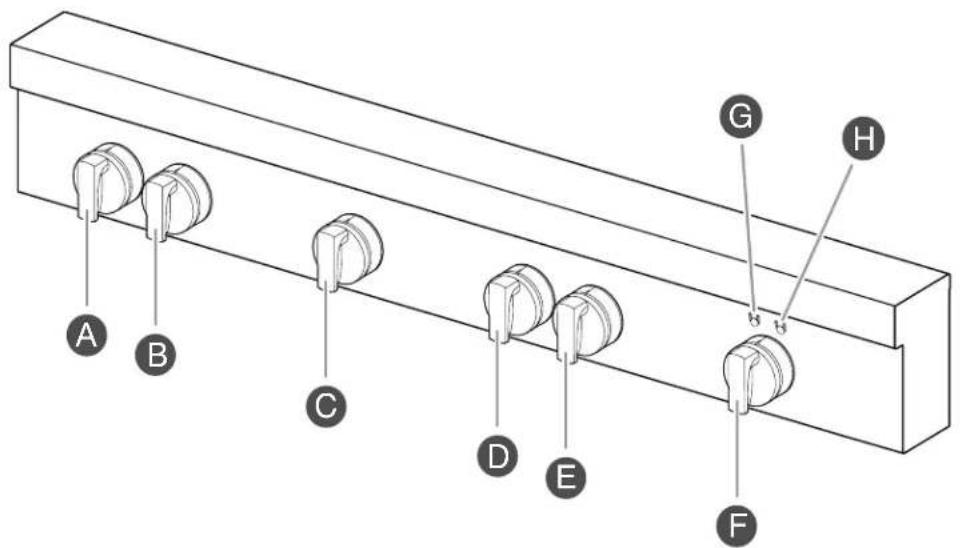
Cooktop Knobs and Indicator Lights

Left Rear Knob

Left Front Knob

Grill Knob

Center Right Rear Knob

Center Right Front Knob

Griddle Knob

Griddle Preheat Light

Griddle Cooktop ON Light
NOTE: Cooktop configuration, features, and controls may differ.
FEATURE DESCRIPTION/BEHAVIOR INSTRUCTIONS
| Griddle Cooktop ON Light | Right Griddle indicator light - The Griddle Cooktop On light illuminates blue when the griddle knob is powered on. |
| Griddle Preheat Light Left | Griddle indicator light - The griddle Preheat light flashes blue while the griddle is preheating. Once preheat temperature has been reached, the indicator light turns solid blue. |
BURNERS
WARNING

Fire Hazard
Do not let the burner flame extend beyond the edge of the pan.
Turn off all controls when not cooking.
Failure to follow these instructions can result in death or fire.
BTU/hr
BURNER APPEARANCE
FEATURES
Large stacked burner
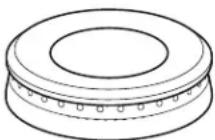
This burner has an upper and lower level of flame. The Hi setting uses both flame levels at full power to provide the highest heat. It is ideal for cooking large quantities of food or liquid and using large pots and pans. The Simmer Hi and Lo settings use the lower flame only.
Small burner
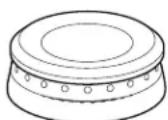
This burner is ideal for cooking smaller quantities of food and melting chocolate or butter.
Igniting Burners:
Electric ignitors automatically light the surface burners when burner knobs are turned to IGNITE.
Before setting a burner knob, place filled cookware on the grate. Do not operate a burner using empty cookware or without any cookware on the grate.
- Visually check that the burner has lit. If the burner does not ignite, listen for the clicking sound. If you do not hear the igniter click, turn off the burner. Check for a tripped circuit breaker or blown fuse.
- Check that the burner knob is pressed completely down on the valve shaft. If the spark igniter still does not operate, call a trained repair specialist.
- When the burner knob for the desired burner is turned to the IGNITE position, the burner will click independent of the other burners.
REMEMBER: When cooktop is in use, the entire cooktop area may become hot.
Flame-Sensing™ Reignition Feature
During cooktop use, if one or more burners are extinguished due to external causes (such as a water spill, wind, or ventilation draft), the ignition system will turn on to reignite the flame. When the flame comes back on, the system will stop sparking. If the draft in the room is not removed, occasional sparking may continue. Sparking may also occasionally occur when using the low setting on a burner.
To Set a Burner:
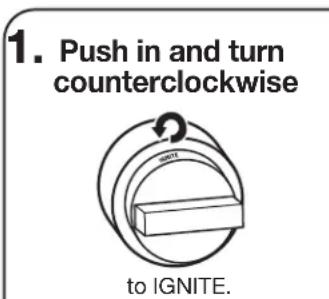
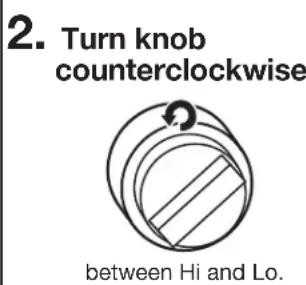
Turn knob counterclockwise further for Simmer Hi and Simmer Lo.
In Case of Power Failure
Hold a lit match near a burner and turn knob counterclockwise to Hi. After burner lights, turn knob to desired setting.

COOKTOP FEATURES
SEATED SURFACE BURNERS
Sealed surface burners are designed to minimize gaps and seams that can allow liquids and spills to get under the cooktop. This design makes cleanup quick and easy.
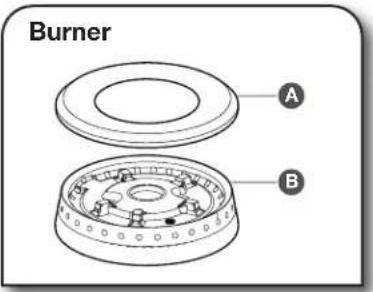
A Burner cap BBurner base
IMPORTANT: Do not obstruct the flow of combustion and ventilation air around the burner grate edges.
Burner cap: Always keep the burner cap in place when using a surface burner. A clean burner cap will help avoid poor ignition and uneven flames. Always clean the burner cap after a spillover, and routinely remove and clean the caps according to the "Care and Cleaning" section.
Gas opening: Gas must flow freely throughout the gas opening for the burner to light properly. Keep this area free of soil and do not allow spills, food, cleaning agents, or any other material to enter the gas opening. Keep spillovers out of the gas opening by always using a burner cap.
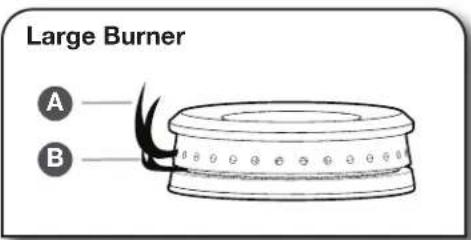
Upper (main) flame
Lower (simmer) flame
Burner Ports:
Check burner flames occasionally for proper size and shape as shown above. A good flame is blue in color, not yellow. Keep this area free of soil and do not allow spills, food, cleaning agents, or any other material to enter the burner ports.
GRILL (on some models)
The grill module consists of a cast-iron grate, a burner assembly, deflector and a drip tray.
NOTE: The burner assembly is not removable and should not be removed except by a qualified service technician.
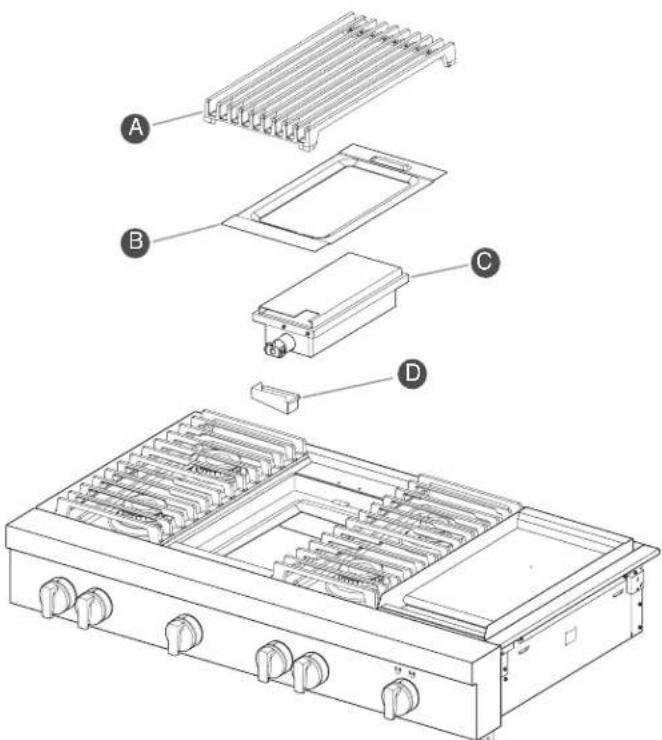
A Grate B Deflector
Burner assembly Drip tray
When using the grill, follow the guidelines below:
- Trim excess fat to reduce spattering. Slit the remaining fat on the edges to avoid curling.
- Allow space between food on the grill. Crowding food will result in uneven cooking.
For most even results, center foods on the grate directly over the heat source.
Use a metal spatula or tongs to turn food.
For even cooking, foods such as chicken quarters should be turned several times.
To check for doneness of meats and poultry, use an instant read thermometer or make a small cut in the center of the food.
Do not leave the grill unattended while cooking.
To avoid damage to the grill, do not use aluminum foil, charcoal or wood chips.
To avoid damage to cookware, do not place cookware on the grill when in use. Food should be cooked directly on the grill grate.
To Use:
| 1. Turn on overhead hood. | 3. Turn knob to ON and allow grill to preheat. |
| 2. Push in and turn knob to IGNITE. The flame will ignite in 1-4 seconds. | 4. Place food on grill. |
CHROME ELECTRIC GRIDDLE (on some models)
The chrome electric griddle provides the perfect cooking surface for grilled sandwiches, pancakes, eggs, burgers, sauteed vegetables, and many more family favorites. The attractive low-stick surface is designed to make cleanup easy.
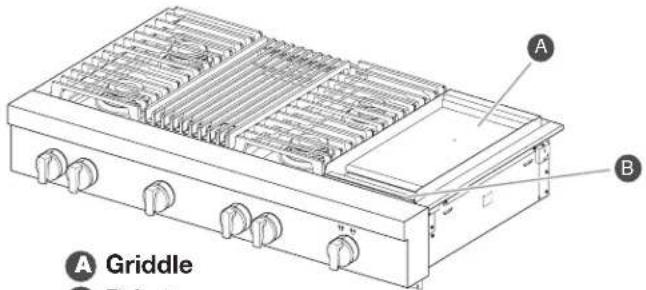
Drip tray
The chrome electric griddle system provides a convenient cooking surface.
- Be sure plastic film has been removed and wash with hot water before first use.
- To avoid scratching the griddle, do not place any pots or pans on the griddle. Use only heat-resistant plastic or wooden utensils.
The griddle surface is ready to use and does not need to be seasoned.
Pouring cold water on a hot griddle may warp the griddle, resulting in an uneven cooking surface.
To Use:
| 1. Position drip tray. | 3. Wait for preheat light to solid indicating the griddle has reached preheat. |
| 2. Push in and turn knob to desired temperature. | 4. Place food on the griddle and cook to desired doneness. |
The left griddle indicator light shows that there is power applied to the griddle.
The right griddle indicator light blinks to show that the griddle is preheating. When preheat is complete, the right griddle indicator lights solid.
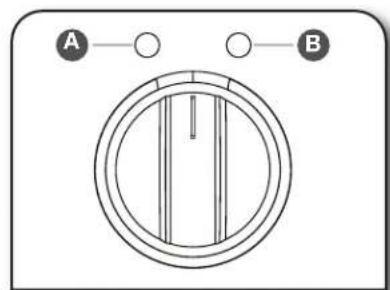
Griddle Preheat Light
Griddle Cooktop ON Light
Cooking Chart
The settings and times are guidelines only and may need to be adjusted for individual tastes.
| FOOD ITEM TEMPERATURE | COOK TIME (IN MINUTES) |
| Toast/Pancakes 350°F (175°C) 4-10 | |
| Eggs 250°F (120°C) 7-10 | |
| Meats 350°F (175°C) 10-20 | |
| Potatoes 350-450°F (175-230°C) 10-20 | |
| Fish 250-350°F (120-175°C) 8-15 |

CARE AND CLEANING
COOKTOP SURFACE
IMPORTANT:
Before cleaning, make sure all cooktop knobs are OFF and cooktop is cool. Always follow label instructions on cleaning products.
Soap, water, and a soft cloth or sponge are suggested first unless otherwise noted.
After Each Use:
- Wipe off cooktop, grates, and caps.
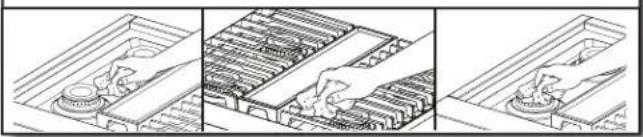
- Clean food spills.
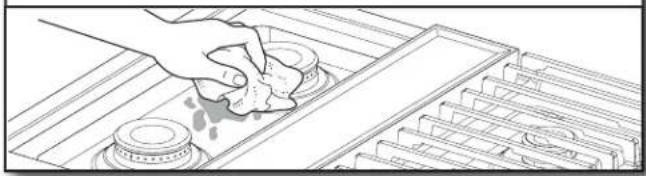
To preserve the finish, clean food spills containing acids, such as vinegar and tomato, as soon as the entire appliance is cool.
SEATED SURFACE BURNERS
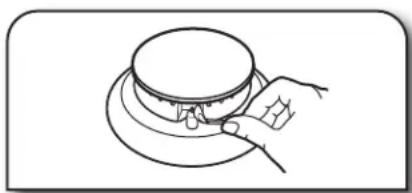
- Remove burner cap.
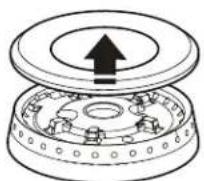
- Clean gas opening with damp cloth.
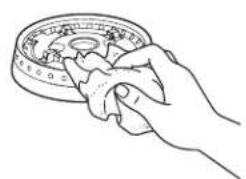
- Clean clogged burner ports.
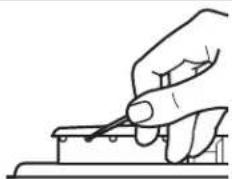
Use a straight pin. Do not enlarge or distort the port. Do not use a wooden toothpick. If the burner needs to be adjusted, contact a trained repair specialist.
- Replace burner cap.
Burner
A
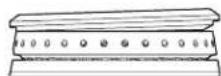

Incorrect

Correct
B
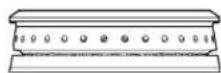
- Turn on burner.

If the burner does not light, check cap alignment. If the burner still does not light, do not service the sealed burner yourself. Contact a trained repair specialist.
PORCELAIN-COATED GRATES AND CAPS

Use scrub and cleanser.
Clean with a nonabrasive nylon scrub pad and mildly abrasive cleanser.
Know Your Grates and Caps
- Food spills containing acids, such as vinegar and tomato, should be cleaned as soon as the cooktop, grates, and caps are cool. These spills may affect the finish.
To avoid chipping, do not bang grates and caps against each other or hard surfaces such as cast iron cookware. - Do not reassemble caps on burners while wet.
- Do not clean in the Self-Cleaning cycle.
Do not clean in dishwasher.
GRILL
To Remove for Cleaning:
Before removing or replacing grill components, make sure the control knobs are turned to OFF. Allow the grill to cool completely before handling.
1. Remove grill grate and deflector.
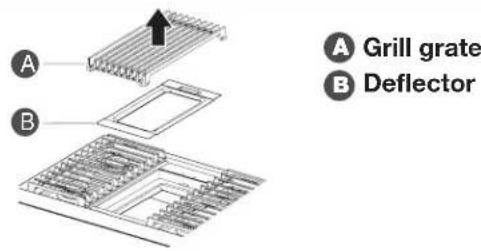
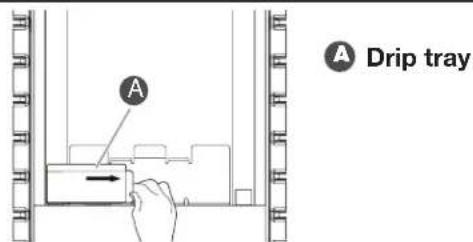
2. Remove and clean drip tray.
To Clean:
Do not use oven cleaners, metal brushes, abrasive scouring pads or other scrubbers made to clean grill components.
Grate:
- Do not clean grill grate in dishwasher.
- Do not clean in a self-cleaning oven.
1. Scrubwith brush while grate is still warm.
Use a soft-bristle brush. Oven mitts may be worn while cleaning.
2. Soak in warm, soapy water for 30 minutes.
After soaking, scrub with nonabrasive pad.
Deflector:
Soak in warm, soapy water to loosen soil.
After soaking, scrub with non-abrasive pad.
Drip Tray:
- Allow cooktop to cool before cleaning.
Wipe with warm, soapy water or non-abrasive cleanser.
Use damp cloth or non-abrasive pad.
Module Basin:
1. Wipe with warm, soapy water or non-abrasive cleanser.
Use damp cloth or non-abrasive pad.
2. For heavy soil, soak with paper towels.
Soak paper towels in household cleanser and lay them on the soil for at least 30 minutes. After soaking, scrub with a nonabrasive pad.

CARE AND CLEANING
To Replace:
1. Replace drip tray.
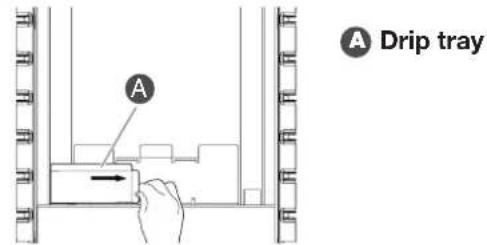
Slide drip tray into opening on the left front side of the grill basin.
2. Place deflector on top of burner assembly.
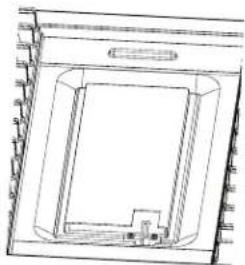
3. Place grill grate into position.
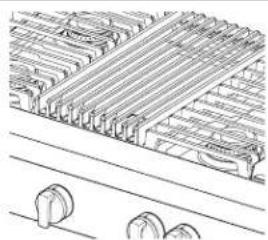
GRIDDLE
Tips:
Prior to cleaning the griddle, make sure that all cooktop burners have been turned off.
For best results, clean the griddle shortly after removing the food.
Do Not Use:
Soap
Abrasive materials
Cleaning materials, including stainless steel cleaner
After Each Use:
1. Turn knob to 300ircF (149°C) to preheat.
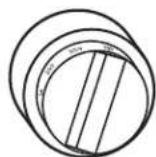
Wait until preheat is complete before cleaning.
2. Pour water on soiled area.
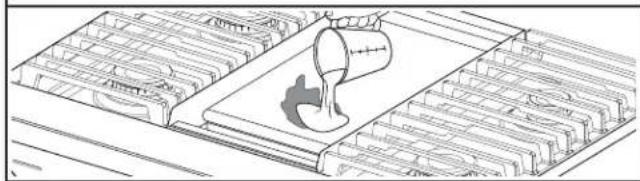
Using a measuring cup, pour up to 1 cup (236.6 mL) tap water over the soiled area. Start at the back, allowing the water to run toward the drip tray in the front. Allow the water to bubble on the griddle for 3-4 seconds.
3. Scrape residue into drip tray.
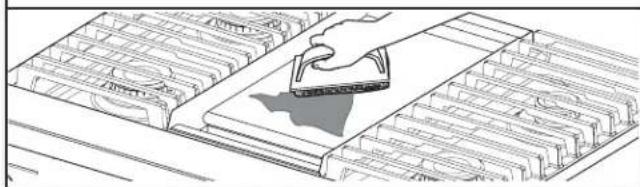
Use a pad holder or wooden spoon with a non-abrasive pad or cloth. Use pressure on soiled areas. Repeat if needed for heavy soils.
4. Remove remaining residue.
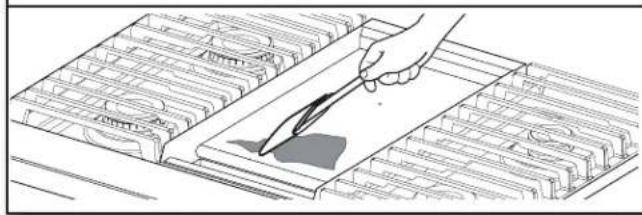
Fold a damp towel and, with the pad holder or wooden spoon, go over the griddle to remove remaining residue.
5. Turn off griddle and let cool.
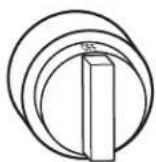
6. Wipe off griddle.
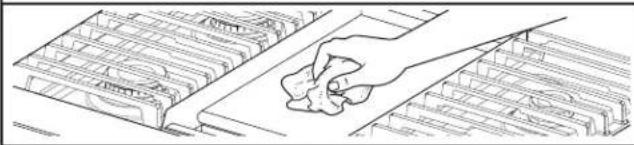
Once cool, wipe the griddle with a clean, damp terry cloth towel. Then buff with a microfiber cloth. If streaking, rainbowing, or ghosting occurs, use a mixture of 1 part white vinegar to 2 parts water on a towel to wipe the griddle.
7. Remove, empty, and clean drip tray.
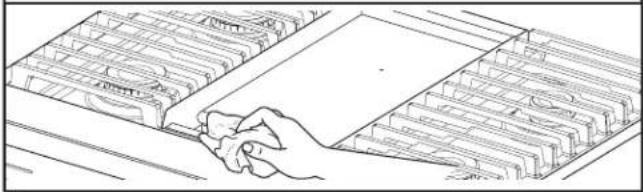
Clean the drip tray with warm, soapy water. Wipe the area under the drip tray clean. Once dry, put the drip tray back in position.
COOKTOP CONTROLS
1. Remove knobs.
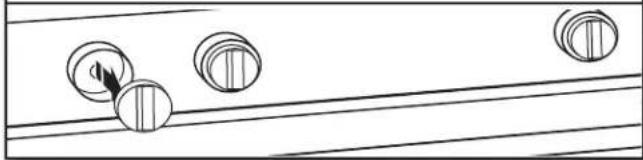
Pull the knobs straight away from the control panel to remove.
2. Clean with warm, soapy water.
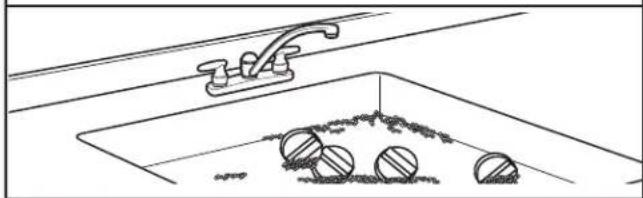
Know Your Cooktop Controls
To avoid damage to the cooktop controls, do not use steel wool, abrasive cleansers, or an oven cleaner.
To avoid damage, do not soak knobs.
- When replacing knobs, make sure knobs are in the Off position.
- When replacing knobs after cleaning either the surface burner controls or the griddle module control, make sure the knobs are replaced to the correct location. See the "Knob Variations" section for reference.
STAINLESS STEEL
Use cleaner or wipes.
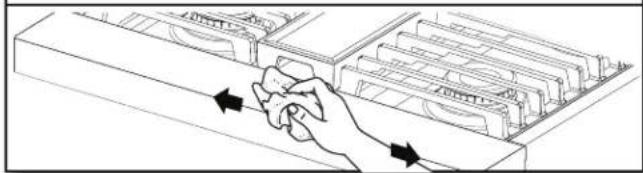
Use affresh Stainless Steel Cleaner or affresh Stainless Steel Cleaning Wipes (not included). Rub in direction of grain to avoid possible damage to the steel surface.
Do Not Use:
Soap-filled scouring pads
Abrasive cleaners
Cooktop polishing creme
Steel-wool pads
Gritty washcloths
Abrasive paper towels
| First try the solutions suggested here. If you need further assistance or more recommendations that may help you avoid a service call, refer to the "Warranty," or visit producthelp.jennair.com. In Canada, visit http://www.jennair.ca. | ||
| IF YOU EXPERIENCE POSIBLE CAUSES SOLUTION | ||
| Nothing will operate. A household fuse has blown or a circuit breaker has tripped. | Replace the fuse or reset the circuit breaker. If the problem continues, call an electrician. | |
| Surface burners will not operate. | This is the first time the surface burners have been used. | Turn on any one of the surface burner knobs to release air from the gas lines. |
| The control knob is not set correctly. | Push in knob before turning to a setting. | |
| The burner ports are clogged. Clean | clogged burner ports with a straight pin. | |
| Surface burner flames are uneven, yellow, and/or noisy. | The burner ports are clogged. Clean | clogged burner ports with a straight pin. |
| The burner caps are not positioned properly. | Make sure cap is properly aligned with the burner. | |
| Propane gas is being used. The cooktop may have been converted improperly. Contact a trained repair specialist. | ||
| Surface burner makes popping noises. | The burner is wet. Let it dry. | |
| Burner sparks but does not light. | There is continuous sparking, but the burner does not light. | Make sure cap is properly aligned with burner. If sparking continues, discontinue use of the surface burner and contact a service technician. |
| Excessive heat around cookware on cooktop. | The cookware is not the proper size. | Use cookware about the same size as the surface cooking area or surface burner. Cookware should not extend more than 1/2" (1.3 cm) outside the cooking area. |
| Cooktop cooking results not what expected. | The proper cookware is not being used. | Use medium-to-heavy cookware made of the material that cooks food the way you want. The best cookware should have a flat bottom, straight sides, and a well-fitting lid. |
| The control knob is not set to the proper heat level. | Set the Cooktop Control to HI, MED, or LO, depending upon the type of cooking you want to do. | |
| The cooktop is not level. The cooktop must be level for the griddle to operate properly. See the Installation Instructions for leveling instructions. | ||
Before calling for assistance or service, please check "Troubleshooting." It may save you the cost of a service call. If you still need help, follow the instructions below. When calling, please know the purchase date and the complete model and serial number of your appliance. This information will help us to better respond to your request.
If You Need Replacement Parts
If you need to order replacement parts, we recommend that you use only factory specified parts. These factory specified parts will fit right and work right because they are made with the same precision used to build every new JennAir® appliance.
To locate factory specified parts in your area, call us or your nearest JennAir designated service center.
In the U.S.A.
Call the JennAir Customer eXperience Center toll-free: 1-800-JENNAIR (1-800-536-6247) or visit our website at www.jennair.com.
Our consultants provide assistance with:
- Scheduling of service. JennAir appliances designated service technicians are trained to fulfill the product warranty and provide after-warranty service anywhere in the United States.
Features and specifications on our full line of appliances.
Referrals to local JennAir appliance dealers.
Installation information.
Use and maintenance procedures.
■ Accessory and repair parts sales.
Specialized customer assistance (Spanish speaking, hearing impaired, limited vision, etc.).
For further assistance
If you need further assistance, you can write to JennAir with any questions or concerns at:
JennAir Brand Home Appliances
Customer eXperience Center
553 Benson Road
Benton Harbor, MI 49022-2692
Please include a daytime phone number in your correspondence.
In Canada
Call the JennAir Canada Customer eXperience Centre toll-free: 1-800-JENNAIR (1-800-536-6247) or visit our website at www.jennair.ca.
Our consultants provide assistance with:
- Scheduling of service. JennAir appliances designated service technicians are trained to fulfill the product warranty and provide after-warranty service anywhere in Canada.
Features and specifications on our full line of appliances.
Referrals to local JennAir appliance dealers.
Installation information.
Use and maintenance procedures.
■ Accessory and repair parts sales.
For further assistance
If you need further assistance, you can write to JennAir Canada with any questions or concerns at:
Customer eXperience Centre
JennAir Canada
200-6750 Century Ave.
Mississauga, Ontario L5N 0B7
Please include a daytime phone number in your correspondence.
ACCESSIONS

For accessories in the U.S.A., you can visit our website at www.jennair.com or call us at 1-800-JENNAIR (1-800-536-6247). In Canada, visit our website at www.jennair.ca or call us at 1-800-JENNAIR (1-800-536-6247).
Affresh Stainless Steel Cleaner
(stainless steel models)
Affresh Stainless Steel Cleaning Wipes (stainless steel models)
Gas Grate/Drip Pan Cleaner
Affresh® Kitchen and Appliance Cleaner
Stainless Steel Grill Cover
Wok Ring
Backguard and Backsplash
Brass Burner Caps
Chrome/Brass Bezels

INFORMATIONS DE SECURITÉ
ASSISTANCE OU SERVICE
JennAir Brand Home Appliances
Customer eXperience Center
553 Benson Road
Benton Harbor, MI 49022-2692
Customer eXperience Centre
JennAir Canada
200 - 6750 Century Ave.
/ ©2021 All rights reserved. Used under license in Canada.

- Your safety and the safety of others are very important.
- ADANGER
- WARNING
- WARNING:
- SAFETY INFORMATION
- IMPORTANT SAFETY INSTRUCTIONS
- SAVE THESE INSTRUCTIONS
- COOKTOP
- CONTROL KNOBS
- BURNERS
- BTU/hr
- BURNER APPEARANCE
- FEATURES
- Igniting Burners:
- Flame-Sensing™ Reignition Feature
- To Set a Burner:
- In Case of Power Failure
- COOKTOP FEATURES
- SEATED SURFACE BURNERS
- Burner Ports:
- GRILL (on some models)
- CHROME ELECTRIC GRIDDLE (on some models)
- Cooking Chart
- CARE AND CLEANING
- COOKTOP SURFACE
- IMPORTANT:
- After Each Use:
- PORCELAIN-COATED GRATES AND CAPS
- Know Your Grates and Caps
- GRILL
- To Remove for Cleaning:
- Remove grill grate and deflector.
- Remove and clean drip tray.
- To Clean:
- Grate:
- Scrubwith brush while grate is still warm.
- Soak in warm, soapy water for 30 minutes.
- Deflector:
- Drip Tray:
- Module Basin:
- Wipe with warm, soapy water or non-abrasive cleanser.
- For heavy soil, soak with paper towels.
- To Replace:
- Replace drip tray.
- Place deflector on top of burner assembly.
- Place grill grate into position.
- GRIDDLE
- Tips:
- Do Not Use:
- Turn knob to 300ircF (149°C) to preheat.
- Pour water on soiled area.
- Scrape residue into drip tray.
- Remove remaining residue.
- Turn off griddle and let cool.
- Wipe off griddle.
- Remove, empty, and clean drip tray.
- COOKTOP CONTROLS
- Remove knobs.
- Clean with warm, soapy water.
- Know Your Cooktop Controls
- STAINLESS STEEL
- Use cleaner or wipes.
- If You Need Replacement Parts
- In the U.S.A.
- Our consultants provide assistance with:
- For further assistance
- In Canada
- ACCESSIONS
- Affresh Stainless Steel Cleaner
- Gas Grate/Drip Pan Cleaner
- INFORMATIONS DE SECURITÉ
- ASSISTANCE OU SERVICE
Brand : JENN-AIR
Model : JGCP536HM
Category : Cooker