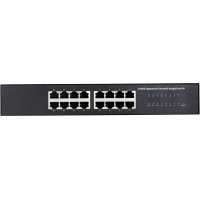
RF3769708 - Switch Renkforce - Free user manual and instructions
Find the device manual for free RF3769708 Renkforce in PDF.


| Product Type | 16-Port Gigabit Switch |
| Brand | Renkforce |
| Model | RF3769708 |
| Number of Ports | 16 RJ45 ports 10/100/1000 Mbps |
| Network Standards | IEEE 802.3i, 802.3u, 802.3x, 802.3ab, 802.3az |
| Power Supply | External power adapter 12 V DC, 1 A (input 100-240 V AC) |
| Maximum Power Consumption | 12 W |
| Housing Material | Black steel |
| Mounting | On a flat surface or in a 19" rack (1U) with included brackets |
| LED Display | Power LED (green) and port activity LEDs (green/orange) |
| Advanced Functions | Auto-MDI/MDI-X, Auto-Negotiation, Energy Efficient Ethernet, Full duplex at 1000 Mbps |
| MAC Address Table | 8 K |
| Operating Temperature | 0 to +40 °C |
| Operating Humidity | 10 to 90% RH (non-condensing) |
| Safety | Protection class II (power adapter), grounding recommended |
| Maintenance | No special maintenance; clean with a dry, lint-free cloth |
| Compatible Operating Systems | Windows 2000 to 10S, Mac OS X 10.5-10.14, Ubuntu 10.04-18.10.1 LTS |
| Package Contents | Switch, 2 mounting brackets, 8 screws, 4 adhesive feet, power adapter, user manual |
Frequently Asked Questions - RF3769708 Renkforce
User questions about RF3769708 Renkforce
0 question about this device. Answer the ones you know or ask your own.
Ask a new question about this device
Download the instructions for your Switch in PDF format for free! Find your manual RF3769708 - Renkforce and take your electronic device back in hand. On this page are published all the documents necessary for the use of your device. RF3769708 by Renkforce.
USER MANUAL RF3769708 Renkforce
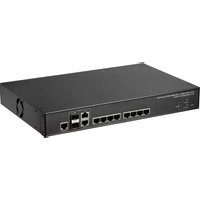
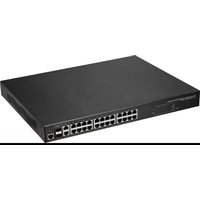
The Gigabit Switch is intended for cable-based networking of computers or other devices suitable for the purpose. It provides 16 twisted-pair connections (RJ45). It integrates the different speeds of 1000 Mbps for Gigabit Ethernet, 100 MBit/s for Fast Ethernet and 10 MBit/s for conventional Ethernet into a single network. The Gigabit switch supports Energy Efficient Ethernet. It detects the length of the connected data cables and automatically adjusts the signal strength for the purpose of energy saving.
It can be mounted into a 19" server rack or can be set up on feet. Power is provided by the supplied power adapter.
This product is intended for indoor use only. Do not use it outdoors. Contact with moisture (e.g. in a bathroom) must be avoided under all circumstances.
For safety and approval purposes, you must not rebuild and/or modify this product. Using the product for purposes other than those described above may damage the product. In addition, improper use can cause hazards such as a short circuit, fire or electric shock. Read the operating instructions carefully and store them in a safe place. If you pass the product on to a third party, please hand over these operating instructions as well.
This product complies with statutory, national and European regulations. All company and product names included herein are trademarks of their respective owners. All rights reserved.
Delivery content
- Gigabit switch x1
- Mounting bracket x2
- Screws x8
Feet x4
Power adapter x1 - Operating instructions

Up-to-date operating Instructions
Download the up-to-date operating instructions at www.conrad.com/downloads or scan the QR code shown. Follow the instructions on the website.
Explanation of symbols

The symbol with the lightning in a triangle indicates that there is a risk to your health, e.g. due to an electric shock.

The symbol with an exclamation mark in a triangle is used to highlight important information in these operating instructions. Always read this information carefully.

The arrow symbol indicates special information and tips on how to use the product.

This symbol indicates that this product is built according to protection class II. It is equipped with reinforced or dual insulation between the mains circuit and the output voltage.
Safety information
Read the operating instructions and safety information carefully. If you do not follow the safety information and information on proper handling in these operating instructions, we will assume no liability for any resulting personal injury or damage to property. Such cases will invalidate the warranty/ guarantee.
a) General information
The device is not a toy. Keep out of the reach of children and pets.
- Do not leave packaging material lying around carelessly. It may become a dangerous toy for children.
- Protect the product from extreme temperatures, direct sunlight, strong jolts, high humidity, moisture, flammable gases, vapours and solvents.
- Never expose the product to mechanical stress.
- If it is no longer possible to operate the product safely, stop using it and prevent unauthorised use. Safe operation can no longer be guaranteed if the product:
- is visibly damaged,
- is no longer working properly,
- has been stored for extended periods in poor ambient conditions or
- has been subjected to any serious transport-related stress.

- Please handle the product carefully. Jolts, impacts or a fall even from a low height may damage the product.
- Always observe the safety information and operating instructions of any other devices which are connected to the product.
- Consult a technician if you are not sure how to use or connect the product, or if you have concerns about safety.
- Maintenance, modifications and repairs must be carried out by a technician or a specialist repair centre.
- If you have any questions that are not answered in these operating instructions, please contact our technical customer service or other professionals.
b) Electrical safety
- Before connecting the product to the mains, check that your local A/C mains voltage matches the specifications on the nameplate.
- The power adapter is built according to protection class II. Only connect the adapter plug to a standard mains socket (230 V/AC, 50 Hz) connected to the public grid.
- Never pour liquids over electrical devices or place objects filled with liquid next to the device. If liquid or an object gets into the device, power down the respective mains socket (e.g. switch off the circuit breaker), and then pull the mains plug from the mains socket. Discontinue use and take the product to a specialist repair centre.
- Never use the product immediately after it has been brought from a cold room into a warm one. The condensation that forms might destroy the product. The power adapter may also generate a fatal electric shock! Allow the product to reach room temperature before connecting it and putting it into use. This may take several hours.
- Do not touch the power adapter if there are any signs of damage, as this may cause a fatal electric shock! Switch off the mains voltage to the socket containing the power adapter (switch off at the corresponding circuit breaker or remove the safety fuse, and then switch off at the corresponding RCD protective switch). You can then unplug the power adapter from the mains socket. Dispose of the faulty power adapter in an environmentally friendly manner and discontinue use. Replace it with a power adapter of the same design.
The mains outlet must be located near to the device and be easily accessible. - Never connect or disconnect power adapters if your hands are wet.
- Never unplug the power adapter from the mains socket by pulling on the cable; always use the grips on the plug.
- When setting up the product, ensure that the cables are not pinched, kinked or damaged by sharp edges.
- Always lay the cables so that nobody can trip over or become entangled in them. This poses a risk of injury.
- For safety reasons, disconnect the power adapter from the mains socket during storms.
Always lay the cables so that nobody can trip over or become entangled in them. This poses a risk of injury.
c) Persons and product
- The housing warms up during use. Ensure that there is sufficient ventilation. Do not cover the housing! Covering the housing may cause the device to overheat and result in a fire.
- Do not place naked flames, such as burning candles, on or immediately next to the device.
- Do not place any heavy objects on the Gigabit switch.
- Use the product only in a temperate climate, never in a tropical climate.
Product overview
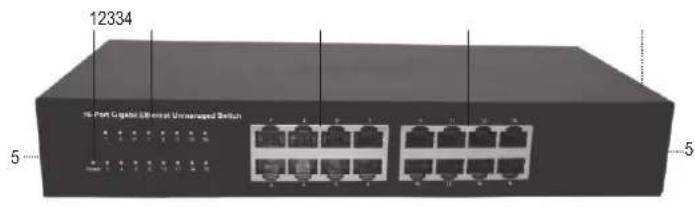
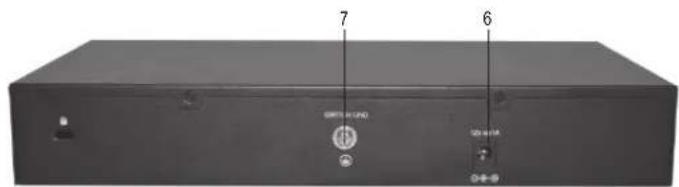
1 Power LED POWER
2 LED indicators for the connections (16x)
3 RJ45 connections 1 to 16
4 Ventilation openings (on both sides, not shown)
5 Threaded holes on both sides for mounting bracket (not shown)
6 Mains connection 12 V 1A
7 Earth connection SWITCH GND
Setup and installation
Before installation, remove any connected devices and the power adapter to the Gigabit switch.
a) Installation
You can use the Gigabit switch on a horizontal heat-resistant surface using the feet. To install on a flat surface, proceed as follows:
- Pull the supplied feet individually from the support strip and affix them symmetrically with the adhesive side (base of the pyramid stub) on the base of the product. Distribute the feet symmetrically at the four corners as far from the centre of the housing as possible to ensure a stable, wobble-free position.
- When installing the product, ensure that there is enough space on all sides for sufficient air circulation for cooling (approx. 10 cm distance to walls and other objects).
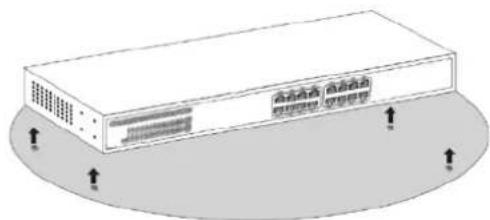
b) Installation into a server rack
You can install the Gigabit switch into a standard 19" server rack with the mounting bracket supplied. To install into a server rack, proceed as follows:
- Attach the mounting bracket to the threaded holes (5) on the housing using the screws supplied. You will need a Philips screwdriver to do this.
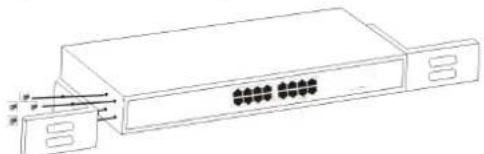
- Then, install the pre-installed Gigabit switch into the rack using the appropriate server rack screws (not included).
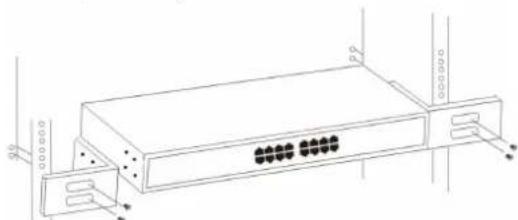
Ensure that there is a mains socket near to where the switch is installed so that you can plug in the power adapter.
Setup
a) Data connections
The maximum length of the network cable can be up to 100 m.
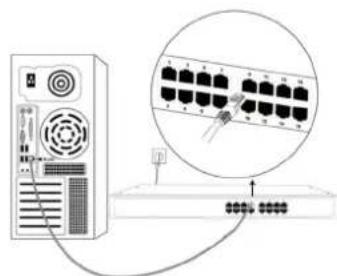
You can directly connect up to 16 network devices with appropriate connectors via RJ45 connections and cables.
b) Mains connection
- Connect the low-voltage plug on the power adapter to the mains socket 12 V...1 A (6).
- Plug the mains plug of the power adapter into an appropriate mains socket to connect the power supply.
The mains LED POWER (1) lights up. The Gigabit switch is correctly supplied with power. - Connect the earth connection SWITCH GND (7) via a cable connected to the earth of the server rack into which Gigabit switch is installed. Screw in a curved cable eyelet with the aid of a suitable Phillips screwdriver.
If the function LED indicators (2) do not light up, check that the connections are firmly seated. If the mains LED POWER (1) does not light up, check the power supply (power adapter and connections).
c) LED indicators

| LED name Colour State | Meaning | ||
| Power | Green | On | Power supply on |
| Off | Power supply off | ||
| Number 1 - 16 | Green | On | 1000 MBit/s device connected to this connection |
| Off | Network device not connected | ||
| Flashing | Data transfer (send/receive) at a speed of up to 1000 MBit/s | ||
| Orange | On | Device with 10/100 MBit/s transfer speed connected to this connection | |
| Off | Network device not connected | ||
| Flashing | Data transfer (send/receive) at a speed of up to 10/100 MBit/s | ||
Care and cleaning
- This product does not require maintenance. Under no circumstances should you service any of the components in the interior of the product, therefore never open it.
- Always disconnect the product from the power supply before cleaning it.
- Disconnect any cables from the product before cleaning.
- Never use aggressive detergents, rubbing alcohol or other chemical solutions, as these may damage the housing or cause the product to malfunction.
- Use a dry, lint-free cloth to clean the product. Do not press too hard on the housing, as this can lead to scratch marks.
Disposal

Electronic devices are recyclable waste and must not be disposed of in the household waste. At the end of its service life, dispose of the product according to the relevant statutory regulations.
You thus fulfil your statutory obligations and contribute to protection of the environment.
Technical data
a) Switch
Input voltage/current. 12 V/DC/max. 1 A
Connections. 16x Ethernet ports (10/100/1000 MBit/s auto-negotiation) Auto-MDI/MDI-X for each port
System requirements.. .Windows 2000, XP (Home, Pro, with SP1, SP2, SP3,
32 bit only), VistaTM (32 bit), 7 (32/64 bit), 8 & 8.1
32/64bit)1032/64bit)10SRT
Mac OS X 10.5 to 10.14, Ubuntu 10.04 desktop i386 to
Ubuntu 18.10.1 LTS
Network standard. Compatible with IEEE 802.3i, IEEE 802.3u, IEEE802.3x, IEEE802.3ab, IEEE802.3az
Supports Full-duplex mode/half-duplex mode for 10/100 MBit/s, full-duplex mode for 1000 MBit/s, store and forward, wire speed and non-blocking, 8K MAC address length
Material Steel housing (black)
Operating conditions. 0 to +40^ , 10 - 90 % relative humidity (non-condensing)
Storage conditions. -10 to +70^, 5 - 90% relative humidity (non-condensing)
Dimensions (W x H x D) 280 x 44 x 126 mm
Weight 893g
b) Power adapter
Input voltage/current. 100 - 240 V/AC, 50/60 Hz, max. 0.5 A
Output voltage/current. 12 V/DC, 1 A
Length of low-voltage cable.117 cm
Dimensions (I x h x P) 280 x 44 x 126 mm
Poids. 893 g


- Delivery content
- Up-to-date operating Instructions
- Explanation of symbols
- Safety information
- a) General information
- b) Electrical safety
- c) Persons and product
- Product overview
- Setup and installation
- a) Installation
- b) Installation into a server rack
- Setup
- a) Data connections
- b) Mains connection
- c) LED indicators
- Care and cleaning
- Disposal
- Technical data
- a) Switch
- b) Power adapter
Brand : Renkforce
Model : RF3769708
Category : Switch