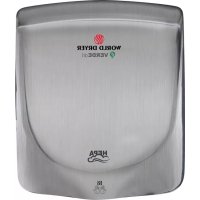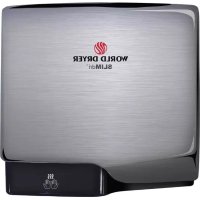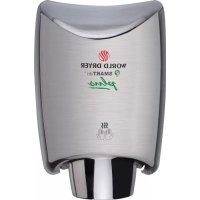
SMARTdri Plus - Tumble drier World Dryer - Free user manual and instructions
Find the device manual for free SMARTdri Plus World Dryer in PDF.


| Product Type | Automatic warm air hand dryer |
| Brand | World Dryer |
| Model | SMARTdri Plus |
| Rated Voltage | 120 V AC (K models) / 208-240 V AC (K4 models) |
| Frequency | 50/60 Hz |
| Maximum Power | 1200 W (120 V) / 1250 W (208-240 V) |
| Rated Current | 10 A (120 V) / 5.2 A (208-240 V) |
| Motor Speeds | 3 levels: Hi (High), Med (Medium), Low (Low) |
| Heating | Activable/deactivatable heating element (400 W max) |
| Sensor | Infrared sensor for automatic triggering |
| Air Filter | Removable filter, to be cleaned or replaced regularly |
| Recommended Mounting Height | 81 to 117 cm depending on user |
| Cover Material | Aluminum or stainless steel, several finishes |
| Protection | Mandatory grounding; ground fault circuit interrupter recommended |
| Warranty | 5-year limited (manufacturing defects) |
| Available Spare Parts | Sensor kit, motor, heating element, filter, cover, etc. |
| Country of Manufacture | United States |
Frequently Asked Questions - SMARTdri Plus World Dryer
User questions about SMARTdri Plus World Dryer
0 question about this device. Answer the ones you know or ask your own.
Ask a new question about this device
Download the instructions for your Tumble drier in PDF format for free! Find your manual SMARTdri Plus - World Dryer and take your electronic device back in hand. On this page are published all the documents necessary for the use of your device. SMARTdri Plus by World Dryer.
USER MANUAL SMARTdri Plus World Dryer
SMARTdri™ and SMARTdriplus High-Efficiency Intelligent Hand Dryer
Secamanos inteligente altamente eficiente Sèche-mains intelligentà haute efficacité
All K and K4 Series
Please read and save these instructions. Read carefully before attempting to assemble, install, operate or service the product described. Protect yourself and others by observing all safety information. Failure to comply with instructions could result in personal injury and/or property damage. Retain instructions for future reference.
World warm air hand dryer, powered by a universal brush motor, delivers up to 850 watts of drying power and incorporates an integrated element for heated air. The dryer controls provide for (3) distinct levels of motor operation (Hi, Med and Low) and the option of operation with, or without, the heating element. An infrared sensor is used to automatically activate the dryer. These models are intended for use in commercial, industrial, office and public facility environments.
Electrical Specifications
Table 1
| Models Type | Electrical Input | Rated Amperage Rated Watts | Certifications | ||
| K-XXX Automatic 120VAC, 50/60Hz 10A 1200 | C US LISTED | ||||
| K4-XXX Automatic 208 - 240VAC, 50/60Hz 5.2A 1250 | |||||
General Safety Information

DANGER
Failure to disconnect the power source before installation or servicing can result in serious
injury or death from electric shock.
- Always disconnect the power source before servicing or installing the hand dryer.

DANGER
Failure to properly ground this unit could result in severe electrical shock and/or death.
- This hand dryer must be properly grounded (Earthed) for safe operation. An identified ground connection point is supplied on the hand dryer's wall base.
We recommend GFCI protection in wet or damp locations or as required by local code.

WARNING
Risk of fire, personal injury or property damage are possible if local codes, or safety
recommendations are not followed.
- Installation and servicing should only be performed by qualified electrical technicians.
- Use only the electrical power (voltage and frequency) specified for the model hand dryer being installed. See Table 1 - Electrical Specifications.
- Connect the hand dryer to the nearest suitable distribution panel.
- To limit a voltage drop, and insure efficient operation, use No. 12 AWG (4 mm2) wire or larger as required by local electrical codes.
- Always connect to a branch circuit with circuit breaker or fuse protection with an electrical rating greater than the model hand dryer's rated amperage shown in Table 1 - Electrical Specifications in accordance with the NEC (National Electrical Code) and/or CEC (Canadian Electrical Code).
- To avoid a hazard due to inadvertent resetting of the thermal cutout, the hand dryer must not be supplied through an external switching device, such as a timer, or connected to a circuit that is regularly switched on and off by the utility.
Each automatic model hand dryer must have a dedicated circuit. - Route all field wiring away from moving parts within the hand dryer.

CAUTION
Improper mounting could result in personal injury or property damage.
- Follow the mounting height recommendations in Table 2.
- On a stud wall, one side of the hand dryer should be mounted to an existing stud.
Unpacking
- Remove all packing material. Recycling is recommended.
- Carefully remove the hand dryer from the shipping carton, using care not to drop the appliance.
- Inspect carefully for any damage that may have occurred during transit. Check for any loose, missing or damaged parts. If the hand dryer is damaged, promptly inform the dealer where you purchased it.
Parts List
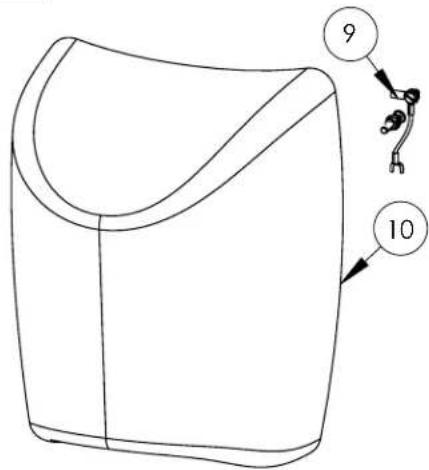
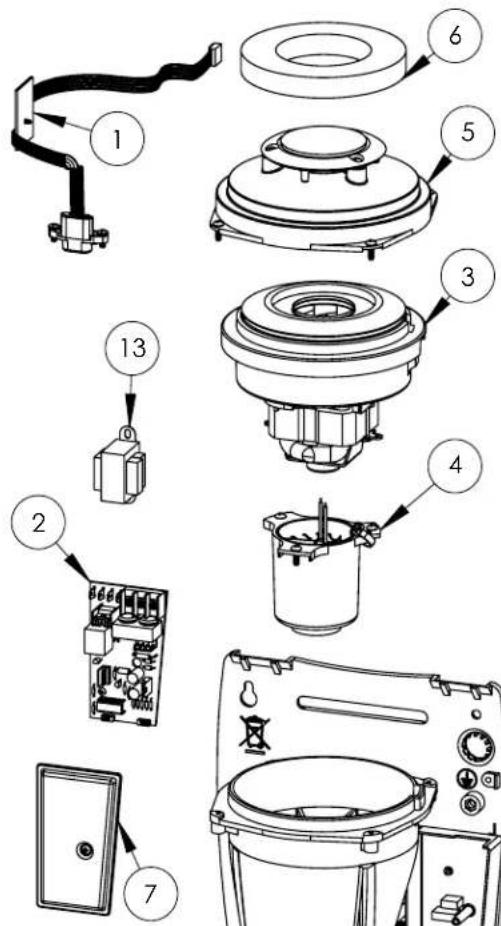
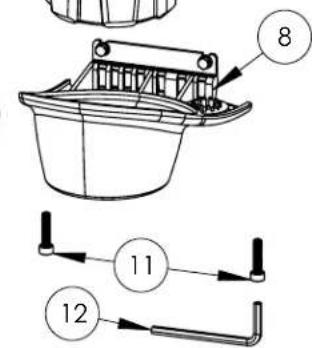
Repair Parts List For SMARTdri™ and SMARTdri Plus Hand Dryers
| # | Description Part Number | |
| 1 Kit, Sensor 49-10108K | ||
| 2 Kit, Dryer Controls 16-KK | ||
| 3 | Kit, Motor- 120V 32-K120K | |
| Kit, Motor - 240V 32-K240K | ||
| 4 | Kit, Heating Element - 120V 21-1 | 120K |
| Kit, Heating Element - 240V 21-1 | 240K | |
| 5 Kit, Plenum Cap Assy 47-0818092AK | ||
| 6 Air Filter 93-120309 | ||
| 7 Kit, Controls Cover 20-0815093K | ||
| 8 Kit, Nozzle 30-K10109K | ||
| 9 Kit, Grounding - Model K 23-120609 | ||
| 10 | Cover Assy - Alum - White | 20-K974 |
| Cover Assy - Alum - Black | 20-K162 | |
| Cover Assy - Alum - Polished/ Bright Chrome | 20-K970 | |
| Cover Assy - Alum - Brushed/ Satin Chrome | 20-K971 | |
| Cover Assy - Stainless Steel - Polished/ Bright | 20-K972 | |
| Cover Assy - Stainless Steel - Brushed/ Satin | 20-K973 | |
| Cover Assy - Steel - White | 20-K975 | |
| Cover Assy - Cast Iron - Porce-lain Enamel | 20-K976 | |
| 11 | Kit, Security Screws | 46-040222K |
| 12 | Wrench, Security | 56-40189 |
| 13 | Transformer - 120V | 50-K120K |
| Transformer - 240V | 50-K277K | |
All kits include fasteners needed for installation. Part Number for Cover Assy. (Reference Number 10) varies with model number for hand dryer.
For Repair Parts, visit www.WorldDryer.com Please provide following information:
- Model number
- Serial number
- Part description and number shown in parts list
Installation
- Disconnect the power source.
- Using Table 2 to determine the recommended mounting height, select a mounting location for the hand dryer where no reflective surfaces or objects (such as a hand basin) are directly under the infra-red sensor eye. The infra-red sensor eye is visible from the bottom of the dryer and is located just inside the dryer's nozzle area. The minimum mounting distance from bottom of the dryer to a reflective surface is 18 in (46 cm). When two or more dryers are installed, they should be spaced apart 24 in (61 cm)
- Use the security hex key supplied to turn the cover mounting screws clockwise to remove the cover from the dryer.
- Place the hand dryer base on the wall at selected location and using the base as a template, mark locations for the 4 mounting bolt holes on the wall.
- Fasten the base to the wall, using the type of bolts recommended in Table 3
- Each dryer must have is own dedicated circuit.
- Connect the dryer to the nearest suitable distribution panel.
- Replace cover, turn screws counter-clockwise making certain not to over-tighten.
IMPORTANT: Consult local and general regulations before performing dryer installation. Ensure the electrical network is not overloaded. Always connect to a dedicated branch circuit with circuit breaker or fuse protection and an electrical rating greater than the model hand dryer's rated amperage shown in Table 1 - Electrical Specifications in accordance with the NEC (National Electrical Code) and/or CEC (Canadian Electrical Code).
Table 2
| Recommended Mounting Heights from Floor to Dryer Bottom Edge in. (cm.) | |
| Men's washrooms 46 (117) | |
| Women's washrooms 44 (112) | |
| Children's washrooms, ages 4-7 32 (81) | |
| Children's washrooms, ages 7-10 | 36 (91) |
| Children's washrooms, ages 10-13 | 40 (102) |
| Children's washrooms, ages 13-17 | 44 (112) |
| Handicap Mounting Height | 37 (94) |
Table 3
| Type of Wall | Type of Bolt | Minimum Bolt Length |
| Hollow Tile, Lath, Wall Board or Metal | 1/4” (M6) screw Type or Wing Type toggle Bolts | Dependent on wall thickness |
| Cement, Brick, or Tile Covered Cement or Brick | 1/4” (M6) Stud Type Expansion Bolts | 3” (76mm) |
| Stud Wall with wood Backing | No 16 (M8) Wood Screws | 23/4” (70mm) |
Adjusting Dryer Controls
K-XXX Series Models
Table 4
| Motor Setting | Power Usage (Watts) | |
| Heater "OFF" | Heater "ON"* | |
| Hi 800 120 | ||
| Med 575 97 | ||
| Low 400 80 | ||
K4-XXX Series Models
| Motor Setting | Power Usage (Watts) | |
| Heater "OFF" | Heater "ON"* | |
| Hi 850 1250 | ||
| Med 600 1000 | ||
| Low 425 825 | ||
- Heating element wattage is 400W maximum.
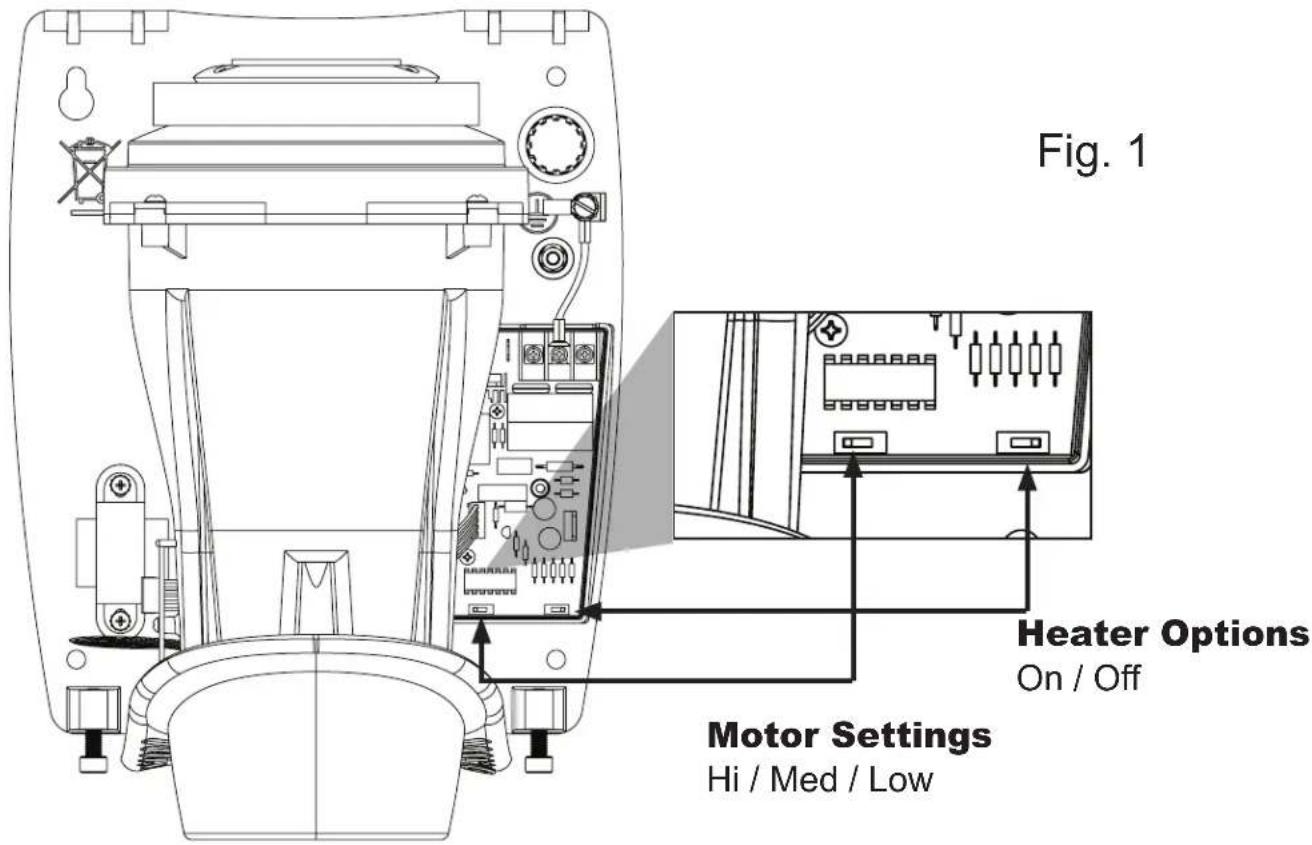
The hand dryer has adjustable controls for (3) levels of operation - Hi, Med and Low. The dryer can be operated with the heating element "ON" or "OFF". The dryer's power usage for the range of operation is shown in Table 4.
Note: The factory setting for the dryer controls is motor "Hi" and heater "ON".
The adjustable dryer controls are located on the printed circuit board inside the dryer's wiring compartment.
To adjust dryer controls:
- Disconnect the power source.
- Use the security hex key supplied to turn the cover mounting screws clockwise to remove the cover from the dryer.
- Remove the wiring compartment cover to access the adjustable controls (see Fig. 1).
- Adjust motor setting and heater as desired, and replace wiring compartment cover.
- Reassemble the dryer cover using the security hex key supplied to turn the cover mounting screws counter-clockwise and tighten until snug. Do not over tighten.
Maintenance and Cleaning Instructions
IMPORTANT: The dryer has an air filter to prevent lint and debris build up that can damage the motor and heating element. Routine replacement or cleaning of the air filter is needed to maintain the dryer in good operating condition. With light to moderate wash room traffic, replacing or cleaning the air filter once a year is recommended. If the wash room traffic is high, the air filter should be replaced or cleaned every 6 months. Read complete instruction before proceeding.
To replace or clean the air filter:
- Disconnect the power source.
- Use the security hex key supplied to turn the cover mounting screws clockwise to remove the cover from the dryer.
- Removing and replacing the air filter is easily done by gently stretching and lifting the air filter around the motor inlet cover.
- To clean the air filter, remove from motor inlet cover. Use soft-medium bristle 12 paint brush to clean lint, dust and debris from the filter. If air filter cannot be completely cleared of debris, replace the filter.
- After replacing the air filter onto the motor inlet cover, reassemble the dryer cover using the security hex key supplied to turn the cover mounting screws counter-clockwise and tight until snug. Do not over tighten.
Troubleshooting Chart
| Dryer fails to start. | A) No power to unit. Check power to | unit and connections. |
| B) Defective motor. Replace motor. | ||
| C) Defective IR sensor. Replace IR sensor assembly. | ||
| D) Defective dryer controls. Replace | dryer controls. | |
| Dryer will not shut off or runs 30 seconds, then will not re-start. | A) Sensor is dirty, defective or there is a reflection. | 1. Check infra-red eye for dirt or damage. Use plastic lens cleaning solution and a soft cloth. Dry lens with a soft cloth. |
| 2. Make sure that sensor is not getting a reflection from another object. | ||
| 3. After electricity has been applied to the dryer, it should turn on within few seconds. Test by placing hands 2 - 5 inches (51 - 127 mm) below the nozzle. | ||
| B) Defective dryer controls. Replace | dryer controls. | |
| Dryer air output is slow. | A) Motor setting is incorrect. Adjust motor setting. See pg.3 of instructions. | |
| Dryer air is not warm. | A) Heater is in the "OFF" position. Adjust heater to "ON" position. See page 3 of instructions. | |
| B) Defective heating element. Replace heating element assembly. | ||
| C) Defective dryer controls. Replace | dryer controls. | |
Limited Warranty
World LIMITED FIVE - YEAR WARRANTY. World Warm Air Hand Dryer, Model covered in this manual, is warranted by World Dryer Corporation to the original user against defects in workmanship or materials under normal use for 5 years after date of purchase. Any part which is determined to be defective in material or workmanship and returned to an authorized service location, as World designates, shipping costs prepaid, will be, as the exclusive remedy, repaired or replaced at World's option. For limited warranty claim procedures, see PROMPT DISPOSITION below. This limited warranty gives purchasers specific rights from jurisdiction to jurisdiction.
LIMITATION OF LIABILITY. To the extent allowable under applicable law, World's liability for consequential and incidental damages is expressly disclaimed. World's liability in all events is limited to and shall not exceed the purchase price paid.
WARRANTY DISCLAIMER. World has made a diligent effort to provide product information and illustrate the products in this literature accurately; however, such information and illustrations are for the sole purpose of identification, and do not express or imply a warranty that the products are MERCHANTABLE, or FIT FOR A PARTICULAR PURPOSE, or that the products will necessary conform to the illustrations or descriptions. Except as provided below, no warranty or affirmation on fact, expressed or implied, other than as stated in the "LIMITED WARRANTY" above is made or authorized by World.
PRODUCT SUITABILITY. Many jurisdictions have codes and regulations governing sales, construction, installation, and/or use of products for certain purposes, which may vary from those in neighboring areas. While World attempts to assure that the products comply with such codes, it cannot guarantee compliance, and cannot be responsible for how the product is installed or used. Before purchase and use of a product, review the product application, and all applicable national and local codes and regulations, and be sure that the product, installation, and use will comply with them.
Certain aspects of disclaimers are not applicable to consumer products; e.g., (a) some jurisdictions do not allow the exclusion or limitation of incidental or consequential damages, so the above limitation or exclusion may not apply to you; (b) also, some jurisdictions do not allow a limitation on how long an implied warranty lasts, consequently the above limitation may not apply to you; and (c) by law, during the period of this Limited Warranty, and implied warranties of implied merchantability or fitness for particular purpose applicable to consumer products purchased by consumers, may not be excluded or otherwise disclaimed. Manufactured by World Dryer Corporation, Berkeley, Illinois 60163 U.S.A.
PROMPT DISPOSITION. World will make a good faith effort for prompt correction or other adjustment with respect to any product which proves to be defective within limited warranty. For any product believed to be defective within limited warranty, first write or call dealer from whom the product was purchased. Dealer will give additional directions. If unable to resolve satisfactorily, write to World at address below, giving dealer's name, address, date, and number of dealer's invoice, and describing the nature of defect. Title and risk of loss pass to buyer on delivery to common carrier. If product was damaged in transit to you, file claim with carrier.