
50G - Calculator HP - Free user manual and instructions
Find the device manual for free 50G HP in PDF.


| Product Type | Graphing Calculator |
| Brand | HP |
| Model | 50G |
| Display | LCD screen 131 × 64 pixels |
| Operating Mode | Algebraic and RPN (Reverse Polish Notation) |
| Computer Algebra System (CAS) | Yes, with adjustable parameters |
| RAM | Approximately 256 KB |
| Flash memory | 1 MB |
| Memory card slot | SD card (up to 2 GB) |
| Connectivity | Infrared port, RS232, USB (via included cable) |
| Main power | 4 AAA batteries (LR03) |
| Backup battery | 1 CR2032 lithium battery |
| Estimated battery life | Approximately 50 hours of continuous use |
| Dimensions (L × H × D) | 185 × 87 × 25 mm |
| Weight (with batteries) | Approximately 165 g |
| Mathematical functions | Real numbers, complex numbers, lists, vectors, matrices, differential and integral calculus, differential equations, probability, statistics, unit conversions, physical constants |
| Graphs | 2D and 3D plots, value table |
| Equation library | More than 300 built-in equations |
| Languages available in the manual | French, English, and others (depending on download) |
| Maintenance | Clean with a soft, dry cloth. Do not use chemicals. |
| Safety | Use only recommended batteries. Do not expose to water or extreme temperatures. |
| Repairability | Batteries are user-replaceable. For any other repairs, contact HP customer service. |
| Warranty | 12 months (hardware) |
Frequently Asked Questions - 50G HP
User questions about 50G HP
0 question about this device. Answer the ones you know or ask your own.
Ask a new question about this device
Download the instructions for your Calculator in PDF format for free! Find your manual 50G - HP and take your electronic device back in hand. On this page are published all the documents necessary for the use of your device. 50G by HP.
USER MANUAL 50G HP
© Copyright 2003, 2006 Hewlett-Packard Development Company, L.P.
4995 Murphy Canyon Rd,
Suite 301
San Diego, CA 92123
Equations polynomiales,6-6
Addition, soustraction, multiplication, division ,7-2
Addition, soustraction ,8-5
Séries infinies, 11-5
Mesure d'angle
1 2 × ALPHA L × √X ← ( ) 1 + ALPHA ← X ÷ ALPHA R ▶ ÷
← () ALPHA R + ALPHA Y ▶ + 2 × ALPHA L ÷ ALPHA ← B
![RAD XYZ HEX R= 'X' [HOME3] 7: 6: 5: 4: 3: 2: 1: MATH 'Math' 'Math' 'Math' EDIT VIEW RCL STOP PURGE CLEAR](/content/2019/11/59903/images/10ed87f9dd3910a46fff757904649e14616d657bcd17ddbc207c848c29a947fb.jpg)
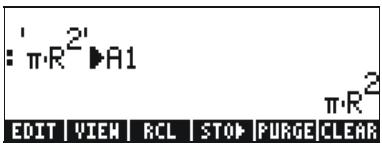
Créer des variables
R: ← [ ] 3 SPC 2 SPC 1 ▶ ALPHA R STO


Ce qui nous donne :

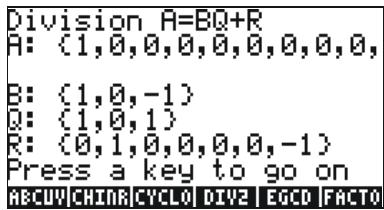
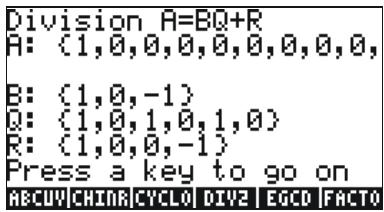


Référence

Fonction SOLVE


Fonction ZEROS

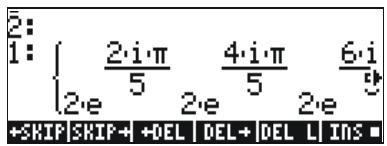
Equations polynomiales
Fonction STEQ
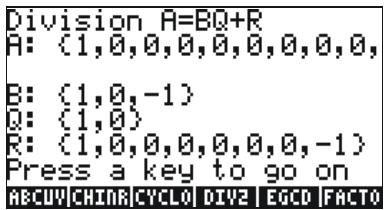
Addition, soustraction, multiplication, division
Addition, soustraction

![:RANM(2 33)→A23 :RANM(2 33)→B23 [7 -8] [-8 2] [2 6 5] [-2 4 5] [0 4 -4] [6 -6 -2] B23 A23 B22 A22](/content/2019/11/59903/images/824fb8deb5e9f14d3e6164e1c162c6c684b865126d6e867f4d3eed2c0a94c097.jpg)
![:RANM(C3 23)→A32 [ -6 -6 ] [ 9 7 ] [ -5 0 ] :RANM(C3 23)→B32) [ 0 3 ] [ 5 -6 ] [ -4 -3 ] B32 | A32 | B23 | A23 | B22 | A22](/content/2019/11/59903/images/9491054174e999a9456a362d398aecf164d614506cd1a000d8dd8b345c847c8e.jpg)
![:RANM(C3 33)→A33 [ -2 -3 4 ] [ 7 2 6 ] [ 5 -1 4 ] :RANM(C3 33)→B33 [ -4 1 7 ] [ -4 -5 7 ] [ -7 6 2 ] B33 | A33 | B32 | A32 | B23 | A23](/content/2019/11/59903/images/4a28a34f2d86acc40932bc05ffd201e900b19bf1be9381e057e6786b9f2ed733.jpg)
![:A23+B23 [8 10 1] [4 -2 -3] :A23-B23 [8 2 9] [-8 10 13] B33 A33 B32 A32 B23 A23](/content/2019/11/59903/images/9e1cc96fcb028e723a1f0faa268e1056fb6c1f0c4e3aab197a4930d5aa23a40f.jpg)
![:A22·IDN(A22) :IDN(A22)·A22 B22 A22 [ -3 0 ] [0 2] [ -3 0 ] [0 2] [ -3 0 ] [0 2]](/content/2019/11/59903/images/ca33d8f66de8c89b320ab37a94bbb55222ff3401a0e5433980c3b966317b08af.jpg)
La matrice inversée


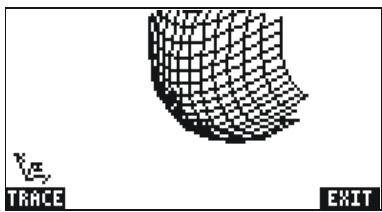

f (x) dx = F (x) + C

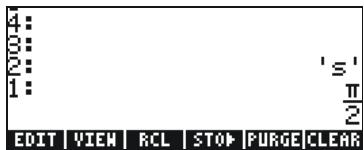

![4: 3: 2: 1: SIN[s=π/2] EDIT VIEW RCL STOP PURGE CLEAR](/content/2019/11/59903/images/84c3f829808ce06f1ef68f1fe0d4b839b9655c42b904123b463829aa53266baf.jpg)

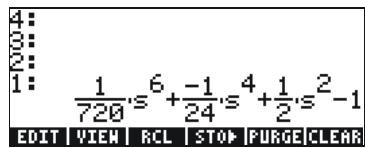
Référence

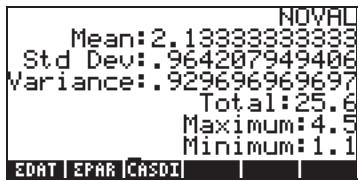
![SINGLE-VARIABLE STATISTICS EDAT: [[2.1] [1.... Col: 1 Type: Population ✓ Mean ✓ Std Dev ✓ Variance ✓ Total ✓ Maximum ✓ Minimum Calculate column Minimum?](/content/2019/11/59903/images/7337efc907e5339965d1fbda6a7989439b2888d97fe39a810751481db0a9c565.jpg)

23, 22, 22, 17, 26, 15, 20, 33.
OCT

BIN

Référence
Référence
Regulatory information
Federal Communications Commission Notice
This equipment has been tested and found to comply with the limits for a Class B digital device, pursuant to Part 15 of the FCC Rules. These limits are designed to provide reasonable protection against harmful interference in a residential installation. This equipment generates, uses, and can radiate radio frequency energy and, if not installed and used in accordance with the instructions, may cause harmful interference to radio communications. However, there is no guarantee that interference will not occur in a particular installation. If this equipment does cause harmful interference to radio or television reception, which can be determined by turning the equipment off and on, the user is encouraged to try to correct the interference by one or more of the following measures:
• Reorient or relocate the receiving antenna.
- Increase the separation between the equipment and the receiver.
- Connect the equipment into an outlet on a circuit different from that to which the receiver is connected.
- Consult the dealer or an experienced radio or television technician for help.
Modifications
The FCC requires the user to be notified that any changes or modifications made to this device that are not expressly approved by Hewlett-Packard Company may void the user's authority to operate the equipment.
Cables
Connections to this device must be made with shielded cables with metallic RFI/EMI connector hoods to maintain compliance with FCC rules and regulations.
Declaration of Conformity
for Products Marked with FCC Logo,
United States Only
This device complies with Part 15 of the FCC Rules. Operation is subject to the following two conditions: (1) this device may not cause harmful interference, and (2) this device must accept any interference received, including interference that may cause undesired operation.
For questions regarding your product, contact:
Hewlett-Packard Company
P. O. Box 692000, Mail Stop 530113
Houston, Texas 77269-2000
Or, call
1-800-474-6836
For questions regarding this FCC declaration, contact:
Hewlett-Packard Company
P. O. Box 692000, Mail Stop 510101
Houston, Texas 77269-2000
Or, call
1-281-514-3333
To identify this product, refer to the part, series, or model number found on the product.
Canadian Notice
This Class B digital apparatus meets all requirements of the Canadian Interference-Causing Equipment Regulations.
Avis Canadien
European Union Regulatory Notice
This product complies with the following EU Directives:
• Low Voltage Directive 73/23/EEC
• EMC Directive 89/336/EEC
Compliance with these directives implies conformity to applicable harmonized European standards (European Norms) which are listed on the EU Declaration of Conformity issued by Hewlett-Packard for this product or product family.
This compliance is indicated by the following conformity marking placed on the product:

This marking is valid for non-Telecom products and EU harmonized Telecom products (e.g. Bluetooth).

This marking is valid for EU non-harmonized Telecom products. *Notified body number (used only if applicable - refer to the product label)
Japanese Notice


- MESURE D'ANGLE
- CRÉER DES VARIABLES
- RÉFÉRENCE
- FONCTION SOLVE
- FONCTION ZEROS
- EQUATIONS POLYNOMIALES
- FONCTION STEQ
- ADDITION, SOUSTRACTION, MULTIPLICATION, DIVISION
- ADDITION, SOUSTRACTION
- LA MATRICE INVERSÉE
- 41712D
- 179216D
- 293D
- 121360O
- 536020O
- 445O
- 1010001011110000B
- 101011110000010000B
- 100100101B
- REGULATORY INFORMATION
- FEDERAL COMMUNICATIONS COMMISSION NOTICE
- MODIFICATIONS
- CABLES
- DECLARATION OF CONFORMITY
- FOR PRODUCTS MARKED WITH FCC LOGO
- UNITED STATES ONLY
- CANADIAN NOTICE
- AVIS CANADIEN
- EUROPEAN UNION REGULATORY NOTICE
- JAPANESE NOTICE
Brand : HP
Model : 50G
Category : Calculator