OA0110 - Detector IFM - Free user manual and instructions
Find the device manual for free OA0110 IFM in PDF.


| Product type | Retroreflective sensor (retroreflective photocell) |
| Brand | IFM |
| Model | OA0110 |
| Range (on 80 mm honeycomb reflector) | Up to 80 mm |
| Power supply | 24 V DC (typical, check label) |
| Connection | Follow diagram on label, use miniature fuse if necessary |
| Main functions | Non-contact detection, LED alignment, adjustable time delay, switching output, diagnostic output |
| LED indicators | Green (voltage), red (alignment), yellow (output active) |
| Alignment | Red LEDs on = correct alignment, blinking = poor alignment or contamination |
| Time delay adjustment | Selector 3 and S1 for modes A (delay on absence of object) and b (delay on object present) |
| Diagnostic output | 5 Hz signal in case of degraded detection (contamination, poor adjustment) |
| Safety | Disconnect power before connection; use miniature fuse |
| Mounting | Attach reflector or reflective adhesive tape, align sensor and fix with bracket |
| Maintenance and cleaning | Clean lenses regularly to avoid contamination |
| Operating environment | Indoor, industrial use |
| Reflector compatibility | Honeycomb reflector or reflective adhesive tape |
Frequently Asked Questions - OA0110 IFM
User questions about OA0110 IFM
0 question about this device. Answer the ones you know or ask your own.
Ask a new question about this device
Download the instructions for your Detector in PDF format for free! Find your manual OA0110 - IFM and take your electronic device back in hand. On this page are published all the documents necessary for the use of your device. OA0110 by IFM.
USER MANUAL OA0110 IFM
Functions and features
In conjunction with a prismatic reflector or reflective tape the retroreflective sensor detects objects and materials without contact and indicates their presence by a switched signal.
Range: see type label (values referred to prismatic reflector with 80mm ).
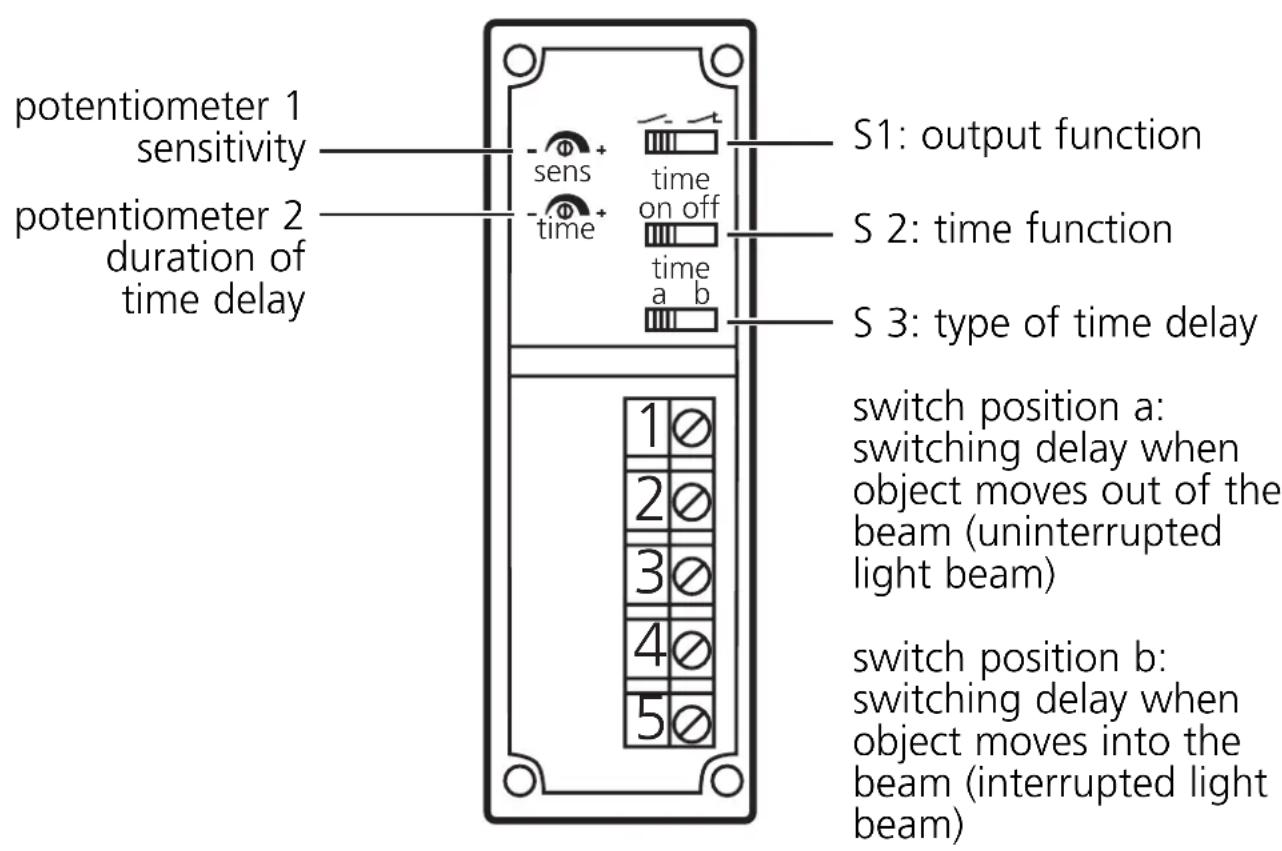
Controls and indicators
Electrical connection

Disconnect power before connecting the sensor.
Connection strictly to the indications on the type label.
Note: insert a miniature fuse according to the technical data sheet, if specified.
Recommendation: check the unit for reliable function after a short circuit
Installation
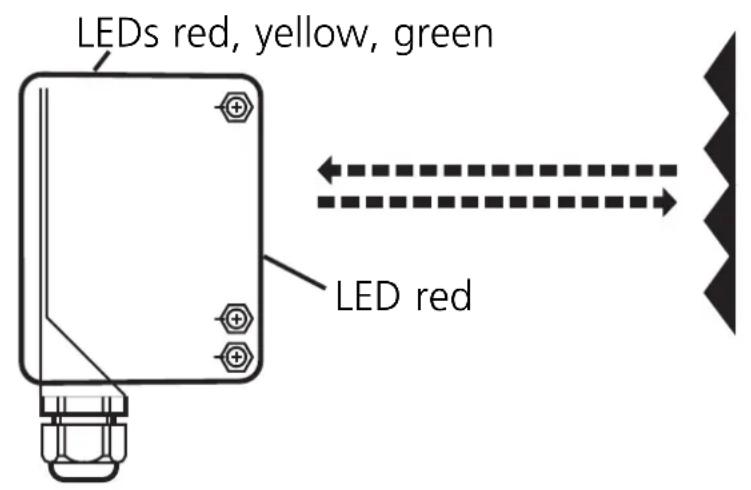
Fix the prismatic reflector / reflective tape in desired position. Align the photocell and fix it by means of a mounting device.
Following electrical connection the photocell can be set exactly by means of the LED display:
- The red LEDs light if setting is exact.
- They flash if setting is inexact.
Maximum range only with precise alignment.
Setting
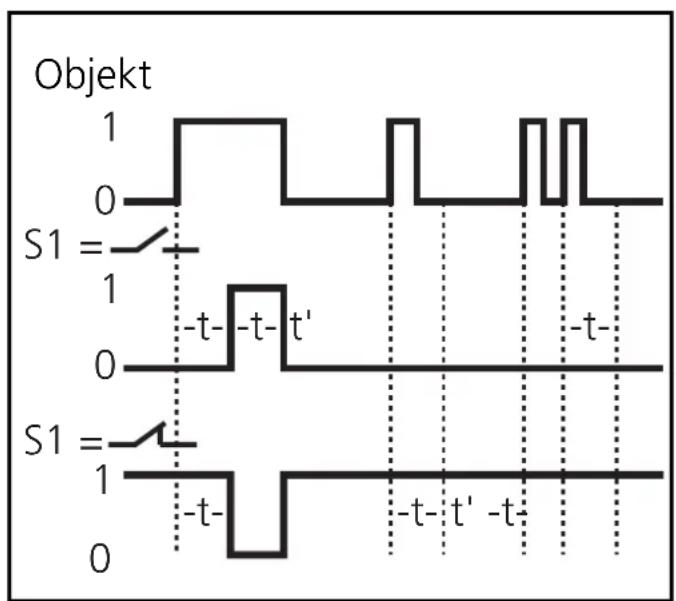
Set the sensitivity, the output function, the time function as well as the type and duration of the time delay.
Switch 3 = a
The signal "no object present" is transferred to the switching output after a delay.
- In the case of S1 = the output switches OFF after the falling edge + t.
- In the case of S1 = the output switches ON after the falling edge + t.
A pulse during the time t triggers the timer again.
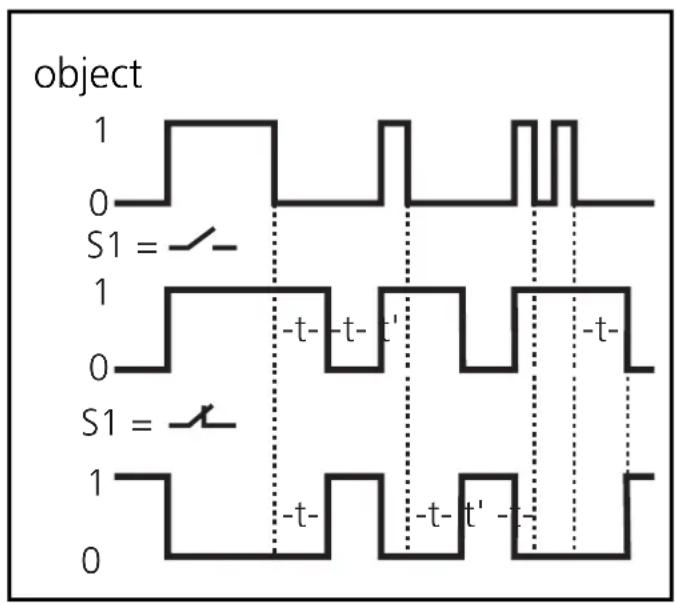
Switch 3 = b
The signal "object present" is transferred to the switching output after a delay.
In the case of S1 = the output switches ON after the rising edge + t.
In the case of S1 = the output switches OFF after the rising edge + t.
A pulse during the time t triggers the timer again.
Operation
Check the safe functioning of the photocell.
Display by LEDs and function-check output.
- Green LED is lit = supply voltage o.k.
- Red LEDs are lit = light reception (no object between photocell and reflector).
- Red LEDs flashing = reception deteriorating (e.g. by soiling of the lenses or maladjustment).
- Yellow LED is lit = output switched.
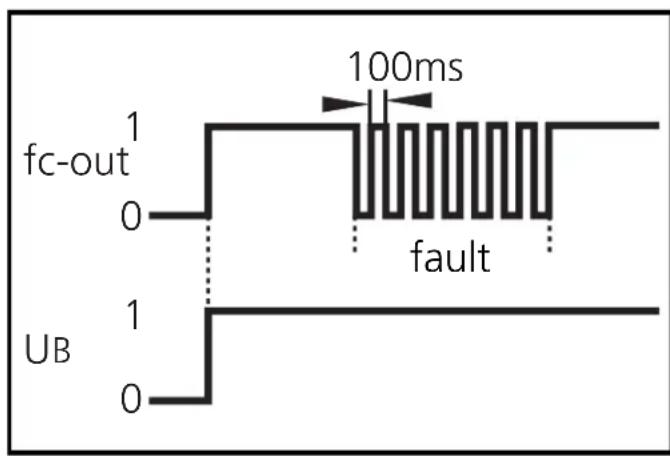
The function check output indicates a wrong object detection (soiling of the lenses, maladjustment) by means of a 5Hz signal. When the object is again clearly detected, the output provides again a continuous signal.
Maintenance: Keep the lens of the sensor free from soiling.
Brand : IFM
Model : OA0110
Category : Detector