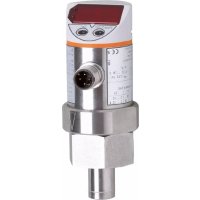
SA3010 - Water flow controller IFM - Free user manual and instructions
Find the device manual for free SA3010 IFM in PDF.



| Product type | Water flow controller |
| Brand | IFM |
| Model | SA3010 |
| Power supply | 20 ... 28 V DC |
| Max. output current | Protected against short circuits, reverse polarity and overloads |
| Voltage drop | < 2 V |
| Analog output | 4 ... 20 mA (max. 500 Ω) or 0 ... 10 V (min. 2000 Ω) |
| Switching functions | Hysteresis (N.O./N.C.) and window function (N.O./N.C.) for 2 outputs |
| Display units | L/min, GAL/min, L/h, GAL/h, m³/h |
| Measuring ranges (according to nominal diameter) | 0 ... 10 L/min (DN15), 0 ... 20 L/min (DN19), 0 ... 40 L/min (DN24) |
| Fluid temperature | 0 ... +80 °C |
| Max. temperature gradient | 200 K/min |
| Pressure resistance | 30 bar |
| Protection | IP 67, class III |
| Materials in contact with fluid | Stainless steel 316L, FPM O-ring |
| Ambient temperature | -20 ... +60 °C |
| Maintenance and cleaning | Periodically clean the probe tip with a soft cloth; for limescale deposits, use a common acetic cleaning product |
| Safety | Installation by an electrician; comply with national and international regulations; SELV/PELV power supply according to EN50178 |
| Repeatability of threshold | 3 % of final value (Q < 30 % FV); 7 % (Q > 30 % FV) |
| Measurement error | ± 10 % of max. final value |
| Availability delay | 10 s |
| Start-up delay | 0 ... 50 s (adjustable) |
| Response time | 5 s (10 % → 90 %) |
| Installation | Grease the nut, insert the probe into the T-connector, max. tightening torque 70 Nm |
| Electrical connection | 4 wires: BN (brown) = L+, WH (white) = OUT2, BK (black) = OUT1, BU (blue) = L- |
Frequently Asked Questions - SA3010 IFM
User questions about SA3010 IFM
0 question about this device. Answer the ones you know or ask your own.
Ask a new question about this device
Download the instructions for your Water flow controller in PDF format for free! Find your manual SA3010 - IFM and take your electronic device back in hand. On this page are published all the documents necessary for the use of your device. SA3010 by IFM.
USER MANUAL SA3010 IFM
natural_image
Line drawing of a digital pressure meter with buttons and a central dial (no text or symbols)| InhaltBedien- und Anzeigeelemente . . . . . . . . . . . . . . . . . . . . . . . . . . . . . . . . . . . . . . . . . . . . . . . . . . . . . . . . . . . . . . . . . . . . . . . . . . . . . . . . . . . . . . . . . . . . . . . . . . . . 5Bestimmungsgemäße Verwendung . . . . . . . . . . . . . . . . . . . . . . . . . . . . . . . . . . . . . . . . . . . . . . . . . . . . . . . . . . . . . . . . . . . . . . . . . . . . . . . . . . . . . . . . . . . . . . . . . . . Betriebsarten . . . . . . . . . . . . . . . . . . . . . . . . . . . . . . . . . . . . . . . . . . . . . . . . . . . . . . . . . . . . . . . . . . . . . . . . . . . . . . . . . . . Montage . . . . . . . . . . . . . . . . . . . . . . . . . . . . . . . . . . . . . . . . . . . . . . . . . . . . . . . . . . . . . . . . . . . . . . . . . . . . . . . . . . . . . . . . . . . . . . . . . . . Elektrischer Anschluß . . . . . . . . . . . . . . . . . . . . . . . . . . . . . . . . . . . . . . . . . . . . . . . . . . . . . . . . . . . . . . . . . . . . . . . . . . . . . . . . . . . . . . . . . . . . . . . . . . . Programmieren . . . . . . . . . . . . . . . . . . . . . . . . . . . . . . . . . . . . . . . . . . . . . . . . . . . . . . . . . . . Betrieb / Wartung . . . . . . . . . . . . . . . . . . . . . . . . . . . . . . . . . . . . . . . . . . . . . . Technik-Information / Funktionsweise / ParameterEinstellbare Parameter . . . . . . . . . . . . . . . . . . . . . . . . . . . . . . . . . . Technische Daten . . . . . . . . . . . . . . . . . . . . . . . . Maßzeichnung . . . . . . . . . . . . . . . . . . . . Einstellbereiche . . . . . . . . . . . . . . . . . . . . . . . . . . . . . . . . | DEUTSCH |
| Contents | |
| Controls and visual indication | page 22 |
| Function and features | page 23 |
| Operating modes | page 24 |
| Installation | page 25 |
| Electrical connection | page 27 |
| Programming | page 28 |
| Operation / maintenance | page 29 |
| Technical information / Functioning / Parameters | |
| Adjustable parameters | page 30 |
| Technical data | page 38 |
| Scale drawing | page 58 |
| Setting ranges | page 59 |
flowchart
graph TD
    A["4.8"] --> B["M"]
    B --> C["SP1 S M 6.0"]
    C --> D["M"]
    D --> E["rP1 S M 4.0"]
    E --> F["M"]
    F --> G["OU1 S M Hno"]
    G --> H["M"]
    H --> I["OU2 S M Hno ... 1"]
    I --> J["M"]
    J --> K["..."]
    K --> L["SP2 S M 4.0"]
    L --> M["M"]
    M --> N["rP2 S M 2.0"]
    N --> O["M"]
    O --> P["dIF S M IS"]
    P --> Q["M"]
    Q --> R["EF S"]
    R --> S["M"]
    S --> T["4.8"]

    U["H1 S M 10.0"] --> V["M"]
    V --> W["Lo S M 0.0"]
    W --> X["M"]
    X --> Y["CGA S M 4.8"]
    Y --> Z["M"]
    Z --> AA["CAr S M ---"]
    AA --> AB["M"]
    AB --> AC["dST S M 0"]
    AC --> AD["M"]
    AD --> AE["P-n S M PnP"]
    AE --> AF["M"]
    AF --> AG["dIS S M d3"]
    AG --> AH["M"]
    AH --> AI["Uni S M Li t"]
    AI --> AJ["M"]

    subgraph RUN
        K
        K
        K
        K
        K
        K
        K
        K
        K
        K
        K
        K
        K
        K
        K
        K
        K
        K
        K
        K
        K
        K
        K
        K
        K
        K
        K
        K
        K
        K
        K
        K
        K
        K

    note1[" Mode/Enter "]
        note2[" OU2 = Hno, Hnc, Fno, Fnc "]
        note3[" Set "]
        note4[" OU2 = I, U "]
Programmieren / Programming / Programmation
| 1 | 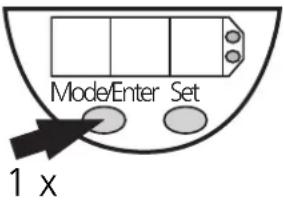 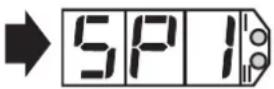 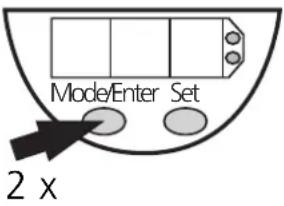 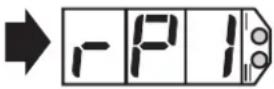 ... ... | Parameter aufrufenSelect parametersSélectionner les paramètres |
| 2 | 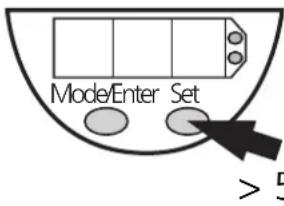 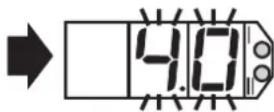 is is | Werte einstellen*Set Values*Régler la valeurs* |
| 3 | 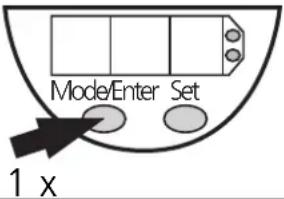 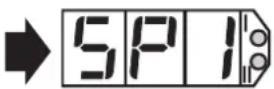 | Werte bestätigenAcknowledgement of valuesConfirmer la valeur |
*Wert verringern: Lassen Sie die Anzeige bis zum maximalen Einstellwert laufen. Danach beginnt der Durchlauf wieder beim minimalen Einstellwert.
*Decrease the value: Let the display of the parameter value move to the maximum setting value. Then the cycle starts again at the minimum setting value.
*Réduire la valeur du paramètre: Laisser l'affichage de la valeur du paramètre aller jusqu'à la valeur de réglage maximum. Ensuite le cycle recommence à la valeur de réglage minimum.
Mindestabstände
1 = BN (braun), 2 = WH (weiß), 3 = BU (blau), 4 = BK (schwarz)
| Programmieren |
line
| t | Q | rP | | ---- | ----- | ---- | | 0 | 0 | 0 | | 1 | 1 | 0 | | 2 | 0 | 0 | | 3 | 0 | 0 | | 4 | 0 | 0 | | 5 | 0 | 0 | | 6 | 0 | 0 | | 7 | 0 | 0 | | 8 | 0 | 0 | | 9 | 0 | 0 | | 10 | 0 | 0 | | 11 | 0 | 0 | | 12 | 0 | 0 | | 13 | 0 | 0 | | 14 | 0 | 0 | | 15 | 0 | 0 | | 16 | 0 | 0 | | 17 | 0 | 0 | | 18 | 0 | 0 | | 19 | 0 | 0 | | 20 | 0 | 0 | | 21 | 0 | 0 | | 22 | 0 | 0 | | 23 | 0 | 0 | | 24 | 0 | 0 | | 25 | 0 | 0 | | 26 | 0 | 0 | | 27 | 0 | 0 | | 28 | 0 | 0 | | 29 | 0 | 0 | | 30 | 0 | 0 | | 31 | 0 | 0 | | 32 | 0 | 0 | | 33 | 0 | 0 | | 34 | 0 | 0 | | 35 | 0 | 0 | | 36 | 0 | 0 | | 37 | 0 | 0 | | 38 | 0 | 0 | | 39 | 0 | 0 | | 40 | 0 | 0 | | 41 | 0 | 0 | | 42 | 0 | 0 | | 43 | 0 | 0 | | 44 | 0 | 0 | | 45 | 0 | 0 | | 46 | 0 | 0 | | 47 | 0 | 0 | | 48 | 0 | 0 | | 49 | 0 | 0 | | 50 | 0 | 0 | | 51 | 0 | 0 | | 52 | 0 | 0 | | 53 | 0 | 0 | | 54 | 0 | 0 | | 55 | 0 | 0 | | 56 | 0 | 0 | | 57 | 0 | 0 | | 58 | 0 | 0 | | 59 | 0 | 0 | | 60 | 0 | 0 | | Note: The data is extracted from the code and presented in CSV format as requested. The 'Gutbereich' label indicates the entire dataset. The 'Fno' and 'Fnc' labels are not present in the image. The 'SP' and 'rP' labels are the same as the original text 'Q', but they do not correspond to any other text in the output.line
| t | SP | rP | |---|------|------| | ① | 2.5% | 0.0% | | ② | 4.0% | 0.0% | | ③ | 3.8% | 0.0% | | ④ | 3.5% | 0.0% | | ⑤ | 2.0% | 0.0% | | ⑥ | 3.0% | 0.0% | | ⑦ | 4.5% | 0.0% |line
| t | SP | rP | |---|------|------| | 1 | 2.5% | 2.5% | | 2 | 4.0% | 4.0% | | 3 | 5.0% | 5.0% | | 4 | 4.5% | 4.5% | | 5 | 3.0% | 3.0% | | 6 | 2.0% | 2.0% | | 7 | 3.5% | 3.5% | | 8 | 4.5% | 4.5% |Controls and visual indication
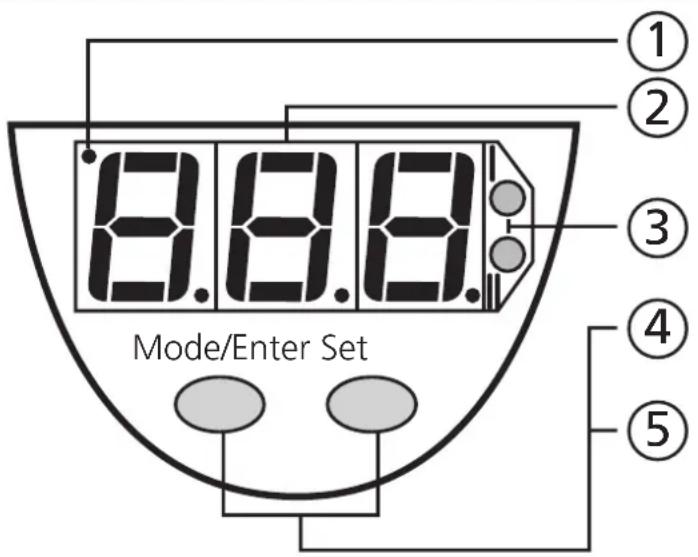
| 1 | Calibration indicator | Active if customer-specific calibration has been carried out. |
| 2 | 7-segment display | Display of the current flow velocity1), display of parameters and parameter values. |
| 3 | 2 x LED red Switching status; lights if output I / II has switched. | |
| 4 | Mode / Enter button | Selection of the parameters and acknowledgement of the parameter values. |
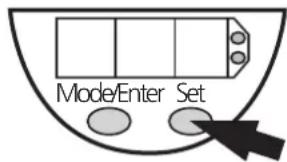
| 5 | Set button | Setting of the parameter values (scrolling by holding pressed; incremental by pressing briefly). |
^1) LPH (litre/hour) value for nominal diameter 19 and 24 = displayed value × 10
Function and features
- The flow monitor detects the flow rate of water,
• shows the current flow rate on its display, (max. value displayed: final value of measuring range + 20%) - and generates 2 output signals according to the set output configuration.
| Output 1 Output 2 | ||
| Analog output(only output 2) | 4 ... 20mA (I) | |
| 0 ... 10V (U) | ||
| switching function(output 1 and output 2;function can be selected for each output separately) | hysteresis function / N.O. (Hno) | |
| hysteresis function / N.C. (Hnc) | ||
| window function / N.O. (Fno) | ||
| window function / N.C. (Fnc) | ||
| output polarity (applies to both switching outputs) | p-switching (PnP) | |
| n-switching (nPn) | ||
Application: water.
(please see the maintenance details on page 29)
- For seamless precision steel to DIN 2391/1 and T-pieces to DIN 2353.
- Adjustable to T-pieces with nominal diameter of 15mm, 19mm or 24mm.
| Nominal diameter | T-piece pipe | |
| 15mm QL 18-18 | -18 18 x 1.5 | |
| 19mm QL 22-18 | -22 22 x 1.5 | |
| 24mm QL 28-18 | -28 28 x 2 |
Measuring range
| litre / min. 0 ... 10 | L, t | 0 ... 20 | 0 ... 40 | |
| gallons / min. | GAL | 0 ... 2.64 0 . | 5.28 0 ... 10.6 | |
| litre / hour ^1) | LPH | 0 ... 600 0 .. | 1 200 0 .. | 2 400 |
| gallons / hour | GPH | 0 ... 158 | 0 ... 317 | 0 ... 636 |
| cubic metre / hour | CPH | 0 ... 0.60 0 . | 1.20 0 ... 2.40 | |
| for nominal diameter | d, A | 15 | 19 | 24 |
Display range
| litre / min. 0 ... 12 | L, t | 0 ... 24 0 ... | 48 | |
| gallons / min. | GAL | 0 ... 3.17 0 ... | 6.34 0 ... 12.7 | |
| litre / hour ^1) | LPH | 0 ... 720 0 ... | 1 440 0 ... 2 880 | |
| gallons / hour | GPH | 0 ... 190 0 ... | 380 0 ... 763 | |
| cubic metre / hour | CPH | 0 ... 0.72 0 ... | 1.44 0 ... 2.88 | |
| for nominal diameter | d, A | 15 19 24 |
^1) For nominal diameter 19 and 24, 1/10 of the LPH value is displayed.
The displayed value must be multiplied by factor 10.
Example: displayed value = 98; real value = 98 * 10 = 980 LPH.
Operating modes
Run mode
(Normal operating mode)
With power on and the power-on delay time elapsed* (approx. 10s) the unit is in the Run mode. It monitors and generates output signals according to the set parameters.
The display indicates the current flow (can be deactivated, page 32). The red LEDs indicate the switching state of the outputs.
*During the power-on delay time the most important parameter values are displayed briefly, then the current measured value is indicated. Even if the display is deactivated (diS = OFF), the most important parameter values are indicated, then the current measured value is indicated for 15s, then the display goes out.
Both outputs are switched according to the programming: ON with the NO function (Hno/Fno) and OFF with the NC function (Hnc/Fnc).
Note: When the hysteresis function is active, the outputs remain in this switching state after the power-on delay time has elapsed if the flow is between SPx and rPx.
If output 2 is configured as analog output, the output signal is 20mA or 10V.
Display mode
(Indication of parameters and the set parameter values)
When the "Mode/Enter" button is pressed briefly, the unit passes to the Display mode which allows parameter values to be read. The internal sensing, processing and output functions of the unit continue as if in Run mode.
- The parameter names are scrolled with each pressing of the "Mode/Enter" button.
- When the "Set" button is pressed briefly, the corresponding parameter value is displayed for 15s. After another 15s the unit returns to the Run mode.
Programming mode
(Setting of the parameter values)
While viewing a parameter value pressing the "Set" button for more than 5s causes the unit to enter the programming mode. You can alter the parameter value by pressing the "Set" button and confirm the new value by pressing the "Mode/Enter" button. The internal sensing, processing and output functions of the unit continue as if in Run mode with the original parameter values unless a new value is confirmed. The unit returns to the Run mode when no button has been pressed for 15s.
Installation
Step 1
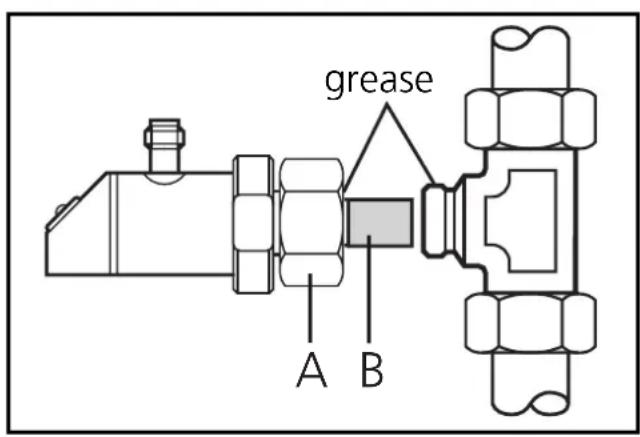
Grease the nut (A) with greasing paste to ensure the nut can be loosened and tightened several times. Note: No grease must be applied to the sensor tip.
Remove the protective cap (B) from the sensor tip. Insert the unit into the T-piece.
Step 2
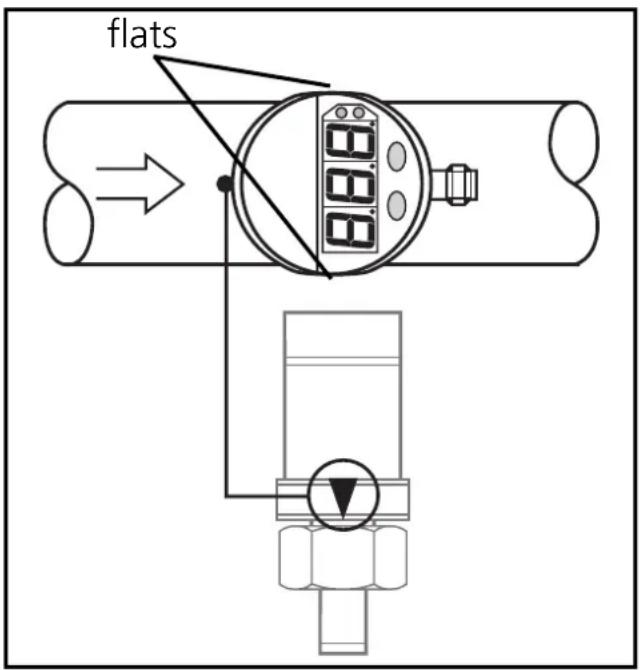
Align the unit as shown such that the flats are parallel with the pipe. The arrow mark should be upstream, if possible.
Fasten the nut, max. tightening torque 70Nm, while maintaining this orientation. Finally, rotate the top part of the sensor for best visibility of LED display.
Minimum distance
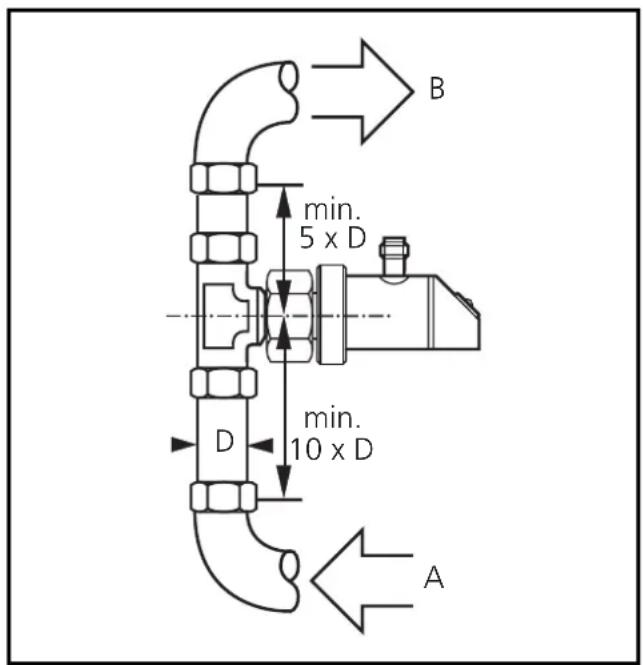
To avoid malfunction a minimum distance between the flow monitor and bends, valves, changes in cross-section or such like must be observed:
- Min. 10 x pipe diameter upstream (A).
- Min. 5 x pipe diameter downstream (B).
(This information refers to laminar flow).
Electrical connection
The unit must only be connected by an electrician.
The national and international regulations for the installation of electrical equipment must be observed.
Voltage supply to EN50178, SELV, PELV.
Disconnect power before connecting the unit.
Wiring:
2 x p-switching
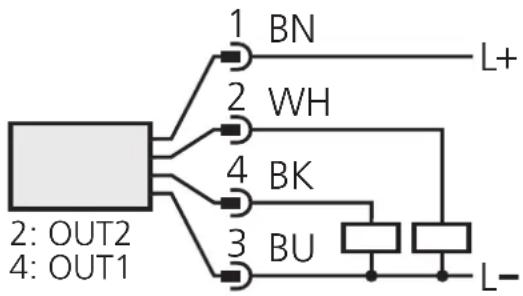
flowchart
graph TD
    A["Component 1"] --> B["BN"]
    A --> C["WH"]
    A --> D["BK"]
    A --> E["BU"]
    F["Component 2"] --> G["OUT2"]
    F --> H["OUT1"]
    I["Component 3"] --> J["BU"]
    K["Component 4"] --> L["OUT1"]
    M["Component 5"] --> N["L+"]
    O["Component 6"] --> P["L-"]
2 x n-switching
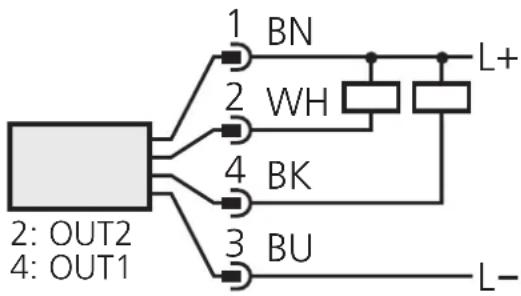
flowchart
graph TD
    A["Component 1"] --> B["BN"]
    A --> C["WH"]
    A --> D["BK"]
    A --> E["BU"]
    F["Component 2: OUT2"] --> A
    G["Component 4: OUT1"] --> A
    H["Component 3"] --> A
    I["Component 2"] --> A
    J["Component 4"] --> A
    K["Component 3"] --> A
    L["Component 2"] --> A
    M["Component 4"] --> A
    N["Component 3"] --> A
    O["Component 2"] --> A
    P["Component 4"] --> A
    Q["Component 3"] --> A
    R["Component 2"] --> A
    S["Component 4"] --> A
    T["Component 3"] --> A
    U["Component 2"] --> A
    V["Component 4"] --> A
    W["Component 3"] --> A
    X["Component 2"] --> A
    Y["Component 4"] --> A
1 x p-switching / 1 x analog
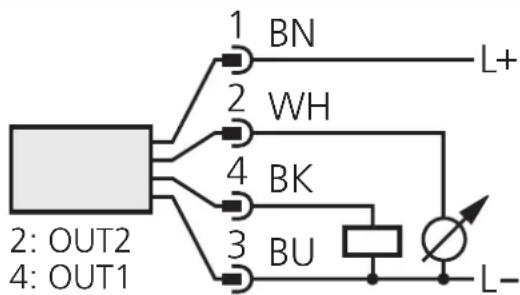
1 x n-switching / 1 x analog
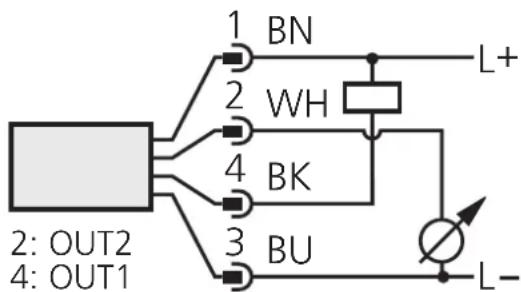
Core colours of ifm sockets:
1 = BN (brown), 2 = WH (white), 3 = BU (blue), 4 = BK (black).
| Programming |
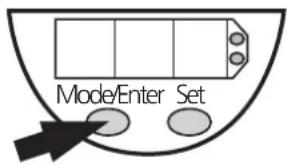
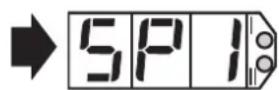
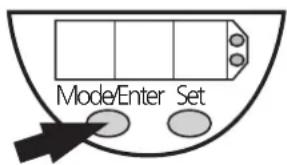
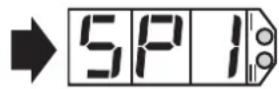
Press the Mode/Enter button several times until the respective parameter is displayed.
Press the Set button and keep it pressed. The current parameter value flashes for 5s,
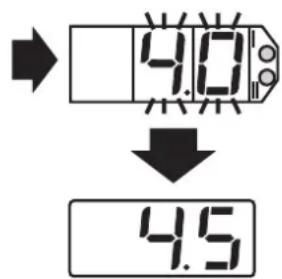
then the value is increased* (incremental by pressing briefly or scrolling by holding pressed).
Press the Mode/Enter button briefly (= acknowledgement). The parameter is displayed again, the set parameter value becomes effective.
Finish programming: Wait for 15s or press the Mode/Enter button until the current measured value is indicated again.
*Decrease the value: Let the display of the parameter value move to the maximum setting value. Then the cycle starts again at the minimum setting value.
Select the display unit (Uni) before setting the switch points (SPx, rPx) or the limits for the analog output signal (ASP, AEP). This avoids rounding errors generated internally during the conversion of the units and enables exact setting of the values.
If no button is pressed for 15s during the setting procedure, the unit returns to the Run mode with unchanged values.
The unit can be electronically locked to prevent unwanted adjustment of the set parameters: Press (in Run mode) both programming buttons for 10s. As soon as the indication goes out the unit is locked or unlocked. Units are delivered from the factory in the unlocked state. With the unit in the locked state is indicated briefly when you try to change parameter values.
Operation / maintenance
After mounting, wiring and setting check whether the unit operates correctly.
Failure indication
| OL | excess flow (flow > 120% of the final value of the measuring range) |
| ULO | flashing: supply voltage too low (< 19V); the switching outputs are reset, the analog signal is reset to 0V / 0mA. |
| SC1 | flashing: short circuit of the switching output 1 |
| SC2 | flashing: short circuit of the switching output 2 |
| SC | flashing: short circuit of both switching outputs |
Recommended maintenance
Check the sensor tip for build-up from time to time. Clean it with a soft cloth. If necessary, build-up which adheres firmly (e.g. lime) can be removed with a common vinegar cleansing agent.
Technical information / Functioning / Parameters
Adjustable parameters
| SP1SP2 | Switch-on point 1 / 2Upper limit value at which the output changes its switching status.SP2 is active only if OU2 = Hno, Hnc, Fno or Fnc. |
| rP1rP2 | Switch-off point 1 / 2Lower limit value at which the output changes its switching status.rPx is always lower than SPx. The unit only accepts values which are lower than SPx.Changing the switch-on point also changes the switch-off point (the distance between SPx and rPx remains constant).If the distance is higher than the new switch point, it is automatically reduced: rPx is set to the minimum setting value (0.0).rP2 is active only if OU2 = Hno, Hnc, Fno or FncSetting range for SPx / rPx: →page 59. |
| OU1 | Configuration of output 14 switching functions can be set:- Hno = hysteresis / normally open- Hnc = hysteresis / normally closed- Fno = window function / normally open- Fnc = window function / normally closed |
| OU2 | Configuration of output 24 switching functions and 2 analog signals can be set:- Hno = hysteresis / normally open- Hnc = hysteresis / normally closed- Fno = window function / normally open- Fnc = window function / normally closed- I = analog output 4 ... 20mA- U = analog output 0 ... 10V |
| ASP | Lower end of analog outputMeasured value for which the output signal is 4mA / 0V.ASP is active only if OU2 = I or U. |
| REPd, A | Upper end of analog outputMeasured value for which the output signal is 20mA / 10V.Minimum distance between ASP and AEP = 40%.AEP is active only if OU2 = I or U.Setting range for ASP / AEP: →page 59.Inside pipe diameterSetting the flow monitor to the selected pipe size.Three settings are possible: 15, 19, 24. |
| EF | Enhanced functionsThis menu item contains a submenu with additional parameters.You can access these parameters by pressing the SET button briefly. |
| HI Lo | Min-Max memory for flow rate:HI: displays the highest measured flow rangeLo: displays the lowest measured flow rangeErase the memory:- Press the "Mode/Enter" button until HI or Lo is displayed.- Press the "Set" button and keep it pressed until “- - -” is displayed.- Then press the "Mode/Enter" button briefly.It is recommended to erase the memory as soon as the unit starts working under normal operating conditions. |
| CGA | Customer-specific calibration (explanation → page 35)If the function is active, the current flow value is displayed.- Press the SET button to set the requested value (scrolling by holding pressed; incremental by pressing briefly).- Acknowledge with the Mode/Enter button.After calibration the calibration indicator is displayed at the upper left corner.Calibration is only possible for values >25% of the final value of the measuring range. For smaller values Lo is displayed, the setting of the parameter is disabled.Setting range: -40% ...+40% of the final value of the measuring range;max. value displayed: final value of the measuring range + 20%. |
| CAr | Calibration reset- Press the "Mode/Enter" button until CAR is displayed.- Press the "Set" button and keep it pressed until “- - -” is displayed.- Then press the "Mode/Enter" button briefly.The calibration set by CGA is reset; the calibration indicator no longer lights. |
| d5t | Start-up delayDuring this time special conditions apply to the switching of the outputs (explanation →page 36).Adjustable in steps of 1s.Setting range: 0 ... 50s (0 = start-up delay not active).The time applies to both outputs. |
| P-n | Output polarity2 options can be selected:PnP = positive switching, nPn = negative switching.This setting applies to both switching outputs. |
| d15 | Setting of the display3 options can be selected:d3 = normal displayrd3 = display rotated 180°OFF = The display is deactivated in the Run mode.When one of the buttons is pressed the current measured value is displayed for 15s.When the Mode/Enter button is then pressed, the display mode is opened.The LEDs indicating the switching state and the calibration indicator remain active even if the display is deactivated. |
| Uni | Display unit5 options can be selected:Lit = litre / min.GAL = gallons/min.LPH = litre / hourGPH = gallons /hourCPH = cubic metre /hourFor nominal diameter 19 and 24, 1/10 of the LPH value is displayed. The displayed value must be multiplied by factor 10.Example:Displayed value = 98; real value = 98 * 10 = 980 LPH.Labels for the different units of display are enclosed with the unit. Stick the respective label on the sensor or fill in the blank label.Select the display unit before setting the switch points (SPx, rPx) or the limits for the analog output signal (ASP, AEP). This avoids rounding errors generated internally during the conversion of the units and enables exact setting of the values. |
Measurement accuracy
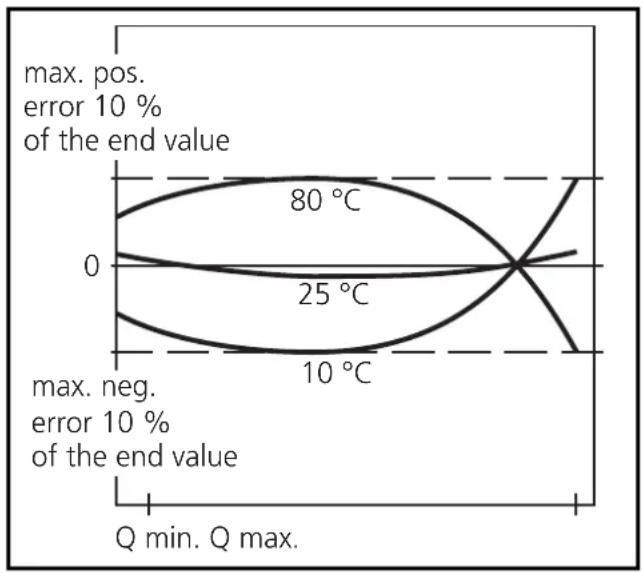
Typical measurement errors for water and different temperatures of the medium.
Dirt / build-up on the sensor tip affects the measurement accuracy.
Check the sensor tip for build-up from time to time.
If necessary, clean it with a soft cloth and a vinegar cleansing agent.
line
| Temperature | End Value | | ----------- | --------- | | 25°C | 80 °C | | 10°C | 10 °C |Hysteresis
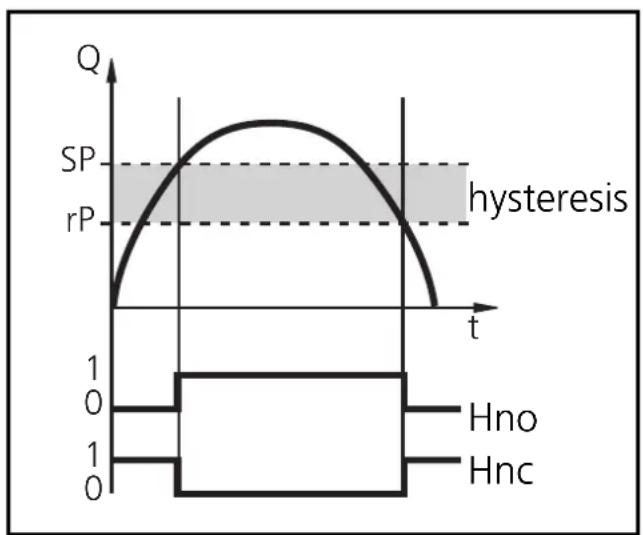
The hysteresis keeps the switching state of the output stable if the flow varies about the preset value.
When the flow is rising, the output switches when the switch-on point has been reached (SPx). When the flow is falling again, the output switches back when the switch-off point (rPx) has been reached.
line
| t | Q | | ---- | ----- | | 0 | 0 | | 1 | 1 | | 2 | 1 | | 3 | 1 | | 4 | 1 | | 5 | 1 | | 6 | 1 | | 7 | 1 | | 8 | 1 | | 9 | 1 | | 10 | 1 | | 11 | 1 | | 12 | 1 | | 13 | 1 | | 14 | 1 | | 15 | 1 | | 16 | 1 | | 17 | 1 | | 18 | 1 | | 19 | 1 | | 20 | 1 | | 21 | 1 | | 22 | 1 | | 23 | 1 | | 24 | 1 | | 25 | 1 | | 26 | 1 | | 27 | 1 | | 28 | 1 | | 29 | 1 | | 30 | 1 | | 31 | 1 | | 32 | 1 | | 33 | 1 | | 34 | 1 | | 35 | 1 | | 36 | 1 | | 37 | 1 | | 38 | 1 | | 39 | 1 | | 40 | 1 | | 41 | 1 | | 42 | 1 | | 43 | 1 | | 44 | 1 | | 45 | 1 | | 46 | 1 | | 47 | 1 | | 48 | 1 | | 49 | 1 | | 50 | 1 | | 51 | 1 | | 52 | 1 | | 53 | 1 | | 54 | 1 | | 55 | 1 | | 56 | 1 | | 57 | 1 | | 58 | 1 | | 59 | 1 | | 60 | 1 | | 61 | 1 | | 62 | 1 | | 63 | 1 | | 64 | 1 | | 65 | 1 | | 66 | 1 | | 67 | 1 | | 68 | 1 | | 69 | 1 | | 70 | 1 | | 71 | 1 | | 72 | 1 | | 73 | 1 | | 74 | 1 | | 75 | 1 | | 76 | 1 | | 77 | 1 | | 78 | 1 | | 79 | 1 | | 80 | 1 | | 81 | 1 | | 82 | 1 | | 83 | 1 | | 84 | 1 | | 85 | 1 | | 86 | 1 | | 87 | 1 | | 88 | 1 | | 89 | 1 | | 90 | 1 | | 91 | 1 | | 92 | 1 | | 93 | 1 | | 94 | 1 | | 95 | 1 | | 96 | 1 | | 97 | 1 | | 98 | 1 | | 99 | 1 | | Note: The y-axis label 'SP' and 'rP' are estimated based on the code provided in the code. The actual y-values are not explicitly provided in the code. The text 'hysteresis' is not used in the plot. The box plot below shows the distribution of 'Hno' and 'Hnc' values over time. The box plot above shows the distribution of 'Hno' and 'Hnc' values over time. The labels for the x-axis 't' appear to be the time points.The hysteresis can be adjusted: First the switch-on point is set, then the switch-off point with the requested difference.
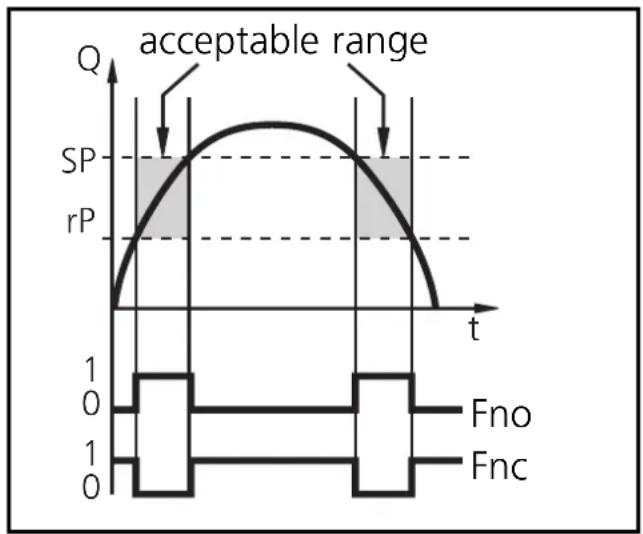
Window function
The window function enables the monitoring of a defined acceptable range. When the flow varies between the switch-on point (SPx) and the switch-off point (rPx), the output is switched (window function/NO) or not switched (window function/NC).
line
| t | Q | | ---- | ----- | | 0 | 0 | | 1 | SP | | 2 | rP | | 3 | SP | | 4 | rP | | 5 | 0 |Scaling the measuring range (analog output)
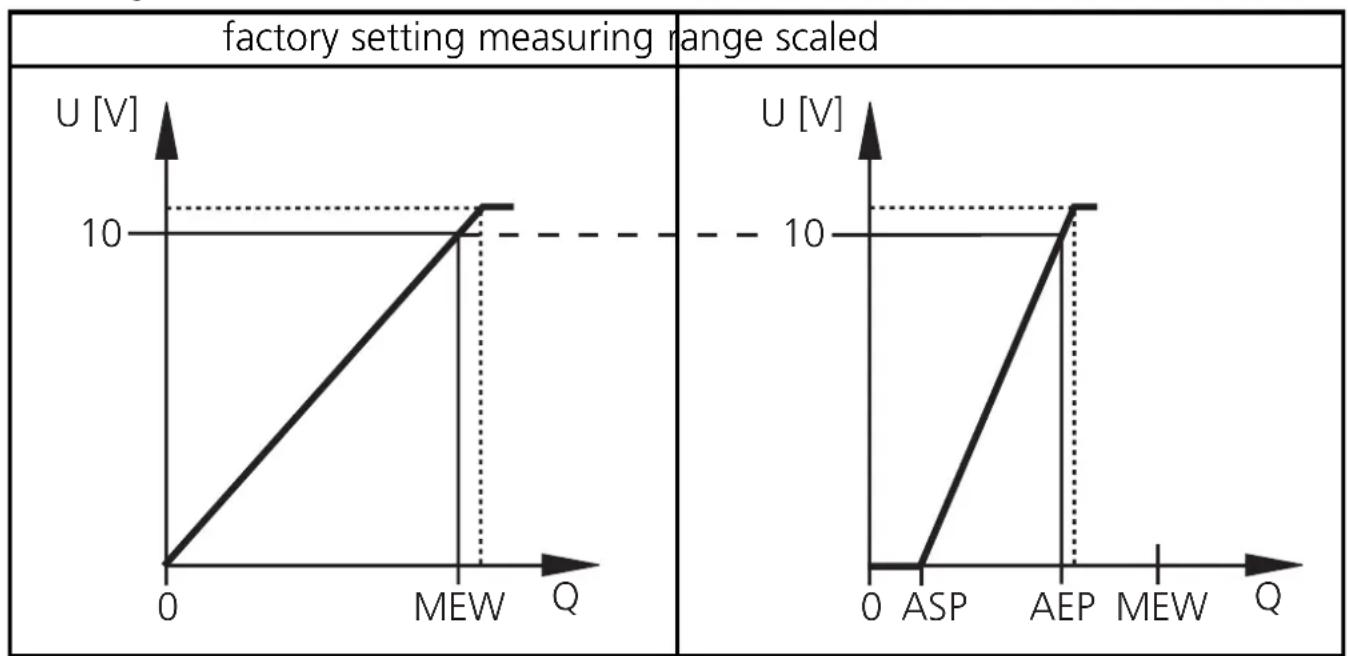
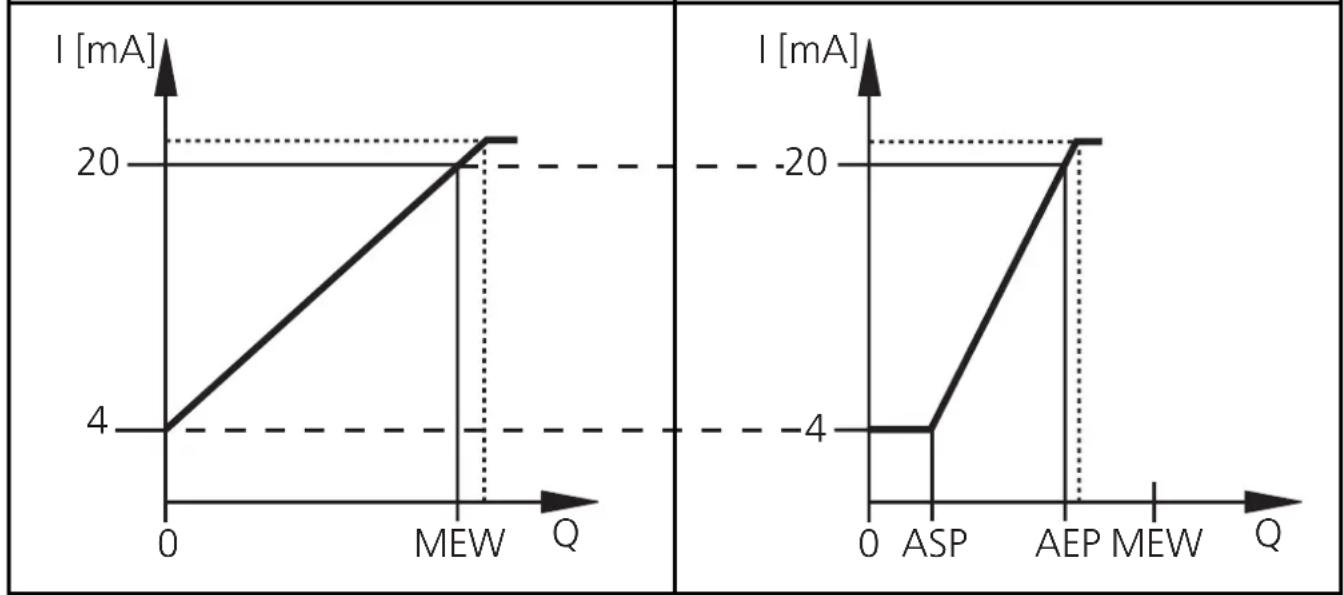
With the parameter "Lower end of analog output" (ASP) you can select the measuring value for which the output signal is 4mA or 0V. With the parameter "Upper end of analog output" (AEP) you can select the measuring value for which the output signal is 20mA or 10V.
Minimum distance between ASP and AEP = 40% of the final value of the measuring range.
Voltage output 0 ... 10V
line
| Q | U [V] | |-------|-------| | 0 | 0 | | MEW | 10 | | AEP | 10 |MEW = value of measuring range
The output signal is between 0 and 10V in the set measuring range. It is also indicated: Flow above the measuring range: output signal > 10V.
Current output 4 ... 20mA
factory setting measuring range scaled
line
| Q | I [mA] | |---|---| | 0 | 4 | | MEW | 20 | | ASP | -4 | | AEP | 20 |MEW = value of measuring range
The output signal is between 4 and 20mA in the set measuring range.
It is also indicated:
Flow above the measuring range: output signal > 20mA.
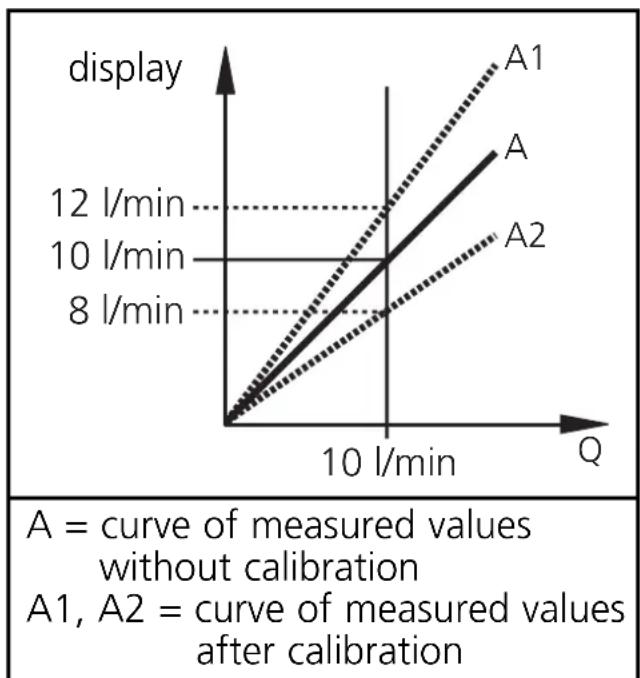
Customer-specific calibration (CGA)
This calibration changes the slope of the curve of measured values. It influences the display and the analog output.
Calibration is only possible for values > 25% of the final value of the measuring range.
It can be reset ( menu item CAr).
line
| Curve | Value | |-------|-----------| | A1 | 12 l/min | | A2 | 10 l/min | | A1 | 8 l/min | | A2 | 10 l/min |Start-up delay (dSt)
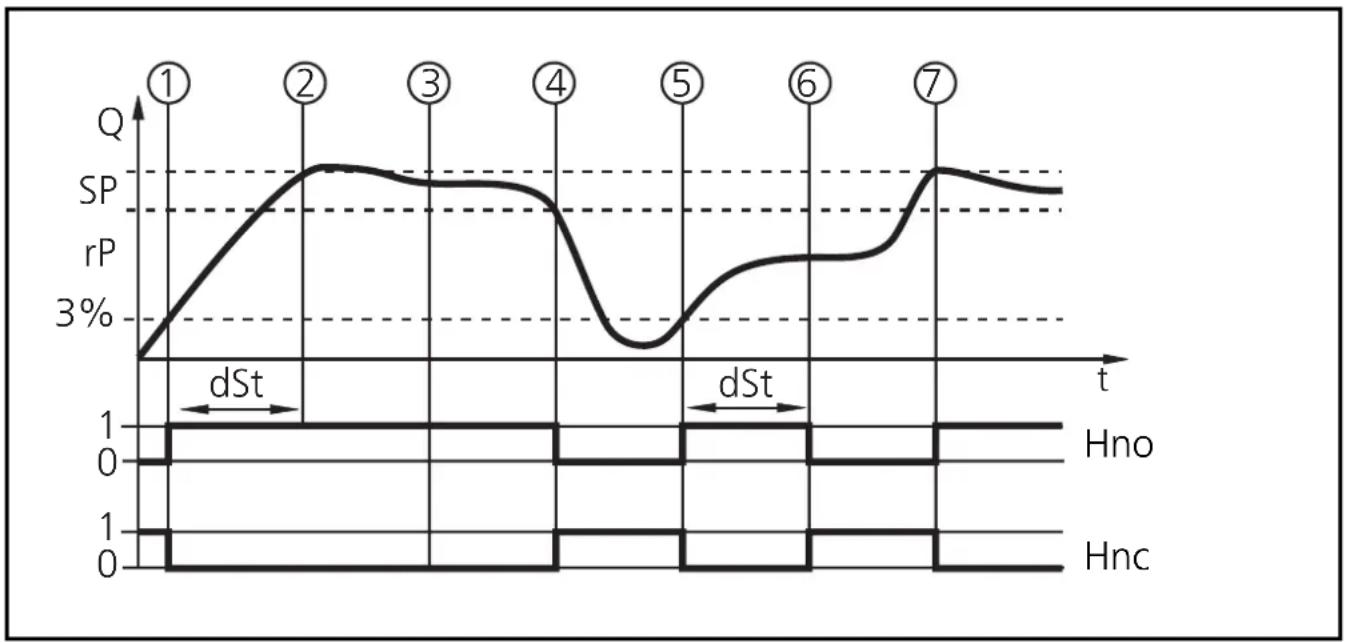
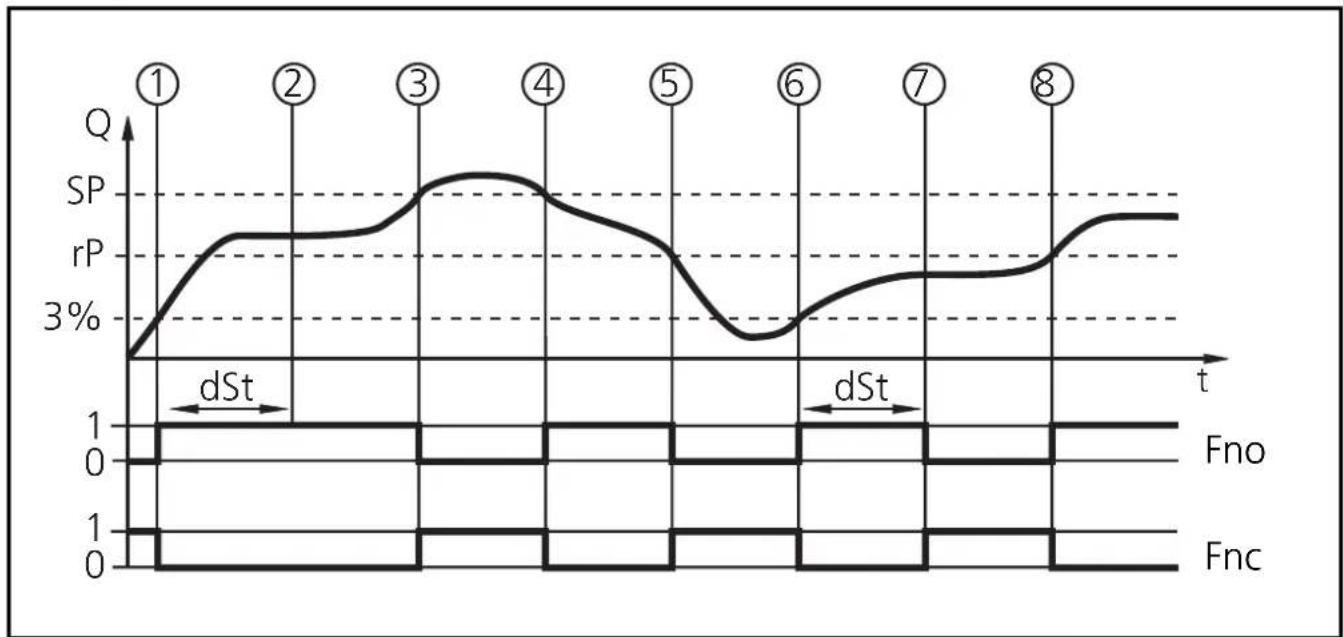
If the start-up delay is active (dSt > 0), the following conditions apply: As soon as the flow has reached the value 3% of the final value (FV)
- the start-up delay starts and
- the outputs are switched according to the programming: ON with the NO function (Hno / Fno), OFF with the NC function (Hnc/Fnc).
During the start-up delay 2 cases are possible:
- fast increase of flow, switch point / acceptable range are reached within dSt → outputs remain active
- slow increase of flow, switch point / acceptable range are not reached within dSt → outputs are reset
Example dSt with hysteresis function
line
| t | SP | rP | |---|-----|----| | 1 | 0 | 0 | | 2 | SP | SP | | 3 | SP | SP | | 4 | SP | SP | | 5 | 0 | 0 | | 6 | SP | SP | | 7 | SP | SP || 1 | flow reaches 3 % of the final value (FV) → dSt starts, the output becomes active |
| 2 | dSt has elapsed, flow has reached SP → the output remains active |
| 3 | flow falls below SP but remains above rP →the output remains active |
| 4 | flow falls below rP →the output is reset |
| 5 | flow reaches 3 % of the final value again → dSt starts, the output becomes active |
| 6 | dSt has elapsed, flow has not reached SP → the output is reset |
| 7 | flow reaches SP →the output becomes active |
Example: dSt with window function
line
| t | SP | rP | |---|------|------| | ① | 2.5% | 0.0% | | ② | 4.0% | 0.0% | | ③ | 5.0% | 0.0% | | ④ | 4.5% | 0.0% | | ⑤ | 3.5% | 0.0% | | ⑥ | 2.0% | 0.0% | | ⑦ | 3.0% | 0.0% | | ⑧ | 4.0% | 0.0% || 1 | flow reaches 3 % of the final value (FV) → dSt starts, the output becomes active |
| 2 | dSt has elapsed, flow has reached the acceptable range → the output remains active |
| 3 | flow exceeds SP (leaves the acceptable range) →the output is reset |
| 4 | flow falls below SP again →the output becomes active again |
| 5 | flow falls below rP (leaves the acceptable range) → the output is reset again |
| 6 | flow reaches 3 % of the final value again → dSt starts, the output becomes active |
| 7 | dSt has elapsed, flow has not reached the acceptable range → the output is reset |
| 8 | flow reaches acceptable range →the output becomes active |
Technical data
| Application . . . . . . . . . . . . . . . . . . . . . . . . . . . . . . . . . . . . . . . . . . . . . . . . . . . . . . . . . . . . . . . . . . . . . . . . . . . . . . . . . . . . . . . . . . . . . . . . . . . . QL 18-18-18 (nominal diameter 15mm)QL 22-18-22 (nominal diameter 19mm)QL 28-18-28 (nominal diameter 24mm) |
| Operating voltage [V] . . . . . . . . . . . . . . . . . . . . . . . . . . . . . . . . . . . . . . . . . . . . . . . . . . . . . . . . . . . . . . . . . . . . . . . . . . . . . . . . . . . . . . . . . . . . . . . . . . . 20 ... 28 DCCurrent rating [mA] . . . . . . . . . . . . . . . . . . . . . . . . . . . . . . . . . . . . . . . . . . . . . . . . . . . . . . . . . . . . . . . . . . . . . . . . . . . . . . . . . . . . . . . . . . . . . . . . . . 3 x 250short-circuit prot., reverse polarity / overload prot.Voltage drop [V]. . . . . . . . . . . . . . . . . . . . . . . . . . . . . . . . . . . . . . . . . . . . . . . . . . . . . . . . . . . . . . . . . . . . . . . . . . . . . . . . . . . . < 2Current consumption [mA] . . . . . . . . . . . . . . . . . . . . . . . . . . . . . . . . . . . . . . . . . . . . . . . . . . . . . . . . . . . . . . . . . . . . . . . . . . . . . . . . . . . . . . . . . . . . . . . Analog output . . . . . . . . . . . . . . . . . . . . . . . . . . . . . . . . . . . . . . . . . . . . . . . . . . . . . . . . . . . . . . . . . . . . . . . . . . . . . . . . . . . . . . . . . . . . . . . . 4 ... 20 mA (max. 500 Ω)0 ... 10 V (min. 2000 Ω) |
| Medium temperature [°C] 0 ... +80Max. temperature gradient of medium [K/min] . . . . . . . . . . . . . . . . . . . . . . . . . . . . . . . . . . . . . . . . . . . . . . . . . . . . . . . . . . . . . . . . . . . . . . . . . . . . . . . . . . . . . . . . . . . . . . . . . . Pressure rating [bar] . . . . . . . . . . . . . . . . . . . . . . . . . . . . . . . . . . . . . . . . . . . . . . . . . . 30 |
| Repeatability switch point[% of final value] . . . . . . . . . . . . . . . . . . . . . . . . . . . . . . . . . . . 3 (Q < 30% of final value)7 (Q > 30% of final value)Measurement error [% of final value] . . . . . . . . . . . . . . . . . . . max. ± 10 |
| Power-on delay time [s] . . . . . . . . . . . . . . . . . . . . . . . . 10Start-up delay [s] . . . . . . . . . . . . . 0 ... 50Response time [s] . . . . . . . . . . . . 5 (10% → 90%) |
| Protection. IP 67 IIIMaterial sensor surface. stainless steel (316S12);O-ring: FPM 16x1,5 gr 70° Shore AHousing material. stainless steel (316S12); Pocan; PC (Macrolon);PA; EPDM/X (Santoprene); FPM (Viton)Operating temperature [°C] -20 ... +60EMCIEC 1000/4/2 ESD: 4 / 8 KVIEC 1000/4/3 HF radiated: 10 V/mIEC 1000/4/4 Burst: 2 KVIEC 1000/4/6 HF conducted: 10 V |
line
| t | Q | rP | | ---- | ----- | ---- | | 0 | 0 | 0 | | 1 | 1 | 0 | | 2 | 0 | 0 | | 3 | 0 | 0 | | 4 | 0 | 0 | | 5 | 0 | 0 | | 6 | 0 | 0 | | 7 | 0 | 0 | | 8 | 0 | 0 | | 9 | 0 | 0 | | 10 | 0 | 0 | | 11 | 0 | 0 | | 12 | 0 | 0 | | 13 | 0 | 0 | | 14 | 0 | 0 | | 15 | 0 | 0 | | 16 | 0 | 0 | | 17 | 0 | 0 | | 18 | 0 | 0 | | 19 | 0 | 0 | | 20 | 0 | 0 | | 21 | 0 | 0 | | 22 | 0 | 0 | | 23 | 0 | 0 | | 24 | 0 | 0 | | 25 | 0 | 0 | | 26 | 0 | 0 | | 27 | 0 | 0 | | 28 | 0 | 0 | | 29 | 0 | 0 | | 30 | 0 | 0 | | 31 | 0 | 0 | | 32 | 0 | 0 | | 33 | 0 | 0 | | 34 | 0 | 0 | | 35 | 0 | 0 | | 36 | 0 | 0 | | 37 | 0 | 0 | | 38 | 0 | 0 | | 39 | 0 | 0 | | 40 | 0 | 0 | | 41 | 0 | 0 | | 42 | 0 | 0 | | 43 | 0 | 0 | | 44 | 0 | 0 | | 45 | 0 | 0 | | 46 | 0 | 0 | | 47 | 0 | 0 | | 48 | 0 | 0 | | 49 | 0 | 0 | | 50 | 0 | 0 | | Note: The actual values for 'plage acceptable' and 'rP' are not provided in the code. The code does not output any data series or labels beyond the specified constraints. The 'Fno' and 'Fnc' waveforms are not explicitly labeled in the image. There is only one data series represented by a filled area under the curve. The 'SP' and 'rP' lines are marked with horizontal dashed lines. The 't' axis is labeled 't'.line
| t | SP | rP | |---|------|------| | ① | 0 | 0 | | ② | SP | 0 | | ③ | SP | 0 | | ④ | SP | 0 | | ⑤ | 0 | 0 | | ⑥ | SP | 0 | | ⑦ | SP | 0 |line
| t | SP | rP | |---|------|------| | ① | 2.5% | 2.5% | | ② | 4.0% | 4.0% | | ③ | 5.0% | 5.0% | | ④ | 4.5% | 4.5% | | ⑤ | 3.5% | 3.5% | | ⑥ | 2.0% | 2.0% | | ⑦ | 3.0% | 3.0% | | ⑧ | 4.0% | 4.0% |- Programmieren / Programming / Programmation
- Mindestabstände
- Controls and visual indication
- Function and features
- Application: water.
- Operating modes
- Run mode
- Display mode
- Programming mode
- Installation
- Step 1
- Step 2
- Minimum distance
- Electrical connection
- Operation / maintenance
- Recommended maintenance
- Technical information / Functioning / Parameters
- Measurement accuracy
- Hysteresis
- Window function
- Scaling the measuring range (analog output)
- Voltage output 0 ... 10V
- Current output 4 ... 20mA
- Customer-specific calibration (CGA)
- Start-up delay (dSt)
Brand : IFM
Model : SA3010
Category : Water flow controller