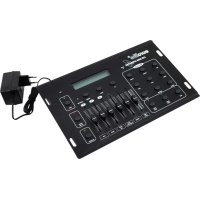
DMX LED Operator 4 - Lighting Eurolite - Free user manual and instructions
Find the device manual for free DMX LED Operator 4 Eurolite in PDF.



| Product Type | DMX Controller 50 channels |
| Brand | Eurolite |
| Model | DMX LED Operator 4 |
| Power Supply | 12 V DC, 300 mA via included mains adapter |
| Power Consumption | 3.6 W |
| Number of Control Channels | 50 |
| DMX Output | 3-pin female XLR |
| Music Control | Built-in microphone or RCA input (Cinch) |
| Main Functions | Color selection, internal programs (11), auto mode, music mode, Hold function, Blackout, fog machine control |
| Display | LCD with control LED |
| Dimensions (L x D x H) | 320 x 190 x 60 mm |
| Weight | 1.4 kg |
| Compatibility | Eurolite LED projectors and effects with 5 DMX channels, KLS-200, RGB LED Bar, fog machine |
| Mounting | On tripod or 19" rack integration (4U, optional frame) |
| Maintenance and Cleaning | Disconnect before cleaning. Use a soft, damp cloth. No alcohol or solvents. |
| Safety | Protection class III. Indoor use only. Avoid moisture, excessive heat, and shocks. |
| Spare Parts and Repairability | No repairable parts inside. Use only original parts. After-sales service reserved for authorized dealers. |
Frequently Asked Questions - DMX LED Operator 4 Eurolite
User questions about DMX LED Operator 4 Eurolite
0 question about this device. Answer the ones you know or ask your own.
Ask a new question about this device
Download the instructions for your Lighting in PDF format for free! Find your manual DMX LED Operator 4 - Eurolite and take your electronic device back in hand. On this page are published all the documents necessary for the use of your device. DMX LED Operator 4 by Eurolite.
USER MANUAL DMX LED Operator 4 Eurolite
50-channel Lighting Controller
text_image
eurolite® LED DMX OPERATOR SOUND HOLD COLOR RED ORANGE YELLOW GREEN CYAN BLUE PURPLE MAGENTA WHITE HOLD COLOR PROG SELECT UP DOWN FOGGER B R G B PROG SELECT DIMMER FLASH SPEED GREEN BLUE SOUND ACTIVE BLACKOUTMULTI-LANGUAGE-INSTRUCTIONS
5.1 Installation 13
5.2 Sound-control.... 13
5.3 DMX-Connection between the devices.... 13
5.4 Addressing the devices.... 13
- OPERATION 14
6.1 Select Color-Mode 14
6.2 Internal Programs-Mode 14
6.3 Auto-Mode 14
6.4 Sound Control-Mode 14
6.5 Hold 14
6.6 Blackout-Modus 14
6.7 Channel-fader Parameters in the Internal Programs-Mode 15
-
CLEANING AND MAINTENANCE 15
-
TECHNICAL SPECIFICATIONS.... 15
You can find the latest update of this user manual in the Internet under:
www.eurolite.de
BEDIENUNGSANLEITUNG
eurolite®
EUROLITE LED PAR-64 TCL 18x3W alu..... No. 51914015
Deutsch
4.2 Geräteübersicht
50-channel Lighting Controller
CAUTION!
Keep this device away from rain and moisture! Unplug mains lead before opening the housing!
For your own safety, please read this user manual carefully before you initially start-up.
Every person involved with the installation, operation and maintenance of this device has to
- be qualified
- follow the instructions of this manual
- consider this manual to be part of the total product
- keep this manual for the entire service life of the product
- pass this manual on to every further owner or user of the product
- download the latest version of the user manual from the Internet
1. INTRODUCTION
Thank you for having chosen a EUROLITE DMX LED Operator 4. If you follow the instructions given in this manual, we are sure that you will enjoy this device for a long period of time.
Unpack your DMX LED Operator 4.
2. SAFETY INSTRUCTIONS
This device has left our premises in absolutely perfect condition. In order to maintain this condition and to ensure a safe operation, it is absolutely necessary for the user to follow the safety instructions and warning notes written in this user manual.

Important:
Damages caused by the disregard of this user manual are not subject to warranty. The dealer will not accept liability for any resulting defects or problems.
Please make sure that there are no obvious transport damages. Should you notice any damages on the power unit or on the casing, do not take the device into operation and immediately consult your local dealer.
Always plug in the power unit least.
Keep away from heaters and other heating sources!
If the device has been exposed to drastic temperature fluctuation (e.g. after transportation), do not switch it on immediately. The arising condensation water might damage your device. Leave the device switched off until it has reached room temperature.
This device falls under protection-class III. The device always has to be operated with an appropriate transformer.
Always disconnect from the mains, when the device is not in use or before cleaning it.
English
Please note that damages caused by manual modifications on the device or unauthorized operation by unqualified persons are not subject to warranty.
Keep away children and amateurs from the device!
There are no serviceable parts inside the device. Maintenance and service operations are only to be carried out by authorized dealers.
3. OPERATING DETERMINATIONS
This device is a DMX-controller for controlling DMX-effects or spots in discotheques, on stages etc. This product is allowed to be operated with a direct voltage of DC 12 V, 300 mA and was designed for indoor use only.
Do not shake the device. Avoid brute force when installing or operating the device.
When choosing the installation-spot, please make sure that the device is not exposed to extreme heat, moisture or dust. There should not be any cables lying around. You endanger your own and the safety of others!
Operate the device only after having familiarized with its functions. Do not permit operation by persons not qualified for operating the device. Most damages are the result of unprofessional operation!
Please use the original packaging if the device is to be transported.
Please consider that unauthorized modifications on the device are forbidden due to safety reasons!
Never remove the serial barcode from the device as this would make the guarantee void.
If this device will be operated in any way different to the one described in this manual, the product may suffer damages and the guarantee becomes void. Furthermore, any other operation may lead to dangers like short-circuit, burns, electric shock, etc.
4. DESCRIPTION
The easy way...
The EUROLITE DMX LED Operator 4 is a DMX-controller especially designed for the EUROLITE LED-spots and LED-effects with 5 DMX-channels plus KLS-200, LED BAR RGB and smoke-machine.
This controller features pre-programmed presets and colours, which can easily be displayed by pressing one button. Save your precious time for programming the individual DMX-channels in order to display this colour or that colour.
4.1 Features
Compact DMX-controller for easy application
- 50 control-channels • 4 LED-parcans can be controlled individually • Select color mode for choosing single colors • 11 internal programs • Auto mode for running all programs • Sound-control via built-in microphone or RCA-input • Pause function • Blackout function • LCD-display and control LEDs display current operating mode • Program Select-fader for selecting the internal programs • Speed-fader for adjusting the program-speed • Sensitivity-fader for adjusting the flash frequency • Additional fogger button for direct control of a DMX smoke machine (CH-49/50) • Designed for standing operation, optional installation is customers' choice
- Power supply via enclosed 12 V DC power unit
The EUROLITE DMX LED Operator 4 is suitable for the following devices:
| EUROLITE LED PS-36/10 RGB Spot 30° ...... No. 51913505 |
| EUROLITE LED PS-86 RGB Spot 30° ...... No. 51913510 |
| EUROLITE LED PS-86 RGB Flood 120° ...... No. 51913520 |
| EUROLITE LED T-36 RGB spot,black, 10mm ...... No. 51913581 |
| EUROLITE LED T-36 RGB Spot, alu, 10mm ...... No. 51913583 |
| EUROLITE LED PAR-56 RGB spot,black, 10mm...... No. 51913624 |
| EUROLITE LED PAR-56 RGB Spot, alu, 10mm...... No. 51913628 |
| EUROLITE LED PAR-64 RGB spot,black, 10mm...... No. 51913634 |
| EUROLITE LED PAR-64 RGB Spot, alu, 10mm...... No. 51913638 |
| EUROLITE LED PAR-64 RGB spot,white, 10mm...... No. 5191363B |
| EUROLITE LED ML-56 RGB 3W 25° spot,black ...... No. 51913660 |
| EUROLITE LED ML-56 RGB 3W 25° spot,silver ...... No. 51913661 |
| EUROLITE LED PAR-56 RGB floor, blk 10mm ...... No. 51913900 |
| EUROLITE LED PAR-56 RGB Floor, alu, 10mm ...... No. 51913920 |
| EUROLITE LED PAR-64 RGB floor, black 10mm...... No. 51913960 |
| EUROLITE LED PAR-64 RGB floor,black 36x1W ...... No. 51913970 |
| EUROLITE LED PAR-64 RGB Floor, alu, 10mm ...... No. 51913980 |
| EUROLITE LED PAR-64 RGB Floor, alu, 36x1W...... No. 51913990 |
English
EUROLITE LED X-PAR-64 Spot, alu, 24x1W..... No. 51914000
EUROLITE LED X-PAR-64 spot, black, 24x1W..... No. 51914020
EUROLITE LED PAR-56 RGB 36x3W alu No. 51914045
EUROLITE LED PAR-56 RGB 36x3W black ...... No. 51914065
EUROLITE LED SLS-183/10 RGB black No. 51915300
EUROLITE LED Floor SLS-183/10 RGB black ...... No. 51915310
EUROLITE LED Floor SLS-400 RGB DMX...... No. 51915350
EUROLITE LED Bar RGB 252/10 schwarz 20° ..... No. 51930420
EUROLITE LED Bar RGB 252/10 20° weiß No. 51930421
EUROLITE LED Bar RGB 252/10 schwarz 40° ..... No. 51930422
EUROLITE LED Bar RGB 252/10 40° weiß No. 51930423
EUROLITE LED KLS-200 RGB DMX inkl. Case...... No. 42109700
EUROLITE LED KLS-400 Compact lightset..... No. 42109780
EUROLITE LED KLS-401 Compact lightset..... No. 42109781
EUROLITE LED KLS-800 TCL DMX incl. case..... No. 42109850
EUROLITE LED KLS-801 Compact lightset..... No. 42109851
EUROLITE LED KLS-1001 Compact lightset..... No. 42109875
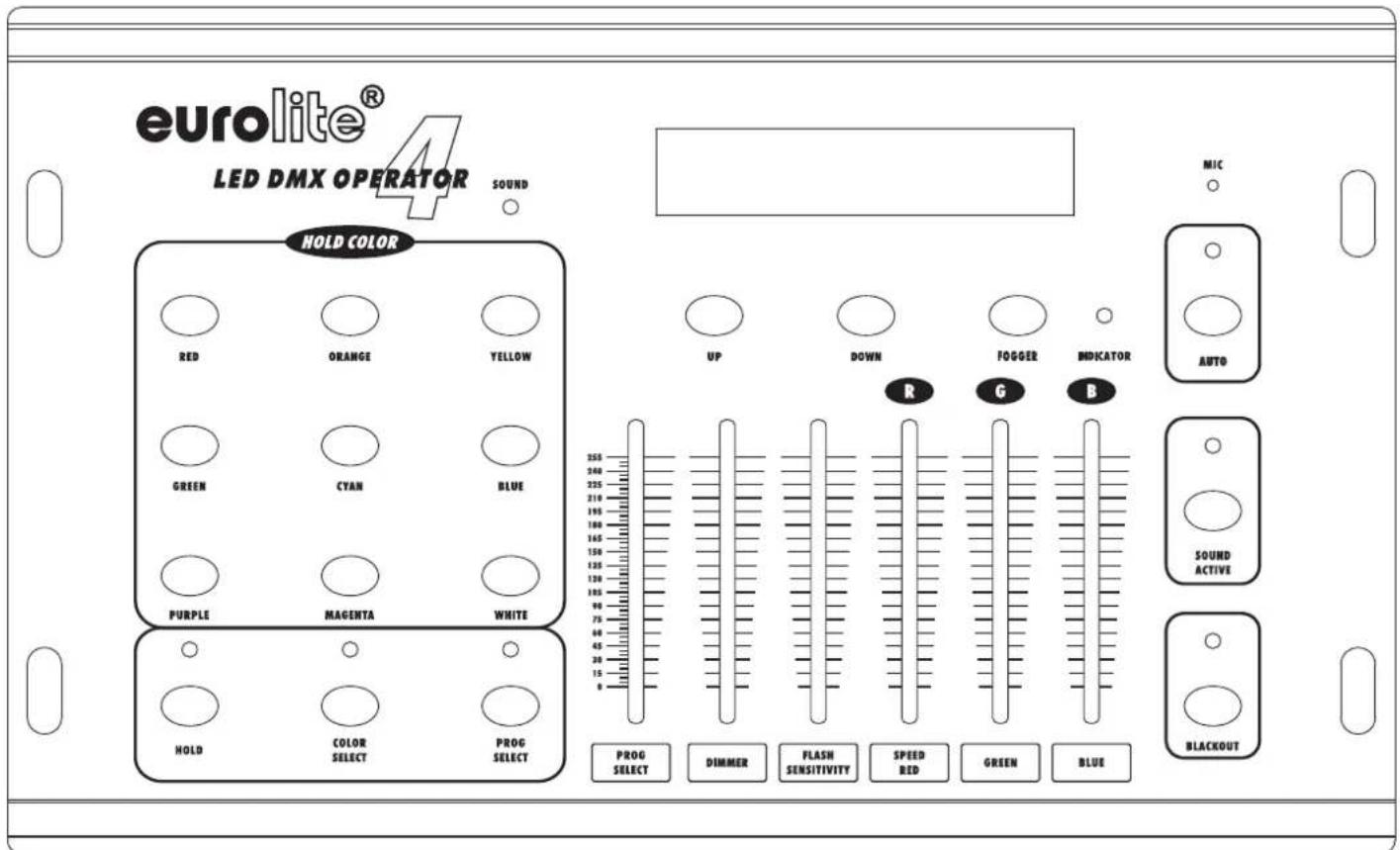
4.2 Overview
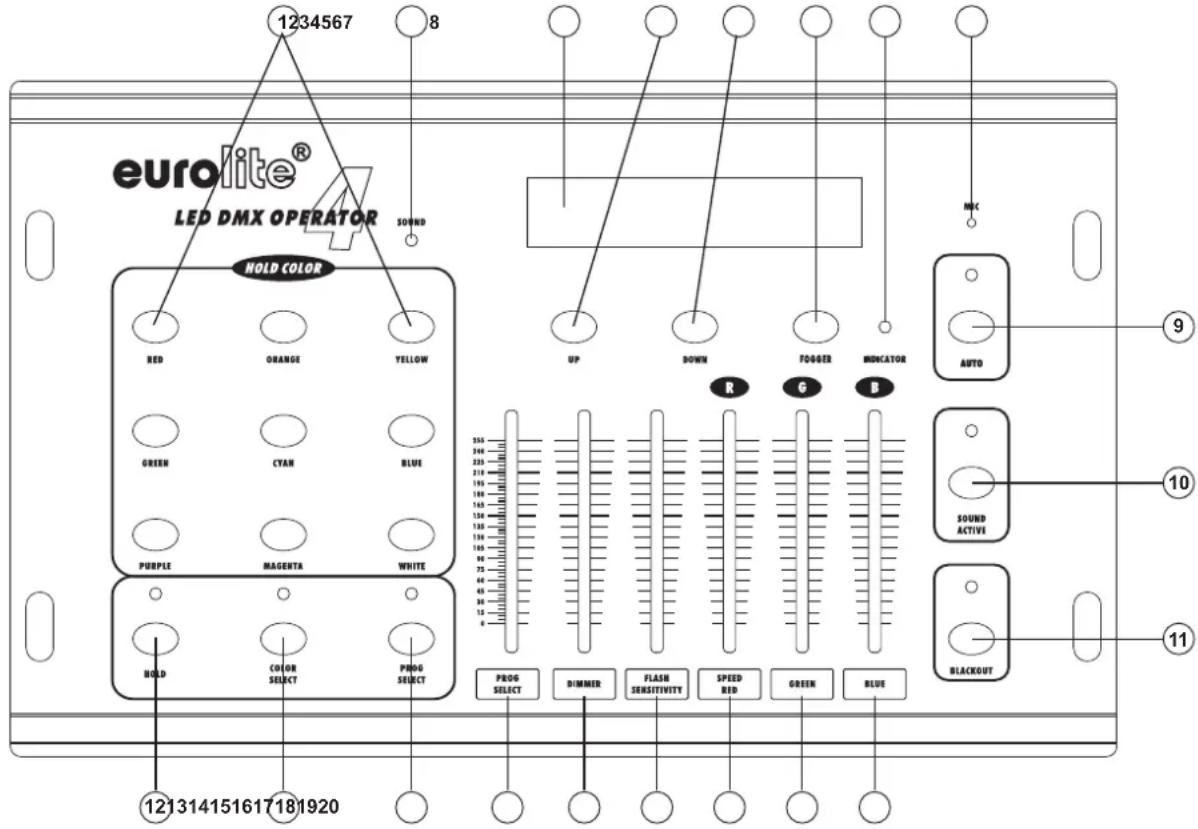
Overview of the control elements
text_image
1234567 8 eurolite® LED DMX OPERATOR SOUND HOLD COLOR RED ORANGE YELLOW GREEN CYAN BLUE PURPLE MAGENTA WHITE HOLD COLOR PROG SELECT PROG SELECT PROG SELECT DIMMER FLASH SPEED GREEN BLACKOUT 121314151617181920 UP DOWN FOLDER INDICATOR AUTO R G B 155 200 250 300 350 400 450 500 550 600 650 700 750 800 850 900 950 1000 1050 1100 1150 1200 1250 1300 1350 1400 1450 1500 1550 1600 1650 1700 1750 1800 1850 1900 1950 2000 2050 2100 2150 2200 2250 2300 2350 2400 2450 2500 2550 2600 2650 2700 2750 2800 2850 2900 2950 3000 3050 3100 3150 3200 3250 3300 3350 3400 3450 3500 3550 3600 3650 3700 3750 3800 3850 3900 3950 4000 4050 4100 4150 4200 4250 4300 4350 4400 4450 4500 4550 4600 4650 4700 4750 4800 4850 4900 4950 5000- Color-buttons für SELECT-COLOR MODE
- Sound LED
- Display
- Up button
- Down button
- Fogger button
- Indicator LED
- Microphone
- AUTO Button
- SOUND CONTROL Button
-
BLACKOUT- Button
-
HOLD button
- SELECT-COLOR MODE Button
- PROGRAM SELECT MODE Button
- PROGRAM SELECT channel fader
- Dimmer fader
- FLASH FREQUENCY/SENSITIVITY channel fader
- SPEED / RED channel fader
- Green fader
- Blue fader
English
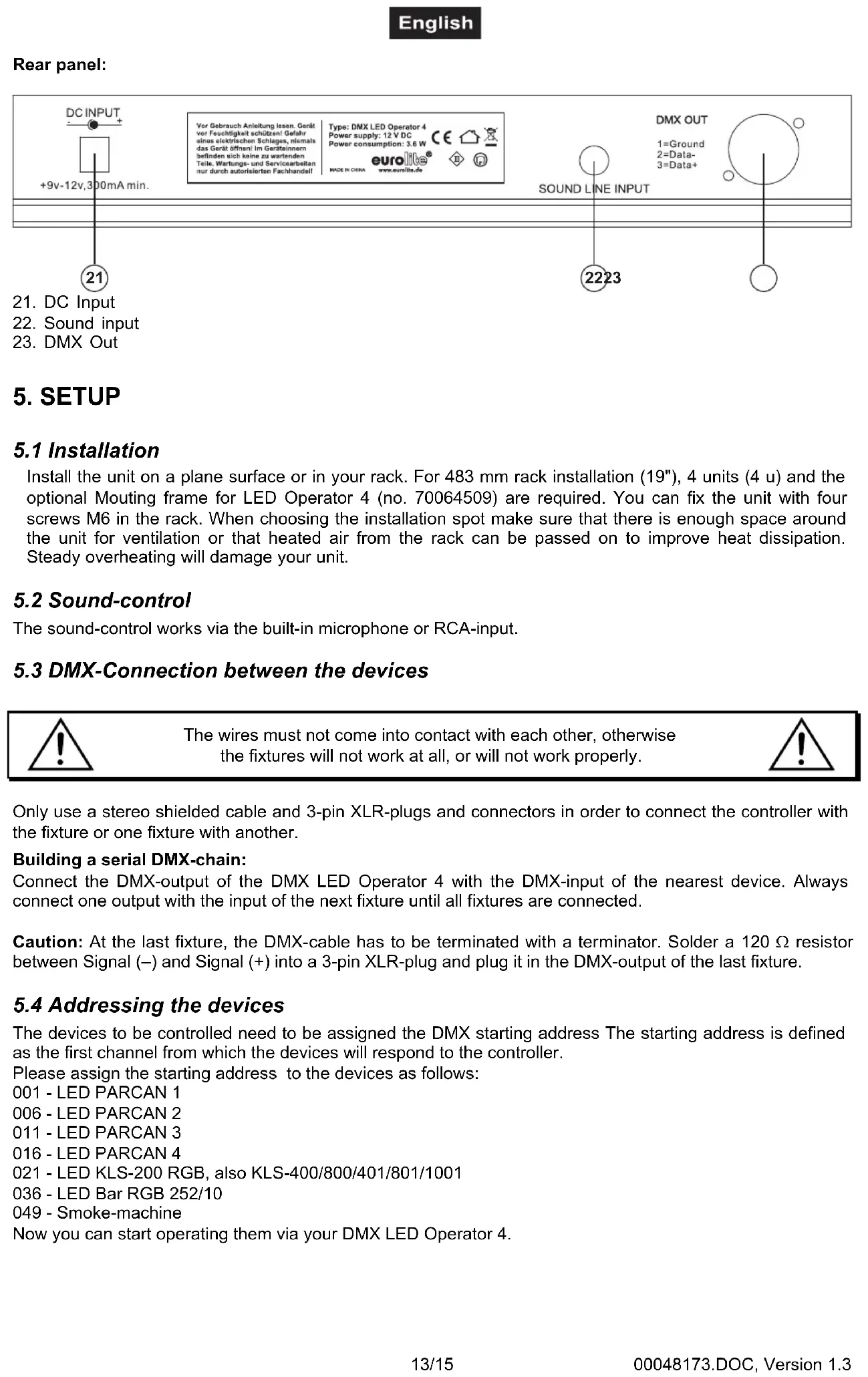
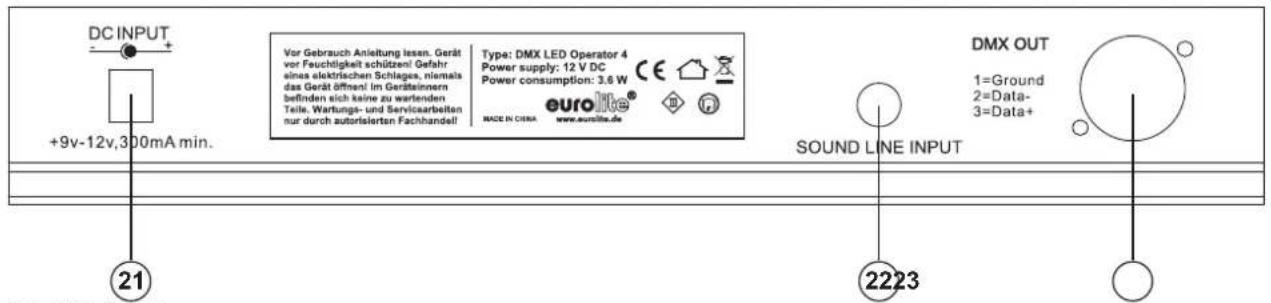
Rear panel:
Install the unit on a plane surface or in your rack. For 483 mm rack installation (19"), 4 units (4 u) and the optional Mouting frame for LED Operator 4 (no. 70064509) are required. You can fix the unit with four screws M6 in the rack. When choosing the installation spot make sure that there is enough space around the unit for ventilation or that heated air from the rack can be passed on to improve heat dissipation. Steady overheating will damage your unit.
5.2 Sound-control
The sound-control works via the built-in microphone or RCA-input.
5.3 DMX-Connection between the devices

The wires must not come into contact with each other, otherwise the fixtures will not work at all, or will not work properly.

Only use a stereo shielded cable and 3-pin XLR-plugs and connectors in order to connect the controller with the fixture or one fixture with another.
Building a serial DMX-chain:
Connect the DMX-output of the DMX LED Operator 4 with the DMX-input of the nearest device. Always connect one output with the input of the next fixture until all fixtures are connected.
Caution: At the last fixture, the DMX-cable has to be terminated with a terminator. Solder a 120 Ω resistor between Signal (−) and Signal (+) into a 3-pin XLR-plug and plug it in the DMX-output of the last fixture.
5.4 Addressing the devices
The devices to be controlled need to be assigned the DMX starting address The starting address is defined as the first channel from which the devices will respond to the controller.
Please assign the starting address to the devices as follows:
001 - LED PARCAN 1
006 - LED PARCAN 2
011 - LED PARCAN 3
016 - LED PARCAN 4
021 - LED KLS-200 RGB, also KLS-400/800/401/801/1001
036 - LED Bar RGB 252/10
049 - Smoke-machine
Now you can start operating them via your DMX LED Operator 4.
English
6. OPERATION
Connect the connection cable of the power-unit with the DC IN-socket. Plug the power unit into your outlet. After you connected the device to the mains, the DMX LED Operator 4 is ready for use.
6.1 Select Color-Mode
In the Select Color-Mode, you can call up the individual colors manually via the color buttons under „Hold Colors“ as well as via the channel faders.
Press the COLOR SELECT-button - the LED lites up green.
Press the button of the desired color.
Press the Up-/Down buttons in order to select from the different devices.
PAR 1-4 means Parcan 1-4
KLS-200 1P means Channels 1-6 of KLS-200
KLS-200 2P 3P means Channels 7-12 of KLS-200
KLS-200 4P means Channels 13-15 of KLS-200
LED BAR 1S means Channels 1-6 of LED Bar
LED BAR 2S 3S means Channels 7-12 of LED Bar
6.2 Internal Programs-Mode
In the Internal Programs-Mode, you can call up the internal programs.
Press the PROG SELECT-button - the LED lites up yellow. The display shows Pro Mode.
Push the Prog Select-channel-fader to the desired program. The display shows Pro and underneath 001-011, AUT, SOU.
Push the Dimmer-channel-fader to the desired brightness. The display shows Dim.
Push the Flash/Sensitivity-channel-fader to the desired Flash-Frequency. The display shows FI.
Push the Speed-channel-fader to the desired speed. The display shows Sp.
6.3 Auto-Mode
In the Auto-Mode, you can call up the auto program as an endless loop.
Press the AUTO-button - the LED lites up green. The display shows Auto Mode.
Push the Dimmer-channel-fader to the desired brightness. The display shows Dim.
Push the Flash/Sensitivity-channel-fader to the desired Flash-Frequency. The display shows FI.
Push the Speed-channel-fader to the desired speed. The display shows Sp.
6.4 Sound Control-Mode
The sound-control works via the built-in microphone.
Press the SOUND ACTIVE-button - the LED lites up red. The display shows Sound Mode.
Push the Dimmer-channel-fader to the desired brightness. The display shows Dim.
Push the Flash/Sensitivity-channel-fader to the desired sensitivity. The display shows Sen.
6.5 Hold
Via this button, the Pause Function is set.
Press the HOLD-button - the LED lites up red.
You can activate the Pause Function in any mode.
6.6 Blackout-Mode
Press the BLACKOUT-button and all devices will be set to Blackout-mode.
The Blackout LED lites up yellow.
6.7 Channel-fader Parameters in the Internal Programs-Mode
| CH1 CH2 CH3 CH4 CH5 CH6 | |||||
| 000-009 | Master Dimmer | Flash Frequency: 0 -10 OFF 11-255 (slow - fast) | R | G | B |
| 010-029 | Master Dimmer | Flash Frequency: 0 -10 OFF 11-255 (slow - fast) | Program Speed 0-255 (slow - fast) | NO USE | NO USE |
| 030-049 | |||||
| 050-069 | |||||
| 070-089 | |||||
| 090-109 | |||||
| 110-129 | |||||
| 130-149 | |||||
| 150-169 | |||||
| 170-189 | |||||
| 190-209 | |||||
| 210-229 | |||||
| 230-249 | Master Dimmer | Flash Frequency: 0 -10 OFF 11-255 (slow - fast) | Auto run speed(slow→quick) | NO USE | NO USE |
| 250-255 | Master Dimmer | Sensitivity: 0 -7 OFF 8 - 255 (insensitive - very sensitive) | NO USE | NO USE | NO USE |
8. CLEANING AND MAINTENANCE
DANGER TO LIFE!
Disconnect from mains before starting maintenance operation!
We recommend a frequent cleaning of the device. Please use a soft lint-free and moistened cloth. Never use alcohol or solvents!
There are no servicable parts inside the device. Maintenance and service operations are only to be carried out by authorized dealers.
Should you need any spare parts, please use genuine parts.
Should you have further questions, please contact your dealer.
9. TECHNICAL SPECIFICATIONS
| Power supply: 230 V AC, 50 Hz ~, | |
| via 9-12 V DC, 300 mA power unit included in the delivery | |
| Power consumption: 3.6 W | |
| Number of control-channels: 50 | |
| Sound-control: via built-in microphone or RCA-input | |
| DMX 512-output: 3-pin XLR-connector | |
| Dimensions (LxWxH): 320 x 190 x 60 mm | |
| Weight: 1.4 kg | |
Please note: Every information is subject to change without prior notice. 23.11.2011 ©
eurolite® GERMANY