UltraGear 27GQ50F - Monitor LG - Free user manual and instructions
Find the device manual for free UltraGear 27GQ50F LG in PDF.
 FR
FR
 BG
BG
 CS
CS
 DA
DA
 DE
DE
 EL
EL
 EN
EN
 ES
ES
 ET
ET
 FI
FI
 HU
HU
 ID
ID
 IT
IT
 JA
JA
 KK
KK
 KO
KO
 LT
LT
 LV
LV
 MK
MK
 NL
NL
 NO
NO
 PL
PL
 PT
PT
 RO
RO
 RU
RU
 SK
SK
 SL
SL
 SQ
SQ
 SV
SV
 TR
TR
 UK
UK
 ZH
ZH
| Brand | LG |
| Model | UltraGear 27GQ50F |
| Product type | LCD Monitor |
| Screen size | 27 inches |
| Power supply | AC 100-240V, 50/60Hz |
| Standby power consumption | Reduced according to DPMS standard |
| DDC protocol | Support for DDC1, DDC2B, E-DDC |
| Power management | On, Sleep and Off modes (DPMS VESA) |
| Electrical safety | Use the supplied power cord; do not open the device |
| Moisture protection | Do not install in humid environments (bathtub, sink, etc.) |
| Ventilation | Do not block ventilation openings |
| Screen cleaning | Unplug, use a soft lightly dampened cloth, no chemicals |
| General maintenance | Do not open; contact a qualified technician for any repairs |
| Defective pixels | Possibility of red, green or blue pixels without impact on performance |
| Image persistence | Avoid prolonged fixed display; use a screen saver |
| Repackaging | Keep the original packaging for transport |
| Power adapter precautions | Do not touch with wet hands; insert plug fully |
| Operating noises | Occasional clicks are normal during mode changes |
Frequently Asked Questions - UltraGear 27GQ50F LG
User questions about UltraGear 27GQ50F LG
0 question about this device. Answer the ones you know or ask your own.
Ask a new question about this device
Download the instructions for your Monitor in PDF format for free! Find your manual UltraGear 27GQ50F - LG and take your electronic device back in hand. On this page are published all the documents necessary for the use of your device. UltraGear 27GQ50F by LG.
USER MANUAL UltraGear 27GQ50F LG
- LG LED Monitor applies LCD screen with LED backlights.
Please read this manual carefully before operating your set and retain it for future reference.
24GQ50F
24GQ50B
24GQ40W
27GQ50A
27GQ50F
27GQ50B
27GQ40W
www.lg.com
Copyright ©2021 LG Electronics Inc. All Rights Reserved.
TABLE OF CONTENTS
LICENSE 2
ASSEMBLING AND PREPARING 3
USING THE MONITOR. 10
USER SETTINGS 12
TROUBLESHOOTING 18
PRODUCT SPECIFICATION 20
LICENSE
Each model has different licenses. Visit www.lg.com for more information on the license.

The terms HDMI, HDMI High-Definition Multimedia Interface, and the HDMI Logo are trademarks or registered trademarks of HDMI Licensing Administrator, Inc.
ASSEMBLING AND PREPARED
CAUTION
- Always use genuine LG components to ensure safety and product performance.
The product warranty will not cover damage or injury caused by the use of unauthorised components. It is recommended that use the supplied components. - Illustrations in this document represent typical procedures, so they may look different from the actual product.
- Do not apply foreign substances (oils, lubricants, etc.) to the screw parts when assembling the product.
(Doing so may damage the product.) - Applying excessive force when tightening screws may cause damage to the monitor. Damage caused in this way will not be covered by the product warranty.
- Do not carry the monitor upside down by just holding the base. This may cause the monitor to fall off the stand and could result in personal injury.
- When lifting or moving the monitor, do not touch the monitor screen. The force applied to the monitor screen may cause damage to it.
- For wave pattern on appearance, unlike the general method of coating, it's applied to added glittering material in raw material. With no peeled-off appearance, it has good durability. Please use it with confidence because there is no problem in using the product at all.
NOTE
The components may look different from those illustrated here.
- Without prior notice, all product information and specifications contained in this manual are subject to change to improve the performance of the product.
- To purchase optional accessories, visit an electronics store or an online shopping site, or contact the retailer from which you purchased the product.
The power cord provided may differ depending upon the region.
Supported Drivers and Software
You can download and install the latest version from the LGE website (www/lg.com).
- Monitor Driver OnScreen Control
Product and Button Description

How to Use the Joystick Button
You can easily control the functions of the monitor by pressing the joystick button or moving it left/right/up/ down with your finger.
Basic Functions
| A | B | C | D |
A (Power on): Press the joystick button once with your finger to turn on the monitor.
B (Power off): Press and hold the joystick button once more than 5 seconds with your finger to turn off the monitor.
C (Volume control): You can control the volume by moving the joystick button left/right.
D(Controls screen brightness): You can control the screen's brightness by moving the joystick button up/down.
Moving and Lifting the Monitor
When moving or lifting the monitor, follow these instructions to prevent the monitor from being scratched or damaged and to ensure safe transportation, regardless of its shape or size.
- Place the monitor in the original box or packing material before attempting to move it.
- Before moving or lifting the monitor, disconnect the power cord and all other cables.
- Hold the bottom and side of the monitor frame firmly. Do not hold the panel itself.
- When holding the monitor, the screen should face away from you to prevent it from being scratched.
- When transporting the monitor, do not expose the monitor to shock or excessive vibration.
- When moving the monitor, keep it upright and never turn the monitor on its side or tilt it sideways.


CAUTION
- Avoid touching the monitor screen as much as possible.
-
This may result in damage to the screen or some of the pixels used to create images.
-
If you use the monitor panel without the stand base, its joystick button may cause the monitor to become unstable and fall, resulting in damage to the monitor or human injury. In addition, this may cause the joystick button to malfunction.
Installing on a Table
- Lift the monitor and place it on the table in an upright position. Place the monitor at least 100mm away from the wall to ensure sufficient ventilation.

A 100mm

CAUTION
- Unplug the power cord before moving or installing the monitor. There is risk of electric shock.
- Make sure to use the power cord that is provided in the product package and connect it to a grounded power outlet.
- If you need another power cord, please contact your local dealer or the nearest retail store.
Adjusting the Angle
1 Place the monitor mounted on the stand base in an upright position.
2 Adjust the angle of the screen.
The angle of the screen can be adjusted forward or backward from -5^ to 15^ for a comfortable viewing experience.
WARNING
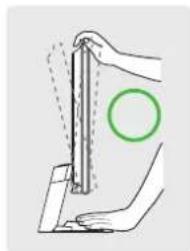
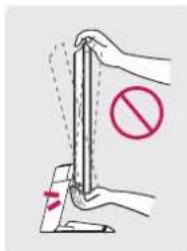
To avoid injury to the fingers when adjusting the screen, do not hold the lower part of the monitor's frame as illustrated below.
- Be careful not to touch or press the screen area when adjusting the angle of the monitor.

Using the Kensington Lock
For more information on installation and usage, refer to the Kensington lock owner's manual or visit the website at http://www.kensington.com.
Connect the monitor to a table using the Kensington security system cable.

NOTE
- The Kensington security system is optional. You can obtain optional accessories from most electronics stores.
Installing on the Wall
This monitor meets the specifications for the wall mount plate or other compatible devices.
Install the monitor at least 100mm away from the wall and leave about 100mm of space at each side of the monitor to ensure sufficient ventilation. Detailed installation instructions can be obtained from your local retail store. Alternatively, please refer to the manual for how to install and set up a tilting wall mounting bracket.
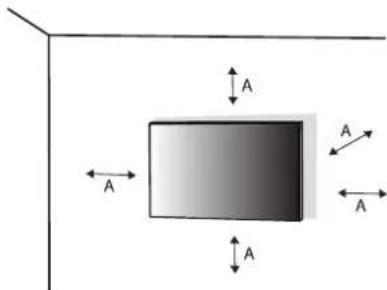
k100mm
Installing the Wall Mount Plate
To install the monitor to a wall, attach a wall mounting bracket (optional) to the back of the monitor. Make sure that the wall mounting bracket is securely fixed to the monitor and to the wall.
| Models 24GQ50F | 24GQ50B 24GQ40W | 27GQ50F 27GQ50B 27GQ40W 27GQ50A |
| Wall Mount (mm) 75 x 75 100 x 100 | ||
| Standard screw M4 x L10 | ||
| Number of screws 4 | ||
| Wall Mount Plate (Optional) LSW149 | ||
NOTE
Use the screws specified by VESA standards.
- The wall mount kit includes the installation guide and all necessary parts.
- The wall mounting bracket is optional. You can obtain optional accessories from your local dealer.
- The length of the screw may differ for each wall mounting bracket. If you use screws longer than the standard length, it may damage the inside of the product.
- For more information, please refer to the user manual for the wall mounting bracket.
- Be careful not to apply too much force while mounting the wall mount plate as it may cause damage to the screen.
- Remove the stand before installing the monitor on a wall mount by performing the stand attachment in reverse.

CAUTION
- Unplug the power cord before moving or installing the monitor to avoid electric shock.
- Installing the monitor on the ceiling or on a slanted wall may result in the monitor falling off, which could lead to injury. Use an authorised LG wall mount and contact the local dealer or qualified personnel.
- To prevent injury, this apparatus must be securely attached to the wall in accordance with the installation instructions.
- Applying excessive force when tightening screws may cause damage to the monitor. Damage caused in this way will not be covered by the product warranty.
- Use the wall mounting bracket and screws that conform to VESA standards. Damage caused by the use or misuse of inappropriate components will not be covered by the product warranty.
- When measured from the back of the monitor, the length of each installed screw must be 8mm or less.

A Wall Mount Plate
g Back of the Monitor
C:Standard screw
D Max. 8 mm
USING THE MONITOR
- Illustrations in this manual may differ from the actual product.
Press the joystick button, go to [Menu] > [Input], and then select the input option.

CAUTION
- If you use generic cables not certified by LG, the screen may not display or there may be image noises.
- Do not press the screen for a prolonged time. This may cause image distortion.
- Do not display a still image on the screen for a prolonged time. This may cause image retention. Use a PC screenshot if possible.
- When connecting the power cord to the outlet, use a grounded (3-hole) power strip or a grounded power outlet.
- The monitor may flicker when turned on in an area where the temperature is low. This is normal.
- Sometimes red, green, or blue spots may appear on the screen. This is normal.
Connecting to a PC
This monitor supports the features
* Pachet that allows you to add a device to your computer without having to reconfigure anything or install any manual drivers.
HDMI Connection
Transmits digital video and audio signals from your PC to the monitor.

NOTE
- Using a DVI to HDMI / DP (DisplayPort) to HDMI cable may cause compatibility issues.
- Use a certified cable with the HDMI logo attached. If you do not use a certified HDMI cable, the screen may not display or a connection error may occur.
Recommended HDMI cable types
- High Speed HDMI™ cable
- High Speed HDMI™ cable with Ethernet
DisplayPort Connection
Transmits digital video and audio signals from your PC to the monitor.
NOTE
- There may be no video or audio output depending on the DP (DisplayPort) version of the PC.
- Make sure to use the supplied DisplayPort cable of the product. Otherwise, this may cause the device to malfunction.
- If you are using a Mini DisplayPort output graphics card, use a Mini DP to DP (Mini DisplayPort to DisplayPort) cable or gender that supports DisplayPort1.4. (Sold separately)
Connecting AV Devices
HDMI Connection
HDMI transmits digital video and audio signals from your AV device to the monitor.
NOTE
- Using a DVI to HDMI / DP (DisplayPort) to HDMI cable may cause compatibility issues.
- Use a certified cable with the HDMI logo attached. If you do not use a certified HDMI cable, the screen may not display or a connection error may occur.
Recommended HDMI cable types
- High Speed HDMF/m cable
- High Speed HDMF/m cable with Ethernet
Connecting Peripherals
Connecting Headphones
Connect peripherals to the monitor via the headphones port.
NOTE
Peripheral devices are sold separately.
- Depending on the audio settings of the PC and external device, headphones and speaker functions may be limited.
- If you use angled earphones, it may cause a problem with connecting another external device to the monitor. Therefore, it is recommended to use straight earphones.

Angled Straight

(Recommend)
USER SETTINGS

NOTE
- Your monitor's OSD (On Screen Display) may differ slightly from that shown in this manual.
Activating the Main Menu

Joystick Button
1 Press the joystick button on the bottom of the monitor.
2 Move the joystick up/down and left/right to set the options.
3 Press the joystick button once more to exit the main menu.
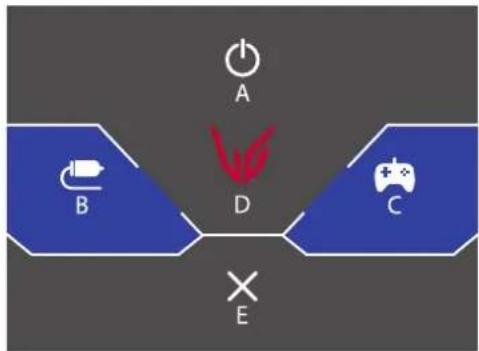
Main Menu Features
| Main Menu Description | |
| A: [Power Off] Turns off the monitor. | |
| B: [Input] Sets input mode. | |
| C: [Game Mode] Sets the game mode for gaming. | |
| D: [Settings] Configures the screen settings. | |
| E: [Exit] Exits the main menu. |
Menu Settings
1 To view the OSD menu, press the joystick button at the bottom of the monitor and then enter the [Menu].
2 Move the joystick up/down and left/right to set the options.
3 To return to the upper menu or set other menu items, move the joystick to or pressing (@) it.
4 If you want to exit the OSD menu, move the joystick to until you exit.


[Game Mode] [Game Adjust] [Picture Adjust] [Input] [General]
[Game Mode]
[Menu] > [Game Mode]
- [Gamer 1]/[Gamer 2]: [Gamer 1] and [Gamer 2] picture modes allow you to save two sets of customized display settings, including game-related setup options.
- [FPS]: This mode is optimized for FPS games. It is suitable for very dark FPS games.
[RTS]: This mode is optimized for RTS Game.
[Vivid]: Optimized the screen for vivid colours.
- [Reader]: Optimizes the screen for reading documents. You can brighten the screen in the OSD menu.
[Game Adjust]
[Menu] > [Game Adjust]
- [FreeSync Premium]: Provides seamless and natural images in a gaming environment. Note that the screen flickering may occur intermittently in a specific gaming environment.
- [On]: [FreeSync Premium] function on.
- [Off]: [FreeSync Premium] function off.
Supported Interface: DisplayPort (FreeSync Premium), HDMI (FreeSync Premium). - Supported Graphic Card: A graphic card that supports AMD's FreeSync is necessary.
- Supported Version: Make sure to update the graphic card to the latest driver.
- For more information and requirement, refer to AMD website (www.amd.com).
[1ms Motion Blur Reduction]
- [On]: This mode minimizes motion blur in fast-moving videos. This function is available for the following vertical frequency.
120Hz/144 Hz:HDMI
120Hz/144Hz/165Hz :DisplayPort
[Off]:Turns [1ms Motion Blur Reduction] Mode off.
- To reduce motion blur, brightness is reduced with backlight control.
-
[1ms Motion Blur Reduction] and FreeSync feature can not be used at the same time.
-
This function is game-optimized.
- It is recommended to turn off when you are not using the gaming function.
Flicker may occur during [1ms Motion Blur Reduction] operation.
-
[Black Stabilizer]: You can control the black contrast to have better visibility in dark scenes. You can easily distinguish objects on dark game screens.
-
[Response Time]: Sets a response time for displayed pictures based on the speed of the screen.
For a normal environment, it is recommended that you use [Fast].
For a fast-moving picture, it is recommended that you use [Faster].
Once [Faster] mode is selected, Motion Blur may occur depending on the content.
[Faster]: Sets the response time to faster.
- [Fast]: Sets the response time to fast.
- [Normal]: Sets the response time to normal.
- [Off]: Disables the feature.
- [Crosshair]: Crosshair provides a mark on the center of the screen for First Person Shooter (FPS) games. Users can select the crosshair that fits their gaming environment among four different crosshairs.
[FPSCounter]
- [On]: The indicator is displayed on the upper left of the screen. It will reflect the actual frame rate that is received at the input.
-
[Off]: Does not use the FPS Counter feature.
-
[FPS Counter] and [Crosshair] feature can not be used at the same time.
[Game Reset]: Returns game to the default settings.
[Picture Adjust]
[Menu] > [Picture Adjust]
[Brightness]: Adjusts the brightness of the screen.
[Contrast]: Adjusts the contrast of the screen.
[Sharpness]: Adjusts the sharpness of the screen.
[Gamma]
- [Mode 1], [Mode 2], [Mode 3]: The higher the gamma value, the darker the image becomes.
Likewise, the lower the gamma value, the lighter the image becomes.
- [Mode 4]: If you do not need to adjust the gamma settings, select [Mode 4].
- [Color Temp]: Set your own colour temperature.
- [Custom]: The user can customize the red, green and blue colour.
- [Wam]: Sets the screen colour to a reddish tone.
- [Medium]: Sets the screen colour to between a red and blue tone.
- [Cool]: Sets the screen colour to a bluish tone.
- [Manual]: The user can fine-tune the colour temperature.
[R/G/B]: You can customize the picture colour using red, green, and blue colours.
[Six Color]: Meets the user requirements for colours by adjusting the hue and saturation of the six colours (red, green, blue, cyan, magenta, and yellow) and then saving the settings.
Hue: Adjusts the tone of the screen colours.
- Saturation: Adjusts the saturation of the screen colours. The lower the value, the less saturated and brighter the colours become. The higher the value, the more saturated and darker the colours become.
- [Black Level]: Sets the offset level (for HDMI only).
Offset: as a reference for a video signal, this is the darkest colour the monitor can display.
- [High]: Keeps the current contrast ratio of the screen.
- [Low]: Lowers the black levels and raises the white levels from the current contrast ratio of the screen.
[DFC] - [On]: Adjusts the brightness automatically according to the screen.
- [Off]: Disables the DFC feature.
[Picture Reset]: Returns picture and colour to the default settings.
[Input]
[Menu] > [Input]
- [Input List]: Selects the input mode.
[Aspect Ratio]: Adjusts the aspect ratio of the screen. - [Auto Input Switch]: When [Auto Input Switch] is set to [On], display will automatically switch to new input when connected.
[General]
[Menu] > [General]
- [Language]: Sets the menu screen to the desired language.
-
[User-defined Key 1]/[User-defined Key 2]: You can customize the main menu to access your preferred menu easily. [User-defined Key 1] and [User-defined Key 2] appear at the left/right of the main menu.
-
[SMART ENERGY SAVING]: Conserve energy by using luminance compensation algorithm.
- [High]: Saves energy using the high-efficiency [SMART ENERGY SAVING] feature.
- [Low]: Saves energy using the low-efficiency [SMART ENERGY SAVING] feature.
- [Off]: Enables the feature.
- The value of energy saving data may differ depending on panel and panel suppliers.
- If you select the option of [SMART ENERGY SAVING] is [High] or [Low], monitor luminance become lower or higher depend on source.
-
[Deep Sleep Mode]: When Deep Sleep mode is enabled, power consumption is minimized while the monitor is in standby mode.
-
[On]: Enables [Deep Sleep Mode].
-
[Off]: Enables the feature.
-
[Automatic Standby]: If there is no operation on the monitor for a certain period of time, the monitor will automatically switch to standby mode.
- [Buzzer]: This feature lets you set the sound generated from Buzzer when your monitor powers on.
- [OSD Lock]: This feature disables the configuration and adjustment of menus. All features are disabled except [Brightness], [Contrast] in [Picture Adjust], [Input], [OSD Lock] and [Information] in [General].
-
[Information]: The following display information will be shown; [Total Power On Time], [Resolution].
-
[Reset to Initial Settings]: Returns to the default settings.
TROUBLESHOOTING
Nothing is displayed on the screen.
Is the monitor's power cord plugged in?
- Check if the power cord is correctly plugged into the power outlet.
Is the monitor's adapter plugged in?
- Make sure to use the adapter that is provided in the product package.
- If the monitor is in sleep mode, move the mouse, or press any key on the keyboard, to switch the display
on.
- Check if the computer is turned on.
-
Is the [The screen is not currently set to the recommended resolution.] message being displayed?
-
This occurs when signals transferred from the PC (graphics card) are out of the recommended horizontal or vertical frequency range of the monitor. Please see the PRODUCT SPECIFICATION section of this manual to set the appropriate frequency.
Is the [No Signal] message being displayed?
- This is displayed when the signal cable between the PC and the monitor is missing or disconnected. Check the cable and reconnect it.
Is the [Out of Range] message being displayed?
- This occurs when signals transferred from the PC (graphics card) are out of the horizontal or vertical frequency range of the monitor. Please see the Product Specification section of this manual to set the appropriate frequency.
Do you see an "Unrecognized monitor, Rhonid Flug (VHSA)?"
Have you installed the display driver?
- Be sure to install the display driver from our web site: http://www/lg.com.
Make sure to check if the graphics card supports PIDgntiplay
The screen retains an image.
- Does image sticking occur even when the monitor is turned off?
- Displaying a still image for a prolonged time may cause damage to the screen, resulting in the retention of the image.
To extend the lifetime of the monitor, use a screensaver.
Screen display is unstable and shaky. / Images displayed on the monitor leave shadow trails.
Did you select the appropriate resolution?
- If the selected resolution is HDMI 1080i 60/50 Hz (interlaced), the screen may be flickering. Change the resolution to 1080p or the recommended resolution.
The display colour is abnormal.
Does the display appear discolored (16 colours)?
- Set the colour to 24 bit (true colour) or higher. In Windows, go to Control Panel > Display > Settings > Colour Quality. (The settings may differ depending on the operating system (OS) you use.)
- Does the display colour appear unstable or monochrome?
- Check if the signal cable is connected properly. Reconnect the cable or reinsert the PC's graphics card.
Are there spots on the screen?
- When using the monitor, pixilated spots (red, green, blue, white, or black) may appear on the screen. This is normal for an LCD screen. It is not an error, nor is it related to the monitor's performance.
Some features are disabled.
- Are some functions not available when you press the Menu button?
- The OSD is locked. Disable [OSD Lock] in [General].
No sound from the headphone port.
-
Are images displayed using DisplayPort or HDMI input without sound?
-
Make sure that the headphone port connections are made properly.
- Try increasing the volume with the joystick.
- Set the audio output of the PC to the monitor you are using. On Microsoft Windows, go to Control Panel > Hardware and Sound > Sound > set the Monitor as default device. (The settings may differ depending on the operating system (OS) you use.)
PRODUCT SPECIFICATION
Specifications are subject to change without notice.
The -symbol means alternating current, and the symbol means direct current.
Colour Depth:
8-bit colour is supported.
Resolution
Max Resolution:
-1920X1080@144Hz(HDMI)
- 1920 x 1080 @ 165 Hz (DisplayPort)
Recommended Resolution:
- 1920 x 1080 @ 144 Hz (HDMI)
- 1920 x 1080 @ 165 Hz (DisplayPort)
Environmental Conditions
-
Operating Conditions
-
Temperature: 0^ to 40^
- Humidity: Less than 80%
Storing Conditions
- Temperature: -20°C to 60°C
- Humidity: Less than 85%
AC/DC Adapter
24GQ50F/24GQ50B/24GQ40W
Model: ADS-45FSQ-19 19032EPG-1
ADS-45FSQ-19 19032EPK-1
ADS-45FSQ-19 19032EPCU-1
ADS-45FSQ-19 19032EPI-1
ADS-45SQ-19-3 19032E
Manufacturer: Shenzhen Honor Electronic CO., LTD.
Model:AD2138S20
AD2138620
AD2138U20
AD10550LF
Manufacturer: PI Electronics (H.K.) Ltd.
Input: 100-240 V ~ 50/60 Hz 1.2 A
Output:19V-1.7A
27GQ50F/27GQ50B/27GQ40W/27GQ50A
Model: ADS-45FSQ-19 19040EPG-1
ADS-45FSQ-19 19040EPK-1
ADS-45FSQ-19 19040EPCU-1
ADS-45SQ-19-3 19040E
Manufacturer: Shenzhen Honor Electronic CO., LTD.
Model:AD2137S20
AD2137620
AD10530LF
Manufacturer: PI Electronics (H.K.) Ltd.
Input: 100-240 V~50/60 Hz 1.2 A
Output:19V-2.1A
(India only)
Model:DA-48F19
Manufacturer: Asian Power Devices Inc.
Model: MS-Z2530R190-048M0-E
Manufacturer: MOSO POWER Supply Technology CO LTD
Input: 100-240 V~50/60 Hz 1.2~1.4 A
Output:19V-2.53A
Dimensions: Monitor Size (Width x Depth x Height)
24GQ50F/24GQ50B/24GQ40W
With Stand (mm): 539.5 x 196.0 x 414.2
Without Stand (mm): 539.5 x 39 x 322.2
27GQ50F/27GQ50B/27GQ40W/27GQ50A
With Stand (mm): 613.7 x 201.6 x 456.1
Without Stand (mm):613.7 x 39.3 x 364.1
Weight (Without Packaging)
24GQ50F/24GQ50B/24GQ40W
With Stand (kg): 3.57
Without Stand (kg): 2.97
27GQ50F/27GQ50B/27GQ40W/27GQ50A
With Stand (kg): 3.87
Without Stand (kg): 3.25
Power Sources
24GQ50F/24GQ50B/24GQ40W
Power Rating: 19 V = 1.5 A
Power Consumption
- Operating Mode: 24 W (Typical)
- Sleep Mode (Standby Mode): ≤ 0.5W^*
-OffMode:≤0.3W
27GQ50F/27GQ50B/27GQ40W/27GQ50A
Power Rating: 19 V -1.5A
Power Consumption
- Operating Mode: 32 W (Typical)
- Sleep Mode (Standby Mode): ≤ 0.5 W*
-OffMode:≤0.3W
- The Operating Mode of Power Consumption is measured with LGE test standard. (Full White pattern, Maximum resolution, Outgoing condition)
- The Power Consumption level can be different by operating condition and monitor setting.
** The monitor goes to the sleep mode in a couple of minutes. (Max. 5 minutes)
Supported Mode
(Preset Mode, HDMI/DisplayPort)
| Resolution Horizontal | Frequency (kHz) Vertical Frequency (Hz) Polarity (H/V) Remarks | |||
| 640 x 480 31.469 59.94 | -/- | |||
| 800 x 600 37.879 60.317 | +/-/+ | |||
| 1024 x 768 48.363 60.0 | -/- | |||
| 1920 x 1080 67.50 60 | +/-/- | |||
| 1920 x 1080 | 113.22 99.93 | +/- | ||
| 1920 x 1080 | 137.26 119.98 | +/- | ||
| 1920 x 1080 | 161.42 | 144 | +/- | HDMI only |
| 1920 x 1080 | 166.59 | 143.98 | +/- | DisplayPort only |
| 1920 x 1080 | 185.57 | 164.96 | +/- | DisplayPort only |
If you use an input timing that is outside the supported frequency, you may experience poor response speed or image quality.
HDMI Timing (Video)
| Resolution Horizontal | Frequency (kHz) Vertical Frequency (Hz) Remarks | ||
| 480P 31.5 60 | |||
| 576P 31.25 50 | |||
| 720P 37.5 50 | |||
| 720P 45 60 | |||
| 1080P 56.25 50 | |||
| 1080P 67.5 60 | |||
| 1080P 112.5 60 | |||
| 1080P 135 120 | |||

The model and serial number of the product are located on the back and on one side of the product.
Record them below in case you ever need service.
Model
Serial No.
IMPORTANT PRECAUTIONS
This unit has been engineered and manufactured to ensure your personal safety, however improper use may result in potential electrical shock or fire hazards. In order to allow the proper operation of all safeguards incorporated in this display, observe the following basic rules for its installation, use, and servicing. All precautions and safety information apply to LCD and OLED models.
On Safety
Use only the power cord supplied with the unit. In case you use another power cord, make sure that it is certified by the applicable national standards if not being provided by the supplier. If the power cable is faulty in any way, please contact the manufacturer or the nearest authorized repair service provider for a replacement.
The appliance coupler is used as the disconnect device.
Please make sure the device is installed near the wall outlet to which it is connected and that the outlet is easily accessible.
Operate the display only from a power source indicated in the specifications of this manual or listed on the display. If you are not sure what type of power supply you have in your home, consult with your dealer.
Overloaded AC outlets and extension cords are dangerous. So are frayed power cords and broken plugs. They may result in a shock or fire hazard. Call your service technician for replacement.
As long as this unit is connected to the AC wall outlet, it is not disconnected from the AC power source even if the unit is turned off.
Do not Open the Display:
- There are no user serviceable components inside.
- There are Dangerous High Voltages inside, even when the power is OFF.
- Contact your dealer if the display is not operating properly.
To Avoid Personal Injury :
- Do not place the display on a sloping shelf unless properly secured.
- Use only a stand recommended by the manufacturer.
- Do not drop an object on or apply impact to the product. Do not throw any toys or objects on the product screen.
It can cause injury to human, problem to product and damage the display.
To Prevent Fire or Hazards:
- Always turn the display OFF if you leave the room for more than a short period of time. Never leave the display ON when leaving the house.
- Keep children from dropping or pushing objects into the display's cabinet openings. Some internal parts carry hazardous voltages.
- Do not add accessories that have not been designed for this display.
- When the display is to be left unattended for an extended period of time, unplug it from the wall outlet.
- In the presence of thunder and lightning, never touch the power cord and signal cable because it can be very dangerous. It can cause electric shock.
On Installation
Do not allow anything to rest upon or roll over the power cord, and do not place the display where the power cord is subject to damage.
Do not use this display near water such as near a bathtub, washbowl, kitchen sink, laundry tub, in a wet basement, or near a swimming pool.
Displays are provided with ventilation openings in the cabinet to allow the release of heat generated during operation. If these openings are blocked, built-up heat can cause failures which may result in a fire hazard.
Therefore, NEVER:
- Block the bottom ventilation slots by placing the display on a bed, sofa, rug, etc.
- Place the display in a built-in enclosure unless proper ventilation is provided.
- Cover the openings with cloth or other material.
- Place the display near or over a radiator or heat source.
Do not rub or strike the Active Matrix LCD with anything hard as this may scratch, mar, or damage the Active Matrix LCD permanently.
Do not press the LCD screen with your finger for a long time as this may cause some afterimages.
Some dot defects may appear as Red, Green or Blue spots on the screen.
However, this will have no impact or effect on the display performance.
If possible, use the recommended resolution to obtain the best image quality for your LCD display. If used under any mode except the recommended resolution, some scaled or processed images may appear on the screen. However, this is characteristic of the fixed-resolution LCD panel.
Displaying a still image for long time on the monitor may leave persistent image or stain on the monitor screen. To avoid this problem, use a screen saver and power off when this product is not used. Persistent image or stain caused by long time usage are not covered by the warranty on this product.
Do not shock or scratch the front and sides of the screen with metallic objects.
Otherwise, it may cause damage to the screen.
Make sure the panel faces forward and hold it with both hands to move. If you drop the product, the damaged product can cause electric shock or fire. Contact an authorized the service center for repair. Avoid high temperatures and humidity.
Do not install this product on a wall if it could be exposed to oil or oil mist.
- This may damage the product and cause it to fall.
For displays with glossy bezels the user should consider the placement of the display as the bezel may cause disturbing reflections from surrounding light and bright surfaces.
Do not use products using high voltage around the Monitor. (ex. Electrical Swatter)
- Monitor may have malfunction as its electrical shock.
Precautions to the AC Adapter and Power
If water or any foreign substance goes inside the product (TV, monitor, power cord, or AC adapter), disconnect the power cord immediately and contact the service center.
- Otherwise, this may cause a fire or electric shock due to damage to the product.
Do not touch the power plug or AC adapter with wet hands. If the pins of the plug are wet or dusty, wipe and dry them before use.
- Otherwise, this may cause a fire or electric shock.
Make sure to completely insert the power cord into the AC adapter.
- If loosely connected, the poor connection may cause a fire or electric shock.
Be sure to use power cords and AC adapters provided or approved by LG Electronics, Inc. - The use of non-approved products may cause a fire or electric shock.
When unplugging the power cord, always pull it by the plug. Do not bend the power cord with excessive force.
- The power line can be damaged, which may cause electric shock or fire.
Be careful not to step or place heavy objects (electronic appliances, clothing, etc.) on the power cord or AC adapter. Be careful not to damage the power cord or AC adapter with sharp objects. - Damaged power cords may cause a fire or electric shock.
Never disassemble, repair or modify the power cord or AC adapter.
This may cause a fire or electric shock.
Be sure to keep the outlet, AC adapter, and pins of the power plug clean from dust and etc.
This may cause a fire.
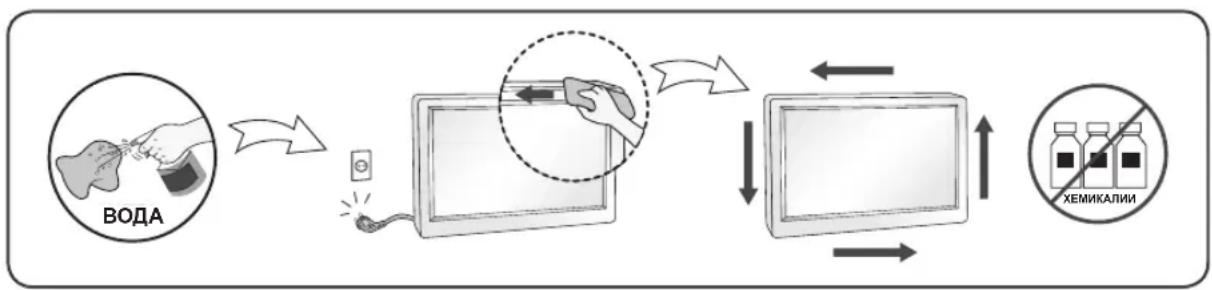
On Cleaning
- Unplug the display before cleaning the face of the display screen.
- Use a slightly damp (not wet) cloth. Do not use an aerosol directly on the display screen because over-spraying may cause electrical shock.
- When cleaning the product, unplug the power cord and scrub gently with a soft cloth to prevent scratching. Do not clean with a wet cloth or spray water or other liquids directly onto the product. An electric shock may occur. (Do not use chemicals such as benzene, paint thinners or alcohol)
- Spray water onto a soft cloth 2 to 4 times, and use it to clean the front frame; wipe in one direction only. Too much moisture may cause staining.

On Repacking
- Do not throw away the carton and packing materials. They make an ideal container in which to transport the unit. When shipping the unit to another location, repack it in its original material.
MASA TÉ RÉNDÉSISHME PARAPRAKE
Ky aparat ᵓshte inexhinieruar dhe prodhuar né MENyre qē tē garantojē sigurīne tuaj personale, sidoqofté, pērdorimi i gabuar mund tē shkaktojē elektroshok ose zjarr. Ně MENyre qē tē lejoni funkSIONimin e sakte tē githa siguresave tē brendatrupēzuara ně kětē televizor, vēzhgoni regullat bazē tē mēposhtme per instalimin, pērdorimin dhe mirëmbajtjen e tij. Tē githa masat paraprake dhe informazioni i sigurise vlejnè per modelet LCD dhe OLED.
Rrethsigurise
Pördorni vetem kordonin elektrik qè jepet me aparatin. Nèse pördorni njè kordon tjeter elektrik, sigurohuni qèèshte i vertetuar nga standardet kombëtare né fuqi nèse nuk juèshte ofruar nga furnizuesi. Nèse kabloja elektrikeèshte me defekt, lutemi tèkontaktoni me prodhuesin ose ofruesin e autorizuar tè sherbimit tè riparimit mè tè afert per ta zëvendésuar.
He otBaprTe dinCpIe:
B HrO He ce cBdIbXaT KOMNoHEHTN, KOITo MOraT Da ce 6cJyXBaT OT Ntpe6nteJI.
B HrO ca 3aJIOXeHn ONaCHn HAnpeXeHn BUCOKo BbTpe, DOpN KOraTo 3axpaHbaHeTo e N3KJIouHo.
Cbpxte ce cbc cBor npectabnten, ako dincnneer He pa60tn npabnHO.
3a da n36eHete Teleecn nobpei:
He nocTabraIte dncnpe Ha haknoheHn pafoBe, oCbeH aKO nocneHnTe He ca yctOnuBO 3actonopeHn.
- I3non3BaIte cAmO cToiKN, npenopbuaHn OT npon3BOJnteJIa.
He n3nyckaIte npedMeTn H He ynpaxKHaBae T haTACK Bbpxy ycToPcNCTBOTo. He noCTaBnTe irpaKm nn DpyrnpedMeTn Bbpxy ekpAHa Ha ycToPcNCTBOTo. ToBa moKe da npuHn HapaHraBe Ha xopa, npo6JIemC ycToPcNCTBOTo n NOBpeDa Ha dncJIeJ.
Ho Te He ce OTPa3raBt He6laorponpyTHO Bbpxy KayeCTBOTo Ha KapTuHaTa.
No Bb3MOxHOCr 3n0J3BaIe npenopbUHTeJIHaTa pa3JeJIHTeJIHa cnoc6HOCT 3a noJyUbaHe Ha HauD6po KaueCTBO Ha 3o6paKeHHeTo 3a CBOA LCD dinCnnei.
Ako ce n3no13BaT noD npyr pexkM c n3KnHoueHne Ha npenopbuaHaTa pa3deNtEnHa cnoc6HOCT, HApKaHa MoKe Da ce NoBRT HAKON MaaAspaHn nn06pa6ToHn 3o6paKeHna.
Ho ToBa e xapaKTepeNCTnka Ha LCD naHena c fKnCupaHa pa3JeIITeHnHa cnoc6HOct.
Ioka3BaHTo Ha HeNoDbNkHo 3o6paXeHne PpOdbJnxTeHb BpeMe Ha MoHITopa MoKe da npuHn HcKcapaHe Ha 3o6paXeHne nn neTHo Ha ekpaHa. 3a Da n36erHeTe To3n np6IeM, n3no3BaHTe CkpInHceBbp In 3KnIOyBaHTe yCTpoiCTBOTo BNHaR, KOrato He Bn e Heo6xOIMO. NocToHHOTO 3o6paXeHne nn neTHo, npuHHeN oT pOdbJnxTeHna ynotpe6a, He ce 06xBaUaT ot rapaHOnHHata IOpDpBkKa Ha TOBa yCTpoiCTBO.
He ydpraTe n He dpackaTe npedHaTn CTpaHnHnTe qactn Ha ekpaha C MetaJIHn PpeDMeTn.
B npotuben cnuyaToba moke da doBeDe do nobpeHa ekpaHa.
Korato npemecTBate ycTpoiCTBOTO, npOBepTe daHn nAHeNbT CTOn C IInue HAnpe NTo rDpbXte C DBeTe cn pbc. Ako n3nycheTe ycTpoiCTBOTO, NOBpeDeHnrt PpOdyKT MoKe Da npuHn TOKOB ydap nn nojkap.
CbpxeTe cbc ynbHOMOueH cepBn3eH ueHTbp 3a nonpaBka. N36yBaIe BucOKn TeMnepaTypu n BlaxKHOCT.
He nocTae Te npOyKta Ha cTeHa, KbTeTo da 6bJe N3IOKeH Ha N3napeHn O T Ma3HnHa IIN npBcKn OT ONo.
ToBa moKe Da noBpei npOdyKta JIn Da npuHn NaJaHe nopAaXJb3raHe.
3a ekpaHnte C nbckabn pHHn nOtpe6ntjT Tp6Ba da o6MncJ 3a NOCTABAHeto Ha ekpaHa, 3aIoTO pHHnTe MoKe Da DOBeDat Do CMUbauOn OTPaKeHn O OKJIHaTa CBETJIHa N CBETJIIOBbpxHOCTN.
He n3no13BaIte yctpoiCTBa C BnCOKO HanpeXeHne OKoNo MOHTopa. (HaNP.eJekTpuecka MyxoboiKa)
- MoHITOpbT MoKe Da Ce NOBpeN, HAnpIMeP Da Bb3HnKHe TOKOB yap.
IpeDnA3Hm MepKn, CbBp3aHn c AC aAnTepa n 3axpaHbauJna Ka6eJ
AkoB npOyKta (TeJeBn3Op, MOHITop, 3axpaHbAs Ka6e nIiN AC aanTep) HABJe3e BOna nn Dpyra yJda cy6ctaHcun, He3a6abHo n3KnHouTe 3axpaHbAs Ka6e n Ce CbPjKeTe cbc cepBn3Hn IeHTbp.
B npotnbeH cnuyaToba moKe da doBeTe do noXap nIIN TOKOB ynap, npaIIOBpeHa npOdykTa. He dokocbaTe uencena nIi AC aanTepa c MOkpn pue. Ako uNTOBete Ha uencena ca MOKpn nI npaunH, n36bpweTe rH rH n3cywete npedynoTpe6a.
B npotnbEN cnyaT OBA moKe da doBepe do noXap nIIN TOKOB ydap.
YBepete ce, ye cte Bkapani Dokpaan 3axpanBaunia kaben AC aanTepa.
Ako exna6abOBcBbP3aH, looTO CBbp3BaHe MoKe da doBeJe Do noXap nn TOKOB ynap.
YBepete ce, ye n3non3BaTe 3axpaHbaun Ka6eN i AC aanTepn, npedocTaBeHn nn odo6peHn ot LG Electronics, Inc.
- YnoTepe6aTa Ha HeoDo6peHn IpOdyKT MoKe Da DoBede Do noKap UIN TOKOB yIap.
Korato n3kIIOvBaTe 3axpaHbAunKa6eI, BnHaRn n3dIbpNbaIte uencena. He orbBaIte 3axpaHbAun Ka6e IpekaJeHo cnJHo.
3axpaHbauyne Moe Ja Ce NOBpeu, KOeTo Da DOBeJe DO TOKOB ynap Nn Nokap.
BnHmabaiTe da He cTbNbaTe n da He noCTaBATE TeKKn npEiMeTu (eJeKtpoHH yCtpoiCTBa, dpexn t.H.) Bbpxy 3axpaHbaunia Ka6eJ nn AC aanTepa. BnHmabaiTe da He nobpeiNe 3axpaHbaunia Ka6eJ nn AC aanTepa c ocTpr npEiMeTu.
- NOBpeHEn 3axpaHbau Ka6e MoKe Da DoBeDe Do noXap nn ToKOB yIap.
Hnkora He demoHTnpaTe, He nonpaBraTe n He moNnPhiuPaTe 3axpaHbauJna Ka6eJ nn AC aanTepa.
ToBa MoKe Da DoBeDe Do NoXap Nn TOKOB ydap.
PoiDlbpkaTe KOHTaTa, AC aIantepa u IuΦTOBe Ta HuaenCeNa UcHn OT npax n T.H.
ToBa MoXe Da npEiN3BnKa noXap.
Pn nouchTbaHe
- ɪəkʌŋuɔyBaɪte Ṣɪçπηèr āpèdi Na noʊciCTnTe NOBbpxHocCTTа Ha ekpaHa My.
- 13no3BaTe Jeko HabnaXHeHa (He Mokpa) Kbpna. He npckaTe ekpHa Ha dncnner c aep030JN, 3aTO pkeKomepHTo npckaHe MoKe da npuHH ToKOB ynap.
- Pn nouctbahe Ha yctpoictBOTo n3BaTee 5eenceHa 3axpaHbunna Ka6eI OT KOHTaN u 36bpwe Tc MeKa Kbpna, 3a da npedotBpataTHe HapackBaHe. He nouctbaite C BnaXha Kbpna Hne npckaTe yctpoictBOTo c B0da nn DpyrTeuHocn. B npotInBeH cnUyau MoKe da Bb3HkHe TOKOB ynap. (He n3non3BaTe XmMueeKn BeueCTBa KaTO 6eH3eH, pa3peNTeJn nn ankoXoJ.)
- HanpbckaTe Meka Kbpna C Boda ot 2 do 4 nbTu n I n3non3BaIte 3a NouchTbAHe Ha npedHaTa pamka; 3abpcBaIte caMoB eEHa nocoka. IpekomepHata Bnara MoKe da npuHn 3aunBaHe.

- MoHHTOP TOK COY CNYKtbl Dpypbic KymbIC Xacamaybl MymkIH.
AinbimalbI Tok aadantepi meH KyaTka 6aJnaHbICTbI caKtbIK shapaIapbl
Erep cy Hemece 6eIe 3aTtap eHIMHIN (TeleIuIapdbH, MOHTOpdbH, KyaT cbIMbIHbH Hemece aHbImaIbI Tok aadantepiH) iuiHe kIpce, KyaT cbIMbH bipdeh axbipatbIn, KbI3MeT KepeTy opTaIbIFbHa xa6apNaCbHb3.
BAJKH N MEPKN HA IPNETNA3JINBOCT
Oboj ypeE e KOHCTpyuPAn H npOn3BeDeH 3a da ja ocInrpyn BaWata JnUHa 6e36eHocT, Ho cenak, HenpaBnHata ynoTe6a MoKe Da npEni3BnKa nToEnuJaEN eJeKtpuYe Hap Nn OnacHOCT od noXap. Co en da ce o6e36eDn npAynIHO fYHKunOHnpaHe Ha CnTe MepKn Ha 3aHTTa BrpaDeHn BO OBOJ ekpan, npdpxyBaJIte Ce KOH CneDnHte OCHOBn npAynla 3a HerOBOTO INcTaIInpaHe, ynoTe6a n cepBncupaHe. Cnte MEPKn Ha npetnaJIbOCt n 6e36eHocN nHfOpMaunCe oNHeCyBaat Ha moDenITE LCD n OLED.
OkoIy 6e36eHocTa
KopncTeTe ro camo ka6eIOT 3a HanojyBaHe koJ e IcnpaHaC oypeIoT. KoKny KopnCTnte dpyr Ka6eI 3a HanojyBaBe KOJ He e obe36eHEn OJ CTpaHa Ha do6abyBaOTo, npOBepTe daNIMa cepTnФkAT 3a PnIMeHNBNTe MeYHarOpDnCTaHdApN. KoKny Ka6eIOT 3a HanojyBaHe e OwTeTeH Na Koj 6nIO HAuH, Be MOJIme ObpAteTe Ce Do Ipn3BOIDTeIOT NII Haj6nCKnOT OBnacteH CepBnC 3a IOnpaBKn 3a Da Ro 3aMeHInTe.
CnojHncaTaHa anapatOT ce KopncTn kako ypei 3a ncknyBaHe. Be moIme ocNrgpajTe ce deka ypeoT e HCTaIIpaH BO 6JIIN3InHa Ha sTeKePOT Ha SIOOT Bo KoJ e npNKnyeH n DeKa do wTeKePOT Ima Jnecen npictan.
EkpaHOT npKnyyBajTe ro eDnHCTBeHO ha n3BOp ha eJeKtpuHa eHeprJa kako IToe Ha3NaYeHO BO CneUncKaunTe Ha OBA yNATCTBO NIn Ha ekpaHOT. Ako He cTe cnrypHi KaOB TIN Ha HanojyBaHe ImaTe BO BAHNOT DOM, o6paTeCe Do BAHNOT npOdaBaY.
IpeontobapeHnte npKnyo3a cTpyja n npOdoJXteJIHnte Ka6n ce OAnCH. NcTOTo Baxn 3a OwTeHnte Ka6n 3a HanojyBaHe n npKnyoOn. Oba moKe da npEtnBnka onaCHOCT od eJeKtpueh ydap nn noxap. ObpaTeTe ce do BaunOT cepBucep 3a 3ameHa.
Cé Idoke ypeoTe nOBp3aH Ha SIneH uTEKeep Ha HAn3MeHnUHa cTpyja, Toj e NOBp3aH Ha N3BOp Ha HanojyBaHe n Pokpaj Toa uTo MoKe6n e NCKnyuH.
He otbopajte ro ekpahot:
Bhatpe Hema DeNoBN KOI MOKAT Da ce nonpabaat OJ KOpNCnUte.
-ПocToI onaCHOcT Od BnCOK HANOH,Дури I KORA HANOjyBaJIbeTo e NICKNPyEHO.
-Дokonky ekpaHOT He pa6Otn npaBnHNo obpaTe ce kaj Baunot npoDaBaU.
3a da ce n36erHe IInuHa nobpeda:
He noctabvajte ro ekpaHOT ha 3akocHa nonuca oCBeH BO cnyuj kora Toj e npabunno 06e36eJen.
KopncTeTe eHnCTBeHO dpKaJ KOe npenopaHaOn OJ pOn3BOAnTeNt.
He ncyuutajte npedmetn Bp3 npo3BOoT He npimehybajte cna Bp3 nctnoT. He ppaKn nn npedmetn KOH ekpaHOT.
PnToa MoKe Da DoJde Do NOBpeHa NyfeTo, npo6IeMn Co pOn3BOoT N OwTeYBaHe Ha ekpaHOT.
3a da ce cnpeu noxap n dpyrn onacnoctn:
- Cekoraw kora no donro ke ja hanywntte co6ata NCKJyETE ro ekpaHOT. Hnkoraaw he octabajte ro ekpaHOT BKJyUeH kora ro hanywTaTe domOT.
He do3BOyBajTe Dea Da HcnyuTaaT npEdMeTu Bp3 ekpaHOT nn Da TypKaaT npEdMeTu BO OTBOpHT Ha KykntTo. HeKoB BHaTpeuHn DeNoBn ce noD BnCOK HANOH.
He KopncTeTe DoaToUc KO He ce dHaHpaHn 3a OBoj ekpaH.
Kora ekpahot Tpe6a da ro octabnte 6e3 na3op nooJro Bpeme, ncknyte ro od snHnot Tekep. - Пи порава Н громови и мольн, Нкогаш He донпajte Г Каблente 3a Hanoуваные И сгнан 6идевки то може за бидemeMHory onacho. Toa може за п徴иЗвka щелковен удap.
OkoIy nHcTaJInpaHeTo
He cMeete HnITo Da noCTaByBaTe Bp3 Ka6eJOT 3a HanojyBaHe IIN da ro octaBate npOn3BOJOT Ha MeCTa HA KO E MOXHO OwTeTyBaHe Ha Ka6eJOT.
Hemojte da ro nocTabyBaTe ekpaHOT BO 6n3Ha Ha BODa KaO Ha npMep, 6ncky do KaDa, MjaJIHK, nepaHa, BnaKeH NOpym Hn Bo 6n3Ha Ha 6a3eH.
EkpaHnTe HMaat OTBOpn 3a BeHTnlaunja Ha KyKuWTeTO KOn OBO3MOxyBaAT Da ce ocNo6oN ToTnHaTa KoJa Ce C03daBa Pn HNBHOTo pa6OteHe. DOKoIky OTbOpnte Ce 6JIOknpaHn, AkymylnpaHaTa TOnnHa MoKe Da npEiIN3BnKa OwTeTyBaHa KaON MoKe Da DOBeDaT Do ONaCHOCT Ond NOxap.
3apaDi oBa, HIKOFAU:
He 6nokpajTe rN OTBOpNTe 3a BaHTnlaunja co nocTaByBaHbE Ha ekpaHot Ha KpeBET, cOfa, KNIM, nTH.
He noctabybajTe ro ekpaHot BO 3aTbopeHn eIemEn 3a BrpaNyBaHe, oCBeH Kora e 06e36eHa npabunHa BeHTunaJia.
He nokpmbajte rnoOTbopnte co TkaehnHa nn npMaTepnjaJI.
He nocTaBayBaJTe ro ekpaHOT Bo 6n3Ha Ha paDnjaTOp nn npu r n3BOp Ha TOnnHa.
HemojTe da ro TpneTe nnn ydnpaTe LCD ekpaHot co aKTHBHa MaTpuca co ubpctn npedmetn 6ndejkn Toa Moke da npedn3Bnka rpebeHe n TpaJHO owTeYBaHe Ha LCD ekpaHot co aKTHBHa MaTpua.
HemojTe da npitnckate Ha LCD ekpaHot co npctot noDolro BpeMe 6ndejkn Oba Moxe da npedn3Bnka OwTeTyBaHe Ha cnkaTa. Moxe da ce nojabat defeKTn Ha ToUKITE BO o6nK Ha CpBeH, 3eNeHN nIN CNH TOuKN Ha ekpaHot.
Cenak, Oba Hema Da Bnjae Bp3 nepoopmaHCnte Ha ekpaHOT.
- MoHntOpOT MoKe Da He paBToN IcnpaBNo KaKo NocJIeDnua Ha cTpyeH yIap.
MepknHa npetna3nBocT 3a AC aanTepot n hanojyBaHeto
Iokonky BO npou3BODOT (TeNeBn3Op, MOHITOP, Ka6en 3a HanojyBaHe uN AC aAnTep) BJe3e BoDa IIN HeKaBa HndBopeuHa CyntcaHua, BeDnAsh OTkaueTe ro Ka6eIoT 3a HanojyBaBe N KOHTaKtnpajTe CO cepBnCHnOT ueHTap.
- Bo cnpoTnBHO, OBA moKe Ia IIOBeIe IIO noXap IIN eIeKtpuYeH yIap IopaI N oWTeTyBaHeTo Ha npOn3BOIoT.
He donnpajTe ro ctpyjHnOT ka6en nIa AC aadantepot co BnaXn paue. Dokonky npnknyoUte Ha eNektpnuHnOT ka6en ce BnaXn nIa npaunBn, n36pnwete rN u Ncuywete rN nped ynoTpe6a.
Bo cnpotnBHO, OBA MOKe Da npEun3BnKa noKap nJIn eJekTpueH yIap.
PpOBepTe daJIu cIeIOcho cTe ro BMeTHaJIe Ka6JIOT 3a HanojyBaHbe BO AC aIanTePOr.
-Дokолу He e DoBoIHo Do6po npuBpcTeH, cna6To nOBp3yBaHbe MoKe Da npeDn3BnKa noXap nnEneKtpnueH ynap.
BnImabajte da Kopncntte Ka6n 3a HanojyBaHe n AC aanTepn OBO3MOKeH nIu OIOpeHn oCtpaHa Ha LG Electronics, Inc.
KopncTeHbTo Ha HeoO6peHn IpOn3BODn MoKe Da npEdu3BnKa nokap IJIeKtpuH eYdap.
Kora ro otkauyBaTe Ka6enot 3a HanojyBaHe, BneyeTe ro 3a npnkyuokOT. He npeBntKyBajTe ro Ka6enot 3a HanojyBaBe KopncTejkn npekymepHa cnna.
- Moxe da ce ouTeTn XucaTa 3a cTpyja, StTo MoXE da npEiun3Bnka eJektpueH yap nIIN noXkap.
BnHmabajte da He ro 3ra3HeTe nn da He noCTaBybATE TeuKN ppeMeTN (eNEKToHcN ypeu, oNeKa nTH.) Ha Ka6enot 3a HanojyBaBe nn Ha AC aanTepo. BnHmabajte da He ro ouTeTne Ka6enot 3a HanojyBaBe nn AC aanTepo co ocTpni ppeMeTu.
- OwTeTeHInTe Ka6Ii 3a HanojyBaHe MoKe Da npEiN3BnKaat noXap iJi eJeKtpuH e ydap.
Hemojte da ro packlonoybate, nonpaBate nIIM MeHyBaTe Ka6eJOT 3a HanojyBaHe nIIN AC aanTepot.
- Oba moke da npedn3Bnka nokap nIeKeTpueh yap.
BnImabajte uTekepoT, AC aanTepoT n npKlyuOuTe Ha eNeKtpnHnot Ka6eI da He coOpXaT npaunHa n HaDbopeuHN cyntCTAHU.
- Oba moke da npedn3Bvka nokap.
OkoJy uHcTeHbeto
- Ппд чистенье на ппсн haстара ства од ekpanot, Искneyчete ro ekpanot od Sttekep.
KopncTeMaJIky HABnaxHeTa (He BoeHa) Kpna. He KopncTe AePOcoN dIpeKTHO Ha ekpaHOT 6ndejkn pnekymepHTo npckaHBe MoKe Da npeDn3BnKa eJekTpueH ydap. - Пи чстени на пОНЗВОДТ, ИСКЛУЧЕТо CTpyjHnOT kAbEN n IСЧИСТЕ co MEKA TKAeHINHa 3a Да He DoJde Do rpe6beHe. He ChcTeTe co BaxHa TkaeHINHa n He npCkajTe BOda n dpyrT TeuHOCtN dIpuKTHO Ha npON3BOODT. MoKe ДдdoJoJddo eNeKtpuyeH yDap. (HemojTe da KOpNCTnte XemnCKn cpeDCTBa KaKO 6eH30I, pa3peDyBaU ha 6oja nnn ankoXoN.)
- Icnpckajte meka kpn 2 do 4 nat co BOda, n co Hea nchcte je npedHaTa pamka; 6puiote camo BO eHa Hacoka. PemHory Bnara Moke da nped3Bnka nojaba Ha damkn.
OkoIy IOBTOPO NaKyBaHbE
He ppaJTe rKapToHnTe mATEpNJaJOT 3a naKyBaJbe. Tne ce ndeanHO naKyBaBe 3a npenecyBaBe Ha ypeoT. Ppi npemecTyBaBe Ha dpyra Iokauija, nobTOPO cnaKyBajTe ro ypeoT BO opunHaHaTa ambaIaxa.
BELANGRIJKE VOORZORGSGMAATREGELEN
He yctaHabIbAte DnCpJIe Ha NaKIOHHyo NOKy 6e3 NaDeXHOro KpenJIeHna.
- IcnoIb3yIe ToIbKO pa3peWeHHyIO npOn3BOIDTeJEM NOCTaBky.
He poHnIte npEIMeTbHa yCtpoIcTBo n He noDbepraTe erO ydapam. He 6pocaTe B ekpaH dincnpe IrgpyuKN nn dpyrne npEIMeTbI.
3TO MOKET NOBLey TpaBMY, npo6nemblc yctpoiCTBOM INI NOBpeXeHne DnCnJIeJ.
Bo n36exaHne Bo3ropaHnI nn nopaxeHnI 3JIeKtpnuecknM TOKOM:
Bcerda BbiknouaTe Dncnney yxOgI n3 KOMHaTbI Ha npoOnkntbHoe Bpem. HnkOrda He ocTabnTe DcnpJe BKNHOeHHbIM yxOgI n3 doma.
He donyckaIte, yTo6bI DeTn poHJIIN HII 6pOcaJI INpeMTeB O TBePcTna B Kopnyce Dncnner. HeKOTOpbie BHytpeHHne Yactn HaxoJrTcN IOd BBICOKIM HanpJxKeHem.
He nCnoB3yIte akceccyapbl, KOtOpbl he 6bln pa3pa6oTaHbI dlaDaHHoro ducnJeer.
- Ecπn DiucπΠe ΚθaεΤα Εε3 πρισκΟτρa Na προδιλχιπελθΗοε BνρεΜ, OTΚΙηθινι Φινγρ πιταίνησι Οροδικόντους.
Bo Bpemrpo3blOTKJIIOUaHTe Ka6BnITaHmN cINHaJIbHbI Ka6EJb, T.K. OHn PpeCTaBnIOT BbICOKyIO onaCHOCTb. 3TO MOKeT pINBeCTn K NopaxKeHHIO 3JIeKTpueckmTOKOM.
MONTAX
He cTabbTe npedMeTb Ha Ka6eIb NITaHn I He pa3MeuaTe Dncnne B MeCTax, rKe Ka6eIb NITaHn MoKet 6bItb NOBpeXdEh.
He nCnoB3yIte dIcIe ne pAIOm c BDOJ, HApPIMep, PAdOM C BaHHO, yMbIBaJIbHOJ uN KxOHHO paKOBnHO, EMKoCTbIO DJIg CTnPK, BO BnAIXOM IOBaJIe NJI B6IIN 6accenHa.
IinCnIe OchAeHb BEHTUNaOnHHbIMN OTBepCTnMn B Kopnyce dIy OTBODa TENJa, 6pa3yUoeroCBO BpeMpa6Obl. Ecn 3TN OTBepCTn3abIOKpOBaHb, HakaJIINBaIOuEecr TENJIO MOKeT NOBJeHHeNCnPabHOCTn I BO3ROPaHne.
HIO3Tomy HIKOΓA:
He 3akpbBaIte BEHTnIaHIOHHbIe OTBepCTnBAH3y, yCTaHaBJIINBaJ DNcPJIeH Ha KPOBaTn, DnBaHe, KOBe n T.D.
He yctaHaBlaBaTe DusnneB Hn,ecn He co6IIOdaOTc Tpe6oBaHnK BHTnlaCn.
- He HαkpbIbaIe OTBepCTnT KαHbI O JIIN dpyrIM MaTePnaIOM.
- He yctaHabIbAitTe dncnJe pRdOM nHn HaD 6atapee nn DpyrUm nCTouHnikom Tepna.
He Tpnte Hn He zapanaTe MaTpuz KK-naheJn TBepdbIMn PpeDMeTam, T.K. To MoKet npNBecTu K NOBLeHNO ZapannH NJI Heo6paTumOMy NOBpeKdEHHO.
Ha HadaBnBaIte Ha KK-3kpan nalbCem B TeueHne npoJOnKnteHbHO nepNoDa BpeMeHn, T.K. 3TO MOKeT npNBecTI K NOBJIeHIO OCTaToCHoro N3O6paXeHn. Ha 3kpaHe MOrY T NOBJIaTBcA ToeUHbIe DeΦeKTbI B BVide KPOSeHbIX KpacHbIX, 3eNeHbIX ININ CNHIX PATEH.
Ho 3TO He BnnaeT Ha KaueCTBO pa60tbi MOHITopa.
EcnB03MOxH0, nCnOJIb3yIte peKOMeHNyEmoe pa3peSeHne IJr DOCTNXeHn HAINyUWeRo KaYeCTBa
n3o6paXeHn JKK-Dncnpe. Ppr nCnOJIb3OBaHHn C dpYHM, OTNNUHbIM OT peKOMeHNoBAHHoro,
pa3peSeHnEM, Ha 3kpaHe MOryt 6bITb 3aMeTHbl CNeIbI MaCtTa6bOpOBaHHn IObpa6OTKn N3o6paXeHnra.
Ho 3TO KAueCTBO npcCyUe Bcem JKK-DncnpeJeM c fNkCupOBaHHbIM pa3peSeHnEM.
OTo6paXeHHe HeNoDnBnKHO r3o6paXeHnHa MoHTope B TeueHne DInTeJIbHOrOBpMeHN MoKeT npNBecTN K NOBpeXeHnIO 3KpaHa N NoRbIeHnIO ocTaTOHOro 3o6paXeHn.
YTo6bI n36exKaTb 3ToI npo6nembl, nCNoJb3yIte 3KpaHHyO 3actaBky I BBIKIOuHaTe yCTpoiCTBO, KOrDa OHO He nCnoJIb3yETc. TapaHTnI dIra DaHHoro yCTpOiCTBa He pacnpocTppaHReTCa Ha noRbIeHne octaTOHORo n3o6paKeHnI.
He noDBepraIte yCtpoiCTBO BCTpRcKe I He capanaiTe MeTaNlHuEckMn PpeDMeTamN PepeHIOU N 6okobIe qactn dncnner.
3To MoKet Bbl3BaTb NOBpeKdHeNe 3kpaHa.
Pn npeHocke depKnte yctpoiCTBO DBym pykam naHeIbIO BnepeI. NaJeHne ycTpoiCTBa moKet npBecTI K nopAkeHHIO 3JIeKtpuYeCKIM TOKOM IIN BO3rOpaHHIO. O6paTNTecB CepBnCHBI CEHTp dIpeMOHTa. He noDBepraIte ycTPOiCTBO BBICOKIM TemNepaTypaM IN BnaXHOCTN.
He yctHaBnBaIte 3TO yCTPOIcTB OHa CTeHy, IDe OHO MOKeT 6bITb NOBepKeHO BO3dEChTBnIO MaCna INMACnHOrO TymHa.
- 3TO MOKET NOBpeiNb yCTpoiCtBO IN pINBEcTN K ERO NaDeHnIO.
IINCJIeB C IINHueBOI pAMKo, npy yCTAHOBKe NOJb3OBATeNb DOJXeH yYeCTb BO3MOXHbIe 6NIKN HpaMKe TB ot OKpykaIOUero OCBeSeHn.
He nCnoB3yIe npOdyKtbi, noB BbICOKIM HAnpJxKeHnEM, B6JIu3N MOHTopa. (HaNPmep, 3JIeKTPnueckyo Myxo6oIky)
- 3TO MOKET npBecTN K HENOJaKam MOHITOPa BCNeDCTBNE BO3JeCtBnA 3JIeKTpuYeCKORo TOKa.
Mepblnpedoctoopoxhoctn pni nCnoB3OBaHn aanTepa nepemehnHO Toka n 3JeKTPoNTaHn
Pn npaHn B yctpoBCTBO (TeNEBn3Op, MOHTop, Ka6eNb nHTaHn aanTep nepemehoro ToKa) BObl nIIObIX dpyHX NOCTOPOHHX BeueCTB HemeJeHHO OTKIIouHr Ke6eNb nHTaHn I o6paNTecb B cepBnchbI ueHtp.
B npotnbHOM cnuyae, 3TO MOKeT npNBecTN K NOXapy NIN NopaxKeHHO 3NeKtpnueckm TOKOM BCNECTBne NOBpeKdEHHY ycTpoiCTBa.
He npikacaiTecb K BNKe nITaHnI aadantepy nepemehHoro TOKa MOKpbIM pykam. Ecnu wTbipN BnKn BlaXHbIe NJI INOKpbITbl nbIbIO, npOTpNTe IX nepeD NCNOJb3OBAHNEM.
B npotnbHOM cnyae 3TO MOKeT npuBeCTn K noXapy nnnpopaxeHnO 3JeKtpueeCKnM TOKOM.
Y6eIITecb TOM, YTO Ka6eJIb IITaHnB BCTaJIeH B aJITep IIEpeMeHHOrO TOKa JO KOHJa.
- HeIIIOTHoe COeINHeHHe MoKET npNBecTn K IOKApy HIN NopaKeHHO 3JIeKTPueCKHM TOKOM. Y6eIHTECb, YTO HcIOJIb3YeMbIe Ka6JIH INIITAHN I aJaITepbI IepMeHHORo TOKa IpON3BeJHbI HIN OIo6peHbI KOMNaHHei LG Electronics, Inc.
- IcnoIb3OBAHHe HeyTBepKdeHHbIX IpOdyKTOB MOKeT IIpHBecTH K IOkApy HIN IopaKeHHIO 3JIeKTPnueCKHM TOKOM.
Ipi OTCoeHHeHH Ka6eJI NHTAHN TAHNTe 3a BNky. He npeRn6aIte Ka6eJIb NHTAHN C H3JIINHM YCHJHEM.
-Повжденгкабл может пьочьа сбои поржснгпл.TOKOM HIN IOKap.Стаптесь He NaCTynatb Hne NOMEuaTb TReKeIbte IpeMeTb (3JIeKTPoHHbte yCtpoNCTBa, OJekdy n T.D.)Ha Ka6eIb IIITAHHn HIN aIaIITep IpeMeHHORToKa.CobIOJaTe OcTOPOKHOCTb, YTObI He NOBpeHITb Ka6eIb IIITAHHn HIN aIaIITep IpeMeHHORToKa OCTpbIMN PpeMTeAMn.
-Повждeнье Кабелпгань могут пивесгк ПОКару ИИн Дорахеню элктучеснм TOKOM. 3апeeшаetс ра3брathь,peMOHTHpoBaTB ИИн MOnHФицрOBaTB Ka6el IINTaHry IIN aДaNTepперемeHHORO TOka.
TO MOKeT IIpHBeCTN K IIOKApY HIN IIOpaKeHHIO 3JIeKtpueCKHM TOKOM.
OuuaaTe po3ETKy, aanTep nepemehHoro ToKa n 1tbpn BnIKn PnTaHn O TbIIN npdyrnx 3arpa3HeHH.
BAJKINBI 3ACTEPEXEHH
Ley npicptpi po3p06neHo Ta BuroTOBJeHO 3 ypaxyBaHHaM BaWo i 6e3neKi, ane Ioro HeHaJIexHe BIKOPNCtAHH MoKe npn3BeCTn Do ypaXeHH eJEnKtpuHm CTpyMOM a6o noKexi.
Ira HaneKhoi po60Tu Bcix 3ao6ixHnx 3ac6ib Cb0rO Bnpo6y DoTpMnyTeC8 OCHOBHX npaBnI Noro BCTaHOBHeHH, BnKOpNCtAHHH Ta o6cnyROByBaHH, 0o BnKaJaeHi Hxue. Yci 3actepexeHH Ta iHopMaicir 3Texhki 6e3neKn CTocyIObCm MoJeI i 3 nncnpeMn LCD Ta OLED.
3axoDi 6e3neKei
BnKOpNCTOByIte NIIe Toi Ka6eJIb KINBNeHRe, IIO NoCTaHaTeB C B KOMPiKeTl 3 BnPo6om. JaKIO BnKOpNCTOBYETBCsI HUnn Ka6eJIb KINBNeHRe, He HAdAHNI NOCTaHaJIbHNKOM, BIn MaE 6yTN cepTnΦIKOBaHNI 3rIHO 3 BiIDNoIBHIMN HaICIOHaJIbHNIMC TAnDapTaMn. RaKIO Ka6eJIb KINBNeHRe NOWKOJKeHO 6yDb-IAHM YHOM, 3BepHITbcrdo BnPObHnKa aO bAHIbJIckQHorO ABTOPIN3OBaHOrO cEPBICHORO CEHTpy dIra 3amHn Ka6eIIO.
IiBicEHaHH npictpoIO iD eJeKtpomepeX BnKOpncTOByte uTekep KaebJIO XNBHeHn. Pnctpi CiiBCTaHOBNIIBaTIN nopAID i3 po3eTKOIO, kA 3HaxoNDTCB C B JERKOIOCTynHOMy Micci.
IiD'edHyTe dncnne Jnwe do xkepeJia XNBHeHHa KBa3aHe B po3dini "TexHiX hapaKepntu" Cboro noc6Hka a6o Ha dncnne. RaUo BN He BneBHeHi, kN Tn Mepexi XNBHeHHy BaWOMy Domi, 3BepHtbcra do npOabua Bnp6y.
BnKOpNCToBvBaTn nepeHabaHTaxKeHi eNEKtpuHi po3eKn 3mIHHO cTpMy Ta nOIOBXyBaui He6e3neHNO. TakoK He6e3NeuHIM e NoTepti Ka6eni Ta 3nAmahi TeKeepn.BoH MoKyb cnpuHHITn ypaXeHHeNEKtpuHIM CTpyMOM Ta NOxKexy.3BepHtbcB CepBicHN CEHTp,0o6 3aMHITn NOnkOxDKeH DeTaJI.
Pnucpii 3aIIwaetbci niEHaHm Do dKepeNa 3MiHHoro ctpyMy nOCTiHo, KOJI BIn yBIMKHeH N B pO3eTky 3MIHHoro ctpyMy-Habitb ToDi, KOJI KINBHeHHn PnIcTPOU BIMKHeHO.
He BixkpuBaIte Incnpei
BcepeunHHeMaekomnoHeHTiB,aki notpe6yOtb 06cIyROByBaHHKOpNCtYBaUem.
BcepeHnH e Detani niD BucKOHO Hanpyo, HabItb ToDi, KOn JKnBHeHHB BMMKHEHO.
- JaKuo DnCnne He npaHoe HaneXHM YINHom, 3BepHiTbcra Do npoDaBa.
Ioo6 yHnKHyTN TpaBMyBaHHaJIoDei:
He CTABTe DnCnne Ha noxuni nobepxhi 6e3 HaneKHO raiHoro 3akpinHnHra;
BnKOpncToByTe NIIe nIDctABky, peKOMeHDoBaHy Bnpo6HnKOM;
- obepiraTe Bnpi6 BiD ynapiB Ta naiHHa Hboro iHux npedMeTIB; He KndaTe irpaXk Ta iHui npedMeTHa ekpan Bnpo6y.
LcMoKe cnpuHHTn TpaBMyBaHHIIOde Ta npuyehnA yHKioHyBaHHa 6o noKdoKeHHBnO6y.
Ioo6 yHnKHyTn noxexi Ta iHux He6e3neK:
3abKnBIMNKAIETXINBHeHnIcNIIeIO,KoIN BIXOOnTe 3 KIMHaTn Ha TpNbAIn Yac; HikoN He 3aNaauTe dncnney VBIMKHEHM, KOJI IN BIXOOnTe 3 Domy;
cIikyTe, 06 dtn He KnaJn Ta He BknaJaan iHx npedmetiB O TBOpn Ha Kopnyci Bnpo6y; deaKi BHytpiHi YactuHn nepe6ybaotb nid He6e3neHIO Hanpyroio;
- He BnKOpncToBvIe DoaTkoBI akcecyapri, kki He npni3NaueHDo Iy cboRo DIncPneIO;
3aIIuauOuHnucnIeHa TpUbaIy uac,Bid'edHaIte Ka6eJIb XJbIeHHB BiD po3eTK;
- niz yac rpo3n 3 bnckabkam Ta rpoMOM hikon He TopkaTecra Ka6eIO xNBHeHHa Ta Ka6eIIO noaui ciHaIy, ockbKn ce MoKe 6yTu dYxke He6e3neuHO. Taki di MOKyTB npn3BcTn do ypaXeHHa eJIeKtpnHm CTpyMOM.
BctaHOBJIeHHa
He cTaBTe Ta He nepeKoyuIe npEmdEt upe3 Ka6JIb XnBJIeHHa, He cTaBTe DnCpJIe y Micx, De Ka6JIb XnBJIeHHa MOXHa JERKO NOLIKODHTN.
He KopnctyIteca nucnneem no6n3y BODn, Hanpknad, 6iJra BaHHN, yMnBaJIbHnka, kXOHHOI cy npaJIbHOI MnKn, y BOIoromy niDaJI a6o no6n3y baceHy.
Icnptnei Maotb y Kopnyci BeHTnlaui Hi OTBOp n IaBBeHHe Hn Ta, 0yTbpOeTbcN iD cac po6Ot npictpo. JaKIO nepeKpHTu ci OTBOp, hakOnnueHHra Tenna MoKe cnpunHHTn HeCnpabHOCTi Ta npn3BecTu do noxeki.
Tomy HIKOJI:
He nepekepnBaIte HIXHI BeHTUNJauCII Hi OTBOpN, CTaBnAyn DNcPNeH Ha JIXKO, DnBaH, KNIM TOIO;
He CTaBTe DnCnneBcepeHnHy Me6JIb, RaIIO B Hnx He 3a6e3neUcTbcra HaLeXHOi BeHTnIaIi;
He HAKPBAIte OTBOPN TKAHINHO YI INHM MaTepiaJOM;
He CTaBTe DnCnnei no6n3y uH 3Bepxu Hd 6aTapeeIO onaIeHHA a6o IHsIM dKepeIOM Tenla.
He TpiTb i He BdapnTe PK ekpaH Active Matrix 6ydb-kaMn TBepdIm npedMeTamN, OckIbKn TaKIM YINOM MoJHa noDpAaTn PK ekpaH Active Matrix, zincyBaTu NOro 3OBHiuHi BnIa n abO HenonnpaBHO noUkoDHTn ekpaH.
He HatackaTe naIbIeM TpIbAun Yac Ha PK ekpaH, aJxte ce MoKe cPnUHHITn NOyBy 3aIIuKOBHX 3o6paKeHb. DeRki DepeKtN MOKyTb BnBJIaTncb y BnIJIaI chepBOHnx, 3eJeHnx abO CnHix ToOcK Ha ekpaHI. Odnak Ce He BnJIiBaE Ha po60Ty dIcnner.
KUIO MOKINBO, BUKOPNCTOBYte peKOMeHNOBaHY po3dINbHy 3daTHicTB dIy 3a6e3neueHH ONTMMBHOJAKOCTI 3o6paKeHH Ha PK dinCnIeI. JIIO BUKOPNCTOBYcTBcI HUN, He peKOMeHDOBaHNI pEXIMPO3dJIbHOI 3daTHocTI, DeRki 3o6paKeHH Ha ekpahi MOxTy BnrrJaTaN CTCHyTMN, PO3THTHMn a60 IHUM YNHOM 3mHeHmN. Ondak ue xapaTePHO dIy PK ekpAHy 3 fIKCOBAHOIO PO3dINbHOIO 3daTHicTIO.
KaHnHaekpaHIMOHITOPaDobrnnuac3aINIuaetbCHepyxOme3o6paXeHHN,zeMOKe npn3BecTndoNOBn 3aIIuKOBHX 3o6paXeHb a6o IaHMaekpaH.Ioo6yHNKHyTNcboR,BNKOpNCTOByeEkaHny3actaKy Ta BmIKaIte Bnip6,KoIN BIn He BnKOpNCTOByeTcR. IapaHTiHa Bnpi6 He NoWnPiOeTbc Ha 3aJIuKOBi 3o6paXeHHa6o IaMnHaekpaH.CpnuHHeTItpBaIIM BiO6paXeHHM HepyXOMNX 3o6paXeHb.
HeBapraTe Ta He dpraNaTe nepeDnTo Ta 6iHy nahEni ekpaHa MeTaIeBmN IpeDMeTAmN.
Taki di MOKyTb noWKoDHTn ekpaH.
Uo6 nepeMICtHTn Bnip6, Bi3bMItb Ioro DbOMa pykAmnepeHbOIO naHeHHIO bID ce6e. JaKIO Bnip6 Bnape, N0sKOJKeHN Bnip6 MoKe npN3BeCTn Do ypaKeHHN eIeKTPnHNM cTpyMOM a6o nOkeKi.ДЯ peMOHTy 3BepHiTbC4 Do MlCeBOrAO ABTopu3OBaHOrO cepBicHOrO ueHTpy.ObepiraTe Bnip6 BiD BnINBy BnCOKnx TemnepaTyp i HaMipHOI BOJorOCTi.
He BCTaHOBnHouTe Bnpi6 Ha CTiHi y Micci, De Ha HbORO MOKe IOTpaNTn Jxnp Ta JxipOBi Bnnap.
BoHH MoKyTb NOnKoDHTn Bupi6 i cnpuHHTn naDiHHa.
IyIcIeB 3 IJHueBnM o6pAMJIeHH KOpNCTyBaU NOBHe H PO3JIaHyT P03MIeHH DaCJIe NaeJI MoKe BIKNIkATn TpINBOXHi BiD3epKaJIeHb BiD HABKOJIuShbOro CbITna i RCKpaBnx NobepxOHB.
He BnKOpncToBvIe nO6JIn3y MoHITopa npucTpoi 3 BnCOKoIO HAnpyroIO (HaPnKnaD, eJeKTpnuHi myx06oKn).
- EneKtpuHn po3pJd MOxE cPunHHTn HeCnpaBHiCTb MoHITopa.
3aTepeKeHnI 10o o aanTepa 3MiHHoro cTpyMy i Ka6eJIO KINBHeHnI
Kkuo Bcepeinyu Bnpoby (Teenebiopa, MoHITopa, Ka6eHIO XNBJIeHHa aanTepa 3MiHoro ctpmy) Notpanntb BOda a60 iHua CTOpOHnpeyOBnHa, HeaHHO BiD'cHaNte Ka6eIb XNBJIeHHa i 3BepHiTbcra do ceHTpy o6cnyroByBaHH.
- HexTyBaHnHa 1eIO BmOrO MoKe np3BecTu Do 3aMAnH a6o ypaKeHH eIekTpHuHM Ctpymom Upe3 N0sKoJKeHH Bnpo6y.
He TopkaTecra Tekepa Ka6eJIO XINBNeHnA 6o aanTepe 3minHoro cTpmy BONormu pykamn. RaKcO KOHTAKTN WTEkepa BOJOrI YN 3aunneHi, BuTpiTb ix i BucywiTb, nepu HIX BIKOPNCTOByBaTu.
- HexTyBaHHI ZICIO BIMORIO MOKe npN3BecTn Do 3aMmHnA bO ypaXeHHN eJIeKTPnHm CTpyMOM.
O6OB'3KOBO Do KINcA BCTabJIte Ka6eJIb XINBJeHHa B aIanTep 3MiHHoro cTpMy.
Cna6ke 3'edHaHH MoKe CTaTI npuHHO 3aImaHH a6o ypaKeHH eJeKtpuHMM cTpyMOM.
O6OB'3KOBO BKNOPNCOTByTe Ka6eJI XNBLeHHra i aanTepn 3mHoro ctpMy hanaHi abo cxbaJeHi KOMnHaHIO LG Electronics, Inc.
BukopncTaHH HecxBaHEnx Bnpo6iB MoKe npu3BeCTn Do 3aImaHH a6o ypaXeHH eJekTpNHm CTpyMOM.
Bid'edhyoun ka6eJb KINBJIeHHa, TgHITb NOro 3a WTekep. He 3rHaIte Ka6eJb XINBIIeHHa 3 HaMipHOIO cnloio.
- Lé Moxé NOUKOДTN UHyp KINBHeHHI npu3BecTn Do ypaXeHHr eJeKtpuHm CTpyMOM a60 BUNHKHeHHa 3aMaHH.
HamaraTecn He CtyaTuHa KabeJb XNBHeHHa aAdanTeP 3MiHHO CTpyMy BaxKi npEdMeTn (eJeKtpoPncToPo, Oyra Toio). Bybte oBepeXHi, 0o6 He nouKoDHTn Ka6JIb XNBHeHHa aadantep 3MiHoro CTpyM yroCTpMm npedMetam.
MUHIM EHTIYOT CHORALARI
Shaxsiy shikastlanishlarning oldini olish:
To'g'ri mahkamlanmagan bo'lsa, displayni qiya tokchalarga o'matmang.
- Faqat ishlab chiqaruvchi tomonidan tavsiya qilingan tayanchlardan foydalaning.
- Mahsulot ustiga buyumlarni tashlamang yoki uni hech qanday ta'sir ostiga qo'ymang. Mahsulot ekraniga o'yinchoglar yoki boshqa buyumlarni otmang.
Bu odamlarning jarohatlanishi, mahsulot bilan bog'liq muammolar va displayning shikastlanishiga olib kelishi mumkin.
ailll lllge Juslll ailll gai jaiil. gaiy
ailll llll llll llll llll llll llll llll llll
:
Active Matrix LCD 12
LCD
yll jy 1 yj 1 1 1 1 1 1 1 1 1 1 1 1 1 1 1 1
aiee eae aee
a
Jaa aee aee aee aee aee aee aee aee aee aee aee aee
aaii i 1
.LCD
aie aiee eae ee eee
a 1234567890
Jgall 1
Aulily, skil gol 21.
a 1
y
a
与 SU = S 一致成立
a aal jll jao jao jao jao jao jao jao
LG Electronics, Inc. 1
a 1

a a a a a a a a a a a a a a a a a a a a a a a a a a a
o 1
.
a a a a a a a a a a a a a a a a a a a a a a a a a a a a a a a a
.
A
jglal 2 A aaiy y gaiy aei yiae aeaiaaiaaa aay ay aaiy jaiy ai
.
1 1 1 1 1 1 1 1 1 1 1 1 1 1 1 1 1 1 1 1 1 1 1 1
()
a a a a a a a a a a a a a a a a a a a a a a a a a a a
DDC is a communication channel over which the monitor automatically informs the host system (PC) about its capabilities.
DDC protocol
① DDC1/DDC2B
An uni-directional communication channel.
② DDC 2AB/DDC2B+/DDC2Bi
A bi-directional communication channel.
Note
- PC must support DDC functions to do this.
E-DDC (Enhanced DDC)
A protocol based on I^2C and used on a bidirectional data channel between the display and host. This protocol accesses devices at I^2C address of A0/A1 as well as the address 60. The 60 address is used as a segment register to allow larger amounts of data to be retrieved than is possible using DDC2B protocols. The protocol is compatible with DDC2B protocols.
DEUTSCH
DDC(Display Data Channel)
② DDC 2AB/DDC2B+/DDC2Bi
② DDC 2AB/DDC2B+/DDC2Bi
Canal de communication bidirectionnel.
Remarque
② DDC 2AB/DDC2B+/DDC2Bi
② DDC 2AB/DDC2B+/DDC2Bi
② DDC 2AB/DDC2B+/DDC2Bi
② DDC 2AB/DDC2B+/DDC2Bi
BvCyTOPOHHKaHaJI CBA3N.
ПРИМЕЧАНЕ
- Ppumeyaue:ДЯ paobmbl 3mOM pexkume Heo6xodumo 3a2py3umb coomemcmeyuouu dpauepe KOMnbIomepa.
E-DDC (PacunpeHbI KaHaJI nepedaUn daHHbIX)
IpoTOKoI, OCHOBaHHbI Ha TeXHOJorHn I2C, KOtOpBII NcNoJIb3yETcA DnA DByCTOpOHHei nepeDaun DaHHbIX MExdY DnCnJIeEM INCTOCHNkOM BnDeOdaHHbIX. DnA DoCTyna K ycTpOJCTBaM NcNoJIb3yIOCTa BntbI aDpeca I2C (A0/A1), a TaKke aDpec 60.
Ampc 60 yka3bIbaeHa peIncTp cerMeHTOB, KOtOpBn PO3BOJraT NOyuaTb 6OJIbUme 06bEmbl DaHHbIX, Yem npn NcNOJb3OBAHm npoToKoJa DDC2B. 3OT npToKoJ COBMeCTM c npToKoJam DDC2B.
中国
② DDC 2AB/DDC2B+/DDC2Bi
皂藻皂 藻土
平
m = 311
()DDC
DDC
Jgj
DDC
DDC'B/DDC' ①
alil
AB/DDC+B+DDC Bi DDC ②
alai jai li jai sii
边
DDC
(DDC)E-DDC
a
e 1
1.2.10 1A/1A·JalallVCJie
iiil 100s c 12 jnuu 11n
This program is designed to have computer equipment manufacturers build circuitry into their products to reduce power consumption when it is not in operation.
When this monitor is used with a PC on which a screen blanking software complying with the VESA Display Power Management Signalling (DPMS) Protocol is installed, it can conserve significant energy by reducing power consumption when it is not in operation.
There are 2 signal lines, 3 modes of operation. : On Mode, Sleep Mode, Off Mode.
| Mode Definition | |
| On mode | The normal operation. When the monitor is on mode, being connected to a power source, it displays an image. |
| Sleep Mode | The reduced power state. returns to on mode when the user moves the mouse or presses a key on the keyboard. |
| Off Mode | The lowest power consumption state. returns to on mode when the user pushes a power switch. |
Note
- The energy saving Design monitors only work while connected to the computers that have energy saving features.
Ie MoNtTeVESA DPMS(Display Power Management Signaling) ProLoTToKoIeJoue JusuHAni Hxnnn BuiOo SsPfTrWoeAorHaJcNn PC XaHnne SuHAnOHn AnuHn AnuHn AnuHn AnuHn AnuHn AnuHn AnuHn AnuHn AnuHn AnuHn AnuHn AnuHn AnuHn AnuHn AnuHn AnuHn AnuHn AnuHn AnuHn AnuHn AnuHn AnuHn AnuHn AnuHn AnuHn Anu Hn Anu Hn Anu Hn Anu Hn Anu Hn Anu Hn Anu Hn Anu Hn Anu Hn Anu Hn Anu Hn Anu Hn Anu Hn Anu Hn Anu Hn Anu Hn Anu Hn Anu Hn Anu Hn Anu Hn Anu Hn Anu Hn Anu Hn Anu Hn Anu Hn Anu
TJI 1
Unplug the monitor from the wall outlet and refer servicing to qualified service personnel when :
- The power cord or plug is damaged or frayed.
Liquid has been spilled into the monitor. - The monitor has been exposed to rain or water.
- The monitor does not operate normally following the operating instructions. Adjust only those controls that are covered in the operating instructions. An improper adjustment of other controls may result in damage and often requires extensive work by a qualified technician to restore the monitor to normal operation.
- The monitor has been dropped or the cabinet has been damaged.
- The monitor exhibits a distinct change in performance.
- Snapping or popping from the monitor is continuous or frequent while the monitor is operating. It is normal for some monitors to make occasional sounds when being turned on or off, or when changing video modes.
Do not attempt to service the monitor yourself, as opening or removing covers may expose you to dangerous voltage or other hazards. Refer all servicing to qualified service personnel.
DEUTSCH
Wartun
J 1 J 1 J 1 J 1 J 1 J 1 J 1 J 1 J 1 J 1 J 1 J 1 J 1 J 1 J 1 J 1 J 1 J 1 J 1 J 1 J 1 J 1 J 1 J 1 J 1 J 1 J 1 J 1 J 1 J 1 J 1 J 1 J 1 J 1 J
iill j! 1lll all iia jy aai yai ai yai Jgai Y. jalall na la yj gai ayai gai jiaai al aai ll yai al yai al Jae
日本語
保守おはこ修理
Please read this manual carefully before operating your set and retain it for future reference.
"EPEAT registered where applicable/supported. EPEAT registration varies by country - see www.epeat.netfor registration status by country."
JORDAN ONLY
WEEE

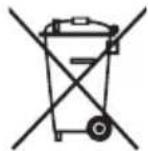
Disposal of your appliance
The symbol indicating separate collection for electrical and electronic equipment consists of the crossed-out wheeled bin.

WEEE
a
Clll 1a haiia 1000 1y yll jy lal 1000 1000 1000 1000
SYMBOLS (SYMBOLES)
| Language | ~ | ~ | 回 | |||
| English | Refers to alternating current(AC). | Refers to direct current(DC). | Refers to class II equipment. | Refers to stand-by. | Refer to "ON" (power). | Refers to dangerous voltage. |
| Svenska | Gäller växelström (AC). | Gäller likström (DC). | Gäller utrustning i klass II. | Gäller stand-by. Gäller "PÅ" (ström). Gäller farlig spänning. | ||
| Norsk | Refererer til vekselsström (AC). | Refererer til likeström (DC). | Refererer til klasse II-utstyr. | Refererer til ventemodus. | Refererer til "PÅ" (ström). | Refererer til farlig spening. |
| Dansk | Refererer til vekselsström (AC). | Refererer til jævnström (DC). | Refererer til klasse II-udstyr. | Refererer til stedy. | Refererer til "Tendt", (Ström). | Refererer til farlig elektrisk speending. |
| Suomi | Viittaa vahtovirtaan (AC). | Viittaa tasavirtaan (DC). | Viittaa II luokan laitteeseen. | Viittaa valmiustilaan. | Viittaa (virta) "pääällä" -tilaan. | Viittaa vaaralliseen jannitteeseen. |
| Deutsch | Steh für Wechselstrom (AC). | Steh für Gleichstrom (DC). | Steh für Geräte der Klasse II. | Steh für Standby. | Steh für „EIN“ (Einschalten). | Steh für gefährliche Spannung. |
| Français | Fait reférence au courant alternatif (CA). | Fait reférence au courant continu (CC). | Fait reférence à l'équipement de classe II. | Fait reférence au mode veille. | Correspond à la commande "Marche" (marche-arrêt). | Fait reférence à des tensions dangereuses. |
| Italienano | Indica la corrente alternata (CA). | Indica la corrente continua (CC). | Si riferisce ad appearechiatura di classe II. | Indica lo stato di standby. | Indica lo stato di "acceso" (alimentazione). | Indica una tension pericolosa. |
| Espanol | Se refiere a la corrente altema (CA). | Se refiere a la corrente continua (CC). | Se refiere a equipments de classe II. | Se refiere al modo en espèra. | Se refiere al modo "ON" (encendido). | Se refiere a voltages peligrosos. |
| Portugués | Refere-se à corrente alternada (CA). | Refere-se à corrente continua (CC). | Refere-se a um equipamento da Klasse II. | Refere-se ao modo de suspência. | Refere-se ao estudo de alimentação "LIGADA". | Refere-se a tensão perigosa. |
| Nederlands | Verwijst maar wisselstrom(AC). | Verwijst maar gelijstkstroom(DC). | Verwijst maar Klasse II-apparatuur. | Verwijst maar stand-by. | Verwijst maar "AAN" (stroom). | Verwijst maar gevaarlijk voltage. |
| Éλλυκá | Yποδεικυέι to εναλλασόμενo ρεύμα (AC). | Yποδεικυέι to συνεύς ρεύμα (DC). | Yποδεικυέι tov εξολιού o kατηγρίας II. | Yποδεικυέι ηιν κατάστοη αναμονήc. | Yποδεικυέι ηιν "ENEPΓΟΙΗΣH" (λειουρία). | Yποδεικυέι επικίνδυμη τάŋ. |
| Magyar | Váltóáramot jelent (AC). | Egyenáramot jelent (DC). | Class II berendeşétjelent. | Készenlétí allapotot jelent. | Bekapcsolt allapotot jelent (tápellátás). | Veszélyes feszült séget jelent. |
| Polski | Oznacza prad zmienny(AC). | Oznacza prad staly(DC). | Oznacza urzadzenie klasy ochrność II. | Oznacza tryb czuwania. | Oznacza przycisk „Wl.” (zasilanie). | Oznacza niebezpieczne napięcie. |
| Česky | Oznacje střidavý proud (AC). | Oznacje stejnosměný proud (DC). | Oznacje zařizení třidy II. | Oznacje pohotovostní režim. | Oznacje režim „ZAPUTO" (napajeni). | Oznacje nebezpećné napěti. |
| Slovenčina | Oznacje striedavý prud (AC). | Oznacje jegnosměný prud (DC). | Oznacje zariadenie triedy II. | Oznacje pohotovostní režim. | Oznacje stav „ZAP." (napajeni). | Oznacje nebezpećné napátie. |
| Pуssкій | Означает переменный ток (AC). | Означает постонный ток (DC). | Означает оборUDOBANIE кл Nassа II. | Означает рожим ожIDsань. | Означает "ВКЛ." (питанце). | Означает onaochoe наразожения. |
| Кацakша | Айымалы токka katысты. | Тураfterы токka katысты. | II К��ties ябдыкka katысты. | Тіреке katысты. | «КÓCY» (kyat) Күйе Катысты. | Kayinii kerheуre katысты. |
| Укpairсьka | Почаимся зminnéсту'm. | Почаимся постийсту'm. | Почаимся обладаньниknasy II. | Почаимся.stаночEquвань. | Почаимся.stан "увимнени" (ЖинBLEнь). | Почаимся небизичны наразу. |
| О'zbekcha | О'zgaruvchan tokni anglatadi (AC). | О'zgarmas tokni anglatadi (DC). | II-sinf qurilmasi ekanligini anglatadi. | Kutish rejimi ngalatadi. | "YOQILGAN" (quvvat)nngalatadi. | Xavfli kuchlanishni anglatadi. |
| Language | ~ | == | 回 | I | ||
| Türkçe | Alternatif akimi (AC) niteler. | Doğru akimi (DC) niteler. | Sinif II donanimi niteler. | Beklemeyi niteler. | "ACIK" (güç) durumunu niteler. | Tehlikeli voltaj niteler. |
| العربية | بسمت الحرفية (AC) نيرداني بورا بورا | بسمت الحرفية (DC) نيرداني بورا | بسمت الحرفية (II اجزهمن الحرفية | بسمت الحرفية (الإستعمال) | بسمت الحرفية (الإستعمال) | بسمت الحرفية الحرفية |
| الترجمة | الترجمة on(n) (AC) نيرداني | الترجمة on(n) (DC) | الترجمة on(n) (II نوام) | الترجمة on(n) | "الترجمة" on(n) (الإستعمال) | الترجمة on(n) .phon |
| Español (latin) | Se refiere a la corriente alterna (ca) | Se refiere a la corriente continua (cc) | Se refiere a los equipos class II | Se refiere al modo deespera | Se refiere a "ENCENDIDO" (alimentación) | Se refiere a voltaje peligioso |
| FRANÇAIS (CANADA) | Se rapporte au courant alternatif (ca.) | Se rapporte au courant continu (c.c.) | Se rapporte à un appeareil de classe II | Se rapporte à la mise en vue | Se rapporte à la mise en marche (alimentation) | Se rapporte à une tension dangereuse |
| BAHASA INDONESIA | Mengacu pada arus bolak-balik (AC) | Mengacu pada arus search (DC) | Mengacu pada peralatan kelas II | Mengacu pada siaga | Mengacu pada "AKTIF" (daya) | Mengacu pada tegangan berbahaya |
| 日本語 | 交流 (AC)を表します | 直流 (DC)を表します | ケラスリの装置を表します | stsunバイを表します | 「才」(電源)をしります | 表危険な電圧を表しります |
| 韓국어 | 고류 (AC)을 기재 (DC)을 기재 II에 기재 Class II | Refere-se à corrente continua (CC) | Refere-se ao equipamento de classe II | Refere-se a stand-by | 선원 "ON"상oire를 기재 | 워크 전목울의미 |
| Portugués (brazil) | Refere-se à corrente alternada (CA) | Refere-se à corrente continua (CC) | Refere-se ao equipamento de classe II | Refere-se a stand-by | Refere-se à "LIGADO" (Liga/Desliga) | Refere-se à tensions perigosa |
| USUANUA | wnnuey nwnneynnnnnae (AC) | wnnuey nwnneynnnnnae (DC) | wnnuey nwnneynnnnnae Class II | wnnuey nwnneynnnnnae | wnnuey "聶" (wnneyn) | wnnuey nwnneynnnnnae (wnneyn) |
| 简体中文 | 表示交流电 (AC) | 表示直流电 (DC) | 表示Ⅱ类设备 | 表示待机 | 表示“开” (电源) | 表示危险电压 |
| 繁體中文 | 代表交流電 (AC) | 代表直流電 (DC) | 代表Ⅱ級設備代表待機 | 代表「開歴」 (電源) | 代表危险電壓 | |
| Language | ! | i | + | ||
| English | CAUTION Instructions | Coin / button cell battery | Moving parts | ||
| Svenska | VARNING Instruktior Knappcellsbatteri | Rörliga delar | |||
| Norsk | ADVARSEL Instruktior Knappcellbatteri | Bevegelige deler | |||
| Dansk | FORSIGTIG Vejledning | Mønt-/ knapcellbatteri | Bevegelige dele | ||
| Suomi | VAARA Objekt Kolikko-/nappiparisto Likingkucvia osia | ||||
| Deutsch | VORSICHT Anweisungen Knopfzellenbatterie | Bewegliche Bauteile | |||
| Français | MISE EN GARDE Instructions | Pilet bouton Pièces mobiles | |||
| Italienano | ATTENZIONE | Batteria a bottone Parti mobili | |||
| Español | PRECAUCión | Pila de tipo moneda/ botón | Piezas moviles | ||
| Portugués | CUIDADO | Pilha botão/em forma de moeda | Peças em movimento | ||
| Nederlands | LET OP | Knoopelbatterij | Bewegende onderden | ||
| Еλλυκά | ПОДΟXYн | Млатaria σε σχήμα νουlpόμatoc/ кουmpιου | Кivουμενα εξαρτήματa | ||
| Magyar | FIGYELEM Utasítások Gombelem Mozgó alkatrészek | ||||
| Polski | PRZESTROGA Instruktje | Bateria guzikowa/pastylkowa | Csěsci ruchome | ||
| Česky | UPOZORNÉNÍ | Knofíková baterie | Pohyblíve Časti | ||
| Slovenčina | UPOZORNENIE | Gombíková batéria | Pohyblíve Časti | ||
| Русsekni | ВИМАНЕ! | Зелемпьппяпьпькпьпьпьпьпьпьпьпьпьпьпьпьпьпьпьпьпьпьпьпьпьпьпьпьпьпьпьпьпьпьпьпьпьпьпьпьпьпьпьпьпьпьпьпьпьпьпьпьпьпьпвппьпьпьпьпьпьпьпьпьпьпьпьпьпьпьпьпьпьпьпьпьпьпьпьпьпьпьпьпьпьпьпьпьпьпьпьпьпьпьпьпьпьпьпьпьпьпьпьпьпбтарег | Движунецca detanii | ||
| Казakшa | АБAJПANБI3! Hýckaynap | Тын/Тумениndi Батарег | ЖылжIMалыбеліктер | ||
| Уррайсьka | УВΑΓA! | Батарег у φорmicMonétн/ tabлетк | Рухом dietani | ||
| O'zbekcha | DIQQAT! | Tanga / tabletkasimon batareya | Harakatlanuvchi qismlar | ||
| Türkçe DİKKAT | Kullanim Talimatlari | Madeni / Düğme pil | Hareketli parçalar | ||
| العربية | العربية | العربية | بزيرة بزيرة بزيرة بزيرة بزيرة | العربية | |
| الجفَة | الجفَة | الجفَة | بزيرة بزيرة بزيرة بزIRA بزIRA | الجفَة | |
| Language | ||||
| Espanol (latin) | PRECAUCION Instrucciones | Batería de moneda/ botón | Piezas móvil. | |
| FRANÇAIS (CANADA) | MISES EN GARDE | Instructions Pile bouton | Pièces mobiles | |
| BAHASA INDONESIA | PERHATIAN Petunjuk | Baterai sel berbentuk koin/ kancing | Komponen yang bergerak | |
| 日本語 | 注意 取収説明書 | コイノ/ボーナン電池 | 可動部分 | |
| / | ||||
| Portugués (brazil) | CUIDADO Instruções | Bateria de célua tipo moeda/botão | Peças em movimento | |
| ITALYAN | # # # # # # # # # # # # # # # # # # # # # # # # # # # # # # # # # # # # # # # # # # # # # # # # # # # # # # # # # # # # # # # # # # # # # # # # # # # # # # # # # # # # # # # # # # # # # # # # # # # # # | # # # # # # # # # # # # # # # # # # # # # # # # # # # # # # # # # # # # # # # # # # # # # # # # # # # # # # # # # # # # # # # # # # # # # # # # # # # # # # # # # # # # # # # # # # # # # # # # # # | # ## # # # # # # # # # # # # # # # # # # # # # # # # # # # # # # # # # # # # # # # # # # # # # # # # # # # # # # # # # # # # # # # # # # # # # # # # # # # # # # # # # # # # # # # # # # # # # # # # # # # #
# # # # # # # # # # # # # # # # # # # # # # # # # # # # # # # # # # # # # # # # # # # # # # # # # # # # # # # # # # # # # # # # # # # # # # # # # # # # # # # # # # # # # # # # # # # # # # # # # # | |
| 简体中文 | 注意 说明 | 硬币型/纽 扣型电池 | 活动部件 | |
| 繁體中文 | 警告 | 指示 | 硬幣型/鈺扣型 電池 | 可動部分 |

LG
Life's Good
- TABLE OF CONTENTS
- LICENSE
- ASSEMBLING AND PREPARED
- CAUTION
- NOTE
- Supported Drivers and Software
- Product and Button Description
- How to Use the Joystick Button
- Moving and Lifting the Monitor
- Installing on a Table
- Adjusting the Angle
- WARNING
- Using the Kensington Lock
- Installing on the Wall
- Installing the Wall Mount Plate
- USING THE MONITOR
- Connecting to a PC
- HDMI Connection
- DisplayPort Connection
- Connecting AV Devices
- Connecting Peripherals
- Connecting Headphones
- USER SETTINGS
- Activating the Main Menu
- Menu Settings
- [Game Mode]
- [Menu] > [Game Mode]
- [Game Adjust]
- [Menu] > [Game Adjust]
- [Picture Adjust]
- [Menu] > [Picture Adjust]
- [Input]
- [Menu] > [Input]
- [General]
- [Menu] > [General]
- TROUBLESHOOTING
- Nothing is displayed on the screen.
- Do you see an "Unrecognized monitor, Rhonid Flug (VHSA)?"
- The screen retains an image.
- Screen display is unstable and shaky. / Images displayed on the monitor leave shadow trails.
- The display colour is abnormal.
- Some features are disabled.
- No sound from the headphone port.
- PRODUCT SPECIFICATION
- Colour Depth:
- Resolution
- Environmental Conditions
- AC/DC Adapter
- 24GQ50F/24GQ50B/24GQ40W
- 27GQ50F/27GQ50B/27GQ40W/27GQ50A
- Weight (Without Packaging)
- Power Sources
- Supported Mode
- IMPORTANT PRECAUTIONS
- On Safety
- Do not Open the Display:
- To Avoid Personal Injury :
- To Prevent Fire or Hazards:
- On Installation
- Precautions to the AC Adapter and Power
- On Cleaning
- On Repacking
- MASA TÉ RÉNDÉSISHME PARAPRAKE
- Rrethsigurise
- He otBaprTe dinCpIe:
- 3a da n36eHete Teleecn nobpei:
- IpeDnA3Hm MepKn, CbBp3aHn c AC aAnTepa n 3axpaHbauJna Ka6eJ
- Pn nouchTbaHe
- AinbimalbI Tok aadantepi meH KyaTka 6aJnaHbICTbI caKtbIK shapaIapbl
- BAJKH N MEPKN HA IPNETNA3JINBOCT
- OkoIy 6e36eHocTa
- He otbopajte ro ekpahot:
- 3a da ce n36erHe IInuHa nobpeda:
- 3a da ce cnpeu noxap n dpyrn onacnoctn:
- OkoIy nHcTaJInpaHeTo
- MepknHa npetna3nBocT 3a AC aanTepot n hanojyBaHeto
- OkoJy uHcTeHbeto
- OkoIy IOBTOPO NaKyBaHbE
- BELANGRIJKE VOORZORGSGMAATREGELEN
- Bo n36exaHne Bo3ropaHnI nn nopaxeHnI 3JIeKtpnuecknM TOKOM:
- MONTAX
- Mepblnpedoctoopoxhoctn pni nCnoB3OBaHn aanTepa nepemehnHO Toka n 3JeKTPoNTaHn
- BAJKINBI 3ACTEPEXEHH
- 3axoDi 6e3neKei
- He BixkpuBaIte Incnpei
- Ioo6 yHnKHyTN TpaBMyBaHHaJIoDei:
- Ioo6 yHnKHyTn noxexi Ta iHux He6e3neK:
- BctaHOBJIeHHa
- Tomy HIKOJI:
- 3aTepeKeHnI 10o o aanTepa 3MiHHoro cTpyMy i Ka6eJIO KINBHeHnI
- MUHIM EHTIYOT CHORALARI
- Shaxsiy shikastlanishlarning oldini olish:
- :
- DDC protocol
- E-DDC (Enhanced DDC)
- DEUTSCH
- DDC(Display Data Channel)
- Remarque
- ПРИМЕЧАНЕ
- E-DDC (PacunpeHbI KaHaJI nepedaUn daHHbIX)
- 中国
- Wartun
- 日本語
- 保守おはこ修理
- JORDAN ONLY
- WEEE
- SYMBOLS (SYMBOLES)
- # # # # # # # # # # # # # # # # # # # # # # # # # # # # # # # # # # # # # # # # # # # # # # # # # # # # # # # # # # # # # # # # # # # # # # # # # # # # # # # # # # # # # # # # # # # # # # # # # #
Brand : LG
Model : UltraGear 27GQ50F
Category : Monitor