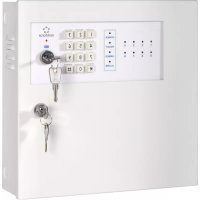
MAC608 - Alarm system Renkforce - Free user manual and instructions
Find the device manual for free MAC608 Renkforce in PDF.



| Brand | Renkforce |
| Model | MAC608 |
| Product type | 8-zone alarm system |
| Dimensions (L × W × H) | 284 × 284 × 86 mm |
| Weight | 4 kg |
| Mains power supply | 100-240 V AC, 50/60 Hz |
| Output voltage | 12 V DC, 1 A (max.) |
| Backup battery (optional) | 12 V DC, 1.2 Ah (lead-acid) |
| Alarm zones | 8 (Z1-Z8) |
| Zone types | Entry/exit (Z1-Z2), immediate (Z3-Z6), 24h (Z7), silent (Z8) |
| Alarm outputs | 3 × 12 V DC / 40 mA (signals) + 2 NO/NC relays 1 A |
| Siren/flash output | 12 V DC, max. 1 A (via relay) |
| Sensor power supply | 12 V DC, max. 1 A (terminals) |
| Control | Key switch + keypad + remote input |
| Settings | DIP switches for timings (entry/exit/alarm) |
| Password | Customizable via keypad (4 digits) |
| Operating temperature | -20 °C to +50 °C |
| Fuse | T 2.0 A 250 V |
| Housing material | Metal, lockable |
| Mounting | Wall-mounted (dry interior) |
| Maintenance | Periodic cable check, dry cleaning, power off |
| Safety | Installation by qualified electrician, disconnect power before servicing |
| Included accessories | 2 enclosure keys, 2 switch keys, 4 screws/plugs, manual |
Frequently Asked Questions - MAC608 Renkforce
User questions about MAC608 Renkforce
0 question about this device. Answer the ones you know or ask your own.
Ask a new question about this device
Download the instructions for your Alarm system in PDF format for free! Find your manual MAC608 - Renkforce and take your electronic device back in hand. On this page are published all the documents necessary for the use of your device. MAC608 by Renkforce.
USER MANUAL MAC608 Renkforce
GB Operating Instructions
8-Zone Alarm System MAC-608
Item No. 754394 Page 19 - 35
F Notice d'emploi
www.business.conrad.at
- Introduction 20
- Intended Use 21
- Scope of Delivery 22
- Symbols 22
- Safety Information 23
- Control Elements 24
- Notes on the Use of an Optional Lead Battery 25
- Installation 25
a) Alarm System Installation Site 25
b) Advice before Mounting 25
c) Placement of the Lines from the Sensors/Alarms to the Alarm System 26
d) Mounting the Alarm System 26
- Installation 27
a) Connection to the Public Mains 27
b) Lead Battery Connection (Optional) 27
- The Operating Staff 28
- Connection of the Monitoring Components 29
a) Time Settings 31
b) Password Settings 32
c) Features of the 8 Alarm Zones 33
- Maintenance and Cleaning 34
a) Maintenance 34
b) Cleaning 34
- Disposal 35
a) General Information 35
b) Rechargeable Batteries 35
- Technical Data 35
1. Introduction
Dear Customer,
Thank you for purchasing this product.
This product complies with the statutory national and European requirements. To maintain this status and to ensure safe operation, you as the user must observe these operating instructions!

Before taking the product in to operation, read the complete operating instructions and observe all operating and safety notes.
All company names and product names are trademarks of their respective owners. All rights reserved.
If there are any technical questions, please contact:
International: www.conrad.com/contact
United Kingdom: www.conrad-electronic.co.uk/contact
2. Intended Use
This 8 zone alarm system is perfect to secure apartments, offices and small companies against "small risks".
It is not suitable for protection from maximum and large risks that are present in large companies, commercial buildings or industrial sites.
The alarm system reports unauthorised entry into the secured building by switching of outputs to which you can connect visual, acoustic or silent signal encoders.
The alarm system has eight alarm zones, an internal signal encoder and a connection for an optional lead battery that is available as a separate accessory (12 V DC, 1.2 Ah), to maintain operation even during a power outage. The lead battery is placed in the alarm system housing.
To operate the system, it must be connected to the main power supply. Operation is possible without the lead acid battery, but the lead acid battery should also be connected for reasons of safety.
When under operation, the alarm system works entirely through the integrated key switch and the buttons arranged on the housing, or with the help of an optional external remote switch.
The basic settings can be adjusted with the DIP switches on the PCB after successful installation.
The alarm system is only suitable for dry indoor use. Any use other than the intended use described above is not permitted and may harm the product and result in short circuit, fire, etc.
The entire product must not be modified or converted. Always observe the safety information included in these operating instructions. Please read the operating instructions carefully and keep them for later reference.
It is absolutely essential to protect the alarm system additionally with external sensors (movement alarm, magnet contacts etc.), so that manipulations of the alarm system control may be ruled out completely. Sabotage loops should be integrated in the wires of the alarm components.
3. Scope of Delivery
- 8-zone alarm system in lockable metal housing for wall mounting
- 4x assembly screw and 4x dowel for attachment of the alarm system housing to the wall
- 2x key for activation and deactivation of the alarm system
- 2x key for closing the metal housing
- Operating instructions
4. Symbols

This symbol is used when your health is at risk, e.g. from an electric shock.

The symbol with the exclamation mark points out particular dangers associated with handling, function or operation.

The "arrow" symbol indicates special advice and operating information.
5. Safety Information

The guarantee/warranty will expire if damage is incurred resulting from non-compliance with the operating instructions! We do not assume any liability for consequential damage!
Nor do we assume any liability for damage to property or personal injury caused by improper use or failure to observe the safety information. In such cases the warranty/guarantee will expire.
Attention!
The product must only be installed by a qualified electrical specialist (e.g. electrician) who is familiar with the relevant regulations (e.g. VDE)!
Improper work, carried out on the mains voltage, endangers not only your life but also the life of others!
If you do not have the expertise required for installation, do not install the device yourself but ask a specialist.
- The product must not be modified or rebuilt, as not only the CE approval will expire but also the warranty/guarantee.
- The product must only be installed and operated in dry, closed inner rooms; it must not get moist or wet! There is danger to life from electric shock!
- Do not use the product inside of rooms or in bad ambient conditions where flammable gases, vapours or explosive dust may be or are present!
-
The product must not be exposed to extreme temperatures, humidity, direct sunlight, intense vibration or heavy mechanical strain.
-
Handle the product with care. It has sharp corners.
-
This product is not a toy and not suitable for children.
-
Never let the packaging material lie around unattended. Plastic foil / bags etc. can become a dangerous toy for children; there is a risk of suffocation.
- If you have reason to assume that safe operation is no longer possible, disconnect the device immediately and secure it against inadvertent operation.
- Thunderstorms may be a danger for any electrical device. Overvoltage on the power line can damage the device.
-
No devices with strong electric or magnetic fields such as mobile phones, radio devices, electric engines etc. should be in the proximity of the alarm system, etc.). Direct heat sources may also lead to functional impairment.
-
Never pour out fluids above electrical devices.
-
Never operate the product covered. Make sure that the device is sufficiently ventilated.
- A device for all-pin separation from the mains voltage must be provided on the installation side (e.g. FI circuit breaker).
-
Also observe the operating instructions for the products used together with this alarm system.
-
Repair must only be carried out by a qualified specialist or a specialist workshop.
-
If, during assembly, connection or installation, you are not sure or you have doubts about the function of this alarm system, contact a specialist.
6. Control Elements

- Casing lock
- ON/OFF key switch
3.Keypad - Function LEDs
- Alarm zone LEDs
7. Notes on the Use of an Optional Lead Batteries

o batteries out of reach of children. Install and operate the product so that it is out of the reach of children.
-
Rechargeable batteries must not be short-circuited, opened, taken apart or thrown into fire. There is a risk of fire and explosion!
-
Chemical fluids may leak from old rechargeable batteries and damage the device.
- Leaking or damaged batteries/rechargeable batteries can cause chemical burns to skin when touched without the use of adequate protective gloves.
8. Installation

The alarm system must be voltage-free during installation. It is not sufficient to, e.g., switch off the alarm system! Turn off the power on all poles of the mains supply by removing the respective electric circuit fuse or switching off the circuit breaker. Also switch off the corresponding FI circuit breaker. Then check that the mains connection is free of current, e.g. with an appropriate tester.
If necessary, pull the connecting plug out of the lead acid battery socket (available separately as accessory).
When drilling wall holes, make sure you do not accidentally damage any power lines, gas pipes or water pipes!
a) Alarm System Installation Site
Select the assembly site sot hat it is well accessible to the system's operator but not in direct view.
Unauthorised persons must not be able to reach the alarm system to deactivate it. If applicable, additional protection of the assembly site, e.g. by motion detectors, is recommended.
When selecting a place of set-up, make sure that your alarm system is not exposed to direct solar radiation, vibrations, heat, cold and moisture.
b) Advice before Mounting
Before the actual assembly of the alarm system and the additional components, use the floor plan of the object to be monitored to plan precisely how you object can be best secured. Draw in the alarms for the doors, windows, rooms, etc. to be secured. Observe the special properties (e.g. recording angle of a motion detector) of the individual alarms.
This procedure helps better estimate the actual material demand (e.g. length and core number of the lines, number of motion detectors, door and window alarms, etc.).
The alarm system supports eight alarm zones. Connect the different sensors for the respective alarms to the corresponding inputs on the PCB.
The functions of the alarm zones are explained in chapter 9.3 "Features of the 8 Alarm Zones".
We recommend reading the information on the different functions of the alarm zones completely before setup.
Once a proper mounting size has been found and the length and core number of the lines required for connecting the sensors/alarms has been determined, mounting may commence.

Before the alarm system is installed, the cable for the mains connection and the connection lines of the sensors/alarms must be guided through the intended round opening at the centre of the rear of the housing from the back. Covered placement of the cables (e.g. in-wall) is important to prevent sabotage. Connection to the mains and the lines of the sensors/alarms is established after mounting.
If required, mark the respective line ends when placing the lines to be able to assign the connection lines to the sensors.
c) Placement of the Lines from the Sensors/Alarms to the Alarm System
First install the sensors/alarms to be connected to the alarm system in the intended locations in the building. Observe the assembly and operating instructions of these products.

Place the required lines from the sensors/alarms to the site of the alarm system concealed (e.g. in-wall) so that you can connect them after the alarm system is installed.
d) Mounting the Alarm System
- Open the front flap of the housing with the enclosed key.
- The alarm system has four assembly holes in the back for mounting.
- Guide the already.placed lines through the intended round opening in the middle of the back wall of the housing.
- Attach the housing to the wall with suitable mounting material. Use the screws and dowels included in the delivery if necessary.
9. Installation

The product must only be installed by a qualified electrical specialist (e.g. electrician)!
per work, carried out on the mains voltage, endangers not only your life but also the life of others! If you do not have the expertise required for installation, do not install the device yourself but ask a specialist.
Remember that the alarm system must be voltage-free during installation! Turn off the power on all poles of the mains supply by removing the respective electric circuit fuse or switching off the circuit breaker. Also switch off the corresponding FI circuit breaker. Then check that the mains connection is free of current, e.g. with an appropriate tester.
a) Connection to the Public Mains
There is a screw clamp for three-wire cable connections in the housing of the alarm system. Use it to connect the alarm system to the mains voltage.
Observe that you always connect the right cables (marked in colour) with each other in order to not damage the product! For this, connect the individual wires to the screw clamp sol that the colours of the insulations match: L = phase (brown cable), N = neutral (blue cable) and PE = protective ground (yellow-green cable). For this, push the stripped ends of the individual wires into the intended contacts and fasten them with the screws. Then secure the mains cable from slipping out by tightly screwing it to the clamp under the black plastic bridge.
b) Lead Battery Connection
To ensure smooth operation of the alarm system even during power failure, a lead acid battery (12 V/DC, with minimum 1.2 Ah) must be connected to the system. For this, use the two screw connections at the red (^+ + ^- -pole) and black cables (^ - ^ -pole) - observe correct polarity to avoid damage to the product.

Activate the operational voltage only after completing all connections and making the individual settings of the DIP switches!
10. The Operating Staff

1. ON/OFF key switch
- When the key switch is in the "ON" position, zones Z7 and Z8 are armed. To be able to arm Z1 - Z6, the Z7 and Z8 zones must be armed. Z1 - Z6 are then armed or disarmed with the buttons through password entry or via optimum, external remote switch. To deactivate the system again after an alarm has been triggered, turn the key switch into the "OFF" position.
- When the key switch is in the "OFF" position, all zones Z1 - Z8 are deactivated.
2.Keypad
- Enter the correct password to arm or disarm zones Z1-Z6. Proceed as described in section „11. b Password Settings" to set an individual password.
- If an alarm has been triggered, you need to turn the key switch into the "OFF" position to deactivate it.
- When the key switch is in the "OFF" position, the keypad is also deactivated.
3. Function Displays (LEDs)
- The "ON" LED is permanently lit: The key switch is in the "ON" position.
- The "ON" LED flashes slowly: Password programming mode.
- The "POWER" LED is permanently lit: The system is supplied with power.
- The "READY" LED is permanently lit: All alarm zones are in "normal" mode (NC = normally closed).
- The "ALARM"-LED lights up when an alarm has been triggered in an armed alarm zone.
- The "ARMED" LED flashes at the time of arming (during the entry and exit time) and emits steady light when the system is armed with the help of the buttons.
4. Alarm zone LEDs
- Switched off: The respective alarm zone is not armed (NC-Modus, normal condition)
- The alarm of this loop is triggered or alarm loop is interrupted.
Before arming, please localize the earth and overcome open contact or interruption of the alarm loop.
- Flashing quickly: An alarm was triggered in an armed alarm zone
- Flashes slowly: Fast flashing shows that alarm was triggered in a zone. If the key switch is then put in the "OFF" position, the LED of the affected alarm zone flashes slowly.
11. Connection of the Monitoring Components
In the delivery condition, the alarm zones in the alarm system are closed with the help of jumpers or short circuit bridges.

Inputs 1-8 for NC contact alarm
Usually in NC mode (NC = normally closed, i.e. the contact opens in case of alarm).
How to connect an NC contact alarm:
This sketch shows an example for connection of the alarms with NC contacts.

- Unused alarm zones remain closed with the help of the short circuit bridges.
Signal lamp output (max. 40 mA)
The following signal outputs are available:
Connection "RE": Alarm system ready for operation
Connection "AL": Alarm system has triggered (alarm is activated)
Connection "AR": Alarm system is armed
Each output delivers a voltage of 12 V/DC when activated (max. 40 mA each). Therefore, a suitable dropping resistor must be used when connecting an LED.
Output for external operating element (REMOTE)
Connection for an optional switch installed in another location in the building to arm and deactivate the alarm system.
Alarm outputs (NO/NC)
Output 1: For connection of an alarm flash or automatic dialling device
Output 2: For connection of an alarm horn (12 V/DC, max. 1 A)
- Both alarm outputs are potential-free relay contacts
Voltage supply terminals with DC 12 V output
Voltage supply terminals with DC 12 V output
Both positive and negative terminals can be used to feed sensors, alarms, streakers and alarm sirens with DC voltage (12 V/DC, max. 1 A).
a) Time Settings
Time settings for alarm duration and alarm delay at unauthorised entry or exit are made on the PCBs in the alarm system casing using the DIP switches marked "T1", "T2" and "T3" by setting them as follows:
DIP-switch "T1": Exit delay: Alarm trigger delay can be set between 15 seconds and 4 minutes (only alarm zones Z1 and Z2)
| Jumper position Time | |||
| OFF OFF OFF 15 seconds | |||
| OFF OFF ON 30 seconds | |||
| OFF ON OFF 45 seconds | |||
| OFF ON ON 60 seconds | |||
| ON OFF OFF 90 seconds | |||
| ON OFF ON 2 minutes | |||
| ON ON OFF 3 minutes | |||
| ON ON ON 4 minutes | |||
DIP-switch "T2" entry delay: Alarm trigger delay can be set between 15 seconds and 4 minutes (only alarm zone Z1)
| Jumper position Time | |||
| OFF OFF OFF 15 seconds | |||
| OFF OFF ON 30 seconds | |||
| OFF ON OFF 45 seconds | |||
| OFF ON ON 60 seconds | |||
| ON OFF OFF 90 seconds | |||
| ON OFF ON 2 minutes | |||
| ON ON OFF 3 minutes | |||
| ON ON ON 4 minutes | |||
DIP-switch "T3" alarm output (alarm duration): Time can be set between 5 seconds and 15 minutes (only alarm zones Z1 and Z7)
| Jumper position Time | |||
| OFF OFF OFF 5 seconds | |||
| OFF OFF ON 30 seconds | |||
| OFF ON OFF 2 minutes | |||
| OFF ON ON 3 minutes | |||
| ON OFF OFF 5 minutes | |||
| ON OFF ON 8 minutes | |||
| ON ON OFF 12 minutes | |||
| ON ON ON 15 minutes | |||

Observe the applicable statutory and community provisions! In Germany, an alarm must not exceed 3 minutes ( = 180 seconds). However, this time may differ in certain communities and locations (e.g. in spa towns).
b) Password Settings
The element "SW1" on the PCB is prepared in the factory to set an individual password for operation of the alarm system. First set the DUP switches to "SW1" as shown in programming step <1> and change the password in step <2> via the keypad. Then put all jumpers on "SW1" in the position OFF.
| Programming Step | Jumper position | |||
| <1>ON OFF OFF OFF | ||||
| <2>Press * 51234 0 | UUUU # | |||
| <3>OFF OFF OFF OFF | ||||
UUUU in the table means the new password.
c) Features of the 8 Alarm Zones
"Z1": Alarm loop with entry/exit delay
- Exit delay: When the alarm zone is armed via the keypad or the external switch (REMOTE), it will switch into the armed normal condition after an exit delay of "T1". The NC contacts of this alarm loop must be closed or they must be closed within the exit time - otherwise the an alarm is triggered.
- Entry delay: If the system is armed, the alarm zone within the programmed period "T2" must be disarmed via the keypad or the external switch (REMOTE). Otherwise, an alarm is triggered.
"Z2": Alarm loop with exit delay
When the alarm zone is armed via the keypad or the external switch (REMOTE), it will switch into the armed normal condition after an exit delay of "T1". The NC contacts of this alarm loop must be closed or they must be closed within the exit time - otherwise the an alarm is triggered.
"Z3" - "Z6" Alarm loops with immediate trigger
If the alarm system is armed via the keypad or the external switch (REMOTE), an alarm is triggered immediately when the resistance changes.
"Z7": 24 hour alarm loop
The Z7 alarm loop is monitored permanently in the key switch position "ON" (24-hour alarm loop). An alarm is triggered immediately when a sensor of the alarm loop is triggered or the alarm loop is interrupted. When the alarm sounds, the internal acoustic signal is triggered and the potential-free relay outputs "Output 1" and "Output 2" are activated.
"Z8": 24 hour alarm loop (silent sabotage alarm)
The Z8 alarm loop is monitored permanently in the key switch position "ON" (24-hour alarm loop). An alarm is triggered immediately when a sensor of the alarm loop is triggered or the alarm loop is interrupted. When the alarm is triggered, only the potential-free relay output "Output 1" is activated immediately. No internal acoustic signal is triggered. This alarm loop can therefore be used for a "quiet alarm" (e.g., for an optional telephone dialling device).

The Z1 - Z6 alarm zones can be armed only if Z7 and Z8 were armed with the help of the key switch earlier. Z1 - Z6 sound alarms only if Z7 and Z8 were armed with the key switch earlier, and the arming of Z1 - Z6 then takes place over the buttons or by remote.
12. Maintenance and Cleaning
a) Maintenance
Check the technical safety of your system regularly, e.g. for damage to the connection cables or to the casings.
If it can be assumed that safe operation is no longer possible, the system must be turned off and precautions are to be taken to ensure that it is not used unintentionally. Disconnect the system from the mains and disconnect the rechargeable battery!
It can be assumed that safe operation is no longer possible if:
- there is visible damage to the system, mains adapter or mains cable
- if the system or mains adapter no longer works,
- the system was stored under unfavourable conditions for an extended period of time
- it was subject to severe strain in transport
b) Cleaning
Always observe the following safety information before cleaning or servicing the system:
Live components may be exposed if covers are opened or components are removed. The system must be disconnected from all power sources before any servicing or repair work is carried out.
- Capacitors inside the device may still carry voltage even though they have been disconnected from all power sources.
- Never replace damaged mains cables yourself. In such cases, disconnect the system from the mains and let a trained electrician repair it.
- Only qualified experts familiar with the hazards involved and the relevant regulations must perform repairs.
13. Disposal
a) General Information

At the end of its service life, dispose of the product according to the relevant statutory regulations.
b) Rechargeable Batteries
You as the end user are required by law (Battery Ordinance) to return all used batteries/rechargeable batteries. Disposing of them in the household waste is prohibited!

Rechargeable batteries that contain any hazardous substances are labelled with the adjacent icon to indicate that disposal in domestic waste is forbidden. The descriptions for the respective heavy metal are: Cd = cadmium, Hg = mercury, Pb = lead (the names are indicated on the rechargeable battery e.g. under the rubbish bin symbol shown to the left).
You may return used rechargeable batteries free of charge at the official collection points of your community, in our stores, or wherever rechargeable batteries are sold. You thus fulfil your statutory obligations and contribute to the protection of the environment.
14. Technical Data
Voltage input. 100 - 240 V/AC, 50/60 Hz
Voltage output 12 V/DC, 1 A (max.)
Recommended rechargeable battery ....12 V/DC, approx. 1.2 Ah
Alarm zones 8
Alarm outputs .3 (12 V/DC, max. 40 mA)
Fuse T2.0A,250V
Operating temperature range -20 ^ C to +50^
Dimensions (W× H× D) . 284 x 284 x 86 mm
Weight 4 kg
Table des matieres F
Page
Chere cliente, cher client,
France (email): technique@conrad-france.fr
Copyright 2015 by Conrad Electronic SE.
GB Legal Notice
This is a publication by Conrad Electronic SE, Klaus-Conrad-Str. 1, D-92240 Hirschau (www.conrad.com).
All rights including translation reserved. Reproduction by any method, e.g. photocopy, microfilming, or the capture in electronic data processing systems require the prior written approval by the editor. Reprinting, also in part, is prohibited. This publication represent the technical status at the time of printing.
Copyright 2015 by Conrad Electronic SE.
Information legales
Copyright 2015 by Conrad Electronic SE.
Nl Colofon
Copyright 2015 by Conrad Electronic SE. V4_0215_01/IB



- 8-Zone Alarm System MAC-608
- Introduction
- Intended Use
- Scope of Delivery
- Symbols
- Safety Information
- Control Elements
- Notes on the Use of an Optional Lead Batteries
- Installation
- a) Alarm System Installation Site
- b) Advice before Mounting
- c) Placement of the Lines from the Sensors/Alarms to the Alarm System
- d) Mounting the Alarm System
- Installation
- a) Connection to the Public Mains
- b) Lead Battery Connection
- The Operating Staff
- ON/OFF key switch
- 2.Keypad
- Function Displays (LEDs)
- Alarm zone LEDs
- Connection of the Monitoring Components
- Inputs 1-8 for NC contact alarm
- How to connect an NC contact alarm:
- Signal lamp output (max. 40 mA)
- Output for external operating element (REMOTE)
- Alarm outputs (NO/NC)
- Voltage supply terminals with DC 12 V output
- a) Time Settings
- b) Password Settings
- c) Features of the 8 Alarm Zones
- "Z1": Alarm loop with entry/exit delay
- "Z2": Alarm loop with exit delay
- "Z3" - "Z6" Alarm loops with immediate trigger
- "Z7": 24 hour alarm loop
- "Z8": 24 hour alarm loop (silent sabotage alarm)
- Maintenance and Cleaning
- a) Maintenance
- b) Cleaning
- Disposal
- a) General Information
- b) Rechargeable Batteries
- Technical Data
- Table des matieres F
- Page
- GB Legal Notice
- Information legales
- Nl Colofon
Brand : Renkforce
Model : MAC608
Category : Alarm system