
SHA56 - Blower STIHL - Free user manual and instructions
Find the device manual for free SHA56 STIHL in PDF.



| Brand | STIHL |
| Model | SHA 56 |
| Product type | Cordless blower / Vacuum shredder |
| Battery | STIHL AK, 36 V, lithium-ion (capacity according to rating plate) |
| Maximum air speed | 56 m/s |
| Volumetric air flow rate | 510 m³/h |
| Weight (vacuum shredder without battery) | 4.2 kg |
| Weight (blower without battery) | 3.2 kg |
| Guaranteed sound power level | 96 dB(A) |
| Sound pressure level (vacuum) | 83 dB(A) |
| Sound pressure level (blower) | 81 dB(A) |
| Vibration level (control handle) | 0.8 m/s² |
| Vibration level (stirrup handle) | 1.1 m/s² |
| Functions | Suction, blowing, shredding |
| Conversion suction/blowing | Rotation of control handle and change of accessories |
| Collection bag | With zipper, suitable volume |
| Safety | Unlock button, Ergo lever, control trigger, protective grille, simple harness |
| Maintenance | Clean with damp cloth, brush for grille and electrical contacts; maintenance by authorized dealer |
| Operating temperature (battery) | -10 °C to +50 °C |
| Compliance | CE, UKCA, directives 2006/42/EC, 2014/30/EU, 2000/14/EC |
Frequently Asked Questions - SHA56 STIHL
User questions about SHA56 STIHL
0 question about this device. Answer the ones you know or ask your own.
Ask a new question about this device
Download the instructions for your Blower in PDF format for free! Find your manual SHA56 - STIHL and take your electronic device back in hand. On this page are published all the documents necessary for the use of your device. SHA56 by STIHL.
USER MANUAL SHA56 STIHL
natural_image
Black and white photo of a STIHL swimmer device with black bandage and white head (no text or symbols visible)

D Gebrauchsanleitung
1 - 25
GB Instruction Manual
26 - 49
F Notice d'emploi
50 - 75
①Istruzioni d'uso
76 - 100
NL Handleiding 101 - 125
Inhaltsverzeichnis
1 Vorwort 2
natural_image
Technical diagram of a mechanical component with labeled parts and an arrow indicating a specific feature (no readable text or symbols)natural_image
Line drawing of a person using a tool to lift a device, with no visible text or symbolsnatural_image
Line drawing of a person using a handheld electric shaver to clean or spray particles (no text or symbols)2 Guide to Using this Manual 27
2.1 Applicable Documents....27
2.2 Symbols used with warnings in the text ..... 28
2.3 Symbols in Text 28
3 Overview 28
3.1 Vacuum Shredder and Battery 28
3.2 Icons 29
4 Safety Precautions 30
4.1 Warning Symbols 30
4.2 Intended Use 30
4.3 Requirements concerning the user .....31
4.4 Clothing and equipment 31
4.5 Work Area and Surroundings 32
4.6 Safe Condition 33
4.7 Working 34
4.8 Transporting 35
4.9 Storing 35
4.10 Cleaning, Maintenance and Repair....36
5 Preparing the Vacuum Shredder for Operation .....36
5.1 Preparing the Vacuum Shredder for Operation .....36
6 Charging the Battery, LEDs 37
6.1 Charging the Battery 37
6.2 State of Charge 37
6.3 LEDs on the battery 37
7 Assembling the Vacuum Shredder 37
7.1 Attaching the Nozzle .....37
7.2 Attaching and Removing the Suction Tube....37
7.3 Attaching and Removing the Catcher Bag .....38
8 Removing and Fitting the Battery 39
8.1 Inserting the battery .....39
8.2 Removing the Battery 39
9 Switching the Vacuum Shredder On/Off 39
9.1 Switching the Vacuum Shredder On 39
9.2 Switching the Vacuum Shredder Off 40
10 Checking the Vacuum Shredder and Battery ..... 40
10.1 Checking the controls 40
10.2 Checking the Vacuum Shredder.... 40
10.3 Testing the Battery 41
11 Working with the Vacuum Shredder 41
11.1 Holding and Guiding the Vacuum Shredder ..... 41
11.2 Vacuum Shredding 42
11.3 Emptying the Catcher Bag 42
12 Changing the Vacuum Shredder for Use as a Blower 42
12.1 Removing the Suction Tube and Catcher Bag ..... 42
12.2 Turning the Control Handle 42
12.3 Attaching and Removing the Blower Tube 42
12.4 Holding and Guiding the Blower 42
12.5 Blowing 43
13 Changing the Blower for Use as a Vacuum Shredder 43
13.1 Changing the Blower for Use as a Vacuum Shredder....43
14 After Finishing Work 43
14.1 When Work is Finished 43
15 Transporting 43
15.1 Transporting the Vacuum Shredder 43
15.2 Transporting the battery 43
16 Storing 44
16.1 Storing the Vacuum Shredder 44
16.2 Storing the Battery 44
17 Cleaning 44
17.1 Cleaning the Vacuum Shredder 44
17.2 Cleaning the Battery 44
1 Introduction
English
18 Maintenance and Repairs 44
18.1 Maintenance and Repair of the Vacuum Shredder....44
18.2 Servicing and Repairing the Battery 44
19 Troubleshooting 45
19.1 Remedying Faults in the Blower or Battery .....45
20 Specifications 47
20.1 Vacuum Shredder STIHL SHA 56 .....47
20.2 STIHL AK Battery 47
20.3 Sound Values and Vibration Values ..... 47
20.4 REACH 47
21 Spare Parts and Accessories 47
21.1 Spare parts and accessories 47
22 Disposal 48
22.1 Disposing of the Vacuum Shredder and Battery ....48
23 EC Declaration of Conformity 48
23.1 STIHL SHA 56 Vacuum Shredder .....48
24 UKCA Declaration of Conformity 48
24.1 Vacuum Shredder STIHL SHA 56....48
1 Introduction
Dear Customer,
Thank you for choosing STIHL. We develop and manufacture our quality products to meet our customers' requirements. The products are designed for reliability even under extreme conditions.
STIHL also stands for premium service quality. Our dealers guarantee competent advice and instruction as well as comprehensive service support.
STIHL expressly commit themselves to a sustainable and responsible handling of natural resources. This user manual is intended to help you use your STIHL product safely and in an environmentally friendly manner over a long service life.
We thank you for your confidence in us and hope you will enjoy working with your STIHL product.
Dr. Nikolas Stihl
IMPORTANT! READ BEFORE USING AND KEEP IN A SAFE PLACE FOR REFERENCE.
2 Guide to Using this Manual
2.1 Applicable Documents
The local safety regulations apply.
▶ In addition to this User Manual, read, understand and keep the following documents:
– Safety notices and precautions for STIHL AK battery.
- User manual for STIHL AL 101, 300, 500 chargers
– User Manual and packaging of the accessory used
English
– Safety information for STIHL batteries and products with built-in battery: www.stihl.com/safety-data-sheets
2.2 Symbols used with warnings in the text

WARNING
This symbol indicates dangers that can cause serious injuries or death.
- The measures indicated can avoid serious injuries or death.
NOTICE
This symbol indicates dangers that can cause damage to property.
- The measures indicated can avoid damage to property.
2.3 Symbols in Text

This symbol refers to a chapter in this instruction manual.
3 Overview
3 Overview
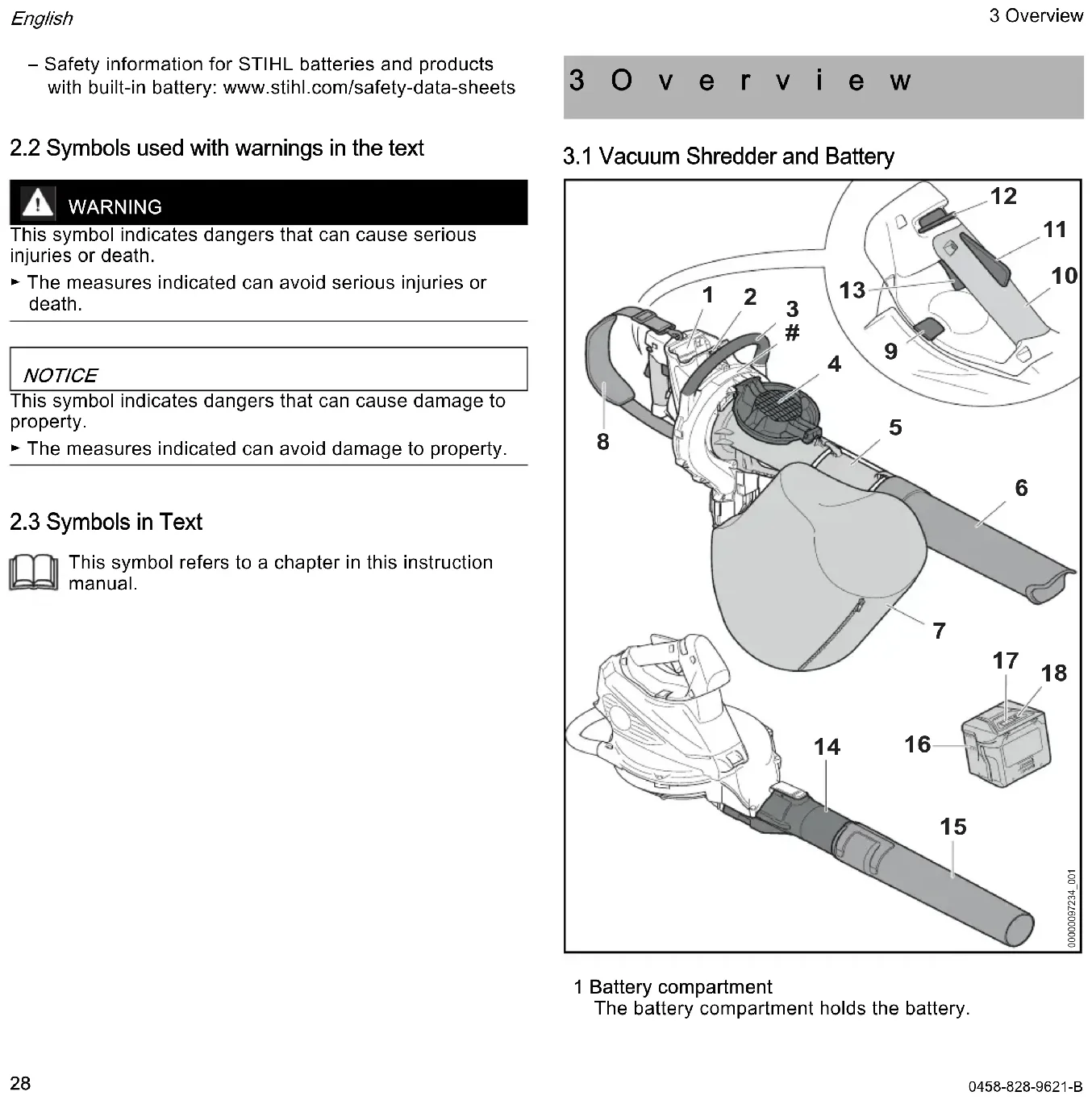
3.1 Vacuum Shredder and Battery
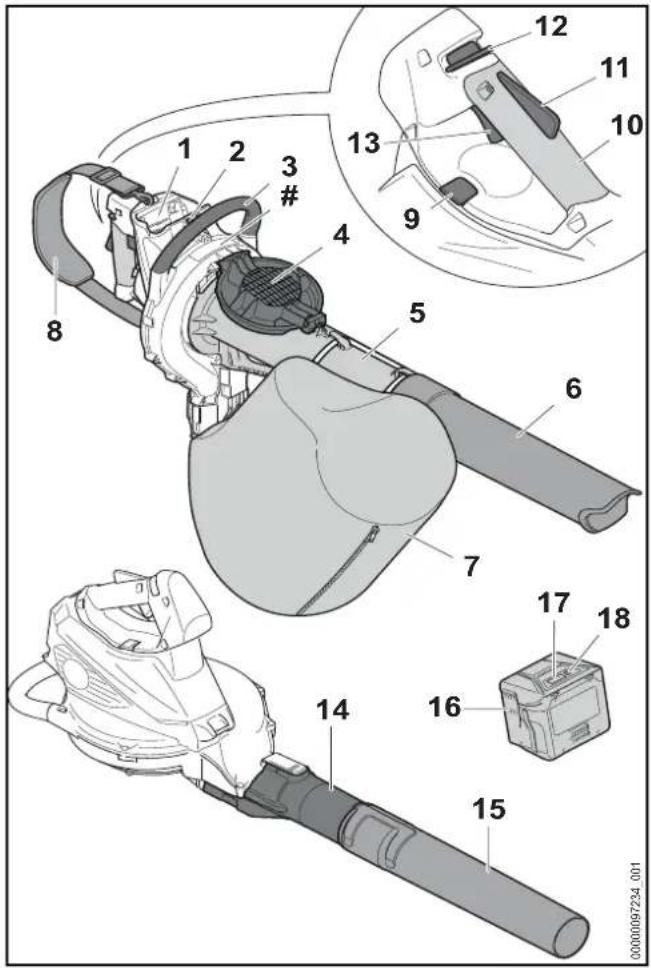
1 Battery compartment
The battery compartment holds the battery.
3 Overview
English
2 Locking lever
The locking lever holds the battery in the battery compartment.
3 Loop handle
For holding and controlling the vacuum shredder.
4 Shield
The shield protects the user from moving parts inside the vacuum shredder.
5 Suction tube
The suction tube guides the sweepings into the vacuum shredder.
6 Nozzle
The nozzle guides the sweepings to the suction tube.
7 Catcher bag
The catcher bag collects the sweepings.
8 Shoulder strap
Serves to carry the vacuum shredder.
9 Retaining latch
The retaining latch retains the control handle in its position.
10 Control handle
The control handle is used to operate, control and carry the vacuum shredder.
11 Ergo lever
The Ergo lever holds the release slide in position when the trigger is released.
12 Release slide
The release slide releases the trigger.
13 Trigger
Switches the vacuum shredder on and off.
14 Blower tube
The blower tube directs the air stream.
15 Nozzle
The nozzle directs and controls the air stream.
16 Battery
The battery supplies the blower with energy.
17 LEDs
The LEDs indicate the state of charge of the battery and any faults.
18 Button
The button activates the LEDs on the battery.
# Rating plate with machine number
3.2 Icons
Meaning of icons that may be on the vacuum shredder and the battery:

This symbols indicates that the control handle can be rotated 180^ .
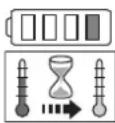
1 LED lights up red. The battery is too warm or too cold.
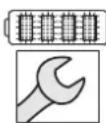
4 LEDs flashing red. There is a fault in the battery.

Guaranteed sound power level in accordance with Directive 2000/14/EC in dB(A) for the purpose of comparing the sound emissions of products.

The information next to the symbol indicates the energy content of the battery according to the cell manufacturer's specification. The energy content available in operation is lower.

Do not dispose of the product with domestic waste.
4 Safety Precautions
4.1 Warning Symbols
The warning symbols on the vacuum shredder or battery have the following meaning:

Observe safety notices and take the necessary precautions.

Read, understand and keep the User Manual.

Wear safety glasses.
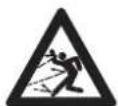
Observe the safety advice concerning flying objects and associated measures.

Tie back long hair and confine it so that it cannot be pulled into the vacuum shredder.
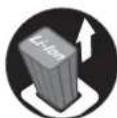
Remove the battery during work stoppages, transport, storage, maintenance or repair.

Protect the vacuum shredder from rain and dampness.
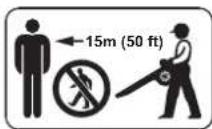
Maintain a safety distance.
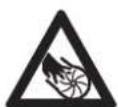
Do not touch moving parts in the blower wheel. If the suction tube is not mounted: Close the shield.
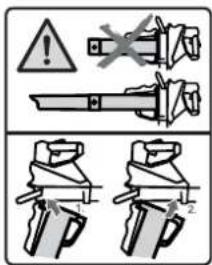
Use the vacuum shredder only with the suction tube attached and the nozzle attached.

Protect battery from heat and fire.

Protect the battery from rain and moisture and do not immerse it in liquids.
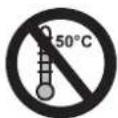
Observe the permitted battery temperature range.
4.2 Intended Use
The STIHL SHA 56 vacuum shredder is intended for sucking up leaves, cut grass and similar sweepings and for blowing off leaves, grass, paper and similar material.
The vacuum shredder must not be used in the rain.
The STIHL AK battery supplies power to the vacuum shredder.
▲ WARNING
■ Batteries not approved by STIHL for the vacuum shredder may cause fires and explosions. Persons may be seriously or fatally injured and property may be damaged.
▶ Use the vacuum shredder with a STIHL AK battery.
■ Failure to use the vacuum shredder or battery as intended may result in serious or fatal injury to people and damage to property.
- Use the vacuum shredder and battery as described in this user manual.
- Use the battery as described in the STIHL AK user manual.
4.3 Requirements concerning the user
▲ WARNING
■ Users without adequate training or instruction cannot recognize or assess the risks involved in using the vacuum shredder and battery. The user or other persons may sustain serious or fatal injuries.

▶ Read, understand and keep the User Manual.
▶ If the vacuum shredder or battery is passed on to another person: Always give them the user manual.
▶ Make sure that the user meets the following conditions:
- The user is rested.
- The user must be in good physical condition and mental health to operate and work with the vacuum shredder and battery. If the user is able to operate the equipment but has physical, sensory or mental restrictions, the user may only
work with the equipment under the supervision of or after receiving instruction from a responsible person.
- The user can recognize and assess the hazards of the vacuum shredder and battery.
– The user is an adult, or is being trained in an occupation under supervision according to national regulations. - The user has received instruction from a STIHL servicing dealer or other experienced user before working with the vacuum shredder for the first time.
- The user is not under the influence of alcohol, medicines or drugs.
▶ If you have any doubts, be sure to consult a STIHL dealer.
4.4 Clothing and equipment
▲ WARNING
■ Long hair can be pulled into the vacuum shredder during operation. This may result in serious injury to the user.

- Tie up and confine long hair above your shoulders.
■ Objects can be thrown at high speed during operation. This may result in injury to the user.

▶ Wear close-fitting safety glasses. Suitable safety glasses tested to standard EN 166 or national standards and bearing the corresponding mark are available to buy.
▶ Wear long trousers.
English
4 Safety Precautions
■ Dust can be whipped up during operation. Whipped up dust can damage the respiratory passages and cause allergic reactions.
▶ If dust is generated: Wear a dust respirator mask.
■ Unsuitable clothing can snag on wood, brush or the vacuum shredder. Users not wearing suitable clothing are at risk of serious injury.
▶ Wear close-fitting clothing.
■ The user can come into contact with the blower wheel during cleaning and maintenance work. This may result in injury to the user.
- Wear work gloves made from resistant material.
- Remove scarves and jewelry.
■ Wearing unsuitable footwear may cause the user to slip. This may result in injury to the user.
- Wear sturdy, closed-toed footwear with high-grip soles.
4.5 Work Area and Surroundings
4.5.1 Vacuum Shredder
▲ WARNING
■ Bystanders, children and animals cannot recognize or assess the dangers of the vacuum shredder or flying debris. This may result in serious injury to bystanders, children and animals and damage to property.
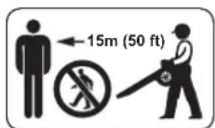
- Do not allow bystanders, children or animals within 15 meters of the work area.
- Maintain a clearance of 15 meters from objects.
- Do not leave the vacuum shredder unattended.
- Make sure that children cannot play with the vacuum shredder.
■ The vacuum shredder is not waterproof. If you work in the rain or in a damp environment, an electric shock may occur. This can result in injuries to the user and may damage the vacuum shredder.

- Do not work in the rain or in a damp environment.
■ Electrical components of the vacuum shredder can produce sparks. Sparks may cause fires and explosions in highly flammable or explosive environments. Persons may be seriously or fatally injured and property may be damaged.
- Do not work in a highly flammable or explosive environment.
4.5.2 Battery
▲ WARNING
■ Bystanders, children and animals cannot recognize or assess the dangers of the battery. Bystanders, children and animals may be seriously injured.
- Keep bystanders, children and animals away from the work area.
- Do not leave the battery unattended.
▶ Make sure that children cannot play with the battery.
■ The battery is not protected against all ambient conditions. If the battery is exposed to certain ambient conditions, it may catch fire or explode. This can result in serious injuries and damage to property.

▶ Protect battery from heat and fire.
▶ Do not throw the battery into a fire.
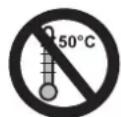
▶ Use and store the battery at temperatures between - 10°C and +50°C.
4 Safety Precautions
English

- Protect the battery from rain and damp – do not immerse it in fluids.
- Keep battery away from metallic objects.
- Do not expose battery to high pressure.
- Do not expose battery to microwaves.
▶ Protect battery from chemicals and salts.
4.6 Safe Condition
4.6.1 Vacuum Shredder
The vacuum shredder is in a safe condition if the following points are observed:
- The vacuum shredder is undamaged.
- The vacuum shredder is clean and dry.
- The controls function properly and have not been modified.
- The zip at the catcher bag can be completely closed and opened.
– The wear limits are not exceeded. - Original STIHL accessories designed for this vacuum shredder model are fitted.
- The accessories are correctly attached.
▲ WARNING
■ If not in safe condition, components may no longer operate correctly and safety devices may be disabled. This may result in serous or fatal injury to people.
▶ Work only with an undamaged vacuum shredder.
▶ If the vacuum shredder is dirty or wet: Clean the vacuum shredder and allow it to dry.
▶ Never attempt to modify the vacuum shredder.
Exception: Attaching a nozzle or catcher bag designed for this vacuum shredder model.
- If the controls do not function properly: Do not work with the vacuum shredder.
▶ If you cannot close or open the zip at the catcher bag: Do not work with the vacuum shredder.
▶ Observe and remain inside the wear limits. - Fit original STIHL accessories designed for this vacuum shredder model.
- Attach accessories as described in this User Manual or in the User Manual for the accessories.
▶ Never insert objects in the openings of the vacuum shredder. - Replace worn or damaged labels.
▶ If you have any doubts, be sure to consult a STIHL dealer.
4.6.2 Battery
The battery is in safe condition when the following conditions are met:
– The battery is not damaged.
- The battery is clean and dry.
- The battery is working and has not been modified.
▲ WARNING
■ The battery cannot function safely if it is not in safe condition. There is a risk of serious injury to persons.
▶ Use an undamaged and functioning battery.
▶ Do not charge a damaged or defective battery.
▶ If the battery is dirty or wet: clean the battery and allow it to dry.
▶ Do not modify the battery.
- Do not insert objects into the apertures in the battery.
▶ Never connect the battery terminals to metallic objects and cause a short circuit.
▶ Do not open the battery.
English
4 Safety Precautions
- Replace worn or damaged warning signs.
■ Fluid may leak from a damaged battery. If the fluid contacts the skin or eyes, this may cause irritation. - Avoid contact with the fluid.
- In the event of contact with the skin: wash the affected areas with plenty of soap and water.
▶ In the event of contact with the eyes: rinse the eyes with plenty of water for at least 15 minutes and seek medical attention.
■ A damaged or defective battery may emit an unusual odour, smoke or catch fire. This may result in serious or fatal injury to people and damage to property.
▶ If the battery emits an unusual odour or smoke: do not use the battery and keep it away from flammable materials. - If the battery catches fire: try to extinguish the battery using a fire extinguisher or water.
4.7 Working
WARNING
■ In certain situations, the user may no longer be able to concentrate on their work. This may result in the user stumbling, falling and suffering serious injury.
- Keep calm and plan your work.
- If light and visibility are poor: Do not work with the vacuum shredder.
▶ Use the vacuum shredder on your own.
▶ Do not work above shoulder height.
▶ Watch out for obstacles.
▶ Work standing on the ground and keep your balance. If you have to work at a height: Use a mobile elevating work platform or secure scaffolding.
▶ If you start feeling fatigue: Take a break.
- The zip at the catcher bag must be closed when working with the vacuum shredder.
- If the vacuum shredder is used as a blower: Blow in the direction of the wind.
- Objects can be thrown at high speed during operation. This can result in injuries to persons and animals and damage to property.
- Do not direct air blast towards persons, pets and objects.
■ If the behavior of the vacuum shredder changes during operation or feels unusual, it may no longer be in a safe condition. This may result in serious injury to people and damage to property. - Stop working, remove the battery and consult a STIHL dealer.
■ Vibrations may occur while using the vacuum shredder.
▶ Take breaks. - If signs of a circulatory disturbance occur: Consult a doctor.
■ The dust whipped up may cause the vacuum shredder to be electrostatically charged. In certain conditions (e.g. dry environment) the vacuum shredder may discharge suddenly and emit sparks. Sparks may cause fires and explosions in highly flammable or explosive environments. Persons may be seriously or fatally injured and property may be damaged. - Do not work in a highly flammable or explosive environment.
■ The moving parts in the blower wheel may injure the user. This may result in serious injury to the user.
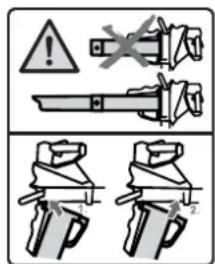
▶ Use the vacuum shredder only with the suction tube attached and the nozzle attached.
4 Safety Precautions
English
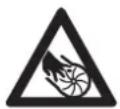
- Do not touch moving parts in the blower wheel.
▶ If the suction tube is not mounted: Close the shield.
▶ If the moving parts in the blower wheel are jammed by an object: Switch the vacuum shredder off and remove the battery. before clearing the jam.
- In an emergency, the user may start to panic and forget to take off the carrying system. This may result in serious injury to the user.
▶ Practice taking off the carrying system.
4.8 Transporting
4.8.1 Vacuum Shredder
WARNING
■ The vacuum shredder may turn over or shift during transport. Persons may be injured or property damaged.
▶ Remove the battery.
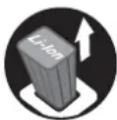
- Secure the vacuum shredder with lashing straps, belts or a net to prevent it turning over and moving.
▶ If the suction tube is not mounted: Close the shield.
4.8.2 Battery
▲ WARNING
■ The battery is not protected against all ambient conditions. The battery may be damaged if it is exposed to certain ambient conditions and damage to property may occur.
▶ Never transport a damaged battery.
- Store the battery in non-conductive packaging.
■ The battery may turn over or shift during transport. This may result in personal injuries and damage to property.
- Pack the battery in packaging in such a way that it cannot move.
- Secure the packaging so that it cannot move.
4.9 Storing
4.9.1 Vacuum Shredder
▲ WARNING
■ Children are not aware of and cannot assess the dangers of the vacuum shredder. Children may be seriously injured.
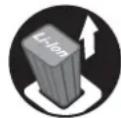
- Remove the battery.
- Store the vacuum shredder out of the reach of children.
- Dampness may corrode the electrical contacts on the vacuum shredder and metal components. The vacuum shredder may be damaged.
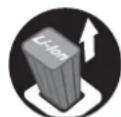
▶ Remove the battery.
- Store the vacuum shredder in a clean and dry condition.
English
4.9.2 Battery
▲ WARNING
■ Children are not aware of and cannot assess the dangers of the battery. Children may be seriously injured.
- Store the battery out of the reach of children.
■ The battery is not protected against all ambient conditions. If the battery is exposed to certain ambient conditions, the battery may be damaged.
- Store the battery in a clean and dry condition.
- Store the battery indoors.
- Store the battery separately from the vacuum shredder and charger.
- Store the battery in electrically non-conductive packaging.
- Store the battery at temperatures between - 10 °C and + 50 °C.
4.10 Cleaning, Maintenance and Repair
▲ WARNING
■ The vacuum shredder may start up unintentionally if the battery is left in place during cleaning, maintenance or repair operations. This may result in serious injury to people and damage to property.
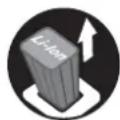
▶ Remove the battery.
- Harsh detergents, cleaning with a water jet or sharp objects can damage the vacuum shredder and the battery. If the vacuum shredder or the battery are not cleaned as
5 Preparing the Vacuum Shredder for Operation
described in this user manual, components may no longer function properly or safety devices may be rendered inoperative. They may cause serious injury to persons.
- Clean the vacuum shredder and battery as described in this user manual.
■ If the vacuum shredder or battery are not serviced or repaired correctly, components may no longer function properly or safety devices may be rendered inoperative. This may result in serous or fatal injury to people.
- Do not attempt to service or repair the vacuum shredder, blower or battery.
▶ If the vacuum shredder or the battery require servicing or repairs: Contact your STIHL dealer for assistance.
5 Preparing the Vacuum Shredder for Operation
5.1 Preparing the Vacuum Shredder for Operation
The following steps must be performed before commencing work:
- Ensure that the following components are in safe condition:
– Vacuum shredder, 4.6.1 - Battery, 4.6.2.
▶ Check the battery, 10.3.
▶ Fully charge the battery, ☐6.1.
▶ Clean the vacuum shredder, 17.1.
▶ Attach the nozzle, 7.1
- Attach the suction tube, 7.2.1.
- Attach the catcher bag, 7.3.1.
▶ Check the vacuum shredder, 10.2.
▶ Check the controls, ☐10.1.
▶ If you cannot carry out these steps: Do not use the vacuum shredder and contact your STIHL dealer for assistance.
6 Charging the Battery, LEDs
6.1 Charging the Battery
The charging time depends on several factors, e.g. temperature of the battery or the ambient temperature. The actual charging time may differ from the specified charging time. For specified charging times see www.stihl.com/charging-times.
- Recharge the battery fully as described in the instruction manual for the STIHL AL 101, 300, 500 chargers.
6.2 State of Charge
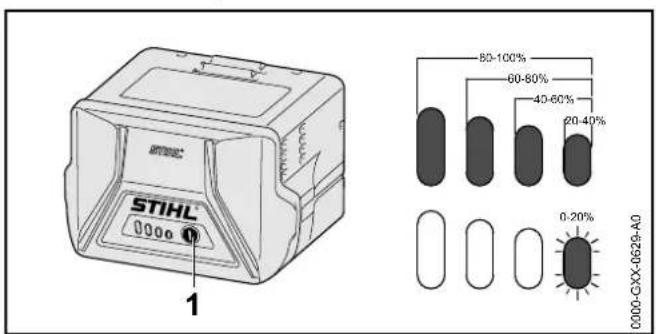
▶ Press the button (1).
The LEDs (5) glow green for about 5 seconds and indicate the state of charge.
▶ If the LED on the right flashes green: Charge the battery.
6.3 LEDs on the battery
The LEDs can indicate the state of charge of the battery or any faults. The LEDs can be steady green, steady red or flashing.
If the LEDs are steady or flashing green, this indicates the state of charge of the battery.
▶ If the LEDs glow or flash red: Troubleshooting, 19.1. There is a malfunction in the vacuum shredder or battery.
7 Assembling the Vacuum Shredder
7.1 Attaching the Nozzle
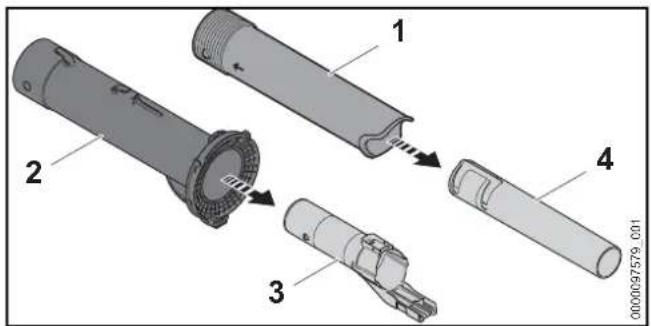
▶ Pull the blower tube (3) out of the suction tube (2).
▶ Pull the nozzle (4) out of the nozzle (1).
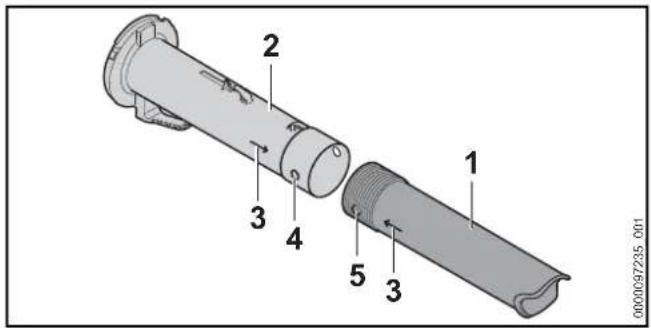
- Line up the hole (4) and the lug (5). The arrows (3) point to each other.
- Push the nozzle (1) onto the suction tube (2). The nozzle (1) engages audibly and no longer needs to be removed.
7.2 Attaching and Removing the Suction Tube
7.2.1 Attaching the Suction Tube
- Switch off the vacuum shredder and remove the battery
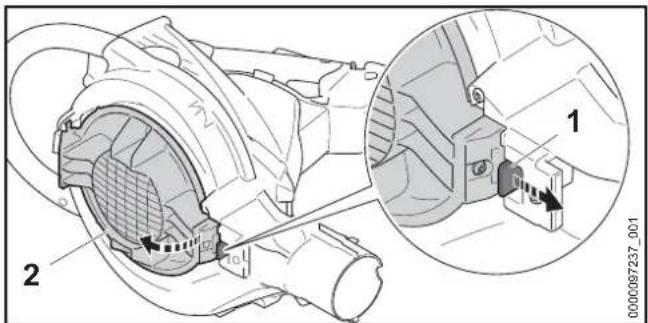
▶ Pull the retaining latch (1).
▶ Fully open the shield (2).
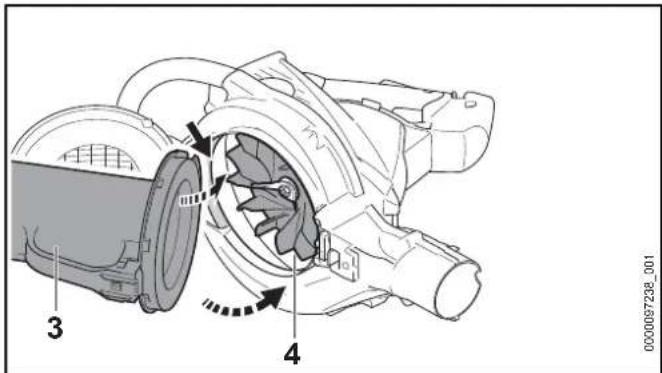
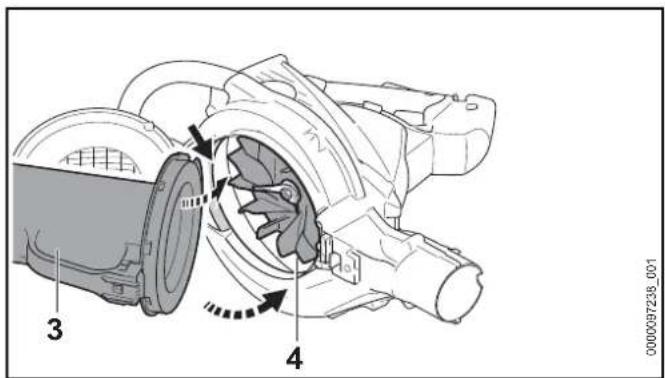
- Insert the suction tube (3) into the blower housing (4).
▶ Swivel the suction tube into the blower housing. The suction tube (3) engages with an audible click.
7.2.2 Removing the Suction Tube
- Switch off the vacuum shredder and remove the battery.
- Hold the suction tube and pull the retaining latch.
- Remove the suction tube from the blower housing.
▶ Close the shield.
The retaining latch engages with an audible click.
7.3 Attaching and Removing the Catcher Bag
7.3.1 Attaching the Catcher Bag
- Switch off the vacuum shredder and remove the battery.
▶ Close the zip on the catcher bag.
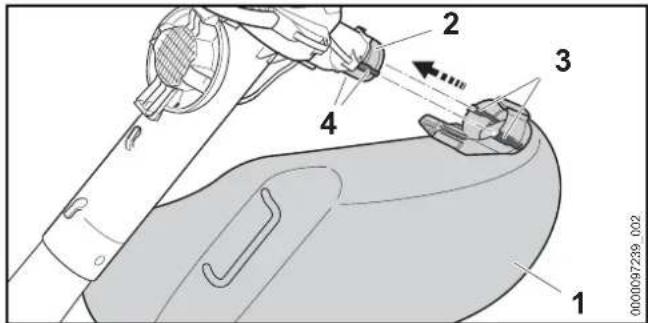
▶ Push the catcher bag (1) over the opening (2) that the guides on the sides (4) are in line with the recesses (3). The catcher bag engages in position with an audible click.
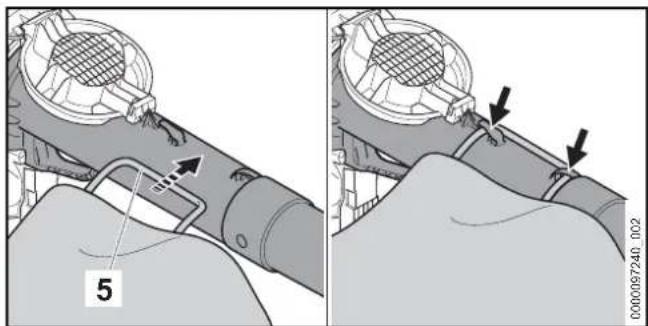
▶ Hook in the loop (5).
7.3.2 Removing the Catcher Bag
- Switch off the vacuum shredder and remove the battery.
8 Removing and Fitting the Battery
English
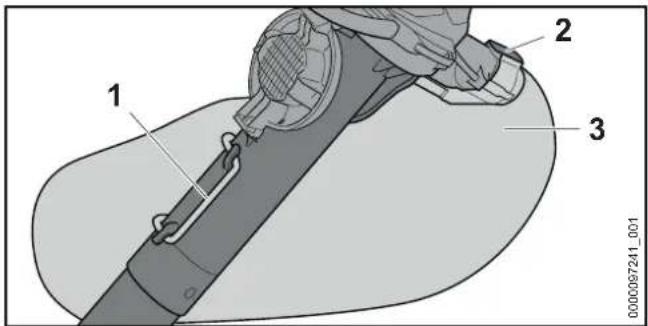
▶ Unhook the loop (1).
▶ Depress the retaining latch (2) and hold it depressed.
▶ Pull off the catcher bag (3).
8 Removing and Fitting the Battery
8.1 Inserting the battery
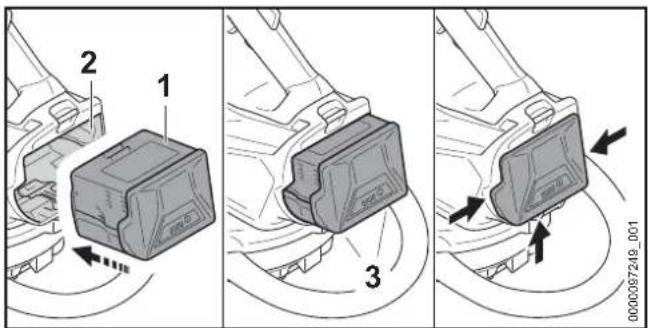
- Insert the battery (1) in the battery compartment (2) and press it home until you hear a click. The arrows (3) on the battery (1) are still visible and the battery (1) is held securely in the battery compartment (2). There is no electrical contact between the vacuum shredder and the battery (1).
- Insert the battery (1) up to the limit stop into the battery compartment (2). The battery (1) engages with a second click and is flush with the vacuum shredder housing.
8.2 Removing the Battery
- Keep one hand in front of the battery compartment so that the battery (2) cannot fall out.
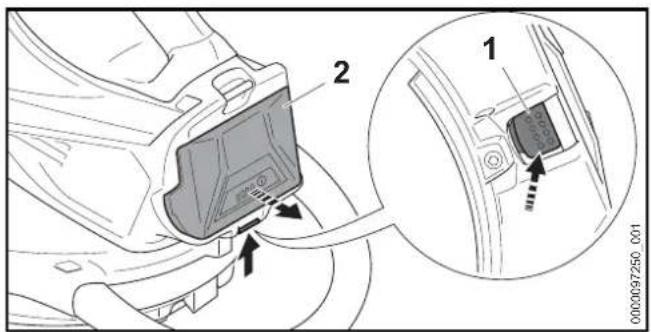
- Press the locking lever (1) with your other hand. The battery (2) is released and can be removed.
9 Switching the Vacuum Shredder On/Off
9.1 Switching the Vacuum Shredder On
- Hold the vacuum shredder firmly with your right hand on the control handle – wrap your thumb around the control handle.
- Hold the vacuum shredder with your left hand on the loop handle - wrap your thumb around the loop handle.
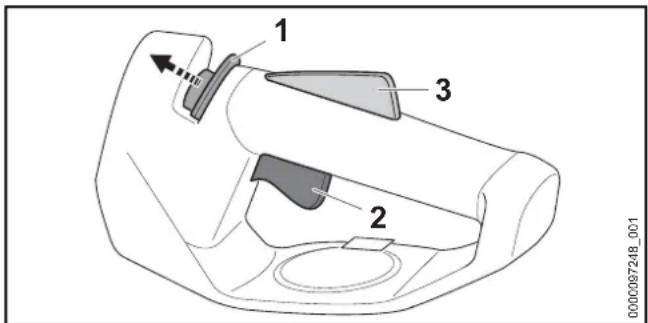
- Push the release slide (1) in the direction of the loop handle with your thumb and hold it there.
▶ Squeeze and hold the trigger (2) with your index finger. The vacuum shredder accelerates, and the sweepings are sucked in. The release slide (1) can be released.
The more you depress the trigger (2), the more sweepings are sucked in.
If the ergo lever (3) is pressed, the trigger switch (2) remains unlocked. This means the trigger can be released and depressed again without having to push the release slide in the direction of the suction tube once more.
If the trigger switch (2) and the ergo lever (3) are released, the trigger switch (2) is locked. The release slide (1) must be slid in the direction of the loop handle once more and held to unlock the trigger (2).
9.2 Switching the Vacuum Shredder Off
- Release the trigger.
The vacuum shredder stops sucking in the sweepings.
▶ If the vacuum shredder continues to suck in sweepings: Remove the battery and consult a STIHL specialist dealer. The vacuum shredder is defective.
10 Checking the Vacuum Shredder and Battery
10.1 Checking the controls
Trigger
▶ Remove the battery.
▶ Press the trigger.
▶ If the trigger is stiff or does not spring back to its idle position: Do not use the vacuum shredder and contact your STIHL dealer for assistance.
The trigger is defective.
Switching the Vacuum Shredder On
▶ Insert battery.
▶ Press and hold the trigger.
The sweepings are sucked in.
▶ If 3 LEDs flash red: Remove the battery and consult a STIHL dealer.
There is a fault in the vacuum shredder.
- Release the trigger.
The vacuum shredder stops sucking in the sweepings.
▶ If the vacuum shredder continues to suck in sweepings: Remove the battery and consult a STIHL specialist dealer. The vacuum shredder is defective.
10.2 Checking the Vacuum Shredder
- Switch off the vacuum shredder and remove the battery.
11 Working with the Vacuum Shredder
English
Checking the suction tube
natural_image
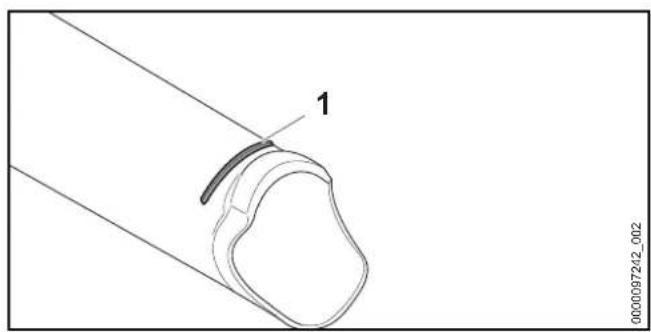
Technical line drawing of a mechanical component with labeled part '1' (no text or symbols beyond label)- Check whether the wear mark (1) on the suction tube is visible.
▶ If there is no visible wear mark on the suction tube: Do not use the vacuum shredder and contact your STIHL dealer for assistance.
▶ If you have any doubts, be sure to consult a STIHL dealer.
Checking the wear pad
natural_image
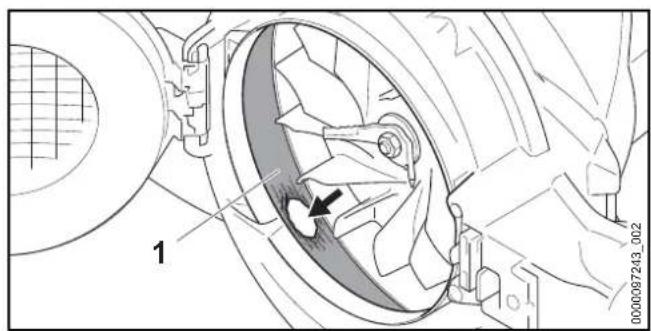
Technical diagram of a mechanical component with labeled parts (1 and arrow), no readable text or symbols beyond labels▶ Remove the suction tube.
▶ Check whether the wear pad (1) is damaged.
▶ If the wear pad is damaged: Do not use the vacuum shredder and contact your STIHL dealer for assistance.
▶ If you have any doubts, be sure to consult a STIHL dealer.
10.3 Testing the Battery
- Press button on battery. The LEDs glow or flash.
▶ If the LEDs do not glow or flash: Do not use the battery and contact your STIHL servicing dealer. There is a malfunction in the battery.
11 Working with the Vacuum Shredder
11.1 Holding and Guiding the Vacuum Shredder
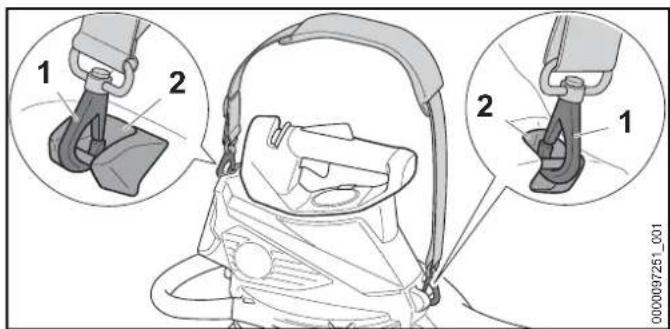
▶ Hook the carrier rings (2) into the carabiners (1)
natural_image
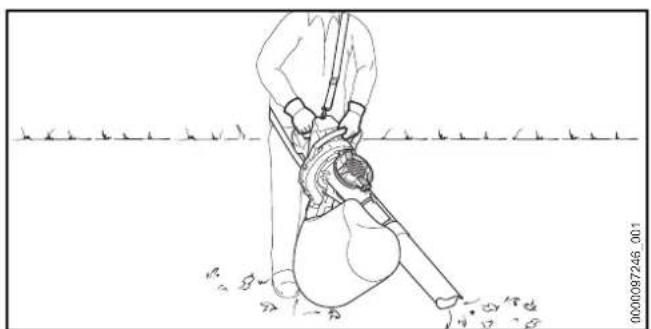
Line drawing of a person using a tool to lift or lift an object, with no visible text or symbols- Hold and control your vacuum shredder with your left hand on the loop handle and your right hand on the control handle. Wrap the thumb of your left hand around the loop handle and the thumb of your right hand around the control handle.
English
11.2 Vacuum Shredding
▶ Point the nozzle at the ground.
▶ Move forward slowly in a controlled manner.
11.3 Emptying the Catcher Bag
- Switch off the vacuum shredder and remove the battery.
- Detach the catcher bag from the vacuum shredder.
- Hold the catcher bag by the carrying ring in such a way that no debris can fall out of the opening.
▶ Fully unzip the catcher bag and properly dispose of the contents.
▶ Full close the zip. - Attach the catcher bag to the vacuum shredder.
12 Changing the Vacuum Shredder for Use as a Blower
12.1 Removing the Suction Tube and Catcher Bag
- Switch off the vacuum shredder and remove the battery.
- Remove the suction tube.
▶ Remove the catcher bag.
12.2 Turning the Control Handle
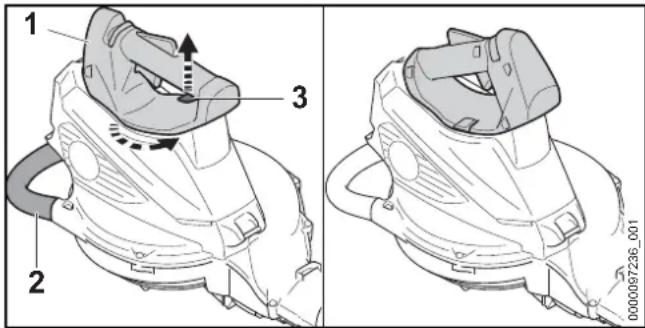
- Hold the vacuum shredder firmly with one hand on the control handle (1).
12 Changing the Vacuum Shredder for Use as a Blower
▶ Pull the retaining latch (3) up and hold it there.
▶ Turn the loop handle (2) 45 degrees counterclockwise.
▶ Release the retaining latch (3).
- Continue to turn the loop handle (2) counterclockwise until it engages.
12.3 Attaching and Removing the Blower Tube
12.3.1 Mounting the Blower Tube
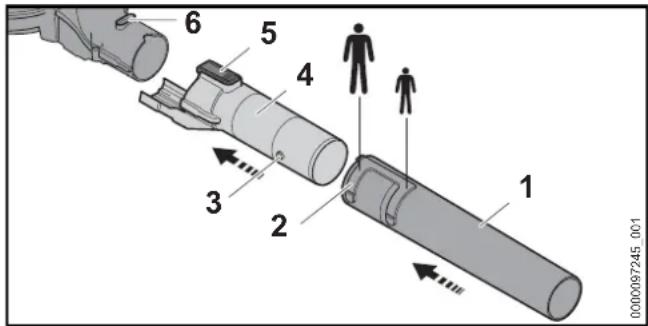
▶ Align the peg (3) with the slot (2).
▶ Push the nozzle (1) onto the blower tube (4) up to the desired position.
▶ Turn the nozzle (1) until it engages
The nozzle (1) engages with an audible click.
- Align the retaining latch (5) with the slot (6).
- Push the blower tube (4) onto the blower.
The retaining latch (5) engages with an audible click.
12.3.2 Removing the Blower Tube
▶ Depress the retaining latch and hold it depressed.
- Remove the blower tube from the blower.
12.4 Holding and Guiding the Blower
- Hold and guide the blower with one hand on the control handle - wrap you thumb around the control handle.
13 Changing the Blower for Use as a Vacuum Shredder
English
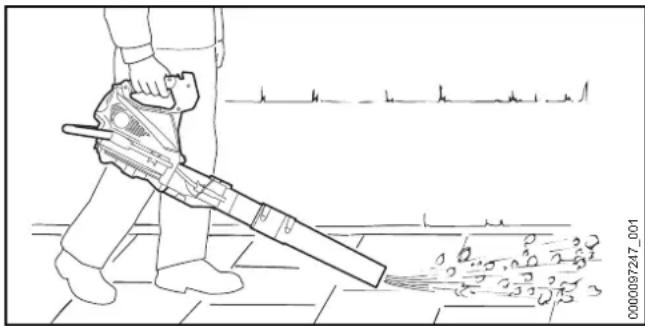
12.5 Blowing
- Insert the battery and switch the blower on.
natural_image
Line drawing of a person using a handheld electric shaver to clean or spray particles (no text or symbols)▶ Point the nozzle at the ground.
▶ Move forward slowly in a controlled manner.
13 Changing the Blower for Use as a Vacuum Shredder
13.1 Changing the Blower for Use as a Vacuum Shredder
▶ Switch off the blower and remove the battery.
▶ Remove the blower tube.
▶ Turn the control handle.
▶ Attach the suction tube.
- Attach the catcher bag.
14 After Finishing Work
14.1 When Work is Finished
- Switch off the vacuum shredder and remove the battery.
▶ Empty the catcher bag.
▶ If the vacuum shredder is wet: Leave the vacuum shredder to dry.
▶ If the catcher bag is wet: Leave the catcher bag to dry.
▶ If the battery is wet: Leave the battery to dry.
▶ Clean the vacuum shredder.
▶ Clean the catcher bag.
▶ Clean the battery.
15 Transporting
15.1 Transporting the Vacuum Shredder
- Switch off the vacuum shredder and remove the battery.
▶ If the suction tube is removed: Close the shield.
Carrying the vacuum shredder
- Carry the vacuum shredder with one hand by the loop handle with the suction tube behind you.
▶ If the vacuum shredder is changed for use as a blower: Carry the blower with one hand by the control handle.
Transporting the vacuum shredder in the car
- Secure the vacuum shredder so that it cannot turn over or move.
15.2 Transporting the battery
- Switch off the vacuum shredder and remove the battery.
▶ Check that the battery is in a safe condition. - Pack the battery so that the following points apply:
- The packaging is electrically non-conductive.
- The battery cannot move inside the packaging.
- Secure the packaging so that it cannot move.
The battery is subject to the Carriage of Dangerous Goods regulations. The battery is classified as UN 3480 (lithium ion batteries) and has been tested pursuant to UN Manual Tests and Criteria Part III, Subsection 38.3.
The transport regulations can be found in www.stihl.com/safety-data-sheets.
16 Storing
16.1 Storing the Vacuum Shredder
- Switch off the vacuum shredder and remove the battery.
- The vacuum shredder should be stored in such a way that the following conditions are fulfilled:
- The vacuum shredder is out of the reach of children.
- The vacuum shredder is clean and dry.
16.2 Storing the Battery
STIHL recommends keeping the battery in a charging state between 40% and 60% (2 green LEDs lit).
- The battery should be stored in such a way that the following conditions are fulfilled:
- The battery is out of the reach of children.
- The battery is clean and dry.
- The battery is in an enclosed room.
- Battery is stored separately, away from the vacuum shredder and charger.
- The battery is in electrically non-conductive packaging.
- The battery is stored at temperatures between - 10 °C and + 50 °C.
17 Cleaning
17.1 Cleaning the Vacuum Shredder
- Switch off the vacuum shredder and remove the battery.
- Clean the vacuum shredder with a damp cloth.
▶ Clean vents with a paintbrush. - Clean the shield with a paintbrush or soft brush.
- Clean the area around the blower wheel with a damp cloth.
-
Beat the catcher bag to remove the dirt, and clean it with a moist cloth.
-
Remove foreign objects from the battery compartment and clean the battery compartment with a damp cloth.
- Clean the electrical contacts in the battery compartment with a paintbrush or soft brush.
17.2 Cleaning the Battery
▶ Clean the battery with a damp cloth.
18 Maintenance and Repairs
18.1 Maintenance and Repair of the Vacuum Shredder
The vacuum shredder cannot be serviced or repaired by the user.
▶ If your vacuum shredder has a malfunction or is damaged or requires servicing: Contact your STIHL dealer for assistance.
18.2 Servicing and Repairing the Battery
The battery requires no servicing and cannot be repaired.
- If the battery has a malfunction or is damaged: Replace the battery.
19 Troubleshooting
19.1 Remedying Faults in the Blower or Battery
| Fault LEDs on the battery | Cause Remedy | |
| The vacuum shredder does not start when switched on. | 1 LED flashing green. | State of charge of the battery is too low. |
| 1 LED emits red light. | The battery is too warm or too cold. | |
| 3 LEDs flashing red. | There is a fault in the vacuum shredder. | |
| 3 LEDs light up red. | The vacuum shredder is too hot. | |
| 4 LEDs flashing red. | There is a fault in the battery. | |
| No electrical contact between the vacuum shredder and the battery. | ||
| The vacuum shredder or battery is damp. |
English
19 Troubleshooting
| Fault LEDs on the | battery | Cause Remedy | |
| The vacuum shredder cuts out during operation. | 3 LEDs light up red. | The vacuum shredder is too hot. | ▸ Remove the battery.▸ Wait for the vacuum shredder to cool down. |
| There is an electrical fault. | ▸ Remove battery and reinsert it.▸ Switch the vacuum shredder on. | ||
| The vacuum shredder is clogged. | ▸ Remove the battery.▸ Clean the vacuum shredder. | ||
| The suction power is too low. | The catcher bag is full or dirty. | ▸ Remove the battery.▸ Empty the catcher bag.▸ Clean the catcher bag. | |
| The suction tube or blower wheel is clogged. | ▸ Remove the battery.▸ Clean the vacuum shredder. | ||
| The runtime of the vacuum shredder is too short. | The battery is not fully charged. | ▸ Fully charge the battery. | |
| The battery service life has been exceeded. | ▸ Replace battery. | ||
| Charging does not start when the battery is inserted into the charger. | 1 LED emits red light. | The battery is too warm or too cold. | ▸ Leave battery inserted in charger.Charging starts automatically as soon as the permitted temperature range is reached. |
20 Specifications
20.1 Vacuum Shredder STIHL SHA 56
- Approved battery: STIHL AK
- Blowing force: 8 N
– Maximum air velocity: 56 m/s
– Air throughput vacuum shredder 510 m³/h - Volume catcher bag: 40 l
- Weight vacuum shredder without battery: 4.2 kg
- Weight blower without battery: 3.2 kg
The running time is shown at www.stihl.com/battery-life.
20.2 STIHL AK Battery
– Battery technology: Lithium-ion
- Voltage: 36 V
– Capacity in Ah: see rating label
– Energy content in Wh: see rating label
- Weight in kg: see rating label
- Permissible temperature range for operation and storage: -10^ to +50^
20.3 Sound Values and Vibration Values
K-value (uncertainty) for sound pressure levels is 2 dB(A). K-value for sound power levels is 2 dB(A). K-value for vibration level is 2 m/s ^4 .
STIHL recommends wearing ear defenders.
- Sound pressure level L_pA (vacuum shredder) measured according to EN 50636-2-100: 83 dB(A).
-
Sound pressure level L_pA (blower) measured according to EN 50636-2-100: 81 dB(A).
-
Sound power level L_wA measured as specified in EN 50636-2-100: 94 dB(A).
-
Vibration level a_hv measured according to EN 50636-2-100:
-
Control handle: 0.8 ~m / s^2
- Loop handle: 1.1 ~m / s^2
The vibration levels indicated were measured according to a standardized test method and can be used as a basis for comparing electric power tools. The vibration levels actually occurring may vary from the values indicated, depending on the type of application. The vibration levels indicated can be used for an initial estimate of the vibration stress. The actual vibration stress has to be estimated. The times when the power tool is switched off and the times when it is switched on but running under no load can be taken into account in the estimate.
For information on compliance with Employers' Vibration Directive 2002/44/EC see www.stihl.com/vib.
20.4 REACH
REACH is an EC regulation and stands for the Registration, Evaluation, Authorisation and Restriction of Chemical substances.
For information on compliance with the REACH regulation see www.stihl.com/reach.
21 Spare Parts and Accessories
21.1 Spare parts and accessories
STIHL These symbols indicate original STIHL spare parts and original STIHL accessories.
STIHL recommends the use of original STIHL spare parts and accessories.
English
22 Disposal
Despite ongoing market observation, STIHL is unable to judge the reliability, safety and suitability of other manufacturers' spare parts and accessories; accordingly, STIHL cannot warrant for the use of those parts.
Original STIHL spare parts and original STIHL accessories are available from STIHL dealers.
22 Disposal
22.1 Disposing of the Vacuum Shredder and Battery
Contact the local authorities or your STIHL dealer for information on disposal.
Improper disposal can be harmful to health and pollute the environment.
▶ Take STIHL products including packaging to a suitable collection point for recycling in accordance with local regulations.
▶ Do not dispose with domestic waste.
23 EC Declaration of Conformity
23.1 STIHL SHA 56 Vacuum Shredder
declare under our sole responsibility that
- design: cordless vacuum shredder
– Manufacturer's brand: STIHL - series: SHA 56
- serial number: SA02
conforms to the specifications of Directives 2011/65/EU, 2006/42/EC, 2014/30/EU and 2000/14/EC and has been developed and built in compliance with the versions of the
following standards valid at the production date:
EN 55014-1, EN 55014-2, EN 60335-1 and EN 50636-2-100.
The measured and guaranteed equivalent sound power level has been determined in accordance with Directive 2000/14/EC, Annex V.
- Measured sound power level: 94 dB(A)
– Guaranteed sound power level: 96 dB(A)
The technical documents are stored at ANDREAS STIHL AG & Co. KG Produktzulassung.
The year of construction, the country of manufacture and the machine number are shown on the vacuum shredder.
Done at Waiblingen, 15.07.2021
Dr. Jürgen Hoffmann, Director Product Certification & Regulatory Affairs
24 UKCA Declaration of Conformity
24.1 Vacuum Shredder STIHL SHA 56

declare under our sole responsibility that
24 UKCA Declaration of Conformity
English
- Category: cordless vacuum shredder
– Manufacturer's brand: STIHL - Series: SHA 56
- Serial number: SA02
conforms to the relevant provisions of UK regulations The Restriction of the Use of Certain Hazardous Substances in Electrical and Electronic Equipment Regulations 2012, Supply of Machinery (Safety) Regulations 2008, Electromagnetic Compatibility Regulations 2016 and Noise Emission in the Environment by Equipment for use Outdoors Regulations 2001 and has been manufactured in compliance with the following standards in the versions valid on the date of production: EN 55014-1, EN 55014-2, EN 60335-1 and EN 50636-2-100.
The measured and the guaranteed sound power level have been determined in accordance with UK regulation Noise Emission in the Environment by Equipment for use Outdoors Regulations 200, Schedule 8..
- Measured sound power level: 94 dB(A)
– Guaranteed sound power level: 96 dB(A)
The technical documents are stored at ANDREAS STIHL AG & Co. KG Produktzulassung.
The year of construction, the country of manufacture and the machine number are shown on the vacuum shredder.
Done at Waiblingen, 15.07.2021
Dr. Jürgen Hoffmann, Director Product Certification & Regulatory Affairs
Table des matières
1 Préface 51
2.1 Documents applicables
natural_image
Technical line drawing of a mechanical component with labeled part '1' (no text or symbols beyond label)natural_image
Technical diagram of a mechanical component with labeled parts (1 and arrow), no readable text or symbols beyond labelsnatural_image
Line drawing of a person using a tool to clean or inspect a large object, with no visible text or symbols.natural_image
Line drawing of a person using a handheld electric shaver to clean particles on a tiled floor (no text or symbols)natural_image
Technical line drawing of a mechanical component with labeled part '1' (no text or symbols beyond label)natural_image
Technical diagram of a mechanical component with labeled parts (no readable text or symbols)natural_image
Line drawing of a person using a tool to lift a bottle, with no visible text or symbols1 led brandt rood. De accu is te warm of te koud.
- Arrêteerhendel (1) uittrekken.
▶ Beschermrooster (2) volledig openen.
natural_image
Technical diagram of a mechanical component with labeled parts and an arrow indicating a specific feature (no readable text or symbols)natural_image
Line drawing of a person using a tool to cut a pipe into a container, with no visible text or symbols.natural_image
Line drawing of a person using a handheld electric shaver to spray particles on a tiled floor (no text or symbols)0458-828-9621-B

- Inhaltsverzeichnis
- Introduction
- Guide to Using this Manual
- Applicable Documents
- English
- Symbols used with warnings in the text
- WARNING
- NOTICE
- Symbols in Text
- Overview
- Vacuum Shredder and Battery
- Safety Precautions
- Warning Symbols
- Intended Use
- ▲ WARNING
- Requirements concerning the user
- Clothing and equipment
- Work Area and Surroundings
- Vacuum Shredder
- Battery
- Safe Condition
- Vacuum Shredder
- Battery
- Working
- Transporting
- Vacuum Shredder
- Battery
- Storing
- Vacuum Shredder
- Battery
- Cleaning, Maintenance and Repair
- Preparing the Vacuum Shredder for Operation
- Preparing the Vacuum Shredder for Operation
- Charging the Battery, LEDs
- Charging the Battery
- State of Charge
- LEDs on the battery
- Assembling the Vacuum Shredder
- Attaching the Nozzle
- Attaching and Removing the Suction Tube
- Attaching the Suction Tube
- Removing the Suction Tube
- Attaching and Removing the Catcher Bag
- Attaching the Catcher Bag
- Removing the Catcher Bag
- Removing and Fitting the Battery
- Inserting the battery
- Removing the Battery
- Switching the Vacuum Shredder On/Off
- Switching the Vacuum Shredder On
- Switching the Vacuum Shredder Off
- Checking the Vacuum Shredder and Battery
- Checking the controls
- Trigger
- Switching the Vacuum Shredder On
- Checking the Vacuum Shredder
- Working with the Vacuum Shredder
- Testing the Battery
- Vacuum Shredding
- Emptying the Catcher Bag
- Changing the Vacuum Shredder for Use as a Blower
- Removing the Suction Tube and Catcher Bag
- Turning the Control Handle
- Attaching and Removing the Blower Tube
- Mounting the Blower Tube
- Removing the Blower Tube
- Holding and Guiding the Blower
- Changing the Blower for Use as a Vacuum Shredder
- Blowing
- Changing the Blower for Use as a Vacuum Shredder
- After Finishing Work
- When Work is Finished
- Transporting
- Transporting the Vacuum Shredder
- Carrying the vacuum shredder
- Transporting the vacuum shredder in the car
- Transporting the battery
- Storing
- Storing the Vacuum Shredder
- Storing the Battery
- Cleaning
- Cleaning the Vacuum Shredder
- Cleaning the Battery
- Maintenance and Repairs
- Maintenance and Repair of the Vacuum Shredder
- Servicing and Repairing the Battery
- Troubleshooting
- Specifications
- Vacuum Shredder STIHL SHA 56
- STIHL AK Battery
- Sound Values and Vibration Values
- REACH
- Spare Parts and Accessories
- Spare parts and accessories
- Disposal
- Disposing of the Vacuum Shredder and Battery
- EC Declaration of Conformity
- STIHL SHA 56 Vacuum Shredder
- UKCA Declaration of Conformity
- Vacuum Shredder STIHL SHA 56
- Table des matières
- Documents applicables
Brand : STIHL
Model : SHA56
Category : Blower