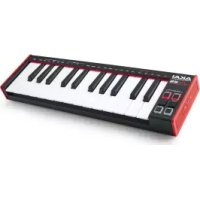
USER MANUAL LPK25 Mk2 AKAI
User Guide (English)
Introduction
Box Contents
LPK25 mk2
USB Cable
Software Download Card
User Guide
Safety & Warranty Manual
Important: Visit akaipro.com and find the webpage for LPK25 mk2 to download the free editor software.
Support
For the latest information about this product (documentation, technical specifications, system requirements, compatibility information, etc.) and product registration, visit akaipro.com.
For additional product support, visit akaipro.com/support.
Quick Start
Connection Diagram
Items not listed under Introduction > Box Contents are sold separately.
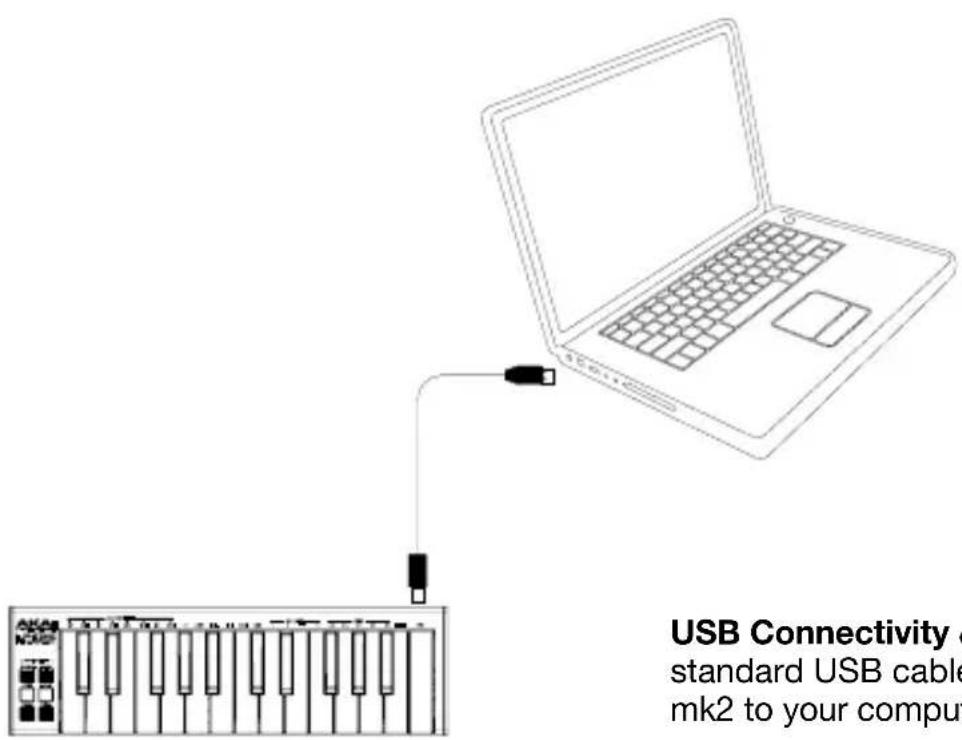
USB Connectivity & Power: Use a standard USB cable to connect LPK25 mk2 to your computer.
Features
Top Panel
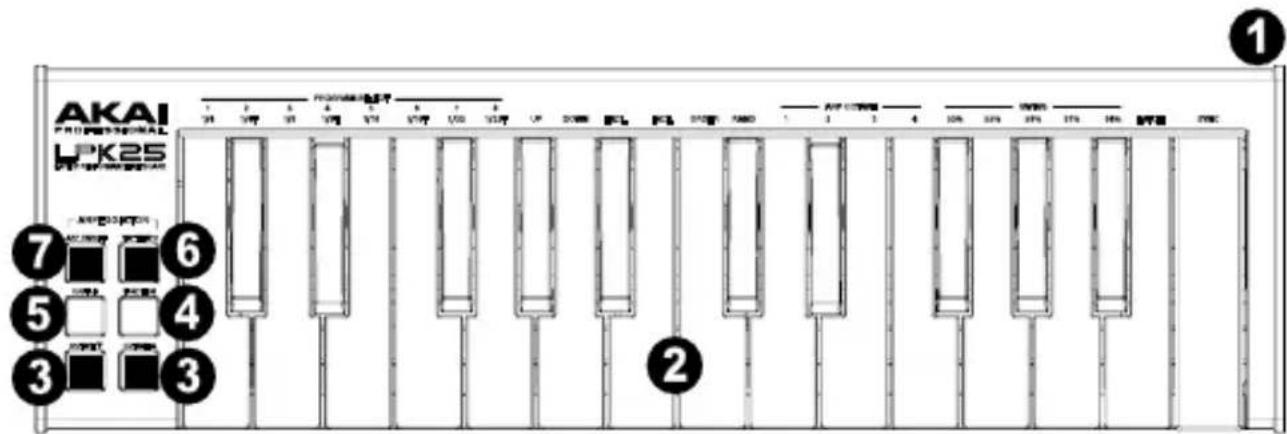
- USB Port (Rear Panel): Use a standard USB cable to connect this USB port to your computer. The computer's USB port provides ample power to LPK25 mk2. This connection is also used to send and receive MIDI data to and from your computer.
- Keyboard: This 25-note keyboard is velocity-sensitive and, in conjunction with the Octave Down/Up buttons, can access the full range of 127 available MIDI notes (10 octaves).
The Function and Arp On/Off buttons allow some of its keys to access additional commands. See Operation > Programs and Arpeggiator to learn more.
- Octave Down/Up (▼/▲): Use these buttons to shift the keyboard's range down or up. Press both buttons simultaneously to reset the octave shift to "zero."
- Function: Hold down this button and press one of the keys on the keyboard labeled Program Select (1-8) to load the program of the same number.
- Sustain: When the Arpeggiator is off, you can hold down the Sustain button to sustain the currently held notes on the keyboard which will stop when the Sustain button is released. If the Arpeggiator is active, then this button will momentarily latch the arpeggiator for as long as the button is held. When released, the Arpeggiator will disengage latching.
- Tap Tempo: Tap this button at the desired rate to enter a new tempo for the internal arpeggiator.
Important: Tap Tempo does not work when LPK25 mk2 is externally synced.
- Arp On/Off: Press this button to enable or disable the internal arpeggiator. The arpeggiator affects notes being played on the keyboard only, and its rate is based on the current tempo and time division settings.
Hold this button down and press a labeled key on the keyboard to enter new settings for the arpeggiator. See Operation >Arpeggiator to learn more.
Operation
Programs
You can store up to 8 programs in LPK25 mk2's internal memory. Each program includes all configurable arpeggiator settings, described below in the Arpeggiator section.
To select a program, press and hold Function, and press a Program Select numbered key.
To manage your programs, use the LPK25 mk2 editor software. Visit akaipro.com and find the webpage for LPK25 mk2 to download it.
Arpeggiator
While using the arpeggiator, playing a chord causes the individual notes of the chord to play one at a time in a set order and repeat until the chord is released. The arpeggiator affects notes being played on the keyboard only.
To enable or disable the arpeggiator, press Arp On/Off. This button controls the operation of the arpeggiator. The button's LED on/off state will indicate the Arpeggiator status. This button has a dual function:
- Press the Arp On/Off button once to activate or deactivate the arpeggiator. When the button is lit, the arpeggiator is engaged. Press the button again to turn the arpeggiator off.
- The settings for the arpeggiator can be changed using the Arp On/Off button in conjunction with the keyboard keys. When the Arp On/Off button is pressed and held, the keyboard keys with white text labeled above them can be used to change the parameters of the Arpeggiator.
When the arpeggiator is on, Note On and Note Off messages will only be sent from the arpeggiator and will not be sent when a key is actually pressed. All of the pressed keys will tell the arpeggiator which notes to play. If the arpeggiator is latched, then keys that are released will stay in the arpeggiator. When the Arpeggiator is turned off, then all notes are released from the arpeggiator.
To momentarily latch the active arpeggiator, press and hold the Sustain button. When the button is released, the Arpeggiator will disengage latch.
The rate of the arpeggiator is based on the current tempo and time division settings. To set the tempo, press Tap Tempo several times at the desired rate. The arpeggiator will automatically detect the new tempo.
Important: Tap Tempo does not work when LPK25 mk2 is externally synced.
To set the time division, press and hold Arp On/Off, and press one of these keys on the keyboard:
| 1/4 (quarter notes) | 1/16 (sixteenth notes) |
| 1/4T (quarter-note triplets) | 1/16T (sixteenth-note triplets) |
| 1/8 (eighth notes) | 1/32 (thirty-second notes) |
| 1/8T (eighth-note triplets) | 1/32T (thirty-second-note triplets) |
The arpeggiation type determines the order in which the notes of a chord play, whether they ascend or descend, etc.
To set the arpeggiation type, press and hold Arp On/Off, and press one of these keys on the keyboard:
- Up: Notes arpeggiate from the lowest note up to the highest note.
- Down: Notes arpeggiate from the highest note down to the lowest note.
- Excl (Exclusive): Notes arpeggiate from the lowest to the highest note and back down. Lowest and highest notes are not retriggered when the arpeggio changes direction.
- Incl (Inclusive): Notes arpeggiate from the lowest to the highest note and back down. Lowest and highest notes are retriggered when the arpeggio changes direction.
- Order: Notes will be repeated in the same order in which their keys were pressed.
• Rand (Random): Plays the held notes in random selection.
The arpeggiation range determines the number of octaves across which the arpeggio will play. After the arpeggio plays at the highest octave in the range, the arpeggio will repeat from the lowest octave.
To set the arpeggiation range, press and hold Arp On/Off, and press Arp 1, 2, 3, or 4.
You can set the arpeggiator to follow the tempo of LPK25 mk2's internal MIDI clock or the external tempo of the project in your digital audio workstation (DAW).
Press and hold Arp On/Off, and press the Latch key on the keyboard. When the Arpeggiator is on and Latch is enabled, you can press a combination of keys on the keyboard and the Arpeggiator will continue to arpeggiate these notes even after you release the keys. Pressing a new combination of keys will start a new arpeggiation.
To set whether the arpeggiator is internally or externally synced, press and hold Arp On/Off, and press the Sync key on the keyboard.
To set the Swing value, press and hold Arp On/Off, and press one of these Swings keys: 50%, 55%, 59%, 61%, or 64%.
Technical Specifications
| Keyboard | 25 keys, velocity-sensitive10-octave range (127 MIDI notes) |
| Arpeggiator | Range | 1-4 octaves |
| Modes | Up, Down, Exclusive, Inclusive, Order, Random, or Latching |
| Time Divisions | 1/4-note, 1/4-note triplet, 1/8-note, 1/8-note triplet, 1/16-note, 1/16-note triplet, 1/32-note, or 1/32-note triplet |
| Tempo | 30-240 BPM via Tap Tempo button (internal sync)Based on software tempo (external sync) |
| Swing | 50%, 55%, 59%, 61%, or 64% |
| Programs | 8 stored programs, configurable via free downloadable editor software |
| Connections | (1) USB port |
| Power | Via USB |
| Dimensions(width x depth x height) | 13.7" x 4.0" x 1.5"348 x 102 x 38mm |
| Weight | 0.99 lbs.0.45 kg |
Specifications are subject to change without notice.
Trademarks & Licenses
Akai Professional is a trademark of inMusic Brands, Inc., registered in the U.S. and other countries.
All other product names, company names, trademarks, or trade names are those of their respective owners.
AKAI®
PROFESSIONAL
akaipro.com
Manual Version 1.2