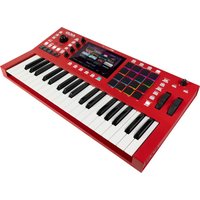
MPC Key 37 - Keyboard AKAI - Free user manual and instructions
Find the device manual for free MPC Key 37 AKAI in PDF.


Pick your language and provide your email: we'll send you a specifically translated version.
| Product Type | Music Production Keyboard Workstation / Controller |
| Number of Keys | 37 |
| Key Type | Velocity-sensitive (semi-weighted) |
| Pads | 16 velocity-sensitive RGB pads |
| Display | 7-inch color touchscreen |
| Assignable Controls | 8 knobs, 4 sliders, and transport buttons |
| Sound Engine | MPC engine with built-in sounds and effects |
| Standalone Operation | Yes (no computer required) |
| DAW Integration | USB MIDI class compliant, MPC 2 software included |
| Polyphony | 128 voices (typical) |
| Storage | Built-in flash memory, expandable via SD card (up to 32GB) |
| Connectivity | USB-B, MIDI I/O (5-pin), 2x 1/4" TRS outs, 1/8" headphone, CV/Gate out |
| Power Supply | External AC adapter (included) |
| Dimensions (W x D x H) | approximately 18.5 x 11.8 x 3.2 inches (470 x 300 x 81 mm) |
| Weight | approximately 9.9 lbs (4.5 kg) |
| Included Software | MPC 2 desktop app, instrument and effect plugins |
| Care Instructions | Clean with a soft, dry cloth. Avoid liquids and direct sunlight. |
| Safety Notes | Use only the included power adapter. Keep away from heat sources. |
| Repairability | User-serviceable parts: none (contact authorized service center) |
| Warranty | 1 year limited warranty (check local terms) |
Frequently Asked Questions - MPC Key 37 AKAI
How do I connect the MPC Key 37 to my computer?
Use a standard USB-B cable to connect the USB B port on the back of the keyboard to a USB port on your computer. The device is class compliant, so no drivers are needed for basic MIDI. For full software integration, install the included MPC 2 software.
Can I use the MPC Key 37 without a computer?
Yes, the MPC Key 37 operates in standalone mode. You can load sounds, sequence, and perform directly on the device using the built-in touchscreen and controls.
How do I load samples onto the MPC Key 37?
Samples can be loaded via SD card (inserted in the slot on the back) or via USB transfer from your computer. Use the MPC 2 software to manage and transfer files.
What is the maximum polyphony of the MPC Key 37?
The MPC Key 37 supports up to 128 voices of polyphony, allowing complex arrangements without note cutoffs.
How do I assign controls to knobs and sliders?
Press the Q-Link button, then select a knob or slider on the touchscreen. Assign any MIDI CC, instrument parameter, or effect parameter to the physical control.
Does the MPC Key 37 have built-in effects?
Yes, it includes a suite of pro-level effects such as reverb, delay, EQ, compression, and modulation effects, which can be applied per track or globally.
Can I play external MIDI instruments with the MPC Key 37?
Yes, use the 5-pin MIDI out port to connect to external synthesizers or modules. The keyboard can send MIDI note and control data.
How do I update the firmware?
Download the latest firmware from the Akai Professional website. Copy the update file to an SD card, insert it into the keyboard, and follow the on-screen instructions in the system menu.
What type of SD card is supported?
The MPC Key 37 supports SDHC cards up to 32GB. Format the card as FAT32 for best compatibility.
Is the MPC Key 37 compatible with my DAW?
Yes, it works as a USB MIDI controller with any DAW. For deeper integration (e.g., transport control, parameter mapping), install the included MPC 2 software which can act as a plugin or standalone.
User questions about MPC Key 37 AKAI
0 question about this device. Answer the ones you know or ask your own.
Ask a new question about this device
No questions yet. Be the first to ask one.
Download the instructions for your Keyboard in PDF format for free! Find your manual MPC Key 37 - AKAI and take your electronic device back in hand. On this page are published all the documents necessary for the use of your device. MPC Key 37 by AKAI.
USER MANUAL MPC Key 37 AKAI

Manual assistant
Powered by Anthropic
Waiting for your message
Product information
Brand : AKAI
Model : MPC Key 37
Category : Keyboard