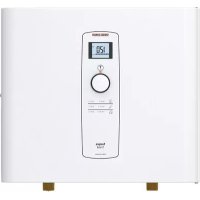
Tempra Trend - Kettle STIEBEL ELTRON - Free user manual and instructions
Find the device manual for free Tempra Trend STIEBEL ELTRON in PDF.



| Product Type | Electric tankless water heater |
| Brand | Stiebel Eltron |
| Model | Tempra Trend |
| Dimensions (H x W x D) | 369 mm x 420 mm x 117 mm |
| Net weight (depending on model) | 6.1 kg to 8.6 kg |
| Power supply | Single-phase 208 V / 240 V, 50/60 Hz |
| Rated power (depending on model) | 9 kW to 36 kW |
| Number of circuits required | 1 to 3 circuits (depending on power) |
| Recommended circuit breaker | Double-pole, 30 A to 50 A per circuit |
| Water connection | 3/4" NPT female thread |
| Maximum water pressure | 1.0 MPa (150 psi) |
| Minimum water flow for activation | 1.4 L/min to 2.9 L/min (depending on model) |
| Outlet temperature range | 20 °C to 60 °C (68 °F to 140 °F) |
| Control type | Electronic, rotary knob and digital display |
| Display functions | Temperature setting, T_max limit, lock, °C/°F units |
| Safety | Safety thermal switch, anti-scald protection |
| Routine maintenance | Cleaning of strainer filter, periodic descaling |
| Certification standards | UL (U.S.), CSA (Canada), NSF/ANSI 372 |
| Warranty | Limited warranty, 7 years on leaks, 3 years on manufacturing defects |
| Installation required | By licensed electrician and plumber, compliant with local codes |
Frequently Asked Questions - Tempra Trend STIEBEL ELTRON
User questions about Tempra Trend STIEBEL ELTRON
0 question about this device. Answer the ones you know or ask your own.
Ask a new question about this device
Download the instructions for your Kettle in PDF format for free! Find your manual Tempra Trend - STIEBEL ELTRON and take your electronic device back in hand. On this page are published all the documents necessary for the use of your device. Tempra Trend by STIEBEL ELTRON.
USER MANUAL Tempra Trend STIEBEL ELTRON
natural_image
Front view of a simple electrical control panel with no visible text or symbols
natural_image
Front view of a portable electric appliance control panel with display and control buttons (no visible text or symbols)
Certified to ANSI/UL Std. 499
Conforms to CAN/CSA Std. C22.2 No. 88
Tested and certified by WQA to NSF/ANSI 372 for lead free compliance.
-
General information
-
Safety 2
2.1 Intended use
2.2 Safety precautions
2.3 Test symbols
2.4 Licenses / certificates 3
-
Register your product 3
-
General 3
4.1 General appearance
- Using the display 5
5.1 User input
5.2 Tempra Trend display 5
5.3 Tempra Plus display 6
INSTALLATION
- Installation configuration
6.1 Typical residential installation 10
6.2 Typical commercial installation 10
- Mounting the unit 10
7.1 Mounting dimensions 10
7.2 Mounting instructions
-
Water connections
-
Electrical connection 12
9.1 Circuit layout 12
9.2 Circuit connection
9.3 Terminal block 13
-
Commissioning the water heater 13
-
Normal maintenance
-
Troubleshooting 14
12.1 Tempra Plus error code reporting 14
12.2 Resetting the safety thermal cutout 14
- Technical data
13.1 Tempra Trend 15
13.2 Tempra Plus 16
13.3 Temp. increase above ambient water temp. 17
13.4 Dimensions 18
13.5 Wiring diagrams 19
-
Spare parts 20
-
Warranty
OPERATION
1. ^2_3 General information
Read this entire manual. Failure to follow all the guides, instructions and rules could cause personal injury or property damage. Improper installation, adjustment, alteration, service and use of this unit can result in serious injury.
This unit must be installed by a licensed electrician and plumber. The installation must comply with all national, state and local plumbing and electric codes. Proper installation is the responsibility of the installer. Failure to comply with the installation and operating instructions or improper use voids the warranty.
Save these instructions for future reference. The installer should leave these instructions with the consumer.
If you have any questions regarding the installation, use or operation of this water heater, or if you need any additional installation manuals, please call our technical service line at 800.582.8423 (USA and Canada only). If you are calling from outside the USA or Canada, please call USA 413.247.3380 and we will refer you to a qualified Stiebel Eltron service representative in your area.
11 This is the safety alert symbol. It is used to alert you to potential personal injury hazard. Obey all safety messages that follow this symbol to avoid possible injury or death.
2. Safety
Observe the following safety information and regulations.
Operate the appliance only when fully installed and with all safety equipment fitted.
^15 2.1 Intended use
The appliance is intended for heating domestic hot water and can supply several draw-off points.
Any other use beyond that described shall be deemed inappropriate, and may void the manufacturers warranty.
Observation of these instructions is also part of the correct use of this appliance.
2.2 Safety precautions

DANGER: Injury
Please read and follow these instructions. Failure to follow these instructions could result in serious personal injury or death.

DAMAGE TO THE APPLIANCE AND THE ENVIRONMENT:
The appliance must be installed by a licensed electrician and plumber. The installation must comply with all national, state and local plumbing and electric codes. Service of the appliance must be performed by qualified service technicians.

DANGER: Electrocution
Before proceeding with any installation, adjustment, alteration, or service of this appliance, all circuit breakers and disconnect switches servicing the appliance must be turned off. Never remove the appliance's cover unless the electricity servicing the appliance is turned off. Failure to do so could result in personal injury or death.
The appliance must be properly grounded. Failure to electrically ground the product could result in serious personal injury or death.

DANGER: Burns
Water temperatures over 125 °F (52 °C) can cause severe burns instantly or death from scalding. A hot water scalding potential exists if the thermostat on the appliance is set too high. Households with small children, disabled or elderly persons may require that the thermostat be set at 113 °F (45 °C) or lower to prevent possible injury from hot water.

WARNING: Injury
Where children or persons with limited physical, sensory or mental capabilities are to be allowed to control this appliance, ensure that this will only happen under supervision or after appropriate instructions by a person responsible for their safety. Children should be supervised to ensure that they never play with the appliance.
2.3 Test symbols
See the type label on the appliance.
2.4 Licenses / certificates
- UL (USA) Std. 499
- CSA (Canada) Std. C22.2 No.88
- NSF/ANSI 372
3. Register your product

You must register this product within 90 days of purchase on our web site in order to activate the standard warranty. Go to our web site at www.stiebel-eltron-usa.com and click on register your product.
Before beginning the registration process, we suggest that you gather the necessary information which will be as follows:
Type, Example: Tempra 24 Plus (from the label that is on the unit)
Number listed after "Nr."
Place of Purchase
Purchase Date
First & Last Name
Email address
Physical Address
Phone Number
Installation Date
If you have any questions concerning the registration process or warranty, please contact Stiebel Eltron USA directly at 800.582.8423.
4. General
The Tempra Trend and Tempra Plus units are designed to supply hot water for a house, apartment or certain commercial applications. Unlike a conventional storage type water heater, the Tempra tankless water heater does not store hot water. Instead, water is heated instantaneously as it flows through the unit. The Tempra offers greater energy efficiency than storage type water heaters due to the absence of stand-by losses and reduced hot water pipe runs.
The input of heat into the water is controlled electronically. The Tempra will deliver any water temperature between 68 °F (20 °C) and 140 °F (60 °C). Set the desired temperature using the knob on the front cover. The Tempra Trend and Tempra Plus temperature adjustment knob can be set to: OFF, 68–140 °F (20–60 °C). The maximum temperature is electronically limited to 140 °F (60 °C).
For reasons of appliance efficiency and durability (scaling), the optimum temperature setting lies between 86 °F (30 °C) and 120 °F (50 °C).
The Tempra has a built-in display that allows for user customization and information feedback.
4.1 General appearance
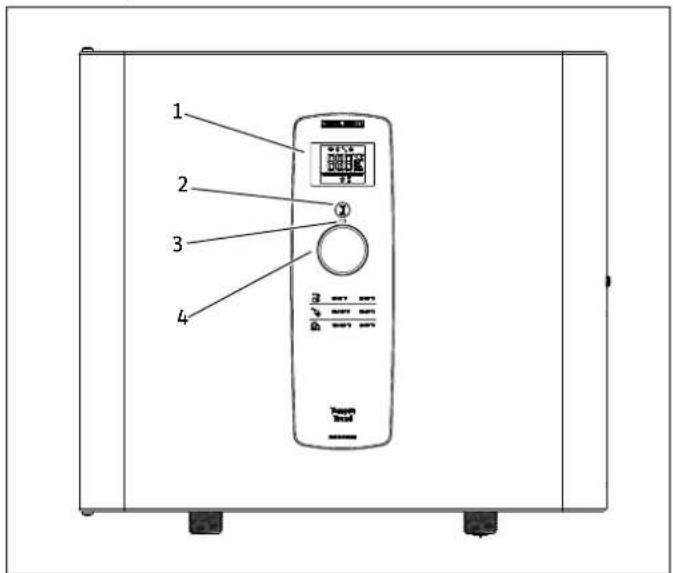
4.1.1 Tempra Trend
text_image
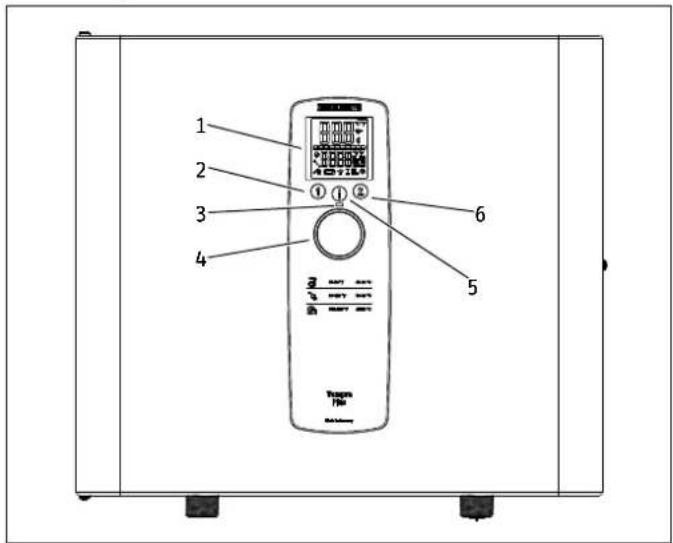
1 2 3 41 Display
2 T_max button
3 Power status LED
4 Control knob
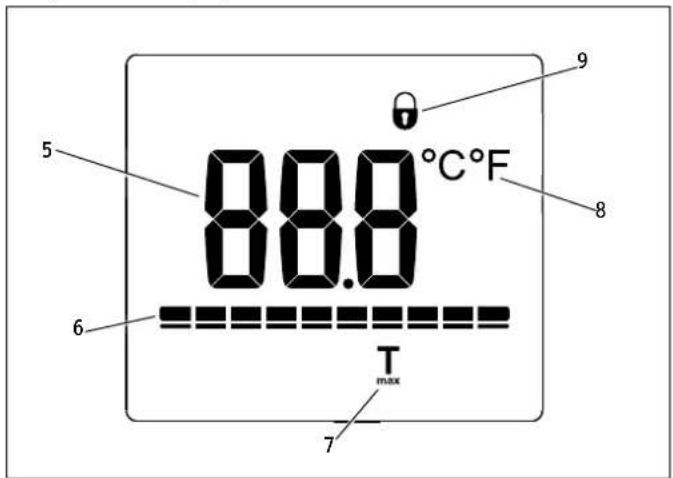
Tempra Trend display overview
text_image
88.8°C F T max5 Digit display
6 Power capacity status
7 T_max indicator
8 Temperature unit indicator
9 Display-lock indicator
4.1.2 Tempra Plus
text_image
1 2 3 4 ① ② 6 5 Vccmra File1 Display
2 Preset 1
3 Power status LED
4 Control knob
5 Menu button
6 Preset 2
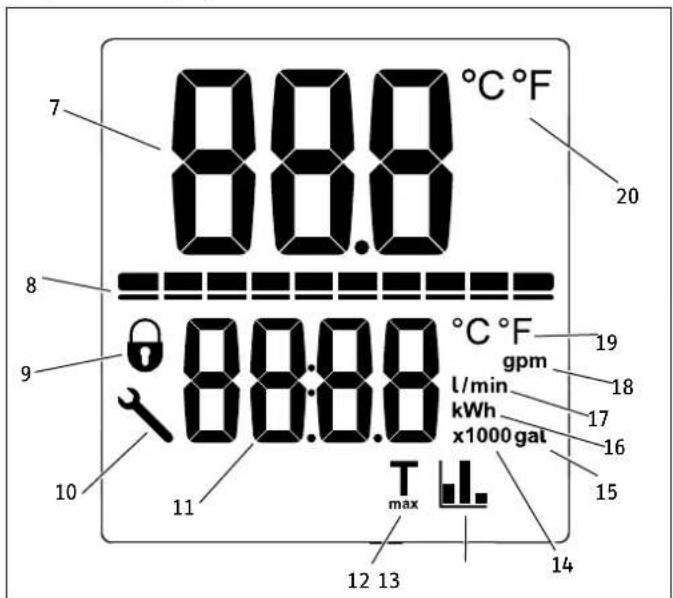
Tempra Plus display overview
text_image
7 8 8.8 88.8 88:8.8 10 11 max 12 13 14 15 16 17 18 19 20 °C °F °C °F gpm l/min kWh x1000 gal7 Primary digit display
8 Power capacity status
9 Display-lock indicator
10 Error code symbol
11 Secondary digit display
12 T_max indicator
13 Savings statistics indicator
14 x1000 secondary display value
15 Gallons secondary display unit
16 kWh secondary display unit
17 Liters & liters per minute secondary display unit
18 Gallons per minute secondary display unit
19 Temperature unit for secondary display
20 Temperature unit for primary display
5. Using the display
5.1 User input
The Tempra Trend and Tempra Plus feature an interactive display that allows for user customization to increase the level of comfort for the user.
The menu structure is designed in an intuitive, linear way to make it as navigable as possible.
5.1.1 Tempra Trend user input
User input

T_max button (pressing or holding this button performs different functions)
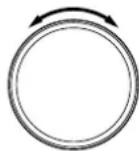
Control knob (turn knob to change settings)
5.1.2 Tempra Plus user input
User input

Information button (pressing or holding this button performs different functions)

Preset 1 button (pressing or holding this button performs different functions)

Preset 2 button (pressing or holding this button performs different functions)
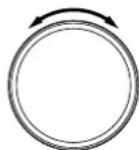
Control knob (turn knob to change settings)
5.2 Tempra Trend display
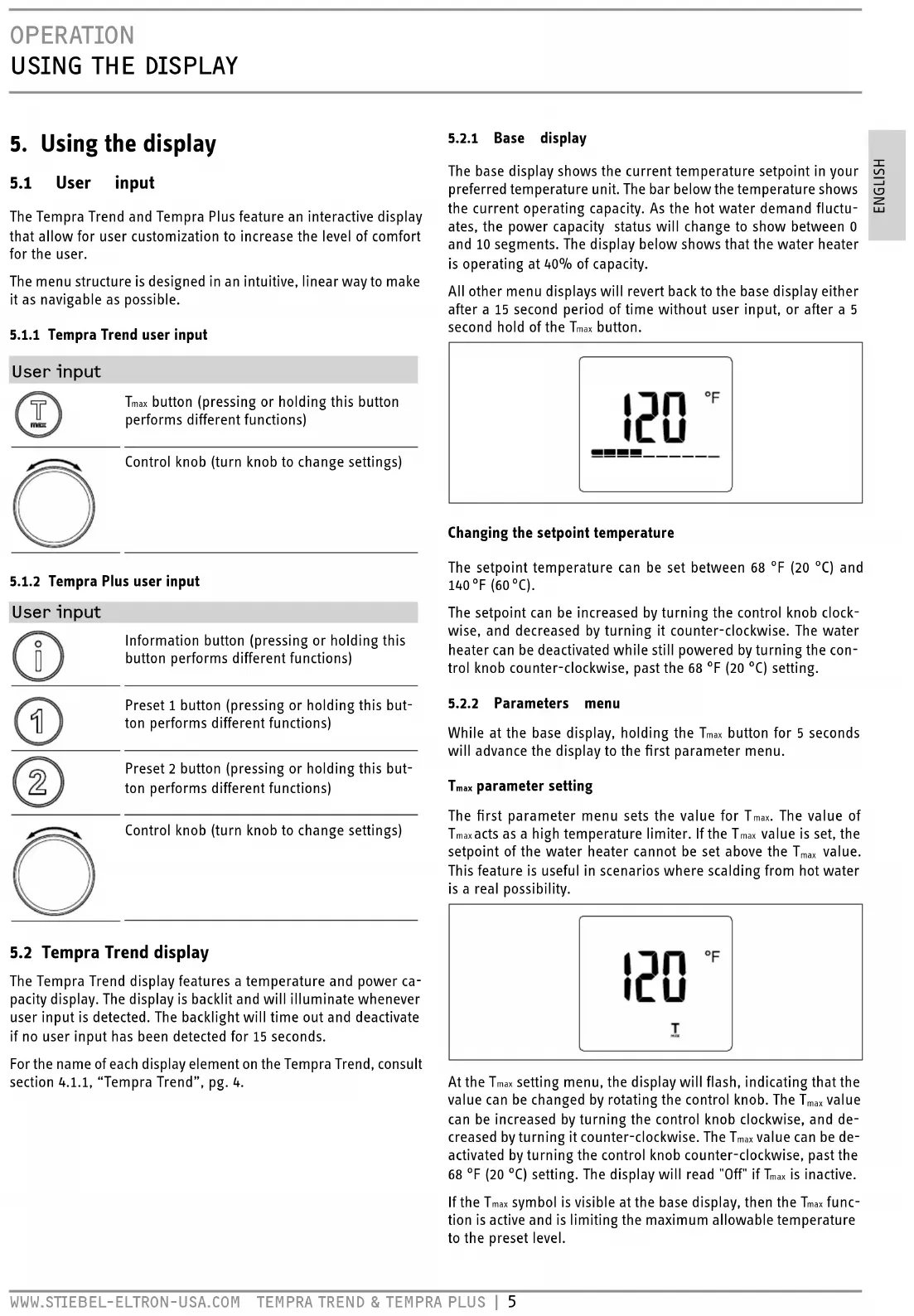
The Tempra Trend display features a temperature and power capacity display. The display is backlit and will illuminate whenever user input is detected. The backlight will time out and deactivate if no user input has been detected for 15 seconds.
For the name of each display element on the Tempra Trend, consult section 4.1.1, "Tempra Trend", pg. 4.
5.2.1 Base display
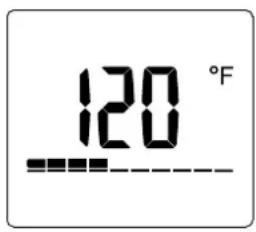
The base display shows the current temperature setpoint in your preferred temperature unit. The bar below the temperature shows the current operating capacity. As the hot water demand fluctuates, the power capacity status will change to show between 0 and 10 segments. The display below shows that the water heater is operating at 40% of capacity.
All other menu displays will revert back to the base display either after a 15 second period of time without user input, or after a 5 second hold of the T_max button.
text_image
120 °FChanging the setpoint temperature
The setpoint temperature can be set between 68 °F (20 °C) and 140 °F (60 °C).
The setpoint can be increased by turning the control knob clockwise, and decreased by turning it counter-clockwise. The water heater can be deactivated while still powered by turning the control knob counter-clockwise, past the 68 °F (20 °C) setting.
5.2.2 Parameters menu
While at the base display, holding the T_max button for 5 seconds will advance the display to the first parameter menu.
T_max parameter setting
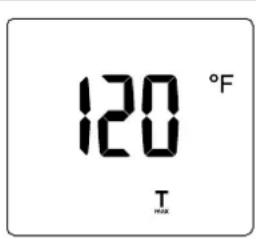
The first parameter menu sets the value for T_max . The value of T_max acts as a high temperature limiter. If the T_max value is set, the setpoint of the water heater cannot be set above the T_max value. This feature is useful in scenarios where scalding from hot water is a real possibility.
text_image
120 °F T MAXAt the T_max setting menu, the display will flash, indicating that the value can be changed by rotating the control knob. The T_max value can be increased by turning the control knob clockwise, and decreased by turning it counter-clockwise. The T_max value can be deactivated by turning the control knob counter-clockwise, past the 68 °F (20 °C) setting. The display will read "Off" if T_max is inactive.
If the T_max symbol is visible at the base display, then the T_max function is active and is limiting the maximum allowable temperature to the preset level.
Pressing the T_max button once while at this display will move the display onto the temperature units parameter setting.
Temperature units parameter setting
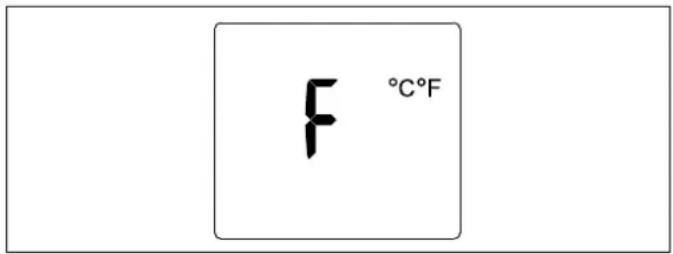
The Tempra Trend is capable of displaying temperature in either Fahrenheit or Celsius.
text_image
F °C°FThe current unit will be shown and the display will be flashing to indicate that the value can be changed. Rotate the control knob to change the value between Fahrenheit and Celsius.
Pressing the T_max button once while at this display will move the display onto the display-lock parameter setting.
Display-lock parameter setting
The display can be locked to prevent changes to the temperature setpoint. This menu will flash, indicating that the value can be changed by rotating the control knob. While the display shows "Off", the lock is not active. The lock is active when it reads "On".
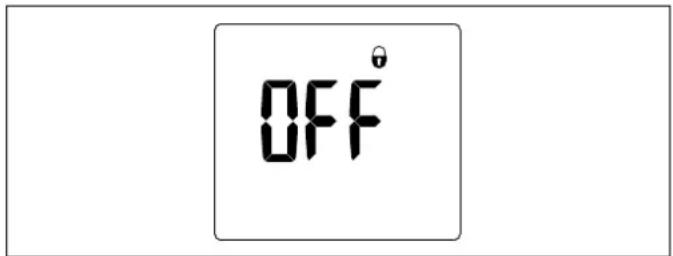
text_image
OFF°If the display-lock parameter is set to "On" and the user either holds the T_max button for 5 seconds or lets the display time out for 15 seconds, the display-lock will become active.
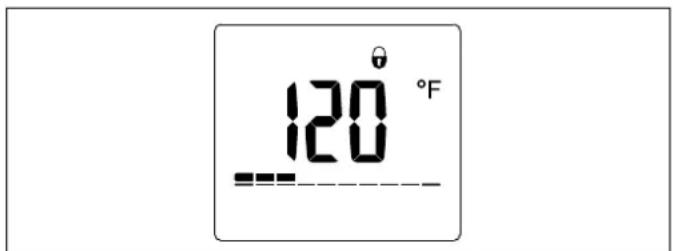
text_image
120°FWith the display-lock active, a lock will appear on the base display, and no parameters can be changed. In order to disable the lock, hold the T_max button for 12 seconds. The lock will then disappear from the display and all parameters can be changed again.
Pressing the T_max button once while at the display-lock parameter setting menu will move the display back onto T_max parameter setting menu.
5.2.3 Returning to the base display
While navigating the display and on any menu other than the base display, holding the T_max button for 5 seconds will return the
display to the base display. Additionally, the display will revert to the base display after a 15 second period with no user input.
5.3 Tempra Plus display
The Tempra Plus features a primary and secondary display area allowing for multiple parameters or information to be displayed. The Tempra Plus is capable of displaying the current flow rate of the water passing through the water heater, as well as calculating the accumulated cost savings of having a tankless water heater compared to a tank-type water heater.
For the name of each display element on the Tempra Plus, consult section 4.1.2, "Tempra Plus", pg. 4.
5.3.1 Base display
The Tempra Plus base display displays the current setpoint temperature in your preferred temperature unit in the top half of the display.
The bar below the temperature shows the current fraction of total capacity that the water heater is running at. As the hot water demand fluctuates, the power capacity status will change to show between 0 and 10 segments. The display below shows that the water heater is operating at 30% of capacity.
The bottom half of the display shows the current flow rate through the unit in either gallons per minute (gpm) or liters per minute (l/min).
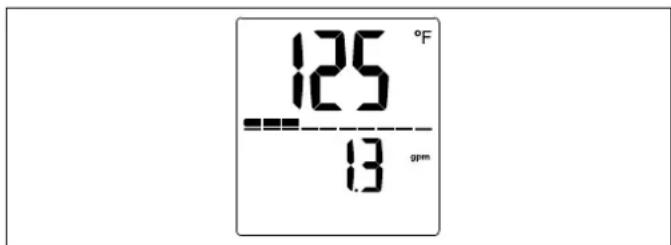
text_image
125 °F --- 13 gpmAll other menus will revert back to the base display either after a 15 second period of time without user input, or after a 5 second hold of the Information button.
5.3.2 Information menu
The information menu structure displays additional information for the user. The information menu is accessed by pressing the Information button while at the base display.
Accumulated cost savings display
If the Information button is pressed while the display is showing the base display, the display will advance to the accumulated cost savings display.
The accumulated cost savings display will display "l1" in the top half of the display, and the bottom half of the display will alternate between "Cur" and the accumulated savings of the water heater.
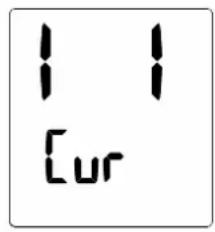
text_image
1 1 [ur]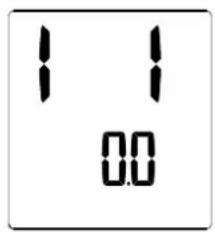
text_image
1 1 0.0The accumulated cost savings updates daily, and shows the estimated savings for the user compared to an install where they would have had a tank-type water heater installed.
This savings estimate is based on the users electricity cost. For the most accurate estimate, the electricity cost per kWh should be set in the electricity cost parameter setting menu. For information on how to do this, see section “Electricity cost parameter setting”, pg. 8.
Pressing the Information button will advance back to the base display. The display will also revert back to the base display if no user input is detected for 15 seconds.
5.3.3 Parameters menu
The parameters menu allows multiple settings on the Tempra Plus to be altered. The parameters menu can be accessed by holding the Information button for 5 seconds.
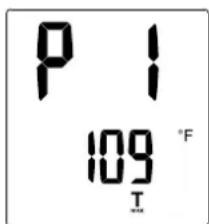
T_max parameter setting
The first parameter menu sets the value for T_max . The value of T_max acts as a high temperature limiter. If the T_max value is set, the setpoint of the water heater cannot be set above the T_max value. This feature is useful in scenarios where scalding from hot water is a real possibility.
text_image
P 1 109 °F TAt the T_max setting menu, the temperature value will flash, indicating that the value can be changed by rotating the control knob. The T_max value can be increased by turning the control knob clockwise, and decreased by turning it counter-clockwise. The T_max value can be deactivated by turning the control knob counter-clockwise, past the 68 °F (20 °C) setting. The display will read "Off" if T_max is inactive.
If the T_max symbol is visible at the base display, then the T_max function is active and limiting the maximum allowable temperature.
Pressing the Information button once while at this menu will move the display onto the temperature units parameter setting.
Temperature units parameter setting
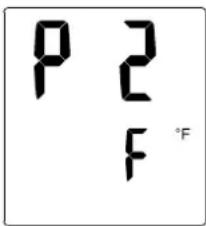
The Tempra Plus is capable of displaying temperature in either Fahrenheit or Celsius.
text_image
P 2 F °FThe current unit will be shown and the secondary display value will be flashing to indicate that the value can be changed. Rotate the control knob to change the value between Fahrenheit and Celsius.
Pressing the Information button once while at this menu will move the display onto the volume units parameter setting.
Volume units parameter setting
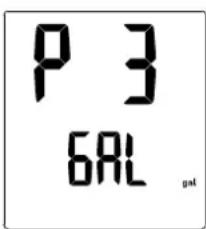
The Tempra Plus is capable of displaying volume or volume flow in either gallons per minute (gpm) or liters per minute (l/min).
text_image
P 3 6AL pstThe current volume unit will be displayed and the value will be flashing to indicate that it can be changed. Rotate the control knob to change the value between gallons per minute and liters per minute.
Pressing the Information button once while at this menu will advance the display to the electricity cost parameter setting.
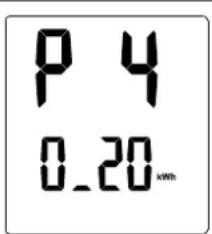
Electricity cost parameter setting
The Tempra Plus has a built-in feature where it calculates the energy savings of the unit when compared to the average energy use of a tank-type water heater. In order for this feature to be accurate, the cost per kWh of electricity must be programmed into the software.
text_image
P 4 0.20kmThe secondary display will be flashing to indicate that the value can be changed by rotating the control knob. Consult your electricity bill to determine the cost of electricity per kWh.
Pressing the Information button once while at this menu will advance the display to the display-lock parameter setting.
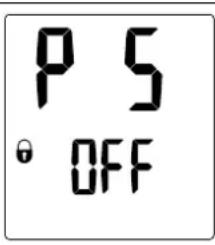
Display-lock parameter setting
The display can be locked to prevent easy alteration of the temperature setpoint. This menu will flash, indicating that the value can be changed by rotating the control knob. While "Off" is displayed, the lock is not active. The lock is active when the display reads "On".
text_image
P 5 ° OFFIf the display-lock parameter is set to "On" and the user either holds the Information button for 5 seconds or lets the display time out for 15 seconds, the display-lock will become active.
With the display-lock active, a lock will appear on the base display, and no parameters can be changed. In order to disable the lock, hold the Information button for 12 seconds. The lock will then disappear and all parameters can be changed again.
Pressing the Information button once while at the display-lock parameter setting menu will move the display onto the factory setting reset parameter menu.
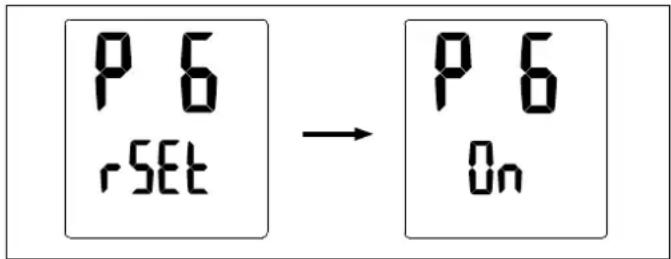
Factory setting reset parameter
The temperature setpoint, preset values, temperature, & volume units can all be reset to their factory settings.
text_image
P 6 rSET → P 6 OnThe display will be flashing to indicate that the value can be changed by rotating the control knob. When the value is set to "On", the reset must be confirmed by holding both Button 1 and Button 2 simultaneously for 5 seconds.
Pressing the Information button once will advance the display to the accumulated savings reset parameter menu.
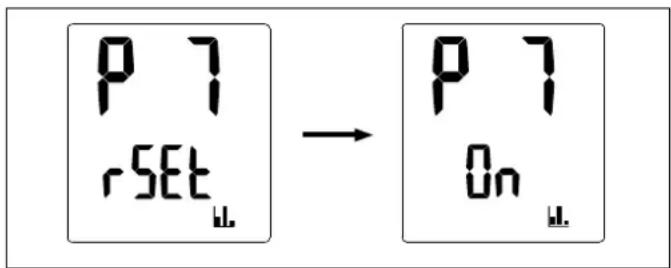
Accumulated savings reset parameter
Much like the factory setting reset parameter, the calculated accumulated savings value can be reset to zero.
text_image
P 7 rSET → P 7 On ↓The display will be flashing to indicate that the value can be changed by rotating the control knob. When the value is set to "On", the reset must be confirmed by holding both Button 1 and Button 2 simultaneously for 5 seconds.
Pressing the Information button once will advance the display to the display backlight time-out parameter.
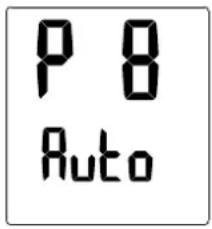
Display backlight time-out parameter
The backlight of the display can be set to be always on, or set to an automatic mode that deactivates when no user input is detected for 15 seconds.
text_image
P 8 AutoThe entire display and backlight will be flashing to indicate that the value can be changed by rotating the control knob. When the value is set to "On", the backlight will always be on. When the value is set to "Auto", it will automatically deactivate after 15 seconds of inactivity.
Pressing the Information button once while at this menu will advance the display to the backlight display brightness parameter menu.
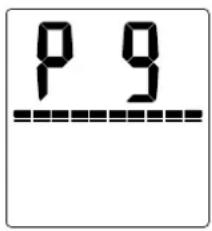
Backlight display brightness parameter
The brightness of the display backlight can be adjusted to two different parameters. A high and low setting allows for user customization depending on the light conditions in the installation location.
text_image
P 9The power capacity status bar indicates the brightness setting. A full capacity bar indicates that the brightness is at the high setting. A half-full capacity bar indicates that the brightness is at the low setting.
Pressing the Information button once while at this menu will advance the display back to the T_max parameter setting page, labeled "P1".
5.3.4 Temperature preset options
The Tempra Plus features two temperature preset settings to allow for quickly accessible setpoints. Button 1 and Button 2 are capable of each storing an independent setpoint value.
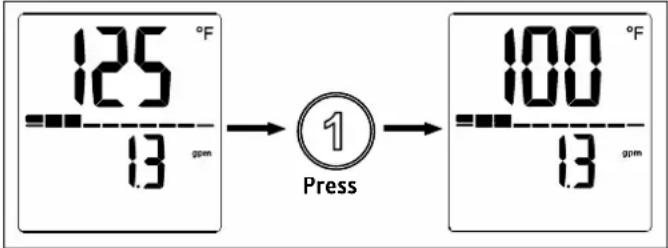
Changing setpoint to preset values
While the display is at the base display, the user can press either Button 1 or Button 2 to change the setpoint to the buttons stored value.
text_image
125 °F 13 gpm ① Press 100 °F 13 gpmWhen the button is pressed, the setpoint value will change to whatever value was stored up to that point.
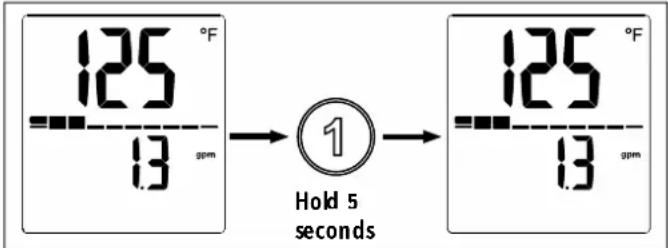
Changing the preset values
The preset values can be changed from the default setpoint values.
text_image
125 °F 13 gpm ① Hold 5 seconds 125 °F 13 gpmTo change the value of either preset 1 or preset 2, first rotate the control knob to the temperature that you want to set the preset value. Then hold the preset button for 5 seconds. The display will flash to indicate that the preset has been changed successfully.
5.3.5 Returning to the base display
While navigating the display and on any menu other than the base display, holding the Information button for 5 seconds will return the display to the base display. Additionally, the display will revert to the base display after a 15 second period with no user input.
5.3.6 Tempra Plus error menu
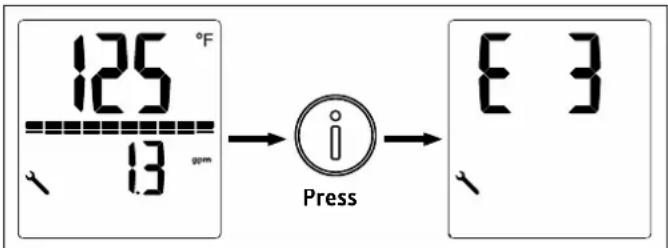
If the Tempra plus encounters an error, a wrench will illuminate in the bottom left of the display.
text_image
125 °F 13 gm Press E 3While the wrench is showing, press the Information button to advance the display to the error display page. Consult section "Tempra Plus error code reporting", pg. 14 for information on how to interpret the reported error code.
INSTALLATION
6. Installation configuration
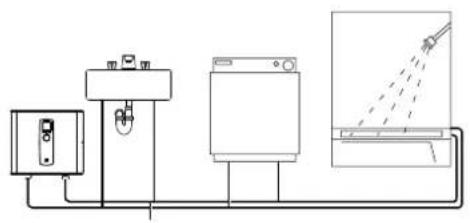
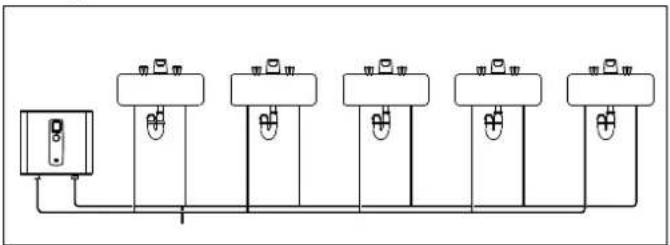
The Tempra can be used for the following applications.
6.1 Typical residential installation
natural_image
Pure electrical circuit lines without any symbols6.2 Typical commercial installation
natural_image
Pure electrical circuit lines without any symbols7. Mounting the unit

NOTICE: Unit must be installed in a vertical position with the water fittings pointing downward.

WARNING: Do not install unit where it would routinely be splashed with water. Electric shock may result.
CAUTION: Hot water outlet pipes leaving unit can be hot to the touch. Insulation must be used for hot water pipes below 36" (0.9 m) due to burn risk to children.

NOTICE: This unit should not be installed in a location where it may be exposed to temperatures less than 36 °F (2 °C). If the unit may be subject to freezing temperatures all water must be drained from the unit. Failure to comply with this instruction voids all warranties.
The unit should be located in an area where water leakage from the unit or connections will not result in damage to the area adjacent to the unit. If such a location cannot be avoided it is recommended that a drain pan be installed under the unit.
7.1 Mounting dimensions

text_image
A B C D E F GDimensions
A ^3/8 (10 mm)
B 12 ^1/2 (318 mm)
C 1" (26 mm)
D^3/4 (20 mm)
E 7^1/2 (190 mm)
F 7^1/2 (190 mm)
G ^316 (5 mm)
7.2 Mounting instructions
Install Tempra as close as possible to the main hot water draw-off points.
▶ Install Tempra in a frost free area. If frost might occur, remove unit before freezing temperatures set in.
Leave a minimum of 5" (120 mm) of clearance on all sides for servicing.
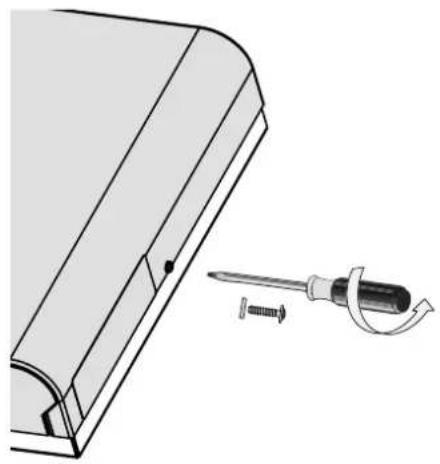
natural_image
Technical illustration of a mechanical component with a screwdriver inserted, showing a curved edge and mounting base (no text or symbols)▶ Remove the cover screw.
natural_image
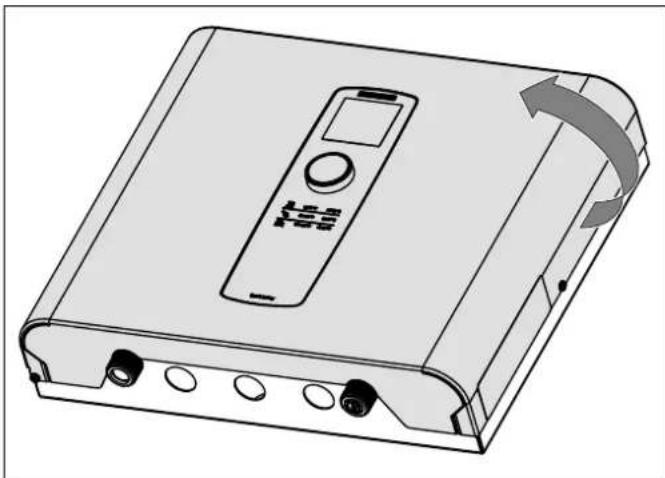
Illustration of a portable electronic device with control panel and scroll arrow (no text or symbols)▶ Open the front cover.
text_image
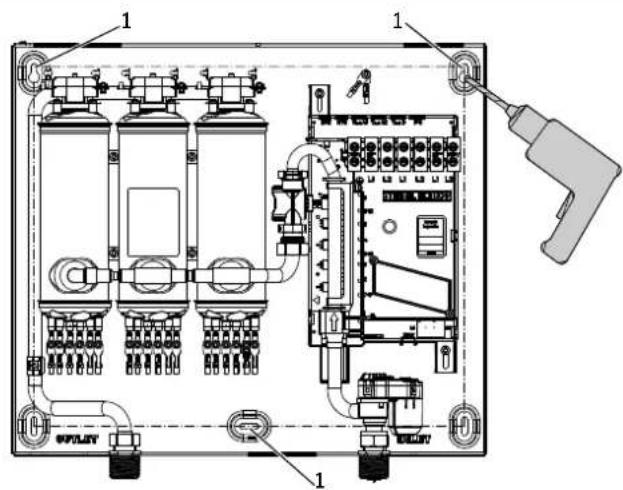
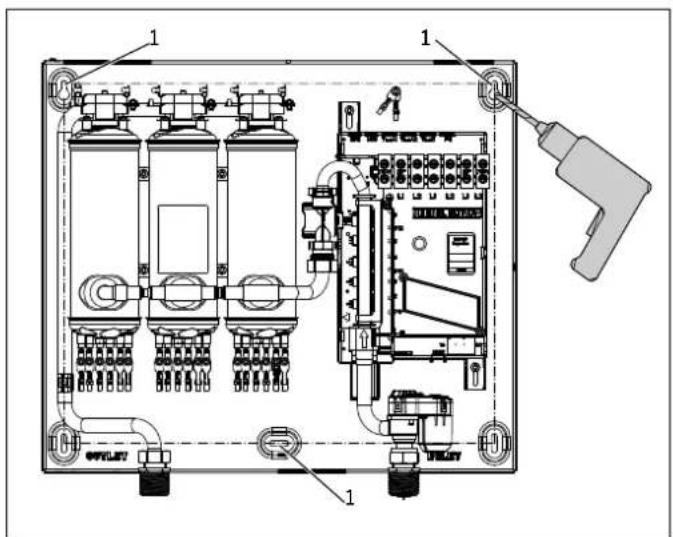
Technical diagram of an electrical enclosure with labeled components and wiring connections1 Mounting holes
▶ Mount unit securely to wall by putting at least three screws through mounting holes. Screws and plastic wall anchors for mounting on masonry or wood are provided.
8. Water connections

NOTICE: Excessive heat from soldering on copper pipes near the Tempra may cause damage. The cold water connection to the unit must be disconnected periodically in order to clean the filter screen. It is required to use water connections that are easily detachable such as braided steel flex connectors.

NOTICE: Hard water or water with a high mineral count may damage the unit. Damage to the unit caused by scale or a high mineral count is not covered under the warranty.
▶ All plumbing work must comply with national and applicable state and local plumbing codes.
▶ A pressure reducing valve must be installed if the cold water supply pressure exceeds 150 psi (10 bar).
▶ Make certain that the cold water supply line has been flushed to remove any scale and dirt.
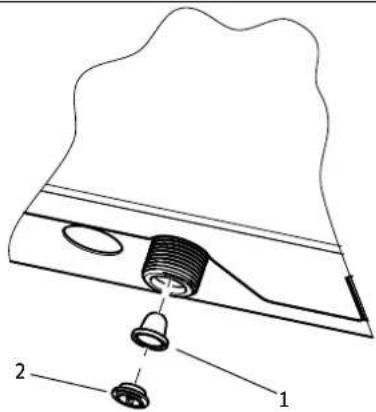
The Tempra unit has a built in filter screen that should be cleaned from time to time. Clean screen and put the screen and the washer back into their original position.
text_image
Technical diagram of a mechanical assembly with labeled parts 1 and 21 Filter screen
2 Washer
The cold water connection (inlet) is on the right side of the unit, and the hot water connection (outlet) is on the left side of the unit.

NOTICE: Tankless water heaters such as the Tempra are not required to be equipped with a temperature and pressure relief valve (T&P). If the local inspector will not pass the installation without a T&P, it should be installed on the hot water outlet side of the unit.
The Tempra on the hot side is designed for connection to copper tubing, PEX tubing or a braided stainless steel hose with a 3/4" NPT female tapered thread.
The plumbing on the cold water inlet side needs to be such that it can easily be removed to allow access to the inlet filter screen. The easiest way to achieve this is to us a stainless steel braided hose connector. If soldering near the unit is necessary, please direct the flame away from the housing of the unit in order to avoid damage.
▶ When all plumbing work is completed, check for leaks and take corrective action before proceeding.
9. Electrical connection

WARNING: Electrocution
Before beginning any work on the electric installation, be sure that main breaker panel switches are "Off" to avoid any danger of electric shock. All mounting and plumbing must be completed before proceeding with electrical hook-up. Where required by local, state or national electrical codes the circuits should be equipped with a "ground fault interrupter". The unit must be properly grounded in accordance with state and local codes, or in absence of such codes, in accordance with national electric code or the Canadian electric code. Failure to electrically ground the product could result in serious personal injury or death.
The Tempra should be connected to properly grounded dedicated branch circuits of proper voltage rating. Ground must be brought to the "Ground" at the circuit breaker panel.
9.1 Circuit layout
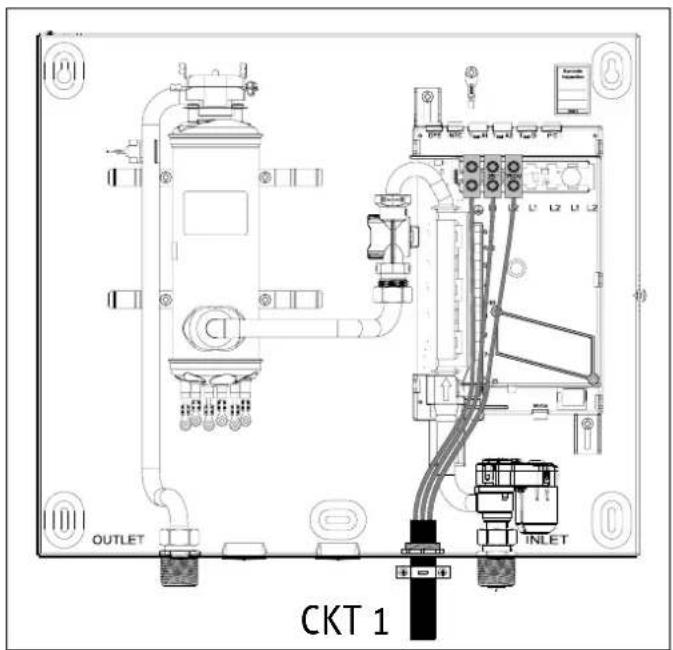
9.1.1 Tempra 12 Trend / Plus
text_image
CKT 1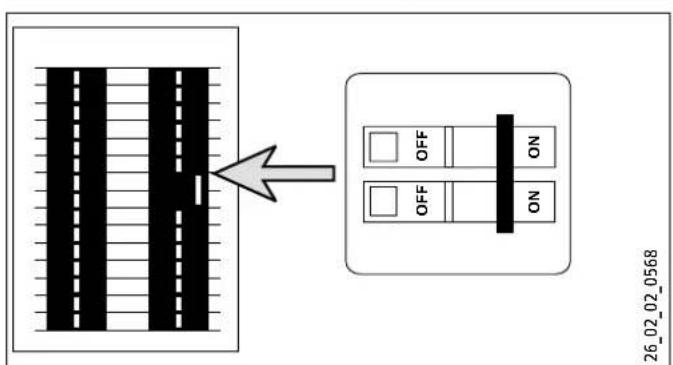
text_image
26_02_02_0568Tempra 12 Trend / Plus: These units can be connected to a single circuit. Use a supply cable protected by a double pole breaker.
9.1.2 Tempra 15, 20, 24 Trend / Plus
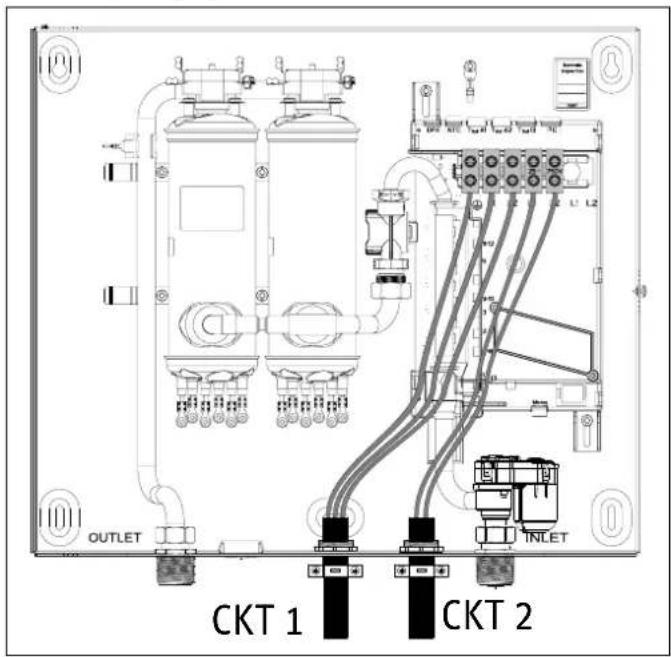
text_image
OUTLET CKT 1 CKT 2 INLET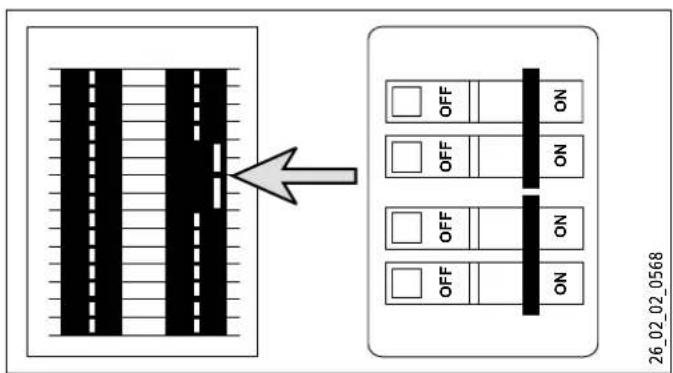
text_image
26.02_02_0568Tempra 15, 20 or 24 Trend / Plus: These units require two independent circuits. Use two supply cables protected by two separate double pole breakers.
9.1.3 Tempra 29, 36 Trend / Plus
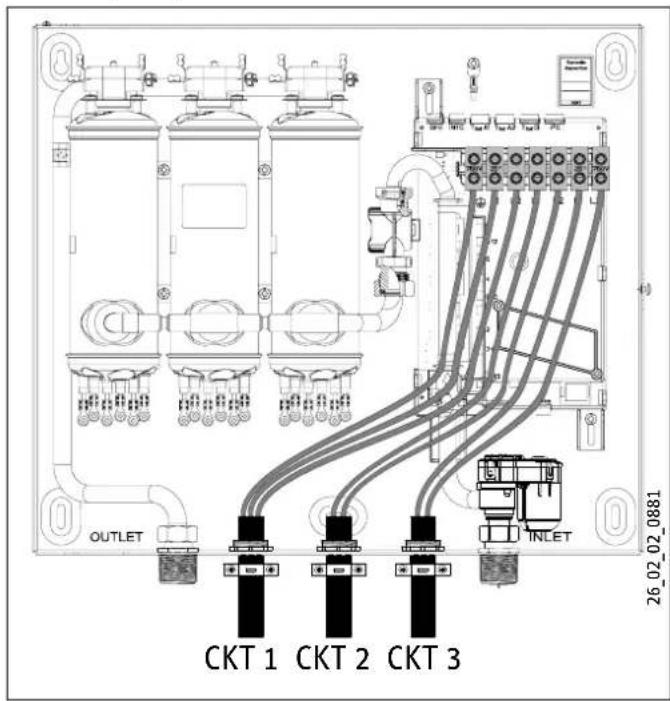
text_image
OUTLET CKT 1 CKT 2 CKT 3 INLET 26_02_02_0881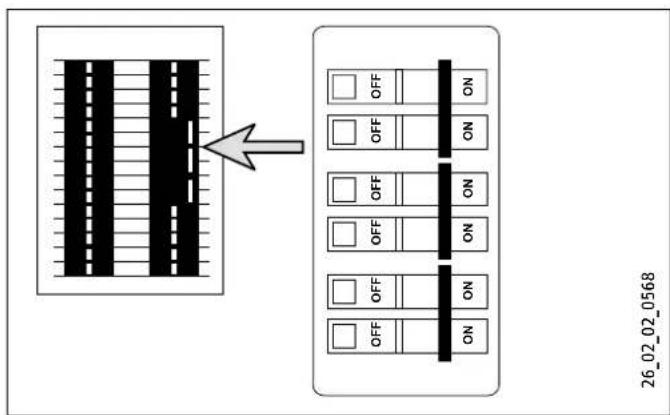
flowchart
graph TD
    A["Device with vertical bars"] --> B["Grid Layout"]
    B --> C["Arrow pointing to the grid"]
    C --> D["26_02_02_0568"]
Tempra 29 or 36 Trend / Plus These units require three independent circuits. Use three supply cables protected by three separate double pole breakers.
9.2 Circuit connection
Please refer to the technical data table for the correct wire and circuit breaker size. In all cases, make sure that the unit is properly grounded.
▶ Cut the electrical connection cable to length and strip.
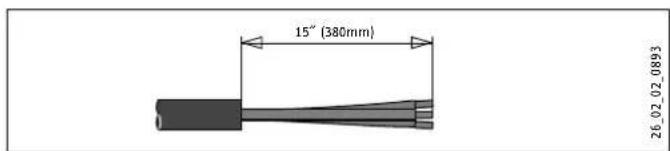
text_image
15" (380mm) 26_02_02_0893The wire must be fed through the knock-outs located between the hot and cold water connections (See 9.1, "Circuit layout", pg. 12). The "live" wires must be connected to the slots on the terminal block marked L1 and L2. The ground wire must be connected to slot marked with the ground symbol (See 13.5, "Wiring diagrams", pg. 19).
9.3 Terminal block
Consult the chart below for the recommended torque amounts on the terminal block screws.
| Screw Size (mm) | Min. Torque (N·cm) | Min. Torque (Lbf·in) |
| M6 | 200-250 | 17.7-22.1 |
Using the proper torque specifications to secure wire to the wiring block helps to avoid personal loss or property damage.
10. Commissioning the water heater

WARNING: Open the hot water faucet for a few minutes until water flow is continuous and all air is purged from water pipes. The unit's cover must be installed before the circuit breakers are turned on.
▶ Check that the set value transducer cable is plugged into the slot TSoll D on the main PCB. If the cable was disconnected for any reason during installation, ensure it is reconnected to slot TSoll D before supplying power to the water heater.
▶ Fill the unit up completely with water.
▶ Close the cover and fix it using the screw with the lock washer.
▶ Turn on circuit breakers to bring electrical power to the unit.
▶ Adjust the water temperature to the desired level using the knob on the front cover of the unit.
▶ Turn on hot water and wait twenty seconds until temperature has stabilized.
▶ Check the water temperature with your hand and make sure that it does not feel too hot. Reduce if necessary.
Explain to the user how the unit works and familiarize them with its use.
▶ Advise the user about possible hazards (hot water temperature up to 140 °F (60 °C)). Hand over these instructions, to be kept for future reference.
11. Normal maintenance

NOTICE: The Tempra does not contain any parts serviceable by the average user. In case of malfunction please contact a licensed plumber or electrician.
Stiebel Eltron Tempra tankless water heaters are designed for a very long service life. Actual life expectancy will vary with water quality and use. To ensure consistent water flow, it is recommended to periodically remove scale and dirt that may build up at the aerator of the faucet(s), the filter screen in the unit, or the heating canisters of the water heater.
Periodically check the water quality supplied to the water heater. Water quality can have an impact on appliance longevity and may not be covered under the manufacturer's warranty.
12. Troubleshooting
| Symptom Possible cause Solution | ||
| No hot water | circuit breakers off turn circuit breakers on | |
| not enough flow rate to activate unit | clean filter screen at unit clean faucet aerator or shower head | |
| flow sensor clogged/not spinning | remove flow sensor and blow through it to make sure wheel is spinning | |
| water heater not plumbed correctly | ensure cold water entering on right side and hot outlet exiting on left side | |
| Not enough hot water/restricted hot water flow | filter screen clogged clean filter scale built up on heating elements | screen at unit descale the heating elements using a descaling solution |
| Water not hot enough | water flow rate too high | reduce water flow rate until power light on front cover stops blinking |
| voltage too low supply correct voltage to unit | ||
| safety thermal cutout has tripped | turn off power supply, reset safety thermal cutout | |
If you are not able to resolve a problem please contact us toll free at 800.582.8423 before removing the unit from the wall.
Stiebel Eltron is happy to provide technical assistance. In most instances, we can resolve the problem over the phone.
12.1 Tempra Plus error code reporting
The Tempra Plus features the capability to self-diagnose and report operational issues that it encounters. For information on how the error will be shown on the Tempra Plus display see the section "Tempra Plus error menu", pg. 9.
| Error Cause Solution | ||
| 2 | inlet temperature sensor failure | contact Stiebel Eltron technical support. |
| 3 | outlet temperature sensor failure | ensure the outlet temperature sensor cable is connected to the main control board |
| contact Stiebel Eltron technical support | ||
12.2 Resetting the safety thermal cutout

DANGER: Electrocution
Do not attempt to reset the safety thermal cutout of this water heater unless power to the unit has been completely shut off at the circuit breakers.
The safety thermal cutout on the Tempra is designed to cut off electrical power to the heating elements if water of a too high temperature is encountered. When one of these safety cutouts have tripped, they must be reset manually.
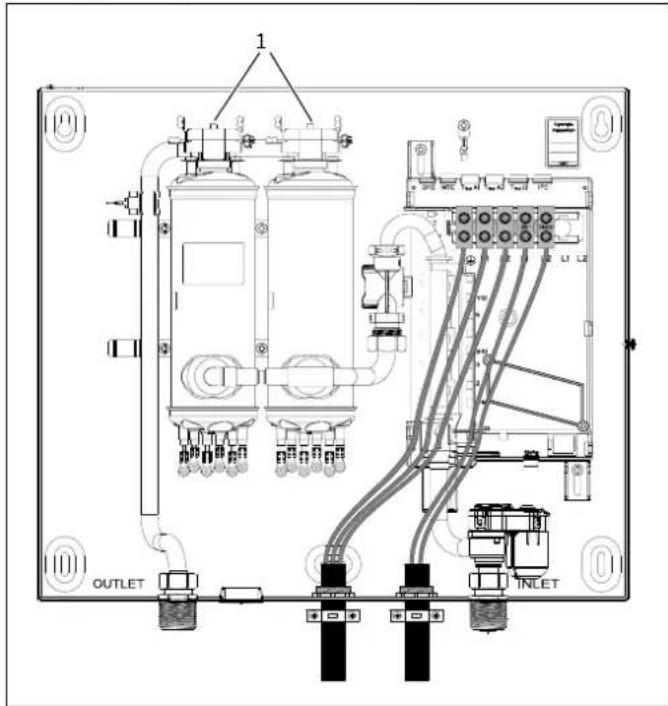
text_image
1 OUTLET INLET1 Thermal safety cutouts
To reset the safety cutouts, follow the following procedure:
▶ Turn off all circuit breakers attached to the water heater
▶ Open the front cover of the water heater
▶ Identify the safety thermal cutouts on the top of the copper heating canisters. The buttons at the top are the reset buttons.
▶ Press down on the buttons, take note of whether they click when pressed or not.
A heating canister that needs to be repeatedly reset may have a technical issue that should be addressed by Stiebel Eltron technical support.
13. Technical data
13.1 Tempra Trend
| Tempra Trend | Tempra 15 Trend | Tempra 20 Trend | Tempra 24 Trend3 | Tempra 29 Trend4 | Tempra 36 Trend5 | |||||||
| Part number | 239213 | 239214 | 239215 | 239216 | 239217 | 239218 | ||||||
| Electrical details | ||||||||||||
| Phase single 50/60 Hz single | ^6 50/60 Hz single ^6 50/60 Hz single ^6 50/60 Hz single ^6 50/60 Hz single ^6 50/60 Hz single ^6 50/60 Hz single ^6 50/60 Hz single ^6 50/60 Hz single ^6 50/60 Hz single ^6 ^6 50/60 Hz single ^6 50/60 Hz single ^6 50/60 Hz single ^6 50/60 Hz single ^6 50/60 Hz single ^6 50/60 Hz single ^6 50/60 Hz single ^6 50/60 Hz single ^6 (2) | |||||||||||
| Voltage | 240 V | 208 V | 240 V | 208 V | 240 V | 208 V | 240 V | 208 V | 240 V | 208 V | 240 V | 208 V |
| Wattage | 12 kW | 9 kW | 14.4 kW | 10.8 kW | 19.2 kW | 14.4 kW | 24 kW | 18 kW | 28.8 kW | 21.6 kW | 36 kW | 27 kW |
| Max. amp. load | 1 x 50 A | 1 x 44 A | 2 x 30 A | 2 x 26 A | 2 x 40 A | 2 x 35 A | 2 x 50 A | 2 x 44 A | 3 x 40 A | 3 x 35 A | 3 x 50 A | 3 x 44 A |
| Number & min. recommended size of circuit breakers ^1 (DP) | 1 x 50 A | 2 x 30 A | 2 x 40 A | 2 x 35 A | 2 x 50 A | 3 x 40 A | 3 x 35 A | 3 x 50 A | ||||
| Power connection | 1/GRD | 2/GRD | 2/GRD | 2/GRD | 3/GRD | 3/GRD | ||||||
| Min. recommended wire size (copper) ^2 | 1 x 8/2 AWG | 2 x 10/2 AWG | 2 x 8/2 AWG | 2 x 8/2 AWG | 3 x 8/2 AWG | 3 x 8/2 AWG | ||||||
| Connections | ||||||||||||
| Water connection | 3/4" NPT | |||||||||||
| Max. cold water temperature | 108°F (42°C) | |||||||||||
| Hydraulic data | ||||||||||||
| Rated capacity | 0.13 gal (0.5 l) | 0.26 gal (1.0 l) | 0.26 gal (1.0 l) | 0.26 gal (1.0 l) | 0.39 gal (1.5 l) | 0.39 gal (1.5 l) | ||||||
| Values | ||||||||||||
| Min. water flow to activate unit | 0.37 gpm(1.4 l/min) | 0.5 gpm(1.9 l/min) | 0.5 gpm(1.9 l/min) | 0.5 gpm(1.9 l/min) | 0.77 gpm(2.9 l/min) | 0.77 gpm(2.9 l/min) | ||||||
| Max. permissible inlet temperature | 131°F (55°C) | |||||||||||
| Application limits | ||||||||||||
| Min. permissible pressure | 30 psi (0.2 MPa) | |||||||||||
| Max. permissible pressure | 150 psi (1.0 MPa) | |||||||||||
| Test pressure | 300 psi (2.0 MPa) | |||||||||||
| Versions | ||||||||||||
| Cap and back panel | sheet steel | |||||||||||
| Color | alpine white | |||||||||||
| Dimensions | ||||||||||||
| Height | 14 1/2" (369 mm) | |||||||||||
| Width 16 | ^5/_8" (420 mm) | |||||||||||
| Depth 4 | ^5/_8" (117 mm) | |||||||||||
| Weights | ||||||||||||
| Weight | 13.5 lbs (6.1 kg) | 16.1 lbs (7.3 kg) | 16.1 lbs (7.3 kg) | 16.1 lbs (7.3 kg) | 19 lbs (8.6 kg) | 19 lbs (8.6 kg) | ||||||
^1 This is our recommendation for overcurrent protection sized at 100% of load. Check local codes for compliance if necessary.
^2 Copper conductors with a temperature rating of 75 °C or greater must be used. Conductors should be sized to maintain a voltage drop of less than 3% under load.
^3 Requires a 150 A main service.
^4 Requires a 200 A main service.
^5 Requires a 300 A main service.
^6 29 Trend & 36 Trend may be wired for balanced 3-phase 208 V. 15 Trend, 20 Trend, 24 Trend may be wired for unbalanced 3-phase 208 V.
13.2 Tempra Plus
| Tempra 12 Plus Tempra 15 Plus Tempra 20 | Plus | Tempra 24 Plus3 | Tempra 29 Plus4 | Tempra 36 Plus5 | ||||||||
| Part number | 239219 | 239220 | 239221 | 239222 | 239223 | 239225 | ||||||
| Electrical details | ||||||||||||
| Phase single 50/60 Hz single | ^6 50/60 Hz single ^6 50/60 Hz single ^6 50/60 Hz single ^6 50/60 Hz single ^6 50/60 Hz single ^6 50/60 Hz single ^6 50/60 Hz single ^6 50/60 Hz single ^6 50/60 Hz single ^6 ^6 50/60 Hz single ^6 50/60 Hz single ^6 50/60 Hz single ^6 50/60 Hz single ^6 50/60 Hz single ^6 50/60 Hz single ^6 50/60 Hz single ^6 50/60 Hz single ^6 (2) | |||||||||||
| Voltage | 240 V | 208 V | 240 V | 208 V | 240 V | 208 V | 240 V | 208 V | 240 V | 208 V | 240 V | 208 V |
| Wattage | 12 kW | 9 kW | 14.4 kW | 10.8 kW | 19.2 kW | 14.4 kW | 24 kW | 18 kW | 28.8 kW | 21.6 kW | 36 kW | 27 kW |
| Max. amp. load | 1 x 50 A | 1 x 44 A | 2 x 30 A | 2 x 26 A | 2 x 40 A | 2 x 35 A | 2 x 50 A | 2 x 44 A | 3 x 40 A | 3 x 35 A | 3 x 50 A | 3 x 44 A |
| Number & min. recommended size of circuit breakers ^1 (DP) | 1 x 50 A | 2 x 30 A | 2 x 40 A | 2 x 35 A | 2 x 50 A | 3 x 40 A | 3 x 35 A | 3 x 50 A | ||||
| Power connection | 1/GRD | 2/GRD | 2/GRD | 2/GRD | 3/GRD | 3/GRD | ||||||
| Min. recommended wire size (copper) ^2 | 1 x 8/2 AWG | 2 x 10/2 AWG | 2 x 8/2 AWG | 2 x 8/2 AWG | 3 x 8/2 AWG | 3 x 8/2 AWG | ||||||
| Connections | ||||||||||||
| Water connection | 3/4” NPT | |||||||||||
| Max. cold water temperature | 108°F (42°C) | |||||||||||
| Hydraulic data | ||||||||||||
| Rated capacity | 0.13 gal (0.5 l) | 0.26 gal (1.0 l) | 0.26 gal (1.0 l) | 0.26 gal (1.0 l) | 0.39 gal (1.5 l) | 0.39 gal (1.5 l) | ||||||
| Values | ||||||||||||
| Min. water flow to activate unit | 0.37 gpm(1.4 l/min) | 0.5 gpm(1.9 l/min) | 0.5 gpm(1.9 l/min) | 0.5 gpm(1.9 l/min) | 0.77 gpm(2.9 l/min) | 0.77 gpm(2.9 l/min) | ||||||
| Max. permissible inlet temperature | 131°F (55°C) | |||||||||||
| Application limits | ||||||||||||
| Min. permissible pressure | 30 psi (0.2 MPa) | |||||||||||
| Max. permissible pressure | 150 psi (1.0 MPa) | |||||||||||
| Test pressure | 300 psi (2.0 MPa) | |||||||||||
| Versions | ||||||||||||
| Cap and back panel | sheet steel | |||||||||||
| Color | alpine white | |||||||||||
| Dimensions | ||||||||||||
| Height | 14 1/2" (369 mm) | |||||||||||
| Width 16 | ^518" (420 mm) | |||||||||||
| Depth 4 | ^518" (117 mm) | |||||||||||
| Weights | ||||||||||||
| Weight | 13.5 lbs (6.1 kg) | 16.1 lbs (7.3 kg) | 16.1 lbs (7.3 kg) | 16.1 lbs (7.3 kg) | 19 lbs (8.6 kg) | 19 lbs (8.6 kg) | ||||||
^1 This is our recommendation for overcurrent protection sized at 100% of load. Check local codes for compliance if necessary.
^2 Copper conductors with a temperature rating of 75^ C or greater must be used. Conductors should be sized to maintain a voltage drop of less than 3% under load.
^3 Requires a 150 A main service.
^4 Requires a 200 A main service.
^5 Requires a 300 A main service.
^6 Tempra 29 Plus & 36 Plus may be wired for balanced 3-phase 208 V. Tempra 15 Plus, 20 Plus, 24 Plus may be wired for unbalanced 3-phase 208 V.
13.3 Temp. increase above ambient water temp.
| Hot water flow rate [ GPM ] Hot water flow rate [ l/m ] | |||||||||||||
| Cold water inlet temp. | Hot water outlet temperature 105 °F Hot water outlet temperature 40 °C | ||||||||||||
| 39°F | 59°F | 77°F | 95°F | 113°F | 131°F | 4°C | 15°C | 25°C | 35°C | 45°C | 55°C | ||
| Tempra 12 Trend / 12 Plus | 9 kW @ 208 V | 0.95 | 1.36 | 2.27 | 6.61 | - | - | 3.58 | 5.16 | 8.59 | 25.00 | - | - |
| 12 kW @ 220-240 V | 1.26 | 1.82 | 3.03 | 6.61 | - | - | 4.77 | 6.87 | 11.46 | 25.00 | - | - | |
| Tempra 15 Trend / 15 Plus | 10.8 kW @ 208 V | 1.14 | 1.63 | 2.72 | 6.61 | - | - | 4.30 | 6.19 | 10.31 | 25.00 | - | - |
| 14.4 kW @ 220-240 V | 1.51 | 2.18 | 3.63 | 6.61 | - | - | 5.73 | 8.25 | 13.75 | 25.00 | - | - | |
| Tempra 20 Trend / 20 Plus | 14.4 kW @ 208 V | 1.51 | 2.18 | 3.63 | 6.61 | - | - | 5.73 | 8.25 | 13.75 | 25.00 | - | - |
| 19.2 kW @ 220-240 V | 2.02 | 2.91 | 4.84 | 6.61 | - | - | 7.64 | 11.00 | 18.33 | 25.00 | - | - | |
| Tempra 24 Trend / 24 Plus | 18 kW @ 208 V | 1.89 | 2.72 | 4.54 | 6.61 | - | - | 7.16 | 10.31 | 17.18 | 25.00 | - | - |
| 24 kW @ 220-240 V | 2.52 | 3.63 | 6.05 | 6.61 | - | - | 9.55 | 13.75 | 22.91 | 25.00 | - | - | |
| Tempra 29 Trend / 29 Plus | 21.6 kW @ 208 V | 2.27 | 3.27 | 5.45 | 6.61 | - | - | 8.59 | 12.37 | 20.62 | 25.00 | - | - |
| 28.8 kW @ 220-240 V | 3.03 | 4.36 | 6.61 | 6.61 | - | - | 11.46 | 16.50 | 25.00 | 25.00 | - | - | |
| Tempra 36 Trend / 36 Plus | 27 kW @ 208 V | 2.84 | 4.09 | 6.61 | 6.61 | - | - | 10.74 | 15.47 | 25.00 | 25.00 | - | - |
| 36 kW @ 220-240 V | 3.78 | 5.45 | 6.61 | 6.61 | - | - | 14.32 | 20.62 | 25.00 | 25.00 | - | - | |
| Hot water flow rate [ GPM ] Hot water flow rate [ I/m ] | ||||||||||||
| Cold water inlet temp. | Hot water outlet temperature 113°F | Hot water outlet temperature 45°C | ||||||||||
| 39°F | 59°F | 77°F | 95°F | 113°F | 131°F | 4°C | 15°C | 25°C | 35°C | 45°C | ||
| Tempra 12 Trend / 12 Plus | 9 kW @ 208 V | 0.83 | 1.14 | 1.70 | 3.41 | 6.61 | - | 3.14 | 4.30 | 6.44 | 12.89 | 25.00 |
| 12 kW @ 220-240 V | 1.11 | 1.51 | 2.27 | 4.54 | 6.61 | - | 4.19 | 5.73 | 8.59 | 17.18 | 25.00 | |
| Tempra 15 Trend / 15 Plus | 10.8 kW @ 208 V | 1.00 | 1.36 | 2.04 | 4.09 | 6.61 | - | 3.77 | 5.16 | 7.73 | 15.47 | 25.00 |
| 14.4 kW @ 220-240 V | 1.33 | 1.82 | 2.72 | 5.45 | 6.61 | - | 5.03 | 6.87 | 10.31 | 20.62 | 25.00 | |
| Tempra 20 Trend / 20 Plus | 14.4 kW @ 208 V | 1.33 | 1.82 | 2.72 | 5.45 | 6.61 | - | 5.03 | 6.87 | 10.31 | 20.62 | 25.00 |
| 19.2 kW @ 220-240 V | 1.77 | 2.45 | 3.63 | 6.61 | 6.61 | - | 6.71 | 9.16 | 13.75 | 25.00 | 25.00 | |
| Tempra 24 Trend / 24 Plus | 18 kW @ 208 V | 1.66 | 2.27 | 3.41 | 6.61 | 6.61 | - | 6.29 | 8.59 | 12.89 | 25.00 | 25.00 |
| 24 kW @ 220-240 V | 2.21 | 3.03 | 4.54 | 6.61 | 6.61 | - | 8.38 | 11.46 | 17.18 | 25.00 | 25.00 | |
| Tempra 29 Trend / 29 Plus | 21.6 kW @ 208 V | 1.99 | 2.72 | 4.09 | 6.61 | 6.61 | - | 7.54 | 10.31 | 15.47 | 25.00 | 25.00 |
| 28.8 kW @ 220-240 V | 2.66 | 3.63 | 5.45 | 6.61 | 6.61 | - | 10.06 | 13.75 | 20.62 | 25.00 | 25.00 | |
| Tempra 36 Trend / 36 Plus | 27 kW @ 208 V | 2.49 | 3.41 | 5.11 | 6.61 | 6.61 | - | 9.43 | 12.89 | 19.33 | 25.00 | 25.00 |
| 36 kW @ 220-240 V | 3.32 | 4.54 | 6.61 | 6.61 | 6.61 | - | 12.57 | 17.18 | 25.00 | 25.00 | 25.00 | |
| Hot water flow rate [ GPM ] Hot water flow rate [ I/m ] | ||||||||||||
| Cold water inlet temp. | Hot water outlet temperature 140°F | Hot water outlet temperature 60°C | ||||||||||
| 39°F | 59°F | 77°F | 95°F | 113°F | 131°F | 4°C | 15°C | 25°C | 35°C | 45°C | ||
| Tempra 12 Trend / 12 Plus | 9 kW @ 208 V | 0.61 | 0.76 | 0.97 | 1.36 | 2.27 | 6.61 | 2.30 | 2.86 | 3.68 | 5.16 | 8.59 |
| 12 kW @ 220-240 V | 0.81 | 1.01 | 1.30 | 1.82 | 3.03 | 6.61 | 3.07 | 3.82 | 4.91 | 6.87 | 11.46 | |
| Tempra 15 Trend / 15 Plus | 10.8 kW @ 208 V | 0.73 | 0.91 | 1.17 | 1.63 | 2.72 | 6.61 | 2.76 | 3.44 | 4.42 | 6.19 | 10.31 |
| 14.4 kW @ 220-240 V | 0.97 | 1.21 | 1.56 | 2.18 | 3.63 | 6.61 | 3.68 | 4.58 | 5.89 | 8.25 | 13.75 | |
| Tempra 20 Trend / 20 Plus | 14.4 kW @ 208 V | 0.97 | 1.21 | 1.56 | 2.18 | 3.63 | 6.61 | 3.68 | 4.58 | 5.89 | 8.25 | 13.75 |
| 19.2 kW @ 220-240 V | 1.30 | 1.61 | 2.08 | 2.91 | 4.84 | 6.61 | 4.91 | 6.11 | 7.86 | 11.00 | 18.33 | |
| Tempra 24 Trend / 24 Plus | 18 kW @ 208 V | 1.22 | 1.51 | 1.95 | 2.72 | 4.54 | 6.61 | 4.60 | 5.73 | 7.36 | 10.31 | 17.18 |
| 24 kW @ 220-240 V | 1.62 | 2.02 | 2.59 | 3.63 | 6.05 | 6.61 | 6.14 | 7.64 | 9.82 | 13.75 | 22.91 | |
| Tempra 29 Trend / 29 Plus | 21.6 kW @ 208 V | 1.46 | 1.82 | 2.33 | 3.27 | 5.45 | 6.61 | 5.52 | 6.87 | 8.84 | 12.37 | 20.62 |
| 28.8 kW @ 220-240 V | 1.95 | 2.42 | 3.11 | 4.36 | 6.61 | 6.61 | 7.36 | 9.16 | 11.78 | 16.50 | 25.00 | |
| Tempra 36 Trend / 36 Plus | 27 kW @ 208 V | 1.82 | 2.27 | 2.92 | 4.09 | 6.61 | 6.61 | 6.90 | 8.59 | 11.05 | 15.47 | 25.00 |
| 36 kW @ 220-240 V | 2.43 | 3.03 | 3.89 | 5.45 | 6.61 | 6.61 | 9.21 | 11.46 | 14.73 | 20.62 | 25.00 | |
13.4 Dimensions
text_image
Technical diagram of a device with labeled components including Tempra Plus and Tempra Trend modules15. Warranty
Subject to the terms and conditions set forth in this limited warranty, Stiebel Eltron, Inc. (the "Manufacturer") hereby warrants to the original purchaser (the "Owner") that each Tankless Electric Domestic Hot Water Heater (the "Heater") shall not (i) leak due to defects in the Manufacturer's materials or workmanship for a period of seven (7) years from the date of purchase or (ii) fail due to defects in the Manufacturer's materials or workmanship for a period of three (3) years from the date of purchase. As Owner's sole and exclusive remedy for breach of the above warranty, Manufacturer shall, at the Manufacturer's discretion, send replacement parts for local repair; retrieve the unit for factory repair, or replace the defective Heater with a replacement unit with comparable operating features. Manufacturer's maximum liability under all circumstances shall be limited to the Owner's purchase price for the Heater.
This limited warranty shall be the exclusive warranty made by the Manufacturer and is made in lieu of all other warranties, express or implied, whether written or oral, including, but not limited to warranties of merchantability and fitness for a particular purpose. Manufacturer shall not be liable for incidental, consequential or contingent damages or expenses arising directly or indirectly from any defect in the Heater or the use of the Heater. Manufacturer shall not be liable for any water damage or other damage to property of Owner arising, directly or indirectly, from any defect in the Heater or the use of the Heater. Manufacturer alone is authorized to make all warranties on Manufacturer's behalf and no statement, warranty or guarantee made by any other party shall be binding on Manufacturer.
Manufacturer shall not be liable for any damage whatsoever relating to or caused by:
- any misuse or neglect of the Heater, any accident to the Heater, any alteration of the Heater, or any other unintended use;
-
acts of God and circumstances over which Manufacturer has no control;
-
installation of the Heater other than as directed by Manufacturer and other than in accordance with applicable building codes;
- failure to maintain the Heater or to operate the Heater in accordance with the Manufacturer's specifications;
- operation of the Heater under fluctuating water pressure or in the event the Heater is supplied with non-potable water, for any duration;
- improper installation and/or improper materials used by any installer and not relating to defects in parts or workmanship of Manufacturer;
- moving the Heater from its original place of installation;
- exposure to freezing conditions;
- water quality issues such as corrosive water, hard water, and water contaminated with pollutants or additives;
Should owner wish to return the Heater to manufacturer for repair or replacement under this warranty, Owner must first secure written authorization from Manufacturer. Owner shall demonstrate proof of purchase, including a purchase date, and shall be responsible for all removal and transportation costs. If Owner cannot demonstrate a purchase date this warranty shall be limited to the period beginning from the date of manufacture stamped on the Heater. Manufacturer reserves the right to deny warranty coverage upon Manufacturer's examination of Heater. This warranty is restricted to the Owner and cannot be assigned.
Some States and Provinces do not allow the exclusion or limitation of certain warranties. In such cases, the limitations set forth herein may not apply to the Owner. In such cases this warranty shall be limited to the shortest period and lowest damage amounts allowed by law. This warranty gives you specific legal rights and you may also have other rights which vary from State to State or Province to Province.
Owner shall be responsible for all labor and other charges incurred in the removal or repair of the Heater in the fi eld. Please also note that the Heater must be installed in such a manner that if any leak does occur, the flow of water from any leak will not damage the area in which it is installed.

The installation, electrical connection and first operation of this appliance should be carried out by a qualified installer.

The company does not accept liability for failure of any goods supplied which have not been installed and operated in accordance with the manufacturer's instructions.
Environment and recycling
Please help us to protect the environment by disposing of the packaging in accordance with the national regulations for waste processing.
This Warranty is valid for U.S.A. & Canada only. Warranties may vary by country. Please consult your local Stiebel Eltron Representative for the Warranty for your country.
OPERACIÓN
text_image
88.8°C T max 5 6 7 8 9text_image
120 °F ---text_image
1 1 Cur 1 1 00text_image
P 1 109 °F Itext_image
P 3 6AL_galtext_image
P 6 rSET → P 6 Onnatural_image
Pure electrical circuit lines without any symbolsnatural_image
Pure electrical circuit lines without any symbolstext_image
A B C D E F GDimensiones
A 10 mm ( ^3/8 pulg.)
B 318 mm (12 ^1/2 pulg.)
C 26 mm (1 pulg.)
D 20 mm (3/4 pulg.)
E 190 mm (7 ^1/2 pulg.)
F 190 mm (7 ^1/2 pulg.)
G 5 mm ( ^316 pulg.)
natural_image
Technical illustration of a mechanical component with a screwdriver and curved base (no text or symbols)natural_image
Illustration of a rectangular electronic device with control panel and buttons, showing a curved arrow indicating rotation or change (no text or symbols present)text_image
Technical diagram of an electrical enclosure with labeled components and wiring connectionstext_image
Technical diagram of a mechanical component with labeled parts 1 and 2text_image
OUTLET CKT 1 INLET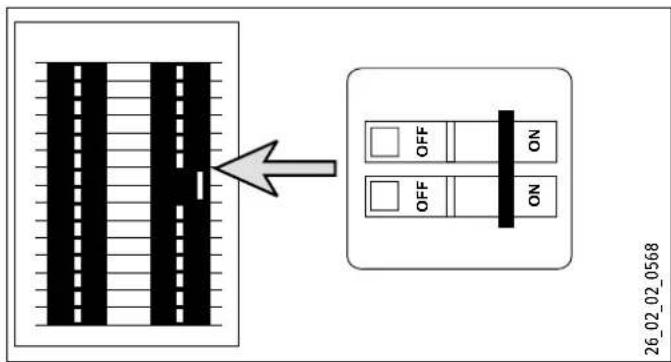
text_image
26_02_02_0568text_image
26_02_02_0568text_image
15" (380mm) 26_02_02_0893text_image
1 OUTLET INLETtext_image
Technical diagram of a device with labeled components including Tempra Plus and Tempra Trend modules15. Garantía
text_image
88.8°C T max 5 6 7 8 9text_image
P 1 109 °F Itext_image
P 3 6AL_galtext_image
P 6 r5Et → P 6 Ontext_image
P 7 rSET → P 7 On ...natural_image
Pure electrical circuit lines without any symbolsnatural_image
Pure electrical circuit lines without any symbolstext_image
A B C D E F GDimensions
A 10 mm ( ^3/8 po)
B 318 mm ( 12^1/2 po)
C 26 mm (1 po)
D 20 mm ( ^3/4 po)
E 190 mm (7 ^1/2 po)
F 190 mm (7 ^1/2 po)
G 5 mm ( ^3/_16 po)
natural_image
Technical illustration of a mechanical component with a screwdriver and curved base, no text or symbols presentnatural_image
Illustration of a portable electronic device with control buttons and a curved arrow indicating rotation (no text or symbols)▶ Ouvrez le capot avant.
text_image
Technical diagram of an electrical enclosure with labeled components and wiring connections1 Trous de montage
text_image
Technical diagram of a mechanical component with labeled parts 1 and 21 Filtre crépine
2 Rondelle
text_image
CKT 1 INLET OUTLET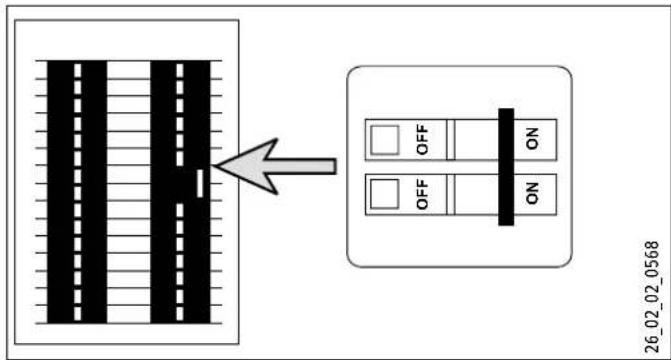
text_image
26_02_02_0568text_image
26_02_02_0568text_image
OUTLET Cir 1 Cir 2 Cir 3 INLET 26_02_02_0881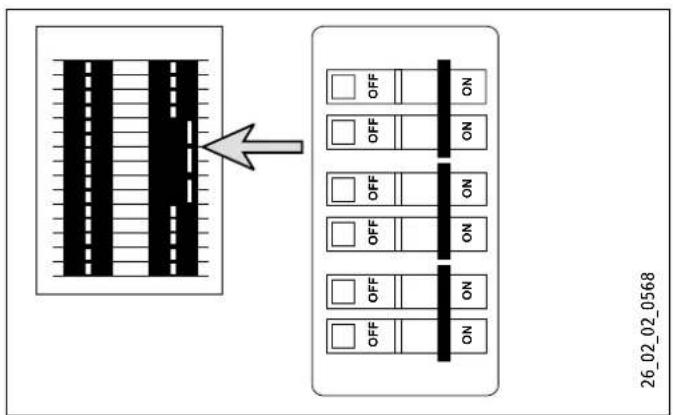
flowchart
graph TD
    A["Device Panel"] --> B["Grid"]
    B --> C["Display Panel"]
    style A fill:#f9f,stroke:#333
    style B fill:#ccf,stroke:#333
    style C fill:#cfc,stroke:#333
    note right of A: Arrow pointing to the grid box
    note right of C: Off/ON button
text_image
15" (380mm) 26_02_02_0893text_image
1 OUTLET INLETtext_image
Technical diagram of a Timpra air conditioning unit with labeled components and assembly steps15. Garantie
17 West Street | West Hatfield MA 01088
Tel. 413-247-3380 | Fax 413-247-3369
info@stiebel-eltron-usa.com
www.stiebel-eltron-usa.com