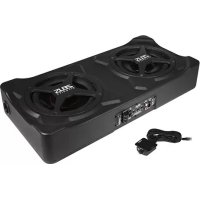
Zeus ZRX220A - Speaker Hifonics - Free user manual and instructions
Find the device manual for free Zeus ZRX220A Hifonics in PDF.


| Product Type | Amplified subwoofer (subwoofer) |
| Brand | Hifonics |
| Model | Zeus ZRX220A |
| RMS Output Power | 1 x 300 W |
| Max Output Power | 1 x 600 W |
| Speaker | 2 x 20 cm (8 inches) |
| Low-pass Filter | 40 – 150 Hz adjustable |
| Subsonic Filter | Fixed at 25 Hz |
| Phase Shift | 0° / 180° |
| Bass Boost | 0 – 12 dB @ 45 Hz |
| Power Supply | 12 V (9 – 15 V), negative ground |
| Fuse | 25 A |
| Dimensions (W x H x D) | 280 x 103 x 580 mm |
| Audio Inputs | RCA and high-level input (Hi-Level) |
| Auto Turn On | Yes, via DC offset detection |
| Remote Bass Control | Yes, included |
| Protection | Red LED Protect for overheating or short circuit |
| Power Indicator | Green Power LED |
| Cleaning | Dry soft cloth |
| Safety | Disconnect battery before installation; fuse within 30 cm of battery |
Frequently Asked Questions - Zeus ZRX220A Hifonics
User questions about Zeus ZRX220A Hifonics
0 question about this device. Answer the ones you know or ask your own.
Ask a new question about this device
Download the instructions for your Speaker in PDF format for free! Find your manual Zeus ZRX220A - Hifonics and take your electronic device back in hand. On this page are published all the documents necessary for the use of your device. Zeus ZRX220A by Hifonics.
USER MANUAL Zeus ZRX220A Hifonics
natural_image
Close-up of a black ZEUS HIFONICS device with four circular vented slots (no visible text or symbols on body)BEDIENUNGSANLEITUNG
USER'S MANUAL
MODE D'EMPLOI
MANUALE D'USO
MANUAL DE USO
ACTIVE
SUBWOOFER
SYSTEM
ZRX220A
INHALTSVERZEICHNIS TABLE OF CONTENT TABLE DES MATIÈRES SOMMARIO INDICE
HOCHPEGELEINGÄNGE
AUTOMATISCHE EINSCHALTFUNKTION
Please read the user's manual carefully before the installation and the first operation of the amplifier.
| SPECIFICATIONS | ZRX220A |
| Subwoofer | 2 x 20 cm (8") |
| Output Power RMS | 1 x 300 W |
| Output Power Max | 1 x 600 W |
| Lowpass Filter | 40 – 150 Hz |
| Subsonic Filter | Fixed at 25 Hz |
| Phase Shift | 0° / 180° |
| Bass Boost | 0 – 12 dB @ 45 Hz |
| Operating Voltage | +12 V (9 – 15 V), negative ground |
| Fuse Rating | 25 A |
| Dimensions (B x H x L) | 280 x 103 x 580 mm |
All Specifications are subject to change
IMPORTANT NOTES PRIOR TO INSTALLATION
- This device is only suited for a 12 volt system with negative ground.
- Ensure that the input and output cables are sufficiently separated from the power supply cables. Otherwise, interferences may occur.
- Ensure the accessibility of the fuse and the operating elements after installation.
- The reliability and performance of the amplifier depends on the quality of installation. Preferably consult an expert to install the system.
- Avoid any damage or removing of the components of the vehicle like wires, cables, board computer, seat belts, gas tank or the like.
POWER SUPPLY AND TURN-ON-CONNECTION
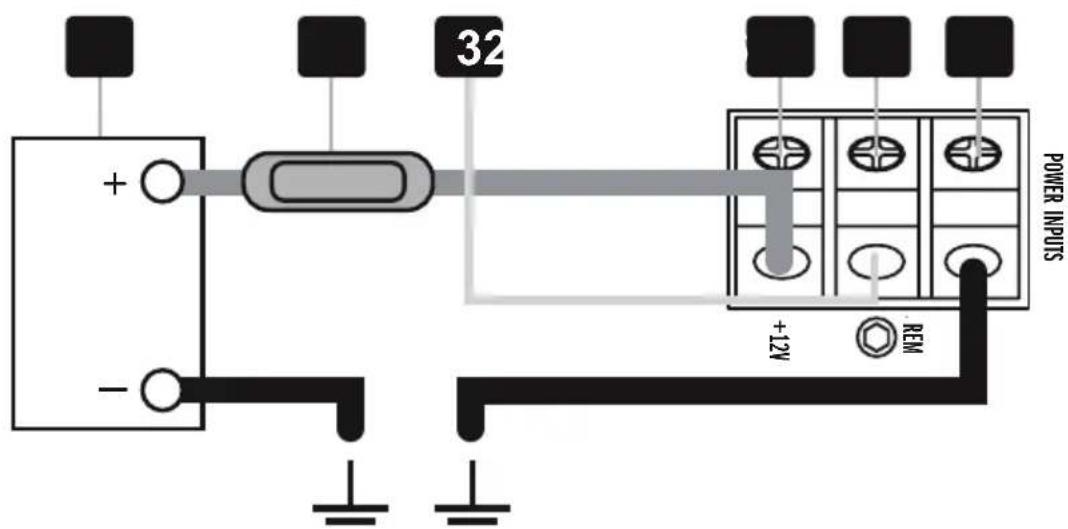
ATTENTION: Before you start with the installation, disconnect the ground connection from the vehicle's battery in order to prevent short circuits.
The power wiring which is usually installed in on-board car networks is not sufficient for a power amplifier's demands. Make sure that the power wires to GND and to the +12V terminal has been sufficiently specified.
First connect the GND terminal [6] of the amplifier to an appropriate ground connection at the chassis. To ensure a good connection, residue dirt and dust from the connection point. A loose connection may cause malfunctions or interferences noise and distortion.
Then connect the +12 V terminal [4] of the amplifier with the battery by using an appropriate cable including an in-line fuse. This fuse [2] should be located very close to the battery [1]; for safety reasons not more than 30 cm away. Only insert the fuse when the installation, including the connection of the loudspeakers, has been accomplished.
Then connect the remote turn-on-wire [3] from the head unit with the amplifier's REM terminal [5]. A cable with a cross-section of 0.5mm^2 is adequate.
AUDIO SIGNAL CABLES
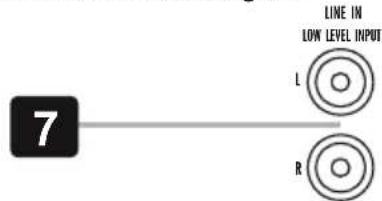
When installing the audio cables between the RCA outputs of the head unit and the RCA inputs of the amplifier [7], the audio and power supply cables should, if possible, not be routed along the same side of the vehicle. We recommend a separated installation, e.g. routing the power cable through the cable channel on the left side and the audio cables through the cable channel of the vehicle on the right side or vice versa. This prevents interferences due to crosstalk into the audio signal.
HIGH LEVEL INPUTS & AUTO TURN ON
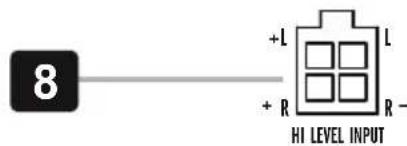
The high level inputs under HI LEVEL INPUT [8] is suitable to connect the device input with speaker wires, if your head unit is not equipped with pre-amplifier RCA outputs. Extend therefore every regarding speaker cable from your head unit with appropriate speaker cables from your car audio retailer to the mounting location of the amplifier. Then connect the each matching loudspeaker cable with the cables of the included High Level Input jack.
CAUTION: Never use the high level inputs and the RCA inputs at the same time. This may damage the device seriously.
AUTO TURN ON
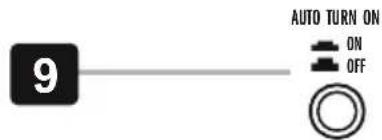
Push the AUTO TURN ON switch [9] to ON position. The amplifier detects now a voltage rise (6 Volts) over the connected input signal on the HI LEVEL INPUT [8] when the head unit will be switched on. Hence, the amplifier will also be turned on. As soon as the head unit will be turned off, the amplifier turns also automatically off. In this case the turn-on connection [3] is not needed.
NOTE: The AUTO TURN ON function usually works with 90% of all head units, because they are equipped with "High Power"-outputs. Only with a few older and still existing head units the Auto Turn On function is not working.
INPUT SENSITIVITY
Turn the LEVEL [10] controller of the amplifier to the MIN position. Then turn the volume controller of the head unit to 80 - 90% of its full setting. Now turn LEVEL [10] clockwise until you hear some distortion. Then turn back LEVEL [10] slightly until you hear a cleaner sound.

VARIABLE BASS BOOST
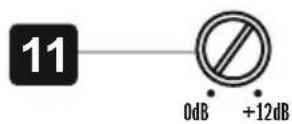
By using the BOOST controller [11] you are able to increase the bass enhancement from 0 to 12 dB. ATTENTION: Use the BASS BOOST wisely!
PHASE SHIFT SWITCH
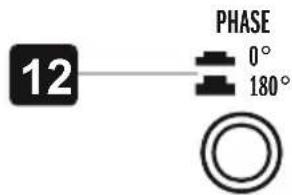
The PHASE SHIFT switch [12] allows to switch the phase from 0° to 180° to match the output signal with the vehicle's interior acoustic.
VARIABLE LPF FILTER
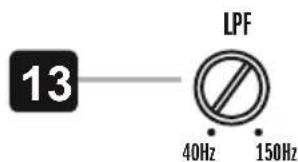
Set the desired crossover frequency by using the controller LPF [13]. Thus to that only the frequencies below the chosen crossover frequency will be amplified and the subwoofer plays more precisely and efficient.
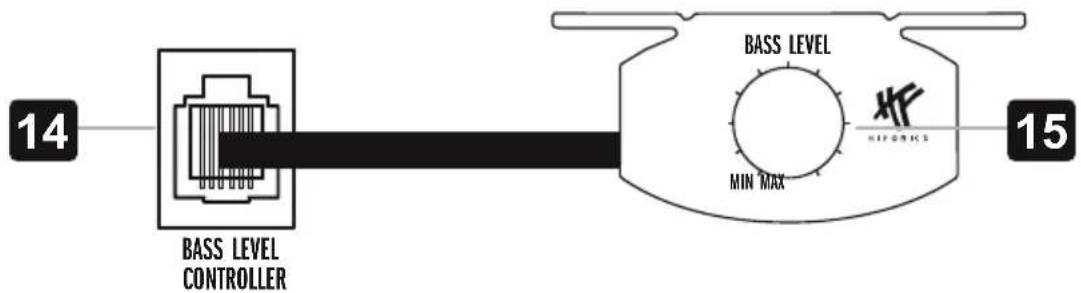
With the included bass level cable remote controller [15] allows to adjust the bass level e.g. out of the driver's seat. Connect the remote controller and the BASS LEVEL CONTROLLER terminal [14] with the enclosed cable.
flowchart
graph LR
    A["BASS LEVEL CONTROLLER"] --> B["BASS LEVEL"]
    B --> C["MIN MAX"]
    C --> D["HIFORICS"]
    style A fill:#f9f,stroke:#333
    style B fill:#ccf,stroke:#333
    style C fill:#cfc,stroke:#333
    style D fill:#fcc,stroke:#333
PROTECTION CIRCUIT
The PROTECT LED [16] lights up red, when the amplifier is overheated, or a short circuit occurs respective a too low impedance load is connected to the speaker outputs. If this events, the internal built-in protection circuit shuts down the amplifier automatically. The amplifier should work again properly after you have solved the problems.
The POWER LED [17] lights up green, if the amplifier is in operation.

flowchart
graph LR
    A["16"] --> B["○ ○"]
    B --> C["17"]
ENTRÉE HAUT NIVEAU
FONCTION ALLUMAGE AUTOMATIQUE
BASS BOOST RÉGLABLE
INGRESSO ALTO LIVELLO
BASS BOOST REGOLABILE
CONTROLLO REMOTO DAL LIVELLO DEI BASSI
ENTRADAS DE ALTO NIVEL
AUTO ENCENDIDO
BASS BOOST REGULABLE
www.audiodesign.de - www.hifonics.de
©2019 Audio Design GmbH, All Rights Reserved

- INHALTSVERZEICHNIS TABLE OF CONTENT TABLE DES MATIÈRES SOMMARIO INDICE
- HOCHPEGELEINGÄNGE
- AUTOMATISCHE EINSCHALTFUNKTION
- IMPORTANT NOTES PRIOR TO INSTALLATION
- POWER SUPPLY AND TURN-ON-CONNECTION
- AUDIO SIGNAL CABLES
- HIGH LEVEL INPUTS & AUTO TURN ON
- AUTO TURN ON
- INPUT SENSITIVITY
- VARIABLE BASS BOOST
- PHASE SHIFT SWITCH
- VARIABLE LPF FILTER
- PROTECTION CIRCUIT
- ENTRÉE HAUT NIVEAU
- FONCTION ALLUMAGE AUTOMATIQUE
- BASS BOOST RÉGLABLE
- INGRESSO ALTO LIVELLO
- BASS BOOST REGOLABILE
- CONTROLLO REMOTO DAL LIVELLO DEI BASSI
- ENTRADAS DE ALTO NIVEL
- AUTO ENCENDIDO
- BASS BOOST REGULABLE
Brand : Hifonics
Model : Zeus ZRX220A
Category : Speaker