
EB112A - Speaker Hifonics - Free user manual and instructions
Find the device manual for free EB112A Hifonics in PDF.


| Product Type | Portable Sound System with PA and subwoofer capability |
| Dimensions (HxWxD) | 730 x 390 x 370 mm |
| Weight (Gross) | 29.78 kg |
| Power Supply | AC 230 V, 50/60 Hz or DC 12-15 V |
| Battery | Rechargeable 20 Ah (256 Wh) – up to 20 h playtime at medium volume, 5 h at high volume |
| Amplifier Output | 300 W RMS, 600 W max, Class D, 4 Ω |
| Woofer | 30 cm (12") – 40 Hz - 5 kHz, 4 Ω |
| Tweeter | 3.8 cm (1.5") – 1 kHz - 20 kHz, 6 Ω |
| Frequency Response | 40 Hz - 20 kHz |
| Total Harmonic Distortion | < 0.2% |
| Bluetooth | Version 5.0 – 2.400 - 2.484 MHz, 30 dBm, supports TWS |
| Media Playback | USB port, SD card slot – supports MP3, WMA, WAV, FLAC, APE |
| Audio Inputs | Bluetooth, USB, SD, AUX (3.5 mm), RCA stereo, MIC (6.35 mm), GUITAR (6.35 mm) |
| Audio Output | RCA stereo |
| Controls | MAIN VOL, TREBLE, BASS, MIC ECHO, MIC VOL, GT VOL, AUDIO IN GAIN, LPF, MODE, EASYEQ (5 presets) |
| Special Features | TWS stereo pairing, subwoofer mode for vehicle, Voice Priority (karaoke), Echo effect, tablet slot, 3 handles, 4 transport wheels, flange bushing for tripod |
| Accessories | Remote control (incl. CR2025 battery), power cable, DC 12V connector, user manual |
| Fuse | 30 A (spare fuse included) |
| Safety | Do not expose to water or moisture; keep away from heat sources; do not disassemble; use only supplied power cord |
Frequently Asked Questions - EB112A Hifonics
User questions about EB112A Hifonics
0 question about this device. Answer the ones you know or ask your own.
Ask a new question about this device
Download the instructions for your Speaker in PDF format for free! Find your manual EB112A - Hifonics and take your electronic device back in hand. On this page are published all the documents necessary for the use of your device. EB112A by Hifonics.
USER MANUAL EB112A Hifonics
natural_image
Simple line drawing of a hand holding a tool near a wall-mounted device (no text or symbols)natural_image
Cartoon illustration of a person with books and arms, holding a sun (no text or symbols)natural_image
Hand inserting a plug into an electrical outlet (no text or symbols visible)natural_image
Cartoon illustration of a smiling computer monitor with motion lines indicating sound or vibration (no text or symbols)natural_image
Simple line drawing of two cartoon characters pulling a large box with motion arrows (no text or symbols)Please read the owner's manual completely before using the device. Keep the owner's manual for later use.
Specifications
Integrated Amplifier Class D Digital
Output Power RMS 300 W
Output Power Max. 600 W
Impedance 4 Ω
Frequency Range 40 Hz - 20 kHz
Total Harmonic Distortion <0,2 %
Operating Voltage AC 230 V, 50/60 Hz
Operating Voltage DC 12 - 15 V
Bass/Mid Loudspeaker 30 cm (12"), 40 Hz - 5 kHz, 4 Ω
Tweeter 3,8 cm (1.5"), 1 KHz - 20 KHz, 6 Ω
Dimensions 390 x 370 x 730 mm
Gross Weight 29.78 kg
Bluetooth Version 5.0 2.400 MHz - 2.484 MHz, 30,0 dBm
Features
Bluetooth® audio streaming function
TWS function to pair a second EB112A Sound System via Bluetooth®
Subwoofer function for operating the EB112A in a vehicle via AUDIO IN input
Audio player (compatible with MP3, WMA, WAV, FLAC, APE)
USB port
SD card slot
Rechargeable 20Ah battery with 256Wh*
EasyEQ with 5 equalizer presets
Echo audio effect for microphone operation
Microphone input (6,35 mm)
Guitar Input (6,35 mm)
RCA stereo input
RCA stereo output
3 sturdy handles
4 transport wheels
Device slot on top for tablets
Flange bushing (∅ 35 mm) for P.A. tripod
* over 20h playing time at medium volume, 5h at high volume Battery charges during operation and when the device is turned off
Scope of Delivery
1 x Portable Sound System
1 x Remote (1 x CR2025 button cell included)
1 x Power Cable
1 x DC 12V Power Connector
1 x User's Manual
Subject to change
Intended Use
This product is designed as indoor or outdoor sound system and can also be used as a subwoofer system in a vehicle. The product can be operated with an operating voltage of 100 - 230 V (alternating current) or 12 - 15 V (direct current) and with the integrated, rechargeable battery.
Declaration of Conformity
Distribution:
The Audio Design Lautsprecher Vertriebs GmbH hereby declares that the device EB112A complies with Directive 2014/53/EU. The full text of the EU declaration of conformity is available at the following Internet address: www.audiodesign.de/hifonics/ce

Notes on Disposal of the Device
If you have to dispose of the device, please note that no electronic devices may be disposed of with household waste. Dispose of the device in a suitable recycling facility in accordance with local waste regulations. If necessary, consult your local authority or your dealer.
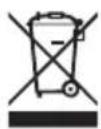
Notes on Disposal of the internal Battery
According to the Battery Act (BattG), we are obliged to point out the following: Batteries must not be disposed in the household waste. Used batteries may contain harmful substances which, if not properly stored or disposed, could damage the environment or your health. But batteries also contain important raw materials such as iron, zinc, manganese or nickel and can be recycled.
In the event of a defect, please dispose of the internal battery only at appropriate battery disposal facilities or recycling centers in your area.

Pb
Safety Instructions

- Use only the supplied power cable to power on and charge the built-in battery. Only supply the device with the voltage specified above.

natural_image
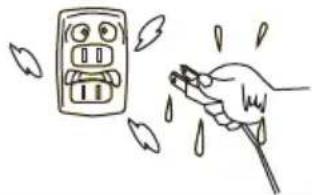
Hand holding a tool near a wall-mounted electrical outlet with droplets falling (no text or symbols)- NEVER plug in or unplug the power cord with wet hands. Do not place the device in a damp place or in the rain to avoid accumulation of liquid on the surface. Do not place a container with water or other liquids on the unit.

natural_image
Cartoon illustration of a sad, anthropomorphic character with arms and legs standing beside a sun (no text or symbols)- Do not place heavy objects on the device. Avoid direct sunlight and keep the device away from heat sources such as stoves, radiators, etc. Avoid exposing the device to high levels of dust and dirt, high temperatures and strong light and magnetic sources.


natural_image
Hand inserting a plug into an electrical outlet (no text or symbols visible)- Do not unplug the connected power cord by the cable directly from the device or the power outlet, always pull directly on the plugs. Keep the power cord away from places where it could be kicked, pinched, or tripped over. Do not lay heavy objects on the cable.

natural_image
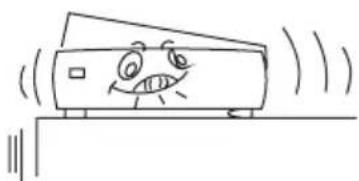
Cartoon illustration of a smiling computer monitor on a surface with sound waves (no text or symbols)- Do not disassemble the device. Touching internal parts of the device may result in a serious electric shock. Do not drop metal parts or liquids into the device openings.

natural_image
Simple line drawing of a person pulling a box with a bird flying nearby (no text or symbols)- If the device will not be used for a long time, always disconnect the power plug from the power socket.
Connection Diagram

Application example 2
Subwoofer operation in a vehicle

Functional Overview

Functional Overview
- The LCD display shows status information.
- Use the MODE button to select the input signal source (BT / USB/SD / Audio In).
- Insert a suitable memory card with music files into the SD card slot.
- Insert a USB stick with music files into the USB port.
- You can play or pause the selected track with the >II button.
- Use the I<< button to jump to the previous track.
- Use the >>I button to jump to the next track.
- Repeat function (RPT): All > One > Random > Folder (SD card and USB only)
- The TWS function is used to couple two EB112A systems via Bluetooth® to form a stereo system. Both systems must be in Bluetooth® mode. Then connect your mobile device to one of the systems. To pair, briefly press TWS on the device with which your Bluetooth® device has connected. Both systems couple within 1 minute. To release the coupled systems, hold the TWS button for approx. 15 seconds.
- At the signal input AUX (3.5 mm jack) you can e.g. connect a smartphone.
- At the signal input AUDIO IN (RCA) you can use an external signal source such as a CD player. For subwoofer operation in the vehicle, the RCA cable that comes from the head unit must be connected.
- At the signal output AUDIO OUT (RCA) you can e.g. connect a mixer.
- You can connect a microphone to the MIC input (6.35 mm jack).
- You can connect a guitar to the GUITAR signal input (6.35 mm jack).
- The MAIN VOL control regulates the overall volume of the sound system.
- The TREBLE control regulates the treble of the sound system.
-
The BASS control regulates the bass of the sound system.
-
The MIC ECHO control regulates the degree of the echo effect of the connected microphone.
- The MIC VOL control regulates the volume of the connected microphone.
- The GT VOLUME control regulates the volume of the connected guitar.
- The VOICE PRIORITY switch activates the karaoke function, i.e. the background music will be played a bit quieter as soon as a microphone is used.
- The AUDIO IN GAIN control regulates the input sensitivity of the connected input signal from AUDIO IN.
- The LPF control regulates the crossover frequency of the AUDIO IN low pass filter.
- At the LPF / FULL switch, you can determine whether the input signal should be a full-range signal or a low-pass signal (subwoofer mode).
- The CHARGE button does the following: I: The device is operated with 230 volts via the connected power plug and the internal battery is charged. O: The device is off and the internal battery is charged when the power plug is connected. II: The device is operated with the internal battery or, if an external battery is connected to DC12V, operated with this.
- Connect the enclosed power plug to POWER.
- This connector is removable and can remain in the vehicle in subwoofer mode. An external 12 volt battery (e.g. vehicle battery) can be connected to DC 12V IN to supply the device with power. Pay attention to correct polarity. The REM control signal (or a switched + 12V supply line) of the car radio must be present at the REM terminal in subwoofer mode.
- The device fuse (FUSE 30A) protects the device against overload and short circuits. If this is defective, you can use the spare fuse instead (SPARE FUSE). Exchange defective fuses only for fuses with the same fuse rating and design.
- The LEDs at BATT show the following: FULL: The internal battery is fully loaded LOW: The charging capacity of the internal battery is too low and should be charged. CHARGE: The internal battery is being charged.
Functional Overview
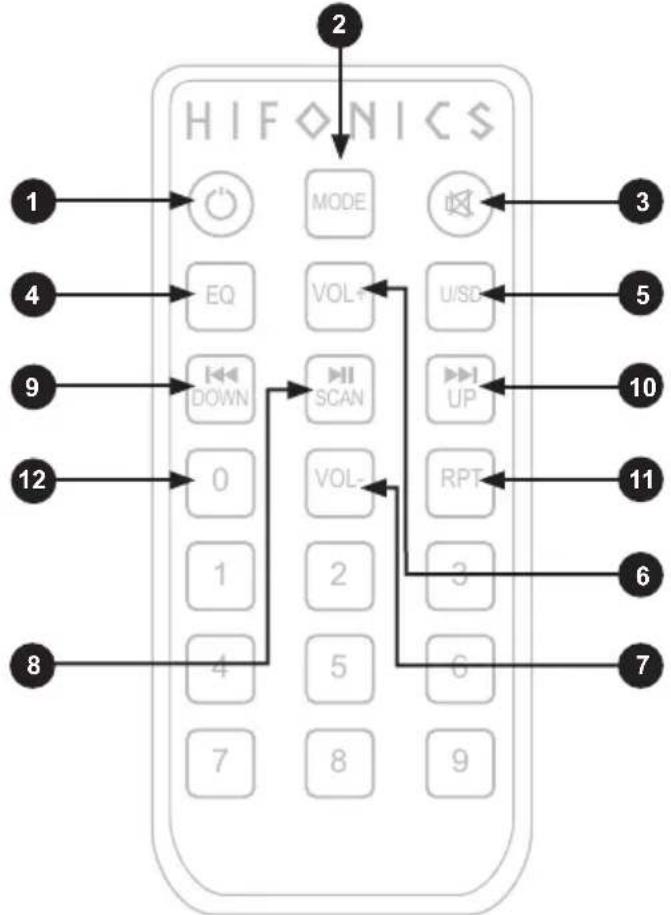
Point the remote at the front of the device. The IR sensor is located approximately in the middle there.
flowchart
graph TD
    A["2"] --> B["HIFNICS"]
    C["1"] --> D["MODE"]
    E["3"] --> F["U/SD"]
    G["4"] --> H["EQ"]
    I["5"] --> J["VOL+"]
    K["9"] --> L["DOWN"]
    M["10"] --> N["SCAN"]
    O["11"] --> P["UP"]
    Q["12"] --> R["0"]
    S["1"] --> T["VOL-"]
    U["2"] --> V["3"]
    W["6"] --> X["6"]
    Y["7"] --> Z["8"]
    AA["8"] --> AB["4"]
- Stand-by mode on or off
- Use the MODE button to select the input signal source (BT / USB/SD / Audio In).
- Mute on or off
- With the EQ button you can select five different EasyEQ equalizer settings (only adjustable by remote control): Flat: No adjustment Party: Ideal for parties and large rooms Groove: Ideal for background music BigBand: Ideal for classical/jazz Studio: Ideal for sophisticated music
- With the U/SD key you can choose between the data carriers USB and SD card.
-
The VOL+ button switches the volume of the currently selected input source one level up each time the button is pressed.
-
The VOL—button switches the volume of the currently selected input source one level down each time the button is pressed.
- You can play or pause the selected track with the >II button.
- Use the I<< button to jump to the previous track.
- Use the >>I button to jump to the next track.
- Repeat function (RPT): All > One > Random > Folder (SD card and USB only)
- Title selection via number buttons.
Bluetooth® Audio Streaming
- Turn on the power of the sound system and press the MODE key at the LCD display or the remote until the device confirms Bluetooth as input source acoustically.
- Search the name "HIFONICS" on your mobile phone or an other device and tap on connect. The device confirms acoustically when the connection is succeeded.
- Play music on your mobile phone or an other device and it will be played via the sound system.
- To disconnect the Bluetooth ^ operation, turn off Bluetooth ^ on your mobile phone or an other device or change the input source on the sound system.
EB-MIC Wireless Microphone Upgrade-Kit
For the EB112A sound system the optional wireless microphone upgrade kit EB-MIC is available. This upgrade kit contains two wireless microphones and a receiver (incl. installation guide) that must be installed in the device. For more information, ask your specialist dealer or visit hifonics.de on the Internet.
HIFONICS
www.audiodesign.de - www.hifonics.de
© Audio Design GmbH, All Rights Reserved

- Specifications
- Features
- Scope of Delivery
- Intended Use
- Declaration of Conformity
- Distribution:
- Notes on Disposal of the Device
- Notes on Disposal of the internal Battery
- Safety Instructions
- Connection Diagram
- Functional Overview
- Bluetooth® Audio Streaming
- EB-MIC Wireless Microphone Upgrade-Kit
- HIFONICS
Brand : Hifonics
Model : EB112A
Category : Speaker