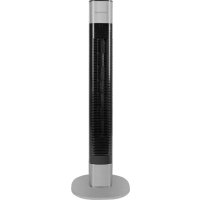
PCTVL 3068 - Fan ProfiCare - Free user manual and instructions
Find the device manual for free PCTVL 3068 ProfiCare in PDF.


| Brand | ProfiCare |
| Model | PCTVL 3068 |
| Product type | Pedestal fan (tower) |
| Dimensions (approx.) | Height: 90 cm, Base: 30 cm diameter |
| Net weight | Approx. 4.0 kg |
| Power supply | 220-240 V~, 50 Hz |
| Power consumption | 50 W |
| Protection class | II |
| Speeds | 3 speeds: low, medium, high |
| Ventilation modes | Normal, Natural, Sleep |
| Electronic timer | 1 to 8 hours |
| Oscillation | Yes, 80° |
| Remote control | Yes, range up to 10 m |
| Remote control battery | CR2025 (included) |
| Memory function | Yes, saves last settings |
| Assembly | Requires simple assembly (base plate, screws) |
| Material | Plastic, metal grille |
| Care and cleaning | Clean with dry or slightly damp cloth; do not immerse |
| Safety | Protective grille; do not insert objects; do not use near flammable liquids |
| Use by children | From age 8 under supervision |
| Supplied accessories | Remote control, battery, base plate, screws, tower |
Frequently Asked Questions - PCTVL 3068 ProfiCare
User questions about PCTVL 3068 ProfiCare
0 question about this device. Answer the ones you know or ask your own.
Ask a new question about this device
Download the instructions for your Fan in PDF format for free! Find your manual PCTVL 3068 - ProfiCare and take your electronic device back in hand. On this page are published all the documents necessary for the use of your device. PCTVL 3068 by ProfiCare.
USER MANUAL PCTVL 3068 ProfiCare
natural_image
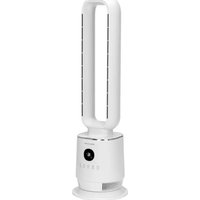
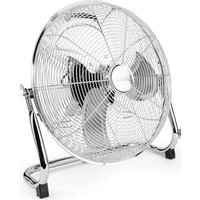
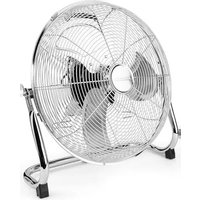
Exterior view of a tall, black-and-white industrial vertical tower with ventilation grilles (no text or symbols visible)Tower-Ventilator PC-TVL 3068
Torenventilator • Ventilateur colonne • Torre ventilador
Overview of the Components ...... Page 3
Instruction Manual......Page 28
Technical Data......Page 31
Bedienungsanleitung
- Appuyez 1 × = NATURAL
- Appuyez 2 × = SLEEP
• Appuyez 3 × = Mode normal
Thank you for choosing our product. We hope you will enjoy using the appliance.
Symbols in this Instruction Manual
Important information for your safety is specially marked. It is essential to comply with these instructions in order to avoid accidents and prevent damage to the appliance:

WARNING:
This warns you of dangers to your health and indicates possible injury risks.

CAUTION:
This refers to possible hazards to the appliance or other objects.

NOTE: This highlights tips and information.
General Notes
Read the operating instructions carefully before putting the appliance into operation and keep the instructions including the warranty, the receipt and, if possible, the box with the internal packing. If you give this appliance to other people, please also pass on the operating instructions.
- The appliance is designed exclusively for private use and for the envisaged purpose. This appliance is not fit for commercial use.
- Do not use it outdoors. Keep it away from sources of heat, direct sunlight, humidity (never dip it into any liquid) and sharp edges. Do not use the appliance with wet hands. If the appliance is humid or wet, unplug it immediately.
- When cleaning or putting it away, switch off the appliance and always pull out the plug from the socket (pull the plug itself, not the lead) if the appliance is not being used and remove the attached accessories.
- Do not operate the appliance without supervision. If you leave the room you should always turn the appliance off. Remove the plug from the socket.
- The appliance and the mains lead have to be checked regularly for signs of damage. If damage is found the appliance must not be used.
- Use only original spare parts.
- In order to ensure your children's safety, please keep all packaging (plastic bags, boxes, polystyrene etc.) out of their reach.

WARNING:
Do not allow small children to play with the foil.
There is a danger of suffocation!
Special Safety Precautions for this Appliance
- Never stick fingers or other objects through the protection grid.
- Watch out for long hair! It can be caught in the fan owing to the air turbulence!
- The appliance must be assembled completely before use!
- Select a stable base to avoid the tipping of the fan during use!
- Do not use the fan in premises where gasoline, paints or inflammable liquids are used or stored.
- The fan must be used only in the envisaged position (standing).
- Do not place the appliance immediately next to stoves or other sources of heat.
-
Do not repair the appliance by yourself. Always contact an authorized technician. If the supply cord is damaged, it must be replaced by the manufacturer, its service agent or similarly qualified persons in order to avoid a hazard.
-
This appliance can be used by children aged from 8 years and above and persons with reduced physical, sensory or mental capabilities or lack of experience and knowledge if they have been given supervision or instruction concerning use of the appliance in a safe way and understand the hazards involved.
• Children shall not play with the appliance. - Cleaning and user maintenance shall not be made by children without supervision.
- Do not immerse the appliance into water for cleaning. Please follow the instructions as stipulated in the chapter “Cleaning”.
Handling Batteries
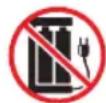
Do not charge!

Do not disassemble!
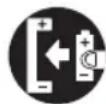
Insert correctly!

Danger of explosion! Do not expose batteries to intense heat, such as sunlight, fire or similar.

Do not short circuit!
- Different battery types or new and used batteries must not be used together.
- Batteries can leak and lose battery acid. If the remote control is not used for a long period of time, remove the batteries.
- If a battery leaks do not rub the liquid into your eyes or mucous membranes. If hands come into contact with the liquid they should be washed thoroughly and eyes rinsed out with clear water; if symptoms persist please consult a doctor.
Scope of Delivery
1 × Remote control
1 × Tower
1 × Base plate
3 × Screws for the base plate
1 × Battery for remote control CR2025
Overview of the Components
1 Remote control
2 Display
3 button
4 Button
5 button
6 Sutton
7 Button
8 IR Receiver for remote control
9 Tower
10 Power cable
11 Base plate
Unpacking the Appliance
- Remove the appliance from its packaging.
- Remove all of the packaging material such as foils, filling material, cable holders and cardboard packaging.
- Check the scope of delivery.

NOTE:
There may still be dust or production residues on the surface of the appliance. We recommend that you quickly wipe off the housing with a damp cloth.
Assembly Instructions
- Position the housing with the open side facing upwards.

NOTE:
It is best to place a blanket underneath so that the housing is not damaged.
-
Pass the connection cable through the hole of the base plate so that the mains plug is located on the underside of the base plate.
-
Place the base plate on the housing. The base plate can only be mounted in one position. Please use the guide pin to fix it in place.
i NOTE:
On the underside of the base plate you will see letters (A, B, C). The hole with the letter "A" must be on the front of the appliance.
- Tighten the base plate with the three screws.
- Thread the cable into the recess provided on the base plate.
- Now turn the fan over and place it on a suitable solid surface.
Remote Control
- Remove the remote control from the compartment on the back of the appliance.
- The cordless remote control has a range of up to 10 meters. When using the remote control, please ensure that there are no obstacles placed between it and the sensor on the appliance.
Inserting of the Battery
i NOTE:
The button cell in the battery compartment of the remote control has been secured with a foil for transport. This will extend the durability of the battery. Before initial use please remove this foil so that the remote control is ready for operation.
If the range of the remote control is reduced during use, please proceed as follows:
- Open the battery compartment on the bottom of the remote control by holding the lever inwards and pulling out the battery compartment.
- Replace the button cell with a battery of the same type (CR2025). Ensure correct polarity.
- Then close the battery lid.
Putting into Service
Electrical Connection
- Before inserting the plug into the socket. Make sure that the mains voltage to be used matches that of the appliance. You can find this information on the nameplate.
- Connect the appliance to a duly installed protective contact socket.
Use
i NOTE:
- The buttons are to be found both on the appliance itself and on the remote control.
i NOTE:
- The buttons on the appliance are touch keys. Gently touch the buttons with a finger to execute the function. Whenever a button is pressed, it will be confirmed by a beep sound.
- For the meaning of the symbols please see the following table.
- The appliance has a memory function: the last parameters set are stored. When it is switched on again, the fan starts up with the last settings.
Button and Symbol Explanation
| Button | Display Indications | Function |
| — — | Standby | |
| Start or stop the fan | ||
| TIMER Timer operation: 1 to 8 hours | ||
| NATURAL SLEEP | Wind-mode: Natural mode, sleep mode, or normal mode | |
| SPEED Speed setting: slow / medium / fast | ||
| Start or stop oscillation | ||
Switching the Fan On and Off
Press the ⏻ button to switch the appliance on or off.
Speed
Press the ✿ button repeatedly to select one of three speeds:
- 1 slow
- 2 medium
- 3 fast
Wind Change Functions
The appliance has the two special functions: NATURAL and SLEEP. The speed of the fan buries between the functions.
Press the Ⓧ button to switch these functions on.
- Press 1 × = NATURAL
This mode simulates natural wind movement. Pressing the ✿ button you can change the speed level.
- Press 2 × = SLEEP
Relax in this mode with rich wind variants. Pressing the button you can change the speed level.
- Press 3 × = Normal Mode
Choose the speed level by pressing the ✿ button.
Electronic Timer
You can switch off the appliance automatically (time-controlled).
- Use the ⏻ button to select a time setting between 1 and 8 hours.
- At the end of the set time the fan shuts off automatically.
Oscillation
Press the 🤒 button to turn on the oscillation. The appliance rotates automatically in the range of about 80 degrees.
Cleaning

WARNING:
• Always remove the mains plug before cleaning the appliance.
- Under no circumstances should you immerse the appliance in water for cleaning purposes. Otherwise this might result in an electric shock or fire.

CAUTION:
- Do not use a wire brush or any abrasive items.
-
Do not use any acidic or abrasive detergents.
-
Clean the outside of the appliance with a dry cloth without any additives.
- If the appliance is very dirty wet a cloth with water and then wipe the appliance dry once you have finished.
Technical Data
Model: PC-TVL 3068
Power supply: 220 - 240 V\~, 50 Hz
Power consumption: 50 W
Protection class: II
Battery for remote control: 1 x 3 V, type "CR2025"
Net weight: .... approx. 4.0 kg
The right to make technical and design modifications in the course of continuous product development remains reserved.
This appliance has been tested according to all relevant current CE guidelines, such as electromagnetic compatibility and low voltage directives, and has been constructed in accordance with the latest regulations.
Disposal
Battery Disposal
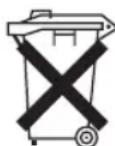
As a consumer you are obliged by law to return old batteries / accumulators.
Remove the battery from the remote control before disposing of the appliance.
Return the battery to a collection facility for the collection of old batteries or hazardous waste. Contact your local authority for more information.
Meaning of the "Dustbin" Symbol
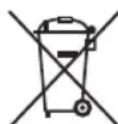
Protect our environment: do not dispose of electrical equipment in the domestic waste.
Please return any electrical equipment that you will no longer use to the collection points provided for their disposal.
This helps avoid the potential effects of incorrect disposal on the environment and human health.
This will contribute to the recycling and other forms of re-utilisation of electrical and electronic equipment.
Information concerning where the equipment can be disposed of can be obtained from your local authority.
Instrukcja obsługi
CTC Clatronic Sp. z o.o
Ul. Brzeska 1
45-960 Opole
Usuwanie
Usuwanie baterii

- Tower-Ventilator PC-TVL 3068
- Bedienungsanleitung
- Symbols in this Instruction Manual
- WARNING:
- CAUTION:
- General Notes
- Special Safety Precautions for this Appliance
- Handling Batteries
- Scope of Delivery
- Overview of the Components
- Unpacking the Appliance
- NOTE:
- Assembly Instructions
- i NOTE:
- Remote Control
- Inserting of the Battery
- Putting into Service
- Electrical Connection
- Use
- Switching the Fan On and Off
- Speed
- Wind Change Functions
- Electronic Timer
- Oscillation
- Cleaning
- Technical Data
- Disposal
- Battery Disposal
- Meaning of the "Dustbin" Symbol
- Instrukcja obsługi
- Usuwanie
- Usuwanie baterii
Brand : ProfiCare
Model : PCTVL 3068
Category : Fan