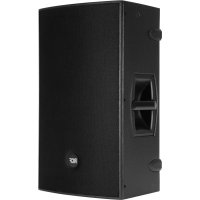
4PRO 3031A - Loudspeaker RCF - Free user manual and instructions
Find the device manual for free 4PRO 3031A RCF in PDF.



| Product Type | Powered Speaker (Active) |
| Brand | RCF |
| Model | 4PRO 3031A |
| Power Supply | 115 V, 60 Hz |
| Fuse | T 3.15 A 250 V |
| Input Connectors | Jack / Female XLR balanced or unbalanced |
| Output Connector | Male XLR (unprocessed signal) |
| Input Sensitivity Selector | Line (0 dB) / Microphone |
| Volume Control | Potentiometer (does not affect LINK output) |
| Equalization | Flat / Boost selector (loudness at low volume) |
| Limiter | Soft clipping with red LED (occasional blinking acceptable) |
| Signal Indicator | Green LED (input signal presence) |
| Power Indicator | Power Status LED (green when powered on) |
| Protection | Microprocessor with error detection (warning, limitation, failure) |
| Initialization | Approximately 2 seconds at power-on (LEDs off) |
| Installation | 35 mm pole mount; suspension attachment points (minimum 2 Fly-Track on opposite sides) |
| Maintenance | Clean with dry cloth; do not use solvents, alcohol, or benzene |
| Safety | Do not open the device; disconnect before any intervention; respect earth polarity |
| Precautions | Avoid exposure to rain or moisture; do not place liquid containers on the speaker |
Frequently Asked Questions - 4PRO 3031A RCF
User questions about 4PRO 3031A RCF
0 question about this device. Answer the ones you know or ask your own.
Ask a new question about this device
Download the instructions for your Loudspeaker in PDF format for free! Find your manual 4PRO 3031A - RCF and take your electronic device back in hand. On this page are published all the documents necessary for the use of your device. 4PRO 3031A by RCF.
USER MANUAL 4PRO 3031A RCF
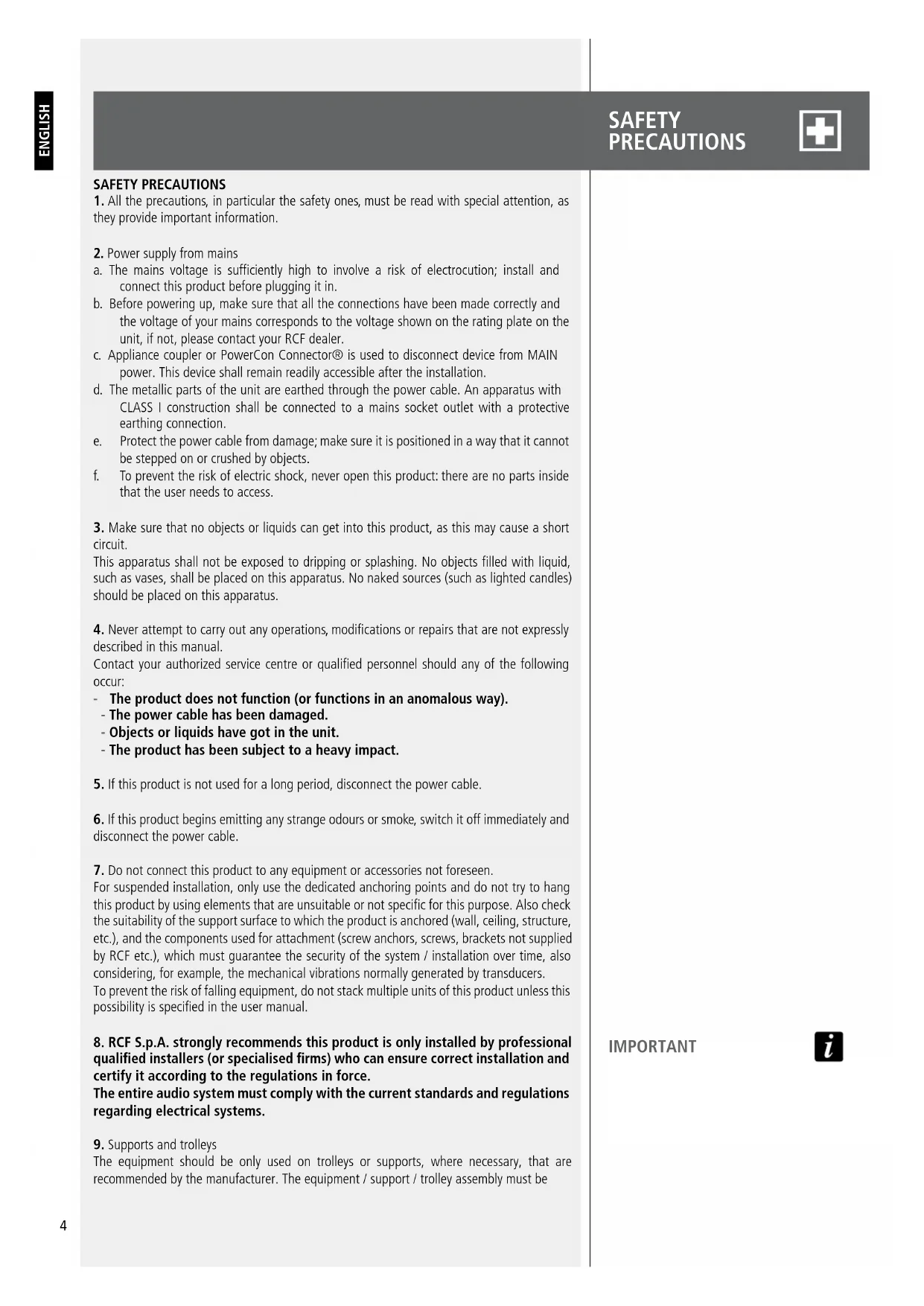
- All the precautions, in particular the safety ones, must be read with special attention, as they provide important information.
- Power supply from mains
a. The mains voltage is sufficiently high to involve a risk of electrocution; install and connect this product before plugging it in.
b. Before powering up, make sure that all the connections have been made correctly and the voltage of your mains corresponds to the voltage shown on the rating plate on the unit, if not, please contact your RCF dealer.
c. Appliance coupler or PowerCon Connector® is used to disconnect device from MAIN power. This device shall remain readily accessible after the installation.
d. The metallic parts of the unit are earthed through the power cable. An apparatus with CLASS I construction shall be connected to a mains socket outlet with a protective earthing connection.
e. Protect the power cable from damage; make sure it is positioned in a way that it cannot be stepped on or crushed by objects.
f. To prevent the risk of electric shock, never open this product: there are no parts inside that the user needs to access.
- Make sure that no objects or liquids can get into this product, as this may cause a short circuit.
This apparatus shall not be exposed to dripping or splashing. No objects filled with liquid, such as vases, shall be placed on this apparatus. No naked sources (such as lighted candles) should be placed on this apparatus.
- Never attempt to carry out any operations, modifications or repairs that are not expressly described in this manual.
Contact your authorized service centre or qualified personnel should any of the following occur:
The product does not function (or functions in an anomalous way).
- The power cable has been damaged.
- Objects or liquids have got in the unit.
-
The product has been subject to a heavy impact.
-
If this product is not used for a long period, disconnect the power cable.
-
If this product begins emitting any strange odours or smoke, switch it off immediately and disconnect the power cable.
-
Do not connect this product to any equipment or accessories not foreseen.
For suspended installation, only use the dedicated anchoring points and do not try to hang this product by using elements that are unsuitable or not specific for this purpose. Also check the suitability of the support surface to which the product is anchored (wall, ceiling, structure, etc.), and the components used for attachment (screw anchors, screws, brackets not supplied by RCF etc.), which must guarantee the security of the system / installation over time, also considering, for example, the mechanical vibrations normally generated by transducers.
To prevent the risk of falling equipment, do not stack multiple units of this product unless this possibility is specified in the user manual.
- RCF S.p.A. strongly recommends this product is only installed by professional qualified installers (or specialised firms) who can ensure correct installation and certify it according to the regulations in force.
The entire audio system must comply with the current standards and regulations regarding electrical systems.
- Supports and trolleys
The equipment should be only used on trolleys or supports, where necessary, that are recommended by the manufacturer. The equipment / support / trolley assembly must be
IMPORTANT

moved with extreme caution. Sudden stops, excessive pushing force and uneven floors may cause the assembly to overturn.
-
There are numerous mechanical and electrical factors to be considered when installing a professional audio system (in addition to those which are strictly acoustic, such as sound pressure, angles of coverage, frequency response, etc.).
-
Hearing loss
Exposure to high sound levels can cause permanent hearing loss. The acoustic pressure level that leads to hearing loss is different from person to person and depends on the duration of exposure. To prevent potentially dangerous exposure to high levels of acoustic pressure, anyone who is exposed to these levels should use adequate protection devices. When a transducer capable of producing high sound levels is being used, it is therefore necessary to wear ear plugs or protective earphones. See the manual technical specifications to know the maximum sound pressure level.
IMPORTANT NOTES
To prevent the occurrence of noise on line signal cables, use screened cables only and avoid putting them close to:
Equipment that produces high-intensity electromagnetic fields
- Power cables
- Loudspeaker lines.
IMPORTANT NOTES

OPERATING PRECAUTIOI

OPERATING PRECAUTIONS
- Place this product far from any heat sources and always ensure an adequate air circulation around it.
- Do not overload this product for a long time.
-
Never force the control elements (keys, knobs, etc.).
-
Do not use solvents, alcohol, benzene or other volatile substances for cleaning the external parts of this product.
IMPORTANT NOTES
Before connecting and using this product, please read this instruction manual carefully and keep it on hand for future reference. The manual is to be considered an integral part of this product and must accompany it when it changes ownership as a reference for correct installation and use as well as for the safety precautions. RCF S.p.A. will not assume any responsibility for the incorrect installation and / or use of this product.
WARNING: To prevent the risk of fire or electric shock, never expose this product to rain or humidity.
CAUTION: to prevent electric shock hazard, do not connect to mains power supply while grille is removed
IMPORTANT NOTES

WARNING

CAUTION

FCC NOTES

Note: This equipment has been tested and found to comply with the limits for a Class B digital device, pursuant to part 15 of the FCC Rules. These limits are designed to provide reasonable protection against harmful interference in a residential installation. This equipment generates, uses and can radiate radio frequency energy and, if not installed and used in accordance with the instructions, may cause harmful interference to radio communications. However, there is no guarantee that interference will not occur in a particular installation. If this equipment does cause harmful interference to radio or television reception, which can be determined by turning the equipment off and on, the user is encouraged to try to correct the interference by one or more of the following measures:
- Reorient or relocate the receiving antenna.
- Increase the separation between the equipment and receiver.
- Connect the equipment into an outlet on a circuit different from that to which the receiver is connected.
- Consult the dealer or an experienced radio/TV technician for help.
Modifications: Any modifications made to this device that are not approved by RCF may void the authority granted to the user by the FCC to operate this equipment.
The concept of this unique speakers derives from the touring industry, bringing in a compact cabinet all the experience of RCF professional sound.
The RCF Team always has the performer's needs at the forefront of the design in order to create new lines of speakers with renewed features, improved sound clarity and definition and even lighter weight systems. 4PRO represents the latest evolution in the active loudspeaker technology with a revolutionary design and sound. Every detail has been carefully studied in order to offer musicians and professionals the perfect tool to amplify their performance, night after night.
High quality materials, precise manufacturing, careful assembly and extensive quality control procedures complete the groundbreaking design work of the RCF R&D team.
The vocals are natural, the sound is clear at longer distances, the spl power is stable at very high levels. The RCF Precision transducers equipping 4PRO have been representing for decades the ultimate performance, the highest power handling and the most advanced technology in the professional and touring industry.
All Compression drivers and Transducers are precision built taking advantage of RCF's superior moulding, assembly technologies and a wealth of professional knowledge and experience dedicated to achieving extremely high standards.
The high power woofer delivers extremely accurate punchy bass, the custom made compression driver offers a transparent midrange and extreme fidelity.
RCF Class-D power amplifiers technology packs huge performance operating with high efficiency into a lightweight solution. 4PRO amplifiers deliver ultra fast attack, realistic transient response and impressive audio performance.
The integrated DSP manages crossover, equalisation, soft limiter, compressor and dynamic bass boost. Each input board presents both XLR/jack balanced inputs, XLR output link, mic/ line switch, volume and a switchable EQ Mode (Flat/Boost).
The amplifier features a solid mechanical aluminium structure which not only stabilize the amplifier during transportation but also assist in the heat dissipation. All the 4PRO amplifiers presents SMPS power supply section in order to produce maximum output and minimum transportation weight.
4PRO cabinets are built in Baltic birch plywood material and designed to dampen down vibrations even at maximum volume settings.
From cabinet construction to the final texture, 4PRO offers the maximum reliability and strength for the intensive use on the road.
The reflex porting has been resized to offer a better efficiency.
4PRO speakers are equipped with side aluminium handles with rubber handgrip for greater portability.
At the bottom a rugged steel pole mount has been installed in all models.
The new cabinet shape will allow 4PRO model to be used in the standard configuration as well as in stage monitor model.
Three fly-track inserts are provided for optional mounting hardware in Installed Sound or Touring Applications.
TOUR SOUND
COMPONENTS
AMPLIFIERS
CABINETS
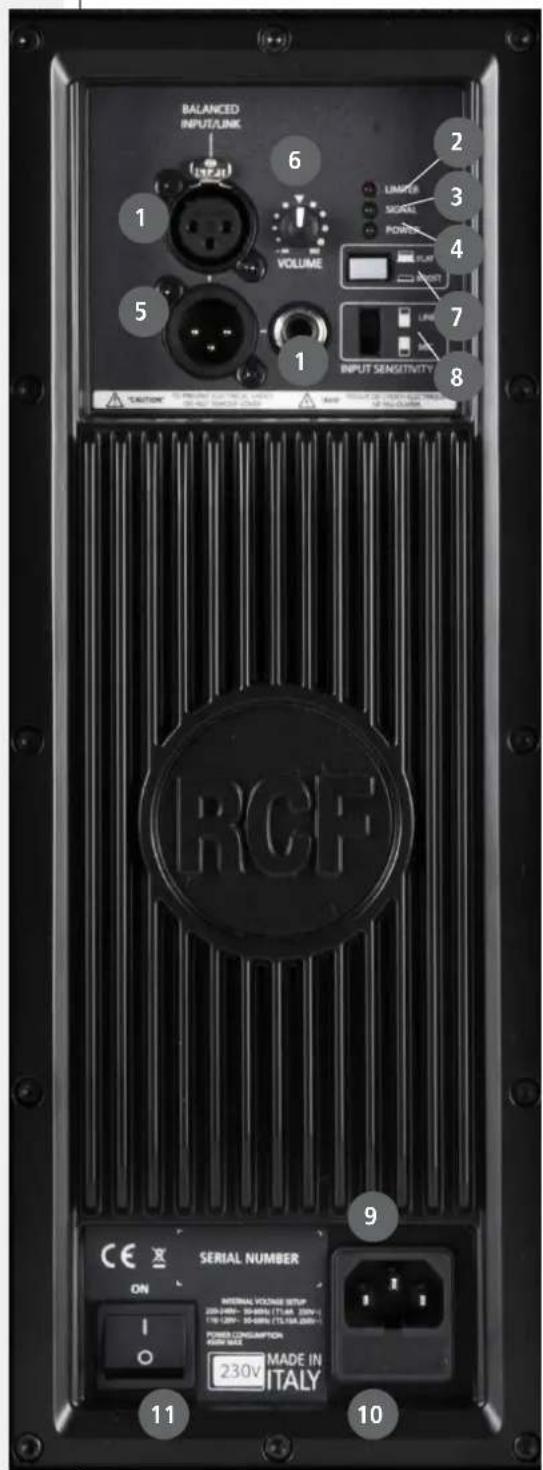
JACK/FEMALE XLR INPUTS (BAL/UNBAL). The system accept jack or XLR input connectors. These balanced inputs can be used to connect balanced or unbalanced microphones or audio sources at line level. The balanced connector is connected in parallel and can be used to send the audio signal to other amplified speakers, recorders or supplementary amplifiers.
2 LIMITER LED. The amplifier has a built in limiter circuit to prevent clipping of the amplifiers or overdriving the transducers. When the soft clipping circuit is active the LED blinks RED. It is okay if the limit LED blinks occasionally. If the LED blinks frequently or lights continuously, turn down the signal level.
3 SIGNAL LED. The signal indicator lights green if there is signal present on the main input.
4 POWER STATUS LED. This green led is ON when the speaker is connected to the main power supply and the ON/OFF is in ON position.
5 MALE XLR SIGNAL OUTPUT. The output XLR connector provides a loop trough for speakers daisy chaining.
6 VOLUME CONTROL. Adjust the amplifier volume. This control does not affect the "Link" - "Input - Link" output level.
FLAT/BOOST SWITCH. Set the flat or boost equalization. "Boost" equalization is a loudness recommended for background music applications, when the system plays at a low level. For all other applications "Flat" equalisation is recommended.
8 INPUT SENSITIVITY SWITCH. Position the switch in LINE to use a line level source (0 dB) or MIC to use a microphone source.
IEC AC SOCKET. The IEC AC socket connect the power cord to the socket.
10 FUSE CARRIER. Mains fuse housing.
11 POWER MAIN SWITCH. The power switch turns the AC power ON and OFF.
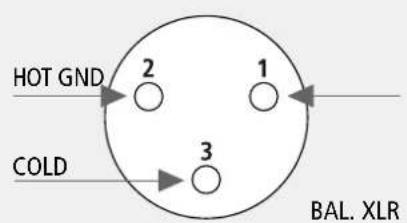
The XLR connectors
use the following AES standard:
PIN 1 = GROUND (SHIELD)
PIN 2 = HOT (+) PIN 3 = COLD(-)
CONNECTIONS
On the back panel you will find all the controls, the signal and current inputs. In case is necessary to change the voltage please call your vendor or authorized RCF SERVICE CENTRE. This operation requires the substitution of the fuse value and is reserved to an RCF SERVICE CENTRE.
At this point you can connect the power supply cable and the signal cable, but before turning on the speaker make sure that the volume control is at the minimum level (even on the mixer output). It is important that the mixer is already ON before turning on the speaker. This will avoid damage to the speakers and noisy "bumps" due to turning on parts on the audio chain. It is a good practice to always turn on speakers at last and turn them off immediately after the show. Now you can turn ON the speaker and adjust the volume control to a proper level.
The amplifiers are equipped with a microprocessor to control the DSP and the amplifier. The correct switch on of the amplifier is ensured by an initialisation procedure; during this test stage the LEDs (Limiter, Signal and Power Status), located on the amplifier module, remain off for approx. 2 sec. At the end of the switch on procedure on the amplifier module the Ready green LED only remains steadily on. In case of severe failure of the speaker, the LED on the front panel flashes several times and on the amplifier module, the Limiter red LED flashes. The speaker switches to "mute".
A 35 mm socket for mounting the loudspeaker on a speaker stand is provided in the bottom of the cabinet. 4PRO speakers MUST be suspended only with approved rigging hardware. In any case always use at least 2 fly-track inserts on opposite sides of the cabinet.
WARNING: Never suspend 4PRO speakers by there handles. Handles are intended for transportation, not for rigging.
WARNING

FAILURE INDICATION AND SAFETY

The microprocessor is able to signal three different kinds of failure by flashing the "Limiter" red LED on the amplifier panel before the lighting up of the "Power status" green LED. The three types of failure are: WARNING: a non severe error or auto-ripristinate malfunction is detected and the performance of the speaker is not limited. LIMITATIONS: an error is detected and the performance of the speaker is limited (the sound level is reduced by 3 dB). This does not affect the operation of the speaker since it continues to operate. However, it is necessary to call the service centre to solve the issue. FAILURE: a severe malfunction is detected. The speaker switches to "mute".
FLASHING INDICATION: 1 or 2 >Warning 3 or 4 > Limitation from 5 to 8 > Failure. In case of failure, the "Ready" green LED remains off.
Perform the checks listed below:
- check if the speaker is properly connected to the power supply
- make sure that the power supply is of correct voltage
- check that the amplifier is not overheated
- disconnect the speaker from the mains power supply, wait for a few minutes and connect it again. If after these tests the red "LIMITER" LED is still on, please contact an authorised service centre.
230 Volt, 50 Hz SETUP: FUSE VALUE T 1.6 A 250 V
115 Volt, 60 Hz SETUP: FUSE VALUE T3.15 A 250 V
VOLTAGE SETUP
(RESERVED TO THE RCF SERVICE CENTRE)
AVVERTENZE PER LA SICUREZZA
ACCENSIONEL DIFFUSORE
INSTALLAZIONE

Brand : RCF
Model : 4PRO 3031A
Category : Loudspeaker