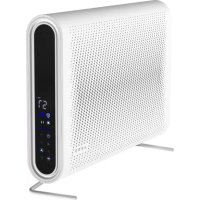
AP2S - Air purifier AENO - Free user manual and instructions
Find the device manual for free AP2S AENO in PDF.



| Product type | Air purifier |
| Brand | AENO |
| Model | AP2S (AAP0002S) |
| Dimensions (W × D × H) | 590 mm × 100 mm × 395 mm |
| Weight | Not specified (approximately 5 kg estimated) |
| Input voltage | 110–240 V (AC), 50/60 Hz |
| Power | 40 W |
| Productivity (CADR) | 420 m³/h |
| Coverage area | Up to 50 m² |
| Purification time (50 m²) | 0.5 h |
| Noise level (night mode) | 25 dB (at 1 m) |
| Filter type | HEPA H13 |
| UV light | UV LED inside (do not disassemble) |
| Ionizer | Yes (eliminates bad odors) |
| Wi-Fi | Yes (Wi-Fi module, 2.4 GHz) |
| Remote control | Radio frequency, range 10.5 m |
| Mobile app | AENO (compatible with iOS and Android) |
| Operating modes | Automatic, sleep, timer (1-24 h), variable speed |
| Child lock | Yes (key lock) |
| Air quality indicator | Color change according to pollution |
| Installation | On stand or wall mount (min 170 cm from floor) |
| Package contents | Purifier, HEPA H13 filter, remote control, stand, wall mount kit, power cable, guide |
| Maintenance | Clean the filter or replace every 12 months approximately (depending on usage) |
| Warranty | 2 years |
Frequently Asked Questions - AP2S AENO
User questions about AP2S AENO
0 question about this device. Answer the ones you know or ask your own.
Ask a new question about this device
Download the instructions for your Air purifier in PDF format for free! Find your manual AP2S - AENO and take your electronic device back in hand. On this page are published all the documents necessary for the use of your device. AP2S by AENO.
USER MANUAL AP2S AENO
natural_image
Black-and-white image of a flat-screen monitor with a dotted pattern on the screen (no visible text or symbols)User Manual
Air Purifier
AP2S
(Model: AP0002S)
a)


c)
ENG The AAP0002S Air Purifier is a household appliance designed to clean indoor air from allergens, pollen, fungal spores, dust particles, smoke, animal hair, and unpleasant odors.
Specifications
Input voltage: 100–240 V (AC), 50/60 Hz. Rated power: 40 W. Air flow rate: 420 m ^3 /h. Coverage: 50 m ^2 . Indoor air purification time: 0,5 hours. Noise level: in the night mode 25 dB (at a distance of 1 m). Dimensions (L × W × H): 590 mm × 100 mm × 395 mm. Built-in UV LED. Wi-Fi module. RF remote control. Remote control range: 10.5 m. Emission power: +20 dBm/100 mW.
Package Contents
AAP0002S Air purifier, HEPA filter H13, remote control, mounting screw (3 pcs.), power cord, support, wall bracket, plugs (2 pcs.), plastic inserts (4 pcs.), self-tapping screws (4 pcs.), Quick Start Guide.
Limitations and Warnings
ATTENTION! The device is equipped with a built-in UV LED. It is not allowed to disassemble the device and turn it on when disassembled, because it may be very harmful for eyes.
Make sure the purifier is unplugged before removing the front panel. Do not immerse the purifier in water or any other liquid. Do not use aggressive and flammable chlorine- or alcohol-containing agents to clean the purifier. Water is not allowed to enter the body of the purifier. Use the device as described in this Quick Start Guide and the complete User Manual only. Failure to follow the instructions may result in fire and other hazardous situations, as well as injuries. Do not use the device if it is damaged or cracked. Do not install the device outdoors or near sources of water, including humidifiers. Do not expose the device to direct sunlight, moisture or vibration. Do not drop, throw, disassemble the device, or try to repair it on your own.
If you have any issues or difficulties using your AENO™ device, please contact support by email at support@aeno.com or via the online chat at aeno.com/service-and-warranty. Our specialists will help you solve the problem, and you will not have to spend time and effort visiting the shop.
6 aeno.com/documents
Do not lay the power cable near radiators, stoves, or heaters. Do not use cleaning agents or detergents to clean the device. Do not dispose of the device with unsorted urban waste, because this will be harmful for the environment. For more information on proper disposal, please contact your local waste collection and disposal company. Keep children away from the device. There is a risk of serious injury and electric shock. This device is intended for use by adults only.
Warnings, precautions, and instructions contained herein may not contain every possible hazardous situation. Please use common sense when operating the device.
Components of the Air Purifier (See Figure a)
(1) – Air inlet, (2) – Removable front panel, (3) – HEPA filter, (4) – Plastic plugs, (5) – Purified air outlet, (6) – Casing, (7) – Mounting screws, (8) – Support, (9) – Wall mounting bracket.
Initial Setup (See Figure a)
Before operation, you should remove the packaging from the HEPA filter. To do this, first make sure that the air purifier is unplugged. Then, carefully remove the front panel (2) and pull the HEPA filter (3) out using the fabric strips. Remove the filter packaging and insert the HEPA filter (3) back into the device body. Close the front panel (2).
There are two options to install the purifier as follows:
- On the support: Insert the plugs (4) in the open ends of the support (8). Attach the support with the three mounting screws (7) to the purifier casing (6).
- On the wall: Attach the wall bracket (9) to the wall as desired (at a height of at least 170cm from the floor). Screw the three mounting screws (7) into the back of the purifier casing (6). Insert the heads of the mounting screws (7) on the back of the purifier into the grooves of the wall bracket (9) attached to the wall.
aeno.com/documents 7
Button Panel Control (See Figure b)
The room air quality indicator/timer display shows either the room air quality or the time period during which the purifier is switched on. The indicator shows that ultraviolet air purification process is ongoing. The speed button allows you to change the fan speed of the purifier every time you press it (The fan speed will be displayed by the air speed indicator). The “Start/Stop” button is used to switch the purifier on and off. The Sleep Mode button is used to switch the purifier into the Sleep Mode at a minimum fan speed where all indicators go out except for the Sleep Mode button. To exit this mode, press the button again. The Automatic Mode button is used to start one of the three available modes of operation of the purifier based on the room air quality. The Wi-Fi button is used to activate the Wi-Fi Module of the purifier to control it remotely from a smartphone. For more information, see the AENO app connection process described in the User manual available at
aeno.com/documents. The indicator changes its colour depending on the level of air pollution by organic compounds (glues, paints, varnishes, solvents, etc.). The timer button is used to switch the air quality indicator to the timer mode. By additional clicks on this button, you may set the timer for the purifier operation: from 1 to 24 hours. The Child Lock button will be activated, if pressed and clicked for 3 seconds. As a result, all buttons become unavailable for control. To enable the buttons, you need to press and hold this button for 3 seconds again. The ioniser button is used to switch on the ionizer which helps to remove unpleasant odors. The filter reset button indicates the time to replace the HEPA filter. Press and hold this button for 10 seconds to stop flashing, the timer set for the service life of the HEPA filter will start from zero.
Controlling the air purifier using the remote control (See Figure c)
The following buttons are available on the remote control: Switching on/off, Sleeping Mode, Timer, Automatic Mode, Fan Speed.
8 aeno.com/documents
Troubleshooting
- The purifier does not turn on. Possible causes and solutions: Make sure that the purifier is plugged into the mains socket, and that there is no power supply failure, as well as that the circuit breaker is on, and that the fuses are intact, and that the filter change LED is blinking red.
- Dust is poorly removed. Possible causes and solutions: Make sure that the filter surface is not clogged and that there are no obstructions preventing air intake or discharge.
- The device makes a loud noise. Possible causes and solutions: Make sure that nothing is stuck in the fan, and that the purifier is not tilted. If the noise is still too loud, try to reduce the fan speed using the fun speed button. Also, use Sleep Mode to operate the purifier at night.
- Unpleasant odor coming out from the purifier. If the device emits a plastic smell during the first few hours of operation, this is deemed to be normal. However, the device may also emit an unpleasant odor when the filter is clogged. In this case, the filter must be cleaned or replaced. If you smell burning, unplug the purifier immediately. Then, contact our Support Dept or the Seller of the device for assistance.
- The filter change LED is blinking after the filter was replaced or cleaned. Possible causes and solutions: Press and hold the filter button for at least 3 seconds. The filter replacement timer will restart and the indicator will turn off.
ATTENTION! If your problem persists, please contact your local supplier or the service center for support. Please do not disassemble the device or try to repair it on your own.
Connection to the AENO mobile app
ATTENTION! Please make sure that your phone is connected to a 2.4 GHz Wi-Fi network as 5 GHz networks are not supported by the device.
- Connect the device to a power supply and turn it on.
aeno.com/documents 9
- Download the AENO mobile app from Google Play or the App Store and create a new account or log in to your user account.
- On the main screen of the app, tap "+" or "Add device" (if there are no added devices in the app). Select "Air purifier" in the window that opens.
Note: If the system prompts you to turn on any features on your smartphone, follow the recommendations in the prompts.
- Enter your Wi-Fi network name and password if the fields have not been filled in automatically. Tap "Next". Make sure that the EZ mode is selected in the upper right corner.
- As a general rule, the device's Wi-Fi button starts blinking when you turn on the device for the first time. On the "Tips to Connect Devices" screen, check the "Make sure that the LED indicator is blinking" box and tap "Next".
- Wait for the "Device successfully added" message to appear *.
- If the connection to the device does not occur, press and hold the Wi-Fi button for about 3 seconds until the device beeps. Repeat the connection process as described above.
Note: It is recommended to stay as close as possible to the device and, if possible, to the router at the moment of connection to ensure a stable Wi-Fi signal.
After that, you will be able to control your device from the app. To learn about remote control scenarios, see the full manual at aeno.com/documents.
* In case of a connection failure, make sure that the device is connected to the power supply and turned on, and the Wi-Fi icon on the device control panel is blinking. Additionally, check your router's Wi-Fi settings or restart it (aeno.com/router-help), and then repeat the connection process.
10 aeno.com/documents
g_1b_3c_mg_ns_8s_3o_5d_9g_1d_3d_6s_2g_8d_5(ob. l_7g_6s_0o a)
ENC ASBISC reserves the right to modify the device and to make changes and additions to this document without prior notice to users.
The warranty period and service life is 2 years from the date of retail sale of the device. Manufacturer: ASBISC Enterprises PLC, lapetou, 1, Agios Athanasios, 4101, Limassol, Cyprus. Made in China. All trademarks and brands mentioned herein are the property of their respective owners. The date of manufacture is indicated on the package.
Up-to-date information and a detailed description of the device, as well as connection instructions, certificates, information on companies that accept quality claims and warranties is available at aeno.com/documents. This device complies with applicable safety requirements.
SIMPLIFIED DECLARATION OF CONFORMITY. Hereby, ASBISC declares that the device is in compliance with Directive 2014/53/EU. The full text of the EU declaration of conformity is available at the following internet address:
aeno.com/userfiles/files/Certificates/CE/AP2S.pdf.
RoHS Directive. The device complies with the requirements of the Directive 2011/65/EU on the Restriction of Hazardous Substances (RoHS), including the requirements of the RoHS Directive 2015/863/EU.
aeno.com/userfiles/files/Certificates/CE/AP2S.pdf.
aeno.com/userfiles/files/Certificates/CE/AP2S.pdf.
aeno.com/userfiles/files/Certificates/CE/AP2S.pdf.
natural_image
Two identical line diagrams of a trash bin with no text or symbols, showing cross-sectional shapes without any labels or symbols.ENC Recycling information. These symbols indicate that you must follow the Waste Electrical and Electronic Equipment (WEEE) and Waste Battery and Battery Regulations when disposing of the device, its batteries and accumulators, and its electrical and electronic accessories. According to the rules, this equipment must be disposed of separately at the end of its service life. Do not dispose of the device, its batteries and accumulators, or its electrical and electronic accessories together with unsorted municipal waste, as this will harm the environment. To dispose of this equipment, it must be returned to the point of sale or turned in to a local recycling facility. You should contact your local household waste disposal service for details.
natural_image
Symbolic icon of a person pushing a circular arrow, representing waste or recycling (no text or symbols)FR
natural_image
Symbolic icon of a person pushing a circular arrow, representing waste or disposal (no text or symbols)FR
ÉLÉMENT(S) D'EMBALLAGE


natural_image
Symbolic icon of a person pushing a circular arrow, representing waste or recycling (no text or symbols)FR


CE

EAC

Please contact our online support team if you have any questions or issues with your AENO device.
This is a better option than visiting the store and will save you time and effort

Get support


aeno.com/service-and-warranty
UKR Отримати підтримку BOS Dobijte podršku BUL Получаване на поддрыкка CES Ziskejte podporu DEU Support erhalten ELL Λήψη υποστήριξης EST Saama toetuse FRA Obtenir de l'aide HRV Tražite pomoć na HUN Támogatás megszerzése HYE Ugwulgnipiniu υπωλων ITA Ottieni supporto KAT ∂δαθηρασθημι δησθός KAZ Κολday any LAV Sanemt atbalstu LIT Gauti palaikymą NLD Ondersteuning krijgen POL Uzyskaj pomoc POR Obter apoio RON Obtineçi asistență RUS Получить поддержку SLK Ziskał podporu SLV Pridobite podpoło SPA Obtener apoyo SRP Tražite pomoć na UZB Qo'llab quvvatlash xizmatidan foydalanish الحصول على الدعم ARA



- Air Purifier
- AP2S
- Specifications
- Package Contents
- Limitations and Warnings
- Components of the Air Purifier (See Figure a)
- Initial Setup (See Figure a)
- Button Panel Control (See Figure b)
- Controlling the air purifier using the remote control (See Figure c)
- Troubleshooting
- Connection to the AENO mobile app
- g_1b_3c_mg_ns_8s_3o_5d_9g_1d_3d_6s_2g_8d_5(ob. l_7g_6s_0o a)
- FR
- Please contact our online support team if you have any questions or issues with your AENO device.
Brand : AENO
Model : AP2S
Category : Air purifier