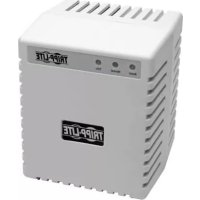
LR604 - Surge protector Tripp Lite - Free user manual and instructions
Find the device manual for free LR604 Tripp Lite in PDF.


| Product Type | Surge Suppressor / Line Conditioner |
| Brand | Tripp Lite |
| Model | LR604 |
| Input Voltage | 230 V AC (208/220/240 V adjustable) |
| Frequency | 50/60 Hz |
| Continuous Output Power | 60 W |
| Number and Type of Outlets | 1 outlet 5-15R, 1 Uniplug outlet |
| Power Cord Length | 2 m |
| Transient Energy Rating | 340 J |
| Noise Attenuation (at 1 MHz) | 20 dB |
| LED Indicators | NORM (green), LOW/BOOST (yellow), HIGH/TRIM (yellow), VERY LOW/HIGH (red), LINE OK (green), LINE FAULT (red) |
| Surge Protection | Yes, built-in |
| Resettable Circuit Breaker | Yes, on selected models |
| Operating Temperature | 0 °C to 40 °C (32 °F to 104 °F) |
| Dimensions (H x W x D) | 15 x 12 x 13 cm |
| Shipping Weight | 2.7 kg |
| Warranty | 2 years (subject to registration within 10 days) |
| Maintenance | No routine maintenance required; keep dry; do not open the unit |
| Safety Recommendations | Use indoors only; plug into a grounded outlet; do not use for life-support equipment |
Frequently Asked Questions - LR604 Tripp Lite
User questions about LR604 Tripp Lite
0 question about this device. Answer the ones you know or ask your own.
Ask a new question about this device
Download the instructions for your Surge protector in PDF format for free! Find your manual LR604 - Tripp Lite and take your electronic device back in hand. On this page are published all the documents necessary for the use of your device. LR604 by Tripp Lite.
USER MANUAL LR604 Tripp Lite
Important Safety Instructions 2
Quick Installation 3
Basic Operation 4
Service 5
Specifications 5
2-Year Limited Warranty 6
Español 7
Français 13
Deutsch 19
Русский 25
PROTECT YOUR INVESTMENT!
Register your product for quicker service and ultimate peace of mind.
You could also win an ISOBAR6ULTRA surge protector— a \$100 value!
www.tripplite.com/warranty


1111 W. 35th Street, Chicago, IL 60609 USA • www.tripplite.com/support
Copyright © 2018 Tripp Lite. All rights reserved.
Important Safety Instructions
SAVE THESE INSTRUCTIONS
This manual contains instructions and warnings that should be followed during the installation, operation and storage of all Tripp Lite Line Conditioners.
Line Conditioner Location Warnings
• Install your Line Conditioner indoors, away from excess moisture or heat, dust or direct sunlight.
- For best performance, keep the indoor temperature between 0^ and 40^ (between 32^ and 104^ ).
- Leave adequate space around all sides of the Line Conditioner for proper ventilation.
Line Conditioner Connection Warnings
- Connect your Line Conditioner to a three-wire, grounded AC power outlet. Do not remove or modify the ground pin of the Line Conditioner's plug.
- Do not use two-prong adapters with the Line Conditioner's plug. Do not plug your Line Conditioner into itself; this will damage the Line Conditioner and void your warranty.
- If you are connecting your Line Conditioner to a motor-powered AC generator, the generator must provide clean, filtered computer-grade output.
- Use care when connecting country-specific plugs to selected 220/240V, 50/60Hz Line Conditioners. Hot 1 and Hot 2 may be reversed. When using a French CEE7/7 plug, always use the separate grounding pin supplied with the unit. When using a Schuko CEE7/4 plug, an ungrounded condition will exist unless separate grounding to the rear of the Line Conditioner is provided by the user.
Equipment Connection Warning
- Do not use Line Conditioners for life support applications in which a malfunction or failure of a Line Conditioner could cause failure or significantly alter the performance of a life-support device.
Line Conditioner Maintenance Warning
- Line Conditioners require no maintenance. Keep the Line Conditioner dry at all times. DO NOT open the unit for any reason.
Quick Installation—220/240V - 50/60Hz
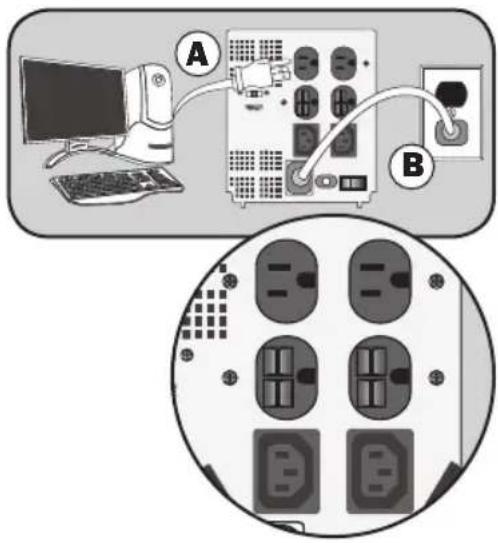
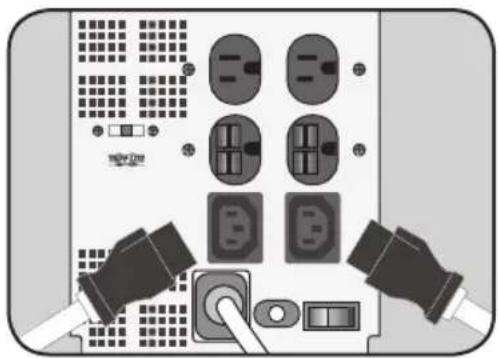
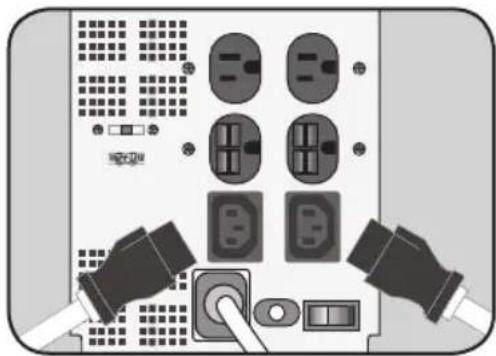
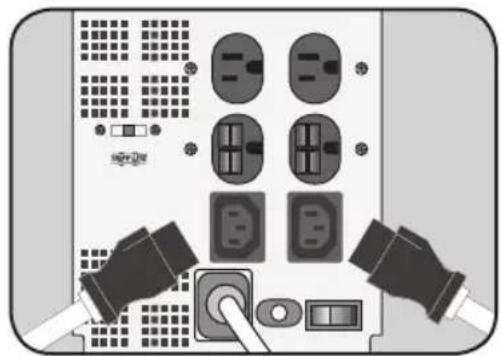
① Connect your equipment to the Line Conditioner, and the Line Conditioner to an electrical outlet.
- Using the power cord from your equipment, connect your equipment to the Line Conditioner (See A).
- Using the supplied power cord, plug cord into the Line Conditioner's input (rear) and then into a wall outlet (See B). If needed, use the supplied Schuko adapter when connecting to the wall outlet.
② Connect additional equipment to the Line Conditioner in the same manner.
• Additional cords and receptacle adapters are available at www.tripplite.com to accommodate most outlet configurations.
natural_image
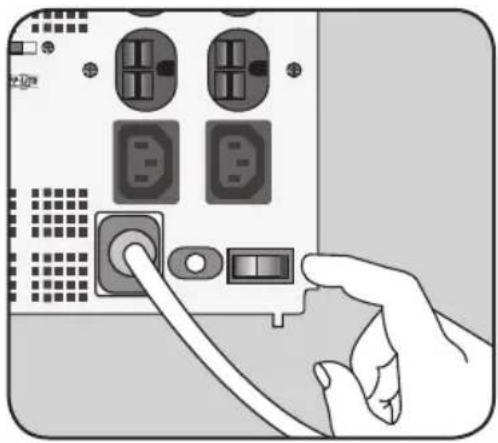
Back panel of a network device showing multiple socket and socket switches with two connectors (no text or symbols visible)③ Turn on your Line Conditioner's power switch
Note: Source Voltage Matching Switch—Set the Source Voltage Matching Switch to either 208, 220 or 240 volts to match the input voltage being used (select models).
natural_image
Illustration of a hand inserting a cable into a computer drive module (no text or symbols visible)Basic Operation
Indicator Lights
All indicator light descriptions apply when the Line Conditioner is plugged into a wall outlet and turned on. (Available on select models only.)
A green “NORM” light will turn ON whenever your Line Conditioner is plugged in and receiving nominal AC line voltage.
Yellow lights labeled “LOW” (or “BOOST”) and “HIGH” (or “TRIM”) will turn ON when incoming voltage is above or below nominal AC line voltage.
Red lights labeled “VERY HIGH” or “VERY LOW” will turn ON when incoming voltage is substantially above or below nominal AC line voltage.
A green “LINE OK” light will turn on when AC power is present and no wiring faults are detected. When this light is illuminated, AC power is acceptable for connected equipment.
A red “LINE FAULT” light will turn ON to indicate a wiring fault has been detected. The condition should be investigated and repaired by a qualified technician as soon as possible. A loose wall outlet may cause this light to come ON. Your Line Conditioner will identify most common wiring faults (but not necessarily every possible type of fault).
Other Features
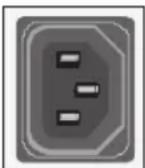
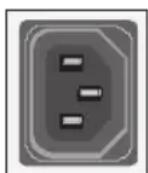
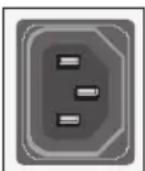
IEC-320-C13 (220/240V)
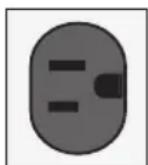
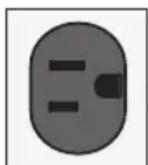
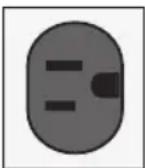
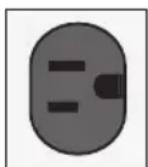
NEMA 5-15R ^* (220/240V)
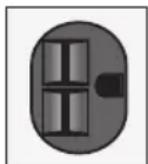
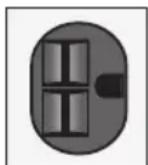
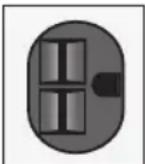
NEMA 6-15R ^* (220/240V)

AC Receptacles
The receptacles provide your connected equipment with AC line power during normal operation. They adjust incoming voltage to provide equipment with nominal 220/240V power. The receptacles also protect your equipment against damaging surges and line noise, eliminating the need for external surge suppression.
Note: As the Line Conditioner corrects fluctuating input voltages, the unit will make a gentle clicking sound. The frequency of the clicking will depend on the quality of the utility power in your particular area. The clicking is normal and indicates the Line Conditioner is compensating for fluctuating input voltages as described in this manual.
* Available on select models.
Circuit Breaker (Available on select models)
If the rated capacity of the Line Conditioner is exceeded at any time, the circuit breaker will open (trip). Remove the overload and let the circuit breaker cool for one minute. Reset the circuit breaker by pushing in the plunger.
Service
If returning your Line Conditioner to Tripp Lite or an authorized Tripp Lite service center, please carefully pack it using the ORIGINAL PACKING MATERIAL that came with the unit. Enclose a letter describing the symptoms of the problem. If the Line Conditioner is within the two year warranty period, enclose a copy of your sales receipt.
Specifications
| Model | Output Wattage(Continuous) | Voltage Frequency*(Hz) | Cord Length**(m.) | Number/Type of Outlets | Surge Energy Rating(Joules) | High Frequency Noise Suppression(@ 1Mhz) | Dimensions H x W x D(cm.) | Shipping Weight(kg.) |
| LR604 600 | 230/50-60 2 | (4) 5-15R, | (1) Uniplug | 340 20 | dB 15 x 12 x 13 | 2.7 | ||
| LR1000 1 | 000 230/50-60 | 2 (4) 5-15R, | (1) Uniplug | 340 20 | dB 17 x 15 x 17 | 3.6 | ||
| LR2000 2 | 000 230/50-60 | 2 (2) 5-15R, | (2) 6-15R,(2) IEC-320,(1) Uniplug INT | 1360 50 | dB 17 x 15 x 17 | 4.5 |
*Voltage range: 168-278VAC nominal output. LR2000 nominal output can be set to 208/220 or 240VAC.
**Cordsets are IEC-320 female to NEMA 5-15 male, LR2000 cordset is IEC-320 female to NEMA 6-15 male.
2-Year Limited Warranty
TRIPP LITE warrants its products to be free from defects in materials and workmanship for a period of two years from the date of initial purchase. TRIPP LITE's obligation under this warranty is limited to repairing or replacing (at its sole option) any such defective products. To obtain service under this warranty, you must obtain a Returned Material Authorization (RMA) number from TRIPP LITE or an authorized TRIPP LITE service center. Products must be returned to TRIPP LITE or an authorized TRIPP LITE service center with transportation charges prepaid and must be accompanied by a brief description of the problem encountered and proof of date and place of purchase. This warranty does not apply to equipment which has been damaged by accident, negligence or misapplication, or has been altered or modified in any way. This warranty applies to only the original purchaser who must have properly registered the product within 10 days of purchase.
EXCEPT AS PROVIDED HEREIN, TRIPP LITE MAKES NO WARRANTIES, EXPRESS OR IMPLIED, INCLUDING WARRANTIES OF MERCHANTABILITY AND FITNESS FOR A PARTICULAR PURPOSE. Some states do not permit limitation or exclusion of implied warranties; therefore, the aforesaid limitation(s) or exclusion(s) may not apply to the purchaser.
EXCEPT AS PROVIDED ABOVE, IN NO EVENT WILL TRIPP LITE BE LIABLE FOR DIRECT, INDIRECT, SPECIAL, INCIDENTAL OR CONSEQUENTIAL DAMAGES ARISING OUT OF THE USE OF THIS PRODUCT, EVEN IF ADVISED OF THE POSSIBILITY OF SUCH DAMAGE. Specifically, TRIPP LITE is not liable for any costs, such as lost profits or revenue, loss of equipment, loss of use of equipment, loss of software, loss of data, costs of substitutes, claims by third parties, or otherwise.
The policy of TRIPP LITE is one of continuous improvement. Specifications are subject to change without notice.
WEEE Compliance Information for Tripp Lite Customers and Recyclers (European Union)
Under the Waste Electrical and Electronic Equipment (WEEE) Directive and implementing regulations, when customers buy new electrical and electronic equipment from Tripp Lite they are entitled to:
- Send old equipment for recycling on a one-for-one, like-for-like basis (this varies depending on the country)
- Send the new equipment back for recycling when this ultimately becomes waste


Manufacturing Excellence.
1111 W. 35th Street, Chicago, IL 60609 USA • www.tripplite.com/support
Manual de Operación
1111 W. 35th Street, Chicago, IL 60609 USA • www.tripplite.com/support
SAVE THESE INSTRUCTIONS
natural_image
Back panel with connectors and socket switches (no text or symbols visible)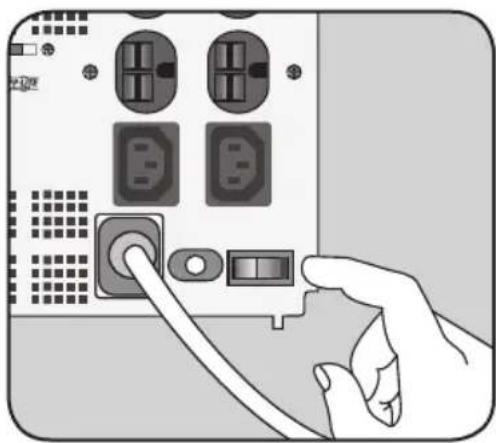
natural_image
Illustration of a hand inserting a USB into a computer drive (no text or symbols visible)1111 W. 35th Street, Chicago, IL 60609 USA • www.tripplite.com/support
1111 W. 35th Street, Chicago, IL 60609 USA • www.tripplite.com/support
natural_image
Illustration of two hands inserting a socket into an electronic device panel with circuit breakers and switches (no text or symbols)natural_image
Illustration of a hand inserting a USB into a computer drive panel (no text or symbols visible)Opération de base
IEC-320-C13 (220/240V)
NEMA 5-15R ^* (220/240V)
NEMA 6-15R ^* (220/240V)
Réceptacles C.A.
1111 W. 35th Street, Chicago, IL 60609 USA • www.tripplite.com/support
Besitzerhandbuch
Netzfilter
(220/240V-50/60Hz)
Sicherheit 20
Schnellinstallation 21
Bedienung 22
Wartung 23
Spezifikationen 23
1111 W. 35th Street, Chicago, IL 60609 USA • www.tripplite.com/support
natural_image
Illustration of two hands inserting a device into an electronic control panel with switches and buttons (no text or symbols visible)natural_image
Illustration of a hand inserting a USB into a computer drive panel (no text or symbols visible)Bedienung
Kontrolllichter
IEC-320-C13 (220/240V)
NEMA 5-15R ^* (220/240V)
NEMA 6-15R ^* (220/240V)
AC-Buchsen

Manufacturing Excellence.
1111 W. 35th Street, Chicago, IL 60609 USA • www.tripplite.com/support
1111 W. 35th Street, Chicago, IL 60609 USA • www.tripplite.com/support
Copyright © 2018 Tripp Lite. All rights reserved.
natural_image
Illustration of two hands inserting a socket into an electronic device panel with switches and buttons (no text or symbols visible)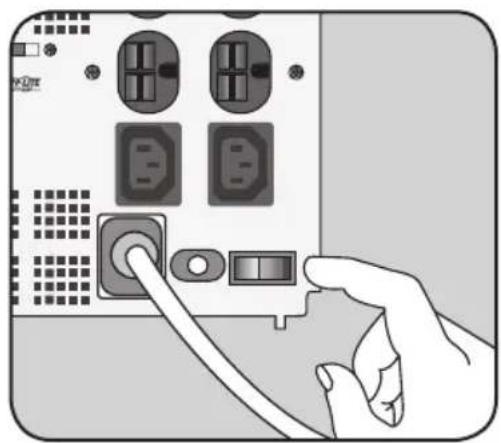
natural_image
Hand inserting a USB into a computer drive (no text or symbols visible)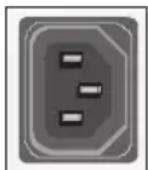
IEC-320-C13 (220/240V)
NEMA 5-15R ^* (220/240V)
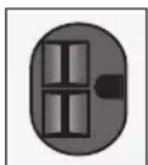
NEMA 6-15R ^4 (220/240V)
1111 W. 35th Street, Chicago, IL 60609 USA • www.tripplite.com/support
- Important Safety Instructions 2
- Quick Installation 3
- Basic Operation 4
- 2-Year Limited Warranty 6
- PROTECT YOUR INVESTMENT!
- Important Safety Instructions
- SAVE THESE INSTRUCTIONS
- Line Conditioner Location Warnings
- Line Conditioner Connection Warnings
- Equipment Connection Warning
- Line Conditioner Maintenance Warning
- Quick Installation—220/240V - 50/60Hz
- ① Connect your equipment to the Line Conditioner, and the Line Conditioner to an electrical outlet.
- ② Connect additional equipment to the Line Conditioner in the same manner.
- ③ Turn on your Line Conditioner's power switch
- Basic Operation
- Indicator Lights
- Other Features
- AC Receptacles
- Circuit Breaker (Available on select models)
- Service
- 2-Year Limited Warranty
- WEEE Compliance Information for Tripp Lite Customers and Recyclers (European Union)
- Manual de Operación
- Opération de base
- Réceptacles C.A.
- Besitzerhandbuch
- Netzfilter
- Bedienung
- Kontrolllichter
- AC-Buchsen
Brand : Tripp Lite
Model : LR604
Category : Surge protector