IN3004KBM - Keyboard Tripp Lite - Free user manual and instructions
Find the device manual for free IN3004KBM Tripp Lite in PDF.


Pick your language and provide your email: we'll send you a specifically translated version.
| Product Type | Rack-mount keyboard |
| Brand | Tripp Lite |
| Model | IN3004KBM |
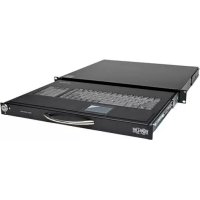
| Form Factor | 1U rack drawer |
| Key Layout | 104-key US QWERTY |
| Switch Type | Membrane rubber dome |
| Integrated Pointing Device | Trackball |
| Connectivity | USB and PS/2 |
| Cable Length | 5 ft (1.5 m) |
| Dimensions (W x D x H) | 19 x 16 x 1.75 in (48.3 x 40.6 x 4.4 cm) |
| Weight | 10.5 lb (4.8 kg) |
| Mounting | 19-inch rack with sliding rails |
| LED Indicators | Num Lock, Caps Lock, Scroll Lock |
| Power Source | Powered by computer port |
| Operating Temperature | 32°F to 122°F (0°C to 50°C) |
| Storage Temperature | -4°F to 140°F (-20°C to 60°C) |
| Color | Black |
| Special Features | Spill-resistant, industrial-grade |
| Maintenance | Clean with a soft, dry cloth |
| Spare Parts | Replacement keycaps and trackball sold separately |
| Repairability | Modular components for easy servicing |
Frequently Asked Questions - IN3004KBM Tripp Lite
How do I connect the IN3004KBM keyboard to my computer?
Connect one end of the provided cable to the keyboard's USB or PS/2 port and the other to your computer. The keyboard is plug-and-play and requires no special drivers.
Does this keyboard have a built-in trackball?
Yes, the IN3004KBM features an integrated trackball for pointer control, eliminating the need for an external mouse.
Can I mount this keyboard in a standard server rack?
Yes, it has a 1U rack drawer design and comes with sliding rails for 19-inch racks, making it ideal for data centers.
How do I clean the keyboard safely?
Use a soft, dry cloth to wipe the keys and surface. Avoid using liquid cleaners or submerging the keyboard, as it is only spill-resistant, not waterproof.
Is the keyboard compatible with Linux and macOS?
The keyboard uses standard USB HID protocol, so it works with Windows, macOS, Linux, and other operating systems without any additional software.
What should I do if some keys stop responding?
First, check the cable connection to the computer. If using PS/2, restart the computer after connecting. If keys still fail, try the keyboard on another system to isolate the issue.
How do I switch between USB and PS/2 mode?
Use the appropriate connector on the keyboard. Some models have a switch or automatically detect the interface. Refer to the markings near the ports.
Is the trackball optical or mechanical?
The trackball uses an optical sensor for precise tracking and lower maintenance compared to mechanical trackballs.
Can I replace the trackball if it wears out?
Yes, the trackball is user-replaceable. You can order a replacement from Tripp Lite or an authorized dealer and push it out gently, then snap in the new one.
Does the keyboard require a separate power supply?
No, it is powered by the host computer via the USB or PS/2 connection. No external power adapter is needed.
User questions about IN3004KBM Tripp Lite
0 question about this device. Answer the ones you know or ask your own.
Ask a new question about this device
No questions yet. Be the first to ask one.
Download the instructions for your Keyboard in PDF format for free! Find your manual IN3004KBM - Tripp Lite and take your electronic device back in hand. On this page are published all the documents necessary for the use of your device. IN3004KBM by Tripp Lite.
USER MANUAL IN3004KBM Tripp Lite

Manual assistant
Powered by Anthropic
Waiting for your message
Product information
Brand : Tripp Lite
Model : IN3004KBM
Category : Keyboard