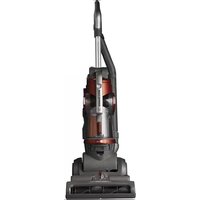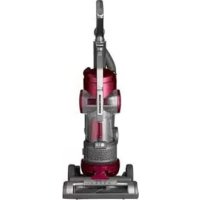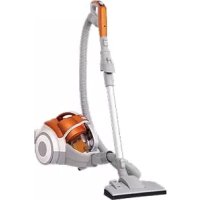
LCV700 - Vacuum Cleaner LG - Free user manual and instructions
Find the device manual for free LCV700 LG in PDF.


User questions about LCV700 LG
0 question about this device. Answer the ones you know or ask your own.
Ask a new question about this device
Download the instructions for your Vacuum Cleaner in PDF format for free! Find your manual LCV700 - LG and take your electronic device back in hand. On this page are published all the documents necessary for the use of your device. LCV700 by LG.
USER MANUAL LCV700 LG
This information contains important instructions for the safe use and maintenance of the vacuum cleaner. Especially, please read all of the information on page 4, 5 for your safety. Please keep this manual in an easily accessible place and refer to it anytime.
LCV700
LG vacuum cleaner warranty
LG Electronics Inc. will repair or replace your product, at LG's option, if it proves to be defective in material or workmanship under Personal household use, during the warranty period set forth below, effective from the date of original consumer purchase of the product. This limited warranty is good only to the original purchaser of the product and effective only when used in U.S.A and Canada.
| WARRANTY PERIOD: | HOW SERVICE IS HANDLED: |
| Three YearFrom the date of the original purchase | Any part of the vacuum cleaner which fails due to a defect in materials or workmanship. During this full three-year warranty, LG will also provide, free of charge, all labor and shop service to replace the defective part. |
THIS WARRANTY IS IN LIEU OF ANY OTHER WARRANTIES, EXPRESS OR IMPLIED, INCLUDING WITHOUT LIMITATION, ANY WARRANTY OF MERCHANTABILITY OR FITNESS FOR A PARTICULAR PURPOSE. TO THE EXTENT ANY IMPLIED WARRANTY IS REQUIRED BY LAW, IT IS LIMITED IN DURATION TO THE EXPRESS WARRANTY PERIOD ABOVE, LG WILL NOT BE LIABLE FOR ANY CONSEQUENTIAL, INDIRECT, OR INCIDENTAL DAMAGES OF ANY KIND, INCLUDING LOST REVENUES OR PROFITS, IN CONNECTION WITH THE PRODUCT. SOME STATES DO NOT ALLOW LIMITATION ON HOW LONG AN IMPLIED WARRANTY LASTS OR THE EXCLUSION OF INCIDENTAL OR CONSEQUENTIAL DAMAGES, SO THE ABOVE LIMITATIONS OR EXCLUSIONS MAY NOT APPLY TO YOU.
This warranty covers only defects in material and workmanship.
LGE will NOT pay for:
- Expendable items that can wear out, including but not limited to filters, belts, batteries.
- A service technician to instruct the user in correct product assembly, operation or maintenance.
- A service technician to clean or maintain this product.
- Damage to or failure of this product if it is not assembled, operated or maintained according to all instructions supplied with this product.
- Damage to or failure of this product resulting from accident, abuse, misuse or use for other than its intended purpose.
- Damage to or failure of this product caused by the use of detergents, cleaners, chemicals or utensils other than those recommended in all instructions supplied with this product.
- Damage to or failure of parts or systems resulting from unauthorized modifications made to this product.
This warranty is extended to the original purchaser for products purchased for home use within the USA. In Alaska, the warranty excludes the cost of shipping or service calls to your home.
Some states do not allow the exclusion or limitation of incidental or consequential damages, so this exclusion or limitation may not apply to you. This warranty gives you specific legal rights, and you may also have other rights which vary from states to states. To know what your legal rights are, consult your local or state consumer affairs or your state's Attorney General.
CUSTOMER ASSISTANCE INFORMATION:
| To Prove Warranty Coverage | Retain your Sales Receipt to prove date of purchase.A copy of your Sales Receipt must be submitted at the time warranty service is provided. |
| To Obtain Nearest Authorized Service Center or Sales Dealer, or to Obtain Product, Customer, or Service Assistance | Call 1-800-243-0000 (Phone answered 24 hours - 365 days a year) and choose the appropriate prompt from the menu; or visit our website at: http://us.lgservice.com. (In Canada- Call 1-888-542-2623, website http://ca.lgservice.com) |
Table of contents
LG vacuum cleaner warranty 2
Important safety instructions 4\~5
How to use 6
Assembling vacuum cleaner 6
Operating vacuum cleaner 8
Using carpet and Hardwood Floor Nozzle 9
Using accessory nozzles 10
Emptying dust tank 11
Cleaning dust tank 12
Cleaning air filter and motor safety filter 13
Cleaning exhaust filter 14
Trouble shooting 15\~16
IMPORTANT SAFETY INSTRUCTIONS
READ ALL INSTRUCTIONS BEFORE USE
IMPORTANT SAFETY INSTRUCTIONS
Read and follow all instructions before using your Vacuum cleaner to prevent the risk of fire, electric shock, personal injury, or damage when using the Vacuum cleaner. This guide do not cover all possible conditions that may occur. Always contact your service agent or manufacturer about problems that you do not understand.

This is the safety alert symbol. This symbol alerts you to potential hazards that can kill or hurt you and others. All safety messages will follow the safety alert symbol and either the word “WARNING” or “CAUTION”.

WARNING
This symbol will alert you to hazards or unsafe practices which could cause serious bodily harm or death.

CAUTION
This symbol will alert you to hazards or unsafe practices which could cause bodily injury or property damage.

WARNING
- Do not plug in if control knob is not in OFF position. Personal injury or product damage could result.
- Disconnect electrical supply before servicing or cleaning the unit or when cleaner is not in use. Failure to do so could result in electrical shock or personal injury.
- Do not use vacuum cleaner to pick up anything that is burning or smoking such as cigarettes, or hot ashes. Doing so could result in death, fire or electrical shock.
- Do not vacuum flammable or explosive substances such as gasoline, benzene, thinners, propane (liquids or gases). The fumes from these substances can create a fire hazard or explosion. Doing so could result in death or personal injury.
- Do not handle plug or vacuum cleaner with wet hands. Doing so could result in death or electrical shock.
- Do not unplug by pulling on cord. Doing so could result in product damage or electrical shock. To unplug, grasp the plug, not the cord.
- Keep hair, loose clothing, fingers, and all parts of the body away from openings and moving parts. Failure to do so could result in electrical shock or personal injury.
- Do not pull or carry by cord, use cord as a handle, close a door on cord, or pull cord around sharp edges or corners. Do not run vacuum cleaner over cord. Keep cord away from heated surfaces. Failure to do so could result in electrical shock or personal injury or fire or product damage.
- Do not allow to be used as toy. Close attention is necessary when used by or near children. Personal injury or product damage could result.
- Do not use the vacuum cleaner if the power cord or plug is damaged or faulty. Personal injury or product damage could result. In these cases, contact LG Electronics Service Agent to avoid hazard.
-
Do not use vacuum cleaner if it has been under water. Personal injury or product damage could result. In these cases, contact LG Electronics Service Agent to avoid hazard.
-
Do not continue to vacuum if any parts appear missing or damaged.
Personal injury or product damage could result. In these cases, contact LG Electronics Service Agent to avoid hazard. - Do not use an extension cord with this vacuum cleaner Fire hazard or product damage could result.
- Using proper voltage. Using improper voltage may result in damage to the motor and possible injury to the user. Proper voltage is listed on the bottom of vacuum cleaner.
- Turn off all controls before unplugging. Failure to do so could result in electrical shock or personal injury.
- Do not change the plug in any way. Failure to do so could result in electrical shock or personal injury or product damage. Doing so result in death. If plug does not fit, contact a qualified electrician to install the proper outlet.
- Repairs to electrical appliances may only be performed by qualified service engineers. Improper repairs may lead to serious hazards for the user.
- Do not use outdoors or on wet surfaces. Failure to do so could result in electrical shock or personal injury.
- Do not put anything, between Vacuum cleaner body and agitator head space. Personal injury or product damage could result.
- This product contains chemicals known to the State of California to cause cancer and reproductive toxicity. Wash hands after handling.
- Use extra care when cleaning on stairs.
- Do not put fingers near the gear. Failure to do so could result in personal injury.
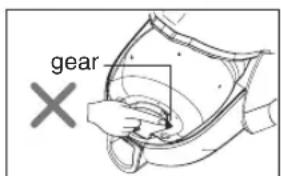
text_image
gear ×
CAUTION
- Do not put any objects into openings.
Failure to do so could result in product damage. - Do not use with any opening blocked: keep free of dust, lint, hair, and anything that may reduce air flow. Failure to do so could result in product damage.
- Do not use vacuum cleaner without dust tank and/or filters in place.
Failure to do so could result in product damage. - Always clean the dust tank after vacuuming carpet cleaners or fresheners, powders and fine dust. These products clog the filters, reduce airflow and can cause damage to the cleaner. Failure to clean the dust tank could cause permanent damage to the cleaner.
- Do not use vacuum cleaner to pick up sharp hard objects, small toys, pins, paper clips, etc. They may damage the cleaner or dust tank.
- Store the vacuum cleaner indoors. Put the vacuum cleaner away after use to prevent tripping over it.
- The vacuum cleaner is not intended to use by young children or infirm people without supervision. Failure to do so could result in personal injury or product damage.
- Only use parts produced or recommended Electronics Service Agents. Failure to do so could result in product damage.
- Use only as described in this manual. Use only with LG recommended or approved attachments and accessories. Failure to do so could result in personal injury or product damage.
- Hold plug when rewinding onto cord reel. Do not allow plug to whip when rewinding.
-
To reduce the risk of electric shock, this appliance has a polarized plug (one blade is wider than the other). This plug will fit in a polarized outlet only one way. If the plug does not fit fully in the outlet, reverse the plug. If it still does not fit, contact a qualified electrician to install the proper outlet. Do not change the plug in any way.
-
Use accessory nozzles in sofa mode.
Failure to do so could result in product damage.
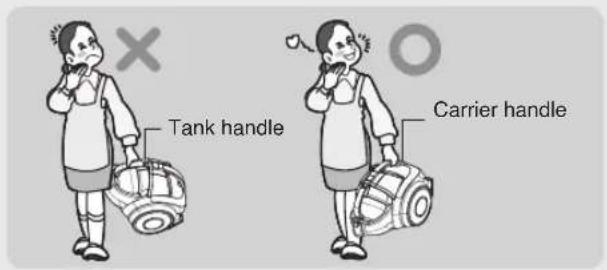
You should grasp the carrier handle when you are moving the vacuum cleaner. (Page 11) - If after emptying the dust tank the alarm sounds, clean the dust tank.
Failure to do so could result in product damage. - To avoid personal injury and to prevent the machine from falling when cleaning stairs, always place it at the bottom of stairs.
Failure to do so could result in personal injury or product damage. - Make sure the filters (exhaust filter and motor safety filter) are completely dry before replacing in the machine. Failure to do so could result in product damage.
- Do not dry the filter in an oven or microwave. Failure to do so could result in fire hazard.
- Do not dry the filter in a clothes dryer. Failure to do so could result in fire hazard.
- Do not dry near an open flame. Failure to do so could result in fire hazard.
- Always turn vacuum cleaner off before connecting or disconnecting the hose. Personal injury or product damage could result.
- Your vacuum cleaner is intended only for household use.
- Proper assembly and safe use of your vacuum cleaner are your responsibilities.
- Do not put the finger between crevice tool and cord hanger, when take out the crevice tool.
- If the power cord is damaged, it must be replaced by an approved LG Electronics Service Agent to avoid a hazard.
- This appliance is not intended for use by persons (including children) with reduced physical, sensory or mental capabilities, or lack of experience and knowledge, unless they have been given supervision or instruction concerning use of the appliance by a person responsible for their safety. Children should be supervised to ensure that they do not play with the appliance.
- Unplug before connecting hose.
Thermal protector :
This vacuum cleaner has a special thermostat that protects the vacuum cleaner in case of motor overheating. If the vacuum cleaner suddenly shuts off, turn off the switch and unplug the vacuum cleaner. Check the vacuum cleaner for possible source of overheating such as a full dust tank, a blocked hose or clogged filter. If these conditions are found, fix them and wait at least 30 minutes before attempting to use the vacuum cleaner. After the 30 minutes period, plug the vacuum cleaner back in and turn on the switch. If the vacuum cleaner still does not run, contact a qualified electrician.
How to use Assembling vacuum cleaner
text_image
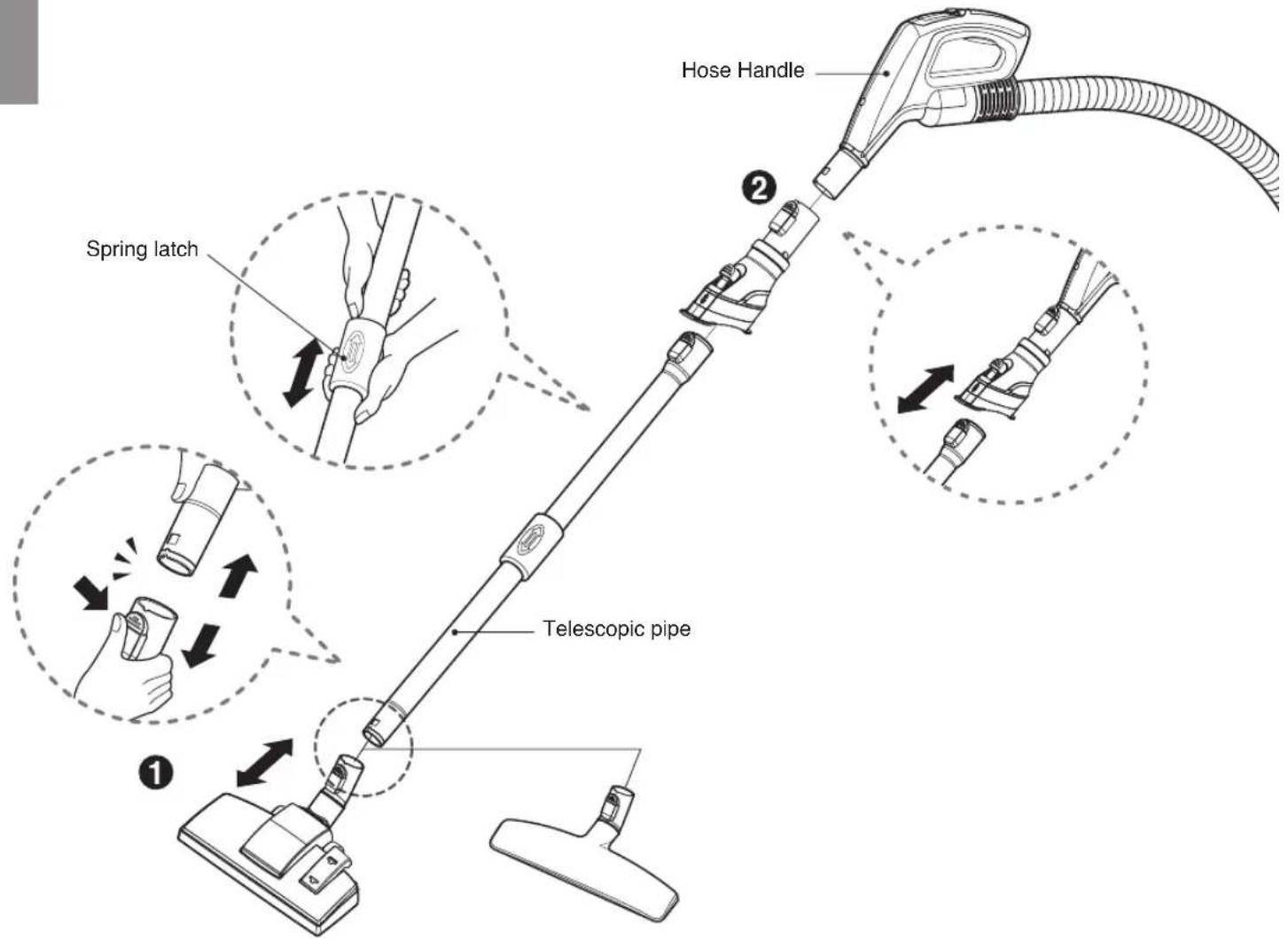
Hose Handle Spring latch Telescopic pipe① Carpet and floor nozzle
② Telescopic pipe
Push the nozzle into the telescopic pipe.
- Push telescopic pipe firmly into hose handle.
- Grasp the spring latch to expand.
- Pull out the pipe to desired length.
text_image
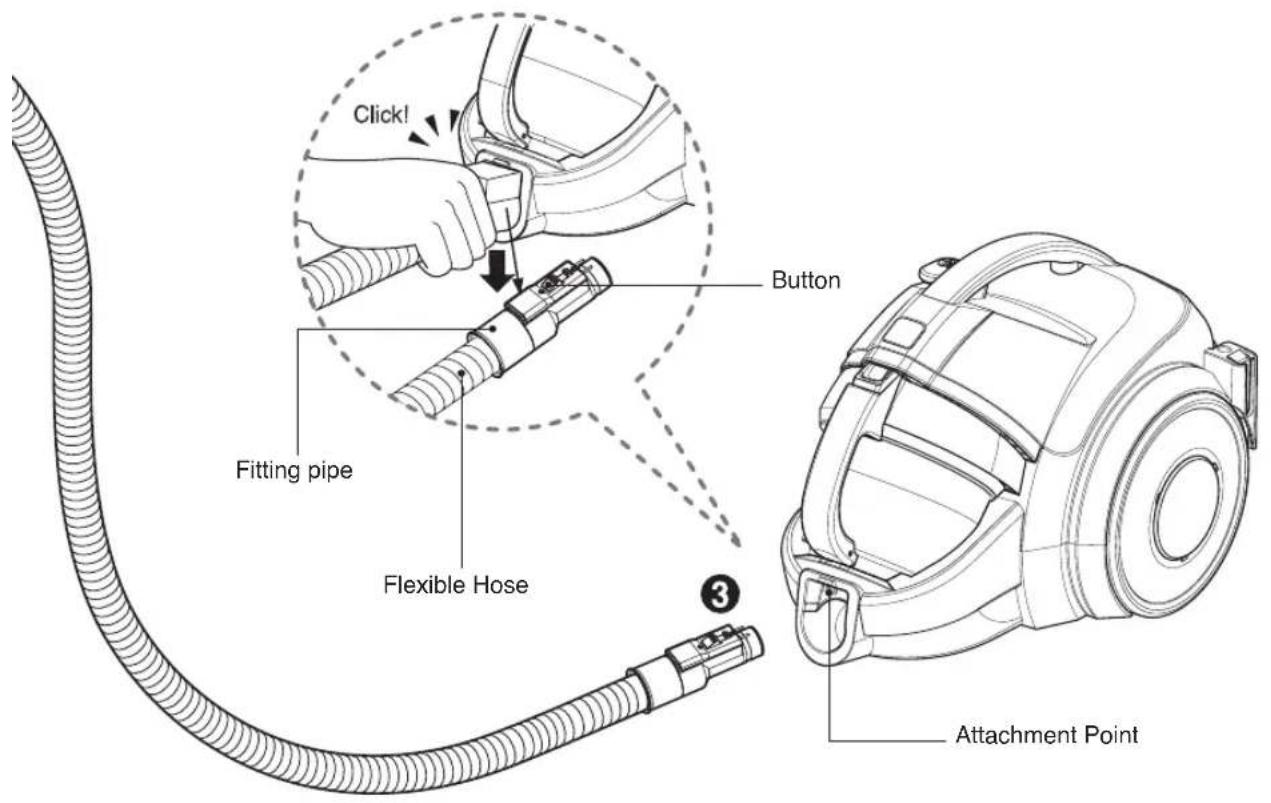
Click! Button Fitting pipe Flexible Hose Attachment Point③ Connecting the hose to the vacuum cleaner
P ush the fitting pipe on the flexible hose into the attachment point on the vacuum cleaner. To remove the flexible hose from the vacuum cleaner, press the button situated on the fitting pipe, then pull the fitting pipe out of the vacuum cleaner.
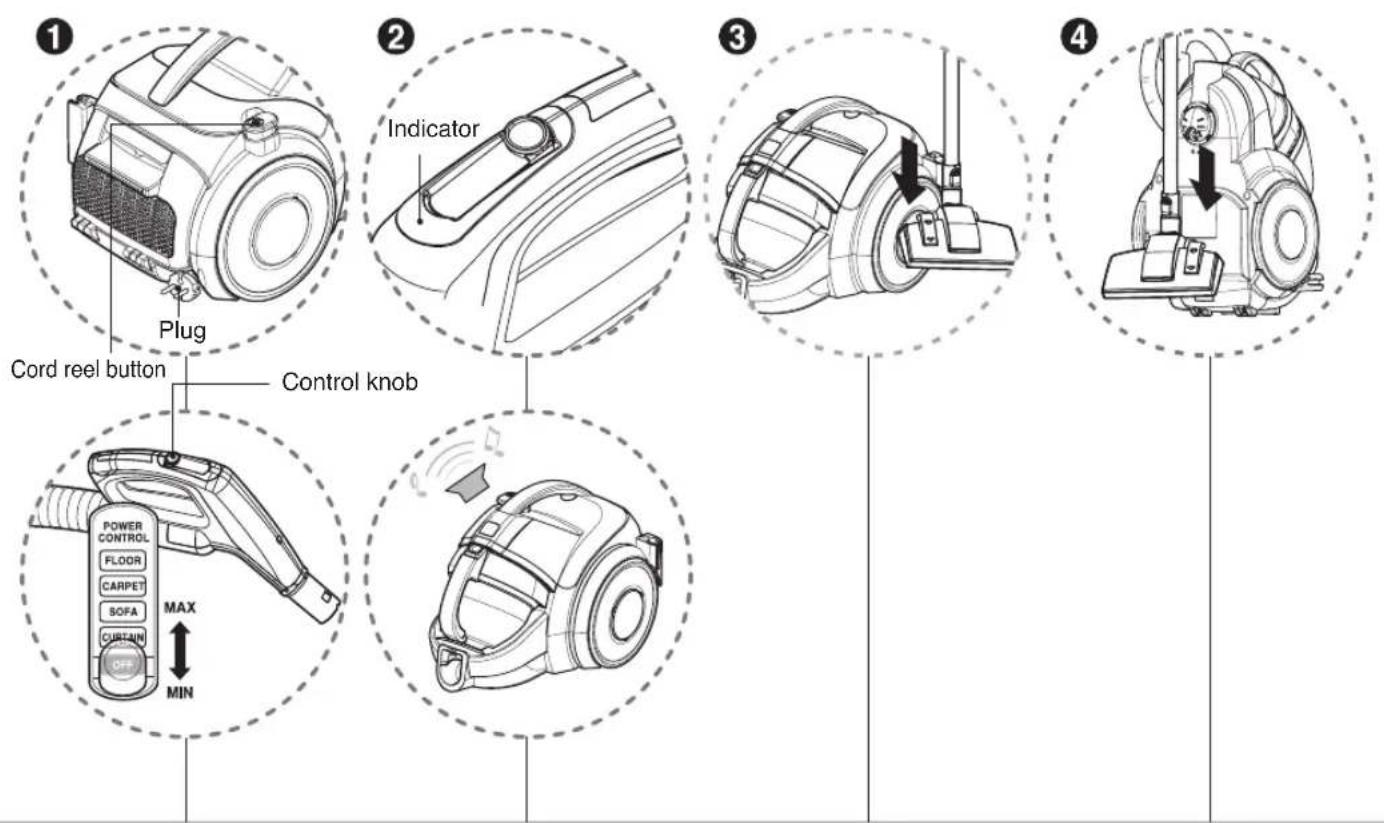
① How to operate
② Indicator and alarm sound
③ Park mode
4 Storage
- Pull out the power cord to the desired length and plug into the socket.
- Place the control knob of the hose handle to the required position.
• To turn off, slide control knob to OFF position. - Press the cord reel button to rewind the power cord after use.
- The indicator light of the hose handle is on and alarm will sound when dust tank is full. After about 1 min 30 sec, vacuum cleaner will turn itself off and alarm will sound. Empty the dust tank and reuse the vacuum cleaner
• To store during vacuuming, for example to move a small piece of furniture or a rug, use park mode to support the flexible hose and nozzle.
- Slide the hook on the nozzle into the slot on the side of vacuum cleaner.
- When you have switched off and unplugged the vacuum cleaner, press the cord reel button to automatically rewind the cord.
- You can store your vacuum cleaner in a vertical position by sliding the hook on the nozzle into the slot on the underside of the vacuum cleaner.
NOTICE
When indicator light flashes and alarm sounds :
- Dust tank is full
→ slide handle knob to OFF position and empty dust tank - Power is on without dust tank
→ slide handle knob to OFF position and reattach dust tank - Rotating plate in the dust tank is restricted because of obstruction
→ slide handle knob to OFF position and remove obstruction
text_image
1 Carpet Pedal Floor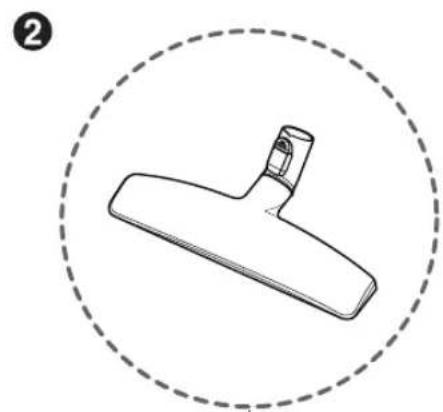
natural_image
Simple line drawing of a Y-shaped tool or bracket inside a dashed circular border (no text or symbols)① Carpet and floor nozzle
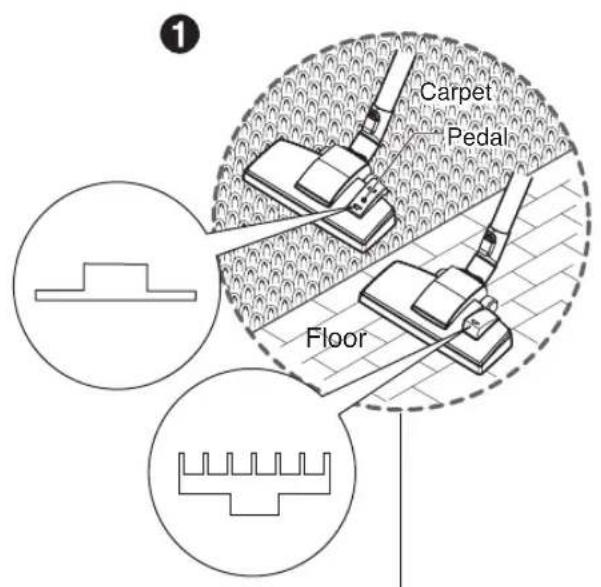
• The 2 position nozzle
This is equipped with a pedal which allows you to alter its position according to the type of floor to be cleaned.
- Carpet or rug position
Press the pedal ( ) to lower brush.
- Hard floor position (tiles, parquets floor)
Press the pedal ( ) Press the pedal to lift the brush up.
② Hardwood Floor Nozzle
- Designed for efficient cleaning on most hardwood floor surfaces around home.
- Cleaning carper and floor nozzle
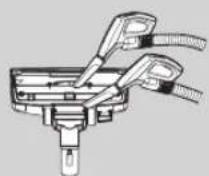
- Clean the hole and brush of nozzle.
text_image
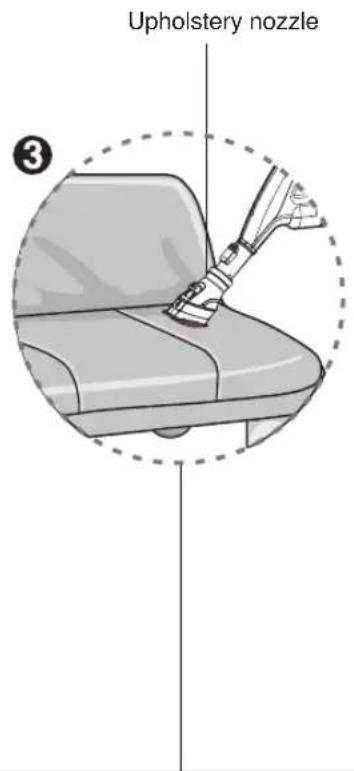
Upholstery nozzle ③③ Upholstery nozzle
text_image
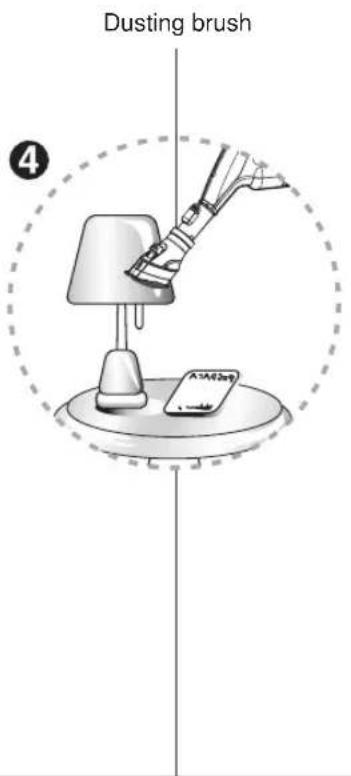
Dusting brush ④④ Dusting brush
text_image
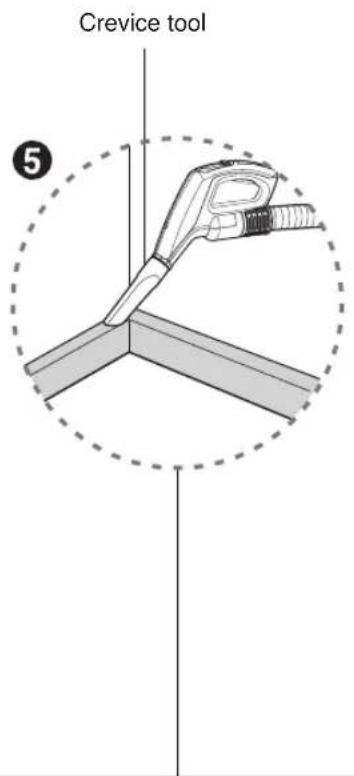
Crevice tool ⑤⑤ Crevice tool
Upholstery nozzle is for vacuuming upholstery, mattresses etc.
Dusting brush is for vacuuming picture frames, furniture frames, books and other irregular surfaces.
Crevice tool is for vacuuming in those normally hard-to-reach places such as reaching cobwebs or between the cushions of a sofa.
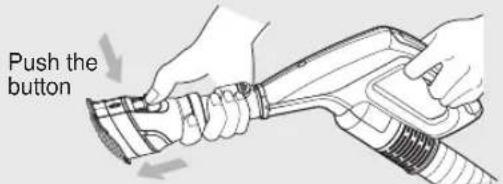
text_image
Push the button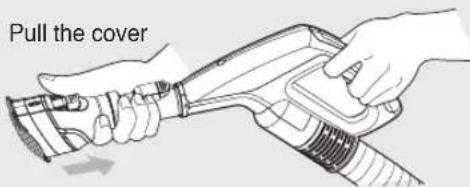
text_image
Pull the cover
NOTICE
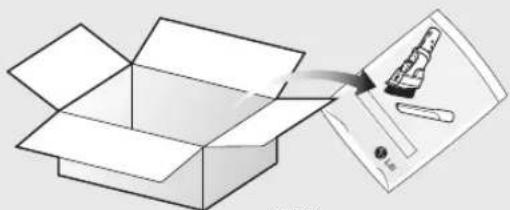
Use accessory in the sofa mode
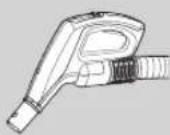
natural_image
Illustration of an open box being extruded with a pencil, showing the paper's tip and cover (no text or symbols)·BOX·
- Accessory nozzles included in the "PE BAG" with owner's manual.
text_image
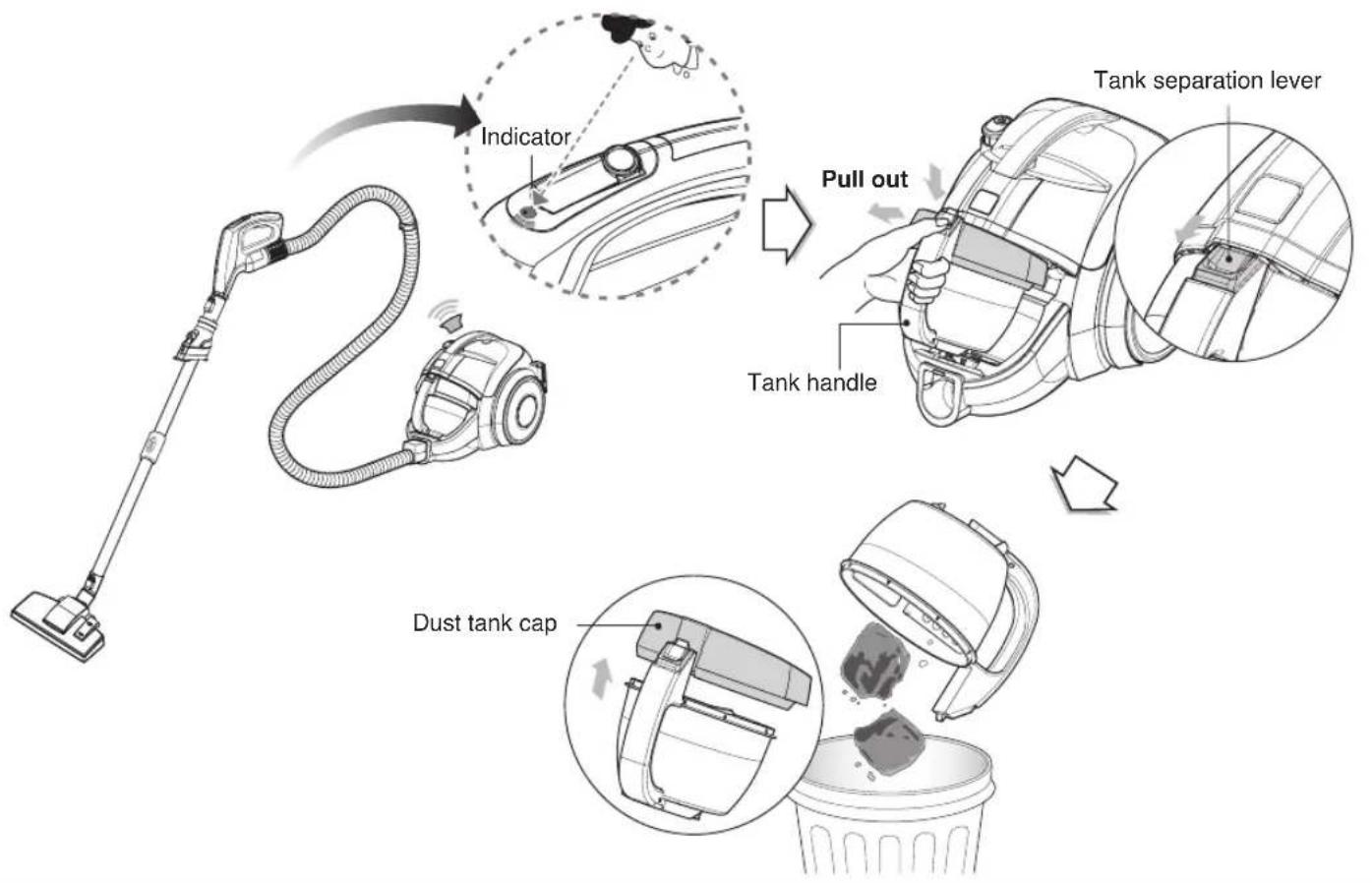
Indicator Pull out Tank separation lever Tank handle Dust tank capThe dust tank needs emptying when indicator light is on.
- Turn off the vacuum cleaner and unplug it.
- Grasp the handle of the tank and then press the tank separation button.
- Pull out the dust tank.
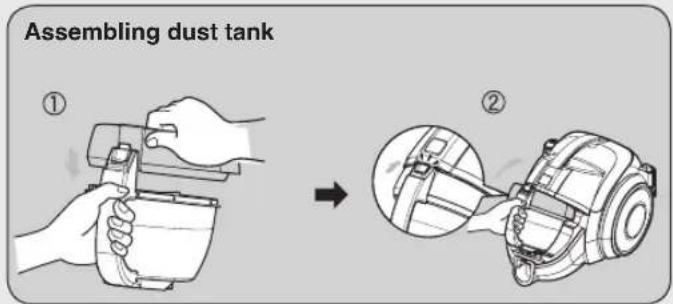
- Empty the tank and then assemble the dust tank as below
text_image
Assembling dust tank ① → ②Moving the vacuum cleaner
- Don't grasp the tank handle when you are moving the vacuum cleaner. The vacuum cleaner's body may fall when separating tank and body. You should grasp the carrier handle when you are moving the vacuum cleaner.
text_image
Tank handle Carrier handleNOTICE
- If suction power decreases after emptying dust tank, clean dust tank Next page
- Since dust tank is full, indicator continues to flash for 1 min 30 sec and suction power will decrease for a while, then vacuum cleaner will turn itself off.
How to use Cleaning dust tank
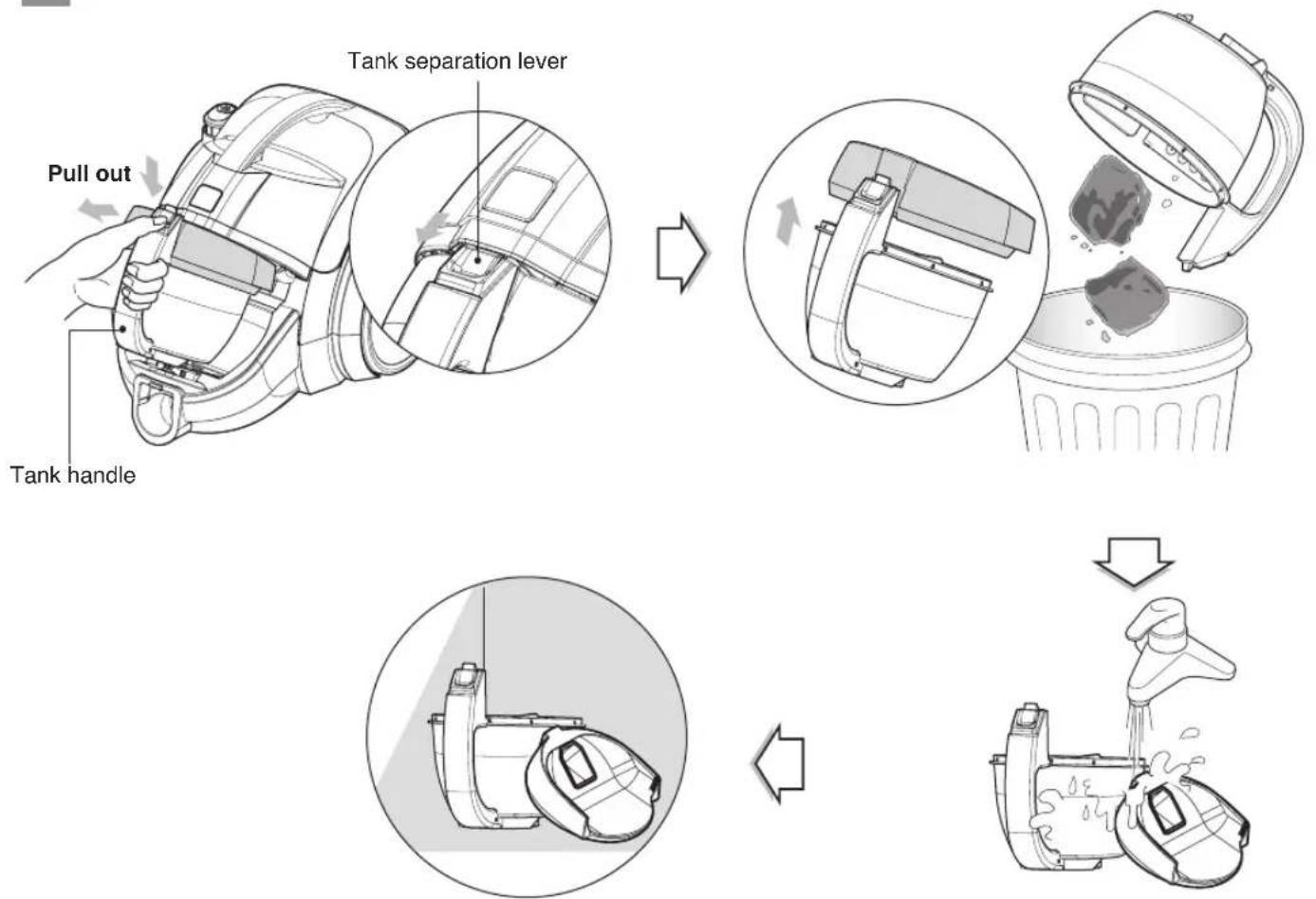
- Press tank separation button and pull out dust tank.
- Raise dust tank cap
- Dry fully in shade so that moisture is entirely removed.
NOTICE
If suction power decreases after cleaning dust tank, clean air filter and motor safety filter.
→ Next page
How to use Cleaning air filter and motor safety filter
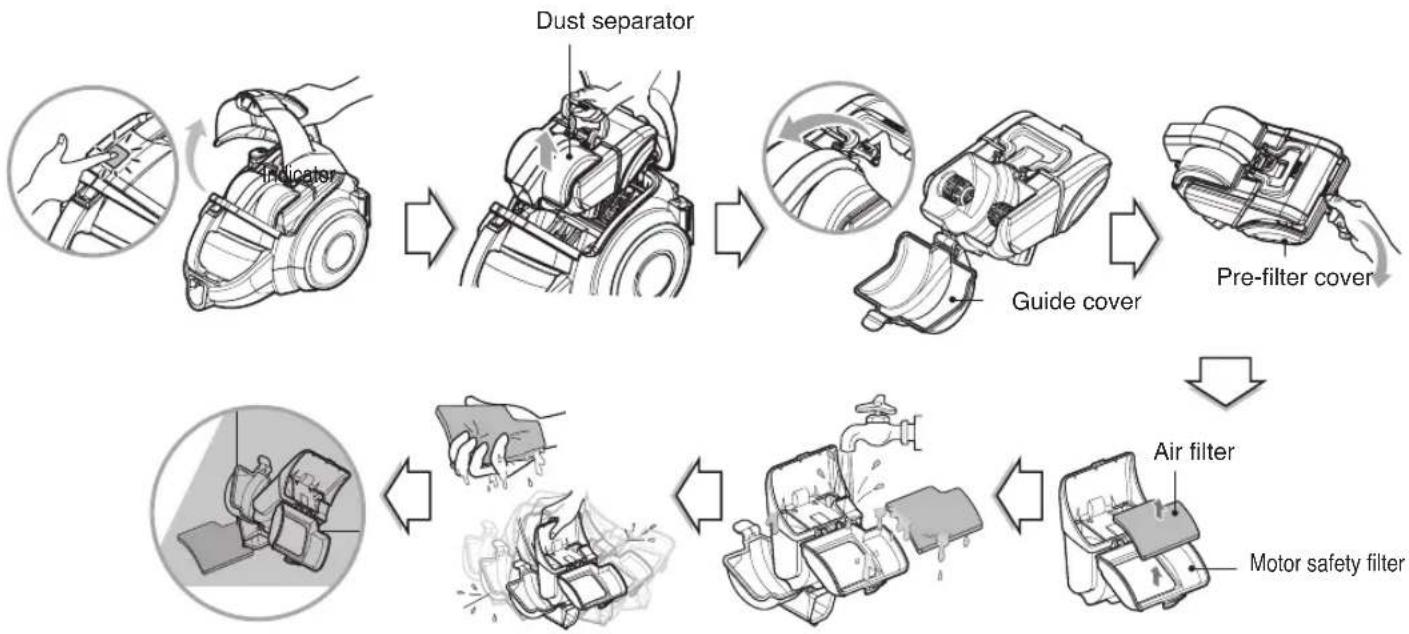
If suction power is decreased after cleaning dust tank or indicator light is on, clean air filter and motor safety filter.
Air filter and motor safety filter are located at the up of vacuum cleaner in the above figure.
- Push the vacuum cover button, open the body cover.
- Hold dust separator handle and pull it upward.
- Open the guide cover by pulling the guide cover lever and remove the dust.
- Open prefilter cover.
- Pull out the air filter.
- Clean air filter and motor safety filter with running water.
- Do not wash filters with hot water.
- Eliminate water thoroughly
- Dry it under well-ventilated shade for a day.
- The air filter and the motor safety filter should be cleaned as above the figure.
NOTICE
If filters are damaged, do not use them.
In this cases, contact LG Electronics Service Agent.
Wash filters at least every 3 months
How to use Cleaning exhaust filter
flowchart
graph TD
    A["Lever"] --> B["Exhaust filter cover"]
    B --> C["Button"]
    C --> D["Exhaust filter cover"]
    D --> E["Click"]
    E --> F["Check for waste disposal"]
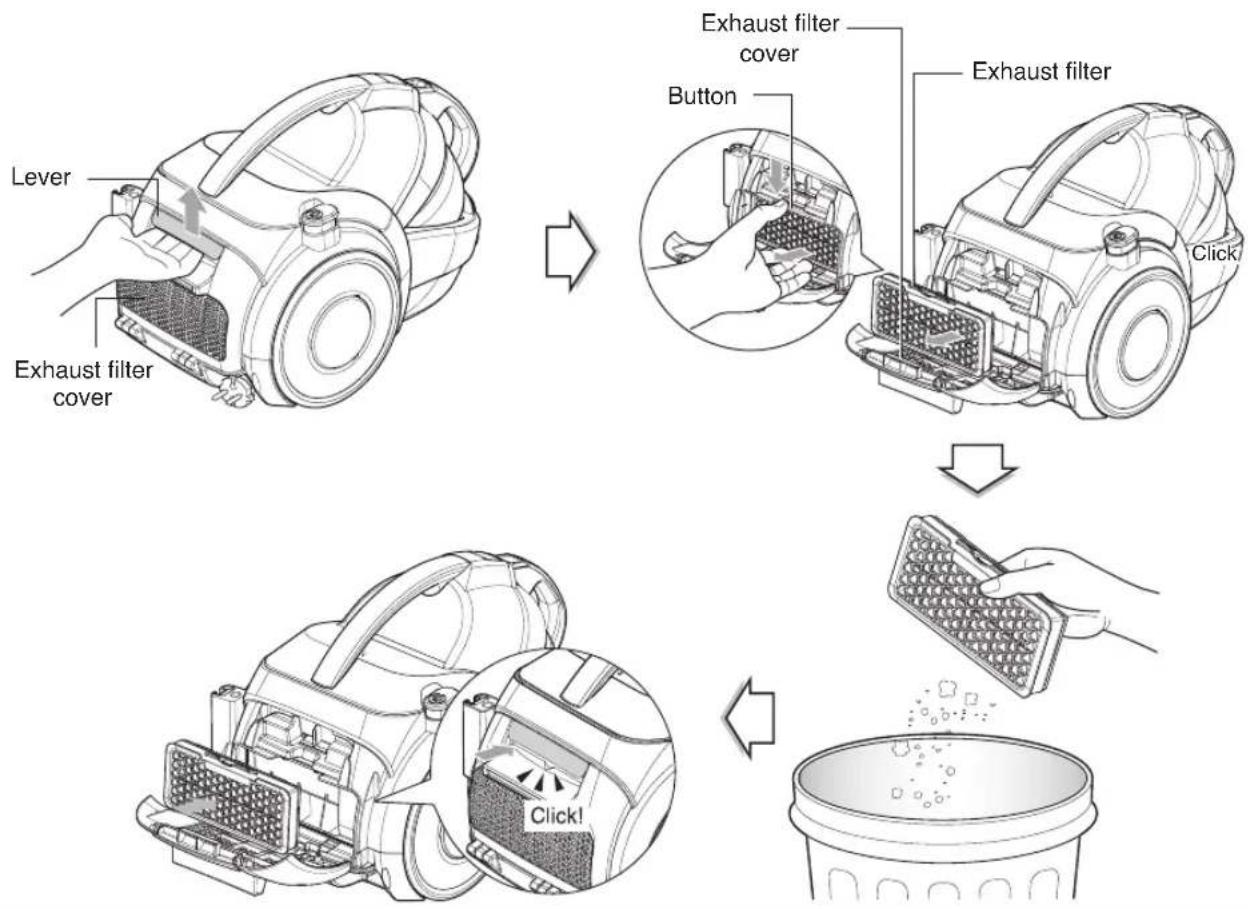
• The exhaust filter is a reusable.
• To clean the exhaust filter, remove the Exhaust filter cover on the body by pulling out it.
- Separate the exhaust filter.
• Dust off filter.(Do not wash filter with water.)
• The exhaust filter should be cleaned at least a year.
Exhaust filter cover assembling
- Fit exhaust filter cover lugs to the grooves of vacuum cleaner body.
- Join it the body.
Trouble Shooting
Review this chart to find do-it-yourself solutions for minor performance problems.
Any service or repair needed, other than as described in this User's Guide, should be performed through your local LGE service center.
WARNING
Electrical shock and personal injury hazard.
Always unplug the vacuum cleaner before servicing. Failure to do so could result in electrical shock or personal injury.
| PROBLEM | POSSIBLE CAUSE POSSIBLE | SOLUTION |
| Vacuum cleaner will not run | Unplugged at wall outletHose is not connected to the body properlyFull or clogged dust tank and filtersDust tank improperly installedClogged hose or wandClogged nozzle | Make sure cord is plugged into a functioning outlet.Remove the hose from the body and reconnect it properly. [See page 7]Empty dust tank and clean filters.[See page 12 ~ 14]Make sure all dust tank components and filters are installed correctly. |
| Poor suction | Full or clogged dust tank and filtersDust tank improperly installedClogged hose or wandClogged nozzle | Empty dust tank and clean filters.[See page 12 ~ 14]Make sure all dust tank components and filters are installed correctly. |
Switch on, but hose LED is on and alarm sound “Dding~, Dding~”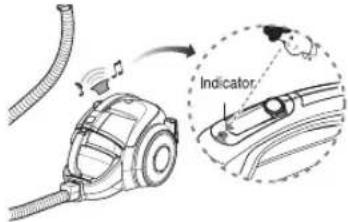 | Dust tank is fullPower is on without dust tankRotating plate in the dust tank is restricted because of obstruction | Empty dust tank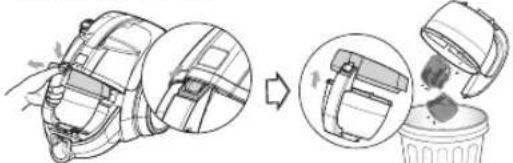 Reattach dust tankRemove obstruction[See page 12 ~ 13] Reattach dust tankRemove obstruction[See page 12 ~ 13] |
Switch on, but unit LED is on and alarm sound “Dding Dding~, Dding Dding~”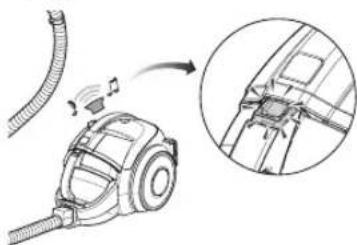 | Dust separator and filters is full of dustPower is on without dust separator and filters | Clean dust separator and filters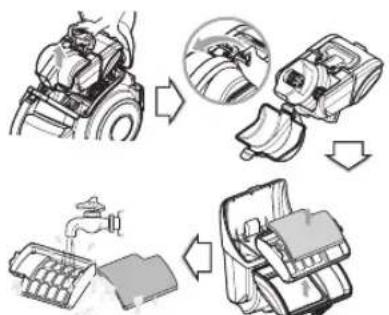 Reattach dust separator and filters Reattach dust separator and filters |
Trouble Shooting
| PROBLEM | POSSIBLE CAUSE POSSIBLE | SOLUTION |
| Is the noise louder than usual? | Clogged hose or wandClogged nozzle | |
| Smell | Smell as the motor spins fast around the surrounding rubberThe filters of dust separator with dust is old or stored for a long time | It's the smells from new vacuum cleaner.The smell disappears after 1-2 months. It's like the smells from a new car or furnitureEmpty dust tank and clean filters.[See page 12 ~ 14] |
| Agitator does not turn | Clogged nozzlePedal improperly positioned. | 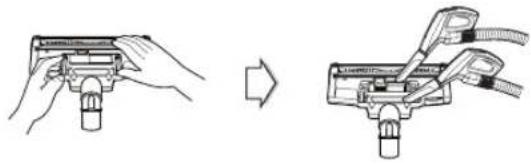 Check the pedal position [See page 9] Check the pedal position [See page 9] |
natural_image
Decorative border frame with leaf and dot patterns, no text or symbols present
natural_image
Decorative border frame with leaf motifs and dotted lines (no text or symbols)
natural_image
Decorative border frame with leaf motifs and dotted lines (no text or symbols)MANUEL D'UTILISATION
ASPIRATEUR LG KOMPRESSOR
text_image
Engrenage X
ATTENTION
text_image
1 Carpet Pédale Sol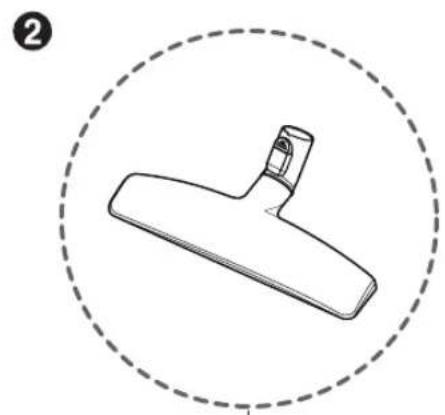
natural_image
Simple line drawing of a Y-shaped tool inside a dashed circular border (no text or symbols)text_image
Diagram illustrating two-step assembly process: first shows hand tool handling cup, second shows close-up of mechanical component with magnified detailRegister your product Online!
www.lg.com