ManualGo.com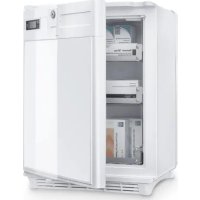
HC 302 30L - Fridge DOMETIC - Free user manual and instructions
Find the device manual for free HC 302 30L DOMETIC in PDF.



Download the instructions for your Fridge in PDF format for free! Find your manual HC 302 30L - DOMETIC and take your electronic device back in hand. On this page are published all the documents necessary for the use of your device. HC 302 30L by DOMETIC.
USER MANUAL HC 302 30L DOMETIC
REFRIGERATION SILENCIO HC© 2022 Dometic Group. The visual appearance of the contents of this manual is protected by copyright and design law. The underlying technical design and the products contained herein may be protected by design, patent or be patent pending. The trademarks mentioned in this manual belong to Dometic Sweden AB. All rights are reserved.HC 302, HC 502
DANGER! Safety instruction: Indicates a hazardous situation that, if not avoided, will result in death or serious injury. WARNING! Safety instruction: Indicates a hazardous situation that, if not avoided, could result in death or serious injury.EN Safety instructions HC 302, HC502
WARNING! Failure to obey these warnings could result in death or serious injury. Electrocution hazard
- Ensure that the refrigerator has been installed by a qualified technician in accordance with the Dometic installation manual.
- Do not operate the refrigerator if it is visibly damaged.
- If this refrigerator's power cable is damaged, it must be replaced by the manufacturer, service agent or a similarly qualified person in order to prevent safety hazards.
- This refrigerator may only be repaired by qualified personnel. Inadequate repairs may cause serious hazards.
- When positioning the refrigerator, ensure the supply cord is not trapped or damaged.
- Do not locate multiple portable socket-outlets or portable power sup- plies at the rear of the refrigerator.
- Plug the device to sockets that ensure proper connection especially when the device needs to be earthed. Fire hazard
- After installation, it must still be possible to disconnect the refrigerator from the supply mains. This may be achieved by having the plug accessible or by incorporating a switch in the fixed wiring according to the wiring rules. CAUTION! Safety instruction: Indicates a hazardous situation that, if not avoided, could result in minor or moderate injury. NOTICE! Indicates a situation that, if not avoided, can result in property damage. NOTE Supplementary information for operating the product.EN HC 302, HC502 Safety instructions
- Do not store any explosive substances, such as spray cans with propellants, in the refrigerator. Health hazard
- This refrigerator can be used by children aged from 8 years and above and persons with reduced physical, sensory or mental capabilities or lack of experience and knowledge if they have been given supervision or instruction concerning use of the refrigerator in a safe way and understand the hazards involved.
- Children shall not play with the refrigerator.
- Cleaning and user maintenance shall not be made by children without supervision.
CAUTION! Failure to obey these cautions could result in minor or moderate injury. Risk of crushing
- Do not put your fingers into the hinge.
- Check that the voltage specification on the type plate is the same as that of the power supply.
- The refrigerator is not suitable for storing substances which are caustic or contain solvents.
- Keep the drainage outlet clean at all times.
- Do not open the refrigerant circuit under any circumstances.
- Only carry the refrigerator upright.
2.2 Operating the refrigerator safely
DANGER! Failure to obey these warnings will result in death or serious injury. Electrocution hazard
- Do not touch exposed cables with your bare hands.
WARNING! Failure to obey these warnings could result in death or serious injury. Fire hazard
- Keep the ventilation openings, in the appliance enclosure or in the built-in structure, clear of obstruction.EN Safety instructions HC 302, HC502
- Do not use mechanical objects or other means to accelerate up the defrosting process, other than those recommended by the manufac- turer.
- Do not damage the refrigerant circuit.
- Do not use electrical devices in the compartments of the appliance unless they are of the type recommended by the manufacturer.
CAUTION! Failure to obey these cautions could result in minor or moderate injury. Electrocution hazard
- Before starting the refrigerator, ensure that the power supply line and the plug are dry. Health hazard
- Only store medicines and vaccines that are suitable to store at the tem- perature range from 2 °C to 8 °C.
- The medicine and vaccines may only be stored in their original pack- aging or in suitable containers.
- Check if the required temperature range for the medicine or vaccine suits with the temperature range of this appliance.
- Opening the door for long periods can cause significant increase of the temperature in the compartments of the refrigerator.
- Clean regularly accessible drainage systems.
- If the refrigerator is left empty for long periods: – Switch off the refrigerator. – Defrost the refrigerator. – Clean and dry the refrigerator. – Leave the door open to prevent mold developing within the refrigerator.
- Do not place the refrigerator near naked flames or other heat sources (heaters, direct sunlight, gas ovens etc.).
- Never immerse the refrigerator in water.
- Protect the refrigerator and the cable against heat and moisture.EN HC 302, HC502 Scope of delivery
3Scope of delivery 4 Intended use The medication refrigerator (also referred to as refrigerator) is designed to keep heat sensitive medicines according to DIN 58345 between +2 °C and +8 °C in enclosed buildings, such as:
- In hospitals, and health centers
- In retirement homes, and nursing homes The refrigerator is not suitable for installation in caravans or mobile homes. The refrigerator is intended to be used either as a built-in appliance or as freestand- ing refrigeration appliance. Refer to the installation instructions. The refrigerator is designed exclusively for cooling and storing medicines and vac- cines in closed containers.
- The refrigerator is not suitable for storing any kind of body fluids like e.g. blood or plasma, or any body parts like e.g. human organs.
- The refrigerator is not suitable for cooling and storing of beverages and foods, storing fresh foods, or freezing foodstuffs. This product is only suitable for the intended purpose and application in accordance with these instructions. This manual provides information that is necessary for proper installation and/or operation of the product. Poor installation and/or improper operating or mainte- nance will result in unsatisfactory performance and a possible failure. The manufacturer accepts no liability for any injury or damage to the product resulting from:
- Incorrect assembly or connection, including excess voltage
- Incorrect maintenance or use of spare parts other than original spare parts provided by the manufacturer Quantity Description 1 Refrigerator 1 Handle 1 Battery (CR1632) 1 Installation and operating manualEN Technical description HC 302, HC502
- Alterations to the product without express permission from the manufacturer
- Use for purposes other than those described in this manual Dometic reserves the right to change product appearance and product specifications. 5 Technical description
5.1 Function description
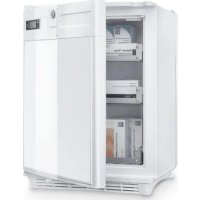
All materials used in the refrigerator are compatible for use with medicines. The refrigerant circuit is maintenance-free. The refrigerator is available as freestanding version (FS) and as built-in version (BIU). The freestanding version (HC302FS, HC502FS) is intended for freestanding use. The cooling unit cover protects the warm parts of the cooling units. The foot frame with ventilation openings ensure sufficient ventilation. By removing the foot frame and cooling unit cover the refrigerator can be used as a built-in version. The built-in version (HC302BIU, HC502BIU) is intended to be mounted into furni- ture. It doesn‘t have a foot frame or cooling unit cover. The digital thermometer shows and stores the minimum and maximum inner temperatures from the last reset so that you can check whether the medicines have been stored at the appropriate temperatures.
5.2 Control elements
No. in fig. 1, page 3 Explanation 1Door lock 2Door 3 Digital thermometer (see fig. 2, page 3) 4 Cooling unit cover 5 Drawers 6 Interior lightEN HC 302, HC502 Installing and connecting the refrigerator
Key to fig. 2, page 3 6 Installing and connecting the refrigerator
6.1 Unpacking the refrigerator
1. Check that the packaging is not damaged.
2. Remove the cardboard packaging.
3. Check that the refrigerator is not damaged.
If you find damage on the packaging or at the refrigerator resulting from transport, report it immediately to the transportation firm.
6.2 Installing freestanding version
Observe the following instructions when installing:
1. Install the refrigerator so that the warm air produced can easily flow away, either
upwards or to the sides.
2. Place the refrigerator at the chosen place.
3. Leave the refrigerator to stand for at least four hours before you connect it to the
power supply so that the refrigerant can flow back into the compressor. 7Fan 8 Foot frame No. Explanation 1 Current inner temperature (in °C) 2 Minimum inner temperature (in °C) 3 Maximum inner temperature (in °C) 4 Reset button No. in fig. 1, page 3 ExplanationEN Installing and connecting the refrigerator HC 302, HC502
6.3 Installing built-in version
Observe the following instructions when installing:
1. Install the refrigerator so that the warm air produced can easily flow away (either
upwards or to the front, see fig. 3, page 4). Key to fig. 3, page 4
2. Make sure that the refrigerator door is able to open at least 100°. Otherwise the
drawers cannot be used.
5. Mount the refrigerator to the furniture by two screws through the fittings at the
bottom (fig. 6, page 5).
6. Leave the refrigerator to stand for at least four hours before you connect it to the
power supply so that the refrigerant can flow back into the compressor.
6.4 Connecting the refrigerator to the power supply
CAUTION! Health hazard Ensure the shelf is adequate to carry the total weight of the refrigerator and the contents to be stored. No. Explanation 1 Cold intake air 2 Hot waste air NOTICE! Damage hazard
- Connect the refrigerator to a separate circuit to prevent malfunctioning due to problems with other electrical equipment. Never connect the refrigerator to a single socket with other electrical equipment by means of a multi-socket.
- UK only: The refrigerator is supplied with a plug fitted with 3 A fuse. In case this fuse has to be to changed, a 3 A ASTA approved (BS 1362) fuse must be used.EN HC 302, HC502 Operation
1. Connect the plug of the connection cable into the AC mains.
2. Insert the battery into the thermometer (see chapter “Replacing the battery of
the thermometer” on page 19). ✔ The display turns on. For the first two seconds the display will not show temperature values; it shows “--.-”. Then the temperature read from the sensor is shown.
6.5 Mounting and removing the door handle
1. Mount the handle as shown (fig. 7, page 6).
2. Remove the handle as shown (fig. 8, page 6).
Before first use, clean the refrigerator inside and outside with a damp cloth for hygienic reasons (see also chapter “Cleaning and maintenance” on page 20).
- Only open the medication refrigerator as often and for as long as necessary.
- For optimal energy consumption, position the shelves and drawers according to their position on delivery.
- On a regularly basis, make sure the door seal still fits properly.
- Clean dust and dirt from the condenser at regular intervals.EN Operation HC 302, HC502
After the first start, after replacing the battery or after switching off the refrigerator for a longer time the display of the digital thermometer (fig. 2, page 3) shows the cur- rent ambient temperature. When the inner temperature reaches the operating range the thermometer should be reset to avoid showing wrong maximum temperature value. ➤ Press the reset button (fig. 2 4, page 3) for 5 s. The thermometer has a blue backlight which makes the temperature values easier to read. ➤ Press the reset button (fig. 2 4, page 3) briefly. ✔ The blue backlight lights for 2 s. The thermometer stores the values of the minimum and maximum inner temperature since the last reset. These values are deleted when the thermometer is reset or the battery is changed.
7.5 Setting the temperature
The refrigerator is equipped with an automatic temperature regulation function. The temperature cannot be set. CAUTION! Health hazard Do not store medicines and medicinal products before the operating temperature range has been reached. CAUTION! Health hazard Always leave some space between the refrigerated goods in the refrig- erator to ensure efficient and even cooling. If the drawers are packed too tightly there may be unacceptable temperature values. NOTICE! Damage hazard Only store heavy objects such as bottles or cans on the bottom of the refrigerator.EN HC 302, HC502 Operation
7.6 Replacing the battery of the thermometer
Replace the battery of the thermometer as follows (fig. 9, page 7):
1. Pull the key (1) from the lock.
2. Remove the lock cover rosette using two standard screwdrivers.
3. Remove both screws (2) from front panel.
4. Push the front panel (3) a bit upwards and remove it by slightly pulling.
6. Insert the new battery (CR1632) in its holder.
7. Remount the front panel and lock cover rosette in reversed order.
Humidity can cause frost to form in the interior of the refrigerator or on the vaporizer. A slight layer of frost or water droplets could form in the interior of the refrigerator if it has been cooling for longer periods. This is normal because the moisture in the air condenses to water when the temperature in the refrigerator drops. The refrigerator is not defective. The condensate flows out through a water drain duct into a water container at the back of the refrigerator at top of the compressor, where it evaporates. It is recommended to defrost the refrigerator every three weeks. Proceed as follows:
1. Switch off the refrigerator: press the button for more than 5 seconds.
2. Disconnect the refrigerator from the mains.
3. Remove the drawers (see chapter “Removing the drawers” on page 20).
4. Leave the door open.
5. After defrosting wipe out the cabinet interior with a clean, damp cloth.
6. Assemble the drawers.
NOTICE! Damage hazard Ensure the polarity is correct (the “+” must face up). NOTE In high ambient temperatures, the refrigerator may operate continuously, which can lead to excessive formation of frost on the rear wall of the refrigerator compartment.EN Cleaning and maintenance HC 302, HC502
7.8 Switching off and storing the refrigerator
If you do not intend to use the refrigerator for a long time, proceed as follows:
1. Disconnect the refrigerator from the mains.
2. Clean the refrigerator (see chapter “Cleaning and maintenance” on page 20).
3. Leave the door slightly open.
This prevents smells from building up.
7.9 Removing the drawers
You can remove the drawers, e.g. for cleaning. Proceed as follows (fig. 0, page 7):
1. Open the door (A).
2. Pull out the drawer (B).
3. Push the fixing pins from the outside to the inside (C).
4. Remove the drawer (D).
5. Assemble the drawers in reverse order.
8 Cleaning and maintenance
➤ Clean the refrigerator regularly and as soon as it becomes dirty with a damp cloth. ➤ Make sure that no water drips into the seals. This can damage the electronics. ➤ Wipe the refrigerator dry with a cloth after cleaning. ➤ Check the condensate drain regularly. WARNING! Electrocution hazard Always disconnect the refrigerator from the mains before you clean and service it. NOTICE! Damage hazard
- Do not use abrasive cleaning agents or hard objects during cleaning as these can damage the refrigerator.
- Never use hard or sharp tools to remove ice or to free objects frozen onto the device.
- Do not use any mechanical tools or any other tools to speed up the defrosting process.EN HC 302, HC502 Troubleshooting
Clean the condensate drain when necessary. If it is blocked, the condensate collects on the bottom of the refrigerator. ➤ Clean the door seals regularly. Freestanding version: Clean the grid of the condenser and the compressor on the back of the refrigerator with a vacuum cleaner regularly. 9 Troubleshooting Water in or under the refrigerator Display signals Fault Possible cause Remedy Water is leaking into the inside of the refrigerator. The condensate drain duct is clogged. Clean the drain. Medicines are preventing the water from flowing to the collector. Make sure that medicines do not touch the rear wall. Water is leaking onto the floor. There is too much water in the water container. Clean the water container. Signal Explanation General error The display blinks each second. The display shows alternately the current inner temperature and the active error code (fig. 2 1, page 3) (E1 or E2, see below). Sensor failure The display blinks and shows “E1”. The minimum and maximum values will be kept as the last known values. Low battery The display blinks and shows “E2” alternately with the current tem- perature. The minimum and maximum inner temperatures are still visible and will be updated from the current inner temperature reading.EN Warranty HC 302, HC502
10 Warranty The statutory warranty period applies. If the product is defective, please contact your retailer or the manufacturer's branch in your country (see dometic.com/dealer). For repair and warranty processing, please include the following documents when you send in the product:
- A copy of the receipt with purchasing date
- A reason for the claim or description of the fault 11 Disposal ➤ Place the packaging material in the appropriate recycling waste bins, wherever possible. Consult a local recycling center or specialist dealer for details about how to dispose of the product in accordance with the applicable disposal regulations.EN HC 302, HC502 Technical data