KE60 - Camera KODAK - Free user manual and instructions
Find the device manual for free KE60 KODAK in PDF.



| Brand | Kodak |
| Model | KE60 |
| Product type | Compact film camera |
| Category | Camera |
| Lens | 29 mm, all-glass |
| Aperture | f/5.6 |
| Shutter speed | Programmed, 1/60 to 1/400 second |
| ISO sensitivity | 100, 200, 400 or 800 ISO (DX code) |
| Focus distance | From 0.5 m (1.5 ft) to infinity (in daylight) |
| Viewfinder | Projected image, central focus circle, macro parallax correction |
| Flash | Built-in, recharge time 6 seconds with new battery |
| Flash modes | Auto, off, fill-in, night view with/without flash |
| Red-eye reduction | Yes (dedicated lamp) |
| Self-timer | 10 seconds |
| Special modes | Portrait, infinity focus |
| Power supply | 1 lithium 3V battery (Kodak K123LA or equivalent) |
| Dimensions | 38 mm x 62 mm x 124 mm |
| Weight | 173 g (without battery) |
| Film loading | Easyload system, automatic advance |
| Rewinding | Automatic (end of film) or manual |
| Maintenance | Clean lens with a blower and soft cloth; no abrasive solvents |
| Warranty | Keep the receipt as proof of purchase |
Frequently Asked Questions - KE60 KODAK
User questions about KE60 KODAK
0 question about this device. Answer the ones you know or ask your own.
Ask a new question about this device
Download the instructions for your Camera in PDF format for free! Find your manual KE60 - KODAK and take your electronic device back in hand. On this page are published all the documents necessary for the use of your device. KE60 by KODAK.
USER MANUAL KE60 KODAK
EASTMAN KOTAK COMPANY
x^2+y^2=r^2
- Jannan Saver Company
B. 2014
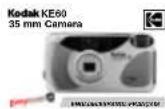
Kodak KE60 35 mm Camera
NEED HELP WITH YOUR CAMERA?
Visit our Web sites at http://www.kodak.com (for US) or http://www.kodak.ca (for Canada) or call:
Kodak (USA only) from 9:00 a.m. to 7:00 p.m. (Eastern time) Monday through Friday at 1-800-242-2424.
Kodak (Canada only) from 8:00 a.m. to 5:00 p.m. (Eastern time) Monday through Friday at 1-800-465-6325, ext. 36100; for the Toronto area, call 416-766-8233, ext. 36100.
When you call, please have your camera available.
For warranty purposes, please keep your sales receipt as proof of the date of purchase.
CONTENTS
CAMERA IDENTIFICATION .... 3
ATTACHING THE STRAP 4
LOADING THE BATTERY 5
Low-battery indicator 6
Auto power off 6
Battery tips 7
ATTACHING THE LCD LABEL 8
Using the LCD backlight...... 8
LOADING THE FILM 9
TAKING PICTURES 12
Using the focus lock 13
Tips for better pictures 14
TAKING FLASH PICTURES 15
Flash-to-subject distance ..... 16
Using the red-eye reduction ..... 17
FLASH MODES 18
Flash off 18
Fill flash 19
Nightview with flash 19
Nightview without flash 20
Selecting the flash modes ...... 20
USING THE SELF-TIMER 22
SPECIAL OPTION MODES 23
Portrait mode 23
Infinity-focus mode 25
UNLOADING THE FILM 26
Automatic rewind 26
Manual rewind 26
CARING FOR YOUR CAMERA ...... 27
TROUBLESHOOTING 28
SPECIFICATIONS 30
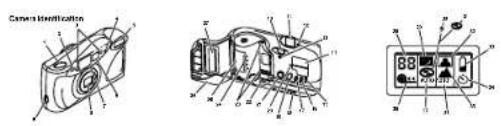
CAMERA IDENTIFICATION
Unfold cover flaps of manual to view camera diagrams.
1 SHUTTER BUTTON
2 SELF-TIMER BULB/RED-EYE-REDUCTION BULB
3 AUTO-FOCUS WINDOWS
4 LIGHT SENSOR
5 FLASH
6 VIEWFINDER LIGHT DIFFUSER
7 VIEWFINDER
8 LENS/LENS COVER
9 STRAP POST
10 FILM-DOOR LATCH
11 VIEWFINDER EYEPIECE
12 FLASH-READY LIGHT
13 FILM-PRESENCE INDICATOR
14 LCD PANEL
15 SELF-TIMER BUTTON
16 FOCUS-MODE BUTTON
17 EXPOSURE-MODE BUTTON
18 TRIPOD SOCKET
19 LCD BACKLIGHT BUTTON
20 FILM-REWIND BUTTON
21 ON/OFF BUTTON
22 BATTERY DOOR
23 FILM-GUIDE RAILS
24 DX/DXN CODE SENSORS
25 FILM CHAMBER
26 FILM DOOR
27 FILM WINDOW
LCD Panel
28 FRAME COUNTER
29 NIGHTVIEW SYMBOL
30 FILL-FLASH SYMBOL
31 FLASH-OFF SYMBOL
32 PORTRAIT SYMBOL
33 BATTERY SYMBOL
34 SELF-TIMER SYMBOL
35 INFINITY-FOCUS SYMBOL
36 AUTO-FOCUS INDICATOR
37 AUTO-FLASH INDICATOR
38 FILM-MOTION INDICATOR
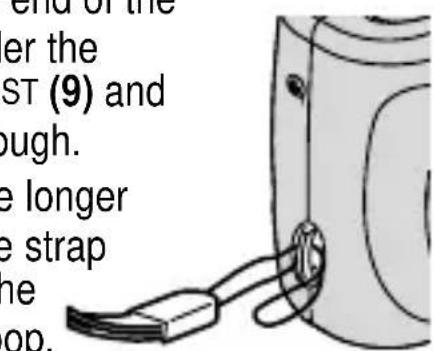
ATTACHING THE STRAP
- Insert one end of the strap under the STRAP POST (9) and pull it through.
- Thread the longer end of the strap through the shorter loop.
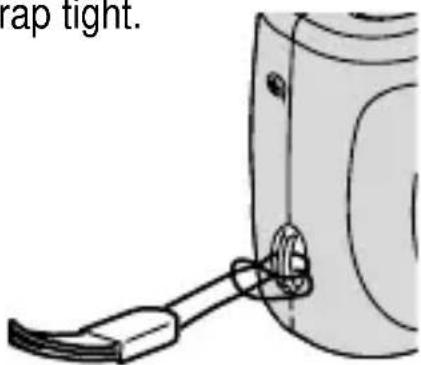
- Pull the strap tight.
LOADING THE BATTERY
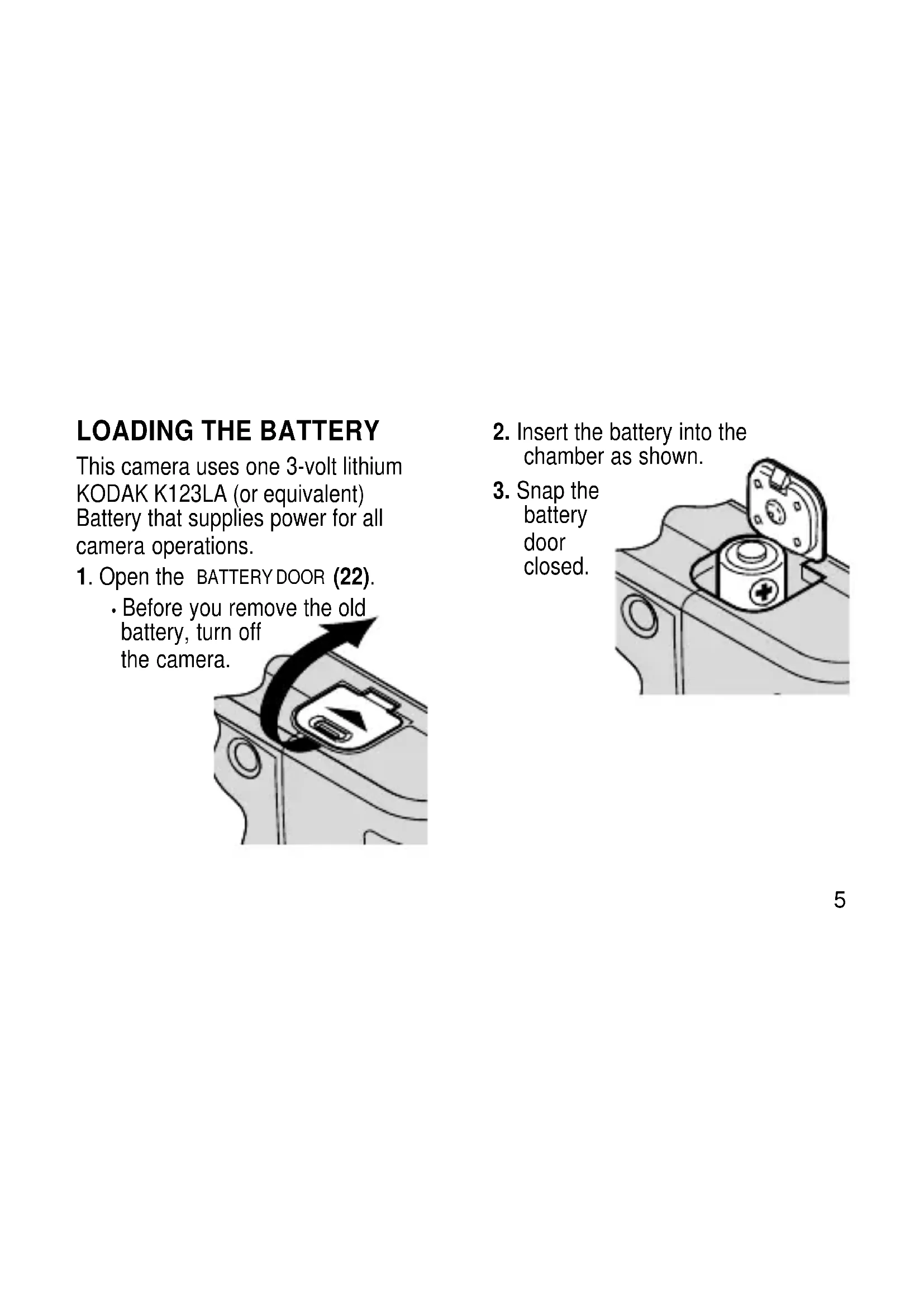
This camera uses one 3-volt lithium KODAK K123LA (or equivalent) Battery that supplies power for all camera operations.
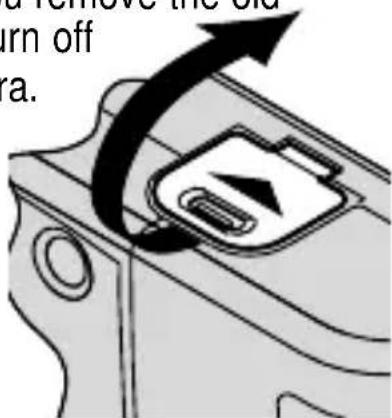
- Open the BATTERY DOOR (22).
• Before you rem battery, turn off the camera.
-
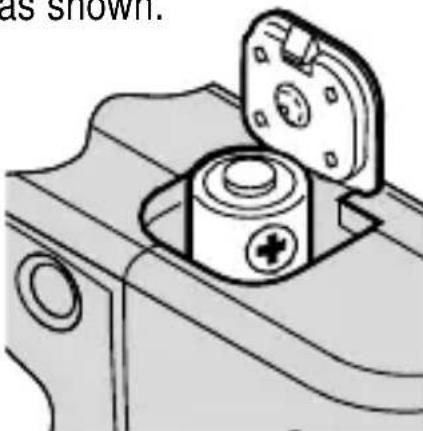
Insert the battery into the chamber as shown.
-
Snap the battery door closed.
natural_image
Technical line drawing of a mechanical component with a cylindrical housing and mounting flange (no text or symbols)Low-battery indicator
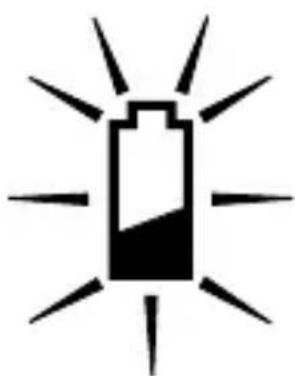
It is time to replace the battery when—
• the BATTERY SYMBOL (33) appears on the LCD PANEL (14).
- none of the indicators appear on the LCD panel and the SHUTTER BUTTON(1) cannot be released.
natural_image
Simple black-and-white icon of a battery with radiating lines, symbolizing charging or illumination (no text or symbols)
Automatic Energy Saving Features
Auto power off
This camera automatically turns off after approximately 4 minutes to conserve the battery life. To awaken the camera, press the ON/OFF BUTTON (21).
- Turn the camera off when the camera is not going to be used for an extended length of time.
Battery tips
- Dispose of the battery according to local and national regulations.
- Keep spare batteries with you at all times.
- Read and follow all warnings and instructions supplied by the battery manufacturer.
- Keep batteries away from children.
- Do not try to take apart, recharge or short circuit the battery, or subject it to high temperature or fire.
-
Store batteries in their original packaging prior to use.
-
Remove the battery from the camera when the camera is not going to be used for an extended length of time.
• In the unlikely event that battery fluid leaks onto your skin, contact Kodak Health, Safety and Environment Information at 1-716-722-5151 in the U.S.
• In the unlikely event that battery fluid leaks inside the camera, U.S. customers can contact the Kodak Information Center (KIC) at 1-800-242-2424. Customers outside the U.S. can contact their local Kodak Customer Service representative.
ATTACHING THE LCD LABEL
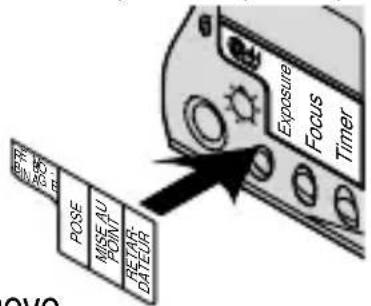
English text references for the LCD control buttons are printed below the LCD PANEL (14). You can replace the English text for Chinese, Arabic, Thai, Polish, French, Spanish,
Portuguese, or Russian with one of the eight supplied labels. Simply remove the peel-off label of your choice and place it over the English text. The label is removable if you want to reposition it or replace it with a different one.
Using the LCD backlight
This camera features an LCD panel backlight for easy viewing and use in low-light or nighttime settings.
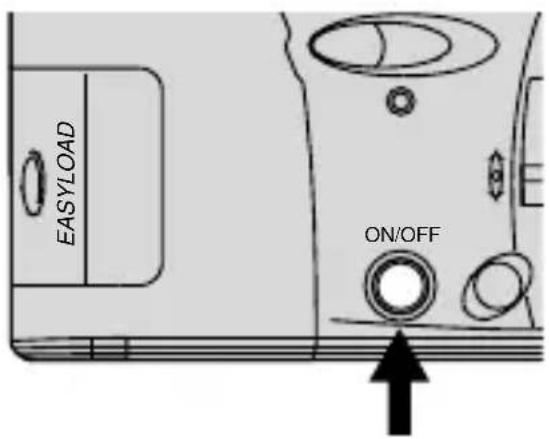
- Press the ON/OFF BUTTON (21) to uncover the LENS (8) and to turn on the camera.
- Press the LCD BACKLIGHT BUTTON (19) to turn on the light.
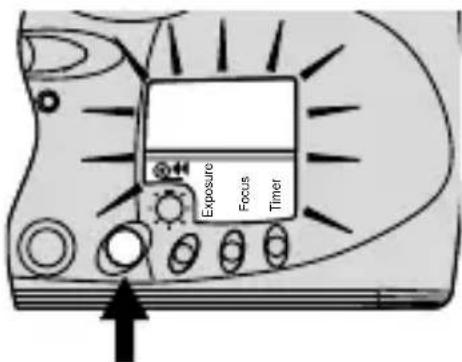
• The backlight automatically turns off in approximately 20 seconds or you can manually turn off the light by repressing the LCD backlight button.
LOADING THE FILM
If in sunlight, turn your back to the sun and load the film in the shade of your body. The unique Easyload feature of this camera makes film loading simple.
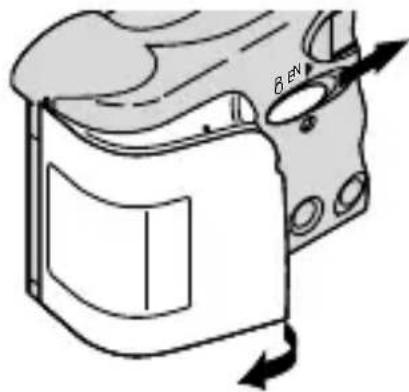
- Slide the FILM-DOOR LATCH(10) in the direction of the arrow to open the FILM DOOR (26).
natural_image
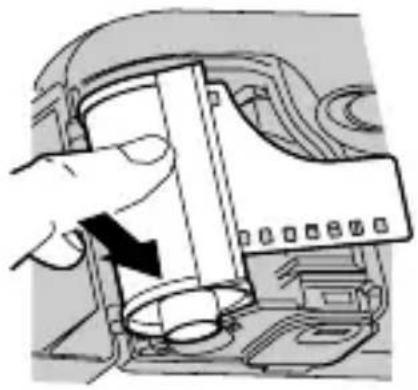
Diagram of a device casing with directional arrows indicating motion or movement (no text or symbols)- Place the film cartridge completely into the FILM CHAMBER (25).
natural_image
Illustration of a hand inserting a device into a computer case (no text or symbols visible)- Insert the film leader into the film slot between the FILM-GUIDERAILS (23).
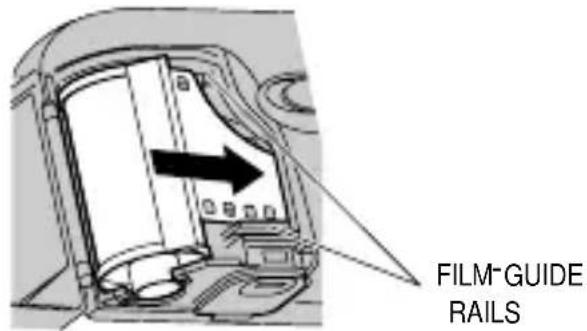
NOTE: You should be able to use the film just as it comes out of the film carton without pulling additional film out of the cartridge.
- Rotate the cartridge completely to the right to lay the film flat.
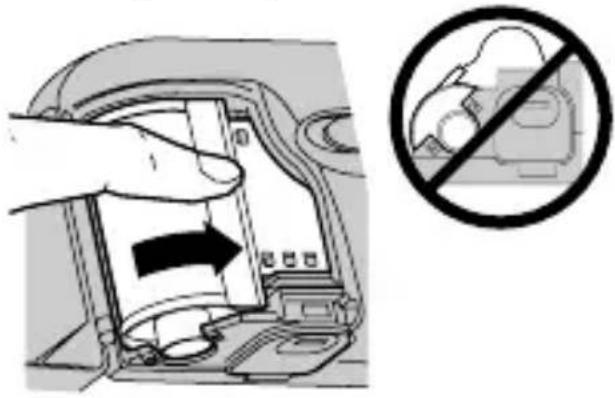
- Close the FILM DOOR (26) to start the automatic film advance.
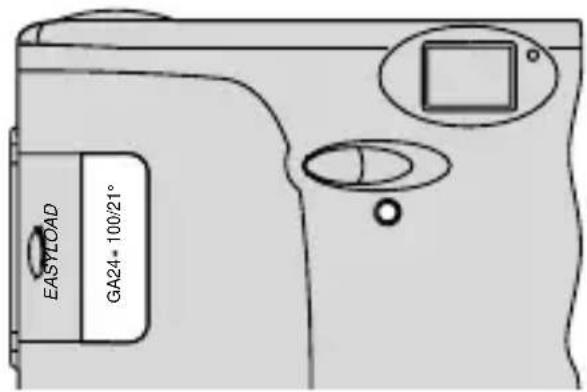
• The LCDPANEL (14) shows the first exposure.
- The FILMPRESENCE INDICATOR (13) turns amber to indicate there is film in the camera.
TAKING PICTURES
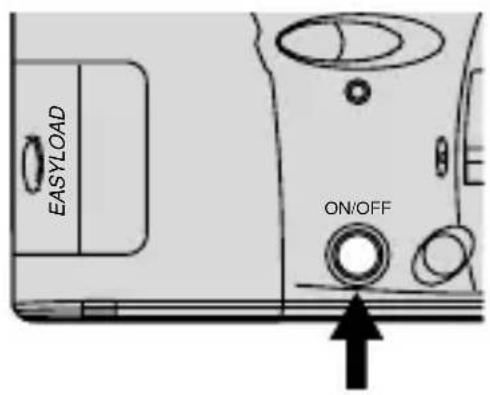
- Press the ON/OFF BUTTON (21) to uncover the LENS (8) and to turn on the camera.
- For a sharp picture, stand at least 1.5 ft (0.5 m) from your subject.
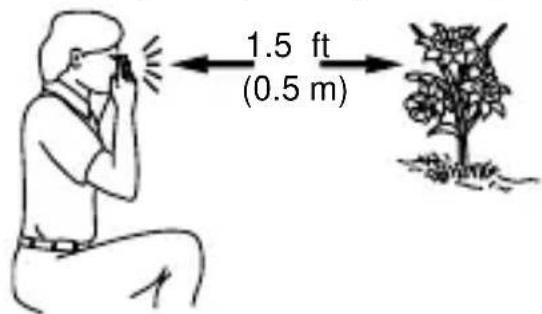
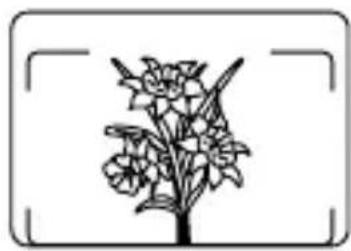
- Look through the VIEWFINDER EYEPIECE (11) to see your subject.
natural_image
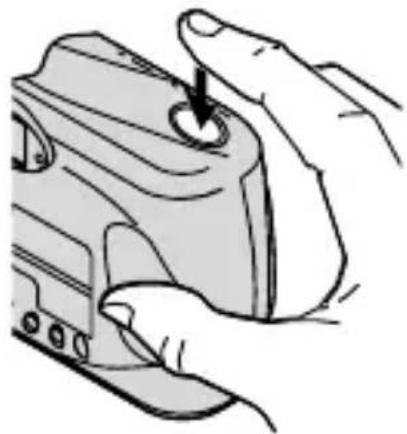
Black-and-white line drawing of a flowering plant with leaves and blossoms, enclosed in a rectangular frame (no text or symbols)- Hold the camera steady and gently press the SHUTTER BUTTON (1) to take the picture.
• After you take the picture, the film automatically advances to
the next picture.
- Turn off the camera when you are done taking pictures.
natural_image
Illustration of hands holding a camera lens with a circular button (no text or symbols)Using the focus lock
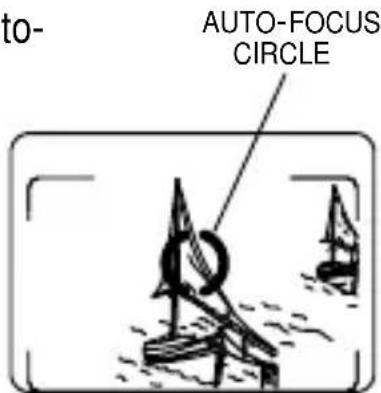
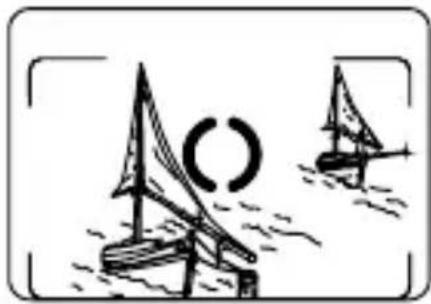
This camera automatically focuses on the subject that is within the auto-focus circle of the viewfinder. If you want to take a picture with the subject positioned outside the auto-focus circle, follow these instructions.
- Place the auto-
focus circle on the subject you want focused in the picture.
VIEWFINDER
- Press the SHUTTER BUTTON (1) halfway down to lock the focus.
- While still pressing the shutter button, move the camera until your subject is where you want it within the VIEWFINDER EYEPIECE (11).
natural_image
Illustration of two sailboats on water with a partial circular symbol (no text or labels)- Press the shutter button completely down to take the picture.
Tips for better pictures
• To avoid blurry pictures, hold your camera steady by keeping your elbows close to your body when you press the shutter button.
- Stand close enough to your subject so it fills the viewfinder but not closer than 1.5 ft (0.5 m).
Take pictures at the subject's level. Kneel down to take pictures of children and pets.
- Hold your camera vertically to capture tall, narrow subjects, such as a waterfall, skyscraper, or a single person.
- Add interest to your picture by framing it with a tree branch, a window, or even the rails of a fence.
- Keep the sun behind you. This provides the best subject illumination.
- Keep your hand, fingers, or objects away from the flash and picture-taking lens.
- Stand at an angle to shiny surfaces like windows or mirrors to avoid flash reflection and bright spots in your pictures.
TAKING FLASH PICTURES
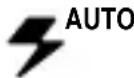
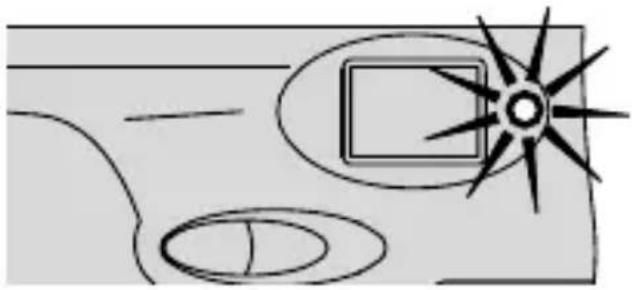
In dim light, such as indoors or outdoors in heavy shade, or on dark overcast days, you need flash. This camera features an automatic flash that fires when you need it.
-
Press the ON/OFF BUTTON (21) to uncover the LENS (8) and to turn on the camera.
-
Wait for the FLASH-READY LIGHT (12) and the AUTO-FLASH INDICATOR(37) on the LCD PANEL (14) to stop blinking.
natural_image
Simple line drawing of a room with a sunburst and circular elements (no text or symbols)- Keep the subject within the distance range for the speed of film in your camera.
ISO film Flash-to-subject speed distance
100 1.5 to 12 ft (0.5 to 3.7 m)
200 1.5 to 17 ft (0.5 to 5.2 m)
400 1.5 to 23 ft (0.5 to 7.0 m)
800 1.5 to 28 ft (0.5 to 8.5 m)
- Don't take pictures beyond the maximum distance or your pictures will be dark.
- Hold the camera steady and gently press the SHUTTER BUTTON (1) completely down to take the picture.
- To prevent battery drain, turn off the camera by pressing the on/off button when you are done taking pictures.
Using the red-eye reduction
Some people's eyes (and some pets') can reflect flash with a red glow. To minimize red eye in flash or fill-flash pictures, use the red-eye-reduction feature.
-
Press the ON/OFF BUTTON (21) to uncover the LENS (8) and to turn on the camera.
-
Partially depress the SHUTTER BUTTON (1) to turn on the RED-EYE-REDUCTION BULB (2).
-
Have your subject look directly at the red-eye-reduction bulb.
-
Press the shutter button completely down to take the picture.
FLASH MODES
Besides the auto-flash mode, which is the default setting of the camera, you can select flash off, fill flash, or nightview with or without flash.
Flash off

When you do not want to use the flash, especially indoors where flash is prohibited or when you want to take twilight scenes, distant subjects that are beyond the flash range, or to capture the ambiance of existing light, use the flash-off feature. Attach a tripod to the camera TRIPOD SOCKET (18) or place the camera on another firm support, and use high-speed film to ensure the best exposure possible for taking pictures without flash.
Fill flash

When bright light indoors or outdoors comes from behind the subject (backlighting), dark shadows (especially on faces) may occur. Use fill flash to lighten these shadows.
Nightview with flash
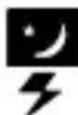
In this mode, the camera balances the flash and existing-light exposure so that you can take beautiful pictures of people at sunset or at night. Use a tripod by attaching it to the camera TRIPOD SOCKET (18) or place the camera on another firm support, and use high-speed film because the shutter speed at night is typically slow.
Nightview without flash
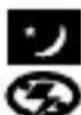
In this mode, you can capture the natural existing-light of city-night scenes or fireworks at night. Attach a tripod to the camera TRIPOD SOCKET (18) or place the camera on another firm support, and use high-speed film because the shutter speed at night is typically slow.
Selecting the flash modes
- Press the ON/OFF BUTTON (21) to uncover the LENS (8) and to turn on the camera.
- Repeatedly press the EXPOSURE-MODE BUTTON (17) until the FLASH-OFF SYMBOL (31), FILL-FLASH SYMBOL (30), or NIGHTVIEW SYMBOL (29) with or without flash appears on the LCD PANEL (14).
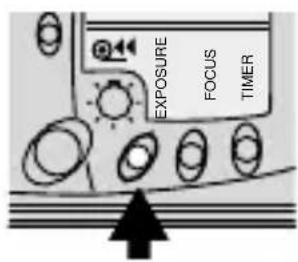
- For flash off and fill flash settings: Hold the camera steady and gently press the SHUTTER BUTTON (1) completely down to take a picture.
For nightview with and without flash settings: Press and hold the shutter button completely down for approximately 4 seconds, without lifting your finger, until the shutter automatically releases to take a picture.
- If you remove your finger from the shutter button before 4 seconds, the shutter releases but in the standard auto-flash mode.
The nightview modes cancel after you take a picture, whereas the off-flash and fill-flash modes remain selected. To cancel the fill-flash or flash-off mode, turn off the camera by pressing the ON/OFF BUTTON (21) or select a different flash mode by pressing the EXPOSURE-MODE BUTTON (17).
USING THE SELF-TIMER

Use this feature when you want to include yourself in the picture.
-
Attach a tripod to the camera TRIPOD SOCKET (18) or place it on another firm support.
-
Press the SELF-TIMER BUTTON (15).
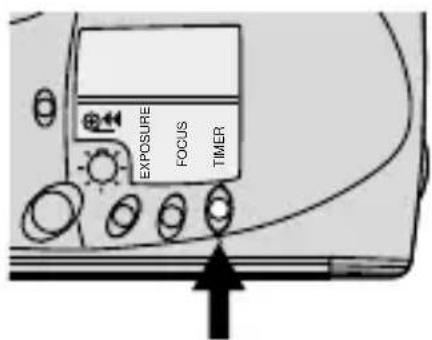
• The SELF-TIMER SYMBOL (34) appears on the LCD PANEL (14).
-
Look through the VIEWFINDER EYEPIECE (11) to compose the picture and to allow room for yourself in it.
-
Hold the camera steady and gently press the SHUTTER BUTTON (1) to take the picture.
-
Position yourself in the composed picture making sure that you see the SELF-TIMER BULB (2) completely.
NOTE: If you do not see the entire bulb, you may not be in the picture.
- The self-timer bulb on the front of the camera glows and then blinks during the 10 seconds self-timer countdown.
• The self-timer automatically cancels after the shutter releases.
SPECIAL OPTION MODES
Repeatedly press the FOCUS-MODE BUTTON (16) to view the special option modes and to make your selection. The special option modes for portrait and infinity focus let you tailor the camera's fully automatic operation for optimal camera settings.
Portrait mode

The portrait selection allows you to take sharp, close-up pictures of people. In this mode, the camera enters the close-focus zone at any distance away from the subject. If its distance exceeds 3 ft (0.9 m), the FLASH-READY LIGHT(12) "blinks red" to warn you of incorrect focus.
- Press the ON/OFF BUTTON (21) to uncover the LENS (8) and to turn on the camera.
- Repeatedly press the FOCUS-MODE BUTTON (16) until the PORTRAIT SYMBOL (32) appears on the LCD PANEL (14).
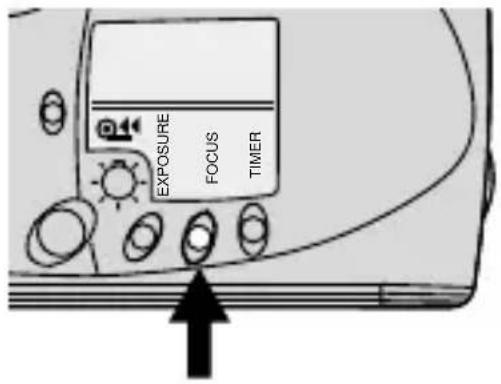
- Look through the VIEWFINDER EYEPIECE (11) and compose your picture within the close-framing guides of the viewfinder.
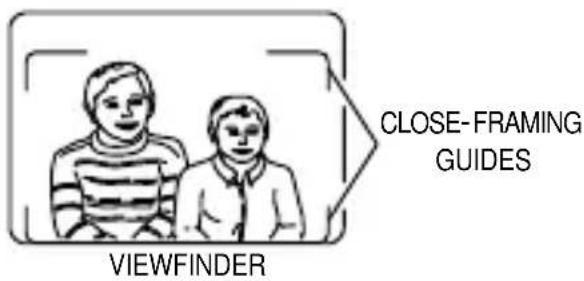
- Hold the camera steady and gently press the SHUTTER BUTTON (1) to take the picture. • The selection cancels after you take the picture.
Infinity-focus mode
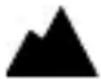
In this mode, you can capture sharp, distant scenery for outdoor picture-taking.
-
Press the ON/OFF BUTTON (21) to uncover the LENS (8) and to turn on the camera.
-
Repeatedly press the FOCUS-MODE BUTTON (16) until the INFINITY-FOCUS SYMBOL (35) appears on the LCD PANEL (14).
- In this mode the camera is automatically set for flash off, the only available flash option.
- Look through the VIEWFINDER EYEPIECE (11) to see your subject.
- Hold the camera steady and gently press the SHUTTER BUTTON (1) to take the picture.
• The selection cancels after you take the picture.
UNLOADING THE FILM
Automatic rewind
The camera automatically rewinds the film into the film cartridge after the last exposure.
-
Wait for the motor to stop running before you open the FILM DOOR (26). • The FILM-MOTION INDICATOR (38) blinks and the FRAME COUNTER (28) counts down as the film is rewinding.
-
Remove the film and reload with fresh KODAK Film. • The frame counter displays "0."
Manual rewind
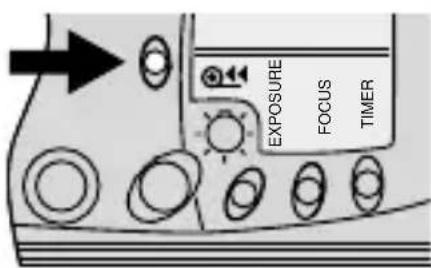
If you don't want to take pictures on the entire roll of film, you can rewind the film manually. But you will not be able to reload the film.
-
Gently press the FILM-REWIND BUTTON (20) to start the automatic film rewind.
-
Follow steps 1 and 2 from Automatic rewind.
CARING FOR YOUR CAMERA
- Protect the camera from dust, moisture, sudden impact, and excessive heat.
CAUTION: Do not use solvents or harsh or abrasive cleaners on the camera body.
- If the lens appears dirty, breathe on it to form a mist and wipe the surface gently with a soft, lintless cloth or camera lens-cleaning tissue. Never wipe a dry lens.
CAUTION: Use solvents or solutions designed for cleaning camera lenses. Do not use chemically treated tissues intended for cleaning eyeglasses.
- Remove the battery when you store the camera for an extended time.
CAUTION: To prevent possible damage and electrical shock, do not attempt to disassemble or repair the camera or flash unit by yourself.
TROUBLESHOOTING
| What happened Probable cause Solution | ||
| Camera will Lens cover closed Open lens cover not operate completely | ||
| Battery weak, dead, Replace or missing, or reload the battery improperly loaded | ||
| Flash not ready Wait for the blinking flash-ready light to disappear | ||
| Film not properly Reload the film; see loaded in camera LOADING THE FILM on page 9 | ||
| Film needs to be See rewound/removed | ||
| Shutter button No film in camera Load film cannot be released into camera | ||
| Lens cover closed Press on/off button to open lens cover | ||
| Film-door latch Film does not open completely reword pictures or into the cartridge press the film-rewind button | ||
| LCD panel is blank Battery weak, dead, Replace or missing, or reload the battery improperly loaded | ||
SPECIFICATIONS
Lens: 29 mm all-glass lens
Shutter: Programmed shutter; 1/60 to 1/400 seconds
Aperture: f/5.6
Film speed: DX (ISO) 100, 200, 400, or 800 print film
Focus range: Daylight: 1.5 ft (0.5 m) to infinity
Viewfinder: Projected image, center-spot-aiming circle, macro parallax correction
Flash unit: Built-in
Flash-recycle time: 6 seconds with fresh battery
Power source: One 3 V lithium battery
Dimensions: 38 x 62 x 124 mm
Weight: 6.1 oz. (173 g)
Kodak and "e" mark are trademarks.
natural_image
Diagram of a device with an arrow indicating rotation or movement, showing a button or connector (no text or symbols present)natural_image
Technical line drawing of a mechanical component with a housing and mounting bracket (no text or symbols)natural_image
Simple black-and-white icon of a battery with radiating lines, symbolizing charging or discharge (no text or symbols)
natural_image
Illustration of a hand inserting a device into a mechanical component (no text or symbols visible)natural_image
Black-and-white line drawing of a flowering plant with multiple blooms and leaves, enclosed in a rounded rectangular frame (no text or symbols)natural_image
Illustration of hands holding a small object with an arrow pointing to it (no text or symbols present)natural_image
Illustration of sailboats on water with a partial circular symbol (no text or labels)natural_image
Simple line drawing of a vehicle interior with a sunburst and rectangular object (no text or symbols)natural_image
Simple line drawing of two boys standing side by side within a rounded rectangular frame (no text or symbols)GUÍAS DE ENMARCAR DEL VISOR
VISOR
Appareil-photo Kodak KE60
EasyLoad35
BESOIN D'AIDE POUR UTILISER VOTRE APPAREILPHOTO?
Visitez nos sites Web à http://www.kodak.ca (Canada)
8 OBJECTIF/COUVRE-OBJECTIF
9 OEILLET DE LA DRAGONNE
10 LOQUET DU COMPARTIMENT
DU FILM
11 OCULAIRE DU VISEUR
12 TÉMOIN DU FLASH PRÊT
13 INDICATEUR DE LA PRÉSENCE
D'UN FILM
14 PANNEAU ACL
15 BOUTON DU RETARDATEUR
16 BOUTON DE MODE MISE AU POINT
17 BOUTON DE MODE EXPOSITION
18 ÉCROU DU TRÉPIED
19 BOUTON D'AFFICHAGE LUMINEUX ACL
20 BOUTON DE REMBOBINAGE
21 BOUTON MARCHE/ARRÊT
22 COUVERCLE DU COMPARTIMENT DE LA PILE
23 RAILS DE GUIDAGE DU FILM
24 CAPTEURS DE CODE DX/DXN
25 COMPARTIMENT DU FILM
26 COUVERCLE DU COMPARTIMENT
DU FILM
27 FENÊTRE DU FILM
Panneau ACL
28 COMPTEUR DE POSES
29 SYMBOLE DE VUE NOCTURNE
30 SYMBOLE DE FLASH D'APPOINT
31 SYMBOLE DE FLASH DÉSACTIVÉ
32 SYMBOLE DU PORTRAIT
33 SYMBOLE DE LA PILE
34 SYMBOLE DU RETARDATEUR
35 SYMBOLE DE MISE AU POINT À L'INFINI
36 INDICATEUR DE MISE AU POINT AUTOMATIQUE
37 INDICATEUR DE FLASH AUTOMATIQUE
38 INDICATEUR DE MOUVEMENT DU FILM
INSTALLATION DE LA DRAGONNE
natural_image
Diagram of a device component with an arrow indicating rotation or movement (no text or symbols present)natural_image
Technical line drawing of a mechanical component with a housing and mounting holes (no text or symbols)natural_image
Simple black-and-white icon of a battery with radiating lines, symbolizing charging or discharge (no text or symbols)
Panneau ACL lumineux
natural_image
Illustration of a hand inserting a device into a mechanical component (no text or symbols visible)natural_image
Diagram of a device interior showing a door panel with an arrow indicating direction (no text or symbols present)RAILS DE
GUIDAGE
DU FILM
natural_image
Hand inserting a component into a device housing (no text or symbols visible)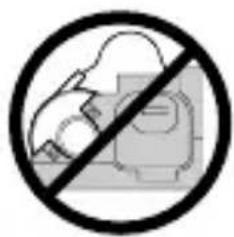
natural_image
Black-and-white line drawing of a flowering plant with leaves and blossoms, enclosed in a rectangular frame (no text or symbols)natural_image
Illustration of hands using a tool to adjust or install a component (no text or symbols visible)natural_image
Illustration of sailboats on water with a circular structure, labeled 'VISEUR' below (no other text or symbols)CERCLE DE
MISE AU POINT