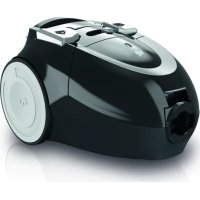
Beat 2.1 - Vacuum Cleaner DIRT DEVIL - Free user manual and instructions
Find the device manual for free Beat 2.1 DIRT DEVIL in PDF.



| Product type | Canister vacuum cleaner |
| Brand | Dirt Devil |
| Model | Beat 2.1 (DD 7374) |
| Category | Canister vacuum cleaner |
| Power supply | 220-240 V ~, 50/60 Hz |
| Power consumption | 800 W |
| Bag capacity | Approx. 1.5 liters |
| Weight | Approx. 3.9 kg |
| Filters | Motor protection filter (washable) and exhaust air filter (non-washable) |
| Dust bag | Swirl® Y50® MicroPor® Plus with AirSpace® (recommended) |
| Included accessories | Furniture brush, upholstery nozzle, crevice tool, combination brush |
| Optional accessories | Mini turbo brush, parquet brush, hard floor brush, flexible long crevice tool |
| Power adjustment | Mechanical slider on hose |
| Cord rewind | Yes, with yellow and red markings |
| Bag full indicator | Yes, on the top |
| Overheat protection | Yes, automatic shut-off |
| Use | Domestic, dry floors |
| Maintenance | Change bag every 3 months, clean motor filter every 3 months, replace every 6 months |
| Warranty | Statutory warranty according to Directive 1999/44/EC |
| Disposal | Do not dispose with household waste, follow local regulations |
Frequently Asked Questions - Beat 2.1 DIRT DEVIL
User questions about Beat 2.1 DIRT DEVIL
0 question about this device. Answer the ones you know or ask your own.
Ask a new question about this device
Download the instructions for your Vacuum Cleaner in PDF format for free! Find your manual Beat 2.1 - DIRT DEVIL and take your electronic device back in hand. On this page are published all the documents necessary for the use of your device. Beat 2.1 by DIRT DEVIL.
USER MANUAL Beat 2.1 DIRT DEVIL
natural_image
Illustration of a vacuum cleaner with attached pipe and bulb (no text or symbols)
Bedienungsanleitung
bagged vacuum cleaner

Mode d'emploi
Aspirateur avec sac

natural_image
Illustration of a hand using a brush to press or brush over a grid of small blocks (no text or symbols visible)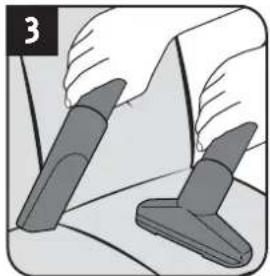
natural_image
Illustration of two hands holding a tool, one with a gray handle and the other with a gray handle (no text or symbols)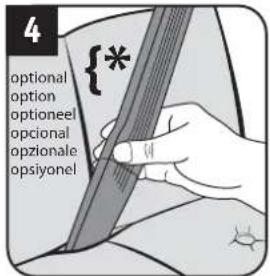
natural_image
Illustration of a hand holding a device with two arrows indicating downward motion (no text or symbols)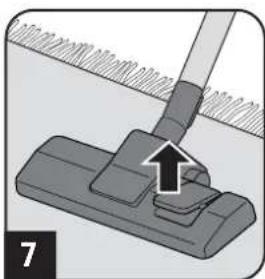
natural_image
Mechanical assembly diagram showing a clip with a handle and arrow indicating motion (no text or symbols)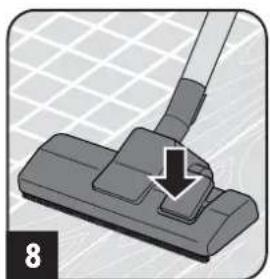
natural_image
Illustration of a hand using a tool to press or install a component, with no visible text or symbols.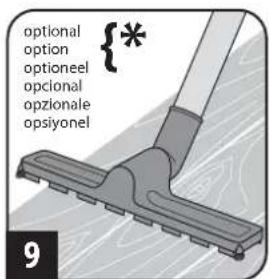
WARNING:
natural_image
Illustration of a hand inserting a device into a device component (no text or symbols visible)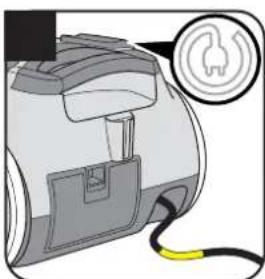
natural_image
Illustration of a handheld device with a yellow cable and a circular icon showing a fuse or plug (no text or symbols present)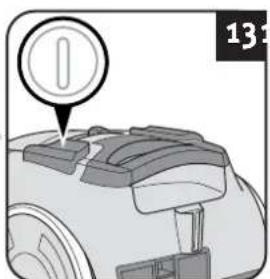
natural_image
Illustration of a person using a long-handled tool to clean or walk (no text or symbols)! WARNING:
natural_image
Illustration of a hand holding a cylindrical device with attached mechanical components (no text or symbols)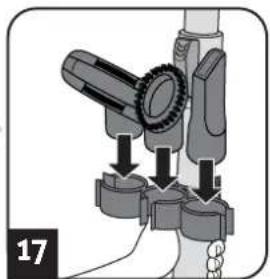
natural_image
Mechanical assembly diagram showing a lever mechanism with arrows indicating motion (no text or symbols)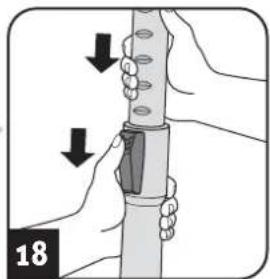
natural_image
Illustration of hands holding a tool with arrows indicating movement or force direction (no text or symbols)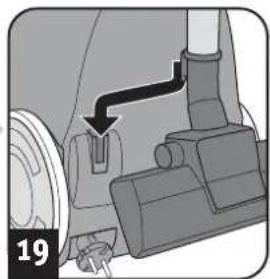
natural_image
Mechanical assembly diagram showing a lever mechanism with a numbered label (19) and an arrow indicating direction (no text or symbols present)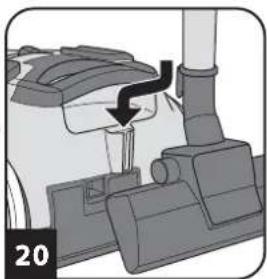
natural_image
Mechanical component diagram showing a lever mechanism with a black arrow indicating motion (no text or symbols)! WARNING:
natural_image
Illustration of a robotic vacuum cleaner with a red capsule and blue handle, labeled '212425' (no other text or symbols)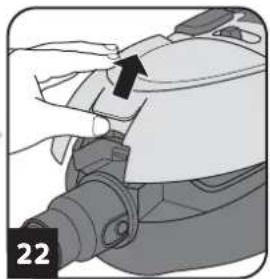
natural_image
Close-up of a hand adjusting a mechanical component with a black arrow pointing to the part (no text or symbols visible)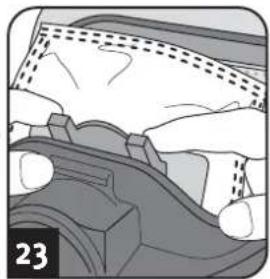
natural_image
Close-up of mechanical components with no visible text or symbols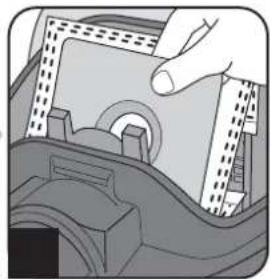
natural_image
Illustration of a hand inserting a component into a device (no text or symbols visible)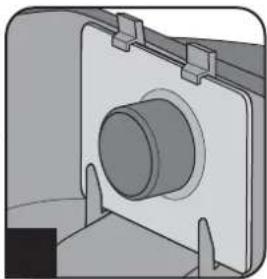
natural_image
Mechanical component diagram showing a cylindrical shaft mounted on a flanged housing (no text or symbols visible)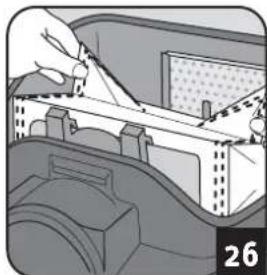
natural_image
Illustration of a hand using a tool to adjust or install a mechanical component, no text or symbols visible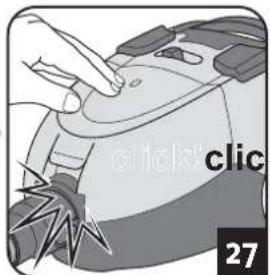
Kaufempfehlung
natural_image
Close-up of a hand pressing down on a mechanical component (no visible text or symbols)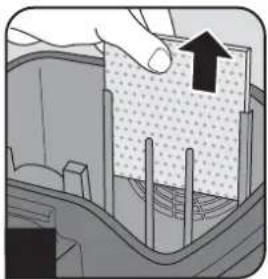
natural_image
Diagram showing a hand pressing down on a textured surface with an arrow indicating upward motion (no text or symbols present)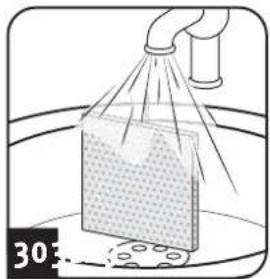
natural_image
Illustration of a spray gun spraying a material sample onto a surface, with no visible text or symbols.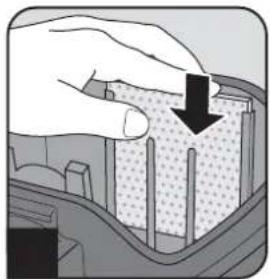
natural_image
Illustration of a hand pressing down on a textured material surface with a black arrow indicating direction (no text or symbols)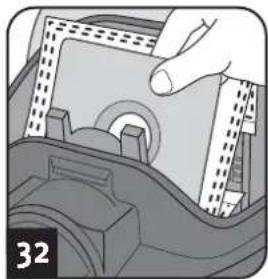
natural_image
Illustration of a hand inserting a component into a device (no text or symbols visible)ACHTUNG:
natural_image
Hand inserting a component into a car's seat panel (no text or symbols visible)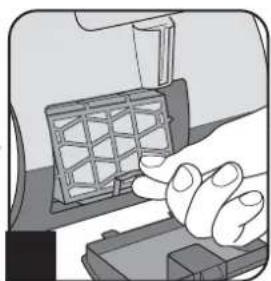
natural_image
Illustration of a hand pressing a component on a device (no text or symbols visible)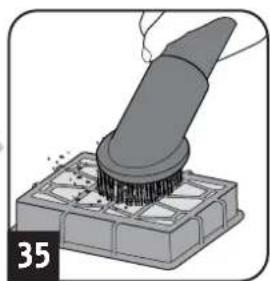
natural_image
Illustration of a brush applying material onto a base, no text or symbols present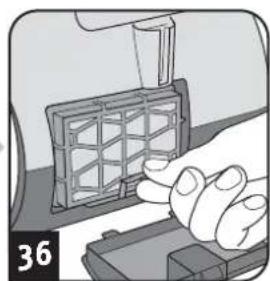
natural_image
Close-up of a hand pressing a grid-patterned object on a mechanical component (no text or symbols visible)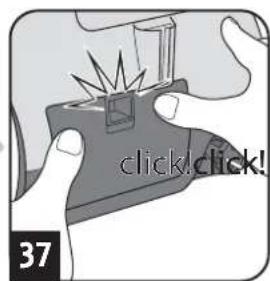
ACHTUNG:
1.1 About the operating manual
Read the operating manual completely before working with the appliance. Keep the operating manual in a safe place. Include the operating manual if you pass the appliance on to a third party. Failure to comply with this operating manual can lead to serious injuries or damage to the appliance. We take no responsibility for damage due to failure to comply with this operating manual. Always comply with the notices marked as follows to avoid accidents and damage to the appliance.

WARNING:
Warns of health hazards and identifies possible risks of injury.

CAUTION:
Indicates possible dangers to the appliance or other objects.
NOTE:
Highlights tips and information for you.
1.2 Concerning certain groups of persons
These appliances can be used by children of 8 years and upwards and persons with impaired physical, sensory or mental abilities, or insufficient experience or knowledge, providing they are supervised or have been instructed in the proper use of the appliance and understand the risks involved.
Children must not play with the appliance. Children must not perform cleaning or user maintenance tasks without supervision. Children under the age of eight should be kept away from the appliance and the connection cable whilst it is switched on or cooling down.
- Packing material must not be used for playing. There is danger of suffocation.
1.3 Information on power supply
The appliance is operated with electrical power, which means there is always a risk of electric shock. Therefore, please comply with the following:
- Never immerse the appliance in water or other liquids; keep it away from rain and moisture. Never touch the plug with wet hands. Do not operate the appliance outdoors or in rooms with a high level of humidity.
Take care that the power cord is not kinked, pinched, or rolled over and ensure it does not come into contact with heat sources. Also take care that it does not become a stumbling hazard.
Before connecting to the power supply, make sure that the voltage stated on the type plate matches the voltage of your plug socket.
■ Always check the power cord for possible damage before using the appliance.
- Never carry the appliance by its power cord. It could be damaged.
Before you clean or maintain the appliance, switch off the appliance and pull the mains plug from the socket. Always pull directly on the plug when you disconnect the appliance from the mains. Do not pull on the power cord as this could damage it.
If possible, do not use extension cords. If you must use an extension cord, use only safety-certified, water-protected single extension cords (no multi-socket distributors) designed for the power consumption of the appliance.
1.4 Information on proper use
The cylinder vacuum cleaner is intended for home use only.
It is not suitable for commercial use.
Use the cylinder vacuum cleaner only for cleaning dry, normally soiled floors and carpet floorings. Depending on which nozzle you have attached (▷ chapter 2.1, „Assemble appliance and adjust nozzles to surface“), you can also use the appliance to vacuum furniture or non-sensitive upholstery.
Any other use is considered improper use and is prohibited.
Also prohibited:
Vacuuming of:
- Persons, animals, plants, especially hair, fingers and other parts of the body as well as pieces of clothing worn on the body. These might be drawn in. This could result in injuries.
- Water and other fluids, especially damp carpet cleaners. Moisture inside the appliance can cause a short-circuit.
- Toner (for laser printers, copying machines, etc.). There is danger of fire or explosion.
- Hot ashes, burning cigarettes or matches. There is a danger of fire.
- Pointed objects, such as glass shards, nails, etc. They can damage the appliance.
- Rubble, plaster, cement, fine drilling-dust, make-up, etc. These might damage the appliance.
■ To use the appliance near explosive or highly-flammable substances. There is a risk of fire or explosion.
■ Use of the appliance outdoors. Rain and dirt may damage the appliance.
■ Sticking objects into the appliance's openings. It could overheat.
■ To modify or repair the appliance yourself.
1.5 About the option turbo brush
The bristles of the optionally included turbo brush rotate very rapidly. There is a danger of injury.
- Do not use the turbo brush on persons, animals or plants. Keep body parts away from the rotating brush roller.
- Switch off the vacuum cleaner before cleaning or detaching the turbo brush.
- Never run over cables. Otherwise, the insulation could get damaged.
The turbo brush is not suitable to clean sensitive surfaces. This may cause damage. Comply with the care and cleaning instructions provided by the manufacturer.
1.6 If the appliance is defective
Never use a defective appliance or operate an appliance with a defective power cord. If the power cord of this appliance is damaged, it must be replaced by the manufacturers, their authorised service representative or a similarly qualified person to avoid danger. Hand over a defective appliance to a specialist dealer or send it to the Dirt Devil customer service department for repairs (▷Page 46, 'International Service').

2.1 Assemble appliance and adjust nozzles to surface
natural_image
Illustration of a hand using a brush to press small blocks on a grid (no text or symbols)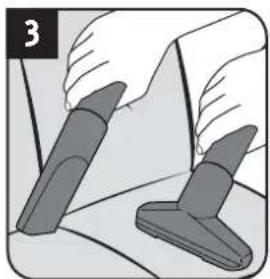
natural_image
Illustration of two hands using a tool to cut or apply a surface, no text or symbols present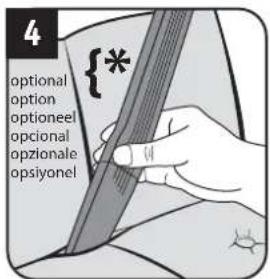
natural_image
Illustration of a hand holding a device with two arrows indicating downward motion (no text or symbols)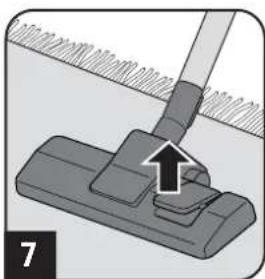
natural_image
Mechanical assembly diagram showing a clip with a handle and arrow indicating force or movement (no text or symbols)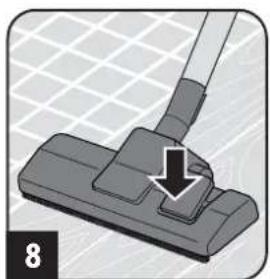
natural_image
Illustration of a hand using a tool to press or install a component, with no visible text or symbols.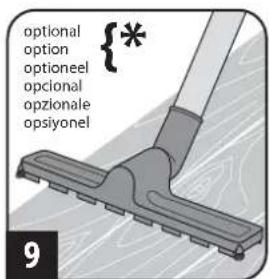
WARNING:
Danger of injury! Only attach the appliance parts when the appliance is not connected to the power supply. Otherwise the machine might start up and parts of your body, hair or pieces of clothing might be sucked in.
CAUTION:
Before assembling, make sure that the fitted nozzle suits the surface to be cleaned. Never use a brush with rotating bristles for example to clean floors or objects that may not be able to withstand the treatment without damage. Observe the flooring manufacturer's recommendations and care information.
NOTE:
You might have to twist the parts when connecting them so they are securely in place. Ensure that installed parts are secure by trying to pull them apart.
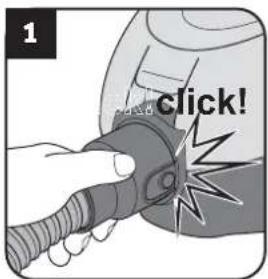
- Connect suction hose and appliance (Fig. 1).
-
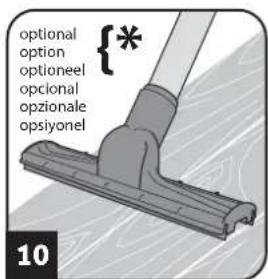
Insert the accessory included in the scope of delivery onto the handle (Fig. 2 - 10) depending on what type of surface you want to vacuum:
-
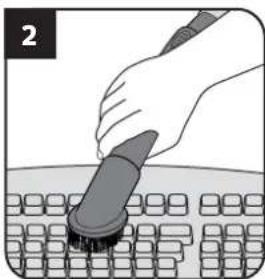
Furniture brush (Fig. 2) for objects with a sensitive surface
- Upholstery nozzle (Fig. 3) for upholstery, mattresses, and the like
- Crevice nozzle (Fig. 3) or optional long flexible crevice nozzle (Fig. 4) for crevices in upholstery
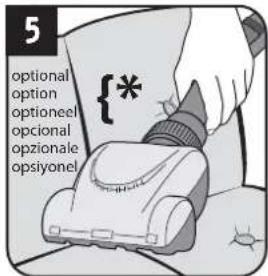
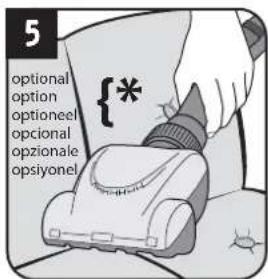
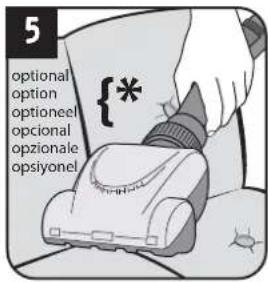
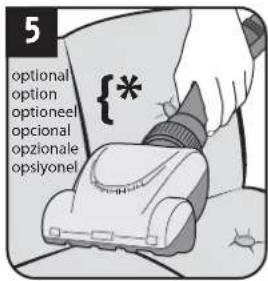
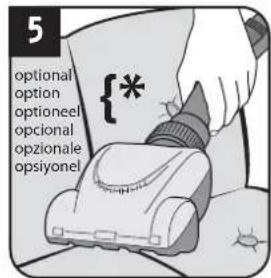
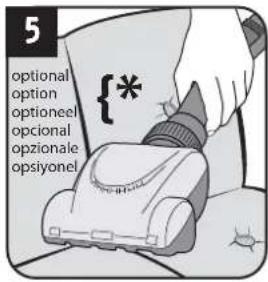
- Optional mini turbo brush (Fig. 5) for non-sensitive upholstery, runner, mats, and the like
- Floor nozzle with switch position as in Fig. 7 for carpets
- Floor nozzle with switch position as in Fig. 8 for hard floors
- Optional parquet brush (Fig. 9) for sensitive hard floors
-
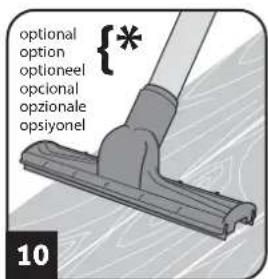
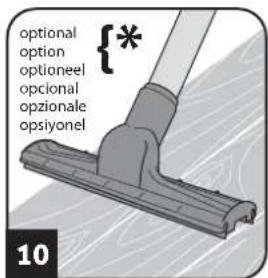
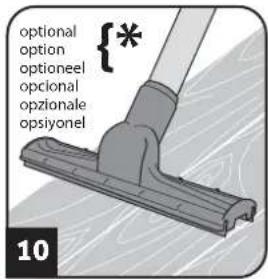
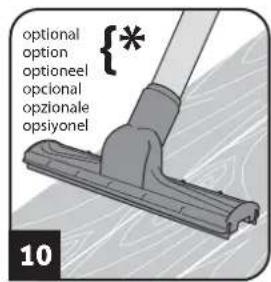
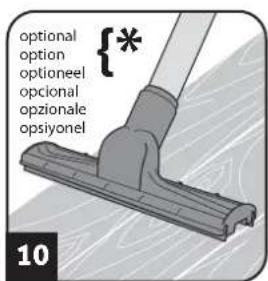
Optional hard floor nozzle (Fig. 10) for hard floors with crevices
-
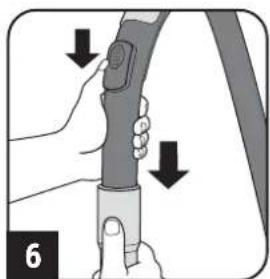
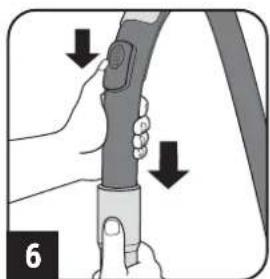
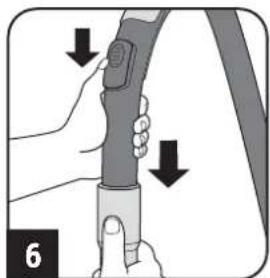
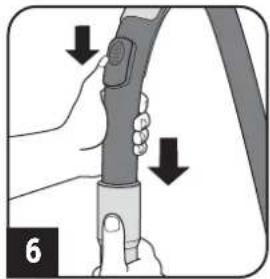
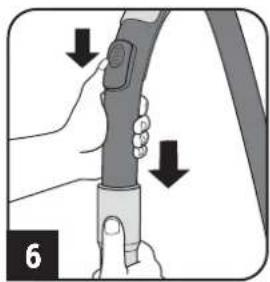
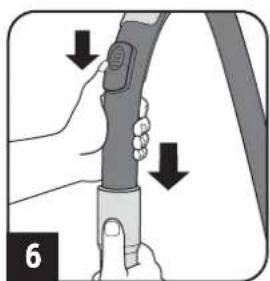
Ensure that the bypass vent is closed (Fig. 6).
-
If you use the telescopic tube, adjust its length.
2.2 Vacuum cleaning
natural_image
Illustration of a hand inserting a device into a device component (no text or symbols visible)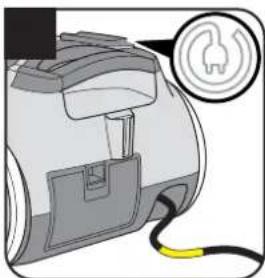
natural_image
Diagram of a device with a plug and cable, showing a connector or socket (no text or symbols present)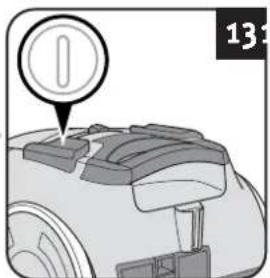
natural_image
Silhouette of a person using a tool to clean or walk, no text or symbols presentWARNING:
Danger of injury! Check appliance and power cord before each use. A damaged appliance must never be used.
CAUTION:
Only use the appliance with all filters undamaged, in dry condition and correctly fitted. Make sure that no objects obstruct the telescopic tube, the suction hose or other openings.
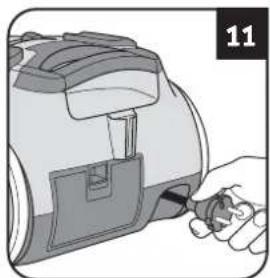
- Pull the cable out of the appliance (Fig. 11) and plug into a socket.
WARNING:
Danger of electric shock! If the red marking shows retract the cord by pressing the retraction button (☐) to pull in the cord up to the yellow mark (Fig. 12) again.
- Switch on the appliance using the on/off switch ( ) (Fig. 13).
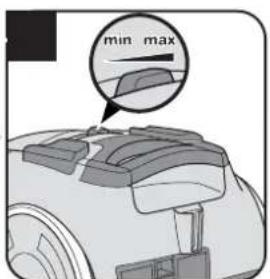
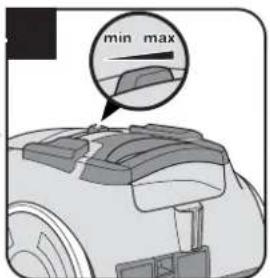
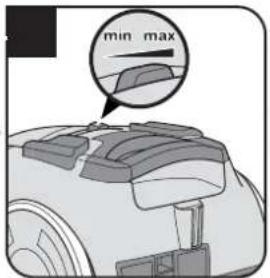
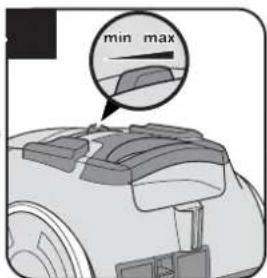
- Set the power to the setting that corresponds to the cleaning task. (Fig. 14).
NOTE:
The auxiliary air regulator (Fig. 6) must be completely closed for vacuum cleaning. With the auxiliary air regulator you can quickly reduce the suction power, to release objects (such as curtains) that have been sucked in. If the hard floor nozzle (Fig. 10) has become stuck to the floor, you can reduce the suction power just as easily using the bypass vent (Fig. 6).
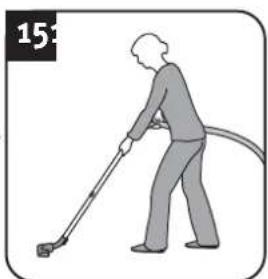
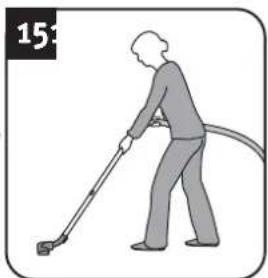
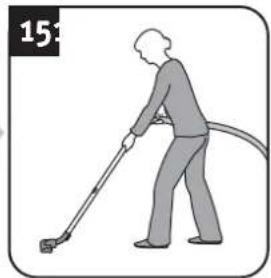
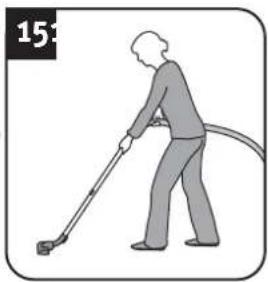
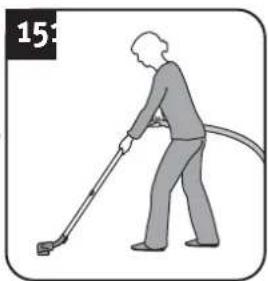
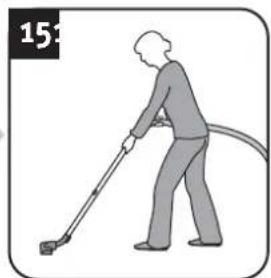
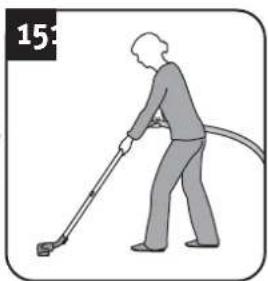
- Vacuum clean (Fig. 15).
! WARNING:
Danger of injury! Especially when vacuum-cleaning stairs make sure that you always stand on a higher level than the appliance.
2.3 After use
natural_image
Illustration of a hand holding a cylindrical device with attached mechanical components (no text or symbols)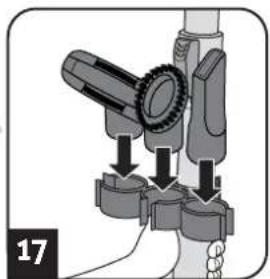
natural_image
Mechanical assembly diagram showing a gear and lever mechanism (no text or symbols)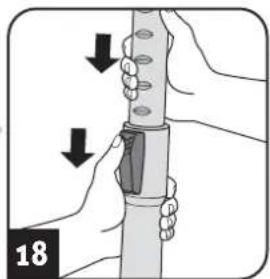
natural_image
Illustration of hands holding a cylindrical object with arrows indicating movement or force direction (no text or symbols)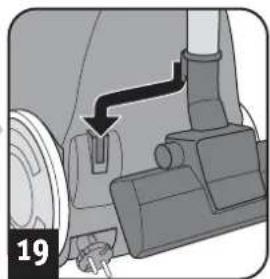
natural_image
Mechanical assembly diagram showing a valve mechanism with a black arrow indicating direction (no text or symbols present)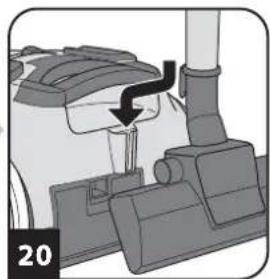
natural_image
Mechanical component diagram showing a valve or pump assembly with a black arrow indicating direction (no text or symbols present)
WARNING:
Danger of injury! After vacuuming, switch off the appliance (i) and wind up the power cord (j). When winding up the cord keep the plug in your hand so that the cord does not thrash about, possibly injuring you.

WARNING:
Danger of injury! Therefore, always keep the appliance out of the reach of children.

CAUTION:
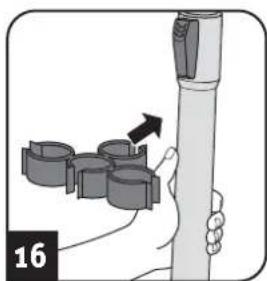
Never store the appliance next to heat sources (e.g. stoves or radiators). Avoid exposing it to direct sunlight. Keep the appliance and accessories cool and dry and so that it does not take up too much space (Fig. 16–20).

CAUTION:
If you intend to store the appliance for a long period, first replace the dust filter bag with a new one, ▷ Chapter 3.1, 'Changing the dust filter bag'.
3.1 Changing the dust filter bag

CAUTION:
Switch off the appliance before changing the dust filter bag. Otherwise, the appliance might be damaged.
NOTE:
Be careful when removing the dust filter bag so that no dust escapes.
natural_image
Illustration of a robotic arm with a red capsule and blue handle, labeled '212425' (no other text or symbols)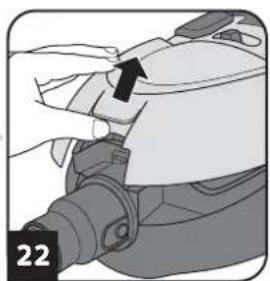
natural_image
Close-up of a mechanical component with a black arrow pointing to a section (no visible text or symbols)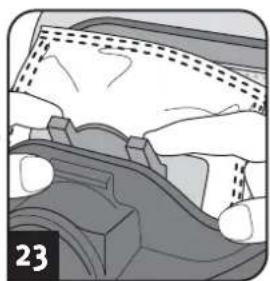
natural_image
Cross-sectional diagram of a mechanical component with no visible text or symbols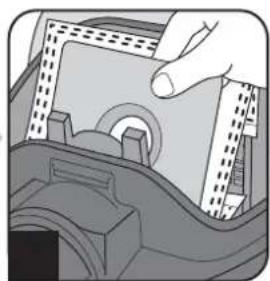
natural_image
Illustration of a hand inserting a CD into a device (no text or symbols visible)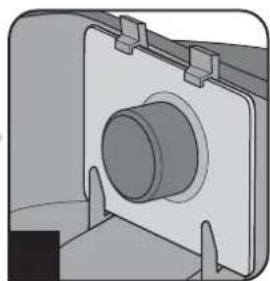
natural_image
Mechanical component diagram showing a cylindrical housing mounted on a flanged base (no text or symbols visible)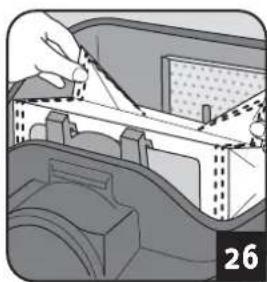
natural_image
Illustration of a hand holding a tool interacting with a mechanical component inside a container (no text or symbols visible)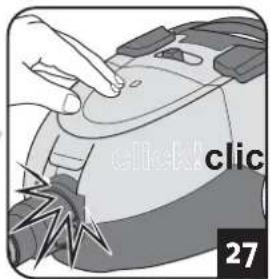
natural_image
Illustration of a hand pressing down on a device with 'click' and 'click' labels (no readable text beyond labels)Recommendation
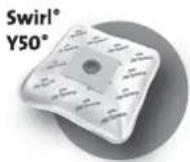
Swirl°
Y50°
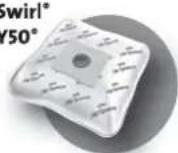
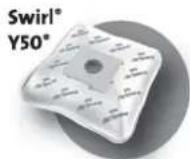
We recommend: Swirl® Y50® MicroPor® Plus dust filter bags with AirSpace® Long Power Guarantee
Swirl ^® , AirSpace ^® MicroPor ^® and Y50 ^® are registered trade marks of a company of the Melitta group and used with their permission.
NOTE:
Insert the bag in the direction of the arrow on the bag. Unfold the bag after insertion (Fig. 26) so that it can erect itself during vacuuming and fill up optimally.
NOTE:
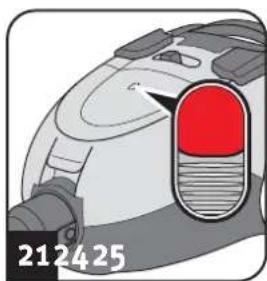
As soon as the dust filter bag change indicator appears in the window (Fig. 21), the dust filter bag has to be changed. In addition, change the dust filter bag at least every three months and before storing for a long period or sending the appliance.
- Switch off the appliance ( ).
- Pull the plug out of the plug socket.
- Open the dust compartment cover (Fig. 22).
- Pull the full dust filter bag out carefully (Fig. 23-24).

CAUTION:
You can dispose of the contents of the dust filter bag with your normal domestic waste as long as it contains no substances not allowed in domestic waste.
- Insert a new dust filter bag (Fig. 25).
- Check whether the dust filter bag is flush with the edges.

CAUTION:
Never use the appliance without having inserted a dust filter bag. Otherwise, the appliance might be damaged.
- Unfold the bag after insertion (Fig. 26) so that it can erect itself during vacuuming and fill up optimally.
- Shut the dust compartment cover (Fig. 27).
3.2 Cleaning / changing the motor protection filter
natural_image
Close-up of a hand pressing down on a mechanical component (no visible text or symbols)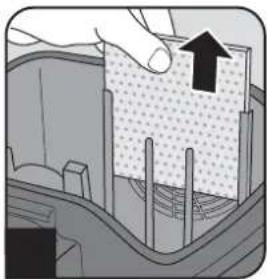
natural_image
Cross-sectional diagram of a mechanical component with a hand holding an upward arrow (no text or symbols)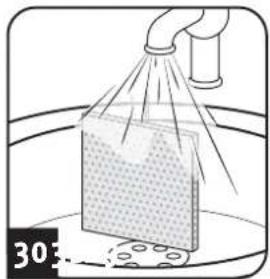
natural_image
Illustration of a spray bottle spraying liquid onto a surface with a pipe (no text or symbols)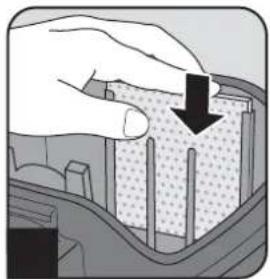
natural_image
Illustration of a hand pressing down on a textured material with a black arrow indicating downward motion (no text or symbols)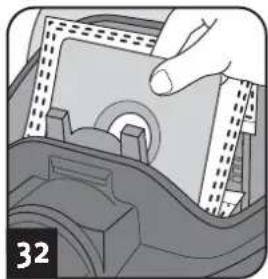
natural_image
Illustration of a hand inserting a component into a car interior (no text or symbols visible)CAUTION:
Clean the motor protection filter upon every filter bag change, and at least every 3 months. Change the motor protection filter every time you open a new dust filter bag packet, because there is a new motor protection filter in every dust filter bag packet.
Change the motor protection filter at least every 6 months.
CAUTION:
The filter is washable, but it may not be cleaned in dishwashers or washing machines. Also, do not use cleaning agents or brushes with hard bristles. Leave the filter to dry after cleaning it with water (approx. 24 hours at room temperature). Only put it back in place when it is completely dry.
- Switch off the appliance ( ).
- Pull the plug out of the plug socket.
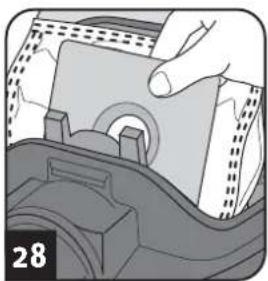
- Take the dust filter bag out of the appliance (Fig. 28), Chapter 3.1, 'Changing the dust filter bag'.
- Pull the filter up and out of the filter holder (Fig. 29).
- Rinse out the filter thoroughly with running cold or hand-warm water (Fig. 30).
- Leave the filter to dry (approx. 24 hours at room temperature).
- Insert the filter back into the filter holder (Fig. 31).
- Put the dust filter bag back in (Fig. 32), Chapter 3.1, 'Changing the dust filter bag'.
3.3 Cleaning / changing the exhaust filter
natural_image
Hand inserting a component into a device (no text or symbols visible)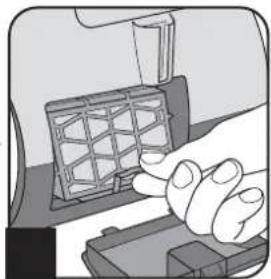
natural_image
Illustration of a hand pressing a component on a device (no text or symbols visible)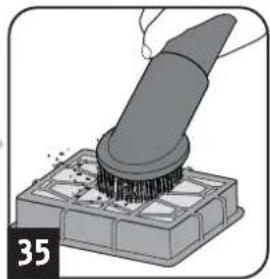
natural_image
Illustration of a brush applying material onto a base, no text or symbols present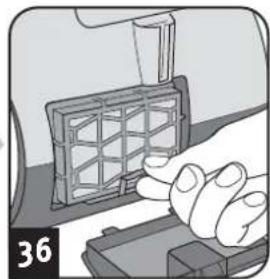
natural_image
Illustration of a hand pressing a grid-patterned object on a device (no text or symbols visible)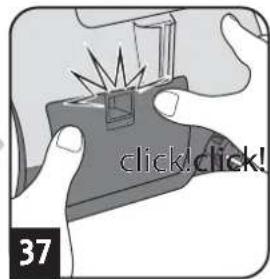
CAUTION:
Clean the exhaust filter each time you clean the motor protection filter. Change the exhaust filter as soon as it has deformed or is damaged at the latest.
CAUTION:
The filter cannot be washed.
Do not use detergents or brushes with hard bristles to clean it.
Otherwise, the filter could get damaged.
- Switch off the appliance ( ).
- Pull the plug out of the plug socket.
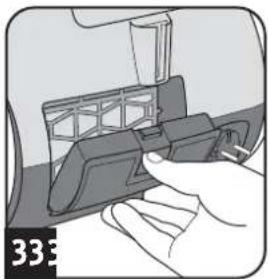
- Open the exhaust filter cover as shown (Fig. 33).
- Take the filter out of the appliance (Fig. 34).
- Knock out the dirt and remove the dirt from the exhaust filter with a soft brush, e.g. the furniture brush supplied with the appliance (Fig. 35).
- Put the filter back into its holder (Fig. 36).
- Put the exhaust filter cover into its recesses (Fig. 37).
- Push the cover until it locks into place.
3.4 Spare parts and accessories
The following accessories and spare parts can be reordered: Accessory parts and spare parts can be reordered from:
Item number Description
7374001 1 exhaust filter
7700022 4 dust filter bags + 1 motor protection filter
M203-4 1 parquet brush
M219 1 mini-turbo brush "Fellino"
M221 1 midi-turbo brush
M232 1 long, flexible crevice nozzle
M236-1 1 Hard floor nozzle
▷Page 46, 'International Service'
CAUTION:
Only use original spare parts from the scope of delivery or those that you have purchased by reordering.
4.1 Before you send in the appliance

WARNING:
Danger of injury! Never use a defective appliance! Always switch off the appliance and disconnect it before starting troubleshooting.
Before contacting us or even sending the appliance to us, use the table to check whether you can correct the problem yourself.
| Problem Possible cause / solution | |
| The dust filter bag change indicator appears in the window (Fig. 21). | The dust filter bag is full. Change the dust filter bag ▷Chapter 3.1, ‘Changing the dust filter bag’. |
| The filters are dirty.Clean the respective filter, ▷Chapter 3.2, ‘Cleaning / changing the motor protection filter’ or ▷Chapter 3.3, ‘Cleaning / changing the exhaust filter’. | |
| Nozzle, telescopic tube or suction hose is blocked.Remove the obstacle. If necessary, use a long wooden stick (e. g. a broomstick) to do this. | |
| The vacuum cleaner stops suddenly. | The overheating protection has tripped (possibly due to blocked suction channels, filters, or similar).1. Switch the appliance off and pull the plug out of the socket.2. Remove the cause of overheating (e.g. by disassembling telescopic tube and suction hose and removing the obstacle and/or cleaning filters).3. Wait around 45 minutes until the appliance has cooled down.4. After the appliance has cooled off, you may switch it on again. |
| Problem Possible cause / solution | |
| The cleaning results are unsatisfactory in spite of the appliance working correctly. | Bypass vent (Fig. 6) is open. Close the bypass vent (Fig. 6). |
| Position of the suction power control is not appropriate (Fig. 14). Adjust the position of the suction power control (Fig. 14). | |
| The attached nozzle is unsuitable. Change the nozzle, ▷Chapter 2.1, ‘Assemble appliance and adjust nozzles to surface’. | |
| Collar brush of the floor nozzle is in a position inappropriate to the floor (Fig. 7 – 8). Adjust the position of the collar brush to the floor via the switch on the floor nozzle (Fig. 7 – 8). | |
| When using the optional long, flexible crevice nozzle, the appliance generates a whistling sound and the suction power drops rapidly. | Negative pressure in the vacuum cleaner is too high. This caused the safety valve in the vacuum cleaner to trigger. Open the bypass vent until the valve no longer triggers. |
NOTE:
If you cannot solve the problem following these instructions, contact the Dirt Devil customer service (▷Page 46, 'International Service').
4.2 Warranty
The statutory warranty regulations in accordance with the EU Directive 1999/44/EC apply.
In non-EU countries the minimum requirements of the warranty in the respective country apply.
4.3 Disposal

Dispose of the appliance in compliance with the environmental protection laws of your country. Electrical waste may not be disposed of together with domestic waste. Use local old-appliance collection points instead.
The filters and dust filter bags are made from environmentally-friendly materials. You can dispose of them — as opposed to the appliance itself — with your domestic waste, provided they do not contain anything that is forbidden from disposal in domestic waste.
4.4 Technical data
Type of appliance : Bagged vacuum cleaner
Model name : BEAT
Model : DD 7374 (-0/-1/.../-5/-6)
Voltage : 220-240 V \~, 50/60 Hz
Power : 800 W
max. available dust bag capacity : approx. 1.5 litres
Power cord length : approx. 5 m
Weight
: approx. 3.9 kg



Technical and design specifications may be changed in the course of continuous product improvement. © Royal Appliance International GmbH
natural_image
Illustration of a vacuum cleaner with attached pipe fitting (no text or symbols)1.1 Mode d'emploi
natural_image
Illustration of a hand inserting a component into a device (no text or symbols visible)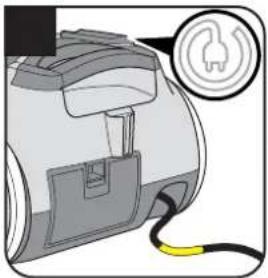
natural_image
Illustration of a mechanical device with a yellow cable and a power plug symbol (no text or labels)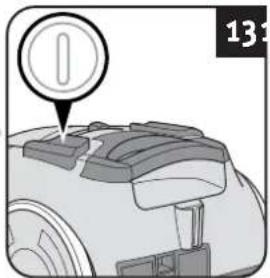
natural_image
Illustration of a person using a power tool to clean or walk (no text or symbols)pareil en marche.
natural_image
Illustration of a hand holding a cylindrical object with a black arrow pointing to it, no text or symbols present.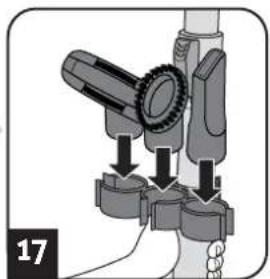
natural_image
Mechanical assembly diagram showing a lever mechanism with arrows indicating motion (no text or symbols)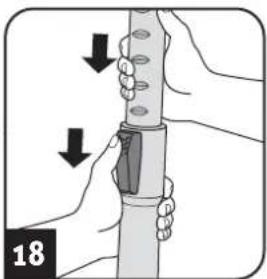
natural_image
Illustration of hands holding a cylindrical object with arrows indicating motion or force direction (no text or symbols)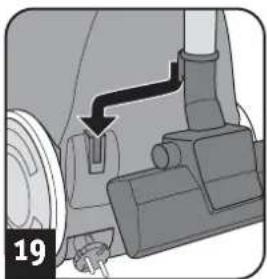
natural_image
Mechanical assembly diagram showing a rotating component with a black arrow indicating direction (no text or symbols)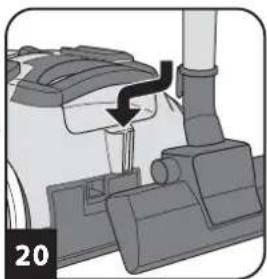
natural_image
Mechanical component diagram showing a lever mechanism with a black arrow indicating motion (no text or symbols)AVERTISSEMENT:
natural_image
Illustration of a mechanical component with a red highlighted section and number 212425 (no text or symbols on the diagram itself)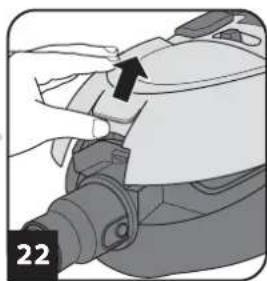
natural_image
Close-up of a hand holding a mechanical component with a black arrow pointing to a section (no text or symbols visible)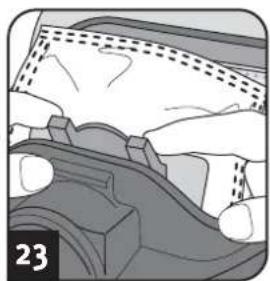
natural_image
Mechanical component diagram showing gear and housing assembly (no text or symbols)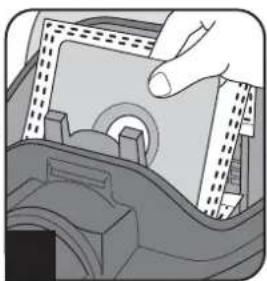
natural_image
Illustration of a hand inserting a component into a device (no text or symbols visible)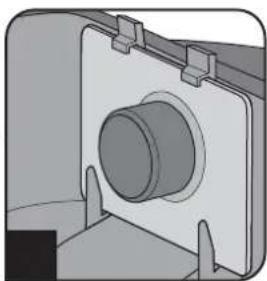
natural_image
Mechanical component diagram showing a cylindrical housing mounted on a flanged base (no text or symbols visible)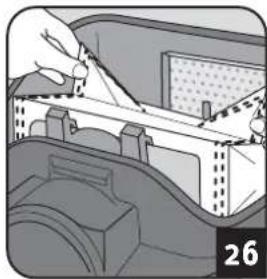
natural_image
Illustration of a hand using a tool to cut or install a mechanical component, no text or symbols visible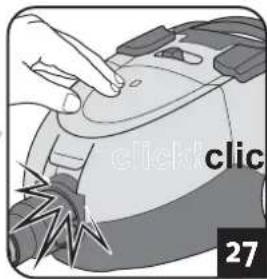
natural_image
Close-up of a hand pressing down on a mechanical component (no visible text or symbols)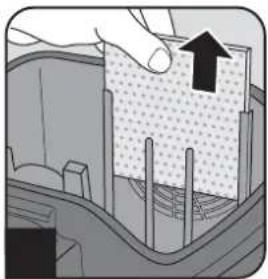
natural_image
Cross-sectional diagram of a mechanical or structural component with a hand holding an upward arrow (no text or symbols present)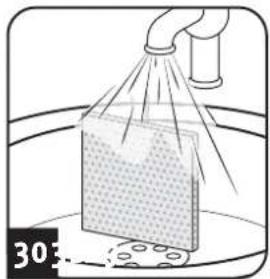
natural_image
Illustration of a spray gun spraying a material sample into a container (no text or symbols)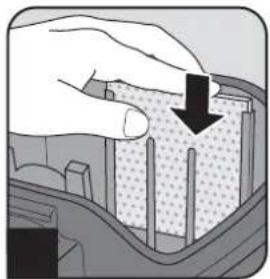
natural_image
Illustration of a hand pressing down on a textured surface with a downward arrow (no text or symbols)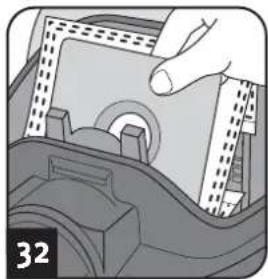
natural_image
Illustration of a hand inserting a component into a device (no text or symbols visible)ATTENTION:
natural_image
Illustration of a hand inserting a device into a device component (no text or symbols visible)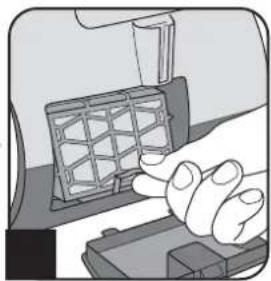
natural_image
Illustration of a hand pressing a grid on a device component (no text or symbols visible)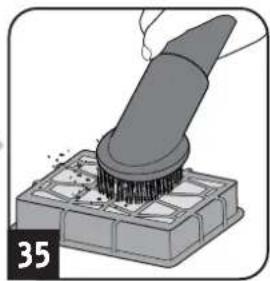
natural_image
Illustration of a brush applying material onto a base, no text or symbols present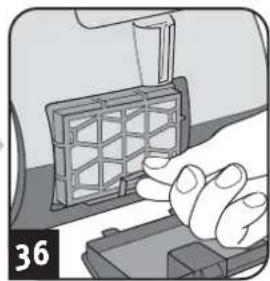
natural_image
Close-up of a hand pressing a grid component on a device (no visible text or symbols)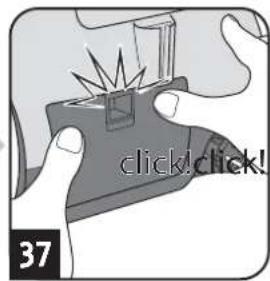
ATTENTION:
natural_image
Illustration of a vacuum cleaner with attached pipe fitting (no text or symbols)natural_image
Illustration of a hand using a brush to clean or store items on a grid surface (no text or symbols)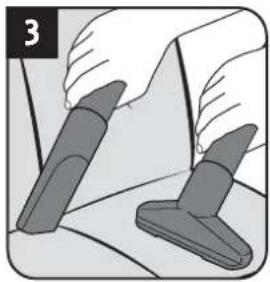
natural_image
Illustration of two hands holding a tool, one pointing at a surface and the other pressing a button (no text or symbols)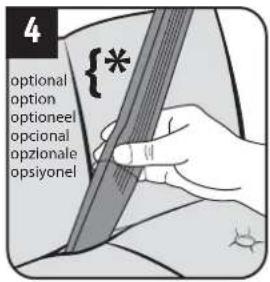
natural_image
Illustration of a hand holding a device with two arrows indicating downward motion (no text or symbols)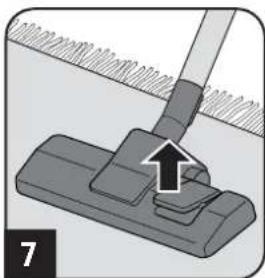
natural_image
Mechanical component diagram showing a clip with an arrow indicating force or movement (no text or symbols present)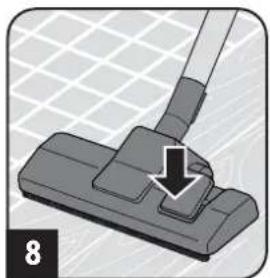
natural_image
Close-up of a hand using a vacuum cleaner to press or install a component, with a black arrow indicating the process (no text or symbols present)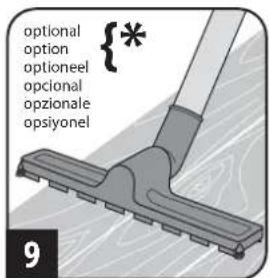

WAARSCHUWING:
natural_image
Illustration of a hand using a handheld device to adjust or install a device (no text or symbols visible)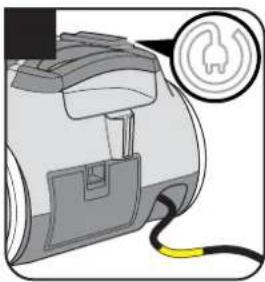
natural_image
Diagram of a device with a yellow cable and a circular icon showing a flame symbol (no text or labels)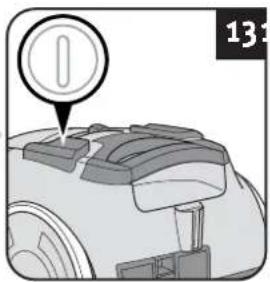
natural_image
Diagram of a robotic arm with a circular icon and number 13, showing no text or symbols on the object itself.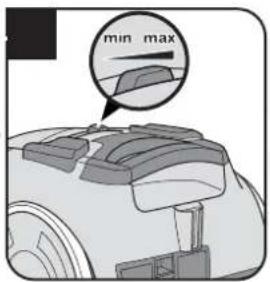
natural_image
Illustration of a person using a handheld tool to clean or wash the material (no text or symbols)
WAARSCHUWING:
natural_image
Illustration of a hand holding a cylindrical device with attached mechanical components (no text or symbols visible)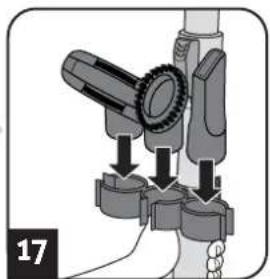
natural_image
Mechanical assembly diagram showing a lever mechanism with arrows indicating force or movement (no text or symbols present)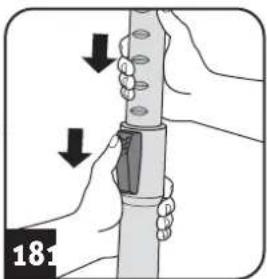
natural_image
Illustration of hands holding a cylindrical object with arrows indicating motion or force direction (no text or symbols)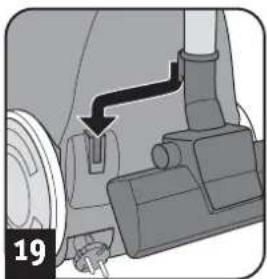
natural_image
Mechanical assembly diagram showing a valve mechanism with a black arrow indicating direction (no text or symbols present)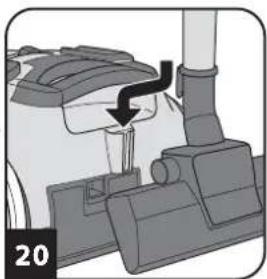
natural_image
Mechanical component diagram showing a lever mechanism with a black arrow indicating motion (no text or symbols)! WAARSCHUWING:
natural_image
Illustration of a robotic arm with a red capsule and blue handle, labeled '212425' (no other text or symbols)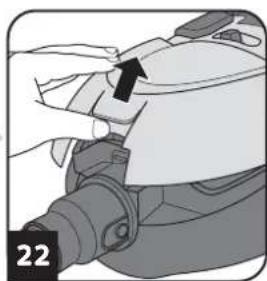
natural_image
Close-up of a hand adjusting a mechanical component with a black arrow pointing to a detail (no text or symbols visible)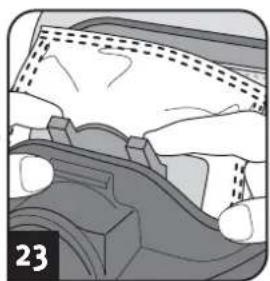
natural_image
Cross-sectional diagram of a mechanical component with no visible text or symbols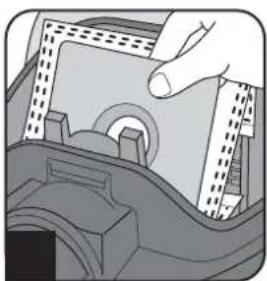
natural_image
Illustration of a hand inserting a component into a device (no text or symbols visible)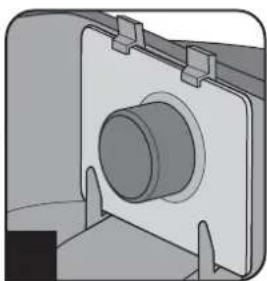
natural_image
Mechanical component diagram showing a cylindrical shaft mounted on a flanged housing (no text or symbols visible)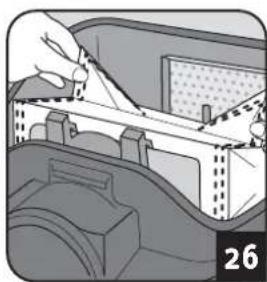
natural_image
Illustration of a hand holding a tool interacting with a mechanical component, no visible text or symbols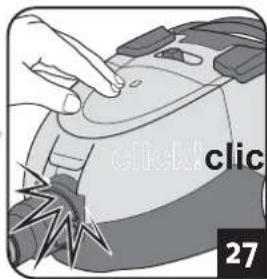
Koopadvies
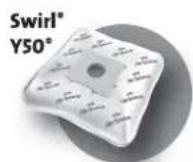
Wij adviseren om: Swirl® Y50® MicroPor® Plus stoffilterzakken met AirSpace® Long Power Guarantee
natural_image
Close-up of a hand pressing down on a mechanical component (no visible text or symbols)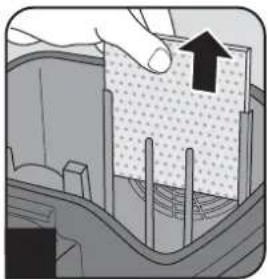
natural_image
Cross-sectional diagram of a mechanical component with an arrow indicating upward motion (no text or symbols present)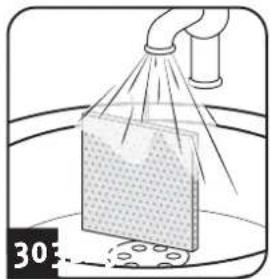
natural_image
Illustration of a spray bottle spraying liquid onto a surface with a pipe (no text or symbols)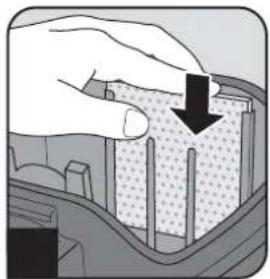
natural_image
Illustration of a hand pressing down on a textured material with a black arrow indicating downward motion (no text or symbols)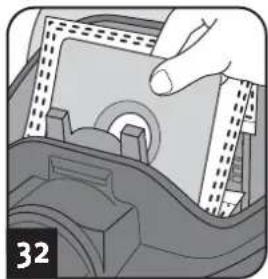
natural_image
Illustration of a hand inserting a component into a car interior (no text or symbols visible)OPGELET:
natural_image
Hand inserting a component into a device (no text or symbols visible)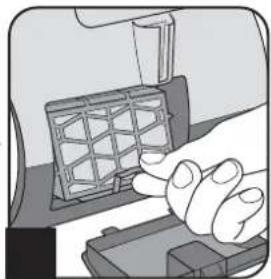
natural_image
Illustration of a hand pressing a component on a device (no text or symbols visible)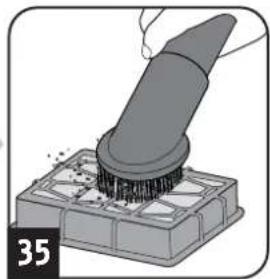
natural_image
Illustration of a brush applying material onto a base, no text or symbols present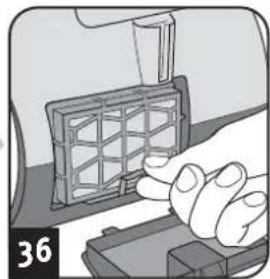
natural_image
Illustration of a hand pressing a grid-patterned object on a device (no text or symbols visible)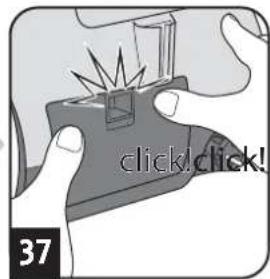
OPGELET:
natural_image
Illustration of a vacuum cleaner with attached pipe fitting (no text or symbols)natural_image
Illustration of a hand using a brush to clean or brush another on a grid of squares (no text or symbols)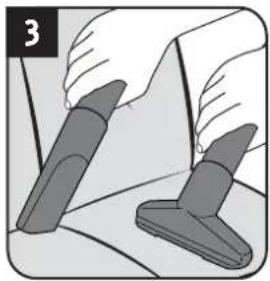
natural_image
Illustration of two hands using a tool to apply or install a component, no text or symbols present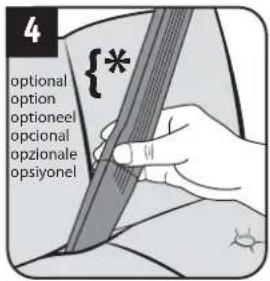
natural_image
Illustration of a hand holding a cable buckle with two arrows indicating downward motion (no text or symbols)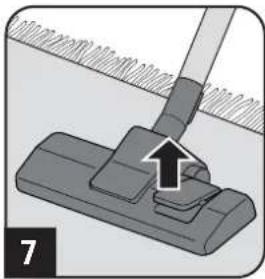
natural_image
Mechanical assembly diagram showing a lever pressing a component with an arrow indicating motion (no text or symbols present)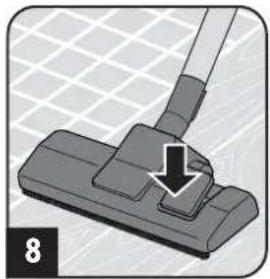
natural_image
Close-up of a cleaning brush applying material to a surface, showing a downward arrow (no text or symbols)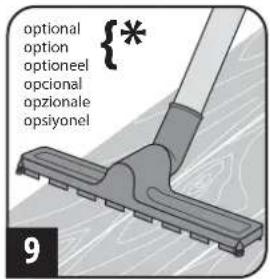
AVISO:
natural_image
Illustration of a hand inserting a device into a device component (no text or symbols visible)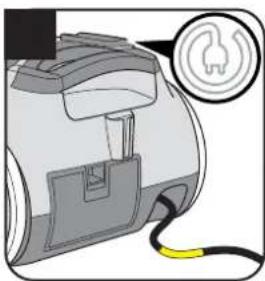
natural_image
Illustration of a portable device with a yellow cable and a circular icon showing a flame symbol (no text or labels)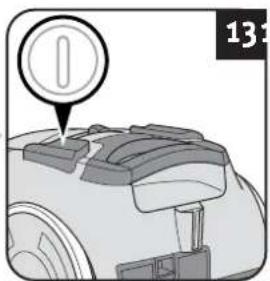
natural_image
Close-up of a robotic device with a circular icon and number 13 visible (no text or symbols on the device itself)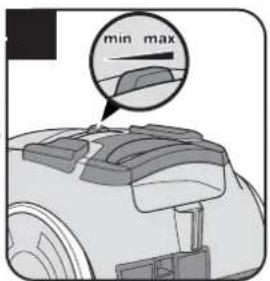
natural_image
Illustration of a person using a handheld tool to clean or walk (no text or symbols)! AVISO:
natural_image
Illustration of a hand holding a cylindrical device with attached mechanical components (no text or symbols)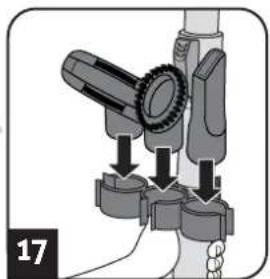
natural_image
Mechanical assembly diagram showing a lever mechanism with arrows indicating force or movement (no text or symbols present)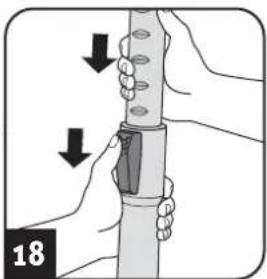
natural_image
Illustration of hands holding a cylindrical object with arrows indicating motion or force direction (no text or symbols)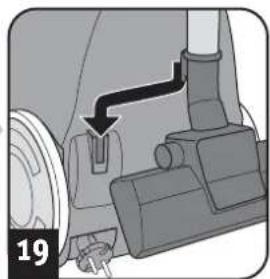
natural_image
Mechanical assembly diagram showing a lever mechanism with a numbered label (19) and an arrow pointing to a component (no text or symbols present)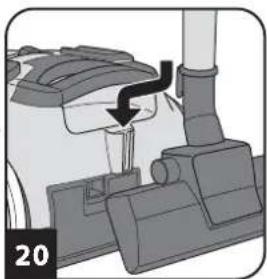
natural_image
Mechanical component diagram showing a lever mechanism with a black arrow indicating motion (no text or symbols)! AVISO:
natural_image
Illustration of a robotic vacuum cleaner with a red vent and blue handle, labeled '212425' (no other text or symbols)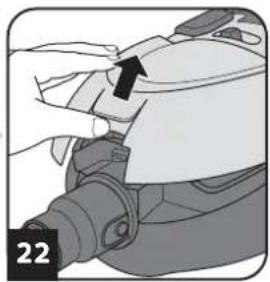
natural_image
Close-up of a hand adjusting a mechanical component with a black arrow pointing to a detail (no text or symbols visible)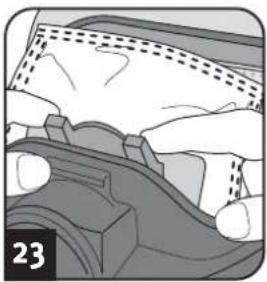
natural_image
Close-up of a mechanical component with hands and gears, no visible text or symbols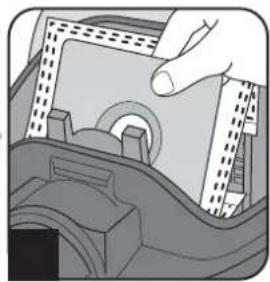
natural_image
Illustration of a hand pressing down on a mechanical component (no text or symbols visible)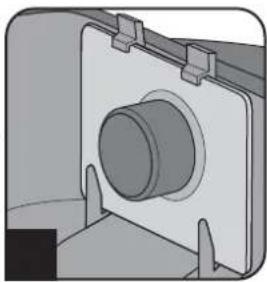
natural_image
Mechanical component diagram showing a cylindrical housing mounted on a flanged base (no text or symbols visible)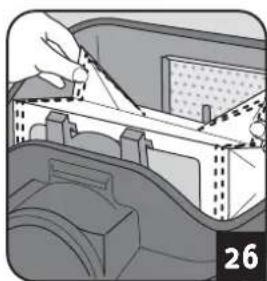
natural_image
Illustration of a hand using a tool to adjust or install a mechanical component, no text or symbols visible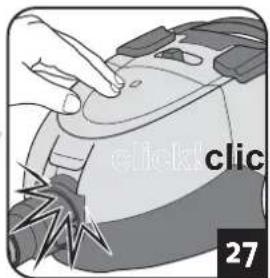
natural_image
Close-up of a hand pressing down on a mechanical component (no visible text or symbols)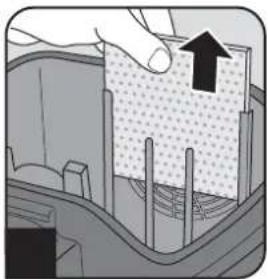
natural_image
Cross-sectional diagram of a mechanical or structural component with a hand holding a textured block and an arrow pointing to it (no text or symbols present)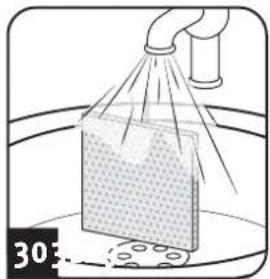
natural_image
Illustration of a spray gun spraying a material sample onto a surface, with no visible text or symbols.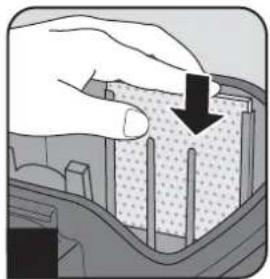
natural_image
Illustration of a hand pressing down on a textured material with a black arrow indicating downward motion (no text or symbols)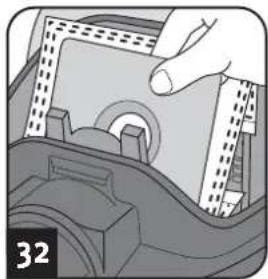
natural_image
Illustration of a hand inserting a component into a car's seat (no text or symbols visible)ATENCIÓN:
natural_image
Hand inserting a component into a device (no visible text or symbols)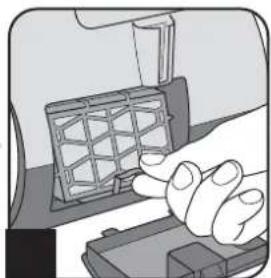
natural_image
Illustration of a hand pressing a component on a device (no text or symbols visible)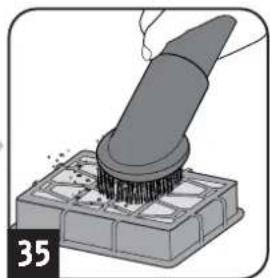
natural_image
Illustration of a brush applying material onto a base, no text or symbols present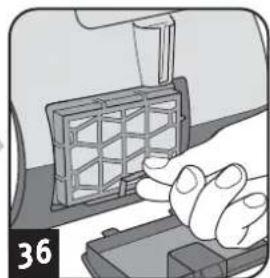
natural_image
Close-up of a hand pressing a grid-patterned object on a device (no text or symbols visible)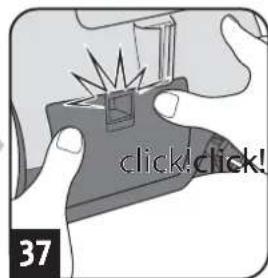
ATENCIÓN:
natural_image
Illustration of a vacuum cleaner with attached pipe fitting (no text or symbols)natural_image
Illustration of a hand using a brush to clean or brush another on a grid of small blocks (no text or symbols)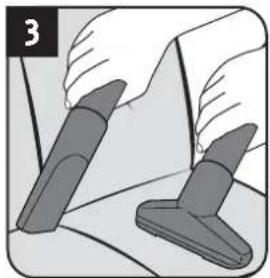
natural_image
Illustration of two hands holding a pen and a pair of similar objects, no text or symbols present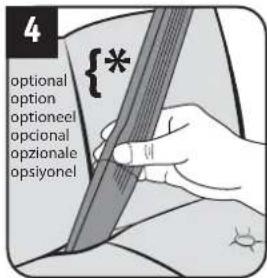
natural_image
Illustration of a hand holding a device with two arrows indicating downward motion (no text or symbols)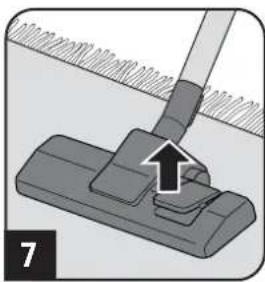
natural_image
Mechanical assembly diagram showing a lever pressing a component with an arrow indicating motion (no text or symbols present)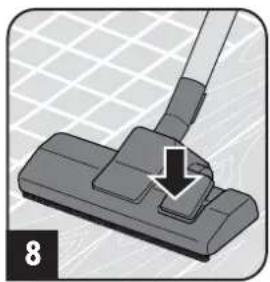
natural_image
Close-up of a hand using a vacuum cleaner to press down a component, with a downward arrow indicating the press direction (no text or symbols present)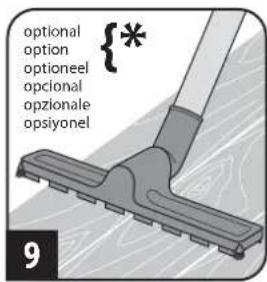
AVVERTIMENTO:
natural_image
Illustration of a hand inserting a device into a device component (no text or symbols visible)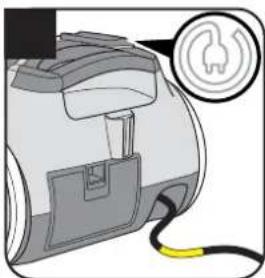
natural_image
Illustration of a portable device with a yellow cable and a circular icon showing a flame symbol (no text or labels)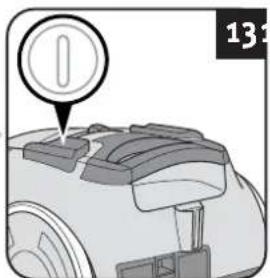
natural_image
Illustration of a person using a tool to clean or walk (no text or symbols)AVVERTIMENTO:
natural_image
Illustration of a hand holding a cylindrical device with attached mechanical components (no text or symbols)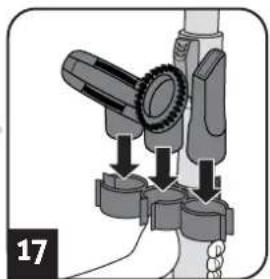
natural_image
Mechanical assembly diagram showing a lever mechanism with arrows indicating force or movement (no text or symbols present)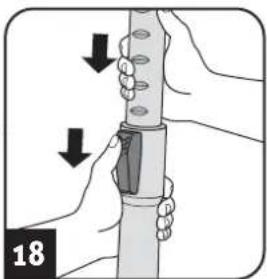
natural_image
Illustration of hands holding a cylindrical object with arrows indicating motion or force direction (no text or symbols)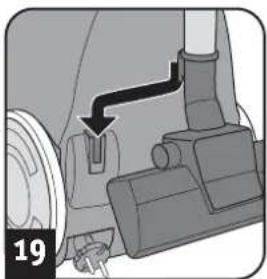
natural_image
Mechanical assembly diagram showing a rotating component with a black arrow indicating motion direction (no text or symbols)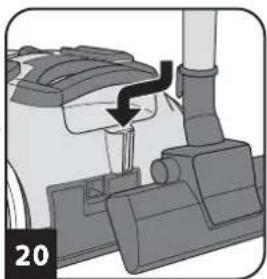
natural_image
Mechanical component diagram showing a lever mechanism with a black arrow indicating motion (no text or symbols)AVVERTIMENTO:
natural_image
Illustration of a robotic vacuum cleaner with a red vent and black handle, labeled '212425' (no other text or symbols)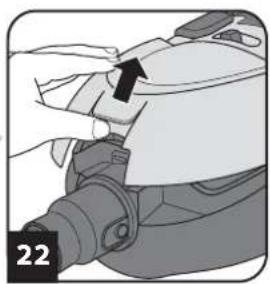
natural_image
Illustration of a hand holding a device with an arrow pointing to a component (no text or symbols present)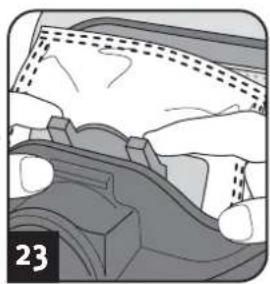
natural_image
Diagram of a mechanical component with hands and a dashed line indicating motion (no text or symbols)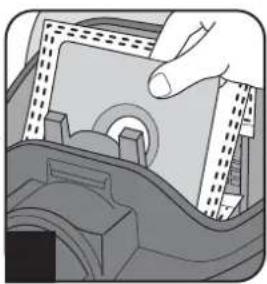
natural_image
Illustration of a hand pressing down on a mechanical component (no text or symbols visible)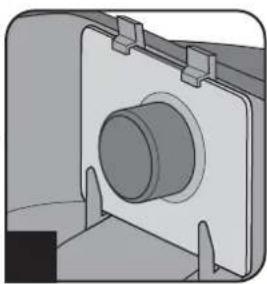
natural_image
Mechanical component diagram showing a cylindrical shaft mounted on a flanged housing (no text or symbols visible)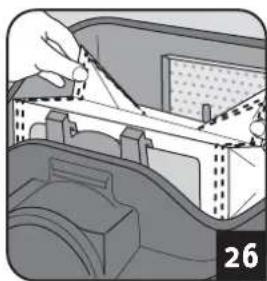
natural_image
Illustration of a hand using a tool to interact with a device inside a container (no text or symbols visible)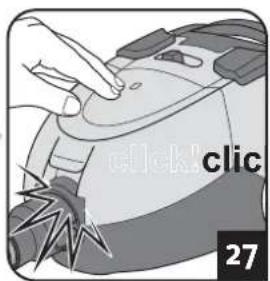
natural_image
Illustration of a hand pressing down on a device component (no text or symbols visible)natural_image
Close-up of a hand pressing down on a mechanical component (no visible text or symbols)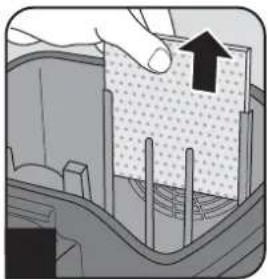
natural_image
Cross-sectional diagram of a mechanical component with an arrow indicating upward motion (no text or symbols)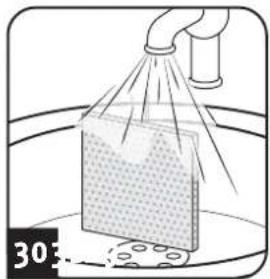
natural_image
Illustration of a spray gun spraying a material sample into a container (no text or symbols)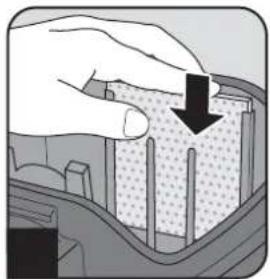
natural_image
Illustration of a hand pressing down on a textured rectangular object with a black arrow indicating downward motion (no text or symbols)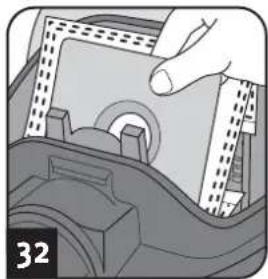
natural_image
Illustration of a hand inserting a component into a device (no text or symbols visible)ATTENZIONE:
natural_image
Hand inserting a component into a device (no visible text or symbols)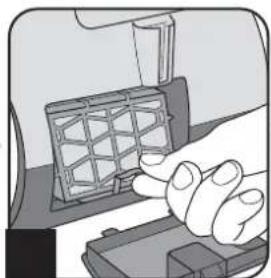
natural_image
Illustration of a hand pressing a component into a device (no text or symbols visible)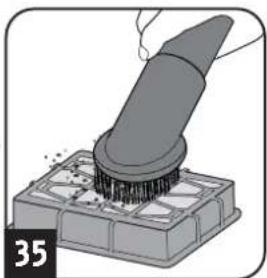
natural_image
Illustration of a brush applying material onto a base, no text or symbols present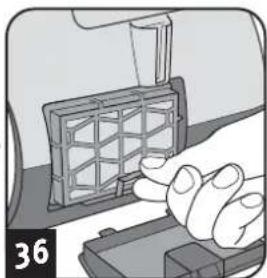
natural_image
Hand pressing a grid component on a device (no text or symbols visible)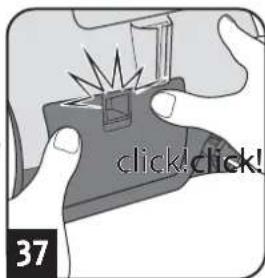
ATTENZIONE:
natural_image
Illustration of a vacuum cleaner with attached pipe fitting (no text or symbols)natural_image
Illustration of a hand using a brush to brush over a grid of squares (no text or symbols)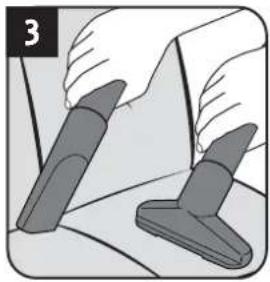
natural_image
Illustration of two hands holding a tool, one with a handle and the other with a handle (no text or symbols)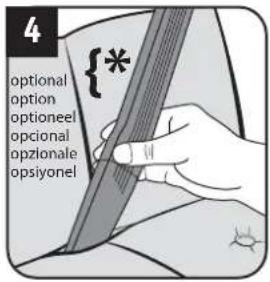
natural_image
Illustration of a hand holding a device with two arrows indicating downward motion (no text or symbols)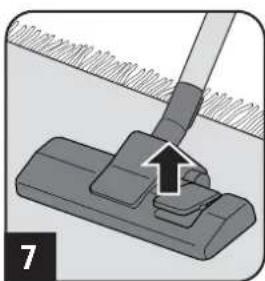
natural_image
Mechanical assembly diagram showing a clip with an arrow indicating force or movement (no text or symbols present)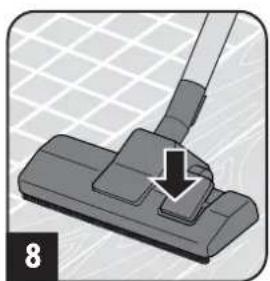
natural_image
Illustration of a hand using a tool to press or install a component on a grid-patterned surface (no text or symbols)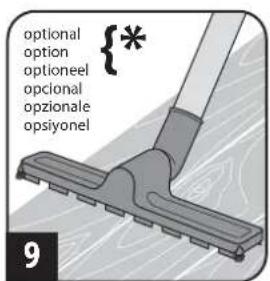
Uyarı:
natural_image
Illustration of a hand using a handheld device to adjust or install a device (no text or symbols visible)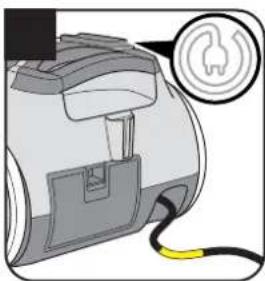
natural_image
Illustration of a portable electronic device with a yellow cable and a circular connector (no text or symbols)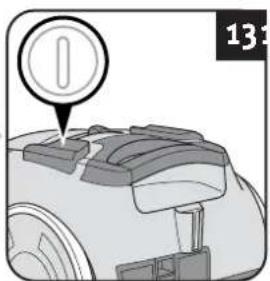
natural_image
Illustration of a robotic arm with a circular icon and number 13 (no text or symbols on the object itself)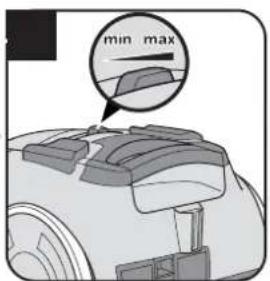
natural_image
Illustration of a person using a handheld tool to clean or wash the material (no text or symbols)⚠️ Uyari:
natural_image
Illustration of a hand holding a cylindrical device with a mechanical component, showing a close-up of its components (no text or symbols visible)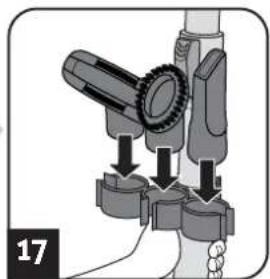
natural_image
Mechanical assembly diagram showing a lever mechanism with arrows indicating motion (no text or symbols)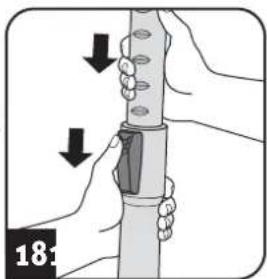
natural_image
Illustration of hands holding a cylindrical object with arrows indicating motion or force direction (no text or symbols)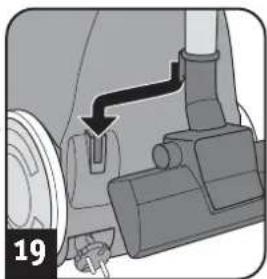
natural_image
Mechanical assembly diagram showing a lever mechanism with a numbered label (19) and an arrow indicating direction (no text or symbols beyond label)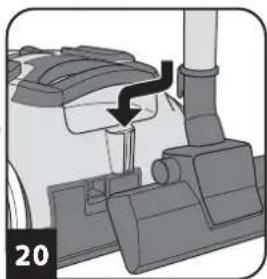
natural_image
Mechanical component diagram showing a lever mechanism with a black arrow indicating motion (no text or symbols)Uyarı:
natural_image
Illustration of a robotic vacuum cleaner with a red capsule and black handle, labeled with numbers 212425 (no text or symbols on the diagram itself)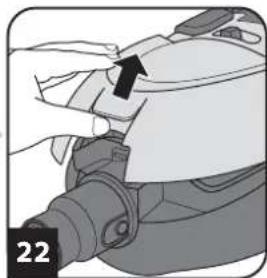
natural_image
Close-up of a hand holding a mechanical component with an arrow pointing to a detail (no text or symbols visible)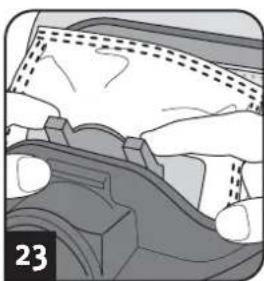
natural_image
Illustration of a car's wheel and dashboard components (no text or symbols)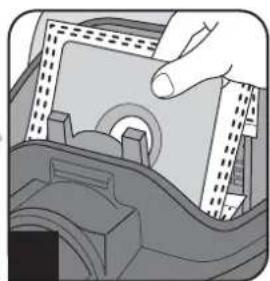
natural_image
Illustration of a hand pressing down on a mechanical component (no text or symbols visible)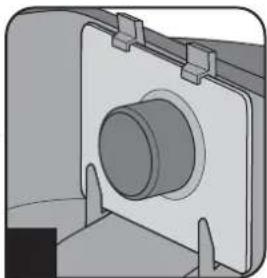
natural_image
Mechanical component diagram showing a cylindrical shaft mounted on a flanged housing (no text or symbols visible)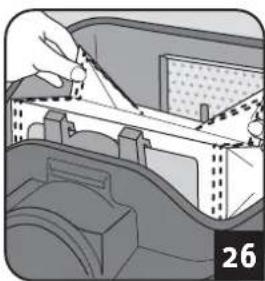
natural_image
Illustration of a hand installing or adjusting a mechanical component inside a vehicle (no text or symbols visible)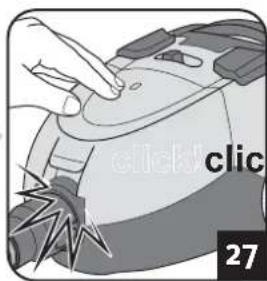
natural_image
Illustration of a hand pressing down on a device with 'click' and '27' labels (no readable text or symbols beyond basic diagram)Satış tavsiyesi
natural_image
Close-up of a hand pressing down on a mechanical component (no visible text or symbols)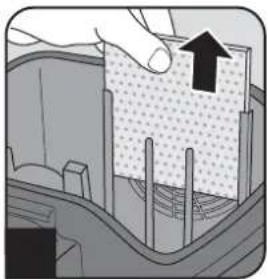
natural_image
Cross-sectional diagram of a mechanical component with an arrow indicating upward motion (no text or symbols present)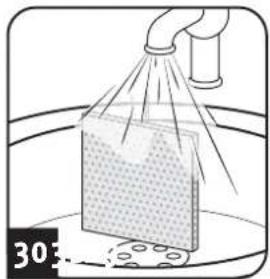
natural_image
Illustration of a spray bottle spraying liquid onto a surface with a pipe (no text or symbols)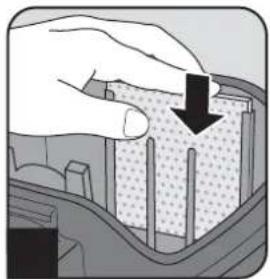
natural_image
Illustration of a hand pressing down on a textured material with a black arrow indicating downward motion (no text or symbols)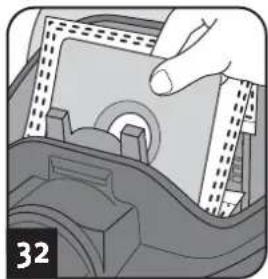
natural_image
Illustration of a hand inserting a component into a car interior (no text or symbols visible)Dikkat:
natural_image
Hand inserting a component into a device (no text or symbols visible)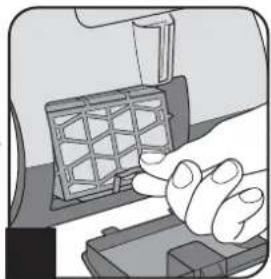
natural_image
Illustration of a hand pressing a component on a device (no text or symbols visible)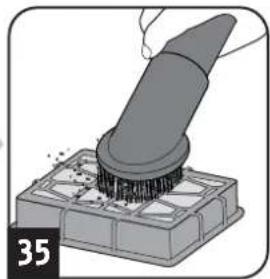
natural_image
Illustration of a brush applying material onto a base, no text or symbols present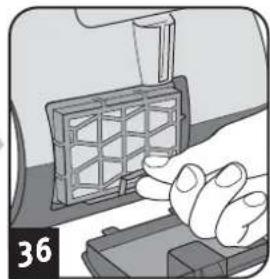
natural_image
Illustration of a hand pressing a grid-patterned object on a device (no text or symbols visible)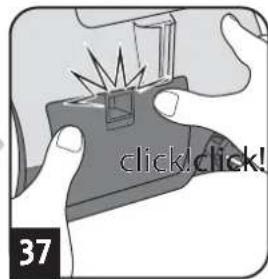
Dikkat:
▷ Sayfa 46, "International Service"
Dikkat:
natural_image
Illustration of a vacuum cleaner with attached pipe fitting (no text or symbols)
DE
Royal Appliance International GmbH
Abt. Kundenservice
Jagenbergstraße 19
41468 Neuss
DEUTSCHLAND

de@dirtdevil-service.eu
www.dirtdevil.de

0049 (0) 180 - 501 50 50*

0049 (0) 2131 - 60906095
AT

at@dirtdevil-service.eu

0043 - 720 - 88 49 54**
BG

bg@dirtdevil-service.eu

00359 - 2 - 49 25 116**
ES

es@dirtdevil-service.eu

0034 - 91 - 19 82 787**
GR

gr@dirtdevil-service.eu

0030 - 2 - 11 19 81 203**
IT

it@dirtdevil-service.eu

0039 - 06 - 94 80 16 18**
NL

nl@dirtdevil-service.eu

0031 - 20 - 80 85 408**
PT

pt@dirtdevil-service.eu

00351 - 21 - 11 41 327**
BE

be@dirtdevil-service.eu
0032 - 2 - 80 85 065**
CH

ch@dirtdevil-service.eu

00359 - 2 - 49 25 116**
FR

fr@dirtdevil-service.eu
0033 - 9 - 75 18 30 17**
HU

hu@dirtdevil-service.eu
0036 - 1 - 84 80 686**
LU

lu@dirtdevil-service.eu
00352 - 2 - 08 80 506**
PL

pl@dirtdevil-service.eu
0048 - 22 - 39 70 223**
\* DE
natural_image
Illustration of a vacuum cleaner with attached pipe and control panel (no text or symbols)Fehlerbeschreibung • Description of the malfunction • Description du problème • Omschrijving van de fout • Descripción del fallo • Descrizione del difetto • Hata tanımı:
Royal Appliance International GmbH
Jagenbergstraße 19
41468 Neuss
Germany
de@dirtdevil-service.eu
www.dirtdevil.de
+49 (0) 1805 - 501 50 50*
+49 (0) 2131 - 60 90 60 95
DE
* € 0.14 per minute from German landlines, maximum German mobile phone tariff € 0.42 per minute.
The cost of calls from abroad—outside Germany—depend upon the current prices of the respective foreign telephone company.
FR
- WARNING:
- ! WARNING:
- Kaufempfehlung
- ACHTUNG:
- About the operating manual
- CAUTION:
- NOTE:
- Concerning certain groups of persons
- Information on power supply
- Information on proper use
- Also prohibited:
- About the option turbo brush
- If the appliance is defective
- Assemble appliance and adjust nozzles to surface
- Vacuum cleaning
- After use
- Changing the dust filter bag
- Recommendation
- Cleaning / changing the motor protection filter
- Cleaning / changing the exhaust filter
- Spare parts and accessories
- Item number Description
- Before you send in the appliance
- Warranty
- Disposal
- Technical data
- Mode d'emploi
- AVERTISSEMENT:
- ATTENTION:
- WAARSCHUWING:
- ! WAARSCHUWING:
- Koopadvies
- OPGELET:
- AVISO:
- ! AVISO:
- ATENCIÓN:
- AVVERTIMENTO:
- ATTENZIONE:
- Uyarı:
- ⚠️ Uyari:
- Satış tavsiyesi
- Dikkat:
- DE
- AT
- BG
- ES
- GR
- IT
- NL
- PT
- BE
- CH
- FR
- HU
- LU
- PL
- \* DE
Brand : DIRT DEVIL
Model : Beat 2.1
Category : Vacuum Cleaner