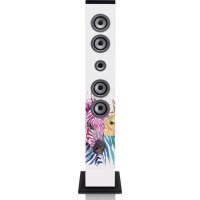
IBT6 - Loudspeaker Ices Electronics - Free user manual and instructions
Find the device manual for free IBT6 Ices Electronics in PDF.



| Product type | Bluetooth acoustic column |
| Brand | Ices Electronics |
| Model | IBT6 |
| Dimensions (approx.) | 150 x 150 x 990 mm |
| Weight (without packaging) | 5.6 kg |
| Power supply | 100-240 V AC ~ 50/60 Hz, 40 W |
| Output power | 2 x 10 W (speakers) + 1 x 25 W (subwoofer) |
| Speakers | 4 x 3 inches + 1 x 4.5 inches |
| Connectivity | Bluetooth, FM radio, 3.5 mm auxiliary input |
| Ports | USB charging (5 V, 1 A), USB MP3 (max 32 GB), SD card reader |
| Remote control | Yes (CR2025 batteries included) |
| Operating temperature | 0 °C to +40 °C |
| Bluetooth frequency | 2402-2480 MHz |
| Care and cleaning | Unplug before cleaning; wipe with a soft cloth; do not use abrasive products |
| Safety | Do not expose to water or excessive heat; keep out of reach of children; use only on a stable surface |
| Spare parts and repairability | Repair by a certified technician recommended; unauthorized opening voids warranty |
| Warranty | Compliant with European legislation; contact the retailer for any repairs |
Frequently Asked Questions - IBT6 Ices Electronics
User questions about IBT6 Ices Electronics
0 question about this device. Answer the ones you know or ask your own.
Ask a new question about this device
Download the instructions for your Loudspeaker in PDF format for free! Find your manual IBT6 - Ices Electronics and take your electronic device back in hand. On this page are published all the documents necessary for the use of your device. IBT6 by Ices Electronics.
USER MANUAL IBT6 Ices Electronics
natural_image
Black vertical speaker tower with multiple circular speakers (no visible text or labels)Thank you for purchasing Tower Speaker
Getting started
- Remove the equipment from the box.
- Remove packaging and place inside the box to store for future reference and/or use
In the box
- Tower speaker unit
● Tower stand and screws to attach the unit
● 3.5mm Aux cable - Instruction manual
- Remote control
natural_image
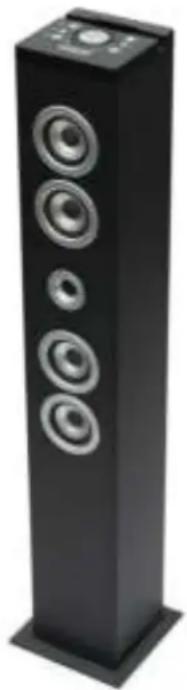
Black vertical speaker tower with five circular speakers, no visible text or symbolsFeatures
● 4 Stereo Speakers
- Bluetooth® Connectivity
- Aux Jack Included
● Aux Cable Included
- USB Port for charging
- USB Port for playing MP3
- SD card slot for playing MP3
● FM radio
- LED display
Safety instructions
When using electrical equipments basic safety precautions should always be followed
- This equipment is not intended for use by persons (including children) with reduced physical, sensory or mental capabilities or lack of experience or knowledge. They should be given appropriate supervision and instructions to use the equipment by a person responsible for their safety.
-
Ensure the equipment is not too close to heat emitting appliances or placed in direct sunlight.
-
Check that the voltage indicated on the data plate corresponds with that of the local network before connecting the equipment to the mains power supply.
- Do not leave the equipment unattended while connected to the power supply
- Do not immerse the equipment in water or any other liquids.
- It is imperative to unplug the power cord after the equipment has been used, before it is cleaned and while being repaired.
- Close supervision is required when using this equipment near children.
● Never leave the equipment within reach of children.
● Repairs to electrical appliances should only be performed by qualified personnel. Improper repairs may place the user and/or equipment at serious risk. - This equipment is intended for household use only and should not be used for industrial or commercial purposes.
- Do not operate this appliance with a damaged plug or cord, after a malfunction or after being dropped or damaged in any way.
- Do not use this equipment for anything other than its intended use.
● This equipment must be placed on a stable, heat resistant surface. - Do not push objects into any openings as damage to the equipment and/or electric shock may occur.
- Do not use this product in wet or bad weather conditions.
● This product is not a toy. - Do not play music at excessive levels especially near children.
Description of parts
Top panel
- STANDBY
- Mode
- Mute
- Volume control
- LED display
- Play/pause
- Skip forward
- Skip backward
Front
- Speaker
- Remote Sensor
(Point remote to the Remote Sensor)

Back panel
- USB port for charging(5V 1A)
- 3.5mm Aux-in Jack
- SD card slot for playing MP3
- USB port for playing MP3
- FM antenna
- AC Cable

Remote Control
**Point remote at middle of speaker**
- STANDBY
- USB/SD mode button
- Mute button
- Aux in button
- FM radio button
- Bluetooth button
- Skip backward button
- Play/Pause button
- Skip forward
- Scan button
- CH-
- CH+
- Bass+ effect button
- Bass- effect button
- Treb+ effect button
- Treb- effect button
- Volume+ button
- Volume-button

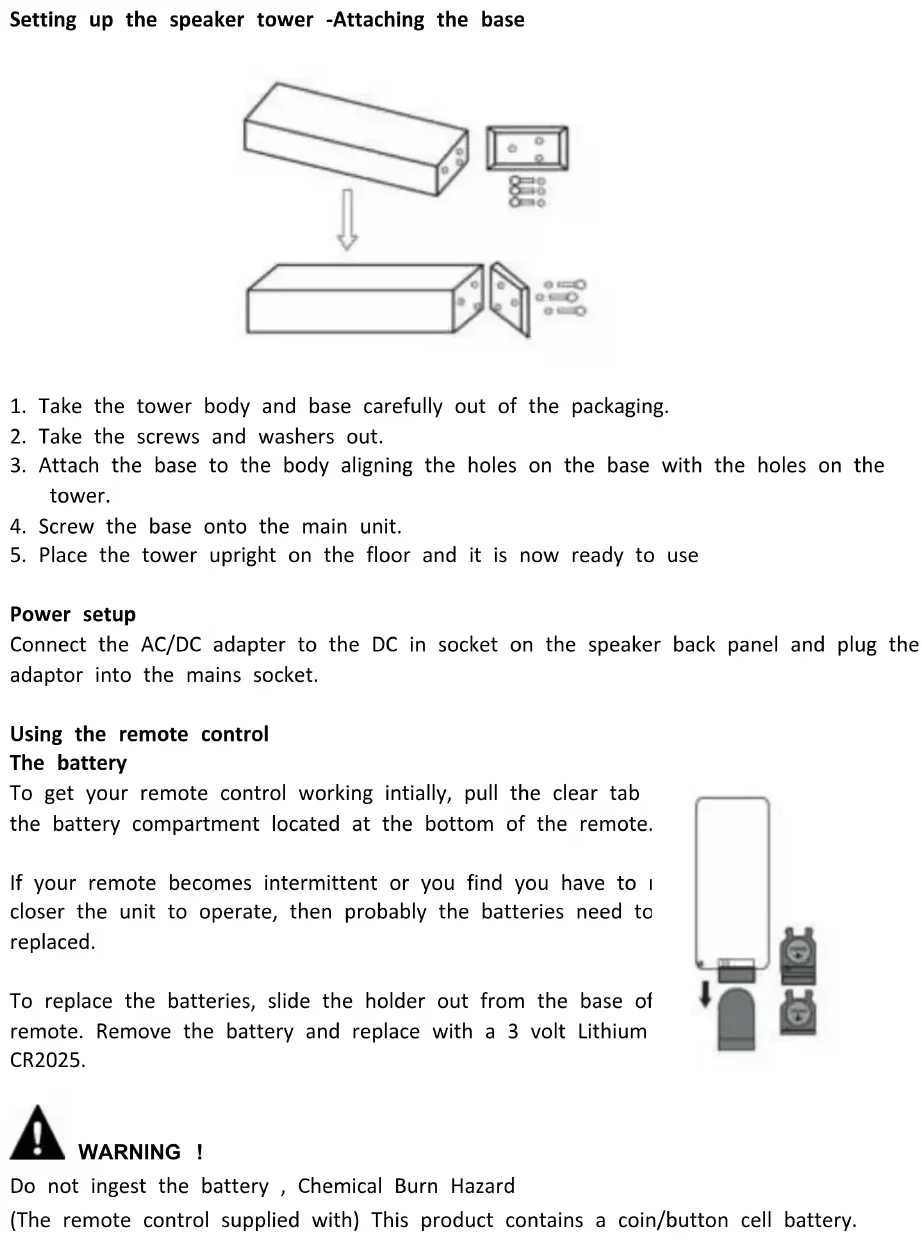
Setting up the speaker tower -Attaching the base

- Take the tower body and base carefully out of the packaging.
- Take the screws and washers out.
- Attach the base to the body aligning the holes on the base with the holes on the tower.
- Screw the base onto the main unit.
- Place the tower upright on the floor and it is now ready to use
Power setup
Connect the AC/DC adapter to the DC in socket on the speaker back panel and plug the adaptor into the mains socket.
Using the remote control
The battery
To get your remote control working initially, pull the clear tab the battery compartment located at the bottom of the remote.
If your remote becomes intermittent or you find you have to closer the unit to operate, then probably the batteries need to replaced.
To replace the batteries, slide the holder out from the base of remote. Remove the battery and replace with a 3 volt Lithium CR2025.

natural_image
Simple diagram showing a device with a lock and two battery-like components (no text or symbols)
WARNING!
Do not ingest the battery, Chemical Burn Hazard
(The remote control supplied with) This product contains a coin/button cell battery.
If the coin/button cell battery is swallowed, it can cause severe internal burns in just 2 hours and can lead to death. Keep new and used batteries away from children.
If the battery compartment does not close securely, stop using the product and keep it away from the children. If you think batteries might have been swallowed or placed inside any part of the body, seek immediate medical attention.
The batteries shall not be exposed to excessive heat such as sunshine, fire or the lake. The apparatus shall not be exposed to dripping or splashing and that no objects filled with liquids, such as vases, shall be placed on the apparatus. The MAINS plug or an appliance coupler is used as the disconnect device, the disconnect device shall remain readily operable.
Aux-In line in type
Requires a 3.5mm cable (included)
- Connect a 3.5mm cable to the Aux-in jack at the rear. Connect the other end of the 3.5mm cable to an MP3 player or other audio source.
- Press the "STANDBY" button to turn the unit on, press "MODE" button on the top panel or press AUX on the remote control, to choose the Aux Mode.
- Use the controls on the top panel to begin playing audio routed through the unit or press "AUX" button on the remote.
Using Bluetooth
- Power on the unit and press "MODE" button on the top panel to change to bluetooth mode or press "BT" button on the remote control, the LED display will display "BT".
- The previous paired device will connect to speaker tower automatically when each time changing to bluetooth mode.
- Press play/pause button and hold for 10 seconds, after a beep tone, the tower speaker is prepared to be paired again.
- Search "ICES IBT-6" and pair it, input the password "0000" if necessary.
- If it still doesn't work, please reset the Bluetooth and follow above step again.
Notes:
- When the Bluetooth icon on the display flashes, means the speaker is searching the previous paired device.
- Press play/pause button and hold for 10 seconds, the Bluetooth icon on the display will flash fast, which means the speaker is ready for being paired.
- After paired successfully, the Bluetooth icon on the display will be on.
USB port for charging
USB port for charging, does not support any media feature.
USB power output DC5V 1A.
USB port for playing MP3
- Power on the unit and insert a USB Flash Drive (not supplied) into the USB port, ensuring the plug is fully inserted at the correct way.
- The tower will play music from the USB automatically or press "MP3" button on the remote. The maximum size of Flash Drive that can be connected is 32GB max.
SD card slot for playing MP3
- Insert an SD or MMC memory card (not supplied) into the memory card expansion slot. Make sure it is inserted at the correct way.
- The tower will play music from the SD card automatically or press "MP3" button at the remote
Playing the FM radio
- When the Tower is powered on, press "STANDBY", then entering into the FM mode automatically.
- Ensure the FM Antenna has been fully extended and press "Mode" to adjust to "FM" mode or press "FM" button on the remote.
- Press the "Skip forward" and "Skip backward" to select the desired FM radio station. Press "Skip forward" or "Skip backward" and hold, the unit will scan the radiostation, and stop at the next one found one.
Programming & Playing of FM radio presets
- Follow the steps for Playing the FM Radio.
- Press "Scan" button on the remote to search and preset stations in memory, (i.e. "P01" - this will blink on the display - and then the preset station frequency number will show on the display).
- Note: 20 FM stations can be set as preset.
- To play the preset Radio stations, press the "CH-" or "CH+" buttons to cycle through the preset FM radio stations.
Care of the appliance
Disconnect the appliance from the power source when cleaning.
If the unit becomes dusty, wipe it with a soft and dry duster. Use a soft cloth to clean this appliance. Do not use any wax, polish sprays, or abrasive cleaners on the unit.
Caution
Never allow any water or other liquids to get inside the unit while cleaning. Dispose of used batteries in an environmental-responsible manner. This product is not intended for
commercial use. Household use only.
The normal function of the product may be disturbed by strong Electro-Magnetic Interference. If so, simply reset the product to resume normal operation by following the instruction manual. In case the function could not resume, please use the product in other location.
Trouble Shooting
Before taking the unit to be repaired, please check the following table when a problem occurs. Consult your dealer or service center if the problem cannot be solved with the following information.
| Problem | Remedy |
| PowerSystem does not turn on or does not respond to the remote control. | - Make sure AC/DC power plug is connected to the socket outlet properly and it has power.- If this does not help, leave the unit unplugged before seeking advice. |
| Remote controlNo functions or short range | - Insert new batteries.- Aim remote directly towards the remote sensor located in center of speaker |
| Pairing the productCannot pair successfully | - Check whether the speaker is in Off or searching mode.- Check whether there are other Bluetooth receivers around your Bluetooth device. Turn them off to any disturbance. Attempt to pair again.- You can click “Forget this device” and then re-pair again if required. Search for “ICES IBT-6” on the Bluetooth device and pair it again. |
| Cannot play properly, the music plays intermittently | Check whether the distance between the speaker and your Bluetooth device is out of its working distance (10m), or whether there are some obstacles blocking communication between the speaker and the Bluetooth device. Move the speaker or the Bluetooth device to the best reception. |
| The sound is distorted | Check the volume setting on both the speaker and y Bluetooth device and adjust the volume to a suitable level. |
SPECIFICATIONS
| Power | AC~ 100-240V,50/60Hz, 40W |
| Operation temperature | 0°C to + 40°C |
| Speakers | 4 x 3” speakers + 1 x 4.5” speaker |
| Speaker output | 2 x 10W |
| Subwoofer Speaker | 1 x 25W |
| Aux-in 1/Aux Lead | 3.5mm dia./3.5mm to 3.5mm Aux Lead |
| Remote Control | Battery 3V CR2025 |
| Unpacked Weight | 5.6 Kgs |
| Dimensions (Approx.) | Approx. 150x150x990mm |
| Frequency | 2402-2480MHz |
| Transmission power | ≤q -3.325dBm |
NOTE:
As a result of continual improvements, the design and specifications of the product within differ slightly from the unit illustrated on the packaging.
Important note: If this unit will be opened, or accessed in any way by a non-official service center, the warranty expires immediately.
This product operates at 2400 - 2483.5 MHz and is designated only to be used inside a normal household environment. This product is suited for this purpose within all EU counties.
Guarantee
ICES offers service and warranty in accordance with the European law, which means that in case of repairs (both during and after the warranty period) you should contact your local dealer.
Important note: It is not possible to send products that need repairs to ICES directly. Important note: If this unit is opened or accessed by a non-official service center in any way, the warranty expires.
This device is not suitable for professional use. In case of professional use, all warranty obligations of the manufacturer will be voided.
Disclaimer
Updates to Firmware and/or hardware components are made regularly. Therefore some of the instruction, specifications and pictures in this documentation may differ slightly from your particular situation. All items described in this guide for illustration purposes only and may not apply to particular situation. No legal right or entitlements may be obtained from the description made in this manual.
Disposal of the Old Device

natural_image
Simple line drawing of a trash bin with crossed lines indicating no waste or discharge (no text or symbols)This symbol indicates that the relevant electrical product or battery should not be disposed of as general household waste in Europe. ensure the correct waste treatment of the product and battery, pl dispose them in accordance to any applicable local laws of required for disposal of electrical equipment or batteries. In so doing, you help to conserve natural resources and improve standards of environmental protection in treatment and disposal of electrical waste (Waste Electrical and Electronic Equipment Directive).
Service
For more information and helpdesk support, please visit.ices-electronics.com Lenco Benelux BV, Thermiekstraat 1a, 6361 HB Nuth, The Netherlands.

LEES VOORDAT U HET APPARAAT GEBRUIKT DEZE GEBRUIKSAANWIJZING DOOR. EN BEWAAR HEM OM HEM LATER TE KUNNEN RAADPLEGEN.
natural_image
Black vertical speaker tower with four circular speakers, no visible text or symbolsKenmerken
natural_image
Technical line drawing of a vertical electrical cabinet with mounting brackets and a control panel (no text or symbols)Afstandsbediening
natural_image
Simple diagram showing a device with a downward arrow and two labeled components (no text or symbols)
WAARSCHUWING!
natural_image
Symbol of a trash bin crossed with no text or labels, accompanied by a black rectangular block below (no readable text or symbols)natural_image
Black vertical speaker tower with five circular speakers (no text or symbols visible)Produktmerkmale
Vorderseite
natural_image
Pure technical line drawing of a vertical cylindrical device with internal components and mounting holes (no text or symbols)Fernbedienung
natural_image
Simple diagram showing a device connected to two battery cells (no text or symbols)
WARNUNG!
natural_image
Symbol of a trash bin crossed out by two crossed lines, with a solid black rectangle below (no text or labels)Lenco Benelux BV, Thermiekstraat 1a, 6361 HB Nuth, The Netherlands.

LISEZ CE MODE D'EMPLOI AVANT D'UTILISER L'APPAREIL. CONSERVEZ-LE POUR LE CONSULTER ULTÉRIEUREMENT.
natural_image
Black vertical speaker tower with four circular speakers, no visible text or symbolsCaractéristiques
natural_image
Technical line drawing of a vertical electrical cabinet with mounting brackets and a control panel (no text or symbols)Télécommande
natural_image
Simple diagram showing a device connected to two battery cells (no text or symbols)
AVERTISSEMENT!
natural_image
Symbol of a trash bin crossed with no text or numbers, representing waste sorting or disposal (no text present)natural_image
Black vertical speaker tower with five circular speakers, no visible text or symbolsCaracterísticas
natural_image
Technical line drawing of a vertical electrical cabinet with a control panel and circular base (no text or symbols)Mando a distancia
natural_image
Simple diagram showing a device connected to two battery cells (no text or symbols)
ADVERTENCIA!
natural_image
Symbol of a trash bin with crossed lines indicating no waste or discharge, and a solid black rectangle below (no text or labels)

- Thank you for purchasing Tower Speaker
- Getting started
- In the box
- Features
- Safety instructions
- Description of parts
- Top panel
- Front
- Back panel
- Remote Control
- Power setup
- Using the remote control
- The battery
- WARNING!
- Aux-In line in type
- Using Bluetooth
- Notes:
- USB port for charging
- USB port for playing MP3
- SD card slot for playing MP3
- Playing the FM radio
- Programming & Playing of FM radio presets
- Care of the appliance
- Caution
- Trouble Shooting
- NOTE:
- Guarantee
- Disclaimer
- Disposal of the Old Device
- Service
- LEES VOORDAT U HET APPARAAT GEBRUIKT DEZE GEBRUIKSAANWIJZING DOOR. EN BEWAAR HEM OM HEM LATER TE KUNNEN RAADPLEGEN.
- Kenmerken
- Afstandsbediening
- Produktmerkmale
- Vorderseite
- Fernbedienung
- LISEZ CE MODE D'EMPLOI AVANT D'UTILISER L'APPAREIL. CONSERVEZ-LE POUR LE CONSULTER ULTÉRIEUREMENT.
- Télécommande
- AVERTISSEMENT!
- Características
- Mando a distancia
Brand : Ices Electronics
Model : IBT6
Category : Loudspeaker