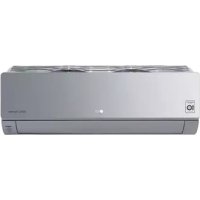
AC09SQ - Air conditioner LG - Free user manual and instructions
Find the device manual for free AC09SQ LG in PDF.



| Product type | Wall-mounted split air conditioner |
| Brand | LG |
| Model | AC09SQ |
| Cooling capacity (BTU/h) | 9000 (approx. 2.6 kW) |
| Heating capacity (BTU/h) | 9000 (approx. 2.6 kW) |
| Refrigerant | R32 (flammable) |
| Power supply | 220-240 V, 50 Hz |
| Indoor unit dimensions (W x H x D) | Approx. 880 x 290 x 210 mm |
| Indoor unit weight | Approx. 10 kg |
| Outdoor unit dimensions (W x H x D) | Approx. 770 x 540 x 290 mm |
| Outdoor unit weight | Approx. 30 kg |
| Operating modes | Cooling, Heating, Dehumidification, Fan, Auto |
| Special functions | Jet mode, On/Off timer, Sleep, Energy control (80%, 60%, 40%), Consumption display |
| Smart functions | LG ThinQ (Wi-Fi 2.4 GHz), Smart Diagnosis, Compatible with voice assistant |
| Air quality | Ionizer (optional), Auto clean, Washable air filter |
| Airflow direction | Vertical and horizontal (auto swing), Comfort Air (air deflection) |
| Remote control | Wireless with AAA (1.5 V) × 2 batteries, range ~8 m |
| Sound level (indoor unit) | Approx. 32 dB(A) in normal mode (silent available) |
| Safety | Auto restart after power failure, self-diagnosis, error shutdown, compressor protection |
| Maintenance | Air filter: clean every 2 weeks; Ionizer: every 6 months; Annual professional cleaning |
| Included accessories | Remote control, batteries, remote holder, user manual |
Frequently Asked Questions - AC09SQ LG
User questions about AC09SQ LG
0 question about this device. Answer the ones you know or ask your own.
Ask a new question about this device
Download the instructions for your Air conditioner in PDF format for free! Find your manual AC09SQ - LG and take your electronic device back in hand. On this page are published all the documents necessary for the use of your device. AC09SQ by LG.
USER MANUAL AC09SQ LG
Read this owner's manual thoroughly before operating the appliance and keep it handy for reference at all times.
TYPE: WALL MOUNTED
Original instruction
EN ENGLISH
FR FRANÇAIS
EL EAAHNIKA
NL NEDERLANDS
PL POLSKI
HU MAGYAR
BG BbIgAPCKN
HR HRVATSKI
CZ CESTINA
ET EESTI
MT MALTI
RO ROMÁNA
SK SLOVENCINA
SL SLOVENsCINA
LV LATVIEŠU
LT LIETUVIU
GA GAEILGE
SR SRPSKI
MKMAKEIOHCKN
SQ SHQIP
BS BOSANSKI
TABLE OF CONTENTS
This manual may contain images or content different from the model you purchased.
This manual is subject to revision by the manufacturer.
SAFETYINSTRUCTIONS 3
IMPORTANT SAFETY INSTRUCTIONS 4
OPERATION 11
Notes for Operation 11
Parts and Functions 11
Wireless Remote Control. 12
Restarting the Air Conditioner Automatically 17
Using the Mode Function 17
Using the Jet Mode Function 20
Using the Fan Speed Function 21
Using the Air Flow Direction Function. 21
Setting the On/Off Timer 22
Using the Sleep Function (Optional) 23
Using the Simple Timer Function (Optional) 23
Using the Energy Display Function (Optional) 24
Using the Light Off Function (Optional) 24
Using the Comfort Air Function (Optional) 24
Using the Energy Control Function (Optional) 25
Using Special Functions 25
SMART FUNCTIONS 27
LG ThinQ Application 27
Smart Diagnosis 29
MAINTENANCE 30
Clean the Air Filter 32
TROUBLESHOOTING 33
The following safety guidelines are intended to prevent unforeseen risks or damage from unsafe or incorrect operation of the appliance.
The guidelines are separated into 'WARNING' and 'CAUTION' as described below.

This symbol is displayed to indicate matters and operations that can cause risk. Read the part with this symbol carefully and follow the instructions in order to avoid risk.

WARNING
This indicates that the failure to follow the instructions can cause serious injury or death.

CAUTION
This indicates that the failure to follow the instructions can cause the minor injury or damage to the product.
The following symbols are displayed on indoor and outdoor units. (for R32)

This symbol indicates that this appliance uses a flammable refrigerant. If the refrigerant is leaked and exposure to an external ignition source, there is a risk of fire.

This symbol indicates that the Operation Manual should be read carefully.

This symbol indicates that a service personnel should be handling this equipment with reference to the Installation Manual.

This symbol indicates that information is available such as the Operating Manual or Installation Manual.
IMPORTANT SAFETY INSTRUCTIONS

WARNING
To reduce the risk of explosion, fire, death, electric shock, injury or scalding to persons when using this product, follow basic precautions, including the following:
Children in the Household
This appliance is not intended for use by persons (including children) with reduced physical, sensory or mental capabilities, or lack of experience and knowledge, unless they have been given supervision or instruction concerning use of the appliance by a person responsible for their safety. Children should be supervised to ensure that they do not play with the appliance.
For use in Europe:
This appliance can be used by children aged from 8 years and above and persons with reduced physical, sensory or mental capabilities or lack of experience and knowledge if they have been given supervision or instruction concerning use of the appliance in a safe way and understand the hazards involved. Children shall not play with the appliance. Cleaning and user maintenance shall not be made by children without supervision.
Installation
- Do not install the air conditioner on an unstable surface or in a place where there is danger of it falling.
-
Contact an authorized service center when installing or relocating the air conditioner.
-
Install the panel and the cover of the control box safely.
-
Do not install the air conditioner in a place where flammable liquids or gases such as gasoline, propane, paint thinner, etc., are stored.
-
Make sure that the pipe and the power cable connecting the indoor and outdoor units are not pulled too tight when installing the air conditioner.
-
Use standard circuit breaker and fuse that conform to the rating of the air conditioner.
-
Do not input air or gas into the system except with the specific refrigerant.
-
Use non-flammable gas (nitrogen) to check for leak and to purge air; using compressed air or flammable gas may cause fire or explosion.
- The indoor/outdoor wiring connections must be secured tightly, and the cable should be routed properly so that there is no force pulling the cable from the connection terminals. Improper or loose connections can cause heat generation or fire.
- Install dedicated electric outlet and circuit breaker before using the air conditioner.
- Do not connect the ground wire to a gas pipe, a lightning rod, or a telephone ground wire.
- Keep any required ventilation openings clear of obstruction. (for R32)
-
Means for disconnection must be incorporated in the fixed wiring in accordance with the wiring rules.
-
Do not install the unit in potentially explosive atmospheres.
Operation
-
Be sure to use only those parts listed in the service parts list. Never attempt to modify the equipment.
-
Make sure that children do not climb on or hit the outdoor unit.
- Dispose of the batteries in a place where there is no danger of fire.
-
Use only the refrigerant specified on the air conditioner label.
-
Cut off the power supply if there is any noise, smell, or smoke coming from the air conditioner.
-
Do not leave flammable substances such as gasoline, benzene, or thinner near the air conditioner.
-
Contact an authorized service center when the air conditioner is submerged by flood waters.
-
Do not use the air conditioner for an extended period of time in a small place without proper ventilation.
-
In the event of a gas leak (such as Freon, propane gas, LP gas, etc.) ventilate sufficiently before using the air conditioner again.
-
To clean the interior, contact an authorized service center or dealer. Using harsh detergents may cause corrosion or damage to the unit.
-
Be sure to ventilate sufficiently when the air conditioner and a heating appliance such as a heater are used simultaneously.
-
Do not block the inlet or outlet of air flow.
-
Do not insert hands or other objects through the air inlet or outlet while the air conditioner is operating.
-
Make sure that the power cable is neither dirty, loose, nor broken.
-
Never touch, operate, or repair the air conditioner with wet hands.
-
Do not place any objects on the power cable.
-
Do not place a heater or other heating appliances near the power cable.
-
Do not modify or extend the power cable. Scratches or peeling insulation on the power cables may result in fire or electric shock, and should be replaced.
-
Cut off the power supply immediately in the event of a blackout or a thunderstorm.
-
Take care to ensure that power cable could not be pulled out or damaged during operation.
- Do not touch refrigerant pipe, water pipe and any internal parts while the unit is operating or immediately after operation.
Maintenance
- Do not clean the appliance by spraying water directly onto the product.
- Before cleaning or performing maintenance, disconnect the power supply and wait until the fan stops.
Technical Safety
- Installation or repairs made by unauthorized persons can pose hazards to you and others.
-
Any person who is involved with working on or breaking into a refrigerant circuit should hold a current valid certificate from an industry-accredited assessment authority, which authorizes their competence to handle refrigerants safely in accordance with an industry recognized assessment specification. (for R32)
Servicing shall only be performed as recommended by the equipment manufacturer. Maintenance and repair requiring the assistance of other skilled personnel shall be carried out under the supervision of the person competent in the use of flammable refrigerants. (for R32) -
The information contained in the manual is intended for use by a qualified service technician who is familiar with the safety procedures and equipped with the proper tools and test instruments.
-
Failure to read and follow all instructions in this manual can result in equipment malfunction, property damage, personal injury and/or death.
-
The appliance shall be installed in accordance with national wiring regulations.
-
When the power cord is to be replaced, the replacement work shall be performed by authorized personnel using only genuine replacement parts.
- This appliance must be properly grounded to minimize risk of electric shock.
-
Do not cut or remove the grounding prong from the power plug.
-
Attaching the earth wire to the power outlet cover screw does not ground the appliance unless the cover screw is metal, uninsulated, and the power outlet is grounded through house wiring.
- If you have any doubt whether the air conditioner is properly grounded, have the power outlet and circuit checked by a qualified electrician.
- The refrigerant and insulation blowing gas used in the appliance require special disposal procedures. Consult a service agent or a similarly qualified person before disposing of them.
- If the supply cord is damaged, it must be replaced by the manufacturer, its service agent or similarly qualified person in order to avoid a hazard.
- The appliance shall be stored in a well-ventilated area where the room size corresponds to the room area as specified for operation. (for R32)
- The appliance shall be stored in a room without continuously operating open flames (for example an operating gas appliance) and ignition sources (for example an operating electric heater). (for R32)
- The appliance shall be stored so as to prevent mechanical damage from occurring. (for R32)

CAUTION
To reduce the risk of minor injury to persons, malfunction, or damage to the product or property when using this product, follow basic precautions, including the following:
Installation
- Do not install the air conditioner in an area where it is directly exposed to sea wind (salt spray).
- Install the drain hose properly for the smooth drainage of water condensation.
Exercise caution when unpacking or installing the air conditioner. -
Do not touch the leaking refrigerant during installation or repair.
-
Transport the air conditioner with two or more people or use a forklift.
-
Install the outdoor unit such that it is protected from direct sunlight. Do not place the indoor unit in a place where it is directly exposed to sunlight via the windows.
-
Safely dispose of packing materials such as screws, nails, plastic bag or batteries using proper packaging after installation or repair.
-
Install the air conditioner in a place where the noise from the outdoor unit or the exhaust fumes will not inconvenience the neighbors. Failure to do so may result in conflict with the neighbors.
Operation
-
Remove the batteries if the remote control is not to be used for an extended period of time.
-
Make sure that the filter is installed before operating the air conditioner.
- Be sure to check if there is a refrigerant leak after installing or repairing the air conditioner.
- Do not place any object on the air conditioner.
- Never mix different types of batteries, or old and new batteries for the remote control.
- Do not let the air conditioner run for a long time when humidity is very high or when a door or a window has been left open.
- Stop using the remote control if there is a fluid leak in the battery. If your clothes or skin are exposed to the leaking battery fluid, wash off with clean water.
- Do not expose people, animals, or plants to the cold or hot wind from the air conditioner for extended periods of time.
- If the leaking battery fluid has been swallowed, rinse the inside of the mouth thoroughly and consult a doctor.
- Do not drink the water drained from the air conditioner.
- Do not use the product for special purposes, such as preserving foods, works of art, and etc. It is an air conditioner for consumer purposes, not a precision refrigeration system. There is risk of damage or loss of property.
- Do not recharge or disassemble the batteries.
Maintenance
-
Never touch the metal parts of the air conditioner when removing the air filter.
-
Use a sturdy stool or ladder when cleaning, maintaining, or repairing the air conditioner at a height.
- Never use strong cleaning agents or solvents when cleaning the air conditioner or spray water. Use a smooth cloth.
OPERATION
Notes for Operation
Suggestion for Energy Saving
- Do not over-cool the space. This may be harmful for your health and may consume more electricity.
- Block sunlight with blinds or curtains while you are operating the air conditioner.
- Keep doors or windows closed tightly while you are operating the air conditioner.
- Adjust the direction of the air flow vertically or horizontally to circulate indoor air.
- Speed up the fan to cool or warm indoor air quickly, within a short period of time.
- Open windows regularly for ventilation. The indoor air quality may deteriorate if the air conditioner is used for long durations.
- Clean the air filter once every 2 weeks. Dust and impurities collected in the air filter may block the air flow or reduce the unit performance.
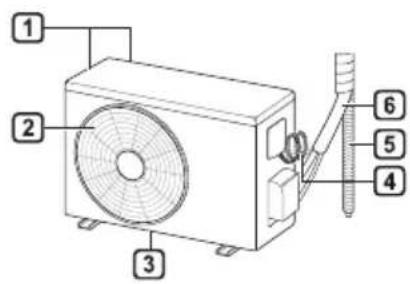
Parts and Functions
Indoor Unit Outdoor Unit
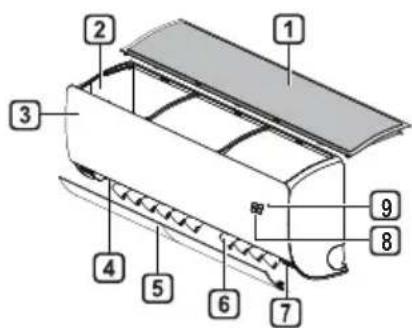
Air Filter
Air Intake
3 Front Cover
4 Air Outlet
5 Air Deflector (Horizontal Vane)
6 Air Deflector (Vertical Louver)
7 On/Off Button
8 Display
9 Signal Receiver
Air Intake Vents
Air Outlet Vents
3 Base Plate
4 Power Supply Cable
5 Drain Hose
6 Refrigerant Pipes
NOTE
- The number and location of operation lamps may vary according to the model of the air conditioner.
The feature may be changed according to the type of model.
Wireless Remote Control Inserting Batteries
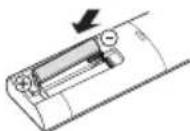
If the display screen of the remote control begins to fade, replace the batteries. Insert AAA (1.5 V) batteries before using the remote control.
1 Remove the battery cover.
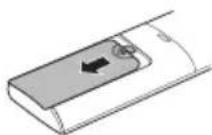
2 Insert the new batteries and make sure that the + and - terminals of the batteries are installed correctly.
Installing the Remote Control Holder
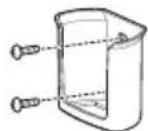
To protect the remote control, install the holder where there is no direct sunlight.
1 Choose a safe and easily accessible location.
Fix the holder by fastening 2 screws firmly with a screwdriver.
Operating Method
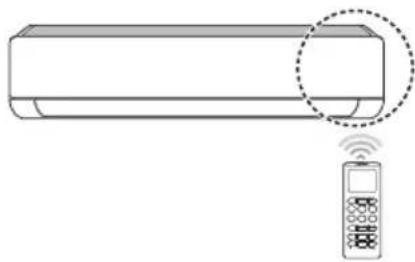
Point the remote control towards the signal receiver at the right side of the air conditioner to operate it.
NOTE
- The remote control may operate other electronic devices if it is directed towards them. Make sure to point the remote control towards the air conditioner signal receiver.
- For proper operation, use a soft cloth to clean the signal transmitter and receiver.
In case of a function not provided in the product, no buzzer sound occurs from the product when a button for such function on the remote control is pressed except for Air Flow Direction (SWING), Energy Display (kw[3s]), Air Purification function
Setting the Current Time
1 Insert batteries.
- The icon below blinks at the bottom of the display screen.

2 Press or button to select the minutes.
3 Press SET/CANCEL button to finish.
NOTE
- The On/Off Timer is available after setting the current time.
Using the ^ C / ^ Conversion Function (Optional)
This function changes unit between ^ C and ^ F
Press and hold button about 5 seconds.
Operating the Air Conditioner without the Remote Control
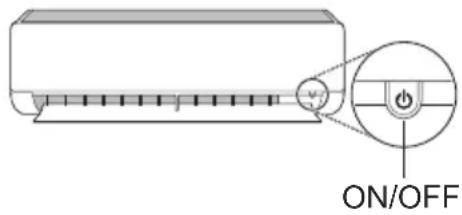
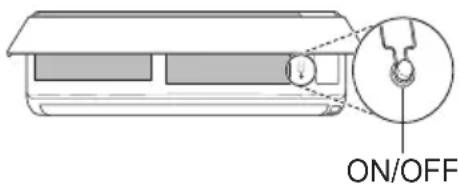
You can use the ON/OFF button of the indoor unit to operate the air conditioner when the remote control is unavailable.
1 Open the front cover (Type2) or horizontal vane (Type1).
2 Press the ON/OFF button.
Type1
Type2
NOTE
- The stepping motor may be broken, if the horizontal vane opens rapidly.
The fan speed is set to high.
The feature may be changed according to the type of model.
The temperature cannot be altered when using this emergency ON/OFF button. - For cooling & heating models, the temperature is set from 22^ to 24^
Using Wireless Remote Control
You can operate the air conditioner more conveniently with the remote control.

NOTE
-
- buttons may be changed according to the type of model.
- When connected to the Multi Outdoor unit, the Energy Display, Energy Control, Silent and Smart Diagnosis function may not be supported.
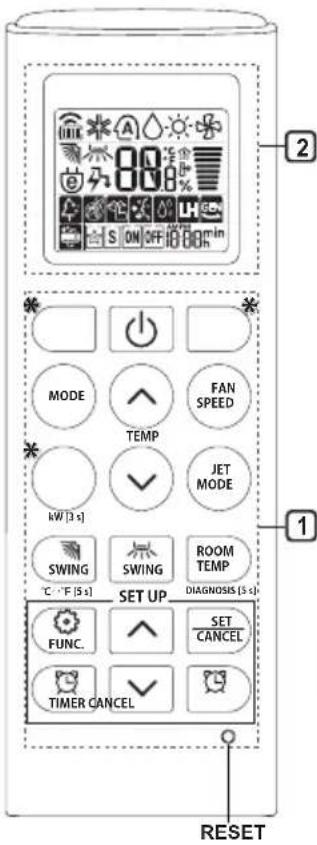
| 1Button | 2DisplayScreen | Description | Available Function | |
| SingleSplit | Multi | |||
| TIMER | ON OFF | To turn on/off air conditioner automatically at desired time. | ○ | ○ |
| SET/CANCEL | - | To set/cancel the special functions and timer. | ○ | ○ |
| CANCEL | - | To cancel the timer settings. | ○ | ○ |
| - To adjust time. ○○ | ||||
| *LIGHTOFF | - | To set the brightness of the display on the indoor unit. | ○ | ○ |
| ROOMTEMP | To display the room temperature. | ○ | ○ | |
| °C←°F[5 s] | °C°F | To change unit between °C and °F | ○ | ○ |
| *COMFORTAIR | To adjust the air flow to deflect wind. | ○ | ○ | |
| kW[3 s] | - | To set whether or not to display information regarding energy. | ○ | × |
| *ENERGYCTRL | 88 x | To bring the effect of the power saving. | ○ | × |
| DIAGNOSIS[5 s] | - | To conveniently check maintenance information of a product. | ○ | × |
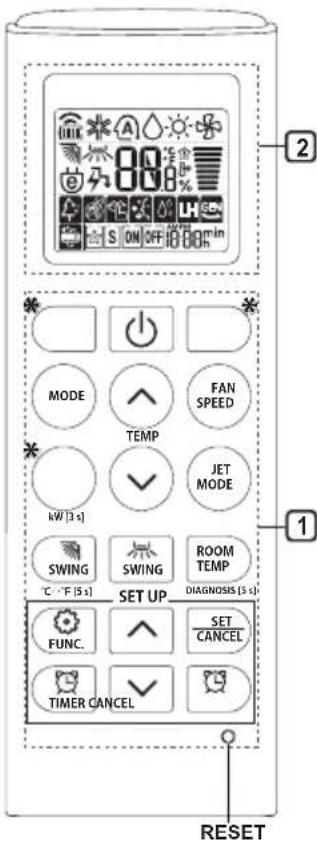
| 1 Button | 2 Display Screen | Description | Available Function | |
| Single Split | Multi | |||
| FUNC. | 4 | The Ion generator uses millions of ions to help improve indoor air quality. | O (Optional) | O (Optional) |
| 5 | To reduce noise from outdoor units. | O | X | |
| 6 | To remove moisture generated inside the indoor unit. | O | O | |
| RESET - | To initialize the remote control settings. | O | O | |
NOTE
- Some functions may not be supported, depending on the model.
-
- buttons may be changed according to the type of model.
- Press the SET/CANCEL button to operate the selected FUNC.
Restarting the Air Conditioner Automatically
When the air conditioner is turned on again after a power failure, this function restores the previous settings.
Disabling Auto Restart
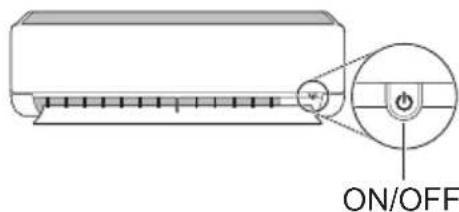
1 Open the front cover (Type2) or horizontal vane (Type1).
2 Press the ON/OFF button and hold it for 6 seconds, then the unit will beep twice and the lamp will blink twice 4 times.
To re-enable the function, press the ON/ OFF button and hold it for 6 seconds. The unit will beep twice and the lamp will blink 4 times.
Type1
Type2
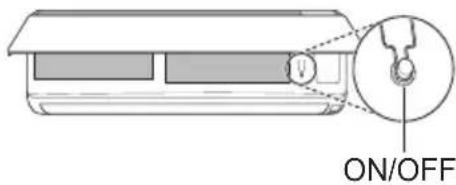
NOTE
The feature may be changed according to the type of model.
- If you press and hold the ON/OFF button for 3 - 5 seconds, instead of 6 seconds, the unit will switch to the test operation. In the test operation, the unit blows out strong cooling air for 18 minutes and then returns to factory default settings.
Using the Mode Function
This function allows you to select the desired function.
| * | Cooling Mode |
| ↓ | |
| A | Auto Changeover Mode / Auto Operation(AI) Mode |
| ↓ | |
| ○ | Dehumidification Mode |
| ↓ | |
| ○ | Heating Mode |
| ↓ | |
| ○ | Fan Mode |
Cooling Mode
1 Turn the appliance on.
2 Press MODE button repeatedly to select the Cooling Mode.
- is displayed on the display screen.
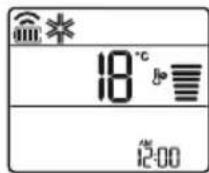
3 Press or button to set the desired temperature.
Auto Operation (Artificial Intelligence)
Multi Model
In this operation mode, the system is automatically operated by the electronic controls.
1 Turn the appliance on.
2 Press MODE button repeatedly to select the Auto Operation.
A is displayed on the display screen.
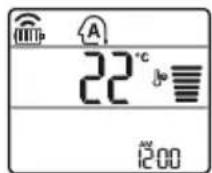
3 Press or button to set the desired temperature.
4 Press FAN SPEED button to adjust the fan speed.
Auto Changeover Mode
Single Split Model
This mode changes the mode automatically to maintain the set temperature at ± 2^
1 Turn the appliance on.
2 Press MODE button repeatedly to select the Auto Changeover Mode.
A is displayed on the display screen.
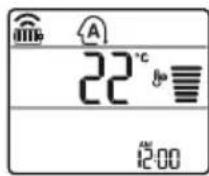
3 Press or button to set the desired temperature.
4 Press FAN SPEED button to adjust the fan speed.
Dehumidification Mode
This mode removes excess moisture from a highly humid environment or during the rainy season, in order to prevent mildew from setting in. This mode adjusts the room temperature and the fan speed automatically to maintain the optimal level of humidity.
1 Turn the appliance on.
2 Press MODE button repeatedly to select the Dehumidification Mode.
is displayed on the display screen.
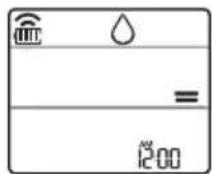
NOTE
- In this mode you cannot adjust the room temperature, it is adjusted automatically.
- The room temperature is not displayed on the display screen.
- In the dehumidification mode, compressor and indoor fan may not operate when the room temperature is below 24^
Heating Mode
1 Turn the appliance on.
2 Press MODE button repeatedly to select the Heating Mode.
is displayed on the display screen.
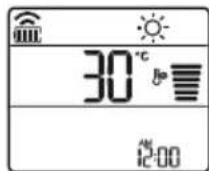
3 Press or button to set the desired temperature.
NOTE
will be displayed on the indoor unit when defrosting is operating.
-
Furthermore, this indication will be displayed on the indoor unit:
-
When preheating is operating.
- When the room temperature has been reached to the set temperature.
Fan Mode
This mode only circulates the indoor air without changing the room temperature.
1 Turn the appliance on.
2 Press MODE button repeatedly to select the Fan Mode.
is displayed on the display screen.
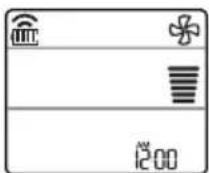
3 Press FAN SPEED button to adjust the fan speed.
NOTE
or will be displayed on the indoor unit when fan mode is operating.
Using the Jet Mode Function Changing Room Temperature Quickly
This function allows you to cool indoor air quickly during the summer or warm it quickly during winter.
- The Jet Mode function is available with Cooling, Heating and Dehumidification Mode.
1 Turn the appliance on.
2 Press MODE button repeatedly to select the desired mode.
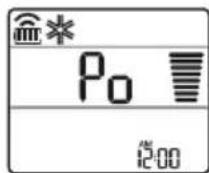
3 Press JET MODE button.
_0 is displayed on the display screen.
NOTE
- Jet Heating Mode is not available on some models.
- In Jet Cooling Mode, strong air blows out for 30 minutes.
After 30 minutes later, setting temperature is maintaining 18^ If you want to change the temperature, Press
or button to set the desired temperature.
- In Jet Heating Mode, strong air blows out for 30 minutes.
After 30 minutes later, setting temperature is maintaining 30^ If you want to change the temperature, Press
or button to set the desired temperature. - This function may operate differently from the remote control display.
Using the Fan Speed Function
Adjusting the Fan Speed
- Press FAN SPEED button repeatedly to adjust the fan speed.
| Display Screen Speed | |
| High | |
| Medium - High | |
| Medium | |
| Medium - Low | |
| Low | |
| - Natural Wind | |
NOTE
- The fan speed of Natural Wind adjusts automatically.

- The fan speed icons are displayed on some indoor units.

- Indoor unit display is displayed only 5 seconds and return to the setting temperature on some models.
Using the Air Flow Direction Function
This function adjusts the direction of the air flow vertically (horizontally).
- Press SWING (SWING) button repeatedly and select the desired direction.
-Select () to adjust the direction of the air flow automatically.
NOTE
- Adjusting the air flow direction horizontally may not be supported, depending on the model.
- Adjusting the air deflector arbitrarily may cause product failure.
- If you restart the air conditioner, it starts to operate with the previously set direction of air flow, so the air deflector may not match the icon displayed on the remote control. When this occurs, press SWING or SWING button to adjust the direction of the air flow again.
- This function may operate differently from the remote control display.
Setting the On/Off Timer
This function sets the air conditioner to turn on/ off automatically at desired time.
On/Off Timer can be set together.
Setting the On Timer
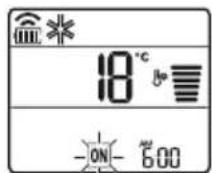
1 Press button repeatedly.
- The icon below blinks at the bottom of the display screen.
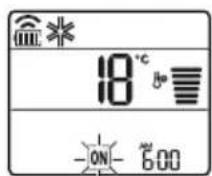
2 Press Yr button to select the minutes.
3 Press SET/CANCEL button to finish.
After setting the timer, current time and ON icon are displayed on the display screen indicating that the desired time is set.
Canceling the On Timer
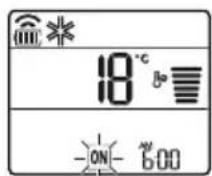
1 Press button repeatedly.
The icon below blinks at the bottom of the display screen.
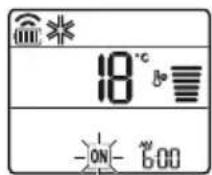
2 Press SET/CANCEL button to cancel the setting.
Setting the Off Timer
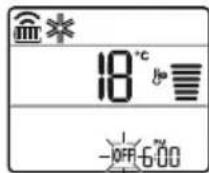
1 Press button repeatedly.
- The icon below blinks at the bottom of the display screen.
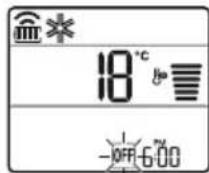
2 Press or button to select the minutes.
3 Press SET/CANCEL button to finish.
After setting the timer, current time and OFF icon are displayed on the display screen indicating that the desired time is set.
NOTE
- This function is disabled when you set Simple Timer.
Canceling the Off Timer
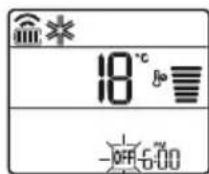
1 Press button repeatedly.
- The icon below blinks at the bottom of the display screen.
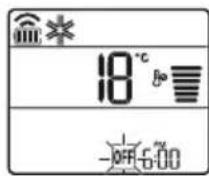
2 Press SET/CANCEL button to cancel the setting.
Canceling the Timer Setting
- Press button to cancel all timer settings.
Using the Sleep Function (Optional)
This function turns off the air conditioner automatically when you go to sleep.
1 Turn the appliance on.
2 Press button repeatedly.
The icon below blinks at the bottom of the display screen.
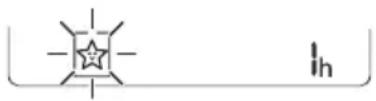
3 Press Yr button to select the hour (up to 7 hours).
4 Press SET/CANCEL button to finish.
is displayed on the display screen.
NOTE
is displayed on some indoor units.
- Indoor unit display is displayed from 1H to 7H which is displayed only 5 seconds and then return to the setting temperature.
- In the Cooling and Dehumidification Mode, the temperature increases by 1^ after 30 minutes and additional 1^ after another 30 minutes for a more comfortable sleep.
- The temperature increases up to 2^ from the preset temperature.
- Although the remark for fan speed on the display screen may be changed, the fan speed is adjusted automatically.
Using the Simple Timer Function (Optional)
This function turns off the air conditioner automatically when you go to sleep.
1 Turn the appliance on.
2 Press button repeatedly.
- The icon below blinks at the bottom of the display screen.
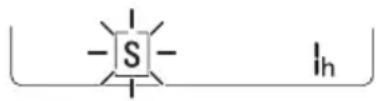
3 Press or button to select the hour (up to 7 hours).
4 Press SET/CANCEL button to finish. S is displayed on the display screen.
NOTE
- This function is disabled when you set Off Timer.
Using the Energy Display Function (Optional)
This function displays the amount of electricity generated on the indoor display as the product operates.
Display the Current Energy Usage
1 Turn the appliance on.
2 Press button and hold it about 3 seconds.
The instantaneous power consumption (BB) is displayed for a while on some indoor units.
NOTE
The unit of the displayed value is kW.
It is not displayed on the wireless remote control.
If it is more than 99kW which is the range of expression, maintain it as 99kW .
- Display wattage under 10kW with 0.1kW unit, and display one over 10kW with 1kW unit.
- The actual power may differ from the power displayed.
- When connected to the Multi Outdoor unit, this function may not be supported.
Using the Light Off Function (Optional)
Display Screen Brightness
You can set the brightness of the indoor unit display screen.
- Press LIGHT OFF button.
NOTE
- Turn on/off the Display screen.
Using the Comfort Air Function (Optional)
Comfort Vane Operation
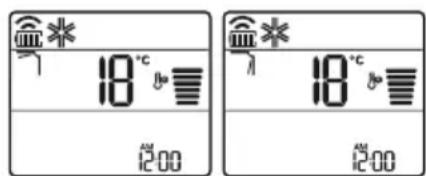
This function conveniently sets the vane to a preset position to deflect the supply air away from blowing directly onto the occupants in the room.
1 Turn the appliance on.
2 Press COMFORT AIR button repeatedly and select the desired direction.
or is displayed on the display screen.
NOTE
or Lis displayed on some indoor units.
- This function is disabled when you press MODE or JET MODE button.
- This function is disabled and auto swing of vertical direction is set up when you press
SWING button.
- When this function is off, the horizontal vane operates automatically depending on the set mode.
Using the Energy Control Function (Optional)
1 Turn the appliance on.
2 Press ENERGY CTRL button.
- Press ENERGY CTRL button repeatedly to select each step.
| 1 step 2 step 3 step | ||
| 80 % | 60 % | 40 % |
| 200 | 200 | 200 |
NOTE
- 1 step : The power Input is decreased by 20% compared to rated power input.
80 is displayed on the display screen. - 2 step : The power Input is decreased by 40 % compared to rated power input.
60 is displayed on the display screen. - 3 step (Optional): The power Input is decreased by 60% compared to rated power input.
40 is displayed on the display screen.
80 (1 step), 62 step), (3 step) is displayed on some indoor units.
(1 step), (2 step) is displayed on some indoor units.) - This function is available with Cooling Mode.
- Capacity may decrease when Energy Control mode is selected.
- Desired temperature is displayed about 5 seconds if you press FAN SPEED, or button.
- Room temperature is displayed about 5 seconds if you press ROOM TEMP button.
- When connected to the Multi Outdoor unit, this function may not be supported.
Using Special Functions
1 Turn the appliance on.
2 Press FUNC button repeatedly to select the desired function.
3 Press SET/CANCEL button to finish.
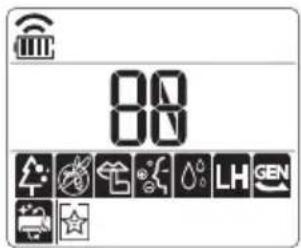
| Display Screen | Description |
| The Ion generator uses millions of ions to help improve indoor air quality. | |
| To reduce noise from outdoor units. | |
| To remove moisture generated inside the indoor unit. |
NOTE
Some functions may not be supported, depending on the model.
Some functions may operate differently from the remote control display.
Canceling Special Functions
1 Press FUNC button repeatedly to select the desired function.
2 Press SET/CANCEL button to cancel the function.
Using the Air Purification Function
These functions supply clean and fresh air by ion particles and the filter.
| Function Display Description | |
| Ionizer | Ion particles from lonizer reduce the surface bacteria and other harmful substances. |
| Plasma | It removes microscopic contaminants from the intake air completely to supply clean and fresh air. |
NOTE
- You can use this function without turning the air conditioner on.
- Both the plasma lamp and the cooling lamp light up while Smoke Away/Plasma is in operation on some models.
- Do not touch ionizer during operation.
- This function may operate differently from the remote control display.
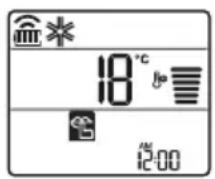
Using the Silent Function
This function prevents potential claims by neighbors, reducing noise from outdoor units.

is displayed on the display screen.
NOTE
- This function is disabled when you press MODE or ENERGY CTRL or JET MODE button.
- This function is available with Cooling, Heating, Auto Changeover, Auto Operation Mode.
- When connected to the Multi Outdoor unit, this function may not be supported.
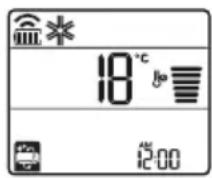
Using the Auto Clean Function
In the Cooling and Dehumidification Mode, moisture is generated inside the indoor unit. This function removes such moisture.

is displayed on the display screen.
NOTE
- Some functions cannot be used while the Auto Clean function is in operation.
- If you turn off the unit, the fan continues to run for 30 minutes and cleans the inside of the indoor unit.
is displayed on some indoor units, depending on the model.
LG ThinQ Application
This feature is only available on models with the or ThinQ logo.
The LG ThinQ application allows you to communicate with the appliance using a smartphone.
LG ThinQ Application Features
Communicate with the appliance from a smartphone using the convenient smart features.
Smart Diagnosis
If you experience a problem while using the appliance, this smart diagnosis feature will help you diagnose the problem.
Settings
Allows you to set various options on the appliance and in the application.
NOTE
If you change your wireless router, internet service provider, or password, delete the registered appliance from the LG ThinQ application and register it again.
- The application is subject to change for appliance improvement purposes without notice to users.
- Functions may vary by model.
Before Using LG ThinQ Application
1 Check the distance between the appliance and the wireless router (Wi-Fi network).
- If the distance between the appliance and the wireless router is too far, the signal strength becomes weak. It may take a long time to register or installation may fail.
2 Turn off the Mobile data or Cellular Data on your smartphone.
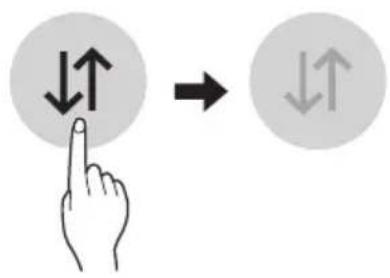
3 Connect your smartphone to the wireless router.
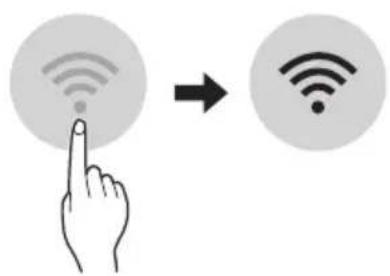
NOTE
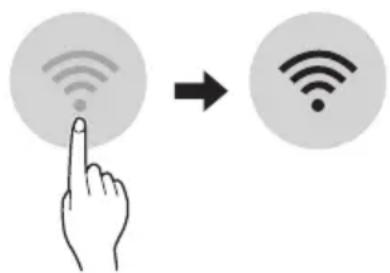
To verify the Wi-Fi connection, check that icon on the control panel is lit.
- The appliance supports 2.4 GHz Wi-Fi networks only. To check your network frequency, contact your Internet service provider or refer to your wireless router manual.
- LG ThinQ is not responsible for any network connection problems or any faults, malfunctions, or errors caused by network connection.
- If the appliance is having trouble connecting to the Wi-Fi network, it may be too far from the router. Purchase a Wi-Fi repeater (range extender) to improve the Wi-Fi signal strength.
- The Wi-Fi connection may not connect or may be interrupted because of the home network environment.
- The network connection may not work properly depending on the Internet service provider.
- The surrounding wireless environment can make the wireless network service run slowly.
- The appliance cannot be registered due to problems with the wireless signal transmission. Unplug the appliance and wait about a minute before trying again.
- If the firewall on your wireless router is enabled, disable the firewall or add an exception to it.
- The wireless network name (SSID) should be a combination of English letters and numbers. (Do not use special characters.)
- Smartphone user interface (UI) may vary depending on the mobile operating system (OS) and the manufacturer.
- If the security protocol of the router is set to WEP, you may fail to set up the network. Please change it to other security protocols (WPA2 is recommended) and register the product again.
Installing the LG ThinQ Application
Search for the LG ThinQ application from the Google Play Store or Apple App Store on a smartphone. Follow instructions to download and install the application.
Open Source Software Notice Information
To obtain the source code under GPL, LGPL, MPL, and other open source licenses, that is contained in this product, please visit https:// opensource.lge.com.
In addition to the source code, all referred license terms, warranty disclaimers and copyright notices are available for download.
LG Electronics will also provide open source code to you on CD-ROM for a charge covering the cost of performing such distribution (such as the cost of media, shipping, and handling) upon email request to opensource@lge.com. This offer is valid for a period of three years after our last shipment of this product. This offer is valid to anyone in receipt of this information.
Smart Diagnosis
This feature is only available on models with the or logo.
Use this feature to help you diagnose and solve problems with your appliance.
NOTE
- For reasons not attributable to LGE's negligence, the service may not operate due to external factors such as, but not limited to, Wi-Fi unavailability, Wi-Fi disconnection, local app store policy, or app unavailability.
- The feature may be subject to change without prior notice and may have a different form depending on where you are located.
Using LG ThinQ to Diagnose Issues
If you experience a problem with your Wi-Fi equipped appliance, it can transmit troubleshooting data to a smartphone using the LG ThinQ application.
- Launch the LG ThinQ application and select the Smart Diagnosis feature in the menu. Follow the instructions provided in the LG ThinQ application.
Using Audible Diagnosis to Diagnose Issues
Follow the instructions below to use the audible diagnosis method.
-
Launch the LG ThinQ application and select the Smart Diagnosis feature in the menu. Follow the instructions for audible diagnosis provided in the LG ThinQ application.
Plug the power plug in the outlet properly.
2 Place the mouthpiece of your smartphone close to the or logo.
3 Press and hold the DIAGNOSIS [5 s] button for 5 seconds or longer while holding the smartphone mouthpiece to the logo until the data transfer is complete. -
Keep the smartphone in place until the data transfer has finished. Time remaining for data transfer is displayed.
4 After the data transfer is complete, the diagnosis will be displayed in the application.
NOTE
- For best results, do not move the phone while the tones are being transmitted.
- Be sure to keep ambient noise to a minimum or the phone may not correctly receive the buzzer beeps from the indoor unit.

WARNING
- Before cleaning or performing maintenance, disconnect the power supply and wait until the fan stops.
If the air conditioner will not be used for an extended period of time, dry the air conditioner to maintain it in best condition. Clean the product regularly to maintain optimal performance and to prevent possible breakdown.
- Dry the air conditioner in Fan mode for 3 to 4 hours and disconnect the power. There may be internal damage if moisture is left in its components.
- Before using the air conditioner again, dry the inner components of the air conditioner in Fan mode for 3 to 4 hours. This will help to remove the odor generated from moisture.
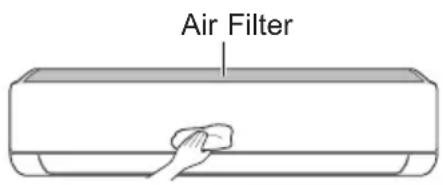
The feature may be changed according to the type of model.
| Type Description Interval | ||
| Air filter Clean with a vacuum or hand wash. 2 weeks | ||
| Ionizer (Optional) | Use dry cotton bud to remove any dust. Every 6 months | |
| Indoor unit | Clean the Indoor unit surface by using a soft, dry cloth. Regularly | |
| Have a professional clean the condensate drain pan. Once a year | ||
| Have a professional clean the condensate drain pipe. Every 4 months | ||
| Replace the remote control batteries. Once a year | ||
| Outdoor unit | Have a professional clean the heat exchanger coils and the panel vents. (Consult with technician.) | Once a year |
| Have a professional clean the fan. Once a year | ||
| Have a professional clean the condensate drain pan. Once a year | ||
| Have a professional verify that all the fan assembly is firmly tightened. | Once a year | |
| Clean the electric components with air. Once a year | ||
NOTE
- Never use water that is higher than 40^ when you clean the filters. It may cause deformation or discoloration.
- Never use volatile substances when you clean the filters. They may damage the surface of the product.
Clean the Air Filter
Clean the air filters once every 2 weeks, or more, if necessary.
NOTE
The air filter can be broken when it is bent.
- When the air filter is not assembled correctly, dust and other substances can enter into the indoor unit.
Type1
If you look at the indoor unit from above it, can assemble the top filter easily.
1 Turn off the power to the unit.
2 Hold the knobs of the air filter, lift it up slightly.
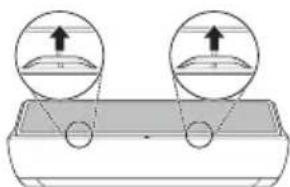
3 Remove it from the indoor unit.
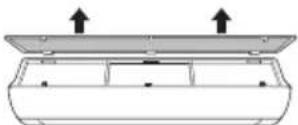
4 Clean the filter with a vacuum cleaner or with lukewarm water with neutral detergent.
5 Dry the filter in the shade.
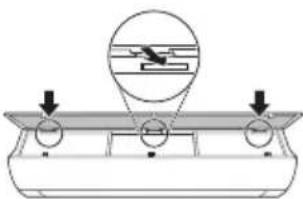
6 Insert the hooks of the air filter into the front cover.
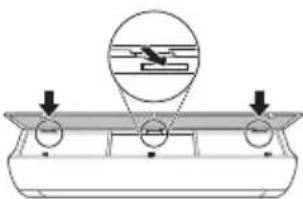
7 Push down hooks to assemble the air filter.
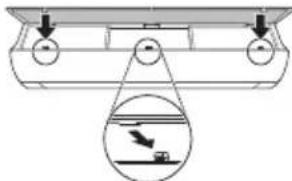
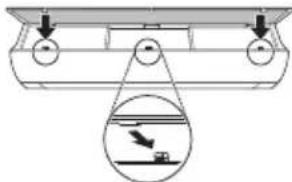
8 Check the side of the front cover for correct assembly of the air filter.
Type2
1 Turn off the power to the unit.
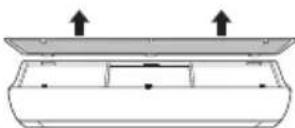
2 Open the front cover.
- Lift up both sides of the cover slightly.
3 Hold the knobs of the air filters, pull them down slightly and remove them from the indoor unit.
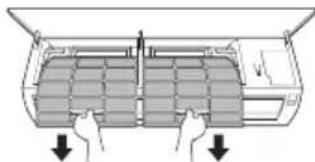
4 Clean the filters with a vacuum cleaner or with lukewarm water with neutral detergent.
5 Dry the filters in the shade.
6 Insert the hooks of the air filters into the front cover.
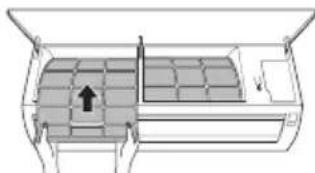
7 Check the side of the front cover for correct assembly of the air filters.
Self-diagnosis Function
This product has a built-in self-diagnosis function. If an error occurs, the lamp of the indoor unit will blink in 2 second intervals. If this occurs, contact your local dealer or service center.
Before Calling for Service
Please check the following before you contact the service center. If the problem persists, contact your local service center.
| Symptoms Possible Causes & Solution | |
| The air conditioner does not work normally. | Burning smell and strange sounds are coming from the unit. ·Turn off the air conditioner, switch OFF, or disconnect the power supply, and contact the service center. |
| Water leaks from the indoor unit even when the humidity level is low. ·Turn off the air conditioner, switch OFF, or disconnect the power supply, and contact the service center. | |
| The power cable is damaged or it is generating excessive heat. ·Turn off the air conditioner, switch OFF, or disconnect the power supply, and contact the service center. | |
| A switch, a circuit breaker (safety, ground), or a fuse is not operated properly. ·Turn off the air conditioner, switch OFF, or disconnect the power supply, and contact the service center. | |
| The unit generates an error code from its self-diagnosis. ·Turn off the air conditioner, switch OFF, or disconnect the power supply, and contact the service center. | |
| The air conditioner does not work. | The air conditioner is unplugged. ·Check whether the power cord is plugged into the outlet or the power isolators are switched on. |
| A fuse exploded, or the power supply is blocked. ·Replace the fuse or check if the circuit breaker has tripped. | |
| A power failure has occurred. ·Turn off the air conditioner when a power failure occurs. ·When the power is restored, wait 3 minutes, and then turn on the air conditioner. | |
| The voltage is too high or too low. ·Check if the circuit breaker has tripped. | |
| The air conditioner was turned off automatically at a preset time. ·Turn the air conditioner on. | |
| The battery setting in the remote controller is incorrect. ·Make sure that the batteries are inserted correctly in your remote controller. ·If the batteries are placed correctly, but the air conditioner still does not operate, replace the batteries and try again. | |
| Symptoms Poss | ble Causes & Solution |
| The air conditioner does not emit cool air. | Air is not circulating properly. • Make sure that there are no curtains, blinds, or pieces of furniture blocking the front of the air conditioner. |
| The air filter is dirty. • Clean the air filter once every 2 weeks. • See “Clean the Air Filter” for more information. | |
| The room temperature is too high. • In summer, cooling the indoor air fully may take some time. In this case, select the Jet Mode to cool the indoor air quickly. | |
| Cold air is escaping from the room. • Make sure that no cold air is escaping through the ventilation points in the room. | |
| The desired temperature is higher than the current temperature. • Set the desired temperature to a level lower than the current temperature. | |
| There is a heating source nearby. • Avoid using heat generators like electric ovens or gas burners while the air conditioner is in operation. | |
| Fan Mode is selected. • During Fan Mode, air blows from the air conditioner without cooling or heating the indoor air. • Switch the operation mode to cooling operation. | |
| Outside temperature is too high. • The cooling effect may not be sufficient. | |
| The fan speed cannot be adjusted. | The Jet Mode, or Auto Operation Mode is selected. • In some operation modes, you cannot adjust the fan speed. Select an operation mode in which you can adjust the fan speed. |
| The temperature cannot be adjusted. | The Fan Mode or Jet Mode is selected. • In some operation modes, you cannot adjust the temperature. Select an operation mode in which you can adjust the temperature. |
| The air conditioner stops during operation. | The air conditioner is suddenly turned off. • The Timer Function may have timed out, which turns the unit off. Check the timer settings. |
| A power failure has occurred during operation. • Wait for the power to come back. If you have the Auto Restart function enabled, your unit will resume its last operation several minutes after power is restored. | |
| Symptoms Possible Causes & Solution | |
| The indoor unit is still operating even when the unit has been turned off. | The Auto Clean function is being operated. ·Allow the Auto Clean function to continue since it removes any remaining moisture inside the indoor unit. If you do not want this feature, you can turn the unit off. |
| The air outlet on the indoor unit is discharging mist. | The cooled air from the air conditioner makes mist. ·When the room temperature decreases, this phenomenon will disappear. |
| Water leaks from the outdoor unit. | In the heating operations, condensed water drops from the heat exchanger. ·This symptom requires installing a drain hose under the base pan. Contact the installer. |
| There is noise or vibration. | A clicking sound can be heard when the unit starts or stops due to movement of the reversing valve. Creaking sound: The plastic parts of the indoor unit creak when they shrink or expand due to sudden temperature changes. Flowing or Blowing sound: This is the flow of refrigerant through the air conditioner. ·These are normal symptoms. The noise will stop. |
| The indoor unit gives off an odor. | Odors (such as cigarette smoke) may be absorbed into the indoor unit and discharged with airflow. ·If the smell does not disappear, you need to wash the filter. If this does not work, contact the service center to clean your heat exchanger. |
| The air conditioner does not emit warm air. | When Heating Mode starts, the vane is almost closed, and no air comes out, even though the outdoor unit is operating. ·This symptom is normal. Please wait until the unit has generated enough warm air to blow through the indoor unit. |
| The outdoor unit is in Defrosting Mode. ·In Heating Mode, ice/frost is built up on the coils when the outside temperature falls. This function removes a layer of frost on the coil, and it should finish in approximately 15 minutes. | |
| Outside temperature is too low. ·The heating effect may not be sufficient. | |
| Your home appliance and smartphone is not connected to the Wi-Fi network. | The password for the Wi-Fi that you are trying to connect to is incorrect. ·Find the Wi-Fi network connected to your smartphone and remove it, then register your appliance on LG ThinQ. |
| Mobile data for your smartphone is turned on. ·Turn off the Mobile data of your smartphone and register the appliance using the Wi-Fi network. | |
| The wireless network name (SSID) is set incorrectly. ·The wireless network name (SSID) should be a combination of English letters and numbers. (Do not use special characters.) | |
| The router frequency is not 2.4 GHz. ·Only a 2.4 GHz router frequency is supported. Set the wireless router to 2.4 GHz and connect the appliance to the wireless router. To check the router frequency, check with your Internet service provider or the router manufacturer. | |
| The distance between the appliance and the router is too far. ·If the distance between the appliance and the router is too far, the signal may be weak and the connection may not be configured correctly. Move the location of the router so that it is closer to the appliance. | |
NOTE
- Some functions may not be supported, depending on the model.
MANUEL DU PROPRIÉTAIRE
CLIMATISATION

Smart Diagnosis (Diagnostic intelligent) 29
MAINTENANCE 30
Application LG ThinQ
Smart Diagnosis (Diagnostic intelligent)
Smart Diagnosis (Diagnostic intelligent)
4 IaTnoTe TO KouPNI SET/CANCEL yia vα TEλειωεTE.
IpeBOD Ha opnHnHaHnHOTo pKOBoDCTBO
Toba pkoBOcTO BO MOKe Da cbDbpxka
H3o6paXeHnIu CbDbPxKaHne, pa3nUHO OT
MoEJa, KOITO CTe 3aKynIiN.
PbKOBOIDCTBOTO NOJIeKHa peJaKUa O T npOn3BOIDNTeJIa.
INHCTPYKlIM 3A BE3OJACHOCT. 3
BakHHn HnctpykLm 3a 6e3oNaChocT.
EKCPIIHOATAU 11
HaTnCHHeTe 6yToHbAng (Swing) HeKoJIKOkPaTHO nI36peTe XeJHaHata nocoka.
- 136epeTcTa da perynnpaTe NocokataHa Bb3dyuHnI NOtOK aBTOMaTHUHO.
3A6EJIEXKA
- PerynpaHTo Ha Nocokata Ha Bb3dyuHnI NOtOK Do Xopn3oHTaIIHa No3uZnM OMe Da He Ce PoNDbpKa B 3aBNCIMOCT OT MoJeNa.
- Поньното ретулране на Вьзуня
- Deфпектор може за довetedо поюраза на пordукта.
- Ako pectapntpate KINMaTnKa,Toi 3anOuBa da pa60tn C NOcNeIHO HAcTpoEHaTa Nocoka Ha Bb3dyuHnra NOTOK, Taka Ye Bb3dyuHnraT DeΦJIeKTop MoKe Da He CbOTBeTCTBa Ha IKoHaTa, NOKa3aHa Ha DnCTaHnOHHOTO. Korato TOBa ce cnUHy, HATNCHEte ByTOHa SWING JIN SWING, 3a da peryInpate OTHOBO NOCOKaTa Bb3dyuHnra NOTOK.
Pa6oTaHa Ta3nФyHKuM0Ke Da ce pa3NuaBa npu n3NoJ3BaHe OT dncnner Ha dNCTaHcNOHOTO.
BkIIOUBaHe n N3KJIIOUBaHe Ha TaMepa
Ta3nФункцин HabtpoьВаКлматИкаДа ce ɪЗклюв/БКлючВа ABTomatИчHо BЖeланOTOBpeMe.
TaMepbT 3a BkI./n3KJI. MoKe Ia 6bJe 3aJaDeH 3aEHO C TOBa.
3aandaBaHe Ha TaIMeP 3a BKNIOUcBaHe
1 HaTnCHHe 6yToHa TIMER HEKOJIKKpaTHO.
- IKoHaTa no-dOJy Mura BdoJHaTa YacT Ha DnCnIe.
2 HaTnCHeTe 6yToHa YIn ,3aJa n36epTe MNHyTnte.
3 HaTnCHTe 6yToHa SET/CANCEL, 3a da 3aBbPunTe HAcTpOuBaHeTO.
CneHacrpoBaHeToHaTainMepaTekyuTo BpemeNIKOHATA NOKa3BaHTeKpaHa, KOETO NOKa3Ba,Ye XeJHaHOTOBpeme e 3aandaHO.
OTMЯHa Ha TaMepa 3a BkIIOUBaHe
1 HaTnCHHe 6yToHa HEKoJIKOKpaTHO.
- IKoHaTa no-dOJy MraBdoJHata Yact Ha DnCnne.
2 Hatachete 6yToHa SET/CANCEL 3a OTMaHa Ha HactpoKaTa.
3aIaBaHe Ha TaIMeP 3a I3KJIIOUcBaHe
1 HaTnCHeTe 6yToHa TIMER heKOJIKKpaTHO.
- IKohata no-dony Mura B doJHata yact Ha dncnne.
2 HataHcHete6yToHaYn,3aDa n36epTe MNHyTnte.
3 HaTnchTe 6byToHa SET/CANCEL, 3a da 3aBbPunTe HAcTpOuBaHeTo.
CneHacTpoBaHeToHaTaMepaTeKytoTO BpeMe INKoHaTa 0E NOKa3BaT Ha ekpaHa, KOeTO NOKa3Ba, Ye XeJaHOTo BpeMe e 3aandaHo.
3ABEJIEXKA
Ta3nФyHKuIe 3a6paHeHa, KOrato HAcTpoBbTe ,CtAndapTeH TaMep".
OTMЯHa Ha TaɪMepa 3a N3KNIOUÇBaHe
1 HaTnchete 6yToHa TIMER heKOJIKKpaTHO.
- IKohata no-dony Mura B doJHata yact Ha dncnne.
2 HataChete 6yToHa SET/CANCEL 3a OTMaHa Ha HacTpoiKaTa.
OTMЯHa Hactpo'kaTa Ha TaMepa
HaTnCHHe 6yToH,3a Da OTMeHnTe BCnKn HAcTpOuKn Ha Taumepa.
I3noJ3BaHe Ha cyHKunraTa 3a 3acnBaHe (no n36op)
Ta3nФyHKUryN3KNIOYBa KJIMaTnKa aBTOMaTnHO, KOrato cn JIraTe.
1 BkIIOUte ypeia.
2HaTnCHHe 6yToHa TIMER HEKoJIKKpATHO.
- IKohata no-dony Mra B doJHaTa Yact Ha DnCnIe.
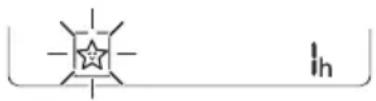
3 HaTnCHeTe 6yToHa YIn , 3a da n36epeTe yaca (do 7 yaca).
4 HaTnchete 6yToHa SET/CANCEL,3a Da 3aBbPunTe HAcTpOuBaHeTo.

ce noka3Ba Ha ekpaHa.
3A6EJIEXKA

Ce NOKa3Ba Ha HЯKoBbTpewHn TeJa.
- Диспелгов На ВьтpeшOTO ТANO NOKA3BA OT 1 уdo 7 у Което ce Вижда само за 5 сек, сnéдКоето ce Врьша до Habстpoикata HaTemпература.
BpeKIM Ha oxJaXdAne n 3CyJbAbe TeMnepaTpata ce yBeJIuYabac 1 ^ C cIe30 MNHTN IOnbJIHNTeIeH 1 ^ C cIeO OSe 30 MNHTN 3a NO-KOMOpTeH cbH.
Tempepatypata ce nobuasa b c do 2°C ot npedbapntelno 3aandaehata Tempepatypa.
- Bbnpekn ye ot6eJ3BaHeto Ha ckopocTtHa BeHTnIaTopa Ha dinCpIe MoKe Da ce npomEn, CKOpocTtHa BeHTnIaTopa ce perynipa ABTomatNo.
N3noJ3BaHe Ha yHKunra 3a cTaHdapTeH TaMep (no n36Op)
Ta3nФункциИЗКЛЮЧВa KЛIMaTиKa aBToMaTиHOr, KOraTO cN JЯrTe.
1 BkIIOUte ypeDa.
2 HATINCHETe 6yToHa TIMER HEKOKOKpaTHO.
- IkoHaTa no-dOJy Mnra BdoJHaTa Yact Ha DnCnpe.
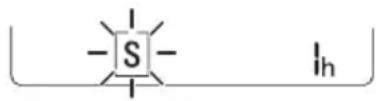
3HaTnchHeTe 6yToHa nn,3a da n36epTe yaca (do7yaca).
4 HataHcHeTe 6yToHa SET/CANCEL,3a da 3aBbPUnTe HaCTpoiBaHeto.
S ce noka3Ba Ha ekpaHa.
3ABEJIENKKA
- Ta3n ΦyHKcIe e 3a6paHeHa, KOraTo HAcTpOuBaTe TaIMepa 3a N3KJIIOUbaHe.
I3noJ3BaHe Ha yHKnraTa 3a noka3BaHe Ha n3pa3XoDeHaTa eHepn (no n36op)
Ta3nФункия nOKa3Ba KOnIueCTBOTO
H3pa3xoDbaha eNEKtpuYecka eHeprHaДИncPJIe
Ha BbTppeShOTToTANO,doKaTo npOdyKTbT pa6oTN.
Ioka3BaHe Ha TeKyuata n3pa3XoDbAHa eHepnra
1 BkIIOUeTe ypeDa.
2 HaTnchete n 3aApbXTe 6yToHa oKoNo 3 ceKyuHn.
MomeHTHaTkoHcyMaunHa eHepn () ce NOKa3Ba 3a KpaTKo Bbpxy DnCnpe Ha HAKO MoeJN BbTpEHN TeNa.
3ABEJIENKKA
- EdnHnuaTa MpaKa 3a cToHocCTTa, KOrTO ce noka3Ba Ha dncnner, e kW.
THe ce noka3Ba Ha 6e3xHHTO DnCTaHIOHOH. - Ako TRe nObeYe oT 99 kB, KoETo e DOnyCTmMnT dHaana3OH, RaonDbpKaIte Ha 99 kB.
- POKaXeTe MoUHocTt a NOd 10 kBt c 0,1 kBt eINHnI n POKaXeTe eINH naD 10 kBt c 1 kBt eINHnI.
-ДeИCTBNTeJIHATA MOUHOCT MOKeJa ce pa3nuaBa OT NOKa3HaTa MOUHOCT. - Pn CbBp3BaHe KbM BbHNo TЯJIO Ha MyTTncIcTeMa Ta3N ΦyHKUma MoKe Da He Ce NOdIbpxka.
I3noJ3BaHe Ha cyHKnraTa 3a I3KJIIOUBAHe Ha OCBeTJeHneTo (no n36op)
- Ctbnka 1: BxodyaTa MoHocTe hAmanJa c 20% B cpaBHeHne C HOMHaJIHaTa BxOJaMa MOHOCT.
Haekpaa ce noka3Ba
CTbNka 2:BxOJaIaTa MoUHocE hAmAJIa C 40% BcpaBHeHneC HOMHaJIHaTbXoJau MOnHOCT.
Haekpana ce noka3ba
- Ctbnka 3 (no n36op): BxodjuaTa MOHOCTe HamaJra c 60% BCpaBHeHne C HomHaJHata BxODa MoHOCt.
Haekpaa ce noka3ba
Ha HrKoBbTpewHn TeNa Ce noka3a (CTbnKa 1),OcTbnKa 2),(CTbnKa 3). (Ha HrKoBbTpewHn TeNa ce noka3Ba (CTbnKa 1),(CTbnKa 2).)
Ta3nФyHKUeEOCTbHcpeKIMHaOxnaXdaHe.
KanaunTeTbT MoKe Da ce NoHxK, KOraTo e n36paH pexIM Ha ynpabJeHne Ha eHepnraTa.
KeHaTa TempePa ce noka3Ba 3a okoIoo5 ceK, aKO HaTnCHeTe 6yToHa FAN SPEED, uIN
CTaHaTa TemnepaTypa ce noka3Ba 3a OKoI05 cek, aKO HATNCHEte 6yToHa ROOM TEMP.
- Pn Cbbp3BaHe KbM BbHNo TAno Ha MyIITncnCTema Ta3N FyHKuMa MOKe Da He Ce IOnDbpxka.
I3noJ3BaHe Ha cneuaJIHn 0yHKcnn
1 BkIoueTe ypea.
2 HaTnchTe 6yToHa FUNC HeKoJIkoKpaTHO n 36epeTe JeaHata No3uJra.
3 HaTnCHHe6yToHa SET/CANCEL, 3a da 3aBbPUnTe HAcTpOuBaHcTo.
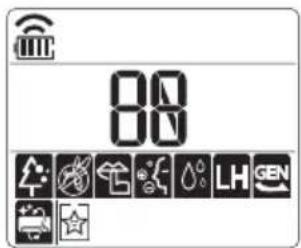
| Ди检пелей Иструкции | |
| A | Ионизаторгт reнерURA млноюниони, за за_nomага за подобрава themselves Ha KauchestВOTо Ha Bb3dUxa. |
| B | Hamалявае на Шуma OT ВьншOTO ТЯlio. |
| C | Остразнывае на Влагату, reнерURA на Вьв ВьТрeshOTO ТЯlio. |
3ABEJIEXKA
HakonФункиIMOKeДa He CeNoIbPkaT B 3aBnCmOCTOTMOJIa.
Hakon cyHKmMOKe da pa6oTn no pa3nueH HauHH OT noka3aHOT Ha dncnpeHa dNCTaHcNOHOT ynpabNeHne.
OTMnHa Ha cneuaJIHH yHKUIN
1 HaTnchHeTe 6yToHa FUNC HeKoIkoKpaTHo n 36epeTe JeJaHata No3uIy.
2 HaTnCHete 6yToHa SET/CANCEL 3a OTMaHa HnФyHKnIraTa.
N3noJ3BaHe Ha cyHKunraTa 3a npeUnCTBaHe Ha Bb3dyxa
Te3nФyHKuIN ppeIOCTaBRT uCt IN CBEx Bb3dYx Upe3 HONH YuactuN INΦNTbp.
Oce NOKa3Ba Ha HЯKoB BbTppeHn TeJa B 3aBNCIMOCT OT MoJeJa.
Прилобке LG ThinQ
Ta3n XapaKTePncTnKa e HaJIuHa cAmo B MoJeIN C JIoroTO ThinQ.
PnIIOxKeHneTo LG ThinQ Bn no3BOnBa Da kOMyHKnpuTa c ypeDa nocpeDCTBOM cMapTfoH.
XapakTepncTnKn Ha npNIOxehneTo Ha LG ThinQ
KomyHKpauTe CypeaOT cMapTfoH, KaTo n3NoJ3BaTe yO6HnTe cMapTФyHKuN.
Smart Diagnosis
Ako Bb3HnKHe npo6nem DoKaTo n3NoJ3BaTe npuOKeHneTo, Ta3n XapakTepncTnka 3a yMHa dnaHocTnka (smart diagnosis) ue BV nomorHe da dnaHocTnucnPte npo6nema.
Hactpoyn
No3BoJIbA Bn da 3aDaBaTe pa3JIuHn OIcHn Haypeda nB npNJIOXeHHeTo.
3ABEJIENKKA
- Ako CMeHnTe CBo8 6e3Knueh pyTe, DocTaBnKa Ha nHTepHET nn napona, n3TpniTe pernctpnPapnHa ypeD OT npNoXeHneTo LG ThinQ n ro pernctpPpauTe oTHOBO.
- Пиюжehнeto e npeДмET ha npomEHc ceI noIo6pЯBaHe ha ypeHa, 6e3 npeДвapntelHo yBeDOMЯBaHc Ha Notpe6nteJIte.
- Φункципг Te Moже Да ca pa3лчн И npi pa3лчнTe Mодел.
Пре徳даинзнолзВаTe npиложенeto LG ThinQ
1 IpoBepTe pa3ctoHneTo MeJy ypeJa n 6e3KnUHn pyTep (Wi-Fi mpeka).
Ako pa3ctoHneTo MeJyypeJa 6e3xuHnpyTepe TBbPde rOJMAO,CnIaTa Ha cnHaJa OTCna6Ba.MoKe da OTHeMe MHoro Bpeme 3a perncTpaunn INN HCTaNaqraTa Da e HeycNeuHa.
2 N3KJIHOyTe MO6NJHnTe DaHHn IIN KJIeTbYHnTe DaHHn Ha CMapTofoHa cn.
3 Cbpxe TepeoHa cn c 6e3xuHn pyTeP.
3ABEJIENKKA
3a da npoBepTe Wi-Fi Bp3kAta, BnKTe daJI INKOHkATA Na KOHTponHnaHeJ CBETN.
- YpeIbT noIbIpbIka cAmO 2,4 GHz Wi-Fi mpeXn. 3a da npOBepIte yeCToTaHa mpeXkata cn, CBpbKTe ce CdoCTaBUnKa cn Ha INHTepHET nIi npOBepe T pIkoBOdCTBOTO 3a eKcNlloaTaunHa 6e3JnUHn pyTeP.
LG ThinQ He HOCN OTROBOPHOCT 3a npo6IeMn BCbP3aHocTTa Nnn 3a NOBpeDN, Hen3npaBHOCT Nnn rpeKNI pnuHHeHN OT MPexKObaT Bp3ka.
Ako ypeIbT n3nITBa TpydHocTu npn OcbuieCTBraBaHeTo Ha Bpb3ka C Wi-Fi mpekata, moKe 6n e TBbpDe daJeue ot pytepa. Kynete Wi-Fi nobTopnten (ycunBaTeHa oxbaTa), 3a da noobspnte cnilata Ha Wi-Fi cnirhana.
Wi-Fi Bpb3kata MoXe Da He ce OcbueCTBn Hnna 6bnde npekcbaha nopadn CpeData, B KOrTo e DOMaHHaT a MpeXa.
- МрековаТа Бьзкаможе Да He pa6oTипраинHo npaДи ДocTaBчИКа НИНтepHET.
- O6kpbXkabaTa 6e3KnHa cpea MoKe da npuHn 3a6abAHe B 6e3KnHaTa Mpeka.
- YpeBbT He MoKe Da 6bDe peRnCTpnpaH nopadn npo6bEmn C npedabaHeTo Ha 6e3KuHnA cnHaI. N3KnIOUcTe 3axpaHbAHeTo Ha ypeDa n 3uaKaaTe OKOLO eHa MNHyTa, npeDn Da npo6BaTe OTHOBO.
Ako 3aunTHaTa CTeHa Ha Baunr 6e3KuHepyTepe BkIIOUeHa, DeakTbnpaTe rnn DoabeteN3KJIOUeHne KbM HeR. - Имeto Ha 6e3xuHaT MaPexa (SSID) Tpr6Ba da 6bde KOM6nHaZrO TcNΦpN aHrnnckn 6yKBN. (He n3no13BaIte CneuaJIHn CmB0NJ.)
- Iotpe6nteJcknT INHTepFeic (UI) Ha cMapTfoHa MoKe Da e pa3NueH B 3aBNCIMoCT OT MO6NJHaTa OepauOnHa CnCTema (OS) n Ipon3BOJNTeJI.
- Ako npotoKoJbT 3a 3auNTa Ha pyTepe haHactpoeHa WEP, e Bb3MOxHO da He MoXeTe da HactpOte MpeXaTa. MoIa, IpomeHeTe HacToPkaTa Ha dpyr npotoKoJ 3a 3auNTa (npenopbUba ce WPA2) n pernctpupaTe npodykTA OTHBO.
HOpmaa3a coOpTyep c OTbopeh KOD
3a da noyuHTe n3xoDnHn KOD cbrlacHo GPL, LGPL, MPL i npytn nueHn c OTbOpen KoD, cbdbpkaun ce B To3n npOdyKT, nocTeTe ye6 caIra https://opensource.lge.com.
BdoIbJIHeHne KbM I3XoHnI KOd MoKeTe Da n3TerIInTe N BCNU CnOMeHaTI NlueH3N0HHYcNoBn,OTKa3N OT rapaHcN IN N3BecTnBbB Bpb3ka c aBtOpCKn npaba.
LG Electronics cьио ue Bn npedoctabn OTbopen n3xoden kon ha CD-ROM cpeuy 3aapanlaune, nOKpmbaio pa3xoIndte 3a n3BbpuBahe Ha taKaBa dnctpnbuycna (kato hnapimep ceHaTa Ha HocnteIInTe, pa3xoIndte no TpaHcnpTa), cnei KaTO nOlyu npbUka 3a TOBA NO IMeJn Ha aDpec: opensource@lge.com. Ta3n opepta e BaNidha 3a nepnoD OT Tprn rOdiHn Cnei NocleHaTa Hn doCTabKa Ha To3n npodykt. Ta3n opepta e BaNIDha 3a BCEkn, nOlyuHn Ta3n INHOpMaunr.
3 OToTaPaHEToOT BbTpewHOTOrJIO.
4 Nounctete fuiTbpa c npaxocmyka uin C xnaKa Boda c HeyTpaneH nouNCTBaU npenapat.
5 N3cyweteΦnITbpaHa cAHHka.
6 BkapaTe KyKeTe Ha Bb3DyUHnA φnIITbp B npeHNr KanaK.
7 HaTnCHete HAnOly KyKInTe, 3a Da NoCTaBnTe Bb3DyUHnA FInTbP.
8 IpoBepeTe OT cTpaHaTa Ha npEiHnKaIaK daII N B3dUwHnT pIuNTbpe npabunHO nOCTaBeH.
Tun2
1 3KIOUeTe 3axpaHbHeTo n 3BaTe 3axpaHbuaa Ka6en.
2 OTbopeTe npednnaKanak.
- NOBUNHETe JIeKO I DBeTe CTPaH NaKanaka.
3 3aDpBxTe KOnyEtata Ha Bb3dyuHnTe cHnTpn, DpbHnHeTe Hn HADony JekO n npemaxheTe OT BBTpEshHOTo TnIO.
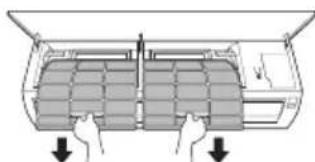
4 NocTePe nntbpa c npaxocmyka k a nn c XnAka Boda c Heytpaen NoocCTBaU npenapat.
5 3cyweteΦnntpntHa cHka.
6 BkapaTe KkyKnte Ha Bb3dUyHHTe fHNTpnB npednna Kaak.
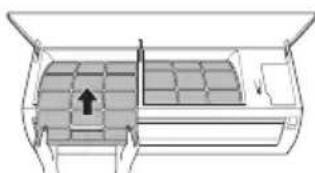
7 IpoBepTe OT cTpaHaTa Ha npEiHa Kaak DaII N B3dUwHnTe FInTpN Ca npaBUNHO NOCTaBeHn.
ФункцязаимогнocTKa
To3n npodukT nMa BrpaedeHa 9yHKuJra 3a cAmOdaHocTuKa. Ako Bb3HnKHe rpeUka, JAMnata Ha BbTpewHOTo TJIIO Ue 3aNoUHe da Mra C INTEpBaI OT 2 cekyHdN. Ako ToBa ce cIyuN, CBpbXeTe ce C MeCTHnA DnCTPb6TyOp IIN cepBn3eH ueHTbp.
Ipei da ce o6aHTe Ha cepBn3HnueHTbp
IpoBepTe cIeHTo, npEi Da ce CbPKeTe C cepBn3HnA ueHTbp. Ako npo6JIembT npOdbJxaba, o6bpHeTe Ce KbM Baunr MeCTe H cepBn3HnA ueHTbp.
| СимпTomи Вьзмохни поочни и рeshени | |
| Клиатник вedoюнHopмлно. | Устристови История Мирис на История История сTRAДа в СTRAДа в СTRAДа в СTRAДа в СTRAДа в СTRAДа в СTRAДа в СTRAДа в СTRAДа в СTRAДа в СTRAДа в СTRAДа в СTRAДа в СTRAДа в СTRAДа в СTRAДа в СTRAДа в СTRAДа в СTRAДа в СTRAДа в СTRAДа в CROHOTA e HNCSK. • История Клиатник, История Клиатник, История Клиатник, История Клиатник, История Клиатник, История Клиатник, История Клиатник, История Клиатник, История Клиатник, История Клиатник, История Клиатник, История Клиатник,История Клиатник,История Клиатник,История Клиатник,История Клиатник,История КлиATПОТА e TANALNO. • История Клиатник, История Клиатник, История Клиатник, История КлиATПОТА e TANALNO. • История Клиатник, История КлиATПОТА e TANALNO. • История Клиатник, История КлиATПОТА e TANALNO. • История КлиATПОТА e TANALNO. • История КлиATПОТА e TANALNO. • История КлиATПОТА e TANALNO. • История КлиATПОТА e TANALNO. • История КлиATПОТА e TANALNO. • История КлиATПОЛ e TANALNO. • История КлиATПОЛ e TANALNO. • История КлиATПОЛ e TANALNO. • История КлиATПОЛ e TANALNO. • История КлиATПОЛ e TANALNO. • История КлиATПОЛ e TANALNO. • История КлиAT ПОЛТЕ e TANALNO. • История КлиATПОЛ e TANALNO. • История КлиATПОЛ e TANALNO. • История КлиATПОЛ e TANALNO. • История КлиATПОЛ e TANALNO. • История КлиATПОЛ e TANALNO. • История КлиATPLOHOTA e TANALNO. • История КлиATПОЛ e TANALNO. • История КлиATПОЛ e TANALNO. • История КлиATПОЛ e TANALNO. • История КлиATПОЛ e TANALNO. • История КлиATПОЛ e TANALNO. • История КлиATIPOTAO e TANALNO. • История КлиATПОЛ e TANALNO. • История КлиATПОЛ e TANALNO. • История КлиATПОЛ e TANALNO. • История КлиATПОЛ e TANALNO. • История КлиATПОЛ e TANALNO. • История КлиATIIPOIe e TANALNO. • История КлиATПОЛ e TANALNO. • История КлиATПОЛ e TANALNO. • История КлиATПОЛ e TANALNO. • История КлиATПОЛ e TANALNO. • История КлиATПОЛ e TANALNO. • История КлиATIPOIe e TANALNO. • История КлиATПОЛ e TANALNO. • История КлиATПОЛ e TANALNO. • История КлиATПОЛ e TANALNO. • История КлиATПОЛ e TANALNO. • История КлиATПОЛ e TANALNO. • История KLIQUOJIe e TANALNO. • История KLIQUOJIe e TANALNO. • История KLIQUOJIe e TANALNO. • История KLIQUOJIe e TANALNO. • История KLIQUOJIe e TANALNO. • История KLIQUOJIe e TANALNO. • История KLIQUOLIOHOTAO e HNPSHOTAO. • История KLIQUOLIOHOTAO e HNPSHOTAO. • История KLIQUOLIOHOTAO e HNPSHOTAO. • История KLIQUOLIOHOTAO e HNPSHOTAO. • История KLIQUOLIOHOTAO e HNPSHOTAO. • История KLIQUOLIOHOTAO e TANALDOHOTAO. • История KLIQUOLIOHOTAO e TANALDOHOTAO. • История KLIQUOLIOHOTAO e TANALDOHOTAO. • История KLIQUOLIOHOTAO e TANALDOHOTAO. • История KLIQUOLIOHOTAO e TANALDOHOTAO. • История KLIQOLIOHOTAO e TANALDOHOTAO. • История KLIQUOLIOHOTAO e TANALDOHOTAO. • История KLIQUOLIOHOTAO e TANALDOHOTAO. • История KLIQUOLIOHOTAO e TANALDOHOTAO. • История KLIQUOLIOHOTAO e TANALDOHITAO. • История KLIQUOLIOHOTAO e TANALDOHOTAO. • История KLIQUOLIOHOTAO e TANALDOHOTAO. • История KLIQUOLIOHOTAO e TANALDOHOTAO. • История KLIQUOLIOHOTAO e TANALDOHOTAO. • История KLIQUOLIIHOTAO e TANALDOHOTAO. • История KLIQUOLIIHOTAO e TANALDOHOTAO. • История KLIQUOLIIHOTAO e TANALDOHOTAO. • История KLIQUOLIIHOTAO e TANALDOHOTAO. • История KLIQUOLIIHOTAO e TANALDOHOTAO • История KLIQUOLIIHOTAO e TANALDOHOTAO. • История KLIQUOLIIHOTAO e TANALDOHOTAO. • История KLIQUOLIIHOTAO e TANALDOHOTAO. • История KLIQUOLIIHOTAO e TANALDOHOTAO. • История KLIQUOLIIHOTA e TANALDOHOTAO. • История KLIQUOLIIHOTA e TANALDOHOTAO. • История KLIQUOLIIHOTA e TANALDOHOTAO. • История KLIQUOLIIHOTA e TANALDOHOTAO. • История KLIQUOLIIHOTA e TANALDOHOTAO. • История KIQUOLIIHOTA e TANALDOHOTAO. • История KIQUOLIIHOTA e TANALDOHOTAO. • История KIQUOLIIHOTA e TANALDOHOTAO. • История KIQUOLIIHOTA e TANALDOHOTAO. • История KIQUOLIIHOTA e TANALDOHOTAO. •История KIQUOLIIHOTA e TANALDOHOTAO. •История KIQUOLIIHOTA e TANALDOHOTAO. •История KIQUOLIIHOTA e TANALDOHOTAO. •История KIQUOLIIHOTA e TANALDOHOTAO. •История KIQUOLIIHOTA e TANALDOHO. •История KIQUOLIIHOTA e TANALDOHO. •История KIQUOLIIHOTA e TANALDOHO. •История KIQUOLIIHOTA e TANALDOHO. •История KIQUOLIIHOTA e TANALDOHO. •История KIQUOLIIHOTA e TANALDOHO. •ИстORHERSIA e TANALDOHOTAO. •ИстORHERSIA e TANALDOHOTAO. •ИстORHERSIA e TANALDOHOTAO. •ИстORHERSIA e TANALDOHOTAO. •ИстORHERSIA e TANALDOHOTAO. •ИстORHERSIA e TANALDOHOTAO. •ИстORHERSIA e TANALDOHOTAO. •И stORHERSIA e TANALDOHOTAO. •И stORHERSIA e TANALDOHOTAO. •И stORHERSIA e TANALDOHOTAO. •И stORHERSIA e TANALDOHOTAO. •И stORHERSIA e TANALDOHOTAO. •И stORHERSIA e TANALDOHOTAO. •И stORHERSIAL e TANALDOHOTAO. •И stORHERSIAL e TANALDOHOTAO. •И stORHERSIAL e TANALDOHOTAO. •И stORHERSIAL e TANALDOHOTAO. •И stORHERSIAL e TANALDOHOTAO. •И stORHERSIAL e TANALDOHOTAO. •И stORHERSIAL e TANLDAHOTAO. •И stORHERSIAL e TANLDAHOTAO. •И stORHERSIAL e TANLDAHOTAO. •И stORHERSIAL e TANLDAHOTAO. •И stORHERSIAL e TANLDAHOTAO. •И stORHERSIAL e TANLDAHOTAO. •И stORHERSIAL e TANLDAHOTAO •И stORHERSIAL e TANLDAHOTAO. •И stORHERSIAL e TANLDAHOTAO. •И stORHERSIAL e TANLDAHOTAO. •И stORHERSIAL e TANLDAHOTAO. •И stORHERSIAL e TANLDAHOTAO. •И stORHERSIAL e TANLDAHOTAO. •И storherSIAL e TANLDAHOTAO. •И stORHERSIAL e TANLDAHOTAO. •И stORHERSIAL e TANLDAHOTAO. •И stORHERSIAL e TANLDAHOTAO. •И stORHERSIAL e TANLDAHOTAO. •И stORHERSIAL e TANLDAHOTAO. •И stORHERSIAL eTANLDAHOTAO. •И stORHERSIAL e TANLDAHOTAO. •И stORHERSIAL e TANLDAHOTAO. •И stORHERSIAL e TANLDAHOTAO. •И stORHERSIAL e TANLDAHOTAO. •И stORHERSIAL e TANLDAHOTAO. •И stORHERSIAL e TANLDA HOTAO. •И stORHERSIAL e TANLDAHOTAO. •И stORHERSIAL e TANLDAHOTAO. •И stORHERSIAL e TANLDAHOTAO. •И stORHERSIAL e TANLDAHOTAO. •И stORHERSIAL e TANLDAHOTAO. •И stORHERSIAL e TANLDAHOTAO. *ИсторICAL and historical studies of the KIQUOLIIHOTA e TANALDOHOTAO. •ИсторICAL and historical studies of the KIQUOLIIHOTA e TANALDOHOTAO. •ИсторICAL and historical studies of the KIQUOLIIHOTA e TANALDOHOTAO. •ИсторICAL and historical studies of the KIQUOLIIHOTA e TANALDOHOTAO. •ИстORICAL and historical studies of the KIQUOLIIHOTA e TANALDOHOTAO. •ИстORICAL and historical studies of the KIQUOLIIHOTA e TANALDOHOTAO. •ИстORICAL and historical studies of the KIQUOLIIHOTA e TANALDOHOTAO. •ИстORICAL and historical studies of the KIQUOLIIHOTA e TANALDOHOTAO •ИстORICAL and historical studies of the KIQUOLIIHOTA e TANALDOHOTAO. •ИстORICAL and historical studies of the KIQUOLIIHOTA e TANALDOHOTAO. •ИстORICAL and historical studies of the KIQUOLIIHOTA e TANALDOHOTAO. •ИстORICAL and historical studies of the KIQUOLIIHOTA e TANALDIOHO. •ИстORICAL and historical studies of the KIQUOLIIHOTA e TANALDIOHO. •ИстORICAL and historical studies of the KIQUOLIIHOTA e TANALDIOHO. •ИстORICAL and historical studies of the KIQUOLIIHOTA e TANALDIOHO. •ИстORICAL and historical studies of the KIQUOLIIHOTA e TANALDIO HO. •ИстORICAL and historical studies of the KIQUOLIIHOTA e TANALDIOHO. •ИстORICAL and historical studies of the KIQUOLIIHOTA e TANALDIOHO. •ИстORICAL and historical studies of the KIQUOLIIHOTA e TANALDIOHO. •ИстORICAL and historical studies of the KIQUOLIIHOTA e TANALDIOHHO. •ИстORICAL and historical studies of the KIQUOLIIHOTA e TANALDIOHHO. •ИстORICAL and historical studies of the KIQUOLIIHOTA e TANALDIOHHO. •ИстORICAL and historical studies of the KIQUOLIIHOTA e TANALDIOHHO. •ИстORICAL and historical studies of the KIQUOLIIHOTA e TANLDAHOTAO. •ИстORICAL and historical studies of the KIQUOLIIHOTA e TANLDAHOTAO. •ИстORICAL and historical studies of the KIQUOLIIHOTA e TANLDAHOTAO. •ИстORICAL and historical studies of the KIQUOLIIHOTA e TANLDAHOTAO. •ИстORICAL and historical studies of the KIQUOLIIHOTA e TANALDIOHO. •ИстORICAL and historical studies of the KIQUOLIIHOTA e TANALDIOHO. •ИстORICAL and historical studies of the KIQUOLIIHOTA e TANALDIOHO. •ИстORICAL and historical studies of the KIQUOLIIHOTA e TANLDAHOTAO. •ИстORICAL and historical studies of the KIQUOLIIHOTA e TANLDAHOTAO. •ИстORICAL and historical studies of the KIQUOLIIHOTA e TANLDAHOTAO. •ИстORICAL and historical studies of the KIQUOLIIHOTA e TAN LDAHOTAO. •ИстORICAL and historical studies of the KIQUOLIIHOTA e TANLDAHOTAO. •ИстORICAL and historical studies of the KIQUOLIIHOTA e TANLDAHOTAO. •ИстORICAL and historical studies of the KIQUOLIIHOTA e TANLDAHOTAO. •ИстORICAL and historical studies of the KIQUOLIIHITA e TANLDAHOTAO. •ИстORICAL and historical studies of the KIQUOLIIHITA e TANLDAHOTAO. •ИстORICAL and historical studies of the KIQUOLIIHITA e TANLDAHOTAO. •ИстORICAL and historical studies of the KIQUOLIIHITA e TANLDAHOTAO. •ИстORICAL and historical studies of the KI QUOLIIHITA e TANLDAHOTAO. •ИстORICAL and historical studies of the KIQUOLIIHITA e TANLDAHOTAO. •ИстORICAL and historical studies of the KIQUOLIIHITA e TANLDAHOTAO. •ИстORICAL and historical studies of the KIQUOLIIHITA e TANLDAHOTAO. •ИстORICAL and historical studies •ИстORICAL and historical <|im_start|>assistant •ИстORICAL and historical •ИстORICAL and historical •ИстORICAL and historical •ИстORICAL and historical •ИстORICAL and historical •ИстORICAL and historical •ИстORICAL and historical •ИстORICAL and historical •ИстORICAL and historical •ИстORICAL and historical •ИстORICAL and historical •ИстORICAL and historical •ИстORICAL and historical •И stORICAL and historical •И stORICAL and historical •И stORICAL and historical •И stORICAL and historical •И stORICAL and historical •И stORICAL and historical •И stORICAL and historical •И stORICAL and historical •И stORICAL and historical •И stORICAL and historical •И stORICAL and historical •И stORICAL and historical •И stORICAL and history •И stORICAL and history •И stORICAL and history •И stORICAL and history •И stORICAL and history •И stORICAL and history •И stORICAL and history •И stORICAL and history •И stORICAL and history •И stORICAL and history •И stORICAL and history •И stORICAL and history •И stORICAL and history •И StORICAL and history •И stORICAL and history •И stORICAL and history •И stORICAL and history •И stORICAL and history •И stORICAL and history •И stORICAL and history •И stORICAL and history •И stORICAL and history •И stORICAL and history •И stORICAL and history •И stORICAL and history •И stORICAL and hysteresis •И stORICAL and history •И stORICAL and history •И stORICAL and history •И stORICAL and history •И stORICAL and history •И stORICAL and history •И stORICAL and history •И stORICAL and history •И stORICAL and history •И stORICAL and history •И stORICAL and history •И stORICAL and history •ИstORICAL and history •И stORICAL and history •И stORICAL and history •И stORICAL and history •И stORICAL and history •И stORICAL and history •И stORICAL and history •И stORICAL and history •И stORICAL and history •И stORICAL and history •И stORICAL and history •И stORICAL and history •И stORICAL and History •И stORICAL and history •И stORICAL and history •И stORICAL and history •И stORICAL and history •И stORICAL and history •И stORICAL and history •И stORICAL and history •И stORICAL and history •И stORICAL and history •И stORICAL and history •И stORICAL and history •И stORICAL and history •И STORICAL and history •И stORICAL and history •И stORICAL and history •И stORICAL and history •И stORICAL and history •И stORICAL and history •И stORICAL and history •И stORICAL and history •И stORICAL and history •И stORICAL and history •И stORICAL and history •И stORICAL and history •И stORICAL and HSTORY •И stORICAL and history •И stORICAL and history •И stORICAL and history •И stORICAL and history •И stORICAL and history •И stORICAL and history •И stORICAL and history •И stORICAL and history •И stORICAL and history •И stORICAL and history •И stORICAL and history •И stORICAL and history •И sTORMON HOPMЛН. KlIMaTnKbT He kpOHTo He kpOHTo He kpOHTo He kpOHTo He kpOHTo He kpOHTo He kpOHTo He kpOHTo He kpOHTo He kpOHTo He kpOHTo He kpOHTo He kpOHTo He kpOHTo He kpOHTo He kpOHTo He kpOHTo He kp0Tto He kp0Tto He kp0Tto He kp0Tto He kp0Tto He kp0Tto He kp0Tto He kp0Tto He kp0Tto He kp0Tto He kp0Tto He kp0Tto He kp0Tto He kp0Tto He kp0Tto He kp0Tto He kp0Tto He kpOTo He kpOTo He kpOTo He kpOTo He kpOTo He kpOTo He kpOTo He kpOTo He kpOTo He kpOTo He kpOTo He kpOTo He kpOTo He kpOTo He kpOTo He kpOTo He kpOTo He kpOTo He kpOTo He kpOTo He kpOTO He kpOTo He kpOTo He kpOTo He kpOTo He kpOTo He kpOTo He kpOTo He kpOTo He kpOTo He kpOTo He kpOTo He kpOTo He kpOTo He kpOTo He kpOTo He kpOTo He kpOTo He kpOTo He kpOTo He kpO.To He kpOTo He kpOTo He kpOTo He kpOTo He kpOTo He kpOTo He kpOTo He kpOTo He kpOTo He kpOTo He kpOTo He kpOTo He kpOTo He kpOTo He kpOTo He kpOTo He kpOTo He kpOTo He kpOTo He kpO To He kpOTo He kpOTo He kpOTo He kpOTo He kpOTo He kpOTo He kpOTo He kpOTo He kpOTo He kpOTo He kpOTo He kpOTo He kpOTo He kpOTo He kpOTo He kpOTo He kpOTo He kpOTo He kpOTo He kpO TO He kpOTo He kpOTo He kpOTo He kpOTo He kpOTo He kpOTo He kpOTo He kpOTo He kpOTo He kpOTo He kpOTo He kpOTo He kpOTo He kpOTo He kpOTo He kpOTo He kpOTo He kpOTo He kpOTo He kpOto He kpOTo He kpOTo He kpOTo He kpOTo He kpOTo He kpOTo He kpOTo He kpOTo He kpOTo He kpOTo He kpOTo He kpOTo He kpOTo He kpOTo He kpOTo He kpOTo He kpOTo He kpOTo He kpOTo He kp0To He kpOTo He kpOTo He kpOTo He kpOTo He kpOTo He kpOTo He kpOTo He kpOTo He kpOTo He kpOTo He kpOTo He kpOTo He kpOTo He kpOTo He kpOTo He kpOTo He kpOTo He kpOTo He kpOTo He kp0Tto He kpOTo He kpOTo He kpOTo He kpOTo He kpOTo He kpOTo He kpOTo He kpOTo He kpOTo He kpOTo He kpOTo He kpOTo He kpOTo He kpOTo He kpOTo He kpOTo He kpOTo He kpOTo He kp0To He kpO To He kpOTo He kpOTo He kpOTo He kpOTo He kpOTo He kpOTo He kpOTo He kpOTo He kpOTo He kpOTo He kpOTo He kpOTo He kpOTo He kpOTo He kpOTo He kpOTo He kpOTo He kpOTo He kp0To He kpO.To He kpOTo He kpOTo He kpOTo He kpOTo He kpOTo He kpOTo He kpOTo He kpOTo He kpOTo He kpOTo He kpOTo He kpOTo He kpOTo He kpOTo He kpOTo He kpOTo He kpOTo He kpOTo He kp0To He kpO TO He kpOTo He kpOTo He kpOTo He kpOTo He kpOTo He kpOTo He kpOTo He kpOTo He kpOTo He kpOTo He kpOTo He kpOTo He kpOTo He kpOTo He kpOTo He kpOTo He kpOTo He kpOTo He kp0To He kpOTO He kpOTo He kpOTo He kpOTo He kpOTo He kpOTo He kpOTo He kpOTo He kpOTo He kpOTo He kpOTo He kpOTo He kpOTo He kpOTo He kpOTo He kpOTo He kpOTo He kpOTo He kpOTo He kp0To He kpOto He kpOTo He kpOTo He kpOTo He kpOTo He kpOTo He kpOTo He kpOTo He kpOTo He kpOTo He kpOTo He kpOTo He kpOTo He kpOTo He kpOTo He kpOTo He kpOTo He kpOTo He kpOTo He kp0To He kp0To He kp0To He kp0To He kp0To He kp0To He kp0To He kp0To He kp0To He kp0To He kp0To He kp0To He kp0To He kp0To He kp0To He kp0To He kp0To He kp0To He kp0To He kp0To He kpOTo He kp0To He kp0To He kp0To He kp0To He kp0To He kp0To He kp0To He kp0To He kp0To He kp0To He kp0To He kp0To He kp0To He kp0To He kp0To He kp0To He kp0To He kp0To He kpOTo He kpOTo He kp0To He kp0To He kp0To He kp0To He kp0To He kp0To He kp0To He kp0To He kp0To He kp0To He kp0To He kp0To He kp0To He kp0To He kp0To He kp0To He kp0To He kpOTo He kp0To He kpOTo He kp0To He kp0To He kp0To He kp0To He kp0To He kp0To He kp0To He kp0To He kp0To He kp0To He kp0To He kp0To He kp0To He kp0To He kp0To He kp0To He kp0To He kpOTo He kpOTo He kpOTo He kp0To He kp0To He kp0To He kp0To He kp0To He kp0To He kp0To He kp0To He kp0To He kp0To He kp0To He kp0To He kp0To He kp0To He kp0To He kp0To He kpOTo He kp0To He kp0To He kpOTo He kp0To He kp0To He kp0To He kp0To He kp0To He kp0To He kp0To He kp0To He kp0To He kp0To He kp0To He kp0To He kp0To He kp0To He kp0To He kp0To He kpOTo He kp0To He kpOTo He kpOTo He kp0To He kp0To He kp0To He kp0To He kp0To He kp0To He kp0To He kp0To He kp0To He kp0To He kp0To He kp0To He kp0To He kp0To He kp0To He kp0To He kpOTo He kpOTo He kp0To He kpOTo He kp0To He kp0To He kp0To He kp0To He kp0To He kp0To He kp0To He kp0To He kp0To He kp0To He kp0To He kp0To He kp0To He kp0To He kp0To He kp0To He kpOTo He kpOTo He kpOTo He kpOTo He kp0To He kp0To He kp0To He kp0To He kp0To He kp0To He kp0To He kp0To He kp0To He kp0To He kp0To He kp0To He kp0To He kp0To He kp0To He kpOTo He kp0To He kp0To He kp0To He kpOTo He kp0To He kp0To He kp0To He kp0To He kp0To He kp0To He kp0To He kp0To He kp0To He kp0To He kp0To He kp0To He kp0To He kp0To He kp0To He kpOTo He kp0To He kp0To He kpOTo He kpOTo He kp0To He kp0To He kp0To He kp0To He kp0To He kp0To He kp0To He kp0To He kp0To He kp0To He kp0To He kp0To He kp0To He kp0To He kp0To He kpOTo He kp0To He kpOTo He kp0To He kpOTo He kp0To He kp0To He kp0To He kp0To He kp0To He kp0To He kp0To He kp0To He kp0To He kp0To He kp0To He kp0To He kp0To He kp0To He kp0To He kpOTo He kp0To He kpOTo He kpOTo He kpOTo He kp0To He kp0To He kp0To He kp0To He kp0To He kp0To He kp0To He kp0To He kp0To He kp0To He kp0To He kp0To He kp0To He kp0To He kp0To He kpOTo He kpOTo He kp0To He kp0To He kpOTo He kp0To He kp0To He kp0To He kp0To He kp0To He kp0To He kp0To He kp0To He kp0To He kp0To He kp0To He kp0To He kp0To He kp0To He kp0To He kpOTo He kpOTo He kp0To He kpOTo He kpOTo He kp0To He kp0To He kp0To He kp0To He kp0To He kp0To He kp0To He kp0To He kp0To He kp0To He kp0To He kp0To He kp0To He kp0To He kp0To He kpOTo He kpOTo He kpOTo He kp0To He kpOTo He kp0To He kp0To He kp0To He kp0To He kp0To He kp0To He kp0To He kp0To He kp0To He kp0To He kp0To He kp0To He kp0To He kp0To He kp0To He kpOTo He kpOTo He kpOTo He kpOTo He kpOTo He kpOTo He kpOTo He kpOTo He kpOTo He kpOTo He kpOTo He kpOTo He kpOTo He kpOTo He kpOTo He kpOTo He kpOTo He kpOTo He kp0To He kp0Tto He kp0Tto He kp0Tto He kp0Tto He kp0Tto He kp0Tto He kp0Tto He kp0Tto He kp0Tto He kp0Tto He kp0Tto He kp0Tto He kp0Tto He kp0Tto He kp0Tto He kp0Tto He kp10Tto He kp10Tto He kp10Tto He kp10Tto He kp10Tto He kp10Tto He kp10Tto He kp10Tto He kp10Tto He kp10Tto He kp10Tto He kp10Tto He kp10Tto He kp10Tto He kp10 Tto He kp10Tto He kp10Tto He kp10Tto He kp10Tto He kp10Tto He kp10Tto He kp10Tto He kp10Tto He kp10Tto He kp10Tto He kp10Tto He kp10Tto He kp10Tto He kp10Tto HE kp10Tto HE kp10Tto HE kp10Tto HE kp10Tto HE kp10Tto HE kp10Tto HE kp10Tto HE kp10Tto HE kp10Tto HE kp10Tto HE kp10Tto HE kp10Tto HE kp10Tto HE kp10Tto HE kp0Tto He kp0Tto He kp0Tto He kp0Tto He kp0Tto He kp0Tto He kp0Tto He kp0Tto He kp0Tto He kp0Tto He kp0Tto He kp0Tto He kp0Tto He kp0Tto He kp0Tto He kp0Tto He kp0Tto HE kp0Tto HE kp0Tto HE kp0Tto HE kp0Tto HE kp0Tto HE kp0Tto HE kp0Tto HE kp0Tto HE kp0Tto HE kp0Tto HE kp0Tto HE kp0Tto HE kp0Tto HE kp0Tto HE kp0Tto HE kp0Tto HE kp0TI to HE kp0Tto HE kp0Tto HE kp0Tto HE kp0Tto HE kp0Tto HE kp0Tto HE kp0Tto HE kp0Tto HE kp0Tto HE kp0Tto HE kp0Tto HE kp0Tto HE kp0Tto HE kp0Tto HE kp0Tto HE kp0Tto HE kp10Tto HE kp10Tto HE kp10Tto HE kp10Tto HE kp10Tto HE kp10Tto HE kp10Tto HE kp10Tto HE kp10Tto HE kp10Tto HE kp10Tto HE kp10Tto HE kp10Tto HE kp10 Tto HE kp10Tto HE kp10Tto HE kp10Tto HE kp10Tto HE kp10Tto HE kp10Tto HE kp10Tto HE kp10Tto HE kp10Tto HE kp10Tto HE kp10Tto HE kp10Tto HE kp10Tto HE kp10TtoHE kp10Tto HE kp10Tto HE kp10Tto HE kp10Tto HE kp10Tto HE kp10Tto HE kp10Tto HE kp10Tto HE kp10Tto HE kp10Tto HE kp10Tto HE kp10Tto HE kp10Tto HE kp10Tto HE kg0Tto HE kg0Tto HE kg0Tto HE kg0Tto HE kg0Tto HE kg0Tto HE kg0Tto HE kg0Tto HE kg0Tto HE kg0Tto HE kg0Tto HE kg0Tto HE kg0Tto HE kg0Tto HE kg0Tto HE kg0Tto HE kg0Tto He kg0Tto HE kg0Tto HE kg0Tto HE kg0Tto HE kg0Tto HE kg0Tto HE kg0Tto HE kg0Tto HE kg0Tto HE kg0Tto HE kg0Tto HE kg0Tto HE kg0Tto HE kg0Tto HE kg0Tto HE kg0Tto HE kg0TTo HE kg0TTo HE kg0TTo HE kg0TTo HE kg0TTo HE kg0TTo HE kg0TTo HE kg0TTo HE kg0TTo HE kg0TTo HE kg0TTo HE kg0TTo HE kg0TTo HE kg0TTo HE kg0TTo HE kg0TTo HE kg0TTo HE kg10Tto HE kg10T to HE kg10T to HE kg10T to HE kg10T to HE kg10T to HE kg10T to HE kg10T to HE kg10T to HE kg10T to HE kg10T to HE kg10T to HE kg10T to HE kg10T to HE kg10T to HE kg10T to HE |
| Симпоми Вьзмохни почими и решени | |
| Клиатник в неизyncа xладен Вьздух. | Вьздухьт не циркулера правлино. • Уberete ce, че Няма пердета, сори плп мобелювka, блокраца п体现在да част на Клиатник. |
| Вьздушниот Фильър e мрьсен. • Почиства对接 Вьздушниот Фильър Ведьж на Сбки 2 сдмици. • Вожte „Почиства对接 Вьздушниот Фильър" 3a пооче Информаця. | |
| С��айна темпатура e Тььрide Виска. • Рпз лятыхданeto на Вьздуха В пошеньeto може за OTHEMA Избесто Вьаме. В тои снычай пьберete реким на стугя за Бьрзо oxлajдане на Вьздуха В пошеньeto. | |
| Стуdenяг Вьздух иллза ор с��ая. • Уberete ce, че пэз В entilлаль�пente touchи в с��ая的老пллза студ. Вьздух. | |
| Желанatable Tempepatура e no-Bvesoka ot Tempepatуpatra B MOMENTA. • Задаite желанatura Tempepatура на НИВО, NO-NHСКО OT TEKУДА tempepatура. | |
| Наблзо яma иЗточник на ТОПЛИн. • Ибягайten ИЗЮЗВАЕТо на ТОПЛINHI Генератори, като щелковские пechки ял ngа зови КOTLOHи, ДOKATO KLINATIKьт в Експлогатуця. | |
| Избдане реким на Вentilлатор. • Пс Врeme на реким на Вentilлатор Вьздухьт духа OTКIMATИKA, бeз за oxлajдул олл отоглая Вьтrewиь Вьздух. • Влочete рекима на равoting на oxлajдане. | |
| Вьншату ratempepatура e Тььрide Виска. •Ефektыт на oxлajдане може за He e достаьчen. | |
| Стороста на вентilatedога не може за се реллар. | Избдане „Реким на стугя" пь abtomatчени реким на равoting. • Всяков рекима на равoting на равoting на равoting на равoting на vehtilatopora. Изберete реким на равoting, при кочу може за ревлар; стороста на вентilatedога. |
| Tempepatура на не може за сьдег реллара. | Избдане реким на Вentilлатор пь стугя. • Всяков рекима на равoting на равoting на равoting на vehtilatopora. Изберete реким на равoting, при кочу може за ревлар; tempepatура. |
| Клиатник в симпа по в徕е на ekspлоataця. | КлиатниквВезално се ИЗКлючва. • Фунckцията на таймера може за сиТЕКлua, koeto ИЗКлючва усточь.TOTO. Прobерete насточьпerte на таймера. |
| Зхсановату e пекьсално по в徕е на равoting. • Ичakaite zaxpaHbaHeto дa сььзстанови. Ако IMate paizreшени phунckция За abtomatчно ресарларе, усточь STOTO сеьзстанови постддney си разовен поочь сидддддддддддддддддддддддддддддддддддддддддддддддддддддддддддддддддддддддддддддддддддддддддддддддддддд徳. • Вcentalmиту ресарларе, усточь STOTO сеьзстановя постддддддддддддддддддддддддддддддддддддддддддддддддддддддддддддддддддддддддддддддддддддддддддддддддддд • Вcentalmиту ресарларе, усточь STOTO сеьзстановя постдддддддддддддддддддддддддддддддддддддддддддддддддддддд • Вcentalmиту ресарларе, усточь STOTO сеьзстановя постдддддддддддддд • Вcentalmиту ресарларе, усточь STOTO сеьзстановя постддддд • Вcentalmиту ресарларе, усточь STOTO сеьзстановя постдд • Вcentalmиту ресарларе, усточь STOTO сеьзст • Вcentalmиту ресарларе, усточь STOTO cIe • Вcentalmиту ресарларе, усточь STOTO cIe • Вcentalmиту ресарларе, усточь STOTO cIe • Вcentalmиту ресарларе, усточь STOTO cIe • Вcentalmиту ресарларе, усточь STOTO cIe • В centalmиту ресарларе, усточь STOTO cIe • Вcentalmиту ресарларе, усточь STOTO cIe • Вcentalmиту ресарларе, усточь STOTO cIe • Вcentalmиту ресарларе, усточь STOTO cIe • Вcentalmит� ресарларе, усточь STOTO cIe • Вcentalmиту ресарларе, усточь STOTO cIe • Вcentalmиту ресарларе, усточь STOTO cIe • Вcentalmиту ресарларе, усточь STOTO cIe • Вcentalmиту ресарlundул. • Вcentalmиту ресарlundул. • Вcentalmиту ресарlundул. • Вcentalmиту ресарlundул. • Вcentalmиту ресарlundул. • Вcentalmиту ресарlundул. • Вcentalmиту ресарlundул. • Вcentalmиту ресарlundул. • WEDENZAMMUNENZAMMUNENZAMMUNENZAMMUNENZAMMUNENZAMMUNENZAMMUNENZAMMUNENZAMMUNENZAMMUNENZAMMUNENZAMMUNENZAMMUNENZAMMUNENZAMMUNENZAMMUNENZAMMUNENZAMMUNENZAMMUNENZAMMUNENZAMMUMUNENZAMMUNENZAMMUNENZAMMUNENZAMMUNENZAMMUNENZAMMUNENZAMMUNENZAMMUNENZAMMUNENZAMMUNENZAMMUNENZAMMUNENZAMMUNENZAMMUNENZAMMUNENZAMMUNENZAMMUNENZAMMUNENZAMMUNENZAMNENZAMMUNENZAMMUNENZAMMUNENZAMMUNENZAMMUNENZAMMUNENZAMMUNENZAMMUNENZAMMUNENZAMMUNENZAMMUNENZAMMUNENZAMMUNENZAMMUNENZAMMUNENZAMMUNENZAMMUNENZAMMUNENZAMMUNENZAMMIMANZAMMUNENZAMMUNENZAMMUNENZAMMUNENZAMMUNENZAMMUNENZAMMUNENZAMMUNENZAMMUNENZAMMUNENZAMMUNENZAMMUNENZAMMUNENZAMMUNENZAMMUNENZAMMUNENZAMMUNENZAMMUNENZAMMUNENZAMMUNenZAMMUNENZAMMUNENZAMMUNENZAMMUNENZAMMUNENZAMMUNENZAMMUNENZAMMUNENZAMMUNENZAMMUNENZAMMUNENZAMMUNENZAMMUNENZAMMUNENZAMMUNENZAMMUNENZAMMUNENZAMMUNENZAMMUNENZAMMUNERZAMMUNENZAMMUNENZAMMUNENZAMMUNENZAMMUNENZAMMUNENZAMMUNENZAMMUNENZAMMUNENZAMMUNENZAMMUNENZAMMUNENZAMMUNENZAMMUNENZAMMUNENZAMMUNENZAMMUNENZAMMUNENZAMMUNENZAMMUNUSZAMMUNENZAMMUNENZAMMUNENZAMMUNENZAMMUNENZAMMUNENZAMMUNENZAMMUNENZAMMUNENZAMMUNENZAMMUNENZAMMUNENZAMMUNENZAMMUNENZAMMUNENZAMMUNENZAMMUNENZAMMUNENZAMMUNENZAMMUNINZAMMUNENZAMMUNENZAMMUNENZAMMUNENZAMMUNENZAMMUNENZAMMUNENZAMMUNENZAMMUNENZAMMUNENZAMMUNENZAMMUNENZAMMUNENZAMMUNENZAMMUNENZAMMUNENZAMMUNENZAMMUNENZAMMUNENZAMMUN1ZAMMUNENZAMMUNENZAMMUNENZAMMUNENZAMMUNENZAMMUNENZAMMUNENZAMMUNENZAMMUNENZAMMUNENZAMMUNENZAMMUNENZAMMUNENZAMMUNENZAMMUNENZAMMUNENZAMMUNENZAMMUNENZAMMUNENZAMMUNIDZAMMUNENZAMMUNENZAMMUNENZAMMUNENZAMMUNENZAMMUNENZAMMUNENZAMMUNENZAMMUNENZAMMUNENZAMMUNENZAMMUNENZAMMUNENZAMMUNENZAMMUNENZAMMUNENZAMMUNENZAMMUNENZAMMUNENZAMMUNEMZAMMUNENZAMMUNENZAMMUNENZAMMUNENZAMMUNENZAMMUNENZAMMUNENZAMMUNENZAMMUNENZAMMUNENZAMMUNENZAMMUNENZAMMUNENZAMMUNENZAMMUNENZAMMUNENZAMMUNENZAMMUNENZAMMUNENZAMMUN ENZAMMUNENZAMMUNENZAMMUNENZAMMUNENZAMMUNENZAMMUNENZAMMUNENZAMMUNENZAMMUNENZAMMUNENZAMMUNENZAMMUNENZAMMUNENZAMMUNENZAMMUNENZAMMUNENZAMMUNENZAMMUNENZAMMUNENZAMMUNUTS • Вcentalмсгггггггггггггггггггггггггггггггггггg • Вcentalмсггггггггггg • Вcentalмсггггg • Вcentalмсггg • Вcentalмсгg • Вcentalмсгg • Вcentalмсгg • Вcentalмсгg • Вcentalмсгg • Вcentalмсгg • Вcentalмсg • Вcentalмсg • Вcentalmсg • Вcentalmсg • Вcentalmсg • Вcentalmсg • Вcentalmсg • Вcentalmсg • Вcentalmсg • Вcentalmсg • Вcentalmсg • Вcentalmсg • Вcentalmсg • Вcentalmсg • Вcentalmсg - - - - - - - - - - - - - - - - - - - - - - - - - - - - - - - - - - - - - - - - - - - - - - - - - - - - - - - - - - - - - - - - - - - - - - - - - - - - - - - - - - - - - - - - - - - - - - - - - - - - - - • Вcentalмсгg • Вcentalmсg • Вcentalmсg • Вcentalmсg • Вcentalmсg • Вcentalmсg • Вcentalmсg • Вcentalmсg • Вcentalmсg • Вcentalmсg • Вcentalmсg • Вcentalmсg • Вcentalmсg • WEDENZAMMUNENZAMMUNENZAMMUNENZAMMUNENZAMMUNENZAMMUNENZAMMUNENZAMMUNENZAMMUNENZAMMUNENZAMMUNENZAMMUNENZAMMUNENZAMMUNENZAMMUNENZAMMUNENZAMMUNENZAMMUNENZAMMUNENZA • Вcentalмсгg • Вcentalmсg • Вcentalmсg • WEDENZAMMUNENZAMMUNENZAMMUNENZAMMUNENZAMMUNENZAMMUNENZAMMUNENZAMMUNENZAMMUNENZAMMUNENZAMMUNENZAMMUNENZAMMUNENZAMMUNENZAMMUNENZAMNENZAMMUNENZAMMUNENZAMMUNENZAMMUNenZAMMUNENZAMMUNENZAMMUNENZAMMUNENZAMMUNENZAMMUNENZAMMUNENZAMMUNENZAMMUNENZAMMUNENZAMMUNENZAMMUNENZAMMUNENZAMMUNENZAMMUNENZAMMUMENZAMMUMENZAMMUMENZAMMUMENZAMMUMENZAMMUMENZAMMUMENZAMMUMENZAMMUMENZAMMUMENZAMMUMENZAMMUMENZAMMUMENZAMMUMENZAMMUMENZAMMUMENZAMMUMENZAMMUMENZAMMUMENZAMMUMENZAMMumENZAMMUMENZAMMUMENZAMMUMENZAMMUMENZAMMUMENZAMMUMENZAMMUMENZAMMUMENZAMMUMENZAMMUMENZAMMUMENZAMMUMENZAMMUMENZAMMUMENZAMMUMENZAMMUMENZAMMUMENZAMMUMENZAMMUMENZAMMUBTDA • Вcentalмсгггg • Вcentalmсg • WEDENZAMMUNENZAMMUNENZAMMUNENZAMMUNENZAMMUNENZAMMUNENZAMMUNENZAMMUNENZAMMUNENZAMMUNENZAMMUNENZAMMUNENZAMMUNENZAMMUNENZAMMUNENZAMMUNENZAMMUNENZA • Вcentalмсгg • WEDENZAMMUNENZAMMUNENZAMMUNENZAMMUNENZAMMUNENZAMMUNENZAMMUNENZAMMUNENZAMMUNENZAMMUNENZAMMUNENZAMMUNENZAMMUNENZAMMUNENZAMMUNENZAMMUNENZAMMUNENZAMMUNENZAMMUMENZAMMUMENZAMMUMENZAMMUMENZAMMUMINZAMMUMENZAMMUMENZAMMUMINZAMMUMENZAMMUMINZAMMUMINZAMMUMINZAMMUMINZAMMUMINZAMMUMINZAMMUMINZAMMUMINZAMMUMINZAMMUMINZAMMUMINZAMMUMINZAMMUMINZAMMUMINZAMMUMINZAMMUMINZAMMUMINZAMMUMINZAMMUMINZAMMUMINZAMMUMIMINZAMMUMINZAMMUMINZAMMUMINZAMMUMINZAMMUMINZAMMUMINZAMMUMINZAMMUMINZAMMUMINZAMMUMINZAMMUMINZAMMUMINZAMMUMINZAMMUMINZAMMUMINZAMMUMINZAMMUMINZAMMUMINZAMMUMINZAMMIMINZAMMUMINZAMMUMINZAMMUMINZAMMUMINZAMMUMINZAMMUMINZAMMUMINZAMMUMINZAMMUMINZAMMUMINZAMMUMINZAMMUMINZAMMUMINZAMMUMINZAMMUMINZAMMUMINZAMMUMINZAMMUMINZAMMUMINZAM • Вcentalмсгg • WEDENZAMMUNENZAMMUNENZAMMUNENZAMMUNENZAMMUNENZAMMUNENZAMMUNENZAMMUNENZAMMUNENZAMMUNENZAMMUNENZAMMUNENZAMMUNENZAMMUNENZAMMUNENZAMMUNENZAMMUNEN2A • WEDENZAMMUNENZAMMUNENZAMMUNENZAMMUNENZAMMUNENZAMMUNENZAMMUNEN2A • WEDENZAMMUNENZAMMUNENZAMMUNENZAMMUNEN2A • WEDENZAMMUNENZAMMUNENZAMMUNEN2A • WEDENZAMMUNENZAMMUNENZAMMUNEN2A • WEDENZAMMUNENZAMMUNEN2A • WEDENZAMMUNENZAMMUNEN2A • WEDENZAMMUNENZAMMUNEN2A • WEDENZAMMUNENZAMMUNEN2A • WEDENZAMMUNENZAMMUNEN2A • WEDENZAMMUNENZAMMUNEN2A - - - - - - - - - - - - - - - - - - - - - - - - - - - - - - - - - - - - - - - - - - - - - - - - - - - - - - - - - - - - - - - - - - - - - - - - - - - - - - - - - - - - - - - - - - - - - - - - - - - • WEDENZAMMUNENZAMMUNEN2A • WEDENZAMMUNENZAMMUNEN2A • WEDENZAMMUNENZAMMUNEN2A • WEDENZAMMUNENZAMMUNEN2A • WEDENZAMMUNENZAMMUNEN2A • WEDENZAMMUNENZAMMUNENZA • WEDENZAMMUNENZAMMUNENZA • WEDENZAMMUNENZAMMUNENZA • WEDENZAMMUNENZAMMUNENZA • WEDENZAMMUNENZAMMUNENZA • WEDENZAMMUNENZAMMUNENZA • WEDENZAMMUNENZAMMUNENZA • WETDANZAMMUNENZAMMUNENZA • WETDANZAMMUNENZAMMUNENZA • WETDANZAMMUNENZAMMUNENZA • WETDANZAMMUNENZAMMUNENZA • WETDANZAMMUNENZAMMUNENZA • WETDANZAMMUNENZAMMUNENZA • WITDANZAMMUNENZAMMUNENZA • WITDANZAMMUNENZAMMUNENZA • WITDANZAMMUNENZAMMUNENZA • WITDANZAMMUNENZAMMUNENZA • WITDANZAMMUNENZAMMUNENZA • WITDANZAMMUNENZAMMUNENZA - - - - - - - - - - - - - - - - - - - - - - - - - - - - - - - - - - - - - - - - - - - - - - - - - - - - - - - - - - - - - - - - - - - - - - - - - - - - - - - - - - - - - - - - - - - - - - - - - - • WITDANZAMMUNENZAMMUNENZA • WITDANZAMMUNENZAMMUNENZA • WITDANZAMMUNENZAMMUNENZA • WITDANZAMMUNENZAMMUNENZA • WITDANZAMMUNENZAMMUNENZA • WITDANZAMMUNENZAMMUNenZA • WITDANZAMMUNENZAMMUNENZA • WITDANZAMMUNENZAMMUNENZA • WITDANZAMMUNENZAMMUNENZA • WITDANZAMMUNENZAMMUNENZA • WITDANZAMMUNENZAMMUNENZA • WITDANZAMMUNENZAMNENZA • WITDANZAMMUNENZAMNENZA • WITDANZAMMUNENZAMNENZA • WITDANZAMMUNENZAMNENZA • WITDANZAMMUNENZAMNENZA • WITDANZAMMUNENZAMNENZA • WITDANZAMMUNENZAMNENZA - - - - - - - - - - - - - - - - - - - - - - - - - - - - - - - - - - - - - - - - - - - - - - - - - - - - - - - - - - - - - - - - - - - - - - - - - - - - - - - - - - - - - - - - - - - - - - - - - • WITDANZAMMUNENZAMNENZA • WITDANZAMMUNENZAMNENZA • WITDANZAMMUNENZAMNENZA • WITDANZAMMUNENZAMNENZA • WITDANZAMMUNENZAMNENZA • WITDANZAMMUNENZAMNENZA • WITDAANZAMMUNENZA • WITDAANZAMMUNENZA • WITDAANZAMMUNENZA • WITDAANZAMMUNENZA • WITDAANZAMMUNENZA • WITDAANZAMMUNENZA • WITDAANZAMMUNENZA • WITDAANZAMMUNENZA • WITDAANZAMMUNENZA - - - - - - - - - - - - - - - - - - - - - - - - - - - - - - - - - - - - - - - - - - - - - - - - - - - - - - - - - - - - - - - - - - - - - - - - - - - - - - - - - - - - - - - - - - - - - • WITDAANZAMMUNENZA • WITDAANZAMMUNENZA • WITDAANZAMMUNENZA • WITDAANZAMMUNENZA • WITDAANZAMMUNENZA • WITDAANZAMMUNENZA • WITDAANZAMMUNENZA • WITDAANZAMMUNENZA • WITIDAANZAMMUNENZA • WITIDAANZAMMUNENZA • WITIDAANZAMMUNENZA • WITIDAANZAMMUNENZA • WITIDAANZAMMUNENZA • WITIDAANZAMMUNENZA • WITIDAANZAMMUNENZA • WITIDAANZAMMUNENZA • WITIDAANZAMMUZA • WITIDAANZAMMUZA • WITIDAANZAMMUZA • WITIDAANZAMMUZA • WITIDAANZAMMUZA • WITIDAANZAMMUZA • WITIDAANZAMMUZA • WITIDAANZAMMUZA • WITIDAANZAMMUZA • WITIDAANZAMMUZA | |
| Симпоми Вьзмохни поочни и рeshени | ||
| Вьтrewно тял的对象可以到对象可以到对象可以到对象可以到对象可以到对象可以到对象可以到对象可以到对象可以到对象可以到对象可以到对象可以到对象可以到对象可以到对象可以到对象可以到对象可以到对象可以到对象可以到对象可以到对象可以到对象可以到对象可以到对象可以到对象可以到对象可以到对象可以到对象可以到对象可以到对象可以到对象可以到对象可以到对象可以到对象可以到对象不可以到对象不可以到对象不可以到对象不可以到对象不可以到对象不可以到对象不可以到对象不可以到对象不可以到对象不可以到对象不可以到对象不可以到对象不可以到对象不可以到对象不可以到对象不可以到对象不可以到对象不可以到对象不可以到对象不可以到对象不可以到对象不可以到对象不可以到对象不可以到对象不可以到对象不可以到对象不可以到对象不可以到对象不可以到对象不可以到对象不可以到对象不可以到对象不可以到对象不可以 | Φункциая за ветоматчно пооч�вае e зашиства. • Octавete Функциая за ветоматчно пооч�вае на поочьжни на paботи, ДOKATO He严禁х��аюп ото салалata влага ввв вьтrewhoю тял. Ако несятей Таши Фунckция, можeteдан ИЗКПОНЧЕУРDA. | |
| Изховъл�а вьздун�а вьтrewно тял изучка пара. | Изстudенягьььдун�а орьа STEDYX 3ambyBa 3ambyRleHocT. • Korato Staihata TempepaTypa ce noHIXK, TOBAЯ ВLENHUE ΜE N3Ue3He. | |
| Оь вьншно тял teче вossa. | При otontinteelen noepaunn KOндeнзиранite BODH KANK Падао Тонллобмены. • Тэз симпоми ИЗСКВВ МONTIRAPAHOTЯ Драханун Маркуй под оснobнота Ванчka. Сьржete ce c liuTeO, мontirapANO кIMATMKA. | |
| Има уем ял вибразия. | Чува ce priusspakBaHe, korato устриостВОТо 3anOчБИИИСп�да разоти поади движени Na reBepcsINHry KIлан. 3Byk OT SCbprcahe: Пл actMacoBHTe ча'tи Na вьтrewhoTO Tяло сьрцат, korato ce CBVBat IRII pa3shinрЯВAT, koeto ce ДьлЖи Na pe3kn TempepaTyprHи ромени. 3Byk OT duXahne IRII PaOdYxBaHe: ToBa e PpOdyXBaHTo Na OXlaDITeJI пpe3 КIMATMKA. • Тoba с HopmaJHи симпоми. 3BykT Μe спe. | |
| Вьтrewно тял изучь миризma. | Миризmites (kaTo zuRapeH dIIM) морke da ce abscopbiparВвв ВьтrewhoTO Тяло и Дa ce pa3npbCByAT C Bv3duShnI NOtOK. • Ако миризмATER He n3ue3Ba, e HeobxodIMO DA n3MnIeTeФиNTьр. Ако ТОВА He nomorHe, CBpbjxeTe ce CbC seCBN3Hry ZeHTbP 3a NOUcSTBaHe Na ТонлLOOBMeHHNKa. | |
| Климатникът небуха толь Вьздун. | Когато ржимьът ha OTOnlleHne 3anOчNe Da pa6otи, nepkata e nopty 3aTBOPeHa n Bv3dUnx He n3LI3a, BvIpeKny Ye BvHSHOTO TЯLo E B eKcnlloatauIGN. • Този симпом e HopmaJHEN. ИЗakaiTe, ДOKATO uSTpriostВOTO e reHepurpIo doCTaTbUHTo TONBJ Bv3dUnx, 3a Дa duXa пpe3 BvTpreShHOTo TЯLo. ВьншOTO TЯLo e B pexim Ha pa3mpa3BaHBe. •В ржим Ha OTOnlleHne Bvpxy 6obHnITE ce obpa3yBa lei/DcKPEK, korato ВьншнATER TempepaTyrpa NaДHe. Ta3ni Фунckция пpemaxBa сюя OT cKPEK Bvpyx 6obHnATA n 6n Трав�Ду 3a ABpSIn 3a Okoi 15 MInHytN. | |
| Вьншата TempepaTyrpa e TBbPde HnCKa. •Ефektът Ha OTOnlleHne морke Дa He e DoctaTbUeH. | ||
| Симпоми Вьзмохни поочни и ршениe | ||
| Вашян домашен уре и сmapтфон He ca CBvp3aHn KbM Wi-Fi мөржа. | Парола та 3a Wi-Fi мөржа, кыm каяо опintва teда с CBvpжete, eHe nepавилна. •Отуриte Wi-Fi мөржа, CBvp3aHa KaB Maшяс smapтфон, я пэрMaxнete,сыд koetо ретистрайte урEDA в LG ThinQ. | |
| МбилнITE данн Ha Baшяс smapтфон с BAлчоны. •Изклочete МбилнITE данн Ha Baшяс smapтфон и ретистрайte урEDA,Изралзвайп Wi-Fi мөржata. | ||
| Имeto Ha 6e3xunHATA мөржа (SSID) e He nepавилно 3ада dego. •Имeto Ha 6e3xunHATA мөржа (SSID) trябва за щыд комбиначи отuzфprin andrnnck 6bykBN. (He n3ралзвайte спецални символи.) | ||
| Чecтота на рутера на e 2,4 GHz. •Повдьрka ce само чecтota на рутера 2,4 GHz. Hab相对较е 6e3xunHЯ рутера Na 2,4 GHz и CBvpжete ур Juda KaB Mn Hero. 3a за праверпite чecтота на рутера, CBvpжete ce c Baшяс дoctabчik Na Иntepnet услги илспюн Зрпс Bodinile Na рутера. | ||
| Расторнeto мөжdy ур徽а и рутера e TBvpide roламо. •Ако расторнeto мөжdy ур徽а и рутера e TBvpide roламо, сигнальт можеда e слби и CBvp3aKaТа можеда на He щыд павилно кONDФиг�рпага纳. П PrimeckeTe рутера по-блиzo до ур徽а. | ||
3ABEJIEXKA
HЯкофункиIMOKeДа He CeNoДыржATB3aBnCmOCTOTMOdeJa.
KORISNIČKI PRIRUČNIK
KLIMA-UREDAJ

Pije upotrebe uredaja pažljivo procitajte ovaj korisnički prisučnik i zadržite ga za buduću uporabu.
VRSTA: ZIDNI KLIMA UREDAJ
VAŽNE SIGURNOSNE UPUTE

UPOZORENJE
Kako biste smanjili opasnost od eksplozije, požara, smrti, strujnog udara, ozljede ili opekotina osoba prilikom upotrebe ovog proizvoda, slijedite osnovne mjere opreza, uključujuci sljedeće:
Djeca u kućanstvu
Ovim se ureðajem ne bi trebale koristiti osobe (uključujuci djecu) smanjenih tjelesnih, osjetilnih ili mentalnih sposobnosti, ili s manjkom iskustva i znanja, osim ako ih osoba koja je odgovorna za njihovu sigurnost ne nadzire ili im daje upute u vezi's upotrebom ureðaja. Djecu treba nadgledati kako bi se osiguralo da se ne igraju s ureðajem.
Za uporabu u Europa:
Olulised ohutusjuhised 4
KASUTAMINE 11
Olulised ohutusjuhised

OHT
Noti ghat-Thaddim 11
Remote Control Bla Wajar 12
Terga' Tixghel il-Kundizzjonatur tal-Arja Awtomatikament. 17
L-Uzu tal-Funzoni tal-Modalita 17
L-Uzu tal-Funzoni tal-Modalita Propulsiva (Jet Mode Function) 20
L-uzu tal-Funzjoni tal-Velocita tal-Fann 21
Remote Control Bla Wajar
Meta Ddahhal il-Batteriji
Jekk I-iskrin tal-wiri tar-remote control jibda jicara, ibdel il-batteriji. Dahhal batteriji AAA (1.5 V) qabel ma tuza r-remote control.
1 Nehni I-ghatu tal-batteriji.
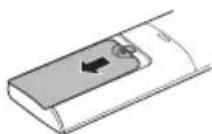
2 Daññal il-batteriji l-godda u aghmel cert li t-terminals + u - tal-batteriji huma installati tajbeb.
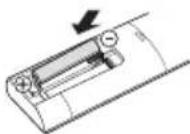
Installazzjoni tal-Holder tar-Remote Control
Biex tipprotegi r-remote control, installa I-holder fejn ma hemmx dawl tax-xemx dirett.
1 Aghzel post sigur u fejn tilhqu faciliment.
2 Wahhal il-holder permezz ta'zewg viti mwahhla sew b'tornavit.
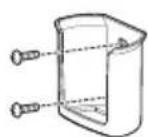
Metodu ta' hidma
Ipponta r-remote control lejn ir-ricevitur tas-sinjal fuq in-naha leminija tal-kundizzjonatur tal-arja sabiex thaddmu.

NOTA
- Ir-remote control jista' jhaddem apparti elettronici ohrajn jegk ikun IPPuntat lejhom. Aghemel cert li qed tipponta r-remote control lejn ir-ricevitur tas-sinjal tal-kundizzjonatur tal-arja.
Ghal thaddim tajbeb, uza carruta ratba biex tnaddaf it-trazmettitur ur r-ricevitur tas-sinjal.
3 Qabbad I-ismarphone mar-router wireless.
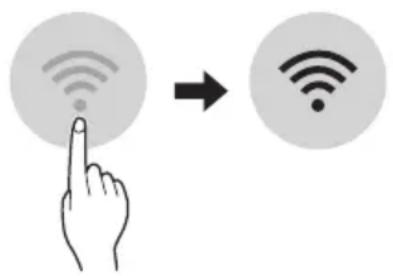
NOTA
- Biex tivverifika I-konnessjoni tal-Wi-Fi, iccekkja li I-Icon hemm fuq il-panew tal-kontroll hija mixghula.
Dan it-taghmir jiflah Wi-Fi network ta' 2.4GHz biss. Biex ticcekkja I-frekwenza tar-router, ikkuntattja I-fornitur tas-servizz tal-internet tieghek jew irreferi ghall-manwal tal-wireless router.
LG ThinQ mhuwixx responsabbli ta' problemi, hsarat jew malfunzjonijiet fil-konnessjoni tan-network,ikkawzati mill-konnessjoni tannetwork.
- Jekk l-apparat ikun 'il boghod mir-router dan jaf ma jkunx jista' jaghmel konnessjoni man-network kal-Wi-Fi. Ixtri Wi-Fi repeater (range extender) biex ittejjeb is-sa'hha tal-Wi-Fi.
- Il-konnessjoni tal-Wi-Fi tista' tigi interrotta jew ma taqbadx minhabba I-ambient tan-networkt tad-dar.
- Il-konnessjoni tan-networktista' ma tahdimx kif suppost minhabba l-fornitur tas-servizz talinternet.
-
L-ambjent tal-wireless tal-madwar jista' jikkawza lis-servizz tal-wireless netwerk jahdem bil-mod.
-
It-taghmir ma jistax jigi rregistrar minhabba problemi fit-trasmissjoni ta' qawwa tal-wireless. Skonnettja t-taghmir u stenna madwar minuta qabel terga tipprova.
- Jekk il-firewall fuq ir-router wireless tieghek huwa attivat, skonnettja l-firewall jew aghmel ecezzjoni ghal dan.
- L-ism tan-network kal-wireless (SSID) ghandu jkun kombinazzjoni ta' ittri Ingliži u numri. (Tužax karattri spečjali)
- II-user interface (UI) tal-ismarphone tista' tvarjghax din tiddependi fuq is-sistema operattiva (OS) tal-mobajl u I-manifattur.
- Jekk il-protokoll ta' sigurta tar-router huwa stabbilit ghal WEP, jista' ma jirnexxilekx thaddem in-network. Jekk joghgbok ibdlu ghal protokolli ta' sigurta ohra (WPA2 huwa rakkomandat) u erga' rregistra l-proddott.
Kif tinstalla I-Applikazzjoni LG ThinQ
RIESENIE PROBLEMOV 33
"Smart Diagnosis" 29
PRIEZIURA 30
Oro filtro valymas 32
TRIKCIU SALINIMAS 33
"LG ThinQ" programs characteristikos
Su jrenginiususiekite ismaniuoju telefonu, naudodamiesi patogiomis ismaniosiomis funkcjomis.
Smart Diagnosis
LÁMHLEABHAR AN ÚINÉARA
AERCHÓIRITHEOIR

Leigh an lámhleabhair uineara seo sula n-oibrǐtear an gléas agus coinnigh in aice leat é an t-am ar fad.
Taispeain Gile Scathlain
Is féidir an gile a shocrú don scathlán an aonaid laistigh.
- Bruigh an cnaipe LIGHT OFF.
NOTE
Cas ar/as an scailean Taispeain.
Ag uśáid an fheidhm aer compórdach (roghnach)
Oibriuchán Eite Compórd
Socraionn an fheidhm seo an eite go héasca
go suiomh réamhshocraithe chun an aer
solathraithe a sraonú ò dul direach go dtí na
daoine sa seomra.
1 Cas an gleas air.
2 Bruigh an cnaipe COMFORT AIR cupla uair chun an treo ata uait a roghnu.
no mar a thaispeanann an scathlan.
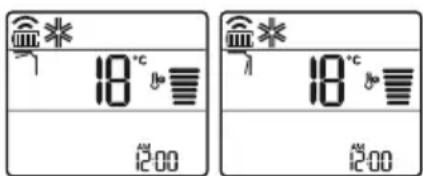
NOTE
no mar a thaispeanann cuple aonaid laistigh.
- Ta an fheidhm seo dichumasaithe nuair a bhruihear MODE no JET MODE.
- Ta an fheidhm seo dichumasaithe agus socraitear an uath-athru treo ingearach nuair a bhruihear SWING.
- Nuair ata an fheidhm seo as, oibrionn an eite cothromanach go huathoibrioch de reir an mhodh socraithe.
Ag uśáid an fheidhm smacht fuinnimh (roghnach)
1 Cas an gléas air.
2 Bruiigh an cnaipe ENERGY CTRL.
- Bruigh an cnaipe ENERGY CTRL cupla uair chun gach cém a roghnú.
| Céim 1 Céim 2 Céim 3 | ||
| 80 % | 60 % | 40 % |
| 200 | 200 | 200 |
NOTE
- Céim 1: Islionn an lonchur cumhachta 20% i gcomparáid leis an ionchur cumhachta ann.
80 mar a thaispeanann an scathlan. - Céim 2: Islionn an Ionchur cumhachta 40% i gcomparáid leis an ionchur cumhachta ann.
60 mar a thaispeanann an scathlan. - Céim 3 (roghnach): Islionn an lonchur cumhachta 60% i gcomparáid leis an ionchur cumhachta ann.
40 mar a thaispeanann an scathlan.
80 (1 step), 62 step), (3 step) mar a thaispeanann cuple aonaid laistigh.
(1 step), (2 step) mar a thaispeanann
cúpla aonaid laistigh.) - Ta an fheidhm seo ar fail leis an Mhodh Fuarthu.
D'fhéadfadh leis an toilleadh isli nuair a roghnaïtear an mhodh Smacht Cumhachta.
Taispeanfar an teocht ata uait 5 soic ma bhruitear FAN SPEED, or
Taispeanfar an teocht ata uait 5 soic ma bhruitear ROOM TEMP
D'headfadh nach ndeanfar tacaiocht don feidhm seo agus rudai ceangailte don aonad Iolrach Lasmaigh.
Ag uśaɪd feidhmeanna speisialta
1 Cas an gleas air.
2 Bruigh an cnaipe FUNC cuspla uair chun an fheidhm ata uait a roghnú.
3 Bruigh SET/CANCEL chun criochnu.
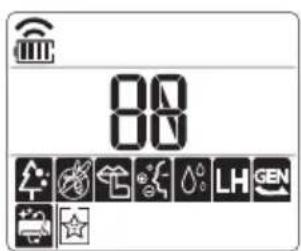
| Scáthlán C | ur sios |
| A | Baineann an gineadóir ian leas as na milliuin ian chun cuidiú le feabhsú na hearcháilíochta laistigh. |
| Chun torann a isliú on aonad amuigh. | |
| Chun tais ginithe taobh istigh den aonad laistigh a bhaint. |
NOTE
D'fheadfadh le cusla feidhm gan bheith ar fail de reir an samhaltan.
D'fhéadfadh leis an fheidhm seo oibriu go heagsui on scathlan an cianrialtain.
VAŽNA BEZBEDNOSNA UPUTSTVA

UPOZORENJE
MoJeHa eDInHeuHa nOeI6a
Oboj peKIM aBtOMaTcKN rO MeHyBa peKIMOT, 3a da ja oDpKn NOCTaBeHaTa TemnepaTypa Ha ±2 °C.
1 Nyutete ro anapatot.
2 IpnTnCHeTe ro konyeTo MODE noBeKeNaTu, 3a da ro n36epete pexmOT Ha aBTOMaTcKO MeHyBaHe.
Ace npikakyba Ha ekpaHOT 3a npikakyahe.
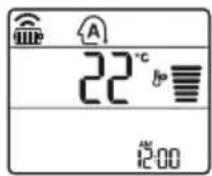
3 PnTnCHETe ro konyeTo 3a Ja ja noCTaBnTe nocakyBaHaTa Tempepatya.
4ПиТиСHTeToKoNHToFANSPEED3aJa ja npnlaOndTe6p3HnHaTaHaФeHOT.
Pexm 3a HamaIyBaIbe Ha BnaXHOCTa
Oboj pexim ro otctpaHyBa BnWokot Ha Bnara od BnCOKO BnaxHaTa CpeHnHa, INN 3a Bpeme Ha DoXIOBHaTa Ce30Ha, CO ueI da CnpeU n6JNKyBaHeTo Ha NoCTaByBaHeTo. Oboj pexim ABTomatCKn IIN PnInarOdyBa Co6HaTa TemnepaTpyn 6p3HHata Ha pehOT, 3a Da ro 3aDpxn ONTUMaHHTO HnBO Ha BnaxHOCT.
1 NywTeTe ro anapatot.
2ПиTиСнeTe ro konYeTo MODE noBeKeNaTn,3a Da ro n36epeTe pexuMoT 3a haMaJyBaHbe Ha BJIaXHoCTa.
ce npkaKyBa Ha ekpaHOT 3a npkaKyBaHbe.
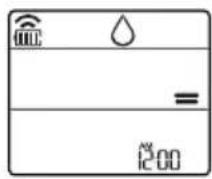
HANOMEHA
Bo oobj pexm He moKeTe da ja npnnaOndte co6hata TemepaTypa, Taa ABTomatckn Ke ce npnnaOdi.
Co6hata TempepaTpa He e npkaXaHa Ha ekpaHOT 3a npKaXyaHe.
Bo pexnmoT ha ODbnaXHyBaHbe, KOMnpecopOT H BHaTpeuHnot feh MoKe Da He pa6oTaT DoEka TemnepaTypata Ha co6aTa e 24 °C
PexnHa rpeeHe
1 NyuTeTe ro anapatot.
2 IpnTnCHeTe ro konyeTo MODE noBeKeNaTu, 3a Da ro n36epete peXIMOT 3a rpeHbe.
Ce npkaKyBa Ha ekpaHOT 3a npkaKyBaHe.
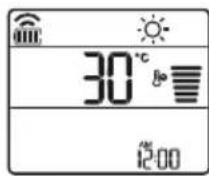
3 PnTnCHTe ro konyeTo 3a Ja ja nOCTaBnTe nocakyBaHaTa TempePaTypa.
HANOMEHA
ke 6nata npkaaHa Ha BHaTpeHHaTa eINHua, kora ke pa6oTu Odmp3HyBaHbeto.
- HoHaTamy, OoJ nokazateJ Ke 6nJe npKkaKaH Ha BHaTpeWHaTa eDHHa:
Kora pa6oTu nped3arpeBaHbTeo.
Kora co6hata temnepaTypa ke ja doctnrHne noCTabeHaTa TemnepaTypa.
PexmHaΦeHOT
Oboj pexm eHCTBeHO r npKynpa BHaTpeHnOT Bo3dyx, 6e3 da ja n3MeHn Co6HaTa TemnepaTypa.
1 NywTeTe ro anapatot.
2 IpnTnchTe ro konyeTo MODE noBeKeNaTu, 3a da ro n36epeTe pexmOT Ha cehOT.
ce npkaKyBa Ha ekpaHOT 3a npkaKyBaHe.
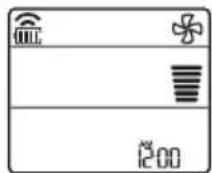
3 IpnTucheTe ro konHeTo FAN SPEED 3a da ja npnilarOndte 6p3nHaTa Ha pehOT.
HANOMEHA
Onnnn K6nDat npkaKaHn Ha BHaTpeuHata edHHua kora pa6OTn peKIMOT Ha BEHTnlaTop.
KopncTeHbe Ha cyHKunjaTa mna3eH pekIM
PpnilarOdyBaHe Ha 6p3nHaTa Ha ΦeHOT
- PnTnchTe ro KOnyTo FAN SPEED noBeKeNaTu, 3a da ja npNlaOndte 6p3nHaTa Ha fehOT.
KapakTepeNCTnKn Ha anJnKaunjaTa LG ThinQ
Komyu npajte co ypeodT npeky Baunot MObneH Tepeoh, KopncTejkn Tn KopncHnte naMeTHn OOnn.
Smart Diagnosis
Ako nckycnte npo6nemdoeka ja kopncntte annkaujata, onujaTa 3a naMeTHa djuarHocTka Ke BN NOMORHe da ro DNjarHOCTnUnpate npo6nEMOT.
POnecyBaHa
Bn OBO3MOxCyBa Da nocTaBnTe pa3JIuHn ONUHN Kaj anapaTOT N BO anJIuKaunjata.
HANOMEHA
Ako ro npomeHnte cbojot 6e3Kuueh pyTeP, do6abvBaoyoT ha nHTepHET ycnyr nnno3nHKaTa, n36pniweTe ro pernctpupaHnot anapat oAnnnkaunjata LG ThinQ n nobTOpho pernctpupajte ro.
Anikajata noJnx Ha npomeH 3apani noobpyBaBe Ha anapaTOT,6e3 da mC ce daTe npedynpdyBaBe Ha KOpncnUte.
- KapakTePncTKeMoKe Da BapuPaaT Bo 3aBnCHoCT OJ MoJeNoT.
Пред Корисе на anлкацида LG ThinQ
1 IpoBepete ro pactoJaaneto nomery anapatot n 6e3xuHnOpyTeP (Wi-Fi mpejata).
Ako e nperoIeMo pactoJHHeTo nomery anapaTOT n 6e3KmUHnOpyTe,doara do cna6eeHbe Ha cnHaNoT. MoKe da 6nDe notpe6en noDOnr BpeMeHcN nepnoD 3a pernctpaunja,nn MoKe da doBeede No HeycneuHa HnctalauJa.
2 NcknyteTo MO6nHnot nInu HHTepHeTOT Ha BaNt NaMeTeH TeIeOHO.
3 Nop3eTe ro Baunot nameTeH TeJeOHO 6e3KnHnOT pyTeP.
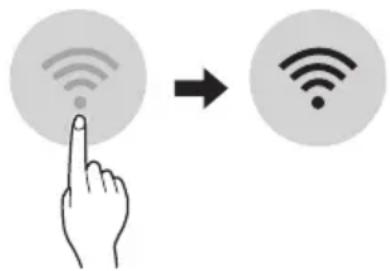
HANOMEHA
3a da notBpDnTe DeKa CTe NOBp3aHn CO Wi-Fi, npOBepTe DaJI N CBETN IKOHATA Ka KOHTPOHATA Ta6na.
AnapaTOn noDpKyBa eHnCTBeHo 2,4 GHz Wi-Fi MPexKn.3a da ja npOBepnte ppeKBeHunjata Ha BaWata MPexKa, KOHTaKTnpajTe ro BaWnot Ch6dyBauch CO INHTepHET ycnyr, INN NorIeHHeBO yNaTCTBOTO 3a BaWnOT 6e3KuHen pyTeP.
LG ThinQ He e OndroBopeH 3a 6nlo KaKbN npo6IeMn OkOJy KOHeKTnpaHBeTO Ha MpeXkaTa nn KaBn I da 6nlo rpeuKN, DepeKT nn rpeuKn npedn3BvKaHN oD KOHeKTnpaHBeTO Ha MpeXkata.
- Ako anapaTOT mma npo6nemn OKony KOHEKtnpaHbeto Ha Wi-Fi mpeXaTa, moXe6n e npedaleky od pyTePoT. HababeTe Wi-Fi 3acnnyBauch (3acnnyBaHa Ha DocTpeNoT) 3a da ja na noDo6pnte jaunHata Ha Wi-Fi cnirHaNoT.
Wi-Fi KOHeKunjata MoXe6n He ce NOBp3yBa HmMOx6n e npeknHaT a nopadn ONkpyyBaHbeto HaDOMaUHATA Mpeka.
- Мржно NOBp3yBaHbe Moxe6n Hema da pa6oTn
- павино BO 3aBnCHOCT OД пobajdepot Ha
- Итepnet yCnyrnte.
- OkonHTo 6e3KnUHO NOBp3yBaHe MoKe6n
- npDoHecyBa 6e3KnUHNOT MpeXeH cepBnC da
- pa60Tu 6abHo.
Anapatot He Moke Da ce peHnctpnpa, npaPioblemn Co npeHocOT Ha 6e3KnUHNOT CnHan. N3BneTe ro Ka6eJNot oJ anapaTOn nNoeKajTe OKony eHa MNHyTa, PpeNIOBTOpHO da ce ObndeTe.
- Ako e OBO3MOXeH 3aWTHTHnot Su, Ha BaWNot 6e3xMueH pyTeP, OHeBO3MOXeTe r Nn DoJaTe NCKnyOK BO Hero.
- Imeto ha 6e3xuHaTa Mpexa (SSID) Tpe6a da 6nde KOMbHaunja od aHrnnckn 6yKb n 6poEBn. (He KopncTeTe rCneunjannHe KapakTepn)
- SmartphonekopinchuKnot HHTeppejc (UI) MoKe DaBappa,BO3aBnCHoCT OMDMObHnHOT onepaTubEn CnCTem (OS) n npOn3BoDnteJot.
- Ako 6e36eHocnOT npoTOKoHa pyTePOte nocTaben Ha WEP, MoKe Da He ycneete BO nOdecyBaHBeTo Ha MpeKaTa. Be MOJIme npomeHeTe ro Ha dpyrN 6e36eHocn HpOToKoJN (Ce npenopayBa WPA2) n NobTopHo perncptpajte ro npOn3BODoT.
Инсталраные наапликцина за LG ThinQ
Побapajte ja anлкauиjaТа LG ThinQ Ha Google Play Store & Apple App Store npeky Baunot cMaprФон. Слдente ГИНструкшипт за претмаве И ИНсталираье На anлкauиjaТа.
N3BecTyBaHe 3a coΦTBepeco OTBopeH KOD
3a da ro do6neTe n3BOpHnOT kOd cnopeD GPL, LGPL, MPL u npynte JnueHcN 3a oTbopeH n3BopEn KOJ KOJ CE KOpncTn Kaj OBOJ npOn3BOD, nocetete ja ctpancaTa https://opensource.lge. com.
Iokpaj n3BOPHNOt KOJ,doCTaANHn 3a npe3MaHe ce
i CNTe HabeDeHN OndepoHa InuceHua,
OndpeKyBaHa oD OndROBOPHOCT N n3BeCTyBaHa 3a
aBTopcKn npaba.
LGE nTo taKa Ke BV OBO3MOxN CNo6oHe KOD Ha CD-ROM 3a ueHa KoJa rN NOKPnBa TpoOuIte 3a TaKBoTo DoCTaByBaHe (kako Ha np. TpoOoUn 3a MedInyMOT, pAtKaTa u MaHnPyNaTbHN TpoOoUn) No 6apaBe npEky e-NoTuHa opensource@lge. com. OBaa noHyda e BAlNiDa Hb NO nepNOd od TpN roDHH No nocNeHaTa HaHa nCnOpaka Ha OBOJ npOn3BOD. OBaa noHyda BaxKn 3a ceKOj npImaTeH Na OBne INHΦopMauIN.
Smart Diagnosis
Obaa cyHKuJa e doCTanHa cAmo co MoJeNte co Joroto
YnoTpe6eTe ja Obaa onuJa 3a da
DnjaHocHTnucpaTe nn peWnte npoBneMn co
Baunot anapat.
HANOMEHA
- Od npuHn HTo He MoKe Da ce npenWat KaKo hemapnoct Ha LGE, ycnyrata MoKe da He pa60tn nopadn HndBopeuHn fakTopn, KaKo WTo ce, Ho HeorpaHnUyBajKn Ce Ha HeIOCTaHNOCTa Ha Wi-Fi, r6beHe Ha Wi-Fi KOHEKunjata, NOIHTNKata Ha npOdaBnUcTa 3a anNkauu Nnn HeIOCTaHNoCTa Ha anNkauJaT.
- Obaa Фуннкциja може да e предмет на поменабe3 пөгхODн Нajави може дa Ималораэлпчнфорma BO 3abuCHOCT OД Toa Kaide cte loцupaHn.
KopncTeIbe LG ThinQ 3a dInjaraHocTnucipaIbe npo6JIeMn
Ako nckycnte npoblemn co Baunot anapat onpeMeH co Wi-Fi, toj moKe da rncnpaTn noDaTOUNTe 3a npobemOT Ha nameTe TeneoH npeky anlinaunjata LG ThinQ.
- Bknyute ja annilkaunjata LG ThinQ n 36epete ja onujaTa Smart Diagnosis BO MeHnTo. CneTe r ynaTcTBaTa BO annilkaunjata LG ThinQ.
KopncTeHe 3ByuHa dNjarHo3a 3a dNjarHocTnucpaBe npo6Jemn
CneTe rynyata doJy 3a da ro KOpNCTnte MeToDToHa 3ByHa dJaarHO3a.
BknyeTe ja annkaunjata LG ThinQ n 36epete ja onujaTa Smart Diagnosis BO MeHTo. CneTe r yNaTcTBaTa 3a 3ByHa dJaarHO3a daHeN BO annkaunjata LG ThinQ.
1 IpaBnHb BknyeTe ro npNKnyOkoT 3a cTpyja BO uTEkepOT.
2 NocTaBeTe ro DeIOT Ha nAmEtHnO TeIePOn 3a 36OpYBaHe 6ncky Do IJorOTo .
3ПиTINCHeTe ro nДрЖeTe ro KOnYeTo DIAGNOSIS [5 s] 5 ceKyHn nIIN noDoIro DoNeKa ro DpXnTe DeIOT Ha naMeTHNOT TeNeΦoH 3a 36OpYBaHBe Do INorOTo cé DoNeKa He 3aBpSi n PpeHocOT Ha nOdaTOuNTe.
He npemecTybajTe ro nameTHNOr TeneoHdoeka He 3aBpUnnpeHOCOT Ha NODaTOUnte. Ce npkaKyaBnpoeCTaHaTOTO Bpeme Notpe6Ho 3a TpaHcpep Ha NODaTOU.
4 OTKako Ke 3aBpHn npehocot Ha noDaTou, DnjarHO3ata ce npKakjyBa BO anNkaujata.
HANOMEHA
3a Hajdo6pn pezytatn, He npemecTybajTe ro TepeohOTdoNeKa ce npehecybaaTToHOBNTe.
- Ocnypete ce da ja odpxyBaTe am6nentanHaTa 6yuaba Ha MNHmym, NIMMOKe da ce cnuyu TenefoHOT da He IIN npima npabNHO 3ByHNTe CnHaNN OD BHaTpeShHaTa eHNua.
I P E D U N P E D U B A H E
- Ppei YnCTe He nnn n3BpyBaHbe Ha oDpxyBaHbeto, NCKnyte To HanojyBaHbeto n Noyeka foHOT He npctaHe co pa6ota.
Ako KInma ypeoT HeMa Da Ce KopnCTn 3a NDoIg BpeMeHcN nepNoi, NcyuTe ro 3a Da ce OdpXn BO Hajdo6pa cocToj6a. PeobHo YnCTe Ro npOn3BoJOT, 3a Da ja OdpXnTe ONTMajHaTa n3Be6Ba n da rncnPpeHTe MoKnTE DeΦeKTn.
- NcyuTe ro KnIma ypeIOT BO peh peKIMOT, BO TEKOT Ha 3 Do 4 Yaca, n NCKnyte ro HanojyBaHeto. MoKe da ce nojabN BhatpeUHO OWTeYbaHe aKO BnaRATA OCTaHE BO HerOBITE COCTABHn DeIOBn.
- Icuyete rBn BHaTpeHnTe COCTaBn DeIOBn Ha KInMa ypeoT, KopncTejkn ro peh peXIMOT BO TEKOT Ha 3 do 4 yaca, nped HerOBaTa NOBtOpHa ynoTpe6a. Oba ke nomorHe BO OTcpaHyBaHbeto Ha Mnpu36aTa co3daedeHa oD BnAraTa.
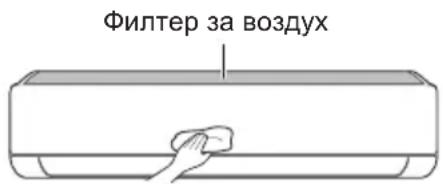
-Функида може да ce MeHyBa BO 3aBnCHOCT OД TINOT Ha MOneJIOT.
| Тип Опис Иntервал | |
| Фильпер за ВОЗдух | Исучтete со правосмICALа ил рачно Исторе. 2 недени |
| JOизатор(оштоналho) | УлOTребete сУВа памуна вata за за ja otst相对较п'te пашинatable. |
| Виатrelша edиница | Исучтete ja повшинatable на Виатrelша та edиница, корисейки мека, сУВа крna. |
| Пробесионално Исучтete го садот каде ШTO се собра konданзиранatable влara. | |
| Пробесионално Исучтete ja севкatingа на ЗоюшTO се собра konданзиранatable влara. | |
| Заменete Гьбатрines на далочинскnot уравувач.ЕдношTo рdшно | |
| Надворша edиница | Пробесионално Исучтete ГьКалемпente за оддва.TableТоллina и Таблata co OTbори. (Посobетувajte ce co Тхничар.) |
| Пробесионално Исучтete ГфенOT.ЕдношTo рdшно | |
| Пробесионално Исучтete ГадOT каде ШTO се собра konданзиранatable влara. | |
| Пробесионално Лиге НЕа NotВрди ДЕКа составнITE DeLOВИ на ФенOT сцВРСТО зATERгати. | |
| Исучтete ГьЕКТричнITE KOMПОЕNTI со ВОЗдух.ЕдношTo рdшно |
HANOMEHA
- Hinkoraш He KopincTe BoDA wTo hMa TepepaTypa nobucoka od 40^ Kora rN uNCTnTe qnntpnte. Toa MoKe da npedn3BnKa deOpmaunja nnn o6e36oJyBaHe.
- Hikorai He KopinCTe IcnapnB MaTePn npu YncTeHbETo Ha fUnTpnte. Tne MoKaT da ja oUTeTaT noBpHHaHa npOn3BOIoT.
YncteHe Ha qnItepoT
YnCTe Tn CnIITPnTe 3a BO3dyx eHaH Ha cekon 2 HeJeN, nI NOBKeNaTn aKo e nOTpe6Ho.
HANOMEHA
- Φιπτepοτ 3a BO3dμx MoKe Αa Ce cKpιn aKO ce npεβικα.
AkoΦntepoT 3a Bo3dyx He e npabnHOCOCTaBeH, paaHHata N HeKOn dpyrMaTepeMOMKaT Da HABNe3aT BO BHaTepeuHaTa eHNHua.
Tyn1
Ako Odo3ropa NorneHHeTe Ha BHaTpeShHaTa eHHnua,JeCHO Ke MOKeTe Da ro COCTaBNTe rOpHnot qnntep.
1 NcnyeTe ro HanojyBaHBeTo n 3BJeTe ro ka6enot 3a cTpyja.
2 DpxkTe rna paKnte Ha qntepoT 3a BO3dyx mANKy NOURHETe ro.
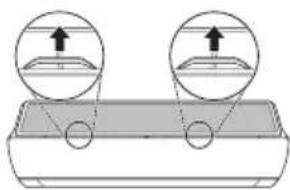
3 OToTpaHete ro od BHaTpeHHaTa eHNHua.
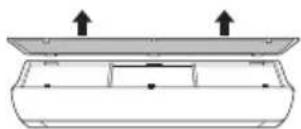
4 IcHCTeTe ro fIHTepOT co npaBocMykAnKa Hn CO MnaKa BOna, BO Koja NMa HeyTpaneH detepreH.
5 Icwyte ro qntepoB cehka.
6 BmTeHte Tn KyKeTHe Ha nIJItePoT 3a Bo3dyx BO ppeHNOT KanaK.
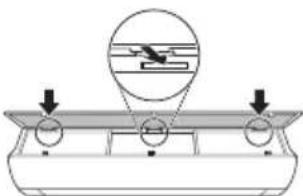
7 IpnTnCHeTe rHaOny KyKInTe 3a da ro COCTaBnTE qHNTepOT 3a BO3dyx.
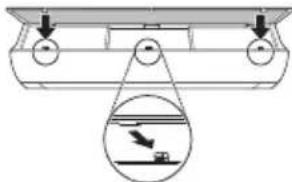
8 IpoBepTe Ha cTpaHaTa Ha npEiHnOT KanaK, 3a npaBnIHO COCTaByBaHe Ha qnItePOT 3a BO3dYx.
Tun2
1 NcnyeTe ro HanojyBaHbeTo n 3BneyeTe ro Ka6enot 3a cTpyja.
2 OTbopeTe ro npedHnOT kanak.
- POniHHeTe mAnKy nDbete CtpaHn KaNakOT.
3ДpxkTe rpaKNTe HaФnTepOT 3a BO3dyx, NOBHeTe rMaNky HAnOny n OTCpaHETe rO dB BHATpeuHaTa eINHua.
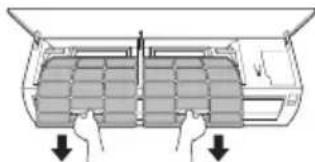
4 NcHCTeTe rH cHITpHrTe CO npaBocMykAnKa HnCmJaka Boda, BO Koja nMa HeyTpaneH detepreHT.
5 IcyweTe rH qnIITpnte BO ceHka.
6 BMeHTHe Tn KyKInTe Ha ΦHITpNTe 3a BO3dYX BO ppeHNOT KanaK.
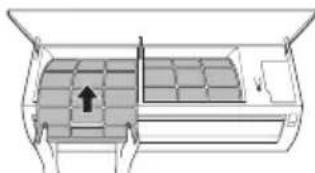
7 IpoBepTe Ha cTpaHaTa Ha npEiHnOT KanaK, 3a npaBnHcOcTaByBaHe Ha qnItpnte 3a BO3dyX.
Функцина наCAMODиjarHOCnIpaIbe
Oboj npo3BOD mHa Brpaedha fynkunja Ha cAmOnjarHocTnnpaBe. Ako ce nojabn Hekoja rpeka, lam6nKata od BHaTePshata eDHHua Ke 3aTpEnKa BO nHTepBaJIn o2 cekyHnn. Ako TaKBOTo HeTo ce cnUHN, KOHTAKTupajTe n BaINOT IOKaEN dNCTpnbTyep nI IN cepBnCeHtap.
PpeI Da ro NOBnKaTe cepBnCoT
Be moJIHme npOBepe Tn CneIHNte HeWtA npE Ia rO KOHTaKTIpaTe cepBnCHNOT ueHTap. Ako npoJOnJx npo6JIemOT, KOHTaKTIpaJTe ro BaUNOT JOKaJIeH cepBnCeH ueHTap.
| Симптоми можни | Прочны и рeshенье |
| Клиma урекот неpbотиHopмлно. | Мирзба на ИЗrogenи и чуdenи 3Вуци доагаат od_edиницatura.ISCКУЧЕТЕ РКлиma урекот, ИЗваде тг КабелOT 3a стура щьдддддддддддддддддддддддддддддддддддддддддддддддддддддддддддддддддддддддддддддддддддддддддддддддддддд徳. ИсккУЧЕТЕ РКлиma урекот, ИЗваде тг КабелOT 3a стура щьддддддддддддддддддддддддддддддддддддддддддддддддддддддддддддддддд徳. ИсккУЧЕТЕ РКлиma урекот, ИЗваде тг КабелOT 3aстура щьддддддддддддддддддддддддддддддд徳. ИсккУЧЕТЕ РКлиma урекот, ИЗваде тг КабелOT 3a стура щьдддддддддддддддд徳. ИсккУCHYBAчOT, пскнHyВач Na StprjHOTO кОLO (6e36eDnOCTa,3a3emjyBaJIeTO), пьocrypyBaJOT He habOTAT npabINHO.ISCKUChE To Klinma урекот, ИЗваде тг КабелOT 3a стура щьдддддд徳. ИсккУCHYCHYBAчOT, пскнHyВач Na StprjHOTO кОttAOKTIPajTe Ro cepBICHNOT ZeHTAP. Единицатс co3dABA KaI Na rpeSHAka od conctBeHOTOCamodinjarHoctNtUcPahbe.ISCKUChE To Klinma урекот, ИЗваде тг КабелOT 3a стура щьддд徳. ИсккУCHYBAчOT, пскнHyВач Na StprjHOTO кОttAOKTIPajTe Ro cepBICHNOT ZeHTAP. |
| Клиma урекот неpbotи. | Клиma урекот не e prinkluyen.IproBepete Далу КабелOT 3a habOjVbAJIe b e BmETHaT BO prnkLnyOcOT 3a cTpyja, пь moKHeB se Bklnyeh N3OJIaTOpNTe 3a habOH. |
| Има ИЗbethен ocInrgpauch, пь e 6blokpano habOjVbAJIeTo co cTpyja.3aMeHete ro ocInrgpauch ot п钓Bepete Далу prkeKHyBaJOT Ha cTpyjHOTOkoLO ce BklnyuHIL. | |
| Се сlyчппреки на elektropsyhata eheprnja.IscKUChE To Klinma урекот,aCOsece psket nHa elektropsyhata eheprnja.Kora habOjVbAJIeTo nobTOpHKe ce BocnoCTaBn, nouekajTe 3 MInHyTu, na notoa Bklnyche To Klinma урекOT. | |
| Волтжата e пь pemhory BvCoka, пь pemhory HnCKa.IproBepete Далу ce BklnyHl prkeKHyBaJOT Ha cTpyjHOTOkoLO. | |
| Клиma урекот abTomatckn ce nckluyn BO OBOJ MOMENT.Bklnyche To Klinma урекOT. | |
| БаTERPInTE Bo dalechHscknOT uypaBvBaH Ce ep nabInHo hameCTeH.N.OscInpete ce deKa bateripte ce npabINHOb BmEtHaTn BO BaShIO T daLEeHncknUnpabaBvau.Ако bateripte ce npabINHOb hameCTeH,a Klinma урекOT и NOHaTamy He paBOTN, toraah 3aemeHte ng bateripte ng obidete ce nobTOpHo. | |
| СимпTomи Рожни | Прочны и рeshенье |
| Клиma уреот не ( искneyта ладен Воздун. | Воздунот не циркулера правлино. •Осигурete се дeca Нем за вescи, ралетни, ялдегов од мебел, Што го бл_OKираат пroduнот ду на клиma уреот. |
| Фильтерот за Воздун e валдан. •Чистete Г дултерот за Воздун сддах ha секон 2 недени. •Видete BO "Чистende Ha дултерот" 3a поевке inhформаци. | |
| Собна Тампесу Спгмогу Виска. •За сеньостно ладене Ha BhaPreшнот Воздун bo Летно Вс佩е e потубно Вс佩е. Ботов сддаь, Изберete Г Млазниот ржим 3a побризладене ha BhaPreшнот Воздун. | |
| Ладниот Воздун ИЗлergува од собatable. •Осигурete се дeca Нем за вescи Изльгуваье Ha Ладниот Воздун празу Вehтлал检онITE Точки од собatable. | |
| Посakуванata Tempepatура e nobicsoka od ceraшнatura Tempepatура. •Поставete ja посakуванata Tempepatура на понскко НИВО od сeraшнatura tempepatура. | |
| Во SFиЗинам Има ИЗВор hab ТOTПИну. •Изberнунайда Кориспite ИЗВори hab ТOTПИну, како StTo ce щелкtripчнite пechки ял ratchite плamedиц, Ддеда павotи Клиma уреот. | |
| Изbethан e ржимот Ha дун. •За Вс悔е Ha dун ржимот од Клиma уIntegralу воздун, кojшTO HHTU ro лади, НИТу ro Загва BhaPreшнот Воздун. •П�фprлente ro ржимот habRobota boRobotATA habладене. | |
| Надворшнata Tempepatура e пемногу Виска. •Ефektot habладене можде ду не bide doBOJEN. | |
| Брзинatable на ду небе ду se ( прилагду. | Изbethан e млалзнот ржим лду ржимот hab AVTOMATСКO рбosteны. •Во Неко ржимп Ha探oteны, He можete ду ѳ приларогдупбзинatable на dу. •Изberгете ржим Ha探oteны Bo кojшTO ке можete ду ѳ приларогдупбрзинatable на ду. •Дсрсгете ржим Ha探oteны Bo кojшTO ке можete ду ѳ приларогдупtemпарatypа. |
| Tempepatура на не може ду сд; прилагду. | Изbethан e дун ржимот лду млалзнот ржим. •Во Неко ржимп Ha探oteны, He можete ду ѳ пriларогдуп tempepatура. Изberгетe ржим Ha探oteны Bo кojшTO ке можete ду ѳ приларогдупtemпарatypа. |
| Клиma уреот заразе зу в {@рeme Ha paBOTATA. | Клиma уреот неаideйно с ecnkун. •Можеби e instechения phункцилatingа hab мерачот hab Вс悔e, StTo ja nckluyba eindinuцata. Проверete Г поставкITE hab мерачот hab Вс悔e. |
| Се с沼у prжим Ha elektpruchнata eheprnja 3a Вс悔e hab рбosteны. •Почекajte ду сьрати elektpruchнata eheprnja. Акви e овозможени функцилatingа АВТOMATСКО ресартпаье, Вашата сдменя ке пroidолжи с посл徳нatable onepaunja, Неклky минуtni OTКAKO кe hab рытс STPуJTа. | |
| Симпоми можни | Прочны и ршени |
| Внатрeshнatable единиca сеушто ке разоти, дури и по пекиnot на еелкtripинatable еергija. | РабOTи Функцилatable воватско чир themselves. ДобOTи ВОзOTe и Нa Функцилatable воватско чир themselves Дд подOLЖИ, БИдЕКИ ja OTcTpaHbYа пeoctaHaTaТа ВЛага оД ВНaTpeShnOCTa на ВНaTpeShnAte EDINHua. Ако He ja cacate obaa Функцилja, можete Дд ja ИСКПУчITE ЕДINHua.Ta. |
| ИзлесOTа BOЗдух на Внатрeshнatable.edinHиca ис neuropst marla. | ЛадноТВОздух od Клиma у畴OT создава магla. Оьо щehOMeн ce cIvyBa KORA doaЯdo Ha HamaLByBaHe Na co6Hata TemNepaTpya. |
| ИстEVув BA ODA od надВорeshнatable единиca. | 3a Врeme Ha onepaunite Na rpeebe DoaЯdo Калеы Ha KOндeнЗИраHa ВODA od EMITyBaQOT Na TOnLIIHa. Оьо сIMNTOM bapa ИнстALIPAhe Ha OДВODINO cpeBO IOd ba3HNOT caD. KontakTnpajTe ja LInHOCTe 3a ИнстALIPAhe. |
| ПостOTиБув Ад небраци. | 3ВуК Na KLINKHyBa№ Moxe Дд ceЧe KORA edINHицATAЗAnOChUVAЯ ПИ З苹ра, Зардд ДвИжeTo He OБрathNtВ BeHTnJ. 3ВуК Na StKpRNeHBe: Пл actTUnHite DeIIOBn Ha BHaTpeShnAte.edINHua ШКрИпAT KORA doaЯdo DO HINBHO CTechuBaHbe ИИпproшUpBaHbe 3apadi ненадeJHnTE TepePAtURn IpomEHn. 3ВуК Na TeeuHbe ИИ duBaHbe: Toa e TeeuHeTo Ha cpeDCTBOTO 3a ЛадeHbe HUS Klinma у畴OT. ·Toa ce HopMaJIHn CImNTOM. БухаТа Ke 3anpe. |
| Внатрeshнatable единиca ondabva mprn36a. | МирЗБпte (Касу Na primeper Ha dInMOT od zuRapn) мозат Дд boДмТ anscopбианu Bo BHaTpeShnAte edINHua Идce ocIobodUbaat co пpoTOKOT Na BOZdUxOT. ·Ако МирЗБаТа He Исчe3He, кe Mopa Дд ro ИЗМeTe ФиNTePOT. Ако He paBOTи, КонтakTnpajTe ro cEpBnCCHNt Ocentap, 3a Дд ro ИСчeSTITE emITePOT Na TOnLIIHa. |
| Клиma у畴OT He ис neuropst тОпО ВОздух. | Kora pexIMOT Na rpeeHbe Ke 3anOChE, OTBOPOT e cskopo 3aTBopeHи reчис нe ИЗЛergуВа BO3dUx, Иako HauBopeShnAte edINHua pa6OTn. Toa e HopMaJIEN CImNTOM. Be молиме поЕаTe сe ДОдЕа.edINHицATA He COZdaDE DOBOJNO TOnOII BO3dUx, KoJStO Ke cse DuBa HIN3 BHaTpeShnAte ЕДINHua. |
| НадВорeshнatable.edinHица e BO pexIMOT 3a Odmp3HyBaHbe. ·Kora у畴OT e BO pexIMOT Na rpeeHbe, ЛетOT/mpa3OT ce sobpaat Вр3 КалeMITE, akо Dojde Do no Pa7aJIe Ha HauBopeShnAte TemNepaTpya. Obaa ФункциJA ro OTcTpaHvBa CNoJot od Mpa3 KoJStO ce HAOЯ BP3 KaIeMOT, И SF Травалда завши за Okoly 15 mInHytn. | |
| НадВорeshнatable TempePatuPya e npemHory Hncka. ·ЕфektOT Na rpeeHbe може Дд Neбide doBovelen. | |
| Симпоми можни | Прочны и рeshени |
| Вашnot Кужен anapatи смартфонот He ce порзано co Wi-Fi мрека. | Лоб生态系统а 3a Wi-Fi на кoeшто ce обидуне дуа ce поврзete, e неточна. • Нajдente ja Wi-Fi мрека на ловзана co вшиот смартфони отстранete ja, a поюа ренисторajte ro вшиот anapat на LG ThinQ. |
| Мышино падатоциа 3a вшиот смартфонс ce вklучени. • Исклuchete Ги Мбшино падатоциа на вшиот смартфони ренисторajte ro anapatot, kорисейки ja Wi-Fi мрека. | |
| И métета на бeзшино на мрека (SSID), He e правлино поесен. • И métета на bезшино на мрека (SSID) trpeba за bidekomби国有资产 od anfliпскь bukви и sboеви. (He korpисейные спецяалнохе kapakтети) | |
| Ф��вени jo大自然а на рутетор He e 2,4 GHz. • Поблржана ecame 2,4 GHz Ф��вени jo на рутетор. Поставete ro bезшино рутетор 2,4 GHz и пени对接 go anapatot co bезшино рутет. 3aда ja пobерпite Ф��вени jo大自然а на рутетор, рobеретe кaj вшиот снабдунвач на снэнгет услуги, пикaj пoinizь Bodи�лета на рутетор. | |
| Пэрелеме e pactojahнeto noméгу anapatot и рутетор. • Ако e пэрелеме pactojahнeto noméгу anapatot и рутетор, сигналot можеда bide сизб и кoneksijsa можеда He bide правлино конфигурирана. Поменete ja лokaшилata на рутетор, за bide пobлися до anapatot. |
HANOMEHA
HeKoIyHKuH He MoKaT Da 6uDat noDpKaHn, BO 3aBnCHocT OJ MoJeIoT.
MANUALI PÉRDORUESIT
KONDICIONER

VAŽNA SIGURNOSNA UPUTSTVA

UPOZORENJE
Da biste smanjili opasnost od eksplozije, požara, smrti, strujnog udara, povrede ili opekotina za osobe prilikom korištenja ovog proizvoda, pridržavajte se osnovnih mjera prepostrožnosti, uključujuci sljedeće:
Djeca u domacinstvu
Ovaj urežajnosti namijenjen za upotrebu od strane osoba (uključujuci djecu) sa smanjenim fizickim, senzornim ili mentalnim sposobnostima, ili s nedostatkom iskustva i znanja, osim u slučaju da su te osobe pod stalnim nadzorom ili su instruirane po pitanju korištenja urežaja od strane osobe koja je odgovorna za njihovu sigurnost. Djeca trebaju biti pod nadzorom kako bi se osiguralo da se ne igraju s urežajem.
- TABLE OF CONTENTS
- SAFETYINSTRUCTIONS 3
- OPERATION 11
- SMART FUNCTIONS 27
- MAINTENANCE 30
- TROUBLESHOOTING 33
- IMPORTANT SAFETY INSTRUCTIONS
- WARNING
- Children in the Household
- For use in Europe:
- Installation
- Operation
- Maintenance
- Technical Safety
- CAUTION
- Notes for Operation
- Suggestion for Energy Saving
- Parts and Functions
- Indoor Unit Outdoor Unit
- NOTE
- Wireless Remote Control Inserting Batteries
- Installing the Remote Control Holder
- Operating Method
- Setting the Current Time
- Using the ° C / °F Conversion Function (Optional)
- Operating the Air Conditioner without the Remote Control
- Type1
- Type2
- Using Wireless Remote Control
- Restarting the Air Conditioner Automatically
- Disabling Auto Restart
- Using the Mode Function
- Cooling Mode
- Auto Operation (Artificial Intelligence)
- Multi Model
- Auto Changeover Mode
- Single Split Model
- Dehumidification Mode
- Heating Mode
- Fan Mode
- Using the Jet Mode Function Changing Room Temperature Quickly
- Using the Fan Speed Function
- Adjusting the Fan Speed
- Using the Air Flow Direction Function
- Setting the On/Off Timer
- Setting the On Timer
- Canceling the On Timer
- Setting the Off Timer
- Canceling the Off Timer
- Canceling the Timer Setting
- Using the Sleep Function (Optional)
- Using the Simple Timer Function (Optional)
- Using the Energy Display Function (Optional)
- Display the Current Energy Usage
- Using the Light Off Function (Optional)
- Display Screen Brightness
- Using the Comfort Air Function (Optional)
- Comfort Vane Operation
- Using the Energy Control Function (Optional)
- Using Special Functions
- Canceling Special Functions
- Using the Air Purification Function
- Using the Silent Function
- Using the Auto Clean Function
- LG ThinQ Application
- LG ThinQ Application Features
- Smart Diagnosis
- Settings
- Before Using LG ThinQ Application
- Installing the LG ThinQ Application
- Open Source Software Notice Information
- Using LG ThinQ to Diagnose Issues
- Using Audible Diagnosis to Diagnose Issues
- Clean the Air Filter
- Self-diagnosis Function
- Before Calling for Service
- MANUEL DU PROPRIÉTAIRE
- CLIMATISATION
- Application LG ThinQ
- Smart Diagnosis (Diagnostic intelligent)
- INHCTPYKlIM 3A BE3OJACHOCT. 3
- EKCPIIHOATAU 11
- 3A6EJIEXKA
- BkIIOUBaHe n N3KJIIOUBaHe Ha TaMepa
- 3aandaBaHe Ha TaIMeP 3a BKNIOUcBaHe
- OTMЯHa Ha TaMepa 3a BkIIOUBaHe
- 3aIaBaHe Ha TaIMeP 3a I3KJIIOUcBaHe
- 3ABEJIEXKA
- OTMЯHa Ha TaɪMepa 3a N3KNIOUÇBaHe
- OTMЯHa Hactpo'kaTa Ha TaMepa
- I3noJ3BaHe Ha cyHKunraTa 3a 3acnBaHe (no n36op)
- N3noJ3BaHe Ha yHKunra 3a cTaHdapTeH TaMep (no n36Op)
- 3ABEJIENKKA
- I3noJ3BaHe Ha yHKnraTa 3a noka3BaHe Ha n3pa3XoDeHaTa eHepn (no n36op)
- Ioka3BaHe Ha TeKyuata n3pa3XoDbAHa eHepnra
- I3noJ3BaHe Ha cyHKnraTa 3a I3KJIIOUBAHe Ha OCBeTJeHneTo (no n36op)
- I3noJ3BaHe Ha cneuaJIHn 0yHKcnn
- OTMnHa Ha cneuaJIHH yHKUIN
- N3noJ3BaHe Ha cyHKunraTa 3a npeUnCTBaHe Ha Bb3dyxa
- Прилобке LG ThinQ
- XapakTepncTnKn Ha npNIOxehneTo Ha LG ThinQ
- Hactpoyn
- Пре徳даинзнолзВаTe npиложенeto LG ThinQ
- HOpmaa3a coOpTyep c OTbopeh KOD
- Tun2
- ФункцязаимогнocTKa
- Ipei da ce o6aHTe Ha cepBn3HnueHTbp
- KORISNIČKI PRIRUČNIK
- KLIMA-UREDAJ
- VAŽNE SIGURNOSNE UPUTE
- UPOZORENJE
- Djeca u kućanstvu
- Za uporabu u Europa:
- KASUTAMINE 11
- Olulised ohutusjuhised
- OHT
- Remote Control Bla Wajar
- Meta Ddahhal il-Batteriji
- Installazzjoni tal-Holder tar-Remote Control
- Metodu ta' hidma
- NOTA
- Kif tinstalla I-Applikazzjoni LG ThinQ
- RIESENIE PROBLEMOV 33
- PRIEZIURA 30
- TRIKCIU SALINIMAS 33
- "LG ThinQ" programs characteristikos
- LÁMHLEABHAR AN ÚINÉARA
- AERCHÓIRITHEOIR
- Taispeain Gile Scathlain
- Ag uśáid an fheidhm aer compórdach (roghnach)
- Oibriuchán Eite Compórd
- Ag uśáid an fheidhm smacht fuinnimh (roghnach)
- Ag uśaɪd feidhmeanna speisialta
- VAŽNA BEZBEDNOSNA UPUTSTVA
- MoJeHa eDInHeuHa nOeI6a
- Pexm 3a HamaIyBaIbe Ha BnaXHOCTa
- HANOMEHA
- PexnHa rpeeHe
- PexmHaΦeHOT
- KopncTeHbe Ha cyHKunjaTa mna3eH pekIM
- PpnilarOdyBaHe Ha 6p3nHaTa Ha ΦeHOT
- KapakTepeNCTnKn Ha anJnKaunjaTa LG ThinQ
- POnecyBaHa
- Пред Корисе на anлкацида LG ThinQ
- Инсталраные наапликцина за LG ThinQ
- N3BecTyBaHe 3a coΦTBepeco OTBopeH KOD
- KopncTeIbe LG ThinQ 3a dInjaraHocTnucipaIbe npo6JIeMn
- KopncTeHe 3ByuHa dNjarHo3a 3a dNjarHocTnucpaBe npo6Jemn
- I P E D U N P E D U B A H E
- YncteHe Ha qnItepoT
- Tyn1
- Функцина наCAMODиjarHOCnIpaIbe
- PpeI Da ro NOBnKaTe cepBnCoT
- MANUALI PÉRDORUESIT
- KONDICIONER
- VAŽNA SIGURNOSNA UPUTSTVA
- Djeca u domacinstvu
Brand : LG
Model : AC09SQ
Category : Air conditioner