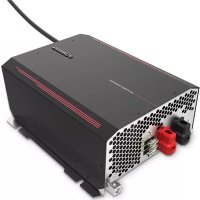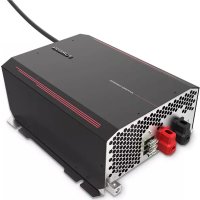
FCVSDC60A - Electric converter Furrion - Free user manual and instructions
Find the device manual for free FCVSDC60A Furrion in PDF.



| Product type | Electric converter / battery charger |
| Brand | Furrion |
| Model | FCVSDC60A |
| AC Input Voltage | 120 V AC, 60 Hz (5-15R plug) |
| Rated DC Output Current | 60 A |
| DC Output Voltage (float) | 13.6 V |
| DC Output Voltage (bulk, LiFePO4) | 14.6 V |
| DC Output Voltage (bulk, lead) | 14.4 V |
| Standby voltage | 13.2 V |
| Output overcurrent protection | 65 A |
| Full load input power | 1015 W |
| Full load input current (120 V) | 9 A |
| Efficiency (typical) | >80 % |
| Line and load regulation | 3 % |
| Main functions | AC/DC converter, multi-stage battery charger (desulfation, soft start, bulk charge, absorption, float, standby), reverse polarity protection, overvoltage, overheat, short circuit, smart fan control |
| Safety | FCC Class B compliant, external fuse protection, automatic shutdown in case of overvoltage/overheat |
| Maintenance | Clean with a dry cloth; fuse replacement by a qualified technician |
| Spare parts | Replacement fuses (same rating and type) |
| Warranty | Manufacturer warranty included (warranty card provided) |
| Operating temperature | -10 °C to 50 °C (derating beyond) |
| Storage temperature | -20 °C to 70 °C |
Frequently Asked Questions - FCVSDC60A Furrion
User questions about FCVSDC60A Furrion
0 question about this device. Answer the ones you know or ask your own.
Ask a new question about this device
Download the instructions for your Electric converter in PDF format for free! Find your manual FCVSDC60A - Furrion and take your electronic device back in hand. On this page are published all the documents necessary for the use of your device. FCVSDC60A by Furrion.
USER MANUAL FCVSDC60A Furrion
Thank you and congratulations for purchasing this Furrion® 60A/80A Converter. Before operating your new product, please read these instructions carefully. This instruction manual contains information for safe use, installation and maintenance of the product.
Please keep this instruction manual in a safe place for future reference. This will ensure safe use and reduce the risk of injury. Be sure to pass on this manual to new owners of this product.
The manufacturer does not accept responsibility for any damages due to not observing these instructions.
If you have any further questions regarding our products, please contact us at support@furrion.com
Supplier's Declaration of Conformity
47 CFR § 2.1077 Compliance Information
Unique Identifier
Trade Name: Furrion
Model No.: FCVSDC60A, FCVSDC80A
Responsible Party - U.S. Contact Information
Furrion Innovation Center & Institute of Technology
52567 Independence Ct., Elkhart, IN 46514, USA
Toll free:1-888-354-5792; Email: support@furrion.com
FCC Compliance Statement
This device complies with Part 15 of the FCC Rules. Operation is subject to the following two conditions: (1) This device may not cause harmful interference, and (2) this device must accept any interference received, including interference that may cause undesired operation.
Contents
Welcome 1
Contents 2
Important Safety Instructions 3
General Safety Precautions 3
Precautions When Working with Batteries 3
FCC Compliance Class B 3
About your Product 4
How your Converter Works 4
Operational Features 4
Product Overview 5
Front Panel 5
Rear Panel. 5
Installation 6
What's in the Box 6
Mounting Location 6
Mounting the Converter 6
Connecting the Converter 6
Operation. 8
Care and Maintenance 9
Fuse Replacement 9
Disposal of your Old Product and Batteries 9
Specifications 10
Troubleshooting 11
Important Safety Instructions

WARNING
Before you install and use your Furrion Power Converter/Battery Charger, be sure to read these safety instructions carefully.
IMPORTANT: This manual contains important information regarding safety, operation, maintenance and storage of this product. Before use, read and understand all cautions, warnings, instructions and production labels, plus your vehicle's battery manufacturer guidelines. Failure to do so could result in injury and/or property damage.
General Safety Precautions
- Do not expose the converter/charger to rain, snow, spray, bilge, or dust. To reduce risk of hazard, do not cover or obstruct the ventilation openings.
- Do not install the converter/charger in a zero-clearance compartment. Overheating may result.
- To avoid a risk of fire and electronic shock, ensure that existing wiring is in good electrical condition, and that wire size is not undersized. Do not operate the converter/charger with damaged or substandard wiring.
After charging, disconnect the converter/ charger from supply mains. Then remove the chassis connection and battery connection, in this order. - Do not charge non-rechargeable batteries.
- During charging the battery must be placed in a well-ventilated area.
- The converter/charger must only be plugged in to a grounded outlet.
- If the power supply cord is damaged, the manufacturer or its service agent or a similar qualified person must replace it in order to avoid a hazard.
Precautions When Working with Batteries
- If battery acid comes into contact with skin or clothing, wash immediately with soap and water. If acid enters the eye, immediately flood eye with running cold water for at least 20 minutes and get medical attention immediately.
- Never smoke or allow a spark or flame in the vicinity of the battery.
- Do not let metal come in contact with the top of the battery. The resulting spark or short-circuit may cause an explosion.
FCC Compliance Class B
NOTE: This equipment has been tested and found to comply with the limits for a Class B digital device, pursuant to Part 15 of the FCC Rules.
These limits are designed to provide reasonable protection against harmful interference when the equipment is operated in a commercial environment. This equipment generates, uses, and can radiate radio frequency energy and, if not installed and used in accordance with the instruction manual, may cause harmful interference to radio communications. Operation of this equipment in a residential area is likely to cause harmful interference, in which case the user will be required to correct the interference at his own expense.
About your Product
How your Converter Works
The Furrion Power Converter/Battery Charger converts 120Vac to 13.6Vdc. As a power supply, it allows the user to operate any 12 volt nominal DC load up to the converter's rated output current for resistance load and allows less than 14 load of inductive load. As a battery charger, the converter will maintain the battery, delivering its full-rated current when the battery capacity falls sufficiently low. The voltage is set to deliver its maximum current for the necessary period of time that minimizes undue stress to the battery caused by the heating of its cells. This helps to ensure the longest possible life of the battery. Over time, as the battery nears its full capacity, the converter will float-charge the battery to prevent self-discharge of its cells.
Operational Features
- Converter/charger ratings up to 60Amps for model FCVSDC60A and 80Amps for model FCVSDC80A.
- Easy access reverse battery protection fuses.
- Intelligent fan speed control.
- Intelligent thermal de-rating & cut off protection.
- Battery Maintenance-free - every 21 days start a new charge cycle.
- Multiple charge status to keep your battery in good condition.
The Furrion power converter/battery charger is designed with high-quality components to help ensure years of continuous use.
REVERSE POLARITY PROTECTION - If a battery is accidentally hooked up backwards, the converter will be protected by fuse.
OVER VOLTAGE PROTECTION - If the Input Voltage exceeds a preset limit, the converter will shut-down to prevent damage. The unit will return to normal operation when the voltage returns to normal.
OVER CURRENT PROTECTION - Cycle-by-cycle peak limiting as well as rated current limiting to maximize the life of the converter.
SHORT CIRCUIT PROTECTION - The power converter/battery charger senses within millionths of a second if the output terminals have been shorted. If this condition should occur the converter first limits the current. Should the condition continue to exist the converter then reduces the current output, within thousandths of a second. The power converter/battery charger is designed to protect itself. Once the "short circuit" has been corrected the power converter/battery charger will automatically return to normal operating condition.
OVER-TEMPERATURE PROTECTION - If an over temperature condition should occur due to air flow obstruction or improper installation, the power converter/battery charger senses the condition and decreases power output until the unit returns to normal operating temperature. Full output capacity will return as the unit cools.
Product Overview
English
Front Panel
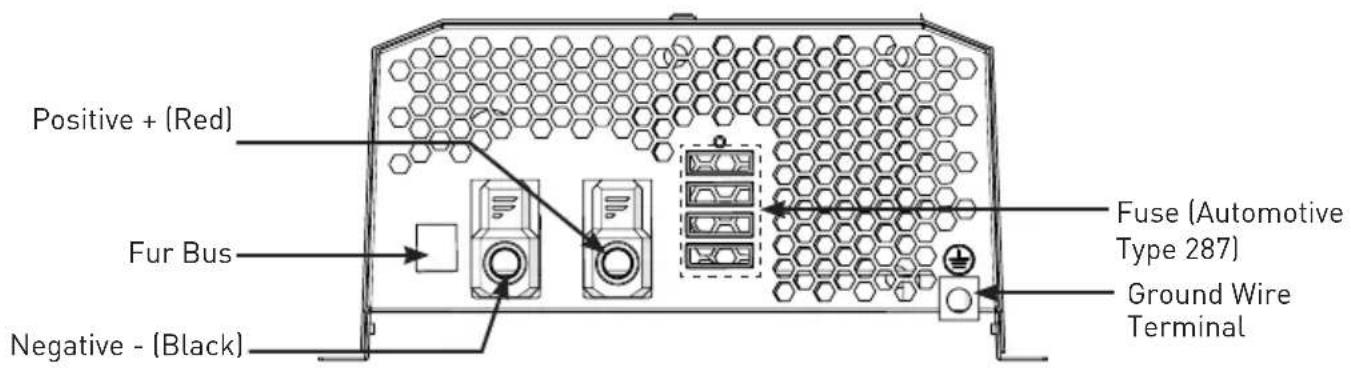
Rear Panel
Installation
What's in the Box
Make sure you have all the following items included in the packaging. If any item is damaged or missing, contact your dealer.
- Power Converter/Battery Charger x 1
-Instruction Manual x 1
Warranty Card x 1
Mounting Location
The Furrion power converter/battery charger can be mounted in any position within an enclosed compartment. Provide sufficient air space to allow unrestricted airflow in and around the unit.
The power converter should be installed in an environment that meets the following requirements:
- DRY - Do not allow water to drip on or enter into the converter.
COOL - Ambient air temperature should be between 0^ and 40^ , the cooler the better. - SAFE - Do not install the converter in a battery compartment or other areas where volatile fumes may exist, such as fuel storage areas or engine compartments.
VENTILATED- Keep the converter a minimum of 25mm away from surrounding objects. Ensure the ventilation area of the unit is not obstructed. - DUST - Do not install the converter in dusty environments. Dust can be inhaled into the unit when the cooling fan is working.
- FUSED - A fuse must be applied between the battery and the converter.
- CLOSE TO BATTERIES - Avoid excessive cable lengths. Do not install the converter in the same compartment as batteries.
-
Use the recommended wire lengths and sizes.
-
Do not mount the converter where it will be exposed to the gases produced by the battery. These gases are very corrosive, and prolonged exposure will damage the converter.
Mounting the Converter
IMPORTANT: Always disconnect the positive side of the battery before installation.
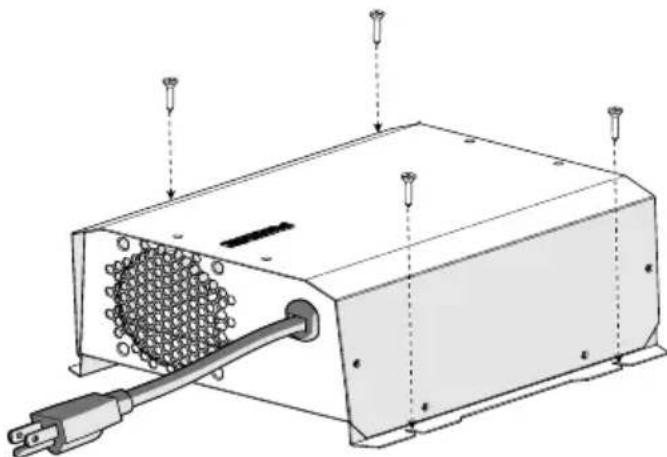
The power converter/battery charger is designed with four slots in its mounting bracket that allows the unit to be fastened against a bulkhead, floor, wall or other flat surface.
Connecting the Converter
There are no components within the power converter/battery charger that, in their normal operation, produce arcs or sparks. However, all electronic devices have some potential for generating sparks in the event of failure. Therefore, never install this device in the same compartment with flammable items such as gasoline or batteries.
Connecting to a Power Source
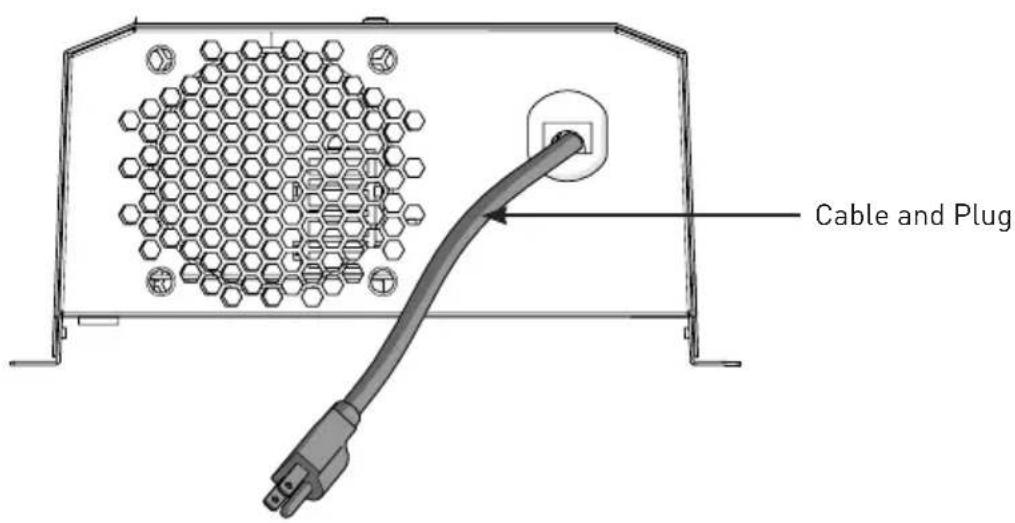
Plug the power converter/battery charger AC input cord into a 120V 3 wire grounded source:
5-15R socket for 60A converter.
5-20R socket for 80A converter.
Installation
Connecting to a Battery/Load
Always use the proper size wire based on the amperage of the converter and the battery.
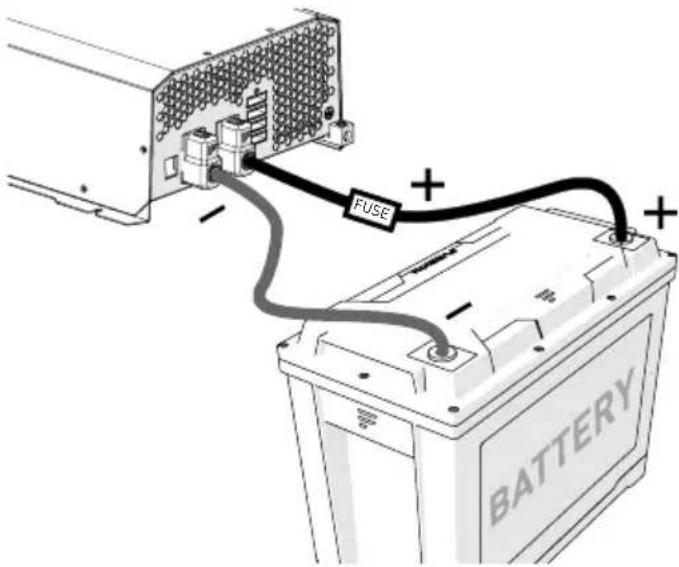
When connecting to a battery, a fuse should be installed between the converter and the battery, connecting the battery positive to the line side of the breaker, and the converter to the load side. Connect chassis bonding lug on the converter to vehicle chassis or other grounding source.
Connect the positive (red) and negative (black) terminal lugs to the battery or load.
Operation
Many options will be installed prior to the purchase of your new RV, however there are a few options that you should be aware of while operating your new converter.
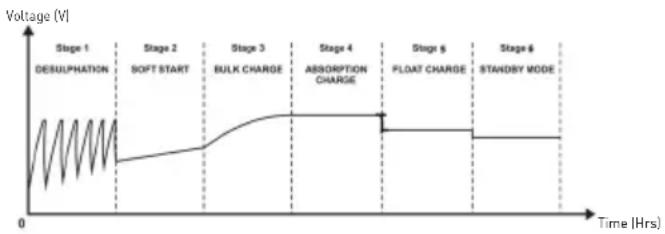
The built-in microprocessor selects the best mode for your battery automatically and determines which operating mode is best suited to recharge or maintain optimum battery condition.
CHARGING FLOW CHART
DESULPHATION CHARGE - PULSE CHARGING
If the initial battery voltage is less than 10V , the charger will start desulphation mode with pulse charge profile. The pulse charge time will be 10 minutes.
NOTE: This charging phase is only available for Lead Acid Battery.
SOFT START - CONSTANT CURRENT CHARGING
If at the initial bulk charging, the battery voltage is less than 11Vdc due to deep discharge, the charger will go with soft charge. The bulk charging current is reduced to half of the maximum current until battery voltage is higher than 11Vdc or 10 minutes (whichever is longer) then switches to bulk charge.
BULK CHARGE - CONSTANT CURRENT CHARGING
Normally the battery is charged at constant maximum current until it rises to the bulk voltage level. The charging voltage changes with the battery voltage. If the charger cannot go to absorption mode within 20 hours, the charger will automatically go to float mode to prevent over charge of the battery. This is the safety timer.
ABSORPTION CHARGE - CONSTANT VOLTAGE CHARGING
When the battery voltage rises to the bulk voltage level, the charging will switch to constant voltage charging. Charger will switch to float stage after 90 or 180 minutes of absorption charge (90 Minutes for LiFePO4 battery, 180 Minutes for Lead Acid Battery).
FLOAT CHARGE - CONSTANT VOLTAGE CHARGING
In this stage, the battery is full and only takes in the amount of current necessary for maintaining the capacity. The charger will switch to bulk charge, if the battery current is higher than 50% of rated current for 5 minutes or the battery voltage is lower than 12.5Vdc for 5 minutes. If the charger remains at this mode with charging current less than 20% of bulk current for over 60 hours, the charger will go into the standby mode.
STANDBY MODE - CONSTANT VOLTAGE CHARGING
In this stage, the charging voltage at this mode will be 13.2Vdc. This is only for maintaining the capacity. The charger will switch to a new cycle after 5 minutes when the current is higher than 6A.
NEW CYCLE CHARGE EVERY 21 DAYS
Charger will start a new cycle charging of bulk to absorption to float every 21 days in either standby or float mode. This new cycle of charging will refresh the battery to prevent separation of the electrolyte & keep the electrode plates in good condition. The standby auto new cycle charge per 21 days are designed to keep the battery in good working condition during long period of resting of the caravan or back up battery application.
Care and Maintenance
Clean only with dry cloth. Do not clean the unit with strong chemical agents or abrasive cleaners. Never spill liquid of any kind on the product. Do not allow residue or liquids to enter any part of the appliance as this may cause risk of electrocution. Always disconnect power before cleaning.
Fuse Replacement
CAUTION: NO USER-SERVICEABLE COMPONENTS INSIDE. DO NOT ATTEMPT TO OPEN THE POWER CONVERTER/BATTERY CHARGER.
The power converter/battery charger is protected against reverse polarity on the DC output. If a battery or the power converter/battery charger is hooked up incorrectly, the fuses will blow and can be easily replaced. Normally, the fuse will not blow unless a serious problem occurs.
- High voltage and high temperature inside the power converter/battery charger. We recommend you contact a technician to find and fix the problems.
Always use the same size and style fuse that came with the converter.
Disposal of your Old Product and Batteries
The power converter/battery charger is designed and manufactured with high quality materials and components, which can be recycled and reused.
Please observe the local regulations regarding the disposal of packaging materials, exhausted batteries and old equipment.
Specifications
| Technical Specification | ||
| Model FCVSDC60A FCVSDC80A | ||
| Standby Voltage | 13.2V 13.2V | |
| Charge Current 60A 80A | ||
| Operation Voltage Range 100Vac to 132Vac / 60Hz 100Vac to 132Vac / 60Hz | ||
| Output Over Current Protection | 65A 85A | |
| Full Load Input Power 1015W 1500W | ||
| No Load Input Current 300mA 300mA | ||
| Full Load Input Current (120V/60Hz) | 9A 12.5A | |
| Efficiency (at LiFeP04) (120Vac) | >80% >80% | |
| Line Regulation At Full Load (@input voltage105V to 132V) | 3% 3% | |
| Load Regulation (10%-100% Load) | 3% 3% | |
| Standard UL458 | UL458 | |
| Working Environment | -10°C to 50°C/14°F to 122°F (Higher temperature will be de-rating) | -10°C to 50°C/14°F to 122°F (Higher temperature will be de-rating) |
| Storage Environment | -20°C to 70°C/-4°F to 158°F | -20°C to 70°C/-4°F to 158°F |
| LiFeP04 Battery | ||
| Bulk | 14.6 V | 14.6 V |
| Float | 13.6V 13.6V | |
| Lead Acid Battery | ||
| Bulk | 14.4V 14.4V | |
| Float | 13.4V 13.4V | |
Troubleshooting
| TROUBLE/SYMPTOM POSSIBLE CAUSES ACTION | ||
| No Output | 120Vac supply not connected | Connect power supply |
| Check AC distribution panel for proper operation | ||
| External Fuses Blown | Check for reverse polarity | |
| Replace fuses with same type and rating | ||
| Short Circuit Trace RV circuits for possible fault | ||
| Unit has shutdown due to overheating | Check air flow | |
| Allow unit to cool | ||
| Unit has shutdown due to over voltage | Check input voltage | |
| Correct input voltage | ||
| External Fuses Blown | Reverse polarity hook up | Correct hook up and replace fuses with same type and rating |
| Converter cycles on & off | Compartment gets too hot or output current is out of the rated current | Check air flow to the converter |
| Improve ventilation to the compartment | ||
| Check the load capacity | ||
| Low Output | Excessive load for converter | Reduce load requirements or install larger converter |
| Bad Battery Cell(s) Replace battery | ||
| Intermittent or no Output on Generator, works on Shore Power | Unit has shutdown due to over voltage | Add another load to the generator. This may reduce the "spikes" to an acceptable level |
| Some generators exhibit excessive voltage spikes on the AC power output. This may cause the over voltage protection to shut the unit down | Contact generator manufacturer for possible defect in the generator | |
Bienvenue
Furrion Innovation Center & Institute of Technology
Furrion Innovation Center & Institute of Technology 52567
Independence Ct., Elkhart, IN 46514, USA
Linea gratuita:1-888-354-5792; Correo electrónico: support@furrion.com
Furrion Innovation Center & Institute of Technology
52567 Independence Ct., Elkhart, IN 46514, USA Toll free:1-800-789-3341
Email: support@furrion.com
©2007-2020 Furrion Ltd. Furrion® and the Furrion logo are trademarks licensed for use by Furrion Ltd. and registered in the U.S. and other countries.