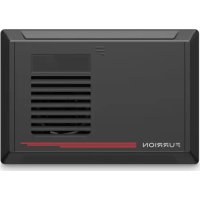
FCVSWC54A - Battery charger Furrion - Free user manual and instructions
Find the device manual for free FCVSWC54A Furrion in PDF.


| Product Type | All-in-one Power Center with Battery Charger |
| Model | FCVSWC54A |
| Brand | Furrion |
| Charge Current | 45 A |
| Input Voltage | 120 V AC, 60 Hz (range 105-132 V) |
| Output Voltage | 12 V DC |
| Full Load Input Power | 790 W |
| Full Load Input Current | 8.8 A (120 V) |
| Efficiency (with LiFePO4 battery) | Greater than 80% |
| Compatible Battery Types | Lead-acid and Lithium (LiFePO4) |
| Charge Modes | Desulfation, soft start, bulk charge, absorption, float, standby, new cycle every 21 days |
| Protections | Reverse polarity (fuse), undervoltage, overcurrent, overtemperature, short circuit, fan lock |
| Ventilation | Thermostatically controlled fan (starts at 50°C, speeds up at 60°C) |
| Cutout Dimensions | 178 mm x 268 mm (7 x 10.56 inches) |
| Operating Environment | -10°C to 50°C |
| Storage Environment | -20°C to 70°C |
| Compliance | UL458, UL67, FCC Part 15 Class B |
| Warranty | 1 year (parts and labor) |
| Box Contents | Power center, instruction manual, warranty card |
Frequently Asked Questions - FCVSWC54A Furrion
User questions about FCVSWC54A Furrion
0 question about this device. Answer the ones you know or ask your own.
Ask a new question about this device
Download the instructions for your Battery charger in PDF format for free! Find your manual FCVSWC54A - Furrion and take your electronic device back in hand. On this page are published all the documents necessary for the use of your device. FCVSWC54A by Furrion.
USER MANUAL FCVSWC54A Furrion
natural_image
Front view of a black Furrion air conditioner unit with ventilation grilles and a red stripe (no text or symbols on the device itself)Thank you and congratulations for purchasing this Furrion® All-In-One Power Center. Before operating your new product, please read these instructions carefully. This instruction manual contains information for safe use, installation and maintenance of the product. Please keep this instruction manual in a safe place for future reference. This will ensure safe use and reduce the risk of injury. Be sure to pass on this manual to new owners of this product.
The manufacturer does not accept responsibility for any damages due to not observing these instructions.
If you have any further questions regarding our products, please contact us at support@furrion.com
Contents
Welcome 3
Contents 4
Important Safety Instructions....5
FCC Compliance Class B 5
General Information 6
How your Power Center Works....6
Operational Features 6
Protective Features of the Power Center 6
Product Overview ....7
Rear Panel....7
Front Panel....7
Installation 8
What's in the Box 8
Mounting the Power Center 8
Wiring Diagram....10
Wiring Connection....10
Operation....11
Care and Maintenance ....12
Replacing Circuit Breaker 12
Replacing the Power Converter 12
Specifications 13
Troubleshooting....14
Warranty....15
Important Safety Instructions

CAUTION
- This product should be installed by an experienced technician. Caution and care must be taken when servicing this equipment.
- To prevent severe shock or electrocution consult your servicing dealer.
- No serviceable parts inside the unit.

WARNING
- This unit employs components that tend to produce arcs or sparks.
- To prevent fire or explosion, do not install in compartments containing batteries or flammable materials (LP gas).

CAUTION
- To prevent fire, do not cover or obstruct ventilation openings.
- Do not mount in zero-clearance compartment. Overheating may result.
- For continued protection against risk of fire, or electric shock replace only with same type and rating of fuse.

CAUTION
- On a monthly basis, check the fluid level in any battery connected to RV charging system, follow battery maintenance procedures.
- This product is not ignition protected and should not be installed in an LP compartment.
FCC Compliance Class B
NOTE: This equipment has been tested and found to comply with the limits for a Class B digital device, pursuant to Part 15 of the FCC Rules.
These limits are designed to provide reasonable protection against harmful interference when the equipment is operated in a commercial environment. This equipment generates, uses, and can radiate radio frequency energy and, if not installed and used in accordance with the instruction manual, may cause harmful interference to radio communications. Operation of this equipment in a residential area is likely to cause harmful interference, in which case the user will be required to correct the interference at his own expense.
General Information
How your Power Center Works
The Furrion power center offers break-through technologies that help maintain and lengthen the life of your batteries. The heart of the power center is the converter. The built-in microprocessor constantly monitors the battery voltage and automatically adjusts the converter output voltage to provide the proper charging voltage for fast recharges and long-term maintenance - the intelligent way to charge and maintain your RV battery.
Operational Features
The Furrion Smart All-In-One Power Center is designed with 35A or 45A converter built-in. The converter has two types of battery selection. It can be switched to Lithium battery type automatically when Furrion Lithium battery is connected. This converter has multiple charging modes to keep your battery in good condition.
- Converter/charger ratings up to 35Amps for FCVSWC42A and 45Amps for FCVSWC54A
- Easy access reverse battery or polarity protection fuses
- Lead acid and Lithium battery charging
- Special protocol to connect with Furrion Lithium battery
- Battery Maintenance-free – every 21 days a new charge cycle begins
Protective Features of the Power Center
BATTERY REVERSE POLARITY – If a battery is accidentally hooked up backwards, the power center converter will be protected by the fuse.
LOWER INPUT VOLTAGE PROTECTION – If the input voltage is lower than the preset limit, the power center converter will shutdown to prevent damage. The unit will return to normal operation when the voltage returns to normal.
OVER CURRENT PROTECTION – The power center converter will automatically shut down when the output current is higher than rated current.
OVER TEMPERATURE PROTECTION – If the temperature inside the power center converter is too high, the unit will reduce the input power automatically by 5A each time until the temperature drops down to a safe level. If the inside temperature still exceeds the preset safety level, the unit will shut down automatically and restart after the temperature inside drops.
SHORT CIRCUIT PROTECTION – The power center converter will shut down. Remove the short circuit and restart power center converter.
COOLING FAN – The fan will start to run when temperature of the heat sink is higher than 50° C. The fan will run fast when the temperature is up to 60C.
FAN BLOCK PROTECTION – The power center converter will shut down when the fan is blocked.
Product Overview
Rear Panel
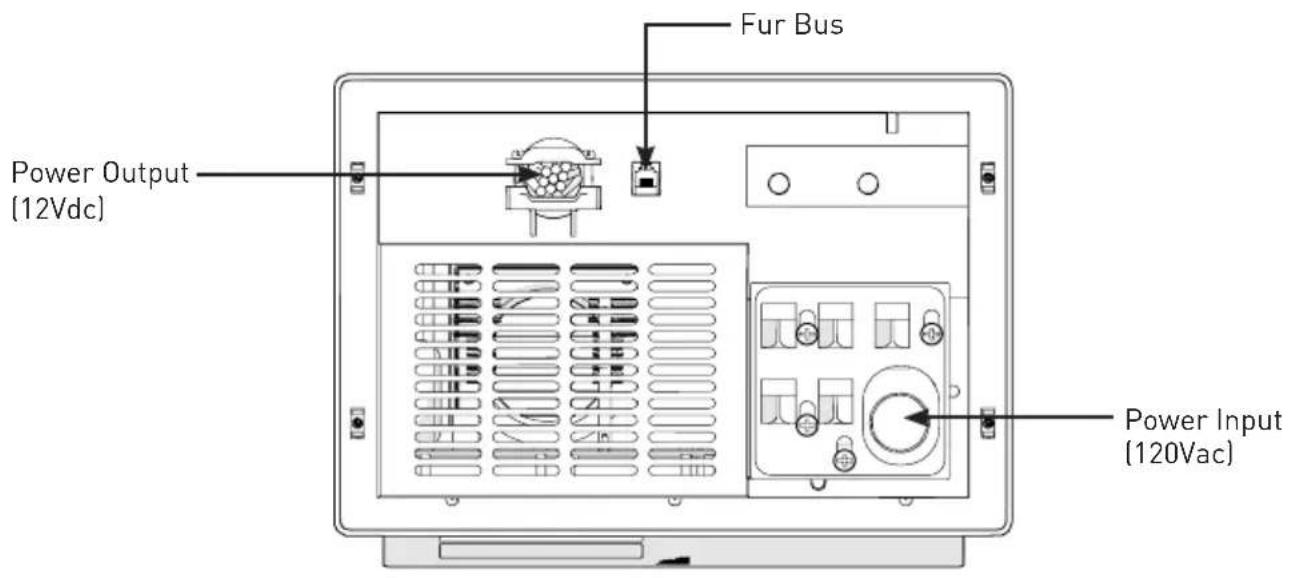
Front Panel

Installation

WARNING
This unit employs components that tend to produce arcs or sparks. To prevent fire or explosion, do not install in compartments containing batteries or flammable materials (LP gas).

CAUTION
- To prevent fire, do not cover or obstruct ventilation openings. Do not mount in zero-clearance compartment. Overheating may result.
- For continued protection against risk of fire or electric shock, replace only with same type and rating of fuse.
What's in the Box
Make sure you have all the following items included in the packaging. If any items are damaged or missing, contact your dealer.
- Power Center x 1
- Instruction Manual x 1
- Warranty Card x 1
Mounting the Power Center
Consult a licensed electrician or an RV technician for installation assistance.
- Select a mounting location near the shore power and battery (batteries). A minimum compartment size of 3 cubic feet is recommended. Failure to provide adequate ventilation will prevent the power center from supplying full output power.
- Cut a rough opening (to the dimension outlined in Fig. 1) on the RV wall to allow the power center to slide in easily.

- Push the power center front cover around to the position of 'F' mark and rotate downwards to fully open it. (Fig. 2)

natural_image
Technical diagram of an electrical enclosure with internal compartments and a black arrow indicating a component (no text or symbols present)- Loosen the screws that hold the housing at the four corners using a Phillips screwdriver. (Fig. 3)

natural_image
Technical line drawing of a computer rack with ventilation slots and a close-up inset showing internal components (no text or symbols)- Pull to remove the housing from the unit. (Fig. 4)
Installation

natural_image
Technical diagram showing internal components of a device with an arrow indicating direction, no text or symbols present.- Connect the power center to Furrion LiFePO4 battery. Red wire to red wire, white wire from converter to black post on battery. Red is positive (+), White is negative (-). Connect the RJ25 wire to power center RJ25 port. See 'Wiring Diagram' section on how to connect the wires.
- Slide the power center into the opening area and affix with 4 self-tapping screws (#8-18 thread) (not supplied). (Fig.5 and Fig. 6)

natural_image
Technical diagram of a mechanical device with internal components and directional arrows, labeled Fig. 5 (no text or symbols on the diagram itself)
natural_image
Technical line drawing of an electronic device casing with internal components and mounting holes (no text or symbols)- Replace the housing to the power center and tighten the screws at the four corners. (Fig. 7 and Fig. 8) NOTE: Do not over tighten. Damage to the housing may occur which will void the warranty.

natural_image
Technical illustration of a laptop with internal components and a magnified view showing internal structure (no text or symbols)
natural_image
Technical line drawing of an internal device with labeled components and a magnified inset showing a close-up view (no text or symbols present)- Test the power center under full load conditions in its intended mounting location to ensure proper ventilation.
Wiring Diagram
Wiring Connection
WARNING: Make sure no AC power is coming into the RV from either the shore power cord or an on-board generator.
The fuse rating that the manufacturer suggests for the output fuses will be marked on the unit. Replace only with same type and rating.
NOTE: If the reverse battery protection fuses are blown during connection, be sure that the battery has been connected properly, then replace the fuses with the same rating as the original.

Operation
Many options will be installed prior to the purchase of your new RV, however there are a few options that you should be aware of while operating your new power center.
The built-in microprocessor selects the best mode for your battery automatically and determines which operating mode is best suited to recharge or maintain optimum battery condition.
CHARGING FLOW CHART

line
| Stage | Voltage (V) | |-------|-------------| | Stage 1 | Decreasing oscillation | | Stage 2 | Soft Start increase | | Stage 3 | Bulk Charge increase | | Stage 4 | Absorption Charge increase | | Stage 5 | Float Charge | | Stage 6 | Standby Mode |DESULPHATION CHARGE - PULSE CHARGING
If the initial battery voltage is less than 10V, the charger will start desulphation mode with pulse charge profile. The pulse charge time will be 10 minutes.
NOTE: This charging phase is only available for Lead Acid Battery.
SOFT START - CONSTANT CURRENT CHARGING
If at the initial bulk charging, the battery voltage is less than 11Vdc due to deep discharge, the charger will go with soft charge. The bulk charging current is reduced to half of the maximum current until battery voltage is higher than 11Vdc or 10 minutes (whichever is longer) then switches to bulk charge.
BULK CHARGE - CONSTANT CURRENT CHARGING
Normally the battery is charged at constant maximum current until it rises to the bulk voltage level. The charging voltage changes with the battery voltage. If the charger cannot go to absorption mode within 20 hours, the charger will automatically go to float mode to prevent over charge of the battery. This is the
safety timer.
ABSORPTION CHARGE - CONSTANT VOLTAGE CHARGING
When the battery voltage rises to the bulk voltage level, the charging will switch to constant voltage charging. Charger will switch to float stage after 90 or 180 minutes of absorption charge (90 Minutes for LiFePO4 battery, 180 Minutes for Lead Acid Battery).
FLOAT CHARGE - CONSTANT VOLTAGE CHARGING
In this stage, the battery is full and only takes in the amount of current necessary for maintaining the capacity. The charger will switch to bulk charge, if the battery current is higher than 50% of rated current for 5 minutes or the battery voltage is lower than 12.5Vdc for 5 minutes. If the charger remains at this mode with charging current less than 20% of bulk current for over 60 hours, the charger will go into the standby mode.
STANDBY MODE - CONSTANT VOLTAGE CHARGING
In this stage, the charging voltage at this mode will be 13.2Vdc. This is only for maintaining the capacity. The charger will switch to a new cycle after 5 minutes when the current is higher than 6A.
NEW CYCLE CHARGE EVERY 21 DAYS
Charger will start a new cycle charging of bulk to absorption to float every 21 days in either standby or float mode. This new cycle of charging will refresh the battery to prevent separation of the electrolyte & keep the electrode plates in good condition. The standby auto new cycle charge per 21 days are designed to keep the battery in good working condition during long period of resting of the caravan or back up battery application.
Care and Maintenance
Replacing Circuit Breaker
A replacement or additional circuit breaker shall be of the same manufacturer, type designation and equal or greater interrupting rating. Main circuit breaker can be used with 30A, branch circuit can be used with 20A or 15A.
"Short-Circuit-Current" rating for the breaker should be 10,000A.
All the circuit breaker need to be UL®-Listed
Acceptable circuit breakers are as follows:
| Manufacturer Model/Type | |
| ITE/Siemens QP/QT | |
| Square D HOM/HOMT | |
| Eaton BR |
Replacing the Power Converter
IMPORTANT: Make sure all power is disconnected before proceeding.
If you should need to replace the power converter for any reason, follow the steps below to safely remove the converter section.
- Remove the hot wires, neutral and ground that lead to the converter on the AC side.
- Remove the converter output wires from the DC board, ground and positive.
- Finally unscrew the screws that hold the metal converter plate to the plastic housing. For factory repairs, return only the converter section. Make sure you use proper packaging to ensure the product's safe arrival.
Do not replace the converter section unless the following checks have been performed:
- Use an AC voltmeter to check for the proper voltage at the 120Vac breaker that the converter is connected to. This voltage should be between 105 and 130 volts.
- Remove the reverse battery fuses and check the converter output from the CONVERTER GND to the CONVERTER POS terminals on the DC board. This should be 13.6Vdc.
- Check the reverse battery fuses. These fuses will only blow if the battery or DC output leads were connected reversed, even for a moment. If they are blown check the polarity of the battery connections before replacing them.
- If the converter output is not present and there is AC to the converter, the converter is defective.
Specifications
| Technical Specification | ||
| FCVSWC42A FCVSWC54A | ||
| Standby Voltage 13.2V 13.2V | ||
| Charge Current 35A 45A | ||
| Operation Voltage Range 105Vac to 132Vac / 60Hz 105Vac to 132Vac / 60Hz | ||
| Full Load Input Power 615W 790W | ||
| No Load Input Current 250mA 250mA | ||
| Full Load Input Current (120V/60Hz) | 7A 8.8A | |
| Efficiency (at LiFePO4) (120Vac) | >80% >80% | |
| Line Regulation At Full Load (@input voltage105V to 132V) | 3% 3% | |
| Load Regulation (10%-100% Load) | 3% 3% | |
| Certification | UL458/UL67/FCC PART 15b | UL458/UL67/FCC PART 15b |
| Working Environment | -10°C to 50°C/14°F to 122°F (Higher temperature will be de-rating) | -10°C to 50°C/14°F to 122°F (Higher temperature will be de-rating) |
| Storage Environment | -20°C to 70°C/-4°F to 158°F | -20°C to 70°C/-4°F to 158°F |
| LiFePO4 Battery | ||
| Bulk | 14.6 V | 14.6 V |
| Float | 13.6V 13.6V | |
| Lead Acid Battery | ||
| Bulk | 14.4V 14.4V | |
| Float | 13.4V 13.4V | |
Troubleshooting
| PROBLEM POSSIBLE CAUSES ACTION | ||
| No Output | 120VAC supply not connected | Connect power supply |
| Check AC distribution panel for proper operation | ||
| Reverse battery fuses blown (See page 1 for location) | Check for reverse battery connection. | |
| Replace fuses with same type and rating (See page 2) | ||
| Short circuit Trace RV circuits for p | possible fault | |
| Unit has shut down due to lower voltage | Check input voltage | |
| Correct input voltage | ||
| Low Output | Compartment gets too hot | Check air flow to the converter |
| Improve ventilation to the compartment | ||
| Excessive load for converter | Reduce load requirements or install larger converter | |
| Input voltage too low Correct input | supply voltage | |
| Bad battery cell(s) Replace battery | ||
| Intermittent or no Output on Generator, works on Shore Power | Unit has shutdown due to lower voltage. | Add another load to the generator, this may reduce the “spikes” to an acceptable level |
| Some generators exhibit excessive voltage spikes on the AC power output, this may cause the over voltage protection to shut the unit down | Contact generator manufacturer for possible defect in the generator | |
| Open Fuse Indicator lit (See page 1 for location) | Fuse open Replace fuse with same type and rating | |
Warranty
Furrion warrants for a period of 1 year from date of retail purchase by the original end-use purchaser, that this product, when delivered to you in new condition, in original packaging, from a Furrion authorized reseller and used in normal conditions, is free from any defects in manufacturing, materials, and workmanship. In case of such defect, Furrion shall replace or repair the product at no charge to you. This warranty does not cover: products where the original serial numbers have been removed, altered or cannot readily be determined; damage or loss caused by accident, misuse, abuse, neglect, product modification, failure to follow instructions in instruction manual, commercial or industrial use; damage or loss caused to the decorative surface of product; to any data, software or information; and normal wear and tear. This warranty only protects the original end-user ("you") and is not transferable; any attempt to transfer this warranty shall make it immediately void. This warranty is only valid in the country of purchase.
THIS WARRANTY AND REMEDIES SET FORTH ABOVE ARE EXCLUSIVE AND IN LIEU OF ALL OTHER WARRANTIES, REMEDIES AND CONDITIONS, WHETHER ORAL OR WRITTEN, EXPRESS OR IMPLIED. FURRION SPECIFICALLY DISCLAIMS ANY AND ALL IMPLIED WARRANTIES, INCLUDING, WITHOUT LIMITATION, WARRANTIES OF MERCHANTABILITY AND FITNESS FOR A PARTICULAR PURPOSE. IF FURRION CANNOT LAWFULLY DISCLAIM IMPLIED WARRANTIES UNDER THIS LIMITED WARRANTY, ALL SUCH WARRANTIES, INCLUDING WARRANTIES OF MERCHANTABILITY AND FITNESS FOR A PARTICULAR PURPOSE ARE LIMITED IN DURATION TO THE DURATION OF THIS WARRANTY.
No Furrion reseller, agent, or employee is authorized to make any modification, extension, or addition to this warranty.
Warranty
FURRION IS NOT RESPONSIBLE FOR DIRECT, INDIRECT, SPECIAL, INCIDENTAL OR CONSEQUENTIAL DAMAGES RESULTING FROM ANY BREACH OF WARRANTY OR CONDITION, OR UNDER ANY OTHER LEGAL THEORY, INCLUDING BUT NOT LIMITED TO LOST PROFITS, DOWNTIME, GOODWILL, DAMAGE TO OR REPLACEMENT OF ANY EQUIPMENT OR PROPERTY, ANY COSTS OF RECOVERING, REPROGRAMMING, OR REPRODUCING ANY PROGRAM OR DATA STORED IN OR USED WITH FURRION PRODUCTS. FURRION'S TOTAL LIABILITY IS LIMITED TO THE REPAIR OR REPLACEMENT OF THIS PRODUCT PURSUANT TO THE TERMS OF THIS WARRANTY.
SOME STATES DO NOT ALLOW THE EXCLUSION OR LIMITATION OF INCIDENTAL OR CONSEQUENTIAL DAMAGES OR EXCLUSIONS OR LIMITATIONS ON THE DURATION OF IMPLIED WARRANTIES OR CONDITIONS, SO THE ABOVE LIMITATIONS OR EXCLUSIONS MAY NOT APPLY TO YOU. THIS WARRANTY GIVES YOU SPECIFIC LEGAL RIGHTS, AND YOU MAY ALSO HAVE OTHER RIGHTS THAT VARY BY STATE OR (WHERE APPLICABLE IN THE COUNTRIES WHERE FURRION HAS NON-US/CANADIAN AUTHORIZED DEALERS) COUNTRY. NO ACTION OR CLAIM TO ENFORCE THIS WARRANTY SHALL BE COMMENCED AFTER THE EXPIRATION OF THE WARRANTY PERIOD.
Keep your receipt, delivery slip, or other appropriate payment record to establish the warranty period. Service under this warranty must be obtained by contacting Furrion at
warranty@furrion.com
Product features or specifications as described or illustrated are subject to change without notice.
Bienvenue
natural_image
Technical line drawing of an electrical enclosure with internal compartments and a directional arrow indicating flow or movement (no text or symbols)natural_image
Technical line drawing of an electronic device casing with internal compartments and a close-up inset showing the component (no text or symbols)Installation
natural_image
Technical illustration of a device showing internal components and a separate open panel (no text or symbols)natural_image
Technical line drawing of an electronic device casing with internal components and mounting holes (no text or symbols)natural_image
Technical illustration of a device interior showing internal components and a separate open panel (no text or symbols)
natural_image
Technical line drawing of an internal device with labeled components and a magnified inset showing the interior (no text or symbols present)line
| Phase | Tension [V] | | ------------------ | ----------- | | Desulphation | High | | Soft Start | Low | | Bulk Charge | Medium | | Absorption Charge | Low | | Float Charge | Low | | Standby Mode | Low |CHARGE DE DÉSULFATATION - CHARGE PAR IMPULSIONS
natural_image
Technical diagram of an electrical enclosure with internal compartments and a directional arrow indicating flow or movement (no text or symbols present)natural_image
Technical line drawing of an internal device with labeled components and a magnified inset showing a close-up view (no text or symbols present)Instalación
natural_image
Technical diagram showing internal components of a device, including a fan assembly and ventilation slots (no text or labels)natural_image
Technical diagram of an internal device with labeled components and directional arrow (no readable text or symbols)
natural_image
Technical line drawing of an NEU device internal structure (no text or symbols)natural_image
Technical illustration of a device interior showing internal components and a separate view of the front panel (no text or symbols)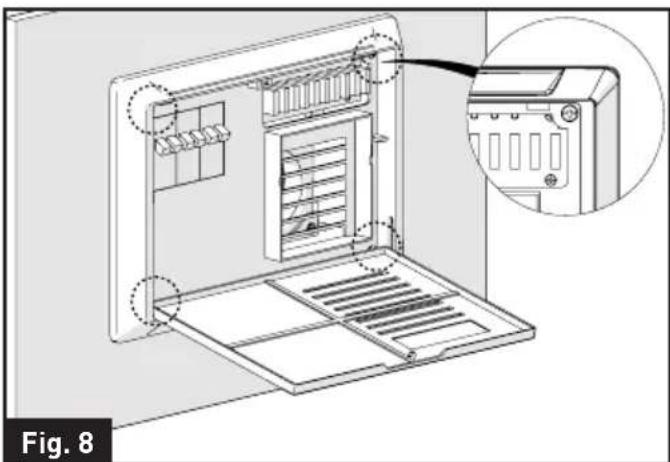
natural_image
Technical line drawing of an internal device with labeled components and a magnified inset showing the interior view (no text or symbols present)line
| Time (Hrs) | Voltage (V) | |------------|-------------| | 0 | Low | | 1 | High | | 2 | Medium | | 3 | High | | 4 | Medium | | 5 | High | | 6 | High |Furrion Innovation Center & Institute of Technology
● 52567 Independence Ct., Elkhart, IN 46514, USA ● Toll free:1-888-354-5792
- Email: support@furrion.com
©2007-2018 Furrion Ltd. Furrion® and the Furrion logo are trademarks licensed for use by Furrion Ltd. and registered in the U.S. and other countries.
- Contents
- Important Safety Instructions
- CAUTION
- WARNING
- FCC Compliance Class B
- General Information
- How your Power Center Works
- Operational Features
- Protective Features of the Power Center
- Product Overview
- Rear Panel
- Front Panel
- Installation
- What's in the Box
- Mounting the Power Center
- Consult a licensed electrician or an RV technician for installation assistance.
- Wiring Diagram
- Wiring Connection
- Operation
- DESULPHATION CHARGE - PULSE CHARGING
- SOFT START - CONSTANT CURRENT CHARGING
- BULK CHARGE - CONSTANT CURRENT CHARGING
- ABSORPTION CHARGE - CONSTANT VOLTAGE CHARGING
- FLOAT CHARGE - CONSTANT VOLTAGE CHARGING
- STANDBY MODE - CONSTANT VOLTAGE CHARGING
- NEW CYCLE CHARGE EVERY 21 DAYS
- Care and Maintenance
- Replacing Circuit Breaker
- All the circuit breaker need to be UL®-Listed
- Replacing the Power Converter
- IMPORTANT: Make sure all power is disconnected before proceeding.
- Do not replace the converter section unless the following checks have been performed:
- Specifications
- Troubleshooting
- Warranty
- warranty@furrion.com
- Bienvenue
- CHARGE DE DÉSULFATATION - CHARGE PAR IMPULSIONS
- Instalación
- Furrion Innovation Center & Institute of Technology
Brand : Furrion
Model : FCVSWC54A
Category : Battery charger