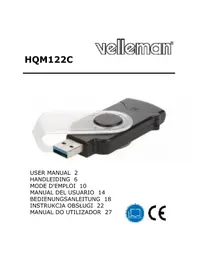
HQM122C - USB Drive HQ Power - Free user manual and instructions
Find the device manual for free HQM122C HQ Power in PDF.


User questions about HQM122C HQ Power
0 question about this device. Answer the ones you know or ask your own.
Ask a new question about this device
Download the instructions for your USB Drive in PDF format for free! Find your manual HQM122C - HQ Power and take your electronic device back in hand. On this page are published all the documents necessary for the use of your device. HQM122C by HQ Power.
USER MANUAL HQM122C HQ Power
Electronic devices are recyclable waste and must not be disposed of in the household waste.
At the end of its service life, dispose of the product according to the relevant statutory regulations.
You thus fulfil your statutory obligations and contribute to the protection of the environment.
Thank you for choosing Velleman! Please read the manual thoroughly before bringing this device into service. If the device was damaged in transit, do not install or use it and contact your dealer.
2. Safety Instructions
- The device is not a toy. Keep it out of the reach of children.
- Do not leave packaging material lying around carelessly. These may become dangerous playing material for children.
- Protect from extreme temperatures, direct sunlight, strong jolts, high humidity, moisture, flammable gases, vapours and solvents.
- Do not place the product under any mechanical stress.
V. 01 - 13/01/2020 2 ©Velleman nv
HQM122C
- Indoor use only. Do not use it outdoors. Contact with moisture, e.g. in bathrooms, must be avoided under all circumstances.
- If it is no longer possible to operate the product safely, take it out of operation and protect it from any accidental use. Safe operation can no longer be guaranteed if the product:
o is visibly damaged,
o is no longer working properly,
○ has been stored for extended periods in poor ambient conditions or
o has been subjected to any serious transport-related stresses.
- Also, observe the safety and operating instructions of any other devices which are connected to the product.
- Consult an expert when in doubt about operation, safety or connection of the device.
- There are no user-serviceable parts inside the device. Refer to an authorized dealer for service and/or spare parts.
- Ensure that the data transfer is done and always use the eject function on your operating system before removing a memory card from your card reader.
3. General Guidelines
Refer to the Velleman® Service and Quality Warranty on www.velleman.eu.
V. 01 - 13/01/2020 3 ©Velleman nv
HQM122C
4. Cleaning and Maintenance
- Disconnect before cleaning.
- Do not immerse in water.
- Clean with a dry, lint-free cloth.
- Do not use any abrasive or chemical cleaning products.
5. Features
- plug & play: ideal to copy photos and data from your camera or smartphone to your computer
compatible with USB 3.0 / 2.0 / 1.1 - auto detects memory card
- lightweight and compact design
- this device reads SD and micro SD cards at the same time and can transfer data from one card to another.
6. Specifications
- compatibility:
MacOS®: 10.5 or above
Windows®: 2000 SP4 / XP SP3 / 2003 / Vista / W7 / W8 / W10
- inputs for storage:
○ SD / SDHC / SDXC / EXTREME SD / EXTREME II SD / EXTREME III SD/ ULTRA SD / ULTRA II SD/ ULTRA II SD P PLUS / SD-ULTRA-X / ULTRA SPEED SD / SD PRO / SD ELITE PRO / HS SD /
HQM122C
MMC/MMC4.0/HSMMC/HSRCMMC/RS MMC/RSMMC4.0/MMCMobile
Micro SD / micro SDHC / micro SDXC
- transfer speed:
o USB 3.0 Ultra Hi speed transfer 100MB/s
○ 5 Gbps Super Speed / 480 Mbps high speed and 12 Mbps full speed transfers
- connectors: USB 3.0
- dimensions: 88 × 31 × 14 ~mm
weight: 19 g - colours: black and silver
Use this device with original accessories only. Velleman nv cannot be held responsible in the event of damage or injury resulting from (incorrect) use of this device. For more info concerning this product and the latest version of this manual, please visit our website www.ivelleman.eu. The information in this manual is subject to change without prior notice.
© COPYRIGHT NOTICE
The copyright to this manual is owned by Velleman nv. All worldwide rights reserved. No part of this manual may be copied, reproduced, translated or reduced to any electronic medium or otherwise without the prior written consent of the copyright holder.
HANDLEIDING
1. Inleiding
MMC/MMC4.0/HSMMC/HSRCMMC/RS MMC/RSMMC4.0/MMCMobile
Micro SD / micro SDHC / micro SDXC
MMC/MMC4.0/HSMMC/HSRCMMC/RS MMC/RSMMC4.0/MMCMobile
Micro SD / micro SDHC / micro SDXC