Skulpter Qube - Receiver Elysia - Free user manual and instructions
Find the device manual for free Skulpter Qube Elysia in PDF.


User questions about Skulpter Qube Elysia
0 question about this device. Answer the ones you know or ask your own.
Ask a new question about this device
Download the instructions for your Receiver in PDF format for free! Find your manual Skulpter Qube - Elysia and take your electronic device back in hand. On this page are published all the documents necessary for the use of your device. Skulpter Qube by Elysia.
USER MANUAL Skulpter Qube Elysia
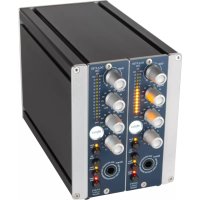
The skulpter 500 is the ultimate recording front end. Its audiophile preamp is based on single resistors controlling a fully discrete Class-A amplifier capable of complementing any microphone with a remarkably true and natural sound. If additional mojo is needed, two variable saturation/filter stages and an intelligent onboard compressor make voices and instruments sound like a finished record right from the start.
Whether clean or colored, the sonic bliss does not stop at your mic locker. The skulpter 500 provides a balanced DI input with significant headroom, so just about any signal coming from guitars, basses, synths and effects will benefit greatly from the skulpter 500's pristine amplification and versatile processing qualities.
Way more than just a preamp, the skulpter 500 is a complete recording solution - everything you'll ever need in front of your DAW.
Compatibility 3
Installation 3
Controls 4
Connectors 6
Audiophile Gain Staging 7
Dual Sound Shaper 8
Variable Low Cut Filter 9
Balanced DI. 9
Intelligent Onboard Dynamics. 10
Multifunction Meter. 11
Appendix. 12

Deutsches Handbuch...16

Manuel François ... 30
elysia
Compatibility
The skulpter 500 is a module to be installed into an API 500 series compatible rack frame (not included). It needs the power supply and the audio connectors provided by this frame and does not function stand alone.
The current consumption is 115 milliamperes at + / - 16 volts DC. The skulpter 500 meets all mechanical and electronic specifications of the VPR Alliance, providing the highest level of compatibility with common 500 series rack frames.
Installation
Just follow these easy steps to install your skulpter 500:
- Switch your API 500 series compatible rack off and disconnect the power cable from mains.
- Insert the module into a free slot of your rack. Make sure the PCB connector matches with the rack connector.
- Gently push the module in place - do not use any extensive force here!
- Tighten the front panel with two screws provided by your rack manufacturer.
- Connect your audio cables (see page 6 for more info) and apply power to your rack.
And this is already it. Have lots of fun with your skulpter 500!
Controls
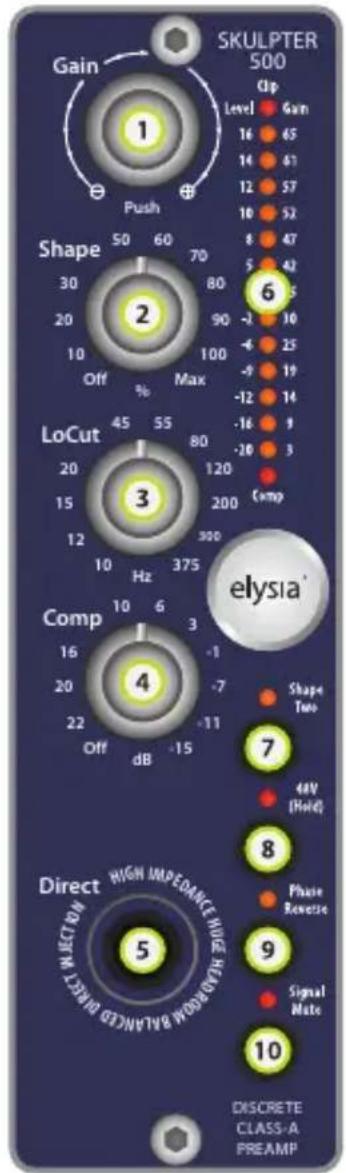
1 Gain: Turn right to increase and left to decrease the amount of gain. Push to change LED display from output level meter to preamp gain indicator. Note: The actual mic preamp and the direct input each have a separate gain value. If you change from Mic to DI or vice versa, the gain will automatically change accordingly. (p. 7)
elysia
Shape: Turn right to increase saturation/filtering effects. Shape One is active per default; press corresponding button for Shape Two. (p. 8)
3 LoCut: A variable low cut filter with a slope of 12 dB per octave, ranging from 10 to 375Hz . Turn right to raise the cutoff frequency. (p.9)
4 Comp: An intelligent soft knee compressor based on a fixed 3:1 ratio. Fully left is off; turn right to lower the compression threshold. (p. 10)
5 Direct: High impedance/headroom direct input for instruments etc. Note: The DI has priority over the mic input and will automatically activate when a jack is connected. (p. 9)
6 Meter: A multi LED array showing input clipping (top), output level or preamp gain (middle) and compression intensity (bottom). (p. 11)
Shape Two: Changes the specially tweaked filter curve of the sound shaper from instrument (LED off) to vocal (LED on) focused enhancement. (p. 8)
48V (Hold): Activates or deactivates +48V phantom power. Note: For safety reasons, the button must be pushed for a period of two seconds to toggle its function.
9 Phase Reverse: Switches the phase from normal (LED off) to reverse or vice versa. Note: This will automatically trigger a signal mute for a few milliseconds to avoid cracking noises.
10 Signal Mute: Allows changing instruments and mics without damaging ears and speakers, or a quick source signal mute while playing back. LED is on while signal is muted.
Connectors
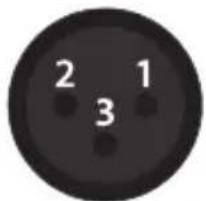
Mic input (+19 dBu max)
Pin assignment: 1 ground 2 hot (+) 3 cold (-)
Note: Never use unbalanced cables/adaptors for connecting microphones. It will cause a destructive short circuit if phantom power is used, and even if phantom power is not used it can cause all kinds of unwanted noises. Always use proper XLR > XLR microphone cables.
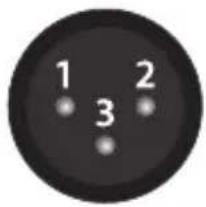
Line output (+4dBu)
Pin assignment balanced: 1 ground 2 hot (+) 3 ground
Pin assignment unbalanced: 1 ground 2 hot (+) 3 idle
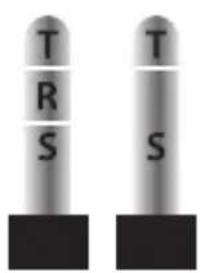
DI input (+19 dBu max) Pin assignment balanced: T hot (+) R cold (-) S ground
Pin assignment unbalanced: T signal S ground
Note: Do not use balanced cables (TRS) for connecting unbalanced sources (e.g. guitars) to the DI input. The ring will not be connected properly and act as an antenna collecting all kinds of unwanted noises. Also, active onboard electronics might not be switched properly by the jack of the instrument anymore.
elysia
Audiophile Gain Staging

The skulpter 500 does not use a potentiometer for changing its gain, but a much more audiophile topology instead: Fixed resistors switched by a cascade of
relays and electronic switches. This setup is controlled by an encoder with 20 steps per rotation, providing a total of 40 gain values in 1.5 / 2 dB steps (total gain range: 3 - 65 dB).
Turning this encoder to the right increases the amount of gain; turning it to the left decreases it. Push the encoder if you want to change the LED meter from displaying the output level to showing the actual amount of gain the preamp generates.
The skulpter 500 provides an ample amount of gain, starting at unusually low values and going up to what you'll need to properly amplify ribbons with high gain requirements. A huge benefit of this is that an additional pad becomes completely unnecessary, resulting in a better signal-to-noise ratio.
When your skulpter 500 is powered off its current gain setting is saved automatically, so the preamp will start with exactly the same amount of gain on the next session.
Using single resistors arranged in a cascade guarantees exact gain values. As a result, multiple preamps do not require factory matching or consecutive serial numbers when forming stereo pairs or multichannel configurations.
Note: However, switching the gain in discrete steps does not allow continuous gain sweeps without interruptions. Slight artifacts can appear in the audio path while changing the gain.
Dual Sound Shaper

The very natural sound character of the skulpter 500 can be shaped by two independent combinations of saturation and specially tweaked filter curves. Any
desired amount of this effect can be blended to the original signal with the Shape controller. Press the Shape Two button to switch from one style to the other.
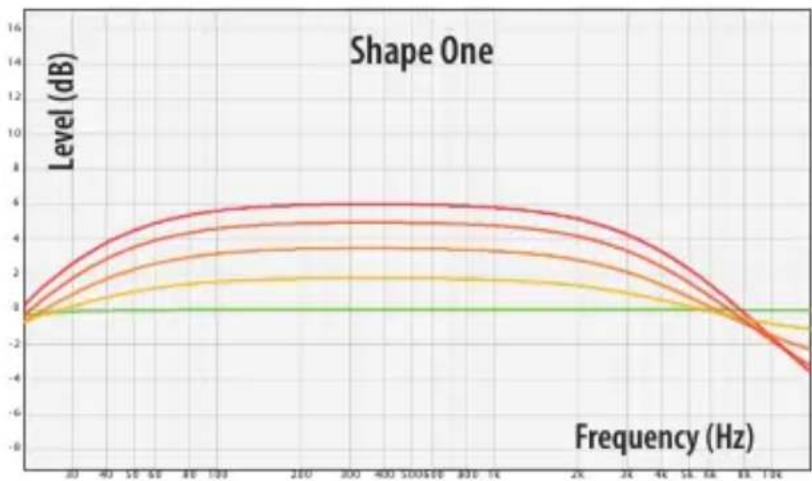
Shape One: Instruments
The first ingredient to achieve that big, fat sound is adding harmonics (THD). The intensity of this saturation is determined by the input level and the amount of preamp gain. At the same time, a pre-tailored EQ curve with a high frequency cut starting around 4kHz is applied to the signal.
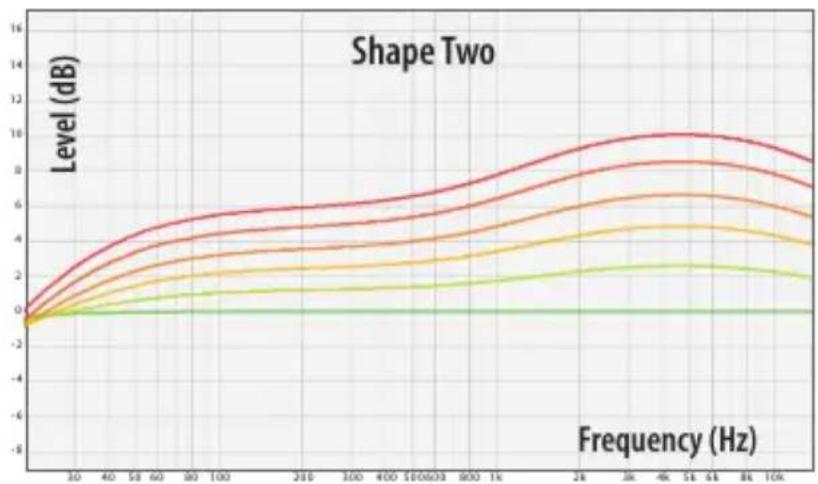
Shape Two: Vocals
Vocals benefit from the same saturation enhancement; and, like a tube-like characteristic curve, this results rather in musical soft clip limiting than in actual distortion. The preset EQ curve is of course a different one for vox, with up to 10 dB of high mid boost around 4.5kHz
elysia
Variable Low Cut Filter

An essential standard tool for any preamp is a low cut for reducing low frequency rumble. Instead of just a single or maybe two fixed frequencies, the skulpter
500 offers a variable low cut filter with a wide frequency range from 10Hz to 375Hz . The slope of the filter is 12 dB/octave, and its amplifier is a discrete class-A design optimized for especially transparent performance.
Balanced DI

The skulpter 500 can handle way more than "just" your complete microphone locker. An integrated front panel JFET DI makes it perfect for amplifying
and shaping many kinds of different signals coming from guitars, basses, synths, effects...
The high input impedance of one megohm allows to directly plug even instruments with passive pickups into the preamp. On the other hand, the input can also handle high line levels of up to +19dB ! Note: The DI has priority over the mic input and will automatically activate when a jack is connected.
Intelligent Onboard Dynamics

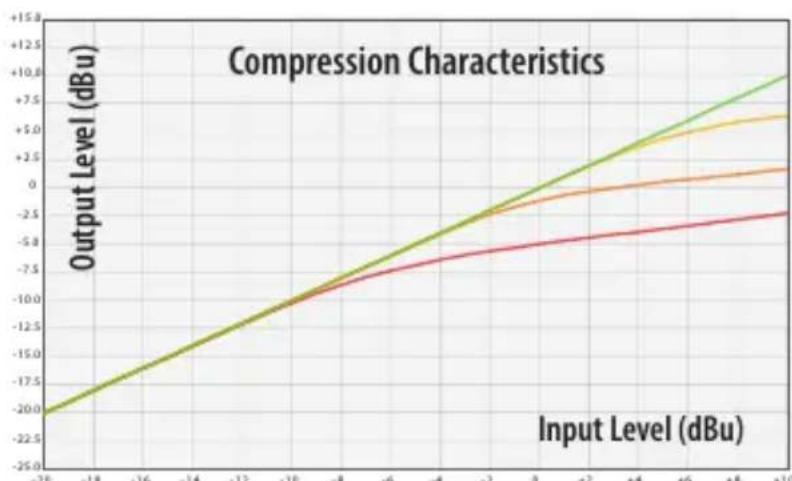
The skulpter 500 features an integrated compressor operated by just a single knob. Its potentiometer sets the threshold based on a fixed 3:1 ratio and a soft
knee characteristic, while the attack and release parameters were selected for their universal usefulness.
But wait - there's more! The compressor's easy and effective one-knob-operation is supported by elysia's signature Auto Fast function, which will automatically reduce the attack to its shortest value when strong impulses and transients require it.
Technically, the discrete VCA responsible for reducing the gain is placed in negative feedback with its following op amp. The beauty of this is that the dynamics section is only part of the signal chain when it is actually working. If there is no compression going on, the corresponding circuitry will be completely bypassed.
Operation is as easy as it gets: If you want more compression, turn the Comp controller further to the right. If you want no compression at all, turn it fully to the left.
elysia
Multifunction Meter

The fifteen LEDs of the skulpter 500's meter provide four pieces of vital information:
Input Clipping
A single LED located at the top of the meter will light up if clipping is detected at the input of the preamp. If the input does not clip, it means that the rest of the signal path is good as well. The LED increases in brightness to reflect the intensity of the overload.
Compression Intensity
Another single LED located at the bottom of the meter shows the amount of compression applied to a signal if the dynamics section of the skulpter 500 is active. This LED also changes in brightness to visually represent the amount of compression applied.
Level Meter
Thirteen LEDs in the middle of the meter show the output level of the preamp. For smooth transitions between different values instead of erratic flickering, these change in brightness, too. Level related effects of the compressor and sound shaper sections can be monitored on this meter as well.
Gain Indicator
If the Gain encoder is pushed, the level meter will turn into a gain indicator. In this case, the scale printed on the right side of the LEDs will apply, and the meter will show the amount of gain the preamp currently generates.
Technical Details
Frequency response @ 3dB gain: 10Hz - 170kHz (-3dB)
Frequency response @ 29dB gain: 10Hz - 170kHz (-3dB)
THD+N @ +6dBu level, 3dB gain, 20Hz - 22kHz: 0.007%
THD+N @ +6dBu level, 29dB gain, 20Hz - 22kHz: 0.007%
Noise floor @ 3dB gain, 20Hz - 20kHz (A-weighted): -97dBu
Noise floor @ 29dB gain, 20Hz - 20kHz (A-weighted): -93dBu
CMRR @ +6dBu level, 29dBu gain, 1kHz: 87dB
CMRR @ +6dBu level, 29dBu gain, 10kHz: 69dB
Maximum level Mic In/DI In/Out 19/19/21dBu
Impedance Mic In/DI In/Out 13.6kohm/1megohm/62ohm
CE Conformity

The conformity of this device to the EU directives is confirmed by the CE mark on the device.
This declaration becomes invalid by any unapproved modification of the device.
CAUTION: Electricity
- Make sure to operate your API 500 series compatible rack at the specific mains voltage of your country.
- Replace rack frame fuse with the same type and value only.
- Your rack frame must be connected to ground.
- Do not use a damaged power cord.
- Never place containers with liquid on the rack.
- Do not expose this device to rain or moisture.
- Do not use this device near water.
Refer service to qualified service staff only.

CAUTION: Temperature
- Surfaces of the device may become hot during operation.
- Do not install this device near any heat source such as radiators, stoves or other heat sources.

CAUTION: Connecting & Mounting
- Never connect to the output of a power amplifier.
- Do not apply extensive force when installing this device.
- Use the device according to this manual only.

CAUTION: Humidity
- If this device is moved from a cold place to a warm room, condensation can occur inside the device. To avoid damaging the unit please allow it to reach room temperature before switching it on.
Warranty Info
The skulpter 500 is covered by a limited warranty for a period of two years against defects in parts and labor from the date of purchase. Natural wear is not covered by this warranty. Repairs or replacements will not extend the warranty period.
The warranty is given to the original purchaser only and is not transferable. elysia will only give warranty on products purchased through authorized elysia dealers. The warranty will only be valid in the country of the original purchase unless otherwise pre-authorized by elysia.
All warranties become void when the product has been damaged by misuse, accident, neglect, modification, tampering or unauthorized alteration by anyone other than elysia authorized service personnel.
The warrantor assumes no liability for property damage or any other incidental or consequential damage whatsoever which may result from failure of this product. Any and all guarantees of merchantability and fitness implied by law are limited to the duration of the expressed warranty.
elysia will not pay for express or overnight freight service or pay for shipments to locations outside Germany. All damages caused by transport are not covered by this warranty.
This warranty gives you specific legal rights and you may also have other rights which vary from state to state. Some of the above limitations may not apply to you.
elysia
Legal Info
The information in this document is subject to change without further notice and shall not be deemed as an obligation or warranty of any kind by the manufacturer. No warranties, express or implied, are made with regard to the quality, suitability or accuracy of this document.
The manufacturer reserves the right to change the contents of this document and/or the associated products at any time without the provision of prior notice. The manufacturer shall not be held liable for damages of any kind arising from the use, or the inability to use this product or its documentation.
The information in this document is subject to copyright. All rights, technical changes and errata are reserved. No part of this manual may be reproduced or transmitted in any form or for any purpose without the explicitly written permission of the copyright holders.
elysia and skulpter are registered trademarks of elysia GmbH. Other product and brand names contained in this document are used for identification purposes only. All registered trademarks, product designations or brand names used in this document are the property of their respective owners.

The product has been manufactured in compliance with the RoHS directive. The purpose of this directive of the European Union is
the Restriction of Hazardous Substances (RoHS) in electronic equipment in order to protect health and nature. Dispos separately!
Version 1.1 © 2019 elysia GmbH
Dual Sound Shaper 22
Variables Low Cut-Filter 23
CMRR @ +6dBu Level, 29dBu Gain, 1kHz: 87dB
CMRR @ +6dBu Level, 29dBu Gain, 10kHz: 69dB
Maximaler Pegel Mic In/DI In/Out 19/19/21dBu
Impedanz Mic In/DI In/Out 13,6kOhm/1Megaohm/62Ohm
CE Konformität
THD+N @ +6dBu level, 3dB gain, 20Hz - 22kHz: 0,007%
THD+N @ +6dBu level, 29dB gain, 20Hz - 22kHz: 0,007%
Seuil de bruit @ 3dB gain, 20Hz - 20kHz (A-weighted): -97dBu
Seuil de bruit @ 29dB gain, 20Hz - 20kHz (A-weighted): -93dBu
CMRR @ +6dBu level, 29dBu gain, 1kHz: 87dB
CMRR @ +6dBu level, 29dBu gain, 10kHz: 69dB
Niveau maximum Mic In/DI In/Out 19/19/21dBu
Impedance Mic In/DI In/Out 13.6kOhm/1Megaohm/62Ohm
Conformité CE