SUPDMB20KIEC - Inverter Tripp Lite - Free user manual and instructions
Find the device manual for free SUPDMB20KIEC Tripp Lite in PDF.



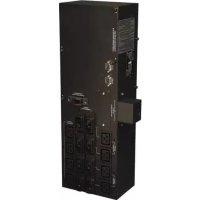
| Product Type | Parallel Power Distribution Module (PDU) for UPS 16/20 kVA |
| Model | SUPDMB20KIEC |
| Brand | Tripp Lite |
| Configuration | N+1 redundant up to 50% load, full capacity beyond |
| Input Voltage | 200-240 V AC |
| Output Voltage | 200-240 V AC |
| Output Receptacles | 6x IEC-320-C19 |
| Output Circuit Breakers | 20 A bipolar |
| Bypass Switch | Yes, for maintenance (100 A) |
| Input Connection | Wired terminal block (L1, L2, ground) |
| Mounting | In rack, on shelves with guide rails |
| Parallel Operation | Up to 2 power modules |
| Hot Swap | Yes, for power modules (with bypass) |
| Operating Temperature | 0°C to 40°C |
| Relative Humidity | 5% to 95% non-condensing (estimated) |
| Cooling | Natural convection |
| Warranty | 2 years limited |
| Maintenance | No periodic maintenance required |
Frequently Asked Questions - SUPDMB20KIEC Tripp Lite
User questions about SUPDMB20KIEC Tripp Lite
0 question about this device. Answer the ones you know or ask your own.
Ask a new question about this device
Download the instructions for your Inverter in PDF format for free! Find your manual SUPDMB20KIEC - Tripp Lite and take your electronic device back in hand. On this page are published all the documents necessary for the use of your device. SUPDMB20KIEC by Tripp Lite.
USER MANUAL SUPDMB20KIEC Tripp Lite
SmartOnline® 16 & 20kVA UPS with N+1 Configuration Options
Models: SU16KRT, SU16KRT-1TF, SU16KRT8, SU16KRTG, SU16KRTHW, SU20KRT, SU20KRT-1TF, SU20KRT8, SU20KRTG, SU20KRTHW, SU20KRTHWTFASSM
Introduction 2
Important Safety Warnings 3
Mounting 4
Features 6
Connection 8
Manual Bypass Operation 10
Storage & Service 12
Warranty & Product Registration 12
Español 13
Français 25
Русский 37
PROTECT YOUR INVESTMENT!
Register your product for quicker service and ultimate peace of mind. You could also win an ISOBAR6ULTRA surge protector—a \$100 value!
www.tripplite.com/warranty
Introduction
Your Tripp Lite 16/20kVA UPS system includes two 8/10kVA power modules along with a parallel PDU and communications cable that combines the output of the two UPS power modules to directly power your equipment. Your UPS automatically supports N+1 fault tolerance at load levels up to 50% and non-redundant operation at loads greater than 50%. The included parallel PDU with bypass switch also enables hot-swappable replacement of either or both power modules without downtime. For additional configuration assistance, contact Tripp Lite.
10kVA Redundant Configuration (10kVA max load)
![graph TD A["10kVA UPS"] --> B["Parallel PDU"] C["10kVA UPS"] --> B B --> D["Loads 10kVA and lower"] D --> E["Redundant Operation YES"] D --> F["Fault-Tolerance YES"] D --> G["Hot-Swappable UPS Replacement YES"] D --> H["Increased Capacity NO"] E --> I["When two UPS systems are loaded to a maximum of…](/content/2026/04/585536/images/0c0f7cec430cb0982e432c2524c04155f540a183cb57cc0d46353f145c2e824a.jpg)
To ensure fault-tolerance, load the two parallel UPS systems to a maximum of 50% of the combined rating for both UPS systems. For example, if you have two 10kVA UPS systems, you will have fault-tolerant operation if the load level remains at 10kVA or lower.
20kVA Non-Redundant Configuration (20kVA max load)
![graph LR A["10kVA UPS"] --> B["Parallel PDU"] C["10kVA UPS"] --> B B --> D["Loads 10-20kVA"] E["Redundant Operation NO"] --> F G["Fault-Tolerance NO"] --> H I["Hot-Swappable UPS Replacement YES"] --> J K["Increased Capacity YES"] --> L](/content/2026/04/585536/images/1038e0d265c9637e9dededf1f96d773c26a6541971049bca205097df7055c2fb.jpg)
When two UPS systems are loaded to a maximum of 100%, your configuration will receive the full capacity of both UPS systems combined to power larger loads. This configuration does NOT carry redundancy or fault-tolerance options. Hot-swappable UPS replacement is possible if you put the PDU in bypass mode (See "Manual Bypass Operation" Section).
Your can use this configuration to grow your UPS power capacity to 16kVA (when two 8kVA UPS systems are used) or 20kVA (when two 10kVA UPS systems are used). In this configuration, fault-tolerance is NOT available.
Note: Use the included 8/10kVA power module manual for UPS operation and configuration options once you have completed the setup of your 16/20kVA UPS per the installation information on the following pages.
For 16/20KVA UPS Configurations
• Economy-mode operation is not supported
- For best results, connect an equal number of external battery packs to each UPS power module.
SAVE THESE INSTRUCTIONS.
This manual contains important instructions and warnings that should be followed during the installation and maintenance of all Tripp Lite Parallel PDUs. Failure to heed these warnings may affect your warranty.
Location Warnings
• Install your PDU indoors, away from excess moisture or heat, direct sunlight, dust and conductive contaminants.
• Install your PDU in a structurally sound area. Your PDU is heavy; take care when moving and lifting the unit.
- Only operate your PDU at indoor temperatures between 32° F and 104° F (between 0° C and 40° C). For best results, keep indoor temperatures between 62° F and 84° F (between 17° C and 29° C).
- Leave adequate space around all sides of the PDU for proper ventilation.
- Do not install the PDU near magnetic storage media, as this may result in data corruption.
Equipment Connection Warnings
- Use of this equipment in life support applications where failure of this equipment can reasonably be expected to cause the failure of the life support equipment or to significantly affect its safety or effectiveness is not recommended.
- When connecting to a UPS, the UPS is connected to a DC energy source (battery). The output terminals may be live when the UPS is not connected to an AC supply.
Maintenance Warnings
- Your PDU does not require routine maintenance. Do not open for any reason. There are no user-serviceable parts inside.
Battery Warnings
- Service and repair should be done only by trained personnel. During any service work to the UPS, it should be turned off or manually bypassed via the PDU. Note that potentially lethal voltages exist within this unit as long as the battery supply is connected.
- Do not connect or disconnect battery module(s) while the UPS is operating from the battery supply or when the detachable PDU is not in bypass mode.
- During "hot-swap" battery module replacement your UPS will be unable to provide battery backup in the event of a blackout.
Mounting
Note: It is recommended that the following mounting instructions only be used in standard rack enclosures and 4-Post Open Frame Racks.
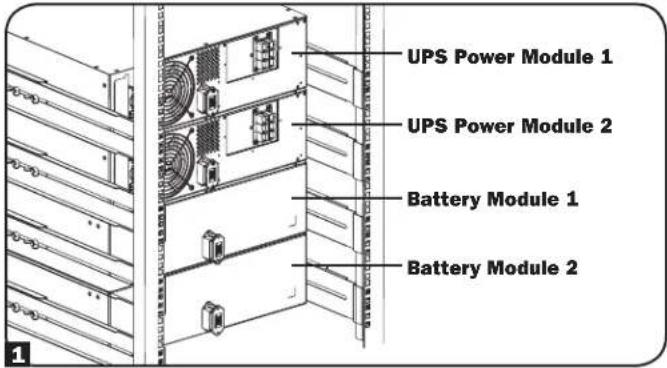
1 It is important to note that in order to accommodate paralleling applications, equipment must be mounted in the following order (see diagram): UPS Power Module 1, UPS Power Module 2, Battery Module 1 and Battery Module 2.
Note: The power module and battery module must be installed in separate shelves.
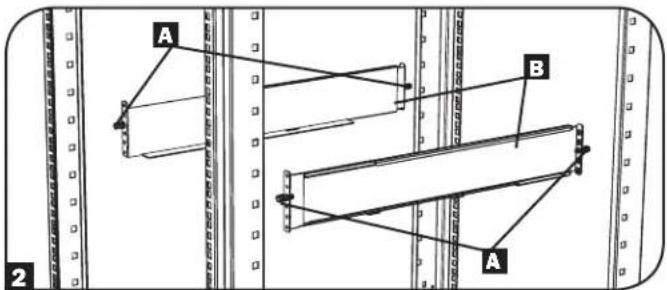
2 The included plastic pegs A will temporarily support the empty rackmount shelves B while you install the permanent mounting hardware. Insert a peg near the center of the front and rear bracket of each shelf as shown. (Each front bracket has 6 holes and each rear bracket has 3 holes.) The pegs will snap into place.
After installing the pegs, expand each shelf to match the depth of your rack rails. The pegs will fit through the square holes in the rack rails to support the shelves. Refer to the rack unit labels to confirm that the shelves are level in all directions.
Note: The support ledge of each shelf must face inward.
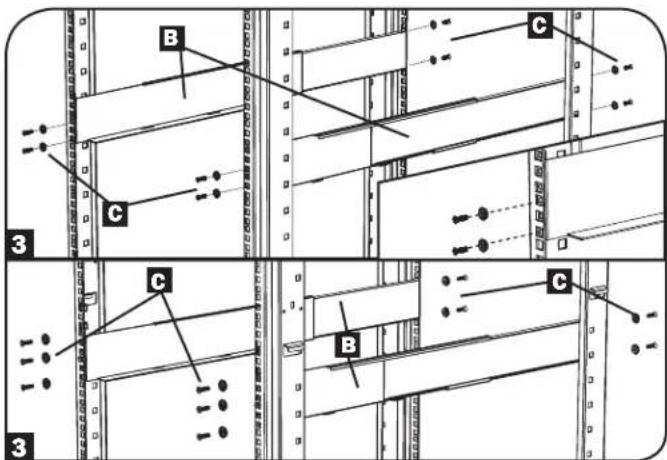
3 Secure the shelves B to the mounting rails permanently using the included screws and cup washers C as shown.
- For 2U equipment mounting, place 4 screws total at the front and 4 screws total at the back.
- For 3U equipment mounting, place 6 screws total at the front and 4 screws total at the back.
Tighten all screws before proceeding.
Warning: Do not attempt to install your equipment until you have inserted and tightened the required screws. The plastic pegs will not support the weight of your equipment.
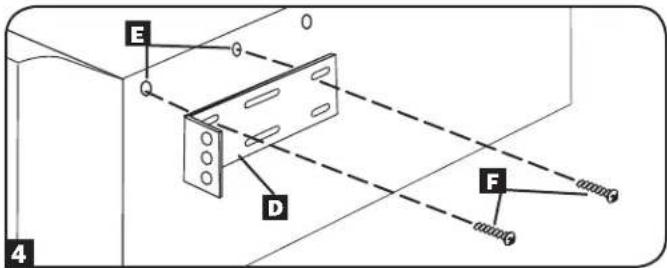
4 Attach mounting ears D to the front mounting holes of your equipment E using the screws provided F. The ears should face forward.
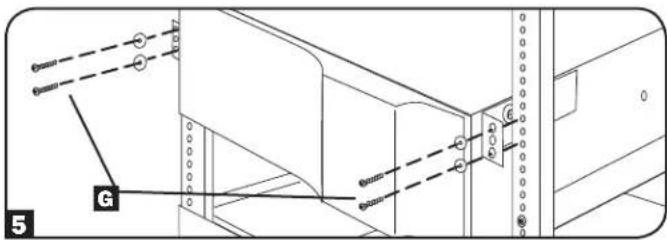
5 Using an assistant, lift your equipment and slide it onto the mounting shelves. Attach your equipment to the rack by passing the screws, nuts and washers (user-provided) G through its mounting ears and into the rack rails.
Mounting
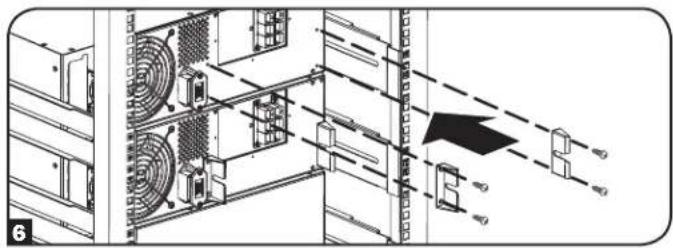
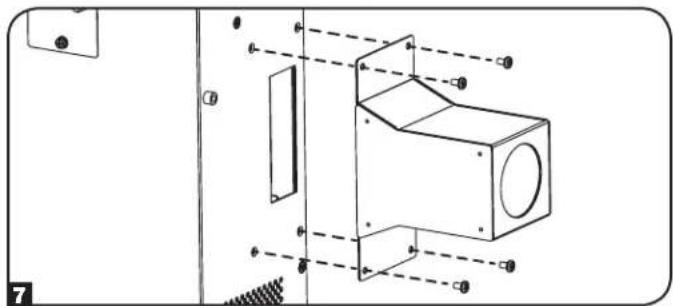
6 With the included screws, attach the 4 placement guide brackets to the power modules (2 per power module).
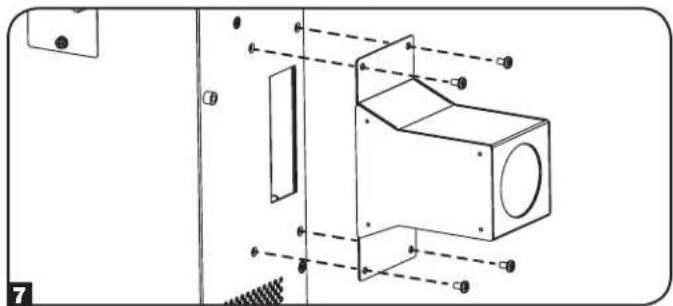
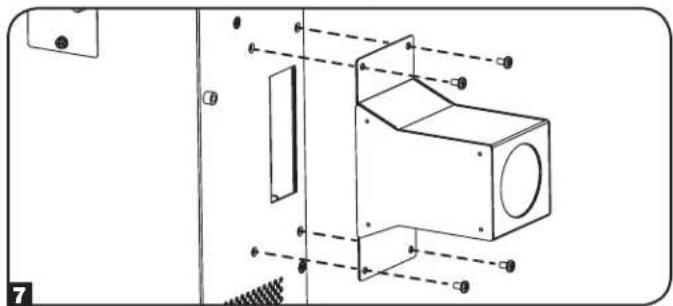
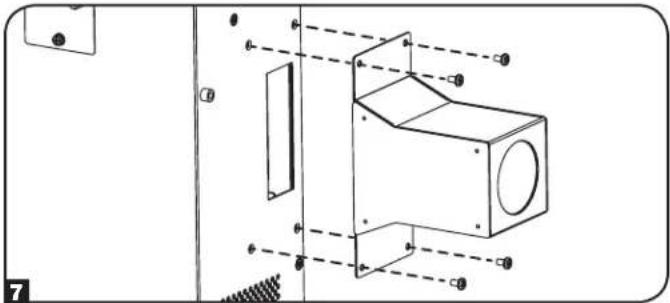
7 Install wiring bustle using the included screws.
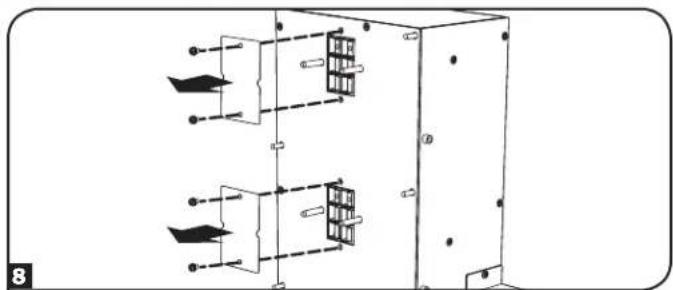
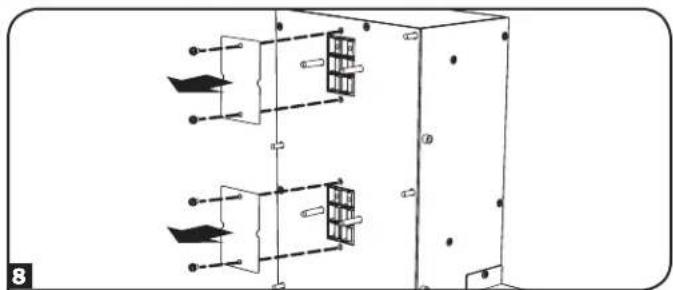
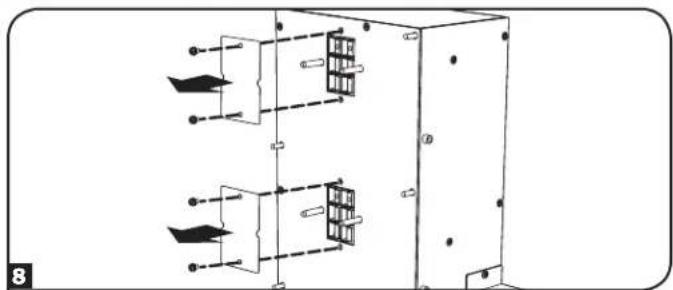
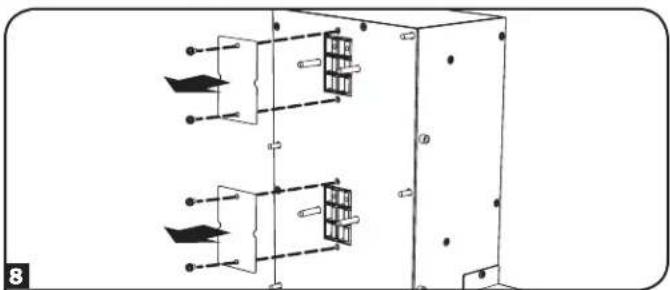
8 Remove the terminal covers by unscrewing the 2 screws and expose the PDU contacts. Save for future use.
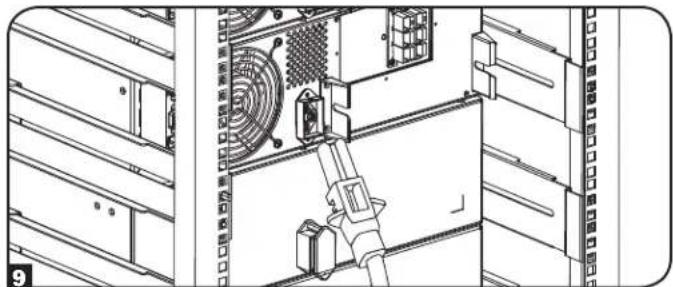
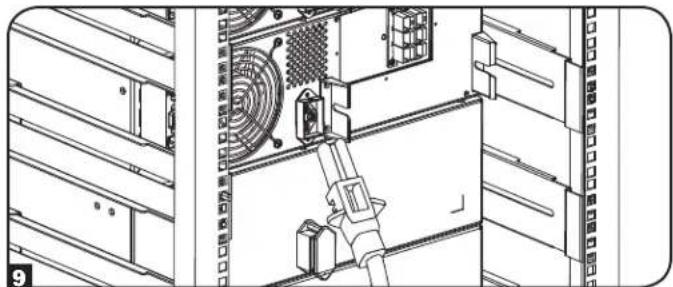
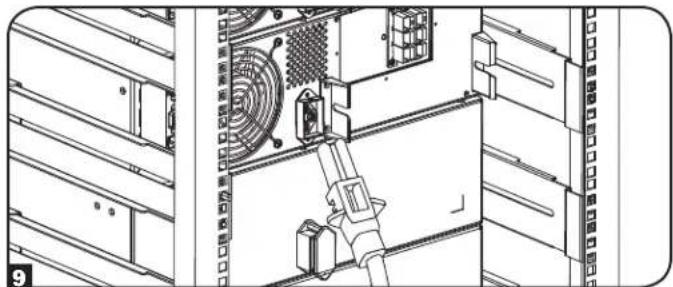
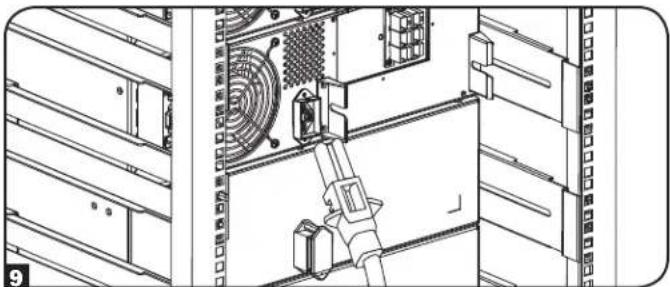
9 Connect Battery Module 2 to Power Module 2 before installing PDU.
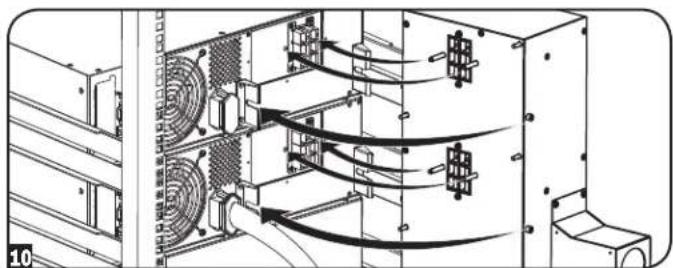
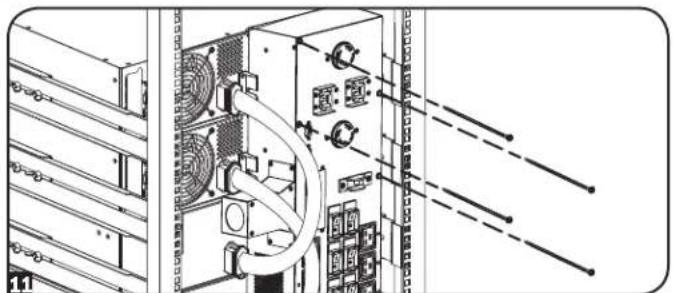
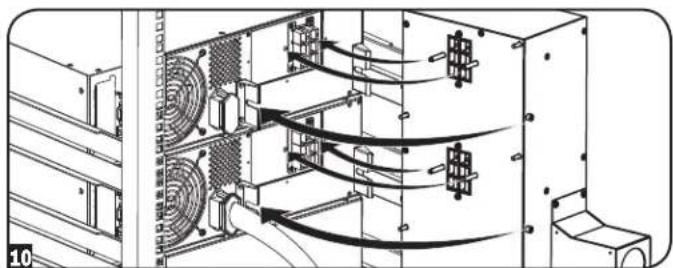
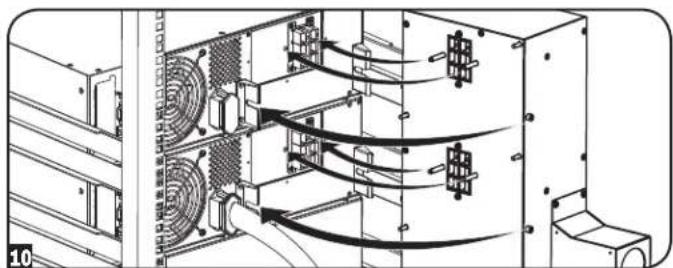
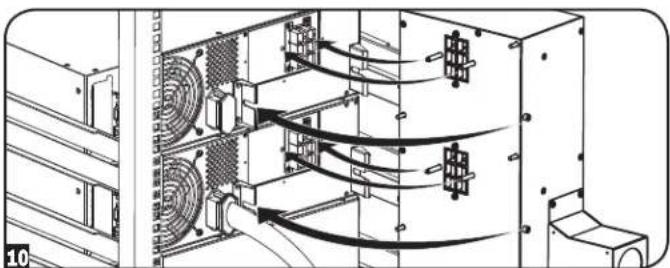
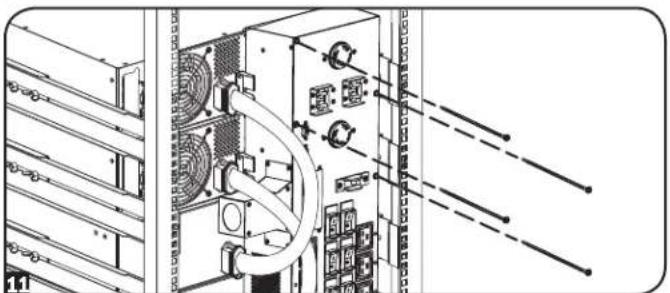
10 Using the 4 placement pegs as a guide, slide the PDU into the placement guide brackets on the power modules. When lined up properly, the guidance pegs on the rear of the PDU should fit into the clearance holes on the power modules and a tight connection will be made.
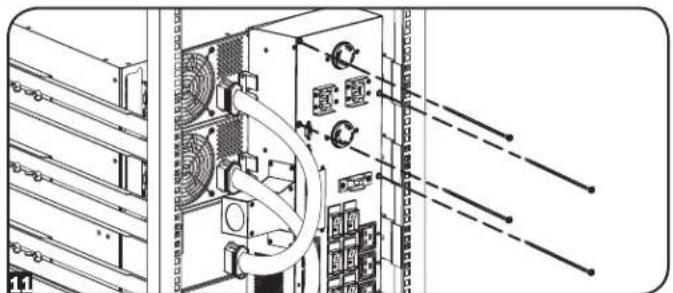
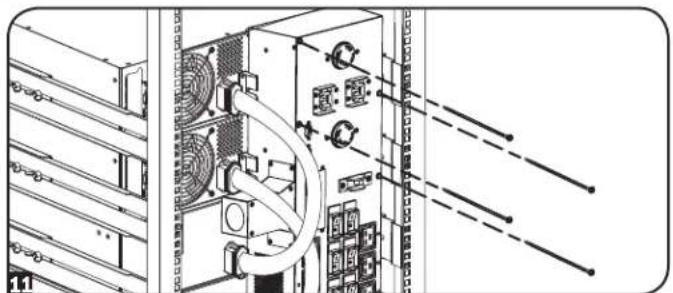
Connect Battery Module 1 to Power Module 1. Attach the PDU to the power modules by tightening the 4 screws.
Features
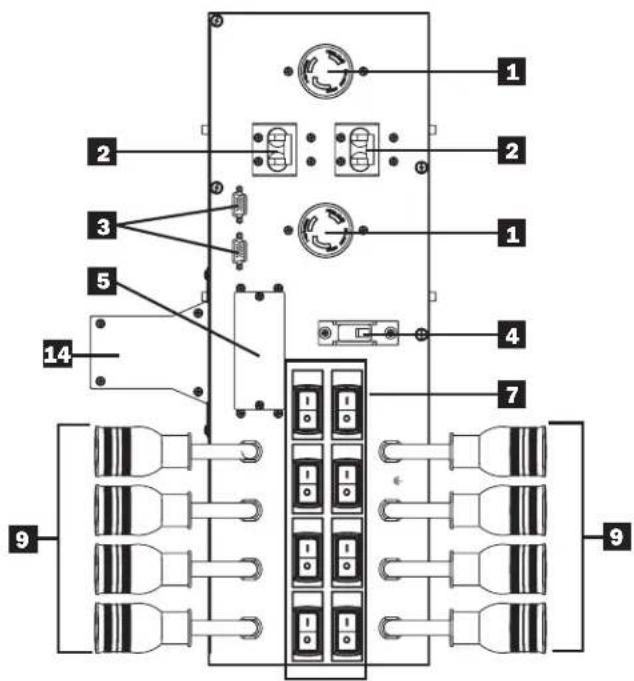
SUPDMB20K
(Included with SU16KRT, SU16KRT-1TF, SU20KRT and SU20KRT-1TF)
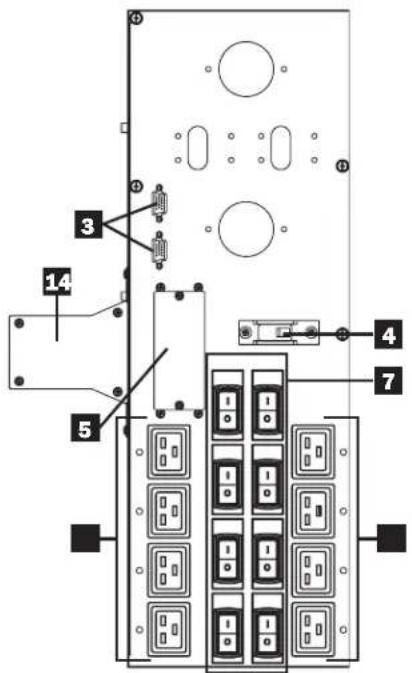
SUPDMB20KIEC
(Included with SU16KRTG & SU20KRTG)
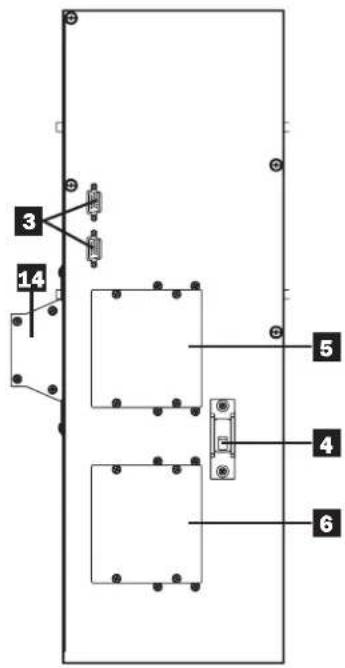
SUPDMB20KHW
(Included with SU16KRTHW & SU20KRTHW)

SUPDMB20K8
(Included with SU16KRT8 & SU20KRT8)
Back Panel
(All models)
Features
1 L6-30R Output Receptacles: Accept direct plug-in connection of L6-30P equipment plugs.
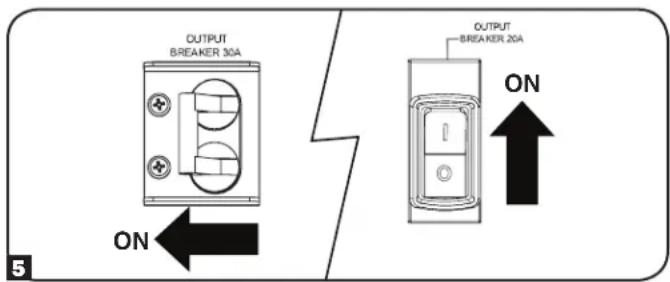
2 Output Breakers (30 Amp): One double-pole circuit breaker provides bypass for the parallel system to the load.
3 Parallel Cable Connectors: For UPS communication in parallel.
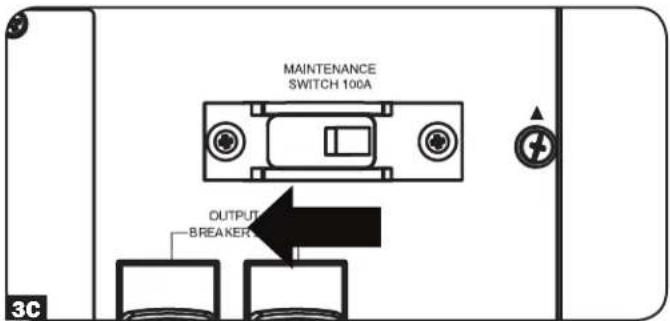
4 Maintenance Switch (100 Amp): Controls maintenance to the power module.
5 Utility Input Terminal Block: Use this terminal to connect your power module to utility power or to the transformer module. Unscrew and remove the cover over the block for access.
6 Equipment Output Terminal Block (SUPDMB20KHW only): Use this terminal to connect your power module to your equipment or to the transformer module. Unscrew and remove the cover over the block for access.
7 Output Breakers (20 Amp): One double-pole circuit breaker provides bypass for the parallel system to the load.
8 IEC-320-C19 Output Receptacles: Accept direct plug-in connection of IEC-320-C19 equipment plugs.
9 L6-20R Output Receptacles: Accept direct plug-in connection of locking L6-20P equipment plugs
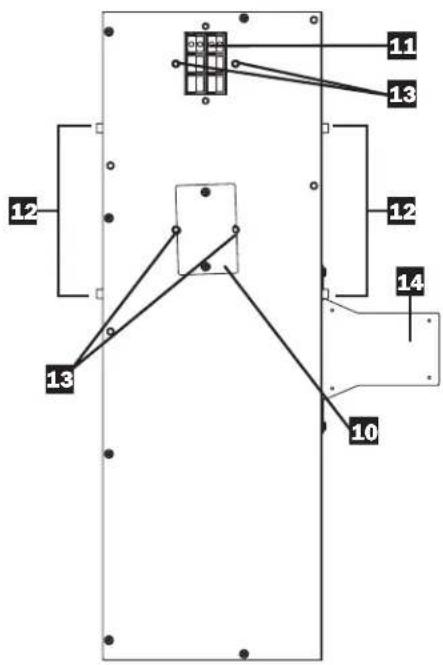
10 PDU Connection Access Covers: Remove to make connections between the PDU and power modules.
1.1 PDU Input Terminal Block: Use these terminals to connect the PDU to the power module.
PDU Guidance Pegs: Found on the side of the PDU to help guide PDU installation placement. Used in conjunction with PDU placement guide brackets (see Mounting section for more details).
13 PDU Guidance Posts: Found on the back panel of the PDU to help guide PDU installation placement. See “Mounting” section for more details.
14 Wiring Bustle: Must be installed prior to mounting PDU. See Mounting section for more details.
Connection
Hardwiring Cautions
- Wiring must be done by a qualified electrician.
- When making wiring connections, observe the cable connection regulations appropriate to your area [e.g. National Electrical Code (NEC) in the U.S.] at all times. Be sure to install an easily accessible disconnect switch in your installation wiring so you may cut off the UPS's AC input during fires and other emergencies. Ensure that cables are fitted with cable sleeves and are secured by connector clamps. Tighten connections with a torque of not less than 24-28 inch-pounds (2.7-3.2 NM).
- Make sure that your equipment is properly grounded.
- Using cables of improper size may damage your equipment and cause fire hazards. Choose appropriate cabling and protection circuits to make wiring connections. Ground conductors must be the same size and type as the power conductors used.
• Refer to National Electrical Code (NEC) guidelines for proper wire gauge and output protection circuit requirements.
Input & Output* Ratings and Recommended Wire Sizing
| For N+1 Redundant Operation | ||||||
| Models (Bundles) | Input Voltage (L-L/L-N) | Max Rated Input Current | Input Service OCPD** | Typical Input Wire Size | Max Rated Output Current | Typical Output Wire Size |
| SU16KRT, SU16KRT-1TF, SU16KRTG, SU16KRTHW, SU16KRT8 | 200V-240V 46A | 50A 10 mm | 2 (#8 AWG) | 40A 10 mm | 2 (#8 AWG) | |
| SU20KRT, SU20KRT-1TF, SU20KRTG, SU20KRTHW, SU20KRT8 | 200V-240V 56A | 60A 16 mm | 2 (#6 AWG) | 50A 10 mm | 2 (#8 AWG) | |
| For Capacity Operation | ||||||
| Models (Bundles) | Input Voltage (L-L/L-N) | Max Rated Input Current | Input Service OCPD** | Typical Input Wire Size | Max Rated Output Current | Typical Output Wire Size |
| SU16KRT, SU16KRT-1TF, SU16KRTG, SU16KRTHW, SU16KRT8 | 200V-240V 92A | 100A 35 mm | 2 (#3 AWG) | 80A 25 mm | 2 (#4 AWG) | |
| SU20KRT, SU20KRT-1TF, SU20KRTG, SU20KRTHW, SU20KRT8 | 200V-240V 112A | 125A 50 mm | 2 (#1 AWG) | 100A 35 mm | 2 (#3 AWG) | |
* Input - hardwired; Output - hardwired or receptacles/outlets ** OCPD - Overcurrent protective device
Terminal Wiring Connections
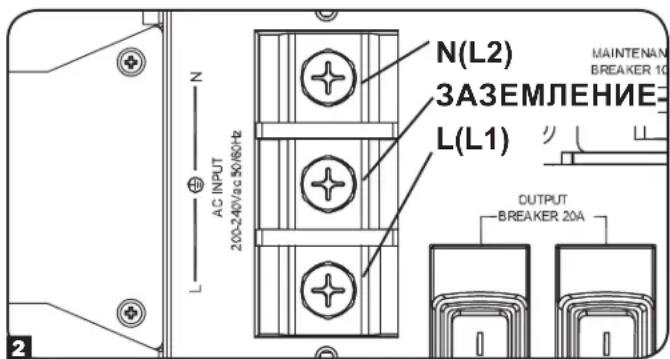
SUPDMB20K, SUPDMB20KIEC & SUPDMB20K8
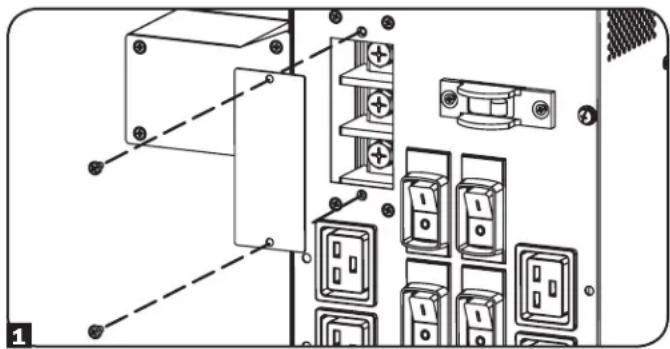
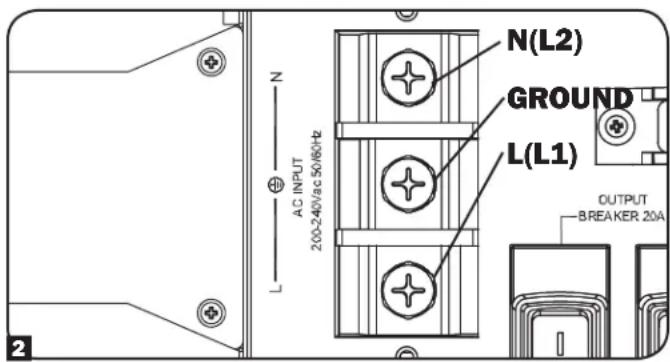
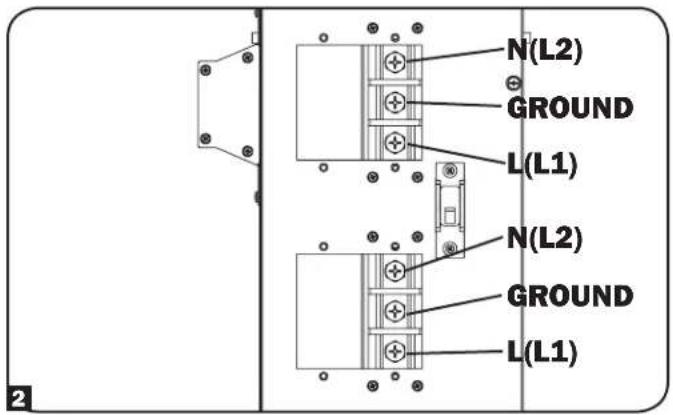
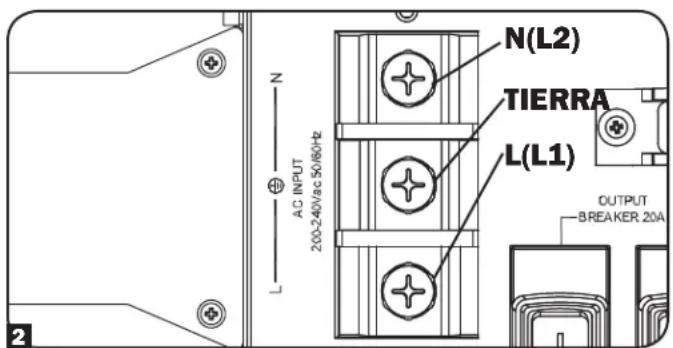
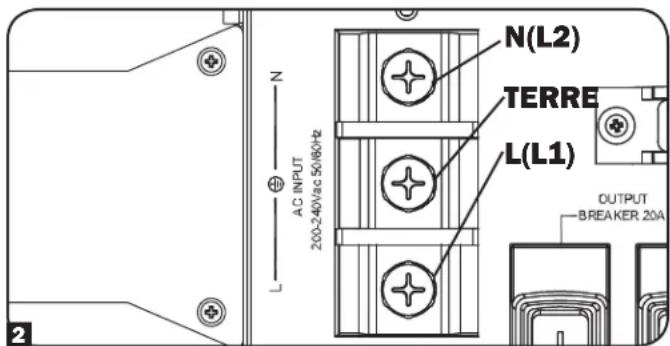
1 Unscrew the 2 screws to remove the Input Terminal Access covers.
2 Connect the N (L2), Ground and L (L1) input wires according to markings on the connectors as seen in the diagram.
3 After input wire attachments have been made, replace the Input Terminal Access covers.
Connection
Terminal Wiring Connections
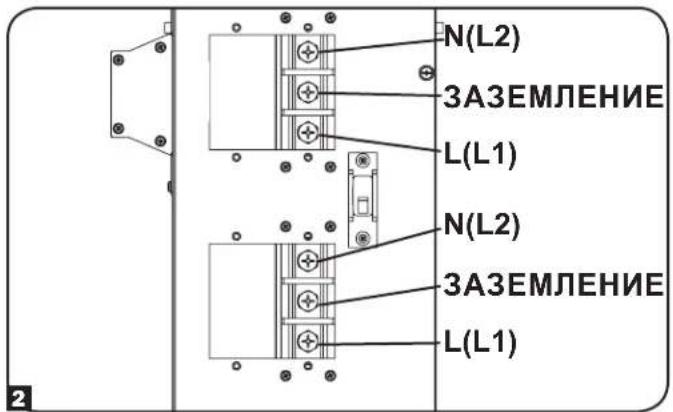
SUPDMB20KHW
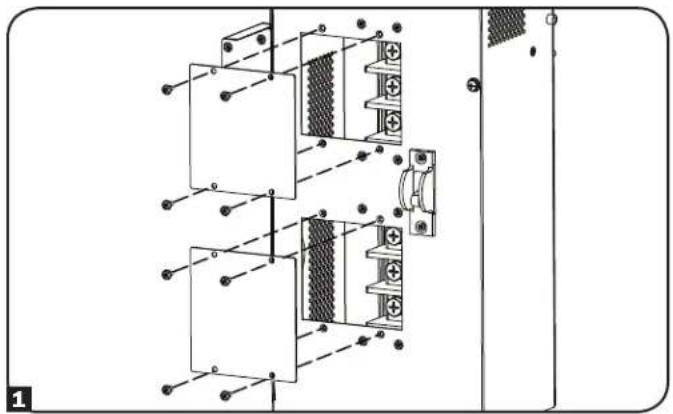
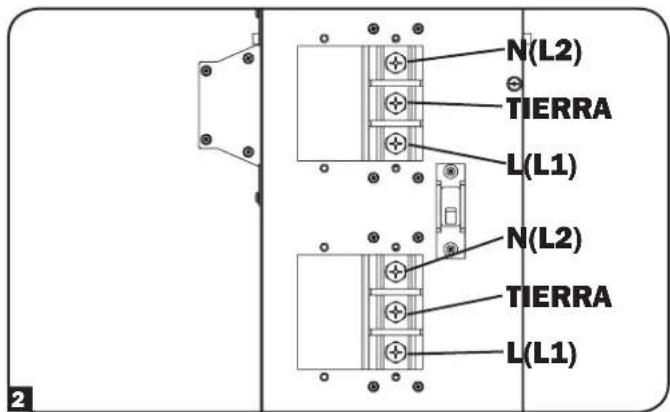
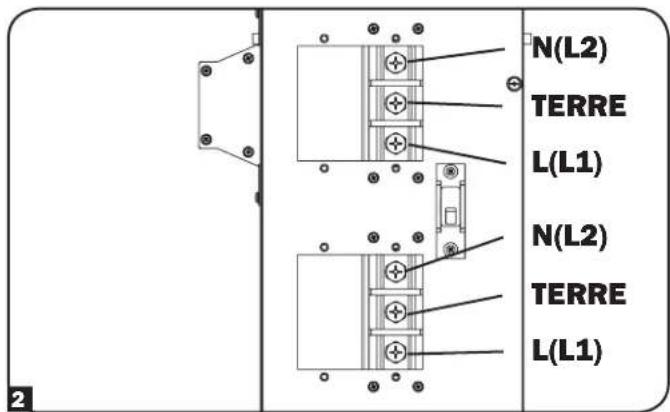
1 Unscrew the 2 screws to remove the Input and Output Terminal Access covers.
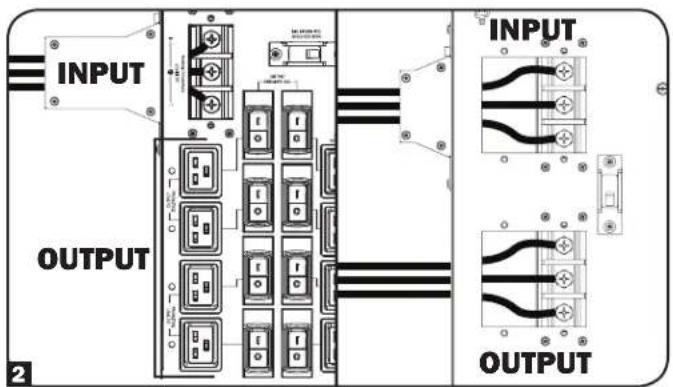
2 Connect the 2 sets of N (L2), Ground and L (L1) wires (1 Input, 1 Output) according to markings on the connectors as seen in the diagram below. Be sure to connect one set of wires to the input terminals and the other set to the output terminals.
Parallel Connection
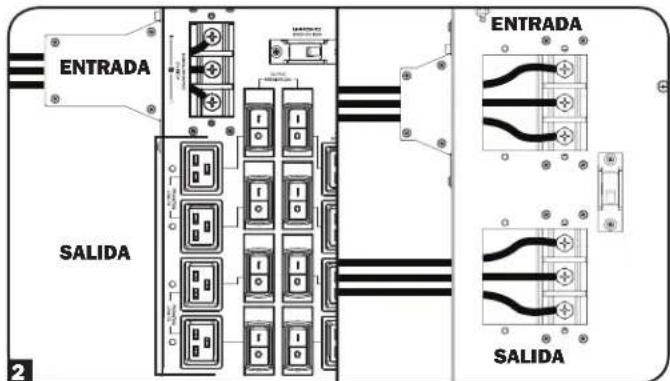
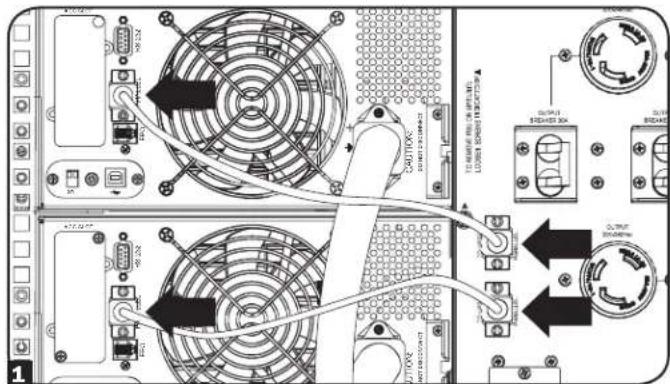
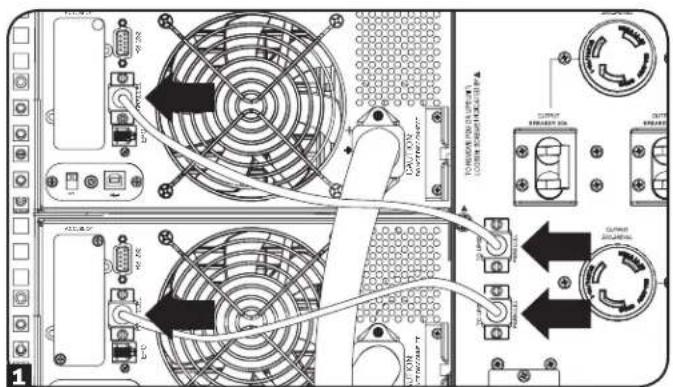
1 Being sure that all switches are off and all units are powered down, connect the 2 parallel cables. Both will originate from the parallel PDU with 1 connecting to the primary power module and the other to the secondary power module. (Refer to the diagram.)
Ensure that each of the parallel cables is securely attached to the PDU and UPS by tightening the thumbscrews on each connection.
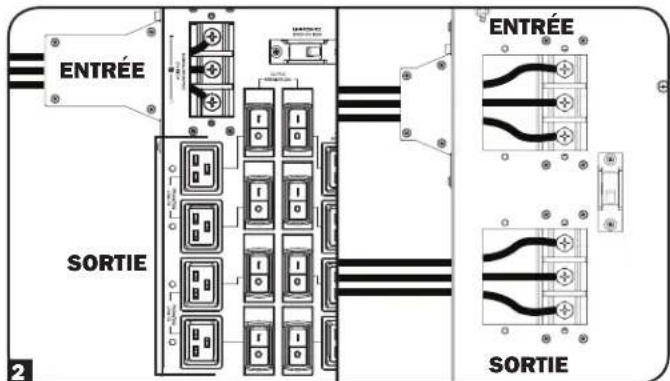
2 Connect the input (SUPDMB20K, SUPDMB20KIEC & SUPDMB20K8), and/or hardwired input/output (SUPDMB20KHW) AC power connections located on the PDU. The AC input cord attaches to the facility's AC source while the AC output cord connects to the intended equipment.
SUPDMB20K, SUPDMB20KIEC,
SUPDMB20K8
SUPDMB20KHW
Connection
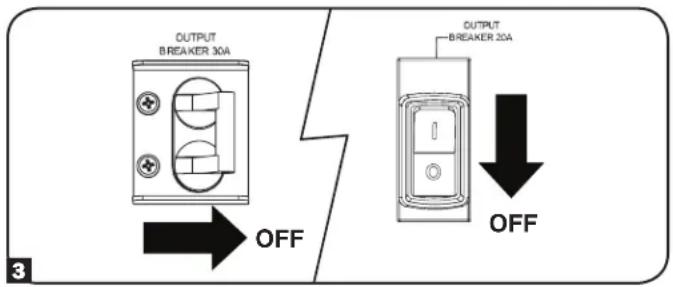
3 Power ON the primary power module, being sure that all output breakers (SUPDMB20K, SUPDMB20KIEC & SUPDMB20K8) are OFF.
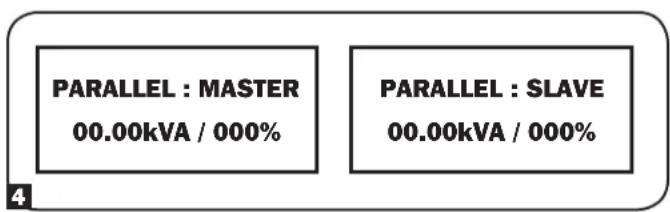
4 After primary power module start-up is complete, power ON the secondary power module. The UPS systems will self detect the Parallel Mode and show the following screen shots for the master and slave power modules:
When the unit is in Parallel Mode the primary power module will display "Parallel: Master" and the secondary power module will display "Parallel: Slave".
5 Once Parallel Mode is detected, turn ON all output breakers (SUPDMB20K, SUPDMB20KIEC & SUPDMB20K8) on the PDU.
Manual Bypass Operation (for UPS maintenance or replacement)

WARNING! For qualified service personnel only. Failure to follow the bypass procedure completely will not adequately power down the UPS, resulting in the continued risk of death or injury from potential contact with high voltage. The UPS and detachable PDU are extremely heavy. This procedure requires several people to perform. Please read the procedure completely before proceeding. Failure to follow the UPS removal procedure correctly may result in a loss of power to the protected load.
The UPS system includes an independent, detachable PDU with a Maintenance Breaker Switch. This switch allows qualified service personnel to remove the detachable PDU from the UPS for routine maintenance without disrupting power to connected loads. While this switch is set to “BYPASS”, connected equipment will receive unfiltered AC mains power. However, equipment will not receive battery power in the event of a blackout.
UPS Removal
STEP 1. Disable PowerAlert and disconnect the SNMP, serial or USB communication cables from the communication ports on the UPS. Do NOT remove the parallel cable at this point. A disconnection of the cable before the power module is properly shut down can result in multiple error messages depending on your configuration.
STEP 2. Before proceeding, determine your maintenance status (i.e. which UPS system requires maintenance and whether you are in Redundancy or Power Mode per the Output/Bypass Breaker Operation chart on page 9).
Manual Bypass Operation (for UPS maintenance or replacement)
STEP 3. Part A: When the output is coming from the Primary UPS and the Secondary UPS needs repair, press the Secondary UPS system's OFF button, if the UPS is powered, until you hear a beep and see a "STANDBY MODE" message shown in the LCD display.
Part B: When the output is coming from the Secondary UPS and the Primary UPS needs repair, press the Primary UPS system's OFF button, if the UPS is powered, until you hear a beep and see a "STANDBY MODE" message shown in the LCD display.
Part C: When both power modules show output is in Bypass, set the Maintenance Breaker Switch to the ON position before servicing.
STEP 4. Disconnect any external battery module(s) from the UPS power module being serviced.
STEP 5. At the rear of the UPS being serviced, remove the 2 screws that secure the PDU to the power module. If both power modules are in need of service, remove all 4 screws.
STEP 6. Remove the rackmounting hardware from the front panel of the UPS. Using an assistant at each end, carefully pull the power module away from the PDU, being careful not to disconnect the parallel cable. Once the power module is pulled from the PDU and powers down, disconnect the parallel cable from the power module.
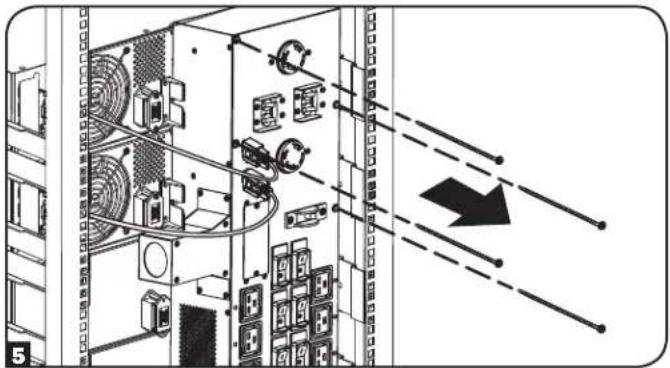
The UPS power/battery module is now safely powered down and it can be detached from the PDU to perform maintenance/replacement.
During this process, ensure that each section is properly supported after they are separated. If the sections are detached in a rackmount application, be sure that each section remains adequately supported by the UPS system's rackmount rails. If the sections are detached in a tower application, be sure that the PDU is supported by the UPS system's tower feet. Adjust the tower feet so they are as close together as possible.

To reattach the PDU, reverse the process listed above.
Output/Bypass Breaker Operation
| Output Status (Normal Operation) Parallel PDU Output Breakers Maintenance Bypass Breaker | |
| Output coming from both UPS systems. ON OFF | |
| Output Status (Redundancy Mode) Parallel PDU Output Breakers Maintenance Bypass Breaker | |
| Output coming from Primary UPS. Secondary UPS needs repair. (Refer to Step 3, Part A.) | ON OFF |
| Output coming from Secondary UPS. Primary UPS needs repair. (Refer to Step 3, Part B.) | ON OFF |
| Output Status (Power Mode) Parallel PDU Output Breakers Maintenance Bypass Breaker | |
| Primary and Secondary UPS output coming from Bypass. (Refer to Step 3, Part C.) | ON ON |
Note: Units will operate in Redundancy Mode up to 8 or 10kVA and switch to Power Mode at loads greater than 8 or 10kVA.
Storage & Service
Storage
Before storing your PDU, be sure all connections have been disconnected and all breakers are turned OFF. Also replace any input or output access covers so as not to damage any contacts.
Service
Your Tripp Lite product is covered by the warranty described in this manual. A variety of Extended Warranty and On-Site Service Programs are also available from Tripp Lite. For more information on service, visit www.triplite.com/support. Before returning your product for service, follow these steps:
- Review the installation and operation procedures in this manual to insure that the service problem does not originate from a misreading of the instructions.
- If the problem continues, do not contact or return the product to the dealer. Instead, visit www.tripplite.com/support.
- If the problem requires service, visit www.triplite.com/support and click the Product Returns link. From here you can request a Returned Material Authorization (RMA) number, which is required for service. This simple on-line form will ask for your unit's model and serial numbers, along with other general purchaser information. The RMA number, along with shipping instructions will be emailed to you. Any damages (direct, indirect, special or consequential) to the product incurred during shipment to Tripp Lite or an authorized Tripp Lite service center is not covered under warranty. Products shipped to Tripp Lite or an authorized Tripp Lite service center must have transportation charges prepaid. Mark the RMA number on the outside of the package. If the product is within its warranty period, enclose a copy of your sales receipt. Return the product for service using an insured carrier to the address given to you when you request the RMA.
Warranty & Product Registration
2-Year Limited Warranty
TRIPP LITE warrants its products to be free from defects in materials and workmanship for a period of two years from the date of initial purchase. To obtain service under this warranty, you must call TRIPP LITE or an authorized TRIPP LITE service center. Products must be returned to TRIPP LITE or an authorized TRIPP LITE service center with transportation charges prepaid and must be accompanied by a brief description of the problem encountered and proof of date and place of purchase. This warranty does not apply to equipment which has been damaged by accident, negligence or misapplication or has been altered or modified in any way. This warranty applies only to the original purchaser who must have properly registered the product within 10 days of purchase.
The warranties of all TRIPP LITE surge suppressors are null and void if they have been connected to the output of any UPS system. The warranties of all TRIPP LITE UPS Systems are null and void if a surge suppressor has been connected to its output receptacles.
EXCEPT AS PROVIDED HEREIN, TRIPP LITE MAKES NO WARRANTIES, EXPRESS OR IMPLIED, INCLUDING WARRANTIES OF MERCHANTABILITY AND FITNESS FOR A PARTICULAR PURPOSE. Some states do not permit limitation or exclusion of implied warranties; therefore, the aforesaid limitation(s) or exclusion(s) may not apply to the purchaser.
EXCEPT AS PROVIDED ABOVE, IN NO EVENT WILL TRIPP LITE BE LIABLE FOR DIRECT, INDIRECT, SPECIAL, INCIDENTAL OR CONSEQUENTIAL DAMAGES ARISING OUT OF THE USE OF THIS PRODUCT, EVEN IF ADVISED OF THE POSSIBILITY OF SUCH DAMAGE. Specifically, TRIPP LITE is not liable for any costs, such as lost profits or revenue, loss of equipment, loss of use of equipment, loss of software, loss of data, costs of substitutes, claims by third parties, or otherwise.
PRODUCT REGISTRATION
Visit www.tripplite.com/warranty today to register your new Tripp Lite product. You'll be automatically entered into a drawing for a chance to win a FREE Tripp Lite product!* * No purchase necessary. Void where prohibited. Some restrictions apply. See website for details.
FCC Part 68 Notice (United States Only)
If your Modem/Fax Protection causes harm to the telephone network, the telephone company may temporarily discontinue your service. If possible, they will notify you in advance. If advance notice isn't practical, you will be notified as soon as possible. You will be advised of your right to file a complaint with the FCC. Your telephone company may make changes in its facilities, equipment, operations or procedures that could affect the proper operation of your equipment. If it does, you will be given advance notice to give you an opportunity to maintain uninterrupted service. If you experience trouble with this equipment's Modem/Fax Protection, please call Tripp Lite Technical Support at (773) 869-1234 for repair/warranty information. The telephone company may ask you to disconnect this equipment from the network until the problem has been corrected or you are sure the equipment is not malfunctioning. There are no repairs that can be made by the customer to the Modem/Fax Protection. This equipment may not be used on coin service provided by the telephone company. Connection to party lines is subject to state tariffs. (Contact your state public utility commission or corporation commission for information.)
Regulatory Compliance Identification Numbers
For the purpose of regulatory compliance certifications and identification, your Tripp Lite product has been assigned a unique series number. The series number can be found on the product nameplate label, along with all required approval markings and information. When requesting compliance information for this product, always refer to the series number. The series number should not be confused with the marking name or model number of the product.
WEEE Compliance Information for Tripp Lite Customers and Recyclers (European Union)

Under the Waste Electrical and Electronic Equipment (WEEE) Directive and implementing regulations, when customers buy new electrical and electronic equipment from Tripp Lite they are entitled to:
- Send old equipment for recycling on a one-for-one, like-for-like basis (this varies depending on the country)
- Send the new equipment back for recycling when this ultimately becomes waste
Tripp Lite has a policy of continuous improvement. Specifications are subject to change without notice.


1111 W. 35th Street, Chicago, IL 60609 USA • www.tripplite.com/support
1111 W. 35th Street, Chicago, IL 60609 USA • www.tripplite.com/support
Características
Conexión
1111 W. 35th Street, Chicago, IL 60609 USA • www.tripplite.com/support
1111 W. 35th Street, Chicago, IL 60609 USA • www.tripplite.com/support
Caractéristiques
Raccordement
Connections des borniers
SUPDMB20KHW
SUPDMB20K, SUPDMB20KIEC,
SUPDMB20K8
SUPDMB20KHW
Conexión
1111 W. 35th Street, Chicago, IL 60609 USA • www.tripplite.com/support
1111 W. 35th Street, Chicago, IL 60609 USA • www.tripplite.com/support
Свойства
SUPDMB20K
SUPDMB20KIEC
SUPDMB20KHW
Задняя панель
(для всех моделей)
![graph TD A["Terminal 10"] --> B["Terminal 11"] A --> C["Terminal 12"] A --> D["Terminal 13"] A --> E["Terminal 14"] B --> F["Terminal 13"] C --> G["Terminal 12"] D --> H["Terminal 13"] E --> I["Terminal 14"]](/content/2026/04/585536/images/5dfcb52714d73a728298ea8ded6fd427fd2b494fd526803b892186ddef4660ff.jpg)
Свойства
Подключение
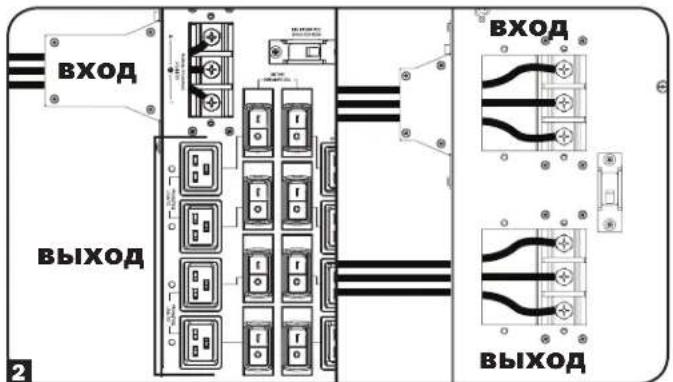
SUPDMB20K, SUPDMB20KIEC, SUPDMB20K8
SUPDMB20KHW
Подключение
1111 W. 35th Street, Chicago, IL 60609 USA • www.tripplite.com/support
- SMARTONLINE® 16 & 20KVA UPS WITH N+1 CONFIGURATION OPTIONS
- PROTECT YOUR INVESTMENT
- INTRODUCTION
- FOR 16/20KVA UPS CONFIGURATIONS
- SAVE THESE INSTRUCTIONS
- LOCATION WARNINGS
- EQUIPMENT CONNECTION WARNINGS
- MAINTENANCE WARNINGS
- BATTERY WARNINGS
- MOUNTING
- FEATURES
- CONNECTION
- HARDWIRING CAUTIONS
- TERMINAL WIRING CONNECTIONS
- SUPDMB20K, SUPDMB20KIEC & SUPDMB20K8
- SUPDMB20KHW
- PARALLEL CONNECTION
- MANUAL BYPASS OPERATION (FOR UPS MAINTENANCE OR REPLACEMENT)
- UPS REMOVAL
- STORAGE & SERVICE
- STORAGE
- SERVICE
- WARRANTY & PRODUCT REGISTRATION
- 2-YEAR LIMITED WARRANTY
- PRODUCT REGISTRATION
- FCC PART 68 NOTICE (UNITED STATES ONLY)
- REGULATORY COMPLIANCE IDENTIFICATION NUMBERS
- WEEE COMPLIANCE INFORMATION FOR TRIPP LITE CUSTOMERS AND RECYCLERS (EUROPEAN UNION)
- CARACTERÍSTICAS
- CONEXIÓN
- CARACTÉRISTIQUES
- RACCORDEMENT
- CONNECTIONS DES BORNIERS
- СВОЙСТВА
- SUPDMB20K
- SUPDMB20KIEC
- ЗАДНЯЯ ПАНЕЛЬ
- ПОДКЛЮЧЕНИЕ
Brand : Tripp Lite
Model : SUPDMB20KIEC
Category : Inverter