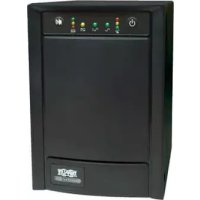
SMX1500SLT - Inverter Tripp Lite - Free user manual and instructions
Find the device manual for free SMX1500SLT Tripp Lite in PDF.


| Product Type | Standby Active UPS (Uninterruptible Power Supply) |
| Brand | Tripp Lite |
| Model | SMX1500SLT |
| Input Voltage | 220/230/240 V AC |
| Output Voltage | 220/230/240 V AC (sinusoidal) |
| Output Receptacles | IEC-320-C13 outlets (quantity depends on model) |
| Protection | Protection against surges, line noise, telephone/network lines |
| Battery | Maintenance-free, replaceable battery |
| Voltage Correction | Yes, automatic (AVR) |
| Communication | USB and RS-232 ports, PowerAlert software |
| Display | LED indicators: POWER, VOLTAGE CORRECTION, OUTPUT LOAD LEVEL, BATTERY CHARGE, BATTERY WARNING |
| Audible Alarm | Yes (indicator beeps) |
| DIP Switches | Input voltage adjustment |
| Circuit Breaker | Built-in input circuit breaker |
| Fan | Internal cooling (operates in battery mode or heavy load) |
| Recommended Ambient Temperature | Between 0°C and 40°C (estimated) |
| Warranty | 2 years |
| Recycling | Recyclable battery, WEEE program |
| Safety | Grounding mandatory, not suitable for medical applications |
| Installation | Indoor, away from moisture and excessive heat |
Frequently Asked Questions - SMX1500SLT Tripp Lite
User questions about SMX1500SLT Tripp Lite
0 question about this device. Answer the ones you know or ask your own.
Ask a new question about this device
Download the instructions for your Inverter in PDF format for free! Find your manual SMX1500SLT - Tripp Lite and take your electronic device back in hand. On this page are published all the documents necessary for the use of your device. SMX1500SLT by Tripp Lite.
USER MANUAL SMX1500SLT Tripp Lite
Intelligent, Line-Interactive
UPS System
220/230/240V Pure Sine Wave Input/Output
Agency Models
AG-0020, AG-0021, AG-0022
Not suitable for mobile applications.
Important Safety Instructions 2
Quick Installation 3
Optional Installation 4
Basic Operation 4
Battery Replacement 7
Storage and Service 8
Espanol 9
Français 18
Pycckn 27
Deutsch 35


Manufacturing Excellence.
1111 W. 35th Street, Chicago, IL 60609 USA • www.triplite.com/support
Copyright © 2019 Tripp Lite. All rights reserved. SmartPro® is a trademark of Tripp Lite
Important Safety Instructions

SAVE THESE INSTRUCTIONS
This manual contains important instructions that should be followed during the installation, operation and storage of all Tripp Lite UPS Systems. Failure to heed these warnings may affect your warranty.
UPS LocationWarnings
- Use caution when lifting UPS.
Install your UPS indoors, away from excess moisture or heat, dust or direct sunlight. - For best performance, the ambient temperature near your UPS should be between 0^ C and 40^ C (between 32^ F and 104^ F).
- Leave adequate space around all sides of the UPS for proper ventilation. Do not obstruct its vents or fan openings.
- Do not mount unit with its front or rear panel facing down (at any angle). Mounting in this manner will seriously inhibit the unit's internal cooling, eventually causing product damage not covered under warranty.
UPS ConnectionWarnings
- The UPS contains its own energy source (battery). The output terminals may be live even when the UPS is not connected to an AC supply.
- Connect your UPS to a properly grounded AC power outlet. Do not modify the UPS's plug in a way that would eliminate the UPS's connection to ground. Do not use adapters that eliminate the UPS's connection to ground.
- Do not plug your UPS into itself; this will damage the UPS and void your warranty.
- If you are connecting your UPS to a motor-powered AC generator, the generator must provide filtered, frequency-regulated computer-grade output.
Equipment ConnectionWarnings
- Use of this equipment in life support applications where failure of this equipment can reasonably be expected to cause the failure of the life support equipment or to significantly affect its safety or effectiveness is not recommended. Do not use this equipment in the presence of a flammable anesthetic mixture with air, oxygen or nitrous oxide.
- Do not connect surge suppressors or extension cords to the output of your UPS. This might overload the UPS and will void the surge suppressor and UPS warranties.
BatteryWarnings
- Batteries can present a risk of electrical shock and burn from high short-circuit current. Observe proper precautions. Do not dispose of the batteries in a fire. Do not open the UPS or batteries. Do not short or bridge the battery terminals with any object. Unplug and turn off the UPS before performing battery replacement. Use tools with insulated handles. There are no user-serviceable parts inside the UPS. Battery replacement should be performed only by authorized service personnel using the same number and type of batteries (Sealed Lead-Acid). The batteries are recyclable. Refer to your local codes for disposal requirements or visit www.triplite.com/UPSbatteryrecycling for recycling information. Tripp Lite offers a complete line of UPS System Replacement Battery Cartridges (R.B.C.). Visit Tripp Lite on the Web at www.triplite.com/support/battery/index.cfm to locate the specific replacement battery for your UPS.
Quick Installation
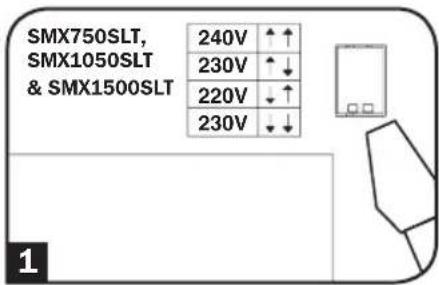
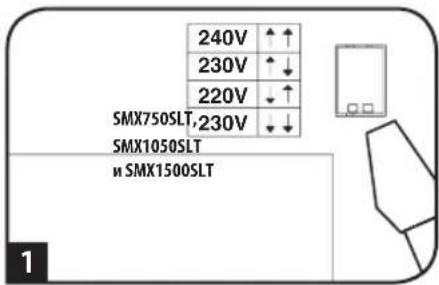
1 With the UPS disconnected from utility power, use a small tool to set the Voltage Dip Switches to match your input voltage. (All models are preset to the 230V setting.)
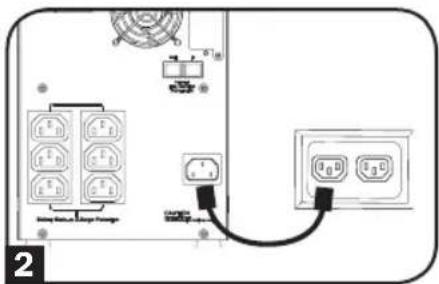
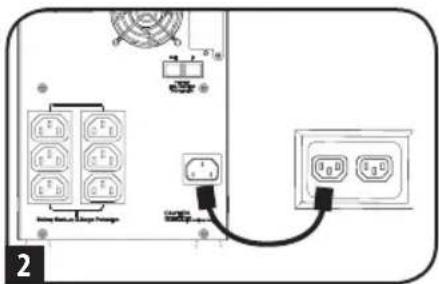
2 Insert a user-supplied power cord (with country-specific plug) into the UPS System's AC input receptacle. Plug the cord into an AC wall outlet.
NOTE! after you plug the UPS into a live AC outlet, the UPS (in "Standby" mode) will automatically charge its batteries,* but will not supply power to its outlets until it is turned ON. * The BATTERY CHARGE LED will be the only LED illuminated
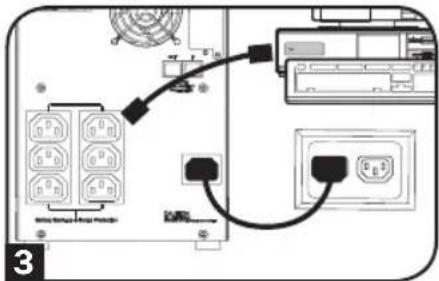
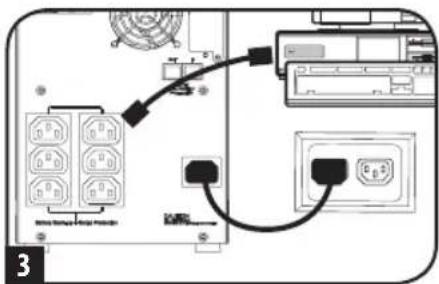
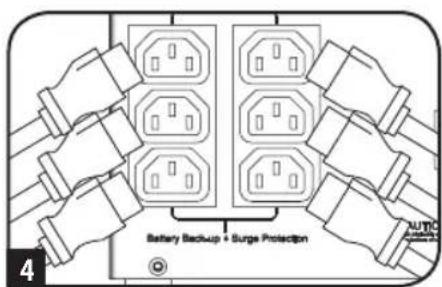
3 Find one of the power cords that came with the UPS. Insert the cord's C13 connector into computer's C14 AC inlet. Insert the cord's C14 plug into any UPS C13 output receptacle.
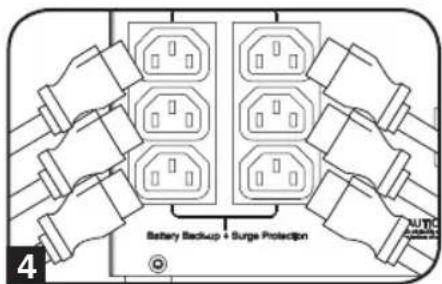
4 Plug your equipment into the UPS.
Plug your equipment into the UPS. Repeat Step 3 above using the additional power cord(s) that came with the UPS.
Note: Additional power cords (C13 to C14) are available at www.TrippLite.com. Part # P004-006
Your UPS is designed to support computer equipment only. You will overload the UPS if the total VA ratings for all the equipment you connect exceeds UPS output capacity. To find your equipment's VA ratings, look on their nameplates. If the equipment is listed in amps, multiply the number of amps by 240 to determine VA. (Example: 1amp× 240 = 240 VA). If you are unsure if you have overloaded your UPS's outlets, see "OUTPUT LOAD LEVEL" LED description.
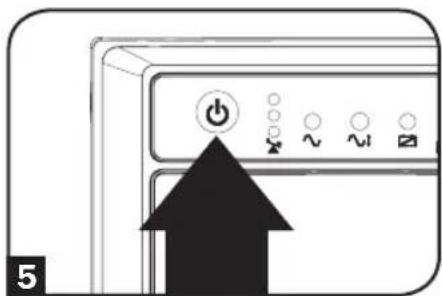
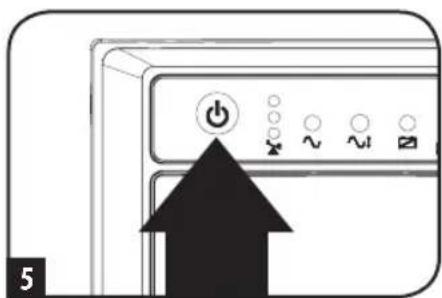
5 Turn the UPS ON.
Press and hold the "ON/OFF/STANDBY" button for one second. The alarm will beep once briefly after one second has passed. Release the button.
Note: UPS system will function properly upon initial startup; however, maximum runtime for the unit's battery will only be accessible after it has been charged for 24 hours.
Optional Installation
These connections are optional. Your UPS will function properly without these connections.
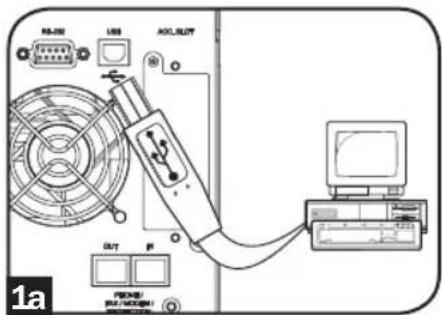
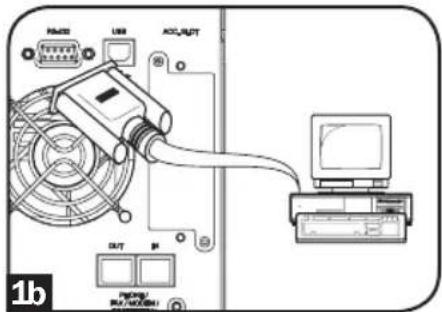
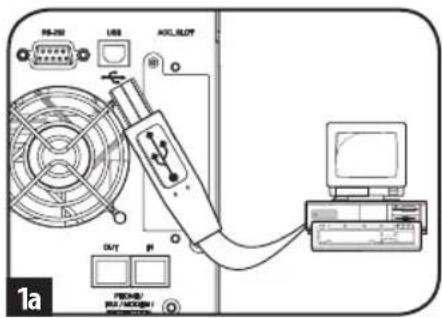
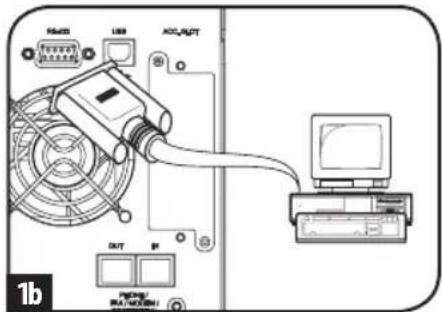
1 USB and RS-232 Serial Communications
Use the included USB cable (see 1a) and/or DB9 serial cable (see 1b) to connect the communication port on your computer to the communication port of your UPS. Install on your computer the Tripp Lite PowerAlert Software appropriate to your computer's operating system.
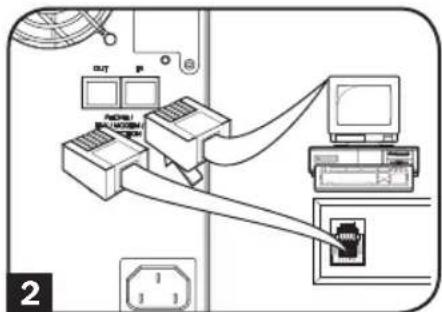
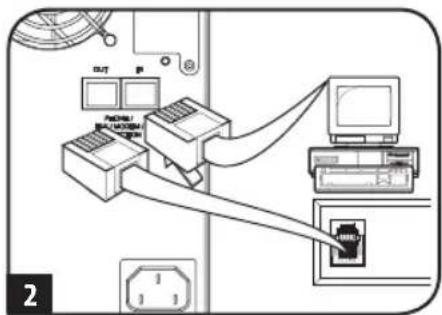
2 Telephone/Network Protection Jacks
Your UPS has jacks that protect against surges over a telephone line or a network dataline. Using telephone or network data cables, connect your wall jack to the UPS jack marked "IN." Connect your equipment to the UPS jack marked "OUT." Make sure the equipment you connect to the UPS's jacks is also protected against surges on the AC line.
Basic Operation
Buttons (Front Panel)

"ON/OFF/STANDBY" Button
-
To turn the UPS ON: with the UPS plugged into a live AC wall outlet, press and hold the "ON/OFF/STANDBY" button for one second. Release the button. If utility power is absent, you can "cold-start" the UPS (i.e.: turn it ON and supply power for a limited time from its batteries) by pressing and holding the "ON/OFF/STANDBY" button for one second.
-
To turn the UPS OFF: with the UPS ON and receiving utility power, press and hold the "ON/OFF/STANDBY" button for one second.** Then unplug the UPS from the wall outlet. The UPS will be completely OFF.
-
After you plug the UPS into a live AC outlet, the UPS (in "Standby" mode) will automatically charge its batteries, but will not supply power to its outlets until it is turned ON. ** The alarm will beep once briefly after the indicated interval has passed. *** If fully charged.
Basic Operation
"MUTE/TEST" Button
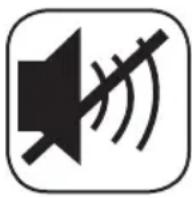
To Silence (or "Mute") UPS Alarms: briefly press and release the MUTE/TEST button.*
To Run a Self-Test: with your UPS plugged in and turned ON, press and hold the MUTE/TEST button. Continue holding the button until the alarm beeps several times and the UPS performs a self test. See "Results of a Self-Test" below.
Note: you can leave connected equipment on during a self-test. Your UPS, however, will not perform a self-test if the UPS is not turned on (see "ON/OFF/STANDBY" Button description).
CAUTION! Do not unplug your UPS to test its batteries. This will remove safe electrical grounding and may introduce a damaging surge into your network connections.
Results of a Self-Test: The test will last approximately 10 seconds as the UPS switches to battery to test its load capacity and battery charge.
- If the "OUTPUT LOAD LEVEL" LED remains lit red and the alarm continues to sound after the test, the UPS's outlets are overloaded. To clear the overload, unplug some of your equipment and run the self-test repeatedly until the "OUTPUT LOAD LEVEL" LED is no longer lit red and the alarm is no longer sounding.
CAUTION! Any overload that is not corrected by the user immediately following a self-test may cause the UPS to shut down and cease supplying output power in the event of a blackout or brownout.
-
If the "BATTERY WARNING" LED remains lit and the alarm continues to sound after the test, the UPS batteries need to be recharged or replaced. Allow the UPS to recharge continuously for 12 hours, and repeat the self-test. If the LED remains lit, contact Tripp Lite for service. If your UPS requires battery placement, visit www.triplite.com/support/battery/index.cfm to locate the specific Tripp Lite replacement battery for your UPS.
-
The alarm will beep once briefly after the indicated interval has passed.
Indicator Lights (Front Panel)
All Indicator Light descriptions apply when the UPS is plugged into a wall outlet and turned ON.

"POWER" LED: this green LED lights continuously when the UPS is ON and supplying connected equipment with AC power from a utility source. The LED flashes and an alarm sounds (4 short beeps followed by a pause) to indicate the UPS is operating from its internal batteries during a blackout or severe brownout. If the blackout or severe brownout is prolonged, you should save files and shut down your equipment since internal battery power will eventually be depleted. See "BATTERY CHARGE" LED description below.
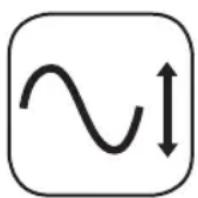
"VOLTAGE CORRECTION" LED: this green LED lights continuously whenever the UPS is automatically correcting high or low AC voltage on the utility line without the assistance of battery power. The UPS will also emit a slight clicking noise. These are normal, automatic operations of the UPS, no action is required on your part.
Basic Operation

"OUTPUT LOAD LEVEL" LEDs: the LEDs indicate the approximate electrical load of equipment connected to the UPS's AC outlets. They will turn from green (light load) to yellow (medium load) to red (overload). If the LED is red (either illuminated continuously or flashing), clear the overload immediately by unplugging some of your equipment from the outlets until the LED changes from red to yellow (or green). CAUTION! Any overload that is not corrected by the user immediately may cause the UPS to shut down and cease supplying output power in the event of a blackout or brownout.

"BATTERY CHARGE" LEDs: when the UPS is operating from utility power, the LEDs indicate the approximate charge state of the UPS's internal batteries: red indicates the batteries are beginning to charge; yellow indicates the batteries are roughly midway through charging; and green indicates the batteries are fully charged. When the UPS is operating from battery power during a blackout or severe brownout, the LEDs indicate the approximate amount of energy (ultimately affecting runtime) which the UPS's batteries will provide: red indicates a low level of energy; yellow indicates a medium level of energy; and green indicates a high level of energy. Since the runtime performance of all UPS batteries will gradually deplete over time, it is recommended that you periodically perform a self-test (see MUTE/TEST Button description) to determine the energy level of your UPS batteries BEFORE a blackout or severe brownout occurs. During a prolonged blackout or severe brownout, you should save files and shut down your equipment since battery power will eventually be depleted. When the red LED illuminates and an alarm sounds continuously, it indicates the UPS's batteries are nearly out of power and UPS shutdown is imminent.

"BATTERY WARNING" LED: this LED lights red and an alarm sounds intermittently after you initiate a self test (See "MUTE/TEST" Button description) to indicate the UPS batteries need to be recharged or replaced. Allow the UPS to recharge continuously for 12 hours, and repeat the self-test. If the LED continues to light, contact Tripp Lite for service. If your UPS requires battery replacement, visit www.triplite.com to locate the specific Tripp Lite replacement battery for your UPS.
Other UPS Features (Rear Panel)
AC Receptacles: Your UPS features IEC-320-C13 outlets. These output receptacles provide your connected equipment with AC line power during normal operation and battery power during blackouts and brownouts. The UPS protects equipment connected to these receptacles against damaging surges and line noise.
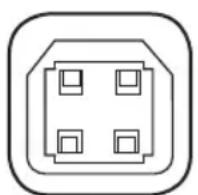
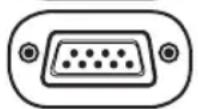
Communications Ports (USB or RS-232): These ports connect your UPS to any workstation or server. Use with Tripp Lite's PowerAlert Software and included cables to enable your computer to automatically save open files and shut down equipment during a blackout. Also use PowerAlert Software to monitor a wide variety of AC line power and UPS operating conditions. Consult your PowerAlert Software manual or contact Tripp Lite Customer Support for more information. See "USB and RS-232 Serial Communications" in the "Optional Installation" section for installation instructions.
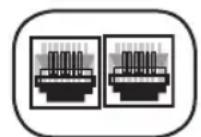
Telephone/Network Protection Jacks: These jacks protect your equipment against surges over a telephone/network data line. Connecting your equipment to these jacks is optional. Your UPS will work properly without this connection.
Basic Operation
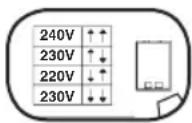
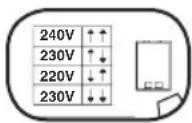
Voltage DIP Switches: These switches enable the UPS to be set to match actual input voltage. If the Voltage DIP Switches are set above or below input voltage, the UPS will treat the input as a continuous overvoltage or undervoltage condition, and will automatically adjust input voltage to match the Voltage DIP Switch setting. This will cause constant, unnecessary wear on the UPS.
Note: The Voltage DIP Switches must be set with the UPS turned OFF and disconnected from utility power. If the switches are set while the UPS is connected to utility power, the setting will not take effect.
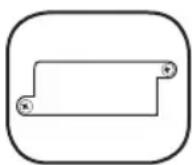
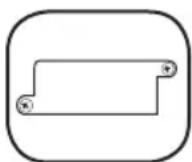
Accessory Slot: Remove the small cover panel from this slot to install optional accessories to remotely monitor and control your UPS. Refer to your accessory's manual for installation instructions. Contact Tripp Lite Customer Support at (773) 869-1234 for more information, including a list of available SNMP, network management and connectivity products.

Input Breaker (SMX1500SLT): Protects your electrical circuit from overcurrent draw from the UPS load. If this breaker trips, remove some of the load, then reset by pressing the breaker in.
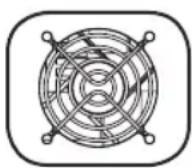
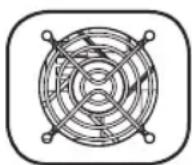
Fan: The fan cools the UPS's internal components. It operates only when the UPS is in battery backup mode, is charging its batteries or is carrying a heavy electrical load.
Battery Replacement
Battery Replacement Door: Under normal conditions, the original battery in your UPS will last several years. Battery replacement should be performed only by qualified service personnel. Refer to "Battery Warnings" in the Safety section. Should your UPS require battery replacement, visit Tripp Lite on the Web at www.triplite.com/support/battery/index.cfm to locate the specific replacement battery for your UPS.
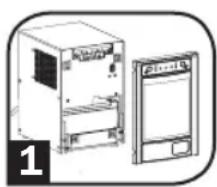
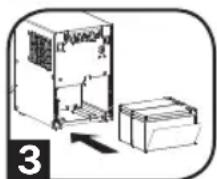
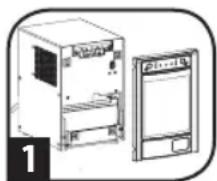
1 Carefully pull the front panel away from the UPS.
Place front panel on top of the unit. Remove the battery support bar.
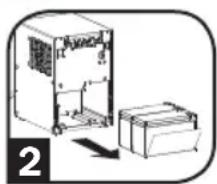
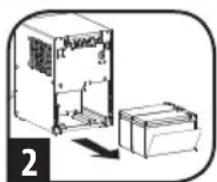
2 Remove old batteries.
Carefully pull the batteries from the UPS and disconnect them.
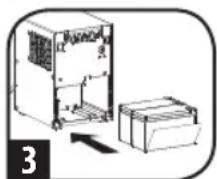
3 Connect new batteries.
Connect the new batteries in exactly the same manner as the old ones: positive (red) connectors together and negative (black) connectors together. Carefully push batteries back into the UPS.
4 Reassemble UPS.
Reinstall the battery support bar and replace the front panel.
Storage and Service
Storage
Before storing your UPS, turn it completely OFF: with the UPS ON and receiving utility power, press and hold the "ON/OFF/STANDBY" button for one second (an alarm will beep once briefly after the interval has passed); then, unplug the UPS from the wall outlet. If you store your UPS for an extended period of time, recharge the UPS batteries once every three months: plug the UPS into a wall outlet; allow it to charge for 12 hours; and then unplug it and place it back in storage. Note: after you plug the UPS in, it will automatically begin charging its batteries; however, it will not supply power to its outlets (see Quick Installation section). If you leave your UPS batteries discharged for an extended period of time, they will suffer a permanent loss of capacity.
Service
A variety of Extended Warranty and On-Site Service Programs are available from Tripp Lite. For more information on service, visit www.triplite.com/support. Before returning your product for service, follow these steps:
- Review the installation and operation procedures in this manual to insure that the service problem does not originate from a misreading of the instructions.
- If the problem continues, do not contact or return the product to the dealer. Instead, visit www.triplite.com/support.
- If the problem requires service, visit www.triplite.com/support and click the Product Returns link. From here you can request a Returned Material Authorization (RMA) number, which is required for service. This simple on-line form will ask for your unit's model and serial numbers, along with other general purchaser information. The RMA number, along with shipping instructions will be emailed to you. Any damages (direct, indirect, special or consequential) to the product incurred during shipment to Tripp Lite or an authorized Tripp Lite service center is not covered under warranty. Products shipped to Tripp Lite or an authorized Tripp Lite service center must have transportation charges prepaid. Mark the RMA number on the outside of the package. If the product is within its warranty period, enclose a copy of your sales receipt. Return the product for service using an insured carrier to the address given to you when you request the RMA.
Regulatory Compliance Identification Numbers
For the purpose of regulatory compliance certifications and identification, your Tripp Lite product has been assigned a unique series number. The series number can be found on the product nameplate label, along with all required approval markings and information. When requesting compliance information for this product, always refer to the series number. The series number should not be confused with the marking name or model number of the product.
Tripp Lite follows a policy of continuous improvement. Product specifications are subject to change without notice.
WEEE Compliance Information for Tripp Lite Customers and Recyclers (European Union)

Under the Waste Electrical and Electronic Equipment (WEEE) Directive and implementing regulations, when customers buy new electrical and electronic equipment from Tripp Lite they are entitled to:
- Send old equipment for recycling on a one-for-one, like-for-like basis (this varies depending on the country)
- Send the new equipment back for recycling when this ultimately becomes waste
Note on Labeling
Two symbols are used on the label.

Manufacturing Excellence.
1111 W. 35th Street, Chicago, IL 60609 USA • www.triplite.com/support
1111 W. 35th Street, Chicago, IL 60609 USA • www.triplite.com/support
1111 W. 35th Street, Chicago, IL 60609 USA • www.triplite.com/support
1111 W. 35th Street, Chicago, IL 60609 USA • www.triplite.com/support
1111 W. 35th Street, Chicago, IL 60609 USA • www.triplite.com/support
PykoBODCTBO N0JIb30BaTeIa
BxOndHoe/BbIXoIndHoe HappKeHne:
220/230/240 B chToB cnHycondaIbHoJ fOpMbI
He npedHa3NaueHoI npepdBnKHO TeHNKn.
Baxhble yka3aHn no texHnke 6e3onacHocTn 28
Iopraok 6bictpoynctahOBkn 29
YCTaHOBKa ONUHOHaJIbHbIX 30
Ochobho npexm pa60tbl 30
3ameha 6atapei 33
XpaHHeHnTexHnueckoe 6cbnyKuBaHne 34
English 1
Espanol 9
Français 18
Deutsch 35
EAC


Pnpynklnmbuclero KINHCTBA.
1111 W. 35th Street, Chicago, IL 60609 USA · www.triplite.com/support
OxpanaHTcA ABTOCPKMM IIpABOM © 2019 Tripp Lite. Ipepeueatka 3anpeuaetc. SmartPro - ToproBbI 3nak KOMPANM Tripp Lite
Baxhblc yka3aHnno TExHnke 6e30naCHOCTN

COXPAHNTE HACTOUIUE YKA3AHNA
B hactoem pykoobodte coepkaTcBaxhblte yka3aHnI npedynpekXdeHn, KOToPbIe Heo6xOJMo co6nOaTb B npouecce yctahOBKn, kcnnyatauH n xpaehnB Cex NbI MapKn Tripp Lite. NrhopnpobAHne 3TuX npedynpekXdeHm MoKet npnbECTN K notepe rapaHTn.
IpeynpeXdHnO tHocntbHo MeCTa pa3MeueHnYbPi
-ПиюьемИБПпрявлгiteocToPoxKhoctb.
- UctahabnBaTne IB 3aKpBtOM nOmeueHm BdaIOn I NCTOuyHKnOB 3b6bIToUHOB BLaI, TENla, nbHn npAIMO COnHeHOro CBeta.
-ДЯ obecneueHnMaKcMmaJIbHoI npOu3BOuNTeBHOCTn NOdEepXuBaIte TeMnpaTy pOkyxuaOero BO3dyxa Bduana3oHe oT 0 do 40^
CoBex cToPOH 16 Heo6xOIMo oecneuHT bocTaUHO Cb6oDHorpoctpaHCTBa dner ehrnaeJauero npobetpmbaHa. 3anpeaaetc3aKpbIbTaBBeHTnlaIOHHbte OTBepTnN pnoEmbl nbpEtnrTopOB B KOpnyce noCtOpOHMMnpedMeTAM
3aepaaetcyaHaabnBaTb yctpoiCTBO cpaonolooehnem ero Iuebo nn 3aHne Hnno Hapabne Hn0 Bn3 (noJIO6bIM yrnom). Mohtax ycptpoCTba nOIO6hBM o6pazom npBedeK co3aHnIO cepbe3hBix npenTCTBn Dn CNTeMb BYHTpeHHe BENTINIAIyUcptOBaUN, B KOHeCHOM NTore, K NOBpeXdHIO IV5N, Ha KOtOpoe he paCnpocTpaHraOTc rapaTHNIbIye yCIOBna.
IpeynpeXeHnO tHOcHTelbHo nOdkloueHn IbPi
- IV5PIMMeT B COCTabe CO6CTBENHbI INCTOYHKn 3Heprn (6aTapeIO). BblXoHNbIe KJIeEMMbly yCTpoiCTBa MOryTH HaxoINbCn PND HappaeHem DaJce NocLe OTKIIHOeHIny yCTpoiCTBa O T cTeN pepeMeHHoro TOka.
- PoiKlnuayte IVI K nadJIexaUmm 6pa3oM 3a3eMneHn o3eTke cTeI nepeMeHHoro ToKa. 3aNepeaaetc BblonHrtb MoDnФmkaUHO uTeNceHbON BUNK INI KaKIM-Ni60 CnOc6OM, npI KOtOpom 6ydt yCTpaHeHa BO3MOxHocB IOnkInoueHn INI K 3a3eMneHIO. 3aNePeuaTeCnOJb3OBaTB NepExoHnIKN, npI pImeHeHn KOtOpBX 6ydt yCTpaHeHa BO3MOxHocB IOnkInoueHn INI K 3a3eMneHIO.
3anpeaetcBkIOuATb IB5B CO6CTBeHNy BObxOHyIO p03ETK; 3TO npBBeTeK NOBpeKDeHIO IB5N ytpate rapaHTM. - Pn noKnoueHm NbI K rehepatopy nepemehoro ToKa C npBODom OT dBnraTeJe Heo6xOaMn O6ceNeHTb FnNtpaunio n peynpOBky TaToTb Ha BixOde TaKOro rHeepota corNaCHO HopMaM, npHnTbIM Dn KOMMbTOpehoro 06OpydoBaHn.
IpeynpekdeHnOTHocntelbNo nokKIOUeHnO bOpdyoBaHn
He pekomehnyetc HcnoIb30BaHne daHHoro 6OpdyoBaHnB CnCTeMaX KIm3HeOecneueHn, rge erO bVIOJ n3 CTPO npednoJoxntbHO MoKET PnBecT N nepe6oM B pa6ote 6OpdyoBaHn Jx3HeOecneueHn IIN B 3HaHTeNbHO Mepe CHN3NTb erO 6e3oNaChocTB mnn 3ΦfKeTtBnCtB. He nCNoJIb3yIte DaHHoe 6OpdyoBaHn B pncytCBm BOCnAmHeYoJeCra aHectTeTuYeCKo CMECN CBOzDyXOM, KICNOpOoM mnn 3aKnCbU a3Ota.
He noKIOUaIe cTeBbIe 0n btpbI IIN Ka6JIu-ynnHInTeN K BbIXOy N6II. 3TO MoXeT npBecTu K nepepy3Ke N6Pi c notepei rapaHTn KaK Ha cTeBOI 0n bTp, TaK H HA N6II.
IpeynpexkdeHnOTHocntelbHo 6aTapei
-Батару могутявлгься ИстоникOMОпаСоCTИЗЕСТУДА,аТAKKEВOCINIMaMeHENB Bpe3yIbTaTe KOPOTKOrO 3ambykaHn. Co6nIOdaite cooTBeCTbYUoiM MePbI npEIOCTOpOXHcSTN.He ytINu3NpyIte bAtapen nyTeM CxNIRAHn. He BCKpbBaIte Kopnyca IVII INIb 6batae.3aIPeuaTeC8aMbKaTb INIcoEINHbKlEMMbI 6batae C NcNOb3OBaHNm KAKORO-NIbO npedMeta. Ipeep 3aMeHO 6batae BvIKNoaHTe IVII INOTKIOUaHTe erO cETN.IcNOb3yIte NHTCPymEtB C10NIPOBaHHbIMn pyKAMn. BHyTPN IVII HET DeTaleN,obCNYIBaEBMIX NOJIb3OBaTEMeM.3aMeHa 6batae DOJNXHa pON3BOIDITcB ABTOpN3OBaHHBM CepBCHbIM nepCOHaIOM C NcNOb3OBaHNm 6batae anAIONUHOrTO TINA (repMeTuHbX CBNUOBO-KICNtBHX AKKYMyIATOpHBx 6batae) c TAKIM JHe HomepOM. Batae npRIOHbI DnB TOpUHOn Nepepa6OTKn.CM.MecThBiE HopMaTbbl N Tpe6OBaHn No yTNIN3aun N60 ByKOBoDCTByTeCb INΦopMaUnne NO yTIIN3aUn Ha CTpaHnce www.triplite.com/UPSbatteryrecycling.AccoptImENT Tripp Lite BKIOuayet B Ce6B CMEHhble 6bataeHbIe KapTpuKInn DnB CEx MoDEe IN5P.NocTe NTBe Be6-CTpaHcy Tripp Lite no aDpcy www. tripplite.com/support/battery/index.cfm, rde BB cMOKeTe NODo6paTb CMeHHy6batae dNn CBOe moDeu IN5P.
Popraok 6bICTpoy yCTaHOBKN
1 OTKIIOUH IVB OT 3JIeKTPnuecko CETn, yCTaHOBtE Dip-NepeKIOuATEnHa nPraJKeHnHa cBoe HOMHaJIbHoe 3NaYeHne BXOHDoro HApJxKeHn C nOMoUbIO octpOKHeHOro npEdMeTa. (Ha 3aBOe-N3rOToBtEne BCE MoDEHN yCTaHabNBAIoTc Ha 230 B).
2 IopKIOUHTe HHP NHTAHN, OCHASeHHbI MTeNCbHOB BUNKO, INHrAToK KNCNoB3OBAHNBO CooTBeCTByIOse CTpaHe (B KOMnJIeKT NoCTaBKn HE BXoHIT), KO BXoHOMy pa3bemy NHTAHN nepemehoro ToKa NbI. BcTaBbTe WTeNCbHyIO BUNKy SHypa B po3ETky cetn nepemehoro ToKa.
PIMMEAHNE. Iocne noDKIIOHEn HbI K PO3eTKe CETn NpeMeHHOro ToKa yCTPOCTBO ATOMATNueCKn HAuHT NPoucc 3apAKn BAtapei (B peXmme STANDBY (OxKdAnHe))*, OJHaKO HApJKeHne Ha bblOaHbIe PO3eTKn HAuHT NpOaBaTaBcra TOnbko NoCtE BKIOUHEn HbI.
*EDHNTBENHHM TROPUMM HNDKA TOPOM 6yET CBEODMOHbIM HNDKA TOP BATTERY CHARGE ("3APJKA BAATPEN").
3 Bo3bMHTe OINH N3 shHypOB nHTaHn, NOCTabNJaEMbIX B KOMnIeKTe c IVbI. BcTaBbTe pa3bem C13 shHypa nHTaHn BO BXoJHO pa3bem nHTaHn nepemehHoro ToKa C14 CBOero KOMnbIOtepa. BcTaBbTe pa3bem C14 shHypa nHTaHn B IIO6yU H3 BvXoJHbIX po3EtOK C13 B Kopnyce IVbI.
4 IIOJIIOHTe CBoe O6OpyObaHne K NbI.
IoiKJIouHtE CBoe OobopyObaHnE K IbI. NObTOpTe Wa3 (CM. BblIe), nCIOJIb3yR dONOIHNHTeBHyI (-e) WHyP(-bl) NITAHN, NOCTABIIReMbI (-e) B KOMIIKeTe C IVbI.
PnmueyHne. DOnonHnteBHe BHe WHypbl NtAHHa (OT C13 Do C14) OocTyHbHa caite www.triplite.com. KAT. Np P004-006.
IVI DanHoi MoJeN pIeHa3HaueH dIy IcNoB3ObaHnra TOnbKo C BByNCInTeNbHbIM
obopyoBaHHeM. Ecn cyMaMoJIOHCTe BCero NODKnIOeHOrO obopyoBaHnA (B BA) npEbiIaet BbyXoHO yOuHOCTb IVI, 3To npBOIoNT K nepepy3Ke NOceHrO.
HomHnAbHbIe 3HaueHnro NOTpe6bIaEmo MOUHCTN eHMeHOTOB oOpyoBaHnA
yka3aHb Ha IX NaCNOptbIX TabmKac. Ecn HOMnHbHO 3HaueHne NOte6bIaEmo
MOUHOCTN OObopyoBaHnA yka3aHO B AmnpexAp (A), To nla ONpeDeneHn
coOTBETcByIOUe 3HaueHnB BA YMHOxBe rero Ho 240 (HanpImep: 1 Ax 240 B= 240 BA). B cnYae comHeHH OTOHcINTEbHO nepepy3Kn po3eTOK IVI cm. OnncAHne
CBeTOHOHO HHNKaTopa "OUTPUT LOAD LEVEL" ("YPOBEH BbIXOHOH
HApy3Kn").
5 BkIouTe IVI.
Haxmnte Ha KhoNkY "ON/OFF/STANDBY" u ydepKmbaTe ee B teeHne OndHcekyHdbI. IIO nCTeueHm OndHcekyHdbI yctpoINCTBO n3daet OndHKpAthbI KpaTKOBpeMeHHbI 3ByKOBoO CnHaI. OTnyCTte KhoNkY
PnmeHne. npnpB0bHaanbHm 3anyke N5f yHKuOnHpyet HndEkaaUMOba3OM; ODAKO MAKcMaIbHoe Bpemr erpo6oTbOT batae nocKe ne no3apKn Bteehne 24acob.
yCTaHOBka OOnuHaJIbHbIX ΕIeMeHTOB
IopKnIOUeyHn, BblonHeHHbIe cornacho onncaHbIM MeToqam, AByIOTc Heo6aTeNbHbIMN. N5P 6ydet
fynKunOHPOBaTb HndJexKaum 06pa3om N 6e3 3TNX IopKnIOUeyHn.
1 B3aHMOeIcTBnuepee nopTb USB n RS-232
C nomoubko Ka6eRA USB n3 KOMnneKta (cm. 1a) w/nnn
nocneobatehoro Ka6eRa DB9 (cm. 1b) noKnIOHTe
KOMMyHnKaUHOHHBn nopT CBOero KOMnbIOTepa K KOMMYHnKAUHOHHOMy
nopTy N5II. YcTaHOBnTe Ha CBOI KOMNbIOTep npOrpaMMHe o6ecneHHe
Tripp Lite PowerAlert, cooTBeTCTByOooee erO onepaUHOHHcuCTeme.
2 Pa3bemblIg3aunltBeTeJefoHHoNnHn / nodkloueHnK nokalbHoCtH
IbI IMeET pa3beMbI, o6ecneuBaOuOme 3aunTy OT bIb6pocOB
HaPraKeHn B TeLeoHHoN IINH NII INH NpepaN DaHHbIX B
IokaBHOcTn. C nOMOsbTO TeLeoHHoro Ka6ena II IN Ka6ena
IokalbHOcTeN coEDHNTEpo3eTKy c pa3BeMOM IVbI, IMeOUM
0603aueHHe "IN"(BXOD). POnkIOUHTe CBOe O6OpUOBaHHe K pa3BeMy
IVbI c 603aueHHeM "OUT"(BblXOD). Y6eINTecB TOM, yTO
60byOBaHHe, NOKJIIOuaEme K pa3BeMaM IVbI, TaKxe 3aunUeHo OT
BbIb6pocOB HaPraKeHn B cTeN nepeMeHHoro TOka.
OchOBHOIpeXIMpa60TbI
Khoŋk (nepeHnaHeIb)

KhoNka"ON/OFF/STANDBY"(BKL/BbIKI/OXnDAHNE)
-ДявкюочиИБП:пocneВКIOчЕньИиПВ розETКу cetи NapeMHOrO TOKA* HAKMITE Ha KONKY ON/OFF/STANDBY u ydepxuBaIte ee b TeueHne 1 cekyHdbI.** OTnycTite KhoNk. Пр OTCyTcBm 3HeprochabkeHMe MoKHO BbIOnHnTB "xOIoHbI pyck"ИБI (t.e. BKIOUHTb erO b TceHne OrpaHueHORo BpeMeHn Iodabatb Ha Hero nITaHne ot c6ObCTBeHHbIX 6bAtpe***) nyTeM haxaTna KhoNk "ON/OFF/STANDBY" Cee ydepxaHnEM B TeueHne 1 cekyHdbI.**
- OTKIOUeHn H5Pi: npB BKIOUeHHOM H5Pi, noLyuaIOeM NITAHHe OT cETn, HaxMMte Ha KhoNky "ON/OFF/ STANDBY" m ydepKmbaTe ee B TeueHne OndHoe CEyHdbI. ** 3aTeM oTcoeHNMe H5Pi ot cTeBoi po3eTk. Iocne ETOrO H5Pi 6ydet NoHOCbIbBkIOUeHn.
*Pocne noKIOHcHHeN IVI K PO3ETKe NHTAHnHE NpeMeHHOro ToKa yCTPOICTBO (B peXmIE "Standby") ABTOMaTueckn HauHET npOec3 aapKn 6batape, OHaKO hApJxHeHn Ha BbIXOHNbE PO3ETKN HauHET NOBaTaBCr TOnbKO nOcNE BkHOeHHeN IVI.
ПОИСТЕЧЕМУКAZAHHOrOВРЕМEHYNCTBON3daETKpaTKOBpeMeHHb3ByKOBoCnHaI.*ПиуСLOBIMNONHOI 3apdKn6atapei.
OchOBHOI pEXIM pa60TbI
Khoinka "MUTE/TEST" ("OTKJIIOUQEHNE 3BYKA/TECT")
CBeTObIe HndnKaTopbI (nepeHnaHeIb)
Bce onncanrpekmno pa60tbcetobix HndkaTopoB deiCTbyOT npn noKIOueHm N5P K po3eTke 3neKtpueckoI cTeN BkIOUeHHOM Tym6nepe nHTAHNA.

CND "POWER" ("ПИТAHINE"): 3TOT CBTODNOHbI INHINKATOP 3eHEnHO TcBETa ROpHT HENpepbIBHO u yka3bIABaET HaTo,чTo IbI haxoDntcBO BKNIOUeHHOM COCTOHN I ObecNueHBaET NOKIIuOeHHoe O6OpYOBaHHe 3JIeKTPoNTaHEm NepemEHnO ToKa OT cTeBOrO IVCTOHNKA. MIRaHne 3TOr CBtOINoHDoro INHINKATopa OndOBpeMeHHo CO 3ByKOBoI CNHAlN3aUnE (YeTbIpe KOpOTKnx CnHHaIc NocJeDuOeNay30J) yka3bIABaET HaTo,чTo IbI PhyHKUOnHpyet OT CBOx BHyTpEHNIX 6bAtpae npOTKIOUeHHN 3JIeKTPuueCTBA UIM cyUeCTBeHHoM NOHKeHHn HAnpXeHHN B cTeN. B CNYaee dNITeNBHOr OTKIOUeHHN 3JIeKTPuueCTBA UIN cyUeCTBeHHoR NOHKeHHn HAnpXeHHN B cTeN cNeDyET COxPAHITb FaJIbI N OTKIOUHTb O6OpYOBaHne, nCKoJIbKy uee3 HeKOTOpoe BpeM BHyTpEHN8 6bAtpae 6yDet pa3PjXeHa. CM. ONICAHme CBTODNOHDoro INHINkATopa "BATTERY CHARGE"(3APRd BATAPEW").
CND "VOLTAGE CORRECTION" ("KOPPEKUNHANPAXEHN": 3TOCTBEOHbINHINKaTOp 3eHOrO zBeta ropnt HnpepbIBHO BTex cnyaX, Korda N6Pi ABToMaTuCeCKN KoppeKTupyET BbICOKoe INH3Koe HappaxHe nepeMeHHORo TOKa B cTeu NtAHn6e3 NcNoJIb3OBAHn NITAHn O7 bAtape. PnE TOM N5Pi TaKke M3Daet IerKn UeIcK. 3TO HopMaJIbHbIe ABToMaTuCeCKne peKIMMb pa60Tb, He Tpe6bUcme BblONHeHn KaKnx-Il6o DeIcTBn co CToPOhbl nolb3OBaTeHn.
OchOBHOI pEXIM pa60TbI

CINDb "OUTPUT LOAD LEVEL"( "YPOBEH BbIXOHDHO HAPY3KN": 3TN CBeTOIOHO He INNDKAToPbI nOKa3bIAhoT np6n3ntelbHyIO 3neKtpuecckyIO harpy3ky, co3DaBaemyo 6opuyoBOAHmE, NOKIOUeHHBIM K pO3ETkAM nepemeHOrO ToKa IVb. IVx UcBT MeKet 6bIT 3eNEbIM (npn IerKO Harpy3Ke), KeNTbIM (npn cpeHHe Harpy3Ke) INN KpaCHbIM (npn neperpy3Ke). Ecm INHDAKATOp IMeET KpaCHbI UcET (HEnpebIBHO rOpaun mnn Muraouu), TO cNeUYET HeMeDJIeHNO yCTpaHHTb NepeRpy3Ky NytEm OTKIOUeHHe HekOTOpbIX 3eMeHToB O6OpUoBAHNr OTO pO3eTOk Do Tex nop, noka erO UcBT He IN3MeHHTc R KpaCHOrHa JeENTbIM (INN 3eJeHb). BHUMAHIE! LIO6a NpeRpy3Ka, He yCTpaHEnHAn IObl30BaTeM e3aMeDIIntelHo, MoKet npNBcETN KOTKIOUeHIno IVbI N PpeKpaUeHIO NOa4u IN M BbIXoHO 3neKTPoINTAHn B Clyueae OTKIOUeHnA 3neKtpuecTBa INN NOHNKeHn HapJXeHn B CeTI.

CINDb "BATTERY CHARGE" ("3APRAKKA BATAPEN"): npn pa6ote IbIOT cTeBTO nITAHNA 3TN CBETOIOHbIE INHdkaTOpby NOKA3bBAIoT np6n3ntelhny yOBeHb 3apraD aBHTpeHHx 6bapei I5I: KpaCHb 1eBT CBNDeTEbCTByet O TOM, qTo 6atapeu NaHnAOT pa3pKaTcB; JeNTbI 1CBET NOKA3bBAeT, qTo yObeHb 3apraDa 6bapei CoCTABNeT OKO NOLOOBHb; 3eNEbI 1CBET CBNDETELbCTByET O NOHOM 3apae. Ecn I5I PA6oTaET OT bAtapei npn OTKIOUeHN 3JeKTPueCTBa INI CyueCTBEHHom NOHKeHn HAnpJKeHn B CTeN, 3TN CBeTOIOHbIe INHdkaTOpby NOKA3bBAIoT np6n3ntelhbo KOINueCTBO 3Heprnn (B KOHeHOM ITORE ONPeDenHOoee Bpemr ABTOHOMNo pa6tBi), oEceNeuBaEMoe 6atapeMn I5I: KpaCHb 1CBET NOKA3bBAeT HN3KN yPOBEHb 3Heprnn, JeNTbI 1CBET — cpeHn yOBeHb 3Heprnn, a 3eNEbI 1CBET — BBICOKN yPOBEHb 3Heprnn. PockOBky dInTeBHOCTb ABTOHOMNo pa6tBi BEx I5I CO bpeMeHem COKpaauetC, POnb30BaTeHIO peKomeHdyetc nepMOUneCKN BInONJIHTB BVHTpeHHN TeT (CM. ONNCaHme KhoNkN "MUTE/TEST" ("OTKIOUeHEN 3Byka/TecT")) dIn OueHKy npOBHn 3Heprnn 6bapei CBOero I5I DO MOMETA OKIOUeHEN 3JeKTPueCTBa INI cyueCTBeHHORo NOHKeHn HAnpJKeHn B CTeN. B CInyae dInTeBHOrO OKIOUeHEN 3JeKTPueCTBa INI cyueCTBeHHORo NOHKeHn HAnpJKeHn B CTeN ClSyEt coXpaHHTb faiNbI N OKIOUHTb 06OpYOBaHne, NOKOBky uee3 HeKOTOpoe Bpemr BHTpeHHN B6aTePAE 6yDet p3paJKeHa. BKnIOUeHEN INdNKaTopa KpaCHOrO cBuTa B CONpOBoXKeHN HEnpepbIBHOrO 3BykoBoro CmHana O3NaHaet, qTo bAtapeN I5I PpaKTUeCKN pa3paJKeHb I BCKope pPon3Oienet erO kTIOUeHEN.

CND BATTERY WARNING" ("PA3PDA BATAPEN") : 3OT CBeTOOHDHb INHINKA TOP 3aROpaeTcK pAcBHIM ZEBOT CnppeBIBCTbIM 3ByKObBIM CnHANOM Nocne 3aNcyaONb3oBaTeIeM BHyTPenHero Tecta (CM. ONMCAHNE KHOKN "MUTE/TEST" ("OTKIOUeHne 3Byka/Tect") ) B TOM cnyueae, eCNi 6batape INbI HxJAdOTcB NpO3apAKe INH3aMeHe. 06ecneYbTe Bo3MOXHOCTb HnpePBIBHOINo3apAKn 6batape INb TceHne KaK MNHMym 12 acOB IN NobTopHO BInOnHIne BHyTPeHNH TeCT. EcnI NOcNe 3TOrO CND npOdoJIxaet ropeB, 6bpatNTceB KOMNaHIO Tripp Lite dna npOBeHnE TexMHueCKOrO 06cJyHbAHn. Pm NeO6xOIMMoCTn 3aMeHb I6batape INbIOscETnTE CTpaHcy http://www.triplite.com, rDe MoKHo nOIO6pAbTc MEmHyIO bATapeo Tripp Lite dN KOHNPeTHOH moEnu INbI.
OchOBHOI pEXIM pa60TbI
DIP-nepeknloateHnapjkeHn:3Tn pekeNIOaTeHn PO3BOJIoT HAcTpbanBaTb N5PnHa qakTuYeckn ypoBeHb BxOJHO rnapjKeHn. B cnyae yctahOBKn DIP-nepeKIOaTeHn HapjKeHn Ha ypoBeH, haxoJusrCBAIe nnn HnXe foAKTuyeCKOrO yPOBn BxOJHO rnapjKeHn, N5P 6ydt BoCpInHMMaTb BXoJHO e HapjKeHne KAK HepepbIBHO NobIiEHHOE nnn NoHIXeHHoe HapjKeHne n ABToMaTuYeCKn KoppeKTIPOBaTB BxOJHO HApjKeHne NOd YCTAHOBHeHHU HoCTpoKy DIP-nepeKIOaTeHn HapjKeHn.3To nobJeET 3a C60B noCToHHoe HexenaleTbHO Bo3DeIcTBne Ha N5P, yckopnoee erO n3Hoc.
PpmeaHne. YcTaHOBKa DIP-nepeKIOUaTeNe HAppeKeHnI DOJNkHa IpnO3BODITbCnOe BbIKIOueHMe N5Pi nero oToCoEduHeHnO TNeKTPuuecko CeTn. B cnyae yCTaHOBKn 3TNx nepeKIOUaTeNe Ha N5Pi, NOkIIIOueHHOM K3JIeKTPuuecko ceTn, YcTaHOBLeHHa NaCTPOka DeiCTBOBaTb He 6yIeT.
Pa3bemДЯakcccyapob: BbHbTe 3aIgUkUyI3TOro pa3bemaN yCTaHOBNTe DOnOHHTeNbHbIe aKCECCyApbl, npedna3aueHHbe IydaJIeHHoro ynpabLeHnIbI NcHToPnEero napaMeTPO. Yka3aHnNo yctaHOBKe n3IOJKeHbI B pykoBOdCTBe nIb3ObaTeIb BCnOMoTaJIeBHO rTOpOCTBa. IJI naIoiyuHnDOnOHHTeNbHO HΦOpMaun, BKNUayar cncocdoCTynhIxSNMP, fyHKuIN CeteBOrO ynpaBHeHnN 3dEHN, Heo6xOIMbIe IJr opraHn3aun noKnIOueHn, o6paauTecb B cnjXby noDepeKk Tripp Lite no ten. (773) 869-1234.

BxOdbhe aBTomatnueckne BbIKIOaTeNN (IJI Ma MoJ. SMX1500SLT): o6ecneuBaHOT 3aunTy
3eKtpueckoi Tne OT nepepyzkn no Toky, coZdaBaemoi nTope6nteMn, noKIOUeHHbIM K I6P. B cnyae
Cpa6aTabiBaHNA bTOMaTnueckoro BbIKIOuATENIA OTKIOUHTe qAcTB nTope6nteNe, a 3aTeM yCTaHOBe erO
NoBtPOH, BdAusb KONkByBHyTpB.
Bentnataop: BpaueHne BeHTnlaTopa 06ecneuBaet OxnaJdeHne BHyTpehnx KOMnoHeHToB N5Pi. OH yHKcIOHpyET TOnbKO npn pa6ote N5Pi B pexHme nITaHnO 6bapeN, BO Bpem3apAdkn 6bapeNn npn 3HaHTeNbHO JNeKtpuuecko HarpzKe.
3aMeHa 6aTapei
Ibepa 6atapeHoro OTeKa: B 06bUHbIX yCIOBnXK cCNpyatauMOpunHahha 6atape NITpOcnyknt HeckonkbKe Iet.3aMeHa 6atape IOnJKA npOM3BOMDTcra TOLko KBaIIuNfUnpOBAHbIM cepBnCHbIM nepcoHAnOM.CM.IyHKT "IpeDynpExHnO tHOcnTeNbHO 6atape" B p3dJe "06ecneueHme 6e3oNaChOCT".Ecn II bIITpe6yET aMeHbI 6atape, nocTeNTe Be6-ctpanu Tripp Lite no aDpecy www.triplite.com/support/battery/index.cfm, rge Bbl CMOxete nOdo6paTb CmEHHy 6atape DnA CBOe moDeni N5I.
1OcToPOxHNOOTaHHTepePdHIO naHeIb noHaNPaBLeHIOoT NbI.
IIOJKeIe nepdHIOIO nAHb Ha BepxHOIO NOBepxHocTB yCTpoiCTBa. BbHbTe INaCTHy,
fIKcUpyOuO 6aTapeN.
2 13BleueHne cTabb6aTapei.
OctopoxHO BbHbTe cTapbe 6aTpe n3 Kopnyca N5n nOTcoeHNHTe nx.
3 PioedoeiHeHne HObBx 6aTapei.
IopcoeHNHtE HOBbIe 6aTapeu ToUHO TaKUM Xe O6pa3O,MaK N CTapBle: NonoXHTeNbHbIe KJIeMMbl (Kpachoro ZbETA) MeKdy c6oBn I OTPuCaTeNbHbIe KJIeMMbl (YePHoro ZbETA) MeKdy c6oBn. OToPoxHo 3aDbHbTe 6aTapeu 6bPaTHo BHyTpB Kopnyca IVI.
4 UctahOBtBe BCE deTaHn HbHa cBOn MeCTa.
UcTaHOBInTe Ha cBoN MeCTa NpactHny, fNkCupyUOuy 6aTapeu, npepeHIOIO naHeIb.
XpaHHeHnTexHnueckoe o6cnyxmbaHne
XpaHeHne
Ipepe nomeeHem I5n ha xpaHHe nnoHocbTo OTKIOHTe rto. PpB BKIOHcHOM I5n c nTahmEOT ceTHaHXMITE u ydepKBAitte KhoNkY "ON/OFF/STANDBY" B TeueHne odHOn CEkyHdbI (no ppoeeCTBn 3tOro nepNoA I5n 3daCT oINH KOPOTKn CnHaJI); 3aTeM OTKIOHTe I5n ot 3neKTPueckO po3eTKn. EcnB bI pAnHypeTe XpaHntb I5n B TeueHne dInTeBHO rno nepNoBa BPEMeHN, cneyET 3apXKaTB 6atape H5n OOnH p3B MeCA: POKIQUHTe I5N K 3neKTPueckO po3eTK n daTe EMy 3apuNTbc TbeueHme 12 lacOB; 3aTeM OTKIOHTe I5N ot po3eTKn n oMeCTte 6paTHo Ha MeTO xpaHEn. PpIMeuHHe. Pocne BkIOUeHn I5N B PO3eTKy OH ABtOMaTHueCKn HauHaet 3apJky CBNX 6atapei; Ondako NITaHne Ha eTo BbIXoHbIe po3eTKn pni ToM He NODaTcR (cm. paZdE "PoppDK 6bICTPOy UCTBOHKn"). EcnOCTABtB 6atapeu I5n p3raXeHHbIMn Ha DInTeBbHbCpOK, TO npOn3OJeT cyuectBeHHoe CHIXeHEmKoCTN 6atapei.
TexHnueckoe 6cbnyKmbaHne
KomnaHra Tripp Lite npednaraet pnd PporpammpacunpeHHo rapaHTm n 6cnykubHnHa o6bekTe. Bonee noDpo6hA INphiopMaia o texHueckom 6cnykubHn m3noKeHa h cTpaHnce www.triplite.com/support. Paped Bo3Bpatom cBoero u3deInn B ceIax TexHueckoro 6cnykubHn npoc6ba BblOpHnTB cIeJyoUne DeiCTBn:
- BHIMaTeIbHO hNtUe NOpJIOK MoHTaKa I KcTIIyTaUcYCTBa, pINBEdENHb B HAcToIeM pyKOBoDCTBe, BO n36ExaHHe np6nEM, KOToPbe MOrY Bo3HNKHyTB B XOJe pa60Tb I3-3a HEnpaBUNbHOrO NOHMHaHn PpNBEdEHbIX B pyKOBOCTBe yKa3AHn.
- Ecn np6bemy peuHb He ydaIocb, He obaaaiTecb K npOaBuy H He Bo3BaauTe u3dene My. B 3OM clyae nocetne mHTepHeTcpanu no aDpey www.triplite.com/support.
- EONBOKHnA np6nema Tpe6yET npoBeHnE PemOna HIN TexHnueCKOrO 06CnyKHBnA, 3aJInTe Ha cTpaHnUy www.triplite.com/ support n haxmte Ha cBlykny Product Returns (Bo3bpat n3denn). 3decb bbl moKeTe 3anpoCtB homep Rerived Material Authorization (RMA - p3peuHne Ha Bo3bpat MATEpnaNoB), KOToBn Heo6xOIM dIg npoBeHnE TexHnueCKOrO 06CnyKHBnA. IJIa 3anolHeHH 3toi npocTo OHnH-OpMbI Ntpe6yeTcay yka3aTb Homep MoEnu HcpeHnBHOmep n3denn, a TaKke o6hne CbeHnA o nokynate. Homep RMA Bmecte cyka3aHnMaNIO TpAHCnpTIPOBKe 6yEt HapPABNeB Bam No 3leKTPOHNOOTHe. Ha KaKne 6bl To HN 6blno y6blTKI (PiPbMle, KOCBeHNbIe, NOCEyUOuNE uNl Bb3BaHNbIE OOCbIMN 06CTOaTEbCTBaM), CBzAHHBe CTpaHcnpTIPOBKO IN3denn B aDpc KOMNaHn Tripp Lite nn ee ynOHIOMOeHHORc cepBnCHORO CEHTPA, DeICTBNE rapaHTNI He pacnpOCTpAHReTCr. CTOMOCTb TpAHCnpTIPOBKN IN3denn B aDpc KOMNaHn Tripp Lite nn ee ynOHIOMOeHHORc cepBnCHORO CEHTPA DOnjXHa 6blTb ONlaueHa abAHcom. Homep RMA DOJxEN 6blTB yka3aHn BHEuHcNCTOPOE yNAKOBKn. ECLN BO3bpAT IN3denn IpOn3BOIDTCB INepNOd DEICTBNI rapaHTNI, To EO6xOIMMo pInIOXNTB KOHNTO TobAPHorO yeKa npOdaBuA. Bo3bpAT IN3denn IJI npoBeHnE peMOHTa INI texHnueCKOrO 06CnyKHBnA DOJxEN npoIN3BOIDTcB 3aCTpaxOBaHbIM nepeBO3YHKOM IO aDpcy, Yka3aHHOMy B OTBeT ha 3anpoc Homepa RMA.
IeHTHnKauOnHHbIe HOpemaCoOTBcTcBnHOPMaTHBbIM Tpe6oBaHHaM
B cenx ceptnnkaun H cooTBeCTBmE HopMaTHBmI Tpe60BaHmN mOn3HaBnHn npno6peTeHOMy BAMn N3dennHO MapKn Tripp Lite npcBOeH yHKaHbHcepnHbHmHomep. CepnHbHmHomep pacnoJanaetc H a3aObockn Ta6nnKte BMeCe Co BcEMn HeooXoDMbMn OTMeKamn O npneMe K npoeHnHOFpaMuMe. Pn 3anPoce HnFopMaun O COoTBeCTBm DaHOrO N3dennn HopMaTHBmI Tpe60BaHmM o83aTeJIbHo Yka3bBaIte erO cepuHbHmHomep. CepnHbHmHomep He cnDyET nyTaTb C hAmHeOBaHmE MapKn N3dennn Hn Homepom erO moJeHN.
KoMaHn Tripp Lite noToaHHo COBepuehCTByeT CBOIO npOykuuio. B CBa3N c 3mM Bo3MOxHO 3MeHeHme TexHuecknx xapaKtepuctNK 3dJIin6e3 npedBaupTebHoro yBeDOMJIeHn.
Hhopmaa no BbnoHnneHH Tpe6obAHn DnpeKTHBb WEEE nnaokynatene H nepepa6oTuKOB npOdykun KOMNaH N Tripp Lite (Araohxpe3ndentamn Eboeckoro co3a)

Corlacho noIooKeHnMa DnpekTHBbO 6yTmImaCauo MTxOBD 3eKtpueckoro n 3eKtpoHHoro 06OpdyOBAHn (WEE) m cnoiHntjBbIX pacnpopJxehn no ee npmeHeHIO, npni NOKyIke NoTpe6HTeAAMn HOBO 3eKtpueckoro nn 3eKtpoHHoro 06OpdyOBAHn npOn3BODCTBa KOMnaHn Tripp Lite oHI noJIyauH npabo Ha:
- PpOdaXy CTaporo 6OpbyoBaHnno pPnHnunny "OOnn K OOnHOmy" n/nnn H3KbBaNJIeHTHO OCHOBE (B 3aBNCMOCTH OT KOHNKpeTHO CTpaHbl)
- Otnpabky HOBOrO 6OpdyoBaHnHa Na nepepa6tKy nocne OkOHaTeJbHoB BbIpa6tKNe eropcypca
IpmeaHne OTHoCnTeNbHO MapKnOpBKn HaMapKnOpBKe IcNoIb3ObaHbI DBa CmBONA.
V\~ :HapnpeKeHne nepemehHoro ToKa
V :HapnpxhennoCToHHoroTOka


PpDyHMHMMKHOKO KNOCTO3
1111 W. 35th Street, Chicago, IL 60609 USA · www.triplite.com/support
Besitzerhandbuch
SmartPro® SLT
1111 W. 35th Street, Chicago, IL 60609 USA • www.triplite.com/support
1111 W. 35th Street, Chicago, IL 60609 USA • www.triplite.com/support