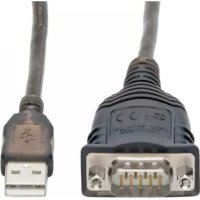
U20930NIND - USB adapter Tripp Lite - Free user manual and instructions
Find the device manual for free U20930NIND Tripp Lite in PDF.


| Product Type | USB to RS-422/RS-485 Serial Adapter |
| Brand | Tripp Lite |
| Model | U209-30N-IND |
| Connectors | USB Type A Male to DB9 Female |
| Chipset | FTDI |
| Transfer Rate | Up to 230 Gbps (note: value mentioned in the manual, likely 230 kbps) |
| Serial Protocols | RS-422, RS-485 |
| COM Retention | Yes (persistent COM port reassignment) |
| Auto Transceiver Turn Around (ATTA) | Yes (for RS-485) |
| USB Compatibility | USB 2.0, backward compatible with USB 1.1 |
| Power | USB bus-powered (no external power needed) |
| Shielding | Double shielding (reduces crosstalk and EMI/RFI interference) |
| Operating Systems | Windows, Mac, Linux |
| Package Contents | Adapter, DB9 terminal block, installation CD, user manual |
| Warranty | 3-year limited |
| Warning | Not for use with life support devices |
| Additional Features | Remote wake-up, power management |
Frequently Asked Questions - U20930NIND Tripp Lite
User questions about U20930NIND Tripp Lite
0 question about this device. Answer the ones you know or ask your own.
Ask a new question about this device
Download the instructions for your USB adapter in PDF format for free! Find your manual U20930NIND - Tripp Lite and take your electronic device back in hand. On this page are published all the documents necessary for the use of your device. U20930NIND by Tripp Lite.
USER MANUAL U20930NIND Tripp Lite
FTDI RS422/485 USB to Serial Adapter Cable with COM Retention
Model: U209-30N-IND
Espanol 9 · Francais 16 · Pycckn 23
PROTECT YOUR INVESTMENT!
Register your product for quicker service and ultimate peace of mind.
You could also win an ISOBAR6ULTRA surge protector—a $100 value!
www.triplite.com/warranty
TRIPP·LITE

Manufacturing Excellence
1111 W. 35th Street, Chicago, IL 60609 USA www.triplite.com/support
Copyright © 2017 Tripp Lite. All rights reserved.
All trademarks are the property of their owners.
Product Features
- Connect an RS-422 or RS-485 serial device to your USB-enabled computer via DB9 serial connector
COM Retention allows the same COM port values to be reassigned to each port whenever a cable is disconnected or the system is rebooted
FTDI chipset supports advanced features and compatibility
Supports data transfer rates up to 230 Kbps
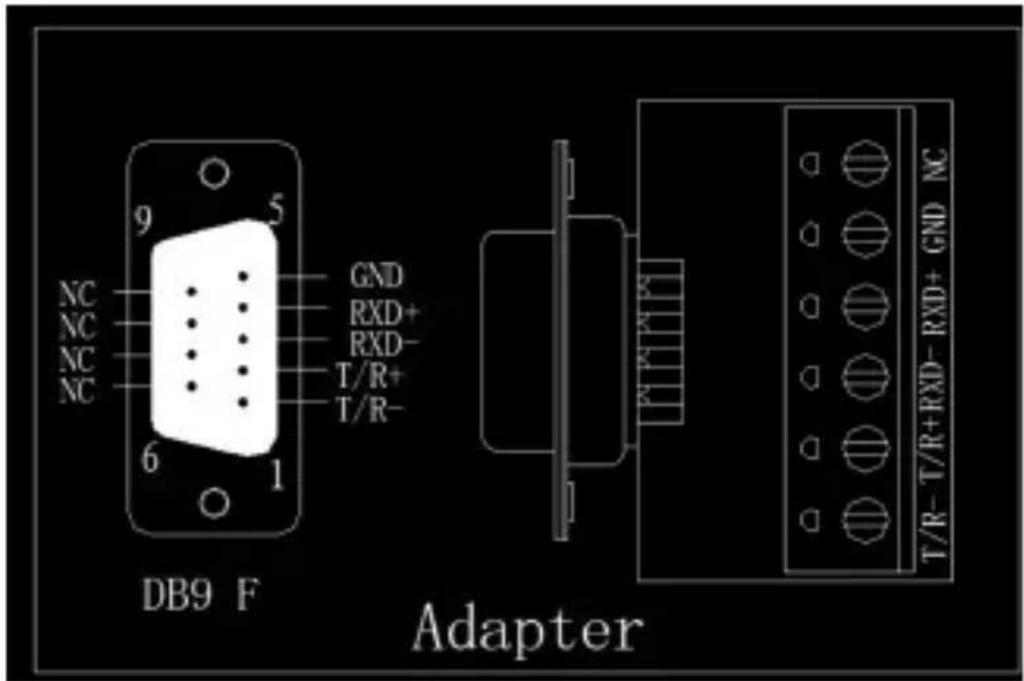
Supports RS-485 Auto Transceiver Turn Around by Unique Featured ATTA Hardware - DB9 to Terminal Block Adapter included for applications requiring a hardwired connection
Supports USB 2.0 specifications and is backwards compatible with USB 1.1
Supports remote wake up and power management - Premium double-shielded cable eliminates cross-talk and reduces EMI/RFI interference
Hot swappable - External power supply not required
System Requirements
- Windows, Mac and Linux compatible computer with an available USB port
Package Contents
U209-30N-IND
DB9 to Terminal Block Adapter
- Driver CD
- Owner's Manual
Installation
- Power on your computer and insert the included CD driver into your computer's CD ROM drive. Note: If your computer does not have a CD Drive, you can download the driver at www.triplite.com/support.
- Launch the driver that corresponds with your product and follow the prompts until installation is complete.
- Your computer will detect the adapter and assign it a COM port. Note: A direct-wire adapter is included for use, if needed.
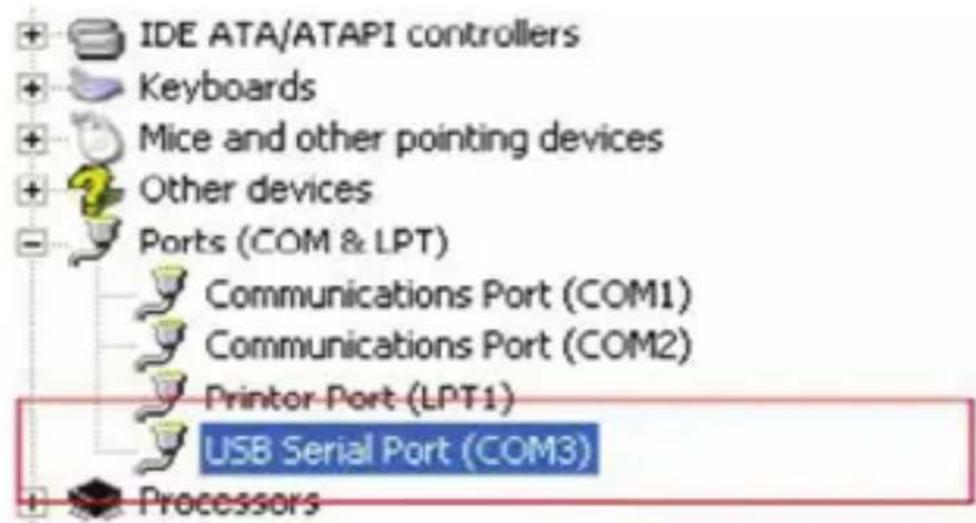
- To verify your adapter has successfully installed, navigate to your computer's Control Panel and open the Device Manager screen. The adapter will appear in the Ports section, with its assigned COM port next to it.
Pinout Diagram
Warranty and Product Registration
3-Year Limited Warranty
TRIPP LITE warrants its products to be free from defects in materials and workmanship for a period of three (3) years from the date of initial purchase. TRIPP LITE's obligation under this warranty is limited to repairing or replacing (at its sole option) any such defective products. To obtain service under this warranty, you must obtain a Returned Material Authorization (RMA) number from TRIPP LITE or an authorized TRIPP LITE service center. Products must be returned to TRIPP LITE or an authorized TRIPP LITE service center with transportation charges prepaid and must be accompanied by a brief description of the problem encountered and proof of date and place of purchase. This warranty does not apply to equipment, which has been damaged by accident, negligence or misapplication or has been altered or modified in any way.
EXCEPT AS PROVIDED HEREIN, TRIPP LITE MAKES NO WARRANTIES, EXPRESS OR IMPLIED, INCLUDING WARRANTY OF MERCHANTABILITY AND FITNESS FOR A PARTICULAR PURPOSE.
Some states do not permit limitation or exclusion of implied warranties; therefore, the aforesaid limitation(s) or exclusion(s) may not apply to the purchaser.
EXCEPT AS PROVIDED ABOVE, IN NO EVENT WILL TRIPP LITE BE LIABLE FOR DIRECT, INDIRECT, SPECIAL, INCIDENTAL OR CONSEQUENTIAL DAMAGES ARISING OUT OF THE USE OF THIS PRODUCT, EVEN IF ADVISED OF THE POSSIBILITY OF SUCH DAMAGE. Specifically, TRIPP LITE is not liable for any costs, such as lost profits or revenue, loss of equipment, loss of use of equipment, loss of software, loss of data, costs of substitutes, claims by third parties, or otherwise.
Warranty and Product Registration
Product Registration
Visit www.triplite.com/warranty today to register your new Tripp Lite product. You'll be automatically entered into a drawing for a chance to win a FREE Tripp Lite product!*
- No purchase necessary. Void where prohibited. Some restrictions apply. See website for details.
FCC Notice, Class B
This device complies with part 15 of the FCC Rules. Operation is subject to the following two conditions: (1) This device may not cause harmful interference, and (2) this device must accept any interference received, including interference that may cause undesired operation.
Note: This equipment has been tested and found to comply with the limits for a Class B digital device, pursuant to part 15 of the FCC Rules. These limits are designed to provide reasonable protection against harmful interference in a residential installation. This equipment generates, uses and can radiate radio frequency energy and, if not installed and used in accordance with the instructions, may cause harmful interference to radio communications. However, there is no guarantee that interference will not occur in a particular installation. If this equipment does cause harmful interference to radio or television reception, which can be determined by turning the equipment off and on, the user is encouraged to try to correct the interference by one or more of the following measures:
- Reorient or relocate the receiving antenna.
- Increase the separation between the equipment and receiver.
- Connect the equipment into an outlet on a circuit different from that to which the receiver is connected.
- Consult the dealer or an experienced radio/TV technician for help.
Warranty and Product Registration
Any changes or modifications to this equipment not expressly approved by Tripp Lite could void the user's authority to operate this equipment.
WEEE Compliance Information for Tripp Lite Customers and Recyclers (European Union)
Under the Waste Electrical and Electronic Equipment (WEEE) Directive and implementing regulations, when customers buy new electrical and electronic equipment from Tripp Lite they are entitled to:
- Send old equipment for recycling on a one-for-one, like-for-like basis (this varies depending on the country)
- Send the new equipment back for recycling when this ultimately becomes waste
WARNING
Use of this equipment in life support applications where failure of this equipment can reasonably be expected to cause the failure of the life support equipment or to significantly affect its safety or effectiveness is not recommended.
Tripp Lite has a policy of continuous improvement. Specifications are subject to change without notice.

1111 W. 35th Street, Chicago, IL 60609 USA www.triplite.com/support
1111 W. 35th Street, Chicago, IL 60609 EE UU www.triplite.com/support
1111 W. 35th Street, Chicago, IL 60609 EE UU www.triplite.com/support
1111 W. 35th Street, Chicago, IL 60609 USA www.triplite.com/support
1111 W. 35th Street, Chicago, IL 60609 USA www.triplite.com/support
PyKOBODCTBO N0JIb30BaTeЯ
Ka6eIb- nepexoHnK USB/ nocJeIOBaTeIbHbI NopT FTDI RS422/485 cФИКcaUeN napametpoB COM-noptOB
Modélb: U209-30N-IND
English 1 • Espanol 9 • Français 16

1111 W. 35th Street, Chicago, IL 60609 USA www.triplite.com/support
OxpanaTcA BTOpckm npabom © 2017 Tripp Lite. Iepeneuatka 3anpeuaetca.
Bce Toprobbie 3NaKn ABAJIOCTCo6CTBEHHOCTbIO CBOUX BnaJeIbIeB.
XapakTepnCTnKn npOdykTa
- 06ecneuBaet noKJIouHne yCTpoiCTBa c nocJeIOBaTeIbHbIM npToM RS-422 nII RS-485 K KomIbIepy c npToM USB uepe3 nocJeIOBaTeIbHbI pa3bem DB9
-ФИКСАЦЯ napametpoB COM-noptOB obecneuBaET BO3MOxHocTb abTomatnueckoro nepeHa3NaueHnA COM-napametpoB COOTBeTCTByUOIM nopTaM B Clyuae OTCoeDInHeHn Ka6eIy nIIN pepe3aRpy3Kn CnCTembl - YHnCet FTDI noДeprKuBaET paCUnpeHHbIe BO3MOxHocTn I COBMeCTnMoOCTb
- Пордержka ckopoстей поедаи даньхdo 230 к6nt/c
- Пордержka abTomatniecko smehbl haprablenia deiCTBnra TpaHcNBepa RS-485 3a cuet yHnKaIbHoro annapaTHoro o6ecneueHnA ATTA
KomnneKtyeTc npexoHnKOM IJI na oKnIoueHna pa3beMa DB9 K6IOky 3aXIMOB pni Heo6xOIMOCtN JecTKOrO Ka6eJbHOrO nOdklUoyHnA - Пордержka Функциона на Inteрфсca USB 2.0 n o6paTHa coBmecTUMOcTB сintePfcom USB 1.1
- Пордержka дистанцонноуnpаьеня јектупатанем иakTNBU3aцnei
- BbICOKOKaueCTBeHHbI Ka6eIb CДBOHbIM 3KpaHnpOBaHnEm, I03B0JIIOUIM N36eRaTb BO3HnKHOBEHnIpeKpeCThblIX NOMEX IN CHIXKaIOUIM yPOBeHb 3JIeKTpOMaHHThblIX n paDnOuactOTHblIX NOMEX
- Bo3moXHoCTb "topaey" 3aMeHbI
OTcYCTBHe Heo6xOIMOCn B NcNoIb3OBaHm BHeJHrO nCTouHnKa PHTAHN
24
CnCTeMHbIe Tpe6OBaHnIa
- Kompltep c OC Windows, Mac nii Linux co cbo60nblm nopToM USB
CopejxHMOe ynaKOBKn
- U209-30N-IND
- Перекондя полоченя pa3bema DB9 к 6лokу
3жIMOB
KoMaKT-ДИСКсдраиВерамN
PykoBoOCTBO n0nb30BaTeJia
yctahOBka
TapaHTnHbIe 06aTeJIbCTBa
OrpaHnueHHa rapaHTna cpoKoM 3 roda
KoMaHnTRIPP LITE rapaHTnpyET OTCytCTBVE DeΦeKTOB MaTePnaJIOB uN3rOToBJeHnB TeueHne Tpex (3) let c MOMeHTa nepBOHaayalbHOI NOKyPkN. 063aTeJIbCTBa KOMnTRIPP LITE no HactoJeuR rapaHTmOrpaHnUBAIoTcpeMOHTom IIN 3aMeHoi (no ee eHNOnuHOMy ycmOTpeHIO) IIO6bIX TaKHX DeΦeKTbIX N3dEIn. DnI nOlyeHnY cyIg no DaHNO rapaHTm Heo6xOIMNo nOlyuHTb Homep Returneded Material Authorization (RMA - pa3peSeHne Ha BO3Bpat MaTePnaJIOB) OT KOMnTHRIPP LITE nn ee ABTopu3OBaHHoro cepBnCHoro ueHTpa. N3dEInraDJIkHb6bITb BO3BpaSeHb B KOMnAHIo TRIPP LITE nn ABTopu3OBaHHb CEHPnTRIPP LITE c npEOJaToI TpaHCnOpTHbIX paCXODOB IN COnPOBXDaTbcra KpaTKM ONCaHem Bo3NHKse IIpo6JIeMbI IN DOKUMENTOM, NOITBepXdaIOUIM DaTy IN MeTo erO npio6peHn. DeIcTBVE NaCToJe rapaHTm He paCnpocTpaHReTcH a O6OpUOBaHHe, NOBpeXdeHHOE B pe3yNbTaTe abapuN, He6peXHOrO o6paSeHn IIN HePaBnBHOrO nCnOJIb3OBaHHa, a TaKKe BnDOImMeHEHoe KaKIM 6bl To HN 6blIO 6pa30M.
3A NCKJIIOUOYEHNEM IPEyCMOTPEHHbIX 3DECb CJUyAEB KOMNAHJ TRIPP LITE HE IPEIOCTABJIET KAKNX-JIIN BO YBHbIX INI IOJPA3YMBAEMbIX TAPAHNTI, BKJIIOUAYI TAPAHNTI KOMMEPUECKO IPINIOHOCTN INI PNIPOJHOCTN JIJI KAKOIJIINBO KOHKPETHOI CEJI.
B HekoTopbix wTaTAX/rocUdapCTBax orpaHnueHne nnn ucknoueHne noDpa3yMeBaEmbIX rapaHTn He donyckaetc; cIeIOBaTeNbHO, Bblweyka3aHHoe(-bie) orpaHnueHne(-r) nnn ucknloueHne(-r) moYrHe paCnpocTpahraTbcHa NOKyNaTeJI.
3A NCKJIIOUCHHEM INPEYCMOTPEHHbIX BbIe CJIyAEB KOMNAHn TRIPP LITE HN IPIKIN KAKNX OBCTOATEJBCTBAX HE HECET OTBETCTBEHHOCTN 3A IIPRMBIE, KOCBEHHbIE, CJIyAHNBIE ININ IOBOUHbIE YbItKN JINbO YbItKN, OIPEJEJEMbIE OC0bIMN OBCTOATEJBCTBAMN, BO3HNKAIOUIE BCBA3N C INCNOJb3OBAHnEM DAHHORO IN3DEJIIN, DAXE B CJIyAe EE INHΦOPMnPOBAHnO BO3MOXHOCTN HACTYNIIEHNRA TAKNX YbItKOB. B qactHOCTn, KOMNAHn TRIPP LITE He Hecet OTBETCTBEHHOCTN 3a KaKne-JIN60 IN3dePjKKn, TAKNE KaYnyuSEHHBe np6blIN ININ DOxOdbI, NOTepr o6OpUdoBaHn, NOTepr BO3MOXHOCTN INCNoJb3OBaHnO bOpUdoBaHn, NOTepr npOrpamMHoro o6ecneHn, NOTepr daHHbIX, paCXoDbI Ha 3aMeHnteIN, ypeynipobAHne npeTeH3n TpeTbNx INIc INI.
TapaHTnHbIe 06aTeJIbCTBa
Информаця по Вьлолною Tpe6obAHи ДиpeKTNBbl WEEE张家界покуразели и nepepa6otuNKOB npodykuzn KOMnaHn Tripp Lite (Являюшисту pe3ndentamN Ebponeckoro co103a)

Cornacno noLoXeHnM DnpeKtBbI 06 yTuN3aun OTxoOB
3neKtpueckoro n 3neKtpoHHoro 6opuydoBaHna (WEEE) n
ncnonHeBbIX paonopjXeHn no ee npImeHnIO, npn nokynke
noTpe6nteMaHn HOBOrO 3neKtpueckoro nn 3neKtpoHHoro 6opuydoBaHna
npou3B0dCTBa KOMNaHm Tripp Lite OHn nonuayot npaBO Ha:
-Пюджусторо обopydobаня по пинциу "ODIN 3a OIN" n/nnHa 3KBuBaJIeHTHoi OCHOBE(B 3aBnCIMOCTN OT KOHKpeTHoi CTpaHbI)
- OtnpaBky HOBoro 6060yDobAHnHa nepepa60TKy noCne OKOHaTeHbHO Bblpa60TKn erO pecypca
BHUMAHNE!
He pekomehnyetcnaonb30BaHne daHHoro 6opdyoBaHnB CnCTeMax
Kn3Heo6ecneueHn, rde erO BbIXoN 3 cTpoR npeIPOJIOXHTeNbHO MoKeT npNBecTN
K nepe6oM B pa6oTe 6opdyoBaHnKn3Heo6ecneueHn IIN B 3HaHTeNbHoMpe
CHn3ntb erO 6e30NaChOCTb IIN eΦeKTUBHocTb.
KoMaHnra Tripp Lite noctoHNO coBepueHCTByeT cBOIO npOduKyuio. B cBa3n C 3TUM Bo3MOxH0 n3MeHeHne TexHuecknx XapaKtepuCTNK 6e3 PpeDbapntelbHoro yBeDoMJIeHnra.

1111 W. 35th Street, Chicago, IL 60609 USA www.triplite.com/support
17-11-280 93-37C9_revA
- FTDI RS422/485 USB to Serial Adapter Cable with COM Retention
- PROTECT YOUR INVESTMENT!
- TRIPP·LITE
- Product Features
- System Requirements
- Package Contents
- Installation
- Pinout Diagram
- Warranty and Product Registration
- 3-Year Limited Warranty
- Product Registration
- FCC Notice, Class B
- WEEE Compliance Information for Tripp Lite Customers and Recyclers (European Union)
- WARNING
- PyKOBODCTBO N0JIb30BaTeЯ
- Ka6eIb- nepexoHnK USB/ nocJeIOBaTeIbHbI NopT FTDI RS422/485 cФИКcaUeN napametpoB COM-noptOB
- XapakTepnCTnKn npOdykTa
- 24
- CnCTeMHbIe Tpe6OBaHnIa
- CopejxHMOe ynaKOBKn
- yctahOBka
- TapaHTnHbIe 06aTeJIbCTBa
- OrpaHnueHHa rapaHTna cpoKoM 3 roda
- BHUMAHNE!
Brand : Tripp Lite
Model : U20930NIND
Category : USB adapter