U44406NHV4GUB - USB adapter Tripp Lite - Free user manual and instructions
Find the device manual for free U44406NHV4GUB Tripp Lite in PDF.


| Brand | Tripp Lite |
| Model | U444-06N-HV4GUB (Black) |
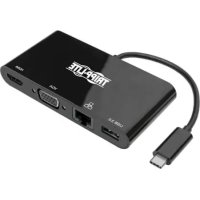
| Product Type | USB-C Multiport Adapter (HDMI, VGA, Ethernet, USB-A) |
| Input Connector | USB-C Male |
| Output Connectors | HDMI 4K Female, VGA Female, USB-A Female, RJ45 Female |
| Maximum HDMI Resolution | 3840 x 2160 @ 30 Hz (4K UHD) |
| Maximum VGA Resolution | 1920 x 1200 @ 60 Hz (1080p) |
| Ethernet Speed | 10/100/1000 Mbps (Gigabit) |
| USB-A Speed | Up to 5 Gbps (USB 3.0), backward compatible |
| HDCP Compatibility | HDCP 1.4 |
| Power Supply | 5 V / 0.9 A (4.5 W) via USB-C port |
| Operating Temperature | 0 to 45 °C |
| Operating Humidity | 10 to 85 % RH, non-condensing |
| Storage Temperature | -10 to 70 °C |
| Storage Humidity | 5 to 90 % RH, non-condensing |
| Warranty | 3-Year Limited |
| Installation | Plug-and-Play, no software required |
| Optional Accessories | HDMI, VGA, USB, Ethernet cables (Tripp Lite series) |
| Safety | Not for use with life support devices |
Frequently Asked Questions - U44406NHV4GUB Tripp Lite
User questions about U44406NHV4GUB Tripp Lite
0 question about this device. Answer the ones you know or ask your own.
Ask a new question about this device
Download the instructions for your USB adapter in PDF format for free! Find your manual U44406NHV4GUB - Tripp Lite and take your electronic device back in hand. On this page are published all the documents necessary for the use of your device. U44406NHV4GUB by Tripp Lite.
USER MANUAL U44406NHV4GUB Tripp Lite
USB Type-C™ to HDMI, VGA, Gigabit Ethernet and USB-A Hub Adapter
Models: U444-06N-HV4GU (White), U444-06N-HV4GUB (Black)
USB Type-C and USB-C are trademarks of USB Implementers Forum
Español 9 • Français 16 • Русский 23
PROTECT YOUR INVESTMENT!
Register your product for quicker service and ultimate peace of mind. You could also win an ISOBAR6ULTRA surge protector—a \$100 value! www.tripplite.com/warranty

text_image
TRIPP·LITE
1111 W. 35th Street, Chicago, IL 60609 USA www.tripplite.com/support
Copyright © 2018 Tripp Lite. All rights reserved.
Package Includes
• U444-06N-HV4GU (White) or U444-06N-HV4GUB (Black)
- Owner's Manual
Optional Accessories
• N201-Series Cat6 Gigabit Snagless Patch Cables
- P502-Series High-Resolution VGA Cables with RGB Coax
• P568-Series High-Speed HDMI Cables
• U322-Series USB 3.0 A/B Device Cables
• U326-Series USB 3.0 Micro-B Device Cables
Product Features
• Supports USB DisplayPort Alternate Mode for connecting a 4K HDMI monitor via a USB-C port
• Supports 4K x 2K Ultra High Definition (UHD) resolutions up to 3840 x 2160 (30Hz)
• VGA port supports video resolutions up to 1920 x 1200 (60Hz) including 1080p
- Ethernet port supports true 10/100/1000 Mbps network speeds
- USB-A hub port supports data transfer rates up to 5 Gbps; backward compatible with previous USB generations
- HDCP 1.4 compatible
- Plug and play; no software or drivers required
Installation
Note: When the unit is connected to the USB-C port on your computer and to a network via Cat5e/6 cabling, a network connection will be automatically established. If no connection is made, you can manually establish one by going to your computer's network settings page. For example, on a Mac, you would navigate to the Network section found in the System Preferences, click the 'Assist Me' button to get to the Network Setup Assistant, then follow the prompts to establish a connection.
- Connect the adapter's USB Type-C connector to the USB-C port on your laptop, tablet or other compatible device.
- Connect the adapter's HDMI port to the monitor's HDMI port using an HDMI cable (such as Tripp Lite's P568-Series HDMI cables).
OR
Connect the adapter's VGA port to the monitor's VGA port using a VGA cable (such as Tripp Lite's P502-Series High-Resolution VGA cables with RGB coax).
-
Connect a USB device to the adapter's USB-A hub port.
-
Connect the adapter's RJ45 port to a network using a UTP cable (such as Tripp Lite's N201-Series Cat6 cables).
Specifications
| Models | U444-06N-HV4GU | U444-06N-HV4GUB |
| Input Connectors | ||
| USB USB-C (Male) | ||
| Output Connectors | ||
| 4K HDMI HDMI (Female) | ||
| VGA VGA (Female) | ||
| USB USB-A (Female) | ||
| Ethernet RJ45 (Female) | ||
| Output Resolution | ||
| HDMI 3840 x 2160 @ | 30Hz (4K x 2K) | |
| VGA 1920 x 1200 @ | 60Hz (1080p) | |
| Environmental | ||
| Operating Temperature | 32°F to 113°F (0°C to 45°C) | |
| Operating Humidity 10% to 85% RH, Non-Condensing | ||
| Storage Temperature 14°F to 158°F (-10°C to 70°C) | ||
| Storage Humidity 5% to 90% RH, Non-Condensing | ||
| Power Requirements | ||
| USB 3.0 Port 5V 0.9A (4.5W) | ||
Warranty and Product Registration
3-YEAR LIMITED WARRANTY
TRIPP LITE warrants its products to be free from defects in materials and workmanship for a period of three (3) years from the date of initial purchase. TRIPP LITE's obligation under this warranty is limited to repairing or replacing (at its sole option) any such defective products. To obtain service under this warranty, you must obtain a Returned Material Authorization (RMA) number from TRIPP LITE or an authorized TRIPP LITE service center. Products must be returned to TRIPP LITE or an authorized TRIPP LITE service center with transportation charges prepaid and must be accompanied by a brief description of the problem encountered and proof of date and place of purchase. This warranty does not apply to equipment, which has been damaged by accident, negligence or misapplication or has been altered or modified in any way.
EXCEPT AS PROVIDED HEREIN, TRIPP LITE MAKES NO WARRANTIES, EXPRESS OR IMPLIED, INCLUDING WARRANTIES OF MERCHANTABILITY AND FITNESS FOR A PARTICULAR PURPOSE.
Some states do not permit limitation or exclusion of implied warranties; therefore, the aforesaid limitation(s) or exclusion(s) may not apply to the purchaser.
EXCEPT AS PROVIDED ABOVE, IN NO EVENT WILL TRIPP LITE BE LIABLE FOR DIRECT, INDIRECT, SPECIAL, INCIDENTAL OR CONSEQUENTIAL DAMAGES ARISING OUT OF THE USE OF THIS PRODUCT, EVEN IF ADVISED OF THE POSSIBILITY OF SUCH DAMAGE. Specifically, TRIPP LITE is not liable for any costs, such as lost profits or revenue, loss of equipment, loss of use of equipment, loss of software, loss of data, costs of substitutes, claims by third parties, or otherwise.
PRODUCT REGISTRATION
Visit www.tripplite.com/warranty today to register your new Tripp Lite product. You'll be automatically entered into a drawing for a chance to win a FREE Tripp Lite product!*
* No purchase necessary. Void where prohibited. Some restrictions apply. See website for details.
Warranty and Product Registration
FCC Notice, Class B
This device complies with part 15 of the FCC Rules. Operation is subject to the following two conditions: (1) This device may not cause harmful interference, and (2) this device must accept any interference received, including interference that may cause undesired operation.
Note: This equipment has been tested and found to comply with the limits for a Class B digital device, pursuant to part 15 of the FCC Rules. These limits are designed to provide reasonable protection against harmful interference in a residential installation. This equipment generates, uses and can radiate radio frequency energy and, if not installed and used in accordance with the instructions, may cause harmful interference to radio communications. However, there is no guarantee that interference will not occur in a particular installation. If this equipment does cause harmful interference to radio or television reception, which can be determined by turning the equipment off and on, the user is encouraged to try to correct the interference by one or more of the following measures:
- Reorient or relocate the receiving antenna.
- Increase the separation between the equipment and receiver.
- Connect the equipment into an outlet on a circuit different from that to which the receiver is connected.
- Consult the dealer or an experienced radio/TV technician for help.
Any changes or modifications to this equipment not expressly approved by Tripp Lite could void the user's authority to operate this equipment.
Warranty and Product Registration
WEEE Compliance Information for Tripp Lite Customers and Recyclers (European Union)
Under the Waste Electrical and Electronic Equipment (WEEE) Directive and implementing regulations, when customers buy new electrical and electronic equipment from Tripp Lite they are entitled to:
- Send old equipment for recycling on a one-for-one, like-for-like basis (this varies depending on the country)
- Send the new equipment back for recycling when this ultimately becomes waste
Use of this equipment in life support applications where failure of this equipment can reasonably be expected to cause the failure of the life support equipment or to significantly affect its safety or effectiveness is not recommended.
Tripp Lite has a policy of continuous improvement. Specifications are subject to change without notice.

text_image
TRIPP·LITE
1111 W. 35th Street, Chicago, IL 60609 USA www.tripplite.com/support
1111 W. 35th Street, Chicago, IL 60609 EE UU www.tripplite.com/support
1111 W. 35th Street, Chicago, IL 60609 EE UU www.tripplite.com/support
1111 W. 35th Street, Chicago, IL 60609 USA www.tripplite.com/support
WEEE Compliance Information for Tripp Lite Customers and Recyclers (Union européenne)

1111 W. 35th Street, Chicago, IL 60609 USA www.tripplite.com/support
Gigabit Ethernet/USB-A
Модели:
1111 W. 35th Street, Chicago, IL 60609 USA
www.tripplite.com/support
1111 W. 35th Street, Chicago, IL 60609 USA www.tripplite.com/support