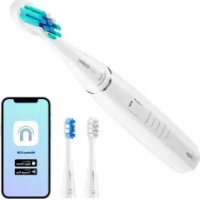
ION SmartSonic - Toothbrush Niceboy - Free user manual and instructions
Find the device manual for free ION SmartSonic Niceboy in PDF.



| Product type | Sonic electric toothbrush |
| Brand | Niceboy |
| Model | ION SmartSonic |
| Rotational speed | 43,000 movements/min |
| Rated voltage | 3.7 V |
| Rated power | 1.85 W |
| Power supply | Wireless charging station (Micro USB cable) |
| Charger input voltage | 5 V, 85 mA |
| Battery capacity | 800 mAh |
| Charging time | 8 to 10 hours |
| Battery life | ~20 days (2 min x 2/day) |
| Waterproof rating | IPX7 |
| Connectivity | Bluetooth 5.0 (2.4 GHz) |
| Radiofrequency power | ≤ 2.5 mW |
| Brushing modes | Sensitive (default) and other switchable modes |
| Number of brush heads included | 3 (soft, medium, hard) |
| Charge indicator | Red, orange, green |
| Built-in timer | 2-min cycle, zone reminder every 30 sec |
| Mobile app | Niceboy ION (compatible iOS/Android) |
| Package contents | Handle, 3 brush heads, docking station, Micro USB cable, manual |
Frequently Asked Questions - ION SmartSonic Niceboy
User questions about ION SmartSonic Niceboy
0 question about this device. Answer the ones you know or ask your own.
Ask a new question about this device
Download the instructions for your Toothbrush in PDF format for free! Find your manual ION SmartSonic - Niceboy and take your electronic device back in hand. On this page are published all the documents necessary for the use of your device. ION SmartSonic by Niceboy.
USER MANUAL ION SmartSonic Niceboy
CASTO KLADENE OTÁZKY
- Niceboy ION SmartSonic toothbrush handle
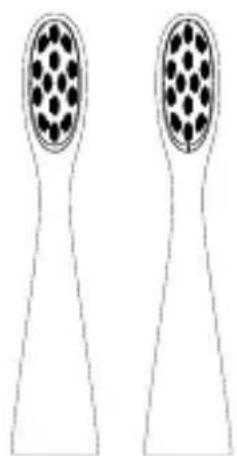
- 3x brush heads (soft, medium, hard)
- Wirelles docking station
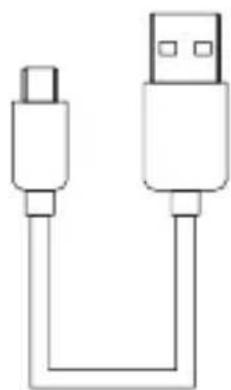
- Micro USB charging cable

OPERATION INSTRUCTIONS
-
For the first time use, please insert the toothbrush to the charging wireles docking station. Charging process:
-
0% - 10% , the charging indicator shows steady red
- 10-100%, the charging indicator shows steady orange
- Charging is complete, the charging indicator shows steady green Note:
-
If the product has not been used for a long time, the charging indicator may not appear when charging the electric toothbrush. Please wait patiently for 3-5 minutes to resume normal charging.
-
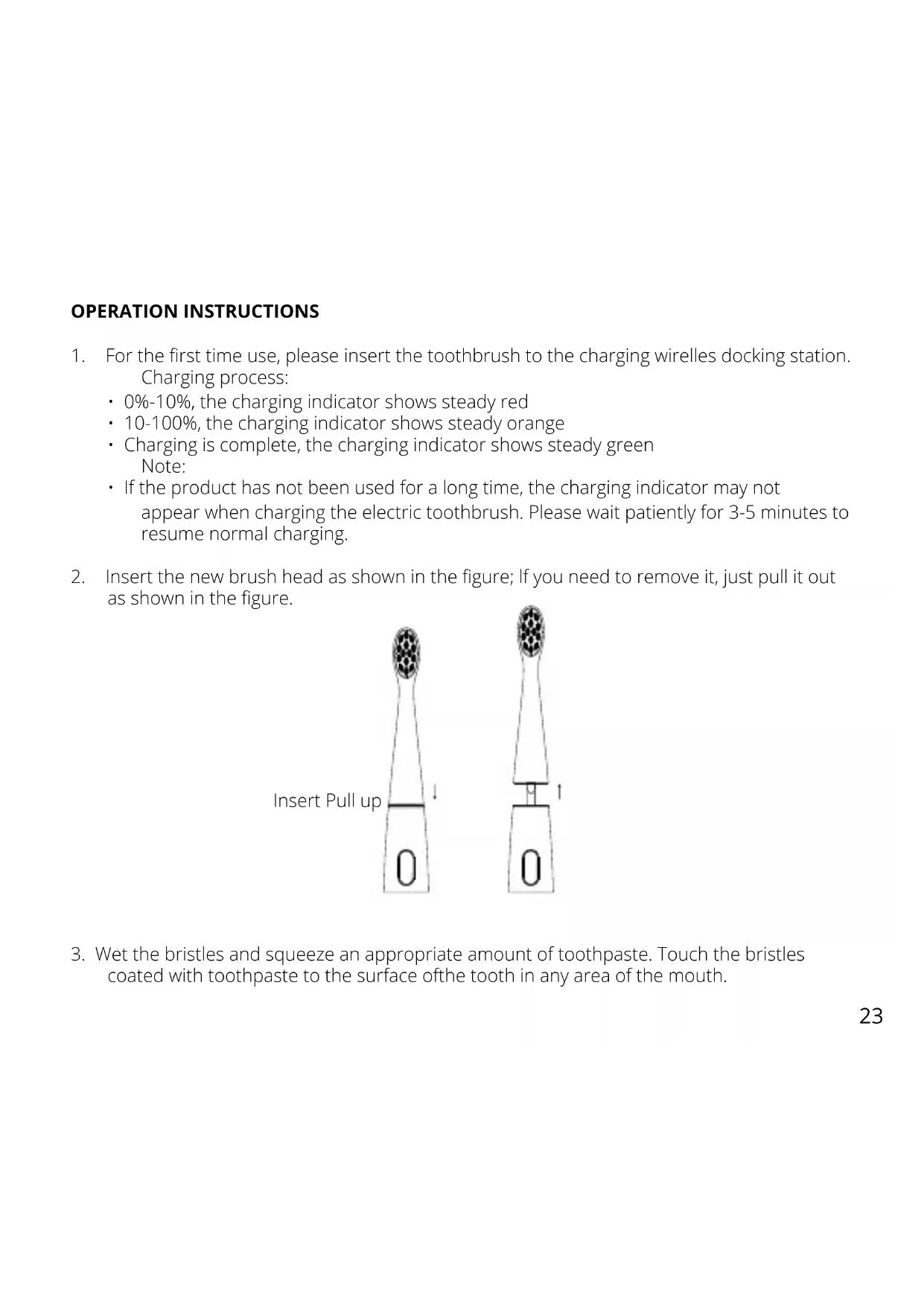
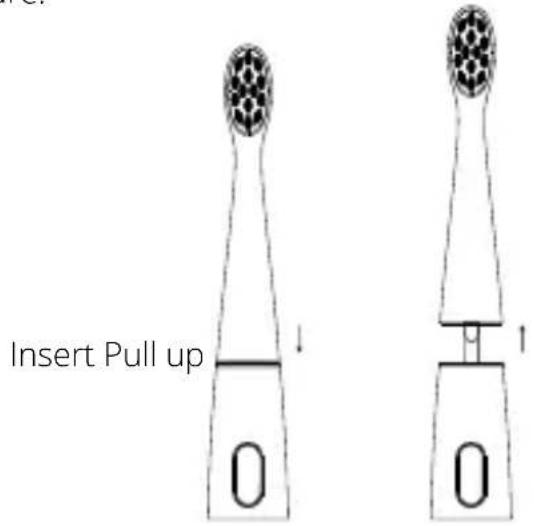
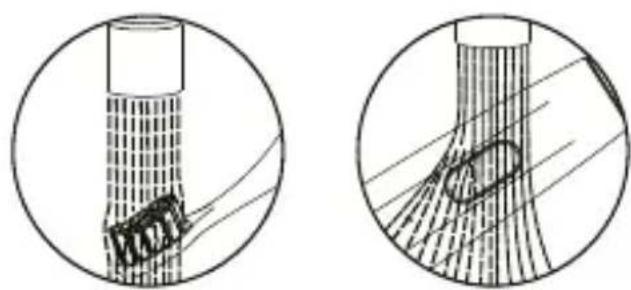
Insert the new brush head as shown in the figure; If you need to remove it, just pull it out as shown in the figure.
-
Wet the bristles and squeeze an appropriate amount of toothpaste. Touch the bristles coated with toothpaste to the surface of the tooth in any area of the mouth.
-
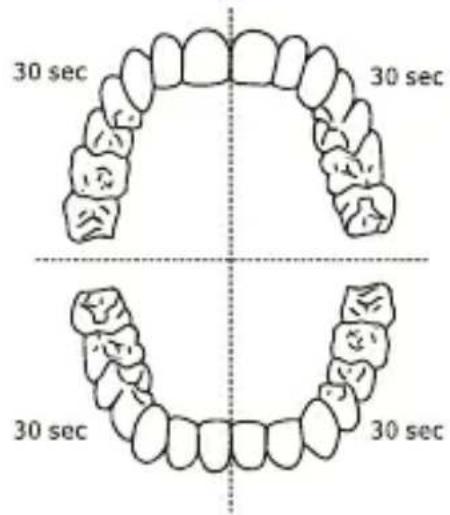
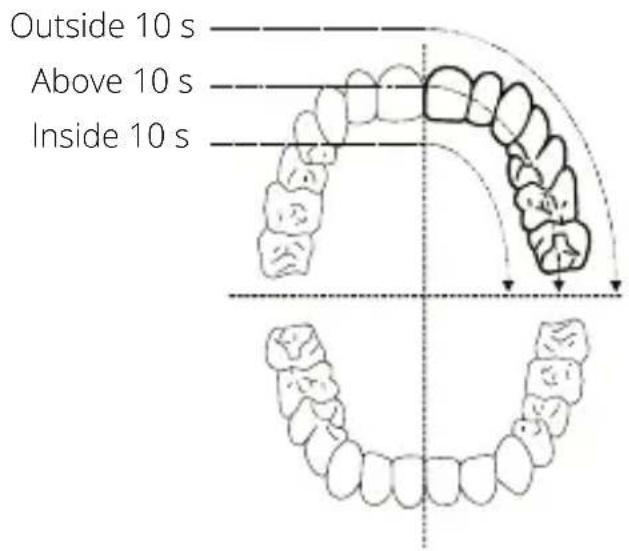
Press the switch and swing your teeth up and down slightly to brush your teeth laterally from the outside and inside. The oral cavity is divided into 4 areas, and the recommended brushing time for each area is 30 seconds. When the 30-second cleaning of this area is completed, the electric toothbrush will pause shortly to remind you to clean the next area.
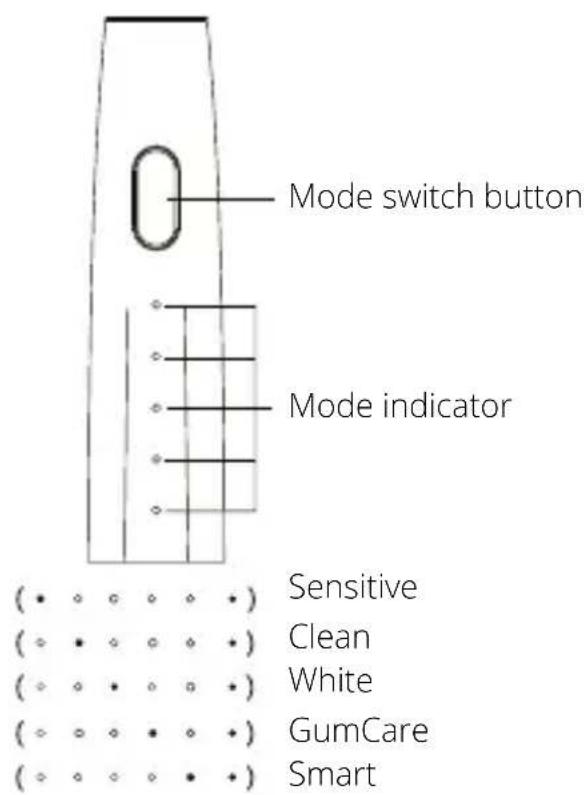
- You can press the mode switching button cf the handle to switch the mode according to persona I preference.
Note:
- 1: By default, the Sensitive mode is activated by default
- 2: Switch mode: within 5 seconds after opening, short press the mode switch button to switch the working mode;
- 3: Mode automatic memory: use any mode for more than S seconds, the system will record this mode. The memory mode is activated by default the next time it is turned on.
- When the scientific and healthy brushing time of 2 minutes is completed, the electric toothbrush will automatically stop. After brushing your teeth, rinse the brush head with running water, please shake off the excess water on the brush head and handle. Keep the crystals of the toothbrush dry and store in a mol, dry place.
Note:
- If you want to stop the electric toothbrush halfway through cleaning the oral cavity, after turning on the electric toothbrush for 5 seconds, short press the key.
- If it will not be used for a long time, please unplug the charging power plug, and thoroughly clean the brush head and handle, store in a cool and dry place;
- It is recommended to replace the toothbrush head every 60 days.
SAFETY INSTRUCTIONS
- Read this user manual carefully before you use the appliance and save it for future reference.
- Keep the plugged-in charging base away from water. Do not place or store it over or near water contained in a bathtub, washbasin, etc. Do not immerse the charging base in water or any other liquid. After cleaning, make sure the charging base is completely dry before you connect it to the mains.
- Check if the voltage indicated on the appliance corresponds to the local mains voltage before you connect the appliance.
- Never use the charging base if it is damaged in any way. If the charging base cord or the plug is damaged, always have it replaced with one of the original type in order to avoid a hazard.
- If the appliance is damaged in any way (brush head, toothbrush handle), stop using it. This appliance contains no user-serviceable parts. If the appliance is damaged, contact the Consumer Care Centre in your country.
- Do not use the charging base outdoors or near heated surfaces.
- This appliance is not intended for use by persons (including children) with reduced physical, sensory or mental capabilities, or lack of experience and knowledge, unless they have been given supervision or instruction concerning use of the appliance by a person responsible for their safety.
Children should be supervised to ensure that they do not play with the appliance.
PRECAUTIONS
- Do not use the toothbrush in the bath or shower.
- If you have had oral or gum surgery in the previous 2 months, consult your dentist before you use the toothbrush.
- Consult your dentist if excessive bleeding occurs after using this toothbrush or if bleeding continues to occur after 1 week of use.
- The Niceboy ION Sonic toothbrush complies with the safety standards for electromagnetic devices. If you have a pacemaker or other implanted device, contact your physician or the device manufacturer of the implanted device before you use the Niceboy ION Sonic.
- This appliance has only been designed for cleaning teeth, gums and tongue. Do not use it for any other purpose. Stop using the appliance and contact your doctor if you experience any discomfort or pain.
- If you have medical concerns, consult your doctor before you use the Niceboy ION Sonic. - The Niceboy ION Sonic toothbrush is a personal care device and is not intended for use on multiple patients in a dental practice or institution.
- Stop using a brush head with crushed or bent bristles. Replace the brush head every 3 months or sooner if signs of wear appear. - Do not clean the brush head in the dishwasher.
- Do not use other brush heads than the ones recommended by the manufacturer.
- Supervise children while they are brushing until they have established good brushing habits.
- If your toothpaste contains peroxide, baking soda or bicarbonate (common in whitening toothpastes), thoroughly clean the brush head with soap and water after each use. This prevents possible cracking of the plastic.
APP CONNECTION
- Download the App by scanning the QR code with your cell phone or Search for „Niceboy ION" in the mobile app market and download the app.
- Open "Niceboy ION" App and register a new account or use an existing account.
- After the password is set, proceed to the next step "Add Device"
- Turn on the Bluetooth of the intelligent terminal, according to the strength of the distance singal, the nearby intelligent terminal will be found Niceboy ION SmartSonic and Select "Go add".
- Click n + n
- Waiting for "connecting"
- Add successfully, clock "done"
- The device end of the toothbrush is connected successfully. Five white lights will breathe and flash, while the toothbrush vibrates, indication that the Bluetooth connection is successful.
PRODUCT SPECIFICATIONS
RPM: 43000
Rated voltage / power: 3,7V = = 1,85W
Charging: Wireless charging dock
Input: 5V == 85 mA
Working hours: 20 Days (calculated
according to the working
state of 2 minutes/time
and 2 times/day)
Gallery capacity: 800 mAh
Charging time: 8-10 Hours
Waterproof: IPX7
The battery or accumulator that may be included with the product has a life of six months because it is a consumable item. Improper handling (prolonged charging, short circuit, breakage by another object, etc.) can lead to fires, overheating or battery leakage, for example.
FAQ
- The following frequently asked questions will help you use the warranty service effectively.
-
To save your time and unnecessary expenses, please perform the following simple check before contacting professional after-sales service.
-
The swing strength is weakened
-
Check whether the toothbrush is strongly pressed against the teeth.
- Check that the gap between the brush head and the main body is too large ar too close.
Solution: - Put the brush head gently on the teeth.
-
Remove the brush head from the arm and put it on the output shaft again, keeping a certain distance between the tooth head and the handle.
-
The toothbrush can only work for a short time.
-
Check whether the charging base is in good contact with the charging interface at the bottom of the main body, and whether the charging indicator of the handle is lit red.
-
Check the power is insufficient.
Solution:
Clean the USB 1/0 port
The battery has reached the end of its life. -
Toothbrush does not work
-
Place the main body vertically on the charger, where the toothbrush body is connected to the charging base, and confirm whether the red indicator light is on.
Solution: - Please charge.
- Please replace the battery in Niceboy authorized customer center.
RTB Media s.r.o. hereby declares that the type of radio equipment NICEBOY ION SMARTSONIC complies with Directives 2014/53 / EU, 2014/30 / EU, 2014/35 / EU, and 2011/65 / EU. The full content of EU Declaration of Conformity is available on the following websites: https://niceboy.eu/cs/podpora/prohlaseni-o-shode-mM38CtmYvX693lHwu4CWpk3vjGrvnC
USER INFORMATION FOR DISPOSING ELECTRICAL AND ELECTRONIC DEVICES (HOME USE)
This symbol located on a product or in the product's original documentation means that the used electrical or electronic products may not be disposed together with the communal waste. In order to dispose of these products correctly, take them to a designated collection site, where they will be accepted for free. By disposing of a product in this way, you are helping to protect precious natural resources and helping to prevent any potential negative impacts on the environment and
human health, which could be the result of incorrect waste disposal.
You may receive more detailed information from your local authority or nearest collection site. According to national regulations, fines may also be given out to anyone who disposes of this type of waste incorrectly. User information for disposing electrical and electronic devices.
(Business and corporate use)
In order to correctly dispose of electrical and electronic devices for business and corporate use, refer to the product's manufacturer or importer. They will provide you with information regarding all disposal methods and, according to the date stated on the electrical or electronic device on the market, they will tell you who is responsible for financing the disposal of this electrical or electronic device. Information regarding disposal processes in other countries outside the EU. The symbol displayed above is only valid for countries within the European Union. For the correct disposal of electrical and electronic devices, request the relevant information from your local authorities or the device seller.
DE
LIEFERUMFANG
Incarcarea: Dock de Incarcare wireless
Intrare: 5V = = 85mA
Ore de lucru: 20 de zile (calculat in functie de starea de lucru de 2 minute/timp si de 2 ori/zi)
Capacitatea bateriei: 800 mAh
Timp de incarcare: 8-10 ore
Rezistenta la apa: IPX7
Puterea de radiofrecventa: ≤ 2,5mW
Bluetooth: 5.0 (2,4 GHz)
QUESTIONS FREQUÉMMENT POSEES
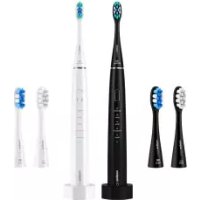
Brand : Niceboy
Model : ION SmartSonic
Category : Toothbrush