
GBB71MCEGN - Freezer LG - Free user manual and instructions
Find the device manual for free GBB71MCEGN LG in PDF.
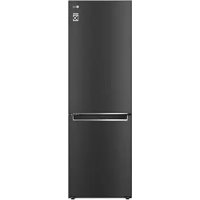



| Product Type | Freezer |
| Brand | LG |
| Model | GBB71MCEGN |
| Dimensions (W x D x H) | 595 x 682 x 1860 mm (compact handle) |
| Alternative dimensions | 595 x 718 x 2030 mm (bar handle, depending on variant) |
| Power supply | 220-240 V, 50 Hz |
| Refrigerant | R600a (isobutane) |
| Climate class | SN (10-32°C), N (16-32°C), ST (16-38°C), T (16-43°C) |
| Freezer temperature range | -15 °C to -23 °C |
| Default temperature | -18 °C |
| Functions | Express Freeze, High temperature alarm, Freshness converter (depending on model), Fresh vegetable drawer (depending on model) |
| Connectivity | Wi-Fi (LG ThinQ), Smart Diagnosis |
| Defrost | Automatic |
| Safety | Security lock (depending on model), Child lock (depending on model) |
| Maintenance | Clean with soft cloth and mild detergent; do not use abrasive cleaners or dishwasher |
| Spare parts | Available for 7 years (seals: 10 years) |
| Minimum warranty | 24 months |
| Net weight | Not specified (estimated ~70 kg) |
Frequently Asked Questions - GBB71MCEGN LG
User questions about GBB71MCEGN LG
0 question about this device. Answer the ones you know or ask your own.
Ask a new question about this device
Download the instructions for your Freezer in PDF format for free! Find your manual GBB71MCEGN - LG and take your electronic device back in hand. On this page are published all the documents necessary for the use of your device. GBB71MCEGN by LG.
USER MANUAL GBB71MCEGN LG
Read this owner's manual thoroughly before operating the appliance and keep it handy for reference at all times.
EN ENGLISH ES ESPANOL IT ITALIANO PL POLSKI SR SRPSKI
BG BULGARIAN ET ESTONIAN LT LITHUANIAN PT PORTUGUES SV SVENSKA
CZ CZECH FI FINNISH LV LATVIAN RO ROMANIAN
DA DANISH FR FRENCH MK MACEDONIAN SK SLOVAK
DE GERMAN HR CROATIAN NL DUTCH SL SLOVENIAN
EL GREEK HU HUNGARIAN NO NORWEGIAN SQ ALBANIAN
TABLE OF CONTENTS
This manual may contain images or content different from the model you purchased.
This manual is subject to revision by the manufacturer.
SAFETY INSTRUCTIONS 3
IMPORTANT SAFETY INSTRUCTIONS 3
INSTALLATION 10
Dimensions and Clearances 10
Ambient Temperature 10
OPERATION 11
Notes for Operation 11
Fresh Converter 12
Fresh Vegetable Painter 12
SMART FUNCTIONS 14
LG ThinQ Application 14
MAINTENANCE 16
Notes for Cleaning 16
Disposal of Your Old Appliance 16
TROUBLESHOOTING 17
Additional Information Of The Manual
This is a short version of Owner's Manual. For more information, please visit the LG website at http://www.lg.com
Troubleshooting
SAFETY INSTRUCTIONS
EN
The following safety guidelines are intended to prevent unforeseen risks or damage from unsafe or incorrect operation of the appliance.
The guidelines are separated into 'WARNING' and 'CAUTION' as described below.

This symbol is displayed to indicate matters and operations that can cause risk. Read the part with this symbol carefully and follow the instructions in order to avoid risk.

WARNING
This indicates that the failure to follow the instructions can cause serious injury or death.

CAUTION
This indicates that the failure to follow the instructions can cause the minor injury or damage to the product.
IMPORTANT SAFETY INSTRUCTIONS

WARNING
To reduce the risk of explosion, fire, death, electric shock, injury or scalding to persons when using this product, follow basic precautions, including the following:
Children in the Household
- This appliance is not intended for use by persons (including children) with reduced physical, sensory or mental capabilities, or lack of experience and knowledge, unless they have been given supervision or instruction concerning use of the appliance by a person responsible for their safety. Children should be supervised to ensure that they do not play with the appliance.
- If the appliance is equipped with a lock (some models only), keep the key out of reach of children.
For use in Europe:
- This appliance can be used by children aged from 8 years and above and persons with reduced physical, sensory or mental capabilities or lack of experience and knowledge if they have been given supervision or instruction concerning use of the appliance in a safe way and understand the hazards involved. Children shall not play with the appliance. Cleaning and user maintenance shall not be made by children without supervision.
- Children aged from 3 to 8 years are allowed to load and unload refrigerating appliances.
Installation
- This appliance should only be transported by two or more people holding the appliance securely.
- Ensure that the socket outlet is properly grounded, and that the earth pin on the power cord is not damaged or removed from the power plug. For more details on grounding, inquire at an LG Electronics customer information centre.
- This appliance is equipped with a power cord having an equipment-grounding conductor and a grounding power plug. The power plug must be plugged into an appropriate socket outlet that is installed and grounded in accordance with all local codes and ordinances.
- If the power cord is damaged or the hole of the socket outlet is loose, do not use the power cord and contact an authorized service centre.
- Do not plug the appliance into a multi socket adapter which does not have a power cable (mounted).
- Do not modify or extend the power cable.
- The appliance should be connected to a dedicated power line which is separately fused.
- Do not use a multi socket outlet which is not properly grounded (portable). In case of using a properly-grounded multi socket outlet (portable), use the multi socket outlet with the current capacity of the power code rating or higher and use the multi socket outlet only for the appliance.
- Install the appliance in a place where is easy to unplug the power plug of the appliance.
- Be careful not to point the power plug up or let the appliance lean against the power plug. Install the appliance on a firm and level floor.
- Do not install the appliance in a damp and dusty place. Do not install or store the appliance in any outdoor area, or any area that is subject to weathering conditions such as direct sunlight, wind, rain, or temperatures below freezing.
- Do not place the appliance in direct sunlight or expose it to the heat from heating appliances such as stoves or heaters.
- Be careful not to expose the rear of the appliance when installing.
- Be careful not to let the appliance door fall during assembly or disassembly.
- Be careful not to pinch, crush, or damage the power cable during assembly or disassembly of the appliance door.
- Do not connect a plug adapter or other accessories to the power plug.
Operation
- Do not use the appliance for any purpose (storage of medical or experimental materials or shipping) other than any domestic household food storage use.
- Unplug the power plug during a severe thunderstorm or lightening or when not in use for a long period of time.
- Do not touch the power plug or the appliance controls with wet hands.
- Do not bend the power cable excessively or place a heavy object on it.
- If water penetrates electrical parts of the appliance, disconnect power plug and contact an LG Electronics customer information centre.
- Do not place hands or metallic objects inside the area emitting the cold air, cover or heat releasing grille on the back.
- Do not apply excessive force or impact to the back cover of the appliance.
- Do not put animals, such as pets, into the appliance.
- Be careful of nearby children when you open or close the appliance door. The door may bump the child and cause injury.
- Avoid the danger of children getting trapped inside the appliance. A child trapped inside the appliance can cause suffocation.
- Do not place heavy or fragile objects, containers filled with liquid, combustible substances, flammable objects (such as candles, lamps, etc.), or heating devices (such as stoves, heaters, etc.) on the appliance.
- If there is a gas leakage (isobutane, propane, natural gas, etc.), do not touch the appliance or power plug and ventilate the area immediately. This appliance uses a refrigerant gas (isobutane, R600a). Although it uses a small amount of the gas, it is still combustible gas. Gas leakage during appliance transport, installation or operation can cause fire, explosion or injury if sparks are caused.
- Do not use or store flammable or combustible substances (ether, benzene, alcohol, chemical, LPG, combustible spray, insecticide, air freshener, cosmetics, etc.) near the appliance.
- Immediately unplug the power plug and contact an LG Electronics customer information centre if you detect a strange sound, odour, or smoke coming from the appliance.
- Fill with potable water only into icemaker or dispenser water tank.
- Do not damage the refrigerant circuit.
- Do not place any electronic appliance (such as heater and mobile phone) inside the appliance.
Maintenance
- Disconnect the power cord before cleaning the appliance or replacing the inside lamp (where fitted).
- Securely plug the power plug in the socket outlet after completely removing any moisture and dust.
- Never unplug the appliance by pulling on the power cable. Always grip the power plug firmly and pull straight out from the socket outlet.
- Do not spray water or inflammable substances (toothpaste, alcohol, thinner, benzene, flammable liquid, abrasive, etc.) over the interior or exterior of the appliance to clean it.
- Do not clean the appliance with brushes, cloths or sponges with rough surfaces or which are made of metallic material.
- Only qualified service personnel from LG Electronics service centre should disassemble, repair, or modify the appliance. Contact an LG Electronics customer information centre if you move and install the appliance in a different location.
- Do not use a hair drier to dry the inside of the appliance or place a candle inside to remove the odours.
- Do not use mechanical devices or other means to accelerate the defrosting process.
Disposal
- When discarding the appliance, remove the door gasket while leaving the shelves and baskets in place and keep children away from the appliance.
- Dispose of all packaging materials (such as plastic bags and styrofoam) away from children. The packaging materials can cause suffocation.
Technical Safety
- Keep ventilation openings, in the appliance enclosure or in the built-in structure, clear of obstruction.
Do not use electrical appliances inside the refrigerator.
- The refrigerant and insulation blowing gas used in the appliance require special disposal procedures. Consult with service agent or a similarly qualified person before disposing of them.
- Refrigerant leaking out of the pipes could ignite or cause an explosion.
- The amount of refrigerant in your particular appliance is shown on the identification plate inside the appliance.
- Never start up an appliance showing any signs of damage. If in doubt, consult your dealer.
- This appliance is intended to be used in household and similar applications only. It should not be used for commercial, or catering purposes, or in any mobile application such as a caravan or boat.
- Do not store explosive substances such as aerosol cans with a flammable propellant in this appliance.
- This refrigerating appliance is not intended to be used as a built-in appliance.
Risk of Fire and Flammable Materials
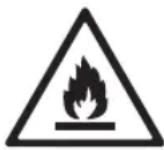
This symbol alerts you to flammable materials that can ignite and cause a fire if you do not take care.
- This appliance contains a small amount of isobutane refrigerant (R600a), but it is also combustible. When transporting and installing the appliance, care should be taken to ensure that no parts of the refrigerating circuit are damaged.
- If a leak is detected, avoid any naked flames or potential sources of ignition and air the room in which the appliance is standing for several minutes. In order to avoid the creation of a flammable gas air mixture if a leak in the refrigerating circuit occurs, the size of the room in which the appliance is used should correspond to the amount of refrigerant used. The room must be 1 m² in size for every 8 g of R600a refrigerant inside the appliance.
- When positioning the appliance, ensure the supply cord is not trapped or damaged.
- Do not locate multiple portable socket-outlets or portable power supplies at the rear of the appliance.
CAUTION
To reduce the risk of minor injury to persons, malfunction, or damage to the product or property when using this product, follow basic precautions, including the following:
Installation
- Do not tilt the appliance to pull or push it when transporting.
- Make sure not to get a body part such as a hand or foot stuck while moving the appliance.
Operation
- Do not touch frozen food or the metal parts in the freezer compartment with wet or damp hands. It may cause frostbite.
- Do not place glass containers, bottles or cans (especially those containing carbonated drinks) in the freezer compartment, shelves or ice bin that will be exposed to temperatures below freezing.
- The tempered glass on the front side of the appliance door or the shelves can be damaged by an impact. If it is broken, do not touch it with hands.
- Do not hang from the appliance doors, storage room, shelf or climb up into it.
- Do not store an excessive amount of water bottles or containers for side dishes on the door baskets.
- Prevent animals from nibbling on the power cable or water hose.
- Do not open or close the appliance door with excessive force.
- If the hinge of the appliance door is damaged or operates improperly, stop using the appliance and contact an authorized service centre.
- Do not clean glass shelves or covers with warm water when they are cold.
- Never eat frozen foods immediately after they have been taken out in the freezer compartment.
- Make sure not to get a hand or foot stuck upon opening or closing the appliance door.
Maintenance
- Do not insert the shelves upside down. The shelves may fall.
- To remove frost from the appliance, contact an LG Electronics customer information centre.
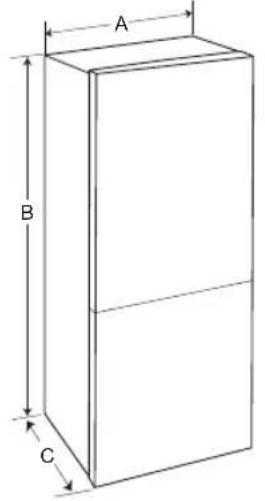
Dimensions and Clearances
Too small of a distance from adjacent items may result in the degradation of freezing capability and increased electricity costs. Allow over 50 mm of clearance from each adjacent wall when installing the appliance.
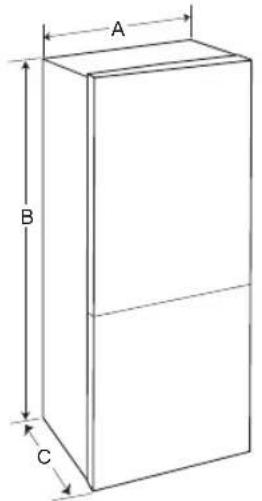
1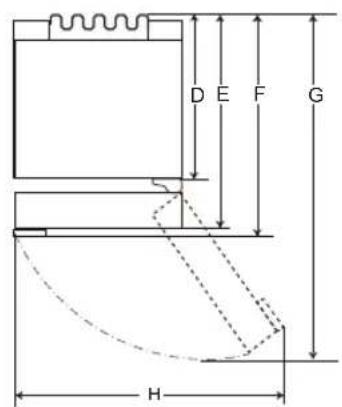
2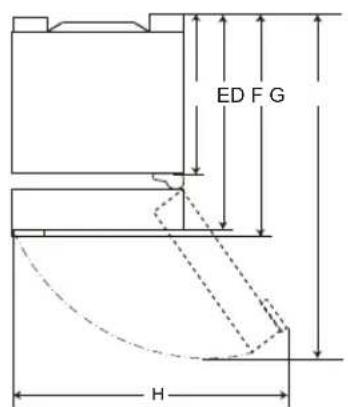
| 1 | 2 | |||
| Size [mm] | ||||
| Pocket Handle | Bar Handle | Pocket Handle | Bar Handle | |
| A | 595 595 595 | 595 | ||
| B | 1860 / 2030 1 860 / 2 030 | 1860 / 2030 1 860 / 2 030 | ||
| C | 682 718 675 | 712 | ||
| D | 616 616 610 | 610 | ||
| E | 682 682 | 675 | 675 | |
| F | - | 718 | - | 712 |
| G | 1 230 | 1 237 | 1 225 | 1 232 |
| H | 995 995 995 | 995 | ||
Ambient Temperature
- The appliance is designed to operate within a limited range of ambient temperatures, depending on the climate zone.
- The internal temperature could be affected by the location of the appliance, the ambient temperature, the frequency of door opening and so on.
- The climate class can be found on the rating label.
| Climate Class | Ambient Temperature Range °C |
| SN (Extended Temperate) | +10 - +32 |
| N (Temperate) | +16 - +32 |
| ST (Subtropical) | +16 - +38 |
| T (Tropical) | +16 - +43 / +10 - +43* |
*Australia, India, Kenya
NOTE
- The appliances rated from SN to T are intended to be used at an ambient temperature between 10°C and 43°C.
Notes for Operation
- Users should keep in mind that frost can form. If the door is not closed completely, if the humidity is high during the summer, or if the freezer door is opened frequently.
- Ensure there is sufficient space between food stored on the shelf or door basket to allow the door to close completely.
- Opening the door for long periods can cause a significant increase of the temperature in the compartments of the appliance.
- If the refrigerating appliance is left empty for long periods, switch off, defrost, clean, dry, and leave the door open to prevent mould developing within the appliance.
Suggestion for Energy Saving
- Ensure there is sufficient space between stored foods. This allows cold air to be circulated evenly and lowers electricity bills.
- Store hot food only after it has cooled in order to prevent dew or frost.
- When storing food in the freezer compartment, set the freezer temperature lower than the temperature indicated on the food.
- Do not put food near the temperature sensor of the fridge compartment. Keep a distance of at least 3 cm from the sensor.
- Note that a temperature rise after defrosting has a permissible range in the appliance specifications. If you wish to minimise the impact this may have on the food storage due to a temperature rise, seal or wrap the stored food in several layers.
- The automatic defrosting system in the appliance ensures that the compartment remains free of ice buildup under normal operating conditions.
- For the most efficient use of energy, keep all inner parts (e.g. door bins, drawers and shelves) on their original location.
- Do not set the temperature of the appliance lower than needed.
Storing Foods Effectively
- Store frozen food or refrigerated food inside sealed containers.
- Check the expiration date and label (storage instructions) before storing food in the appliance.
- Do not store food for a long period of time if it spoils easily at a low temperature.
- Avoid refreezing any food which has been completely thawed. Freezing any food which has been completely thawed again will lower its taste and nutrition.
- Do not wrap and store vegetables with newspaper. Printing material of newspaper or other foreign substances may smear and contaminate food.
- Do not overfill the appliance. Cold air can not circulate properly if the appliance is overfilled.
- If you set an excessively low temperature for food, it may become frozen. Do not set a temperature lower than the required temperature for the food to be stored correctly.
- For more space, you can remove bottle rack, egg tray, ice tray and fresh converter drawer.
- Store raw meat and fish in suitable containers in the refrigerator, so that it is not in contact with or drip onto other food.
- Place the refrigerated food or frozen food in each fridge or freezer compartment immediately after purchasing.
- Food may freeze or spoil if stored at the wrong temperature. Set the refrigerator to the correct temperature for the food being stored.
Max Freezing Capacity
- The Express Freeze function will set the freezer to its maximum freezing capacity. This generally takes up to 24 hours and automatically switches off.
- If the maximum freezing capacity is to be used, Express Freeze must be switched on for 7 hours before fresh produce is placed in the freezer compartment.
Freezing the Maximum Amount of Food
- To get better air circulation, insert all drawers.
- If large quantities of food are to be stored, all the freezer drawers shall be taken out of the appliance and the food shall be stacked directly on the freezer shelf (or shelves) in the freezer compartment.
NOTE
- To remove the drawers, first remove the food from drawers and then pull out the drawers carefully. Not doing so could cause injury or damage to the drawers.
- The shape of each drawer may be different, insert in the right position.
Setting the Temperature
This sets the fridge temperature or freezer temperature
Press the Fridge button or Freezer button to adjust the temperature.
The temperature can be adjusted.
- Fridge: from 1°C to 7°C
- Freezer: from -15 °C to -23 °C
The initial temperature is set.
Fridge: 3°C - Freezer: -18°C
The actual inner temperature varies depending on the food status, as the indicated setting temperature is a target temperature, not the actual temperature within the appliance.
NOTE
- The default temperature setting may vary depending on the appliance.
- For optimal food preservation, increasing or decreasing 1°C or one level from the default temperature is recommended for each compartment.
- Wait until 2 or 3 hours have passed after connecting the appliance to the outlet before storing food in the appliance.
- For ice making in normal climates, the freezer temperatures should be set to -18°C or colder.
High Temperature Alarm
When the freezer temperature goes too high due to power failure, the freezer temperature LED lamp blinks and an alarm sounds.
- Press the Freezer button to stop.
- If the temperature is sufficiently cold, the blinking and alarm will automatically stop. This function operates:
- When the refrigerator is turned on.
- When the freezer compartment gets too warm.
- When there is a power outage that lasts for a long period of time.
- When large amounts of warm food are placed in the freezer compartment.
- When the freezer door is open for too long or too frequently.
Fresh Converter (*)
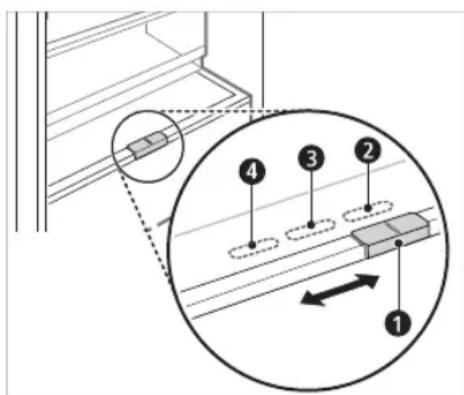
As a chill compartment, the temperature in the fresh converter can be controlled by sliding the lever 1, located in front of the compartment, in either direction.
When keeping vegetables after setting up Meat or Fish, cold injury may occur.
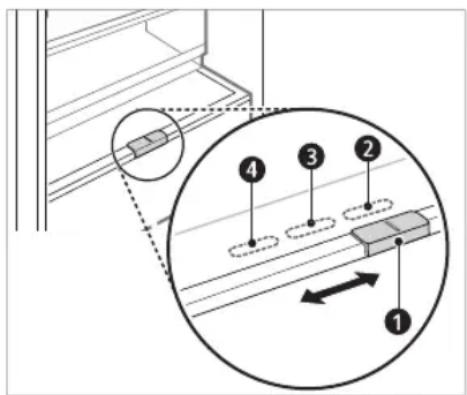
For storing vegetables. (Recommended) For storing fish. For storing meat.
NOTE
- (*): This feature varies depending on the model purchased.
Fresh Vegetable Painter (*)
The vegetable compartment can adjust the humidity by moving the knob 1.
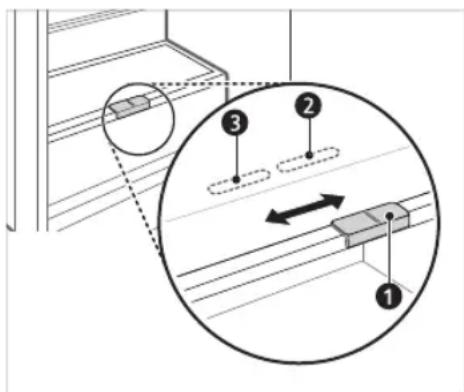
For storing vegetables. (Recommended) For storing fruit.
NOTE
- (*): This feature varies depending on the model purchased.
Food Storage Compartments Storing Food in the Fridge Compartment
- Fridge Shelf
- This is where refrigerated foods and other items are stored.
- The shelf height can be adjusted by inserting the shelf in another groove of different height.
- Store the foods with higher moisture content at the front of the shelf. The actual number of shelves will differ from model to model.
- Bottle Rack (*)
- This is where drinks tall bottles or containers are stored.
- Folding Shelf (*)
- This is where refrigerated foods and high items are stored.
- Fresh Vegetable Printer
- This is where fruits and vegetables are stored to help maintain freshness by adjusting the humidity controller. The appearance or components of the appliance may differ from model to model.
- Fresh Converter (*)
- As a chill compartment, this is where meat, fish and vegetables are stored. Help maintain freshness by adjusting the humidity controller located in the back of the fridge compartment.
- For more space, you can use chill area without chill compartment drawer.
- Movable Egg Tray
- This is where eggs are stored.
- You can move it to and use it at a desired position as needed. However, do not use it as the ice bin or place it on the shelf on top of the fridge or the vegetables drawer. Fridge Door Basket
- This is where small packages of refrigerated foods, drinks and sauce containers are stored.
Water Dispenser Tank (*)
- This is where water to supply the dispenser or the automatic icemaker is stored. It requires manual filling. (Non plumbed models only)
Storing Food in the Freezer Compartment
Ice Tray
- This is where ice is produced and stored.
- For more space, you can remove the ice tray or ice cubes bucket.
- Freezer Drawer
- This is for long-term storage of frozen items.
- Freeze food items quickly, store the food in the top drawer. Food items will freeze most quickly in the drawer.
NOTE
- (*) : This feature varies depending on the model purchased.
- For more information about other compartments, visit lg.com and download owner's manuals.
LG ThinQ Application
This feature is only available on models with Wi-Fi.
The LG ThinQ application allows you to communicate with the appliance using a smartphone.
LG ThinQ Application Features
Communicate with the appliance from a smartphone using the convenient smart features.
Smart Diagnosis
- If you experience a problem while using the appliance, this smart diagnosis feature will help you diagnose the problem.
Settings
- Allows you to set various options on the appliance and in the application.
NOTE
- If you change your wireless router, internet service provider, or password, delete the registered appliance from the LG ThinQ application and register it again.
The application is subject to change for appliance improvement purposes without notice to users.
- Functions may vary by model.
Before Using LG ThinQ Application
1 Check the distance between the appliance and the wireless router (Wi-Fi network).
- If the distance between the appliance and the wireless router is too far, the signal strength becomes weak. It may take a long time to register or installation may fail.
2 Turn off the Mobile data or Cellular Data on your smartphone.
3 Connect your smartphone to the wireless router.
NOTE
To verify the Wi-Fi connection, check that the icon on the control panel is lit. The appliance supports 2.4 GHz Wi-Fi networks only. To check your network frequency, contact your Internet service provider or refer to your wireless router manual. LG ThinQ is not responsible for any network connection problems or any faults, malfunctions, or errors caused by network connection. - If the appliance is having trouble connecting to the Wi-Fi network, it may be too far from the router. Purchase a Wi-Fi repeater (range extender) to improve the Wi-Fi signal strength. - The Wi-Fi connection may not connect or may be interrupted because of the home network environment. - The network connection may not work properly depending on the Internet service provider. - The surrounding wireless environment can make the wireless network service run slowly. - The appliance cannot be registered due to problems with the wireless signal transmission. Unplug the appliance and wait about a minute before trying again. - If the firewall on your wireless router is enabled, disable the firewall or add an exception to it. - The wireless network name (SSID) should be a combination of English letters and numbers. (Do not use special characters.)
- Smartphone user interface (UI) may vary depending on the mobile operating system (OS) and the manufacturer.
- If the security protocol of the router is set to WEP, you may fail to set up the network. Please change it to other security protocols (WPA2 is recommended) and register the product again.
Installing the LG ThinQ Application
Search for the LG ThinQ application from the Google Play Store or Apple App Store on a smart phone.
- Follow instructions to download and install the application.
Connecting to Wi-Fi
The Wi-Fi button, when used with the LG ThinQ application, allows the appliance to connect to a home Wi-Fi network. The icon shows the status of the appliance's network connection. The icon illuminates when the appliance is connected to the Wi-Fi network.
Initial Appliance Registration
- Run the LG ThinQ application and follow the instructions in the application to register the appliance.
Re-registering the Appliance or Registering Another User
- Press and hold the Wi-Fi button for 3 seconds to temporarily turn it off. Run the LG ThinQ application and follow the instructions in the application to register the appliance.
NOTE
- To disable the Wi-Fi function, press and hold the Wi-Fi button for 3 seconds. The icon will be turned off.
Open Source Software Notice Information
To obtain the source code under GPL, LGPL, MPL, and other open source licenses that have the obligations to disclose source code, that is contained in this product, and to access all referred license terms, copyright notices and other relevant documents please visit http://opensource.lge.com. LG Electronics will also provide open source code to you on CD-ROM for a charge covering the cost of performing such distribution (such as the cost of media, shipping, and handling) upon email request to opensource@lge.com.
This offer is valid to anyone in receipt of this information for a period of three years after our last shipment of this product.
Notes for Cleaning
- When removing a shelf or drawer from inside the appliance, remove all stored foods from the shelf or drawer to prevent injury or damage to the appliance.
- Otherwise, injury may occur due to the weight of stored foods.
- If cleaning the outside air vents of the appliance by means of vacuuming, then the power cord should be unplugged from the outlet to avoid any static discharge that can damage the electronics or cause an electric shock.
- Detach the shelves and drawers and clean them with water, and then dry them sufficiently, before replacing them.
Regularly wipe the door gaskets with a wet soft towel.
- Door basket spills and stains should be cleaned as they can compromise storage ability of the basket and could even be damaged.
- After cleaning, check if the power cable is damaged, warm or improperly plugged.
- Keep the air vents on the exterior of the appliance clean.
- Blocked air vents can cause fire or appliance damage.
- When cleaning the inside or outside of the appliance pot, wipe it with a rough brush, toothpaste, or flammable materials. Do not use cleaning agents containing flammable substances.
- This may cause discoloration or damage to the appliance.
- Flammable substances: alcohol (ethanol, methanol, isopropyl alcohol, isobutyl alcohol, etc.), thinner, bleach, benzene, flammable liquid, abrasive, etc.
- For the appliance exterior, use a clean sponge or soft cloth and a mild detergent in warm water. Do not use abrasive or harsh cleaners. Dry thoroughly with a soft cloth.
- Never clean the shelves or containers in the dishwasher. The parts may become deformed due to the heat. Regularly clean surfaces that can come in contact with food.
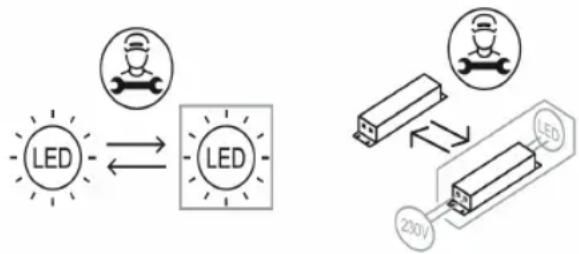
- If the appliance is equipped with an LED lamp, do not remove lamp cover and LED lamp in any attempt to repair or service it. Please, contact an LG Electronics customer information centre.
Disposal of Your Old Appliance
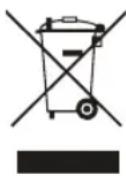
- This crossed-out wheeled bin symbol indicates that waste electrical and electronic products (WEEE) should be disposed of separately from the municipal waste stream.
- Old electrical products can contain hazardous substances so correct disposal of your old appliance will help prevent potential negative consequences for the environment and human health. Your old appliance may contain reusable parts that could be used to repair other products, and other valuable materials that can be recycled to conserve limited resources.
- You can take your appliance either to the shop where you purchased the product, or contact your local government waste office for details of your nearest authorised WEEE collection point. For the most up to date information for your country please see www/lg.com/global/recycling.
Before Calling for Service
Customer Care and Service
Contact an LG Electronics customer information centre.
To find information on LG authorized service centre, visit our website at www/lg.com. - Only qualified service personnel from LG authorized service centre should disassemble, repair, or modify the appliance. - The minimum warranty period of this refrigerating appliance is 24 months. - To purchase spare parts, contact an LG Electronics customer information centre or our website at www.lg.com. - Spare parts referenced in Regulation EU 2019/2019 are available for 7 years (only door gaskets are available for 10 years).
NOTE
- For more information about the energy efficiency of the appliance, visit https://ec.europa.eu and search using the model name (valid from 1st March 2021).
- Regulation EU 2019/2019, valid from 1st March 2021, is related to the Energy Efficiency classes by Regulation EU 2019/2016.
- Scan the QR code on the energy label supplied with the appliance, which provides a web link to the information related to the performance of the appliance in the EU EPREL database. Keep the energy label for reference and all other documents supplied with the appliance (valid from 1st March 2021).
- The model name can be found on the rating label of the appliance.
- This product contains a light source of energy efficiency class G.
Read the operating instructions carefully before using the device, and keep them in a convenient place for reference at all times.
SAFETY INSTRUCTIONS. 3
Important safety instructions. 3
INSTALLATION 10
Dimensions and clearances 10
Ambient temperature. 10
OPERATION 11
Notes on operation 11
Converter for pressed products (*) 12
Yeast dough for green vegetables ( *). 13
SMART FUNCTIONS 15
LG ThinQ Application 15
MAINTENANCE 17
TABLE OF CONTENTS 17
Replacing the old unit 17
Troubleshooting 18
Additional information regarding the manual
This is a brief version of the operating manual. For more information, please visit the website http://www.lg.com
Troubleshooting
SAFETY INSTRUCTIONS
BG
The safety instructions are provided to prevent unforeseen risks and damage or injury from incorrect use of the product. The instructions are divided into "WARNING" and "CAUTION" categories, as described below.

This symbol is used to alert users to risks that may occur. Read the part marked with this symbol carefully and follow the instructions to avoid risks.

WARNING
This indicates that failure to follow the instructions may cause serious injury or death.

CAUTION
This indicates that failure to follow the instructions may cause minor injury or damage to the product.
Important safety instructions

WARNING
To reduce the risk of fire, electric shock, or injury to persons when using the product, basic safety precautions should always be followed, including the following:
Children in the household
This appliance is not intended for use by persons (including children) with reduced physical, sensory, or mental capabilities, or lack of experience and knowledge, unless they have been given supervision or instruction concerning use of the appliance by a person responsible for their safety. Children should be supervised to ensure that they do not play with the appliance.
- If the appliance is equipped with a lock (only for certain models), keep the key out of reach of children.
For use in Europe:
This appliance can be used by children aged from 8 years and above and persons with reduced physical, sensory or mental capabilities or lack of experience and knowledge if they have been given supervision or instruction concerning use of the appliance in a safe way and understand the hazards involved. Children shall not play with the appliance. Cleaning and user maintenance shall not be made by children without supervision.
- Children aged from 3 to 8 years are allowed to load and unload refrigerating appliances.
Installation
This appliance must be transported only by two or more people holding the appliance securely. - Make sure the plug is properly connected and that the power cord is not damaged or pinched. For more information on grounding, contact the LG Electronics customer information center.
This appliance is equipped with a power cord with a grounding wire and a grounding plug. The plug must be plugged into an appropriate outlet that is installed and grounded in accordance with all local codes and ordinances.
- If the power cord is damaged or the plug is loose, do not use the cord and contact a qualified service center. Do not plug the appliance into a multi-outlet adapter that has a power cord (integrated). Do not modify or extend the power cord.
- The appliance must be connected to a dedicated electrical circuit with a separate fuse. Do not use a multi-outlet adapter that is not properly grounded (loose). In case of using a properly grounded multi-outlet adapter (loose), use a multi-outlet adapter with a current rating for the power cord or higher, and use it only for the appliance. - Place the appliance in a location where the plug can be easily disconnected from the outlet.
Remove the protective film from the appliance before use and do not leave the appliance on top of it. - Place the appliance on a stable, flat surface. - Do not install the appliance in a damp or dusty place. - Do not install the appliance outdoors or in a place exposed to atmospheric conditions such as direct sunlight, wind, rain, or temperatures below freezing. - Do not place the appliance near direct sunlight and do not expose it to heat from heating appliances, e.g., stoves or radiators. Be careful not to expose the rear part of the appliance during installation. Be careful that the door of the appliance does not fall during assembly or disassembly. Be careful not to puncture, crush, or damage the cables when assembling or disassembling the door of the appliance. - Do not connect the appliance to the mains via an extension cord.
Exploitation
- Do not use the appliance for any purpose other than storing food and household items (e.g., storing medicines or experimental materials, or for transport). - Disconnect the appliance during thunderstorms, during power outages, or when the appliance is not in use for a long time. - Do not touch the appliance or its controls with wet hands. - Do not bend the power cord excessively and do not place heavy objects on it. - If water penetrates the electrical parts of the appliance, disconnect it and contact the LG Electronics customer service center for information. Do not place containers with water or metal objects in the area where cold air comes out, on the top of the appliance, or on the grill that emits heat at the rear. - Do not apply excessive force to the door of the appliance. - Do not place a live animal inside the product. The animal may get injured.
WARNING: If the door is opened or closed, children can be trapped and injured. The door can be closed and cause injury. Do not allow anyone to get on or into the door, as this can cause damage to the appliance and serious injury. Be careful of the danger of children being trapped in the appliance. A child trapped inside can suffocate. Do not place heavy objects, sharp objects, flammable substances, or easily flammable materials (e.g., candles, lamps, etc.) or heating devices (e.g., stoves, radiators, etc.) on the appliance. - If gas leakage is detected (butane, propane, natural gas, etc.), do not operate the appliance, do not turn on the ventilation fan, and immediately ventilate the area. This appliance produces a gaseous refrigerant (isobutane, R600a). Even though it produces a small amount of gas, it is still flammable. Gas leakage during transport, installation, or operation can cause fire, explosion, or injury if sparks are present. Do not use or store flammable or combustible substances (ether, benzene, alcohol, chemicals, liquefied petroleum gas, combustible sprays, insecticides, air fresheners, cosmetics, etc.) near the appliance. Always remove the plug from the outlet and contact the LG Electronics customer information center if you notice any unusual noise, smell, or smoke coming from the appliance. - Keep the space around the generator and the water reservoir clear. Do not damage the refrigerant pipes. Do not place other electrical appliances (such as heaters or mobile phones) on the appliance.
Maintenance
Unplug the power cord before cleaning the appliance or removing the interior shelf (if any). Insert the plug correctly into the outlet, after removing any moisture and dust. - Never disconnect the appliance by pulling the power cord. Always grip the plug firmly and pull it straight out of the outlet.
- Do not spray water or flammable substances (toothpaste, alcohol, solvents, benzene, flammable liquids, abrasives, etc.) on the inside or outside of the appliance for cleaning. Do not clean the appliance with brushes, abrasive pads, or rough surfaces, or with metal materials.
- Only qualified service personnel from the LG Electronics service center should repair, adjust, or modify the appliance. Contact the LG Electronics customer information center if you relocate or install the appliance in a different location. Do not use a hair dryer to dry the inside of the appliance, and do not place candles inside to remove odors.
- Do not use mechanical devices or other means to speed up the defrosting process.
Disposal
When disposing of the appliance, remove the door gasket, leave the shelves and baskets in place, and do not allow children to approach the appliance. - Dispose of the packaging material (such as plastic bags and Styrofoam) away from children. Packaging materials can cause suffocation.
Technical Safety
Do not store explosive substances such as aerosol cans with flammable gas in the appliance. Do not use electrical appliances inside the refrigerator. - A special procedure is required for the disposal of the refrigerant and insulation, and for the removal of the gas used in the appliance. Consult a technician or other similarly qualified person before disposing of it. The refrigerant that escapes from the pipes may ignite or cause an explosion. - The amount of refrigerant for your specific appliance is indicated on the identification plate of the appliance. - Never switch on an appliance that shows signs of damage. If in doubt, consult your dealer.
This appliance is intended for household use only or for similar non-commercial applications. It should not be used for commercial purposes, catering, or mobile applications such as in caravans or mobile homes. Do not store explosive substances such as aerosol cans with flammable gas in the appliance. This refrigerator is not intended to be used as a built-in appliance.
Risk of fire and flammable materials
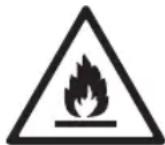
This symbol warns you about flammable materials that can ignite and cause a fire if you are not careful.
This appliance contains a small amount of isobutane refrigerant (R600a), which is flammable. When transporting or installing the appliance, be careful not to damage any part of the cooling circuit. - If a leak is detected, avoid open flames or potential ignition sources and ventilate the room where the appliance is located for a few minutes. To avoid the formation of a flammable gas-air mixture, if a leak occurs in the cooling circuit, the size of the room where the appliance is used must correspond to the amount of refrigerant used. The room must be at least 1 m² for every 8 g of R600a refrigerant in the appliance. When positioning the appliance, make sure the power cord is not trapped or damaged. Do not place multiple portable sockets or portable power supplies at the rear of the appliance.

WARNING
To reduce the risk of unintentional starting, incorrect operation, or damage to the product or materials, follow the basic safety precautions, including:
Installation
- Do not place the appliance to connect or disconnect it during transport.
- Be careful not to pinch parts of the body (e.g., hands or feet) while moving the appliance.
Explosion hazard
Do not store food in the freezer drawers or place metal parts in the freezer compartment. This can lead to freezing. Do not place glass containers, bottles, or cans (especially those with carbonated drinks) in the freezer, on the shelves, or in the ice container, where they will be exposed to temperatures below freezing. -The frozen glass in the door or in the upper part of the door may be damaged upon impact. Do not hit it with your hand if it is frozen. Do not lean on the doors of the freezer, the storage compartment, or the drawers, and do not climb on them. - Do not store an excessively large quantity of bottles of water or cans for preservation in the door compartments. -Do not allow children to play with the power cord or the water supply. - Do not open or close the freezer door with excessive force. - If the freezer door is damaged or does not work properly, stop using it and contact an authorized service center.
Do not place hot dishes or containers of hot water in the freezer when they are still hot.
- Never refreeze frozen food after it has been removed from the freezer. Be careful not to pinch your hand or foot when opening or closing the freezer door.
Maintenance
Do not place the shelves upside down. They may fall. -To prevent freezing in the freezer, contact the LG Electronics customer information center.
Dimensions and clearances
Too small a distance to surrounding objects can lead to reduced freezing capacity and increased energy consumption. Leave more than 50 mm of space from any surrounding wall when installing the appliance.
1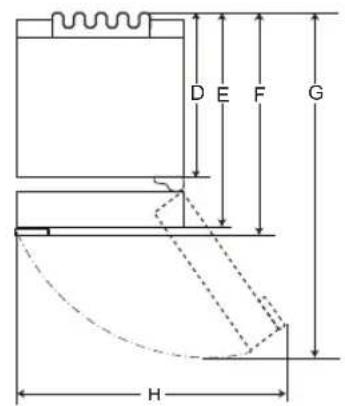
2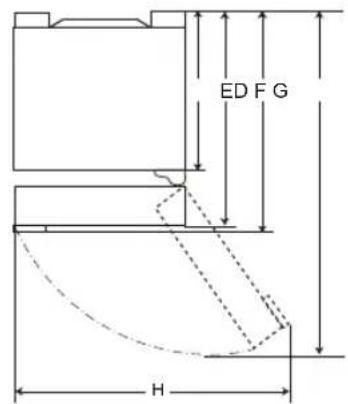
| 1 | 2 | |||
| Размер [MM] | ||||
| Джобна дрьжka | Лостова дрьжka | Джобна дрьжka | Лostова дрьжka | |
| A | 595 | 595 | 595 | 595 |
| B | 1860/2030 | 1860/2030 | 1860/2030 | 1860/2030 |
| C | 682 | 718 | 675 | 712 |
| D | 616 | 616 | 610 | 610 |
| E | 682 | 682 | 675 | 675 |
| F | - | 718 | - | 712 |
| G | 1230 | 1237 | 1225 | 1232 |
| H | 995 | 995 | 995 | 995 |
Ambient temperature
- The appliance is designed to operate in a limited temperature range depending on the climate zone. The temperature inside the appliance may be affected by its location, the ambient temperature, the frequency of door openings, etc. The climate class can be indicated with data.
*Abstract, English, Kenya
INSTALLATION
The appliance with categories from SN to T is intended for use at ambient temperatures from 10°C to 43°C
Notes on operation
- It is possible for ice to form and frost to build up if the door is not closed properly, if the humidity is high during the summer, or if the freezer door is opened frequently.
- Make sure there is enough space between the food stored on the top shelf and the top of the door, so that the door can close completely.
Leaving the door open for a long time can lead to a significant increase in the temperature inside the appliance. If the cooling unit is left open for a long time, you should disconnect it, defrost it, clean it, dry it, and leave the door open to prevent mold from forming in the unit.
Recommendations for energy saving
- Make sure there is enough space between the stored food items. This allows for even circulation of cold air and reduces electricity consumption. - Place hot food only after it has cooled down, to avoid the formation of ice or frost. When storing food in the refrigerator, set the temperature of the refrigerator to a lower value than the temperature indicated on the food. Do not place food close to the temperature sensor of the cooling unit. Keep a distance of at least 3 cm from the sensor. - Remember that the increase in temperature after defrosting has an acceptable range according to the specifications of the appliance. If you want to minimize the impact that this temperature increase can have on food storage, close the door hermetically or wrap the stored food in several layers.
- The automatic defrosting system of the appliance guarantees that under normal operating conditions, it does not require manual intervention. For the most efficient use of energy, place all internal parts (e.g., door containers, shelves, and drawers) in their original positions.
Do not set the temperature of the appliance lower than necessary.
Effective food storage
Store raw and frozen food in the freezer compartment. Check the expiration date (see storage instructions) before placing the food in the freezer. Do not store food for a long time if it has thawed completely at low temperature. Place chilled or frozen food in the refrigerator or freezer immediately after purchase. Store raw meat in suitable containers in the refrigerator, so that it does not come into contact with other food or drip on it. Avoid refreezing food that has been completely thawed. Refreezing food that has been completely thawed will impair the taste and nutritional quality. Do not store vegetables in the vegetable drawer. The vegetable drawer's humidity or other substances may contaminate or affect the food. Do not overload the appliance. The cold air cannot circulate properly if the appliance is overloaded. If you set the temperature too low, the food may freeze. Do not set the temperature lower than necessary for proper food storage. For more space, you can remove the bottle rack, the can rack, the shelf for eggs, and the drawer for fresh products. Food may freeze or spoil if stored at the wrong temperature. Set the refrigerator to the correct temperature for the food being stored.
Max. freezing capacity
The Express Freeze function sets the freezer to maximum freezing capacity. It quickly freezes for up to 24 hours and turns off automatically. If you need to use the maximum freezing capacity, Express Freeze should be turned on seven hours before placing fresh products in the freezer compartment.
Freezing maximum amount of food
For better air circulation, remove all drawers. If you need to store large quantities of food, all freezer drawers must be removed and the food placed directly on the freezer shelves (or racks) in the freezer compartment.
DRAWERS
To remove the drawers, first remove the food from the drawers and then lift them out carefully. Failure to follow this instruction may cause damage or injury. The shape of each drawer may be different; place them in the correct position.
Setting the temperature
This sets the temperature of the refrigerator or freezer.
- Press the Fridge button or the Freezer button to adjust the temperature.
- The temperature can be adjusted. -Refrigerator: from 1 °C to 7 °C -Freezer: from -15 °C to -23 °C -The initial temperature is set. -Refrigerator: 3°C -Freezer: -18°C
The actual temperature varies depending on the state of the food, as the set temperature is a reference, not the actual temperature in the appliance.
DRAWERS
The temperature in the refrigerator may vary depending on the settings. For optimal food storage, it is recommended to increase or decrease the temperature by 1°C using the thermostat for each compartment. - Remove the drawers 2 or 3 hours before cleaning. Connect the appliance to the mains, then store the food in it.
For proper operation, the freezer temperatures must be set to -18°C or colder.
High Temperature Alarm
When the freezer temperature becomes too high due to a power failure, the LED temperature indicator lights up and an audible alarm sounds.
- Press the Freezer button to turn it off. If the temperature has reached a sufficiently cold level, the alarm will stop automatically.
The function operates:
- When the appliance is switched on. - When the freezer compartment becomes too warm. - When there is a power interruption for an extended period. - When large quantities of warm food are placed in the freezer compartment. - When the freezer door is left open for a long time or opened too frequently.
Fresh Food Converter (*)
As a cooling compartment, the temperature in the fresh food converter can be controlled by adjusting the lever 1, located in the front of the compartment, in any direction.
When storing fresh vegetables, meat, or fish, you may experience cooling from the cold.
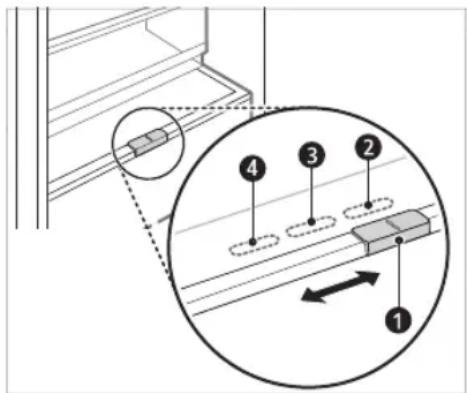
For storing vegetables (recommended) for storing fruit. For storing meat.
NOTE
(*): The function may vary depending on the purchased model.
Drawer for Fresh Vegetables (*)
The humidity in the vegetable drawer can be adjusted by turning the knob 1.
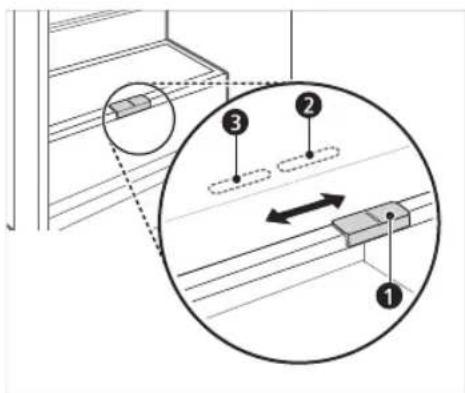
Storage in the green zone (recommended) for storing food.
DELAY
(*) This function varies depending on the model purchased.
- Cooling of the chamber
- This is the space for short-term storage of frozen products. - To quickly freeze fresh food, store it in the top cooling zone. Fresh food will freeze in the coldest zone.
WARNING
(*) This function varies depending on the model purchased. For more information regarding the specific model, please refer to the user manual.
LG ThinQ App
This feature is only available on models with Wi-Fi.
The LG ThinQ app allows you to communicate with the appliance via a smartphone.
Features of the LG ThinQ app
Communicate with the appliance from your smartphone using convenient smart features.
Smart Diagnosis
- If you encounter problems while using the appliance, this smart diagnosis feature will help you diagnose the problem.
Settings
- Ability to set different ONU IN types in the device and in the application.
NOTE
If you replace your wireless router, internet service provider, or password, reset the registration from the LG ThinQ application and re-register. - The application is subject to change without prior notice for improvement purposes. - Functions may differ depending on the model.
Before using the LG ThinQ application
1 Check the distance between the device and the wireless router (Wi-Fi).
If the distance between the device and the wireless router is too large, the signal strength weakens. It may take a long time to register or installation may be unsuccessful.
2 Turn off mobile data or cellular data on the smartphone.
3 Connect the smartphone to the wireless router.
NOTE
To check the Wi-Fi connection, turn on the LED indicator. - The device supports only 2.4 GHz Wi-Fi. To check the network frequency, contact your internet service provider or check the wireless router's manual. LG ThinQ is not responsible for connectivity problems or for damages, malfunctions, or defects caused by the network connection. If the device has difficulty connecting to the Wi-Fi network, it may be too far from the router. Purchase a Wi-Fi repeater (range extender) to improve the Wi-Fi signal strength. The Wi-Fi connection may not work or may be interrupted due to the environment in which the home network is located. - The network connection may not work properly due to the internet service provider. - The surrounding wireless environment may cause delays in the wireless network. - The device cannot be registered if there are problems with the wireless signal transmission. Turn off the device and wait about one minute before trying again. - If the wireless router's security wall is enabled, disable it or add an exception for it.
- The wireless network name (SSID) must be a combination of letters and English characters. (Do not use special characters.)
- The smartphone's user interface (UI) may differ depending on the mobile operating system (OS) and manufacturer. If the router's security protocol is set to WEP, you may not be able to configure the network. Change the security protocol to another one (WPA2 is recommended) and register the product again.
Temperature setting
Press the Fridge or Freezer button to adjust the temperature.
Installation of LG ThinQ application
Download the LG ThinQ app from the Google Play Store or Apple's App Store on a smartphone.
Important Safety Instructions 3
INSTALLATION 10
IMPORTANT SAFETY INSTRUCTIONS

DANGER
Additional Information Of The Manual
Application LG ThinQ
IMPORTANT SAFETY INSTRUCTIONS 3
INSTALLATION 10
Dimensions and free space 10
Ambient temperature 10
OPERATION 11
Operating notes 11
IMPORTANT SAFETY INSTRUCTIONS

WARNING
To reduce the risk of explosion, fire, death, electric shock, injury, or burns to persons when using this product, follow basic precautions, including the following:
Children in the household
- This appliance should not be used by persons (including children) with reduced physical, sensory, or mental capabilities, or lack of experience and knowledge, unless they are supervised or given instructions concerning use of the appliance by a person responsible for their safety. Children should be supervised to ensure that they do not play with the appliance.
- If the appliance is equipped with a lock (only on some models), keep the key out of reach of children.
For use in Europe:
Frozen or chilled food should be stored in closed containers.
- Frozen or chilled food should be placed in the freezer or refrigerator.
- Check the expiration date on the label (storage instructions) before placing food in the appliance.
- Do not store food for longer than the recommended period (more than 4 weeks) if it is not properly packaged at low temperature. Place frozen or chilled food in the freezer or refrigerator after purchase. Avoid refreezing food that has been completely thawed. Refreezing any food that has been completely thawed will reduce the nutritional value.
- Store fresh meat and fish in the appropriate compartments to prevent contact or dripping onto other food. Do not place vegetables in the crisper. Certain materials such as vegetables or other organic substances may contaminate and spoil food. Do not overload the appliance. Cold air cannot circulate properly if the freezer is overfilled.
- If you set the temperature too low, food may freeze. Do not set the temperature lower than necessary for proper food storage.
For more space, you can remove the shelves for bottles, jars, and the crisper for fresh food.
Food may freeze or spoil if stored at an incorrect temperature. Set the temperature in the fridge/freezer to the correct value for the food stored in it.
Maximum freezing capacity
- The Express Freeze function allows the maximum freezing capacity to be set. - The function is usually active for 24 hours, after which it switches off automatically. - If you want to use the maximum freezing capacity, the Express Freeze function must be activated 24 hours in advance, after which fresh products can be placed in the freezing compartment.
Freezing maximum amount of food
To improve air circulation, remove the drawers. If larger quantities of food need to be stored, the drawers in the freezing compartment should be removed and the food placed directly on the shelves (or on the bottom) of the freezing compartment.
WARNING
To remove the drawers, first remove the food from them, then pull them out. If you do not do this, the drawers may be damaged or torn. - The shape of each drawer may be different, so insert them into the corresponding slot.
Setting the temperature
Set the temperature on the fridge/freezer.
- Press the Fridge or Freezer button to adjust the temperature.
- The temperature can be adjusted.
- Fridge: from 1°C to 7°C - Freezer: from -15°C to -23°C
- The recommended temperature is set.
- Fridge: 3°C - Freezer: -18°C
The actual temperature varies depending on the status of the food. The temperature setting indicated is the target temperature, not the actual temperature inside the appliance.
NOTE: The temperature may vary depending on the type of food. For optimal food storage, it is recommended to adjust or lower the standard temperature for each compartment by 1°C or one level. - Wait 2 to 3 hours after connecting the appliance to the power supply before placing food in it. - To freeze food in a normal climate, the temperature of the freezer should be set to -18 °C or lower.
High Temperature Alarm
When the freezing temperature is too high due to a defect, the LED light of the freezer will blink and the alarm will sound.
- Press the Freezer button to turn it off. - If the temperature is low enough, the blinking and the alarm will automatically turn off.
The function is activated in the following cases:
- - The appliance is turned on.
- When the temperature in the freezer compartment rises significantly. - In case of a prolonged power outage. - In case of placing a large amount of warm food in the freezer. - In case the freezer door is left open for a long time or is opened very often.
Compartment for fresh products (*)
In the refrigerator compartment, the temperature in the fresh products compartment can be controlled with the help of the lever 1 which is located in the compartment, by placing it in two positions.
Storing vegetables with meat or fish settings may lead to freezing.
Storing vegetables. (Recommended) 3 for storing vegetables. 4 for storing meat.
NOTE
• (*): This characteristic varies depending on the purchased model.
Vegetable drawer (*)
Lamp for green light (*)
Place the vegetables in the drawer for vegetables.
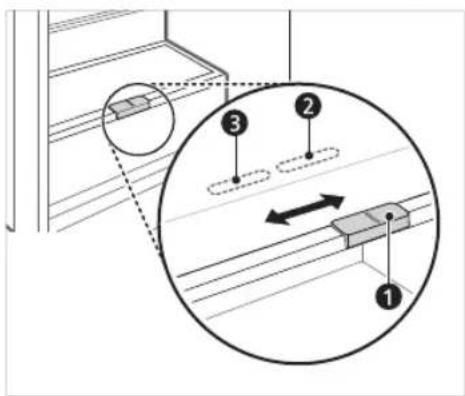
Storing vegetables. (Recommended) Guide for storage.
NOTE
(水 ) :This feature varies depending on the purchased model.
Drawer for storing food Storing food in the refrigerator
-Shelf on the door -This is the place where food is stored in the refrigerator. -The height of the shelf can be adjusted by placing the shelf in another slot with a different height. -Food that contains more moisture should be stored on the lower shelves. -The number of shelves varies from model to model. -Door shelf (*) -On the door shelf you can store all bottles and jars. -Folding shelf ( ) -Here you can store larger food items and tall items. -Vegetable drawer ( ) -Use the humidity controller in the drawer to maintain the freshness of vegetables and fruits. -The drawers may vary from model to model. -Fresh drawer (*) -In the fresh drawer you cannot store meat, fish, vegetables. Use the humidity controller located at the back of the refrigerator to maintain the freshness of the products. -For more space, you can use the fresh drawer without the drawer for vegetables. -Egg tray -Here eggs are stored. -You can place it and put it in the desired position. However, do not use it as a tray for ice or place it at the top of the refrigerator or in the vegetable drawer.
- Door shelves of the refrigerator -Here small packages of food, jars, bottles with sauces are stored.
- Water dispenser reservoir (*) -Water for the dispenser or for the automatic ice maker is placed in the reservoir. The reservoir is filled manually. (Only for models that are not connected to the water supply in the home)
Storing Food in the Freezer
- Ice tray
-The tray serves for making and storing ice. -For additional space, you can remove the tray or the ice cube container.
- Freezer drawer
-This is used for long-term storage of frozen food. -For quick freezing of fresh products, place the food in the top drawer. In this drawer, fresh products freeze the fastest.
NOTE
(*) :This feature varies depending on the purchased model. For more information about other drawers, visit lg.com and review the user guide.
LG ThinQ app
This function is available only on models with Wi-Fi.
The LG ThinQ app allows you to communicate with the appliance using your smartphone.
Features of the LG ThinQ app
Communicate with the appliance from your smartphone using the practical smart functions.
Smart Diagnosis
If you experience a problem while using the app, the smart diagnosis feature will help you diagnose the problem.
Settings
It allows you to set various functions of the appliance and the app.
NOTE
If you change your wireless router, internet service provider, or password, delete the registered appliance from the LG ThinQ app and register it again. The app should update the appliance settings in advance, without giving prior notice to users. - Features may vary depending on the model.
Before using the LG ThinQ app
1 Check the distance between the appliance and the wireless router (Wi-Fi network).
If the distance between the appliance and the wireless router is too far, the signal may be weak. It may take a longer time to register, or may lead to unsuccessful installation.
2 Turn off mobile data or cellular data on your smartphone.
3 NOBp3eTe ro BaHnOT nAmEt H TeNeΦoH co 6e3xuHnOpyTep.
HANOMEHA
3a da ja notbprnte Wi-Fi kohekujata, npoBepeTe DaHn CBETN KOHOHa TKA KOHTPOHNOI NaHeJ. Anapatot noDpkyBa eHCTBeno 2,4 GHz Wi-Fi mpekn.3a da ja npobepnte pfpekbeunjata Ha BaWata mpeka, KOHTaKTnpajte ro BaWnOT Cha6dyBaucho INTEpHET ycnyu, nJIN NorJeHete BO yNATCBOTO 3a BaWnOT 6e3KneHen pyTep.
LG ThinQ He o odrovoepen 3a 6nlo KaBn npo6nemn Okony KoHeKtnpaHBeTo Ha MPekKaTa nn KaBn n da 6nno rpeuKn, DepeKtn nnn rpeuKn npedn3BnkaHn od KoHeKtnpaHBeTo Ha MPekKaTa. Ako anapaTOT mna npo6nemOkony KOHeKTnpaHbeto Ha Wi-Fi MPexKaTa, MoXe6n e npedaneky od pyTePOT. Hababe Wi-Fi 3acnnyBauch (3acnnyBaH na Docptenot) 3a da ja nOdo6pnte jauHata Ha Wi-Fi cnHaNoT. Wi-Fi KOHeKunjata MoKe6n He ce NOBp3yBa nn MoKe6n e npeKnHaTa nopadi ONkpyKaBaHeto Ha DomaHaTa Mpeka. MpexHTo IOBp3yBaHe MoKe6n Hema da pa60TN npaBnHb BO 3aBnCHocT O npobajdepot Ha nHTepHET ycnyrnte. - OkonHTo 6e3KnUHO NOBp3yBaHaBe MoKe6n npDoHeCyBa 6e3KuHNOT MpexKeH cepBnC da pa60Tu 6aBHo. AnapatoT He MoKe Da ce perncTpnpa, npaHn np6IeMn Co npeHocot Ha 6e3KuHnOt CnHnI. N3Bneye To Ka6eIOT Od anapaTOn I nouekajte OKny edHa MNHyTa, nped nobTOpHO da ce obndTe. Ako e OBO3MOXKe 3aUHTHNOt SnHa BaUINOT 6e3Kuueh pyTep, OHeBO3MOXKeTe ro nn IdoaJeTe NCKnyOK BO Hero.
- IMeTo Ha 6e3KnUHata MpeKa (SSID) Tpe6a da 6nnde KOM6nHaunja Od aHrnnckn 6yKBn n 6poEBn. (He KopncTeTe r n CneunjahnHte KapakTepn) KopncnHKnOT INHTeppejc (UI) Ha naMeTHNOTeJeFOH MOKe Da Bapnpa, BO 3aBnCHOCTOJ MO6NJHNOT ONepaTHBEH CnCTeM (OS) nIpnON3BONDTEJOT. Ako 6e36eHocnOT npotoKoHa pytepo e noctabeh Ha WEP,MOke da He ycneete BO nOecyBaheTo Ha mpekata. Be moJime npomeHeTe ro Ha dpyrN 6e36eHocnH npotoKoHi (Ce npenopaCyBa WPA2) n NOBtOpHo pernctpupajTe ro npOn3BOIoT.
HcTaInpaBe Ha anIIkaunjaTALG ThinQ
Побapajte ja anлкацида LG ThinQ Ha Google Play Store & Apple App Store npeky bauinot namete6 telefoH.
CneTe rHnHCTpyKunHe 3a npEemaBe n HCTaInpaHe Ha aannkaunjata.
Nobp3yBaHe co Wi-Fi
Kora ro KopnCTnte KOnHeTo Wi-Fi co anIIkaunjata LG ThinQ, anapaTOT moKe da ce noBp3e co domaunHata Wi-Fi MPeka. IKoHata ro nokakyba cTaTycot Ha MPekHATA KOHEKUnja Ha anapatot. IKoHata cbEtN kora anapaTOT e nobp3ah co Wi-Fi MPekaTata.
PpBnHa pernctpaunJa Ha anapatot
CTapTybajte ja LG ThinQ annkaunjata n cneDeTe rHnCTpykunite BO annkaunjata,3a da ro pernctpupaTpe anapaTOT.
NoBtopHo pernctpnpaHe Ha anapatOT nnn perncptpapaHe Ha npyR KopncnK
- PnntncheTe n dpKeTe ro konyeTo Wi-Fi BO TpaHe 3 ckyHn, 3a npBpeMeHo NCKnyBaHe. CtapTyBajTe ja LG ThinQ anIIkaunjata n cneTe r HNCTpyKunTe BO Hea 3a da ro pernctpnpate anapatOT.
HANOMEHA
To connect to Wi-Fi, press and hold the Wi-Fi button for 3 seconds. The icon will turn on.
Software license notification with open source code
To obtain the source code under GPL, LGPL, MPL, and other open source licenses, which are subject to the terms of the respective licenses and are included in this product, and to access the relevant documents, please visit https://opensource.lge.com.
LGE will also provide you with the open source code on CD-ROM for a charge covering the cost of such distribution (such as the cost of media, shipping, and handling) upon request via email to opensource@lge.com. This offer is valid for three years from the date of the last shipment of this product, for anyone who receives this information.
Cleaning instructions
When cleaning the appliance, unplug it from the power outlet to prevent damage or injury. - In particular, avoid direct contact with the heating element of the appliance. - If the appliance has a ventilation opening on the top or side, unplug it from the power source to avoid static electricity that could damage the electronics or cause an electric shock. - Remove the plugs and cords, wash them with warm water, then dry and reattach them. - Regularly clean the door with a damp soft cloth. - The door gasket and its surroundings should be cleaned because they affect the door's sealing capacity and may cause damage. - After cleaning, check that the power cord is not damaged, bent, or incorrectly plugged in. - Clean the ventilation openings on the exterior of the appliance.
-Blocked ventilation openings can cause a fire or damage the appliance.
When cleaning the interior or exterior of the appliance, do not use a rough brush, abrasive for scrubbing, or any flammable materials. Do not use cleaning agents that contain flammable substances.
-This may cause discoloration or damage to the appliance. -Flammable materials: alcohol (ethanol, methanol, isopropyl alcohol, etc.), paint thinner, benzene, flammable liquids, abrasives, etc. - For the exterior of the appliance, use a soft cloth dampened with water or a mild detergent. Do not use abrasive cleaners or strong cleaning agents. Rinse thoroughly with a soft cloth. - Never put the plugs or cords in a dishwasher.
-The door may deform due to heat.
- Regularly clean the surfaces to prevent contact with food and the cooking system.
- If the appliance is equipped with LED lighting, do not look directly at the LED light, even when repairing or servicing it. You may contact the LG Electronics customer information center.
Connection with Wi-Fi
Recommendations for energy saving
TABLE OF CONTENTS
IMPORTANT SAFETY INSTRUCTIONS

WARNING
TABLE OF CONTENTS
There may be images or content in this manual that differ from the model you purchased.
for more information.
Troubleshooting
SAFETY INSTRUCTIONS
EN
Setting the temperature
With this button, the refrigerator or freezer temperature is set.
Press the Fridge button or the
Freezer button to adjust the temperature.
- The temperatures can be adjusted.
Fridge: from 1°C to 7°C - Freezer: from -15°C to -23°C
- The initial temperature is set.
Fridge: 3°C - Freezer: -18°C
- (*): This feature varies depending on the model purchased.
Control Panel
Units and Functions
On the Refrigerator Door
Inside the Refrigerator
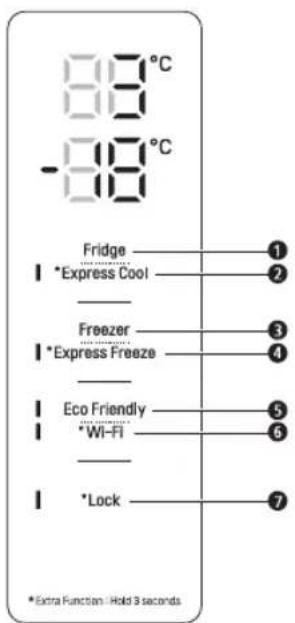
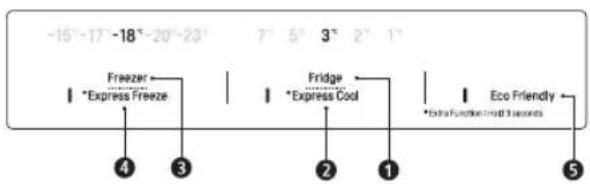
Fridge Temperature
This sets the fridge target temperature.
Eco Friendly
This controls the Power Save mode for lowering energy consumption.
Express Cool
This sets the Express Cool Functions.
6 Wi-Fi
This sets the refrigerator to connect to your home's Wi-Fi network.
3 Freezer Temperature
This sets the freezer target temperature.
7 Lock
This locks the buttons on the control panel.
4 * Express Freeze
This sets the Express Freeze Functions.
NOTE
The actual control panel may differ from model to model. - The control panel will turn off automatically for energy saving.
- Take care when cleaning the control panel, as contact with fingers or skin can accidentally activate buttons.
- To turn functions on/off, press and hold the center of the text until you hear a sound or the LED indicator turns on/off.
Warning for flammable material
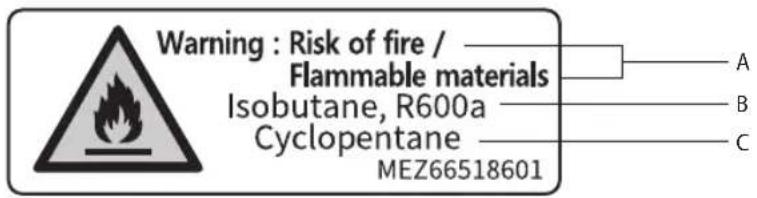
A (EN) Warning: Risk of fire / Flammable materials / (BG) Пedlyрждени: Рск OT похар / Залиму matерпан / (CZ) Varovani: Nebezpeci vzniku požaru / Hořlavе materiały / (DA) Adversel: brandrisiko /brandbare materialer / (DE) Warning: Brandgefahr / Brennbare Materialien / (ES) Advertencia: Riesgo de incendio Mat eriales inflamables / (ET) Hoiatus: tuleoht / Tuleohtlikud materjalid / (FI) Varoitus: Tulipalovaara/sytyviä materiaaleja / (FR) Avertissement: Risque d'incendie / Materiaux inflammables / (GR) Пождбогион: Kivduvoč φωτιαc / (EUφλεκταυικa / (HR) Upozorenje: Opasnost(68) požara / Zapaljivi materijali / (HU) Figyelmeztêtes: Tuzveszély/Gyulékony anyagok/ (M) Attenzione: rischio d'incendio / Materiale inflammabile (LT) Jspejimas: gaisro rizika / Degiosios medziagos / (LV) Brīdinajums: Ugunsgreka risks / Viegli uzliesmojsi materiali / (MK) Пedlyрждени: Onachoct od požap / 3anannu mapecjani / (NL) Waarschuwing: Brandgevaar / Brandbare materialen / (NO) Adversel: Brannfare / Brennbar e materialer / (PL) Ostrzezenia: Rzyko požaru / Materialy latwopalne / (PT) Aviso: Risco de incendió/Materiais inflamáveis / (RO) Avertissement: Risc de incendiu / Materiale inflamabile / (SK) Varovanie: Nebezpečestvo požiaru / Horlavé materiały / (SL) Opozorilo: nevarnost požara / Vnetljivi materiali / (SQ) Paralajmerim: Rrezik zjarri / Materiale te ndeshme / (SR) Upozorenje: Opasnost od požar a / Zapaljivi materijali / (SV) Varning: Brandrisk / Brandfarligt material B (BN) Isobutane, R600a/ (BG) N3o6yraH, R600a/ (CZ) Izobutan, R600a/ (DA) Isobutan, R600a/ (DE) Isobutan, R600a/ (ES) Isobutano, R600a/ (ETD) Isobutaan, R600a/ (FJ) Isobutaani, R600a/ (FR) Isobutane, R600a/ (GR) IooBoutavio, R600a/ (HR) Izobutan, R600a/ (HU) Izobutan, R600a/ (IT) Isobutano, R600a/ (LT) Izobutanas, R600a/ (LV) Izobutans, R600a/ (MK) N3o6yraH, R600a/ (NL) Isobutaan, R600a/ (NO) Isobutan, R600a/ (PL) Izobutan, R600a/ (PT) Isobutano, R600a/ (RO) Izobutan, R600a/ (SR) Izobutan, R600a/ (SL) Izobutan, R600a/ (SQ) Izobutan, R600a/ (SR) Izobutan, R600a/ (SV) Isobuten, R600a C (EN) Cyclopentane/ (BG) LknonenTah/ (CZ) Cyklopentan/ (DA) Cyklopentan/ (DE) Zyklo-Pentan / (ES) Ciclopentano/ (ET) Tsuklopentaan/ (FI) syklopentaani/ (FR) Cyclopentane/ (GR) Kuklonevtavio / (HR) Ciklopentan/ (HU) Ciklopentan/ (IT) Ciclopentano/ (LT) Ciklopentanas / (LV) Ciklopentans / (MK) LknonenTah/ (NL) Cyclopentaan/ (NO) Syklopentan/ (PL) Cyklopentan/ (PT) Ciclopentano/ (RO) Ciclopentan/ (SK) Cyklopentan/ (SL) Ciklopentan/ (SQ) Ciklopentan/ (SR) Ciklopentan / (SV) Cyclopentan
Rating label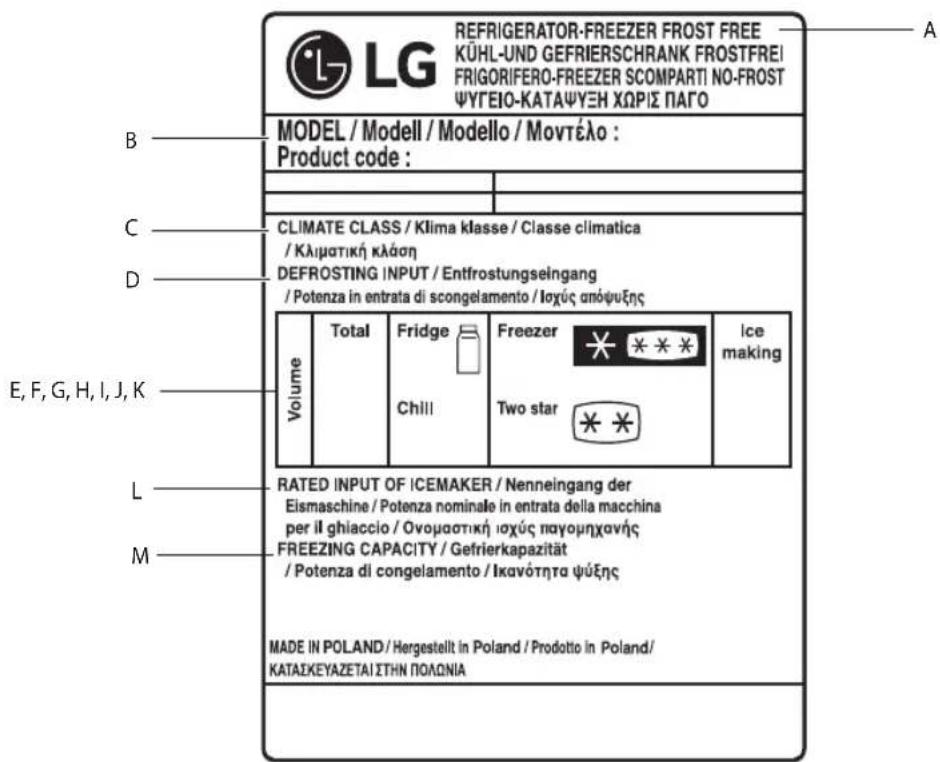
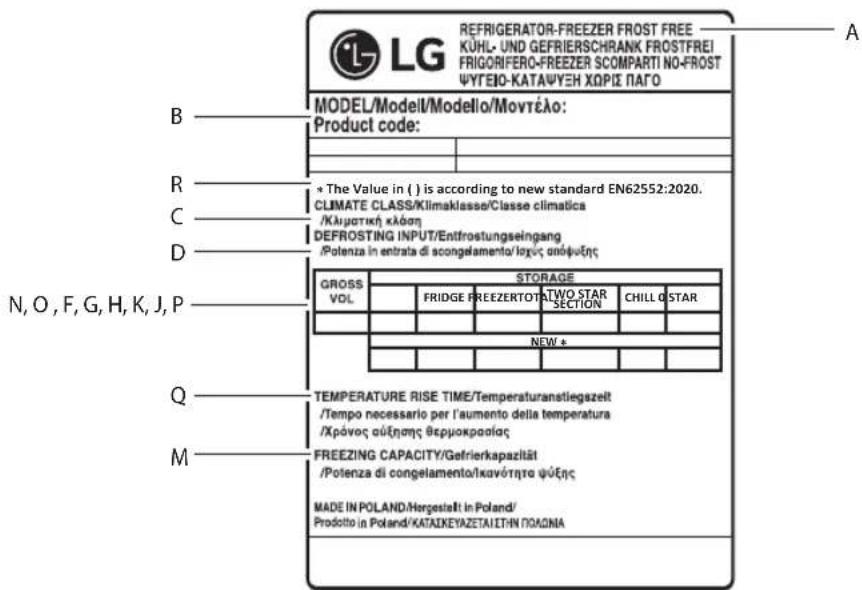
A (EN) Refrigerator-freezer Frost free / (BG) Xладинник-фризер Без скреж / (CZ) Chladnička s mrazničkou, Beznámrazová / (DA) No frost-køleskab/fryser / (ES) Refrigerador-congelador Libre de escarcha / (ET) Külmik-sügavkülmik Külmumiskindel / (FI) Jääkaappi-pakastin, automaattisulatteinen / (FR) Réfrigérateur-congélateur Sans givre / (HR) Hladnjak-zamrzivač Bez nakupljanja leda / (HU) Hűtőszekrény-fagyasztó Jegesedésmentes / (LT) Šaldytuvas-šaldiklis Be šerkšno / (LV) Ledusskapis-saldētava Bez apsarmojuma / (MK) Фрижидер-Замрзнувач Без мраз / (NL) Koel-vriescombinatie No-frost / (NO) Frostfri kjøleskap med fryser / (PL) Chłodziarko-zamrażarka System bezszronowy / (PT) Frigorífico-congelador Sem gelo / (RO) Frigider-congelator Fără gheață / (SK) Chladnička s mrazničkou Beznámrazový systém / (SL) Hladilnik-zamrzovalnik Brez ledu / (SQ) Frigorifer-ngrirës pa ngricë / (SR) Frižider-zamrzivač Bez zamrzavanja / (SV) Frostfritt Kyl-och frysskåp B (EN) Model / (BG) Модел / (CZ) Model / (DA) Model / (ES) Model / (ET) Model / (FI) Malli / (FR) Modèle / (HR) Model / (HU) Modell / (LT) Modelis / (LV) Modelis / (MK) Модел / (NL) Model / (NO) Modell / (PL) Model / (PT) Modelo / (RO) Model / (SK) Model / (SL) Model / (SQ) Model / (SR) Model / (SV) Modell C (EN) Climate class / (BG) Климатичен клас / (CZ) Klimatická třída / (DA) Klimaklasse / (ES) Clase climática / (ET) Kliimaklass / (FI) Ilmastoluokka / (FR) Classe climatique / (HR) Klimatski razred / (HU) Klíma osztály / (LT) Klimato klasė / (LV) Klimata klase / (MK) Климатска класа / (NL) Klimaatklasse / (NO) Klimaklasse / (PL) Klasa klimatyczna / (PT) Classe climática / (RO) Clasă de climatizare / (SK) Klimatická trieda / (SL) Klimatski razred / (SQ) Kategoria e klimës / (SR) Klimatska klasa / (SV) Miljöklass D (EN) Defrosting input / (BG) Потребена мощност за размразяване / (CZ) Příkon při rozmrazování / (DA) Afrimningsindgang / (ES) Entrada de descongelación / (ET) Sulatamise sisend / (FI) Sulatuksen tulo / (FR) Entrée de décongélation / (HR) Ulaz odmrzavanja / (HU) Leolvasztási bemenet / (LT) Energijos poreikis atšildymui / (LV) Atsaldēšanas ievade / (MK) Одмрзнување влез / (NL) Ingang ontdooien / (NO) Nominell avtining / (PL) Pobór mocy przy rozmrażaniu / (PT) Entrada para descongelação / (RO) Putere dezghețare / (SK) Príkon rozmrazovania / (SL) Odjemna moč za odleditev / (SQ) Hyrja e shkrirjes / (SR) Ulazna snaga za odmrzavanje / (SV) Avfrostningseffekt E (EN) Volume / (BG) Обем / (CZ) Objem / (DA) Volumen / (DE) Volumen / (EL) Όγκος / (ES) Volumen / (ET) Maht / (FI) Määrä / (FR) Volume / (HR) Zapremina / (HU) Térfogat / (IT) Volume / (LT) Talpa / (LV) Skalums / (MK) Волумен / (NL) Volume / (NO) Volum / (PL) Objętość / (PT) Volume / (RO) Volum / (SK) Objem / (SL) Prostornina / (SQ) Vëllim / (SR) Zapremina / (SV) Volym F (EN) Total / (BG) Общо / (CZ) Celkem / (DA) Total / (DE) Gesamt / (EL) Σύνολο / (ES) Total / (ET) Kokku / (FI) Yhteensä / (FR) Total / (HR) Ukupno / (HU) Összesen / (IT) Totale / (LT) Iš viso / (LV) Kopā / (MK) Вкупно / (NL) Totaal / (NO) Total / (PL) Łącznie / (PT) Total / (RO) Total / (SK) Celkovo / (SL) Skupaj / (SQ) Totali / (SR) Ukupno / (SV) Totalt G (EN) Fridge / (BG) Хладилник / (CZ) Chladnička / (DE) Kühlschrank / (DA) Køleskab / (EL) Ψυγείο / (ES) Frigorífico / (ET) Külmik / (FI) Jääkaappi / (FR) Réfrigérateur / (HR) Hladnjak / (HU) Hűtőszekrény / (IT) Frigorifero / (LT) Šaldytuvas / (LV) Ledusskapis / (MK) Фрижидер / (NL) Koelkast / (NO) Kjøleskap / (PL) Lodówka / (PT) Frigorífico / (RO) Frigider / (SK) Chladnička / (SL) Hladilnik / (SQ) Frigoriferi / (SR) Frižider / (SV) Kylskåp H (EN) Freezer / (BG) Фризер / (CZ) Mraznička / (DA) Fryser / (DE) Gefrierschrank / (ES) Congelador / (ET) Sügavkülmik / (FI) Pakastin / (FR) Congélateur / (GR) Καταψύκτης / (HR) Zamrzivač / (HU) Fagyasztó / (IT) Freezer / (LT) Šaldiklis / (LV) Saldētava / (MK) Замрзнувач / (NL) Vriescombinatie / (NO) Fryser / (PL) Zamrażarka / (PT) Congelador / (RO) Congelator / (SK) Mraznička / (SL) Zamrzovalnik / (SQ) Ngrirës / (SR) Zamrzivač / (SV) Frysskåp | (EN) Ice making / (BG) Производство на лед / (CZ) Výroba ledu / (DA) Isterningmaskine / (DE) Eisherstellung / (EL) Παραγωγή πάγου / (ES) Fabricación de hielo / (ET) Jää valmistamine / (FI) Jääpalojen valmistus / (FR) Fabrication de glace / (HR) Pravljenje leda / (HU) Jégkészítés / (IT) Produzione ghiaccio / (LT) Ledo gaminimas / (LV) Ledus gatavošana / (MK) Производство мраз / (NL) IJs maken / (NO) Ismaskin / (PL) Wytwarzanie lodu / (PT) Produção de gelo / (RO) Utilizarea dozatorului de gheață / (SK) Výrobník ľadu / (SL) Izdelava ledu / (SQ) Prodhimi i akullit / (SR) Ledomat / (SV) Istillverkning J (EN) Chill / (BG) Студено / (CZ) Chlad / (DA) Kold / (DE) Kühle / (ES) Frío / (EL) Ψύχος / (ET) Külmus / (FI) Jäähdytys / (FR) Fraîcheur / (HR) Hladnoća / (HU) Hűtés / (IT) Freddo / (LT) Šaltumas / (LV) Aukstums / (MK) Студено / (NL) Koude / (NO) Avkjøling / (PL) Komora chłodzenia / (PT) Frio / (RO) Răcire / (SK) Chlad / (SL) Hladnost / (SQ) Ftohtësi / (SR) Hladnoća / (SV) Kyla K (EN) Two star / (BG) 2 звезди / (CZ) Dvě hvězdičky / (DA) To stjerner / (DE) Zwei Sterne / (EL) 2 αστέρων / (ES) 2 estrellas / (ET) Kahetärniline / (FI) Kaksi tähteä / (FR) Deux étoiles / (HR) Dvije zvijezde / (HU) Két csillag / (IT) 2 stelle / (LT) Dvi žvaigždutės / (LV) Divas zvaigznes / (MK) 2 ѕвезди / (NL) Twee sterren / (NO) To stjerner / (PL) Dwie gwiazdki / (PT) Duas estrelas / (RO) Două stele / (SK) Dve hviezdičky / (SL) Dve zvezdici / (SQ) Me dy yje / (SR) Dve zvezdice / (SV) Två stjärnor
L (EN) Rated input of icemaker / (BG) Rated input of icemaker / (CZ) Rated input of icemaker / (DA) Rated input of icemaker / (DE) Rated input of icemaker / (EL) Rated input of icemaker / (ES) Rated input of icemaker / (ET) Rated input of icemaker / (FI) Rated input of icemaker / (FR) Rated input of icemaker / (HR) Rated input of icemaker / (HU) Rated input of icemaker / (IT) Rated input of icemaker / (LT) Rated input of icemaker / (LV) Rated input of icemaker / (MK) Rated input of icemaker / (NL) Rated input of icemaker / (NO) Rated input of icemaker / (PL) Rated input of icemaker / (PT) Rated input of icemaker / (RO) Rated input of icemaker / (SK) Rated input of icemaker / (SL) Rated input of icemaker / (SQ) Rated input of icemaker / (SR) Rated input of icemaker / (SV) Rated input of icemaker / M (EN) Freezing Capacity / (BG) Freezing Capacity / (CZ) Freezing Capacity / (DA) Freezing Capacity / (ES) Freezing Capacity / (ET) Freezing Capacity / (FI) Freezing Capacity / (FR) Freezing Capacity / (HR) Freezing Capacity / (HU) Freezing Capacity / (LT) Freezing Capacity / (LV) Freezing Capacity / (MK) Freezing Capacity / (NL) Freezing Capacity / (NO) Freezing Capacity / (PL) Freezing Capacity / (PT) Freezing Capacity / (RO) Freezing Capacity / (SK) Freezing Capacity / (SL) Freezing Capacity / (SQ) Freezing Capacity / (SR) Freezing Capacity / (SV) Freezing Capacity / N (EN) Gross Volume / (BG) Gross Volume / (CZ) Gross Volume / (DA) Gross Volume / (DE) Gross Volume / (EL) Gross Volume / (ES) Gross Volume / (ET) Gross Volume / (FI) Gross Volume / (FR) Gross Volume / (HR) Gross Volume / (HU) Gross Volume / (IT) Gross Volume / (LT) Gross Volume / (LV) Gross Volume / (MK) Gross Volume / (NL) Gross Volume / (NO) Gross Volume / (PL) Gross Volume / (PT) Gross Volume / (RO) Gross Volume / (SK) Gross Volume / (SL) Gross Volume / (SQ) Gross Volume / (SR) Gross Volume / (SV) Gross Volume / O (EN) Storage Volume / (BG) Storage Volume / (CZ) Storage Volume / (DA) Storage Volume / (DE) Storage Volume / (EL) Storage Volume / (ES) Storage Volume / (ET) Storage Volume / (FI) Storage Volume / (FR) Storage Volume / (HR) Storage Volume / (HU) Storage Volume / (IT) Storage Volume / (LT) Storage Volume / (LV) Storage Volume / (MK) Storage Volume / (NL) Storage Volume / (NO) Storage Volume / (PL) Storage Volume / (PT) Storage Volume / (RO) Storage Volume / (SK) Storage Volume / (SL) Storage Volume / (SQ) Storage Volume / (SR) Storage Volume / (SV) Storage Volume / P (EN) 0 star / (BG) 0 star / (CZ) 0 star / (DA) 0 star / (DE) 0 star / (EL) 0 star / (ES) 0 star / (ET) 0 star / (FI) 0 star / (FR) 0 star / (HR) 0 star / (HU) 0 star / (IT) 0 star / (LT) 0 star / (LV) 0 star / (MK) 0 star / (NL) 0 star / (NO) 0 star / (PL) 0 star / (PT) 0 star / (RO) 0 star / (SK) 0 star / (SL) 0 star / (SQ) 0 star / (SR) 0 star / (SV) 0 star / Q (EN) Temperature rise time / (BG) Temperature rise time / (CZ) Temperature rise time / (DA) Temperature rise time / (ES) Temperature rise time / (ET) Temperature rise time / (FI) Temperature rise time / (FR) Temperature rise time / (HR) Temperature rise time / (HU) Temperature rise time / (LT) Temperature rise time / (LV) Temperature rise time / (MK) Temperature rise time / (NL) Temperature rise time / (NO) Temperature rise time / (PL) Temperature rise time / (PT) Temperature rise time / (RO) Temperature rise time / (SK) Temperature rise time / (SL) Temperature rise time / (SQ) Temperature rise time / (SR) Temperature rise time / (SV) Temperature rise time / R (EN) The value in () is according to new standard EN62552:2020. / (BG) The value in () is according to new standard EN62552:2020. / (CZ) The value in () is according to new standard EN62552:2020. / (DA) The value in () is according to new standard EN62552:2020. / (DE) The value in () is according to new standard EN62552:2020. / (ES) The value in () is according to new standard EN62552:2020. / (EL) The value in () is according to new standard EN62552:2020. / (ET) The value in () is according to new standard EN62552:2020. / (FI) The value in () is according to new standard EN62552:2020. / (FR) The value in () is according to new standard EN62552:2020. / (HR) The value in () is according to new standard EN62552:2020. / (HU) The value in () is according to new standard EN62552:2020. / (IT) The value in () is according to new standard EN62552:2020. / (LT) The value in () is according to new standard EN62552:2020. / (LV) The value in () is according to new standard EN62552:2020. / (MK) The value in () is according to new standard EN62552:2020. / (NO) The value in () is according to new standard EN62552:2020. / (NL) The value in () is according to new standard EN62552:2020. / (PL) The value in () is according to new standard EN62552:2020. / (PT) The value in () is according to new standard EN62552:2020. / (RO) The value in () is according to new standard EN62552:2020. / (SK) The value in () is according to new standard EN62552:2020. / (SL) The value in () is according to new standard EN62552:2020. / (SQ) The value in () is according to new standard EN62552:2020. / (SR) The value in () is according to new standard EN62552:2020. / (SV) The value in () is according to new standard EN62552:2020.

Life's Good
- TABLE OF CONTENTS
- SAFETY INSTRUCTIONS
- INSTALLATION
- OPERATION
- SMART FUNCTIONS
- MAINTENANCE
- TROUBLESHOOTING
- ADDITIONAL INFORMATION OF THE MANUAL
- WARNING
- CAUTION
- IMPORTANT SAFETY INSTRUCTIONS
- CHILDREN IN THE HOUSEHOLD
- FOR USE IN EUROPE
- DISPOSAL
- TECHNICAL SAFETY
- RISK OF FIRE AND FLAMMABLE MATERIALS
- DIMENSIONS AND CLEARANCES
- AMBIENT TEMPERATURE
- NOTE
- NOTES FOR OPERATION
- SUGGESTION FOR ENERGY SAVING
- STORING FOODS EFFECTIVELY
- MAX FREEZING CAPACITY
- FREEZING THE MAXIMUM AMOUNT OF FOOD
- SETTING THE TEMPERATURE
- HIGH TEMPERATURE ALARM
- FRESH CONVERTER (*)
- FRESH VEGETABLE PAINTER (*)
- FOOD STORAGE COMPARTMENTS STORING FOOD IN THE FRIDGE COMPARTMENT
- STORING FOOD IN THE FREEZER COMPARTMENT
- LG THINQ APPLICATION
- LG THINQ APPLICATION FEATURES
- SMART DIAGNOSIS
- SETTINGS
- BEFORE USING LG THINQ APPLICATION
- INSTALLING THE LG THINQ APPLICATION
- CONNECTING TO WI-FI
- INITIAL APPLIANCE REGISTRATION
- RE-REGISTERING THE APPLIANCE OR REGISTERING ANOTHER USER
- OPEN SOURCE SOFTWARE NOTICE INFORMATION
- NOTES FOR CLEANING
- DISPOSAL OF YOUR OLD APPLIANCE
- BEFORE CALLING FOR SERVICE
- CUSTOMER CARE AND SERVICE
- ADDITIONAL INFORMATION REGARDING THE MANUAL
- EXPLOITATION
- EXPLOSION HAZARD
- NOTES ON OPERATION
- RECOMMENDATIONS FOR ENERGY SAVING
- EFFECTIVE FOOD STORAGE
- MAX. FREEZING CAPACITY
- FREEZING MAXIMUM AMOUNT OF FOOD
- DRAWERS
- FRESH FOOD CONVERTER (*)
- DRAWER FOR FRESH VEGETABLES (*)
- DELAY
- COOLING OF THE CHAMBER
- LG THINQ APP
- FEATURES OF THE LG THINQ APP
- BEFORE USING THE LG THINQ APPLICATION
- TEMPERATURE SETTING
- INSTALLATION OF LG THINQ APPLICATION
- APPLICATION LG THINQ
- FROZEN OR CHILLED FOOD SHOULD BE STORED IN CLOSED CONTAINERS
- MAXIMUM FREEZING CAPACITY
- NOTE: THE TEMPERATURE MAY VARY DEPENDING ON THE TYPE OF FOOD. FOR OPTIMAL FOOD STORAGE, IT IS RECOMMENDED TO ADJUST OR LOWER THE STANDARD TEMPERATURE FOR EACH COMPARTMENT BY 1°C OR ONE LEVEL. - WAIT 2 TO 3 HOURS AFTER CONNECTING THE APPLIANCE TO THE POWER SUPPLY BEFORE PLACING FOOD IN IT. - TO FREEZE FOOD IN A NORMAL CLIMATE, THE TEMPERATURE OF THE FREEZER SHOULD BE SET TO -18 °C OR LOWER
- WHEN THE FREEZING TEMPERATURE IS TOO HIGH DUE TO A DEFECT, THE LED LIGHT OF THE FREEZER WILL BLINK AND THE ALARM WILL SOUND
- IN THE REFRIGERATOR COMPARTMENT, THE TEMPERATURE IN THE FRESH PRODUCTS COMPARTMENT CAN BE CONTROLLED WITH THE HELP OF THE LEVER 1 WHICH IS LOCATED IN THE COMPARTMENT, BY PLACING IT IN TWO POSITIONS
- (*): THIS CHARACTERISTIC VARIES DEPENDING ON THE PURCHASED MODEL
- LAMP FOR GREEN LIGHT (*)
- DRAWER FOR STORING FOOD STORING FOOD IN THE REFRIGERATOR
- STORING FOOD IN THE FREEZER
- BEFORE USING THE LG THINQ APP
- HANOMEHA
- HCTAINPABE HA ANIIKAUNJATALG THINQ
- NOBP3YBAHE CO WI-FI
- PPBNHA PERNCTPAUNJA HA ANAPATOT
- NOBTOPHO PERNCTPNPAHE HA ANAPATOT NNN PERNCPTPAPAHE HA NPYR KOPNCNK
- SOFTWARE LICENSE NOTIFICATION WITH OPEN SOURCE CODE
- CLEANING INSTRUCTIONS
- CONNECTION WITH WI-FI
- CONTROL PANEL
- UNITS AND FUNCTIONS
- FRIDGE TEMPERATURE
- ECO FRIENDLY
- EXPRESS COOL
- WI-FI
- FREEZER TEMPERATURE
- LOCK
- EXPRESS FREEZE
- WARNING FOR FLAMMABLE MATERIAL
Brand : LG
Model : GBB71MCEGN
Category : Freezer