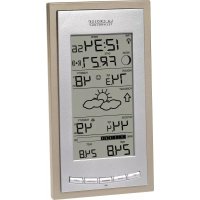
WS9046U - Weather Station LA CROSSE TECHNOLOGY - Free user manual and instructions
Find the device manual for free WS9046U LA CROSSE TECHNOLOGY in PDF.



| Product Type | Wireless weather station with outdoor sensors |
| Brand | La Crosse Technology |
| Model | WS9046U |
| Indoor station power | 3 AA 1.5V batteries (alkaline recommended) |
| Remote thermo-hygrometer sensor power | 2 AA 1.5V batteries |
| Anemometer sensor power | Powered by the thermo-hygrometer sensor (via RJ11 cable) |
| Rain sensor power (optional) | Battery-free, powered by connection to the thermo-hygrometer sensor |
| Indoor station dimensions | 350 x 144 x 30.4 mm |
| Remote thermo-hygrometer sensor dimensions | 137 x 56.2 x 56.2 mm |
| Remote anemometer sensor dimensions | 191.2 x 55.8 x 56 mm |
| Radio range (sensor to station) | Up to 24 meters in open field |
| Time signal frequency | WWVB 60 kHz (nighttime reception) |
| Indoor temperature range | 0°C to 59.9°C (resolution 0.1°C) |
| Outdoor temperature / dew point range | -29.9°C to 69.9°C (resolution 0.1°C) |
| Indoor and outdoor humidity range | 1% to 99% (resolution 1%) |
| Wind speed range | 0 to 50 m/s (0 to 111.8 mph) |
| Rainfall measurement (with optional sensor) | 0 to 999.9 mm in 1h/24h; total 0 to 2499 mm |
| Main functions | Weather forecast (icons), barometric trend, indoor/outdoor temperature/humidity, anemometer, Beaufort scale, dew point, moon phase, alarm with snooze, radio-controlled time, min/max display, adjustable contrast |
| Cleaning and maintenance | Soft damp cloth, no abrasive solvents; remove used batteries; do not immerse; do not open the casing |
| Safety | Do not use for medical purposes; keep out of reach of children |
| Warranty | 1 year (excluding misuse, faulty batteries, etc.) |
| Customer service | La Crosse Technology, 190 Main Street, La Crescent, MN 55947, USA; support@lacrossetechnology.com |
Frequently Asked Questions - WS9046U LA CROSSE TECHNOLOGY
User questions about WS9046U LA CROSSE TECHNOLOGY
0 question about this device. Answer the ones you know or ask your own.
Ask a new question about this device
Download the instructions for your Weather Station in PDF format for free! Find your manual WS9046U - LA CROSSE TECHNOLOGY and take your electronic device back in hand. On this page are published all the documents necessary for the use of your device. WS9046U by LA CROSSE TECHNOLOGY.
USER MANUAL WS9046U LA CROSSE TECHNOLOGY
Radio-controlled Weather Station
Instruction Manual

LA CROSSE
TECHNOLOGY
technology tools for home & office
FCC ID: OMO-01RX (Receiver), OMO-01TX (transmitter)
FCC DISCLAIMER
THIS DEVICE COMPLIES WITH PART 15 OF THE FCC RULES. OPERATION IS SUBJECT TO THE FOLLOWING TWO CONDITIONS:
- THIS DEVICE MAY NOT CAUSE HARMFUL INTERFERENCE, AND
- THIS DEVICE MUST ACCEPT INTERFERENCE RECEIVED, INCLUDING INTERFERENCE THAT MAY CAUSE UNDESIRED OPERATION.
Contents
Language Page
English 1
Francais 34
Spanish 69
TABLE OF CONTENTS
| Topic Page | |
| Inventory of Contents/Additional Equipment | 3 |
| About WWVB 4 | |
| Quick Set-Up Guide 4 | |
| Detailed Set-Up Guide | |
| Battery installation 6 | |
| Program Mode | |
| Program Sequence and Default Settings 7 | |
| Function Keys 7 | |
| Setting the LCD Contrast 8 | |
| Setting the Time Zone 8 | |
| Daylight Saving Time Setting 9 | |
| Radio-controlled Time Setting 9 | |
| 12/24-hour Time Setting 10 | |
| Setting the Time 10 | |
| Setting the Year, Day and Month | 11 |
| Setting the Snooze | 12 |
| Setting the Temperature Format | 13 |
| Setting the Unit of Rainfall | 13 |
| Setting the Forecast Sensitivity | 14 |
| Features | |
| Weather Forecast Icons and Tendency Arrows | 16 |
| Indoor Temperature, Humidity, & Comfort Level Indicator | 17 |
| Outdoor Temperatures and Humidity | 17 |
| Minimum & Maximum Records (Indoor, Outdoor, & Resetting) | 17 |
| Moon Phase | 18 |
| Current, minimum and maximum Dew Point | 19 |
| Topic Page | |
| Wind speed, wind chill and minimum and maximum | 19 |
| Beaufort Scale | 19 |
| Rainfall measurement | 22 |
| Time Alarm | 24 |
| Mounting | 25 |
| Troubleshooting | 29 |
| Maintenance & Care | 30 |
| Specifications | 30 |
| Warranty Information | 32 |
GB P.1
P.2
GB
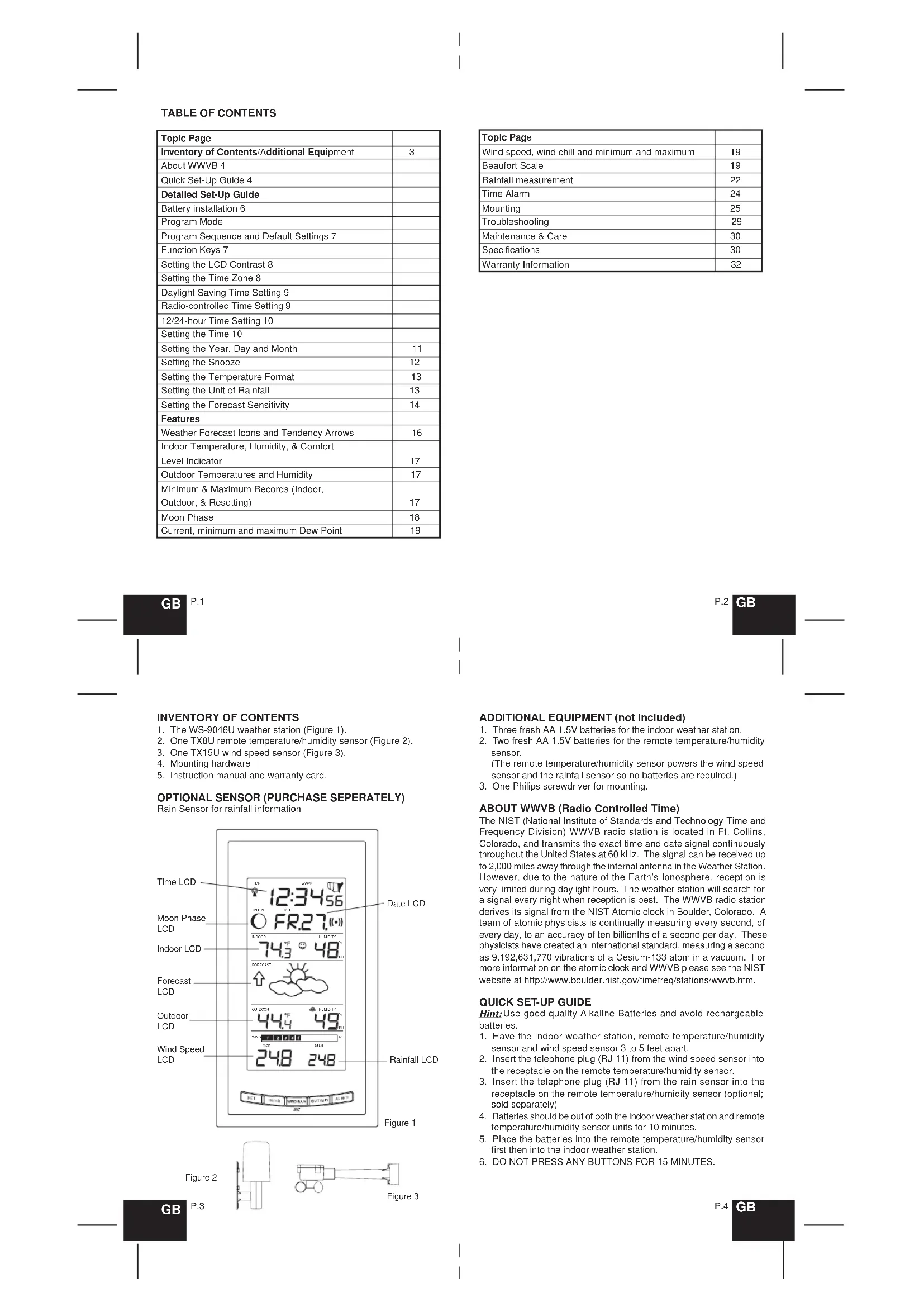
INVENTORY OF CONTENTS
- The WS-9046U weather station (Figure 1).
- One TX8U remote temperature/humidity sensor (Figure 2).
- One TX15U wind speed sensor (Figure 3).
- Mounting hardware
- Instruction manual and warranty card.

OPTIONAL SENSOR (PURCHASE SEPERATELY)
Rain Sensor for rainfall information
P.4
GB
In this time the indoor weather station and remote temperature/humidity sensor (and rain sensor if any) will start to talk to each other and the display will show the indoor temperature/humidity, outdoor temperature/ humidity and wind speed. If the indoor weather station does not display all information after the 15 minutes please retry the set up as stated above. After all information has been displayed for 15 minutes you can place your sensors outdoors and set your time.
Important Notes on Set-up and Operation
- The remote temperature/humidity sensor is both the source of power for both outdoor sensors and source of transmission for all remote sensor data.
- The remote temperature/humidity sensor should be placed in a dry, shaded area.
- Fog and mist will not harm your remote temperature/humidity sensor but direct rain must be avoided.
- Direct rainfall will not harm the wind speed sensor.
- The remote temperature/humidity sensor has a range of 330 feet. Any walls that the signal will have to pass through will reduce distance. An outdoor wall or window can have up to 30 feet of resistance and an interior wall can have up to 20 feet of resistance. Your distance plus resistance should not exceed 330 ft. in a straight line.
- The remote temperature/humidity sensor transmits a signal every minute. After the batteries have been installed, the indoor weather station will search for the signal for a duration of 15 minutes. If there is no temperature or humidity reading in the OUTDOOR LCD or wind speed in the WIND SPEED LCD after 15 minutes, make sure the units are within range of each other, or repeat the battery installation procedure.
- If a button is pressed before the indoor weather station receives the signal from the remote temperature/humidity sensor, you will need to follow the battery installation procedure again.
To complete the set up of your new wireless weather station after the 15 minutes have passed please follow the steps that follow in the Detailed Set-Up Guide.
GB P.5
PROGRAM MODE
Programming Note: If 30 seconds are allowed to pass, or the WIND/RAIN/SNZ button is pressed during the programming mode, the unit will confirm/set the last information entered—the display will stop flashing and return to normal time-date readings. If you don't leave the program mode during the programming of sections IV through XI, you can advance to step 4 of the next program setting. If you do leave the program setting (or want to program a specific setting) follow each instructional step to program that setting.
I. PROGRAMMING SEQUENCE AND DEFAULT SETTINGS
The programming sequence and default (factory) settings are as follows:
| LCD Contrast 5 | |
| Time Zone -5 (Eastern) | |
| Daylight Saving Time ON | |
| Radio-controlled time reception ON | |
| 12/24-hour time 12 | |
| Time - Hour 12 | |
| Time - Minute | :00 |
| Year | 2003 |
| Month | 1 |
| Day | 1 |
| Snooze | 10 minutes |
| Temperature Format | °F |
| Rainfall Unit | inch |
| Forecast Sensitivity | 2 |
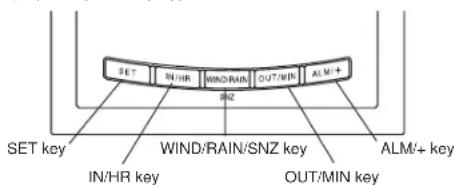
II. FUNCTION KEYS
The function keys are located on the front of the unit directly below the LCD (Liquid Crystal Display).
GB P.7
DETAILED SET-UP GUIDE
BATTERY INSTALLATION
The first step to powering up the weather station is to insert the connector (RJ11) at the end of the wire attached to the wind speed sensor to the remote temperature/humidity sensor. Please ensure when doing this that the connector is inserted with the proper orientation. When seated properly you will hear the connector 'click' in place.
- Remove the mounting bracket and humidity hood.
- Remove the battery cover by sliding the cover down.
- Observing the correct polarity install 2 AA batteries. The batteries will fit lightly (to avoid start-up problems make sure they do not spring free).
- Replace the battery cover by sliding upwards. Be sure battery cover is on securely.
- Replace the humidity hood.
B. INDOOR WEATHER STATION
- Remove the battery cover. To do this, insert a solid object in the space provided at the lower-central position of the battery cover, then push up and pull out on the battery cover.
- Observe the correct polarity, and install 3 AA batteries.
- Replace the battery cover.
C. RAINFALL SENSOR (optional)
The optional Rain Sensor does not need batteries to operate. Simply insert the telephone plug (RJ-11) of the rain sensor into the receptacle on the remote temperature/humidity sensor.
Note: Immediately after the batteries have been installed, the LCD (Liquid Crystal Display) will flash. Within 15 seconds the indoor temperature, indoor relative humidity, and the weather icons (sun and clouds) will be displayed. If not, remove batteries for 10 seconds and reinstall. If the outdoor temperature is not displayed within four minutes, remove batteries from both units, wait 30 seconds, and reinstall making sure to install batteries into the remote temperature sensor first. The time will show -: and start searching for the WWVB signal. If it successfully receives the time signal (usually at night), it will display the correct time (default time-zone is Eastern). You will need to adjust the time zone to match your local time.
P.6
GB
III. SETTING THE LCD CONTRAST
- Press and hold the SET button for 5 seconds.
- "LCD" will show in the TIME LCD and the number setting will flash.

Note: There are 8 LCD contrast levels to choose from-"LCD 0" is the lightest, and "LCD 7" is the darkest.
- Press and release the ALM+ button to select the level you desire.
- Press and release the SET button to confirm and advance to the Time Zone setting.
IV. TIME ZONE SETTING
- Press and hold the SET button for 5 seconds.
- "LCD" will show in the TIME LCD and the number setting will flash.
- Press and release the SET button again.
- The time zone will flash in the DATE LCD.
- Press and release the ALM/+ button to select your time zone.

Note: It is possible to select any time zone from -12 GMT to +12 GMT (for example to see the time in another country)
TIME ZONES
| GMT | 0 | |
| Atlantic | -4 | |
| EST: | Eastern | -5 |
| CST: | Central | -6 |
| MST: | Mountain | -7 |
| PST: | Pacific | -8 |
| ALA: | Alaska | -9 |
| HAW: | Hawaii | -10 |
P.8
GB
- Press and release the SET button to confirm and advance to the Daylight Saving Time setting.
V. DAYLIGHT SAVING TIME (DST) SETTING
- Press and hold the SET button for 5 seconds.
- "LCD" will show in the TIME LCD and the number setting will flash.
- Press and release the SET button twice.
- "DST" will appear in the DATE LCD and either "ON" or "OFF" will flash in the TIME LCD.
- Press and release the ALM/+ button to select DST on or off.

Note: "DST OFF" indicates that the feature is off and the WWVB will not change times automatically. "DST ON" indicates that the feature is on and the WWVB will change times automatically.
Note: Some locations (Arizona and parts of Indiana) do not follow Daylight Saving Time, and should select "DST OFF".
6. Press and release the SET button to confirm and advance to the radio-controlled time on/off setting.
VI. RADIO-CONTROLLED TIME ON/OFF SETTING
- Press and hold the SET button for 5 seconds.
- "LCD" will show in the TIME LCD and the number setting will flash.
- Press and release the SET button three times.
- "RCC" will appear in the DATE LCD and "ON" or "OFF" will flash in the TIME LCD.

GB P.9
time has not been received after 10 minutes of battery installation, you may manually set the time or leave the time function alone (reception will occur regardless).
B. MANUAL TIME SETTING
Note: When in the 12-hour format "P.M." will appear to the left of the hour in the time LCD between the hours of noon and midnight.
Note: Reception of the WWVB signal will automatically set the time. The reception of the signal will override any programmed time.

-
Press and hold the SET button for 5 seconds.
-
"LCD" will show in the TIME LCD and the number setting will flash.
- Press and release the SET button five times.
- The hours digits will flash in the TIME LCD.
- Press and release the ALM+ button to advance the hours.
- Press and release the SET button to confirm the hours setting and advance to the minutes setting.
- The minutes digits will flash in the TIME LCD.
- Press and release the ALM/+ button to advance the minutes.
- Press and release the SET button to confirm and advance to the year setting.
IX. SETTING THE YEAR, DAY AND MONTH
Note: Reception of the WWVB signal will also set the date and day. The reception of the signal will override any programmed date and day.

- Press and release the ALM+ button to select radio-controlled time on or off.
- Press and release the SET button to confirm and advance to the 12/24-hour time setting.
VII.12 OR 24 HOUR TIME SETTING
- Press and hold the SET button for 5 seconds.
- "LCD" will show in the TIME LCD and the number setting will flash.
- Press and release the SET button four times.
- "12h" or "24h" will flash in the DATE LCD.
- Press and release the ALM/+ button to select 12 or 24-hour time format.
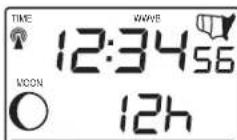
Note: When in the 12-hour format "P.M." will appear to the left of the hour in the time LCD between the hours of noon and midnight.
6. Press and release the SET button to confirm and advance to the time setting.
VIII. TIME SETTING
There are two methods by which the time and date can be set:
A) Automatically via WWVB reception, or
B)Manually.
A. WWVB (Remote Control Time)
This method requires you to do nothing, except wait for the signal to be received, and to select a time zone. Reception usually takes approximately 10 minutes during optimal conditions. The best conditions for reception is at night, between midnight and 6:00 am when there is less atmospheric interference. To keep your time as accurate as possible, the indoor weather station conducts a WWVB search every night between these hours, and overrides any manually set time. The WWVB tower icon (appearing in the TIME LCD) will flash when a signal-search is in progress and a signal is being received, and will remain steady when the signal has been received. If the WWVB
P.10
- Press and hold the SET button for 5 seconds.
- "LCD" will show in the TIME LCD and the number setting will flash.
- Press and release the SET button seven times.
- The year will flash in the DATE LCD.
- Press and release the ALM/+ button to advance the year.
- Press and release the SET button to confirm the year and advance to the month setting.
- The month will flash in the DATE LCD.
- Press and release the ALM/+ button to advance the month.

-
Press and release the SET button to confirm the month and advance to the day setting.
-
The day of the month will flash in the DATE LCD.
- Press and release the ALM/+ button to advance the day of the month.
- Press and release the SET button to confirm and advance to the snooze setting.
X. SETTING THE SNOOZE
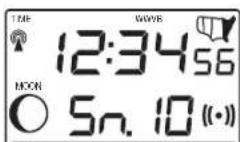
- Press and hold the SET button for 5 seconds.
- "LCD" will show in the TIME LCD and the number setting will flash.
- Press and release the SET button ten times.
- "Sn" will appear in the DATE LCD and a number will be flashing next to it.
- Press and release the ALM/+ button to select the duration of the snooze.
GB P.11
P.12 GB
Note: The snooze can be set for 0 to 30 minutes in 5-minute increments. If 0 minutes is selected pressing the WIND/RAIN/SNZ button will deactivate the alarm and it will not come back on.
- Press and release the SET button to confirm and advance to the temperature format setting.
XI. SELECTING FOR C
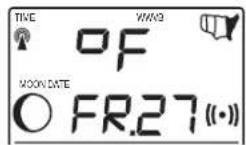
- Press and hold the SET button for 5 seconds.
- "LCD" will show in the time LCD and the number setting will flash.
- Press and release the SET button eleven times.
- Either "F" or "C" will flash in the TIME LCD.
- Press and release the ALM / + button to select the temperature format.
- Press and release the SET button to confirm and advance to the rainfall unit setting.
XILSETTING THE UNIT OF RAINFALL (inch/mm)

- Press and hold the SET button for 5 seconds.
- "LCD" will show in the time LCD and the number setting will flash.
- Press and release the SET button twelve times.
- Either "inch" or "mm" will flash in the TIME LCD (bottom right corner)
- Press and release the ALMi+ button to select the desired rainfall unit.
- Press and release the SET button to confirm and advance to the forecast sensitivity setting.
GB P.13
P.14
GB
FEATURES OF THE WS-9046U

I. WEATHER FORECAST
The weather forecasting feature is estimated to be 75% accurate and is for the next 12 to 24 hours. The weather forecast is based solely upon the change of air pressure over time. The WS-9046U averages past air-pressure readings to provide an accurate forecast-creating a necessity to disregard all weather forecasting for 12-24 hours after the unit has been set-up, reset, or moved from one altitude to another (i.e. from one floor of a building to another floor). In areas where the weather
XIII. SETTING THE FORECAST SENSITIVITY
Note: The forecast sensitivity can be adjusted to allow for areas that have a higher or lower sensitivity to changing air pressure (for example coastal areas have more pressure change than areas such as southern Arizona).
The numbers correspond to the amount of air pressure change necessary to trigger a change in the forecast icon. Areas that tend to have more air pressure change would set the sensitivity to 3, while areas that experience lower than normal air pressure change would set the sensitivity to 1.

- Press and hold the SET button for 5 seconds.
- "LCD" will show in the TIME LCD and the number setting will flash.
- Press and release the SET button twelve times.
- Either "1", "2" or "3" will flash in the TIME LCD and the forecast icon and tendency arrows will flash in the FORECAST LCD.
- Press and release the ALM+ button to select the forecast sensitivity
- Press and release the SET button to confirm the forecast sensitivity and complete the programming.
is not largely affected by the change of air pressure, the sensitivity setting should be set to 1. In areas where the air pressure changes more rapidly (such as coastal areas) the sensitivity setting should be set to 3.
A. WEATHER ICONS
There are 3 possible weather icons that will be displayed in the FORECAST LCD:
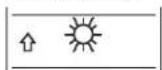


Sunny-indicates that the weather is expected to improve (not that the weather will be sunny).
Sun with Clouds-indicates that the weather is expected to be fair (not that the weather will be sunny with clouds).
Clouds with Rain-indicates that the weather is expected to get worse (not that the weather will be rainy).
These icons indicate the expected weather change in the next 12 to 24 hours. The icon does not give an exact prediction of the weather, however it should be viewed as a generalization of the expected weather change (for example a "sunny" icon indicates the weather is expected to improve).
The weather icons change when the unit detects a change in air pressure. The icons change in order, from "sunny" to "partly sunny" to "cloudy" or the reverse. It will not change from "sunny" directly to "rainy", although it is possible for the change to occur quickly. If the symbols do not change then the weather has not changed, or the change has been slow and gradual.
B. WEATHER TENDENCY ARROWS
Other possible displays in the FORECAST LCD are 2 weather tendency arrows, one that points up (on the left side of the LCD) and one that points down (on the right side of the LCD). These arrows reflect current changes in the air pressure. An arrow pointing up indicates that the air pressure is increasing and the weather is expected to improve or remain good, an arrow pointing down indicates that the air pressure is decreasing and the weather is expected to become worse or remain poor. No arrow means the pressure is stable.
GB P.15
P.16
GB
II. INDOOR TEMPERATURE, HUMIDITY, AND COMFORT LEVEL INDICATOR
The current indoor temperature and relative humidity are displayed in the INDOOR LCD.
The comfort level indicator is located at the bottom left of the INDOOR LCD. The indicator will display a happy face icon when the temperature is between 68^ and 79^ (20°C and 25.9°C), and the humidity is between 45% and 64%. A sad face icon will be displayed when the temperature and humidity are outside the mentioned ranges.
III. OUTDOOR TEMPERATURE AND HUMIDITY
The temperature and humidity received from the remote temperature/ humidity sensor is viewed in the OUTDOOR LCD.
The WS-9035U keeps a record of the MINIMUM and MAXIMUM temperature, and the time and date of their occurrence, for both the indoor and outdoor modes.
- Press and release the IN/HR button once. "MAX" appears to the right of the indoor temperature, indicating that the maximum temperature (along with the humidity measured at that time) and the time and date of occurrence are displayed. The maximum records will display for 30 seconds before returning to the normal display mode.
- Press and release the IN/HR button again (once while MAX" is still displayed, twice otherwise). MIN appears to the right of the indoor temperature, indicating that the minimum temperature (along with the humidity measured at that time) and the time and date of occurrence are displayed.
- While "MIN" is still displayed press and release the IN/HR button again to return to the current data display. Or you can wait 30 seconds, during either the minimum or the maximum readings, and the unit will automatically return to current data readings.
- Press and release the OUT/MIN button once. "MAX" appears above the outdoor temperature and the LCD will flash, indicating that the maximum temperature, and the time and date of occurrence are displayed. The maximum records will display for 30 seconds before
GB P.17
returning to the normal display mode.
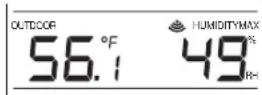
- Press and release the OUT/MIN button again (once while "MAX" is still displayed, twice otherwise). "MIN" appears to the right of the outdoor temperature, indicating that the minimum temperature and the time and date of occurrence are displayed.
- While "MIN" is still displayed press and release the OUT/MIN button again to return to the current data display. Or you can wait 30 seconds, during either the minimum or the maximum readings, and the unit will automatically return to current data readings.
C. RESETTING THE MIMIMUM AND MAXIMUM RECORDS
To reset the INDOOR records:
1. Press and release the IN/HR button to select the record you wish to reset, either MAX or MIN.
2. Press and hold the SET button for 5 seconds.
3. The record is now reset and will show the current time in the TIME LCD and current indoor temperature and humidity in the INDOOR LCD.
To reset the OUTDOOR records:
- Press and release the OUT/MIN button to select the record you wish to reset, either MAX or MIN
- Press and hold the SET button for 5 seconds.
- The record is now reset and will show the current time in the TIME LCD and current outdoor temperature and humidity in the OUTDOOR LCD.
V. MOON PHASE
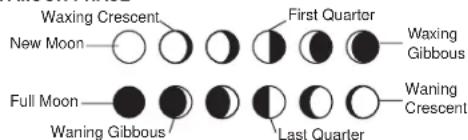
There are 12 moon phases shown on the indoor weather station; the
P.18
GB
black portion signifies the portion of the moon visible in the sky. Thus, when the moon icon is all black, it is a full moon.
VI. VIEWING THE CURRENT, MAXIMUM AND MINIMUM DEW POINT
To view the current dew point:
1. Press and hold the OUT/MIN button for 5 seconds.
2. The OUTDOOR LCD will switch to show the dew point (DEW POINT) will be visible in the upper left corner of the OUTDOOR LCD).
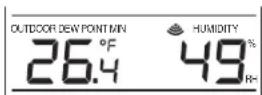
To view the maximum and minimum dew point readings:
1. Press and release the OUT/MIN button.
2. The maximum or minimum value along with the time and date it was recorded will be displayed (MAX or MIN will be displayed below the words DEW POINT in the OUTDOOR LCD).
3. After 30 seconds the display will automatically go back to the normal display mode showing the current dew point reading.
To reset the maximum or minimum dew point record:
While viewing either the maximum or minimum dew point record:
1. Press and hold the SET button for 5 seconds.
2. The record will now be reset and show the current time in the TIME LCD and dew point reading in the OUTDOOR LCD.
To return to the outdoor temperature/humidity viewing mode:
1. Press and hold the OUT/MIN button for 5 seconds.
2. The OUTDOOR LCD will switch back to show the outdoor temperature and humidity (DEW POINT will no longer be visible in the upper left corner of the OUTDOOR LCD).
VII.WIND SPEED, WIND CHILL, MINIMUM AND MAXIMUM VALUES In the WIND SPEED LCD you can view the current wind speed and gust. The wind speed is updated every 128 seconds with the average wind speed of that time being displayed. The gust display is the highest gust for the last 128-second period.
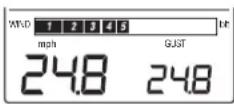
To view the current wind chill
- Press and release the WIND/RAIN/SNZ button.
- The wind chill value will display at the bottom of the WIND SPEED LCD.
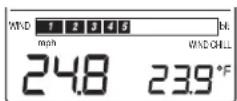
To view the maximum and minimum wind/wind chill values:
1. Press and hold the WIND/RAIN/SNZ button for 3 seconds.
2. The WIND SPEED LCD will now show the maximum wind.
3. Press and release the WIND/RAIN/SNZ button again.
4. The WIND SPEED LCD will now show the maximum wind gust.
5. Press and release the WIND/RAIN/SNZ button.
6. The WIND SPEED LCD will now show the minimum wind chill.
7. Press and release the WIND/RAIN/SNZ button.
8. The WIND SPEED LCD will now show the maximum wind chill.
To reset the maximum and minimum wind/wind chill values:
1. Select the value you wish to reset by pressing and releasing the WIND/RAIN/SNZ button.
2. Press and hold the SET button for 5 seconds.
3. The record will now be reset and show either 0.0 for max wind speed and wind gust or the current wind chill in the OUTDOOR LCD.
To return to the normal viewing mode:
1. Press and release the ALM+ button or
2. After 15 seconds the display will automatically return to the normal viewing mode.
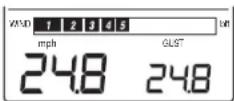
VIII. BEAUFORT SCALE WIND SPEED
The Beaufort Scale wind meter is located at the top of the WIND SPEED
LCD. It corresponds to the average wind speed and not the gust. On
GB P.19
P.20
GB
the following pages is a list of the Beaufort Scale and the wind speeds it corresponds to.
| fort Number or Force | Wind Speed | Description | Effects Land/Sea | ||
| mph | km/hr | knots | |||
| 0 | <1 | <1 | <1 | Calm | Still, calm air, smoke will rise vertically. Water is mirror-like. |
| 1 | 1-3 mph | 1-5 kph | 1-3 knots | Light Air | Rising smoke drifts, wind vane is inactive. Small ripples appear on water surface. |
| 2 | 4-7 mph | 6-11 kph | 4-6 knots | Light Breeze | Leaves rustle, can feel wind on your face, wind vanes begin to move. Small wavelets develop, crests are glassy. |
| 3 | 8-12 mph | 12-19 kph | 7-10 knots | Gentle Breeze | Leaves and small twigs move, light weight flags extend. Large wavelets, crests start to break, some whitecaps. |
| 4 | 13-18 mph | 20-28 kph | 11-16 knots | Moderate Breeze | Small branches move, raises dust, leaves and paper. Small waves develop, becoming longer, whitecaps. |
| 5 | 19-24 mph | 29-38 kph | 17-21 knots | Fresh Breeze | Small trees sway. White crested wavelets (whitecaps) form, some spray. |
| 6 | 25-31 mph | 39-49 kph | 22-27 knots | Strong Breeze | Large tree branches move, telephone wire begin to 'whistle', umberlas are difficult to keep under control. Larger waves form, whitecaps prevalent, spray. |
GB
P.21
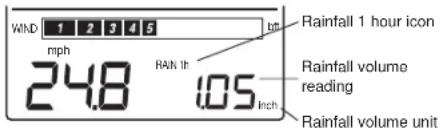
- Rainfall volume in the past 1 hour;
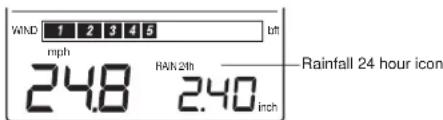
- Rainfall volume in the past 24 hours:
- Total rainfall volume from starting the measurement

To view the current rainfall measurements:
Press and release the WIND/RAIN/SNZ button to toggle between GUST, WIND CHILL, 1 hour rainfall volume, 24 hour rainfall volume and total rainfall volume.
To view the maximum rainfall measurements:
- Press the WIND/RAIN/SNZ button and hold for 3 seconds to enter MAX WIND MODE.
- Press the WIND/RAIN/SNZ button 4 times to 6 times to view the Max 1 hour rainfall, Max 24 hour rainfall and Max total rainfall respectively.
Note:
- The Max 1 hour rainfall is maximum value among all the all 1-hour rainfall readings measured.
- The Max 24 hour rainfall is maximum value among all the all 24 hours rainfall readings measured.
GB
P.23
| fort Number or Force | Wind Speed | Description | Effects Land/Sea | ||
| mph | km/hr | knots | |||
| 7 | 32-38 mph | 50-61 kph | 28-33 knots | Moderate or Near Gale | Large trees sway, becoming difficult to walk. Larger waves develop, white foam from breaking waves begins to be blown. |
| 8 | 39-46 mph | 62-74 kph | 34-40 knots | Gale or Fresh Gale | Twigs and small branches are broken from tree, walking is difficult. Moderately large waves with blown foam. |
| 9 | 47-54 mph | 75-88 kph | 41-47 knots | Strong Gale | Slight damage occurs to buildings, shingles are blown off of roofs. High waves (6 meters), rolling seas, dense foam, blowing spray reduces visibility. |
| 10 | 55-63 mph | 89-102 kph | 48-55 knots | Whole Gale or Storm | Trees are broken or uprooted, building damage is considerable. Large waves 96-9 meters), overhanging crests, sea becomes white with foam, heavy rolling, reduced visibility. |
| 11 | 64-72 mph | 103-117 kph | 56-63 knots | Violent Storm | Extensive widespread damage. Large wave (9-14 meters), white foam, visibility further reduced. |
| 12 | 73+ mph | 118+ kph | 64+ knots | Hurricane | Extreme destruction, devastation. Large waves over 14 meters, air filled with foam, sea white with foam and driving spray, little visibility. |
IX. RAINFALL MEASUREMENT
If you have purchase the optional Rain Sensor, the rainfall measurement can be viewed in the WIND SPEED LCD, otherwise, the rainfall information will not be shown.
Simply press the WIND/RAIN/SNZ button to toggle between Wind and Rain display.
In the WIND SPEED LCD you can view also three kinds of rainfall measurements:
P.22
GB
- The Max total rainfall is accumulated rainfall volume from the commencement of measurement, which is equivalent to the Total rainfall shown in the current rainfall mode.
To reset the maximum rainfall measurements:
- Press the WIND/RAIN/SNZ button and hold for 3 seconds to enter MAX WIND MODE.
- Press the WIND/RAIN/SNZ button for times to select the max rainfall data to be reset.
- Press and hold the SET button for 5 seconds to reset the MAX Rainfall data to zero value. The time of record will be reset to the current time.
To return to the normal viewing mode:
- Press and release the ALM/+ button or
- After 15 seconds the display will automatically return to the normal viewing mode.
X. TIME ALARM
To set the time alarm:
- Press and hold the ALM/+ button for 5 seconds.
- The alarm time will begin to flash in the DATE LCD.
- Press and release the IN/HR button to adjust the hour.
Note: When in the 12-hour mode and setting an alarm for a time between noon and midnight, "PM" will appear to the left of the alarm time in the DATE LCD.
- Press and release the OUT/MIN button to adjust the minutes.
- Press and release the WIND/RAIN/SNZ button to confirm the setting or wait for 20 seconds and the display will automatically return to the normal mode.

To activate the alarm:
1. Press and release the ALM/i+ button to toggle between the alarm time and the day and date.
P.24
GB
- When the alarm time and alarm icon are showing in the DATE LCD the alarm is activated.
- When the day and date are showing in the DATE LCD the alarm is deactivated.
To activate the snooze:
- While the alarm is sounding press and release the WIND/RAIN/SNZ button.
- The snooze will be activated and the alarm will come back on after the selected time period.
MOUNTING
Note: Before permanently mounting ensure that the indoor weather station is able to receive WWVB signals from the desired location. Also, extreme and sudden changes in temperature will decrease the accuracy of the indoor weather station, and changes in elevation will result with inaccurate weather forecasting for the next 12 to 24 hours. These changes will require a 12 to 24 hour wait before obtaining reliable data. To achieve a true temperature reading, avoid mounting where direct sunlight can reach the remote temperature/humidity sensor or indoor weather station. While the remote temperature/humidity sensor is weather proof, avoid submersion in water or snow. We recommend that you mount the remote temperature/humidity sensor on an outside North-facing wall. The sending range is 330ft-obstacles such as walls, concrete, and large metal objects can reduce the range. Place both units in their desired location, and wait approximately 15 minutes before permanently mounting to ensure that there is proper reception. The indoor weather station should display a temperature and humidity in the OUTDOOR LCD and wind speed (can be 0.0) in the WIND SPEED LCD within 4 minutes of setting up.
I. THE REMOTE TEMPERATURE/HUMIDITY SENSOR
The remote temperature/humidity sensor can be mounted in several ways:
- With the use of screws
- Using adhesive tape
Using nylon straps
A. MOUNTING WITH SCREWS
1) Remove the mounting bracket from the remote temperature/humidity sensor.
2) Place the mounting bracket over the desired location.
GB P.25
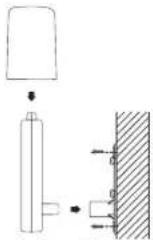
3) Through the two screw holes of the bracket, mark the mounting surface with a pencil.
4) Screw mounting bracket onto the mounting surface. Ensure that the screws are tight against the bracket.
5) Insert the remote temperature/humidity sensor into the bracket.
B. MOUNTING WITH ADHESIVE TAPE
1) With a nonabrasive solution, clean and dry the back of the mounting bracket and the mounting surface to ensure a secure hold. The mounting surface should be smooth and flat.
2) Remove the protective strip from one side of the tape.
3) Adhere the tape to the designated area on the back of the mounting bracket.
4) Remove the protective strip from the other side of the tape.
5) Position the remote temperature/humidity sensor in the desired location, ensuring that the indoor weather station can receive the signal.
C. MOUNTING WITH NYLON STRAPS
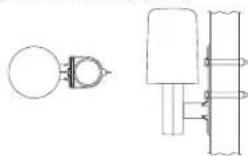
1) Remove the mounting bracket from the remote temperature/humidity sensor.
2) Place two nylon straps through the slots on the mounting bracket
P.26
GB
3) Place the remote temperature/humidity sensor in your desired mounting location.
4) Fasten the two nylon straps securely around the mounting location.
II. THE REMOTE WIND SPEED SENSOR
The remote wind speed sensor can be mounted two ways:
- With the use of screws
- Using nylon straps
With the U-shaped bolt
A. MOUNTING WITH SCREWS
1) Unlock the mounting bracket from the remote wind speed sensor, leaving the wire going through the bracket.
2) Place the mounting bracket over the desired location.
3) Through the two screw holes of the bracket, mark the mounting surface with a pencil.
4) Screw the mounting bracket onto the mounting surface. Ensure that the screws are tight against the bracket.
5) Slide the remote wind speed sensor onto the bracket making sure to lock it in place.
B. MOUNTING WITH NYLON STRAPS
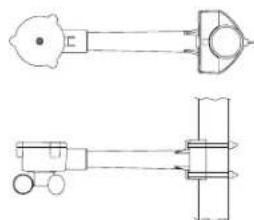
1) Unlock the mounting bracket from the remote wind speed sensor leaving the wire going through the bracket.
2) Place two nylon straps through the slots on the mounting bracket.
3) Place the remote wind speed sensor in your desired location.
4) Fasten the two nylon straps securely around the mounting location.
5) Slide the remote wind speed sensor onto the bracket making sure to lock it in place.
C. MOUNTING WITH THE U-SHAPED BOLT
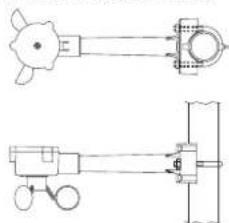
1) Use the U-shaped bolt provided and thread it through each of the holder holes.
2) Fix the holder to a mast by using the nuts provided.
III. THE RAIN SENSOR (OPTIONAL)

- Securely mount the rain sensor onto a horizontal surface about 2-3 ft above the ground and in an open area away from trees or other coverings. (Rainfall may be reduced causing inaccurate readings.)
- When securing into place, check that rain excess will not collect and store at the base of the unit but can flow out between the base and the mounting surface (test by pouring clean water).
- After mounting the rain sensor, connect the cable to the thermohydro sensor at the corresponding socket so power supply can be received and data be transmitted to the base station.
GB P.27
P.28
GB
Note: For testing purposes, very slowly pour a small amount of water into the rain sensor funnel. This simulates the rainfall and rainfall reading will be received and displayed at the base station for about 2 minute delay. (to clear this data on the base station, refer to the resetting data section in "Rainfall Measurement")
IV. THE INDOOR WEATHER STATION
1) Fix a screw (not included) into the desired wall, leaving approximately 3/16 of an inch (5mm) extended from the wall.
2) Place the indoor weather station onto the screw using the hanging hole on the backside.
3) Gently pull the indoor weather station down to lock the screw into place.
TROUBLESHOOTING
NOTE: For problems not solved, please contact La Crosse Technology.
Problem: No reception of WWVB time signal. Solution:
1) Wait overnight for signal.
2) Be sure indoor weather station is at least 6 feet from any electrical devices, such as televisions, computers, or other radio-controlled clocks.
3) Remove batteries for five minutes, reinsert and leave the unit alone overnight without pressing buttons.
4) If there are still problems, contact La Crosse Technology.
Problem: Hour is incorrect (minute and date are correct). Solution:
Be sure correct time zone and daylight saving time settings are selected.
Problem: The LCD is faint.
Solution:
1) Set the LCD contrast to a higher number.
2) Replace the batteries
Problem:
No outdoor temperature/humidity and/or wind speed is displayed. Solution:
1) Disconnect the cable from the remote wind speed sensor, then reinsert making sure the cable clicks in place.
2) Remove all batteries, reinsert into remote temperature/humidity
GB
P.29
Outdoor and dew point: -21.8°F to 157.8°F with 0.2°F resolution
(-29.9°C to 69.9°C with 0.1°C resolution)
"OFL" displayed if outside this range.
Wind chill: -21.8°F to 157.8°F with 0.2°F resolution
(-29.9^ to 69.9^ with 0.1^ resolution)
"OFL" displayed if outside range
Indoor relative humidity
measuring range: 1% to 99% with 1% resolution
(- - ) displayed if outside this range
Outdoor relative humidity
measuring range: 1 % to 99% with 1 % resolution
displays if outside this range
Wind speed measuring range: 0 to 111.8 mph (0 to 50 m/s) Rain Volume Display
(only with Rain Sensor use): 1 hour and 24 hour rainfall: 0
to 999.9 mm with 0.1 mm
resolution (0 to 39 inch with 0
02 inch resolution)
Total rainfall: 0 to 2499 mm with 0.1 mm resolution
(0 to 98 inch with 0.02 inch resolution)
Weather data checking interval:
Indoor temperature checking interval: Every 15 seconds
Indoor humidity checking interval: Every 20 seconds
Outdoor temperature checking interval
(remote temperature/humidityensor): Every 128 seconds
Outdoor humidity checking interval: Every 128 seconds
Wind speed checking interval: Average of 128 seconds with
highest gust
Outdoor temperature,
humidity and wind speed reception
(indoor weather station):
Every 128 seconds
Transmission range:
330 feet (in open space)
Power Supply:
Indoor weather station: 3 x AA, IEC LR6, 1.5V
Remote temperature/humidityensor: 2xAAIECR6,1.5V
Remote wind speed sensor: Supplied by remote temperature
humidity sensor
Battery life cycle
Recommended battery type:
Dimensions (× × )
Indoor weather station:
9"×4.62"×1.25"
(227× 117.4× 31.2mm)
sensor first, then the indoor weather station.
3) Place the remote temperature/humidity sensor closer to the display.
4) Be sure all batteries are fresh.
5) Place the remote temperature/humidity sensor and indoor weather station in position so the straight-line signal is not passing through more than two or three walls.
Problem:
Temperatures do not match if units are placed next to each other.
Solution:
Each temperature/humidity sensor is manufactured to be accurate to within 2 degree plus or minus and under normal conditions, so two sensors could be as much as 4 degrees different. However, the difference can be exaggerated further because the sensors are designed for different working environments. The indoor temperature sensor is less responsive to ambient air currents because of the shielding effect of the display's case. In addition, the case can act as a heat sink to absorb and store heat from external sources (i.e. handling of the case or radiant heat). Also, the much greater range of the remote temperature/humidity sensor requires a different calibration curve than the indoor range. Error is usually greater at the extreme ends of a range, making it harder to compare different ranges with different curves. Under non-laboratory conditions, it is difficult to compensate for the above factors and obtain an accurate comparison.
MAINTENANCE AND CARE INSTRUCTIONS
- Extreme temperatures, vibration, and shock should be avoided to prevent damage to the units.
- Clean displays and units with a soft, damp cloth. Do not use solvents or scouring agents; they may mark the displays and casings.
- Do not submerge in water
- Immediately remove all low powered batteries to avoid leakage and damage.
- Opening the casings invalidates the warranty. Do not try to repair the unit. Contact La Crosse Technology for repairs.
SPECIFICATIONS
Weather data measuring range:
Indoor: 14.2F to 139.8
with 0.2^ resolution.
(0°C to 59.9°C with 0.1°C resolution) "OFL"
displayed if outside this range
P.30
GB
Remote temperature/humidityensor: 5.4^ × 2.25^ × 2.25^
(137 x 56.2 x 56.2 mm)
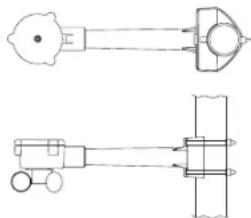
Remote wind speed sensor: 7.5^ × 2.2^ × 2.2^
(191.2 x 55.8 x 56 mm)
WARRANTY INFORMATION
La Crosse Technology provides a 1-year warranty on this weather station. Contact La Crosse Technology immediately upon discovery of any defects covered by this warranty.
Before sending the Weather Station in for repairs, contact La Crosse Technology. The Weather Station will be repaired or replaced with the same or similar model.
This warranty does not cover any defects resulting from improper use, unauthorized repairs, faulty batteries, or the Weather Stations inability to receive a signal due to any source of interference.
LA CROSSE TECHNOLOGY WILL NOT ASSUME LIABILITY FOR INCIDENTAL, CONSEQUENTIAL, PUNITIVE, OR OTHER SIMILAR DAMAGES ASSOCIATED WITH THE OPERATION OR MALFUNCTION OF THIS WEATHER STATION. THIS PRODUCT IS NOT TO BE USED FOR MEDICAL PURPOSES OR FOR PUBLIC INFORMATION. THIS PRODUCT IS NOT A TOY. KEEP OUT OF CHILDRE'S REACH.
This warranty gives you specific legal rights. You may also have other rights specific to your State. Some States do no allow the exclusion of consequential or incidental damages therefore the above exclusion of limitation may not apply to you.
For warranty work, technical support, or information contact
La Crosse Technology
190 Main Street
La Crescent, MN 55947
Phone: 507.895.7095
Fax:507.895.8000
e-mail:
support@lacrossetechnology.com
(warranty work)
sales@lacrossetechnology.com
(information on other products)
P.32
GB
GB P.31
web:
www.lacrossetechnology.com
Questions? Please see instruction video at
www.lacrossetechnology.info/9046
All rights reserved. This handbook must not be reproduced in any form, even in excerpts, or duplicated or processed using electronic, mechanical or chemical procedures without written permission of the publisher.
This handbook may contain mistakes and printing errors. The information in this handbook is regularly checked and corrections made in the next issue. We accept no liability for technical mistakes or printing errors, or their consequences.
All trademarks and patents are acknowledged.
TABLE DES MATIERES
C. FIXATION A L'AIDE D'ATTACHES EN NYLON

B. FIXATION A L'AIDE D'ATTACHES EN NYLON
Dimensions (H x L x P)
INFORMATIONS SUR LA GARANTIE
de resolution (-29.9°C a 69.9°C
con 0.1^ de resolution)