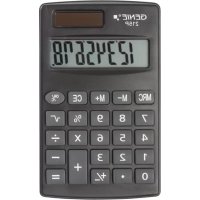
215 P - Calculator Genie - Free user manual and instructions
Find the device manual for free 215 P Genie in PDF.


| Product type | Desktop calculator |
| Brand | Genie |
| Model | 215 P |
| Display capacity | 8 digits |
| Power source | LR54 (LR1130) battery included |
| Automatic shutdown | After 4 to 5 minutes |
| Operating temperature | 0°C to 40°C |
| Dimensions (L x W x H) | 115 x 70 x 10 mm |
| Weight | 42 g |
| Housing material | Plastic |
| Main functions | Basic calculations (+, -, ×, ÷) |
| Display type | LCD |
| Package contents | Calculator, LR54 battery |
| Care and cleaning | Clean with a soft, dry cloth. Do not use solvents. |
| Safety | Keep out of reach of children. Avoid water, shocks, and sun exposure. |
| Spare parts and repairability | No removable parts. In case of defect, return to place of purchase. |
| Warranty | Return the device in its original packaging with the receipt. |
| Battery | Type LR54 (LR1130), non-rechargeable |
| Recycling | Do not dispose of with household waste. Take to a collection point. |
| Manufacturer | GO Europe GmbH, Germany |
| Intended use | Personal calculations, home and office use |
Frequently Asked Questions - 215 P Genie
User questions about 215 P Genie
0 question about this device. Answer the ones you know or ask your own.
Ask a new question about this device
Download the instructions for your Calculator in PDF format for free! Find your manual 215 P - Genie and take your electronic device back in hand. On this page are published all the documents necessary for the use of your device. 215 P by Genie.
USER MANUAL 215 P Genie
The operating manual represents a component part of the device. It contains important information regarding safety, use and disposal. Familiarize yourself with all the operating and safety information before starting to use the device. Only use the device as described and for the purpose for which it is intended. Hand over all the documents with the device if it is transferred to third parties.
SAFETY
Please read the following safety instructions. The manufacturer assumes no liability for damage arising from failure to observe these safety instructions. Keep this manual together with the calculator for later reference and pass it on with the product.
CALCULATOR
- This product is not a toy. Children could injure each other or themselves when playing with the calculator; they could break off and swallow small parts such as keys or damage the display.
- Keep the calculator away from water. Moisture or liquids can damage the calculator.
- Avoid dropping the product or exposing it to shocks. Pressure can damage the calculator irreparably, for example, by carrying it around in a tight trouser pocket.
- Never subject the calculator to direct sunlight and protect it from dust.
- The calculator should only be opened for disposal purposes or in order to replace the battery.
BATTERIES
Safety information regarding handling
Warning! Risk of suffocation through batteries.
- Keep batteries out of reach of children.
- Seek medical attention immediately if one is swallowed.
Caution! There are different risks involved when dealing with batteries.
- Never attempt to recharge standard batteries, never short circuit batteries and/or open batteries. Doing so leads to a potential risk of overheating, fire or explosion.
- Improper handling of batteries can put your health and the environment at risk. Batteries may contain toxic, ecologically hazardous heavy metals.
- Ensure the connection terminals are not short-circuited.
- Never throw batteries into a fire or water.
- Never expose batteries to any mechanical loads.
- Leaking batteries could cause damage to the device. If a battery should start to leak, remove it from the device immediately to prevent any further damage. Take the utmost care when handling damaged or leaking batteries and always wear protective gloves.
- Avoid any contact with the skin, eyes and mucous membranes. Rinse any parts of the body which have come into contact with battery acid with plenty of clean water and contact a doctor immediately. Avoid extreme conditions and temperatures which could affect the batteries, e.g. by placing them on radiators or exposing them to direct sunlight.
- Only use batteries of the type specified.
- Never use batteries of different types or new and old batteries together.
- Ensure batteries are inserted with the correct polarity.
- If the device will not be used for a longer period, switch the device off and remove the batteries.
- Remove empty batteries from the device and dispose of them according to the applicable directives.
- The batteries must be removed from the device before its disposal.
INTENDED USE
- This calculator has been produced for calculating only. It is not a toy and was not designed as such. It is intended for private use only. The manufacturer assumes no liability for damage arising from improper use.
DELIVERY CONTENTS
Calculator including 1x battery LR54 (LR1130).
BEFORE USING THE FIRST TIME
- Please check that everything is included.
- Check if there are any signs of damage.
- If the calculator is damaged or incomplete, please return it to the place of purchase.
TECHNICAL DATA:
- Type: electronic desktop calculator
- Operating capacity: 8 digits
- Power supply: including LR54 (LR1130) battery
- Automatic power-off: after 4 - 5 minutes
- Operating temperature: 0 - 40°C
- Dimensions: 115 x 70 x 10 mm (H x W x D)
- Weight: 42 g
CARE & MAINTENANCE
- Clean the surface of the housing with a soft, dry, lint-free cloth. Do not use any solvents or cleaning agents.
- Open the battery compartment with a proper screwdriver and change the battery.
- Close the compartment firmly after changing the battery.
STORAGE
- Avoid storage in areas subjected humidity and dust. Take care never to leave the calculator where it might be splashed by water. Such elements can damage internal circuitry.
- Store out of reach of children.
- Remove battery if not in use for longer period of time.
- Store in dark place (not in direct sunlight).
WARRANTY
Dear customer,
We are delighted that you have chosen this equipment.
In the case of a defect, please return the device together with the receipt and original packing material to the point of sale.
DISPOSAL

Find out about the possibilities of taking back old appliances and used batteries free of charge from your dealer.

The adjacent symbol indicates laws dictate that electrical and electronic apparatus no longer required must be disposed of separate from domestic waste. Dispose of your device at a collection point provided by your local public waste authority. Packaging materials must be disposed of according to local regulations.

Defective or empty batteries must be recycled in accordance with Directive 2006/66/EC and its amendments. Return batteries and the device via the collection points provided.

Packaging materials must be disposed of according to local regulations.

Observe the identification on the packaging materials during the waste sorting process; they are identified by abbreviations (b) and numbers (a) which have the following significance: 1–7: plastic/20–22: paper and cardboard/80–98: composite materials.

The device and packaging materials can be recycled; sort them for disposal to simplify waste management. The Triman logo is only relevant for France.
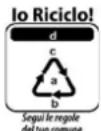
The device and the packaging material can be recycled, so sort them prior to disposal for better waste management. Contact your local authorities for information on the various options available to ensure correct disposal. Observe the following identifications of the packaging materials: (a) numbers, (b) abbreviations and (c) materials which have the following significance: 1–7: plastics / 20–22: paper and cardboard / 80–98: composite materials and (d) type of packaging. The logo is only applicable to Italy.
DECLARATION OF CONFORMITY

The CE Mark on the device confirms conformity.
The Declaration of Conformity can be read online at www.go-europe.com.
MANUFACTURER
GO Europe GmbH
Zum Kraftwerk 1
D-45527 Hattingen
Germany
FR - INSTRUCTIONS D'UTILISATION
Calculatrice - GENIE 215P
DÉCLARATION DE CONFORMITÉ

- SAFETY
- CALCULATOR
- BATTERIES
- Safety information regarding handling
- INTENDED USE
- DELIVERY CONTENTS
- BEFORE USING THE FIRST TIME
- TECHNICAL DATA:
- CARE & MAINTENANCE
- STORAGE
- WARRANTY
- DISPOSAL
- DECLARATION OF CONFORMITY
- MANUFACTURER
- FR - INSTRUCTIONS D'UTILISATION
- Calculatrice - GENIE 215P
- DÉCLARATION DE CONFORMITÉ
Brand : Genie
Model : 215 P
Category : Calculator