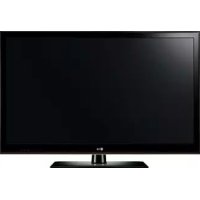
AMST20BB - Television LG - Free user manual and instructions
Find the device manual for free AMST20BB LG in PDF.



| Product Type | TV Stand (Base) |
| Brand | LG |
| Model | AMST20BB |
| TV Compatibility | LG 49US762H0ZC, 55US762H0ZC |
| Dimensions (W x D x H) | 570 x 303 x 228 mm |
| Net Weight | 3.2 kg |
| Material | Plastic and Metal |
| Swivel Angle | 20° left or right |
| Tilt | Adjustable |
| Desk Mount | Yes (M5 screws provided) |
| Included Accessories | Stand base, 2 screws, 2 washers, 2 nuts |
| Installation | Requires 2 people |
| Maintenance | Wipe with a soft, dry cloth |
| Safety | Flat and stable surface, do not allow children to climb |
| Warranty | Does not cover damage from unapproved items |
| Repairability | Contact customer service for spare parts |
Frequently Asked Questions - AMST20BB LG
User questions about AMST20BB LG
0 question about this device. Answer the ones you know or ask your own.
Ask a new question about this device
Download the instructions for your Television in PDF format for free! Find your manual AMST20BB - LG and take your electronic device back in hand. On this page are published all the documents necessary for the use of your device. AMST20BB by LG.
USER MANUAL AMST20BB LG
Please read this manual carefully before operating your set and retain it for future reference.
AM-ST19BA
AM-ST18CA
AM-ST18CB
AM-ST19CA
AM-ST19CC
AM-ST20BB
2
- Image shown may differ from your product.
HSIN9N3
Safety instructions
This symbol is intended to alert the user to the presence of important operating and maintenance (servicing) instructions in the literature accompanying the appliance.
Please read these safety precautions carefully before using the product.
When lifting or moving the product, at least two people are required due to the heavy weight of the product.
- The product may fall down, causing a malfunction or injury.
- Do not let children hang on or climb onto the product.
- The product may fall down, causing an injury or even death.
- Do not install the product in an area which is unstable, vibrating or where the product is not completely supported (e.g. a shaky or tilted shelf).
- The product may fall down or overturn, causing an injury or malfunction.
Put the product on a flat and firm floor. - The product may fall and cause an injury.
- When moving or handling a product assembled with the Stand, be cautious about damaging the exterior of the product.
- When there is a stain or fingerprint left on the surface, wipe it off gently.
- When removing a stain, do not use excessive force. Wiping with excessive force may cause scratches or discoloration on the product.
Assembling and Preparing
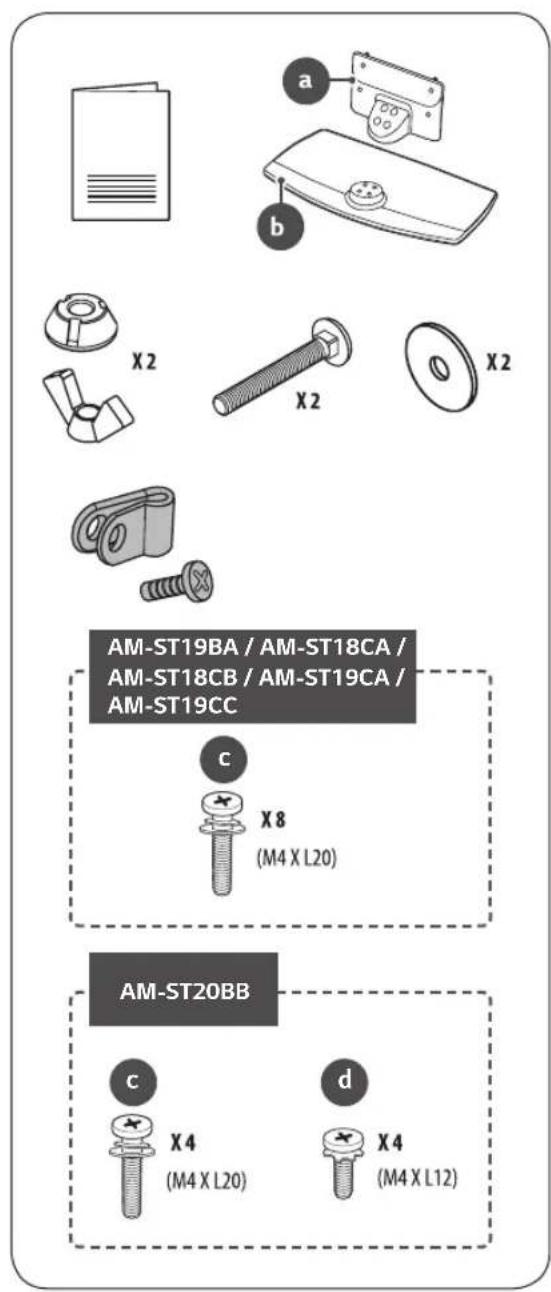
Accessories
How to Assemble the Stand
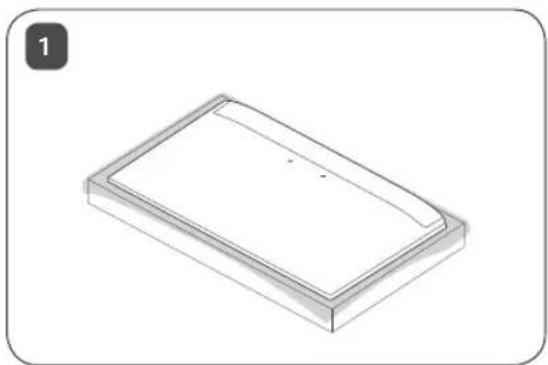
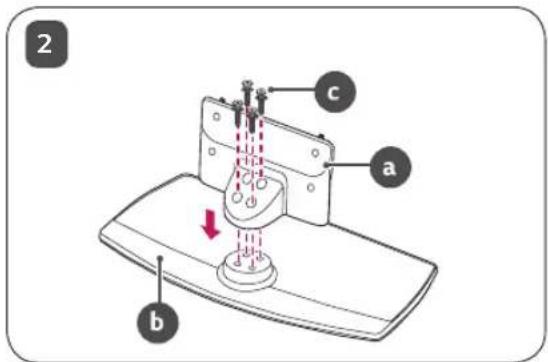
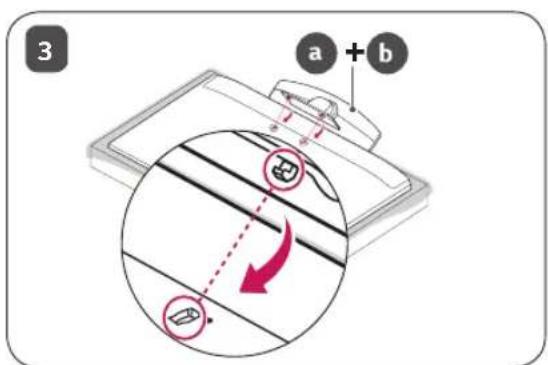
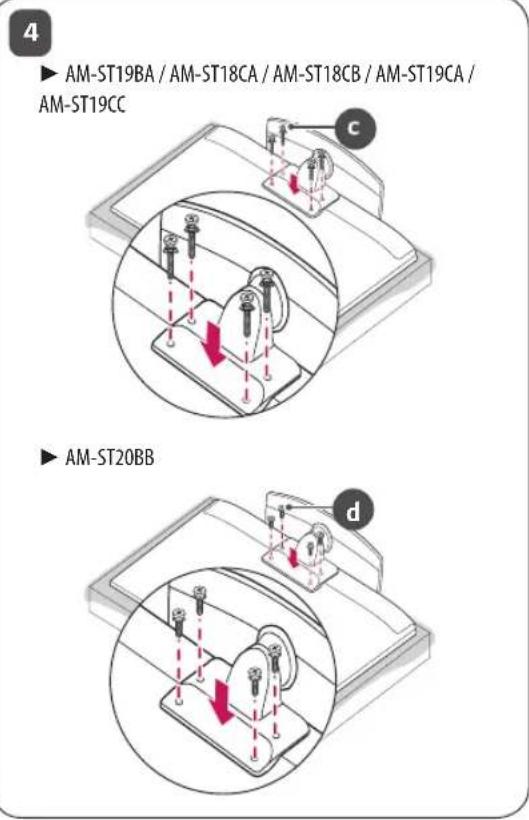
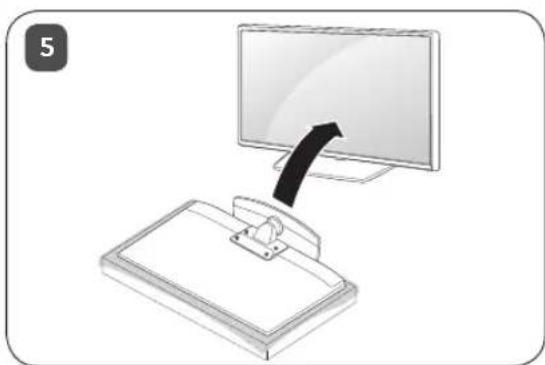
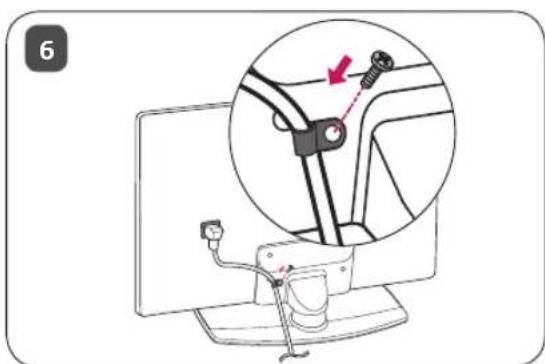

-
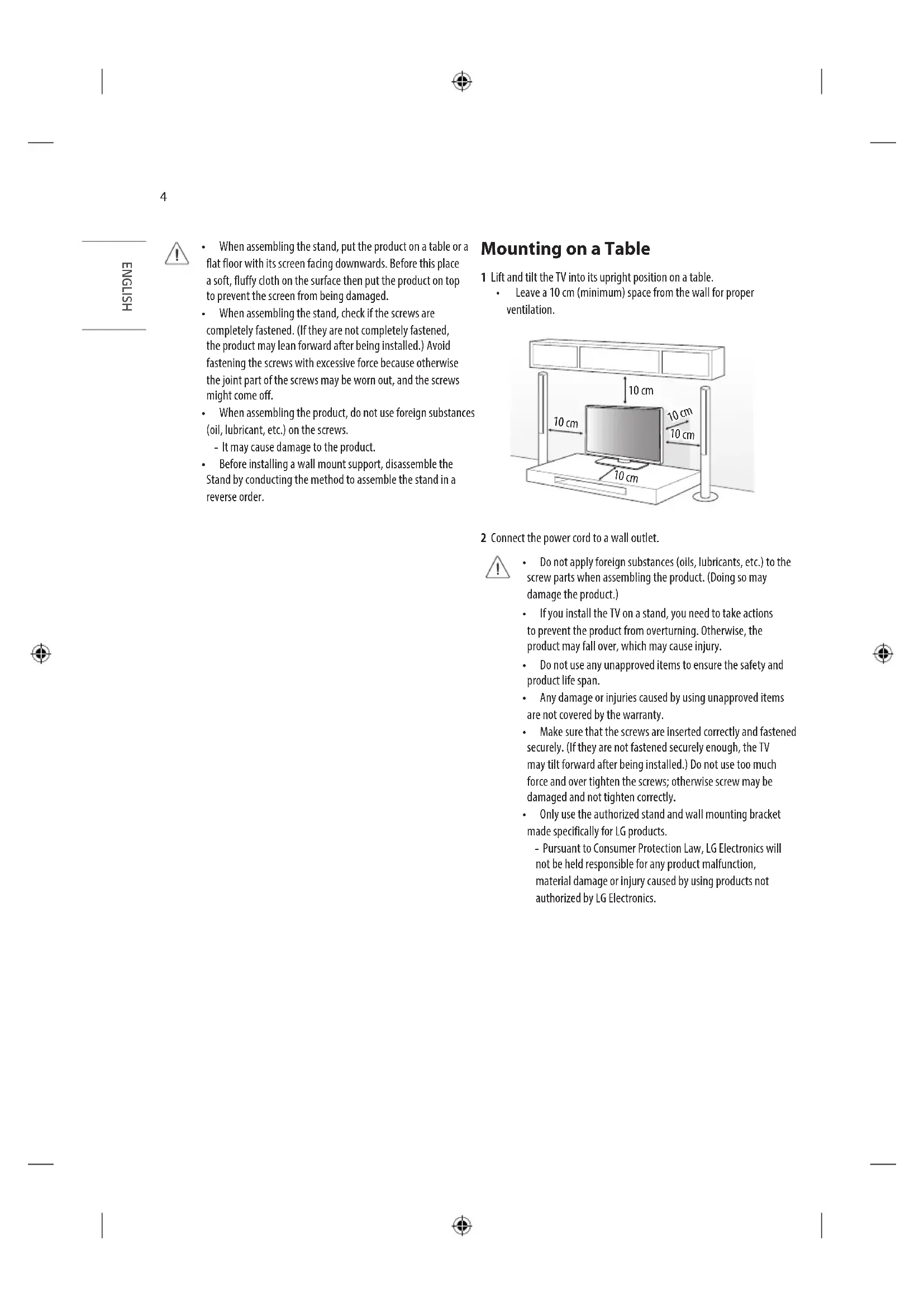
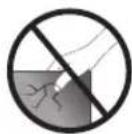
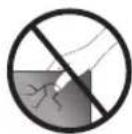
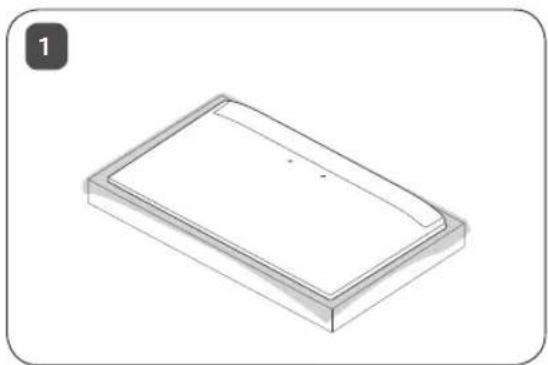
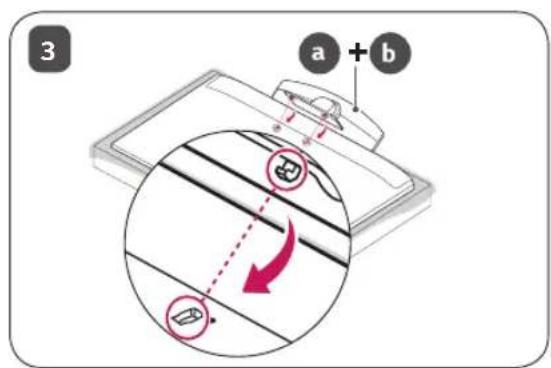
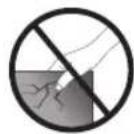
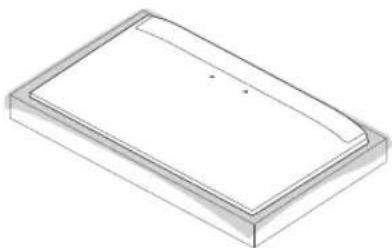
When assembling the stand, put the product on a table or a flat floor with its screen facing downwards. Before this place a soft, fluffy cloth on the surface then put the product on top to prevent the screen from being damaged.
-
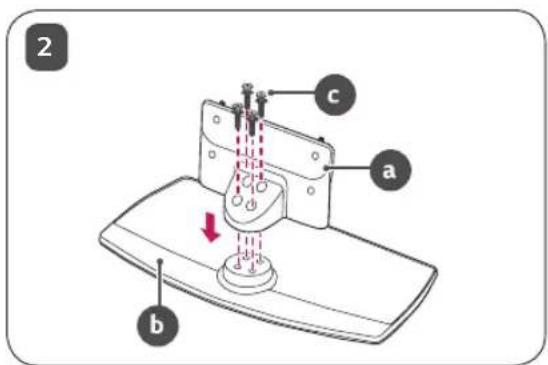
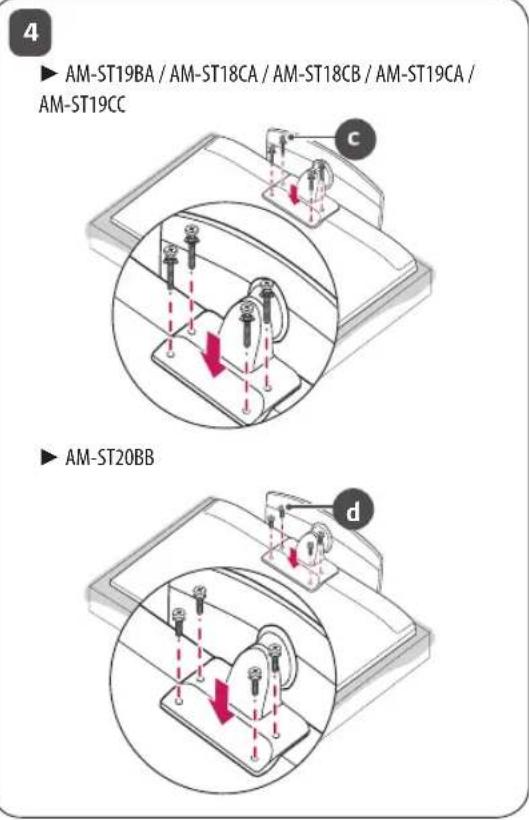
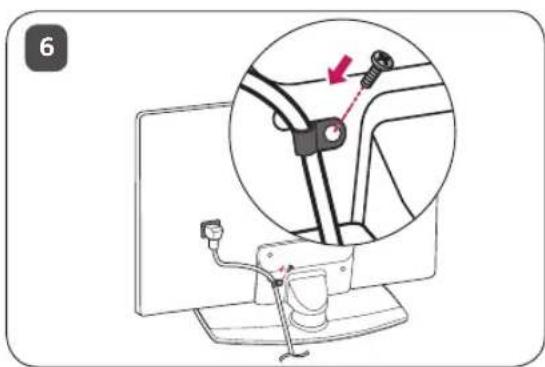
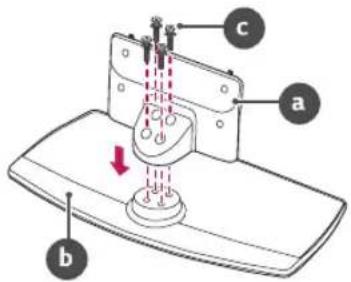
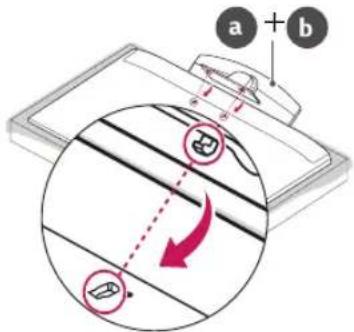
When assembling the stand, check if the screws are completely fastened. (If they are not completely fastened, the product may lean forward after being installed.) Avoid fastening the screws with excessive force because otherwise the joint part of the screws may be worn out, and the screws might come off.
-
When assembling the product, do not use foreign substances (oil, lubricant, etc.) on the screws.
-
It may cause damage to the product.
Before installing a wall mount support, disassemble the Stand by conducting the method to assemble the stand in a reverse order.
Mounting on a Table
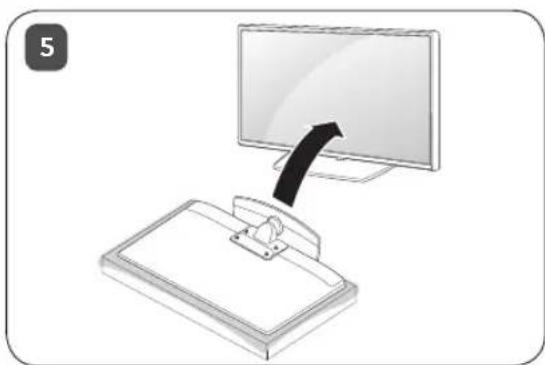
1 Lift and tilt the TV into its upright position on a table.
- Leave a 10cm (minimum) space from the wall for proper ventilation.
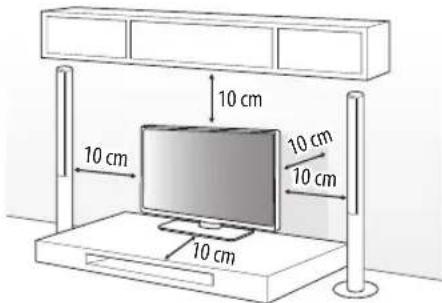
2 Connect the power cord to a wall outlet.

- Do not apply foreign substances (oils, lubricants, etc.) to the screw parts when assembling the product. (Doing so may damage the product.)
If you install the TV on a stand, you need to take actions to prevent the product from overturning. Otherwise, the product may fall over, which may cause injury. -
Do not use any unapproved items to ensure the safety and product life span.
Any damage or injuries caused by using unapproved items are not covered by the warranty.
Make sure that the screws are inserted correctly and fastened securely. (If they are not fastened securely enough, the TV may tilt forward after being installed.) Do not use too much force and over tighten the screws; otherwise screw may be damaged and not tighten correctly.
Only use the authorized stand and wall mounting bracket made specifically for LG products. -
Pursuant to Consumer Protection Law, LG Electronics will not be held responsible for any product malfunction, material damage or injury caused by using products not authorized by LG Electronics.
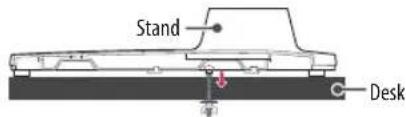
Attaching the TV to a Desk
Depending on model)
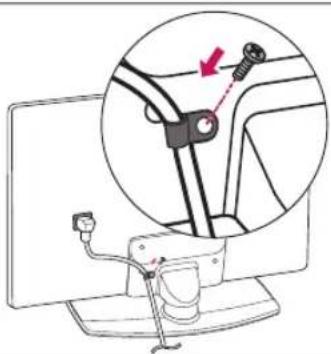
WARNING: The TV should be attached to a desk so it cannot be pulled in a forward/backward direction, potentially causing injury or damaging the product.
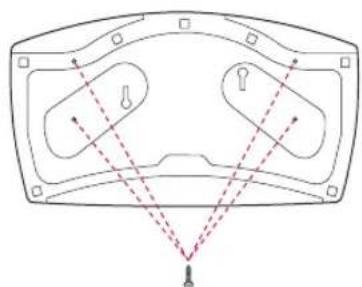
A type
4-Screws
Not supplied with TV
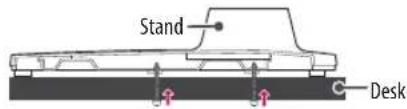
- Screw: M5 x L (*L: Table depth + 8~10 mm)
ex) Table depth: 15 mm, Screw: M5 x L25
B type
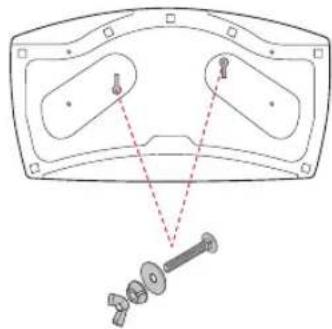
2-Screws for Stand Fixing,
2-Washers for Stand Fixing,
2-Nuts for Stand Fixing
(Supplied with TV)
Securing the TV to a Wall
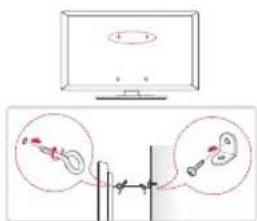
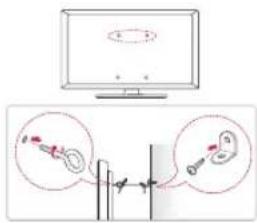
1 Insert and tighten the eye-bolts, or TV brackets and bolts on the back of the TV.
If there are bolts inserted at the eye-bolts position, remove the bolts first.
2 Mount the wall brackets with the bolts to the wall. Match the location of the wall bracket and the eye-bolts on the rear of the TV.
3 Connect the eye-bolts and wall brackets tightly with a sturdy rope. Make sure to keep the rope horizontal with the flat surface.
- Use a platform or cabinet that is strong and large enough to support the TV securely.
- Brackets, bolts and ropes are not provided. You can obtain additional accessories from your local dealer.
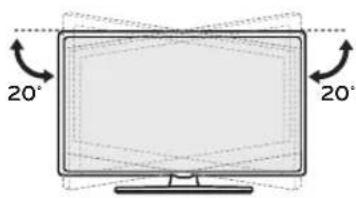
Adjusting the Angle of the TV to suit view
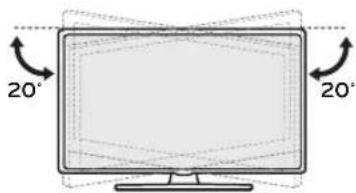
Swivel 20 degrees to the left or right and adjust the angle of the TV to suit your view.

-
When adjusting the angle of the product, watch out for your fingers.
-
Personal injury may occur if hands or fingers are pinched. If the product is tilted too much, it may fall, causing damage or injury.
Specifications
| AM-ST19BA | |
| Model | 43UT782H0ZA 43UT782V0ZA 43UT782V0ZC 43UT782H1ZA 43UT782V2ZA |
| Width x Depth x Height (mm) 570 | x 303 x 235.1 |
| Weight (kg) 3.2 | |
| AM-ST18CA | |
| Model | 43/49UU662H-ZE 49UT662H2ZB 49UT662H0ZB |
| Width x Depth x Height (mm) 570 | x 303 x 299.2 |
| Weight (kg) 3.2 | |
| AM-ST18CB | |
| Model 55UU662H-ZE | |
| Width x Depth x Height (mm) 570 | x 303 x 227 |
| Weight (kg) 3.2 | |
| AM-ST19CA | |
| Model | 43UT662H0ZC 43UT662H2ZC 43US662H0ZC 43US665H0ZC 43US342H0ZC |
| Width x Depth x Height (mm) 570 | x 303 x 228.7 |
| Weight (kg) 3.2 | |
| AM-ST19CC | |
| Model | 55UT662H0ZC 55UT662H2ZC 50/55US662H0ZC 50/55US665H0ZC 50/55US342H0ZC |
| Width x Depth x Height (mm) 570 | x 303 x 226.0 |
| Weight (kg) 3.2 | |
| AM-ST20BB | |
| Model | 49US762H0ZC 55US762H0ZC |
| Width x Depth x Height (mm) 570 | x 303 x 228 |
| Weight (kg) 3.2 | |

LG
Life's Good
The model and serial number of the product are located on the back and on one side of the product. Record them below in case you ever need service.
Model
Serial No.
MANUEL D'UTILISATION
Support
Comment assembler le support

PYKOBODCTBO NOIb3OBATEJIa
Подставka
Ipeed Haayanom 3KcnpnyatauBHNMaTeJbHO O3HaKOMbTecb C daHHbIM pyKOBOdCTBOM. CoxpaHnTe pyKOBoDCTBO NOJIb3OBaTeJIA dIra IcNoJIb3OBAHnB B6yduem.
AM-ST19BA
AM-ST18CA
AM-ST18CB
AM-ST19CA
AM-ST19CC
AM-ST20BB
*N3o6paXeHHe MoKet OTnHaTbcr O TBaWero yCTpoNCTBa.
ПразвILA NOТEXнIKE 6e3OnaChOcTn

3TOT CUMBOJ npeynpckdaet noIb3OBateN O BAXHbIX INHCTpykUxN IOKcnIyatauMn
06cJyKBAHIO, yKa3aHHbX B DOKymeHTaCIN, KOtOpA npnlaraeTcK YCTPOIcTB.
Ipejde yem nonb3oBaTc8yCTpOYCTBOM, BHIMATEbHO npouHTe daHbte HCTpyKun no TeXnke 6e3onacHOCTN.

ДпглбьемипсрмшнуctpoCTBa Tpe6yETcKAKMHIMyIMDbayHNoBekaN3-3a 60nbwoRBeCAyTPOIcTBa.
-ycpocCTBO MOKET ynapctb.3TO MOKET npnbecn K HenpaBnBHO paOte ycpoCtBa nIN TpaBMPOBAHIO.
He pa3peaIte DeTm XBaTaTbC3a YcTPOIcTBO m 3aBpaTbCn Ha Hero.
-CTPOCTBO MOKET yNACTb N CTaTB npuHOB TPABM INI DAXJE NETaBHO NOCXOJa.
He yctaHabnBaIte yctpoCTBO Ha HeyctOuMbIX nBb6pnpuyoux IOBepxHOCTAx mN B MeCTax, rJe yctpoCTBO HeaJedXHO 3akpenneHO (HaNPmEp, Ha Kaayaoxxcra HnHaknoHHbx NOKax).
-ycpOCTBO MOKET ynaCTb NIN ONPOKHytbc. 3TO MOKET PnBecTc K TpaBMPOBaHNO NIN HENpaBnBHO pa6ote ycTPOCTBA.
- YCTaHaBnBaIte yCTpOoiCTBO Ha poBHO INYCTOINMOIBNOBepxHOCTN.
-Ⅲaenme moxet ynactb n ctaTb npuHNOI TpaBMbl.
- Pn nepemueHm Hnncno3oBaHm yctpoiCTBa c npKpennHNOCTaBKO co6IHOaTe octopoxHocTB, YTObI He NOBpeNTb NOBepxHocTb yctpoiCTBa.
-ECnHa NOBepxHOCTNoOpa3OBaNcB NITHAnOTneAHTK NaIbueB,AKKypaTHo BbITPteNX.-He ydaTnTe nTHeCA Upe3MePHbIM ycINnEM.3ToMOkET npNBecn K NoRBeHIO Ha YcTPOIeCTBeUAPAHN INI ERO BbCtAHIO.
C6opka n nojroTOBka K pa6ote
Akceccyapbl
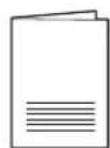
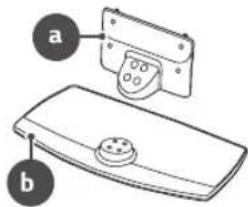
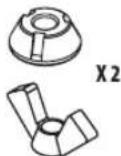
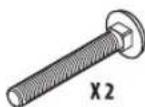
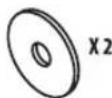
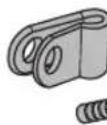

AM-ST19BA / AM-ST18CA / AM-ST18CB / AM-ST19CA / AM-ST19CC
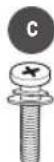
X8 (M4 X L20)
AM-ST20BB
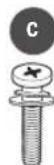
X4(M4X L20)

X4(M4XL12)
YCTaHOBKa NOIDCTaBKn
1
2
3
4
AM-ST19BA / AM-ST18CA / AM-ST18CB / AM-ST19CA / AM-ST19CC
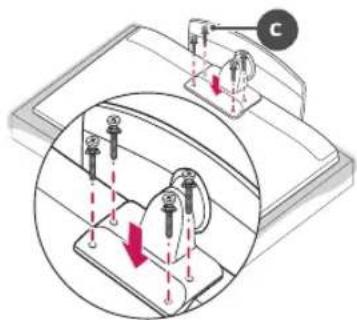
AM-ST20BB
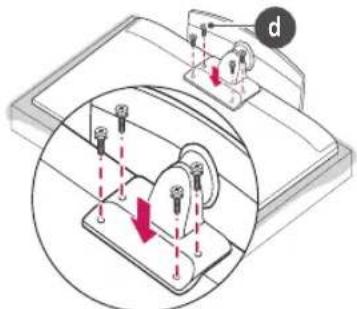
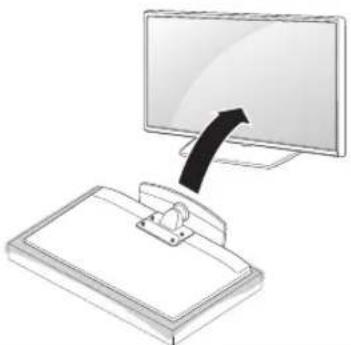
5
6

IyCTAHOBKn NOCTABKN NNOXNTyeTPOCTBO 3KpaHOM BnH3 Ha CTON INN POBHyN NOIN. IpeNd TEM KAK NIOXNTb YCTPOCTBO, HAKPOTE NOBEPXHOCTb MANKO TKAHbO, YTObI He NOBPeNTb 3KpaH.
- Pn yCTAHOBKe NOCTABKn O63aTeJIbHO NOJHOCTbHO 3aTARNBaIe BINTbI. (EcNOn OH 3aTAYHbI He NONHOCTbIO, NOcNe yCTAHOBKn YCTPOINCTBO MOKET HAKIOHNbCRBNEpe.) He 3aTARNBaITe BNHTbIC Ype3MEpHbIM ycINHeM, INaYe BNTOBBie COeINHEHn MOrYt N3HOCNTbC, IN BINTbl OTCOeINHHTCA.
- PnC6bOpKe yCTPOINCTBa He HaHOCIne HA BINTbIO NOCTOPOHHNHe BeIeCTBa (MaCNO, CMA3OHTbIE MaTePnAnbl N.T.D.)-YCTPOINCTBO MOKET NOBPeDITbcR.
IpeyctAHOBKoi kpoHHTeHa nHa HacteHHORO KpENHEHNA CHIMITE NOCTABKY, BbINONHNB DeiCTBnIO ee yCTAHOBKe B ObaTHOM NoprKe.
YcTaHObKa Ha cTone
1 POnHmIte IN BepTnKaJIbHO yCTaHOBInTe TeneBn3Op Ha CTONE.
OCTaBte 3a3Op MMHmMym 10 cm OT CTehbl DnI DOCTaTOHHOHTNJLJUM.
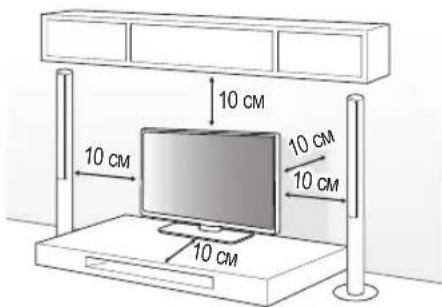
2 IopknHHTe Ka6eIb NITAHN K p03eTke.

He HAnocHte NoctopOHnHe BeueCTBa (Macna, Cma30yHbIe BeueCTBa n T. n.) Ha NOBepxHOCTb BNHTa npN C6OpKe yCtpoCTBa. (3TO MOKET npMBecTn K NOBpeXdEHIO YcTPOCTBA).
Pn yctahOBKe TeneBn3Opa Ha noCTabky HxHNO npedpnpHb MEPbIO npedeOTbpaueHIO eRO onpOKnDbBaHn. Pn Heco6NIOeHN yka3aHHbIX MEP npedeOCTOPoXHOCTnycTPOCTBO MOKET ynaCTb, YTO MOKET pINBeCTn KHaHeceHN Bo BamtpAbbl.
IIOOeHnE 630nacHOCTN IN npoONJIteBHO CPOKa CnyKbI yCTpoiCTBa He IcNOb3yIte DeTAln, He OoOpeHHbIe N3rTOBHTENM.
Kakne-ni6o NOBpeXeHn Hnyep6,Bb3BaHHbIe HcN0lb3OBAHmE DetaneH,He OdopeHHbIX npOn3BOHnTeHm,HE RaBnHOrTa rapaHTnHbIM cnYaem.
Y6eHNTecb, YTO BnHTbI npabINbHO BCTaBneHbI n HAdEJHO 3aTHyTb. (EcN OH He 6yDyt HAdEJHO 3aTHyTb, TeNEBn3Op MOKET HAKIOHnTcBcBpeqnocne yCTaHOBKn). He 3aTmBaTe BnHTbCNIuKOM CInbHO BnpOTNBHom Cnyae OHMOrYT bItb NOBpeXDeHbI 3aTHyTb HENpaBnHbO.
IcnoNb3yIte tonko oOobpeHHbIe noCTabKy n KPOHHTeIN dIra HAcTeHHoro KpennHeHn, cneuaNBHO npedHa3NaeHHbIe dIra yCtpoiCTB LG-Cornaccho 3aKOHy O 3auInTe notpeBnteJIe, KOMnAHnLG Electronics He Hecet OTBeTcBEHOctn 3a HeNCnpABHOCTn, MaTePnaHBHy uep6 NIT TaPBMBI, Bbl3BaHHbIE IcNoB3oBAHNmE yCtpoiCTB, He OoOpeHHbIX KOMnAHnEg LG Electronics.
3akpenJIeHne TeIeBn3opa Ha cTone
(3abncnt OT moDeJIi.)
PENPYPEXKDEHNE:3akpenTe TeneBn3Op Ha cTone DnI PneDTBpaueHnHaKaIOHa BpePe, NOBpexdHnN I NOTEHuaNbHO TpaBMPOBaHn.
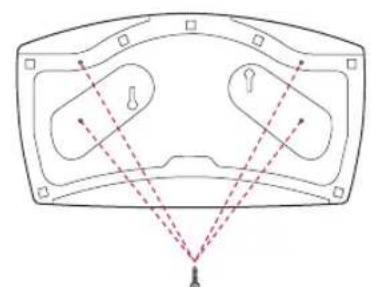
Tun A
4 BnHTa
(He BXoJrT B KOMnJIeKtauHIO)
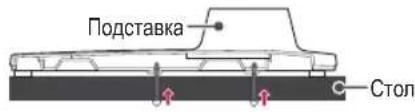
BnHT:M5xL (^*L TonuHa cTOna +8 - 10mm
Hapnep,ToIuHa cTOna:15 MM,BnHT:M5xL25
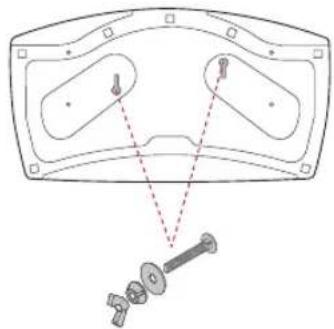
TunB
2BnHTaDnKpEnneHnnoCTabKn,
2 7a86blnKoepnneHnoPcTabKm
2TaNnKpePnHnnoCTABKn
(NocTABNIOCTBMECTeCN3DnEM)
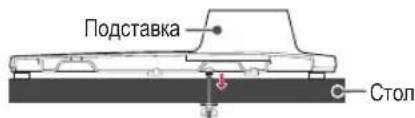
6
3akpenIeHne TeJIeBn3opa KCTHe
1 BCTABbTe n 3aTnHHe 6oNTbC yUkAMn NnN 6oNTbI kpoHtMeHOB TB Ha 3aHHe nAHeN TeneBUNOpa.
- EcnB MeCTax DnIg BcONTOB C yUkAMN yXe YcTAHOBNEHbDpyrHe BoNTb,To ChaHaA BbIKpyTHTe IN.
2 3akpeINTE KPOHHTeHbHa CTHe C NOMOuBIO6oTOB. COBMeCTNE KPOHHTeHn 6oJIbC yUkamn Ha 3aHne naHeN TeBn30pa.
3 KpeKMM Hhypom HaedJXHO npBbXnTe 60ntbI c yuKaMNI KpOHTeHAM. Y6eNTecb B TOM uTO hHyp paCNOXeHROP30HTaJIbHO.
IcnoIb3yemaM JnKpeNneHnIOBepXHOCTb DOJKNHa 6blTb DOCTaTOHNO YCTOHNBOH IN PPOHNO.
KPOHHTHeBnHTbIMHYPbHE BXOaT B KOMIJIeKT NOCTABKN. DOnONHITeNBHe AKECCyapb MoXHO npNo6pctu y MeCTHO DNepa.
Perynipobka yrna o63opa TeleBn3opa
IIOBEPHnTe TEnEBn3Op Ha 20 rpaDycOB BNEBO nIN BnpaBO, YTO6bI yNJyUHTb BVIMMOCTb C MeCTa IPOCMOTpa.

- Pn perynpOBKe yrna 0630pa yctpoaCTBa 6ydbTe octopoxhbl, YTObHe pniueemntb naIbbl.
-He donyckaite 3aueemneHry knnn naIbueB, T.K.3TO MOKET npuBeCTN K TpaBME. PnCNIuKOM 60nbwom HAKNOHE TEeBn3Op MOKET ynaTb, YTO npuBeTeK erO NOBpeXdHNo.
TexHnueckne XapaKTepeNCTnKn
| AM-ST19BA | |
| Модень | 43UT782H0ZA 43UT782V0ZA 43UT782V0ZC 43UT782H1ZA 43UT782V2ZA |
| ШирINA x Рлубнада x ВсICOTa (MM) | 570 x 303 x 235,1 |
| Вес (кг) 3,2 | |
| AM-ST18CA | |
| Мо德尔 | 43/49UU662H-ZE 49UT662H2ZB 49UT662H0ZB |
| ШирINA x Рунба x Велиота (MM) | 570 x 303 x 299,2 |
| Вес (кг) 3,2 | |
Packing Information (Customs Union)

Pycckn
CmBON «NetTnMa Me6nyca» yka3bIbAet Ha BO3MOxHOCtByTNJN3aCnynyNAKObKn.CmBON MOKeT 6bITb DOnONHeH 06o3HaueHnEM MaTePnaJa yNAKObKn B BIne CnΦpOBoR O/INN 6yKBeHHOrO 06o3HaueHn.
Ka3aKawa
CnMBOI KANTamaHbI KOIO MymKiHdiriH KepceTei. CmBON caHdbIK KOJ XaHe/ Hemece apin 6enirinepi Typinderi KaNTama MaTePnabHbIH 6enricimEn ToJIbIKTbIPbIybl MyMKH.

LG
Life's Good
MoIeNb H cepHbH Homep yctpoiCTBa yka3aHbHa 3aHHe N aHEn yctpoiCTBa. 3aHnWte nx Hxke Ha cLuya, ecnn nOTpe6yEtcaTexHnueckoe o6cnyKbaHne.
MoeB
CepnHbHOMep