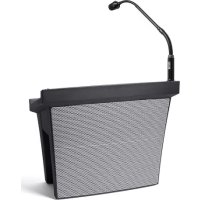
Presenter PA - Sound system ALTO - Free user manual and instructions
Find the device manual for free Presenter PA ALTO in PDF.



| Product type | All-in-one portable PA system for presentations |
| Brand | Alto Professional |
| Model | Presenter PA |
| Power source | IEC power cable and built-in rechargeable lead-acid battery |
| Battery | Rechargeable lead-acid; full charge recommended after each use; 4-LED level indicator |
| Battery life | Varies with use; may lose capacity if left discharged for more than 6 months |
| Speakers | Integrated two-way system |
| Microphone input | XLR (supports dynamic microphones only) |
| Auxiliary input | 1 x 3.5 mm stereo |
| Lamp input | 4-pin XLR (flexible lamp not included) |
| Bluetooth | Yes, with pairing button and LED indicator |
| USB charging port | 1 x USB (to charge an external device, requires unit to be powered on) |
| Controls | Mic volume, aux/Bluetooth volume, mic mute, power switch |
| Indicators | Battery level (4 LEDs), charge indicator (red/green), power indicator, Bluetooth LED |
| Pole mount | 3.5 cm socket for stand; recommended stand height 76 to 91 cm |
| Laptop tray | Yes, built-in rigid |
| Fuse | Replaceable, rating printed on rear panel |
| Storage temperature | Avoid extreme temperatures (above 32°C or below 0°C) |
| Maintenance and cleaning | Clean with a dry cloth; do not use abrasive products |
| Safety | Follow electrical codes; install on a flat, stable surface; watch cables to prevent tripping |
| Spare parts and repairability | Replaceable fuse; battery not user-replaceable; contact Alto Professional support |
Frequently Asked Questions - Presenter PA ALTO
User questions about Presenter PA ALTO
0 question about this device. Answer the ones you know or ask your own.
Ask a new question about this device
Download the instructions for your Sound system in PDF format for free! Find your manual Presenter PA - ALTO and take your electronic device back in hand. On this page are published all the documents necessary for the use of your device. Presenter PA by ALTO.
USER MANUAL Presenter PA ALTO
PRESENTER PA
User Guide
English (2-6)
Guía del usuario
Español (7 - 11)
Guide d'utilisation
Français (12 - 16)
Guida per l'uso
Italiano (17 - 21)
Benutzerhandbuch
Deutsch (22 - 26)
Appendix
English (27)
User Guide (English)
Introduction
Thank you for purchasing the Presenter PA. At Alto Professional, performance and reliability mean as much to us as they do to you. That's why we design our equipment with o thing in mind—to make your performance the best it can be.
The Presenter PA is a portable presentation station for multi-media presentations—perfect for hotels, places of worship, conference rooms and convention centers. This all-in-one solution is designed with professional features, such as a powerful, rechargeable 2-way speaker system, inputs for a playback device, microphone and LED podium lamp (sold separately) and a rigid laptop tray.
Please see this guide's Setup chapter to learn how to integrate Presenter PA with your audio system, and then refer to the Operation chapter to start using Presenter PA.
Box Contents
Presenter PA
Power Cable
Gooseneck XLR Microphone
User Guide
Safety & Warranty Manual
Support
For the latest information about this product (system requirements, compatibility information, etc.) and product registration, visit altoprofessional.com.
For additional product support, visit altoprofessional.com/support.
Rechargeable Batteries
Rechargeable lead-acid batteries are the same type used in automobiles. As with your car battery, how you use this battery has a significant impact on its lifespan. With proper use and treatment, a lead-acid battery can last for years. Here are some recommendations for getting the longest life from the internal battery.
General Usage Fully charge the battery before using the loudspeaker. Charge the battery completely after each use.
Storage For best product longevity, do not store at exceedingly hot (greater than 90 °F / 32 °C) or exceedingly cold (less than 32 °F / 0 °C) temperatures. It is acceptable to leave your loudspeaker plugged in. This will not overcharge the battery. If you leave the battery level low and do not charge it for 6 months, the battery may permanently lose capacity.
Repair If the battery fails to charge, contact Alto Professional at altoprofessional.com.
Disposal Bring the unit to a recycling center or dispose of in accordance with local ordinances.
Stand-Mounting
Presenter PA features a 1-3/8" (3.5 cm) diameter pole socket for mounting on a stand. We recommend using a stand that is adjustable between 30–36" (76–91 cm) in height for best results. When using a stand with Presenter PA, make sure to follow these guidelines:
• Always install loudspeakers in accordance with applicable electrical and building codes.
- Install the loudspeaker according to its maximum weight. Check the specifications of your stand or pole to ensure it can support the loudspeaker's weight. Also, observe all safety precautions specified by the manufacturer.
- Do not mount multiple loudspeakers on the same stand or pole.
- Always verify that the stand or pole is on a flat, level, and stable surface. Also, fully extend the legs of tripod-style stands, and ensure its legs do not present a trip hazard.
- Inspect the stand (or pole and associated hardware) before each use and do not use equipment with worn, damaged, or missing parts.
- Always be cautious in windy, outdoor conditions. You may need to place additional weight (e.g., sandbags) on stand's base to improve stability. Do not attach banners or similar items to any part of a loudspeaker system. Such attachments could act as a sail and topple the system.
- Unless you are confident that you can handle the loudspeaker's weight, ask another person to help you lift it onto the stand or pole.
- Make sure your cables are out of the way of performers, production crew, and audience so they will not trip over them, pulling the loudspeaker off the stand or pole.
Features
Rear Panel

PRESENTER PA ALL-IN-ONE PRESENTATION STATION WITH BUILT-IN RECHARGEABLE SPEAKER
- Battery Level/Charging Indicator: While the unit is powered on, these four lights indicate the power left in the battery. Battery life varies based on volume and usage. The Charging Indicator illuminates red when the battery is charging and green when it is fully charged. The LED will turn off when the battery is full and the unit is in standby.
- Mic Volume: Turn this knob to adjust the volume of the microphone.
- Aux/Bluetooth Volume: Turn this knob to adjust the input volume of the aux input and Bluetooth. When the knob is at the minimum position, the internal speaker will be muted.
- Aux Input (1/8" / 3.5 mm): Connect a CD player, digital media player, or other audio source to this 1/8" (3.5 mm) stereo auxiliary input. Control the volume using the Aux/Bluetooth Volume knob.
- Bluetooth Pair Button: Press this button to pair a Bluetooth device. When Presenter PA is in pairing mode, the LED above this button will flash quickly. On your Bluetooth device's setup screen, find Presenter PA and connect. When successfully paired, the LED will remain lit.
- USB Charging Port: Connect your device's charge cable here to charge it. USB charging only functions when the unit's power is turned on.
-
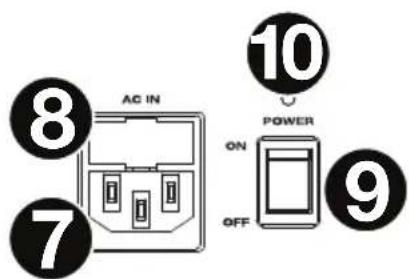
Power Cable Input (IEC): Insert the included power cable here to charge the unit. Note that the Presenter PA can run off the power cable while it simultaneously charges the battery. The charge indicator illuminates red when the battery is charging.
-
Fuse: If the fuse is broken, disconnect the power cord from the power outlet, and then unscrew this holder to replace the fuse. Replace it with a fuse with an appropriate rating (printed under on the rear panel). Using a fuse with an incorrect rating can damage the product and/or fuse.
- Power Switch: Use this switch to power Presenter PA on or off. Please note that while Presenter PA is connected to a power source, it does not need to be powered on to charge the battery.
- Power Light: This light will illuminate when Presenter PA is powered on.
Top Panel
- Microphone Input (XLR): Connect a dynamic microphone here.
- Microphone Mute: Press and hold this button to mute a microphone.
- Lamp Input (4-Pin XLR): Connect an LED podium lamp (not included) here.
Setup
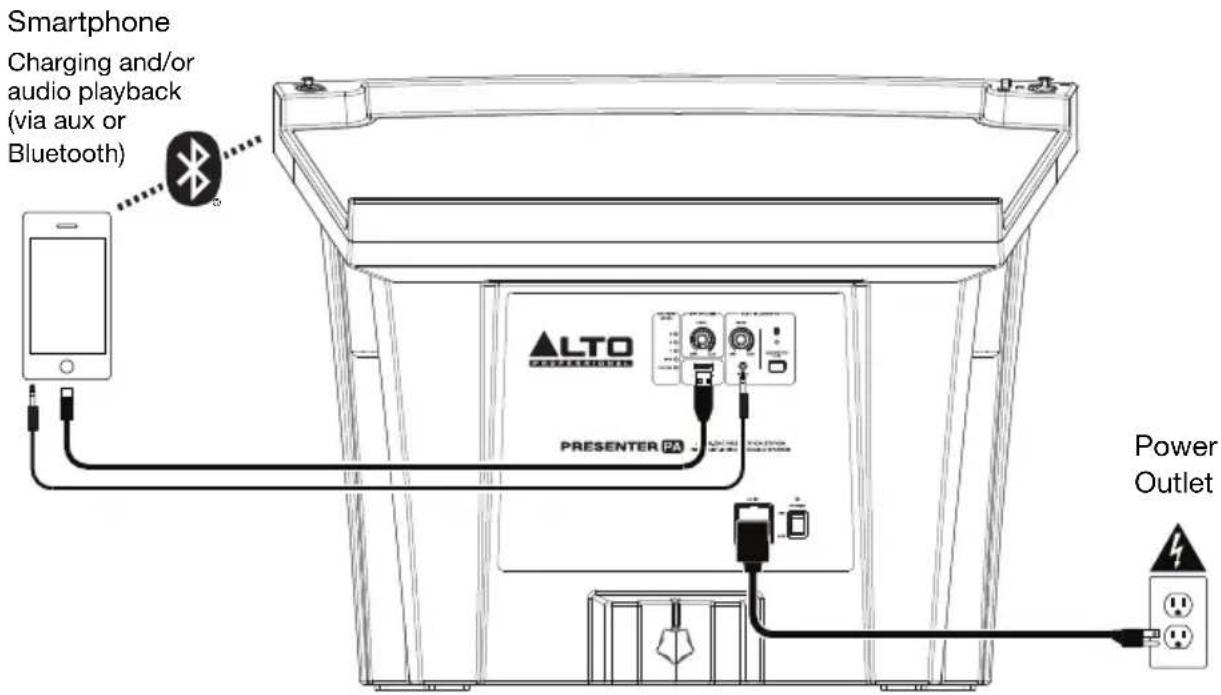
Items not listed under Introduction > Box Contents are sold separately.
Operation
To power Presenter PA on or off, use the power switch.
To play audio from an auxiliary device:
- Connect an audio device to the aux input using a stereo 1/8" (3.5 mm) cable.
- Power on Presenter PA.
- Play audio on your device, and turn the Aux/Bluetooth Volume knob to adjust the output volume level. Also, adjust the volume level on your device.
To play audio from a Bluetooth device:
- Turn on your Bluetooth device.
- Power on Presenter PA. If you have previously connected to another Bluetooth device, Presenter PA will reconnect. To disconnect pairing if the Bluetooth LED is lit solid, press and release the Bluetooth Pair button.
- Navigate to your Bluetooth device's setup screen, find Presenter PA and connect.
- Play audio on your device, and turn the Aux/Bluetooth Volume knob to adjust the output volume level. Also, adjust the volume level on your device.
To use a microphone with Presenter PA:
- Make sure the microphone is connected properly to the XLR input above the top panel tray on the right side.
Note: Only dynamic microphones are supported.
- Speak into the microphone and adjust its position, if necessary.
To adjust the microphone volume, turn the Mic Volume knob.
To mute the microphone, press and hold the Mute button next to the XLR input.
To unmute the microphone, release the Mute button.
To use a podium lamp (not included), make sure it is connected properly to the 4-pin input above the top panel tray on the left side. The podium lamp will turn on automatically. Adjust the position of the lamp if necessary.
To charge a device, connect it to the USB port on the rear panel.
Important: Presenter PA must be powered on to charge a connected device.
Microphone XLR flexible
Guide d'utilisation
Technical Specifications
| Output Power | 50 W (RMS), 100 W (peak) | |
| Drivers | Low | (1) Freq.254 mm) full-range woofer |
| High Freq. | (1) 1" (25 mm) high-frequency driver with precision wave-guide | |
| Mixer Controls | Microphone volume, mute buttonVolume for 1/8" (3.5 mm) aux input and Bluetooth | |
| Connections | (1) XLR microphone input (dynamic microphone not included)(1) 1/8" (3.5 mm) stereo input(1) 4-pin XLR jack (for podium lamp, not included)(1) USB charging port(1) IEC power input | |
| Power | Connection | IEC |
| Input Voltage | 100-240 V~, 50/60 Hz, 85 W | |
| Fuse | T1AL 250VAC | |
| Battery Type | 12V, 7Ah SLA | |
| Battery Life | Up to 33 hours * | |
| Dimensions(width x depth x height) | 24.7" x 15.0" x 18.9"62.8 x 38 x 48.1 cm | |
| Weight | 29.1 lbs13.2 kg | |
Specifications are subject to change without notice.
* Battery life may vary based on temperature, age, and volume usage of product.
Trademarks & Licenses
Alto Professional is a trademark of inMusic Brands, Inc., registered in the U.S. and other countries.
The Bluetooth word mark and logos are owned by the Bluetooth SIG, Inc. and any use of such marks by Alto Professional is under license.
All other product names, company names, trademarks, or trade names are those of their respective owners.
altoprofessional.com
- PRESENTER PA
- User Guide (English)
- Introduction
- Box Contents
- Support
- Rechargeable Batteries
- Stand-Mounting
- Features
- Rear Panel
- Top Panel
- Setup
- Operation
- To play audio from an auxiliary device:
- To play audio from a Bluetooth device:
- To use a microphone with Presenter PA:
- Trademarks & Licenses
- altoprofessional.com
Brand : ALTO
Model : Presenter PA
Category : Sound system