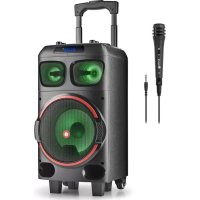
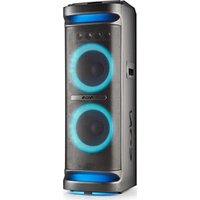
WILD DUB Zero - Loudspeaker NGS - Free user manual and instructions
Find the device manual for free WILD DUB Zero NGS in PDF.



| Brand | NGS |
| Model | WILD DUB Zero |
| Product type | Portable speaker |
| RMS power | 20 W |
| Peak power | 120 W |
| Woofer | 1 x 8 inches |
| Tweeter | 2 x 3 inches |
| Power supply | AC 100-240 V ~ 50/60 Hz or rechargeable battery 11.1 V / 2.2 A |
| Battery life | About 3 hours at 100% volume, 4.5 hours at 70%, 7 hours at 50% |
| Inputs | USB, SD card, Bluetooth, AUX, microphone, guitar |
| Outputs | AUX OUT |
| Wireless functions | Bluetooth 5.0 (estimated), TWS to pair two speakers |
| Equalizer | Presets: NOR, rock, jazz, classical, pop, country; mega bass |
| Recording | Voice recording via built-in mic on USB key or SD card |
| Remote control | Included with AAA batteries |
| Display | LED to show modes and settings |
| Lighting | Multicolored LED lights with flashing modes |
| Frequency range | 20 Hz - 20 kHz |
| Maintenance | Clean with a soft dry cloth; do not immerse in water |
| Safety | Do not open the device; use the supplied power adapter; recycle at a waste disposal center |
| Spare parts | Contact NGS after-sales service |
| General information | Full manual available for PDF download |
Frequently Asked Questions - WILD DUB Zero NGS
User questions about WILD DUB Zero NGS
0 question about this device. Answer the ones you know or ask your own.
Ask a new question about this device
Download the instructions for your Loudspeaker in PDF format for free! Find your manual WILD DUB Zero - NGS and take your electronic device back in hand. On this page are published all the documents necessary for the use of your device. WILD DUB Zero by NGS.
USER MANUAL WILD DUB Zero NGS
NORSK I SUOMI I SVENSKA I DANSK I LIETUVIU


www.ngs.eu
USER'S MANUAL
CONTROL BUTTONS
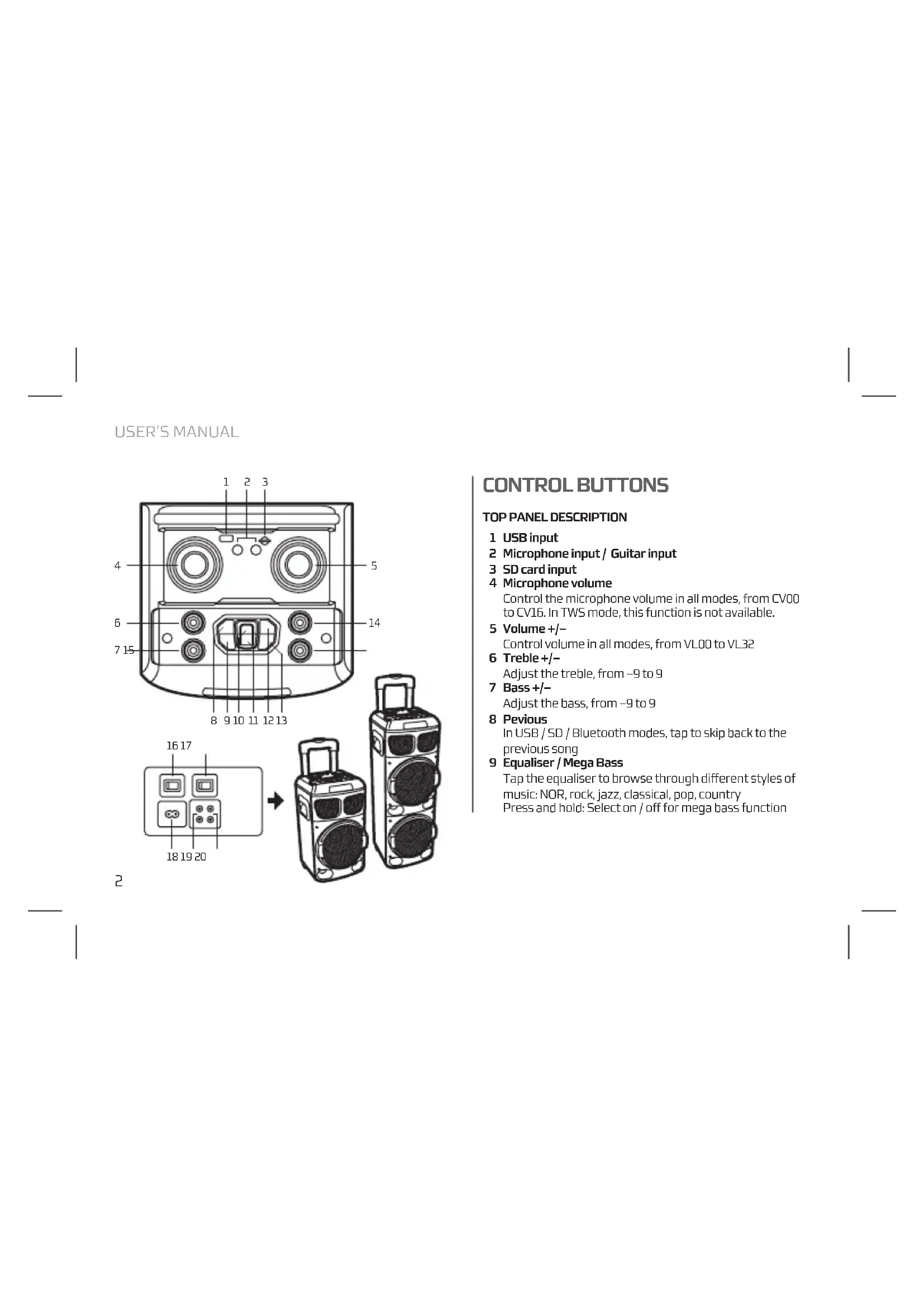
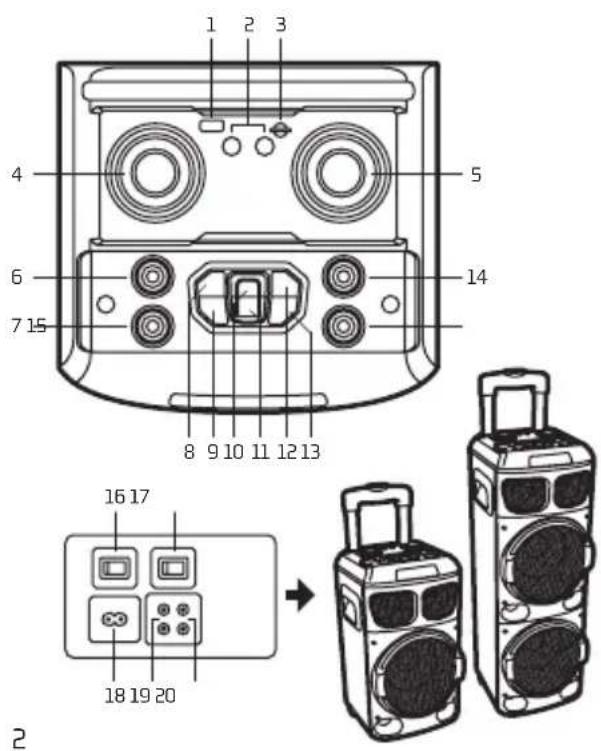
TOP PANEL DESCRIPTION
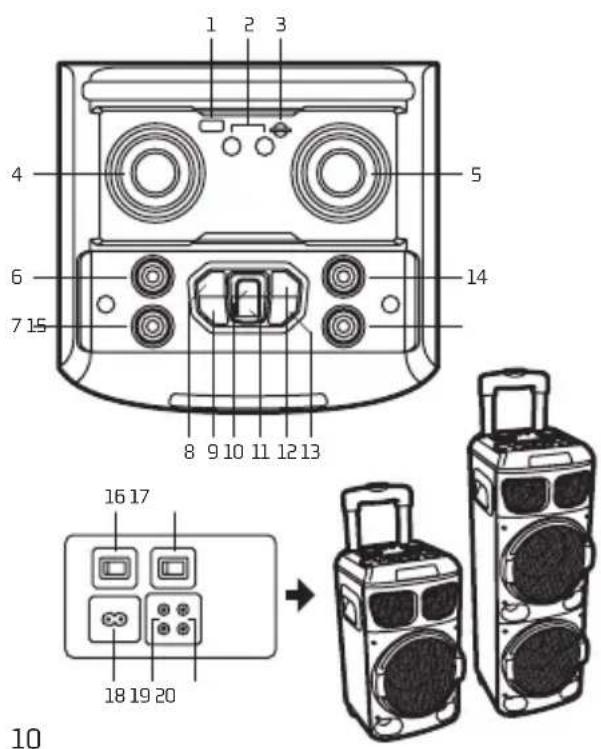
1 USB input
2 Microphone input / Guitar input
3 SD card input
4 Microphone volume
Control the microphone volume in all modes, from CV00 to CV16. In TWS mode, this function is not available.
5 Volume +/- Control volume in all modes, from VL00 to VL32
6 Treble +/- Adjust the treble, from -9 to 9
7 Bass +/- Adjust the bass, from -9 to 9
8 Pevious
In USB / SD / Bluetooth modes, tap to skip back to the previous song
9 Equaliser / Mega Bass
Tap the equaliser to browse through different styles of music: NOR, rock, jazz, classical, pop, country
Press and hold: Select on / off for mega bass function
Play / Pause
Under USB / SD modes, this button is play/pause In BT mode, tap to play / pause
In TWS mode, press and hold to connect and disconnect the TWS (5 seconds)
Under AUX-IN mode, this button has no function
11 Mode
Press shortly to skip to Wireless BT / AUX-IN / USB / SD modes
In BT mode, press and hold to disconnect Bluetooth (3 seconds)
12 Next
Under USB / SD / BT modes, tap to skip forward to the next song
13 Standby mode
By pressing standby, all functions will stop working
14 Echo
Press and adjust the value with the multifunction from EC00 to EC30
15 Guitar volume
Control the guitar volume under guitar-input mode
BACK PANEL DESCRIPTION10
16 POWER
Battery / off / AC
17 LIGHT SW
Turn on / off the light
18 ACIN
For connecting the AC cable to get power supply
19 AUX OUT
To connect more speakers togheter
20 AUX-IN
For connecting the external device under AUX-IN mode
USER'S MANUAL
USING THE REMOTE CONTROL
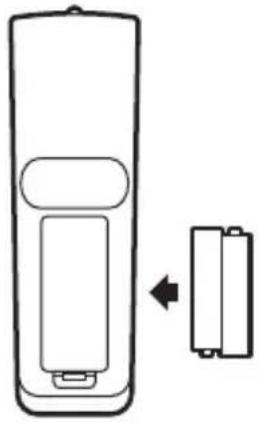
Installing the batteries
Remove the battery cover from the back of the remote control as shown and insert 2xAAA size batteries ensuring correct polarity.
natural_image
Diagram of a remote control unit with an arrow indicating left-side change (no text or symbols)Note: Please point at the LED screen when you are using the remote controller
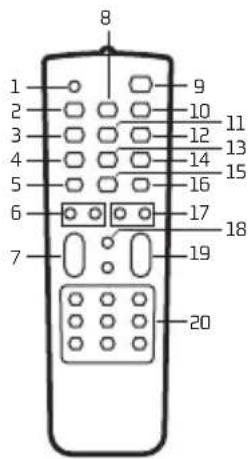
1 Mute
Press this button, sound off. Press again, sound on
2 Previous
Under USB / SD / Bluetooth mode, press shortly for previous sound source
3 MODE
Press shortly to skip to Wireless BT / AUX-IN / USB (with USB card plug in) / SD (with SD card plug in) mode
4 REC
Under any mode, press "REC" button to record sound with connected microphone and record in USB stick / SD card
5 LIGHT
The color changes from red, green, blue, purple four color automatically. Press "LIGHT" button, the light will twinkle & change color with the music. Press the "LIGHT" again, the light will be off.
6 BASS+/-
Adjust the bass
7 M. VOL+/-
Control the microphone volume
8 Play / Pause
Under USB / SD / BT modes, this button is play/pause Under AUX-IN mode, this button has no function
9 STANDBY
Press shortly to put speaker in standby Press again to turn on speaker
10 Next
Under USB / SD / BT modes, press shortly for next song
11 VOICE
Sound effects key which can emphasize the voice
12 REPEAT
Repeat one, repeat all (only available under USB / SD modes)
13 REC PLAY
Play the recorded files into USB / SD
14 R-DEL
Delete the recorded file (only available under REC PLAY mode)
15 RGB
Change LED lights colours between red, green and blue
16 M-PRI
Gives priority to mic voice against music
17 TREBLE +/-
Adjust the treble
18 EQ
Equalizer to browse through different music styles: NOR, rock, jazz, classical, pop, country
19 VOL+/-
Control the volume
20 0-9 keys
Under USB / SD modes to select songs
For other modes, number buttons have no function
USER'S MANUAL
AUX IN, USB/SD, BLUETOOTH
To switch from one mode to another press the MODE button. If the device is not connected to a USB stick or an SD card, these modes will be omitted.
1. AUX IN
With the attached audio cable, you can connect the device with the external multimedia audio sources through the port "AUX". After connection, just set the mode to AUX by pressing the MODE button on the device. At this time, the AUX indicator will be displayed on the screen, suggesting the device can play the audio files from multimedia sources like PC, mobile phone, MP3 and MP4, etc.
Note: In AUX IN mode, the forward and rewind song functions will not operate. They must be accessed through the auxiliary device directly.
2. USB/SD CARD PLAYING
Insert the SD card or a USB Flash memory stick into the corresponding slot. The device will automatically play any music in MP3 format on the card.
3. BLUETOOTH MODE
A. Press the MODE button until the word "BLUE" appears on the screen. The * icon will start to flash. In Bluetooth mode the device goes into searching / paring / reconnect mode for pair.
B. Now, turn ON the Bluetooth function on your mobile phone.
C. Search for "NGS WILDDUB" and select it to pair (for first time pairing or pairing a new mobile device). Once connected, the ➤ icon will stop flashing.
D. The Bluetooth speaker will be reconnecting automatically if your mobile phone has been paired (Depend on the of mobile phone's type and configuration, manual reconnection may require on some devices).
4. TWS
A. Change the two speaker in the BT mode, then press the PLAY/PAUSE button on one speaker for 5 seconds.
B. You'll hear a beep and ON will appear on the main screen and PAUSE on the secondary screen.
C. Search your mobile device for NGS WILDDUB and it will hook up.
BUILT-IN RECORDING FUNCTION
- Plug in a microphone to the MIC IN input
- Insert USB/SD card into the corresponding port, press MODE button and select USB/SD mode.
- If the USB/SD card is plugged into the speaker for the first time, the system will automatically create a folder named RECORD to save recorded files (FAT32 USB file system is supported).
- When you are ready to record, press REC button to go to recording mode. The current sound output will stop and the MICRO mode will be activated, the screen shows the recording time. The device starts recording when the screen shows 00:01 and users can use the microphone to record.
USER'S MANUAL
BATTERY MODE
- Put the switch on the back to battery position.
- Switch on the speaker by pressing the STANDBY button.
CHARGING THE BATTERY
- Connect one end of the power cable to the speaker and the other end to the electricity supply.
- A red LED will appear on the screen while it is charging.
- When the battery is fully charged the red LED will disappear and a green LED will appear.
TECHNICAL SPECIFICATIONS
TWS
USB / SD / BT / AUX inputs
Microphone input
Guitar input
LED screen
LED lights
AUX output
Input voltage: AC 100V-240V 50/60Hz
Frequency range: 20Hz - 20kHz
WILDDUB1 WILDDUB ZERO
Output power
(Peak power): 300W 120W
Woofer size: 2 x 8" 1 x 8"
Tweeter size: 2 x 3" 2 x 3"
RMS power: 80W 20W
Battery: 11.1V/5.2A 11.1V/2.2A
Battery life:
At 100% volume 3 hours 3 hours
At 70% volume 7 hours 4.5 hours
At 50% volume 12 hours 7 hours
ENGLISH

NGS
If at any time in the future you should need to dispose of this product please note that:
Waste electrical products should not be disposed of with household waste. Please recycle where facilities exist.
Check with your Local Authority or retailer for recycling advice.
(Waste Electrical and Electronic Equipment Directive)
MANUEL DE L'UTILISATEUR
BOUTONS DE COMMANDE
TOP PANEL DESCRIPTION
natural_image
Diagram of a remote control unit with an arrow indicating left-side change (no text or symbols)AUX IN, USB/SD, BLUETOOTH
natural_image
Diagram of a remote control unit with an arrow indicating left-side change (no text or symbols)AUX IN, USB/SD, BLUETOOTH
(Peak power): 300W 120W
natural_image
Diagram of a remote control unit with an arrow indicating left-side change (no text or symbols)AUX IN, USB/SD, BLUETOOTH
natural_image
Diagram of a remote control unit with an arrow indicating left-side change (no text or symbols)Riproduci i file registrati in USB / SD
14 R-DEL
AUX IN, USB/SD, BLUETOOTH
natural_image
Diagram of a remote control unit with an arrow indicating left-side change (no text or symbols)AUX IN, USB/SD, BLUETOOTH
natural_image
Diagram of a remote control unit with two battery cells, one moving right (no text or symbols)AUX IN, USB/SD, BLUETOOTH
natural_image
Diagram of a remote control unit with an arrow indicating left-side change (no text or symbols)AUX IN, USB/SD, BLUETOOTH
natural_image
Diagram of a remote control unit with an arrow indicating left-side change (no text or symbols)AUX IN, USB/SD, BLUETOOTH
natural_image
Diagram of a remote control unit with an arrow indicating left-side change (no text or symbols)AUX IN, USB/SD, BLUETOOTH
natural_image
Diagram of a remote control unit with an arrow indicating left-side change (no text or symbols)AUX IN, USB/SD, BLUETOOTH
(Peak power): 300W 120W
natural_image
Diagram of a remote control unit with an arrow indicating left-side change (no text or symbols)AUX IN, USB/SD, BLUETOOTH
natural_image
Diagram of a remote control unit with an arrow indicating left-side change (no text or symbols)AUX IN, USB/SD, BLUETOOTH
natural_image
Diagram of a remote control unit with an arrow indicating left-side change (no text or symbols)AUX IN, USB/SD, BLUETOOTH
natural_image
Diagram of a remote control unit with an arrow indicating left-side change (no text or symbols)AUX IN, USB/SD, BLUETOOTH
(Peak power): 300W 120W
Storlek på bashögtalare: 2x8" 1x8"
natural_image
Diagram of a remote control unit with an arrow indicating left-side change (no text or symbols)AUX IN, USB/SD, BLUETOOTH
(Peak power): 300W 120W
natural_image
Diagram of a remote control unit with an arrow indicating left-side change (no text or symbols)AUX IN, USB/SD, BLUETOOTH
HAS BEEN TESTED AND FOUND IN CONFORMITY WITH THE FOLLOWING HARMONIZED EUROPEAN STANDARDS:
HA SIDO TESTADO EN CONFORMIDAD CON LAS SIGUIENTES NORMAS STANDARD EUROPEAS ARMONIZADAS:
EN 60065:2014
IEC 62321:2013
EN 62479:2010
ETSIEN 301 489-1 V2.2.0 (2017-03)
ETSI EN 301 489-17 V3.2.0 (2017-03)
ETSI EN 301 489-53 V1.1.0 (2017-03)
ETSI EN 300 328 V2.1.1 (2016-11)
ETSI EN 303 345 V1.1.7 (2017-03)
AND THEREFORE COMPLY WITH THE ESSENTIAL REQUIREMENTS AND PROVISIONS OF THE FOLLOWING DIRECTIVES OF THE EUROPEAN PARLIAMENT AND EUROPEAN COUNCIL:
Y, POR LO TANTO, CUMPLE CON LOS REQUERIMIENTOS Y PROVISIONES DE LAS SIGUIENTES DIRECTIVAS DEL PARLAMENTO EUROPEO:
RADIO EQUIPMENT DIRECTIVE 2014/53/EU ROHS DIRECTIVE 2011/65/EU & (EU) 2015/863
DIRECTIVA DE EQUIPOS DE RADIO 2014/53/EU DIRECTIVA ROHS 2011/65/EU & (EU) 2015/863
AUTHORIZED REPRESENTATIVE:
REPRESENTANTE AUTORIZADO:
LURBE GRUP S.A
PORTUETXE 27
20018 SAN SEBASTIÁN (GUIPÚZCOA)
SPAIN
SAN SEBASTIÁN, JULY 20TH, 2021 SAN SEBASTIÁN, 20 DE JULIO DE 2021
SIGNED FIRMADO
RAÚL MARTÍN
PRODUCT MANAGER
LURBE GRUP S.A, SAN SEBASTIÁN, ESPAGNE, SOUS SA RESPONSABILITÉ EXCLUSIVE, CERTIFIE LA CONFORMITÉ DU PRODUIT :
LURBE GRUP S.A. SAN SEBASTIÁN, ESPAÑA, DECLARA SOB A SUA EXCLUSIVA RESPONSABILIDADE A CONFORMIDADE DO PRODUTO:
NGS: HAUT-PARLEUR BLUETOOTH NGS / MODÈLE: WILDDUB ZERO / WILDDUB 1
NGS: ALTO-FALANTE BLUETOOTH NGS / MODELO: WILDDUB ZERO / WILDDUB 1
A ÉTÉ TESTÉ CONFORMÉMENT AUX NORMES STANDARD EUROPÉENNES HARMONISÉES SUIVANTES :
FOI TESTADO EM CONFORMIDADE COM AS SEGUINTES NORMAS STANDARD EUROPEIAS HARMONIZADAS:
EN 60065:2014
IEC 62321:2013
EN62479:2010
ETSI EN 301 489-1 V2.2.0 (2017-03)
ETSI EN 301 489-17 V3.2.0 (2017-03)
ETSI EN 301 489-53 V1.1.0 (2017-03)
ETSI EN 300 328 V2.1.1 (2016-11)
ETSI EN 303 345 V1.1.7 (2017-03)
ET RESPECTE DONC LES EXIGENCES ET LES DISPOSITIONS DES DIRECTIVES SUIVANTES DU PARLEMENT EUROPÉEN :
E, POR CONSEGUINTE, CUMPRE COM OS REQUISITOS E PROVISÕES DAS SEGUINTES DIRECTIVAS DO PARLAMENTO EUROPEU:
DIRECTIVE SUR LES ÉQUIPEMENTS RADIO 2014/53/EU DIRECTIVE ROHS 2011/65/EU & (EU) 2015/863
DIRECTIVA RELATIVA AOS EQUIPAMENTOS DE RÁDIO 2014/53/EU DIRECTIVA ROHS 2011/65/EU & (EU) 2015/863
REPRÉSENTANT AUTORISÉ :
REPRESENTANTE AUTORIZADO:
LURBE GRUP S.A
PORTUETXE 27
20018 SAN SEBASTIÁN (GUIPÚZCOA)
SPAIN
SAN SEBASTIÁN, LE 20 JULLET 2021 SAN SEBASTIÁN, 20 DE JULHO DE 2021
SIGNÉ ASSINADO

RAÚL MARTÍN
PRODUCT MANAGER

technical support: www.ngs.eu/support
www.ngs.eu
- USER'S MANUAL
- CONTROL BUTTONS
- TOP PANEL DESCRIPTION
- Play / Pause
- Mode
- Next
- Standby mode
- Echo
- Guitar volume
- BACK PANEL DESCRIPTION10
- POWER
- LIGHT SW
- ACIN
- AUX OUT
- AUX-IN
- USING THE REMOTE CONTROL
- Installing the batteries
- Mute
- Previous
- MODE
- REC
- LIGHT
- BASS+/-
- M. VOL+/-
- Play / Pause
- STANDBY
- Next
- VOICE
- REPEAT
- REC PLAY
- R-DEL
- RGB
- M-PRI
- TREBLE +/-
- EQ
- VOL+/-
- 0-9 keys
- AUX IN, USB/SD, BLUETOOTH
- AUX IN
- USB/SD CARD PLAYING
- BLUETOOTH MODE
- TWS
- BUILT-IN RECORDING FUNCTION
- BATTERY MODE
- CHARGING THE BATTERY
- TECHNICAL SPECIFICATIONS
- MANUEL DE L'UTILISATEUR
- BOUTONS DE COMMANDE
Brand : NGS
Model : WILD DUB Zero
Category : Loudspeaker