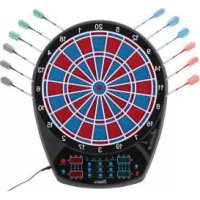
DS5478 - Electronic game CRIVIT - Free user manual and instructions
Find the device manual for free DS5478 CRIVIT in PDF.


| Product Type | Electronic LED dartboard |
| Brand | Crivit |
| Model | DS5478 (also DS5479) |
| Dimensions (W x H x D) | Approx. 420 x 517 x 26 mm |
| Power supply | Power adapter 9V = 500 mA (protection class III) |
| Adapter input | 100-240 V~ 50/60 Hz, 0.35 A (protection class II) |
| Adapter models | EU: ASSA105E-090050; UK: ASSA105B-090050 |
| Display | 4 LED displays |
| Number of games | 27 games (301-901, Cricket, etc.) |
| Number of players | 1 to 16 players or teams (2-2 to 8-8) |
| Special functions | Cyber Match (virtual opponent), Handicap, Game Guard, Bounce Out, Dart Out, Double In/Out |
| Speaker | Built-in, adjustable volume (7 levels + mute) |
| Included accessories | 12 shafts, 12 barrels, 12 flights, 112 Soft-Tip tips, power adapter, 4 screws/anchors, throwing line, template, manual |
| Tip type | Soft-Tip only - no steel tips |
| Safety | Not suitable for children under 14 years; indoor use only |
| Maintenance | Clean with a damp cloth and soapy water; do not use solvents |
| Storage | Dry, dust-free, in a temperate room |
| Warranty | 3 years from date of purchase |
| Manufacturing date | 09/2018 (mentioned in the manual) |
Frequently Asked Questions - DS5478 CRIVIT
User questions about DS5478 CRIVIT
0 question about this device. Answer the ones you know or ask your own.
Ask a new question about this device
Download the instructions for your Electronic game in PDF format for free! Find your manual DS5478 - CRIVIT and take your electronic device back in hand. On this page are published all the documents necessary for the use of your device. DS5478 by CRIVIT.
USER MANUAL DS5478 CRIVIT
Playing and user instructions

B
Rere nreding ird out the ilustratio pape and qut in know of the fumction of your urit.
G5 Instruetior and Safety Notice Page 50
IAN 303330IAN 303330
()()
F 11 96
DE AT CH
Lieferumfang 7
Technische Daten 7
Safety information 50-51
Safety information for the
power adaptor 51
Assembly instructions 51
Assembly of the dartboard 51
Assembly of the darts 51
Designation and function of
each of the parts 51-52
Operation of the dartboard 52 - 53
Turning the item on and off 52
Functional buttons 52-53
Game settings and sequence 53
Game options and list of
game options 54
Games 55-59
Troubleshooting 60
Maintenance, care, storage 60
Disposal 61
Notes on the guarantee
and service handling 61
Model: EU: ASSA105E-090050
Model: UK: ASSA105B-090050
Single-Segment =ine Station
Battleground General
Segment Double = deux stations
Segment Triple = trois stations
Battleground General
Moitié inférieure : Segments : 6, 10, 15, 2, 17, 3, 19, 7, 16, 8.
Battleground General
Meta inferiore: segmenti: 6, 10, 15, 2, 17, 3, 19, 7, 16, 8.
With this purchase you have opted for a high-quality item. Familiarise yourself with the item before using it for the fist time. Read the following instructions for play and operation of the item carefully, including the safety information. Only use this item in the manner described and for the purpose for which it is intended. Store these instructions carefully. When passing the item on to third parties, hand over all accompanying documents as well.
Package contents
1 x game and instructions for use
1 x electronic dartboard
12 x shafts (3 each blue, green, red and black)
12x dart grips
12 × wings (3 each in blue/white, green/ white, red/white and black/white)
112 x soft-tip (point)
1x power adaptor
4× screws & dowels
1 x throw-off point
1xdrill template
Technical data Electronic dartboard
Model: DS-5478/DS-5479
Total dimensions: approx.
$$ 4 2 0 \times 5 1 7 \times 2 6 \mathrm {m m} (\mathrm {W} \times \mathrm {H} \times \mathrm {D}) $$
Power supply values: 9V = 500mA

= protection class III
Power adaptor
Model: EU: ASSA105E-090050
Model: UK: ASSA105B-090050
Input: 100-240V - 50/60Hz 0.35A
Output: 9V = 500mA

= protection class II
Date of manufacture (month/year): 09/2018
Intended use
The item is not suitable for children under 14 years of age!
The product contains small parts which could be swallowed by children and, as a sporting item, requires concentration and good motor skills.
The item is for private indoor use only and is not intended for commercial use, or use in outdoor areas.
This item is meant to be used exclusively with darts with a soft tip. The use of darts with steel points causes irreparable damage. Remove the protective foil from the dartboard.
Safety information
Risk of injury!
- This item is not intended for use by persons (including children) with limited physical abilities, motor skills or mental handicaps, nor for persons who lack experience and/or knowledge, unless they are supervised by a safety officer, or have received instruction on the use of the item from a safety officer.
Children should be supervised to ensure that they don't play with the item. - Do not aim at, or throw the darts, at people or animals.
Take care to position or set up the item in an inaccessible place when in use. - Do not mount onto doors!
Metal tips may not be used at all!
Preventing damage to the item!
- Use only appropriate replacement tips, to prevent the darts from ricocheting from the dartboard. Long tips are not recommended for electronic dartboards.
They bend or break easily (removal of broken tips from the dartboard - error messages).
- Do not expose the item to adverse weather conditions or extreme temperatures.
- Protect the item from wet and moist conditions. The electronics may be damaged.

Safety information for the power adaptor
CAUTION!
Important information for the use of the power adaptor!
Note: The equipment warms up during normal operation.
- Only use the power adaptor for Dartboard DS-5478/DS-5479.
- Use only original adaptor!
- Use only original replacement parts in case of malfunctioning parts!
- Unplug the power adaptor from the mains power before disconnecting the power adaptor from the dartboard.
- The power adaptor is only suitable for indoor use. Keep away from moisture.
- Don't continue using the power adaptor when the cover or supply cable have been damaged.
- Disconnect the item from the mains when not in use for an extended period.
- The output cable must not be short-circuited.
- The outer connection cable of this transformer cannot be replaced; if the cable is damaged, the transformer should be disposed of.
Assembly instructions
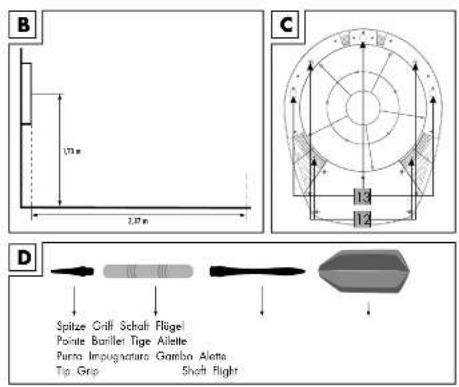
Assembly of the dartboard (Fig. B and C)
- Select an appropriate location, with approx. 3m free space.
- The throw-off point is about 2.37m from the dartboard. Mount the dartboard to the wall in such a way that the mid-point of the bullseye is around 1.73m from the ground.
- Mark the relevant drill holes with a pencil, using the drill template included. The markings "+" designate the dartboard's mounting bracket. The markings "O" designate openings on the dartboard, to facilitate the long-term, stable wall-mounting.
- Either mount the dartboard onto the mounting bracket (3 screws) or onto the permanent wall mount (4 screws). The cross in the middle of the drill template marks the height of the bullseye on the dartboard. Afterwards, mount the dartboard with the screws and dowels included.
Assembly of the darts (Fig. D)
Screw the tips and the shaft to the grip, as shown, and insert the wings into the cross-slits.
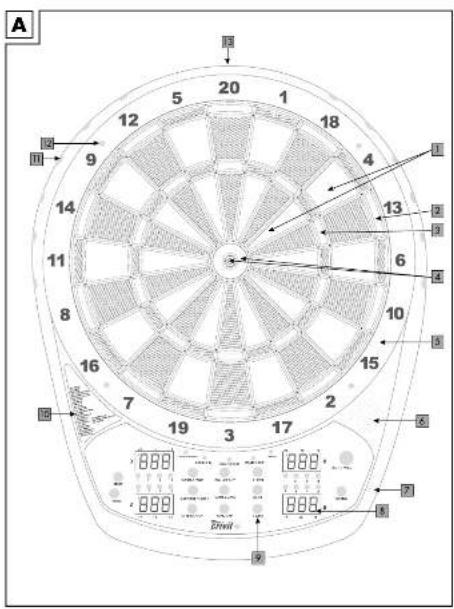
Designation and function of each of the parts (Fig. A and C)
Single: Number of points as shown
2 Double: Number of points × 2
3 Triple: Number of points × 3
4 Bull: Outer ring counts for 25 points; Bullseye counts for 50 points
5 Catching border: Border, no points
6 Loud-speaker
7 Connection point for power adaptor
8 4 LED displays
9 Functional buttons
Play list
Dart holder
12 Drill holes
13 Mounting bracket (back)
Operation of the dartboard
Turning the item on and off
The item is fitted with an automatic switch-off system. To switch the item on, connect the power adaptor with the dartboard and mains power point. If the item is not used for more than 10 minutes, displays and systems are automatically switched off (standby mode). As long as the power adaptor is plugged in, the item will "remember" the current score. Via the pressing of any function button, the item will switch itself on again.
To switch of the item completely, unplug it at the mains.
Functional buttons (Fig. A)
POWER
Press the POWER button to switch the item on and off.
GAME
Press the GAME button to select a game. The displays will show the game number, above left, the name of the game, above right, below left, the game options are shown, and below right, the number of players.
Note: While the game is running, press GAME once to stop the game and restart.
SELECT
Press the SELECT button to select options for all players within the current game.
Note: Abbreviations for the various options are shown below left on the display.
PLAYER
Press the PLAYER button to select the number of players before the game begins.
You have options to play with 1 to 16 players, or to play team games (2-2 to 8-8).
During a game, the first four players' points are displayed when you press the PLAYER button.
Keep the PLAYER button depressed to see further players' points.
Note: The amount of players is shown on he LED displays, via the relevant lights.
DOUBLE/MISS
Press the button DOUBLE/MISS, to set the function Double In or Double Out for the G01 game.
Press 1 time: Double In,
Press 2 times: Double Out (red light on the left Score Board, 10),
Press 3 times: with Double In, Double Out, Press 4 times: Master Out,
Press 5 times: Double In/Master Out, Press 6 times: all selected - no LED.
Press the button DOUBLE/MISS after one throw to reduce the number of left-over darts with no-hits.
SOUND
Default setting: SOUND setting 4. Press the SOUND button to choose between 7 volume settings, or to switch off the sound.
START/HOLD
Pres the button START/HOLD go start a game, or to change to the next player during a game.
CYBER MATCH
Press the button CYBER MATCH button to start a game against a virtual opponent.
Via repeatedly pressing the button, you set the of the virtual player's level (C1 = most challenging opponent - C5 = least challenging opponent).
Note: After one throw you can delete the last throw by pressing the CYBER MATCH button and repeat it.
DARTOUT/SCORE
Press the button DARTOUT/SCORE to receive an electronic throw suggestion, for games 301, 401, 501 etc. when your score is below 160. The double and triple throws are designated with 2 and 3 lines respectively.
Note: If you keep the button depressed during the game, the left-over lives of the players are indicated, while playing a specific game.
BOUNCE OUT
If you press this button during a game, the last throw is made redundant. You may not repeat the throw.
RESET
Press the RESET button to reset all scores for a specific game.
Note: The volume is reset to the standard setting of 4.
GAME GUARD
The GAME GUARD button blocks all buttons while a game is in progress. The LED "game guard" lights up as a reminder.
HANDICAP
Before the start of the game, you may use this button to set varying difficult levels for the different players.
First press the button
Then press the button
Note: Before the game starts, the individual handicaps are displayed on the LED panel.
Game settings and sequence
Set a game as follows:
- Use the
button to select your game option. - Press the
button to select the number of players (1-16 players).
Note: When you press the button
- Use the
button to set the level of difficulty or each player. - Press the button
for games 301-901, to select further options. - Press the button
to start the game.
Game progression:
- Every player throws 3 darts per round. After the third dart, a signal goes off and the display flashes.
- Carefully remove the darts form the dartboard.
Note: The darts are most easily removed from the dartboard by twisting each dart gently to the right, as you remove them.
- Press the button
for the next player's turn.
Game options and list of game options
The following table lists the possible games with numbers, designations, abbreviations and selection options.
| No. Designation Abb. SELECT (Option 1 to max. 12) | ||
| G01 3 | 01-901 Std 301, 401, 501, 601, | 701, 801, 901 |
| G02 CRICKET Cri Std/nc | ||
| G03 SCRAM Scr - | ||
| G04 CUT THROAT CRICKET Cut Cri | ||
| G05 ENGLISH CRICKET EnG | - | |
| G06 ADVANCED CRICKET ACr - | ||
| G07 SHOOTER | Sho | 6, 7, 8, 9, 10, 11, 12 |
| G08 BIG SIX | bSi 3, 4, 5, | 6, 7 |
| G09 OVERS | Our 3 | 4, 5, 6, 7 |
| G10 U NDERS | Und 3 | 4, 5, 6, 7 |
| G11 COUNT UP | CUP | 300, 400, 500, 600, 700, 800, 900, 999 |
| G12 HIGH SCORE | HSC | 3r, 4r, 5r, 6r, 7r, 8r, 9r, 10r, 11r, 12r, 13r, 14r |
| G13 ROUND THE CLOCK | ron | r01, r05, r10, r15, d01, d05, d10, d15, t01, t05, t10, t15 |
| G14 K LLER | HiL 3, 4, 5 | 6, |
| G15 D DOUBLE DOWN don - | ||
| G16 DOUBLE DOWN 41 | F41 | - |
| G17 ALL FIVES | ALL | 51, 61, 71, 81, 91, |
| G18 SHANGHAI | Shi | 01, 05, 10, 15, S01, S05, S10, S15 |
| G19 GOLF | GoL | 09H, 10H, 11H, 12H, 13H, 14H, 15H, 16H, 17H, 18H |
| G20 FOOTBALL | Fot - | |
| G21 BASEBALL | bAS | 6, 7, 8, 9 |
| G22 STEEPLECHASE Hor - | ||
| G23 E LIMINATION Eli 3, 4, 5 | ||
| G24 Horseshoes | Hsh | 15, 16, 17, 18, 19, 20, 21, 22, 23, 24, 25 |
| G25 Battleground | bAt Sin, dou, tri, GEN | |
| G26 Advanced Battleground | Adb | - |
| G27 Paintball | PbA | Sin, dou, tri |
Games
G01 301-901
With this game, points for every dart played per round (3 throws per player) are deducted from the starting point values (e.g. 301 or 501 etc.). The player who reaches (exactly) 0 first, wins the game. If you throw too many points, your round is not evaluated, and you start with the point from the previous round again. Select the options Double-IN/Double-OUT via the button
OP1: Double-IN - the game only begins when a double segment has been struck.
OP2: Double-OUT - you need to strike a double segment to end the game.
OP3: Double-IN-OUT - you need to strike a double segment to start and end a game.
OP4: MASTER-OUT - you need to strike a double or triple segment to end the game.
OP5: Double-IN/MASTER-OUT - you first need to strike a double segment, and to end the game you need to strike a double or triple segment. Press the
G02 CRICKET
Here, you play exclusively with the numbers 15 to 20, with the bull and the bulls-eye. The aim is to attain the highest possible points, and to close off the correlating numbers (segments). You throw three darts per round. If you manage to strike one number three times, the number (segment) is opened. Only strikes on the opened segment earn points. If your opponent also strikes the opened segment three times, it is closed again, and you cannot gather more points in this segment.
The double and triple segments count the same as 2 and 3 strikes.
You may open the segment in any order.
The winner is the player who scores the most points, and closed off the most segments.
If you've closed off most of the segments, but have less points, you must attempt to strike the open segments before your opponent closes of the segments.
Choose the various options via the
NO-SCORE-CRICKET
This game is a derivative of cricket, in which you close off the segments via successful strikes. Points are not earned or collected in this game variant, and the winner is the player who has closed off the most segments.
Choose this option via the
G03 SCRAM (for 2 players or two teams)
With this cricket-related variant of the game, only the numbers 15 to 20, the bull and the bulls-eye, counts.
You play two rounds. In the first round, Player 1 tries to close off the opened segments. Your opponent, Player 2, can only collect points in the open segments.
The first round ends when all open segments have been closed off. In round two, your opponent, Player 2, tries to close off all segments and you try to score points. The player with the most points, wins.
G04 CUT THROAT CRICKET
With this variant of cricket, the aim is to close off segments, and earn as few points as possible. The player with the lowest point value, wins. You only earn points in this game variant, if your opponent strikes segments which have been closed off.
Example: You close off Segment 20 in the second throw, and your opponent struck the single 20 with his/her first throw, and with his/her second throw, the double 20. If s/he again strikes Segment 20 with his/her third throw, the points are scored by your opponent.
G05 ENGLISH CRICKET (only for 2 players)
In this cricket variant, you need to strike the bull and/or the bulls-eye nine times to end the round.
The bulls-eye counts twice. If your opponent fails to strike the bulls-eye, s/he collects the points earned by the throw. You may aim to collect points in the first round, s/he must reach the 40-point mark, however. If you strike the bull or bulls-eye, your opponent will forfeit a bull or bulls-eye respectively. You gain more time to collect points. When your opponent strikes the bulls-eye nine times, the first round is over, and the second round begins, as the roles are reversed.
G06 ADVANCED CRICKET
This Cricket variant is for advanced players. Only double and triple segments count, with double segments counting for one, and the triple segments counting double. The bull counts for one, and the bulky-eye counts double, like in cricket.
G07 SHOOTER
In this game, the computer chooses one segment at random, which is displayed anew for every round. You must hit this segment. Single segments count for one, and double segments count double, and triple segments count triple, a bull counts quadruple. When the computer selects a bully-eye, then a bull counts double and a bullseye counts quadruple. The player with the most points, wins.
Choose the number of rounds via the
OP1:6 Rounds
OP2:7 Rounds
OP3: 8 Rounds
OP4: 9 Rounds
OP5: 10 Rounds
OP6: 11 Rounds
OP7: 12 Rounds
G08 BIG SIX
With this game, the 6 is the first target segment. If you miss the 6, a life is subtracted.
Your opponent will attempt hit the 6. If you hit the target segment within the first two throws, the third throw is the decide for the next target segment.
You win if your opponent loses all his/her lives first.
Choose the number of lives via the
OP1: 3 Lives
OP2: 4 Lives
OP3: 5 Lives
OP4: 6 Lives
OP5: 7 Lives
G09 OVERS
Every player throws three times. If their throws earn the most points in the first round, their opponent must exceed the point score.
Otherwise s/he loses a life. The first player to lose all his/her lives, loses the game.
Choose the number of lives via the
OP1: 3 Lives
OP2: 4 Lives
OP3: 5 Lives
OP4: 6 Lives
OP5: 7 Lives
G10 UNDERS
This game pre-supposes a point score of 180.
Every player throws three times. If you throw the least points in the first round, your opponent must score less than you. Otherwise s/he loses a life. If you miss, you are allocated 60 penalty points. The first player to lose all his/her lives, loses the game.
Choose the number of lives via the
OP1: 3 Lives
OP2: 4 Lives
OP3: 5 Lives
OP4: 6 Lives
OP5: 7 Lives
G11 COUNT UP
The aim of this game is to reach a specified point score. Every successful throw counts.
The player who reaches, or exceeds, the prespecified point score, is the winner.
Choose the specified point scores via the
OP1:300
OP2:400
OP3:500
OP4:600
OP5:700
OP6:800
OP7:900
OP8:999
G12 HIGH SCORE
Every player may throw three darts per round. The aim of this game is to score the highest total score. If you reach the highest total score at the end of the specified round, you are the winner. Choose the number of rounds via the
OP1: 3 Rounds
OP2: 4 Rounds
OP3: 5 Rounds
OP4: 6 Rounds
OP5:7 Rounds
OP6: 8 Rounds
OP7: 9 Rounds
OP8: 10 Rounds
OP9: 11 Rounds
OP10: 12 Rounds
OP11: 13 Rounds
OP12: 14 Rounds
G13 ROUND THE CLOCK
Every player must hit the bull and/or the bullseye in sequence, from segments 1 to 20. You have three throws per round, and you must hot the specified segments. Once you've hit the specified segment, the next segment is indicated. You win if you hit all the specified segments first. Choose the various options via the
OP1: The game begins in segment 1.
OP2: The game begins in segment 5.
OP3: The game begins in segment 10.
OP4: The game begins in segment 15.
Double and triple segments count as one.
ROUND THE CLOCK Double
For this game, choose the option double = d via the SELECT> button.
The same rules apply, as for the game ROUND THE CLOCK, but only double segments count. Choose the various options via the
OP1: The game begins in segment 1.
OP2: The game begins in segment 5.
OP3: The game begins in segment 10.
OP4: The game begins in segment 15.
ROUND THE CLOCK Triple
For this game, choose the option triple = t via the
The same rules apply, as for the game ROUND THE CLOCK, but only triple segments count. Choose the various options via the SELECT> button:
OP1: The game begins in segment 1.
OP2: The game begins in segment 5.
OP3: The game begins in segment 10.
OP4: The game begins in segment 15.
G14 KILLER
For two or more players. Choose the number you wish to hit. The LED display shows SEL. This is your number, and all the players must select different numbers. Once every player has selected a number, each player must hot the double segment of their selected number to earn the "killer" status. Once you are a killer, you can kill the other players by hitting their selected segments. The player thus loses a life and is no longer a killer him/herself. In order to gain the killer status again, the specific player must once again hit the selected double segment. If you, as a killer hits your own segment by mistake, you lose a life and your killer status. Whoever is left over at the end, is the winner.
Choose the number of lives via the SELECT> button:
OP1: 3 Lives
OP2: 4 Lives
OP3: 5 Lives
OP4: 6 Lives
G15 DOUBLE DOWN
The aim of this game is to gain the most points in the active segments. All players start off with 40 points. The game begins with one throw on segment 15. If you don't hit segment 15, your point score is halved. If you hit 15, 15 points are added to your point score. The double and triple throws also count. The next round begins in segment 16. The segments are played in the table sequence. The player with the highest score, wins.
G16 Forty One
This game is played like Double Down, except that you play another round on top.
You need to reach a point score of exactly 41 with three throws.
G17 ALL FIVES
The aim of the game is to reduce the pre-set results of 51, 61, 71, 81 or 91 in every round. In order to get results, the total points for each round must be divisible by 5. If, for example, a player aims for 20 points in a round, the result is 4 (20÷5=4). Every score which is not divisible by 5, does not count.
If one of the three darts doesn't hit the board, the round is rated as a no-results round. The first player to reach or exceed the selected point score, is the winner.
Choose the specified total point scores via the
OP1: 51 Points
OP2: 61 Points
OP3:71 Points
OP4: 81 Points
OP5:91 Points
G18 SHANGHAI
In this game, you need to hit segment one in the first round, segment 2 in the second round etc. until segment 20 is reached, e.g. bull or bullseye. Only the hits in the correct order count. If you miss a number, no points are scored, and you continue with the next sequential number. The player with the most collected points, wins. Choose the game options via the
OP1: The game begins in segment 1.
OP2: The game begins in segment 5.
OP3: The game begins in segment 10.
OP4: The game begins in segment 15.
SUPER SHANGHAI (S)
This game is played like the game Shanghai, with the exception that you must hit double and triple segments.
Choose the game options via the
OP1: The game begins in segment 1.
OP2: The game begins in segment 5.
OP3: The game begins in segment 10.
OP4: The game begins in segment 15.
G19 GOLF
Aim for the segments numbering 1-18, in sequence, and hit these in sequence (round 1 = aim for segment 1, round 2 = aim for segment 2 etc.). The aim of the game is to score as few points as possible in every round.
Point evaluation:
Triple = 1 point (best valuation, the next player continues the game automatically)
Double = 2 points
Single = 3 points
A no-hit in the pre-specified segment earns 5 points
Each player is allowed three throws per segment.
If you are satisfied with a double on your first throw, you may hand over to the next player and receive 2 points for the relevant segment.
Should you hit a single in the relevant segment, you receive 3 points. In such a case you may decide to hand over to the next player, or to take advantage of your second throw.
If you miss the relevant segment, your score increases from 3 to 5 points. If you better your performance in your second throw, your point score will decrease from 3 to 2, and you may again choose to throw a triple to improve your score (or you may worsen your score again). If you go over your selected point score, you are eliminated from the game.
The winner is the last standing player, or the player with the least points after playing 18 segments.
G20 FOOTBALL
Select a segment, either via a throw on the board, or by selecting a button. After selection, the segment which players must hit, is selected. The selected segment is the starting point, the opposite segment is the target. Example: If you've selected segment 20, the target segment is 3.
The playing area is divided into 11 segments, which you must hit one after the other.
Sequence: First, the double-20 segment, then the outer ring, single segment 20, triple-20, inner ring single segment 20, bull, bulls-eye, inner ring single-3-segment, triple 3, outer ring, single-3-segment, double-3-segment. The segments which must be hit, are displayed.
G21 BASEBALL
With this game, you play nine rounds (innings).
Every player throws three darts per inning.
Single segment = one station
Double segment = two stations
Triple segment = three stations
Bull and/or bulls-eye segment, "home run" (can only be attempted with the third throw)
Your aim is to accomplish as many "runs" per round as possible. The displays show the relevant stations.
G22 STEEPLECHASE
This game is like an obstacle course, starting in segment 20, all the way around the electronic dartboard once, in a clock-wise direction. The end is in segment 5, and then you still need to hit the bull, or the bulls-eye.
During the obstacle course, you may only hit the inner single elements, those that are positioned between the bull or bulls-eye an the triple ring. The segments triple 13, triple 17, triple 8 and triple 5 are obstacles which you must also hit.
G23 ELIMINATION
In this game, you must best the score of your opponent, who's turn was just before yours, in three throws.
If you don't succeed, you lose a life.
Choose the number of lives via the SELECT> button:
OP1: 3 Lives
OP2: 4 Lives
OP3: 5 Lives
G24 HORSESHOES
In this game, only hits in the 20 and 3 segments count. Double and triple segments in these segments also count.
Choose the number of points via the SELECT> button:
OP1: 15 Points
OP2: 16 Points
OP3: 17 Points
OP4: 18 Points
OP5: 19 Points up till OP10: 25 Points
G25 BATTLEGROUND
In this game, you take over the upper half of the electronic dart game, and you must hit the bottom half with your three throws. Your opponent must take over the bottom half, and must hit the upper half. Who takes over which half, is decided before the game.
Choose the various options via the SELECT> button:
Battleground Double
Only double segments count.
Battleground Triple
Only triple segments count.
Battleground General
Play this game like the standard Battleground game, but you need to strike the bull and/or the bulls-eye to finish off.
Upper half: Segments: 11, 14, 9, 12, 5, 20, 1, 18, 4, 13.
Lower half: Segments: 6, 10, 15, 2, 17, 3, 19, 7, 16, 8.
This game is played like the standard.
Battleground game. However, double and triple
segments are taboo, and may not be hit. If you
hit any taboo segments, you lose a life.
G27 PAINTBALL
This game is similar to the Battleground game. Hit the bulls-eye twice,
you capture the enemy's flag. The aim is to destroy the enemy's segments, or to capture the enemy's flag.
Choose the various options via the
Paintball Double
Here, only double segments count, and the bullseye must be hit three times.
Paintball Triple
Here, only the triple segments count, and the bulky-eye must be hit three times.
Troubleshooting
No power
Ensure that the power adaptor is plugged into a mains power source, and the power adaptor connection is plugged into the connection plug on the dartboard.
No results
Check whether the game is in "settings" or "pause" mode. Check whether any buttons or displays fields are stuck.
Stuck display elements or stuck function buttons
During the transport, or during normal operation of the dartboard, the display elements may get stuck temporarily, and results are no longer shown.
A warning signal is emitted, and a display light flickers, indicating the stuck element. Gently pulling out the dart from the relevant element, or flicking the element back and forth with a gentle pressure usually frees the relevant element quickly. The game can then be continued, and the results are displayed exactly where it was interrupted.
Removing broken dart tips
Soft tips are safe, but they don't last forever. If a tip breaks off, and is stuck in the dartboard, try to remove it with an appropriate pair of pliers. If a tip is broken off ad is so short that you it does not protrude from the dartboard, it can be pushed out through the opening on the dart plate. The soft tip cannot damage the electronics behind the element. To accomplish this step, we do, however, expressly recommend using an undamaged soft-tip dart. Never push a short, broken-off tip through the dartboard with a sharp metal object, as a metal object can easily damage the plate, if it's inserted into the dartboard too deeply.
The heavier the dart, the more apparent the danger of the tip breaking off.
Power fluctuations or electromagnetic disruptions
In extreme situations, when massive electromagnetic disruptions occur, the electronics may cease to function, or may deliver incorrect results.
Examples:
Heavy thunderstorms, extreme power fluctuations, lack of tension, or if the dartboard has been installed too close to electric engines, or micro-wave ovens. In order to restore normal functioning, the network power adaptor must be separated from the power network for several seconds, then reconnected. You should, of course, ensure that the cause of the disruption has been fixed.
Maintenance, care and storage
IMPORTANT! Before cleaning with a moist cloth, remove the power adaptor form the mains power plug. Only clean the dartboard with a moist cloth! The network adaptor may not come into contact with moisture!
Repeated use of the item mainly causes dirt on the front side, due to touching with fingers.
Clean the front, the buttons and the windows with a moist cloth.
As a solvent, we recommend water with a little dishwashing product. Afterwards, dry off with a soft, dry cloth. For extended periods of non-use, cover the item with a cloth, to protect it from dust. Always store the item clean and dry at room temperature.
Disposal
Dispose of the article and the packaging materials in accordance with current local regulations. Packaging materials such as foil bags are not suitable to be given to children. Keep the packaging materials out of the reach of children.

Devices that are marked with the
symbol shown here may not be
disposed of with domestic waste. You
are obliged to dispose of these kinds of
used electrical and electronic devices
separately. Ask your local authority about
possible methods for regulated disposal.
Notes on the guarantee and service handling
The product was produced with great care and under constant supervision. You receive a three-year warranty for this product from the date of purchase. Please retain your receipt.
The warranty applies only to material and workmanship and does not apply to misuse or improper handling. Your statutory rights, especially the warranty rights, are not affected by this warranty.
With regard to complaints, please contact the following service hotline or contact us by e-mail. Our service employees will advise as to the subsequent procedure as quickly as possible. We will be personally available to discuss the situation with you. Any repairs under the warranty, statutory guarantees or through goodwill do not extend the warranty period. This also applies to replaced and repaired parts.
Repairs after the warranty are subject to a charge.
IAN:303330

Service Great Britain
Tel.: 0871 5000 720
(£ 0.10/Min.)
E-Mail: deltasport@lidl.co.uk



- DE AT CH
- Battleground General
- Package contents
- Technical data Electronic dartboard
- Power adaptor
- Intended use
- Safety information
- Risk of injury!
- Preventing damage to the item!
- Safety information for the power adaptor
- CAUTION!
- Important information for the use of the power adaptor!
- Note: The equipment warms up during normal operation.
- Assembly instructions
- Assembly of the dartboard (Fig. B and C)
- Assembly of the darts (Fig. D)
- Designation and function of each of the parts (Fig. A and C)
- Operation of the dartboard
- Turning the item on and off
- Functional buttons (Fig. A)
- POWER
- GAME
- SELECT
- PLAYER
- DOUBLE/MISS
- SOUND
- START/HOLD
- CYBER MATCH
- DARTOUT/SCORE
- BOUNCE OUT
- RESET
- GAME GUARD
- HANDICAP
- Game settings and sequence
- Game progression:
- Note: The darts are most easily removed from the dartboard by twisting each dart gently to the right, as you remove them.
- Game options and list of game options
- Games
- G01 301-901
- G02 CRICKET
- NO-SCORE-CRICKET
- G03 SCRAM (for 2 players or two teams)
- G04 CUT THROAT CRICKET
- G05 ENGLISH CRICKET (only for 2 players)
- G06 ADVANCED CRICKET
- G07 SHOOTER
- G08 BIG SIX
- G09 OVERS
- G10 UNDERS
- G11 COUNT UP
- G12 HIGH SCORE
- G13 ROUND THE CLOCK
- ROUND THE CLOCK Double
- ROUND THE CLOCK Triple
- G14 KILLER
- G15 DOUBLE DOWN
- G16 Forty One
- G17 ALL FIVES
- G18 SHANGHAI
- SUPER SHANGHAI (S)
- G19 GOLF
- G20 FOOTBALL
- G21 BASEBALL
- G22 STEEPLECHASE
- G23 ELIMINATION
- G24 HORSESHOES
- G25 BATTLEGROUND
- Battleground Double
- Battleground Triple
- G27 PAINTBALL
- Paintball Double
- Paintball Triple
- Troubleshooting
- No power
- No results
- Stuck display elements or stuck function buttons
- Removing broken dart tips
- Power fluctuations or electromagnetic disruptions
- Examples:
- Maintenance, care and storage
- Disposal
- Notes on the guarantee and service handling
Brand : CRIVIT
Model : DS5478
Category : Electronic game