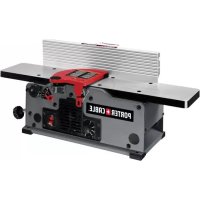
PC160JT - Milling machine Porter-Cable - Free user manual and instructions
Find the device manual for free PC160JT Porter-Cable in PDF.


| Product Type | Benchtop Jointer |
| Brand | Porter-Cable |
| Model | PC160JT |
| Power Supply | 120 V, 60 Hz, 10 A |
| Rotation Speed (cutterhead) | 6,000 to 11,000 RPM (variable) |
| Width Capacity | 152 mm (6 in) |
| Maximum Depth of Cut | 3.2 mm (1/8 in) |
| Fence Tilt | 0° to 45° (right) with positive stops |
| Number of Knives | 2 knives |
| Estimated Dimensions (L x W x H) | 610 x 406 x 305 mm |
| Estimated Weight | 18 kg |
| Table Material | Cast iron |
| Safety Features | Lockable switch, knife guard, blade lock |
| Included Accessories | Fence, 2 push blocks, dust collector adapter, hex wrenches, etc. |
| Warranty | 3-year limited (see manual) |
| Maintenance | Cleaning, waxing tables, belt replacement |
| Recommended Use | Hardwoods and softwoods |
| Safety Standards | ANSI O1.1, OSHA 1910.213 |
Frequently Asked Questions - PC160JT Porter-Cable
User questions about PC160JT Porter-Cable
0 question about this device. Answer the ones you know or ask your own.
Ask a new question about this device
Download the instructions for your Milling machine in PDF format for free! Find your manual PC160JT - Porter-Cable and take your electronic device back in hand. On this page are published all the documents necessary for the use of your device. PC160JT by Porter-Cable.
USER MANUAL PC160JT Porter-Cable
Variable Speed Bench Jointer
IMPORTANT SAFETY INSTRUCTIONS
⚠ WARNING: Read and understand all warnings and operating instructions before using any tool or equipment. When using tools or equipment, basic safety precautions should always be followed to reduce the risk of personal injury. Improper operation, maintenance or modification of tools or equipment could result in serious injury and property damage. There are certain applications for which tools and equipment are designed. PORTER-CABLE strongly recommends that this product NOT be modified and/or used for any application other than for which it was designed.
SAFETY GUIDELINES - DEFINITIONS
It is important for you to read and understand this manual. The information it contains relates to protecting YOUR SAFETY and PREVENTING PROBLEMS. The symbols below are used to help you recognize this information.
▲ DANGER: indicates an imminently hazardous situation which, if not avoided, will result in death or serious injury.
WARNING: indicates a potentially hazardous situation which, if not avoided, could result in death or serious injury.
▲CAUTION: indicates a potentially hazardous situation which, if not avoided, may result in minor or moderate injury.
NOTICE : indicates a practice not related to personal injury which, if not avoided, may result in property damage.
GENERAL SAFETY RULES
⚠ WARNING: Failure to follow these rules may result in serious personal injury.
For your own safety, read the instruction manual 1. before operating the machine. Learning the machine's application, limitations, and specific hazards will greatly minimize the possibility of accidents and injury.
- Wear eye and hearing protection and always use safety glasses. Everyday eyeglasses are not safety glasses. Use certified safety equipment. Eye protection equipment should comply with ANSI Z87.1 standards. Hearing equipment should comply with ANSI S3.19 standards.
Wear proper apparel. 3. Do not wear loose clothing, gloves, neckties, rings, bracelets, or other jewelry which may get caught in moving parts. Nonslip protective footwear is recommended. Wear protective hair covering to contain long hair.
Do not use the machine in a dangerous environment. 4. The use of power tools in damp or wet locations or in rain can cause shock or electrocution. Keep your work area well-lit to prevent tripping or placing arms, hands, and fingers in danger.
Do not operate electric tools near flammable liquids 5. or in gaseous or explosive atmospheres. Motors and switches in these tools may spark and ignite fumes.
- Maintain all tools and machines in peak condition. Keep tools sharp and clean for best and safest performance. Follow instructions for lubricating and changing accessories. Poorly maintained tools and machines can further damage the tool or machine and/or cause injury.
-
Check for damaged parts. Before using the machine, check for any damaged parts. Check for alignment of moving parts, binding of moving parts, breakage of parts, and any other conditions that may affect its operation. A guard or any other part that is damaged should be properly repaired or replaced with PORTER-CABLE or factory authorized replacement parts. Damaged parts can cause further damage to the machine and/or injury.
-
Keep the work area clean. Cluttered areas and benches invite accidents.
-
Keep children and visitors away. Your shop is a potentially dangerous environment. Children and visitors can be injured.
-
Reduce the risk of unintentional starting. Make sure that the switch is in the "OFF" position before plugging in the power cord. In the event of a power failure, move the switch to the "OFF" position. An accidental start-up can cause injury. Do not touch the plug's metal prongs when unplugging or plugging in the cord.
-
Use the guards. Check to see that all safety devices are in place, secured, and working correctly to prevent injury.
-
Remove adjusting keys and wrenches before starting the machine. Tools, scrap pieces, and other debris can be thrown at high speed, causing injury.
-
Use the right machine. Don't force a machine or an attachment to do a job for which it was not designed. Damage to the machine and/or injury may result.
-
Use recommended accessories. The use of accessories and attachments not recommended by PORTER-CABLE may cause damage to the machine or injury to the user.
-
Use the proper extension cord. Make sure your extension cord is in good condition. When using an extension cord, be sure to use one heavy enough to carry the current your product will draw. An undersized cord will cause a drop in line voltage, resulting in loss of power and overheating. See the Extension Cord Chart for the correct size depending on the cord length and nameplate ampere rating. If in doubt, use the next heavier gauge. The smaller the gauge number, the heavier the cord.
-
Secure the workpiece. Use clamps or a vise to hold the workpiece when practical. Loss of control of a workpiece can cause injury.
-
Feed the workpiece against the direction of the rotation of the blade, cutter, or abrasive surface. Feeding it from the other direction will cause the workpiece to be thrown out at high speed.
-
Don't force the workpiece on the machine. Damage to the machine and/or injury may result.
-
Don't overreach. Loss of balance can make you fall into a working machine, causing injury.
Never stand on the machine. 20. Injury could occur if the tool tips, or if you accidentally contact the cutting tool.
Never leave the machine running unattended.21. Turn the power off. Don't leave the machine until it comes to a complete stop. A child or visitor could be injured.
Turn the machine "OFF", and disconnect the machine 22. from the power source before installing or removing accessories, changing cutters, adjusting or changing set-ups. When making repairs, be sure to lock the start switch in the "OFF" position. An accidental start-up can cause injury.
Make your workshop childproof with padlocks, master 23. switches, or by removing starter keys. The accidental start-up of a machine by a child or visitor could cause injury.
Stay alert, watch what you are doing, and use common 24. sense. Do not use the machine when you are tired or
under the influence of drugs, alcohol, or medication. A moment of inattention while operating power tools may result in injury.
WARNING: Use of this tool can generate and disperse dust or other airborne particles, including wood dust, crystalline silica dust and asbestos dust. Direct particles away from face and body. Always operate tool in well ventilated area and provide for proper dust removal. Use dust collection system wherever possible. Exposure to the dust may cause serious and permanent respiratory or other injury, including silicosis (a serious lung disease), cancer, and death. Avoid breathing the dust, and avoid prolonged contact with dust. Allowing dust to get into your mouth or eyes, or lay on your skin may promote absorption of harmful material. Always use properly fitting NIOSH/OSHA approved respiratory protection appropriate for the dust exposure, and wash exposed areas with soap and water.
ADDITIONAL SPECIFIC SAFETY RULES
⚠ WARNING: Failure to follow these rules may result in serious personal injury.
-
Do not operate this machine until it is completely assembled and installed according to the instructions. A machine incorrectly assembled can cause serious injury.
-
Obtain advice from your supervisor, instructor, or another qualified person if you are not thoroughly familiar with the operation of this machine. Knowledge is safety.
-
Follow all wiring codes and recommended electrical connections to prevent shock or electrocution.
-
Keep knives sharp and free from rust and pitch. Dull or rusted knives work harder and can cause kickback.
-
Tighten the infeed/outfeed tables before starting the machine. Loss of control of the work-piece can cause serious injury.
-
Properly secure the blades in the cutterhead before turning the power "ON". Loose blades may be thrown out at high speeds.
-
Never turn the machine "ON" before clearing the table of all objects (tools, scraps of wood, etc.). Flying debris can cause serious injury.
-
Nevertum the machine "ON" with the workpiece contacting the cutterhead. Kickback can occur.
-
Avoid awkward operations and hand positions. A sudden slip could cause a hand to move into the cutterhead.
-
Keep arms, hands, and fingers away from the cutterhead to prevent severe injury.
-
Never make cuts deeper than 1/8 inch (3.2 mm) to prevent kickback.
-
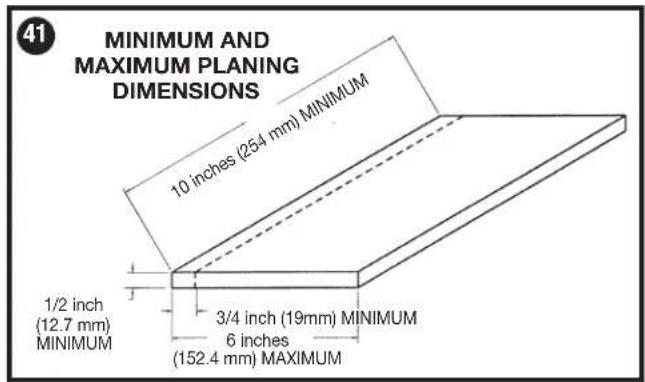
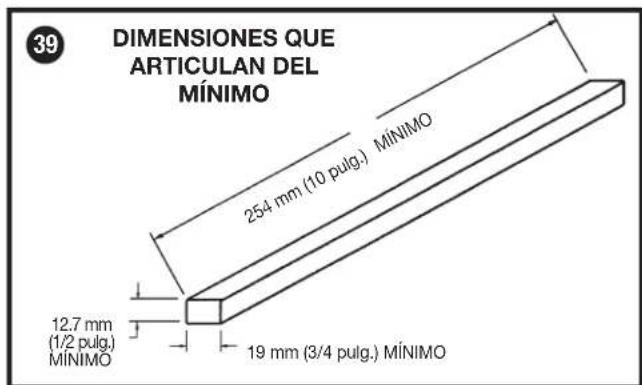
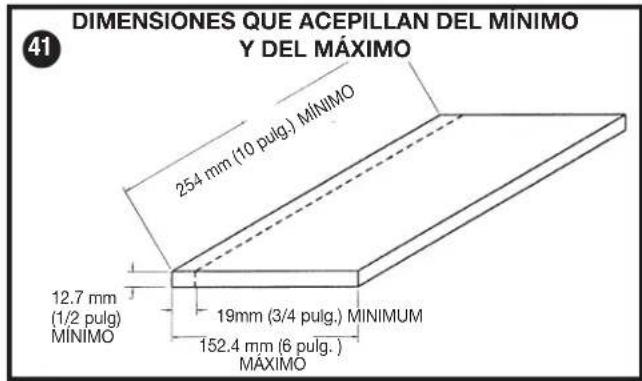
Never joint or plane a workpiece that is shorter than 10 inches (254 mm), narrower than 3/4 inch (19 mm), or less than 1/2 inch (12.7mm) thick. Jointing smaller workpieces can place your hand in the cutterhead causing severe injury.
-
Use hold-down/push blocks for jointing or planing any workpiece lower than the fence. Jointing or planing small workpieces can result in kickback and severe injury.
-
Hold the workpiece firmly against the table and fence. Loss of control of the workpiece can cause kickback and result in serious injury.
-
Never perform "free-hand" operations. Use the fence to position and guide the workpiece. Loss of control of the workpiece can cause serious injury.
-
Do not attempt to perform an abnormal or little-used operation without study and the use of adequate hold-down/push blocks, jigs, fixtures, stops, etc.
-
Do not feed a workpiece into the outfeed end of the machine. The workpiece will be thrown out of the opposite end at high speeds.
-
Do not feed a workpiece that is warped, contains knots, or is embedded with foreign objects (nails, staples, etc.) To prevent kickback.
-
Maintain the proper relationship of infeed and outfeed table surfaces and cutterhead knife path. Loss of control of the work-piece can cause serious injury.
-
Properly support long or wide workpieces. Loss of control of the workpiece can cause injury.
-
Never perform layout, assembly, or set-up work on the table/work area when the machine is running. A sudden slip could cause a hand to move into the cutterhead. Severe injury can result.
-
Remove shavings only with the power "OFF" and the cutterhead stopped to prevent serious injury.
-
Turn the machine "OFF", disconnect the machine from the power source, and clean the table/work area before leaving the machine. Lock the switch in the "OFF" position to prevent unauthorized use. Someone else might accidentally start the machine and cause injury to themselves.
-
Additional information regarding the safe and proper operation of power tools (i.e. a safety video) is available from the Power Tool Institute, 1300 Sumner Avenue, Cleveland, OH 44115-2851 (www.powertoolinstitute.com). Information is also available from the National Safety Council, 1121 Spring Lake Drive, Itasca, IL 60143-3201. Please refer to the American National Standards Institute ANSI 01.1 Safety Requirements for Woodworking Machines and the U.S. Department of Labor OSHA 1910.213 Regulations.
⚠ WARNING: Some dust created by power sanding, sawing, grinding, drilling, and other construction activities contains chemicals known to the State of California to cause cancer, birth defects or other reproductive harm. Some examples of these chemicals are:
- Lead from lead-based paints,
• Crystalline silica from bricks and cement and masonry products, and
• Arsenic and chromium from chemically-treated lumber (CCA).
Your risk from these exposures varies, depending on how often you do this type of work. To reduce your exposure to these chemicals: work in a well-ventilated area, and work with approved safety equipment, such as those dust masks that are specially designed to filter out microscopic particles.
- Avoid prolonged contact with dust from power sanding, sawing, grinding, drilling, and other construction activities. Wear protective clothing and wash exposed areas with soap and water. Allowing dust to get into your mouth, eyes, or lay on the skin may promote absorption of harmful chemicals.
⚠ WARNING: Use of this tool can generate and/or disburse dust, which may cause serious and permanent respiratory or other injury. Always use NIOSH/OSHA approved respiratory protection appropriate for the dust exposure. Direct particles away from face and body. Always operate tool in well-ventilated area and provide for proper dust removal. Use dust collection system wherever possible.
POWER CONNECTIONS
A separate electrical circuit should be used for your machines. This circuit should not be less than #12 wire and should be protected with a 20 Amp time lag fuse. NOTE: Time delay fuses should be marked "D" in Canada and "T" in the U.S. If an extension cord is used, use only 3-wire extension cords which have 3-prong grounding type plugs and matching receptacle which will accept the machine's plug. Before connecting the machine to the power line, make sure the switch (or switches) is in the "OFF" position and be sure that the electric current is of the same characteristics as indicated on the machine. All line connections should make good contact. Running on low voltage will damage the machine.
▲DANGER Do not expose the machine to rain or operate the machine in damp locations.
MOTOR SPECIFICATIONS
Your machine is wired for 120 Volts, 60 HZ alternating current. Before connecting the machine to the power source, make sure the switch is in the "OFF" position.
GROUNDING INSTRUCTIONS
▲DANGER This machine must be grounded while in use to protect the operator from electric shock.
1. All grounded, cord-connected machines:
In the event of a malfunction or breakdown, grounding provides a path of least resistance for electric current to reduce the risk of electric shock. This machine is equipped with an electric cord having an equipment-grounding conductor and a grounding plug. The plug must be plugged into a matching outlet that is properly installed and grounded in accordance with all local codes and ordinances.
Do not modify the plug provided - if it will not fit the outlet, have the proper outlet installed by a qualified electrician.
Improper connection of the equipment-grounding conductor can result in risk of electric shock. The conductor with insulation having an outer surface that
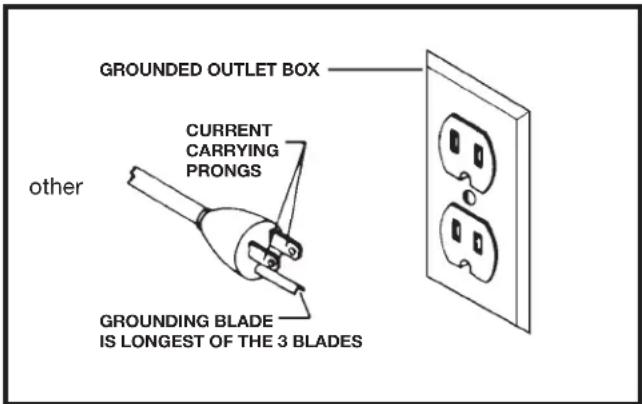
Fig. A
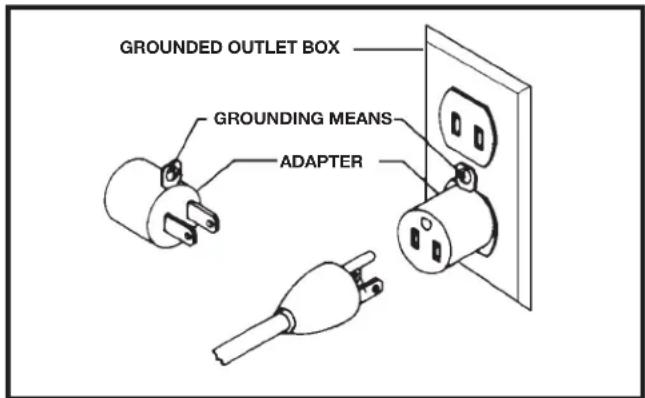
Fig. B
is green with or without yellow stripes is the equipment-grounding conductor. If repair or replacement of the electric cord or plug is necessary, do not connect the equipment-grounding conductor to a live terminal.
Check with a qualified electrician or service personnel if the grounding instructions are not completely understood, or if in doubt as to whether the machine is properly grounded.
Use only 3-wire extension cords that have 3-prong grounding type plugs and matching 3-conductor receptacles that accept the machine's plug, as shown in Fig. A.
Repair or replace damaged or worn cord immediately.
2. Grounded, cord-connected machines intended for use on a supply circuit having a nominal rating less than 150 Volts:
If the machine is intended for use on a circuit that has an outlet that looks like the one illustrated in Fig. A, the machine will have a grounding plug that looks like the plug illustrated in Fig. A. A temporary adapter, which looks like the adapter illustrated in Fig. B, may be used to connect this plug to a matching 2-conductor receptacle as shown in Fig. B if a properly grounded outlet is not available. The temporary adapter should be used only until a properly grounded outlet can be installed by a qualified electrician. The green-colored rigid ear, lug, and the like, extending from the adapter must be connected to a permanent ground such as a properly grounded outlet box. Whenever the adapter is used, it must be held in place with a metal screw.
NOTE: In Canada, the use of a temporary adapter is not permitted by the Canadian Electric Code.
▲DANGER In all cases, make certain that the receptacle in question is properly grounded. If you are not sure, have a qualified electrician check the receptacle.
EXTENSION CORDS
⚠ WARNING: Use proper extension cords. Make sure your extension cord is in good condition and is a 3-wire extension cord which has a 3-prong grounding type plug and matching receptacle which will accept the machine's plug. When using an extension cord, be sure to use one heavy enough to carry the current of the machine. An undersized cord will cause a drop in line voltage, resulting in loss of power and overheating. Fig. D-1 shows the correct gauge to use depending on the cord length. If in doubt, use the next heavier gauge. The smaller the gauge number, the heavier the cord.
| MINIMUM GAUGE EXTENSION CORDRECOMMENDED SIZES FOR USE WITH STATIONARY ELECTRIC MACHINES | |||
| Ampere Rating Volts | Total Length of Cord | Gauge of Feet Extension Cord | |
| 0-6 | 120 | up to 25 | 18 AWG |
| 0-6 | 120 | 25-50 | 16 AWG |
| 0-6 | 120 | 50-100 | 16 AWG |
| 0-6 | 120 | 100-150 | 14 AWG |
| 6-10 | 120 | up to 25 | 18 AWG |
| 6-10 | 120 | 25-50 | 16 AWG |
| 6-10 | 120 | 50-100 | 14 AWG |
| 6-10 | 120 | 100-150 | 12 AWG |
| 10-12 | 120 | up to 25 | 16 AWG |
| 10-12 | 120 | 25-50 | 16 AWG |
| 10-12 | 120 | 50-100 | 14 AWG |
| 10-12 | 120 | 100-150 | 12 AWG |
| 12-16 | 120 | up to 25 | 14 AWG |
| 12-16 | 120 | 25-50 | 12 AWG |
| 12-16 | 120 | GREATER THAN 50 FEET NOT RECOMMENDED | |
Fig. D-1
FUNCTIONAL DESCRIPTION
FOREWORD
The PC160JT is a 6 inch (152 mm), Variable-Speed Bench Jointer with a designed cutting capacity of 6 inches (152 mm) wide and 1/8 inch (3 mm) deep. Unit includes a 10 Amp, 120 Volt motor with a variable speed range of 6,000 to 11,000 RPM, and a cutting speed range of 12,000 to 22,000 CPM, a dust chute, a center-mounted fence, a two-knife cutterhead, a cutterhead guard and lock, wrenches, and push blocks.
NOTE: The picture on the manual cover illustrates the current production model. All other illustrations contained in the manual are representative only and may not depict the actual labeling or accessories included. These are intended to illustrate technique only.
CARTON CONTENTS
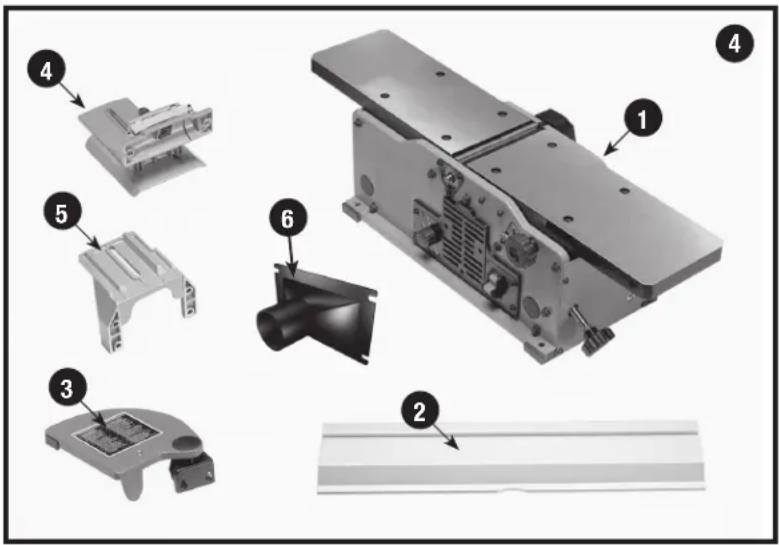
- Jointer
- Fence
- Cutterhead Guard
- Fence Sliding Bracket
- Fence Mounting Bracket
- Vacuum Hose Adaptor
-
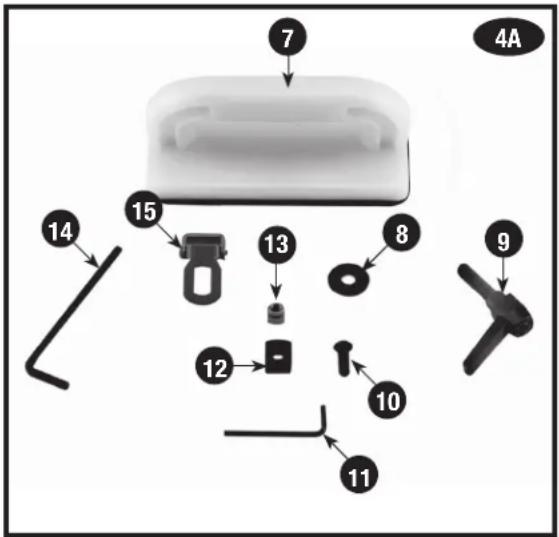
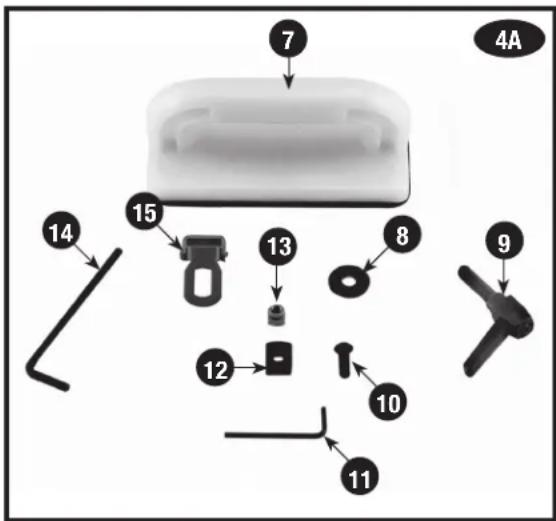
Push Blocks - (2)
-
M8 Flat Washer
- Spring Loaded Lock Handle
- M6 x 1 x 16 mm Button Head Screw - (6)
- 5/32 Hex Wrench
- Special Nut
- M6x1 Square Nut - (2)
- 7/64 Hex Wrench
- Cutterhead Lock
UNPACKING AND CLEANING
Carefully unpack the machine and all loose items from the shipping container(s). Remove the rust-preventative oil from unpainted surfaces using a soft cloth moistened with mineral spirits, paint thinner or denatured alcohol.
NOTICE: Do not use highly volatile solvents such as gasoline, naphtha, acetone or lacquer thinner for cleaning your machine.
After cleaning, cover the unpainted surfaces with a good quality household floor paste wax.
ASSEMBLY
⚠ WARNING: To reduce the risk of injury, turn unit off and disconnect it from power source before installing and removing accessories, before adjusting or when making repairs. An accidental start-up can cause injury.
ASSEMBLY TOOLS REQUIRED
- Two hex wrenches (supplied)
ASSEMBLY TIME ESTIMATE
Assembly for this machine takes approximately 1 hour.
FENCE
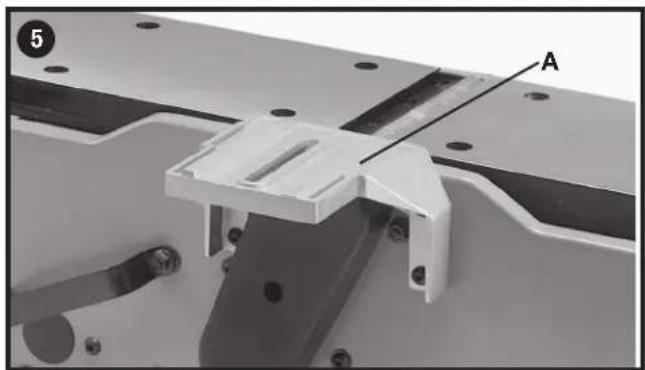
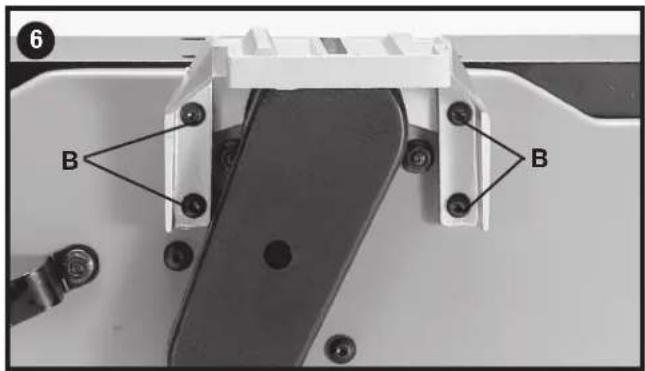
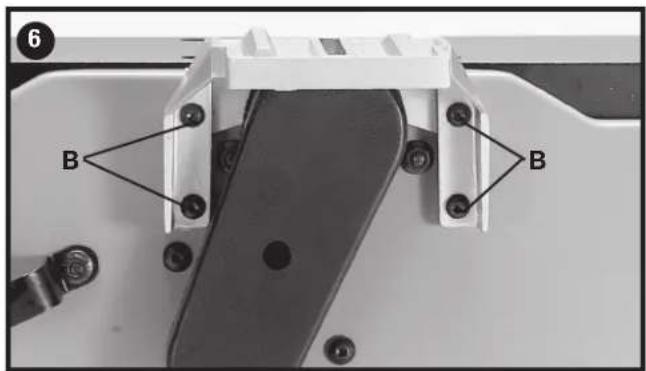
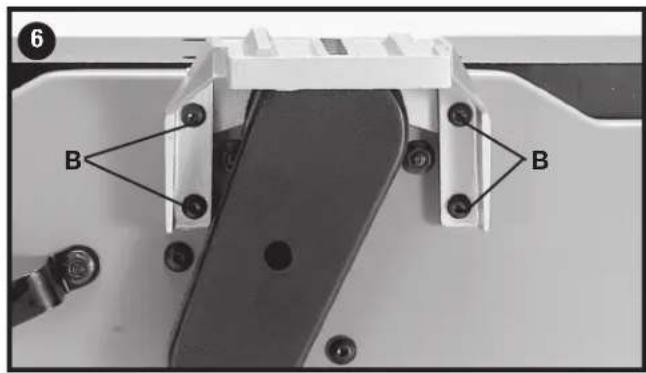
- Assemble the fence mounting bracket (A) Fig. 5 to the jointer base using the four M6x1x16 mm button head screws (B) Fig. 6.
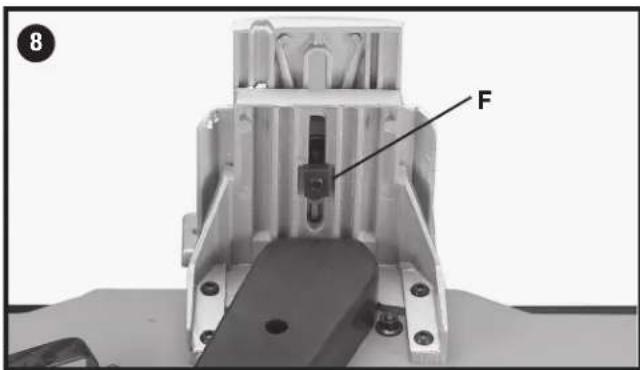
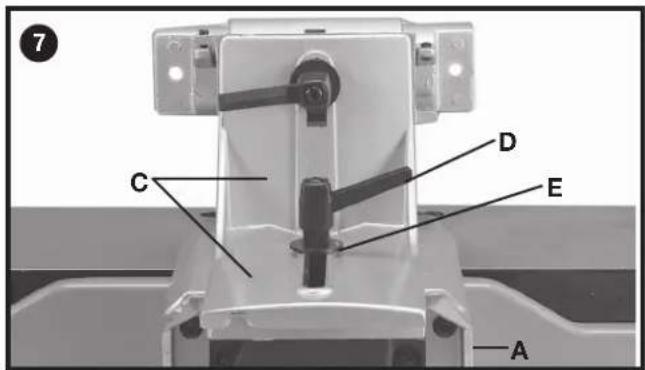
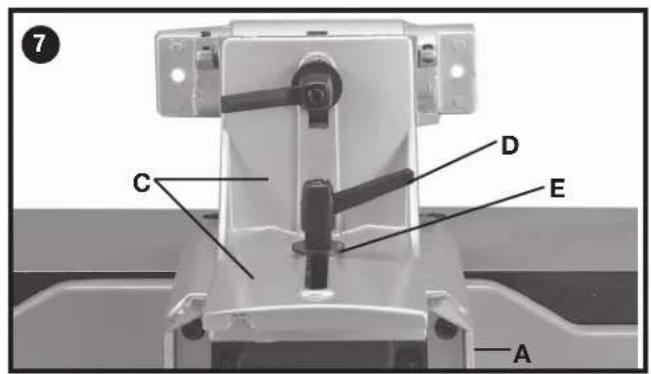
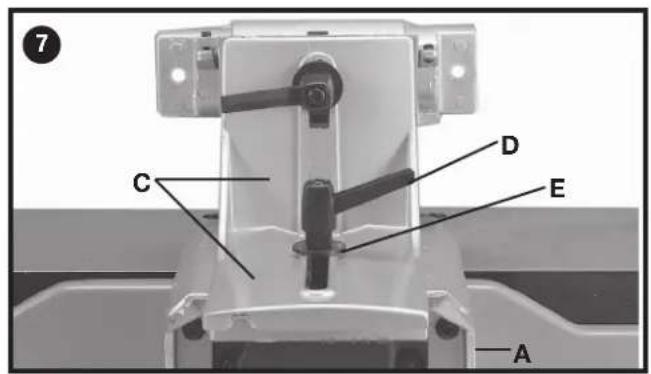
- Assemble the fence sliding bracket (C) Fig. 7 to mounting bracket (A) using the lockhandle (D), M8 flat washer (E) and special nut (F) Fig. 8.
-
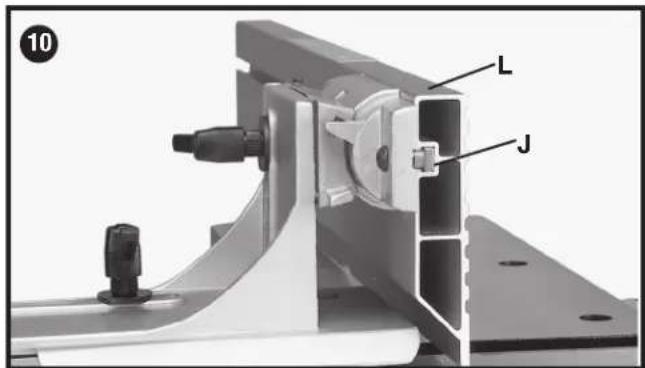
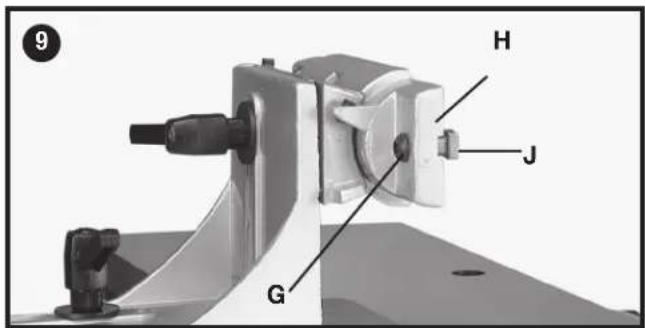
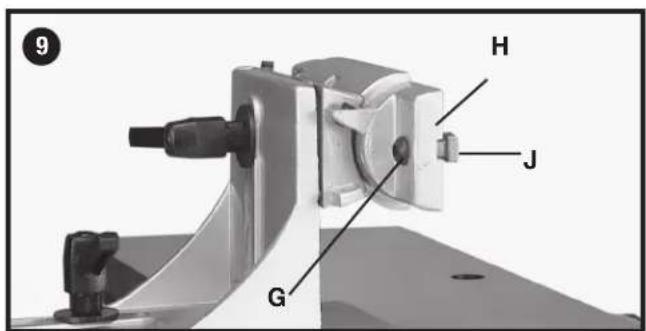
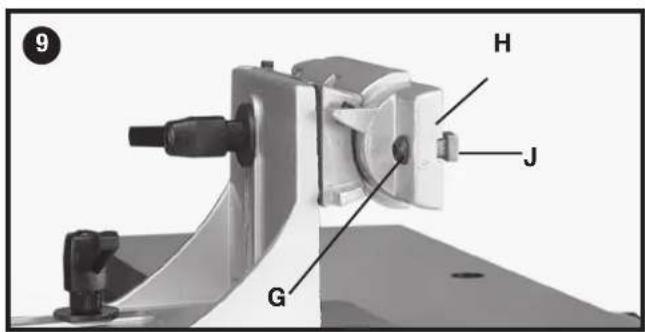
Insert a M6x1x16 mm button head screw (G) Fig. 9 through fence tilting bracket (H) and thread a M6 x 1 square nut (J) onto threaded end of screw (G). DO NOT COM PLETE LY TIGHTEN SCREW (G) AT THIS TIME. Assemble screw and square nut to opposite end of tilting bracket in the same manner.
-
Slide groove of fence (L) Fig. 10 over square nuts (J).
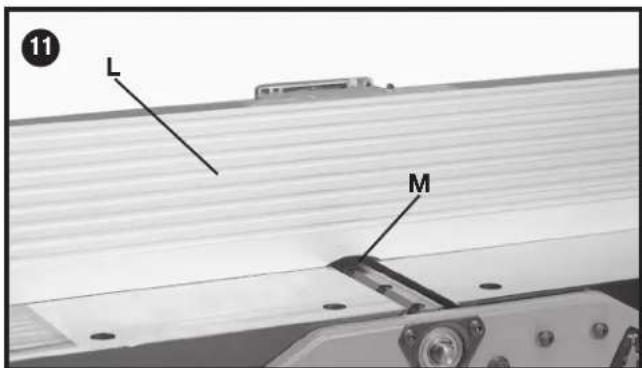
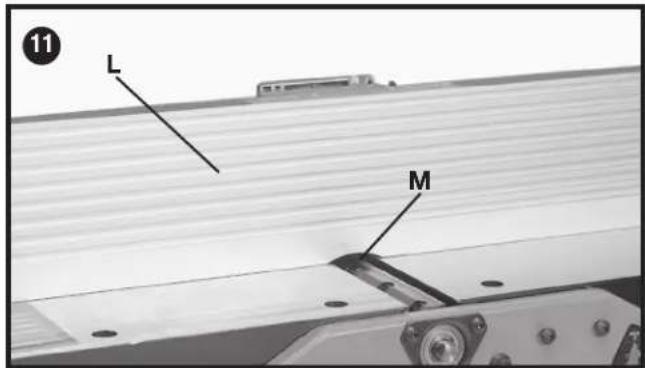
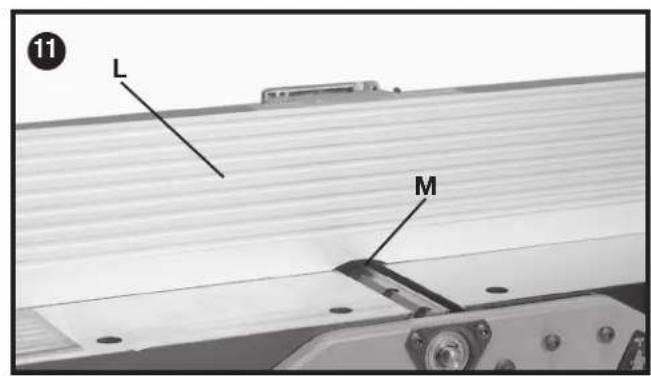
- Position fence (L) Fig. 11 so that rounded section (M) on bottom of fence is over cutterhead opening.
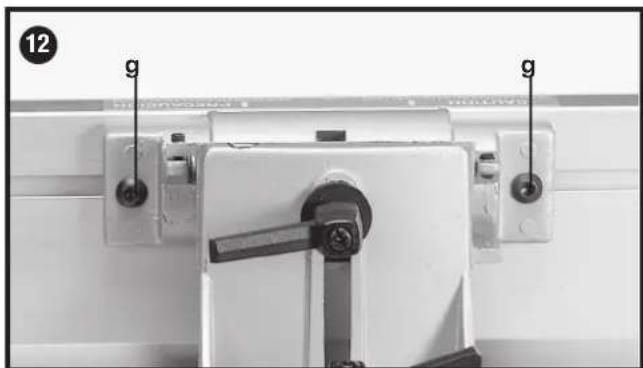
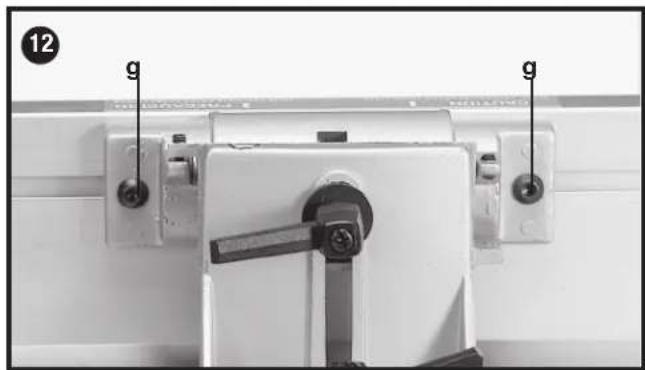
- Tighten two screws (G) Fig. 12 using included hex wrench.
CUTTERHEAD gUARD
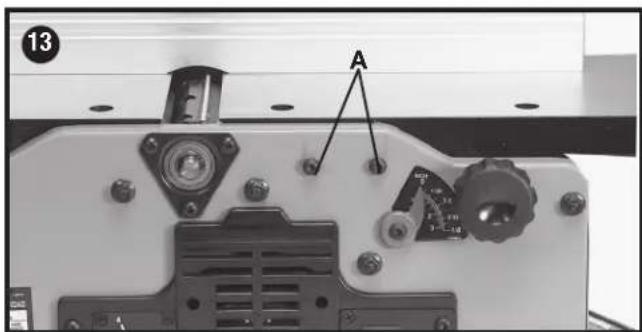
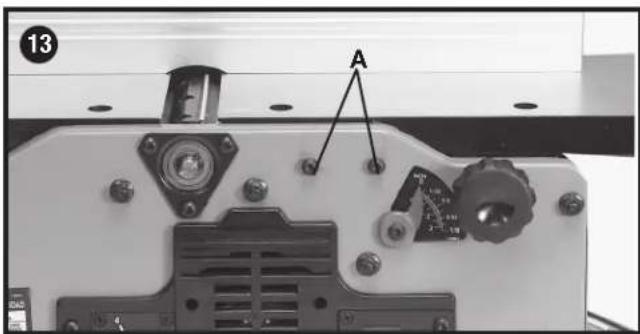
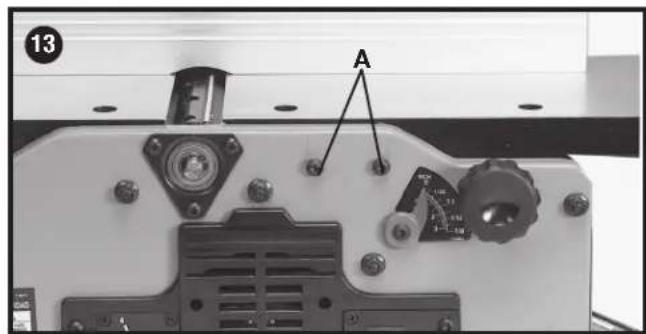
- Locate the two M6x1x12 mm button head screws (A) Fig. 13 in front side of jointer base. MAKE SURE THEY ARE NOT COMPLETELY TlghtENED AT THIS TIME.
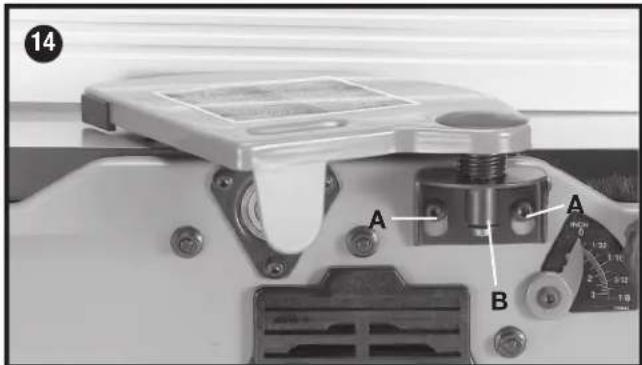
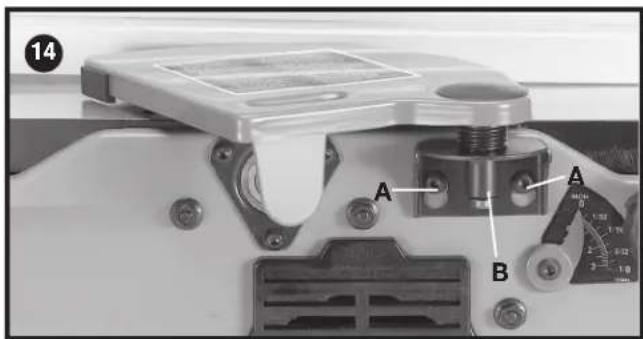
- Slide cuttinghead guard's mounting bracket (B) Fig. 14 onto the two screws (A). Make sure cutterhead guard is touching the fence and tighten the two screws (A).
CUTTERHEAD LOCK
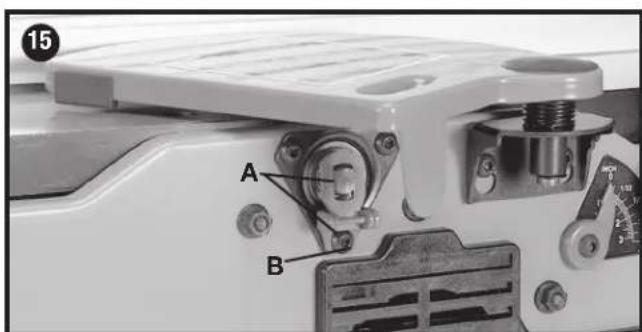
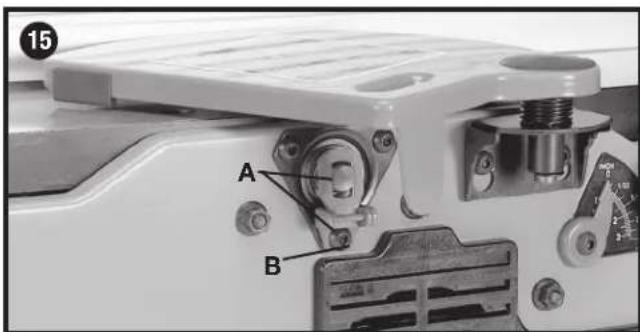
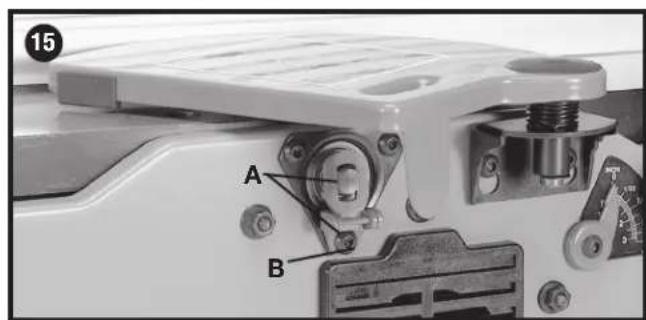
Assemble cutterhead lock (A) Fig. 15 to the front side of the jointer base, using the M6x1x12 mm button head screw (B).
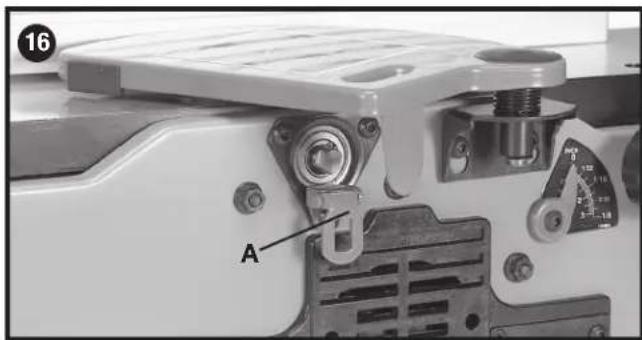
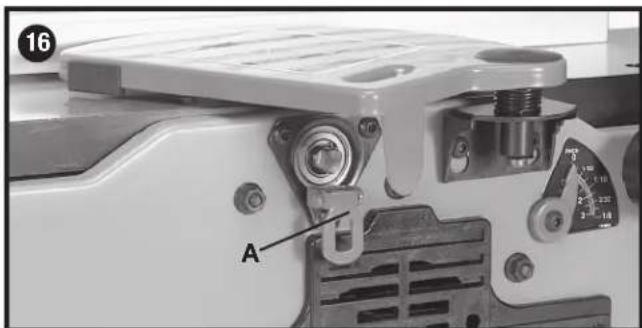
NOTE: The cutterhead lock (A) is to be engaged with the cutterhead shaft (Fig. 15) Only when setting knives. All other times, the cutterhead lock (A) should be disengaged from the cutterhead (Fig. 16).
FASTENING JOINTER TO SUPPORTING SURFACE
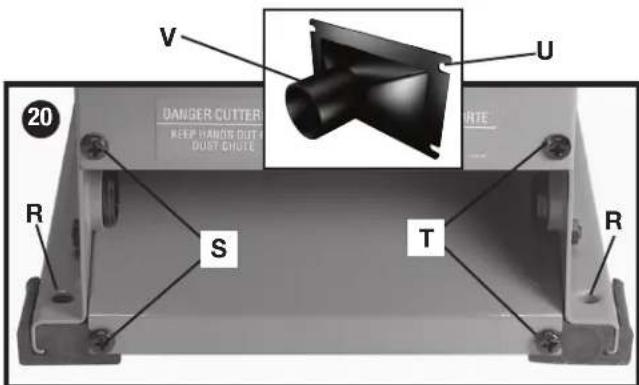
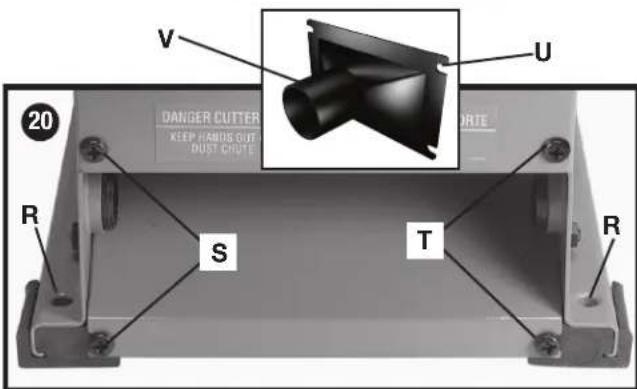
If during operation, there is any tendency for the jointer to tip over, slide or "walk" on the supporting surface, the jointer must be secured to the supporting surface. Four holes (two of which are shown at (R) Fig. 20), are provided for this purpose.
VACUUM HOSE ADAPTER
A vacuum hose adapter (V) Fig. 20 is supplied with the jointer to help connect it to a standard 2 inch vacuum hose. To assemble the adapter:
- Remove two screws (S) Fig. 20. Loosen screws (T).
- Slide adaptor's slots (U) under loosened screws (T).
- Tighten screws (T) when adaptor (V) is in proper location.
- Replace and tighten screws (S).
NOTICE: Do not install this dust chute unless you will be using a dust collector.
OPERATION
STARTING AND STOPPING JOINTER
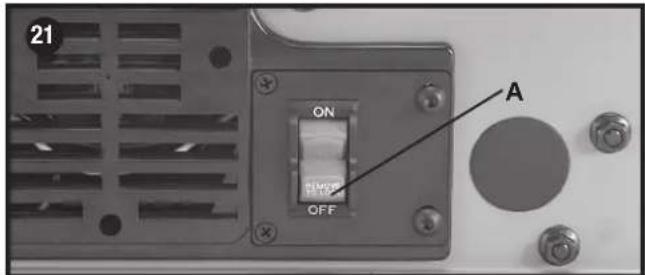
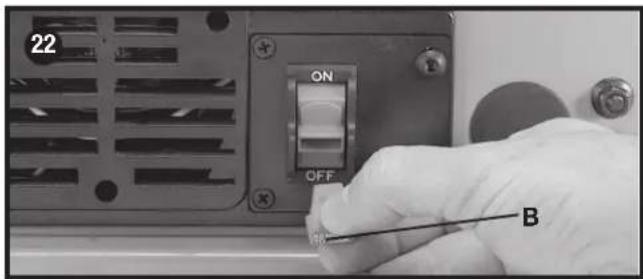
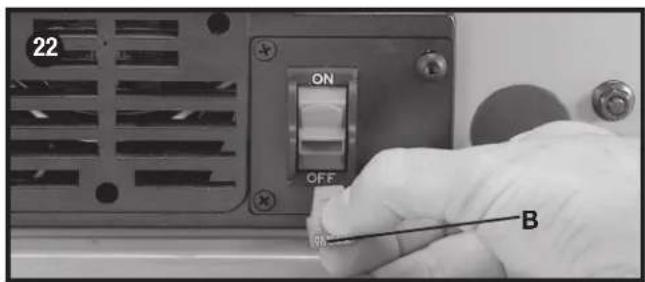
- The on/off switch (A) Fig. 21 is located on the front of the jointer. To turn the machine "ON", move switch (A) up to the "ON" position.
- To turn the machine "OFF", move the switch down to the "OFF" position.
⚠ WARNING: Make sure that the switch is in the "OFF" position before plugging in the power cord. In the event of a power failure, move the switch to the "OFF" position. An accidental start-up can cause injury.
LOCKING SWITCH IN THE "OFF" POSITION
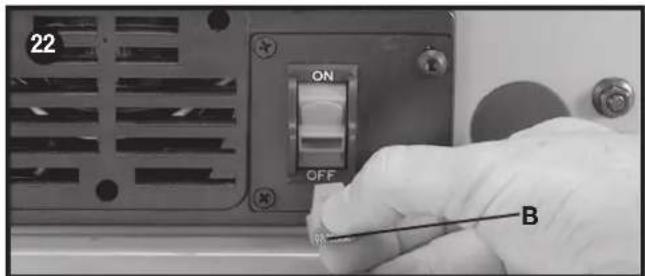
IMPORTANT: When the machine is not in use, the switch should be locked in the "OFF" position to prevent unauthorized use. To lock the machine, grasp the switch toggle (B) and pull it out of the switch (Fig. 21). With the switch toggle (B) removed, the switch will not operate. However, should the switch toggle be removed while the pointer is running, the machine can be turned "OFF," but cannot be restarted without re-inserting the switch toggle (B).
VARIABLE SPEED CONTROL
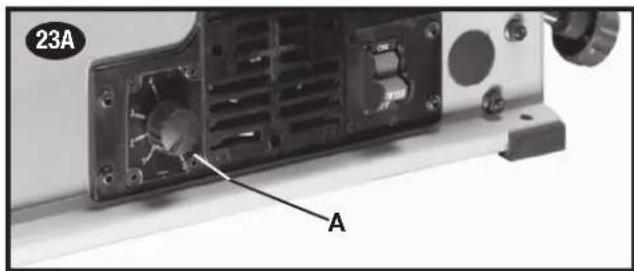
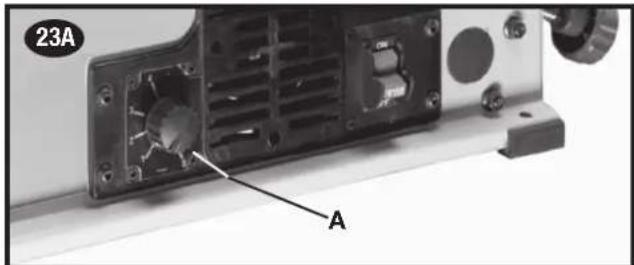
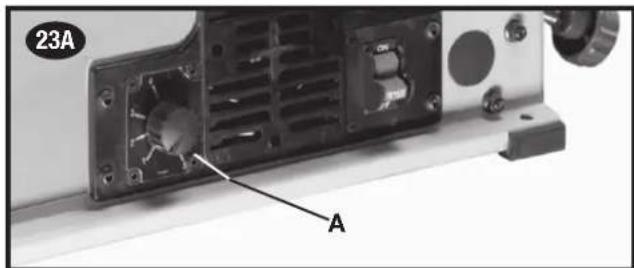
Your jointer is supplied with variable speed control (A) Fig. 23A that enables you to operate the machine at cutterhead speeds between 6,000 and 11,000 RPM. Speed indicators of 1-2-3-4 and 5 are provided on the speed dial. When the pointer on the speed knob is pointing to 1, the cutterhead speed will be 6,000 RPM; 2 – 7,250 RPM; 3 – 8,800 RPM; 4 – 9,750 RPM; and 5 – 11,000 RPM.
SPEED SELECTION CHART
Use the speed selection chart (Fig. 23B) to determine the proper setting for your workpiece.
NOTE: For convenience, make a copy of this chart and post it on or near the machine.
DEPTH OF CUT ADJUSTMENT
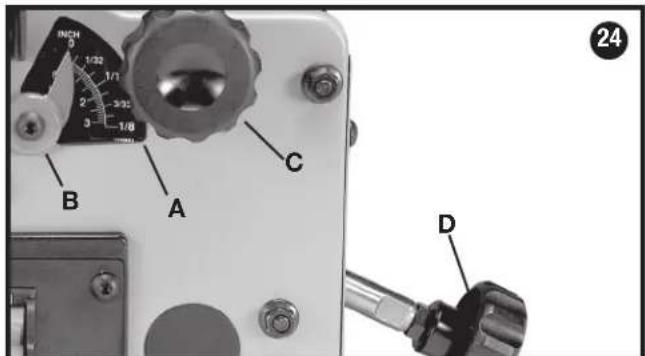
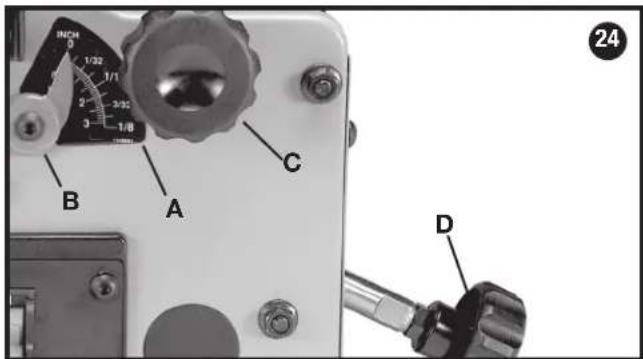
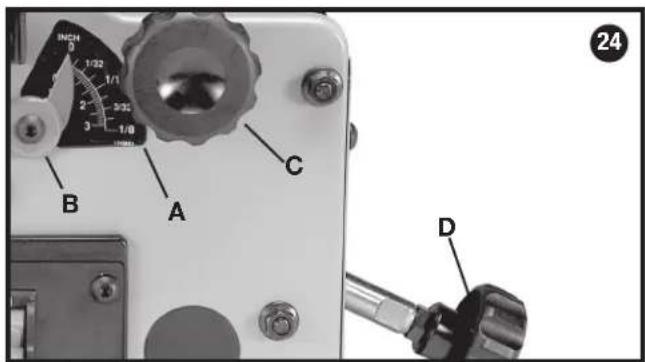
The jointer can be set to cut any depth from a very thin shaving to 1/8 inch (3.2 mm) deep. A dual English/Metric scale (A) Fig. 24, and pointer (B) are provided to indicate the depth of cut. To adjust for depth of cut, loosen lock knob (C) and turn adjusting knob (D) clockwise to lower and coun ter clock wise to raise the infeed table. Raising the infeed table decreases the depth of cut, while lowering it will increase the depth. After the infeed table is at the desired setting, tighten lock knob (C).
NOTE: For best results, final positioning of the infeed table should always be made from the bottom to the up position.
| SPEED SELECTION CHART | ||||||
| CUTTING WIDTH CONTROL SETTING | ||||||
| FROM TO PLASTICS SOFT | WOOD | HARD WOOD | ||||
| inches | mm | inches | mm | |||
| 0 | 0 | 11/2 | 38.1 | 1 | 1 | 1 |
| 11/2 | 38.1 | 21/2 | 65.5 | 2 | 2 | 3 |
| 21/2 | 63.5 | 31/4 | 82.5 | 3 | 3 | 4 |
| 31/4 | 82.5 | 4 | 101.6 | --- | 4 | 5 |
| 4 | 101.6 | 6 | 152.4 | --- | 5 | 5 |
FENCE ADJUSTMENTS
The fence can be moved across the table and can be tilted up to 45 degrees, as follows:
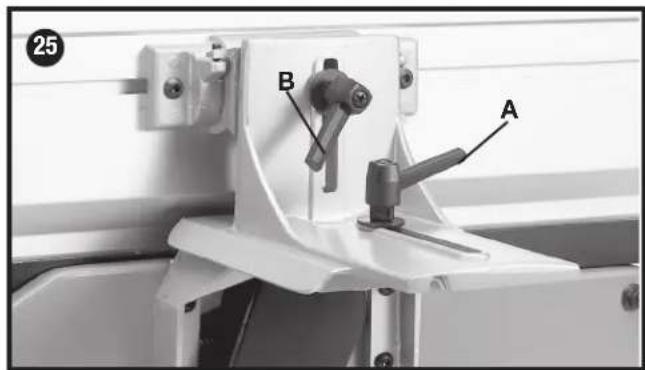
- To move the fence across the table, loosen lock lever (A) Fig. 25, slide the fence to the desired position on the table and tighten lever (A).
NOTE: Lock lever (A) is spring loaded and can be repositioned by pulling up on the lever and repositioning it on the nut located underneath the lever.
- To tilt the fence, loosen lever (B) Fig. 25, and tilt the fence to the desired angle. Then tighten lever (B).
NOTE: Lever (B) is spring loaded and can be repositioned by pulling out on the lever and repositioning it on the nut located under the shallower.
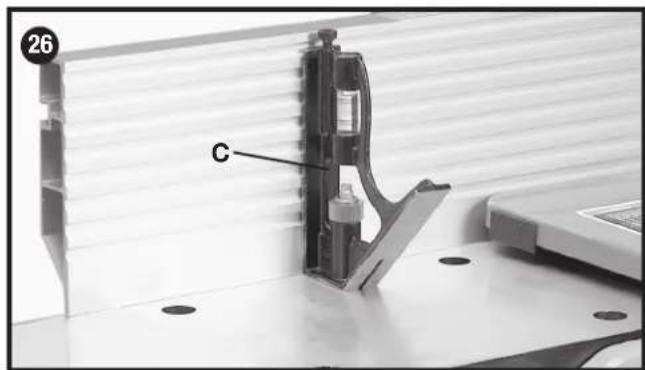
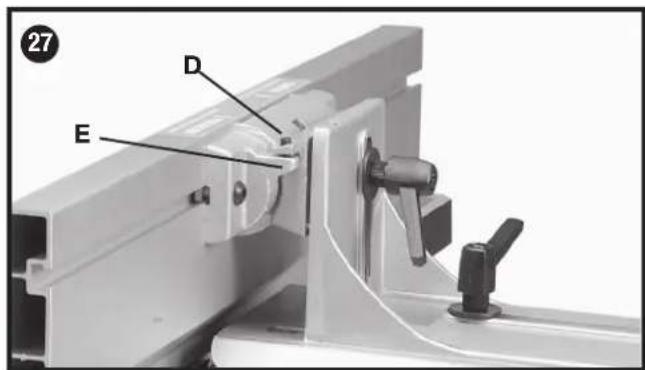
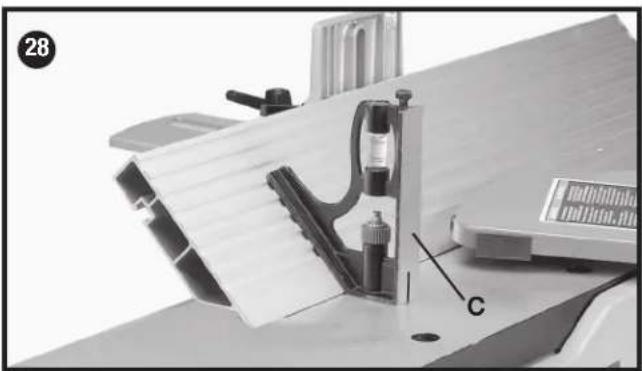
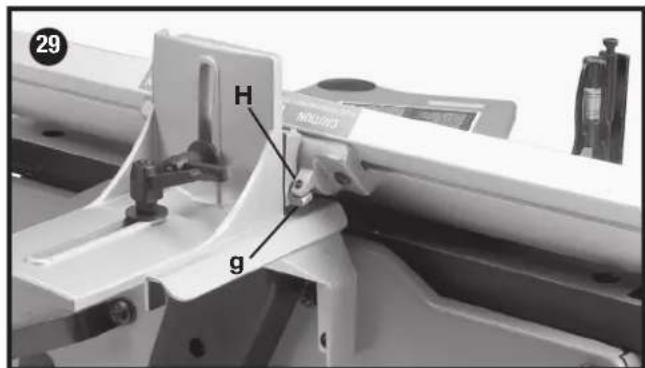
- The fence features adjustable positive stops at the most used fence positions of 90 degrees and 45 degrees to the right. To check and adjust the positive stops, proceed as follows:
- Place a square (C) Fig. 26, on the table with one end of the square against the fence as shown. Adjust the fence until it is exactly 90 degrees to the table.
- Using supplied hex wrench, turn set screw (D) Fig. 27 until it contacts stop (E).
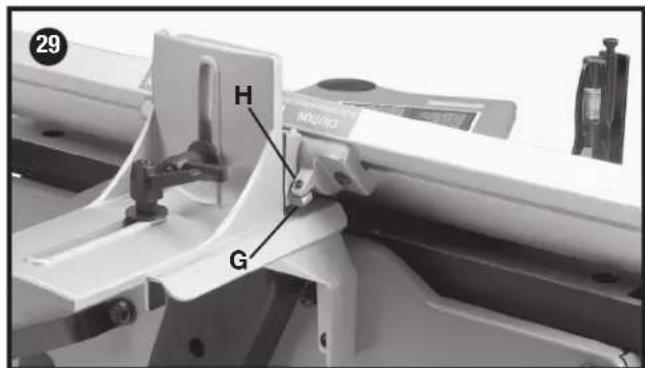
- Using a square (C) Fig. 28, tilt the table to the 45 degree position and make sure the fence is 45 degrees to the table. Adjust the fence if necessary.
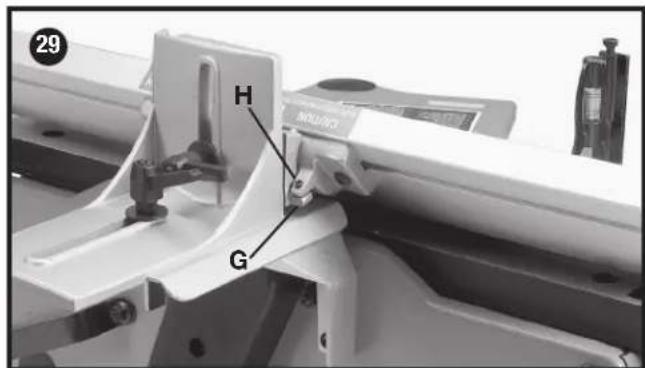
- Using supplied hex wrench, turn set screw (H) Fig. 29, until it contacts stop (G).
- These positive stops enable you to rapidly position the table to the 90 and 45 degree settings.
CAUTION Make sure the fence is in level contact with the surface of the outfeed table.
ADJUSTING KNIVES
When it becomes necessary to replace or adjust the knives due to replacement or wear:
WARNING: The knives are sharp.
WARNING: Disconnect machine from power source.
- Remove cutterhead guard.
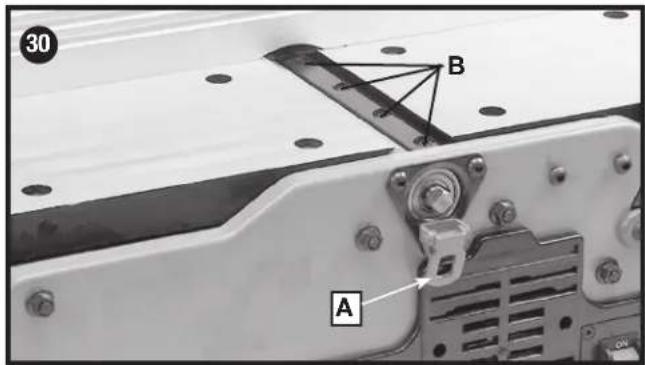
- To replace a knife, disengage the cutterhead lock (A) Fig. 30. Rotate cutterhead, loosen four screws (B) and remove bar and knife. Insert new knife and replace bar and slightly tighten four screws (B).
⚠ WARNING: Be extremely careful that your hands do not come in contact with the knives.
- To adjust the knives, make sure the cutterhead lock (A) Fig. 30 is not engaged. Make sure screws (B) are not overly tightened. Loosen each one half turn or only enough so knife can slide between locking plate and cutterhead.
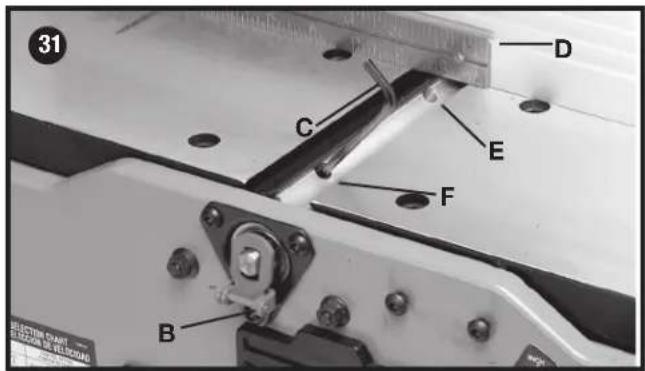
- Rotate cutterhead and engage cutterhead lock (B) Fig. 31, on cutterhead shaft as shown. This will position knives for proper adjustment to the outfeed table.
- Place a straight edge (D) Fig. 31, on the outfeed table extending out over the knife as shown. Using wrench (C) supplied, turn screw (E) until knife just touches straight edge. Adjust knife at near end of cutterhead in the same manner turning screw (F). Tighten four screws (B) Fig. 30, after adjustment is made.
NOTE: Make sure cutterhead lock (B) is disengaged after adjustment is completed and replace cutterhead guard.
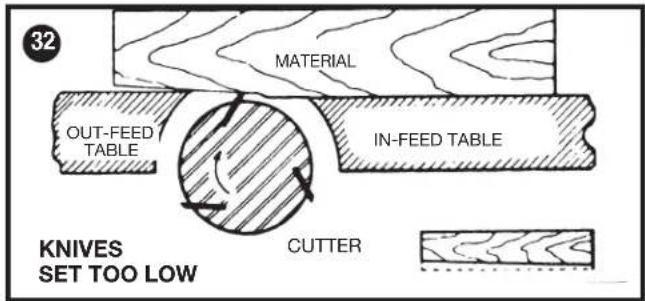
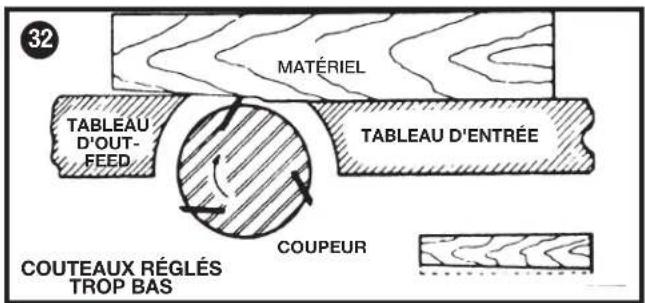
- If the knives are set too low, the result will be as shown in Fig. 32, and the finished surface will be curved.
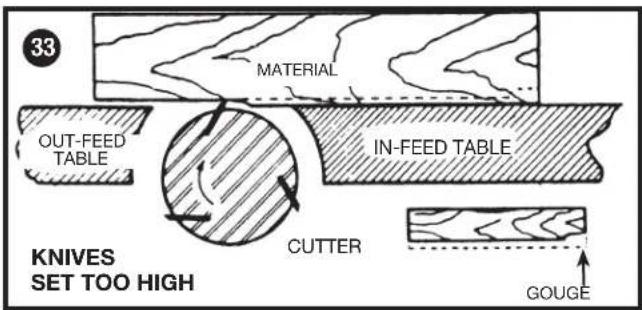
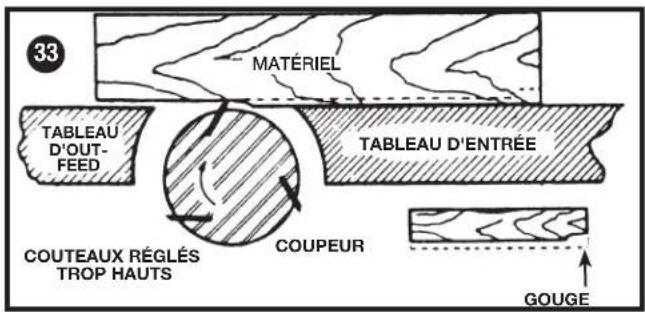
- If the knives are set too high, the work will be gouged at the end of the cut, as shown in Fig. 33.
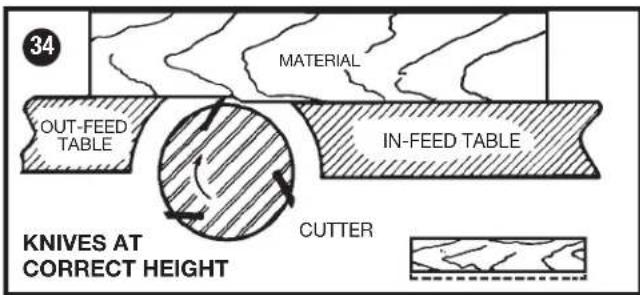
- As a final check, run a piece of work slowly over the knives for 6 to 8 inches (152 to 203 mm). The wood should rest firmly on both tables as shown in Fig. 34, with no open spaces under the finished cut.
⚠ WARNING: Make certain that all knives are securely fastened in cutterhead before turning on power.
CHIP AND DUST CHUTE
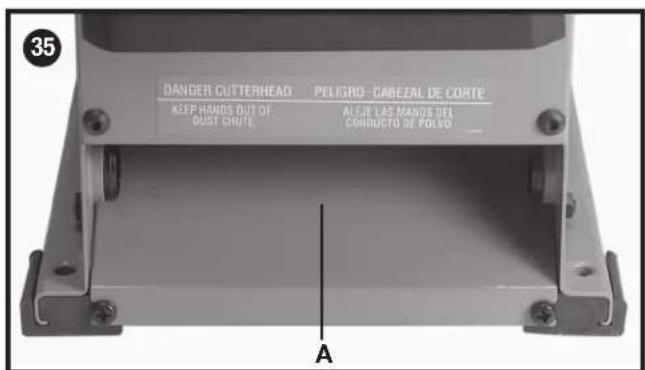
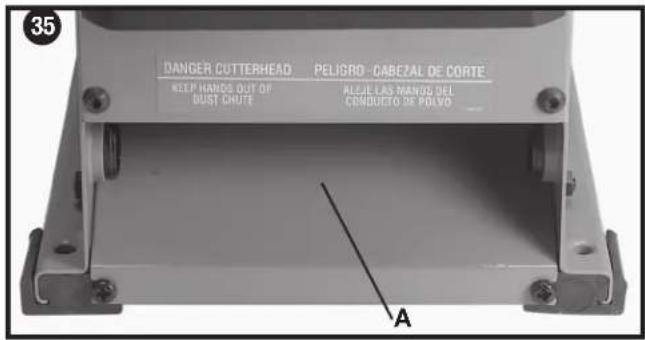
A chip and dust chute (A) Fig. 35 is provided on the outfeed end of the jointer base for efficient chip removal.
⚠ WARNING: Keep hands out of chip and dust chute at all times.
PUSH BLOCKS
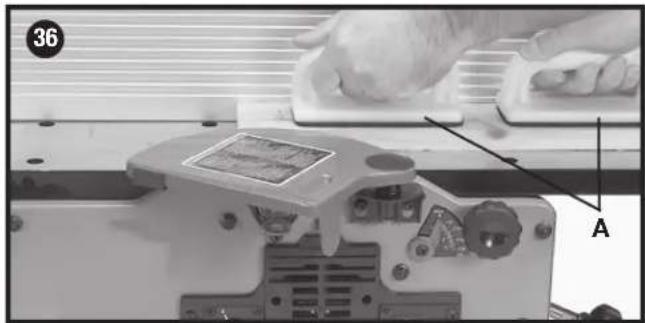
A set of push blocks (A) Fig. 36 is supplied with your jointer and should be used whenever possible to minimize all danger to your hands. Fig. 36 illustrates using the push blocks properly.
MACHINE USE
The following directions will give the beginner a start on jointer operations. Use scrap pieces of lumber to check the settings and to get the feel of the operations before attempting regular work.
NOTE: The knives on the jointer will not wear evenly by feeding the wood through the same spot on the table every time. Feed the wood through the jointer at different spots on the table to help eliminate uneven wear of the knives.
⚠ WARNING: Always use cutterhead guard and keep hands away from cutterhead. Use push blocks whenever possible.
DEFINITION OF JOINTING, PLANING
-
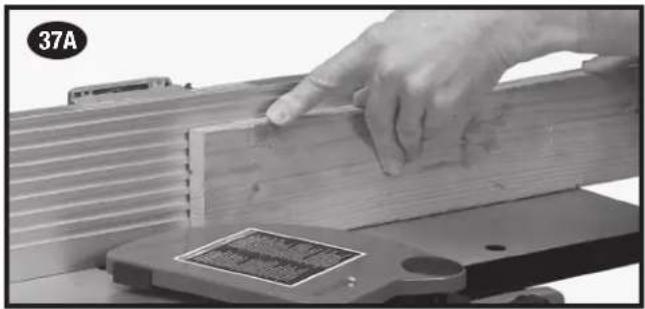
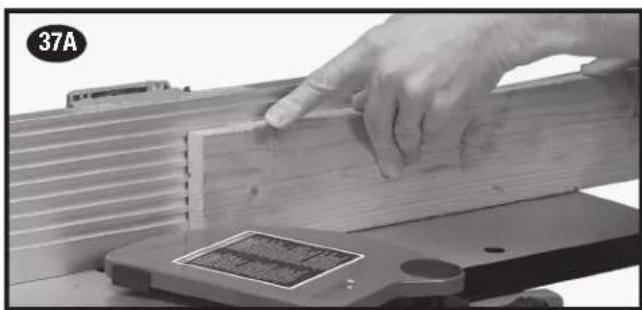
JOINTING OPERATIONS - Jointing cuts or edge jointing are made to square an edge of a workpiece. The workpiece is positioned on the jointer with the narrow edge of the workpiece on the infeed table and the major flat surface of the workpiece against the fence, as shown in Fig. 37A. The workpiece is moved from the infeed table, across the cutterhead to the outfeed table.
-
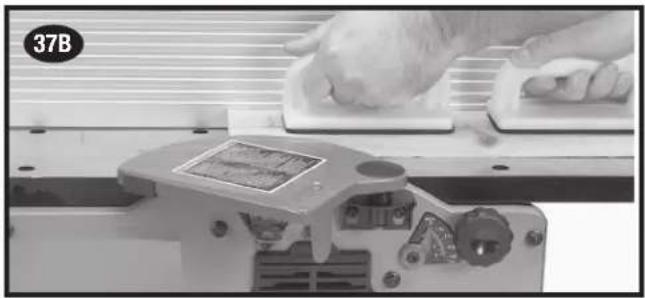
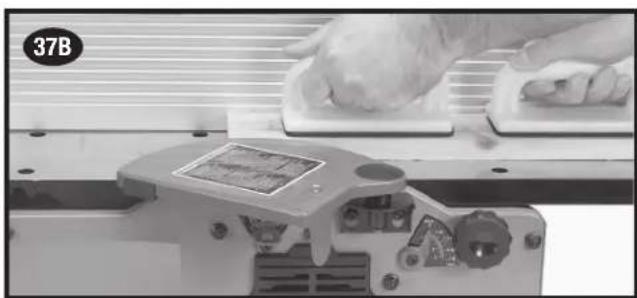
PLANING OPERATIONS - Planing or surfacing are identical to the jointing operation except for the position of the workpiece. For planing, the major flat surface of the workpiece is placed on the infeed table of the jointer with the narrow edge of the workpiece against the fence, as shown in Fig. 37B. The workpiece is moved from the infeed table, across the cutterhead to the outfeed table. Use push blocks when performing planing operations whenever possible.
PLACEMENT OF HANDS DURING FEEDING
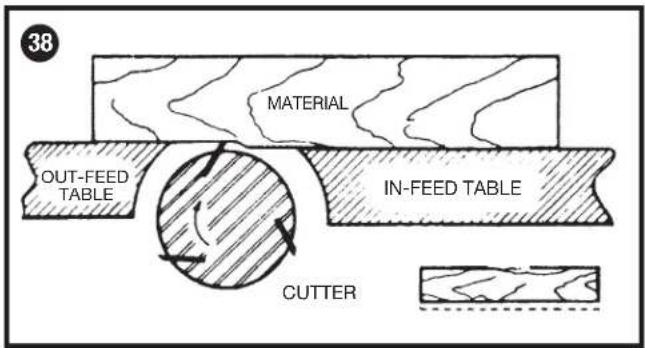
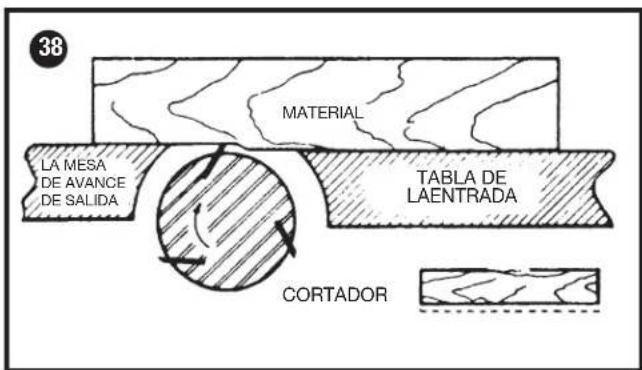
At the start of the cut, the left hand holds the work firmly against the infeed table and fence, while the right hand pushes the work toward the knives. After the cut is underway, the new surface rests firmly on the outfeed table as shown in Fig. 38. The left hand should then be moved to the work on the outfeed table, at the same time maintaining flat contact with the fence. The right hand presses the work forward, and before the right hand reaches the cutterhead it should be moved to the work on the outfeed table.
⚠ WARNING: Never pass hands directly over the cutterhead.
JOINTING AN EDGE
This is the most common operation for the jointer. Set the guide fence square with the table. Depth of cut should be the minimum required to obtain a straight edge. Hold the best face of the piece firmly against the fence throughout the feed as shown in Fig. 37A.
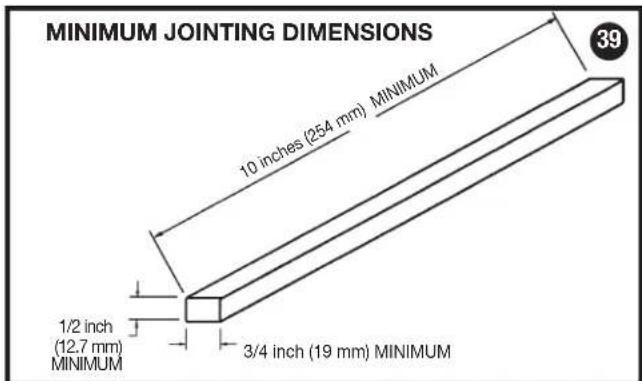
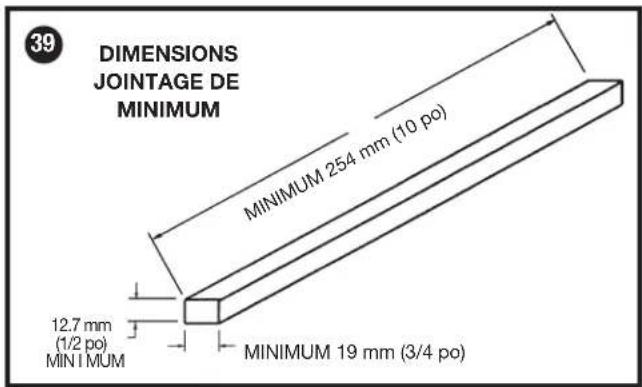
⚠ WARNING: Do not perform jointing operations on material shorter than 10 inches (254 mm), narrower than 3/4 inch (19 mm), or less than 1/2 inch (12.7 mm) thick (refer to Fig. 39).
PLANING WARPED PIECES
If the wood to be planed is dished or warped, take light cuts until the surface is flat. Avoid forcing such material down against the table; excessive pressure will spring it while passing the knives, and it will spring back and remain curved after the cut is completed.
PLANING SHORT OR THIN WORK
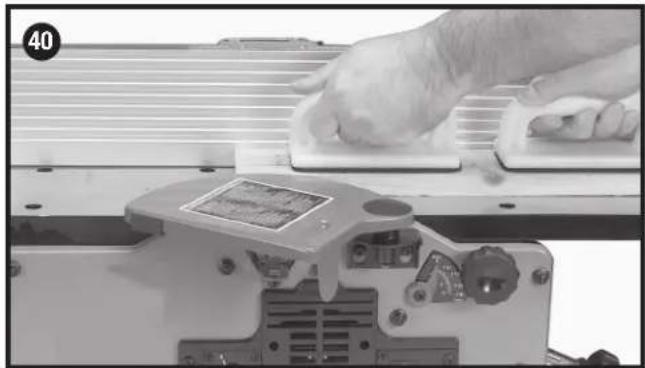
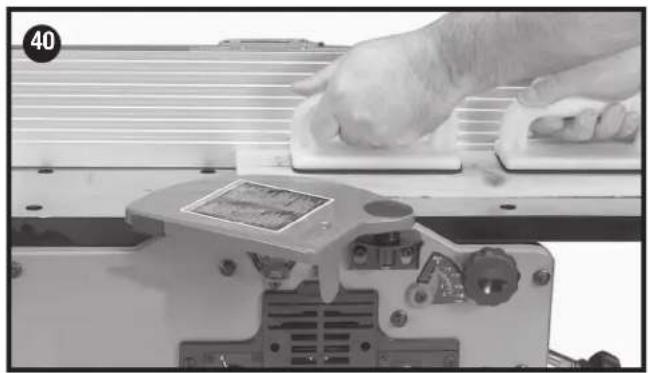
When planing short or thin pieces, always use push blocks to minimize all danger to the hands. Fig. 40, illustrates using the Push Blocks properly.
⚠ WARNING: Do not perform jointing operations on material shorter than 10 inches (254 mm), narrower than 3/4 inch (19 mm), or less than 1/2 inch (12.7 mm) thick (refer to Fig. 41).
DIRECTION OF GRAIN
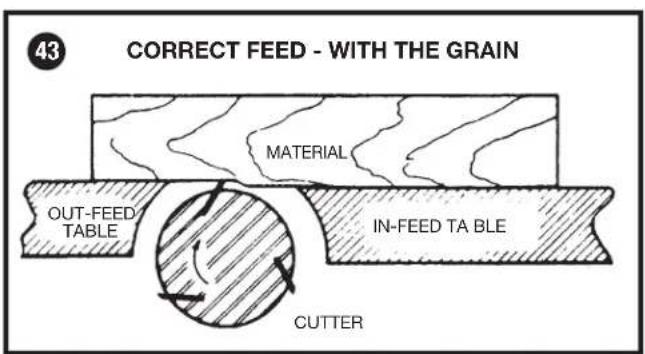
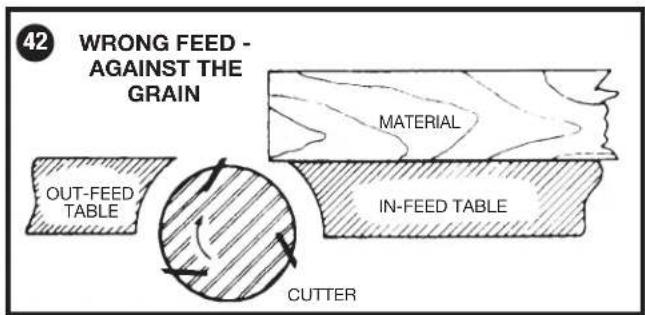
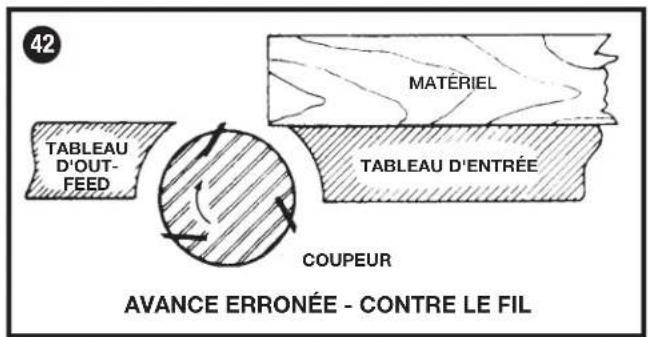
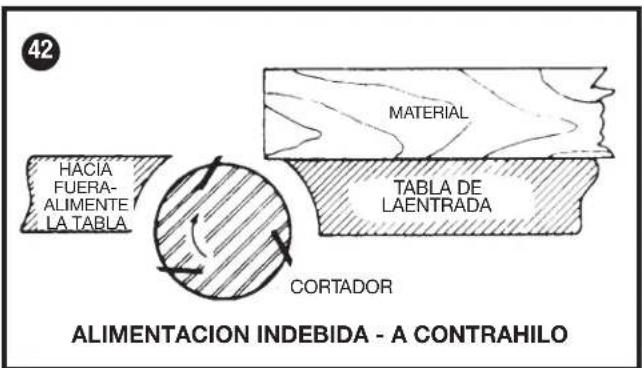
Avoid feeding work into the jointer against the grain as shown in Fig. 42. The result will be chipped and splintered edges. Feed with the grain as shown in Fig. 43 to obtain a smooth surface.
TROUBLESHOOTING
For assistance with your machine, visit our website at www.portercable.com for a list of service centers or call the help line at 1-888-848-5175.
MAINTENANCE
⚠ WARNING: To reduce the risk of injury, turn unit off and disconnect it from power source before installing and removing accessories, before adjusting or when making repairs. An accidental start-up can cause injury.
BELT REPLACEMENT
When it becomes necessary to replace the belt on your jointer:
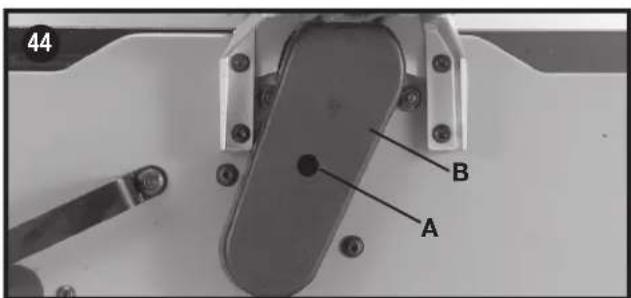
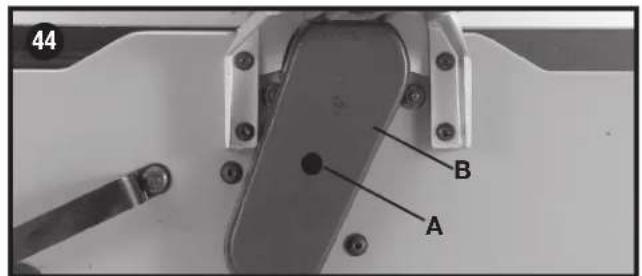
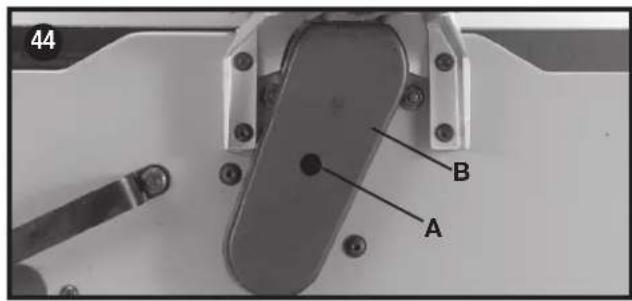
- Remove screw (A) Fig. 44, using hex wrench supplied, and remove belt guard (B).
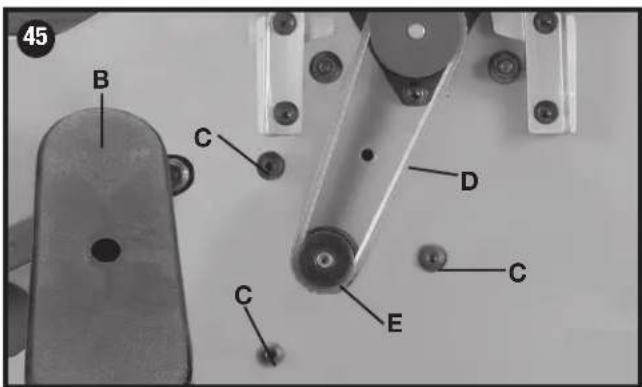
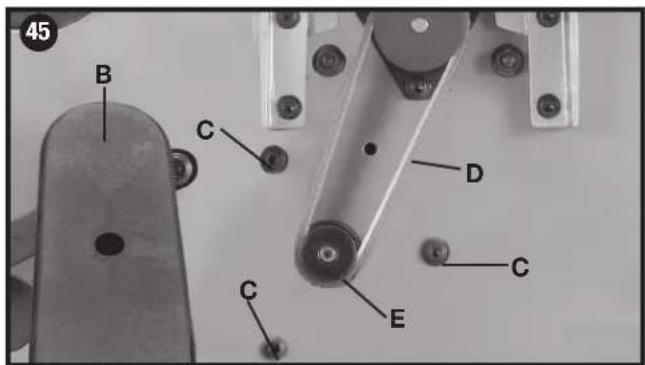
- Loosen three screws (C) Fig. 45, to release belt tension and remove belt (D) from pulleys.
- Assemble new belt to the cutterhead and motor pulleys. Press down on motor pulley (E) Fig. 45, to tension belt and tighten three screws (C).
NOTE: There should be approximately 1/4 inch (6.4 mm) deflection in the belt (D) at the center span of the pulleys using light finger pressure. The belt does not require excessive tension to function properly.
4. Replace belt guard (B) Fig. 44.
KEEP MACHINE CLEAN
Periodically blow out all air passages with dry compressed air. All plastic parts should be cleaned with a soft damp cloth. NEVER use solvents to clean plastic parts. They could possibly dissolve or otherwise damage the material.
⚠ WARNING: Wear certified safety equipment for eye, hearing and respiratory protection while using compressed air.
FAILURE TO START
Should your machine fail to start, check to make sure the prongs on the cord plug are making good contact in the outlet. Also, check for blown fuses or open circuit breakers in the line.
LUBRICATION & RUST PROTECTION
Apply household floor paste wax to the machine table, extension table or other work surface weekly. You can also use a commercially available protective product designed for this purpose. Follow the manufacturer's instructions for use and safety.
To clean cast iron tables of rust, you will need the following materials: a medium sized scouring pad, a can of spray lubricant and a can of degreaser. Apply the spray lubricant and polish the table surface with the scouring pad. Degrease the table, then apply the protective product as described above.
SERVICE
REPLACEMENT PARTS
Use only identical replacement parts. For a parts list or to order parts, visit our service website at www.portercable.com. You can also order parts from your nearest PORTER-CABLE Factory Service Center or PORTER-CABLE Authorized Warranty Service Center. Or, you can call our Customer Care Center at (888) 848-5175.
SERVICE AND REPAIRS
All quality tools will eventually require servicing and/or replacement of parts. For information about PORTER-CABLE, its Factory Service Centers or Authorized Warranty Service Centers, visit our website at www.porter-cable.com or call our Customer Care Center at (888) 848-5175. All repairs made by our service centers are fully guaranteed against defective material and workmanship. We cannot guarantee repairs made or attempted by others.
You can also write to us for information at PORTER-CABLE, 4825 Highway 45 North, Jackson, Tennessee 38305, (888) 848-5175 - Attention: Product Service. Be sure to include all of the information shown on the nameplate of your tool (model number, type, serial number, etc.).
ACCESSORIES
WARNING: Since accessories, other than those offered by PORTER-CABLE, have not been tested with this product, use of such accessories with this tool could be hazardous. To reduce the risk of injury, only PORTER-CABLE recommended accessories should be used with this product.
A complete line of accessories is available from your PORTER-CABLE Factory Service Center or a PORTER-CABLE Authorized Warranty Service Center. Please visit our web site www.portercable.com for a catalog or for the name of your nearest supplier.
THREE YEAR LIMITED WARRANTY
PORTER-CABLE will repair or replace, without charge, any defects due to faulty materials or workmanship for three years from the date of purchase for tools (two years for batteries). This warranty does not cover part failure due to normal wear or tool abuse. For further detail of warranty coverage and warranty repair information, visit www.portercable.com or call (888) 848-5175. This warranty does not apply to accessories or damage caused where repairs have been made or attempted by others. This warranty gives you specific legal rights and you may have other rights which vary in certain states or provinces.
In addition to the warranty, PORTER-CABLE tools are covered by our:
1 YEAR FREE SERVICE: PORTER-CABLE will maintain the tool and replace worn parts caused by normal use, for free, any time during the first year after purchase.
90 DAY MONEY BACK gUARANTEE: If you are not completely satisfied with the performance of your PORTER-CABLE power tool for any reason, you can return it within 90 days from the date of purchase with a receipt for a full refund – no questions asked.
LATIN AMERICA: This warranty does not apply to products sold in Latin America. For products sold in Latin America, see country specific warranty information contained in the packaging, call the local company or see website for warranty information.
To register your tool for warranty service visit our website at www.portercable.com.
WARNINGg LABEL REPLACEMENT
If your warning labels become illegible or are missing, call (888) 848-5175 for a free replacement.

A WARNING TO REDUCE THE RISK OF INJURY USER MUST READ THE INSTRUCTION MANUAL BEFORE OPERATING JOINER, ALWAYS WEAR PROPER EYE AND RESPIRATORY PROTECTION WHEN OPERATING THIS TOOL, DO NOT WEAR GLOVES, NECKTIES, JEWELY, LOOSE CLOTHING OR LONG HAR, LACERATION HAZARD. ALWAYS KEEP HANDS AND FINGERS AWAY FROM CUTTERHEAD, NEVER PERFORM A JOINTING OR PLANNING OPERATING WITH CUTTERHEAD OR DIVE GUARD REMOVED. DISCONNECT MACHINE FROM POWER SOURCE BEFORE MAKING REPAIRS OR ADJUSTMENTS. ALWAYS USE HOLDS OR PUSH BLOCKS FOR JOINTING MATERIAL NARRIER THAN 3 INCHES (76.2 MHz) OR PLANNING MATERIAL THINNER THAN 3 INCHES (78.2 MHz). RICKBACK HAZARD, NEVER JOINT OR PLANE MATERIAL LESS THAN 10 INCHES (254 INCHES) OR PLANNING ON JOINTING OR PLANNING CUT DEEPER THAN 1/4 INCH (3.2 MHz). SHOCK HAZARD. DO NOT EXPOSE TO RAIN OR USE IN DAMP LOCATIONS. DO OUTPUT WHILE UNDER THE INFLUENCE OR RUG, ALCOHOL OR MEDICATION.
ADAPTATEUR DE TUYAU D'ASPIRATEUR
| 23B LE TABLEAU SÉLECTION DES VITESSESS | ||||||
| LARGEUR DE COUPE L'ARRANGEMENT DE LA COMMANDE | ||||||
| DE | á | PLASTIQUES | BOIS TEDRES | BOIS DURS | ||
| po. | mm | po. | mm | |||
| 0 | 0 | 11/2 | 38.1 | 1 | 1 | 1 |
| 11/2 | 38.1 | 21/2 | 65.5 | 2 | 2 | 3 |
| 21/2 | 63.5 | 31/4 | 82.5 | 3 | 3 | 4 |
| 31/4 | 82.5 | 4 | 101.6 | --- | 4 | 5 |
| 4 | 101.6 | 6 | 152.4 | --- | 5 | 5 |
RÉGLAGES DU GUIDE
RÉGLAGE OU REMPLACEMENT DES LAMES
BLOCS-POUSSOIRS
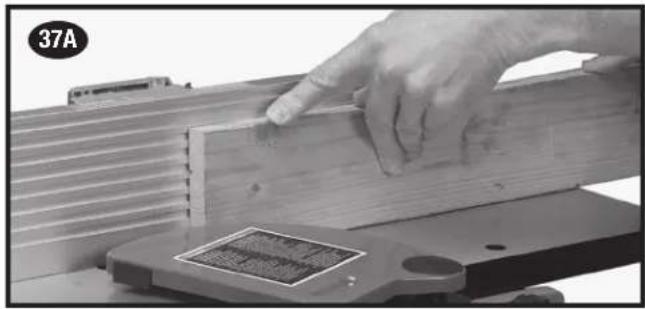
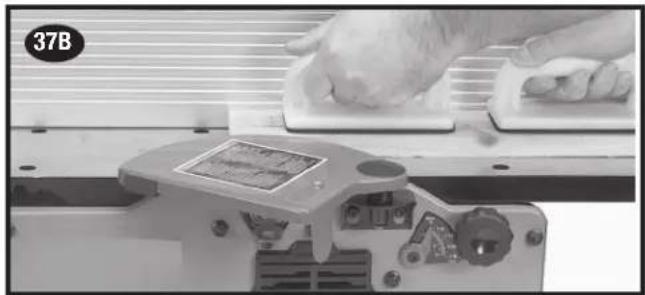
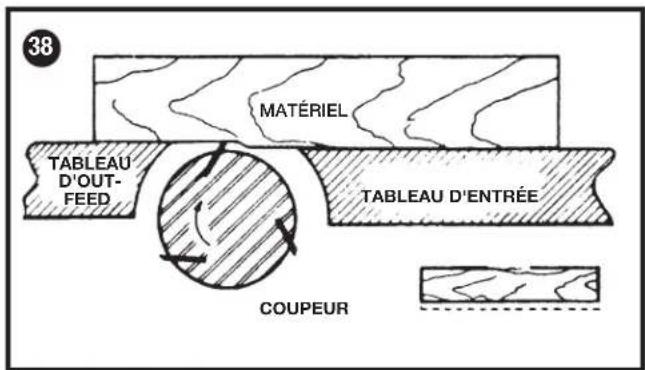
Fig. 38
RABOTAGE DE PIÈCE VOILÉE
DÉMARRAgE IMPOSSIBLE
LACERATION HAZARD. BLADE EXPOSED BETWEEN THESE LINES.
AVERTISSEMENT
RISQUE DE LACÉRATION. LAME EXPOSÉE ENTRE CES LIGNES.
WARNING
LACERATION HAZARD.
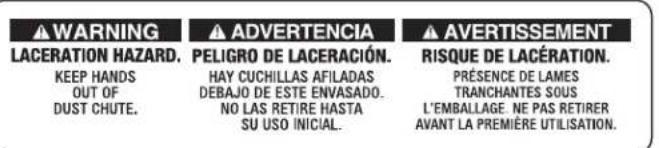
KEEP HANDS OUT OF DUST CHUTE.
ADVERTENCIA
WARNING TO REDUCE THE RISK OF INJURY MUST READ THE INSTRUCTION MANUAL BEFORE OPERATING INVENTER, ALWAYS MUST PROPER EYE AND RESPIRATORY PROTECTION, WHEN OPERATING THIS TOOL, DO NOT WEAR GLOVES, NECKTES, JEWELRY, LOOSE CLOTHING OR LONG H&R, LACERATION HAZARD, ALWAYS KEEP HANDS AND FINGERS AWAY FROM CUTTERHEAD, NEVER PERFORM A ONION OR PLANNING OPERATING INC. WITH CUTTERHEAD OR DIVE GARDY REMOVED, DISCONNECT MACHINE FROM POWER SOURCE BEFORE MAKING REPAIRS OR ADJUSTMENTS, ALWAYS USE HOLD BOWNS AND PUSH BLOCKS FOR OUTFING MATERIAL NARRIER THAN 3 INCHES (762 MMS) OR PLANNING MATERIAL FLOWER THAN 3 INCHES (762 MMS), KIOSKACH HAZARD, NEVER QUART ON PLANE MATERIAL LESS THAN 10 INCHES (254 MMS) OR PLANNING PLANE CRIP PLETION OR PLANNING CRIP PLETION THAN 10 INCHES (32 MMS), SHOCK CHAP PLETION, DO NOT EXPOSE TO BAIN OR USE IN DBW PATINGS. DO NOT OPERATE WHILE IN THURRY INDEGRUS, ALCOHOL OR MEDICATION
| ANCHO DE CORTE FIJACION DE CONTROL | ||||||
| DE | A | PLASTICAS | MADERAS SUAVES | MADERAS DURAS | ||
| inches | mm inches mm | |||||
| 0 0 1 | 1/2 38.1 | 1 1 | ||||
| 11/2 38 | .1 21/2 65 | .5 2 2 3 | ||||
| 21/2 63 | .5 31/4 82 | .5 3 3 4 | ||||
| 31/4 82 | .5 4 101 | .6 --- 4 5 | ||||
| 4 10 | .6 6 152 | .4 --- 5 5 | ||||
AJUSTES DE LA GUIA
AJUSTE DE CUCHILLAS
MANTENgA LA MÁQUINA LIMPIA
Local D, Col. Obrera (55) 5588 9377
MERIDA, YUC
Calle 63 #459-A - Col. Centro (999) 928 5038
MONTERREY, N.L.
Av. Francisco I. Madero 831 Poniente - Col. Centro (818) 375 23 13
PUEBLA, PUE
17 Norte #205 - Col. Centro (222) 246 3714
QUERETARO, QRO
Av. San Roque 274 - Col. San Gregorio (442) 2 17 63 14
SAN LUIS POTOSI, SLP
BOSQUES DE CIDROS, ACCESO RADIATAS NO.42
4825 Highway 45 North
Jackson, TN 38305
(888) 848-5175
www.portercable.com


- IMPORTANT SAFETY INSTRUCTIONS
- SAFETY GUIDELINES - DEFINITIONS
- GENERAL SAFETY RULES
- ADDITIONAL SPECIFIC SAFETY RULES
- ⚠ WARNING: FAILURE TO FOLLOW THESE RULES MAY RESULT IN SERIOUS PERSONAL INJURY
- POWER CONNECTIONS
- MOTOR SPECIFICATIONS
- GROUNDING INSTRUCTIONS
- ALL GROUNDED, CORD-CONNECTED MACHINES
- GROUNDED, CORD-CONNECTED MACHINES INTENDED FOR USE ON A SUPPLY CIRCUIT HAVING A NOMINAL RATING LESS THAN 150 VOLTS
- EXTENSION CORDS
- FUNCTIONAL DESCRIPTION
- FOREWORD
- CARTON CONTENTS
- UNPACKING AND CLEANING
- ASSEMBLY
- ASSEMBLY TOOLS REQUIRED
- ASSEMBLY TIME ESTIMATE
- FENCE
- CUTTERHEAD GUARD
- CUTTERHEAD LOCK
- FASTENING JOINTER TO SUPPORTING SURFACE
- VACUUM HOSE ADAPTER
- OPERATION
- STARTING AND STOPPING JOINTER
- LOCKING SWITCH IN THE "OFF" POSITION
- VARIABLE SPEED CONTROL
- SPEED SELECTION CHART
- DEPTH OF CUT ADJUSTMENT
- FENCE ADJUSTMENTS
- ADJUSTING KNIVES
- WARNING: THE KNIVES ARE SHARP
- WARNING: DISCONNECT MACHINE FROM POWER SOURCE
- ⚠ WARNING: BE EXTREMELY CAREFUL THAT YOUR HANDS DO NOT COME IN CONTACT WITH THE KNIVES
- ⚠ WARNING: MAKE CERTAIN THAT ALL KNIVES ARE SECURELY FASTENED IN CUTTERHEAD BEFORE TURNING ON POWER
- CHIP AND DUST CHUTE
- ⚠ WARNING: KEEP HANDS OUT OF CHIP AND DUST CHUTE AT ALL TIMES
- PUSH BLOCKS
- MACHINE USE
- DEFINITION OF JOINTING, PLANING
- PLACEMENT OF HANDS DURING FEEDING
- JOINTING AN EDGE
- PLANING WARPED PIECES
- PLANING SHORT OR THIN WORK
- DIRECTION OF GRAIN
- TROUBLESHOOTING
- MAINTENANCE
- BELT REPLACEMENT
- KEEP MACHINE CLEAN
- FAILURE TO START
- LUBRICATION & RUST PROTECTION
- SERVICE
- REPLACEMENT PARTS
- SERVICE AND REPAIRS
- ACCESSORIES
- THREE YEAR LIMITED WARRANTY
- WARNINGG LABEL REPLACEMENT
- ADAPTATEUR DE TUYAU D'ASPIRATEUR
- RÉGLAGES DU GUIDE
- RÉGLAGE OU REMPLACEMENT DES LAMES
- BLOCS-POUSSOIRS
- RABOTAGE DE PIÈCE VOILÉE
- DÉMARRAGE IMPOSSIBLE
- AVERTISSEMENT
- WARNING
- LACERATION HAZARD
- ADVERTENCIA
- AJUSTES DE LA GUIA
- AJUSTE DE CUCHILLAS
- MANTENGA LA MÁQUINA LIMPIA
Brand : Porter-Cable
Model : PC160JT
Category : Milling machine